


 Скачать презентацию Enterprise Directories Design Implementation and Operational Strategies Dr
30e2eebecf7cf536f3cd9dda3fb1ef15.ppt
- Количество слайдов: 23
 Enterprise Directories: Design, Implementation, and Operational Strategies Dr. Tom Barton
 Copyright Statement Copyright Thomas J. Barton, 2003. This work is the intellectual property of the author. Permission is granted for this material to be shared for non-commercial, educational purposes, provided that this copyright statement appears on the reproduced materials and notice is given that the copying is by permission of the author. To disseminate otherwise or to republish requires written permission from the author. 19 February 2003 EDUCAUSE SW Regional 2
 What we’re trying to accomplish • Simplify what users must know to access to online services. • Enable IT organization to efficiently provide multitude of online services. • Increase security. • Enable online service for our constituents earlier in their affiliation with us, wherever they are, and forever. • Participate in new, inter-organizational, collaborative architectures. 19 February 2003 EDUCAUSE SW Regional 3
 Terminology • Identity: set of attributes about a person. Operationalized as a “person object”. • Authentication: process used to associate a user with an identity. Often a login process. • Authorization: process of determining if policy permits an intended action to proceed. • Customization: presentation of user interface tailored to user’s identity. Subsumes personalization. 19 February 2003 EDUCAUSE SW Regional 4
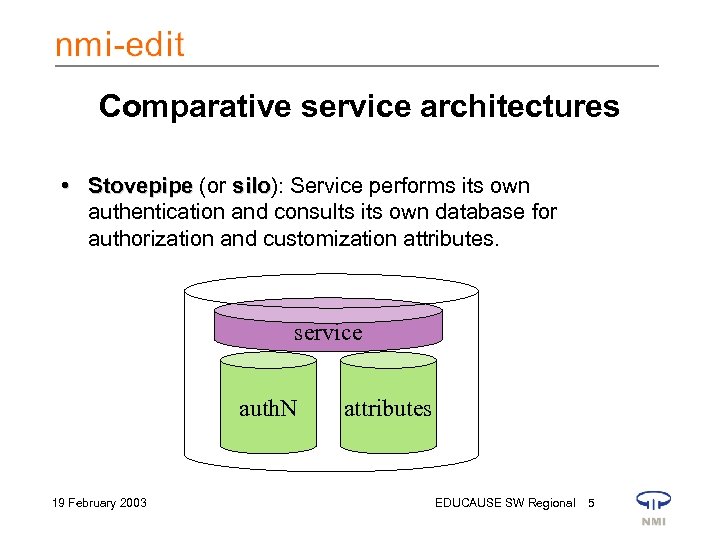 Comparative service architectures • Stovepipe (or silo): Service performs its own silo authentication and consults its own database for authorization and customization attributes. service auth. N 19 February 2003 attributes EDUCAUSE SW Regional 5
 Comparative service architectures • Stovepipes are run by separate offices. – Environment is more challenging to users, who may need to contact each office to arrange for service and remember several sets of credentials. – Any life cycle management of service specific resources must be undertaken by service specific office. – Per-service identifiers and security practices make it more difficult to achieve a given level of security across the enterprise. 19 February 2003 EDUCAUSE SW Regional 6
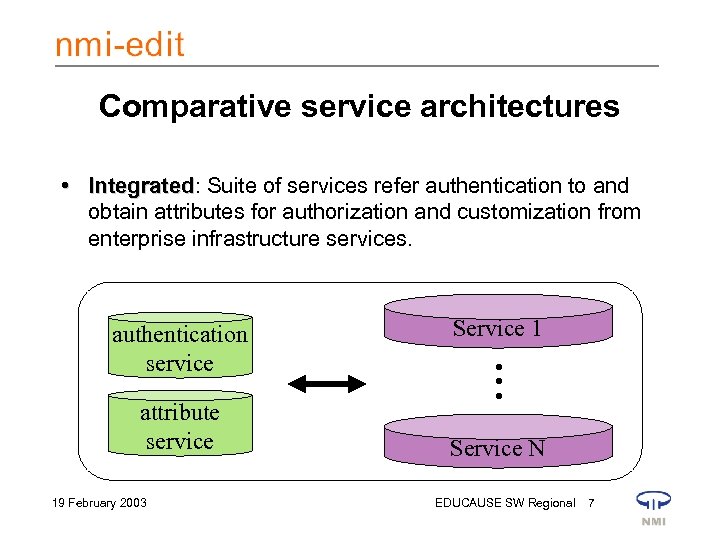 Comparative service architectures • Integrated: Suite of services refer authentication to and Integrated obtain attributes for authorization and customization from enterprise infrastructure services. attribute service 19 February 2003 Service 1 • • • authentication service Service N EDUCAUSE SW Regional 7
 Comparative service architectures • Enterprise authentication & attribute services are provisioned by a central office. – All attributes known by the organization about a person can be integrated and made appropriately available to services. – Automated life cycle resource management across the enterprise is facilitated. – Common identifiers across integrated services enables an easier and more secure user environment. – Lower marginal cost to implement a new service. 19 February 2003 EDUCAUSE SW Regional 8
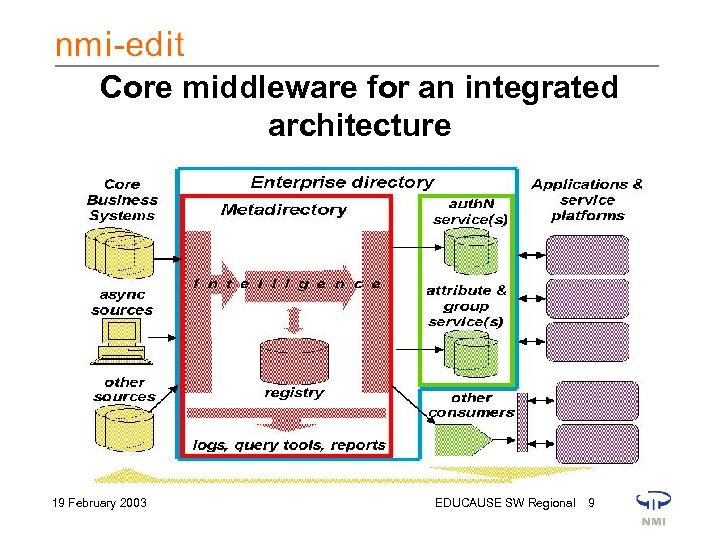 Core middleware for an integrated architecture 19 February 2003 EDUCAUSE SW Regional 9
 Examples • Common “basket” of services: email (reading & sending), calendar, shell & cluster accounts, network access services, myriad web apps, LMS, library databases, home directories, …. • Remote account initialization & admitted students • Academic Personnel Records – Leverages common security & data architecture 19 February 2003 EDUCAUSE SW Regional 10
 Identifiers Preceding slides sketched the overall technical architecture. Now we’ll dig into the identifiers that are fundamental to providing integration… 19 February 2003 EDUCAUSE SW Regional 11
 Source system identifiers • Affiliations: – Which source systems define which major affiliations? How? – How do constituents become engaged in their various affiliations with the U? How disengaged? • Associated attributes: – What other attributes of value to online services are maintained in which source systems? – How are they maintained, for what purposes? Are they reliable? • Metadata: – (De-)Assignment process; persistence; visibility; versions; … – What encumbrances/obligations/policies pertain? – Updatable (in source system)? Forever iterate over these considerations 19 February 2003 EDUCAUSE SW Regional 12
 Registry identifiers • Fundamental IDs – Permanent, unreleased guid. – Permanent pvid? – Versions? – Source join & consumer crosswalk. • Derived identifiers – username(s). – Attributes for provisioning processes. – Consumer specific? • Affiliations • Derived. • Course, program, org related identifiers & objects. • Group memberships. • Namespace issues • Multiple namespaces? • For registry objects? • For consumer systems? • Overloading. • Format. All is hidden from view 19 February 2003 EDUCAUSE SW Regional 13
 Consumer identifiers • Fundamental IDs – Persistence, visibility, opacity, … • Potential interaction with privacy policy – Store/use pvid? – Choice of naming components (LDAP only). • Representation of attributes – Application use cases – Overloading & namespace collision. E. g. s: All is potentially exposed • cn: name of person, name of group, name of … • uid: orthogonal sets of usernames? – Consumer specific selection & transformation 19 February 2003 EDUCAUSE SW Regional 14
 Service identifiers • Ability to use or be provisioned with a user identifier derived in the metadirectory is a requirement for integration into this architecture. • Attribute schema – Conventions for syntax & semantics • Stresses on a common username space: – Least common denominator format requirements. – Number of persons assigned one (alums? , parents? , sibs? , patrons? , donors? ). – Duration of assignment: forever? – Potential for shared administration of portions of username space might drive creation of orthogonal namespaces. • Eg, OS usernames, uids, gids w/ nss-ldap. • University “guest” registration. Username & related namespace issues 19 February 2003 EDUCAUSE SW Regional 15
 Stateful Provisioning 19 February 2003 EDUCAUSE SW Regional 16
 The Problem • Unclear process for lifecycle management of accounts & other IT resources – Seat of pants policy determination • Inconsistent operational practices – Done differently by different people at different times • Common business logic forced to reside in applications to determine eligibility – Eg. Is this user “currently a member of community”? – Inconsistent service levels for users results. 19 February 2003 EDUCAUSE SW Regional 17
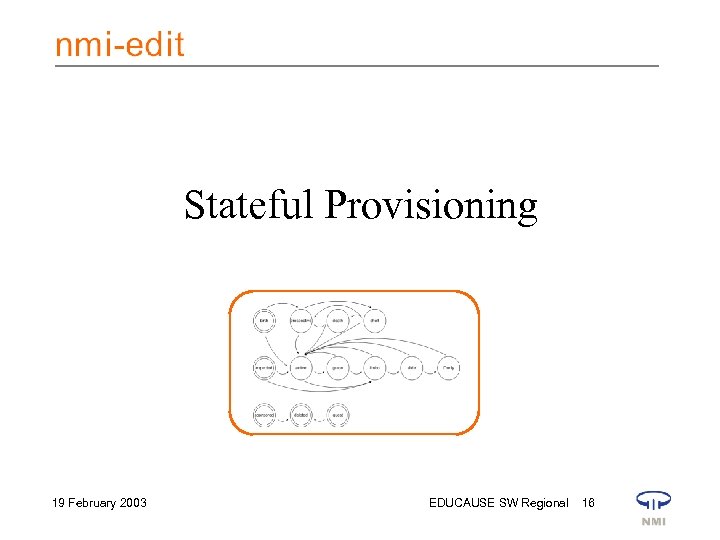
 Automated stateful provisioning • Basic account provisioning is guided by a finite state machine. • Managed resources include – shell accounts – IMAP/POP/HTTP mailbox service – campus-wide computing cluster access – variety of directory enabled application and web services that use an LDAP directory for access control, or that use the LDAP directory to determine eligibility for service. 19 February 2003 EDUCAUSE SW Regional 18
 States embody levels of service • Provisioning profiles – Full access to basic services • Faculty, staff, enrolled student – Email & identity management, including PIN maintenance for access to administrative web applications • Accepted student, registered student – Identifiers maintained for continued support for outsourced services • Alum, id retained • Steps between these and oblivion – Notification of impending doom – Access denied – Resources deleted 19 February 2003 EDUCAUSE SW Regional 19
 Independent variables for state transitions • • state substate date the present state was reached date by which the present state might end (expiration date) • major affiliation (faculty, staff, enrolled student, accepted student, registered student, alum, id retained) • multivalued attribute holding the identifiers of resources being managed for this account. 19 February 2003 EDUCAUSE SW Regional 20
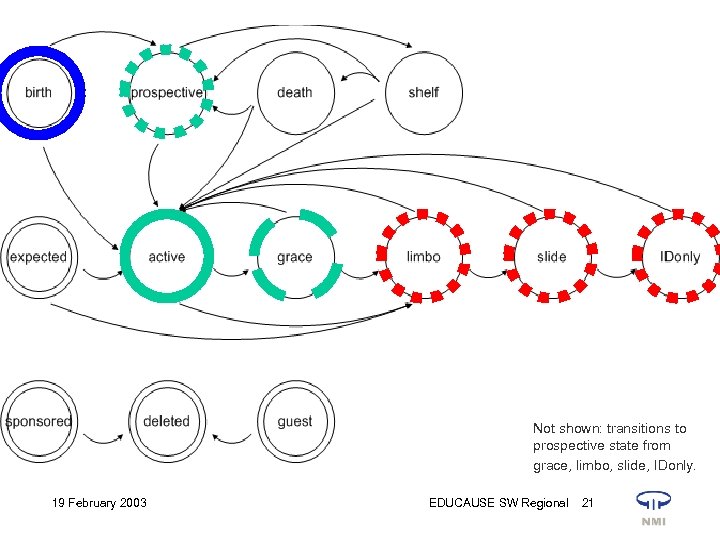 Not shown: transitions to prospective state from grace, limbo, slide, IDonly. 19 February 2003 EDUCAUSE SW Regional 21
 Benefits • Smooth over issues with feeds from source systems (grace state). • Provide continuity of service to persons who temporarily drop out of source systems. – Absence from a source system need not imply absence from University community. • Avoid deletion of resources for persons not in fact departed (limbo state). • Organizing principle for business logic that determines provisioning. 19 February 2003 EDUCAUSE SW Regional 22
 Benefits • Authorization policy in applications can leverage knowledge of user’s “state”. – Details of how to determine “standing” of a person from data in source systems is only instantiated once. – Administrative exceptions need only be represented once, in the metadirectory. • Source of IT resource management policy. • Increases value of integrated architecture (cf. “Middleware Business Case” – middleware value proposition) 19 February 2003 EDUCAUSE SW Regional 23