


 Скачать презентацию Enterprise CLM Usage Model Scenario Driven Configuration
a6efcbaafa5f25ea405ed973ed7baeb7.ppt
- Количество слайдов: 80
 Enterprise CLM Usage Model Scenario Driven Configuration © 2014 IBM Corporation
 Background § Your Collaborative Lifecycle Management (CLM) solution currently includes a set of server and client tools, out of the box, integrations, templates and reports. This workshop is intended to address the overall usage model, selection of out of the box capabilities, allocation of responsibilities between roles and products, redefine reporting needs and set the boundaries for the practice area/product configuration workshops. § IBM recommended practices and configurations that support traditional and agile methods for the software development lifecycle (SDLC). The CLM configurations provide a means to plan, track, measure, reuse and automate the Software Development Lifecycle (SDLC) activities. During this workshop we will – Explore the potential of the CLM capability during a hands on demonstration – Review your organizations current SDLC processes, gates and products – Use this presentation as a means to capture the initial configuration and usage model § Following this workshop we will hold practice/product workshops to further refine the usage model for the particular area/product and implement the configuration within the product in preparation for a pilot of the solution. © 20104 BM Corporation
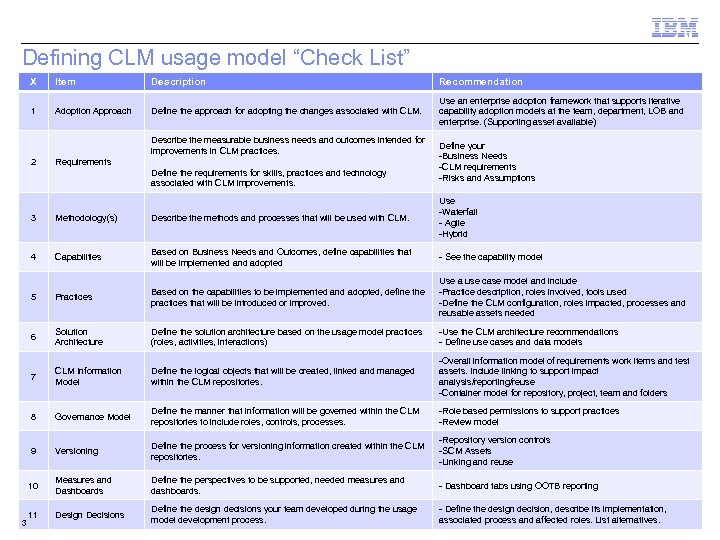 Defining CLM usage model “Check List” X Item Description Recommendation 1 Adoption Approach Define the approach for adopting the changes associated with CLM. Use an enterprise adoption framework that supports iterative capability adoption models at the team, department, LOB and enterprise. (Supporting asset available) Describe the measurable business needs and outcomes intended for improvements in CLM practices. 2 Requirements Define the requirements for skills, practices and technology associated with CLM improvements. Define your -Business Needs -CLM requirements -Risks and Assumptions 3 Methodology(s) Describe the methods and processes that will be used with CLM. Use -Waterfall - Agile -Hybrid 4 Capabilities Based on Business Needs and Outcomes, define capabilities that will be implemented and adopted - See the capability model 5 Practices Based on the capabilities to be implemented and adopted, define the practices that will be introduced or improved. Use a use case model and include -Practice description, roles involved, tools used -Define the CLM configuration, roles impacted, processes and reusable assets needed 6 Solution Architecture Define the solution architecture based on the usage model practices (roles, activities, interactions) -Use the CLM architecture recommendations - Define use cases and data models 7 CLM Information Model Define the logical objects that will be created, linked and managed within the CLM repositories. assets. Include linking to support impact analysis/reporting/reuse -Container model for repository, project, team and folders 8 Governance Model Define the manner that information will be governed within the CLM repositories to include roles, controls, processes. -Role based permissions to support practices -Review model 9 Versioning Define the process for versioning information created within the CLM repositories. -Repository version controls -SCM Assets -Linking and reuse 10 Measures and Dashboards Define the perspectives to be supported, needed measures and dashboards. - Dashboard tabs using OOTB reporting 11 Design Decisions Define the design decisions your team developed during the usage model development process. - Define the design decision, describe its implementation, associated process and affected roles. List© 20104 BM Corporation alternatives. -Overall information model of requirements work items and test 3
 Adoption approach 4 © 2014 IBM Corporation
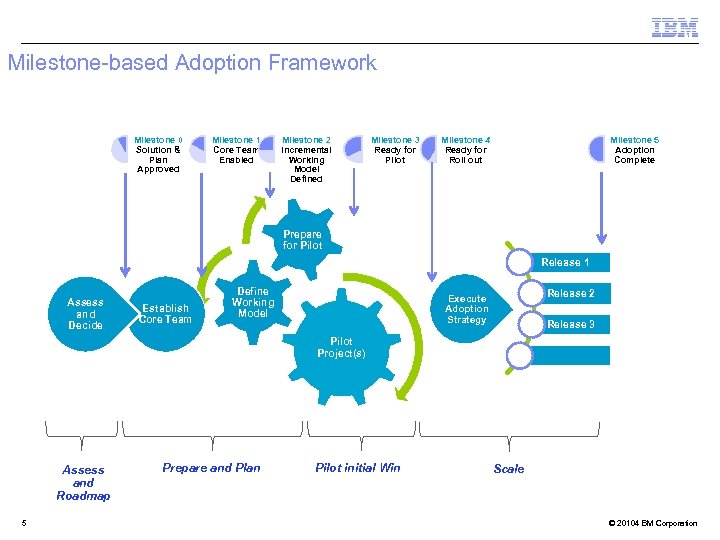 Milestone-based Adoption Framework Milestone 0 Solution & Plan Approved Milestone 1 Core Team Enabled Milestone 2 Incremental Working Model Defined Milestone 3 Ready for Pilot Milestone 4 Ready for Roll out Milestone 5 Adoption Complete Prepare for Pilot Release 1 Assess and Decide Establish Core Team Define Working Model Pilot Project(s) Assess and Roadmap 5 Prepare and Plan Release 2 Execute Adoption Strategy Pilot initial Win Release 3 … Scale © 20104 BM Corporation
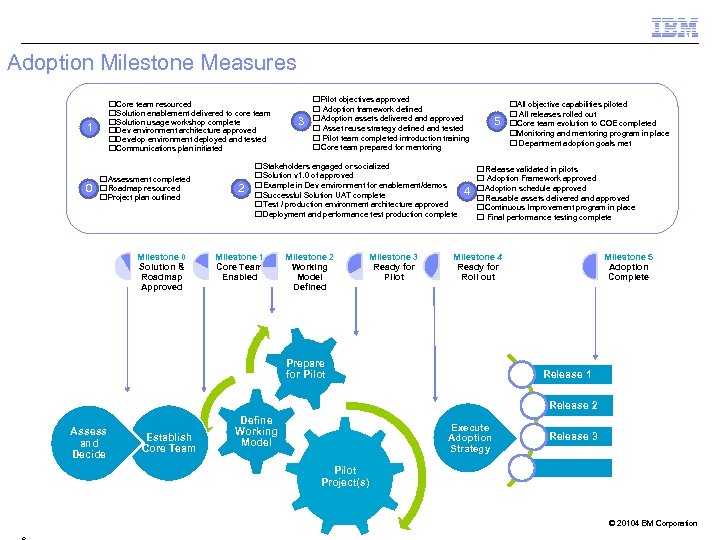 Adoption Milestone Measures q. Core team resourced q. Solution enablement delivered to core team q. Solution usage workshop complete q. Dev environment architecture approved q. Develop environment deployed and tested q. Communications plan initiated 1 0 q. Assessment completed q. Roadmap resourced q. Project plan outlined Milestone 0 Solution & Roadmap Approved 2 3 q. Pilot objectives approved q Adoption framework defined q. Adoption assets delivered and approved q Asset reuse strategy defined and tested q Pilot team completed introduction training q. Core team prepared for mentoring q. Stakeholders engaged or socialized q. Solution v 1. 0 of approved q. Example in Dev environment for enablement/demos q. Successful Solution UAT complete q. Test / production environment architecture approved q. Deployment and performance test production complete Milestone 1 Core Team Enabled Milestone 2 Working Model Defined Milestone 3 Ready for Pilot 4 5 q. All objective capabilities piloted q All releases rolled out q. Core team evolution to COE completed q. Monitoring and mentoring program in place q Department adoption goals met q. Release validated in pilots q Adoption Framework approved q. Adoption schedule approved q. Reusable assets delivered and approved q. Continuous Improvement program in place q Final performance testing complete Milestone 4 Ready for Roll out Milestone 5 Adoption Complete Prepare for Pilot Release 1 Release 2 Assess and Decide Establish Core Team Define Working Model Execute Adoption Strategy Pilot Project(s) Release 3 … © 20104 BM Corporation
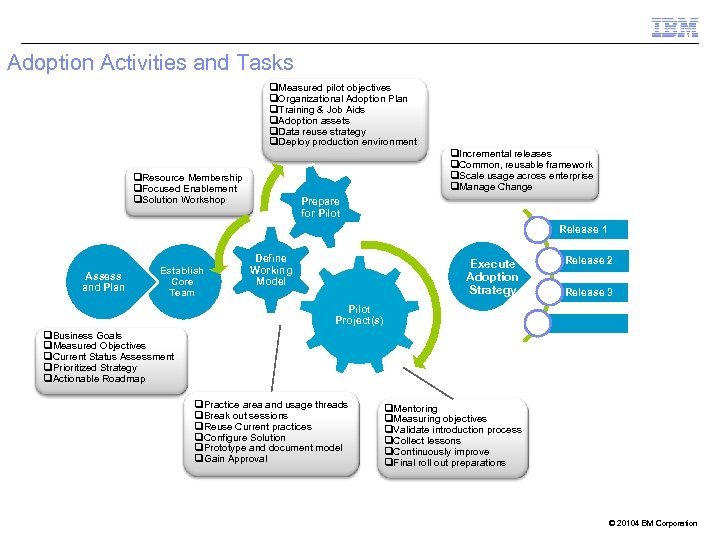 Adoption Activities and Tasks q. Measured pilot objectives q. Organizational Adoption Plan q. Training & Job Aids q. Adoption assets q. Data reuse strategy q. Deploy production environment q. Incremental releases q. Common, reusable framework q. Scale usage across enterprise q. Manage Change q. Resource Membership q. Focused Enablement q. Solution Workshop Prepare for Pilot Release 1 Assess and Plan Establish Core Team Define Working Model Release 2 Execute Adoption Strategy Pilot Project(s) Release 3 … q. Business Goals q. Measured Objectives q. Current Status Assessment q. Prioritized Strategy q. Actionable Roadmap q. Practice area and usage threads q. Break out sessions q. Reuse Current practices q. Configure Solution q. Prototype and document model q. Gain Approval q. Mentoring q. Measuring objectives q. Validate introduction process q. Collect lessons q. Continuously improve q. Final roll out preparations © 20104 BM Corporation
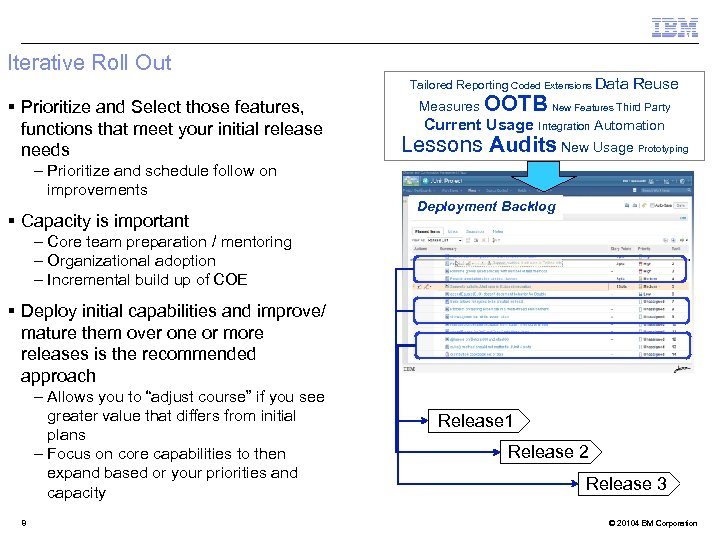 Iterative Roll Out Tailored Reporting Coded Extensions Data § Prioritize and Select those features, functions that meet your initial release needs – Prioritize and schedule follow on improvements § Capacity is important Reuse Measures OOTB New Features Third Party Current Usage Integration Automation Lessons Audits New Usage Prototyping Deployment Backlog – Core team preparation / mentoring – Organizational adoption – Incremental build up of COE § Deploy initial capabilities and improve/ mature them over one or more releases is the recommended approach – Allows you to “adjust course” if you see greater value that differs from initial plans – Focus on core capabilities to then expand based or your priorities and capacity 8 Release 1 Release 2 Release 3 © 20104 BM Corporation
 Requirements 9 © 2014 IBM Corporation
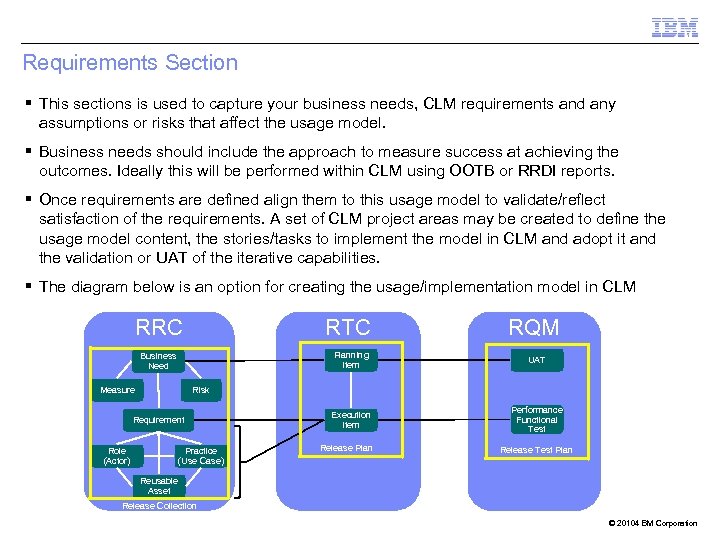 Requirements Section § This sections is used to capture your business needs, CLM requirements and any assumptions or risks that affect the usage model. § Business needs should include the approach to measure success at achieving the outcomes. Ideally this will be performed within CLM using OOTB or RRDI reports. § Once requirements are defined align them to this usage model to validate/reflect satisfaction of the requirements. A set of CLM project areas may be created to define the usage model content, the stories/tasks to implement the model in CLM and adopt it and the validation or UAT of the iterative capabilities. § The diagram below is an option for creating the usage/implementation model in CLM RRC RTC RQM Planning Item Business Need Measure UAT Execution Item Performance Functional Test Risk Requirement Role (Actor) Practice (Use Case) Release Plan Release Test Plan Reusable Asset Release Collection © 20104 BM Corporation
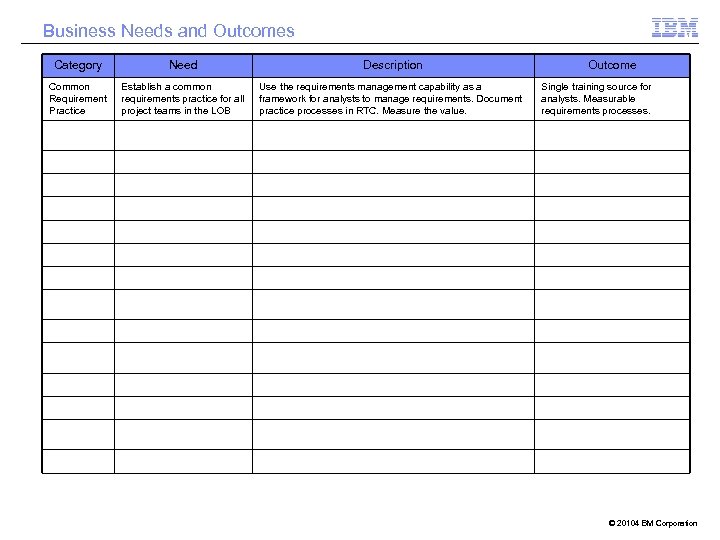 Business Needs and Outcomes Category Need Description Common Requirement Practice Establish a common requirements practice for all project teams in the LOB Use the requirements management capability as a framework for analysts to manage requirements. Document practice processes in RTC. Measure the value. Outcome Single training source for analysts. Measurable requirements processes. © 20104 BM Corporation
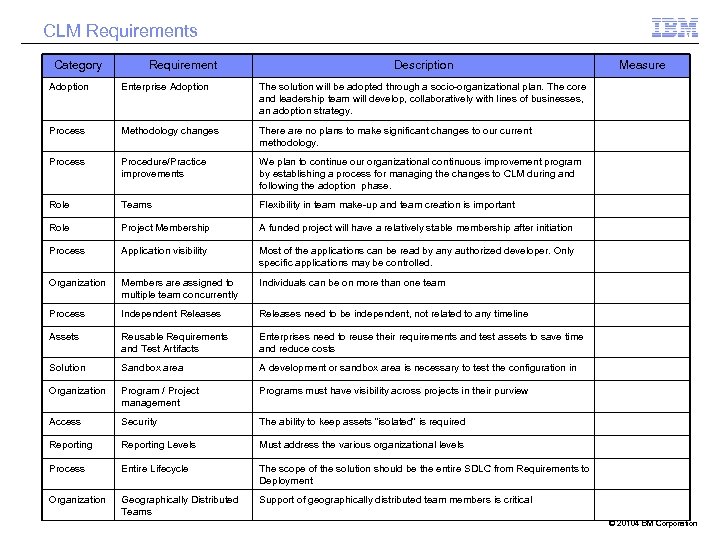 CLM Requirements Category Requirement Description Adoption Enterprise Adoption The solution will be adopted through a socio-organizational plan. The core and leadership team will develop, collaboratively with lines of businesses, an adoption strategy. Process Methodology changes There are no plans to make significant changes to our current methodology. Process Procedure/Practice improvements We plan to continue our organizational continuous improvement program by establishing a process for managing the changes to CLM during and following the adoption phase. Role Teams Flexibility in team make-up and team creation is important Role Project Membership A funded project will have a relatively stable membership after initiation Process Application visibility Most of the applications can be read by any authorized developer. Only specific applications may be controlled. Organization Members are assigned to multiple team concurrently Individuals can be on more than one team Process Independent Releases need to be independent, not related to any timeline Assets Reusable Requirements and Test Artifacts Enterprises need to reuse their requirements and test assets to save time and reduce costs Solution Sandbox area A development or sandbox area is necessary to test the configuration in Organization Program / Project management Programs must have visibility across projects in their purview Access Security The ability to keep assets “isolated” is required Reporting Levels Must address the various organizational levels Process Entire Lifecycle The scope of the solution should be the entire SDLC from Requirements to Deployment Organization Geographically Distributed Teams Measure Support of geographically distributed team members is critical © 20104 BM Corporation
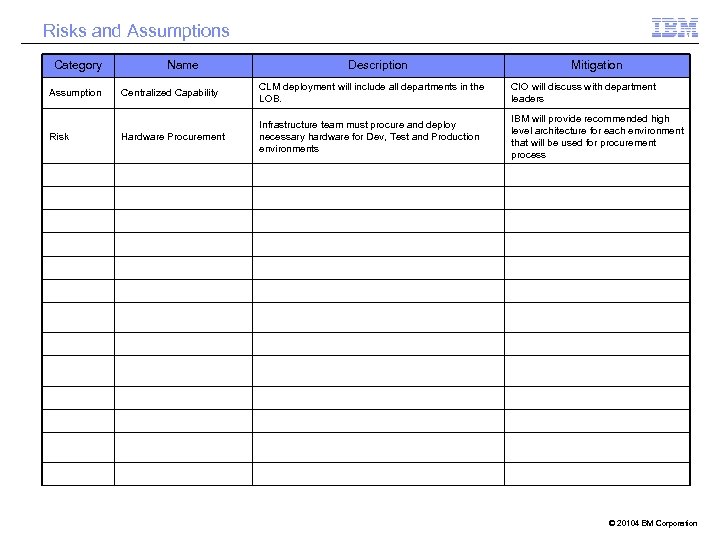 Risks and Assumptions Category Assumption Risk Name Description Mitigation Centralized Capability CLM deployment will include all departments in the LOB. CIO will discuss with department leaders Hardware Procurement Infrastructure team must procure and deploy necessary hardware for Dev, Test and Production environments IBM will provide recommended high level architecture for each environment that will be used for procurement process © 20104 BM Corporation
 Methodology 1 © 2014 IBM Corporation
 Methodology § Use this section to describe the clients methodolgy(s) that will be used with CLM. The goal is to capture enough of their processes to influence how the tools will be used and configured. This will also limit the practice area discussions for detailed usage. § You do not need to elaborate in detail, but rather provide enough information for the context of the capabilities and practices © 20104 BM Corporation
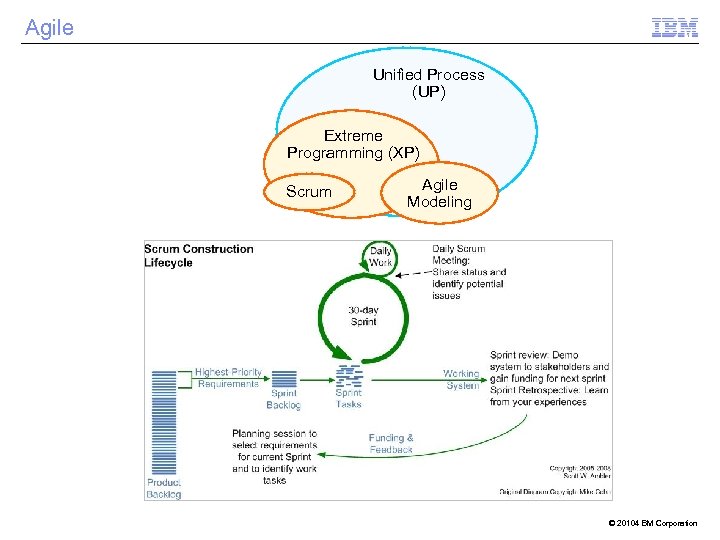 Agile Unified Process (UP) Extreme Programming (XP) Scrum Agile Modeling © 20104 BM Corporation
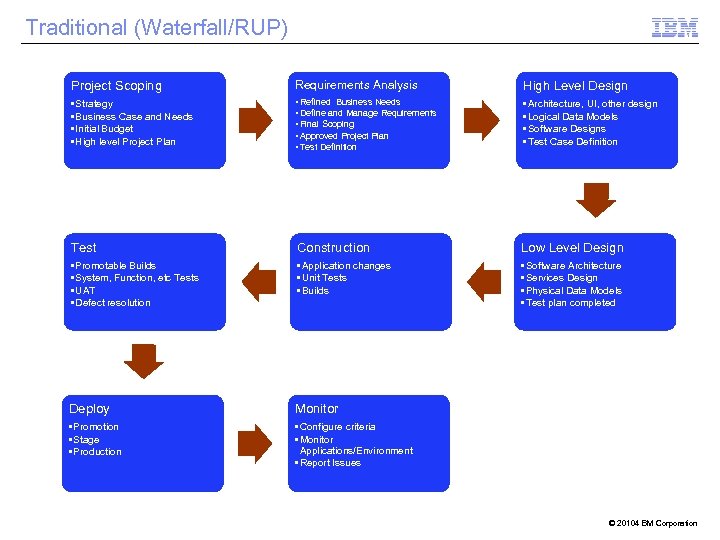 Traditional (Waterfall/RUP) Project Scoping Requirements Analysis High Level Design • Strategy • Business Case and Needs • Initial Budget • High level Project Plan • Refined Business Needs • Define and Manage Requirements • Final Scoping • Approved Project Plan • Test Definition • Architecture, UI, other design • Logical Data Models • Software Designs • Test Case Definition Test Construction Low Level Design • Promotable Builds • System, Function, etc Tests • UAT • Defect resolution • Application changes • Unit Tests • Builds • Software Architecture • Services Design • Physical Data Models • Test plan completed Deploy Monitor • Promotion • Stage • Production • Configure criteria • Monitor Applications/Environment • Report Issues © 20104 BM Corporation
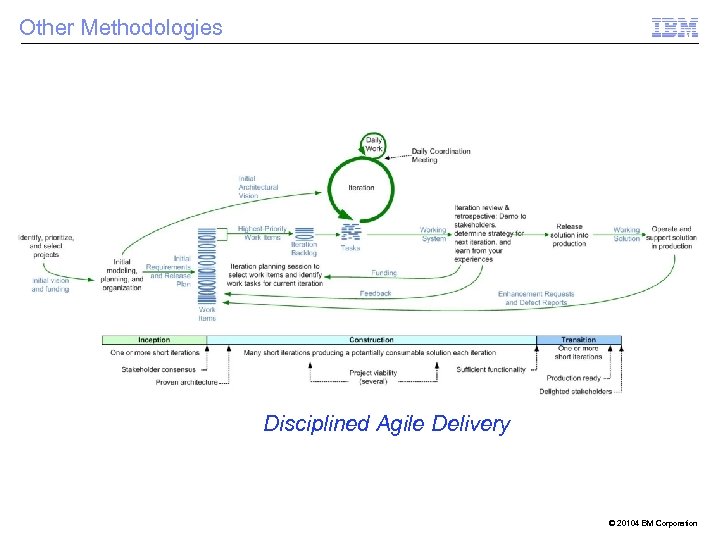 Other Methodologies Disciplined Agile Delivery © 20104 BM Corporation
 Capability Practice Framework 1 © 2014 IBM Corporation
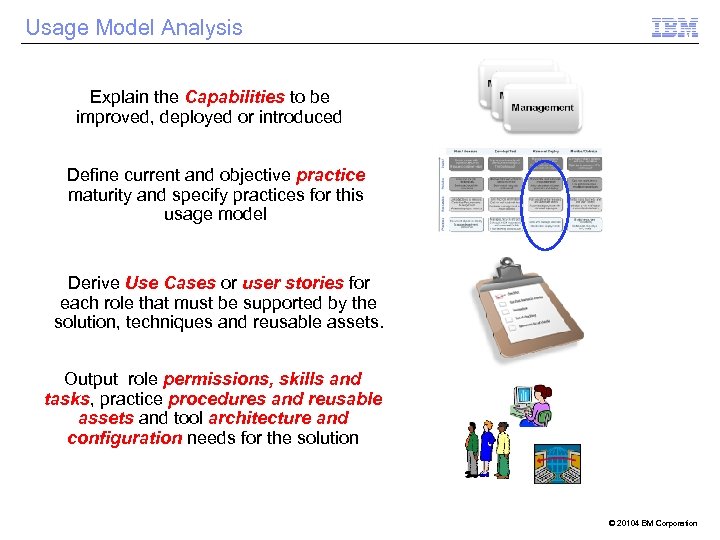 Usage Model Analysis Explain the Capabilities to be improved, deployed or introduced Define current and objective practice maturity and specify practices for this usage model Derive Use Cases or user stories for each role that must be supported by the solution, techniques and reusable assets. Output role permissions, skills and tasks, practice procedures and reusable assets and tool architecture and configuration needs for the solution © 20104 BM Corporation
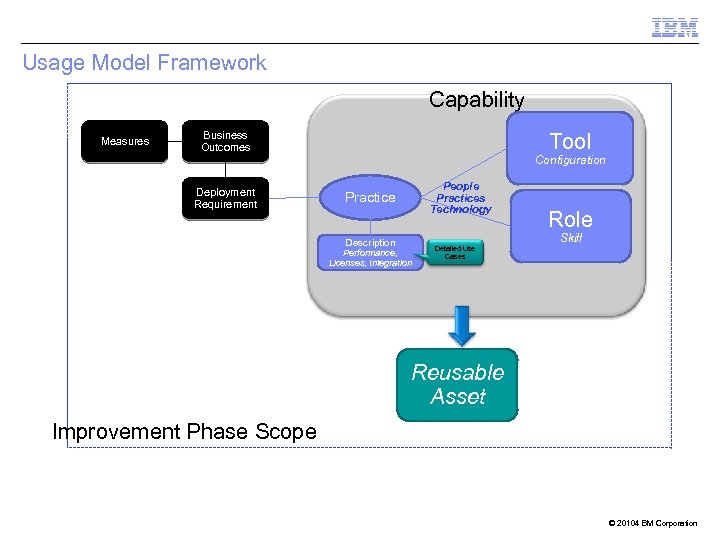 Usage Model Framework Capability Measures Business Outcomes Tool Configuration Deployment Requirement People Practices Technology Practice Description Performance, Licenses, Integration Detailed Use Cases Role Skill Reusable Asset Improvement Phase Scope © 20104 BM Corporation
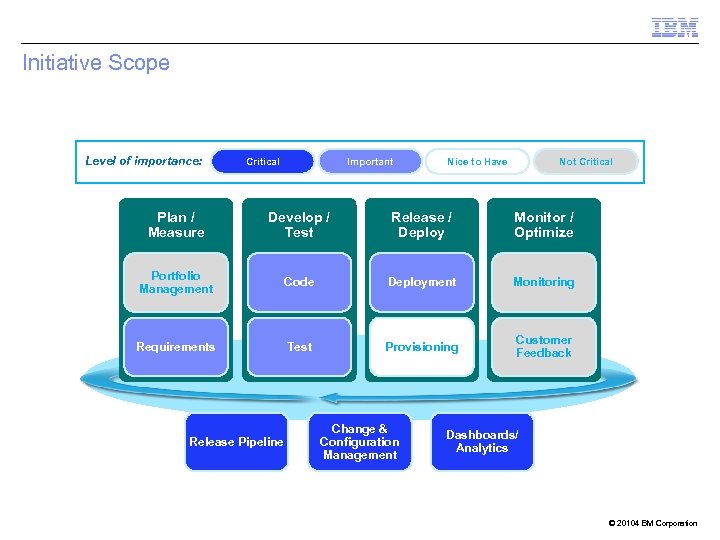 Initiative Scope Level of importance: Critical Important Nice to Have Not Critical Plan / Measure Develop / Test Release / Deploy Monitor / Optimize Portfolio Management Code Deployment Monitoring Requirements Test Provisioning Customer Feedback Release Pipeline Change & Configuration Management Dashboards/ Analytics © 20104 BM Corporation
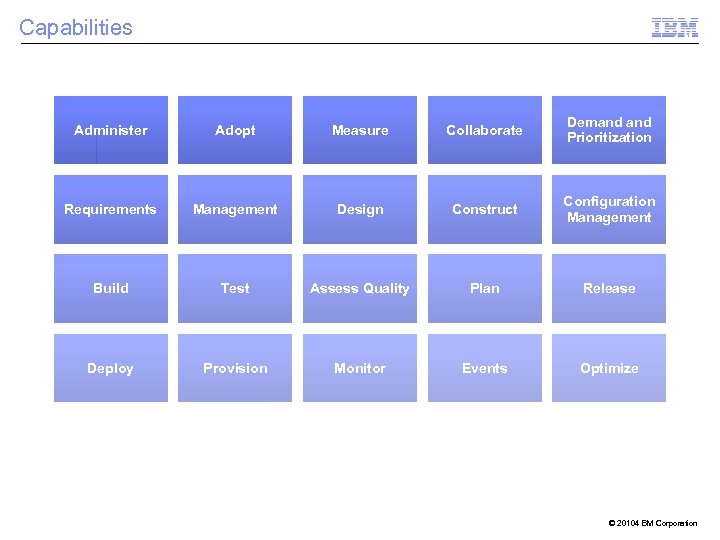 Capabilities Administer Adopt Measure Collaborate Demand Prioritization Requirements Management Design Construct Configuration Management Build Test Assess Quality Plan Release Deploy Provision Monitor Events Optimize © 20104 BM Corporation
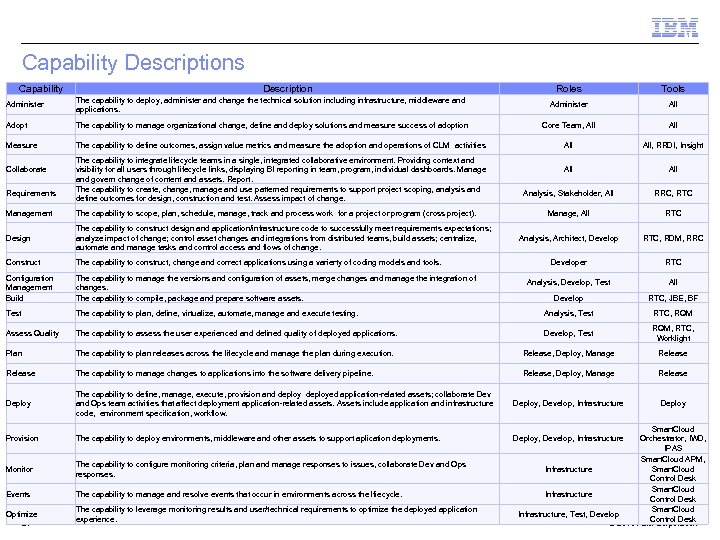 Capability Descriptions Roles Tools Administer Capability The capability to deploy, administer and change the technical solution including infrastructure, middleware and applications. Administer All Adopt The capability to manage organizational change, define and deploy solutions and measure success of adoption Core Team, All Measure The capability to define outcomes, assign value metrics and measure the adoption and operations of CLM activities All, RRDI, Insight All Analysis, Stakeholder, All RRC, RTC Manage, All RTC Analysis, Architect, Develop RTC, RDM, RRC Developer RTC Analysis, Develop, Test All Collaborate Requirements Description The capability to integrate lifecycle teams in a single, integrated collaborative environment. Providing context and visibility for all users through lifecycle links, displaying BI reporting in team, program, individual dashboards. Manage and govern change of content and assets. Report. The capability to create, change, manage and use patterned requirements to support project scoping, analysis and define outcomes for design, construction and test. Assess impact of change. Management The capability to scope, plan, schedule, manage, track and process work for a project or program (cross project). Design The capability to construct design and application/infrastructure code to successfully meet requirements expectations; analyze impact of change; control asset changes and integrations from distributed teams, build assets; centralize, automate and manage tasks and control access and flows of change. Construct The capability to construct, change and correct applications using a varierty of coding models and tools. Configuration Management Build The capability to manage the versions and configuration of assets, merge changes and manage the integration of changes. The capability to compile, package and prepare software assets. Develop RTC, JBE, BF Test The capability to plan, define, virtualize, automate, manage and execute testing. Analysis, Test RTC, RQM Assess Quality The capability to assess the user experienced and defined quality of deployed applications. Develop, Test RQM, RTC, Worklight Plan The capability to plan releases across the lifecycle and manage the plan during execution. Release, Deploy, Manage Release The capability to manage changes to applications into the software delivery pipeline. Release, Deploy, Manage Release Deploy The capability to define, manage, execute, provision and deployed application-related assets; collaborate Dev and Ops team activities that affect deployment application-related assets. Assets include application and infrastructure code, environment specification, workflow. Deploy, Develop, Infrastructure Deploy Provision The capability to deploy environments, middleware and other assets to support aplication deployments. Deploy, Develop, Infrastructure Monitor The capability to configure monitoring criteria, plan and manage responses to issues, collaborate Dev and Ops responses. Events The capability to manage and resolve events that occur in environments across the lfiecycle. Optimize 24 The capability to leverage monitoring results and user/technical requirements to optimize the deployed application experience. Smart. Cloud Orchestrator, IWD, IPAS Smart. Cloud APM, Smart. Cloud Infrastructure Control Desk Smart. Cloud Infrastructure, Test, Develop Control Desk © 20104 BM Corporation
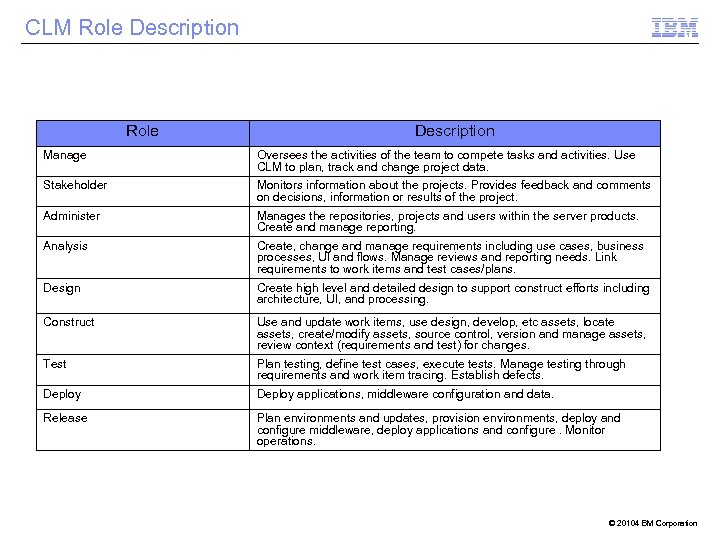 CLM Role Description Manage Oversees the activities of the team to compete tasks and activities. Use CLM to plan, track and change project data. Stakeholder Monitors information about the projects. Provides feedback and comments on decisions, information or results of the project. Administer Manages the repositories, projects and users within the server products. Create and manage reporting. Analysis Create, change and manage requirements including use cases, business processes, UI and flows. Manage reviews and reporting needs. Link requirements to work items and test cases/plans. Design Create high level and detailed design to support construct efforts including architecture, UI, and processing. Construct Use and update work items, use design, develop, etc assets, locate assets, create/modify assets, source control, version and manage assets, review context (requirements and test) for changes. Test Plan testing, define test cases, execute tests. Manage testing through requirements and work item tracing. Establish defects. Deploy applications, middleware configuration and data. Release Plan environments and updates, provision environments, deploy and configure middleware, deploy applications and configure. Monitor operations. © 20104 BM Corporation
 Use Case Approach 2 © 2014 IBM Corporation
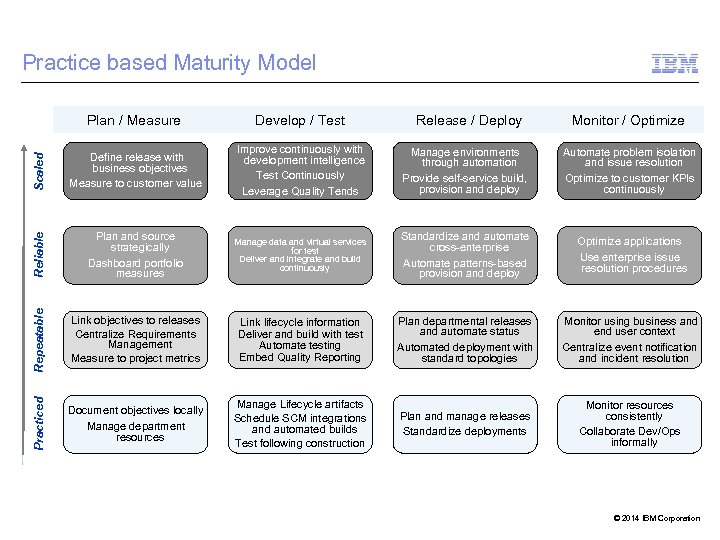 Plan / Measure Develop / Test Scaled Define release with business objectives Measure to customer value Improve continuously with development intelligence Test Continuously Leverage Quality Tends Manage environments through automation Provide self-service build, provision and deploy Automate problem isolation and issue resolution Optimize to customer KPIs continuously Reliable Plan and source strategically Dashboard portfolio measures Manage data and virtual services for test Deliver and integrate and build continuously Standardize and automate cross-enterprise Automate patterns-based provision and deploy Optimize applications Use enterprise issue resolution procedures Repeatable Link objectives to releases Centralize Requirements Management Measure to project metrics Link lifecycle information Deliver and build with test Automate testing Embed Quality Reporting Plan departmental releases and automate status Automated deployment with standard topologies Monitor using business and end user context Centralize event notification and incident resolution Practiced Practice based Maturity Model Release / Deploy Monitor / Optimize Document objectives locally Manage department resources Manage Lifecycle artifacts Schedule SCM integrations and automated builds Test following construction Plan and manage releases Standardize deployments Monitor resources consistently Collaborate Dev/Ops informally © 2014 IBM Corporation
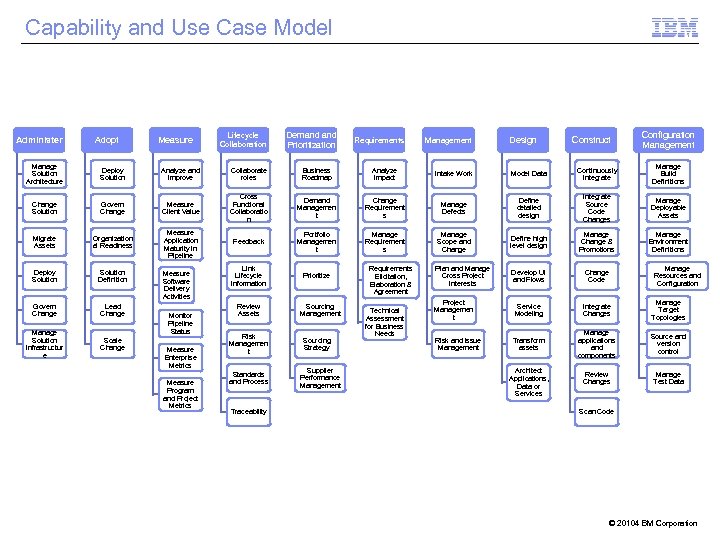 Capability and Use Case Model Administer Adopt Measure Lifecycle Collaboration Demand Prioritization Requirements Management Design Construct Configuration Management Manage Solution Architecture Deploy Solution Analyze and Improve Collaborate roles Business Roadmap Analyze Impact Intake Work Model Data Continuously Integrate Manage Build Definitions Change Solution Govern Change Measure Client Value Cross Functional Collaboratio n Demand Managemen t Change Requirement s Manage Defects Define detailed design Integrate Source Code Changes Manage Deployable Assets Migrate Assets Organization al Readiness Measure Application Maturity in Pipeline Feedback Portfolio Managemen t Manage Requirement s Manage Scope and Change Define high level design Manage Change & Promotions Manage Environment Definitions Deploy Solution Definition Link Lifecycle Information Prioritize Plan and Manage Cross Project Interests Develop UI and Flows Change Code Govern Change Lead Change Project Managemen t Service Modeling Integrate Changes Manage Target Topologies Manage Solution Infrastructur e Scale Change Risk and Issue Management Transform assets Manage applications and components Source and version control Review Changes Manage Test Data Measure Software Delivery Activities Monitor Pipeline Status Measure Enterprise Metrics Measure Program and Project Metrics Review Assets Risk Managemen t Standards and Process Traceability Sourcing Management Sourcing Strategy Supplier Performance Management Requirements Elicitation, Elaboration & Agreement Technical Assessment for Business Needs Architect Applications, Data or Services Manage Resources and Configuration Scan Code © 20104 BM Corporation
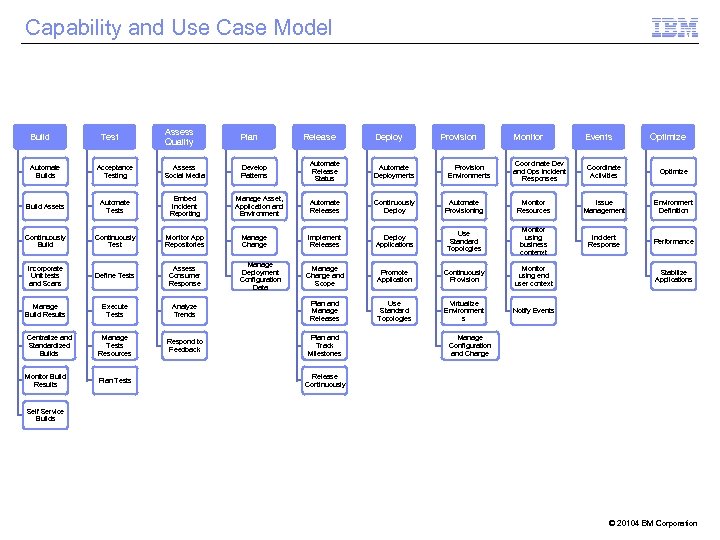 Capability and Use Case Model Build Test Assess Quality Plan Develop Patterns Release Deploy Provision Automate Release Status Automate Deployments Automate Releases Continuously Deploy Automate Provisioning Implement Releases Deploy Applications Manage Change and Scope Analyze Trends Plan and Manage Releases Respond to Feedback Plan and Track Milestones Automate Builds Acceptance Testing Assess Social Media Build Assets Automate Tests Embed Incident Reporting Continuously Build Continuously Test Monitor App Repositories Incorporate Unit tests and Scans Define Tests Assess Consumer Response Manage Build Results Execute Tests Centralize and Standardized Builds Manage Tests Resources Monitor Build Results Plan Tests Manage Asset, Application and Environment Manage Change Manage Deployment Configuration Data Provision Environments Monitor Coordinate Dev and Ops Incident Responses Events Optimize Coordinate Activities Optimize Monitor Resources Issue Management Environment Definition Use Standard Topologies Monitor using business contenxt Incident Response Performance Promote Application Continuously Provision Monitor using end user context Use Standard Topologies Virtualize Environment s Notify Events Stabilize Applications Manage Configuration and Change Release Continuously Self Service Builds © 20104 BM Corporation
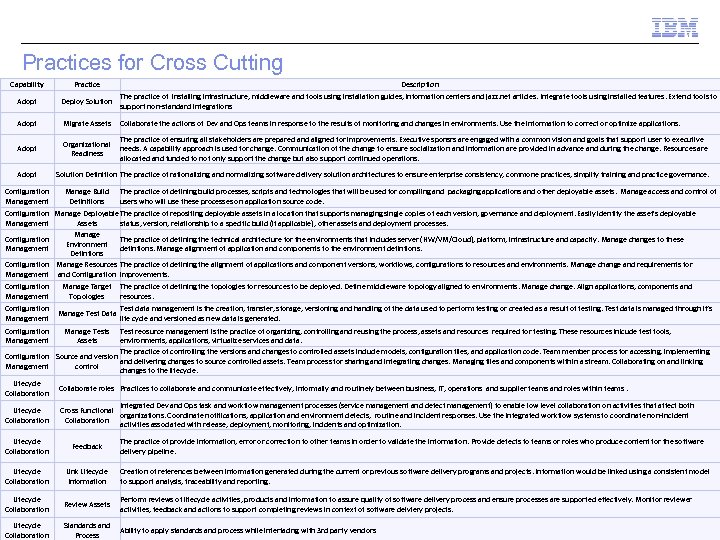 Practices for Cross Cutting Capability Practice Description Adopt The practice of installing infrastructure, middleware and tools using installation guides, information centers and jazz. net articles. Integrate tools using installed features. Extend tools to Deploy Solution support non-standard integrations Adopt Migrate Assets Collaborate the actions of Dev and Ops teams in response to the results of monitoring and changes in environments. Use the information to correct or optimize applications. Adopt Organizational Readiness The practice of ensuring all stakeholders are prepared and aligned for improvements. Executive sponsrs are engaged with a common vision and goals that support user to executive needs. A capability approach is used for change. Communication of the change to ensure socialization and information are provided in advance and during the change. Resources are allocated and funded to not only support the change but also support continued operations. Adopt Configuration Management Solution Definition The practice of rationalizing and normalizing software delivery solution architectures to ensure enterprise consistency, commone practices, simplify training and practice governance. Manage Build Definitions The practice of defining build processes, scripts and technologies that will be used for compiling and packaging applications and other deployable assets. Manage access and control of users who will use these processes on application source code. Configuration Manage Deployable The practice of repositing deployable assets in a location that supports managing single copies of each version, governance and deployment. Easily identify the asset's deployable Management Assets status, version, relationship to a specific build (if applicable), other assets and deployment processes. Manage Configuration The practice of defining the technical architecture for the environments that includes server (HW/VM/Cloud), platform, infrastructure and capacity. Manage changes to these Environment Management defintions. Manage alignment of application and components to the environment defintions. Defintions Configuration Manage Resources The practice of defining the alignment of applications and component versions, workflows, configurations to resources and environments. Manage change and requirements for Management and Configuration improvements. Configuration Management Manage Target Topologies Configuration Management Manage Test Data Configuration Management The practice of defining the topologies for resources to be deployed. Define middleware topology aligned to environments. Manage change. Align applications, components and resources. Manage Tests Assets Test data management is the creation, transfer, storage, versioning and handling of the data used to perform testing or created as a result of testing. Test data is managed through it’s life cycle and versioned as new data is generated. Test reosurce management is the practice of organizing, controlling and reusing the process, assets and resources required for testing. These resources inlcude test tools, environments, applications, virtualize services and data. The practice of controlling the versions and changes to controlled assets include models, configuration files, and application code. Team member process for accessing, implementing Configuration Source and version and delivering changes to source controlled assets. Team process for sharing and integrating changes. Managing files and components within a stream. Collaborating on and linking Management control changes to the lifecycle. Lifecycle Collaboration Collaborate roles Practices to collaborate and communicate effectively, informally and routinely between business, IT, operations and supplier teams and roles within teams. Lifecycle Collaboration Integrated Dev and Ops task and workflow management processes (service management and defect management) to enable low level collaboration on activities that affect both Cross Functional organizations. Coordinate notifications, application and environment defects, routine and incident responses. Use the integrated workflow systems to coordinate non-incident Collaboration activities associated with release, deployment, monitoring, incidents and optimization. Lifecycle Collaboration Feedback The practice of provide information, error or correction to other teams in order to validate the information. Provide defects to teams or roles who produce content for the software delivery pipeline. Lifecycle Collaboration Link Lifecycle Information Creation of references between information generated during the current or previous software delivery programs and projects. Information would be linked using a consistent model to support analysis, traceability and reporting. Lifecycle Collaboration Review Assets Perform reviews of lifecycle activities, products and information to assure quality of software delivery process and ensure processes are supported effectively. Monitor reviewer activities, feedback and actions to support completing reviews in context of software delviery projects. Lifecycle Collaboration Standards and Process Ability to apply standards and process while interfacing with 3 rd party vendors © 20104 BM Corporation
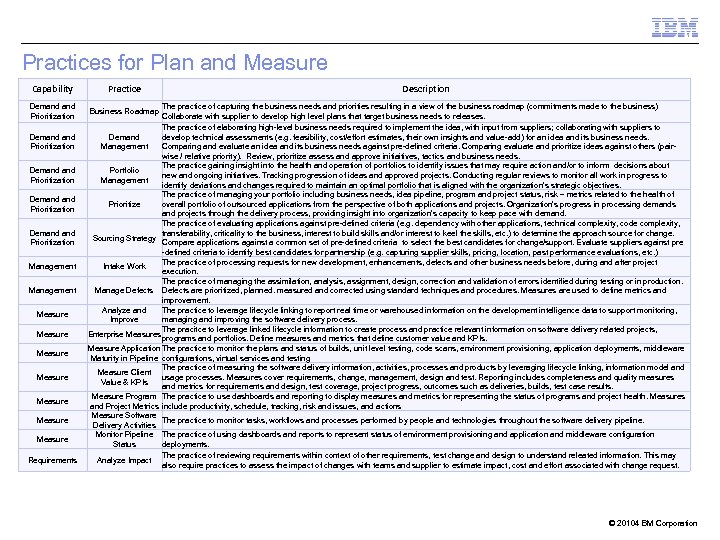 Practices for Plan and Measure Capability Demand and Prioritization Demand Prioritization Management Measure Measure Requirements Practice Description The practice of capturing the business needs and priorities resulting in a view of the business roadmap (commitments made to the business) Collaborate with supplier to develop high level plans that target business needs to releases. The practice of elaborating high-level business needs required to implement the idea, with input from suppliers; collaborating with suppliers to develop technical assessments (e. g. feasibility, cost/effort estimates, their own insights and value-add) for an idea and its business needs. Demand Management Comparing and evaluate an idea and its business needs against pre-defined criteria. Comparing evaluate and prioritize ideas against others (pairwise / relative priority). Review, prioritize assess and approve initiaitives, tactics and business needs. The practice gaining insight into the health and operation of portfolios to identify issues that may require action and/or to inform decisions about Portfolio new and ongoing initiatives. Tracking progression of ideas and approved projects. Conducting regular reviews to monitor all work in progress to Management identify deviations and changes required to maintain an optimal portfolio that is aligned with the organization's strategic objectives. The practice of managing your portfolio including business needs, idea pipeline, program and project status, risk – metrics related to the health of overall portfolio of outsourced applications from the perspective of both applications and projects. Organization’s progress in processing demands Prioritize and projects through the delivery process, providing insight into organization’s capacity to keep pace with demand. The practice of evaluating applications against pre-defined criteria (e. g. dependency with other applications, technical complexity, code complexity, transferability, criticality to the business, interest to build skills and/or interest to keel the skills, etc. ) to determine the approach source for change. Sourcing Strategy Compare applications against a common set of pre-defined criteria to select the best candidates for change/support. Evaluate suppliers against pre -defined criteria to identify best candidates for partnership (e. g. capturing supplier skills, pricing, location, past performance evaluations, etc. ) The practice of processing requests for new development, enhancements, defects and other business needs before, during and after project Intake Work execution. The practice of managing the assimilation, analysis, assignment, design, correction and validation of errors identified during testing or in production. Manage Defects are prioritized, planned. measured and corrected using standard techniques and procedures. Measures are used to define metrics and improvement. Analyze and The practice to leverage lifecycle linking to report real time or warehoused information on the development intelligence data to support monitoring, Improve managing and improving the software delivery process. The pracitce to leverage linked lifecycle information to create process and practice relevant information on software delivery related projects, Enterprise Measures programs and portfolios. Define measures and metrics that define customer value and KPIs. Measure Application The practice to monitor the plans and status of builds, unit level testing, code scans, environment provisioning, application deployments, middleware Maturity in Pipeline configurations, virtual services and testing The practice of measuring the software delivery information, activities, processes and products by leveraging lifecycle linking, information model and Measure Client usage processes. Measures cover requirements, change, management, design and test. Reporting includes completeness and quality measures Value & KPIs and metrics for requirements and design, test coverage, project progress, outcomes such as deliveries, builds, test case results. Measure Program The practice to use dashboards and reporting to display measures and metrics for representing the status of programs and project health. Measures and Project Metrics include productivity, schedule, tracking, risk and issues, and actions Measure Software The practice to monitor tasks, workflows and processes performed by people and technologies throughout the software delivery pipeline. Delivery Activities Monitor Pipeline The practice of using dashboards and reports to represent status of environment provisioning and application and middleware configuration Status deployments. The practice of reviewing requirements within context of other requirements, test change and design to understand releated information. This may Analyze Impact also require practices to assess the impact of changes with teams and supplier to estimate impact, cost and effort associated with change request. Business Roadmap © 20104 BM Corporation
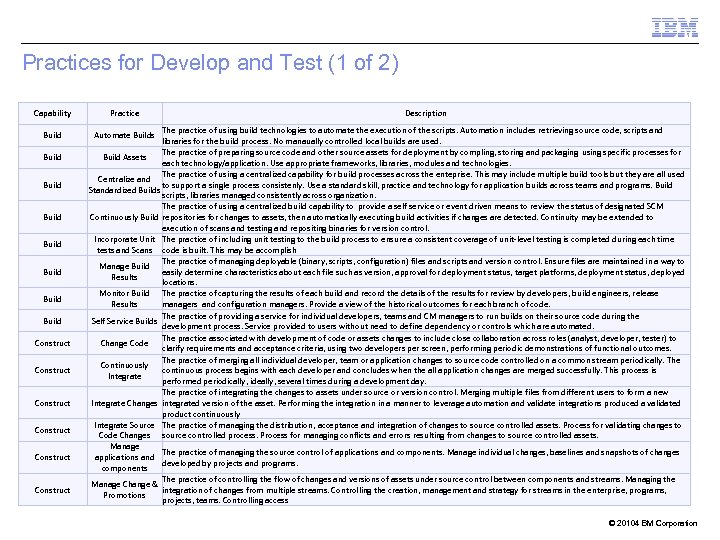 Practices for Develop and Test (1 of 2) Capability Build Build Construct Construct Practice Description The practice of using build technologies to automate the execution of the scripts. Automation includes retrieving source code, scripts and libraries for the build process. No manaually controlled local builds are used. The practice of preparing source code and other source assets for deployment by compling, storing and packaging using specific processes for Build Assets each technology/application. Use appropriate frameworks, libraries, modules and technologies. The practice of using a centralized capability for build processes across the enteprise. This may include multiple build tools but they are all used Centralize and to support a single process consistenly. Use a standard skill, practice and technology for application builds across teams and programs. Build Standardized Builds scripts, libraries managed consistently across organization. The practice of using a centralized build capability to provide a self service or event driven means to review the status of designated SCM Continuously Build repositories for changes to assets, then automatically executing build activities if changes are detected. Continuity may be extended to execution of scans and testing and repositing binaries for version control. Incorporate Unit The practice of including unit testing to the build process to ensure a consistent coverage of unit-level testing is completed during each time tests and Scans code is built. This may be accomplish The practice of managing deployable (binary, scripts, configuration) files and scripts and version control. Ensure files are maintained in a way to Manage Build easily determine characteristics about each file such as version, approval for deployment status, target platforms, deployment status, deployed Results locations. Monitor Build The practice of capturing the results of each build and record the details of the results for review by developers, build engineers, release Results managers and configuration managers. Provide a view of the historical outcomes for each branch of code. The practice of providing a service for individual developers, teams and CM managers to run builds on their source code during the Self Service Builds development process. Service provided to users without need to define dependency or controls which are automated. The practice associated with development of code or assets changes to include close collaboration across roles (analyst, developer, tester) to Change Code clarify requirements and acceptance criteria, using two developers per screen, performing periodic demonstrations of functional outcomes. The practice of merging all individual developer, team or application changes to source code controlled on a common stream periodically. The Continuously continuous process begins with each developer and concludes when the all application changes are merged successfully. This process is Integrate performed periodically, ideally, several times during a development day. The practice of integrating the changes to assets under source or version control. Merging multiple files from different users to form a new Integrate Changes integrated version of the asset. Performing the integration in a manner to leverage automation and validate integrations produced a validated product continuously Integrate Source The practice of managing the distribution, acceptance and integration of changes to source controlled assets. Process for validating changes to Code Changes source controlled process. Process for managing conflicts and errors resulting from changes to source controlled assets. Manage The practice of managing the source control of applications and components. Manage individual changes, baselines and snapshots of changes applications and developed by projects and programs. components The practice of controlling the flow of changes and versions of assets under source control between components and streams. Managing the Manage Change & integration of changes from multiple streams. Controlling the creation, management and strategy for streams in the enterprise, programs, Promotions projects, teams. Controlling access Automate Builds © 20104 BM Corporation
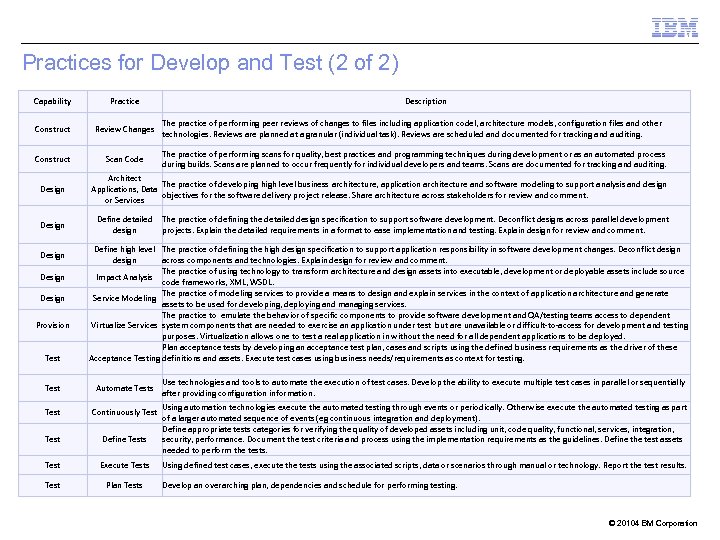 Practices for Develop and Test (2 of 2) Capability Practice Construct Review Changes The practice of performing peer reviews of changes to files including application codel, architecture models, configuration files and other technologies. Reviews are planned at a granular (individual task). Reviews are scheduled and documented for tracking and auditing. Construct Scan Code The practice of performing scans for quality, best practices and programming techniques during development or as an automated process during builds. Scans are planned to occur frequently for individual developers and teams. Scans are documented for tracking and auditing. Design Design Provision Test Description Architect The practice of developing high level business architecture, application architecture and software modeling to support analysis and design Applications, Data objectives for the software delivery project release. Share architecture across stakeholders for review and comment. or Services Define detailed design The practice of defining the detailed design specification to support software development. Deconflict designs across parallel development projects. Explain the detailed requirements in a format to ease implementation and testing. Explain design for review and comment. Define high level The practice of defining the high design specification to support application responsibility in software development changes. Deconflict design across components and technologies. Explain design for review and comment. The practice of using technology to transform architecture and design assets into executable, development or deployable assets include source Impact Analysis code frameworks, XML, WSDL. The practice of modeling services to provide a means to design and explain services in the context of application architecture and generate Service Modeling assets to be used for developing, deploying and managing services. The practice to emulate the behavior of specific components to provide software development and QA/testing teams access to dependent Virtualize Services system components that are needed to exercise an application under test but are unavailable or difficult-to-access for development and testing purposes. Virtualization allows one to test a real application in without the need for all dependent applications to be deployed. Plan acceptance tests by developing an acceptance test plan, cases and scripts using the defined business requirements as the driver of these Acceptance Testing definitions and assets. Execute test cases using business needs/requirements as context for testing. Test Automate Tests Test Continuously Test Define Tests Test Execute Tests Test Plan Tests Use technologies and tools to automate the execution of test cases. Develop the ability to execute multiple test cases in parallel or sequentially after providing configuration information. Using automation technologies execute the automated testing through events or periodically. Otherwise execute the automated testing as part of a larger automated sequence of events (eg continuous integration and deployment). Define appropriate tests categories for verifying the quality of developed assets including unit, code quality, functional, services, integration, security, performance. Document the test criteria and process using the implementation requirements as the guidelines. Define the test assets needed to perform the tests. Using defined test cases, execute the tests using the associated scripts, data or scenarios through manual or technology. Report the test results. Develop an overarching plan, dependencies and schedule for performing testing. © 20104 BM Corporation
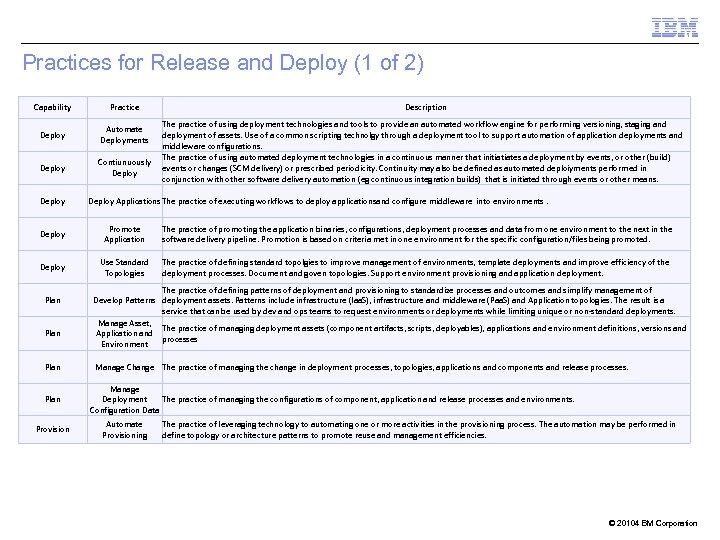 Practices for Release and Deploy (1 of 2) Capability Practice Deploy Automate Deployments Deploy Contiunuously Deploy Description The practice of using deployment technologies and tools to provide an automated workflow engine for performing versioning, staging and deployment of assets. Use of a common scripting technolgy through a deployment tool to support automation of application deployments and middleware configurations. The practice of using automated deployment technologies in a continuous manner that initiatiates a deployment by events, or other (build) events or changes (SCM delivery) or prescribed periodicity. Continuity may also be defined as automated deploiyments performed in conjunction with other software delivery automation (eg continuous integration builds) that is initiated through events or other means. Deploy Applications The practice of executing workflows to deploy applicationsand configure middleware into environments. Deploy Promote Application The practice of promoting the application binaries, configurations, deployment processes and data from one environment to the next in the software delivery pipeline. Promotion is based on criteria met in one environment for the specific configuration/files being promoted. Deploy Use Standard Topologies The practice of defining standard topolgies to improve management of environments, template deployments and improve efficiency of the deployment processes. Document and goven topologies. Support environment provisioning and application deployment. Plan Provision The practice of defining patterns of deployment and provisioning to standardize processes and outcomes and simplify management of Develop Patterns deployment assets. Patterns include infrastructure (Iaa. S), infrastructure and middleware (Paa. S) and Application topologies. The result is a service that can be used by dev and ops teams to request environments or deployments while limiting unique or non-standard deployments. Manage Asset, The practice of managing deployment assets (component artifacts, scripts, deployables), applications and environment definitions, versions and Application and processes Environment Manage Change The practice of managing the change in deployment processes, topologies, applications and components and release processes. Manage Deployment The practice of managing the configurations of component, application and release processes and environments. Configuration Data Automate Provisioning The practice of leveraging technology to automating one or more activities in the provisioning process. The automation may be performed in define topology or architecture patterns to promote reuse and management efficiencies. © 20104 BM Corporation
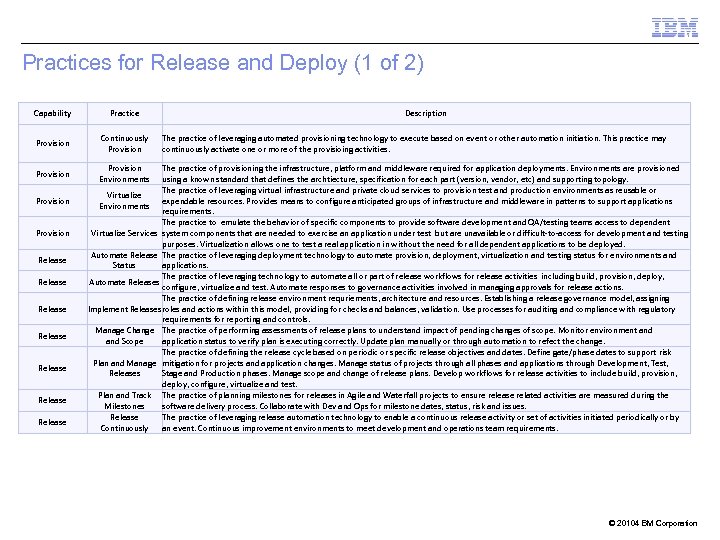 Practices for Release and Deploy (1 of 2) Capability Practice Provision Continuously Provision Environments Provision Release Release Description The practice of leveraging automated provisioning technology to execute based on event or other automation initiation. This practice may continuously activate one or more of the provisioing activities. The practice of provisioning the infrastructure, platform and middleware required for application deployments. Environments are provisioned using a known standard that defines the archtiecture, specification for each part (version, vendor, etc) and supporting topology. The practice of leveraging virtual infrastructure and private cloud services to provision test and production environments as reusable or Virtualize expendable resources. Provides means to configure anticipated groups of infrastructure and middleware in patterns to support applications Environments requirements. The practice to emulate the behavior of specific components to provide software development and QA/testing teams access to dependent Virtualize Services system components that are needed to exercise an application under test but are unavailable or difficult-to-access for development and testing purposes. Virtualization allows one to test a real application in without the need for all dependent applications to be deployed. Automate Release The practice of leveraging deployment technology to automate provision, deployment, virtualization and testing status for environments and Status applications. The practice of leveraging technology to automate all or part of release workflows for release activities including build, provision, deploy, Automate Releases configure, virtualize and test. Automate responses to governance activities involved in managing approvals for release actions. The practice of defining release environment requriements, architecture and resources. Establishing a release governance model, assigning Implement Releases roles and actions within this model, providing for checks and balances, validation. Use processes for auditing and compliance with regulatory requirements for reporting and controls. Manage Change The practice of performing assessments of release plans to understand impact of pending changes of scope. Monitor environment and Scope application status to verify plan is executing correctly. Update plan manually or through automation to refect the change. The practice of defining the release cycle based on periodic or specific release objectives and dates. Define gate/phase dates to support risk Plan and Manage mitigation for projects and application changes. Manage status of projects through all phases and applications through Development, Test, Releases Stage and Production phases. Manage scope and change of release plans. Develop workflows for release activities to include build, provision, deploy, configure, virtualize and test. Plan and Track The practice of planning milestones for releases in Agile and Waterfall projects to ensure release related activities are measured during the Milestones software delivery process. Collaborate with Dev and Ops for milestone dates, status, risk and issues. Release The practice of leveraging release automation technology to enable a continuous release activity or set of activities initiated periodically or by Continuously an event. Continuous improvement environments to meet development and operations team requirements. © 20104 BM Corporation
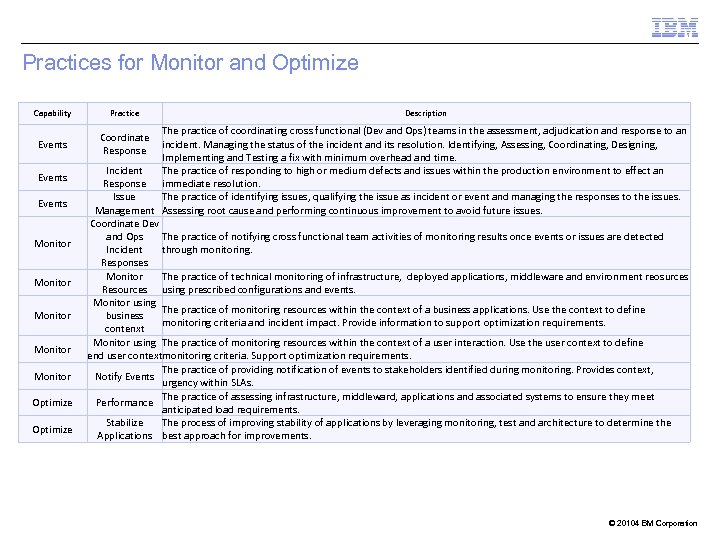 Practices for Monitor and Optimize Capability Events Monitor Monitor Optimize Practice Description The practice of coordinating cross functional (Dev and Ops) teams in the assessment, adjudication and response to an incident. Managing the status of the incident and its resolution. Identifying, Assessing, Coordinating, Designing, Implementing and Testing a fix with minimum overhead and time. Incident The practice of responding to high or medium defects and issues within the production environment to effect an Response immediate resolution. Issue The practice of identifying issues, qualifying the issue as incident or event and managing the responses to the issues. Management Assessing root cause and performing continuous improvement to avoid future issues. Coordinate Dev and Ops The practice of notifying cross functional team activities of monitoring results once events or issues are detected Incident through monitoring. Responses Monitor The practice of technical monitoring of infrastructure, deployed applications, middleware and environment reosurces Resources using prescribed configurations and events. Monitor using The practice of monitoring resources within the context of a business applications. Use the context to define business monitoring criteria and incident impact. Provide information to support optimization requirements. contenxt Monitor using The practice of monitoring resources within the context of a user interaction. Use the user context to define end user contextmonitoring criteria. Support optimization requirements. The practice of providing notification of events to stakeholders identified during monitoring. Provides context, Notify Events urgency within SLAs. The practice of assessing infrastructure, middleward, applications and associated systems to ensure they meet Performance anticipated load requirements. Stabilize The process of improving stability of applications by leveraging monitoring, test and architecture to determine the Applications best approach for improvements. Coordinate Response © 20104 BM Corporation
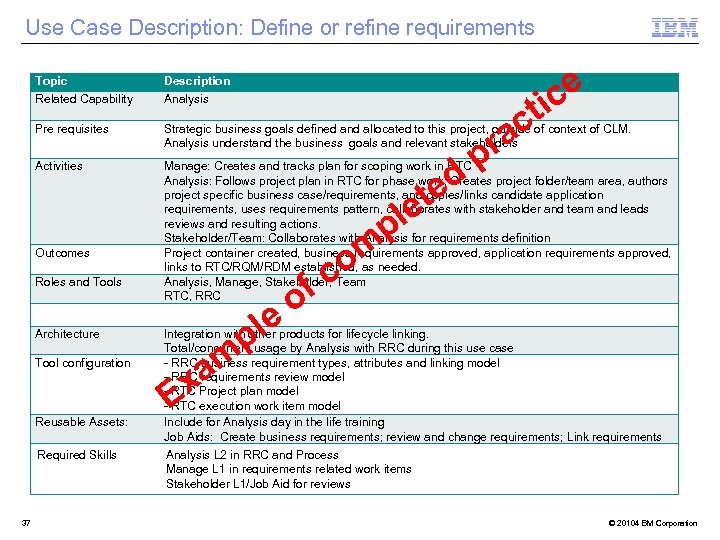 Use Case Description: Define or refine requirements ce ti Topic Related Capability Description Analysis Pre requisites Strategic business goals defined and allocated to this project, outside of context of CLM. Analysis understand the business goals and relevant stakeholders Activities Manage: Creates and tracks plan for scoping work in RTC Analysis: Follows project plan in RTC for phase work; Creates project folder/team area, authors project specific business case/requirements, and copies/links candidate application requirements, uses requirements pattern, collaborates with stakeholder and team and leads reviews and resulting actions. Stakeholder/Team: Collaborates with Analysis for requirements definition Project container created, business requirements approved, application requirements approved, links to RTC/RQM/RDM established, as needed. Analysis, Manage, Stakeholder, Team RTC, RRC Outcomes Roles and Tools Architecture Tool configuration Reusable Assets: Required Skills 37 ed t le p o om fc p ac r le p Integration with other products for lifecycle linking. Total/concurrent usage by Analysis with RRC during this use case - RRC business requirement types, attributes and linking model - RRC requirements review model - RTC Project plan model - RTC execution work item model Include for Analysis day in the life training Job Aids: Create business requirements; review and change requirements; Link requirements am x E Analysis L 2 in RRC and Process Manage L 1 in requirements related work items Stakeholder L 1/Job Aid for reviews © 20104 BM Corporation
 Solution Architecture © 2014 IBM Corporation
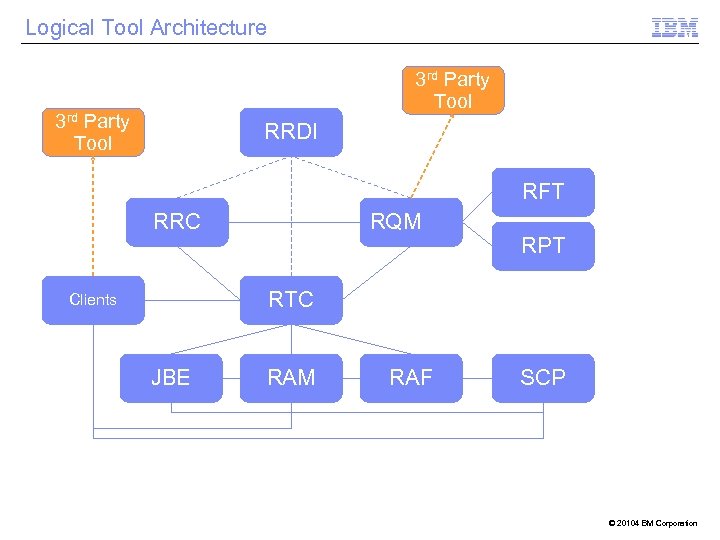 Logical Tool Architecture 3 rd Party Tool RRDI RFT RRC RQM RPT RTC Clients JBE RAM RAF SCP © 20104 BM Corporation
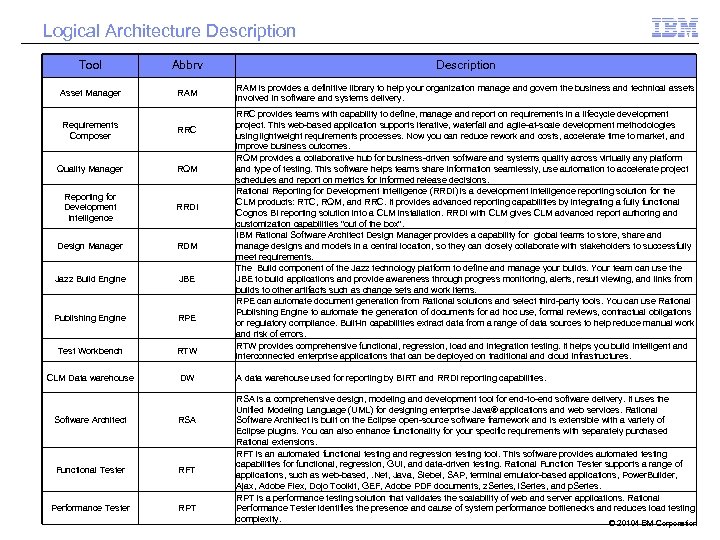 Logical Architecture Description Tool Abbrv Description Asset Manager RAM is provides a definitive library to help your organization manage and govern the business and technical assets involved in software and systems delivery. Requirements Composer RRC Quality Manager RQM Reporting for Development Intelligence RRDI Design Manager RDM Jazz Build Engine JBE Publishing Engine RPE Test Workbench RTW CLM Data warehouse DW Software Architect RSA Functional Tester RFT Performance Tester RPT RRC provides teams with capability to define, manage and report on requirements in a lifecycle development project. This web-based application supports iterative, waterfall and agile-at-scale development methodologies using lightweight requirements processes. Now you can reduce rework and costs, accelerate time to market, and improve business outcomes. RQM provides a collaborative hub for business-driven software and systems quality across virtually any platform and type of testing. This software helps teams share information seamlessly, use automation to accelerate project schedules and report on metrics for informed release decisions. Rational Reporting for Development Intelligence (RRDI) is a development intelligence reporting solution for the CLM products: RTC, RQM, and RRC. It provides advanced reporting capabilities by integrating a fully functional Cognos BI reporting solution into a CLM installation. RRDI with CLM gives CLM advanced report authoring and customization capabilities "out of the box". IBM Rational Software Architect Design Manager provides a capability for global teams to store, share and manage designs and models in a central location, so they can closely collaborate with stakeholders to successfully meet requirements. The Build component of the Jazz technology platform to define and manage your builds. Your team can use the JBE to build applications and provide awareness through progress monitoring, alerts, result viewing, and links from builds to other artifacts such as change sets and work items. RPE can automate document generation from Rational solutions and select third-party tools. You can use Rational Publishing Engine to automate the generation of documents for ad hoc use, formal reviews, contractual obligations or regulatory compliance. Built-in capabilities extract data from a range of data sources to help reduce manual work and risk of errors. RTW provides comprehensive functional, regression, load and integration testing. It helps you build intelligent and interconnected enterprise applications that can be deployed on traditional and cloud infrastructures. A data warehouse used for reporting by BIRT and RRDI reporting capabilities. RSA is a comprehensive design, modeling and development tool for end-to-end software delivery. It uses the Unified Modeling Language (UML) for designing enterprise Java® applications and web services. Rational Software Architect is built on the Eclipse open-source software framework and is extensible with a variety of Eclipse plugins. You can also enhance functionality for your specific requirements with separately purchased Rational extensions. RFT is an automated functional testing and regression testing tool. This software provides automated testing capabilities for functional, regression, GUI, and data-driven testing. Rational Function Tester supports a range of applications, such as web-based, . Net, Java, Siebel, SAP, terminal emulator-based applications, Power. Builder, Ajax, Adobe Flex, Dojo Toolkit, GEF, Adobe PDF documents, z. Series, i. Series, and p. Series. RPT is a performance testing solution that validates the scalability of web and server applications. Rational Performance Tester identifies the presence and cause of system performance bottlenecks and reduces load testing complexity. © 20104 BM Corporation
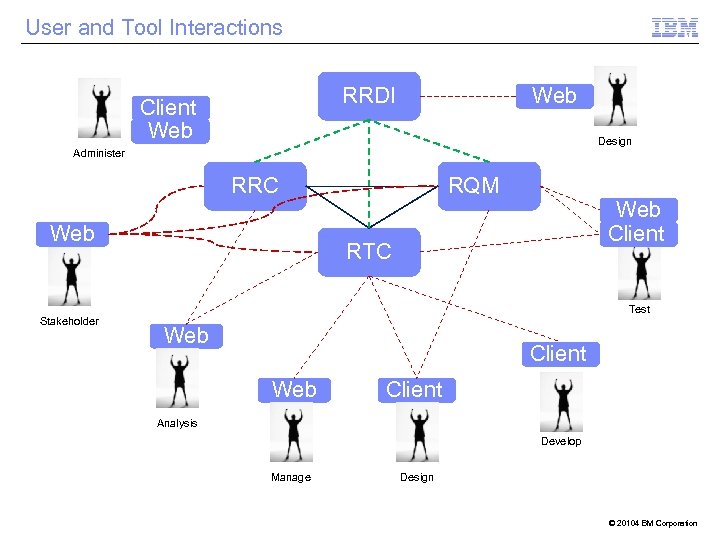 User and Tool Interactions Web RRDI Client Web Design Administer RRC Web Stakeholder RQM Web Client RTC Test Web Client Analysis Develop Manage Design © 20104 BM Corporation
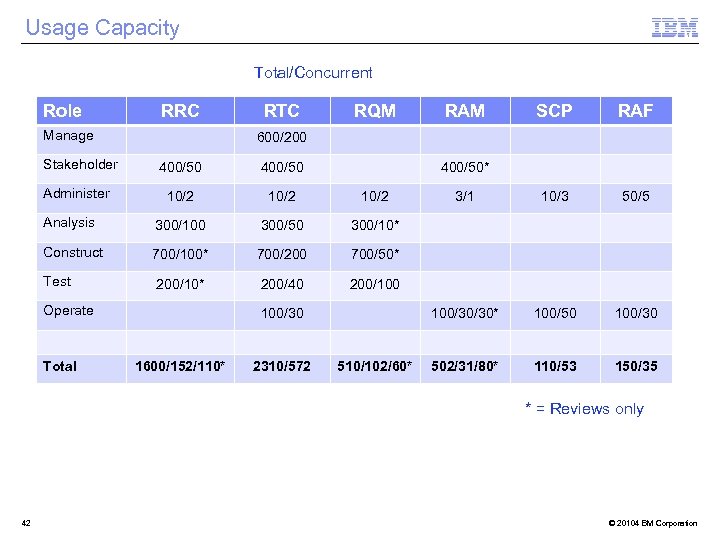 Usage Capacity Total/Concurrent Role RRC Manage Stakeholder RTC RQM RAM SCP RAF 3/1 10/3 50/5 100/30/30* 100/50 100/30 502/31/80* 110/53 150/35 600/200 400/50 10/2 Analysis 300/100 300/50 300/10* Construct 700/100* 700/200 700/50* Test 200/10* 200/40 200/100 Administer Operate Total 400/50* 100/30 1600/152/110* 2310/572 510/102/60* * = Reviews only 42 © 20104 BM Corporation
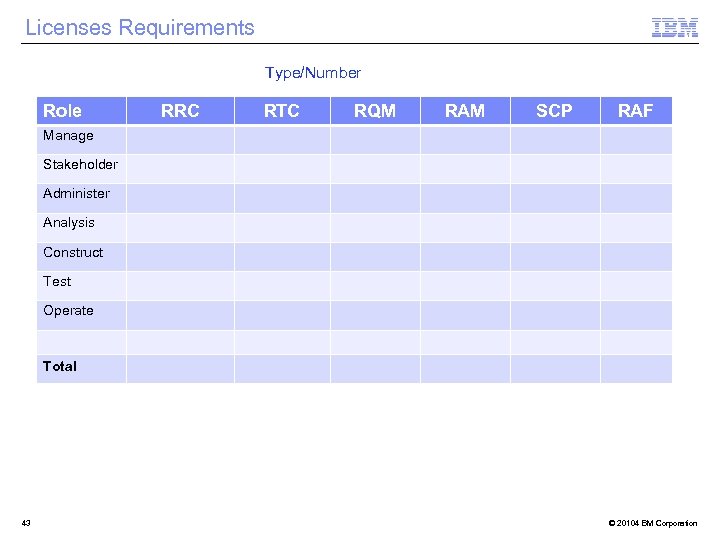 Licenses Requirements Type/Number Role RRC RTC RQM RAM SCP RAF Manage Stakeholder Administer Analysis Construct Test Operate Total 43 © 20104 BM Corporation
 Physical Architecture § Physical Architecture Diagram 44 © 20104 BM Corporation
 CLM Information Model © 2014 IBM Corporation
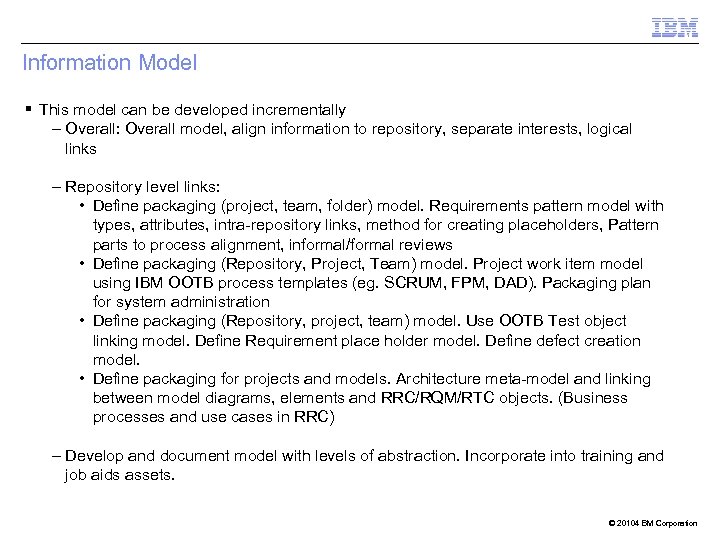 Information Model § This model can be developed incrementally – Overall: Overall model, align information to repository, separate interests, logical links – Repository level links: • Define packaging (project, team, folder) model. Requirements pattern model with types, attributes, intra-repository links, method for creating placeholders, Pattern parts to process alignment, informal/formal reviews • Define packaging (Repository, Project, Team) model. Project work item model using IBM OOTB process templates (eg. SCRUM, FPM, DAD). Packaging plan for system administration • Define packaging (Repository, project, team) model. Use OOTB Test object linking model. Define Requirement place holder model. Define defect creation model. • Define packaging for projects and models. Architecture meta-model and linking between model diagrams, elements and RRC/RQM/RTC objects. (Business processes and use cases in RRC) – Develop and document model with levels of abstraction. Incorporate into training and job aids assets. © 20104 BM Corporation
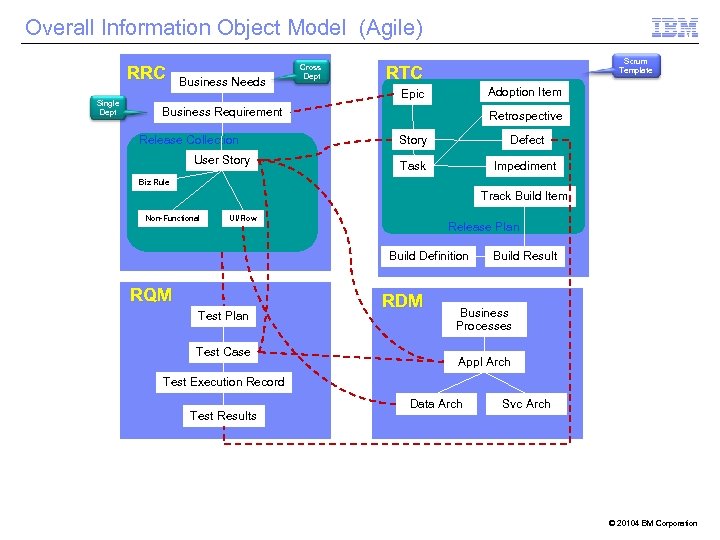 Overall Information Object Model (Agile) RRC Single Dept Business Needs Cross Dept Scrum Template RTC Adoption Item Epic Business Requirement Release Collection User Story Retrospective Story Defect Task Impediment Biz Rule Track Build Item Non-Functional UI/Flow Release Plan Build Definition RQM Test Plan Test Case RDM Build Result Business Processes Appl Arch Test Execution Record Test Results Data Arch Svc Arch © 20104 BM Corporation
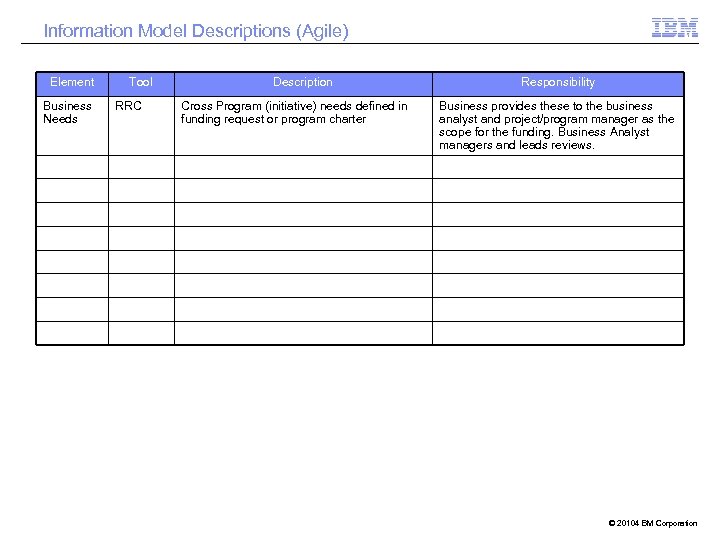 Information Model Descriptions (Agile) Element Business Needs Tool RRC Description Cross Program (initiative) needs defined in funding request or program charter Responsibility Business provides these to the business analyst and project/program manager as the scope for the funding. Business Analyst managers and leads reviews. © 20104 BM Corporation
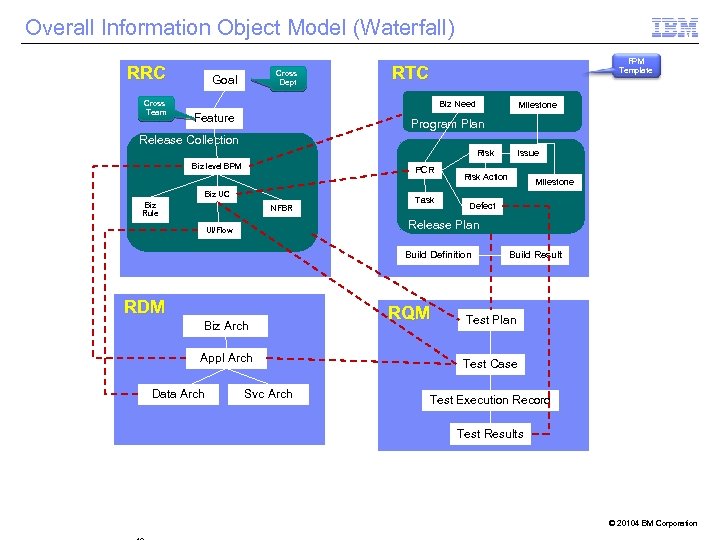 Overall Information Object Model (Waterfall) RRC Cross Team Cross Dept Goal FPM Template RTC Biz Need Feature Milestone Program Plan Release Collection Risk Biz level BPM PCR Biz UC Biz Rule NFBR Task Risk Action Milestone Defect Release Plan UI/Flow Build Definition RDM Biz Arch Appl Arch Data Arch Issue Svc Arch RQM Build Result Test Plan Test Case Test Execution Record Test Results © 20104 BM Corporation
 Information Model Descriptions (Waterfall) Decision Description Reason © 20104 BM Corporation
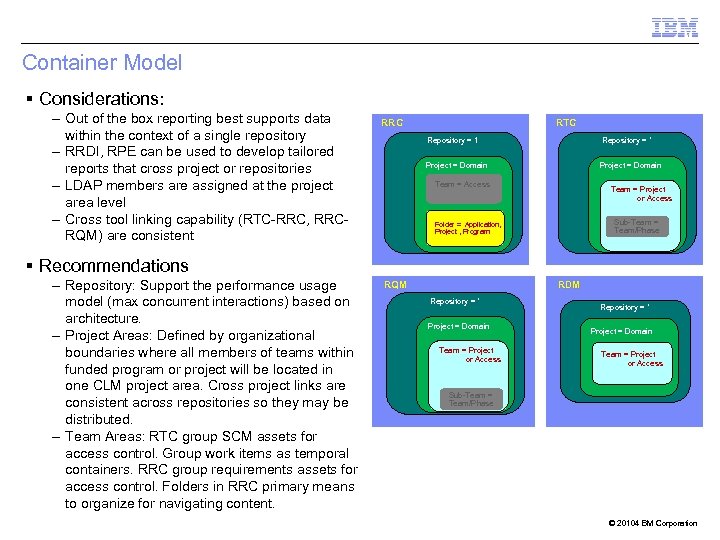 Container Model § Considerations: – Out of the box reporting best supports data within the context of a single repository – RRDI, RPE can be used to develop tailored reports that cross project or repositories – LDAP members are assigned at the project area level – Cross tool linking capability (RTC-RRC, RRCRQM) are consistent RRC RTC Repository = 1 Repository = * Project = Domain Team = Access Team = Project or Access Sub-Team = Team/Phase Folder = Application, Project , Program § Recommendations – Repository: Support the performance usage model (max concurrent interactions) based on architecture. – Project Areas: Defined by organizational boundaries where all members of teams within funded program or project will be located in one CLM project area. Cross project links are consistent across repositories so they may be distributed. – Team Areas: RTC group SCM assets for access control. Group work items as temporal containers. RRC group requirements assets for access control. Folders in RRC primary means to organize for navigating content. RQM RDM Repository = * Project = Domain Team = Project or Access Sub-Team = Team/Phase © 20104 BM Corporation
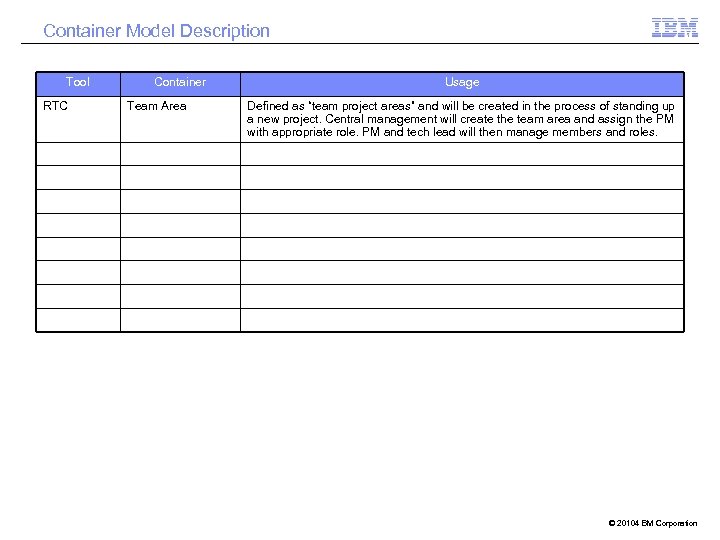 Container Model Description Tool RTC Container Team Area Usage Defined as “team project areas” and will be created in the process of standing up a new project. Central management will create the team area and assign the PM with appropriate role. PM and tech lead will then manage members and roles. © 20104 BM Corporation
 Governance Model 5 © 2014 IBM Corporation
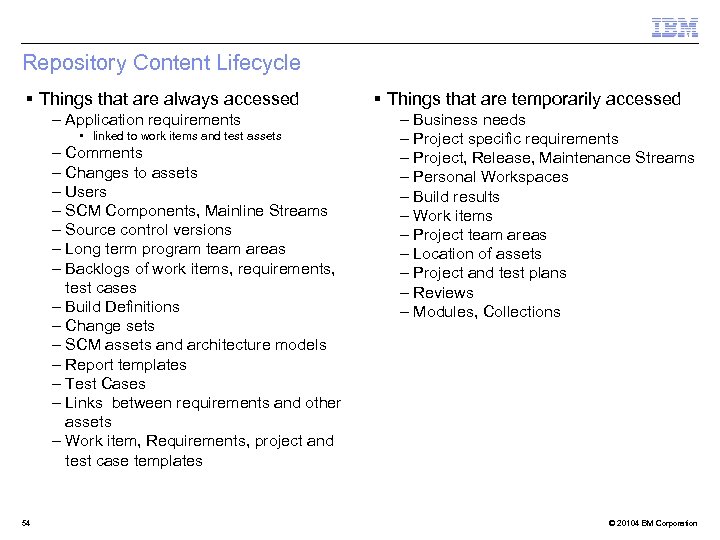 Repository Content Lifecycle § Things that are always accessed – Application requirements • linked to work items and test assets – Comments – Changes to assets – Users – SCM Components, Mainline Streams – Source control versions – Long term program team areas – Backlogs of work items, requirements, test cases – Build Definitions – Change sets – SCM assets and architecture models – Report templates – Test Cases – Links between requirements and other assets – Work item, Requirements, project and test case templates 54 § Things that are temporarily accessed – Business needs – Project specific requirements – Project, Release, Maintenance Streams – Personal Workspaces – Build results – Work items – Project team areas – Location of assets – Project and test plans – Reviews – Modules, Collections © 20104 BM Corporation
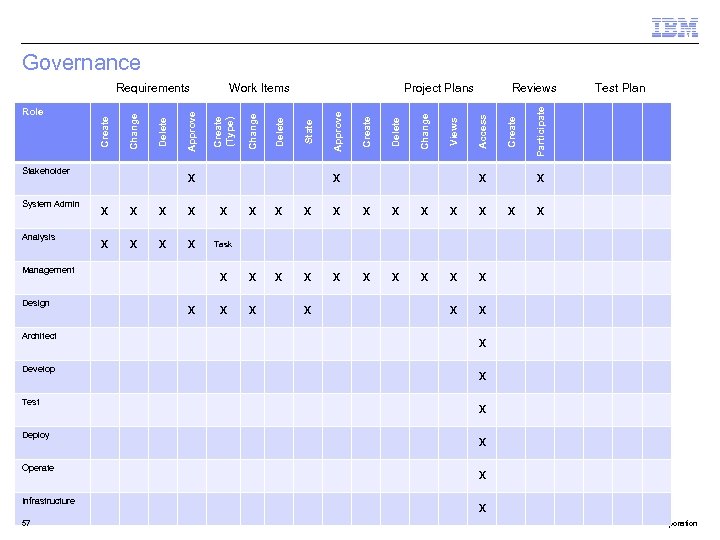
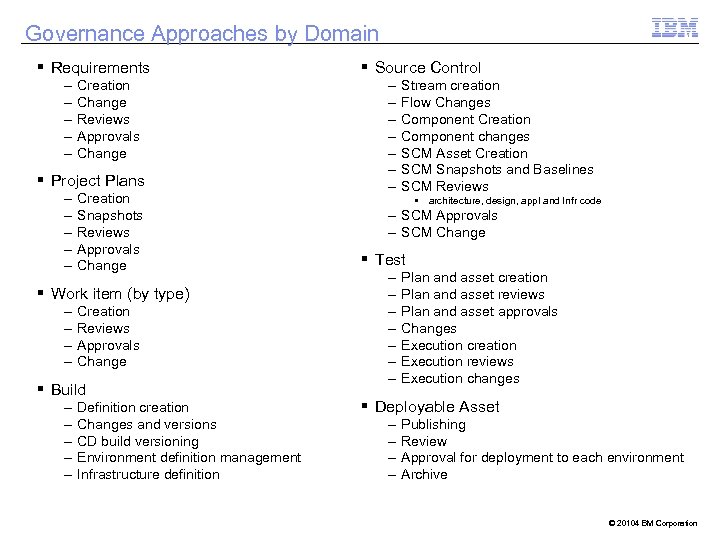 Governance Approaches by Domain § Requirements – – – Creation Change Reviews Approvals Change § Project Plans – – – Creation Snapshots Reviews Approvals Change § Work item (by type) – – Creation Reviews Approvals Change § Build – – – Definition creation Changes and versions CD build versioning Environment definition management Infrastructure definition § Source Control – – – – Stream creation Flow Changes Component Creation Component changes SCM Asset Creation SCM Snapshots and Baselines SCM Reviews • architecture, design, appl and Infr code – SCM Approvals – SCM Change § Test – – – – Plan and asset creation Plan and asset reviews Plan and asset approvals Changes Execution creation Execution reviews Execution changes § Deployable Asset – – Publishing Review Approval for deployment to each environment Archive © 20104 BM Corporation
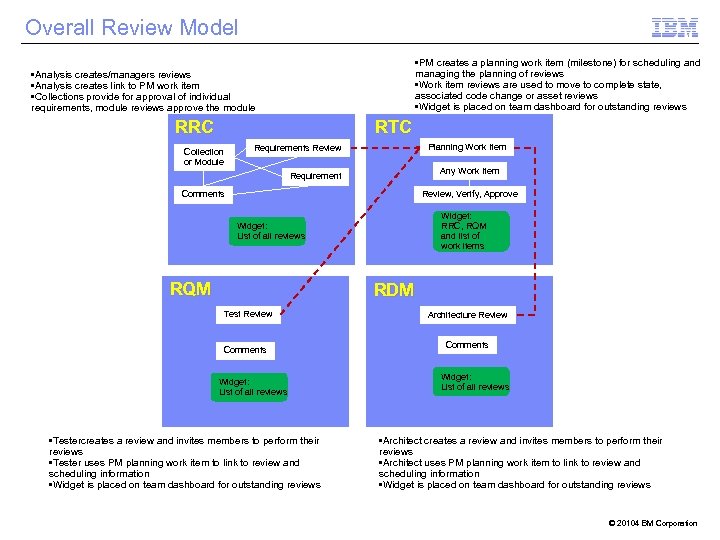
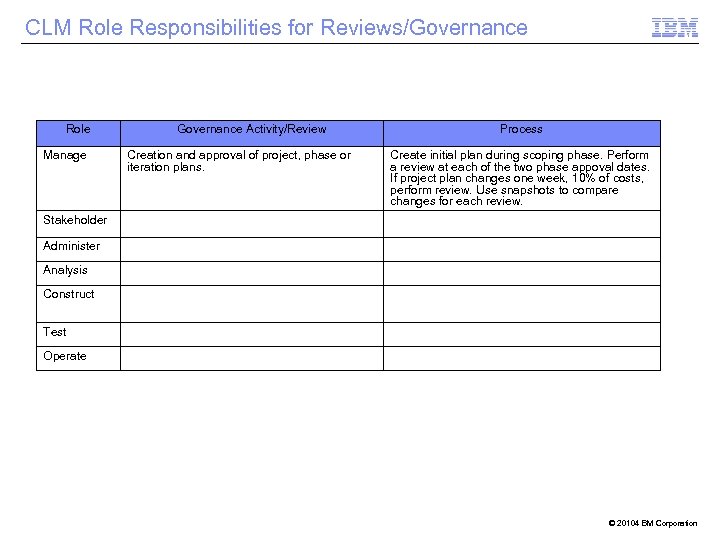 CLM Role Responsibilities for Reviews/Governance Role Manage Governance Activity/Review Creation and approval of project, phase or iteration plans. Process Create initial plan during scoping phase. Perform a review at each of the two phase appoval dates. If project plan changes one week, 10% of costs, perform review. Use snapshots to compare changes for each review. Stakeholder Administer Analysis Construct Test Operate © 20104 BM Corporation
 Governance Stakeholder System Admin Analysis Architect Develop Test Deploy Operate Infrastructure 57 X X X X X X X X X Task X X Test Plan Participate Create Reviews Access Views Change Delete Create Approve State Delete Change Project Plans X Management Design Work Items Create (Type) Approve Delete Change Role Create Requirements X X X X X © 20104 BM Corporation
 Overall Review Model • PM creates a planning work item (milestone) for scheduling and managing the planning of reviews • Work item reviews are used to move to complete state, associated code change or asset reviews • Widget is placed on team dashboard for outstanding reviews • Analysis creates/managers reviews • Analysis creates link to PM work item • Collections provide for approval of individual requirements, module reviews approve the module RRC RTC Collection or Module Planning Work Item Requirements Review Any Work Item Requirement Comments Review, Verify, Approve Widget: RRC, RQM and list of work items Widget: List of all reviews RQM RDM Test Review Comments Widget: List of all reviews • Testercreates a review and invites members to perform their reviews • Tester uses PM planning work item to link to review and scheduling information • Widget is placed on team dashboard for outstanding reviews Architecture Review Comments Widget: List of all reviews • Architect creates a review and invites members to perform their reviews • Architect uses PM planning work item to link to review and scheduling information • Widget is placed on team dashboard for outstanding reviews © 20104 BM Corporation
 Review Model Descriptions Decision Description Reason © 20104 BM Corporation
 Versioning CLM information and assets 6 © 2014 IBM Corporation
 RTC Versioning § Capabilities – Asset SCM using the eclipse client, web UI or other supported clients to deliver/load versions. Create components that align to application components to organization software or other files. Use streams and workspaces to collaborate changes so that members on same stream can exchanges (change sets) and merge (automatically or manually) files continuously. SCM components baseline is used to capture a formal version at that time. Streams can be snap shot to baseline all of the components in the stream. Both can be used to compare and then a feature specific view of the differences can be used. Builds results can be linked to the baseline of components used for the build. – Work item history is maintained in a running list in a tab on each work item. Snapshot plans to 1) capture the specific content of a plan based on the work items in the plan and 2) promote the work items linked by “tracked” links to an associated cross project plan. The snapshots can be compared and a UI view of the differences can be viewed. – Build definitions are versioned by naming convention. Build results have a build identifier. § Version control process – SCM: Use the best practices for stream strategy and delivery in jazz. net. Use a continuous check in to the repository workspace process. Deliver to team stream continuously and accept changes to deconflict individual change sets versus groups of changes. – Plans: Use snapshots to perform reviews/approvals at organizational project methodology. Usually this is a two step process to define the project plans where you can snapshot at each of these two steps. Then snapshot in preparation for any scope changes that require approval and to update data to cross project plans. – Manage build definition version by naming convention. Manage them in team areas (excluding visibility the non-team members to limit the list of build definitions for a single developer. 61 © 20104 BM Corporation
 RRC Versioning § Capabilities – RRC – each requirements object’s versions (based on saves) can be viewed from UI. A snapshot of the repository can be taken, then at a later time you can view the repository based on its state at the time of the snapshot. However, when managing requirements, new versions should be created using a copy/paste process to allow for multiple teams creating new versions in parallel. Define a specific link type to identify those copies under revision. Once approved, replace or apply the approved changes to the original. When making revisions, create project relevant links to work items/test cases from copy. Links to test cases should be moved when requirement is approved/implemented. Repository snapshots are used to capture all information at a point in time. A user can then view and navigate the information for a snapshot. § Version control process – New Requirements: • Create in a team or project folder • Use a tag/attribute to categorize as under development • Use the locks to limit concurrent changes to a single requirement, module, collection • View artifact history (revision or audit history) and restore requirement to earlier versions – Reusing existing requirements • Define a folder/team areas to store approved requirements for reuse. Use only those that are maintained long term such as system or technical requirements. Maintain links to their test cases which should also be stored similarly • Create a copy of the requirement for reuse and paste into the current project folder • Create a specialized link that indicates the requirement is under revision and link the original and new copy. Use a view to see which requirements are under revision and by which teams • Update the links, attributes and other information to reflect the change • Collaborate across teams who are changing the same requirement • After the requirement change is approved / implemented, update the original requirement with the changes and include links to the new test cases. 62 © 20104 BM Corporation
 RQM Versioning § Capabilities – RQM –Snapshot to create a read-only version of a test artifact. It includes the test artifact itself, such as a test plan, and the associated test artifacts, such as the test cases, the test case execution records, test suites, and the test results. If you are working with a master test plan, the snapshot will also include all child test plans and their associated artifacts. After you create a snapshot, you can use it to create an editable test artifact that represents a previous version of a test plan, test case, test suite, or test script. § Version control process – New Test Assets: • Create in a team area and group/link as needed • Use a tag/attribute to categorize as under development • Use the locks to limit concurrent changes to a single requirement, module, collection • View artifact history (revision or audit history) and restore requirement to earlier versions – Reusing existing requirements • Define a folder/team areas to store approved test assets for reuse. Use only those that are maintained long term test cases. Maintain links to their test cases which should also be stored similarly • Snapshot the test artifact. Create a new artifact from the snapshot and place it in the current project’s folder. • Update the links, attributes and other information to reflect the changes • After the test artifact change is approved / tested, if appropriate, relocate it to the reuse team area. 63 © 20104 BM Corporation
 RDM Versioning § Capabilities – Source control within RDM only. User’s clients connect directly to RDM server to continiuously change design assets on server. Use locking to perform parallel changes (similar to RRC/RQM/RTC). Requires users to be very collaborative. Works at the model resource level. – SCM outside of RDM (CC/RTC): Models created offline in the RSA or Rhapsody thick client and version controlled using RTC/other SCM system processes. When model is available for sharing/comment/review, it is published to RDM. Changes grouped into change sets. § Version control process – Source control within RDM only. Clients connect directly to RDM server. Users do direct editing of designs and change control on server providing a more simplified environment. Use locking to manage conflicts with concurrently changing same object. Works at the model resource level. – SCM outside of RDM (CC/RTC): Models created offline in the RSA or Rhapsody thick client and version controlled with SCM system. When model is available for sharing/comment/review, it is published to RDM. Changes grouped into change sets. 64 © 20104 BM Corporation
 Measures 6 © 2014 IBM Corporation
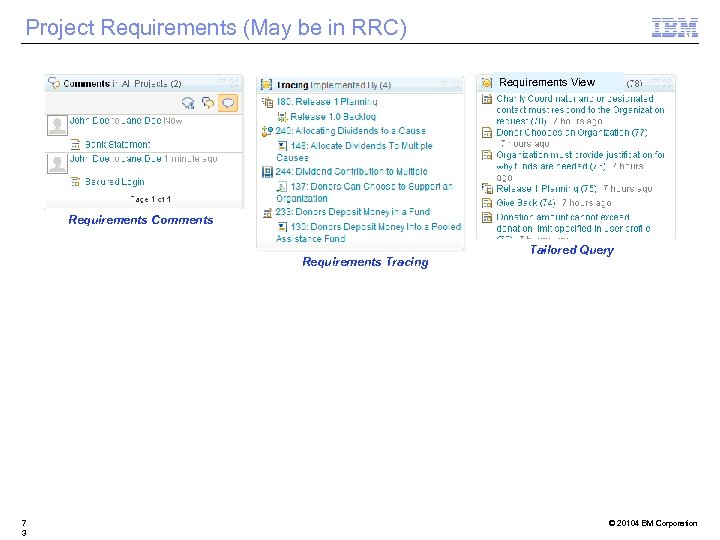
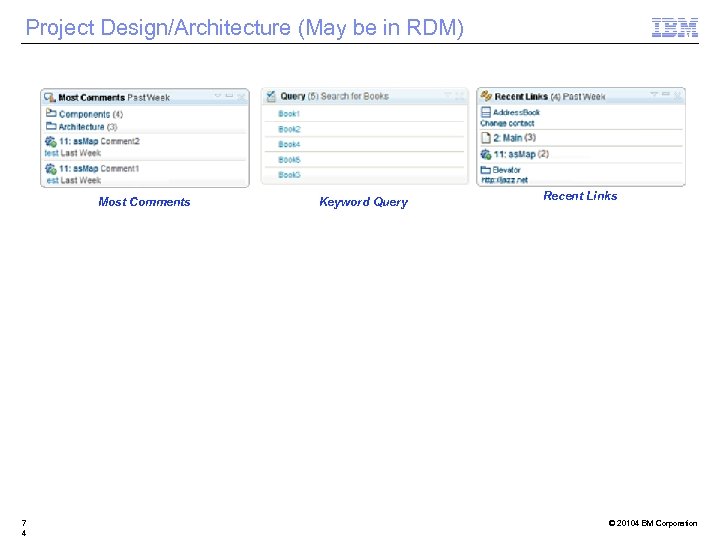
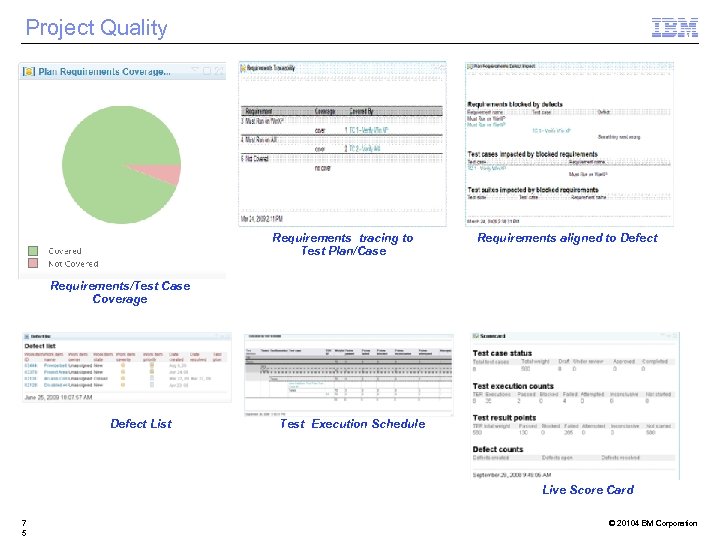
 Dashboards § Organization wide (executive) – RPE, Insight or RRDI Tailored Reports* – RTC project dashboard • Cross Organization, Estimate versus Actuals, Time to complete work items, Defect trends, Build results trends, Test outcomes § Program or Domain – RTC Project Area dashboard – Program/project monitoring – See following tabs § Project – RTC Team Area dashboard – RRC Dashboard for Analysts – RQM Dashboard for Testers – See following tabs § Personal – “My” Widgets for personalized views • Work Items • Reviews • Queries * Depending on number of JTS servers and reporting needs © 20104 BM Corporation
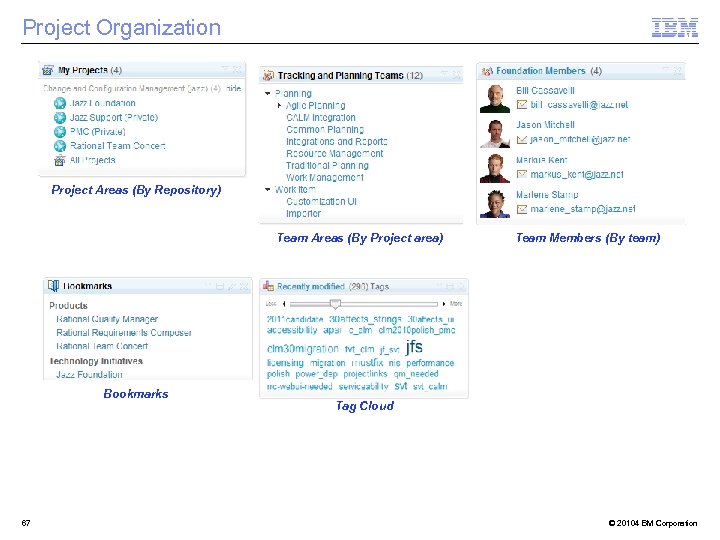 Project Organization Project Areas (By Repository) Team Areas (By Project area) Bookmarks 67 Team Members (By team) Tag Cloud © 20104 BM Corporation
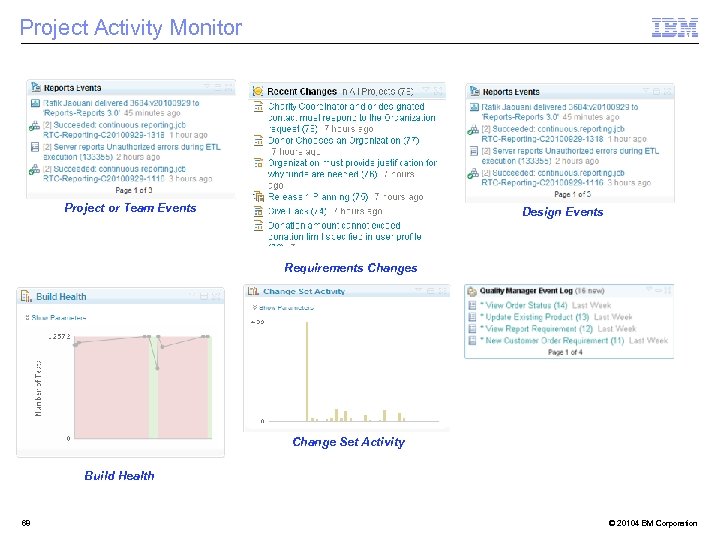 Project Activity Monitor Project or Team Events Design Events Requirements Change Set Activity Build Health 68 © 20104 BM Corporation
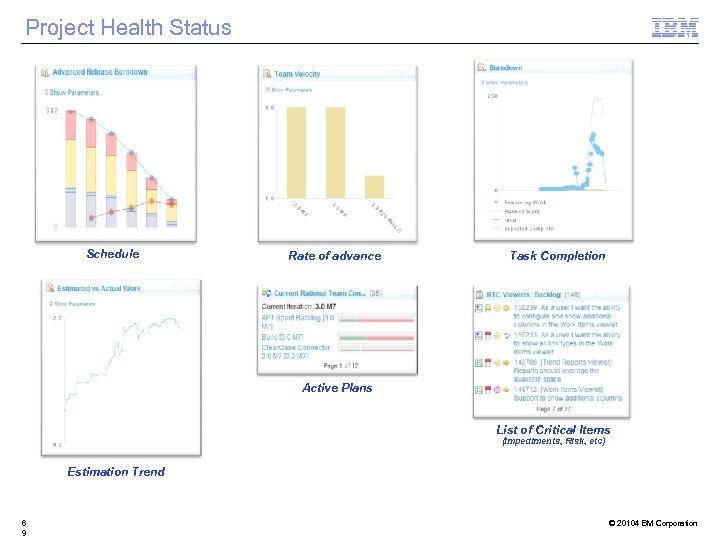 Project Health Status Schedule Rate of advance Task Completion Active Plans List of Critical Items (Impediments, Risk, etc) Estimation Trend 6 9 © 20104 BM Corporation
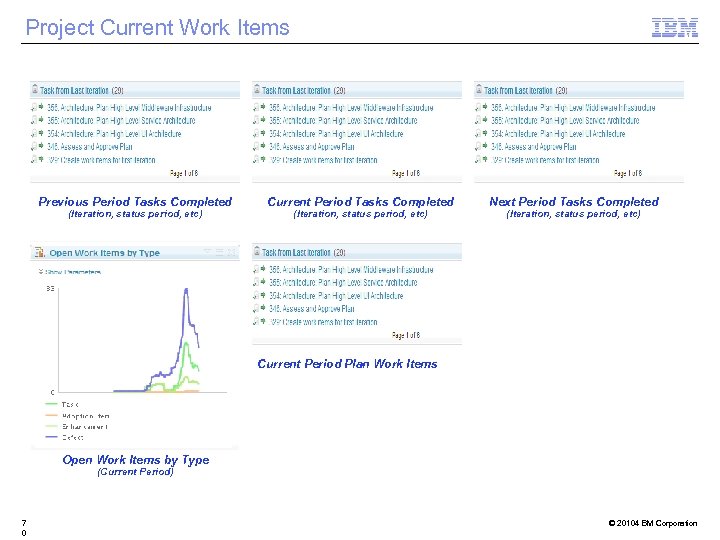 Project Current Work Items Previous Period Tasks Completed (Iteration, status period, etc) Current Period Tasks Completed (Iteration, status period, etc) Next Period Tasks Completed (Iteration, status period, etc) Current Period Plan Work Items Open Work Items by Type (Current Period) 7 0 © 20104 BM Corporation
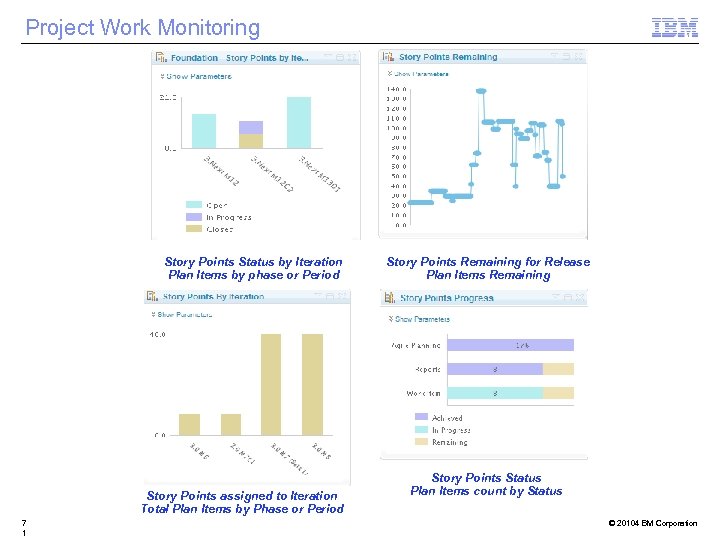 Project Work Monitoring Story Points Status by Iteration Plan Items by phase or Period Story Points assigned to Iteration Total Plan Items by Phase or Period 7 1 Story Points Remaining for Release Plan Items Remaining Story Points Status Plan Items count by Status © 20104 BM Corporation
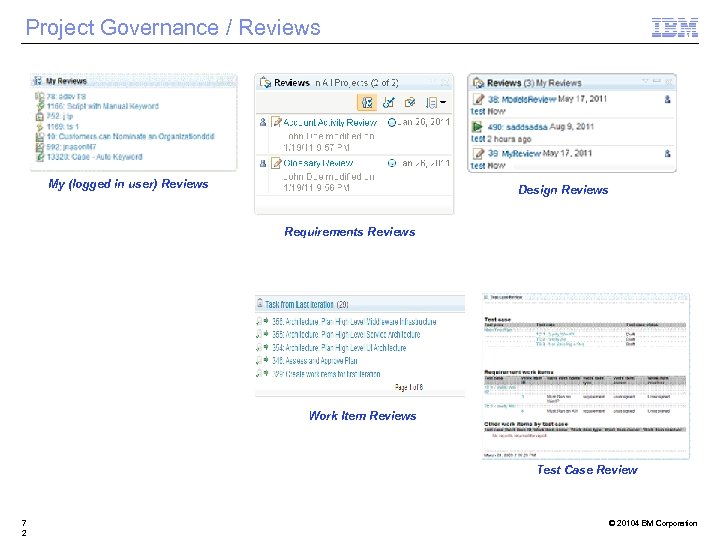 Project Governance / Reviews My (logged in user) Reviews Design Reviews Requirements Reviews Work Item Reviews Test Case Review 7 2 © 20104 BM Corporation
 Project Requirements (May be in RRC) Requirements View Requirements Comments Requirements Tracing 7 3 Tailored Query © 20104 BM Corporation
 Project Design/Architecture (May be in RDM) Most Comments 7 4 Keyword Query Recent Links © 20104 BM Corporation
 Project Quality Requirements tracing to Test Plan/Case Requirements aligned to Defect Requirements/Test Case Coverage Defect List Test Execution Schedule Live Score Card 7 5 © 20104 BM Corporation
 Design Decisions 7 © 2014 IBM Corporation
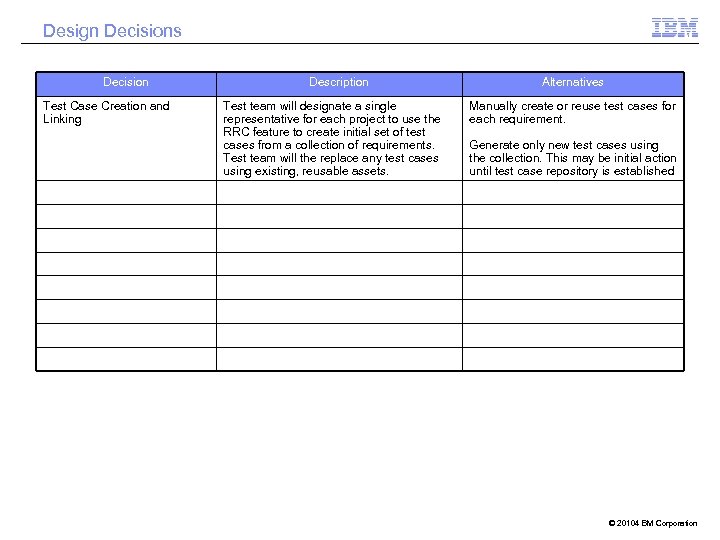 Design Decisions Decision Test Case Creation and Linking Description Test team will designate a single representative for each project to use the RRC feature to create initial set of test cases from a collection of requirements. Test team will the replace any test cases using existing, reusable assets. Alternatives Manually create or reuse test cases for each requirement. Generate only new test cases using the collection. This may be initial action until test case repository is established © 20104 BM Corporation
 Next Steps and Actions 7 © 2014 IBM Corporation
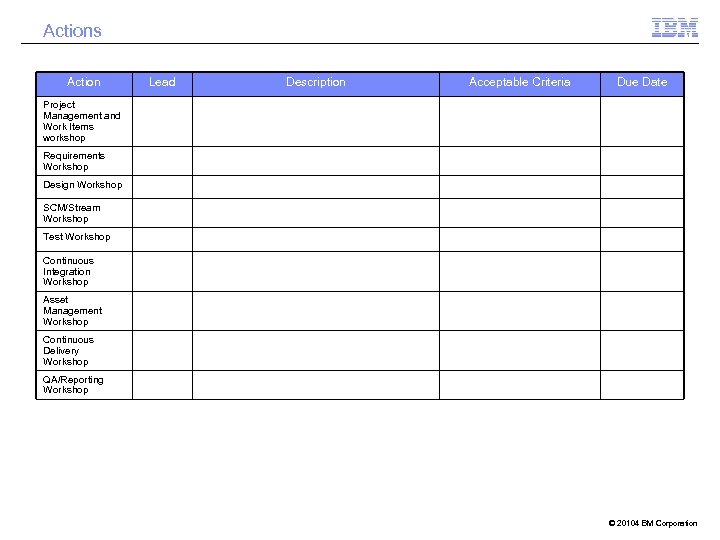 Actions Action Lead Description Acceptable Criteria Due Date Project Management and Work Items workshop Requirements Workshop Design Workshop SCM/Stream Workshop Test Workshop Continuous Integration Workshop Asset Management Workshop Continuous Delivery Workshop QA/Reporting Workshop © 20104 BM Corporation
 Questions © 2014 IBM Corporation