


 Скачать презентацию Engineering Workstations High performance microcomputers equipped with very
4e912b6e493936d55dc3261834f5620a.ppt
- Количество слайдов: 37
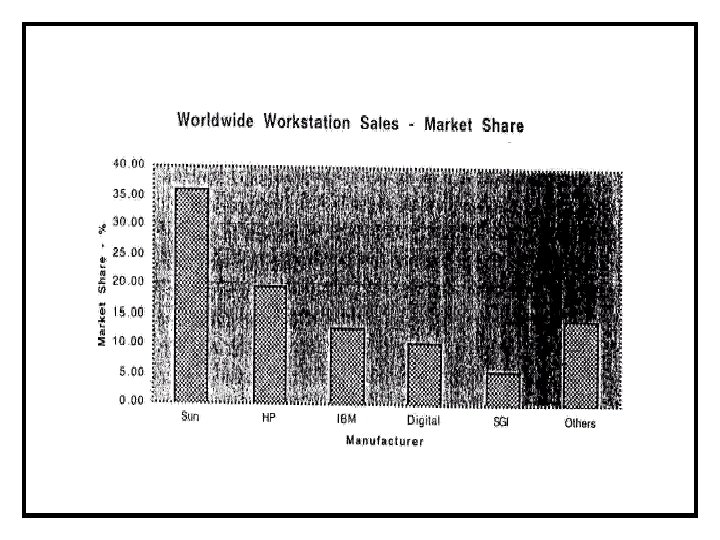
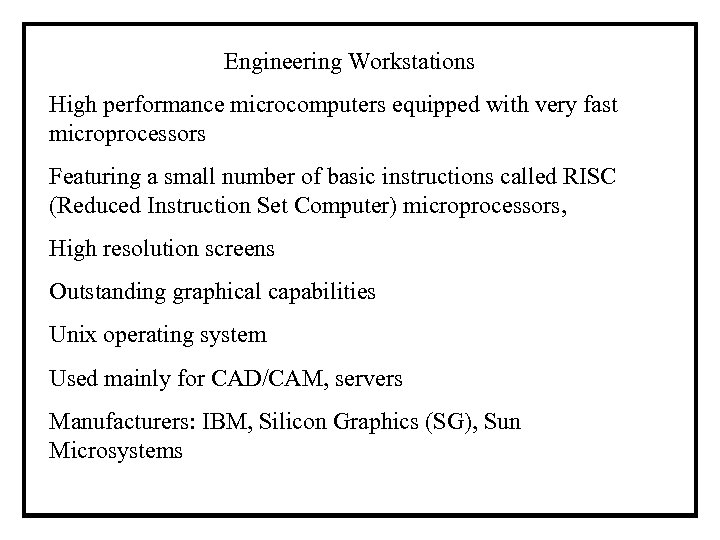 Engineering Workstations High performance microcomputers equipped with very fast microprocessors Featuring a small number of basic instructions called RISC (Reduced Instruction Set Computer) microprocessors, High resolution screens Outstanding graphical capabilities Unix operating system Used mainly for CAD/CAM, servers Manufacturers: IBM, Silicon Graphics (SG), Sun Microsystems
 Super Computers Many CPU’s (8, 16, 32, 64) are connected in parallel and work at very high speed on the same job Used mainly for very high speed computation that needed in physics, chemistry, molecular biology, weather forecasting and animated movies For many years there was embargo on exporting high performance computers and supercomputers to Israel Manufacturers: Cray, IBM, Origin
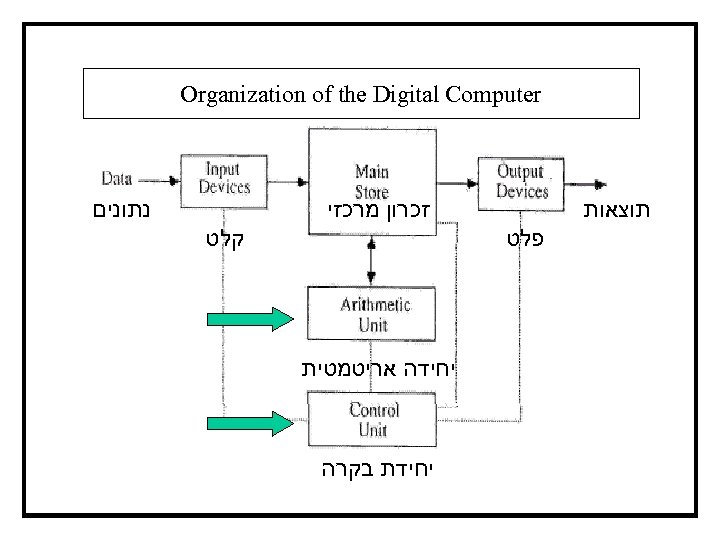
 Digital-Computer Organization Digital computers are general devices for manipulating symbolic information A general purpose computer can be instructed to accept, store, manipulate and display any kind of information that has been encoded in appropriate symbolic form. The computer can solve computable problems. A computable problem is one that can be stated unambiguously and for which an unambiguous terminating solution procedure (algorithm) can be outlined, step by step The computer (hardware) is a collection of inter-connected electronic (no moving parts) and electro-mechanical (some moving parts) devices, all directed by a central control unit.
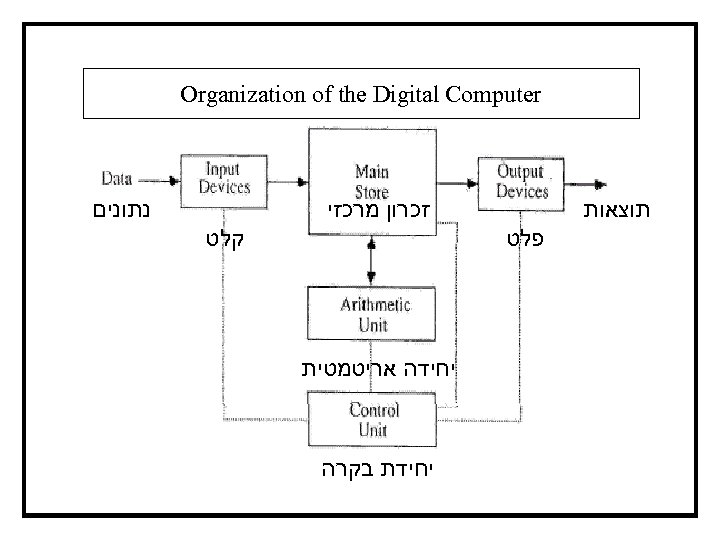 Organization of the Digital Computer זכרון מרכזי תוצאות פלט נתונים קלט יחידה אריטמטית יחידת בקרה
 Main Memory Is a place to save or store information that is currently being manipulated by other parts of the computer. The basic unit of the memory is an electronic element that can be in one of two possible physical states. The two state values of the storage elements represent the binary digits (bits) 0 and 1 A group of eight bits is called a byte. Memory size is expressed in Kilo (1024), Mega (1024*1024) or Giga (10243) bytes. There are 28 (256) distinct symbols that can be represented by one byte. Each character (lower and upper case Roman letters, decimal digits, punctuation marks and decimal digits) are equated with a unique integer value between zero and 255. The encoding scheme used by most computers for converting characters to bytes is called the ASCII standard.
 Main Memory Numbers such as π = 3. 14159 cannot be stored in a byte. Numbers with up to seven decimal digits can be stored in one memory word, which consists of four bytes. A value stored in a byte can be read without being altered. But if a new value stored in the byte its old value is destroyed. The memory access time is the time to retrieve the current content of one byte. This time is measured in nano (10 -9) seconds. The main memory is called RAM (random access memory) because the access time is the same regardless of the storage address involved. The RAM is volatile, the information in it is lost when the computer is turned off.
 Main Memory The ROM (read-only memory) is non-volatile. This memory can be read off but cannot be written to. The ROM contains important, frequently used programs. The main memory is inappropriate for storing information on a permanent basis because it is relatively small, volatile and relatively expensive. One option of storing information on a long term is the use of the floppy diskette. It consists of a 3. 5 inch diameter circular mylar sheet with a magnetizable surface coating similar to that of a magnetic audio recording tape. The diskette rotates inside the disk drive at a speed of 600 rpm. A recording head writes information in circular tracks and a playback head reads previously stored information.
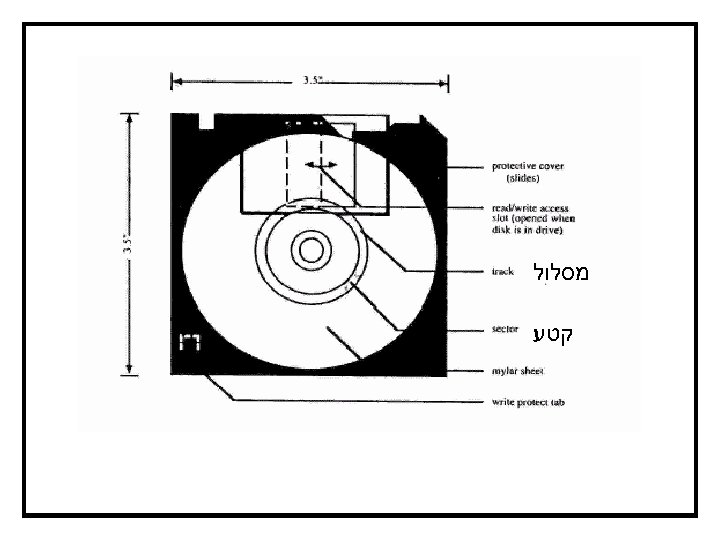 מסלול קטע
 Secondary (Disk) Storage The information on the diskette can be write protected by moving the write-protect tab, so that the square hole is open Before storing the information on a diskette it is formatted to create circular tracks where each track is divided into fixed number of sectors with each sector having 512 bytes. The total storage capacity is B = 512*2*s*t where t = 80 (number of tracks) and s = 18 (number of sectors for a track). Thus B = 1 474 560. By today’s standards the storage space of the diskette is too small, access time is too long and they fail too often, thus it is recommended to use other storage devices if possible
 Secondary (Disk) Storage The hard disk contains several rigid metal disks coated with magnetizable material and attached to a spindle rotating at about 3600 rpm. The disk drive includes an air filtering system to keep out dust. The advantages of the hard disk over the diskette are (1) large storage capacity (50 Gigabytes) (2) short access time and (3) high data-transfer rate. Disadvantages: (1) Typically there is one hard disk drive and the disk cannot be removed from the computer (2) Disk “crash” may result in a real disaster. Hard disk must be backed up regularly, on CD-ROMs, magnetic tapes or other hard disks
 Secondary (Disk) Storage The CD-ROM (compact disk read-only memory) has become the most widely used storage device. It is essentially identical to the digital audio compact disk (CD) Information is prerecorded in the form of small pits in a reflective coating on a substrate, and read by a laser beam aimed at the rotating surface. The absence of a reflected beam indicates the presence of a pit, which can represent a bit. The storage area of the CD-ROM is typically 700 MB
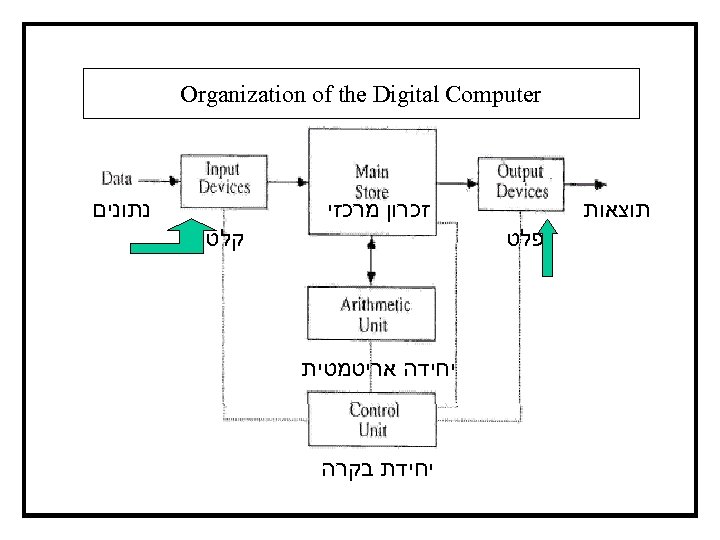 Organization of the Digital Computer זכרון מרכזי תוצאות פלט נתונים קלט יחידה אריטמטית יחידת בקרה
 Input/Output Units Any signal generating device can be used as input device; any equipment that accepts electronic signals can be made to function as output device. Most frequently used devices: Input: keyboard, mouse Output: video monitor, printer Input + output: Disk storage, network connection The keyboards for the PC contain four key sets: the typewriter keys, the numeric keypad keys, the program-function keys and the control keys.
 Input/Output Units The video monitor is typically used for the following tasks: 1. The user input from the keyboard and mouse is “echoed” for visual feedback. 2. The computer communicates with the user by displaying prompts for input and textual visual messages. 3. The results generated by the software used are displayed. 4. The principal screen characteristics of interest are: 5. Screen resolution (pixels or dots per inch 2) 6. Screen size 7. The number of colors that can be displayed simultaneously
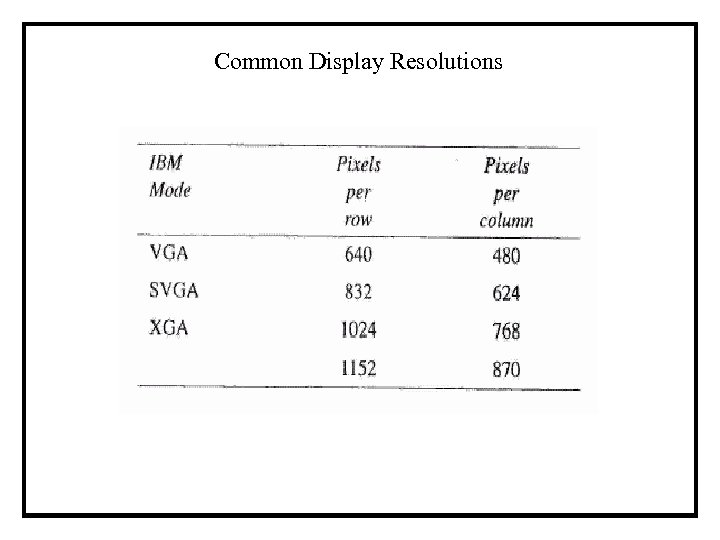 Common Display Resolutions
 Input/Output Units The information for the pixels (color, brightness etc. ) must be separately stored because of that higher resolution requires more storage area, higher computational speed and faster data transmission. There are two types of printers that are most widely used: inkjet and laser. The laser printer operates on xerographic principles similar to the copy machines. In the ink-jet printer small jets of ink are being ejected from a small orifice located on a moving head. The laser printer is much faster than the ink-jet but it is also much more expensive. Additional output device, important for engineers, is the plotter which is used to prepare large size drawings.
 Organization of the Digital Computer זכרון מרכזי תוצאות פלט נתונים קלט יחידה אריטמטית יחידת בקרה
 Arithmetic Unit The arithmetic (and logic) unit, ALU is the part of the computer that manipulates information retrieved from the main store. The ALU contains all the circuitry required to perform the standard arithmetic operations (addition, subtraction, multiplication, division) and also many non arithmetical ones on the operands stored in the registers. Each computer has a fixed number of distinctly different operations called machine instructions that the ALU unit is capable executing. The processors for PC have about 200 distinctly different instructions and they are called CISC (Complex Instruction Set Computers).
 The Arithmetic Unit Workstation processor have smaller instruction sets than PC (typically 50 basic instructions) and called RISC (Reduced Instruction Set Computers). RISC processors are faster and cheaper to produce than CISC processors. The Control Unit The control unit supervises the sequence of activities taking place in the computer. The control unit decides when and with which input device to bring information into the memory, where to place this information, which operands are to be retrieved from the memory and sent to the ALU for manipulation, what sequence of operations to be performed by the ALU, where to put the results in the memory and what information to display.
 The Control Unit The principal purpose of the control unit is to interpret individual machine instructions. To solve a particular problem the control unit must be provided with a sequence of individual machine instructions. In order to tell the control unit what to do the problem must be unambiguously defined and a step by step procedure (algorithm) must be developed to solve it. Then the algorithm must be transcribed into a sequence of individual machine instructions (a program) so that the problem can be solved. The computer is capable to execute millions of instructions per second (MIPS). To provide instructions in such a high rate the machine instructions are encoded in sequences of binary digits and stored in sequential addresses of the main memory.
 The Control Unit The digital code used is called the machine’s language and it is different for each model or family of computer. In the machine language program each bit sequence contains a part of the operation code (opcode) and another part of the address of the operand. Writing an error-free program in the machine language is very difficult and extremely tedious. Today the programs are written using symbolic and high level languages. But these programs are translated (compiled) to machine language programs because the control unit understands only programs written in its own machine language.
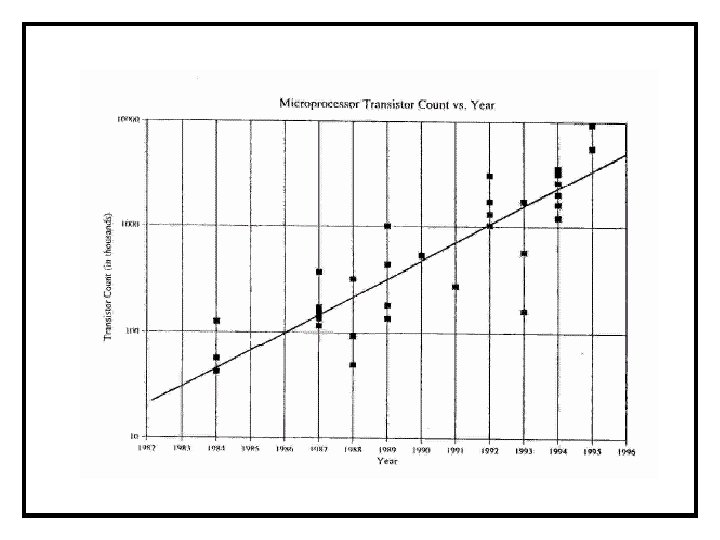
 The Microprocessor The arithmetic and control units taken together are called the CPU, (central processing unit) or simply the processor. In microcomputers the CPU consists of a single electronic microchip called a microprocessor. The “power” of a microcomputer strongly depends on: The number of transistors in the microprocessor. The main memory access time. The number of parallel bits in the data path. The number of bits processes simultaneously by the processor. The clock speed of the microprocessor.
 The Microprocessor Timing of the microprocessor activity is determined bay an internal clock controlled by a quartz crystal. The clock speed is measured in MHz (Mega. Hertz) or millions of cycles per second. All else being equal the throughput of the microprocessor is roughly proportional to its clock speed. Individual processor instructions require different numbers of clock cycles for their completions so the number of MIPS processed depends on the nature of the program. All the microprocessors can perform arithmetic operations on integer operands. There are special processors needed to perform floating point instructions by the hardware. Today this capability is built into all the processors, special math coprocessors were used, before, for this purpose.
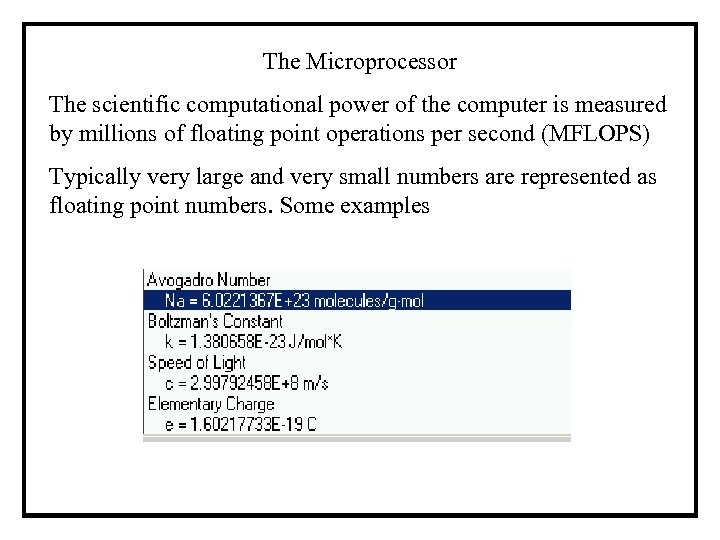 The Microprocessor The scientific computational power of the computer is measured by millions of floating point operations per second (MFLOPS) Typically very large and very small numbers are represented as floating point numbers. Some examples
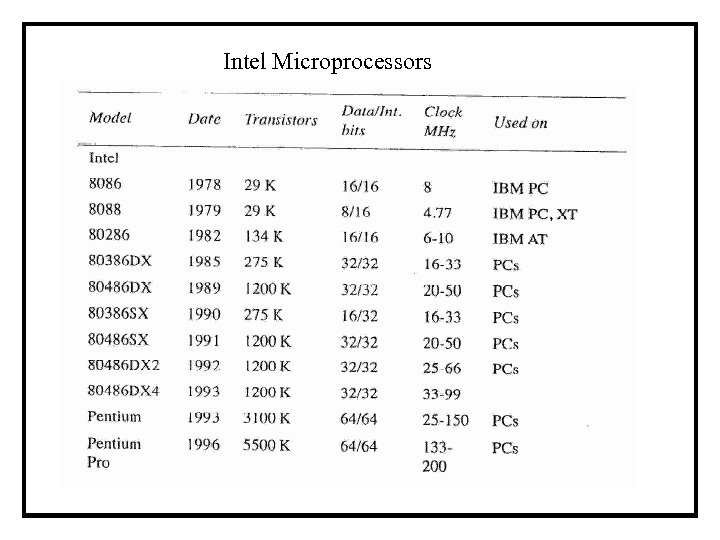 Intel Microprocessors
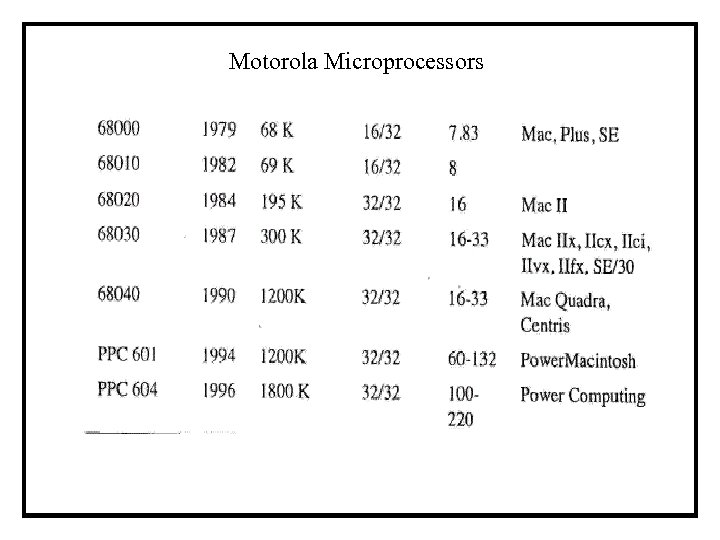 Motorola Microprocessors
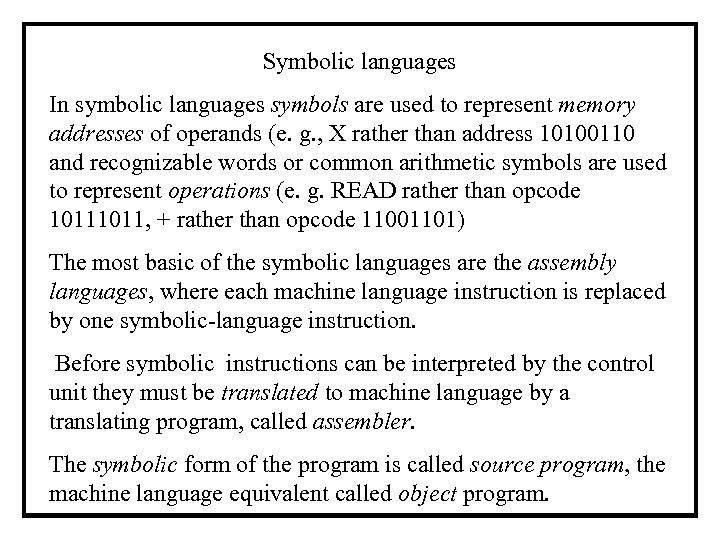 Symbolic languages In symbolic languages symbols are used to represent memory addresses of operands (e. g. , X rather than address 10100110 and recognizable words or common arithmetic symbols are used to represent operations (e. g. READ rather than opcode 1011, + rather than opcode 11001101) The most basic of the symbolic languages are the assembly languages, where each machine language instruction is replaced by one symbolic-language instruction. Before symbolic instructions can be interpreted by the control unit they must be translated to machine language by a translating program, called assembler. The symbolic form of the program is called source program, the machine language equivalent called object program.
 Symbolic languages Assembly languages are highly machine dependent not easily transportable and require tedious programming by professional programmers. They are used today only for tasks that cannot be done using higher level languages. Higher level or procedural languages, for scientific and engineering calculations, such as FORTRAN, BASIC, PASCAL, C and C++, enable writing complete algebraic equations without breaking them down into single instructions. They are machine-independent and transportable. Strictly speaking MATLAB is not a programming language, but it is very close to the C language. Before programs written in a symbolic language can be executed they must be converted to a machine language program in several steps.
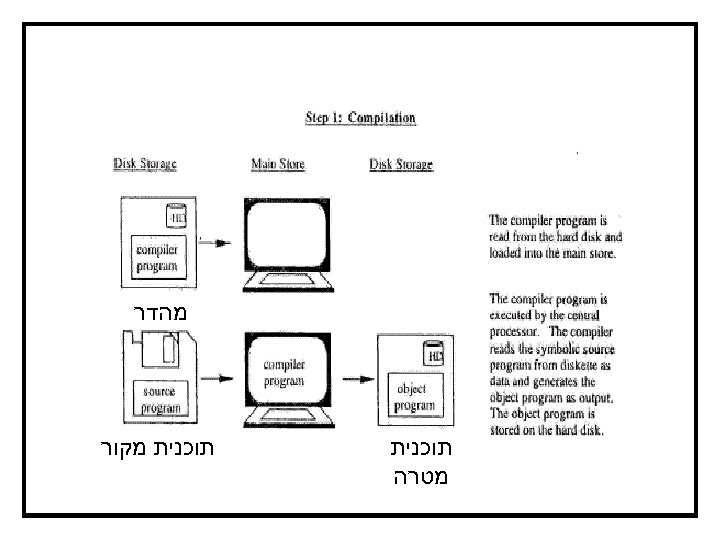 מהדר תוכנית מטרה תוכנית מקור
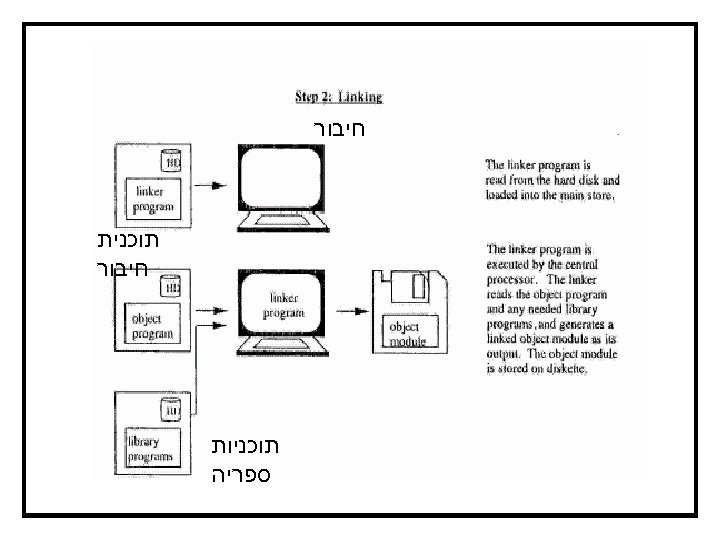 חיבור תוכנית חיבור תוכניות ספריה
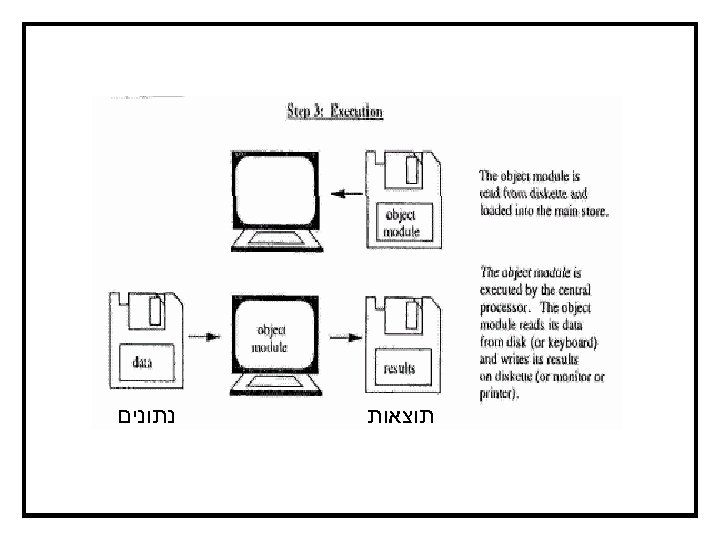 תוצאות נתונים
 Communication Between Computers Typically, communication takes place through the RS-232 asynchronous serial device that is built into the computer’s motherboard. RS-232 is a standard protocol for computer/computer communication. Asynchronous means that the information exchange can be initiated with independent timing and serial implies that the individual bits are transmitted in sequence, one after another. The communication interface is called a port. The data transmission rate is measured in baud (bits per second) Two computers can be hardwired over short distances. For long distances special communication lines or radio transmission over satellites are used.
 Communication Between Computers Telephone lines can also be used for computer communication. To use the telephone network the information must be reformatted using a modem (modulator – demodulator). The modulator is used to format the information received from the computers communication port to the requirements of the telephone network. On the receiving end the demodulator reformats the signal to the digital computer-compatible code. Wide-Area Networks High speed communication between remotely located computers is handled by packet-switching networks. Such wide-area networks (WANs) group bits that are to be transmitted by a single user to packets of say 512 bits which are transmitted in a high-speed burst over the network’s wide-bandwidth lines.
 Local-Area Networks Individual computers, called network nodes, are hardwired together and to one or more servers, to create a local-area network (LAN). The servers are responsible for logging users on and off, maintaining inter-computer communications and sharing network resources (printers large disk-storage units etc. ). Ethernet is a popular standard for LAN. Each computer is equipped with an Ethernet adapter that is installed in one of the computer’s expansion slots. Each node (computer) has a distinct Ethernet “address” to distinguish it from other nodes. Individual message packets can be put onto the network transmission lineby any computer at any time. Each adapter on the network examines every message packet as it passes by on the backbone cable, and retrieves only the ones that are addressed to its node.