


 Скачать презентацию Engineer Training XL 1500 Software 5 021 A
3ffe80896e865e0d545ee93b92dea64c.ppt
- Количество слайдов: 30
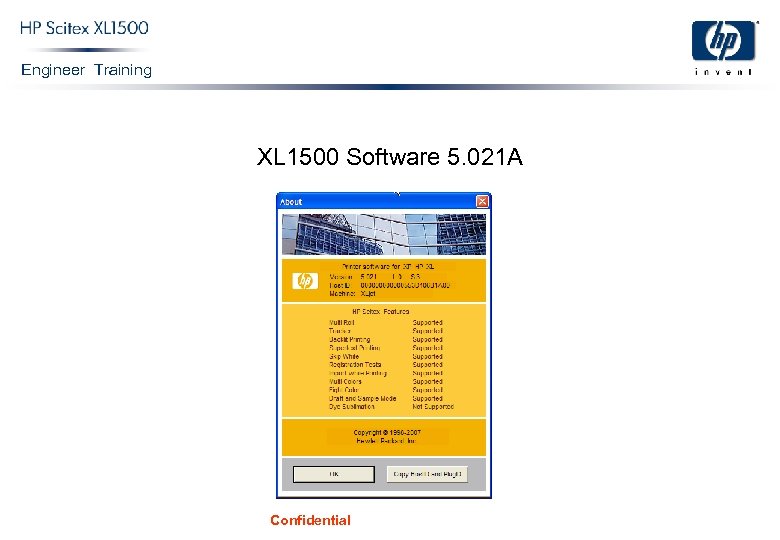 Engineer Training XL 1500 Software 5. 021 A Confidential
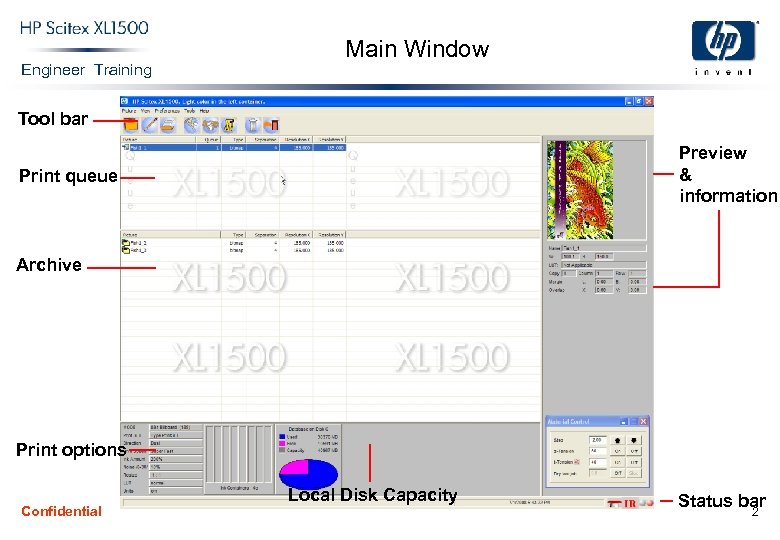 Engineer Training Main Window Tool bar Preview & information Print queue Archive Print options Confidential Local Disk Capacity Status bar 2
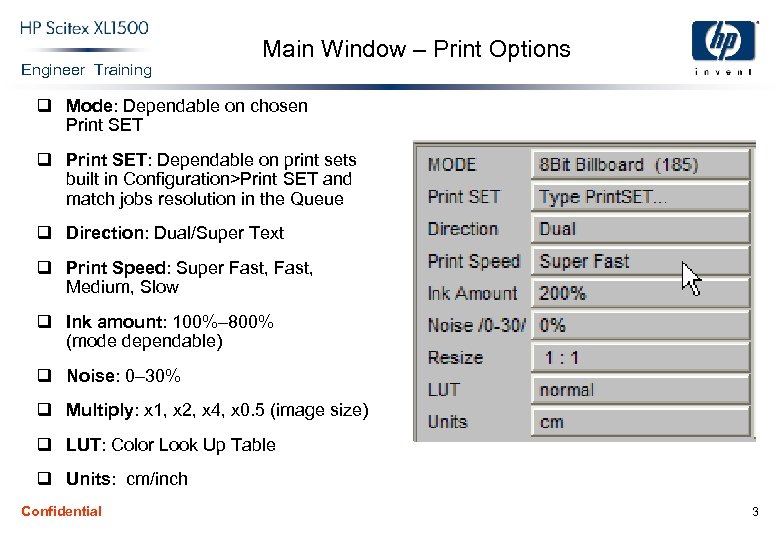 Engineer Training Main Window – Print Options q Mode: Dependable on chosen Print SET q Print SET: Dependable on print sets built in Configuration>Print SET and match jobs resolution in the Queue q Direction: Dual/Super Text q Print Speed: Super Fast, Medium, Slow q Ink amount: 100%– 800% (mode dependable) q Noise: 0– 30% q Multiply: x 1, x 2, x 4, x 0. 5 (image size) q LUT: Color Look Up Table q Units: cm/inch Confidential 3
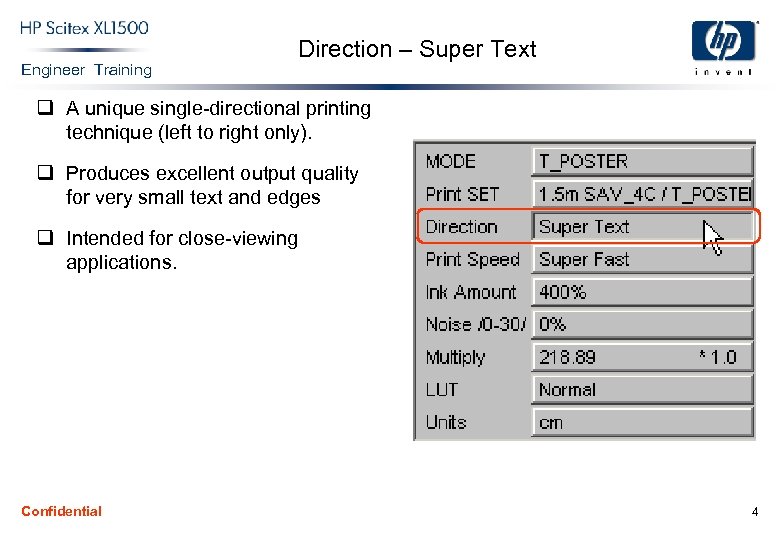 Engineer Training Direction – Super Text q A unique single-directional printing technique (left to right only). q Produces excellent output quality for very small text and edges q Intended for close-viewing applications. Confidential 4
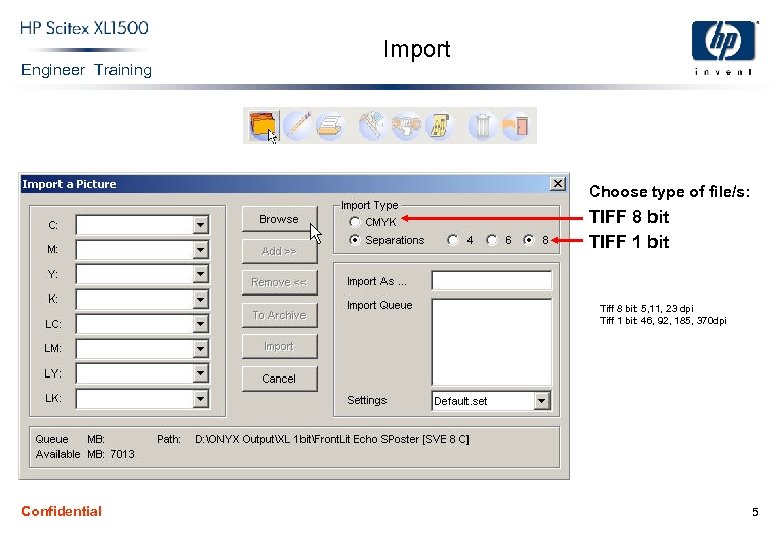 Engineer Training Import Choose type of file/s: TIFF 8 bit TIFF 1 bit Tiff 8 bit: 5, 11, 23 dpi Tiff 1 bit: 46, 92, 185, 370 dpi Confidential 5
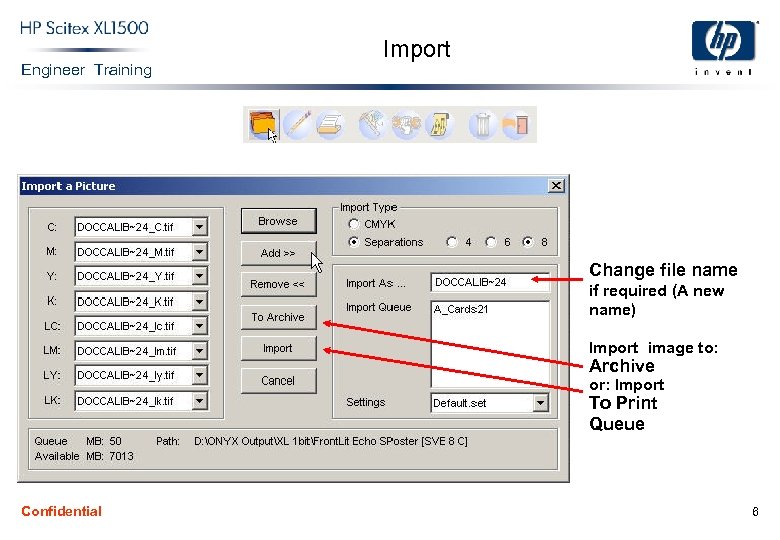 Engineer Training Import Change file name if required (A new name) Import image to: Archive or: Import To Print Queue Confidential 6
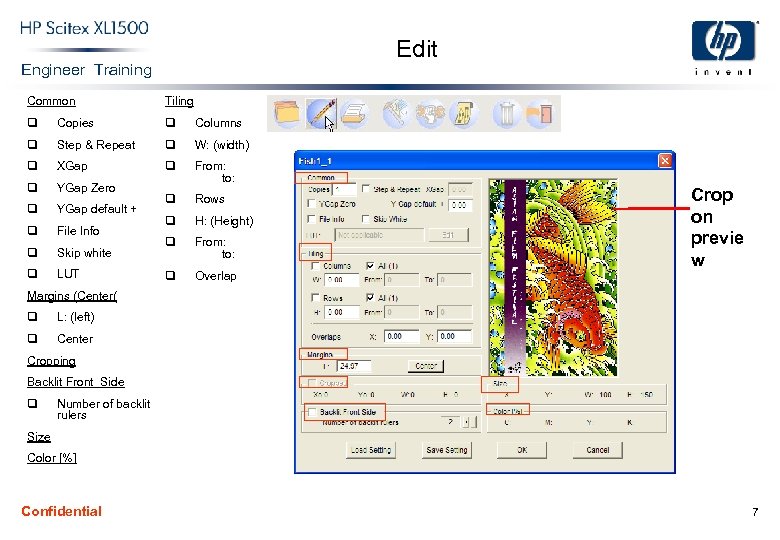 Edit Engineer Training Common Tiling q Copies q Columns q Step & Repeat q W: (width) q XGap q q YGap Zero From: to: q YGap default + q Rows q File Info q H: (Height) q Skip white q From: to: q LUT q Overlap Crop on previe w Margins (Center( q L: (left) q Center Cropping Backlit Front Side q Number of backlit rulers Size Color [%] Confidential 7
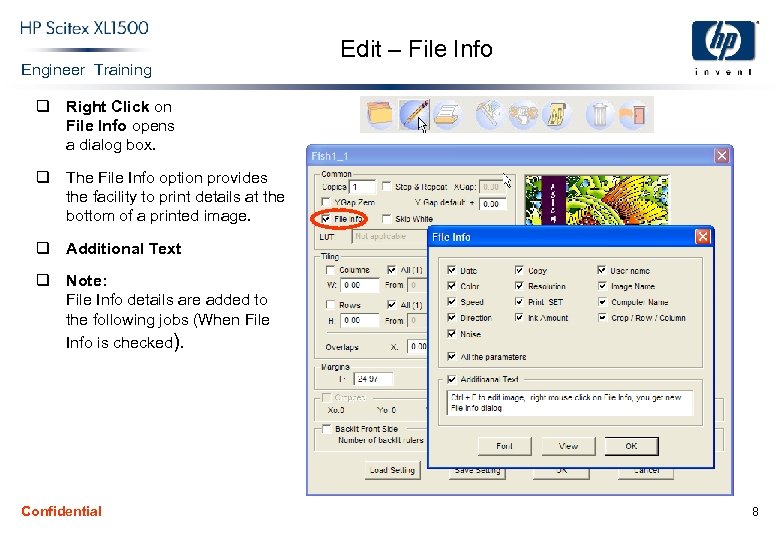 Engineer Training Edit – File Info q Right Click on File Info opens a dialog box. q The File Info option provides the facility to print details at the bottom of a printed image. q Additional Text q Note: File Info details are added to the following jobs (When File Info is checked). Confidential 8
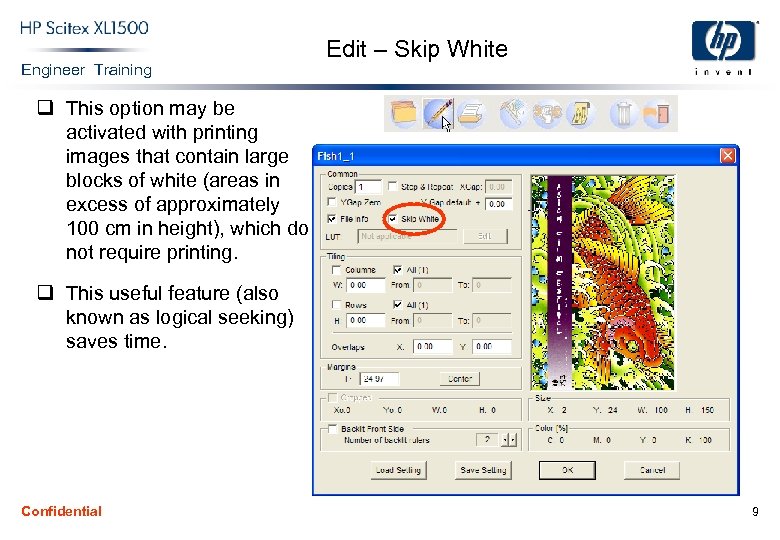 Engineer Training Edit – Skip White q This option may be activated with printing images that contain large blocks of white (areas in excess of approximately 100 cm in height), which do not require printing. q This useful feature (also known as logical seeking) saves time. Confidential 9
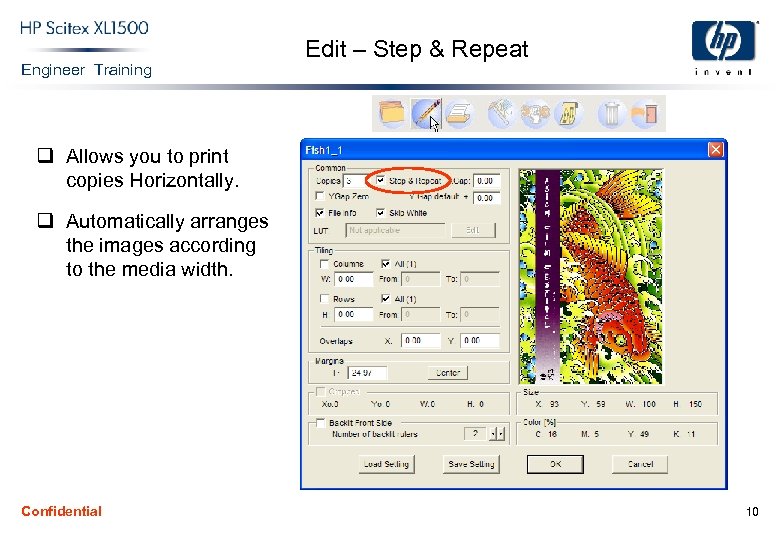 Engineer Training Edit – Step & Repeat q Allows you to print copies Horizontally. q Automatically arranges the images according to the media width. Confidential 10
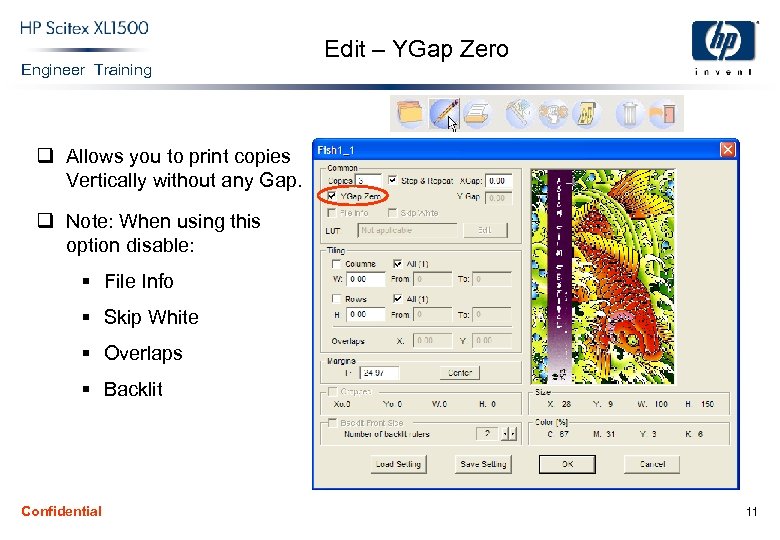 Engineer Training Edit – YGap Zero q Allows you to print copies Vertically without any Gap. q Note: When using this option disable: § File Info § Skip White § Overlaps § Backlit Confidential 11
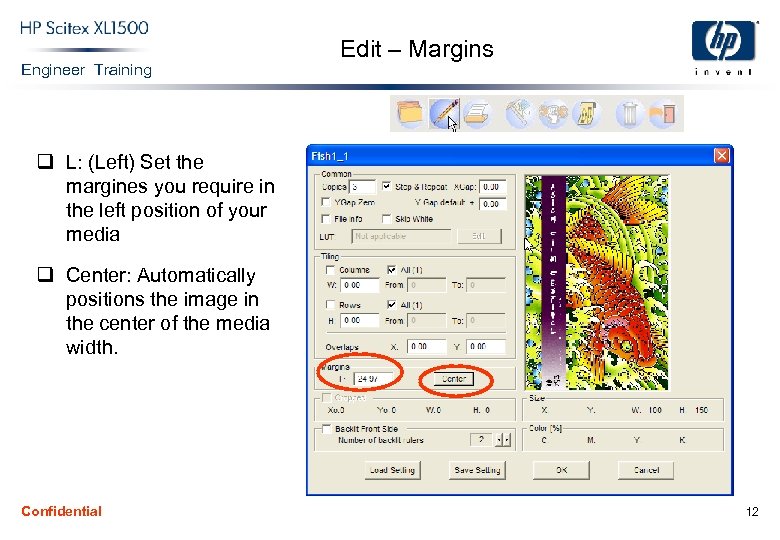 Engineer Training Edit – Margins q L: (Left) Set the margines you require in the left position of your media q Center: Automatically positions the image in the center of the media width. Confidential 12
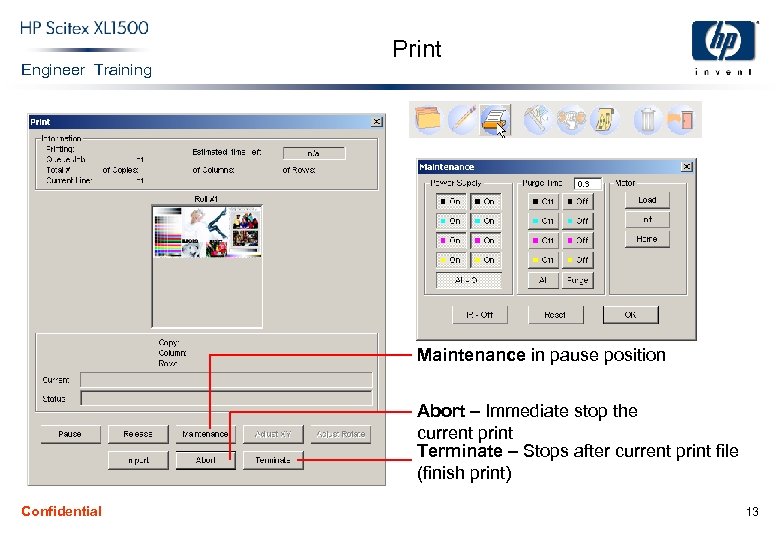 Engineer Training Print Maintenance in pause position Abort – Immediate stop the current print Terminate – Stops after current print file (finish print) Confidential 13
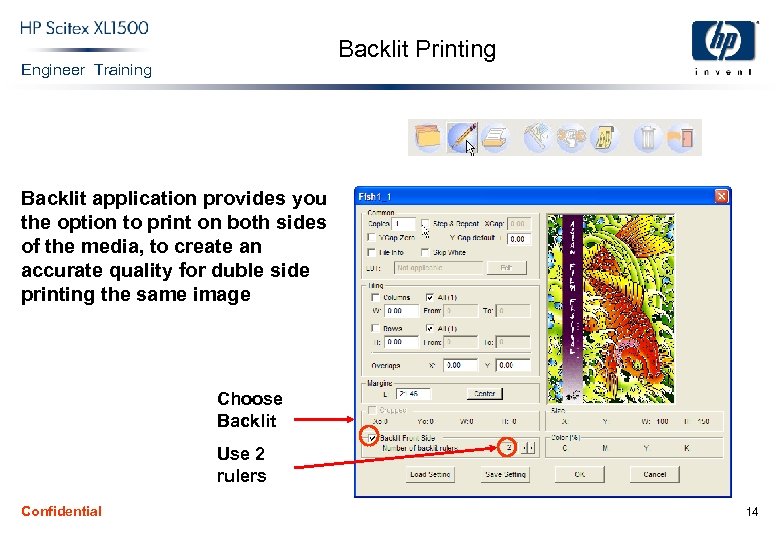 Backlit Printing Engineer Training Backlit application provides you the option to print on both sides of the media, to create an accurate quality for duble side printing the same image Choose Backlit Use 2 rulers Confidential 14
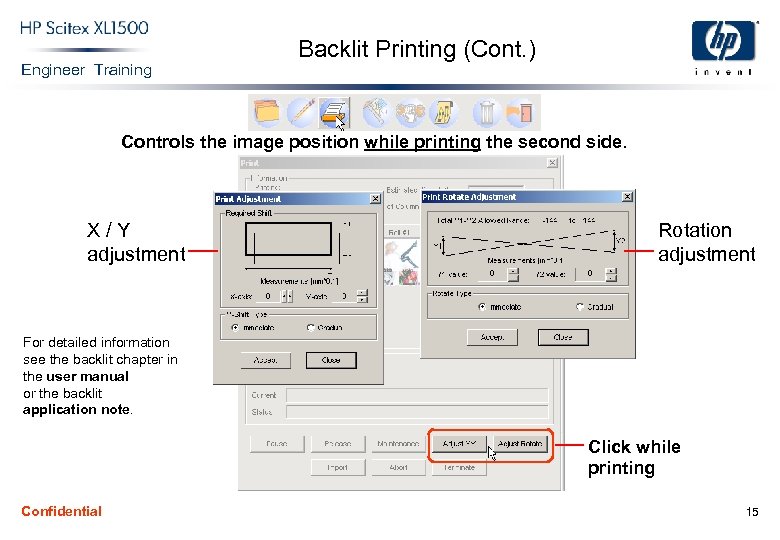 Engineer Training Backlit Printing (Cont. ) Controls the image position while printing the second side. X/Y adjustment Rotation adjustment For detailed information see the backlit chapter in the user manual or the backlit application note. Click while printing Confidential 15
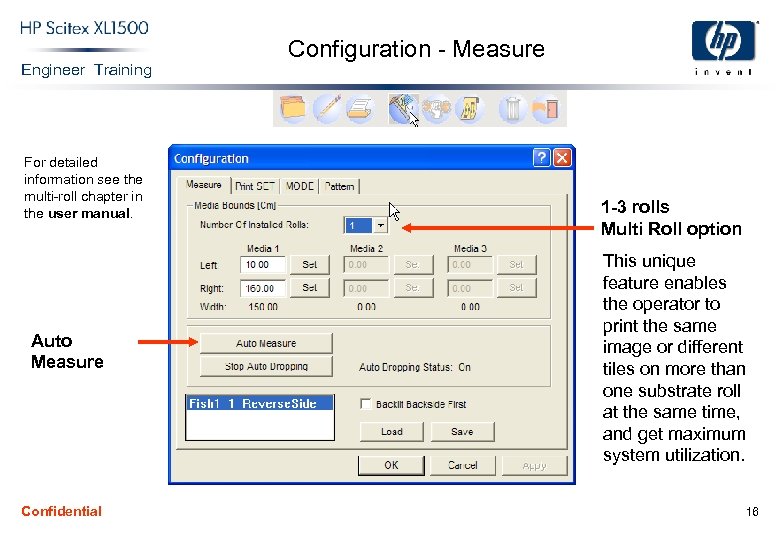 Engineer Training For detailed information see the multi-roll chapter in the user manual. Auto Measure Confidential Configuration - Measure 1 -3 rolls Multi Roll option This unique feature enables the operator to print the same image or different tiles on more than one substrate roll at the same time, and get maximum system utilization. 16
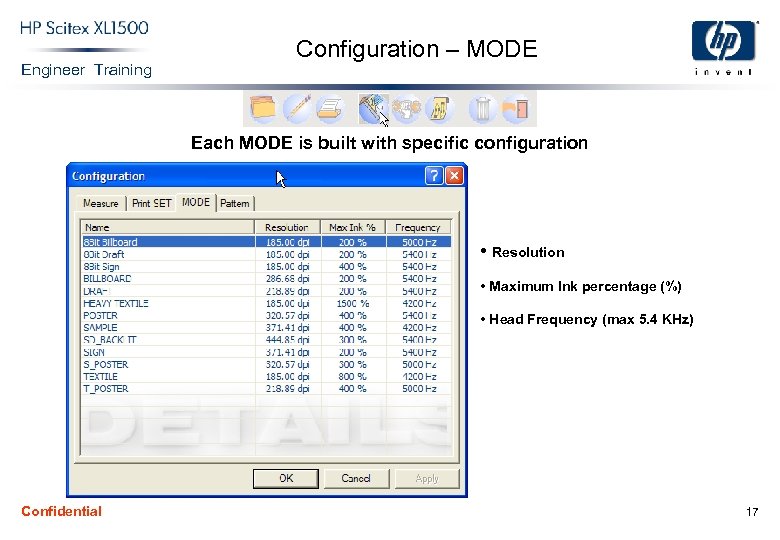 Engineer Training Configuration – MODE Each MODE is built with specific configuration • Resolution • Maximum Ink percentage (%) • Head Frequency (max 5. 4 KHz) Confidential 17
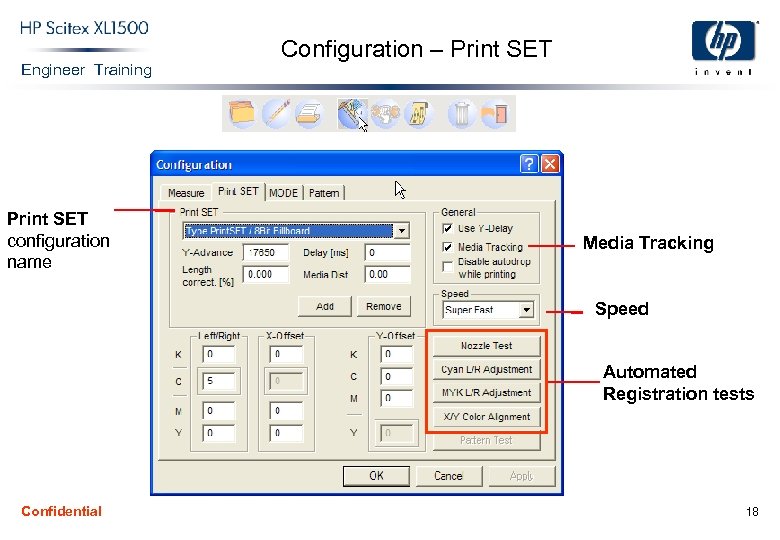 Engineer Training Print SET configuration name Configuration – Print SET Media Tracking Speed Automated Registration tests Confidential 18
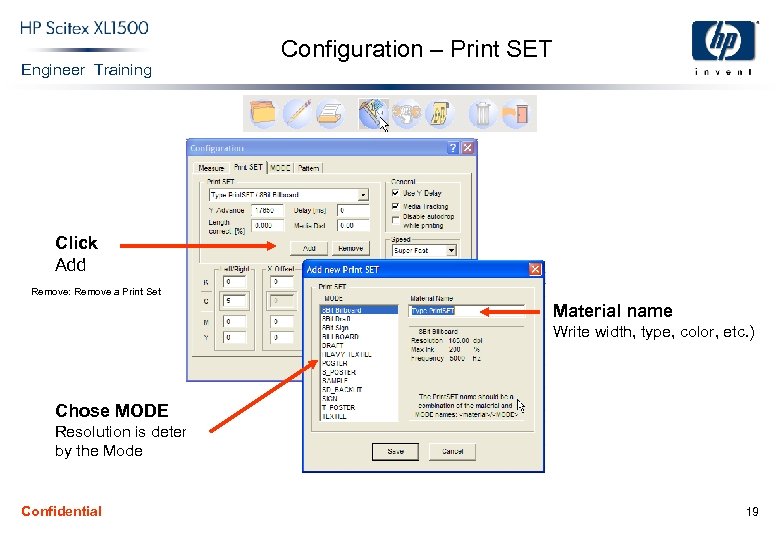 Engineer Training Configuration – Print SET Click Add Remove: Remove a Print Set Material name Write width, type, color, etc. ) Chose MODE Resolution is determined by the Mode Confidential 19
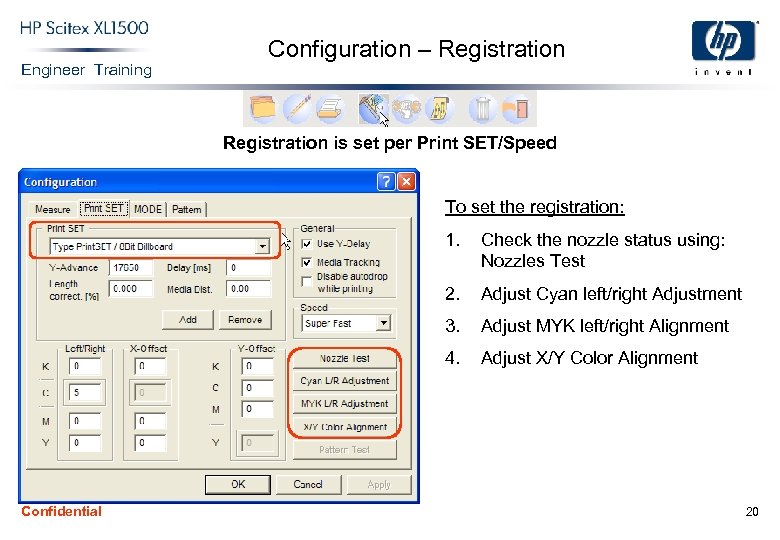 Engineer Training Configuration – Registration is set per Print SET/Speed To set the registration: 1. 2. Adjust Cyan left/right Adjustment 3. Adjust MYK left/right Alignment 4. Confidential Check the nozzle status using: Nozzles Test Adjust X/Y Color Alignment 20
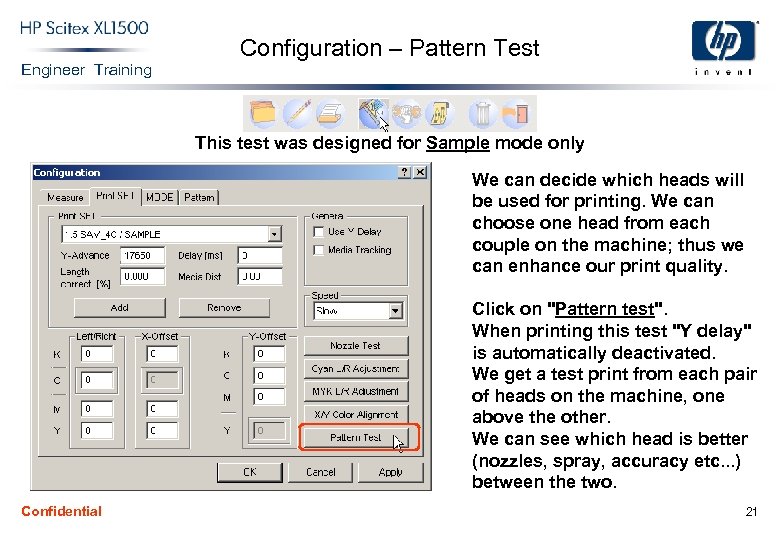 Engineer Training Configuration – Pattern Test This test was designed for Sample mode only We can decide which heads will be used for printing. We can choose one head from each couple on the machine; thus we can enhance our print quality. Click on "Pattern test". When printing this test "Y delay" is automatically deactivated. We get a test print from each pair of heads on the machine, one above the other. We can see which head is better (nozzles, spray, accuracy etc. . . ) between the two. Confidential 21
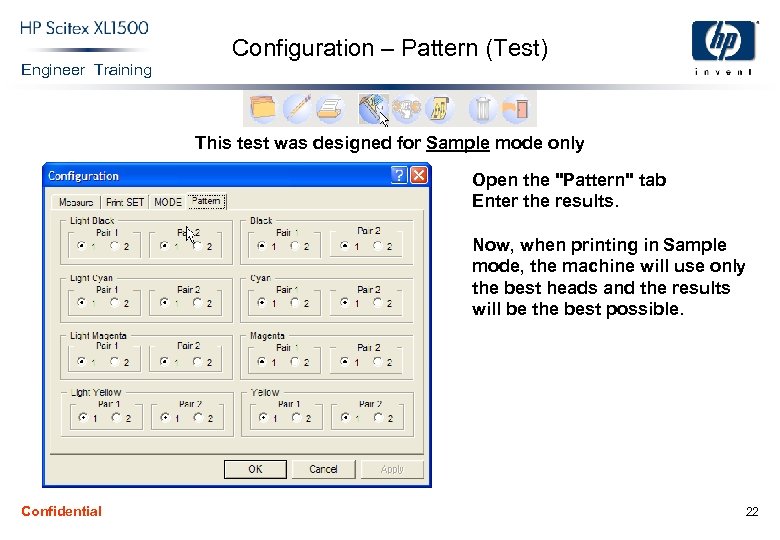 Engineer Training Configuration – Pattern (Test) This test was designed for Sample mode only Open the "Pattern" tab Enter the results. Now, when printing in Sample mode, the machine will use only the best heads and the results will be the best possible. Confidential 22
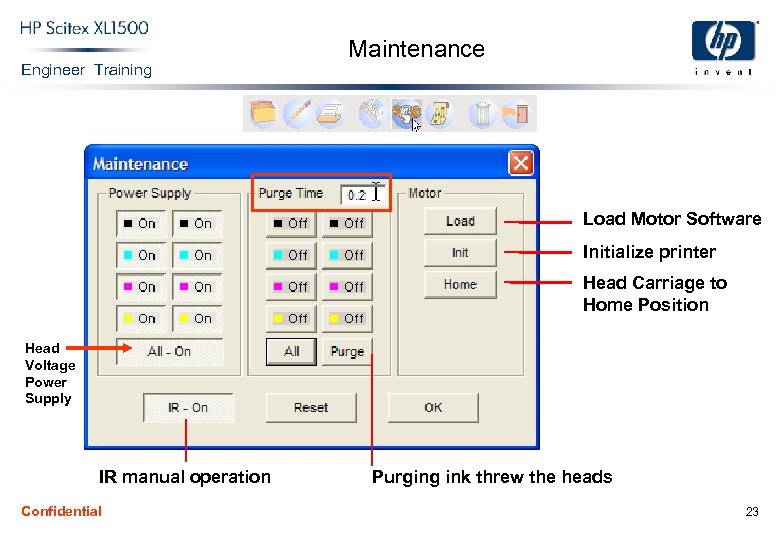 Engineer Training Maintenance Load Motor Software Initialize printer Head Carriage to Home Position Head Voltage Power Supply IR manual operation Confidential Purging ink threw the heads 23
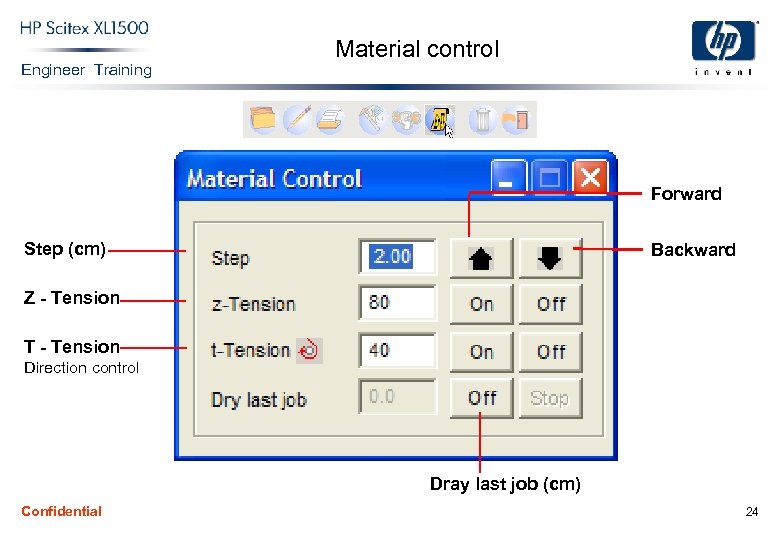 Engineer Training Material control Forward Step (cm) Backward Z - Tension T - Tension Direction control Dray last job (cm) Confidential 24
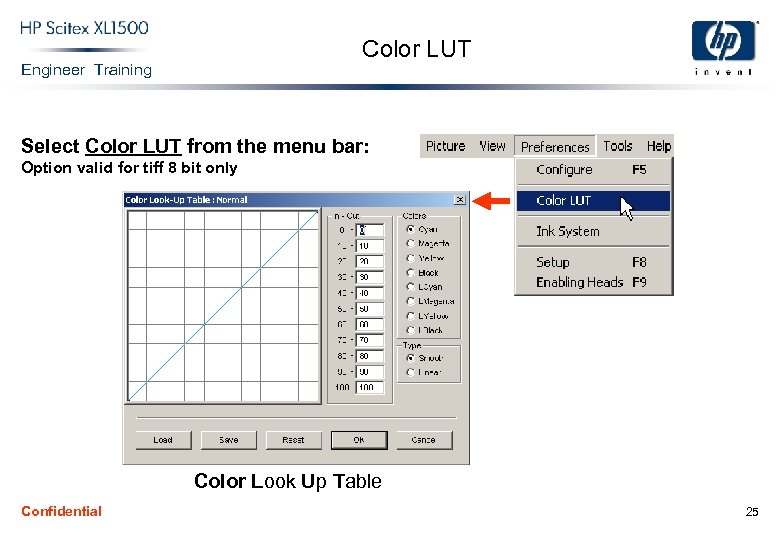 Color LUT Engineer Training Select Color LUT from the menu bar: Option valid for tiff 8 bit only Color Look Up Table Confidential 25
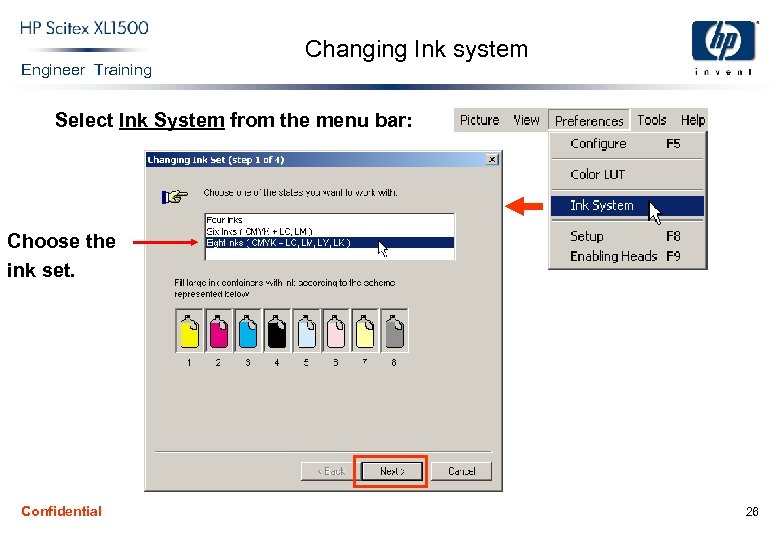 Engineer Training Changing Ink system Select Ink System from the menu bar: Choose the ink set. Confidential 26
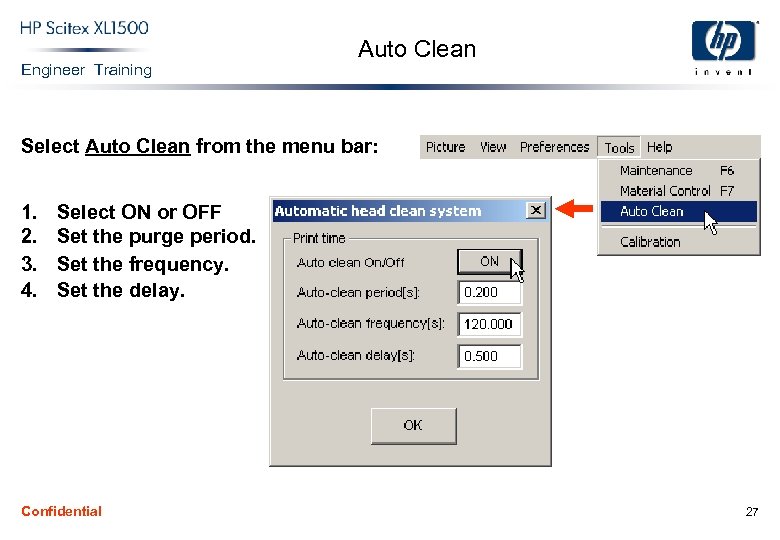 Engineer Training Auto Clean Select Auto Clean from the menu bar: 1. 2. 3. 4. Select ON or OFF Set the purge period. Set the frequency. Set the delay. Confidential 27
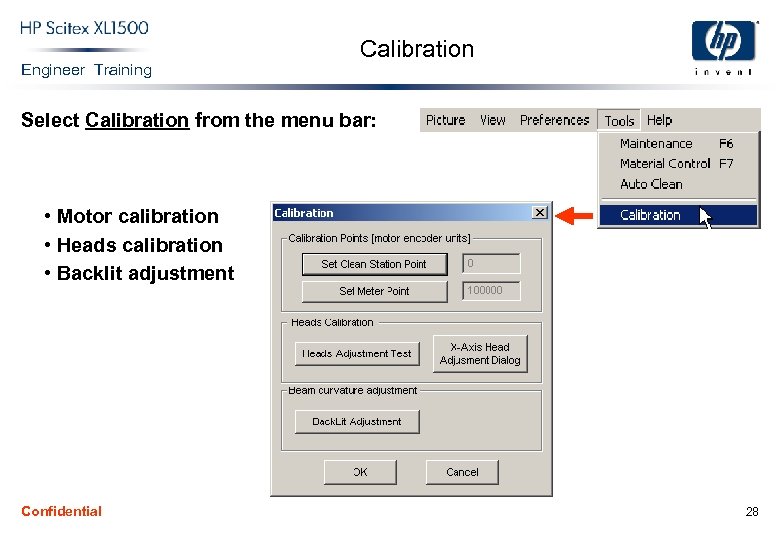 Engineer Training Calibration Select Calibration from the menu bar: • Motor calibration • Heads calibration • Backlit adjustment Confidential 28
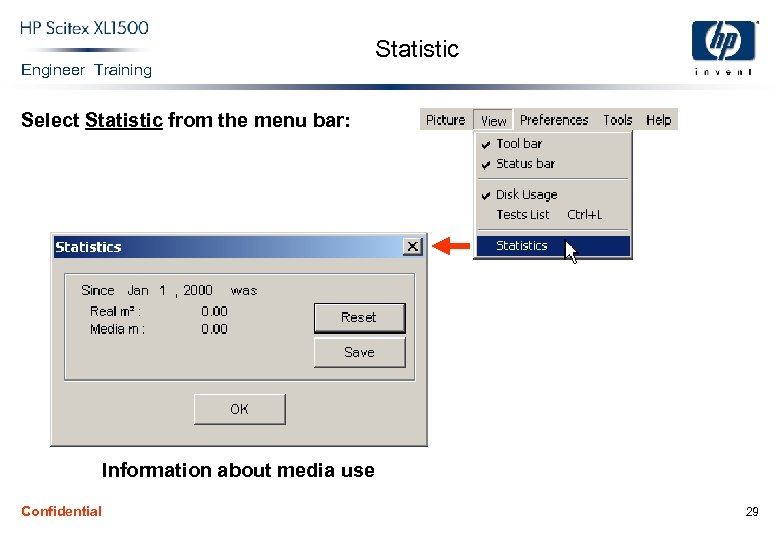 Engineer Training Statistic Select Statistic from the menu bar: Information about media use Confidential 29
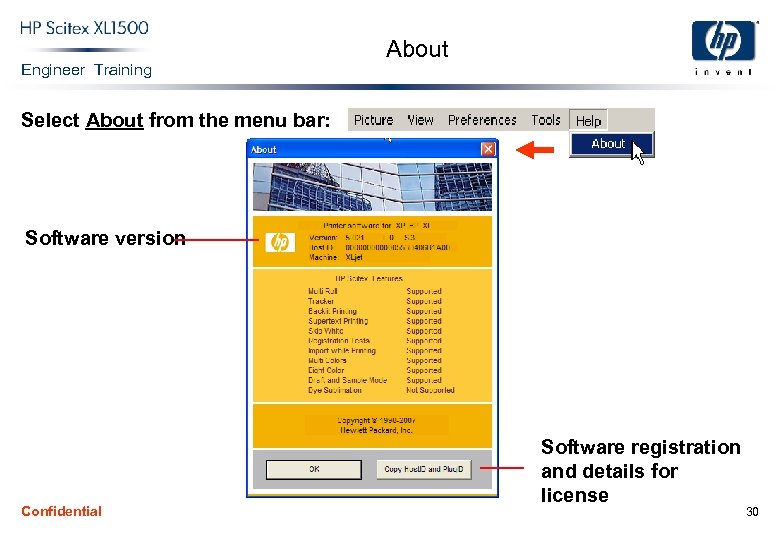 Engineer Training About Select About from the menu bar: Software version Confidential Software registration and details for license 30