 Скачать презентацию Enabling Java 2 Runtime Security with Eclipse Plug-ins
5ce4f153d9fc3f4f1b1b5602cf04ca0c.ppt
- Количество слайдов: 23




Enabling Java 2 Runtime Security with Eclipse Plug-ins ___ Analyzing Security Requirements for OSGi-Enabled Platforms Marco Pistoia, Ted Habeck, Larry Koved IBM T. J. Watson Research Center New York, USA
Agenda 1. Motivation for This Work 2. Review of Java Security Concepts 3. IBM Security Workbench Development Environment for Java (SWORD 4 J) 4. SWORD 4 J Demo

1. Motivation for This Work
Developing Secure OSGi Applications • The OSGi framework is a robust platform for deploying and managing applications from handheld devices to servers • It supports security sandboxing by limiting access to resources applications can access at run time • OSGi security is based on the Java 2, Standard Edition (J 2 SE) security architecture • Eclipse is built on top of the OSGi framework
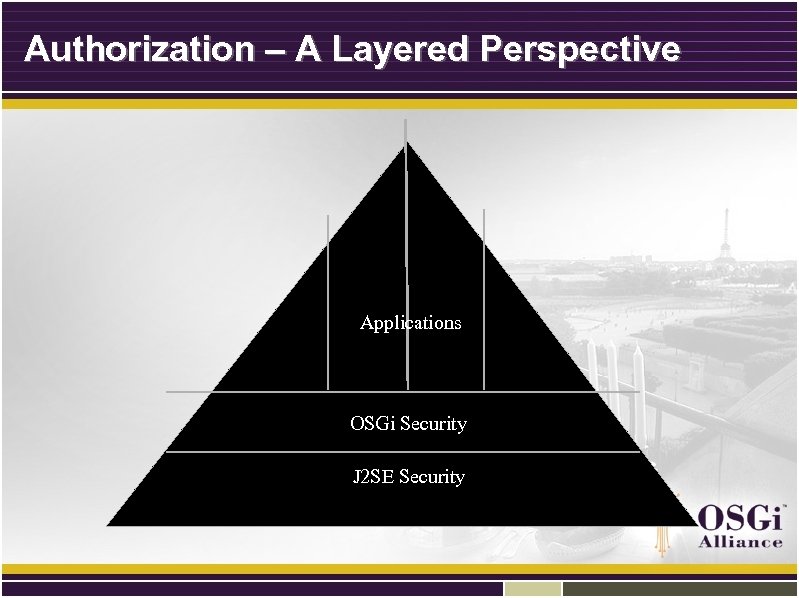
Authorization – A Layered Perspective Applications OSGi Security J 2 SE Security
2. Review of Java Security Concepts
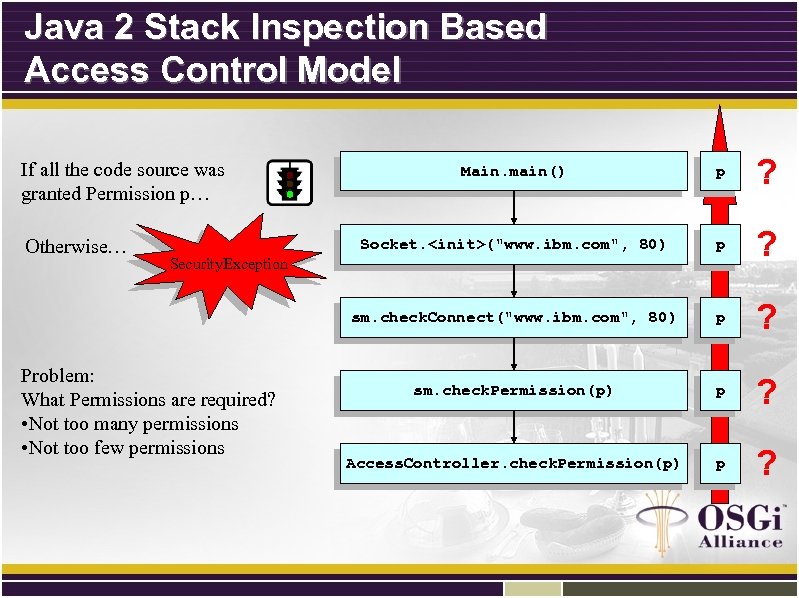
Java 2 Stack Inspection Based Access Control Model p ? sm. check. Connect("www. ibm. com", 80) Otherwise… Main. main() Socket. <init>("www. ibm. com", 80) If all the code source was granted Permission p… p ? sm. check. Permission(p) p ? Access. Controller. check. Permission(p) p ? Security. Exception Problem: What Permissions are required? • Not too many permissions • Not too few permissions
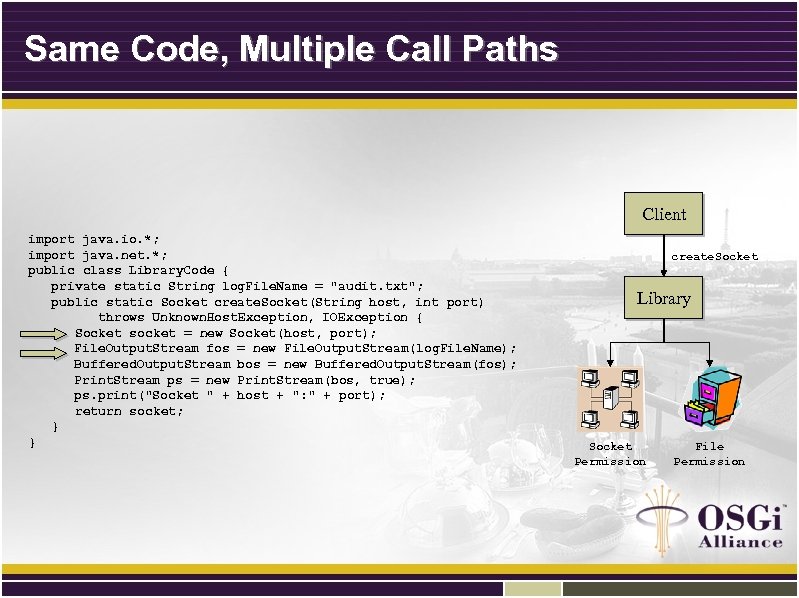
Same Code, Multiple Call Paths Client import java. io. *; import java. net. *; public class Library. Code { private static String log. File. Name = "audit. txt"; public static Socket create. Socket(String host, int port) throws Unknown. Host. Exception, IOException { Socket socket = new Socket(host, port); File. Output. Stream fos = new File. Output. Stream(log. File. Name); Buffered. Output. Stream bos = new Buffered. Output. Stream(fos); Print. Stream ps = new Print. Stream(bos, true); ps. print("Socket " + host + ": " + port); return socket; } } create. Socket Library Socket Permission File Permission
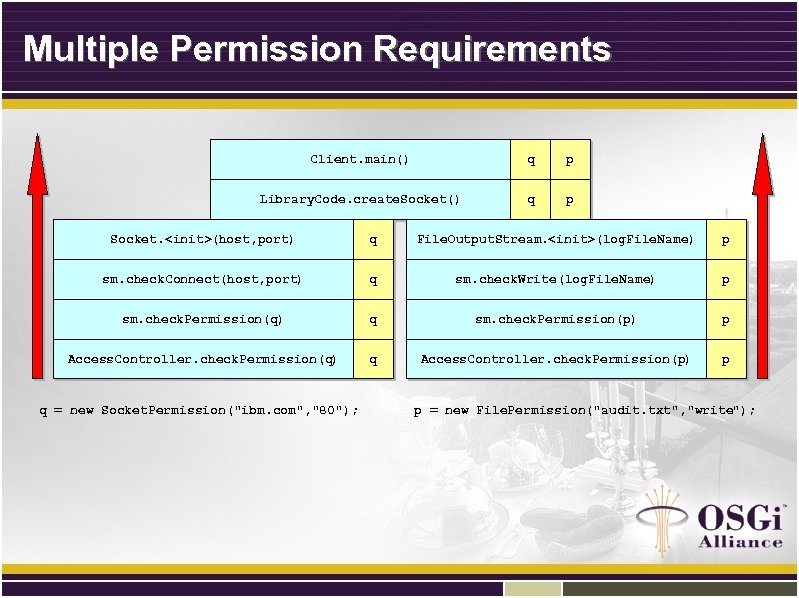
Multiple Permission Requirements Client. main() q p Library. Code. create. Socket() q p Socket. <init>(host, port) q File. Output. Stream. <init>(log. File. Name) p sm. check. Connect(host, port) q sm. check. Write(log. File. Name) p sm. check. Permission(q) q sm. check. Permission(p) p Access. Controller. check. Permission(q) q Access. Controller. check. Permission(p) p q = new Socket. Permission("ibm. com", "80"); p = new File. Permission("audit. txt", "write");
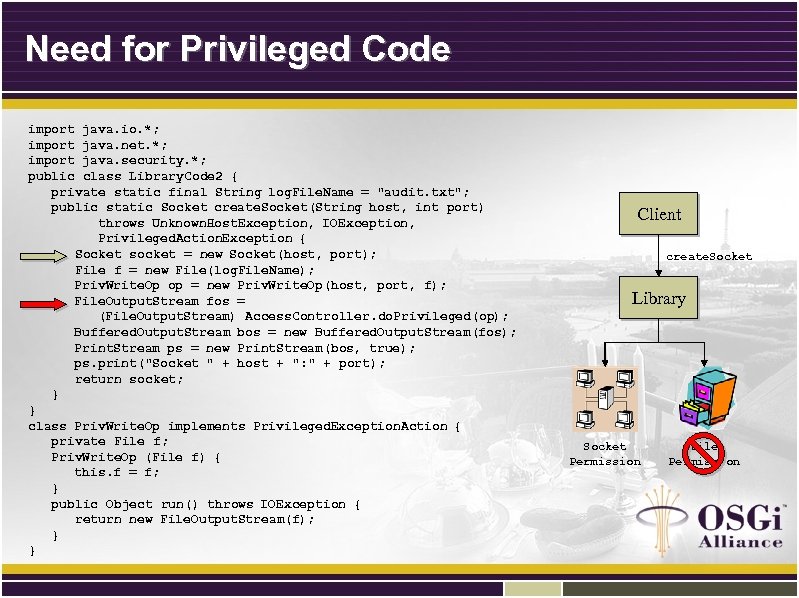
Need for Privileged Code import java. io. *; import java. net. *; import java. security. *; public class Library. Code 2 { private static final String log. File. Name = "audit. txt"; public static Socket create. Socket(String host, int port) throws Unknown. Host. Exception, IOException, Privileged. Action. Exception { Socket socket = new Socket(host, port); File f = new File(log. File. Name); Priv. Write. Op op = new Priv. Write. Op(host, port, f); File. Output. Stream fos = (File. Output. Stream) Access. Controller. do. Privileged(op); Buffered. Output. Stream bos = new Buffered. Output. Stream(fos); Print. Stream ps = new Print. Stream(bos, true); ps. print("Socket " + host + ": " + port); return socket; } } class Priv. Write. Op implements Privileged. Exception. Action { private File f; Priv. Write. Op (File f) { this. f = f; } public Object run() throws IOException { return new File. Output. Stream(f); } } Client create. Socket Library Socket Permission File Permission
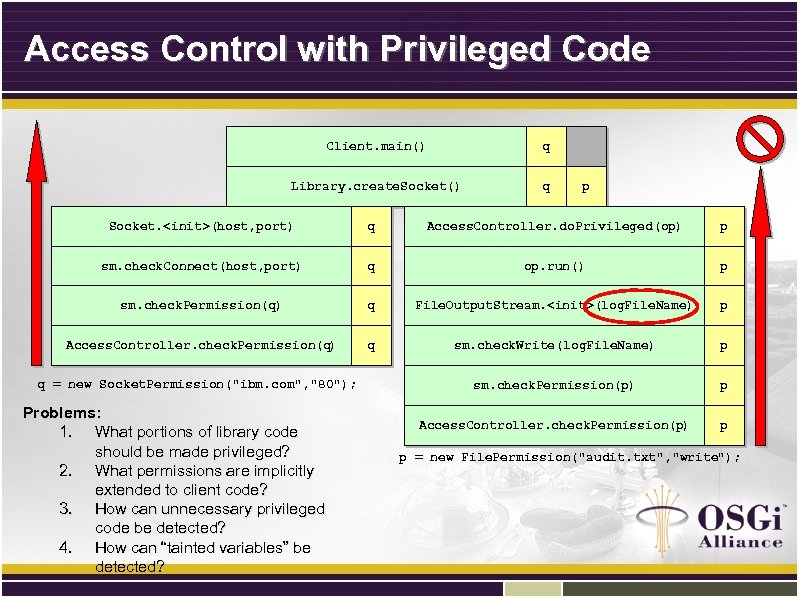
Access Control with Privileged Code Client. main() q Library. create. Socket() q p Socket. <init>(host, port) q Access. Controller. do. Privileged(op) p sm. check. Connect(host, port) q op. run() p sm. check. Permission(q) q File. Output. Stream. <init>(log. File. Name) p Access. Controller. check. Permission(q) q sm. check. Write(log. File. Name) p sm. check. Permission(p) p Access. Controller. check. Permission(p) p q = new Socket. Permission("ibm. com", "80"); Problems: 1. What portions of library code should be made privileged? 2. What permissions are implicitly extended to client code? 3. How can unnecessary privileged code be detected? 4. How can “tainted variables” be detected? p = new File. Permission("audit. txt", "write");
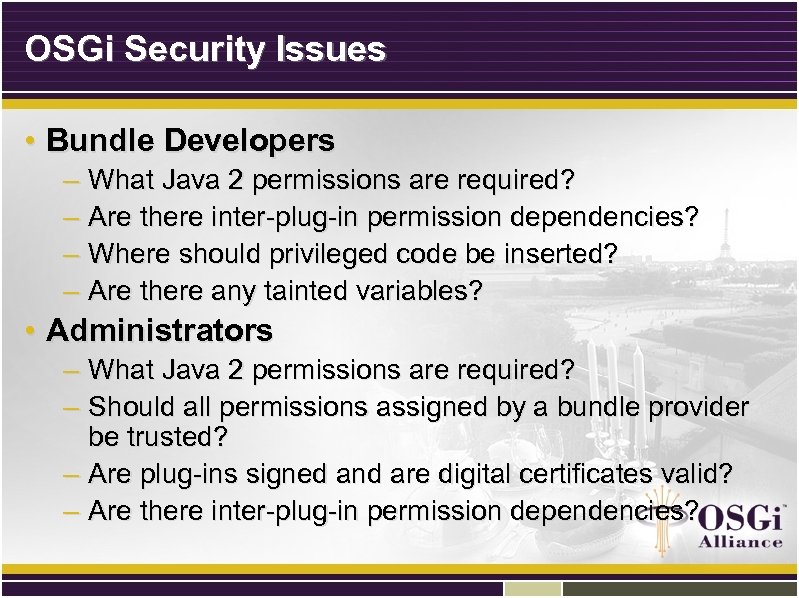
OSGi Security Issues • Bundle Developers – What Java 2 permissions are required? – Are there inter-plug-in permission dependencies? – Where should privileged code be inserted? – Are there any tainted variables? • Administrators – What Java 2 permissions are required? – Should all permissions assigned by a bundle provider be trusted? – Are plug-ins signed and are digital certificates valid? – Are there inter-plug-in permission dependencies?
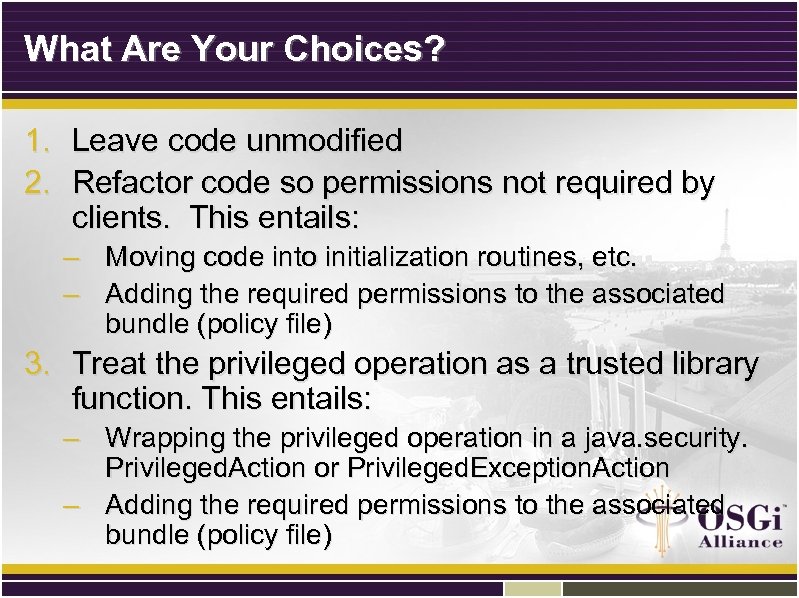
What Are Your Choices? 1. Leave code unmodified 2. Refactor code so permissions not required by clients. This entails: – Moving code into initialization routines, etc. – Adding the required permissions to the associated bundle (policy file) 3. Treat the privileged operation as a trusted library function. This entails: – Wrapping the privileged operation in a java. security. Privileged. Action or Privileged. Exception. Action – Adding the required permissions to the associated bundle (policy file)
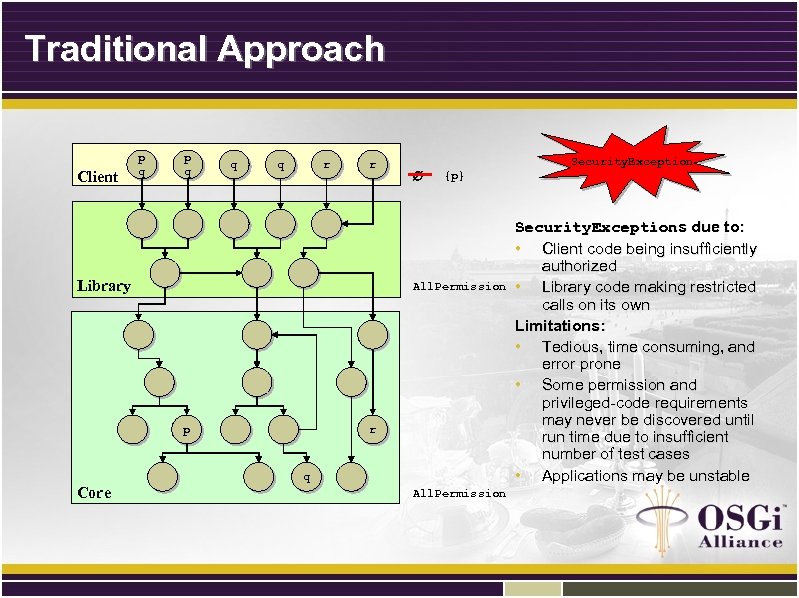
Traditional Approach Client p q q q r r Library Security. Exception {p} All. Permission p Core r q All. Permission Security. Exceptions due to: • Client code being insufficiently authorized • Library code making restricted calls on its own Limitations: • Tedious, time consuming, and error prone • Some permission and privileged-code requirements may never be discovered until run time due to insufficient number of test cases • Applications may be unstable
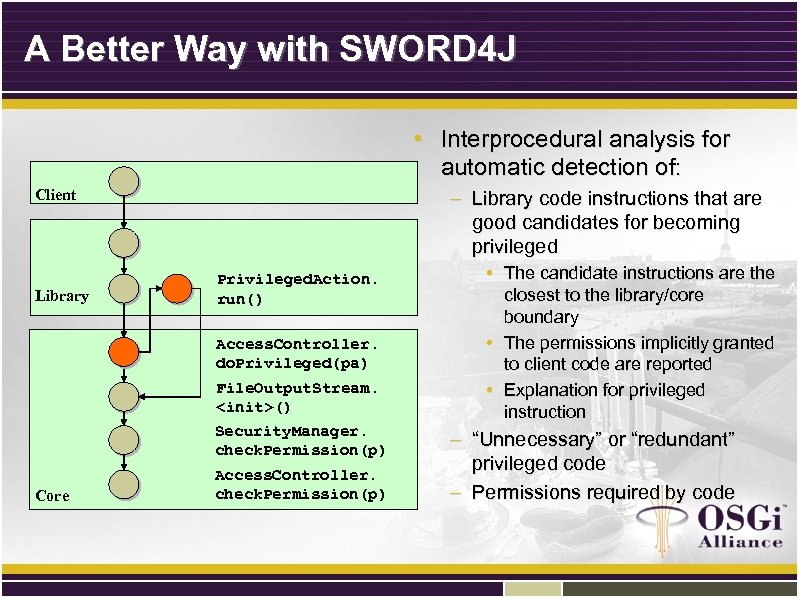
A Better Way with SWORD 4 J Client • Interprocedural analysis for automatic detection of: p – Library code instructions that are good candidates for becoming privileged p Library p p Privileged. Action. run() p p File. Output. Stream. <init>() p Core Access. Controller. do. Privileged(pa) Security. Manager. check. Permission(p) p Access. Controller. check. Permission(p) • The candidate instructions are the closest to the library/core boundary • The permissions implicitly granted to client code are reported • Explanation for privileged instruction – “Unnecessary” or “redundant” privileged code – Permissions required by code
3. IBM Security Workbench Development Environment for Java (SWORD 4 J)
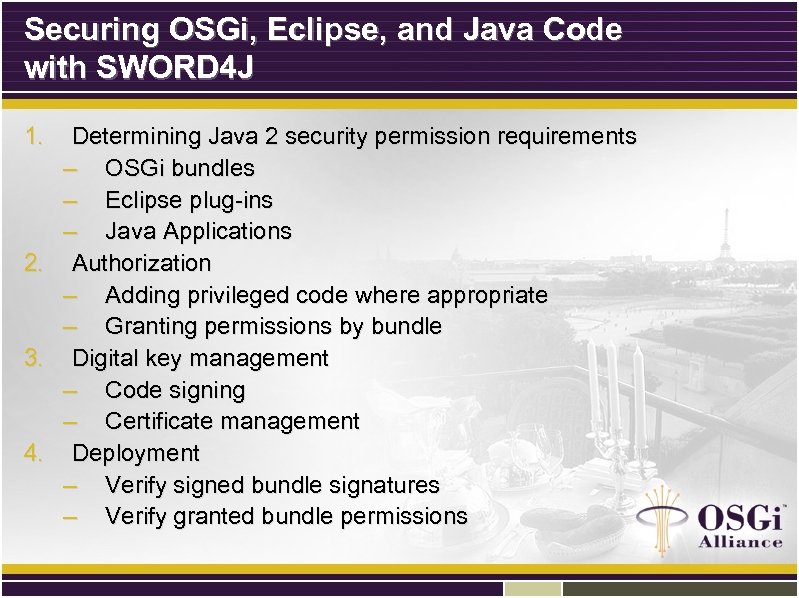
Securing OSGi, Eclipse, and Java Code with SWORD 4 J 1. Determining Java 2 security permission requirements – OSGi bundles – Eclipse plug-ins – Java Applications 2. Authorization – Adding privileged code where appropriate – Granting permissions by bundle 3. Digital key management – Code signing – Certificate management 4. Deployment – Verify signed bundle signatures – Verify granted bundle permissions
4. SWORD 4 J Demo
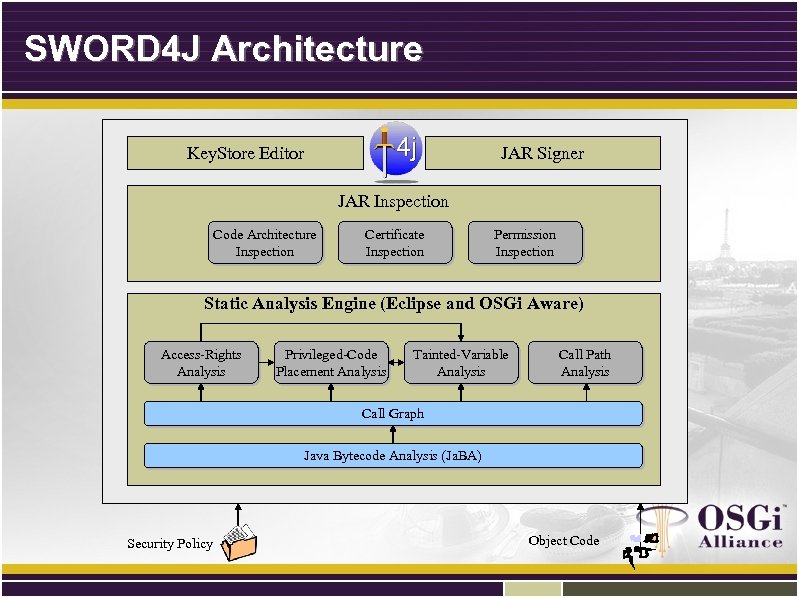
SWORD 4 J Architecture Key. Store Editor JAR Signer JAR Inspection Code Architecture Inspection Certificate Inspection Permission Inspection Static Analysis Engine (Eclipse and OSGi Aware) Access-Rights Analysis Privileged-Code Placement Analysis Tainted-Variable Analysis Call Path Analysis Call Graph Java Bytecode Analysis (Ja. BA) Security Policy Object Code
SWORD 4 J Summary • New Eclipse-based analysis tool for inspecting and analyzing OSGi bundles, Eclipse plug-ins, and Java programs • Includes the following plug-ins: – Java 2 Security Analysis – Jar Inspection – Jar Signing – Key. Store editor
SWORD 4 J Features • Security Analyses – Permission analysis – Privileged code analysis • Code Signing – SWORD 4 J provides a JAR signing GUI • Key. Store Management – SWORD 4 J provides a Key. Store editor for managing Java Key. Stores • Change password, edit certificate aliases, export certificates, import certificates, generate self-signed certificates, change key entry passwords, copy key entries between Key. Stores • Jar Inspector – – – Displays JAR architecture Displays Signing information Displays OSGi bundle permission requirements.
Additional Information – Thank You! • E-mail: – – – pistoia@us. ibm. com habeck@us. ibm. com koved@us. ibm. com • Web – SWORD 4 J Download: • http: //www. alphaworks. ibm. com/tech/sword 4 j – Personal: • http: //www. research. ibm. com/people/p/pistoia • http: //www. research. ibm. com/people/k/koved – Java Security Project: • http: //www. research. ibm. com/javasec – Eclipse security: http: //www. eclipse. org/equinox/ • Books
Скачать презентацию Enabling Java 2 Runtime Security with Eclipse Plug-ins
5ce4f153d9fc3f4f1b1b5602cf04ca0c.ppt