 Скачать презентацию Enabling Grids for E-scienc E Enabling Grids E-scienc
444da2845b767b9ccd914b1595c2c748.ppt
- Количество слайдов: 29




Enabling Grids for E-scienc. E Enabling Grids E-scienc. E The Wisdom Environment Vincent Bloch CNRS-IN 2 P 3 ACGRID School Hanoi (Vietnam) November 8 th, 2007 Credits: Jean Salzemann www. eu-egee. org EGEE-II INFSO-RI-031688 INFSO-RI-508833 EGEE and g. Lite are registered trademarks
WISDOM initiative Enabling Grids for E-scienc. E • WISDOM initiative aims to demonstrate the relevance and the impact of the grid approach to address drug discovery for neglected and emerging diseases. • First achieved experiences: – Summer 2005: Wide In Silico Docking On Malaria (WISDOM) – Spring 2006: Accelerate drug design against H 5 N 1 neuraminidase – Winter 2006: Second data challenge on Malaria • Partners: – Grid infrastructures: EGEE, Auvergrid, TWGrid, EELA, Eu. China. Grid, Eu. Med. Grid – European projects: Embrace, Bioinfo. Grid, EGEE – Institutes and association: Fraunhofer SCAI, Academia Sinica of Taiwan, ITB, Unimo University, LPC, CMBA, CERN-ARDA, Health. Grid EGEE-II INFSO-RI-031688 2
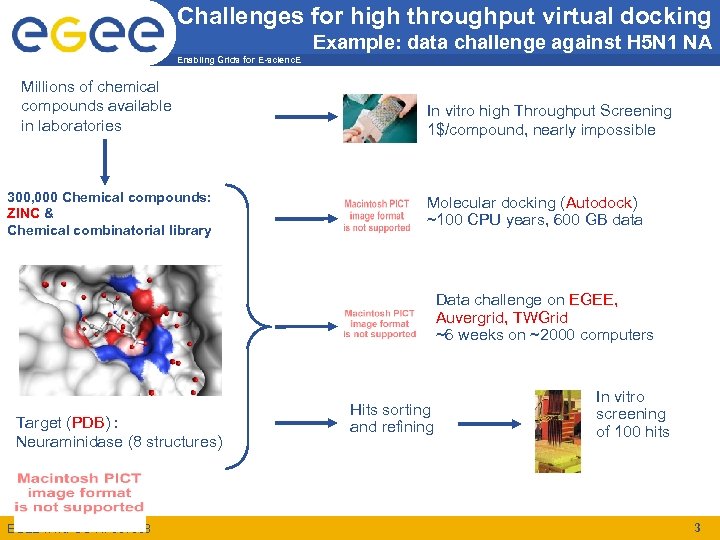
Challenges for high throughput virtual docking Example: data challenge against H 5 N 1 NA Enabling Grids for E-scienc. E Millions of chemical compounds available in laboratories 300, 000 Chemical compounds: ZINC & Chemical combinatorial library In vitro high Throughput Screening 1$/compound, nearly impossible Molecular docking (Autodock) ~100 CPU years, 600 GB data Data challenge on EGEE, Auvergrid, TWGrid ~6 weeks on ~2000 computers Target (PDB) : Neuraminidase (8 structures) EGEE-II INFSO-RI-031688 Hits sorting and refining In vitro screening of 100 hits 3
Issues for the grid-enabled high throughput virtual docking Enabling Grids for E-scienc. E • Computer-based in-silico screening can help to identify the most promising leads for biological tests – Involve whole databases (ZINC) – reduces the cost of trail-and-error approach • In silico docking is well-fitted for grid deployment – CPU intensive application – Huge amount of output – Embarrassingly Parallel • Issues of a large scale grid deployment – – The rate of submitted jobs must be carefully monitored The amount of transferred data impacts on grid performance Grid process introduces significant delays Licensed software requires licenses distribution strategy on grid EGEE-II INFSO-RI-031688 4
Grid tools used during the data challenges Enabling Grids for E-scienc. E • WISDOM – a workflow of grid job handling: automated job submission, status check and report, error recovery – push model job scheduling – batch mode job handling – http: //wisdom. eu-egee. fr • DIANE – a framework for applications with master-worker model – pull mode job scheduling – interactive mode job handling with flexible failure recovery feature – http: //cern. ch/diane EGEE-II INFSO-RI-031688 5
Grid components interacting with WISDOM Enabling Grids for E-scienc. E • The WMS: – The user submits jobs via the Workload Management System – The Goal of WMS is the distributed scheduling and resource management in a Grid environment. – What does it allow Grid users to do? § § To submit their jobs To get information about their status To cancel them To retrieve their output – The WMS tries to optimize the usage of resources as well as execute user jobs as fast as possible EGEE-II INFSO-RI-031688 6
WMS Components Enabling Grids for E-scienc. E WMS is currently composed of the following parts: • User Interface (UI) : access point for the user to the WMS • Resource Broker (RB) : the broker of GRID resources, responsible to find the “best” resources where to submit jobs • Job Submission Service (JSS) : provides a reliable submission system • Information Index (BDII) : a server (based on LDAP) which collects information about Grid resources – used by the Resource Broker to rank and select resources • Logging and Bookkeeping services (LB) : store Job Info available for users to query EGEE-II INFSO-RI-031688 7
Grid components interacting with WISDOM Enabling Grids for E-scienc. E • DMS: Data Management system – The user can store files on the grid through the DMS. – The goal of the DMS is to virtualize data on the grid and guarantee security integrity, and reliability of the data – What it allows Grid users to do: § § § Copy Files on the Grid Register files on the Grid with a logical name Store and manage metadata related to a file Replicate files on the Grid Delete files on the Grid Retrieve files from the Grid EGEE-II INFSO-RI-031688 8
DMS Components Enabling Grids for E-scienc. E • LFC (LCG File Catalogue): – It is used to register files on the grid – LFC provides functionalities to give logical names to files and organize them in directories • Grid. FTP: – Low level file transfer protocol – Secured and reliable • AMGA: – It is an grid interface for relational databases – Can be used to store medata – Can be used as a file catalogue EGEE-II INFSO-RI-031688 9
other components interacting with WISDOM Enabling Grids for E-scienc. E • VOMS (Virtual Organisation Membership Service) – Store information concerning VO and roles • Flex. Lm floating licenses server • Web Portals – Can be used to visualize statistics or results • Remote Database Servers – Can be used to store some information remotely (results, metadata etc. . ) EGEE-II INFSO-RI-031688 10
WISDOM technology Enabling Grids for E-scienc. E • WISDOM has been specifically developed around EGEE middlewares (LCG-2. 7 , Glite). • It uses a Java Multithreaded submission Engine • Main scripts are written in perl • Job-related scripts in written shell script (bash) • Future environment will include – Web Services technology (WS-I profile) – Java and Python AMGA clients – All the code written in Java – Security and fine-grained ACLs EGEE-II INFSO-RI-031688 11
WISDOM ENVIRONMENT (1/2) Enabling Grids for E-scienc. E • 2 main scripts: – wisdom_submit: § submits the jobs with a java multithreaded submission engine § stores the job ID and command lines and store them in a database. – wisdom_status: § § checks the status of jobs regularly handle the resubmissions of failed, aborted and cancelled jobs. reads the IDs from wisdom_submit database stores the job IDs in a table to prevent crushing wisdom_submit files, along with other parameters: • job number • a submission job status (unsubmitted, done) • job submission count. § The process will loop until all the jobs of the instance are not finished. EGEE-II INFSO-RI-031688 12
WISDOM ENVIRONMENT (2/2) Enabling Grids for E-scienc. E • Several Features: – No input and output sandboxes in jobs. § All the target files, ligands and software copied dynamically from the SE to the WN to unload the RB i/o. § Flex. X outputs and Grid outputs are saved on several SEs through LFC and Grid. FTP – Jobs JDL and scripts are generated just before any submission § to take the wisdom. conf modifications into account (CE and RB black lists, job submission frequency) § are deleted afterward to save disk space. – Dynamic insertions of docking results and statistics in databases which allow real-time visualisation of the DC status. – wisdom_status can be stopped at any given time and restarted: it saves its own memory environment, so it can be restarted after a crash. EGEE-II INFSO-RI-031688 13
Instance Definition Enabling Grids for E-scienc. E • The instance is a set of jobs regrouped accordingly to different criteria. • The instance is unique, and has its own name • The instance is submitted entirely on the grid, then it is followed up • The instance name is by default: • <TARGET><PARAMETER><DATABASE> • Instance’s jobs are called after the instance name: • <INSTANCE NAME>J<number of the job> EGEE-II INFSO-RI-031688 14
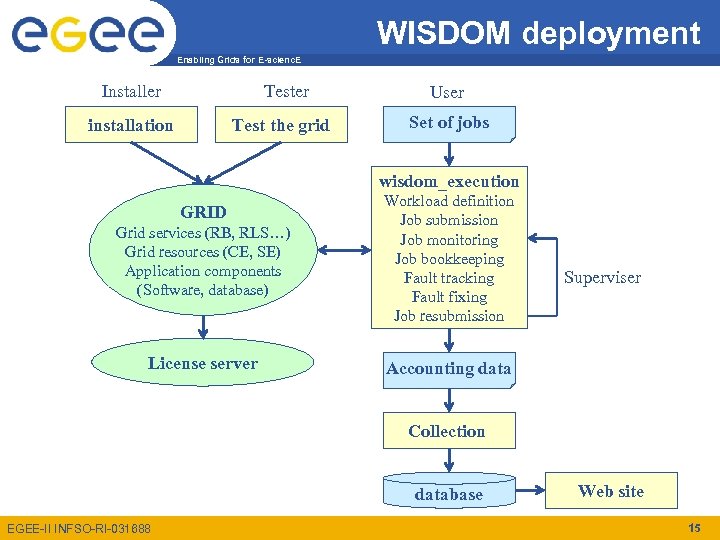
WISDOM deployment Enabling Grids for E-scienc. E Installer Tester installation Test the grid User Set of jobs wisdom_execution Grid services (RB, RLS…) Grid resources (CE, SE) Application components (Software, database) Workload definition Job submission Job monitoring Job bookkeeping Fault tracking Fault fixing Job resubmission License server Accounting data GRID Superviser Collection database EGEE-II INFSO-RI-031688 Web site 15
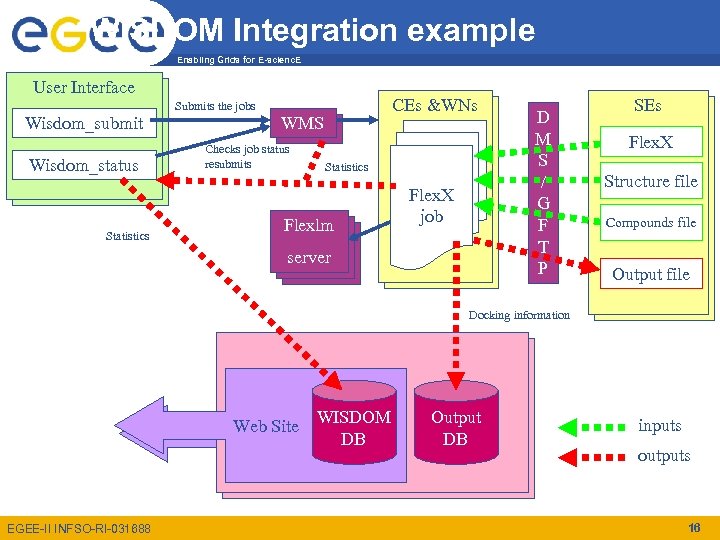
WISDOM Integration example Enabling Grids for E-scienc. E User Interface Wisdom_submit Wisdom_status Statistics Submits the jobs WMS Checks job status resubmits CEs &WNs Statistics Flexlm server Flex. X job D M S / G F T P SEs Flex. X Structure file Compounds file Output file Docking information Health. Grid Server Web Site WISDOM Web Site DB EGEE-II INFSO-RI-031688 Output DB inputs outputs 16
Environment architecture (1/2) Enabling Grids for E-scienc. E • wisdom. conf – the file that define the configuration of the instance • wisdom_submit. sh – the execution script that launch the instance submission • wisdom_submit. pl – the perl script of the execution process which submits the instance • wisdom_status. sh – the execution script that launches the instance status checking • wisdom_status. pl – the perl script of the status checking EGEE-II INFSO-RI-031688 17
Environment architecture (2/2) Enabling Grids for E-scienc. E • bin/flexx. sh (the flexx script that is run by the jobs) • bin/mt-job-submit (the execution script of the multi-threaded submission engine) • bin/MTJob. Submitter. jar (the jar file of the multi-threaded java submission engine) • bin/checkit. sh (a script used at the end of jobs to check the status of the job and store everything on the grid) • bin/lfc_env. sh (a script to set up the environment variables for LFC) • input/<DATABASE>/db_urls* ( there are several files, 1000, 2000, 3000, 4000… each of these files has the sfn of the database subsets replica. It is used in case of failure of the LFC server). • edg_wl_ui_config/* (this directory hold all the configuration files of the resource brokers) • Files need to be edited accordingly to the application and the VO! EGEE-II INFSO-RI-031688 18
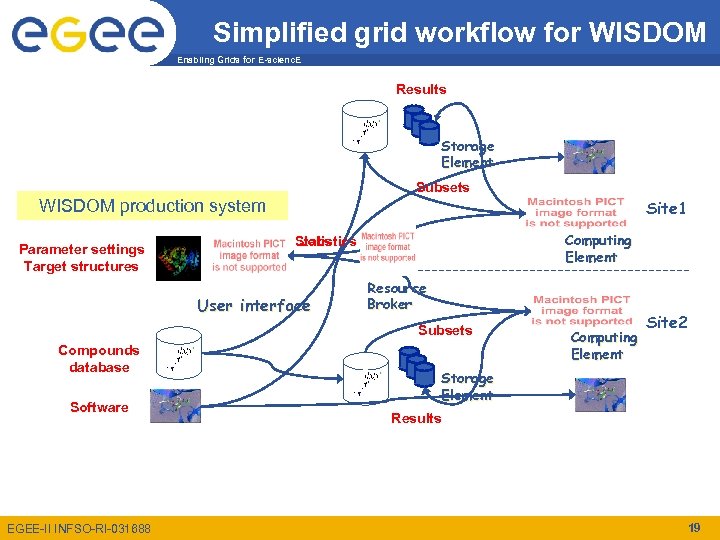
Simplified grid workflow for WISDOM Enabling Grids for E-scienc. E Results Storage Element Subsets WISDOM production system Parameter settings Target structures Site 1 Computing Element Statistics Jobs User interface Resource Broker Subsets Compounds database Software EGEE-II INFSO-RI-031688 Computing Element Site 2 Storage Element Results 19
WISDOM and Security Enabling Grids for E-scienc. E • Instances are submitted by a given user – All the jobs of the instance are belonging to the same user – Resources are dependant on the user’s VO • Outputs files – Stored on the VO storage elements and register with the VO LFC. – If LFC is failing, files are stored on the VO writable directory on a given storage element This implies that: • Users must follow-up the execution, and need to renew their proxy if necessary • Files stored, are, a priori, available to all the VO members EGEE-II INFSO-RI-031688 20
The new environment Enabling Grids for E-scienc. E • Web Services Interface – better interoperability – Everything is controlled through a few set of operations (no more modification of the files are required) • Dynamic storing/querying of the results and jobs information on the Grid using AMGA metadata management system • Improved fault tolerance • Improved flexibility – New applications can be deployed more easily – As well as corresponding data • Secured and multi-user EGEE-II INFSO-RI-031688 21
The new environment Enabling Grids for E-scienc. E • Entirely developed using Java – No need to use text files to send information between the submission and the monitoring of the jobs – Improved fault tolerance – Improved flexibility – New application easier to deploy • Improved monitoring of the grid resources – Uses its own ranking based on BDII information – Takes into account the number of jobs submitted to the sites to avoid overloads (the jobs are sent where the free CPUs are) – Takes into account the jobs failures and failing reasons (the “bad” sites are penalized) EGEE-II INFSO-RI-031688 22
The new environment Enabling Grids for E-scienc. E • Uses AMGA for jobs and data monitoring – Improved monitoring and statistics – Dynamic storage and query of the data and results – Allows “Pull Model” • Web Services Interface – Better interoperability – Ease the access to the environment: everything is controlled through a few set of operations EGEE-II INFSO-RI-031688 23
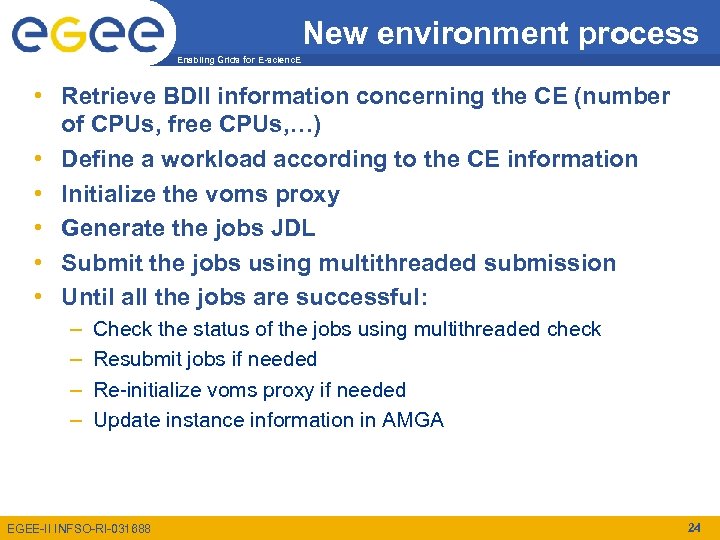
New environment process Enabling Grids for E-scienc. E • Retrieve BDII information concerning the CE (number of CPUs, free CPUs, …) • Define a workload according to the CE information • Initialize the voms proxy • Generate the jobs JDL • Submit the jobs using multithreaded submission • Until all the jobs are successful: – – Check the status of the jobs using multithreaded check Resubmit jobs if needed Re-initialize voms proxy if needed Update instance information in AMGA EGEE-II INFSO-RI-031688 24
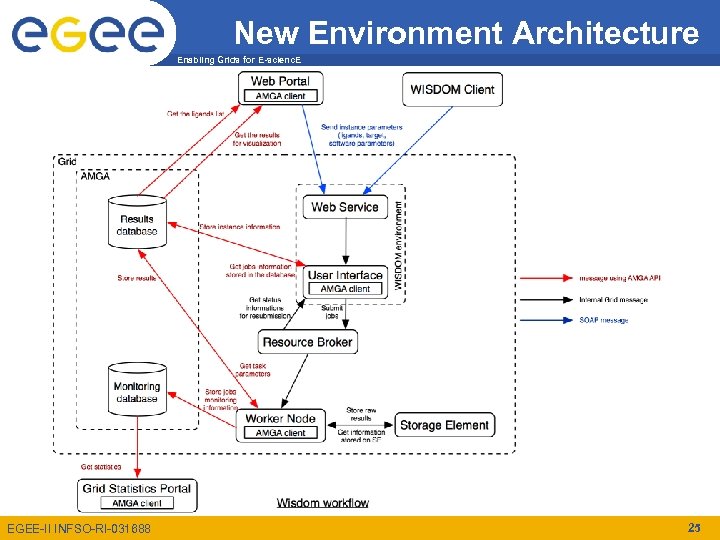
New Environment Architecture Enabling Grids for E-scienc. E EGEE-II INFSO-RI-031688 25
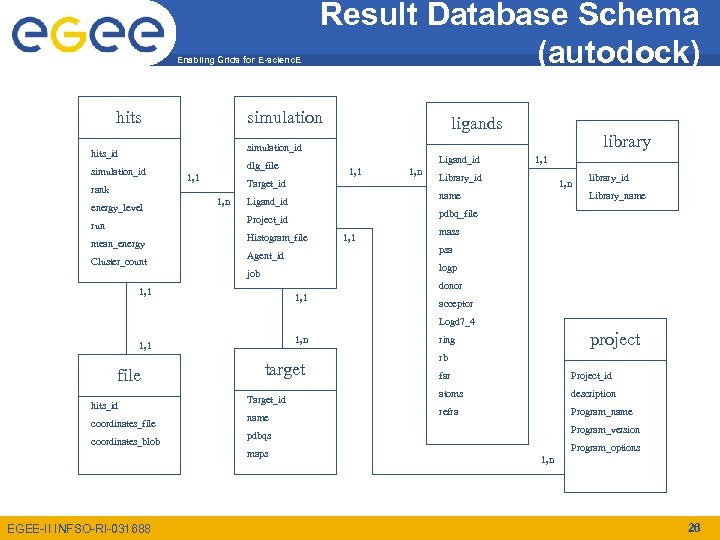
Enabling Grids for E-scienc. E hits Result Database Schema (autodock) simulation ligands library simulation_id hits_id simulation_id 1, 1 Target_id rank energy_level Ligand_id dlg_file 1, n mean_energy Cluster_count 1, 1 Library_id 1, n name Ligand_id library_id Library_name pdbq_file Project_id run 1, n Histogram_file 1, 1 mass psa Agent_id logp job donor 1, 1 acceptor Logd 7_4 1, n 1, 1 file hits_id coordinates_file coordinates_blob target Target_id name rb far Project_id atoms description refra Program_name Program_version pdbqs maps EGEE-II INFSO-RI-031688 project ring Program_options 1, n 26
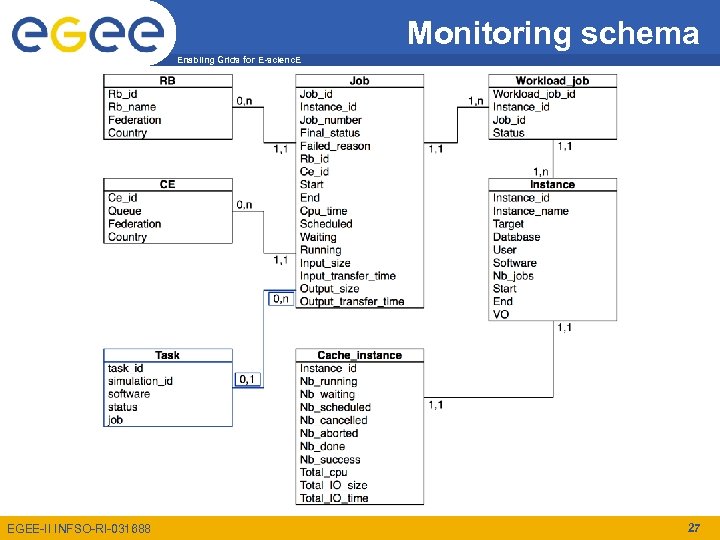
Monitoring schema Enabling Grids for E-scienc. E EGEE-II INFSO-RI-031688 27
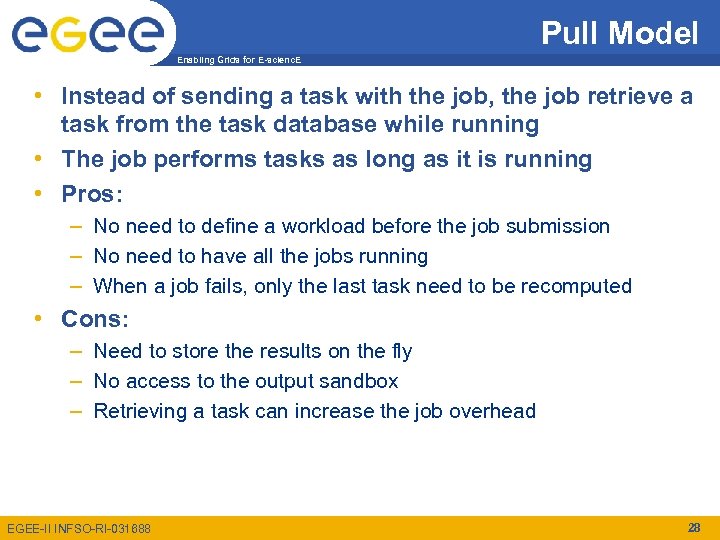
Pull Model Enabling Grids for E-scienc. E • Instead of sending a task with the job, the job retrieve a task from the task database while running • The job performs tasks as long as it is running • Pros: – No need to define a workload before the job submission – No need to have all the jobs running – When a job fails, only the last task need to be recomputed • Cons: – Need to store the results on the fly – No access to the output sandbox – Retrieving a task can increase the job overhead EGEE-II INFSO-RI-031688 28
Enabling Grids for E-scienc. E Questions? EGEE-II INFSO-RI-031688 29
Скачать презентацию Enabling Grids for E-scienc E Enabling Grids E-scienc
444da2845b767b9ccd914b1595c2c748.ppt