


 Скачать презентацию EMTM 553 E-commerce Systems Lecture 3 Software Insup
b778aece2aed4e3c8e465329c8ac1afa.ppt
- Количество слайдов: 44
 EMTM 553: E-commerce Systems Lecture 3: Software Insup Lee Department of Computer and Information Science University of Pennsylvania lee@cis. upenn. edu www. cis. upenn. edu/~lee 3/23/01 EMTM 553 1
 Background • Simple view of the original WWW – Web servers stored pages coded in HTML in their file systems. – Pages retrieved by browsers using HTTP. – The URL of a page was the hostname of the server plus the filename of the document. • Later, it was realized that – HTML Web pages could be produced by programs as well as stored as files. – URL specifies the hostname of the server, the name of the program to run, and arguments for that program. 3/23/01 EMTM 553 2
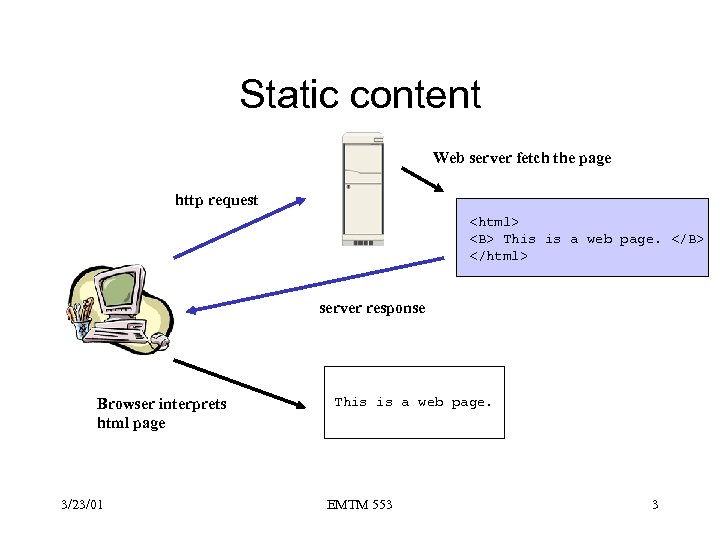 Static content Web server fetch the page http request This is a web page. server response Browser interprets html page 3/23/01 This is a web page. EMTM 553 3
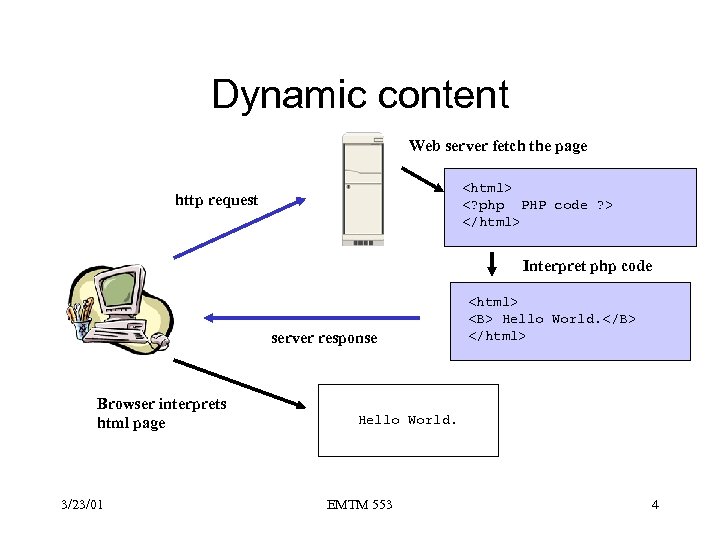 Dynamic content Web server fetch the page http request Interpret php code server response Browser interprets html page 3/23/01 Hello World. Hello World. EMTM 553 4
 Stateless vs. state • Stateless server – The user request a document, and then another document, and so on. – Natural for large number of browsers and small number of servers. • Why? – If stateful, it can increase performance. However, o On server crash, it looses all its volatile state information o On client crash, the server needs to know to claim state space. 3/23/01 EMTM 553 5
 Session • User Session – A delimited set of user clicks across one or more Web servers (for multiple Web page requests) • Server Session – A collection of user clicks to a Web server during a user session • Why sessions are important? – Complex pages require many connections – High overhead for establishing a connection due to privacy and authentication requirements – E-commerce applications require a series of actions by the user and the server. 3/23/01 EMTM 553 6
 Where to keep state for client? • How to identify sets of user requests as belong to the same session and for passing state information back and forth between client and server – State is the application information itself – A session id is a reference to state stored somewhere else. • Server-side vs. client-side – Database on server – Applications on server – Cookie on client • What are tradeoffs? 3/23/01 EMTM 553 7
 Session and Client state mechanism • Techniques – Cookies o Data sent by a Web server to a Web client, to be stored locally by the client and sent back to the server on subsequent requests o Cookies are stored as small file in a client machine – Date and time, user id, password, etc. – Authentication mechanisms such as client certificate o Used this to identify the user to the server on each request to use state stored in application database – Forms: state or session id can passed as hidden fields – Applets: client scripting can be used to store session id or state 3/23/01 EMTM 553 8
 Active Web Sites • Allow the user to be sent customized pages • Support dynamic browsing experience • Built using with a combination of languages and technologies – Client-side technologies o Used for detecting browser features, responding to user actions, validating form data, displaying dialog boxes. o Adv: reduce network traffic, server load, almost instant response to user actions – Server-side technologies 3/23/01 EMTM 553 9
 Client-side technologies • Active. X controls – Self-contained program called components written in C++ or Visual Basic can be called –
 Java • An object-oriented language developed by Sun Microsystems • Java programs are compiled into Java bytecode, which are executed by JVM (Java virtual machine) • Write-once run-anyway • Security of Java applets is based on a sandbox model 3/23/01 EMTM 553 11
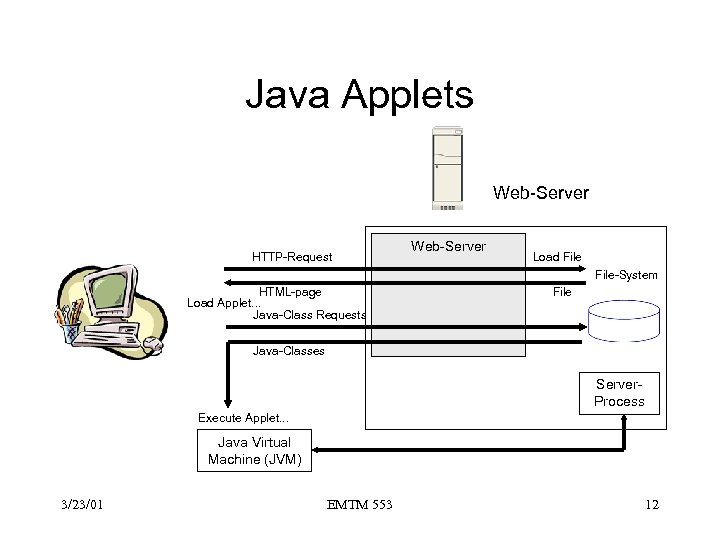 Java Applets Web-Server HTTP-Request Web-Server Load File-System HTML-page Load Applet. . . Java-Class Requests File Java-Classes Server. Process Execute Applet. . . Java Virtual Machine (JVM) 3/23/01 EMTM 553 12
 Java Applets • Advantages – Platform independent: works for every web-server and browser supporting Java – Secure • Disadvantages • – Standalone Character: o Entire session runs inside applet o HTML forms are not used – Slow: loading can take a long time – Resource intensive: JVM – Restrictive: can only communicate with server from which applet was loaded Server-Process can be written in any language 3/23/01 EMTM 553 13
 Server-side technologies • • CGI Active Server Pages, Microsoft Server-side Java. Script, Netscape Java Servlets and JSP (Java Server Pages), Sun. Micro • PHP, developed initially by Rasmus Lerdorf, 1994 to track visitors to his online resume. 3/23/01 EMTM 553 14
 Benefits of server-side processing • Minimizes network traffic by limiting the need for the browser and server to talk back and forth to each other • Quickens loading time since, in the end, only the actual page is downloaded • Avoids browser-compatibility problems • Can provide the client with data that does not reside at the client • Provides improved security measures, since one can code things that cannot be viewed from the browser 3/23/01 EMTM 553 15
 Web Server Software Feature Sets • Core Capabilities – Process and respond to Web client requests using the HTTP protocol • Security – Validation of username and password – Processing certificates and key pairs • FTP – Transferring of files to or from the server • Searching – Searches the existing site or entire Web for documents – Indexing provides full-text indexes for files stored on the server • Data Analysis – Capture visitor information o Who, how long, date & time, what pages were visited. 3/23/01 EMTM 553 16
 The Common Gateway Interface (CGI) • CGI defines an interface between a Web server and an independent application program. • CGI are used to create “gateways” between the Web and an existing application. • CGI also serve as the interface for new applications designed for the Web, not integrated directly into a Web server (as in plug-ins). 3/23/01 EMTM 553 17
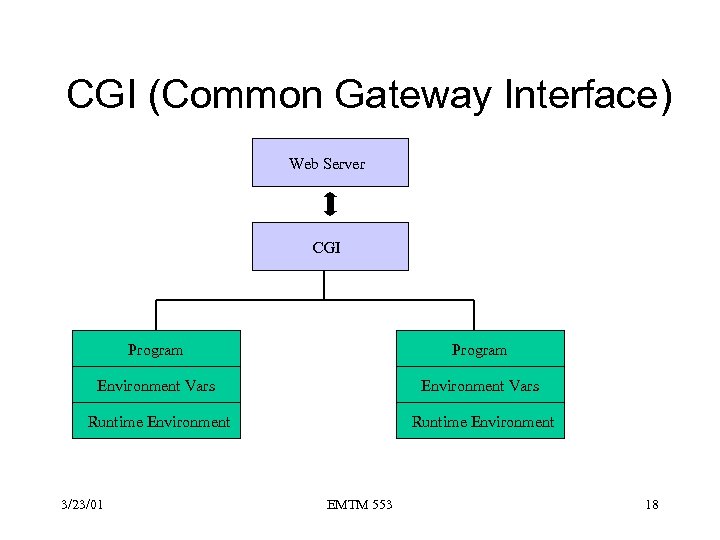 CGI (Common Gateway Interface) Web Server CGI Program Environment Vars Runtime Environment 3/23/01 EMTM 553 18
 Server API for CGI • • • Starting and stopping application Passing data from the client to the application Passing data from the application to the client Status and error reporting Passing configuration information to the application Passing client and environment information to the application 3/23/01 EMTM 553 19
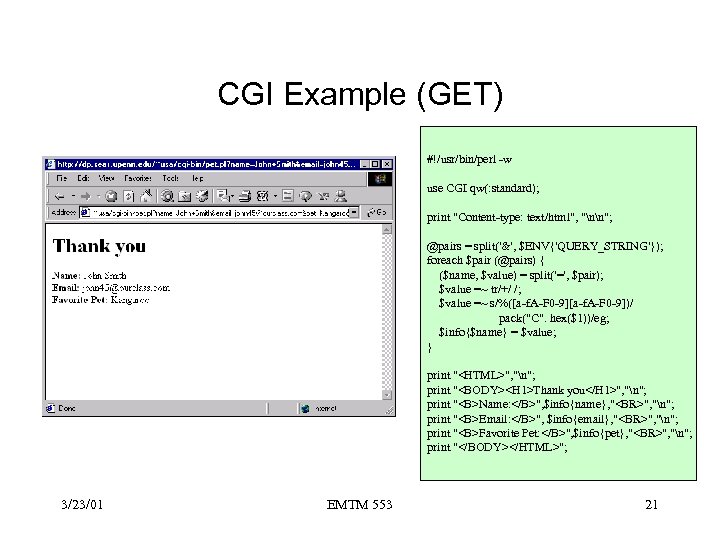 CGI Example (GET) #!/usr/bin/perl -w use CGI qw(: standard); print "Content-type: text/html", "nn"; @pairs = split('&', $ENV{'QUERY_STRING'}); foreach $pair (@pairs) { ($name, $value) = split('=', $pair); $value =~ tr/+/ /; $value =~ s/%([a-f. A-F 0 -9])/ pack("C". hex($1))/eg; $info{$name} = $value; } print "", "n"; print "
", "n"; print "Email: ", $info{email}, "
", "n"; print "Favorite Pet: ", $info{pet}, "
", "n"; print ""; 3/23/01 EMTM 553 21
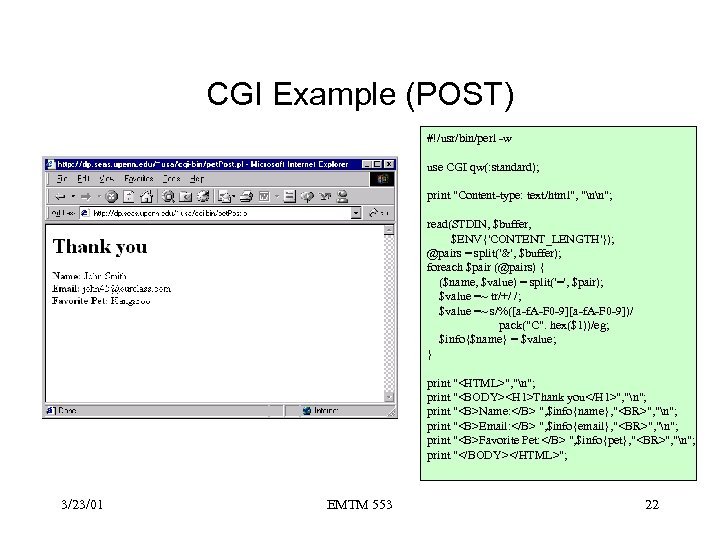 CGI Example (POST) #!/usr/bin/perl -w use CGI qw(: standard); print "Content-type: text/html", "nn"; read(STDIN, $buffer, $ENV{'CONTENT_LENGTH'}); @pairs = split('&', $buffer); foreach $pair (@pairs) { ($name, $value) = split('=', $pair); $value =~ tr/+/ /; $value =~ s/%([a-f. A-F 0 -9])/ pack("C". hex($1))/eg; $info{$name} = $value; } print "", "n"; print "
", "n"; print "Email: ", $info{email}, "
", "n"; print "Favorite Pet: ", $info{pet}, "
", "n"; print ""; 3/23/01 EMTM 553 22
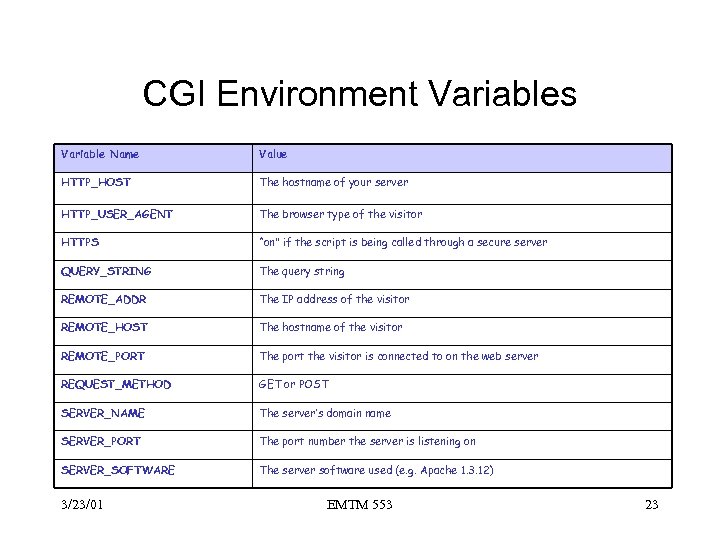 CGI Environment Variables Variable Name Value HTTP_HOST The hostname of your server HTTP_USER_AGENT The browser type of the visitor HTTPS “on” if the script is being called through a secure server QUERY_STRING The query string REMOTE_ADDR The IP address of the visitor REMOTE_HOST The hostname of the visitor REMOTE_PORT The port the visitor is connected to on the web server REQUEST_METHOD GET or POST SERVER_NAME The server’s domain name SERVER_PORT The port number the server is listening on SERVER_SOFTWARE The server software used (e. g. Apache 1. 3. 12) 3/23/01 EMTM 553 23
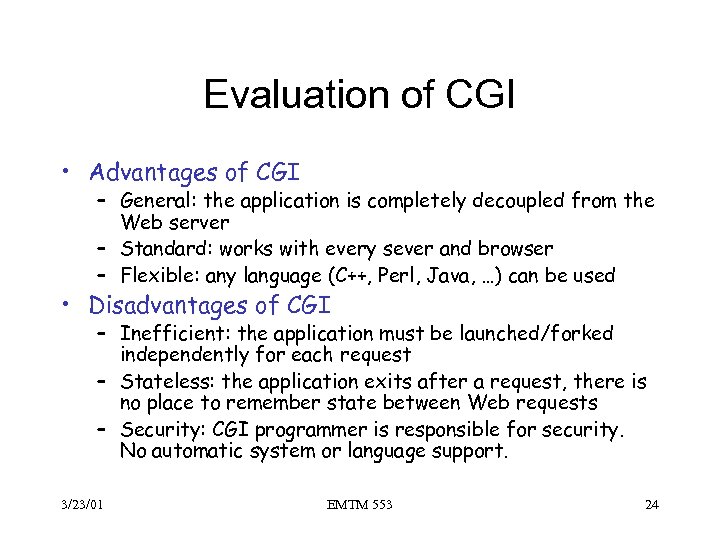 Evaluation of CGI • Advantages of CGI – General: the application is completely decoupled from the Web server – Standard: works with every sever and browser – Flexible: any language (C++, Perl, Java, …) can be used • Disadvantages of CGI – Inefficient: the application must be launched/forked independently for each request – Stateless: the application exits after a request, there is no place to remember state between Web requests – Security: CGI programmer is responsible for security. No automatic system or language support. 3/23/01 EMTM 553 24
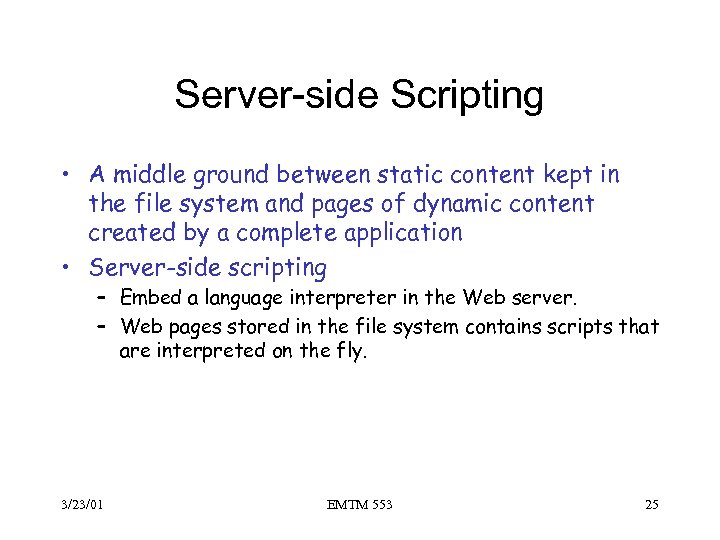 Server-side Scripting • A middle ground between static content kept in the file system and pages of dynamic content created by a complete application • Server-side scripting – Embed a language interpreter in the Web server. – Web pages stored in the file system contains scripts that are interpreted on the fly. 3/23/01 EMTM 553 25
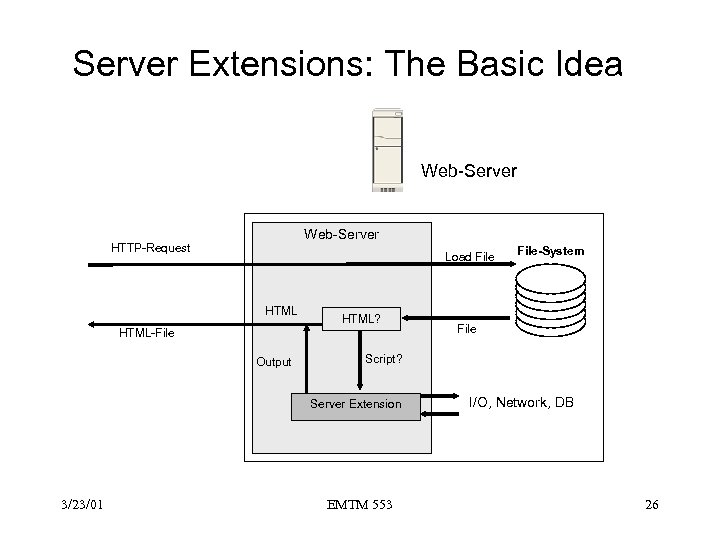 Server Extensions: The Basic Idea Web-Server HTTP-Request Load File HTML? HTML-File Output File Script? Server Extension 3/23/01 File-System EMTM 553 I/O, Network, DB 26
 Server Extensions • API depends on Server vendor: – Apache Foundation Apache Server: Apache API – Microsoft Internet Information Server: ISAPI – Netscape Enterprise Server: NSAPI • One can define it’s own server extension, e. g. , – Authentication module – Counter module 3/23/01 EMTM 553 27
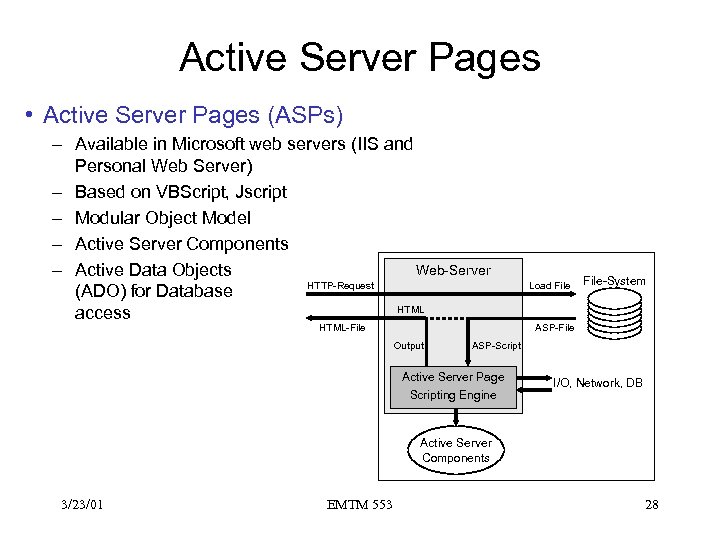 Active Server Pages • Active Server Pages (ASPs) – Available in Microsoft web servers (IIS and Personal Web Server) – Based on VBScript, Jscript – Modular Object Model – Active Server Components Web-Server – Active Data Objects HTTP-Request (ADO) for Database HTML access HTML-File Output Load File-System ASP-File ASP-Script Active Server Page Scripting Engine I/O, Network, DB Active Server Components 3/23/01 EMTM 553 28
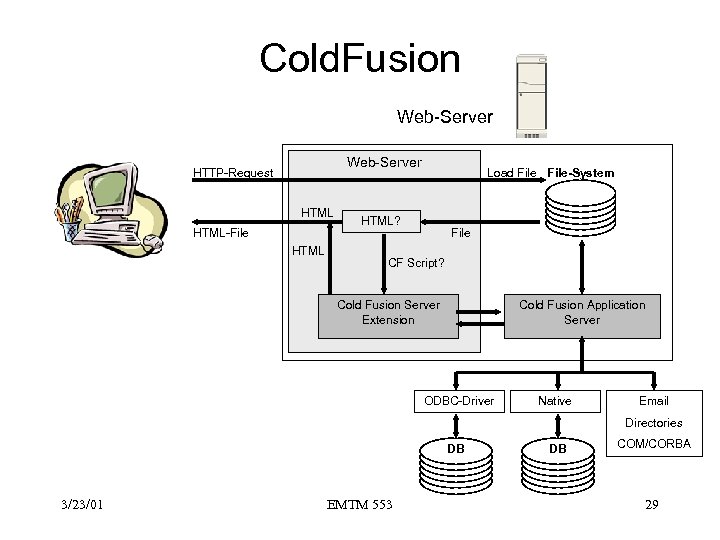 Cold. Fusion Web-Server HTTP-Request HTML-File HTML Load File-System HTML? File CF Script? Cold Fusion Application Server Cold Fusion Server Extension ODBC-Driver Native Email Directories DB 3/23/01 EMTM 553 DB COM/CORBA 29
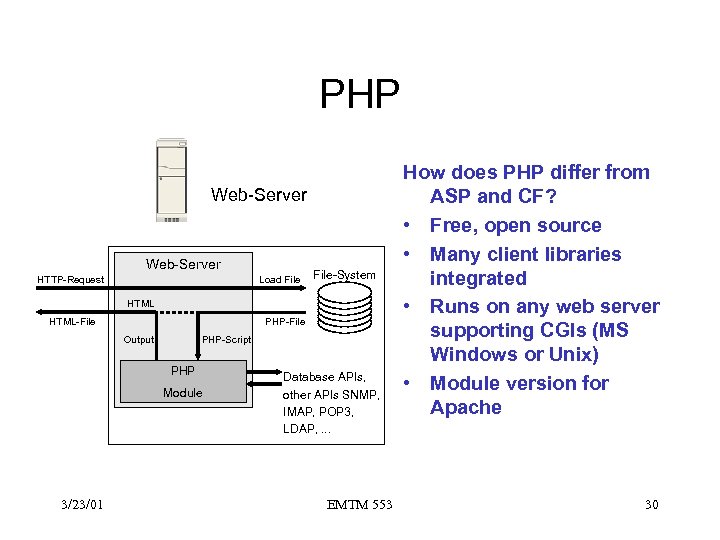 PHP Web-Server HTTP-Request Load File-System HTML-File PHP-File Output PHP-Script PHP Module 3/23/01 Database APIs, other APIs SNMP, IMAP, POP 3, LDAP, . . . EMTM 553 How does PHP differ from ASP and CF? • Free, open source • Many client libraries integrated • Runs on any web server supporting CGIs (MS Windows or Unix) • Module version for Apache 30
 Object Technology • Advantages – – Encapsulation, polymorphism, heterogeneous languages Rapid application development Distributed applications Flexibility of deployment • Technologies – CORBA – COM – Java Beans/RMI 3/23/01 EMTM 553 31
 Enterprise Java. Beans (EJB) • Server-side component architecture – Enable and simplify the building of distributed object in Java – Allow rapid application development – Supportability and reusability across vendors, I. e. , platform and implementation independent • EJB supports CTM (Component Transaction Monitoring) – hybrid of traditional transaction processing and distributed object request broker (ORB) services – TP Monitor is an OS for business systems and manages the entire environment that a business system runs, including transactions, resource management, and fault tolerance. – Distributed objects allow unique objects that have state and identity to be distributed accrossa network so that they can be accesses by other systems. 3/23/01 EMTM 553 32
 Server-side component Architecture • EJB server is responsible for – Making a component a distributed object – Managing services such as transactions, persistence, concurrency, security • Component Advantage – Divides software into manageable, discrete chunk of logic – Implements well-defined interfaces – Enables reuse o Components can be pieced together to solve larger problems 3/23/01 EMTM 553 33
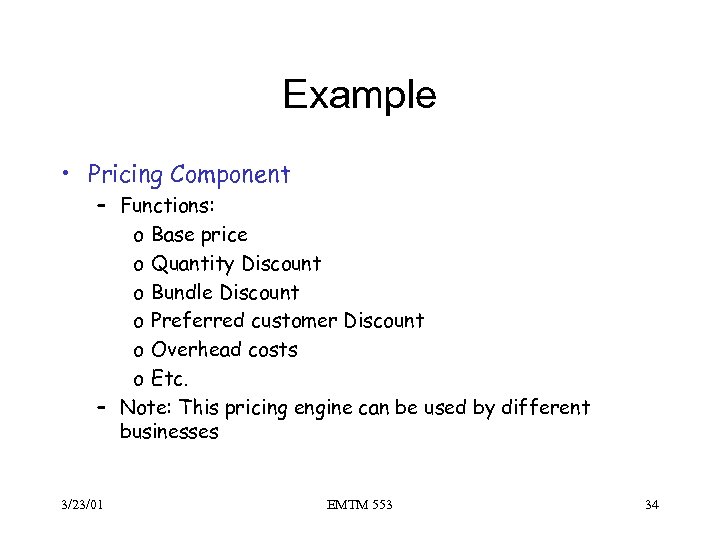 Example • Pricing Component – Functions: o Base price o Quantity Discount o Bundle Discount o Preferred customer Discount o Overhead costs o Etc. – Note: This pricing engine can be used by different businesses 3/23/01 EMTM 553 34
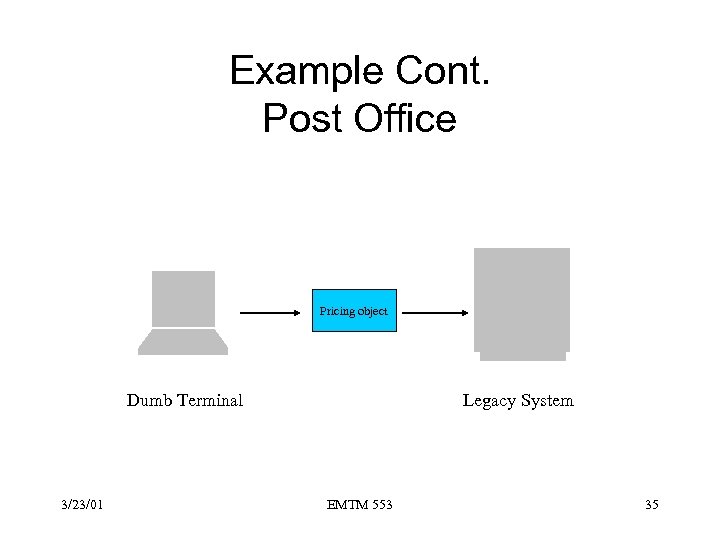 Example Cont. Post Office Pricing object Dumb Terminal 3/23/01 Legacy System EMTM 553 35
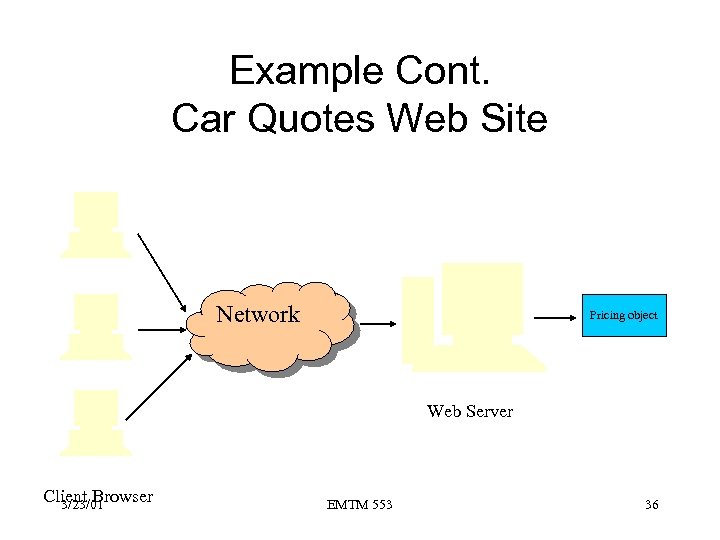 Example Cont. Car Quotes Web Site Network Pricing object Web Server Client Browser 3/23/01 EMTM 553 36
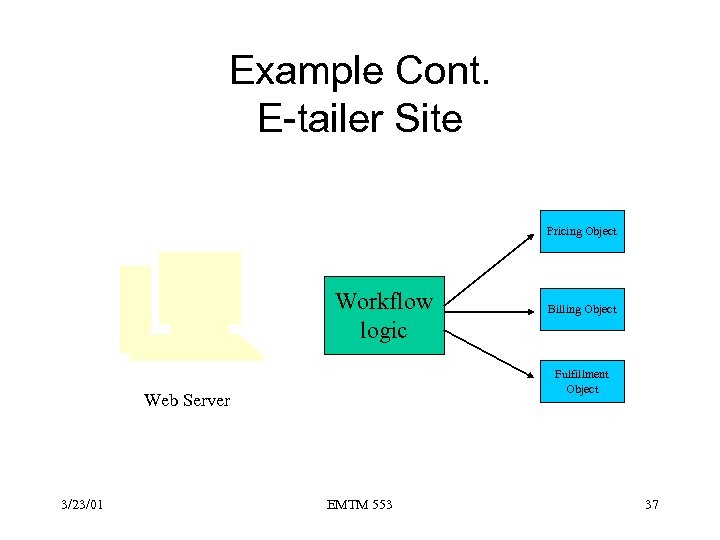 Example Cont. E-tailer Site Pricing Object Workflow logic Fulfillment Object Web Server 3/23/01 Billing Object EMTM 553 37
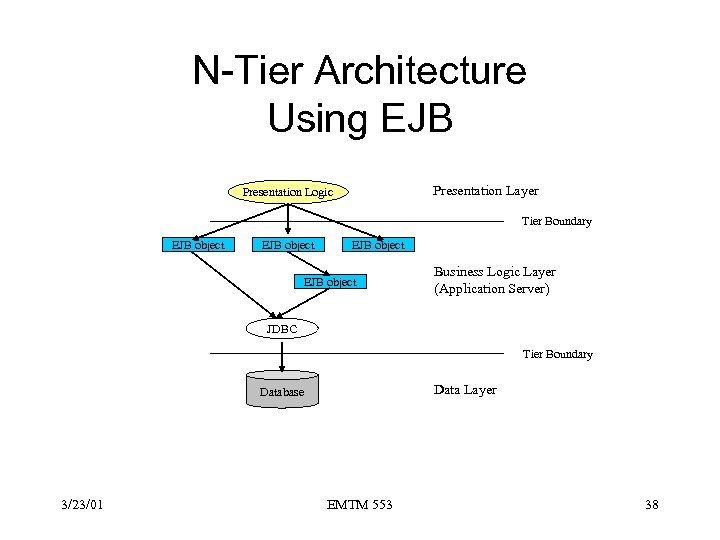 N-Tier Architecture Using EJB Presentation Layer Presentation Logic Tier Boundary EJB object Business Logic Layer (Application Server) JDBC Tier Boundary Data Layer Database 3/23/01 EMTM 553 38
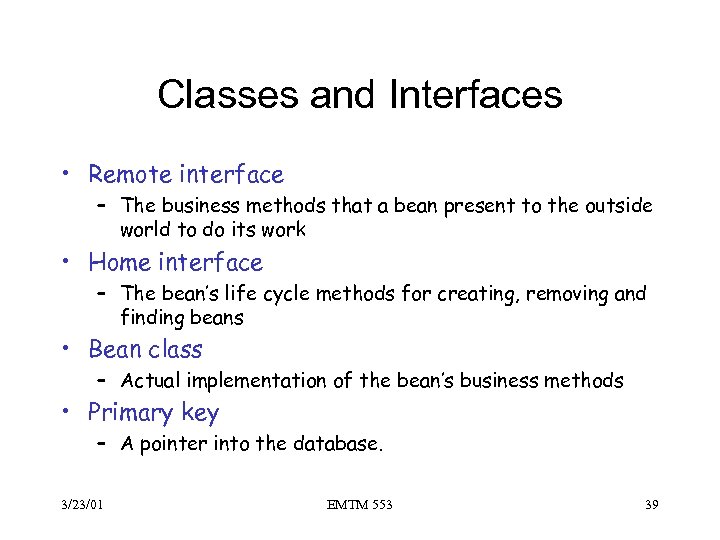 Classes and Interfaces • Remote interface – The business methods that a bean present to the outside world to do its work • Home interface – The bean’s life cycle methods for creating, removing and finding beans • Bean class – Actual implementation of the bean’s business methods • Primary key – A pointer into the database. 3/23/01 EMTM 553 39
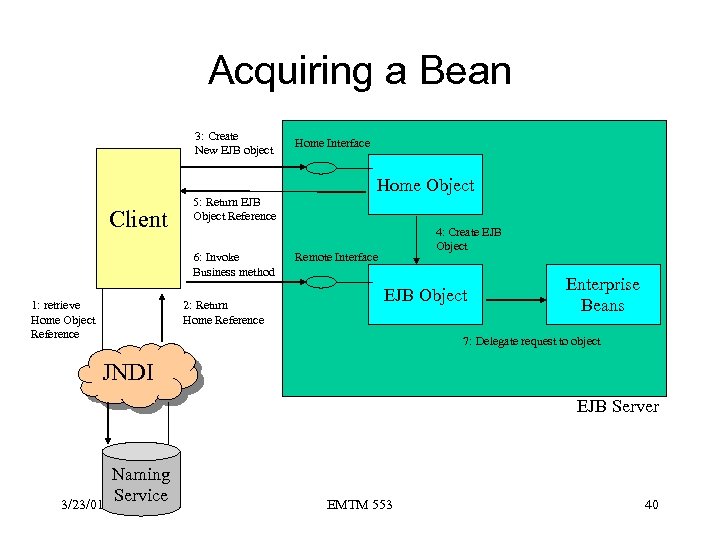 Acquiring a Bean 3: Create New EJB object Home Interface Home Object Client 5: Return EJB Object Reference 6: Invoke Business method 1: retrieve Home Object Reference 2: Return Home Reference 4: Create EJB Object Remote Interface EJB Object Enterprise Beans 7: Delegate request to object JNDI EJB Server 3/23/01 Naming Service EMTM 553 40
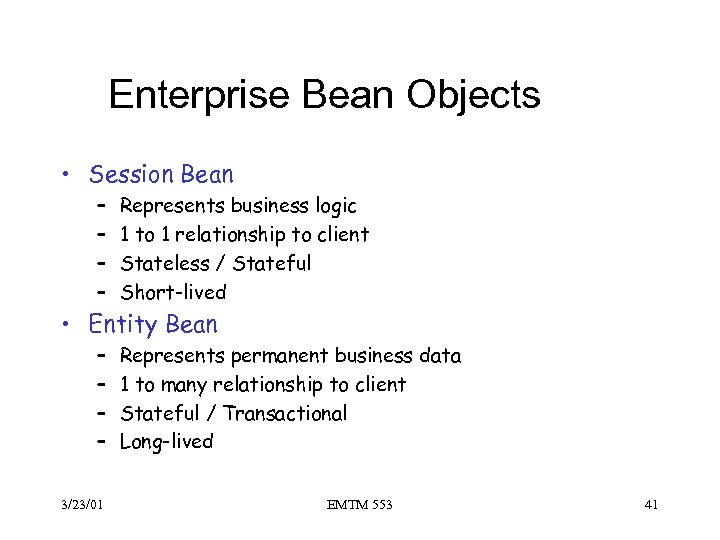 Enterprise Bean Objects • Session Bean – – Represents business logic 1 to 1 relationship to client Stateless / Stateful Short-lived • Entity Bean – – 3/23/01 Represents permanent business data 1 to many relationship to client Stateful / Transactional Long-lived EMTM 553 41
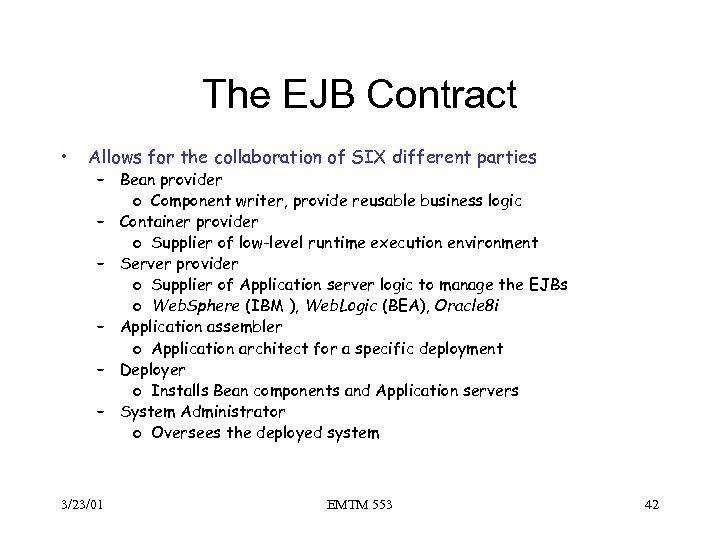 The EJB Contract • Allows for the collaboration of SIX different parties – Bean provider o Component writer, provide reusable business logic – Container provider o Supplier of low-level runtime execution environment – Server provider o Supplier of Application server logic to manage the EJBs o Web. Sphere (IBM ), Web. Logic (BEA), Oracle 8 i – Application assembler o Application architect for a specific deployment – Deployer o Installs Bean components and Application servers – System Administrator o Oversees the deployed system 3/23/01 EMTM 553 42
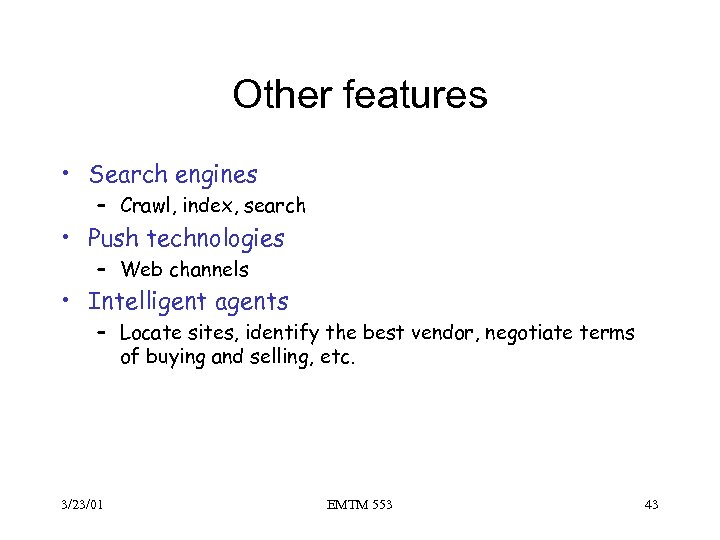 Other features • Search engines – Crawl, index, search • Push technologies – Web channels • Intelligent agents – Locate sites, identify the best vendor, negotiate terms of buying and selling, etc. 3/23/01 EMTM 553 43
 Q&A 3/23/01 EMTM 553 44