 Скачать презентацию Embedded System Spring 2011 Lecture 2 FORMALISMS FOR
6afb50e27f2e01ec69160e4dc70c4ea8.ppt
- Количество слайдов: 72



Embedded System Spring, 2011 Lecture 2: FORMALISMS FOR SYSTEM DESIGN Eng. Wazen M. Shbair IUG- Embedded System
Today’s Lecture o o Object-oriented design. Unified Modeling Language (UML). IUG- Embedded System 2
System modeling o Need languages to describe systems: n n o useful across several levels of abstraction; understandable within and between organizations. Block diagrams are a start, but don’t cover everything. IUG- Embedded System 3 3
Object-oriented design o o Object-oriented (OO) design: A generalization of object-oriented programming. Object = state + methods. n n State provides each object with its own identity. Methods provide an abstract interface to the object. IUG- Embedded System 4 4
Objects and classes o o o Class: object type. Class defines the object’s state elements but state values may change over time. Class defines the methods used to interact with all objects of that type. n Each object has its own state. IUG- Embedded System 5 5
OO design principles o Some objects will closely correspond to real -world objects. n o Some objects may be useful only for description or implementation. Objects provide interfaces to read/write state, hiding the object’s implementation from the rest of the system. IUG- Embedded System 6 6
UML o o Developed by Booch et al. Goals: n n object-oriented; visual; useful at many levels of abstraction; usable for all aspects of design. IUG- Embedded System 7 7
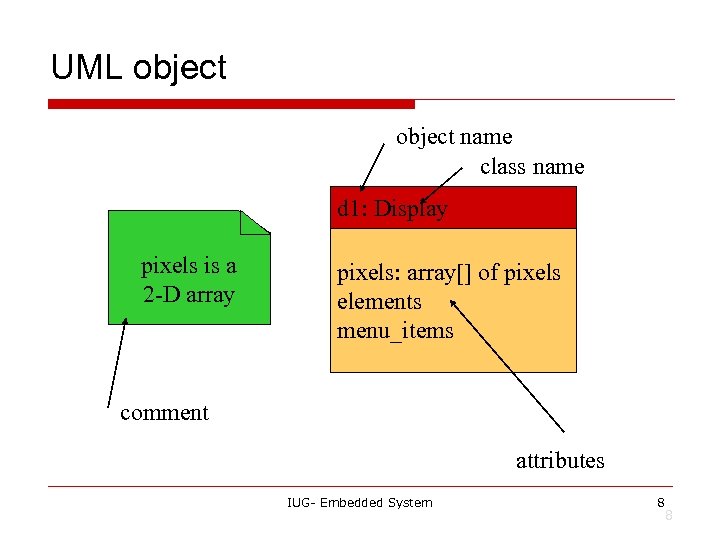
UML object name class name d 1: Display pixels is a 2 -D array pixels: array[] of pixels elements menu_items comment attributes IUG- Embedded System 8 8
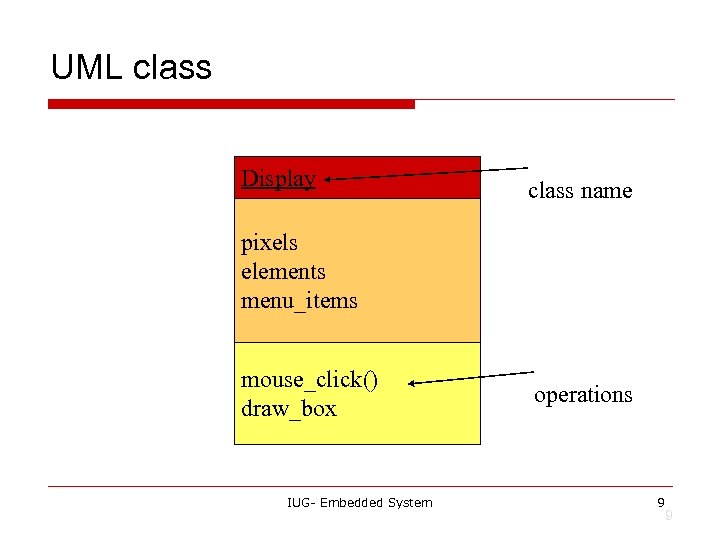
UML class Display class name pixels elements menu_items mouse_click() draw_box IUG- Embedded System operations 9 9
The class interface o o o The operations provide the abstract interface between the class’s implementation and other classes. Operations may have arguments, return values. An operation can examine and/or modify the object’s state. IUG- Embedded System 10 10
Choose your interface properly o If the interface is too small/specialized: n n o object is hard to use for even one application; even harder to reuse. If the interface is too large: n n n class becomes too cumbersome for designers to understand; implementation may be too slow; spec and implementation are probably buggy. IUG- Embedded System 11 11
Relationships between objects and classes o o Association: objects communicate but one does not own the other. Aggregation: a complex object is made of several smaller objects. Composition: aggregation in which owner does not allow access to its components. Generalization: define one class in terms of another. IUG- Embedded System 12 12
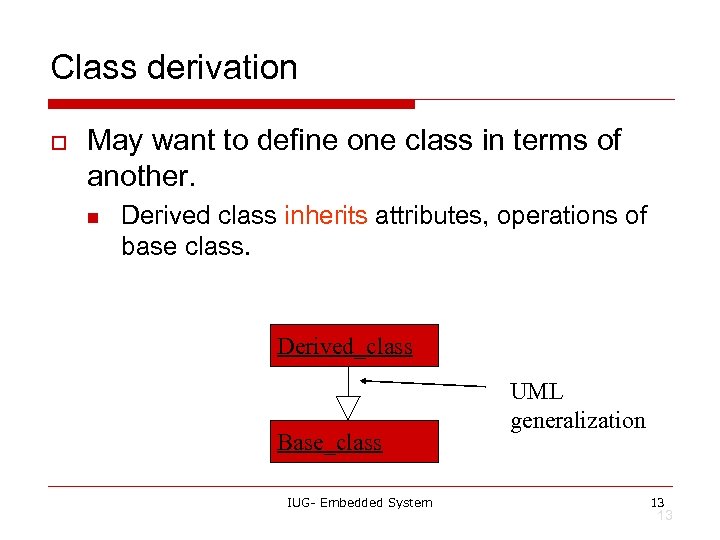
Class derivation o May want to define one class in terms of another. n Derived class inherits attributes, operations of base class. Derived_class Base_class IUG- Embedded System UML generalization 13 13
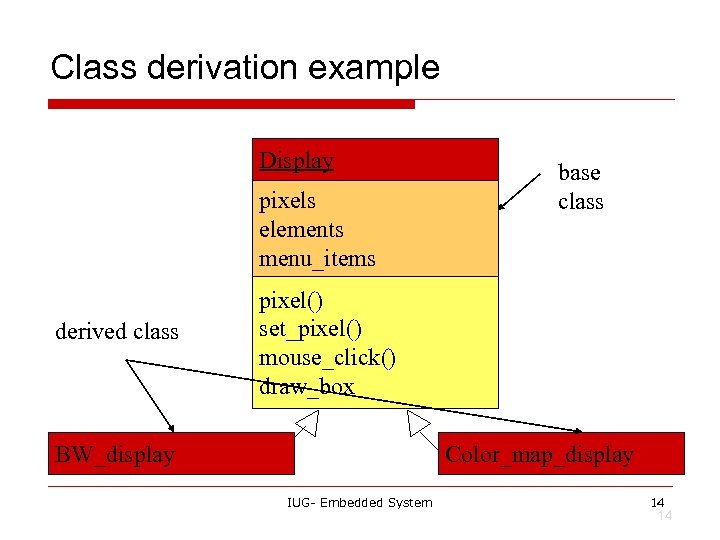
Class derivation example Display pixels elements menu_items derived class base class pixel() set_pixel() mouse_click() draw_box BW_display Color_map_display IUG- Embedded System 14 14
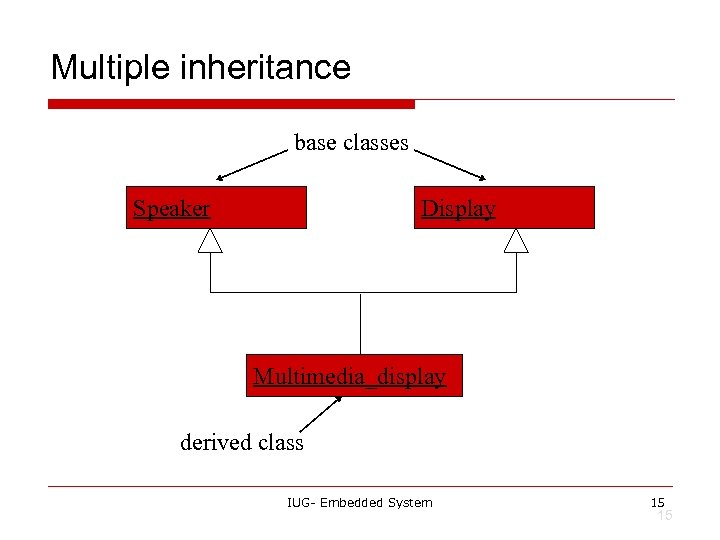
Multiple inheritance base classes Speaker Display Multimedia_display derived class IUG- Embedded System 15 15
Links and associations o o Link: describes relationships between objects. Association: describes relationship between classes. IUG- Embedded System 16 16
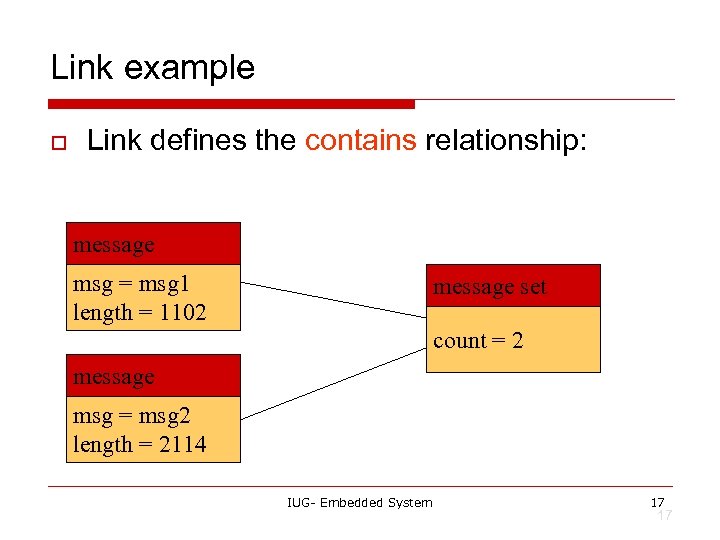
Link example o Link defines the contains relationship: message msg = msg 1 length = 1102 message set count = 2 message msg = msg 2 length = 2114 IUG- Embedded System 17 17
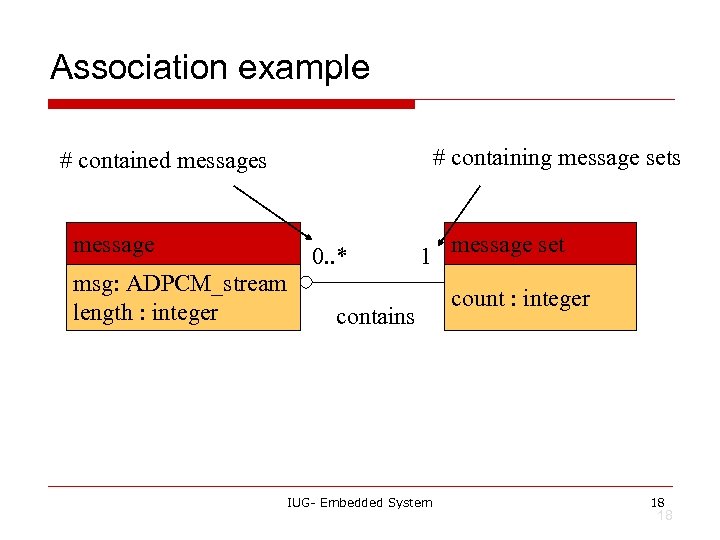
Association example # containing message sets # contained messages message msg: ADPCM_stream length : integer 0. . * 1 contains IUG- Embedded System message set count : integer 18 18
Stereotypes o o Stereotype: recurring combination of elements in an object or class. Example: n <<foo>> IUG- Embedded System 19 19
Behavioral description o Several ways to describe behavior: n n internal view; external view. IUG- Embedded System 20 20
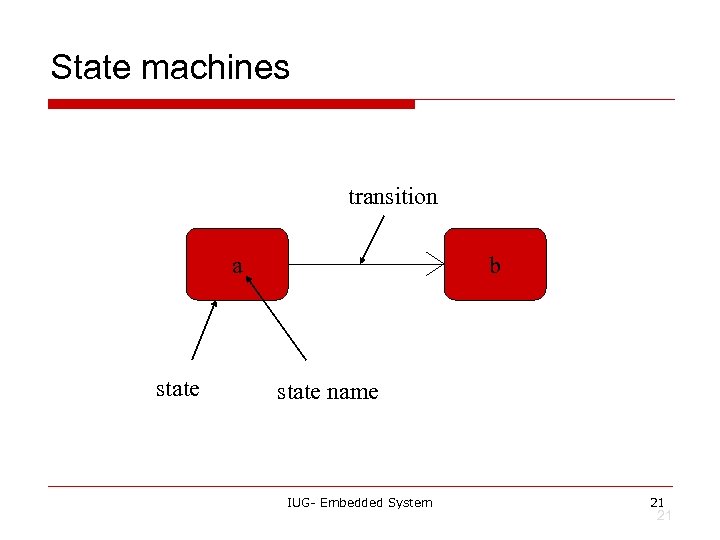
State machines transition a state b state name IUG- Embedded System 21 21
Event-driven state machines o Behavioral descriptions are written as event -driven state machines. n o Machine changes state when receiving an input. An event may come from inside or outside of the system. IUG- Embedded System 22 22
Types of events o o o Signal: asynchronous event. Call: synchronized communication. Timer: activated by time. IUG- Embedded System 23 23
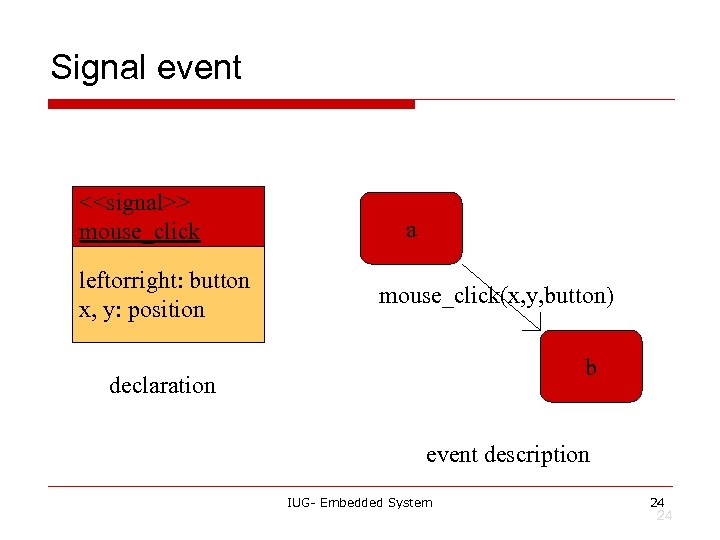
Signal event <<signal>> mouse_click leftorright: button x, y: position a mouse_click(x, y, button) b declaration event description IUG- Embedded System 24 24
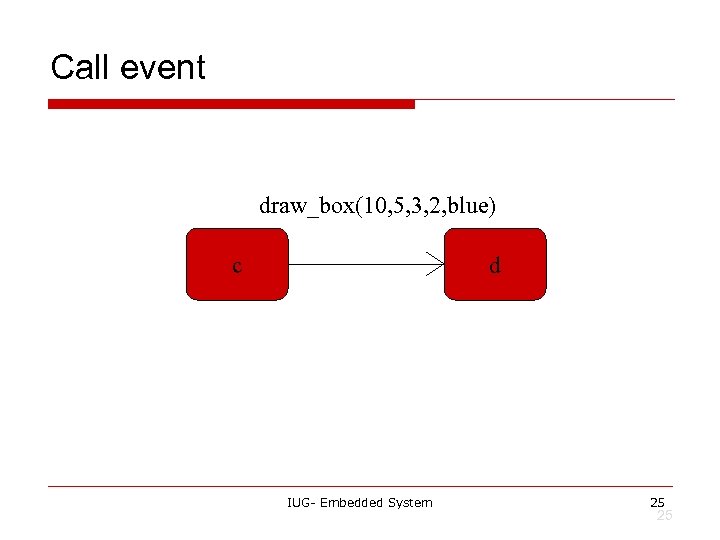
Call event draw_box(10, 5, 3, 2, blue) c d IUG- Embedded System 25 25
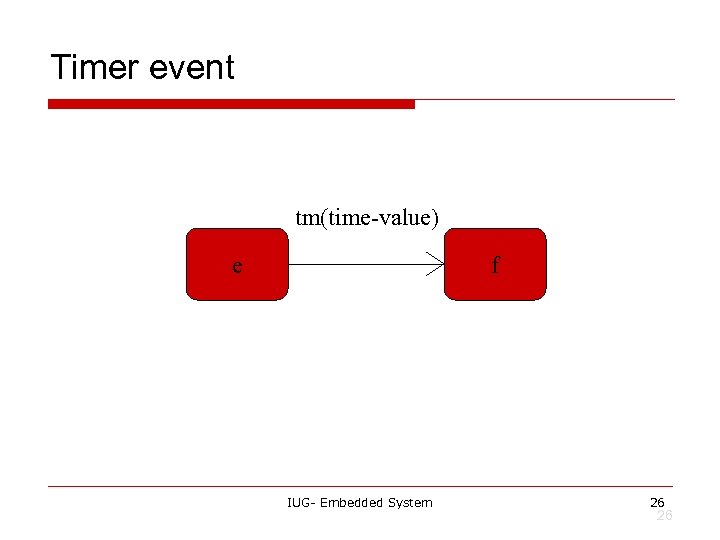
Timer event tm(time-value) e f IUG- Embedded System 26 26
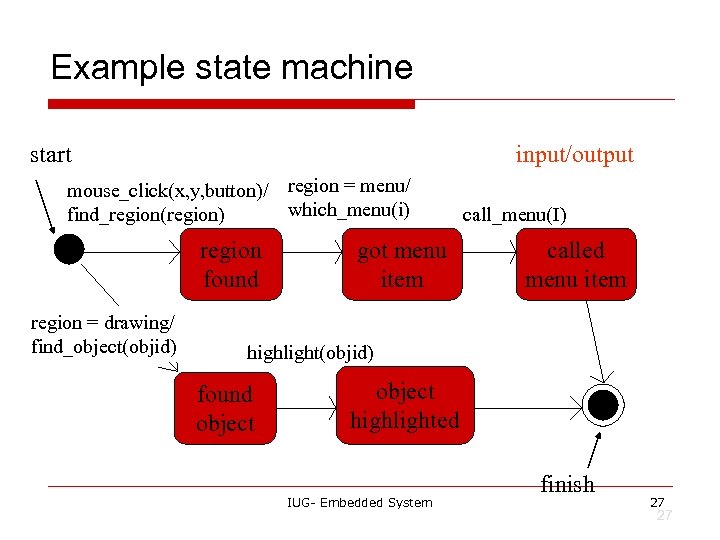
Example state machine start input/output mouse_click(x, y, button)/ region = menu/ which_menu(i) find_region(region) region found region = drawing/ find_object(objid) got menu item call_menu(I) called menu item highlight(objid) found object highlighted IUG- Embedded System finish 27 27
Sequence diagram o o Shows sequence of operations over time. Relates behaviors of multiple objects. IUG- Embedded System 28 28
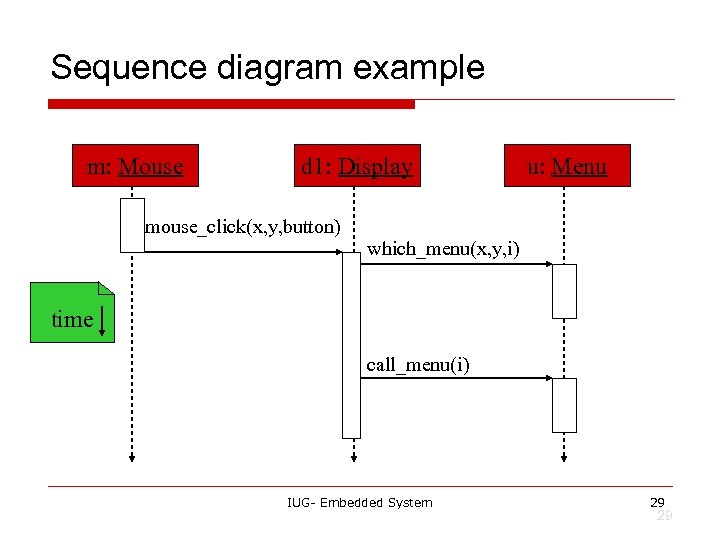
Sequence diagram example m: Mouse d 1: Display mouse_click(x, y, button) u: Menu which_menu(x, y, i) time call_menu(i) IUG- Embedded System 29 29
Summary o o Object-oriented design helps us organize a design. UML is a transportable system design language. n Provides structural and behavioral description primitives. IUG- Embedded System 30 30
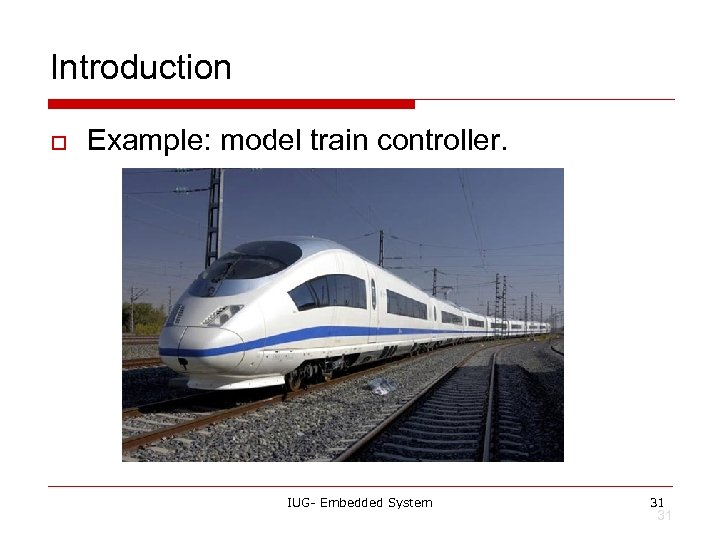
Introduction o Example: model train controller. IUG- Embedded System 31 31
Purposes of example o o Follow a design through several levels of abstraction. Gain experience with UML. IUG- Embedded System 32 32
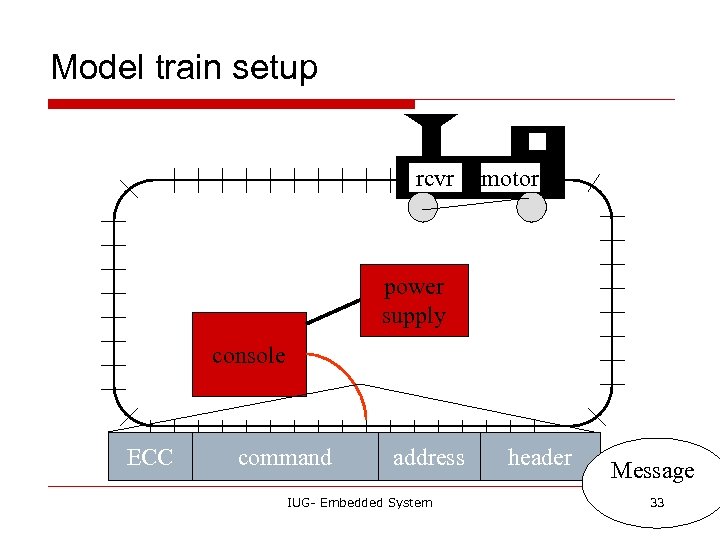
Model train setup rcvr motor power supply console ECC command address IUG- Embedded System header Message 33 33
Requirements o o o Console can control 8 trains on 1 track. Throttle has at least 63 levels. Inertia control adjusts responsiveness with at least 8 levels. Emergency stop button. Error detection scheme on messages. IUG- Embedded System 34 34
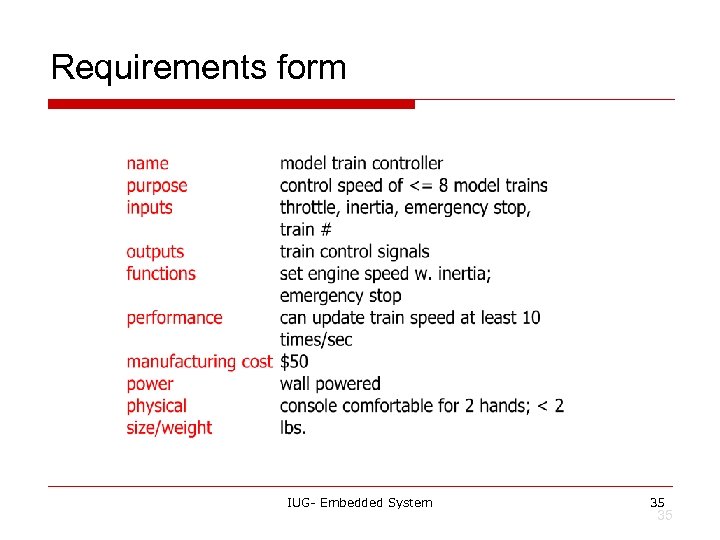
Requirements form IUG- Embedded System 35 35
Digital Command Control o o DCC created by model railroad hobbyists, picked up by industry. Defines way in which model trains, controllers communicate. n o Leaves many system design aspects open, allowing competition. This is a simple example of a big trend: n Cell phones, digital TV rely on standards. © 2010 Husam Alzaq IUG- Embedded System Computers as Components 36 36
DCC documents o Standard S-9. 1, DCC Electrical Standard. n o Defines how bits are encoded on the rails. Standard S-9. 2, DCC Communication Standard. n Defines packet format and semantics. IUG- Embedded System 37 37
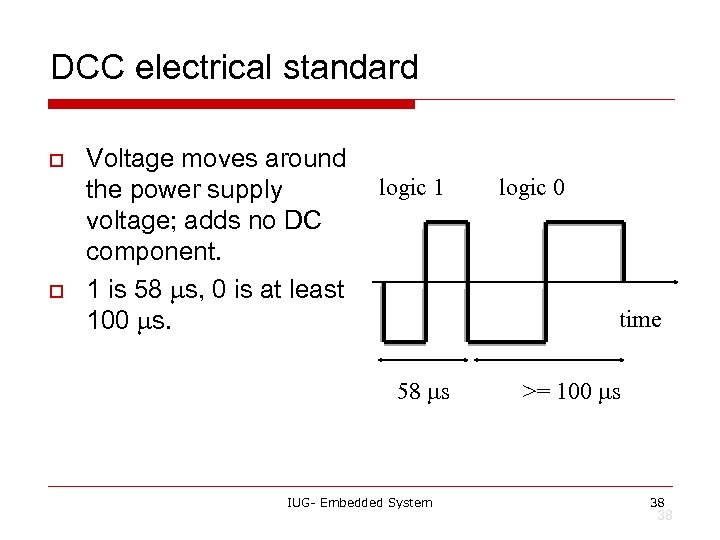
DCC electrical standard o o Voltage moves around the power supply voltage; adds no DC component. 1 is 58 ms, 0 is at least 100 ms. logic 1 logic 0 time 58 ms IUG- Embedded System >= 100 ms 38 38
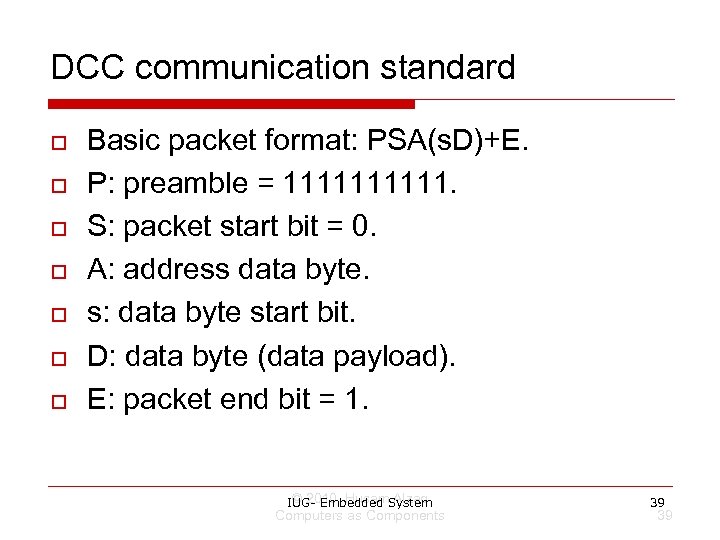
DCC communication standard o o o o Basic packet format: PSA(s. D)+E. P: preamble = 11111. S: packet start bit = 0. A: address data byte. s: data byte start bit. D: data byte (data payload). E: packet end bit = 1. © 2010 Husam Alzaq IUG- Embedded System Computers as Components 39 39
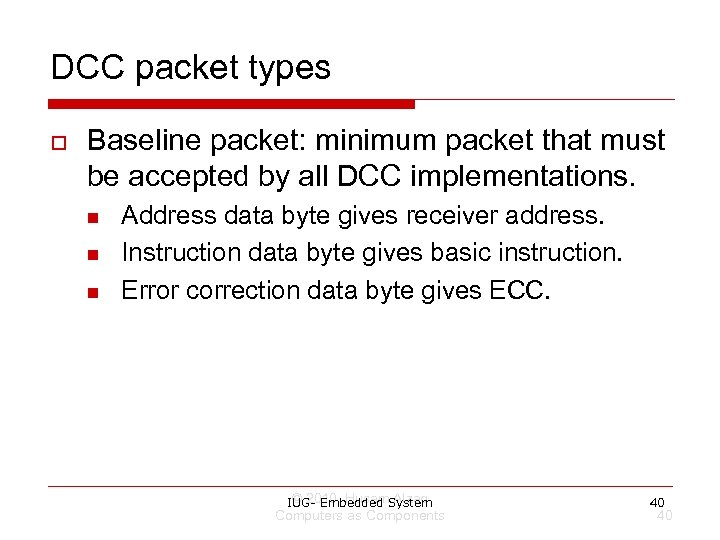
DCC packet types o Baseline packet: minimum packet that must be accepted by all DCC implementations. n n n Address data byte gives receiver address. Instruction data byte gives basic instruction. Error correction data byte gives ECC. © 2010 Husam Alzaq IUG- Embedded System Computers as Components 40 40
Conceptual specification o Before we create a detailed specification, we will make an initial, simplified specification. n n Gives us practice in specification and UML. Good idea in general to identify potential problems before investing too much effort in detail. IUG- Embedded System 41 41
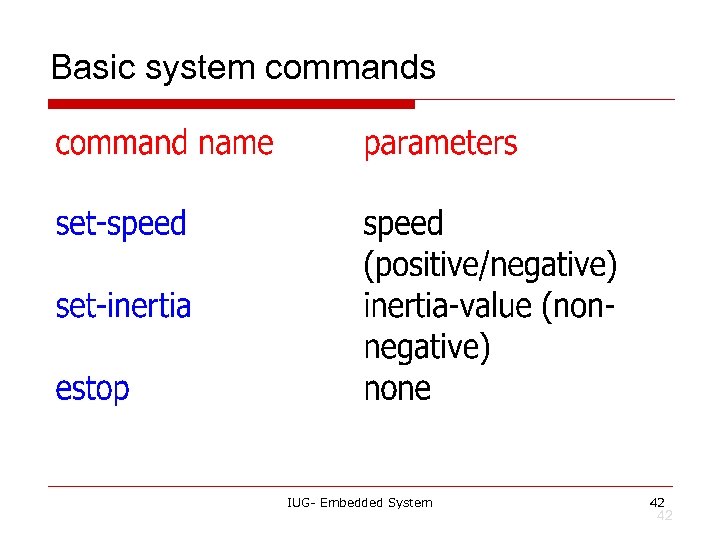
Basic system commands IUG- Embedded System 42 42
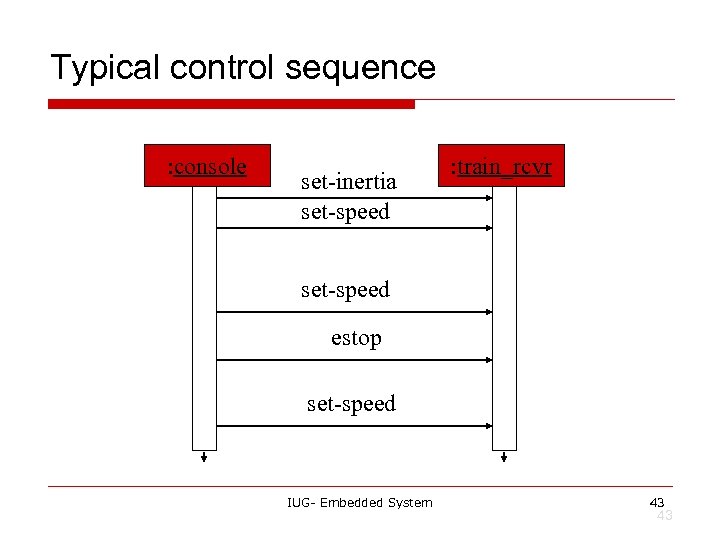
Typical control sequence : console set-inertia set-speed : train_rcvr set-speed estop set-speed IUG- Embedded System 43 43
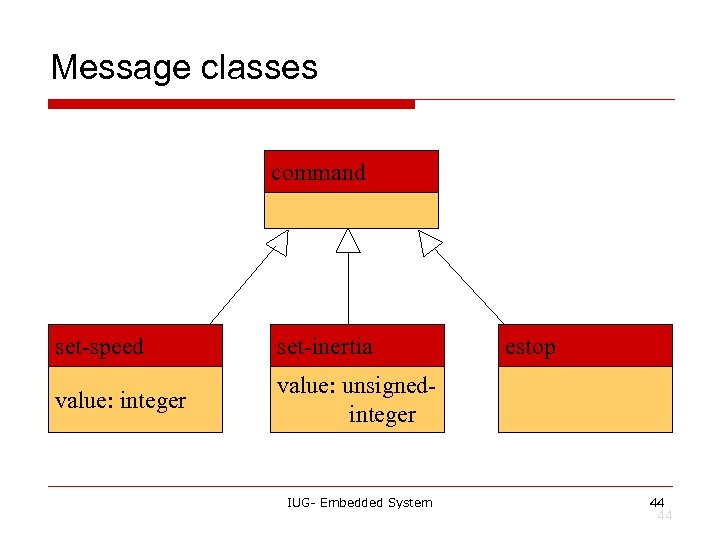
Message classes command set-speed set-inertia value: integer value: unsignedinteger IUG- Embedded System estop 44 44
Roles of message classes o Implemented message classes derived from message class. n o Attributes and operations will be filled in for detailed specification. Implemented message classes specify message type by their class. n May have to add type as parameter to data structure in implementation. IUG- Embedded System 45 45
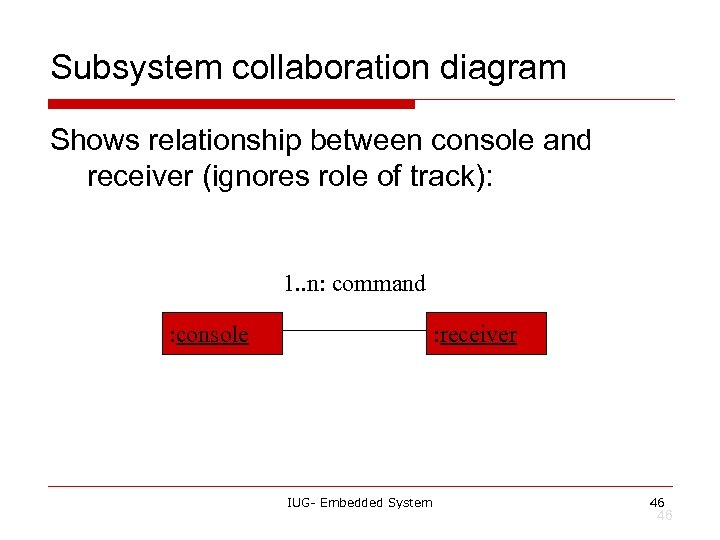
Subsystem collaboration diagram Shows relationship between console and receiver (ignores role of track): 1. . n: command : console : receiver IUG- Embedded System 46 46
System structure modeling o Some classes define non-computer components. n o Denote by *name. Choose important systems at this point to show basic relationships. IUG- Embedded System 47 47
Major subsystem roles o Console: n n n o read state of front panel; format messages; transmit messages. Train: n n n receive message; interpret message; control the train. © 2010 Husam Alzaq IUG- Embedded System Computers as Components 48 48
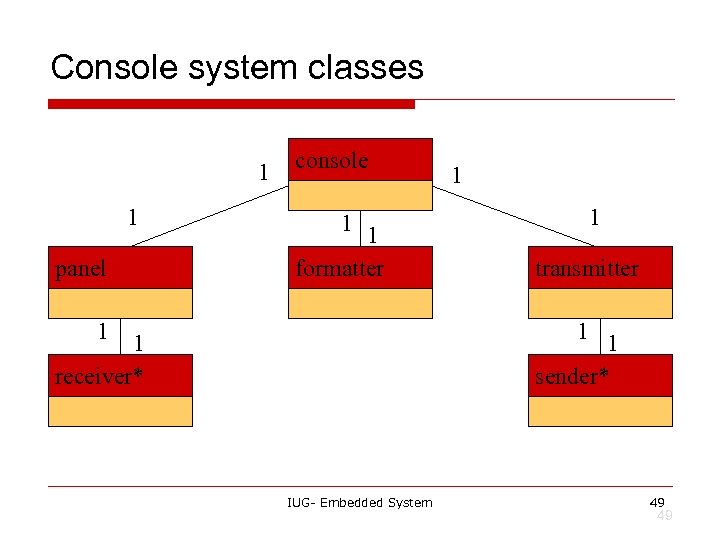
Console system classes 1 1 panel console 1 1 formatter 1 1 1 transmitter 1 1 sender* 1 receiver* IUG- Embedded System 49 49
Console class roles o o o panel: describes analog knobs and interface hardware. formatter: turns knob settings into bit streams. transmitter: sends data on track. © 2010 Husam Alzaq IUG- Embedded System Computers as Components 50 50
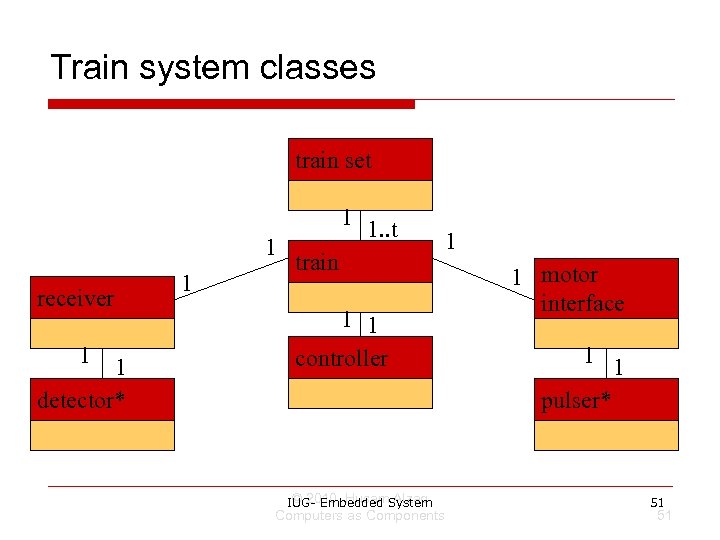
Train system classes train set 1 receiver 1 1 detector* 1 1 1. . t train 1 1 controller © 2010 Husam Alzaq IUG- Embedded System Computers as Components 1 1 motor interface 1 1 pulser* 51 51
Train class roles o o o receiver: digitizes signal from track. controller: interprets received commands and makes control decisions. motor interface: generates signals required by motor. © 2010 Husam Alzaq IUG- Embedded System Computers as Components 52 52
Detailed specification o We can now fill in the details of the conceptual specification: n n o more classes; behaviors. Sketching out the spec first helps us understand the basic relationships in the system. IUG- Embedded System 53 53
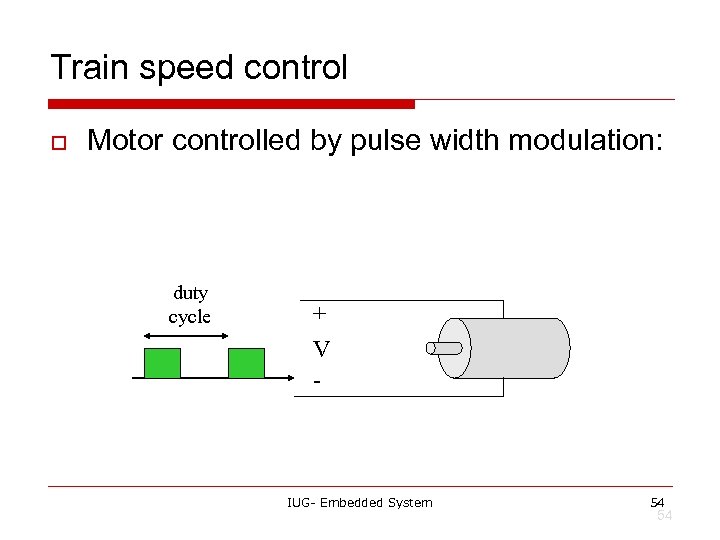
Train speed control o Motor controlled by pulse width modulation: duty cycle + V - IUG- Embedded System 54 54
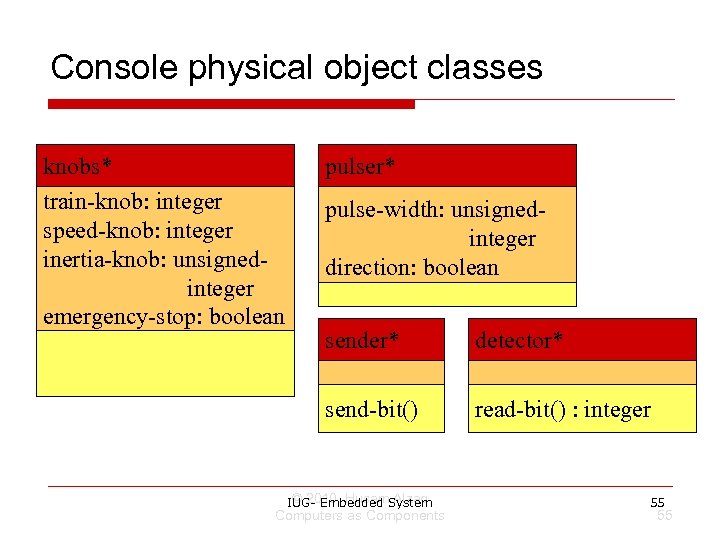
Console physical object classes knobs* train-knob: integer speed-knob: integer inertia-knob: unsignedinteger emergency-stop: boolean pulser* pulse-width: unsignedinteger direction: boolean sender* detector* send-bit() read-bit() : integer © 2010 Husam Alzaq IUG- Embedded System Computers as Components 55 55
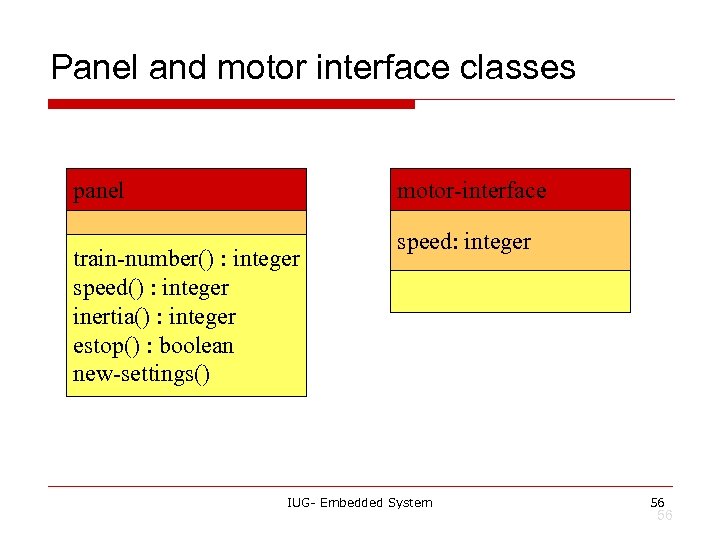
Panel and motor interface classes panel motor-interface train-number() : integer speed() : integer inertia() : integer estop() : boolean new-settings() speed: integer IUG- Embedded System 56 56
Class descriptions o panel class defines the controls. n o new-settings() behavior reads the controls. motor-interface class defines the motor speed held as state. © 2010 Husam Alzaq IUG- Embedded System Computers as Components 57 57
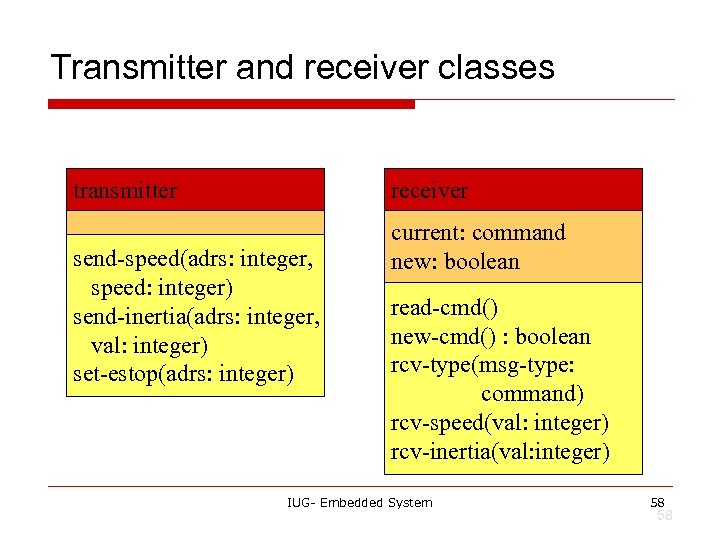
Transmitter and receiver classes transmitter receiver send-speed(adrs: integer, speed: integer) send-inertia(adrs: integer, val: integer) set-estop(adrs: integer) current: command new: boolean read-cmd() new-cmd() : boolean rcv-type(msg-type: command) rcv-speed(val: integer) rcv-inertia(val: integer) IUG- Embedded System 58 58
Class descriptions o o transmitter class has one behavior for each type of message sent. receiver function provides methods to: n n n detect a new message; determine its type; read its parameters (estop has no parameters). IUG- Embedded System 59 59
![Formatter class formatter current-train: integer current-speed[ntrains]: integer current-inertia[ntrains]: unsigned-integer current-estop[ntrains]: boolean send-command() panel-active() :](https://present5.com/presentation/6afb50e27f2e01ec69160e4dc70c4ea8/image-60.jpg "Formatter class formatter current-train: integer current-speed[ntrains]: integer current-inertia[ntrains]: unsigned-integer current-estop[ntrains]: boolean send-command() panel-active() :")
Formatter class formatter current-train: integer current-speed[ntrains]: integer current-inertia[ntrains]: unsigned-integer current-estop[ntrains]: boolean send-command() panel-active() : boolean operate() IUG- Embedded System 60 60
Formatter class description o o Formatter class holds state for each train, setting for current train. The operate() operation performs the basic formatting task. IUG- Embedded System 61 61
Control input cases o o Use a soft panel to show current panel settings for each train. Changing train number: n o must change soft panel settings to reflect current train’s speed, etc. Controlling throttle/inertia/estop: n read panel, check for changes, perform command. IUG- Embedded System 62 62
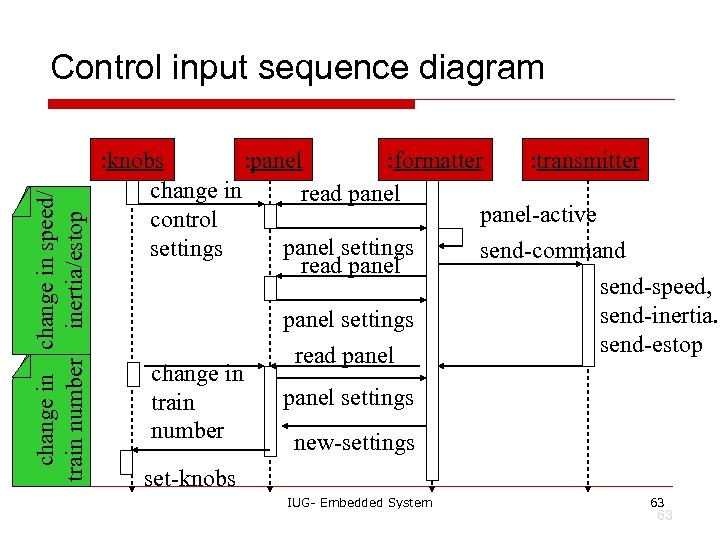
change in speed/ train number inertia/estop Control input sequence diagram : knobs : panel : formatter : transmitter change in read panel-active control panel settings send-command read panel send-speed, send-inertia. panel settings send-estop read panel change in panel settings train number new-settings set-knobs IUG- Embedded System 63 63
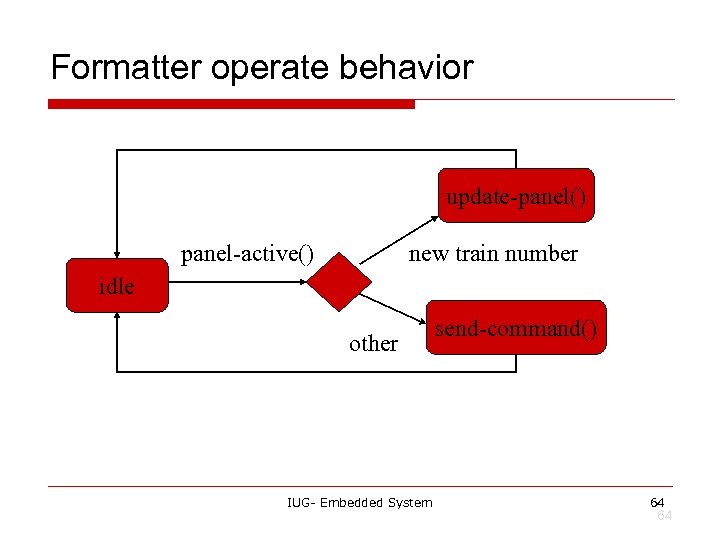
Formatter operate behavior update-panel() panel-active() new train number idle other IUG- Embedded System send-command() 64 64
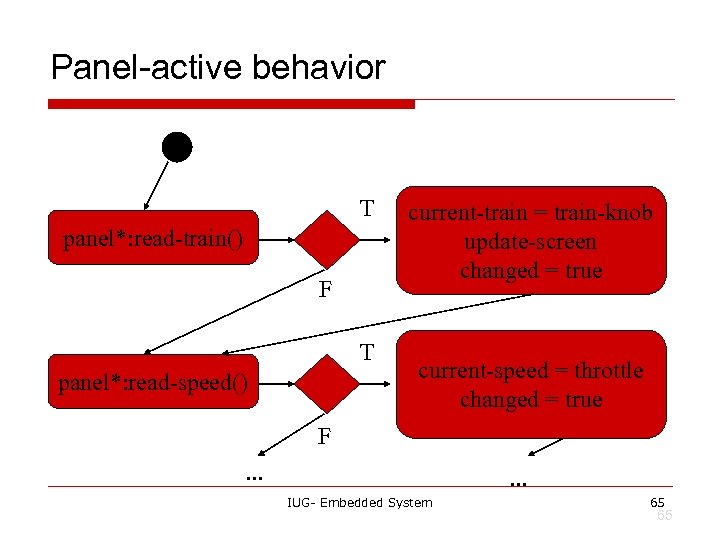
Panel-active behavior T panel*: read-train() F T panel*: read-speed() current-train = train-knob update-screen changed = true current-speed = throttle changed = true F. . . IUG- Embedded System 65 65
![Controller class controller current-train: integer current-speed[ntrains]: integer current-direction[ntrains]: boolean current-inertia[ntrains]: unsigned-integer operate() issue-command() IUG-](https://present5.com/presentation/6afb50e27f2e01ec69160e4dc70c4ea8/image-66.jpg "Controller class controller current-train: integer current-speed[ntrains]: integer current-direction[ntrains]: boolean current-inertia[ntrains]: unsigned-integer operate() issue-command() IUG-")
Controller class controller current-train: integer current-speed[ntrains]: integer current-direction[ntrains]: boolean current-inertia[ntrains]: unsigned-integer operate() issue-command() IUG- Embedded System 66 66
Setting the speed o o Don’t want to change speed instantaneously. Controller should change speed gradually by sending several commands. © 2010 Husam Alzaq IUG- Embedded System Computers as Components 67 67
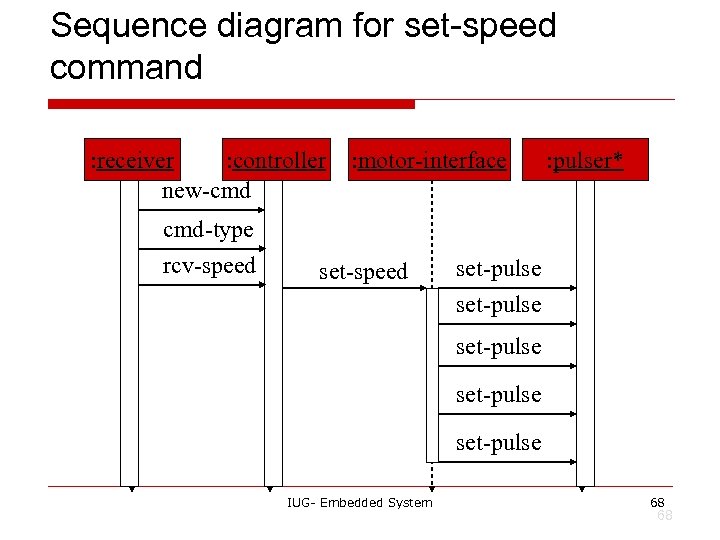
Sequence diagram for set-speed command : receiver : controller new-cmd cmd-type rcv-speed : motor-interface set-speed : pulser* set-pulse set-pulse IUG- Embedded System 68 68
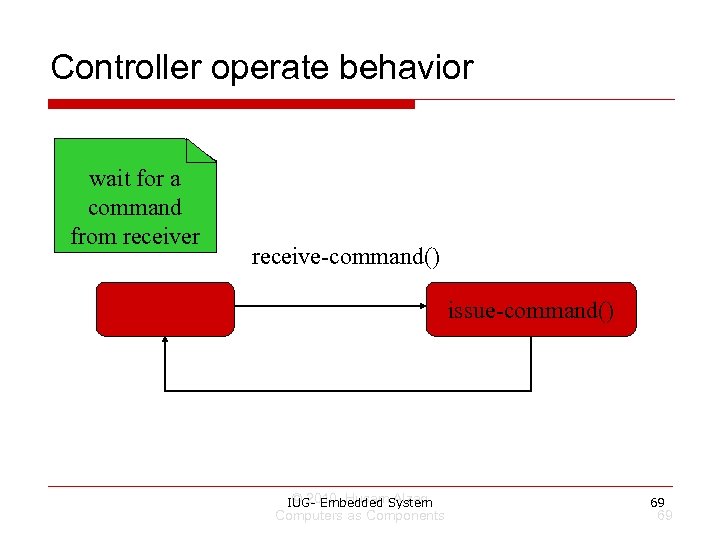
Controller operate behavior wait for a command from receiver receive-command() issue-command() © 2010 Husam Alzaq IUG- Embedded System Computers as Components 69 69
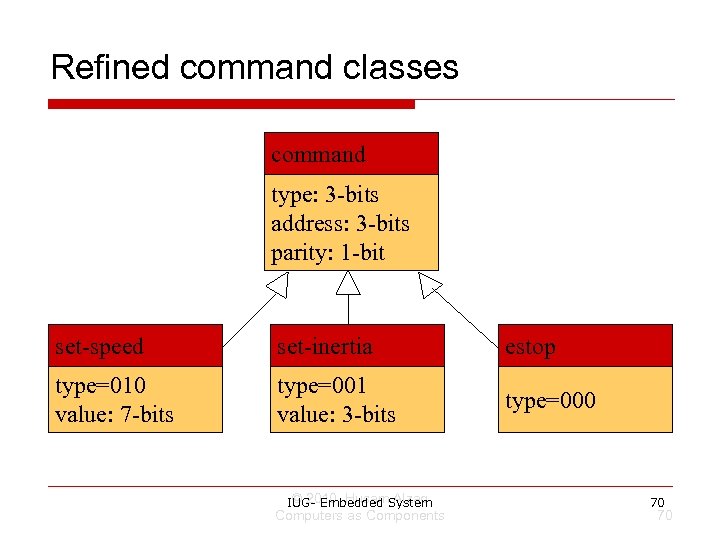
Refined command classes command type: 3 -bits address: 3 -bits parity: 1 -bit set-speed set-inertia estop type=010 value: 7 -bits type=001 value: 3 -bits type=000 © 2010 Husam Alzaq IUG- Embedded System Computers as Components 70 70
Summary o Separate specification and programming. n n o Small mistakes are easier to fix in the spec. Big mistakes in programming cost a lot of time. You can’t completely separate specification and architecture. n Make a few tasteful assumptions. IUG- Embedded System 71 71
References o o Jie Hu , ECE 692 Embedded Computing Systems , Fall 2010. Wayne Wolf’s , Computers as Components © 2000 , Morgan Kaufman IUG- Embedded System 72
Скачать презентацию Embedded System Spring 2011 Lecture 2 FORMALISMS FOR
6afb50e27f2e01ec69160e4dc70c4ea8.ppt