


 Скачать презентацию Elliott CRM Features Edward M Kwang President
69fc8a61b8941e12a068b50183e7c9ff.ppt
- Количество слайдов: 39
 Elliott CRM Features Edward M. Kwang President
 Elliott CRM Features • System Level – Notes – Attribute – Links – e. Contact – Emails Features – Events • Application Level (Mostly in COP)
 Prelude to e. Contact Manager Notes – Conversation With Customers – Reminder to Follow Up • Attribute – Expand Database Without Modification • Links – External Documents Related to The Customer
 Notes, Ticklers & Knowledge Base • Notes – Use It for Memo – Print on Documents • Ticklers – It’s Notes With A Due/Remind Date – Management Functions • Knowledge Base – Free Text Search for Notes Database
 Notes Demo • Adding a new customer “Elliott, Inc. ” • Use Notes for Recording Conversation with Customers. • Use Notes as Tickler to Remind You. • Tickler Become Management Tool • Use Notes for Knowledge Base
 Attribute • Attribute is an extension to Elliott database w/o modification • Attribute used in CRM for various different tracking purpose • Attribute used for e. Contact on the Web is like Profiling • Selection based on attribute can be easily handled in Mass Email and Export Processor • V 7. 1 Attribute Has GUI User Interface
 Attribute for Restriction Control • Create an attribute code for control purpose. • Decide how to control – Not allow – Restriction when present – Restriction when not present • Add the restriction control • Attach attribute to customers – Inherit customer type attribute • Attach attribute to item – Inherit product category & user defined code attribute
 Scenario – Territory Limitation • Can’t sell an item in State of CA • Add an attribute • Attach to item, product category or user defined code • Add restriction for CA for not allow this attribute
 Scenario – License Regulation • State of CA does not allow selling of an item unless reseller is properly licensed by the state and license is not expired. • Add an attribute code with license# & exp. date • Add restriction for CA, restricted when not present for this attribute code • Attach attribute to customer file and record proper license# and exp. Date • Attach attribute to item
 Attribute Demo • Expand Customer Database • Territory Limitation Control • State Licensing Control • Support Control
 Links • Like a note attached to the master record (I. e. Customers or Vendors) • Unlike notes, the information will come from an existing document • Can be Word, Excel, PDF, Images, HTML, and any file in your systems. • Links can also be an URL address, Email address or an EXE command.
 Links - Examples • Inventory Item Images. • Item Specification – Help Salesman Give Better Information to Customers. • Customer Web Page – Check Your Customer’s Company Activities Before You Call Them. • Customer Contracts – On Line Access Customer Contracts for Customer Service. • Manage Correspondent with Customers. • Many, Many More…
 Type of Links • System Links • User Definable Links – Predefined Link Type • Template (For Path) – You Can Define Your Own Link Types • Ad-Hoc Links – Link Does Not Require Link Type – Easy to Use, Long Term Maintenance Issue • Program Links – System Built In
 Links Demo • Customer Web Site • Map Quest • Item Specification • Add a new link type • Add-hoc links • System Links
 e. Contacts • Contact Manager Database • Database for Mass Email • Web access login control • Available where ever notes are
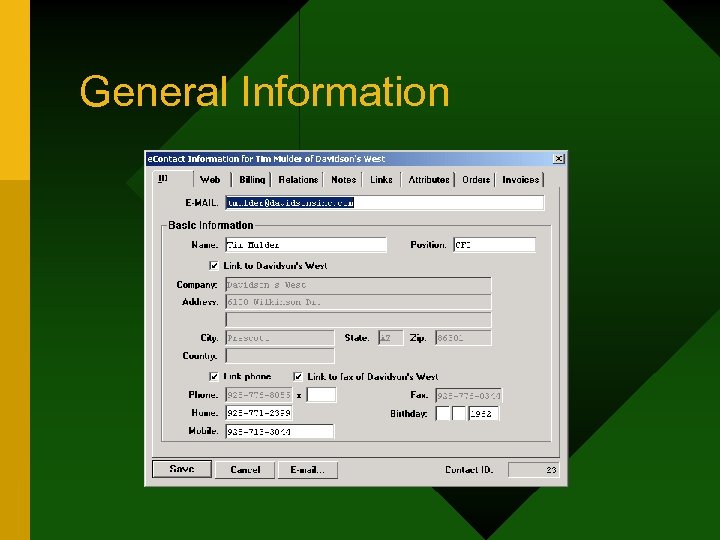 General Information
 Synchronize e. Contact Address • May link e. Contact’s address to Customer file, Vendor or Salesman…etc. • Based on primary relationship • Example, Customer address changed, e. Contact’s address is also changed.
 e. Contact Demo • Adding a new e. Contact for customer – With or Without Email • e. Contact General Tab – Create e. Contact Without Email • Address Synchronization
 Web Access Demo • Password – encrypted – Optionally to Assign A Random Password Automatically Generated When Password Left Blank – Batch Utility to Generate Random Password • Block Access • Role – Determine Web Access Right • Stop Email – Mass Email • Accept HTML format
 Billing/Relationship Demo • Credit Card Information is encrypted • Only authorized supervisors can see it. • Billing Address may be needed for charging to credit card. • Relationships – We’ll explain this later.
 Notes, Attribute & Links Demo • Two List Views in Each Tab – Contact List View – Company List View • Move Between Two List Views
 Open Orders Inquiry Demo • Posted Orders Won’t Show • Different Icon For Different Status – Open – Incomplete – Hold – Picking Ticket Printed – Billed or Invoiced • Limited by Ship-To • Printing
 Invoice History Inquiry Demo • Invoice History Inquiry • Printing • Order / Invoice History Inquiry in e. Contact Are Better Implementation Than Regular Order / Invoice History Inquiry. • Available Through Special Functions in Many Areas – When Customer # Is Identified
 Order and Invoice Inquiry Access from Other Areas Demo • Customer File Maintenance • Customer Account Inquiry • Sales Desk • Many other areas where customer is identified.
 e. Contact Manager • Access from any Elliott menu or Startup from desktop (EL 700 GE. EXE) • Keep it open for the day • Type a few characters and locate your contact • Email or call your contact • Sort by any column • Filters Options • Drill Down to e. Contact Detail Screen
 Printing And Email • Every Reports Can Be Printed And Emailed. • In V 7. 0 or prior version, Recipient Address Book Come From Email Client (I. e. Outlook or Outlook Express) • In V 7. 1, it supports emailing to e. Contacts
 e. Contact Manager Demo • Launch e. Contact Manager – Icon or Toolbar • Sort e. Contact Manager • Search and Sort • Limit The List – Source (Customer, Salesman, Ship-To…) – Filter Option • Email • Drill Down • Printing and Email
 Order Entry and e. Contacts Demo • When a new order is added, system adds a new relationship, not the contact. • Relationship attached to order automatically or manually – depending on setup. • When attached automatically, it will use the primary e. Contact from either ship-to or customer file. • Option to attach salesman e. Contact information. • Also available in Sales Desk
 Order Acknowledgement Email • Order Email sent to Order Contacts – Same Principle Applies to Shipping Email • Dynamically send from – Sales Desk – Order Entry • Batch Processing Email – Option to send duplicate
 Shipment Tracking Demo • Use Starship Manifest • Non-Starship Manifest • Shipment Without Tracking Number • Shipping Email Acknowledgement • Tracking Through Order Notes • On-Line Tracking
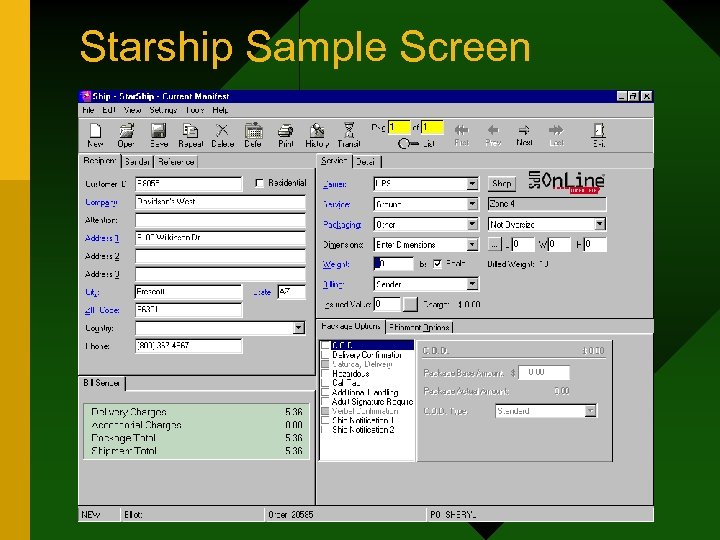 Starship Sample Screen
 Sales Desk Demo • Design for Salesman or Telemarketer • Find All Relevant Information About a Customer • Stock Status Inquiry • Quote Customer Price • Take Order • Print / Email Order Acknowledgement, Picking Ticket, Invoice…etc.
 Events Demo • Notify Sales Rep When Customer Place Order • Notify Sales Rep When Customer Cancel Order • Notify Sales Rep Upon Cash Receipt from Customer • Stock Watch/Wish List
 Add-on Sales Demo • Work in Sales Desk Only • Define Add-On Sales in I/M Util-Setup • Allow Import from Spreadsheet (CSV)
 Substitute Item Demo • Define Substitute Class • Define Item Belong to Which Class • Work from Sales Desk
 Notes, Attributes, Links, e. Contacts & CRM • Notes, Attributes, Links and e. Contacts Are Not Limited to CRM • You can use them just as well for Human Resource Management, Supplier Management, Inventory Management, Sales Order Management …etc.
 Demo Other Applications • Human Resource Management • Supplier Management
 In Summary • There Are Many Netcellent CRM Features • Notes, Attributes, Links and e. Contacts Are Generic Features And Its Applications Are Not Limited to CRM. • e. Contact Is The Center of Elliott CRM Feature. • e. Contact Is Also a Significant Part of Elliott Internet Solution
 Questions & Answers