


 Скачать презентацию Electronic Commerce Security Electronic Commerce Security Full
cf9a667362c9ac12e2405f91597c1b1c.ppt
- Количество слайдов: 88
 Electronic Commerce Security
 Electronic Commerce Security Full implementation of electronic commerce security requires • Security policy • Authentication • Assurance(Encryption) • Web site security • Secured payment methods
 Security policy
 Security Policies • A security policy defines what is considered valuable and specifies what steps are to be taken to protect those assets. • It makes clear what is being protected and why. • It clearly states the responsibility for that protection.
 Security Policies • It provides a ground on which to interpret and resolve conflicts that arise. • It should be general and changes slowly over time.
 Security Policies • Standards – Standards are intended to codify successful practice of security in an organization. – They should change slowly over time. – They should be general. – They change more often than standards. – They may be violated, if necessary.
 Security Policies • Guidelines – Guidelines interpret standards for a particular environment. – They are specific to particular machines or situations.
 Risk Assessment • Before making security policies, we must determine the following: – What to protect from – How to protect it
 Risk Assessment • Basic goals of security: – Availability: Service not denied to rightful user – Confidentiality: Information not accessible to unauthorized users – Integrity: Data not tempered with • Elements of risk analysis: – Identifying assets – Identifying threats
 Risk Assessment Cost-Benefit Analysis • Cost of loss – cost of repairing and replacements – cost of company reputation • Cost of prevention – cost of buying/installing additional software – cost of additional employee training
 Risk Assessment • Adding up the numbers – Know the cost of predicted loss, cost of prevention and the probability of event occurrence. – Multiply each cost by its probability and determine the priority of their importance.
 Identifying Assets Use the CISTM site as an example • Network – In the Beckman Institute domain – Connected through Ethernet Fiber Optic
 Identifying Assets • Hardware – Dell Power. Edge 6300 server – IBM RS/6000 server • Software – Operating system: Windows NT 5. 0 Server on the Dell computer/AIX 4. 3 on the IBM computer
 Identifying Assets – Web server: Microsoft Internet Information Server/Lotus Domino server • Data – Web content – Course material – Research material
 Identifying Assets • People – Administrators – Privileged users: researchers from the center – Ordinary users: students from classes
 Identifying Threats Typical threats include: • Unauthorized access • Disclosure of information • Denial of service
 Unauthorized Access • Intruders gain access as administrators • They will be able to change content, delete files/users, etc • It is the highest security breach
 Disclosure of Information • Materials not published on the public WWW are disclosed. Achieved by breaking into the host machine • Interception of network data sent from browser to server or vice versa. Achieved through network eavesdropping.
 Disclosure of Information • Eavesdroppers can operate from any point on the pathway between browser and server including: – The network on the browser's side of the connection. – The network on the server's side of the connection (including intranets).
 Disclosure of Information – The end-user's Internet service provider (ISP). – The server's ISP. – Either ISPs' regional access provider.
 Denial of service • Attackers cripple the system by jamming or sending virus • Users that reply on the system to perform their jobs are denied service
 Access Control • Access control refers to the regulation of access to the system to prevent unauthorized or unwanted access. • Software programs such as firewall provide an effective means to control access by setting up a filter through which incoming and outgoing packets must pass.
 Access Control • A policy must be made stating what resource is available to whom. • Each user is assigned appropriate level of read/write/execute access. .
 Access Control • Physical aspects of network security must also be considered. – Computers should be physically secured. – Physical access to devices should be regulated
 Data Integrity • Protection of the information from being altered without the permission of the owner of the information. • The word information may include items such as financial account records, passwords, private documents, and credit card numbers.
 Data Integrity • Prevention: – read-only file systems • Detection of changes: – comparison copies – checksum – message digest
 Prevention Data Integrity • Data can be protected by using read-only file systems. • Benefits – Only need to do backup once. – No need to run periodic scan on these files as their contents will not change. – No need to set disk quota since the file size grows in a monitored way.
 Data Integrity • Drawbacks – User data is too volatile for read-only media. – The entire disk must be read-only which can cause waste of space. – A machine will need two disks, one for userfiles and one for the read-only files.
 Data Integrity Detection of Changes • Comparison Copies: Keep a copy of the unaltered data and check periodically. • Benefit of comparison copies: – It is the most certain method. – An altered version can be recovered simply by a replacement of the stored copy.
 Data Integrity • Drawback of comparison copies: – Requires twice as much storage as the original file. – It might involve the violation of copyright or license of certain files that allow only one copy.
 Data Integrity Detection of Changes • Checksum – Store the checksum of the files and check periodically for possible alterations. – However, files can sometimes be altered with the preservation of its checksum. – A stronger mechanism such as message digests should be used to generate a checksum that is not easily spoofed.
 Data Integrity • Message digest – a special number produced by a function that is very difficult to reverse. – The function is designed so that a small change in input may result in large change in output – It can be used to verify whether the content of file has been changed.
 Privacy/Confidentiality • Protect the data from being read or copied by unauthorized users. • Items to be protected include credit card numbers, personal information, etc.
 Privacy/Confidentiality • Common types of data piracy: – packet sniffing – eavesdropping • Data encryption is an effective way to protect data privacy.
 Policy Issues Who is allowed to use the resource • Researchers (professor, grad students in the center)
 Policy Issues Who may have system administration privileges • Grant only enough privilege to accomplish the necessary task • On the other hand, people must be given admin rights to get their jobs done
 Handling an Incident • All security-related sites should have a policy for handling an incident made in advance. Otherwise the activities taken might lose focus.
 Handling an Incident • Steps to be taken when handling an incident: – Notification and exchange of information – Protecting evidence and activity logs – Containment - limit the extent of an attack – Eradication – Recovery – Follow-up
 Other Resources • CERT(TM) Advisory – Send mail to: cert-advisory-request@cert. org – Message Body: subscribe cert
 Other Resources • Internet Firewalls – Send mail to: majordomo@greatcircle. com – Message Body: subscribe firewalls user@host
 Authentication
 Authentication • Definition: The process of identifying a user. • Three classical ways of proving an identity: – user provides some information, such as passwords – user shows something, such as card key – measure something about the user, such as fingerprint
 Authentication • Effective ways to enforce authentication: – One-time passwords: passwords are used only once – Kerberos
 Kerberos • Created in MIT • Provides real-time authentication in an insecure distributed environment
 How does Kerberos work? • Authentication – Users or services get “tickets” used to identify themselves • Ticket, a sequence of a few hundred bytes, can be imbedded or forwarded • Encryption – Secret, cryptographic keys for secure communication with network resources
 Authentication Process Step 1 A client sends a request to the authentication server, requesting “credentials” for a given application server. The credentials can be directly for an application server or for a Ticket Granting Server
 Authentication Process Step 2 The authentication server responds with these credentials, encrypted in the client’s key. The credentials consist of the following: – A “ticket” for the server – A temporary encryption key (session key)
 Authentication Process Step 3 If the ticket is for a Ticket Granting Server, client requests a ticket for the application server from the TGS
 Authentication Process Step 4 The Ticket Granting Server replies with a ticket for the application server
 Authentication Process Step 5 The client transmits the ticket (which contains client’s identity and a copy of session key)
 Authentication Process Step 6 The session key, now shared by client and application server, is used to authenticate the client, and can be used to authenticate the server
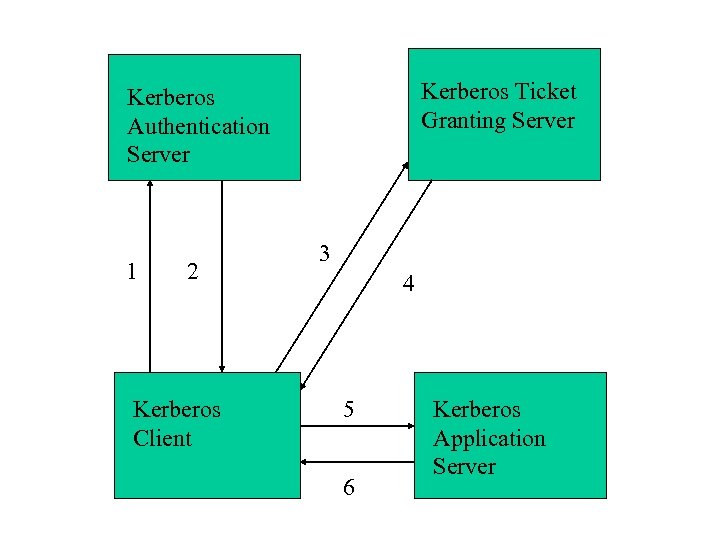 Kerberos Ticket Granting Server Kerberos Authentication Server 1 2 Kerberos Client 3 4 5 6 Kerberos Application Server
 Assurance (Encryption)
 Encryption • • • One Way Function Private key Public key DES RSA
 One way Function • Traditional login: – User logs in with password – Host compares it with stored password – Drawback: host can be broken into and password can be stolen
 One way Function • With one-way function – Host stores results from one-way functions of the password – User logs in with password – Host performs one-way function on the entered password – Host compares result of one-way function with the value it stored
 One way Function • Advantage of one-way function: – host does not need to know the password – So the password can not be stolen • Why one-way function works: – Definition: easy to compute f(x) from x but difficult to compute x from f(x) – Example: Smashing a plate is easy; hard to put the pieces together
 Private Key Encryption • Also called symmetric key • The same key is used both for encryption and decryption • Encryption will be broken if the key is stolen
 Real World Example of Private key Encryption Data Encryption Standard (DES) • A 64 -bit block of plaintext foes in one end of the algorithm • A 64 -bit clock of ciphertext comes out the other end • It is symmetric since same algorithm and key are used for both encryption and decryption
 Real World Example of Private key Encryption • Key length is usually 56 bits • DES is somewhat old fashioned and not so secure any more
 Public Key Encryption • Also called asymmetric key • Two different keys: public one and private one • Computationally hard to deduce the private key from the public key • Anyone with the public key can encrypt a message but not decrypt it
 Public Key Encryption • Only the person with the private key can decrypt the message
 Real World Example of Public Key encryption RSA • The easiest and safest public key algorithm today • Relies on the “presumed” difficulty of factoring large numbers • RSA’s security is never proved or disproved by mathematicians
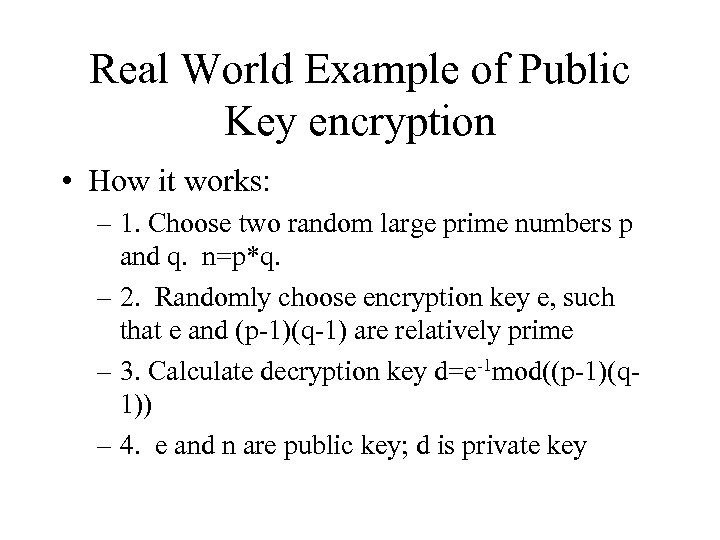 Real World Example of Public Key encryption • How it works: – 1. Choose two random large prime numbers p and q. n=p*q. – 2. Randomly choose encryption key e, such that e and (p-1)(q-1) are relatively prime – 3. Calculate decryption key d=e-1 mod((p-1)(q 1)) – 4. e and n are public key; d is private key
 Digital Signature • Digital signature must have the following properties: – Authentic – Unforgeable – Not reusable – The signed document must be unalterable – can not be repudiated
 Digital Signature • How digital signatures work – The opposite of public key encryption – 1. Alice encrypts document with private key, thereby signing the document – 2. Alice sends signed document – 3. Bob decrypts it with public key, thereby verifying it
 Digital Signature • Combining digital signature with encryption – 1. Alice signs document with private key – 2. Alice encrypts signed message with Bob’s public key and sends to Bob – 3. Bob decrypts with his private key – 4. Bob verifies with Alice’s public key
 Web Site Security
 Type of Threats From the part on “Security Policy”, we learned that typical threats include: • Unauthorized access • Disclosure of information • Denial of service
 Security Problems Specific problems for web site administration • Access points to the web server can be compromised: – Local area network links – Dialup telephone line – Internet
 Security Problems • Misconfigured systems – Misconfigured systems form a large percentage of security problems – Today’s operating system and software too complex for non-specialists to manage
 Protecting the System • Through Controls – Once we Reconfigured the system, we added controls • Through Network Connections: – Firewall – Gateway
 Protecting the System • Through Encryption – Hardware and software – Communications • Through Logging Activities – Recognize unauthorized activities through the audit trail logging service provided by web servers
 Audit Trails Help system administrators track security violations and break-in attempts
 Firewall • Definition: collection of components that is placed between two networks • Properties: – All traffic in either direction must pass through the firewall – Only traffic authorized by the local security policy will be allowed to pass – The firewall itself is immune to penetration
 More concerns • CGI security • Java security
 CGI Security CGI (Common Gateway Interface) scripts: • Used to add interactivity and functionality to a web site • Execute user command on user input data • Major source of security holes
 How to Make CGI secure • Never trust a script from outside source • To write CGI, compiled languages such as C are safer than interpreted languages like Perl and shell scripts • Place CGI scripts in a “wrapper”
 Java Security • Applet is a Java program that is run from inside a web browser • Applets loaded over the net are prevented from – reading and writing files on the client file system – making network connections except to the originating host – starting other programs on the client.
 Secured Payment Methods
 Payment methods and their security features • Online credit card • Internet payment system • Smart card application
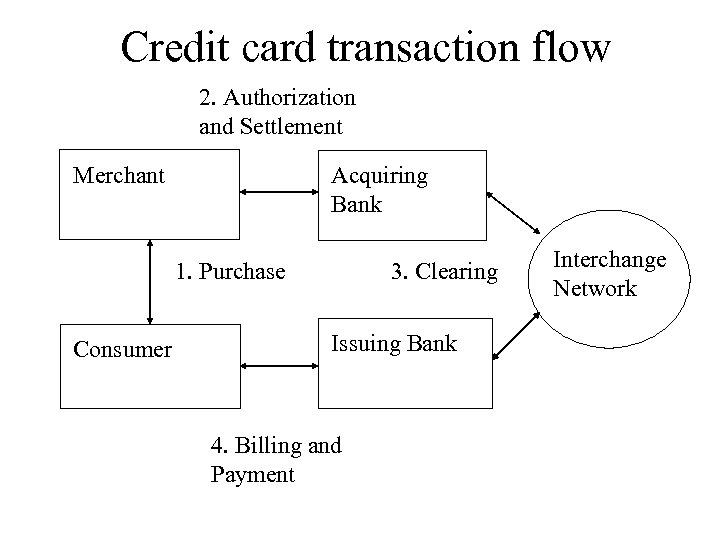 Credit card transaction flow 2. Authorization and Settlement Merchant Acquiring Bank 1. Purchase Consumer 3. Clearing Issuing Bank 4. Billing and Payment Interchange Network
 Online Credit Card Security Two ways to implement security for online credit card transaction: • Secure communication: Secure HTTP and Secure Socket Layer (SSL)
 Online Credit Card Security • Secure Electronic Transactions (SET): – Jointly developed by Visa and Master. Card to provide secure credit card transactions over open networks like the Internet
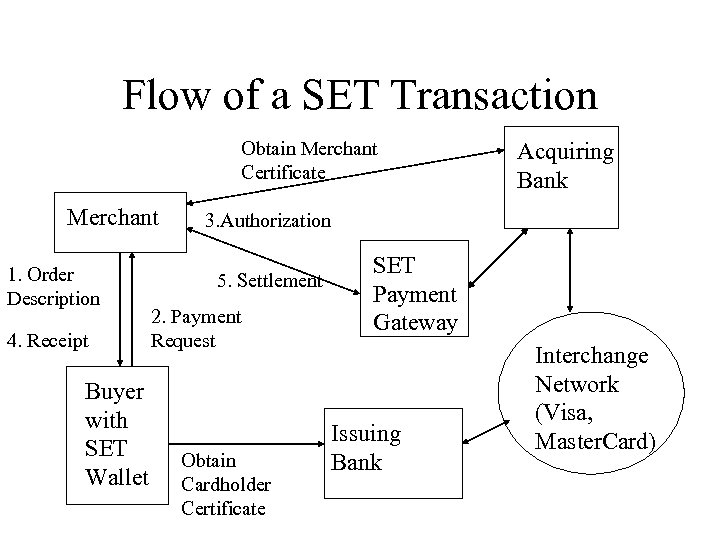 Flow of a SET Transaction Obtain Merchant Certificate Merchant 1. Order Description 4. Receipt Buyer with SET Wallet Acquiring Bank 3. Authorization 5. Settlement 2. Payment Request Obtain Cardholder Certificate SET Payment Gateway Issuing Bank Interchange Network (Visa, Master. Card)
 Internet Payment Systems • First Virtual: http: //www. fv. com • Cyber. Cash: http: //www. cybercash. com
 Smart Cards An object the size of a plastic credit card that contains a processor, and an interface to the outside world Benefits: • Portable storage • Secure storage: Secure and tamperproof storage for all information stored on it
 Smart Cards • Trusted execution environment: Not vulnerable to viruses and intrusion risks that plague desktop computers