


 Скачать презентацию Electronic Commerce COMP 3210 Session 10 Securing E-Commerce
1d43bb30af53a6314388eb034711000a.ppt
- Количество слайдов: 80
 Electronic Commerce COMP 3210 Session 10: Securing E-Commerce Web sites Dr. Paul Walcott 28/10/05 Dr. Paul Walcott - Department of Computer Science, Mathematics and Physics, University of the West Indies, Cave Hill Campus, Barbados, W. I. ; email pwalcott@uwichill. edu. bb; © 2005
 Session Objectives • After completing this session you will be able to: – Describe the requirements of a secure ecommerce Web site – Analyse a given Web site’s security and provide improvement recommendations 2
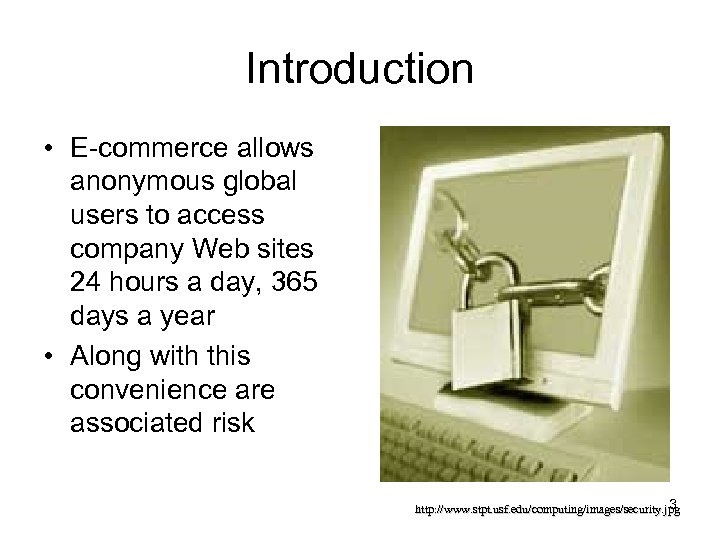 Introduction • E-commerce allows anonymous global users to access company Web sites 24 hours a day, 365 days a year • Along with this convenience are associated risk 3 http: //www. stpt. usf. edu/computing/images/security. jpg
 Introduction Cont’d • The risks of running an e-commerce site includes: – Fraud • Anonymous users logging on to companies Web site and making purchases using other people’s credit information • The transfer of funds from/or to accounts that do not belong to the user – The unauthorised disclosure of company confidential information or the revealing of confidential financial records 4
 Introduction Cont’d – Unforeseen costs due to operating system patches, virus attacks, employee sabotage and server failures – The loss of consumer confidence due to masquerading; e. g. a hacker defacing a Web site, or advertising competitors products on the Web site 5
 Introduction Cont’d • It does not make economic sense protecting against threats that are deemed low risk – especially if the cost to protect the asset exceeds the cost of the asset – Example: it would be sensible to protect a network from a hurricane in Barbados, but not to protect it from low (below 0 degrees) temperatures 6
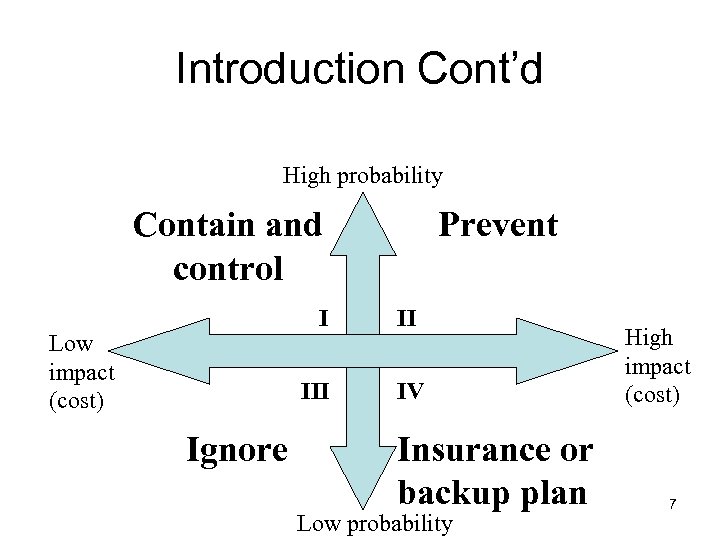 Introduction Cont’d High probability Contain and control I Low impact (cost) III Ignore Prevent II IV Insurance or backup plan Low probability High impact (cost) 7
 Introduction Cont’d • The risk management model on the previous slide illustrates four actions an organisation can take depending on the cost and probability of the physical threat • In this model – The threat posed by a hurricane in Barbados would be in quadrant II – The threat posed by temperatures dropping below freezing would be in quadrant IV 8
 Introduction Cont’d • To mitigate possible risks a good security scheme is required, which – First identifies the risks – Determines how to protect the assets at risk – Calculates the amount of money that should be spent protecting the assets at risk 9
 Introduction Cont’d • One such scheme is a security policy which is a document that describes: – The assets requiring protection and why – The people responsible for protecting these assets – Which behaviours are permissible and which are not 10
 Introduction Cont’d • The security policy, which should be updated regularly, typically addresses: – – Physical security Computer and network security Access authorisation, and Disaster recovery • In the sections that follow the above topics will be discussed, however the subject of cryptography will be discussed first 11
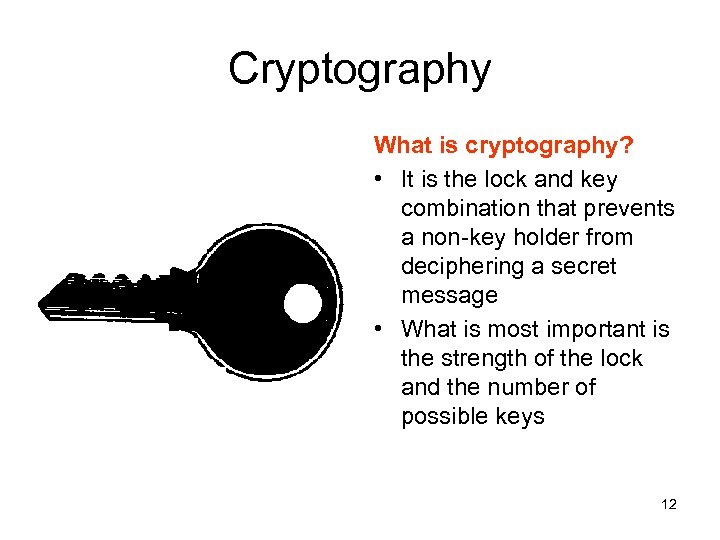 Cryptography What is cryptography? • It is the lock and key combination that prevents a non-key holder from deciphering a secret message • What is most important is the strength of the lock and the number of possible keys 12
 Cryptography Cont’d • To secure a house keys are used to lock the doors • It is assumed that an intruder can not easily obtain a copy of the key and enter the house – The intruder could search for all the keys in the world and try them one at a time, but this would take a long time • Computer security uses a similar system (public/private key and secret key cryptography) to secure messages passed between computers 13
 Cryptography Cont’d • To describe these cryptographic systems the following terms must first be defined: – A key is used in conjunction with a cipher to encrypt or decrypt a message. A key is simply a number (usually a binary number) – A cipher is an algorithm used to encrypt a message – Ciphertext is the encrypted message – Plaintext is the unencrypted message 14
 Cryptography Cont’d • Since a key is a binary number, a 56 bit key has about a quadrillion different key combinations • Traditionally, a key length of 56 bits was considered secure since: – If one million keys were tried each second then it would take 1000 years to break the ciphertext • However, due to increases in computing power a 56 bit key can now be broken in just 24 hours • As a result key lengths of 128 bits or more are typical 15
 Cryptography Cont’d • There are two main types of cryptography – Secret key cryptography – Public/private key cryptography • Secret Key Cryptography uses a symmetric key to secure a message – the same key is used to encrypt and decrypt the message 16
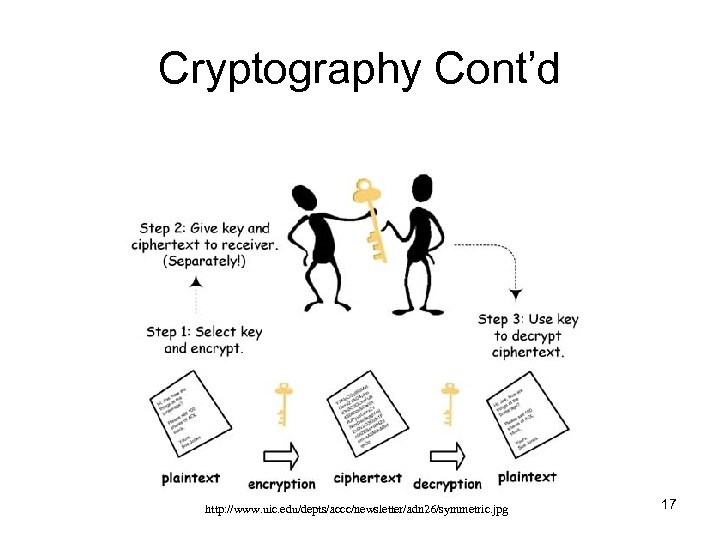 Cryptography Cont’d http: //www. uic. edu/depts/accc/newsletter/adn 26/symmetric. jpg 17
 Cryptography Cont’d • Public/Private Key Cryptography uses two keys (asymmetric key) – The public key, which is distributed to everyone (the public), is used to encrypt the message, while – The private key, which must be kept secret, is used to decrypt the message 18
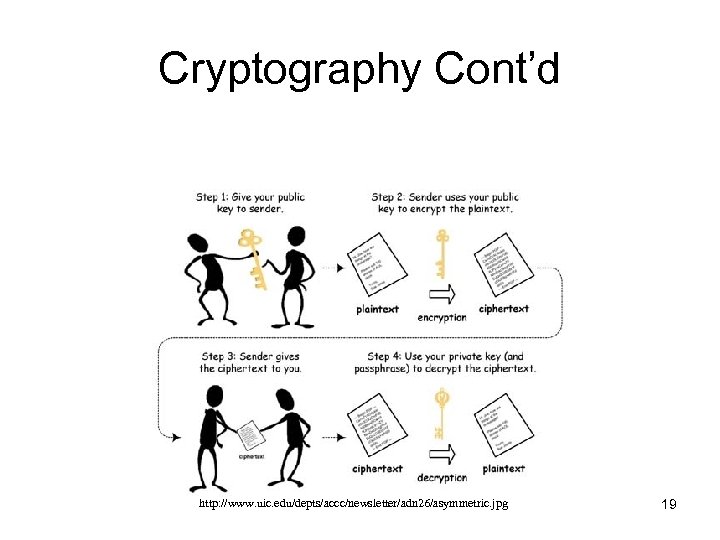 Cryptography Cont’d http: //www. uic. edu/depts/accc/newsletter/adn 26/asymmetric. jpg 19
 Cryptography Cont’d Secret Key Cryptography • In secret key cryptography the key must be kept secret by both parties that are communicating – therefore the key must be communicated in a secure fashion to protect against unauthorised access • The advantage of secret key cryptography is that messages can be encrypted quickly 20
 Cryptography Cont’d Public/Private Key Cryptography • Is much slower than secret key cryptography • The individual or organisation that wants to receive messages keeps the private key • The public key is distributed to everyone else (the public) • One advantage of public/private key cryptography is that it is easier to distribute the encryption key (the public key), since it does not have to be kept secret 21
 Cryptography Cont’d • Public/Private key cryptography is based on the principle of inverse number • To gain insight into the principle of inverse numbers consider the multiplication function • Clearly in practice the multiplication function can not be used since it is too easy to determine the inverse number 22
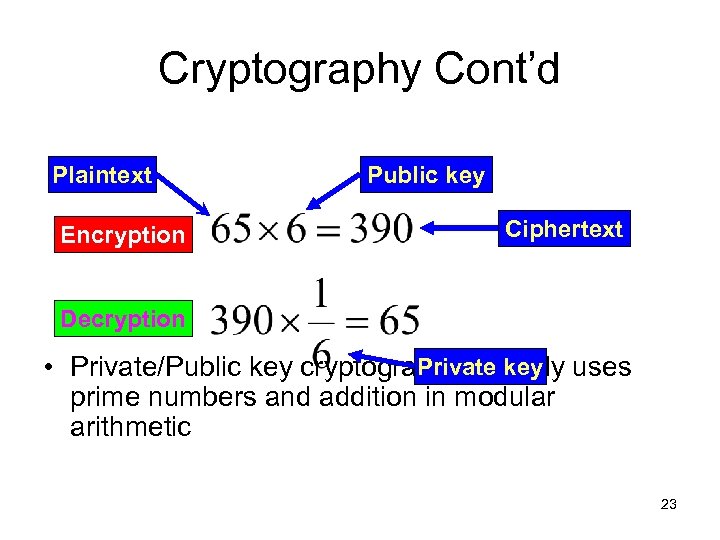 Cryptography Cont’d Plaintext Encryption Public key Ciphertext Decryption Private key • Private/Public key cryptography actually uses prime numbers and addition in modular arithmetic 23
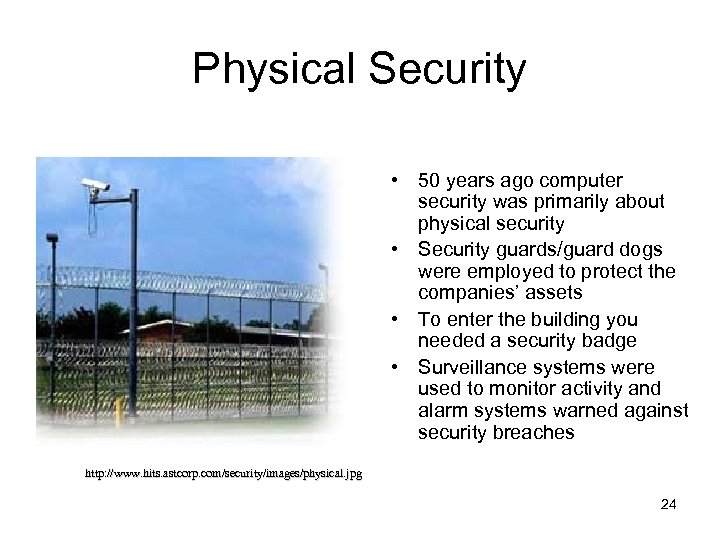 Physical Security • 50 years ago computer security was primarily about physical security • Security guards/guard dogs were employed to protect the companies’ assets • To enter the building you needed a security badge • Surveillance systems were used to monitor activity and alarm systems warned against security breaches http: //www. hits. astcorp. com/security/images/physical. jpg 24
 Physical Security Cont’d • Physical security worked because users accessed mainframe computers through dumb terminals • Provided that the mainframe computer and terminals were secure, it made it difficult for individuals to penetrate these systems • Several mainframe computers may have been connected together through dedicated links or telephone lines, yet infiltration was not easy • With the advent of the Internet new forms of security threats have surfaced (i. e. cyber crime) 25
 Physical Security Cont’d • Physical security is no less important today that 50 years ago • With the advent of terrorists, who are quite happy to blow up any infrastructure, it is just as important now to have physical security • All Web servers and associated machines require physical protection – Backup servers and storage at remote locations to prevent losses 26
 Physical Security Cont’d • Today the use of fingerprint readers, and biometric security help provide improved physical security • Physical security methods that are now utilised include: – Writing pads that measure the pressure and form of hand writing – Eye scanners – Palm scanners (entire palm rather than single finger) 27
 Computer/Network Security • In the computer and network security section, the protection of client and server machines, as well as the actual communication line will be discussed http: //www. wizbit. net/theme_images/10_r_barbed_wire. jpg 28
 • Computer/Network Security Cont’d Before discussing computer and network security the assurances that will be given to the user about the safety of their data must be defined • There are four important assurances that must be given when securing an e-commerce site, these are: confidentially, authentication, integrity and nonrepudiation 29
 • Computer/Network Security Cont’d Confidentiality ensures that only owners of the shared key can decrypt the message • Authentication ensures the identity of the person at either end of a communication line are who they say they are • Integrity ensures the message is not changed during transit • Nonrepudiation ensures that the sender can not deny sending the message 30
 • Computer/Network Security In addition two other Cont’d should be assurances provided: – Availability. Providing delivery assurance for each message so that a loss will not go undetected – Key Management. Ensuring that the distributing and management of keys is done securely (note that the distribution of public keys is often done by third parties called certification authorities, e. g. Verisign) 31
 • Computer/Network Security Cont’d These assurances are provided through the following methods: – Public/Private keys ensure confidentiality – Digital signatures ensure non-repudiation and authentication – Message authentication codes ensure data integrity • These methods will be discussed in a later section 32
 Client Computer Security • This section outlines – security threats that may occur on client computers – how they work – and how to protect against them 33
 Client Computer Security Cont’d • Active content refers to programs that are embedded transparently in Web pages that cause actions to occur – E. g. displaying moving graphics and downloading and playing audio – In e-commerce it is used to place items in a shopping cart and compute total invoice amounts 34
 Client Computer Security Cont’d • Active content also – extends HTML functionality • Since these programs run on the client’s computer they pose a security risk • Examples include: – Cookies – Java applets – Java. Script • However, other examples include graphics, Web browser plug-ins and email attachments 35
 Client Computer Security Cont’d • Since active content is embedded in Web pages (e. g. scripting languages) they can be transparent to the browsers of the Web page • Crackers for example can include a Trojan horse in a Web page – A Trojan horse is a program hidden inside another program or Web page that masks its true purpose 36
 Client Computer Security Cont’d • A Trojan horse can – Send private information on the client’s computer back to a server (a secrecy violation) – Could alter or erase information on the client’s computer (an integrity violation) • A Cracker might also place a zombie (a program that takes over a computer to launch an attack on other computers) on your system through a trojan horse 37
 Client Computer Security Cont’d • To avoid Trojan horses do not download and install software from sources that you do not trust; also make use of firewalls to block illegitimate ingoing/outgoing traffic 38
 Client Computer Security Cont’d • Cookies were designed to solve the problem of the stateless nature of the HTTP protocol – To save information between one session and another • For example, when a user logs into a Web site their name and membership information could be stored in a cookie and be used in other pages on the Web site. 39
 Client Computer Security Cont’d • Allowing active content to be added to Web pages used for e-commerce can be dangerous since: – Cookies (files) frequently store credit card numbers, usernames and passwords – Information stored in cookies can be read by the Server computer that stored them there 40
 Client Computer Security Cont’d • There are two types of time duration cookies – Session cookies • These exist until the Web client ends the session (or connection) – Persistent cookies • These remain on the client’s computer indefinitely • E-commerce uses both types of these cookies 41
 Client Computer Security Cont’d • Cookies can also be categorised by source: – First-party cookies are cookies put on the client computer by the Web server – Third-party cookies are cookies put on the client computer by some other Web site • The third-party Web site usually provides some content on the Web site being viewed 42
 Client Computer Security Cont’d • These third party Web site can then track visitors from one site to the next (because they have ads and cookies set up on many of these sites) 43
 Client Computer Security Cont’d • To protect yourself against cookies: – Disable cookies altogether, however this will stop some sites from functioning correctly • Users would have to re-enter information every time they visit the Web site – Disable third-party cookies – Or use a third-party cookie blocker program that stores cookies selectively 44
 Client Computer Security Cont’d • “An (Java) applet is a program written in the Java. TM programming language that can be included in an HTML page, much in the same way an image is included. ” 2 • “When you use a Java technology-enabled browser to view a page … the applet's code is transferred to your system and executed by the browser's Java Virtual Machine (JVM). ” 2 • Java applets are included into Web pages using the
 Client Computer Security Cont’d • Once an applet is downloaded Java code runs on the clients computer which introduces a security hole • To counteract this Java has a security model called the Java sandbox which prevents applets from performing certain functions, e. g. – file input, output, or – delete operations • This scheme provides secrecy and integrity 46
 Client Computer Security Cont’d • Java. Script is a scripting language developed by Netscape • When a Web page is downloaded and contains embedded Java. Script code, it runs on the user’s (client) computer • Javascript can be used to attack the client’s computer – destroy the hard disk – Disclose email stored in mailboxes – Capture information stored in Web forms (e. g. credit card information) 47
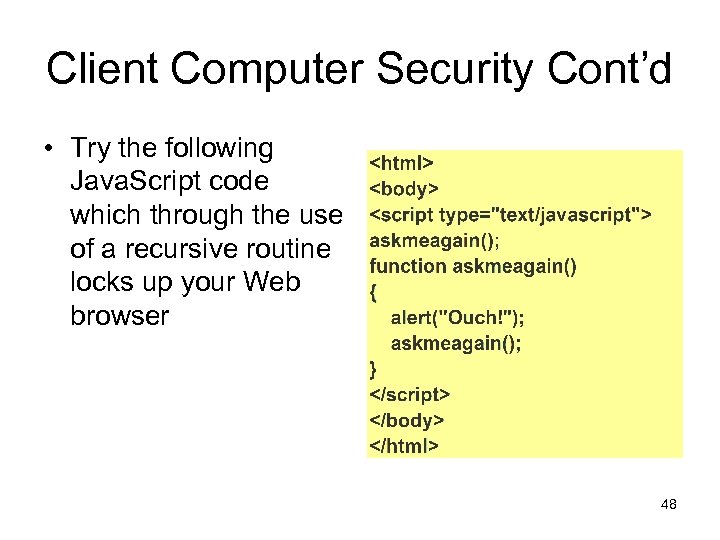 Client Computer Security Cont’d • Try the following Java. Script code which through the use of a recursive routine locks up your Web browser 48
 Client Computer Security Cont’d • An Active. X control is an object that contains programs • And only runs on the Windows operating system • When downloaded the control is run on the client’s computer like any other program – They have full access to system resources • Can reformat hard disk • Rename or delete files • Shut down the computer 49
 Client Computer Security Cont’d • Execution of Active. X controls can not be halted once started • Web browsers can be configured to warn users when Active. X controls are about to be downloaded 50
 Client Computer Security Cont’d • Graphics, browser plug-ins and email attachments can include executable content • Some graphic file formats contain special instructions on how to render the graphic – The embedded code can be used to attack your computer • Plug-ins enhance your browser’s capabilities but can also pose a threat 51
 Client Computer Security Cont’d • A virus is software that attaches itself to another program • A macro virus is a type of virus that is coded as a macro • A worm is a type of virus that replicates itself on the computer it affects • Email attachments may include word processing files, spreadsheets, databases, images which may contain viruses – Viruses within Word and Excel macros (Visual Basic for Applications) can damage your computer 52
 Client Computer Security Cont’d • Viruses tend to prey on operating system (or Web server) vulnerabilities • To counteract viruses – Ensure you have installed the latest security patches – Also ensure that you are running the latest Antivirus software with the latest virus updates 53
 Client Computer Security Cont’d Digital Certificates • One way of verifying the source of information is through a digital certificate • A digital certificate is an attachment to a message which verifies the sender of the message • It contains an encrypted message that – identifies the author – Indicates whether the certificate is valid or not 54
 Client Computer Security Cont’d • The creator of the digital certificate proclaims: – That they have attached Mr. X public key – and signed (a hash of) it with their private key • These digital certificates must be created by someone you trust • A digital certificate has two parts: – Plaintext • States who the certificate is created for and that the public key is attached – The plaintext hashed and signed (using a message authentication code and a digital signature) 55
 Client Computer Security Cont’d • Other information on the digital certificate is: – The certificate’s owner’s identifying information, such as name, organisation and address – The certificate owner’s public key – Dates between which the certificate is valid – Serial number of the certificate – Name of the certificate issuer – Digital signature of the certificate issuer 56
 Client Computer Security Cont’d • Digital certificates are issued by a certification authority (CA) – To individuals or organisations – Appropriate proof of identity must be provided • One of the oldest and best know certification authority is Veri. Sign 57
 Communication Channel Security • Communication channel threats come from various sources including: – Sniffer Programs – Backdoors – Cyber. Vandalism – Masquerading or Spoofing – Denial-of-Service – Man-in-the-middle exploit 58
 Comm. Channel Security Cont’d Sniffer Programs • These programs provide a means of recording packets passing through a computer or router – It is similar to telephone line tapping • Sniffer programs can – Read email messages – Read user logins and passwords – Read credit card numbers 59
 Comm. Channel Security Cont’d Backdoors • Some e-commerce programs contain backdoors • These backdoors are left intentionally or unintentionally by software developers • Backdoors provide a way for an unauthorised user to gain access to protected information including: – Credit card information – Proprietary company information (which could be sold for millions to competitors) 60
 Comm. Channel Security Cont’d Cyber. Vandalism • This is the electronic defacing of Web site pages – By replacing regular content • It is parallel to the spraying of graffiti on public property 61
 Comm. Channel Security Cont’d Masquerading or Spoofing • This is when a person impersonates someone else – E. g. pretending that a Web site belongs to someone else, when it does not • On a domain name server a perpetrator might use a security hole in order to change the IP address of a given Web page – Any order entered on this new page could then be modified (e. g. change the shipping address of the goods) and sent to the original Web site. 62
 Comm. Channel Security Cont’d Denial-of-Service Threat • This threat disrupts normal computer processing • For example a zombie computer could be used to flood a Web site with packets • This prevented legitimate users from using the Web site • This also may lead to a loss in business 63
 Comm. Channel Security Cont’d Man-in-The-Middle Exploit • Imagine sending an important message containing valuable information to a colleague • A person intercepts this email and changes its contents • The intended recipient receives the email and acts on the wrong information. • This is called the man-in-the-middle exploit 64
 Comm. Channel Security Cont’d • Solutions for communication channel threats include: – Symmetric Encryption (discussed earlier) – Asymmetric Encryption (discussed earlier) – Digital Signatures – Message Hashing – Digital Certificates (discussed earlier) – Secure Socket Layer 65
 Comm. Channel Security Cont’d Digital Signatures • Are an electronic version of a written signature • When creating a digital signature a private key is used to encrypt and the public key to decrypt • Since the process of signing is slow (because it utilises public/private key cryptography), messages are compressed before they are signed • Alternatively, a hash is created from the message and signed which improves speed 66
 Comm. Channel Security Cont’d Message Authentication Codes (MACs) • Ensure the integrity of data • MACs work in the following way – The sender creates the MAC using the message to be transmitted and a publicly available MAC formula – Both the MAC and the message are transmitted – The receiver creates a MAC from the received message, and – Compares the two MACs. If they are the same the message has not been tampered with 67
 Comm. Channel Security Cont’d • MACs are important since – A MAC is very small (a number of bytes) compared with the size of most messages – Messages are often long – Encryption and decryption is time-consuming – It ensures message integrity – It is not the same as compression since you can not recover the original message from the MAC – It is similar to a checksum 68
 Comm. Channel Security Cont’d Hashing • MAC and hashing are extremely similar • A hash value is generated using a hash algorithm • Hash values act as a fingerprints for messages • Hash values are almost always unique (very low probability of same hash value) • A hash provides message integrity 69
 Comm. Channel Security Cont’d Secure Sockets Layer • This provides a secure way for client and server to transmit confidential information • A session key is a secret key created (for the purpose of encrypted communication) for the duration of an SSL session • Public/Private key cryptography is used to transmit the session key 70
 Comm. Channel Security Cont’d • Secret key encryption is used for all subsequent communication – Secret key encryption is between 100 – 1000 times faster than Public/Private Key encryption • The following diagram describes the handshaking done by the client and server 71
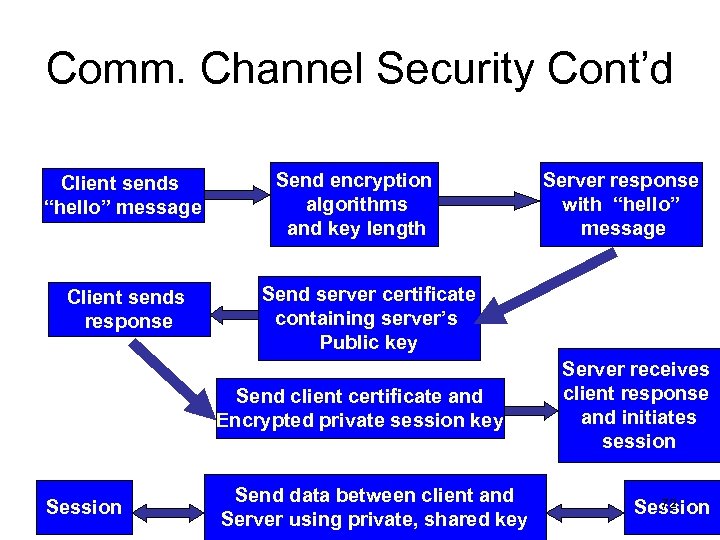 Comm. Channel Security Cont’d Client sends “hello” message Client sends response Send encryption algorithms and key length Send server certificate containing server’s Public key Send client certificate and Encrypted private session key Session Server response with “hello” message Send data between client and Server using private, shared key Server receives client response and initiates session 72 Session
 Server Computer Security • Server vulnerabilities come from – Web servers and their software – Backend programs such as • Database programs 73
 Server Computer Security Web Server Threats • The more complex the software the more likely it contains errors which might lead to vulnerabilities • A Web server can compromise secrecy if it allows automatic directory listings • Passwords users select could be a threat since a dictionary attack might reveal them 74
 Server Computer Security Database Threats • These databases store confidential information • Some databases store username/passwords in unencrypted tables, or do not enforce security at all 75
 Server Computer Security Other Threats • Threats may arise when programs are executed by the server – E. g. buffer overrun or buffer overflow • Buffers can overflow into critical memory locations causing the Web server to run an attacker’s program – Mail bombs cause mail servers to malfunction by overloading them with email 76
 Server Computer Security Firewalls • For a useful presentation on firewalls see: http: //scitec. uwichill. edu. bb/cmp/online/co mp 3210/presentations/Antonio. Arthur. ppt 77
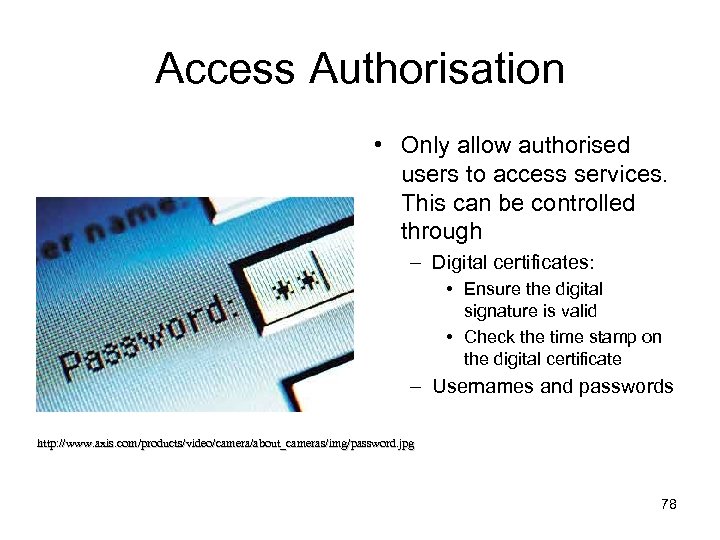 Access Authorisation • Only allow authorised users to access services. This can be controlled through – Digital certificates: • Ensure the digital signature is valid • Check the time stamp on the digital certificate – Usernames and passwords http: //www. axis. com/products/video/camera/about_cameras/img/password. jpg 78
 Disaster Recovery • Disaster recovery is concerned with how quickly a company can recover from machine failure, disk failures, software failure and power failures and surges http: //www. nationalgeographic. com/ngkids/0312/images/stories_volcano_image. jpg 79
![References [1] Schneider, Gary, P. , “Electronic Commerce: The second wave”, Thomson Course Technology,](https://present5.com/presentation/1d43bb30af53a6314388eb034711000a/image-80.jpg "References [1] Schneider, Gary, P. , “Electronic Commerce: The second wave”, Thomson Course Technology,") References [1] Schneider, Gary, P. , “Electronic Commerce: The second wave”, Thomson Course Technology, Fifth Annual Edition, 2004 [2] Sun Microsystems, “Code Samples and Apps”, 2005. Available online at http: //java. sun. com/applets/ 80
References [1] Schneider, Gary, P. , “Electronic Commerce: The second wave”, Thomson Course Technology, Fifth Annual Edition, 2004 [2] Sun Microsystems, “Code Samples and Apps”, 2005. Available online at http: //java. sun. com/applets/ 80