


 Скачать презентацию ELEC 2041 Microprocessors and Interfacing Lectures 29 I O
e983b180fe334ccfb435d3d316b6b1ff.ppt
- Количество слайдов: 27
 ELEC 2041 Microprocessors and Interfacing Lectures 29: I/O Interfacing Examples http: //webct. edtec. unsw. edu. au/ May 2006 Saeid Nooshabadi ELEC 2041 lec 29 -io-examples. 1 saeid@unsw. edu. au Saeid Nooshabadi
 Overview ° Parallel Interfacing ° Serial Interfacing • UART • RS 232 ELEC 2041 lec 29 -io-examples. 2 Saeid Nooshabadi
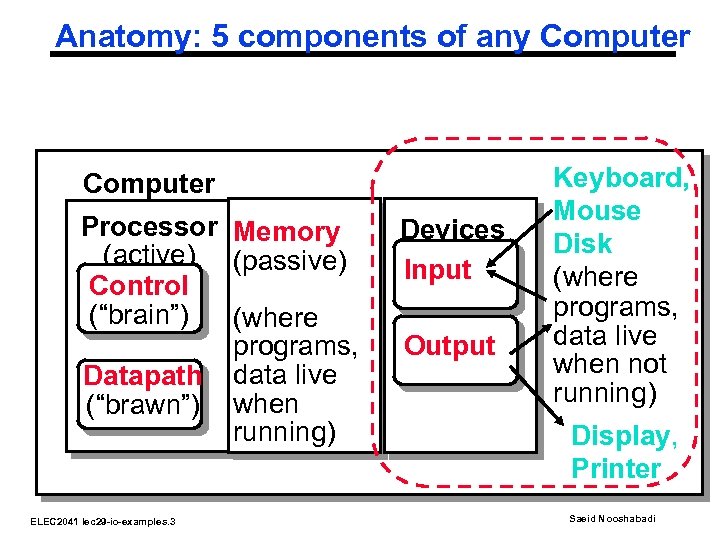 Anatomy: 5 components of any Computer Processor Memory (active) (passive) Control (“brain”) (where programs, Datapath data live (“brawn”) when running) ELEC 2041 lec 29 -io-examples. 3 Devices Input Output Keyboard, Mouse Disk (where programs, data live when not running) Display, Printer Saeid Nooshabadi
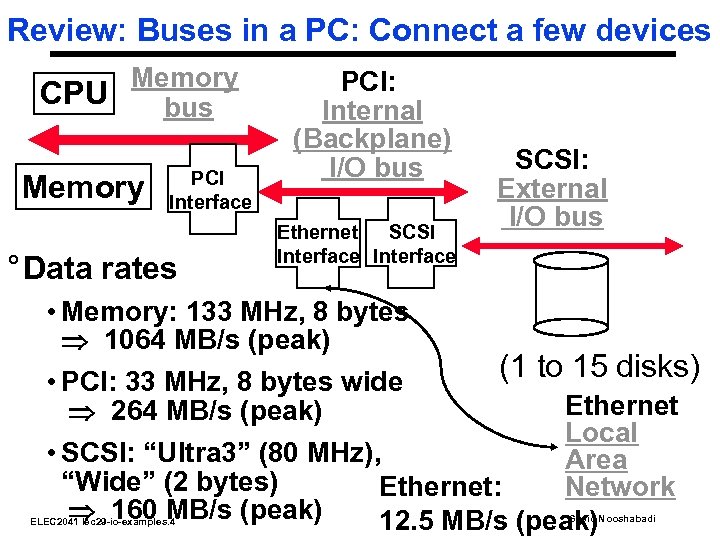 Review: Buses in a PC: Connect a few devices Memory CPU bus Memory PCI Interface ° Data rates PCI: Internal (Backplane) I/O bus Ethernet SCSI Interface SCSI: External I/O bus • Memory: 133 MHz, 8 bytes 1064 MB/s (peak) (1 to 15 disks) • PCI: 33 MHz, 8 bytes wide Ethernet 264 MB/s (peak) Local • SCSI: “Ultra 3” (80 MHz), Area “Wide” (2 bytes) Network Ethernet: 160 MB/s (peak) 12. 5 MB/s (peak) ELEC 2041 lec 29 -io-examples. 4 Saeid Nooshabadi
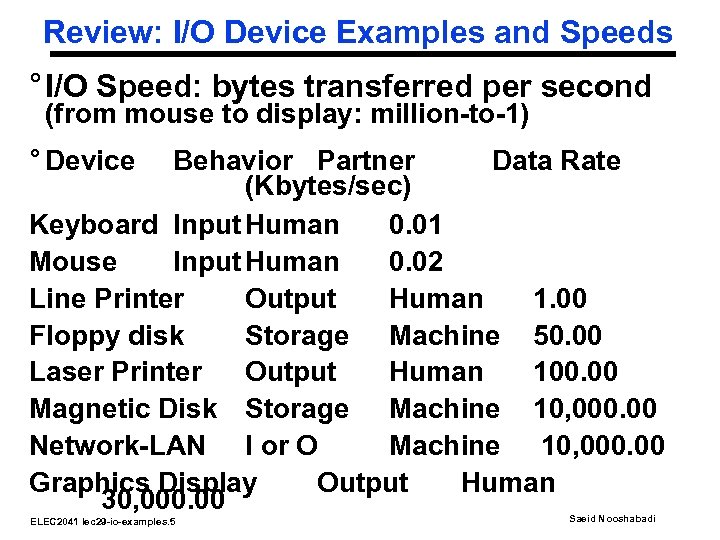 Review: I/O Device Examples and Speeds ° I/O Speed: bytes transferred per second (from mouse to display: million-to-1) ° Device Behavior Partner Data Rate (Kbytes/sec) Keyboard Input Human 0. 01 Mouse Input Human 0. 02 Line Printer Output Human 1. 00 Floppy disk Storage Machine 50. 00 Laser Printer Output Human 100. 00 Magnetic Disk Storage Machine 10, 000. 00 Network-LAN I or O Machine 10, 000. 00 Graphics Display Output Human 30, 000. 00 ELEC 2041 lec 29 -io-examples. 5 Saeid Nooshabadi
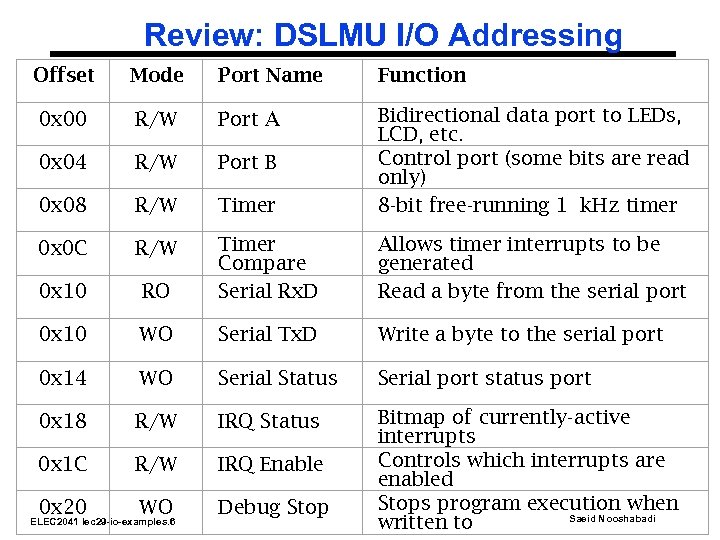 Review: DSLMU I/O Addressing Offset Mode Port Name Function 0 x 00 R/W Port A 0 x 04 R/W Port B 0 x 08 R/W Timer Bidirectional data port to LEDs, LCD, etc. Control port (some bits are read only) 8 -bit free-running 1 k. Hz timer 0 x 0 C R/W 0 x 10 RO Timer Compare Serial Rx. D Allows timer interrupts to be generated Read a byte from the serial port 0 x 10 WO Serial Tx. D Write a byte to the serial port 0 x 14 WO Serial Status Serial port status port 0 x 18 R/W IRQ Status 0 x 1 C R/W IRQ Enable 0 x 20 WO Debug Stop Bitmap of currently-active interrupts Controls which interrupts are enabled Stops program execution when Saeid Nooshabadi written to ELEC 2041 lec 29 -io-examples. 6
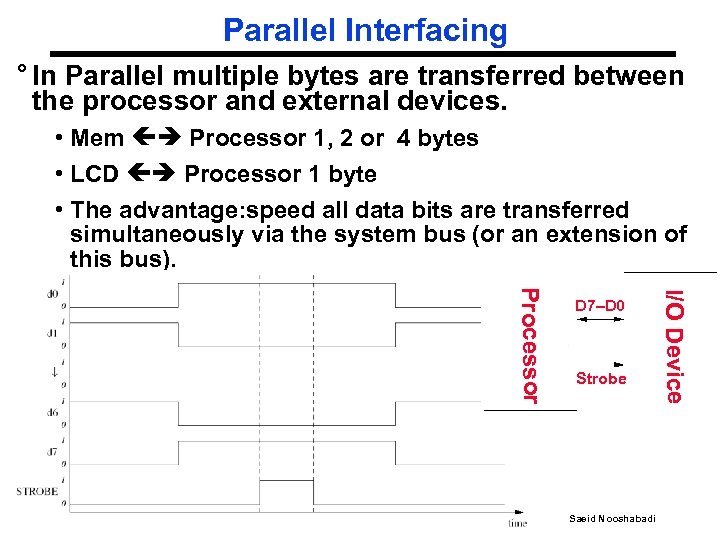 Parallel Interfacing ° In Parallel multiple bytes are transferred between the processor and external devices. • Mem Processor 1, 2 or 4 bytes • LCD Processor 1 byte • The advantage: speed all data bits are transferred simultaneously via the system bus (or an extension of this bus). Strobe Saeid Nooshabadi I/O Device Processor ELEC 2041 lec 29 -io-examples. 7 D 7–D 0
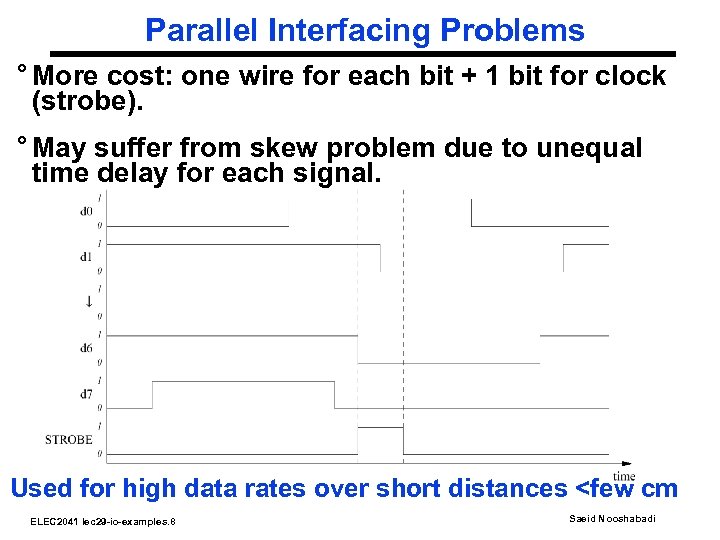 Parallel Interfacing Problems ° More cost: one wire for each bit + 1 bit for clock (strobe). ° May suffer from skew problem due to unequal time delay for each signal. Used for high data rates over short distances
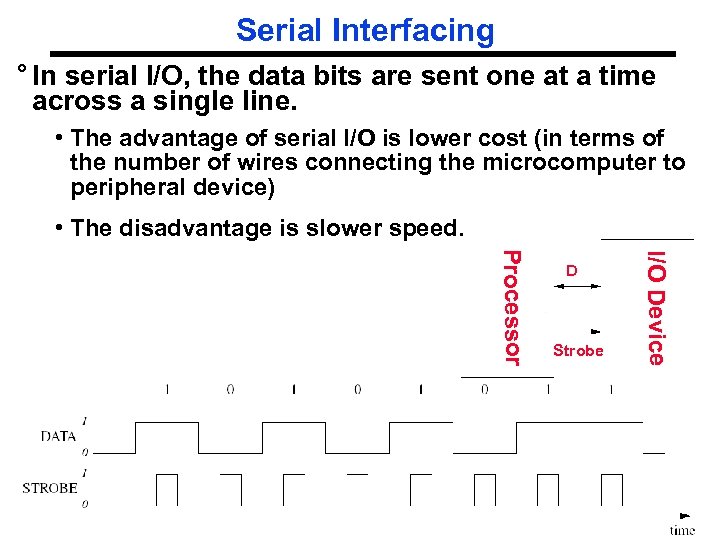 Serial Interfacing ° In serial I/O, the data bits are sent one at a time across a single line. • The advantage of serial I/O is lower cost (in terms of the number of wires connecting the microcomputer to peripheral device) • The disadvantage is slower speed. Strobe I/O Device Processor ELEC 2041 lec 29 -io-examples. 9 D Saeid Nooshabadi
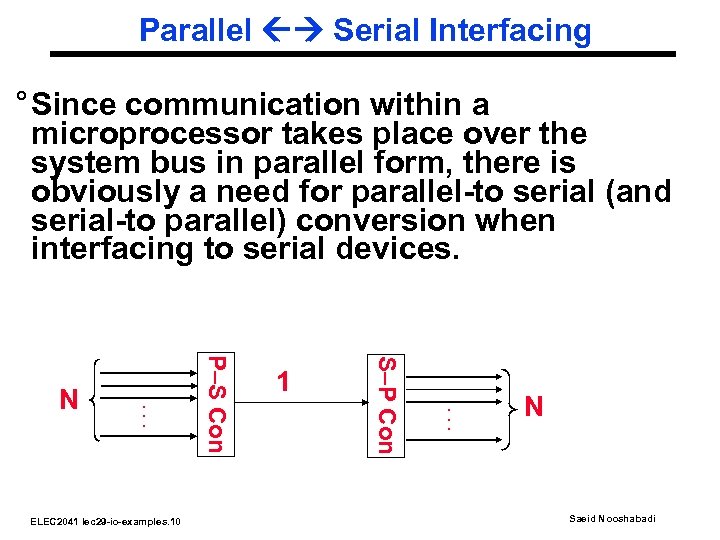 Parallel Serial Interfacing ° Since communication within a microprocessor takes place over the system bus in parallel form, there is obviously a need for parallel-to serial (and serial-to parallel) conversion when interfacing to serial devices. ELEC 2041 lec 29 -io-examples. 10 S–P Con . . . P–S Con N 1 . . . N Saeid Nooshabadi
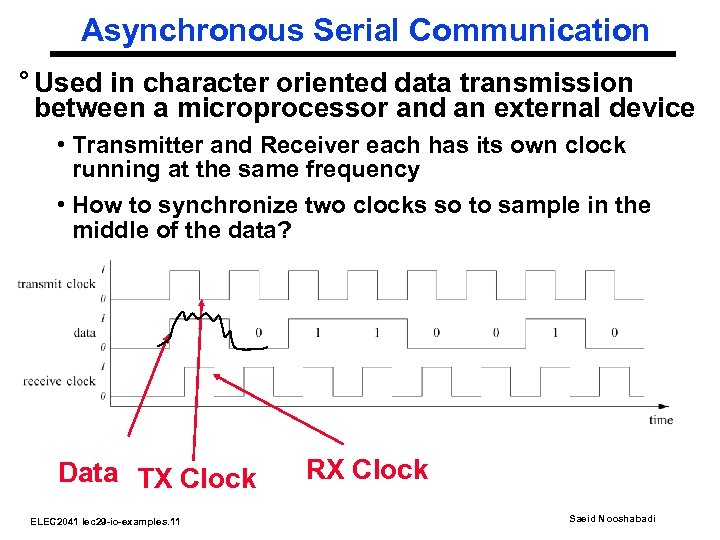 Asynchronous Serial Communication ° Used in character oriented data transmission between a microprocessor and an external device • Transmitter and Receiver each has its own clock running at the same frequency • How to synchronize two clocks so to sample in the middle of the data? Data TX Clock ELEC 2041 lec 29 -io-examples. 11 RX Clock Saeid Nooshabadi
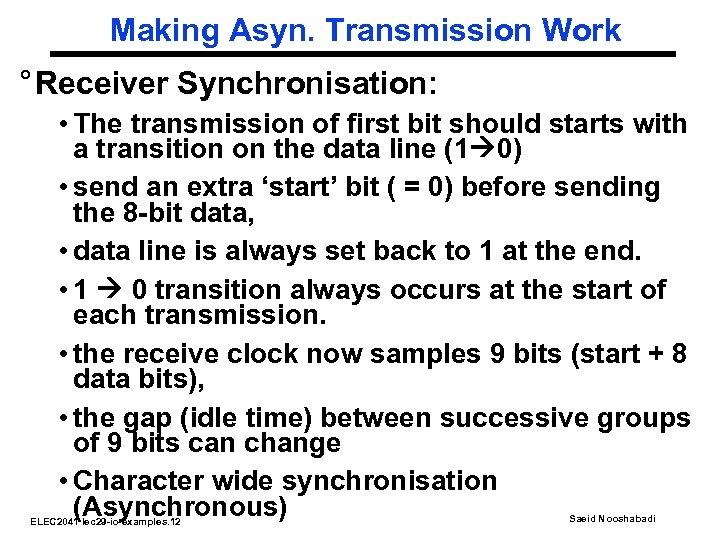 Making Asyn. Transmission Work ° Receiver Synchronisation: • The transmission of first bit should starts with a transition on the data line (1 0) • send an extra ‘start’ bit ( = 0) before sending the 8 -bit data, • data line is always set back to 1 at the end. • 1 0 transition always occurs at the start of each transmission. • the receive clock now samples 9 bits (start + 8 data bits), • the gap (idle time) between successive groups of 9 bits can change • Character wide synchronisation (Asynchronous) ELEC 2041 lec 29 -io-examples. 12 Saeid Nooshabadi
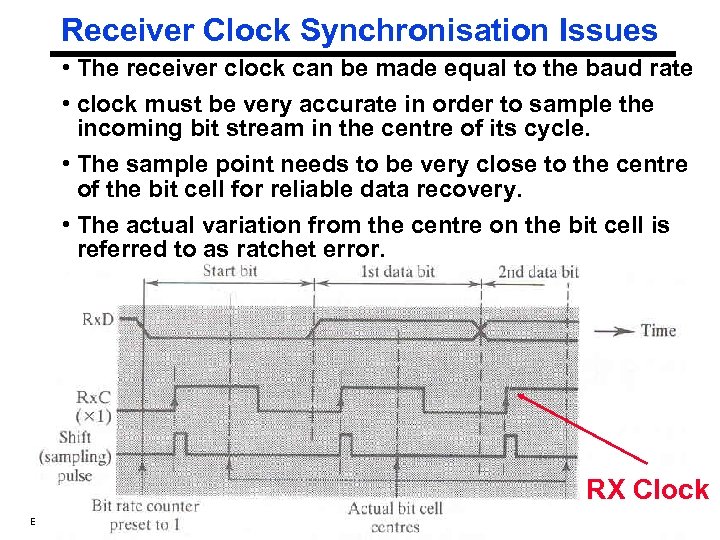 Receiver Clock Synchronisation Issues • The receiver clock can be made equal to the baud rate • clock must be very accurate in order to sample the incoming bit stream in the centre of its cycle. • The sample point needs to be very close to the centre of the bit cell for reliable data recovery. • The actual variation from the centre on the bit cell is referred to as ratchet error. RX Clock ELEC 2041 lec 29 -io-examples. 13 Saeid Nooshabadi
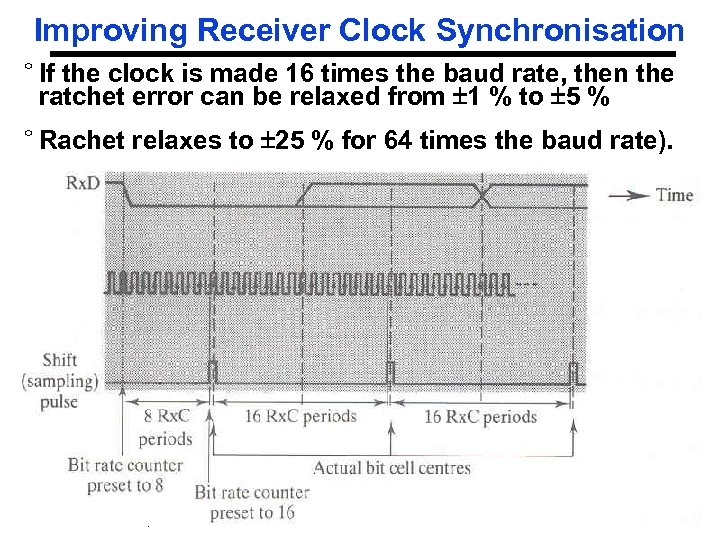 Improving Receiver Clock Synchronisation ° If the clock is made 16 times the baud rate, then the ratchet error can be relaxed from 1 % to 5 % ° Rachet relaxes to 25 % for 64 times the baud rate). ELEC 2041 lec 29 -io-examples. 14 Saeid Nooshabadi
 Parallel Serial Conversion ° Asynchronous data transmission uses a special device called Universal Asynchronous Receiver Transmitter ( UART). • UART is used to simultaneously transmit and receive serial data • performs the appropriate parallel/serial conversions and inserting or checking the extra bits used to keep the serial data synchronised. • UART typically configured as 2 -4 I/O addresses: input/output status port(s), and output/input data port(s). • Bytes sent as 8 -bit parallel data to the output data address by the computer are converted into a standard -format serial bit stream for transmission by a transmitter inside the UART • Similarly, an incoming serial bit stream is detected by a receiver inside the UART and converted into parallel data that can be read by the computer from the UART's Saeid Nooshabadi ELEC 2041 lec 29 -io-examples. 15 input data address.
 Full Duplex VS Half Duplex Data Transmission ° Simultaneous conversion of an incoming and an outgoing serial data stream is called full duplex • It requires two data carriers (Tx. D, and Rx. D) • Implemented with three wires: one for the outgoing stream (Tx. D), one for the incoming stream (Rx. D), and the third for a common ground line. • The UART does provide for standard full duplex handshaking conventions. ° Half duplex allows two-way communications, hence the name duplex, but only one direction is active at a time. ELEC 2041 lec 29 -io-examples. 16 Saeid Nooshabadi
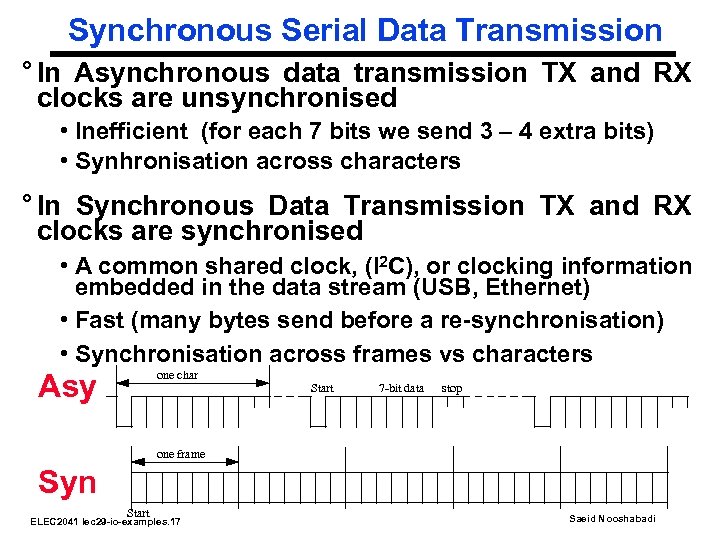 Synchronous Serial Data Transmission ° In Asynchronous data transmission TX and RX clocks are unsynchronised • Inefficient (for each 7 bits we send 3 – 4 extra bits) • Synhronisation across characters ° In Synchronous Data Transmission TX and RX clocks are synchronised • A common shared clock, (I 2 C), or clocking information embedded in the data stream (USB, Ethernet) • Fast (many bytes send before a re-synchronisation) • Synchronisation across frames vs characters one char Asy Start 7 -bit data stop one frame Syn Start ELEC 2041 lec 29 -io-examples. 17 Saeid Nooshabadi
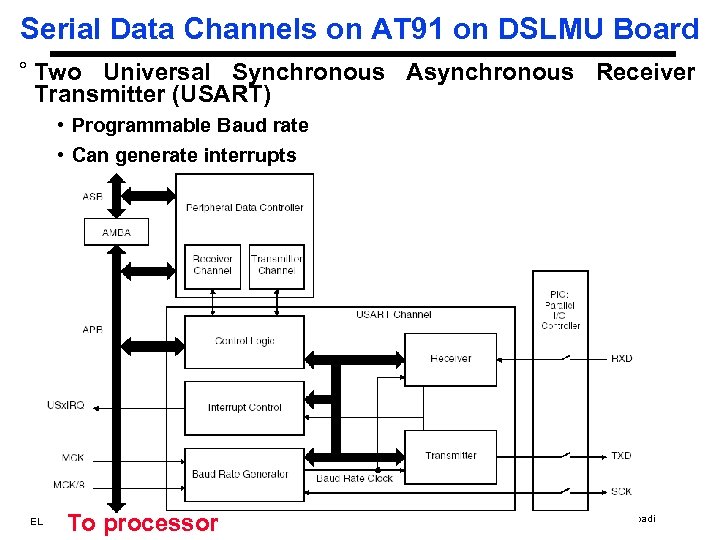 Serial Data Channels on AT 91 on DSLMU Board ° Two Universal Synchronous Asynchronous Receiver Transmitter (USART) • Programmable Baud rate • Can generate interrupts To processor ELEC 2041 lec 29 -io-examples. 18 Saeid Nooshabadi
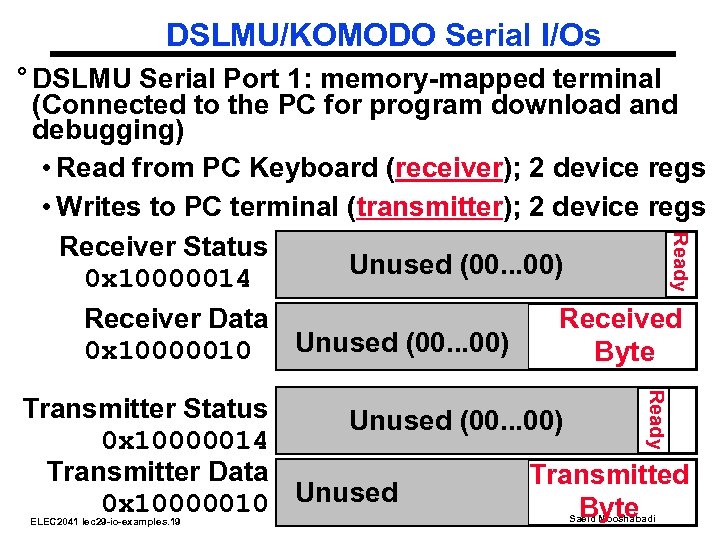 DSLMU/KOMODO Serial I/Os Ready ° DSLMU Serial Port 1: memory-mapped terminal (Connected to the PC for program download and debugging) • Read from PC Keyboard (receiver); 2 device regs • Writes to PC terminal (transmitter); 2 device regs Receiver Status (IE) Unused (00. . . 00) 0 x 10000014 Receiver Data Received Unused (00. . . 00) 0 x 10000010 Byte Ready Transmitter Status Unused (00. . . 00) 0 x 10000014 Transmitter Data Transmitted 0 x 10000010 Unused Byte ELEC 2041 lec 29 -io-examples. 19 Saeid Nooshabadi
 DSLMU/Komodo Serial I/Os ° Status register rightmost bit (0): Ready • Receiver: Ready==1 means character in Data Register not yet been read (or ready to be read); 1 0 when data is read from Data Reg • Transmitter: Ready==1 means transmitter is ready to accept a new character; 0 Transmitter still busy writing last char ° Data register rightmost byte has data • Receiver: last char from keyboard; rest = 0 • Transmitter: when write rightmost byte, writes char to display ELEC 2041 lec 29 -io-examples. 20 Saeid Nooshabadi
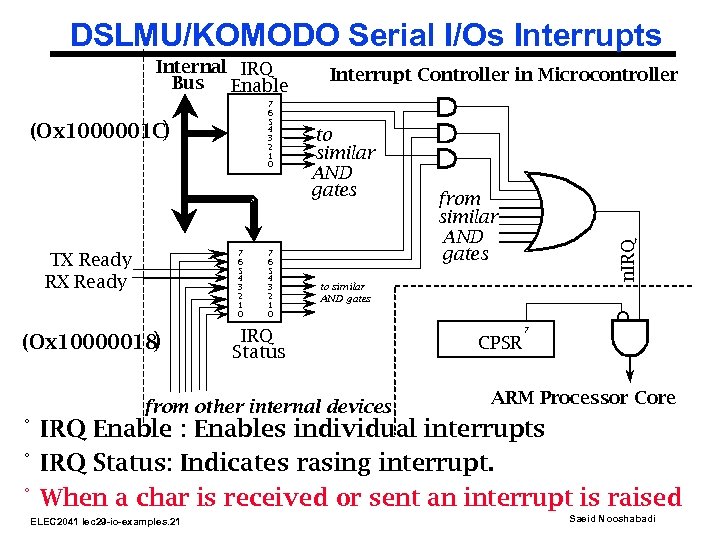 DSLMU/KOMODO Serial I/Os Interrupts 7 6 5 4 3 2 1 0 (Ox 1000001 C ) 7 6 5 4 3 2 1 0 TX Ready RX Ready (Ox 10000018 ) 7 6 5 4 3 2 1 0 Interrupt Controller in Microcontroller to similar AND gates from similar AND gates n. IRQ Internal IRQ Bus Enable to similar AND gates IRQ Status from other internal devices CPSR 7 ARM Processor Core ° IRQ Enable : Enables individual interrupts ° IRQ Status: Indicates rasing interrupt. ° When a char is received or sent an interrupt is raised ELEC 2041 lec 29 -io-examples. 21 Saeid Nooshabadi
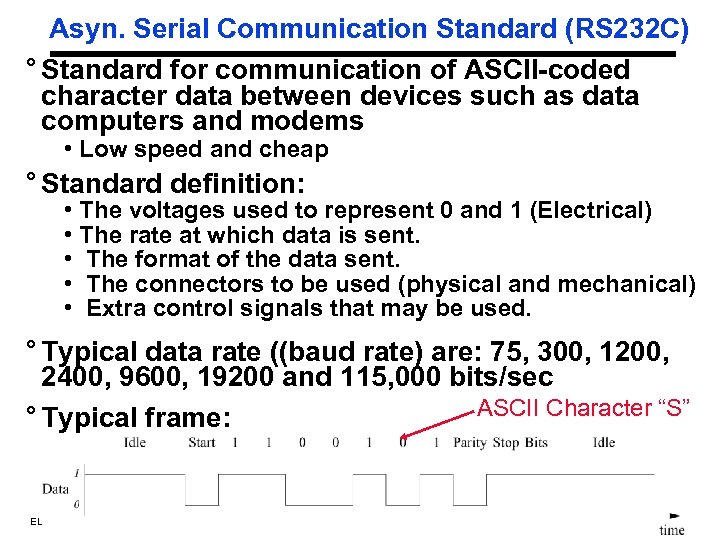 Asyn. Serial Communication Standard (RS 232 C) ° Standard for communication of ASCII-coded character data between devices such as data computers and modems • Low speed and cheap ° Standard definition: • The voltages used to represent 0 and 1 (Electrical) • The rate at which data is sent. • The format of the data sent. • The connectors to be used (physical and mechanical) • Extra control signals that may be used. ° Typical data rate ((baud rate) are: 75, 300, 1200, 2400, 9600, 19200 and 115, 000 bits/sec ASCII Character “S” ° Typical frame: ELEC 2041 lec 29 -io-examples. 22 Saeid Nooshabadi
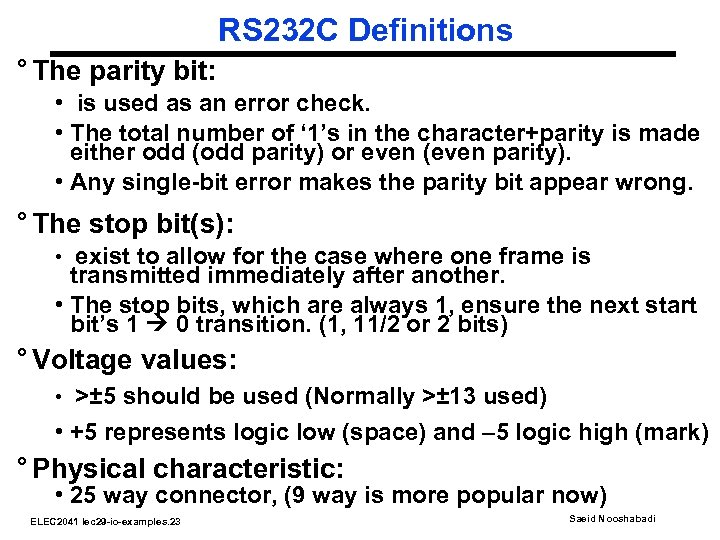 RS 232 C Definitions ° The parity bit: • is used as an error check. • The total number of ‘ 1’s in the character+parity is made either odd (odd parity) or even (even parity). • Any single-bit error makes the parity bit appear wrong. ° The stop bit(s): • exist to allow for the case where one frame is transmitted immediately after another. • The stop bits, which are always 1, ensure the next start bit’s 1 0 transition. (1, 11/2 or 2 bits) ° Voltage values: • >± 5 should be used (Normally >± 13 used) • +5 represents logic low (space) and – 5 logic high (mark) ° Physical characteristic: • 25 way connector, (9 way is more popular now) ELEC 2041 lec 29 -io-examples. 23 Saeid Nooshabadi
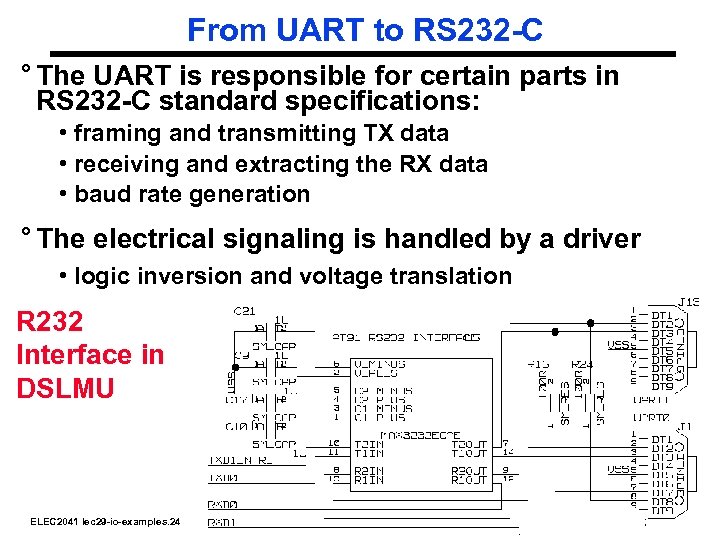 From UART to RS 232 -C ° The UART is responsible for certain parts in RS 232 -C standard specifications: • framing and transmitting TX data • receiving and extracting the RX data • baud rate generation ° The electrical signaling is handled by a driver • logic inversion and voltage translation R 232 Interface in DSLMU ELEC 2041 lec 29 -io-examples. 24 Saeid Nooshabadi
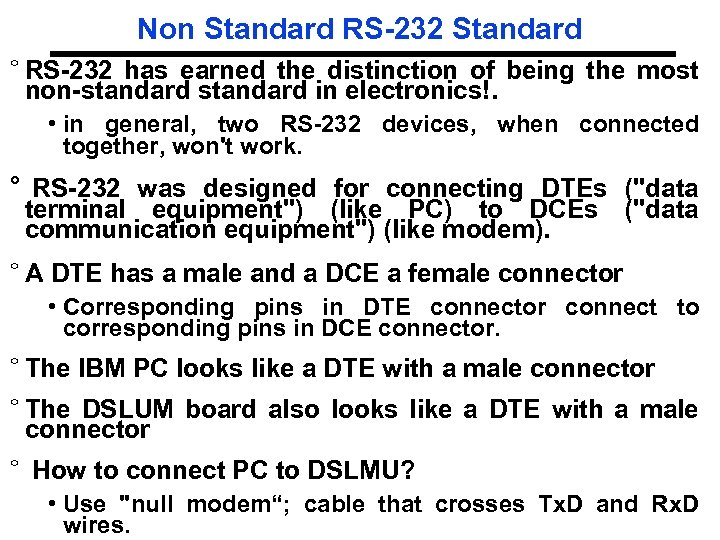 Non Standard RS-232 Standard ° RS-232 has earned the distinction of being the most non-standard in electronics!. • in general, two RS-232 devices, when connected together, won't work. ° RS-232 was designed for connecting DTEs ("data terminal equipment") (like PC) to DCEs ("data communication equipment") (like modem). ° A DTE has a male and a DCE a female connector • Corresponding pins in DTE connector connect to corresponding pins in DCE connector. ° The IBM PC looks like a DTE with a male connector ° The DSLUM board also looks like a DTE with a male connector ° How to connect PC to DSLMU? • Use "null modem“; cable that crosses Tx. D and Rx. D Saeid Nooshabadi ELEC 2041 lec 29 -io-examples. 25 wires.
 Reading Material ° Reading Material: • http: //www. beyondlogic. org/serial. htm • http: //www. sangoma. com/signal. htm • Hardware Reference Manual on CD-ROM ELEC 2041 lec 29 -io-examples. 26 Saeid Nooshabadi
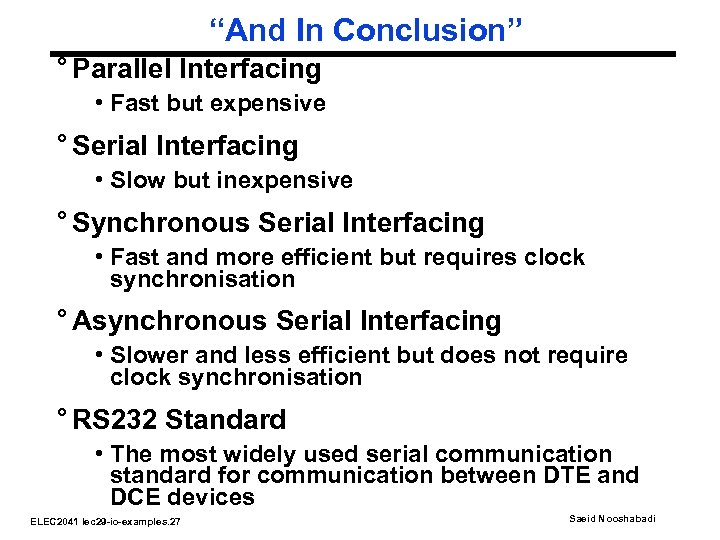 “And In Conclusion” ° Parallel Interfacing • Fast but expensive ° Serial Interfacing • Slow but inexpensive ° Synchronous Serial Interfacing • Fast and more efficient but requires clock synchronisation ° Asynchronous Serial Interfacing • Slower and less efficient but does not require clock synchronisation ° RS 232 Standard • The most widely used serial communication standard for communication between DTE and DCE devices ELEC 2041 lec 29 -io-examples. 27 Saeid Nooshabadi