


 Скачать презентацию EE 314 Microprocessor Systems Chapter 9 Using Disks
03220d845ca9e86c5d30a8adb610a95f.ppt
- Количество слайдов: 9
 EE 314 Microprocessor Systems Chapter 9 Using Disks and Files Objectives: The difference between Floppy and Hard Disks What the Boot Sector is for What the File Allocation Table is for How to access disk sectors trough BIOS INT 13 H How to navigate trough DOS’s directory structure Using DOS INT 21 H functions to access disk files Based on "An Introduction to the Intel Family of Microprocessors" by James L. Antonakos
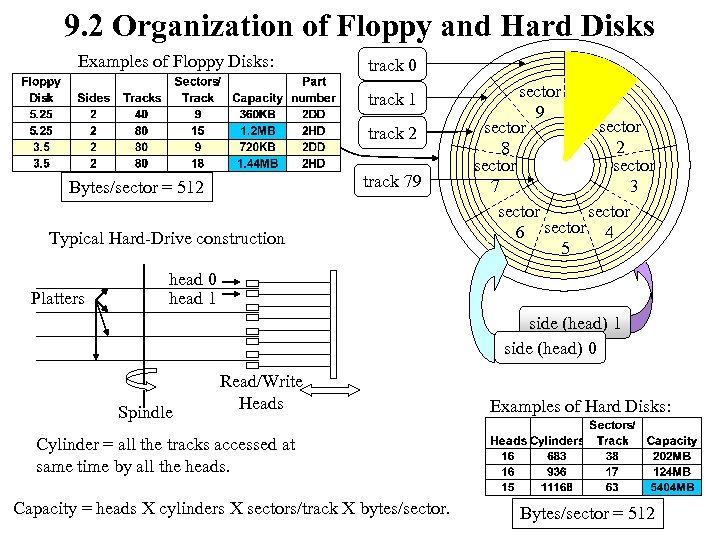 9. 2 Organization of Floppy and Hard Disks Examples of Floppy Disks: track 0 track 1 track 2 track 79 Bytes/sector = 512 Typical Hard-Drive construction Platters sector 9 1 sector 2 8 sector 7 3 sector 6 sector 4 5 head 0 head 1 side (head) 0 Spindle Read/Write Heads Examples of Hard Disks: Cylinder = all the tracks accessed at same time by all the heads. Capacity = heads X cylinders X sectors/track X bytes/sector. Bytes/sector = 512
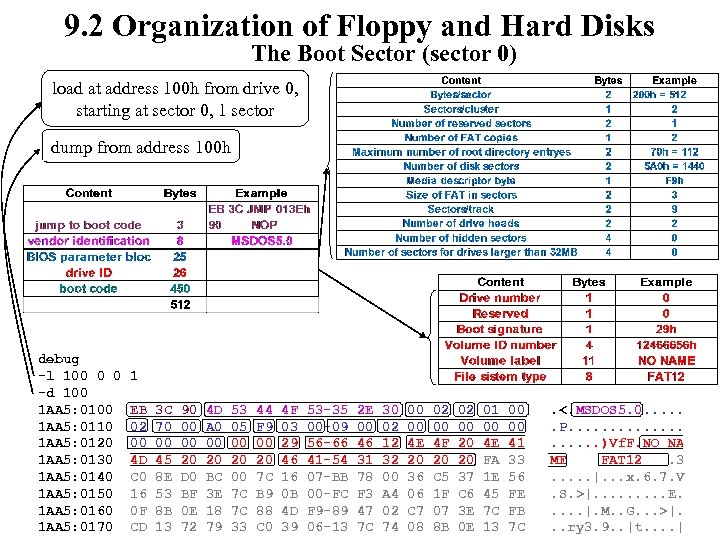 9. 2 Organization of Floppy and Hard Disks The Boot Sector (sector 0) load at address 100 h from drive 0, starting at sector 0, 1 sector dump from address 100 h debug -l 100 0 0 -d 100 1 AA 5: 0110 1 AA 5: 0120 1 AA 5: 0130 1 AA 5: 0140 1 AA 5: 0150 1 AA 5: 0160 1 AA 5: 0170 1 EB 02 00 4 D C 0 16 0 F CD 3 C 70 00 45 8 E 53 8 B 13 90 00 00 20 D 0 BF 0 E 72 4 D A 0 00 20 BC 3 E 18 79 53 05 00 20 00 7 C 7 C 33 44 F 9 00 20 7 C B 9 88 C 0 4 F 03 29 46 16 0 B 4 D 39 53 -35 00 -09 56 -66 41 -54 07 -BB 00 -FC F 9 -89 06 -13 2 E 00 46 31 78 F 3 47 7 C 30 02 12 32 00 A 4 02 74 00 00 4 E 20 36 06 C 7 08 02 00 4 F 20 C 5 1 F 07 8 B 02 00 20 20 37 C 6 3 E 0 E 01 00 4 E FA 1 E 45 7 C 13 00 00 41 33 56 FE FB 7 C . <. MSDOS 5. 0. . . P. . . . . )Vf. F. NO NA ME FAT 12. 3. . . |. . . x. 6. 7. V. S. >|. . E. . . |. M. . G. . . >|. . . ry 3. 9. . |t. . |
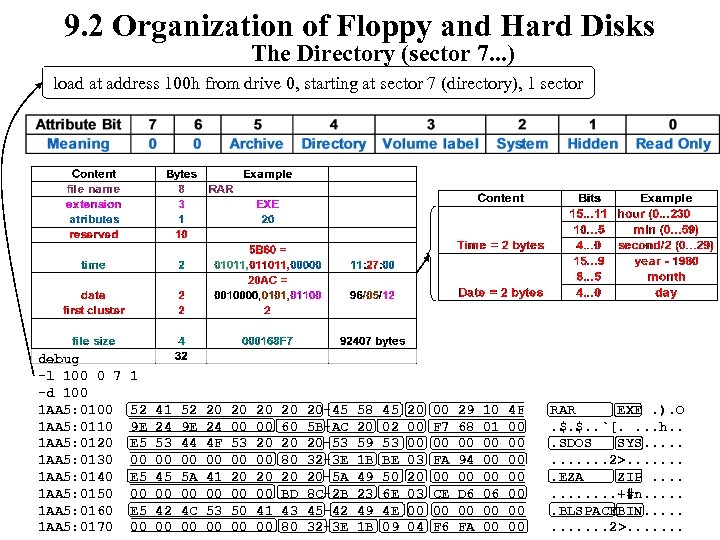 9. 2 Organization of Floppy and Hard Disks The Directory (sector 7. . . ) load at address 100 h from drive 0, starting at sector 7 (directory), 1 sector debug -l 100 0 7 -d 100 1 AA 5: 0110 1 AA 5: 0120 1 AA 5: 0130 1 AA 5: 0140 1 AA 5: 0150 1 AA 5: 0160 1 AA 5: 0170 1 52 9 E E 5 00 41 24 53 00 45 00 42 00 52 9 E 44 00 5 A 00 4 C 00 20 24 4 F 00 41 00 53 00 20 00 50 00 20 00 41 00 20 60 20 80 20 BD 43 80 20 -45 5 B-AC 20 -53 32 -3 E 20 -5 A 8 C-2 B 45 -42 32 -3 E 58 20 59 1 B 49 23 49 1 B 45 02 53 BE 50 6 E 4 E 09 20 00 00 03 20 03 00 04 00 F 7 00 FA 00 CE 00 F 6 29 68 00 94 00 D 6 00 FA 10 01 00 00 00 06 00 00 4 F 00 00 RAR EXE. ). O. $. $. . `[. . h. . . SDOS SYS. . . 2>. . . . EZA ZIP. . . +#n. . . BLSPACEBIN. . . 2>. . . .
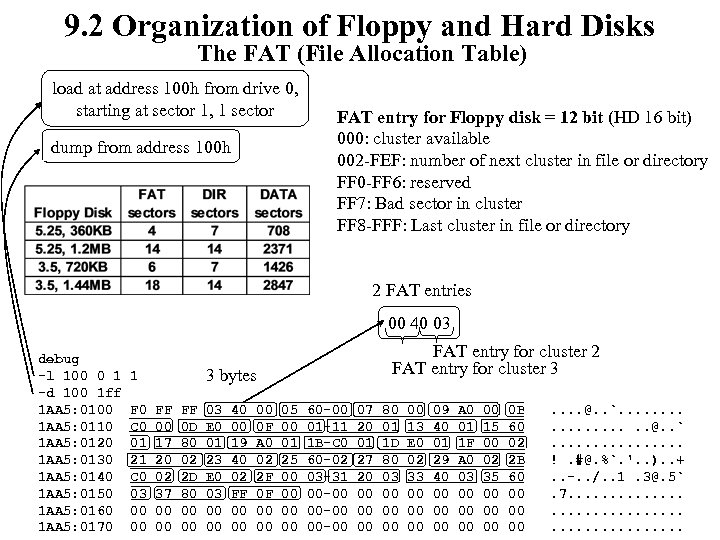 9. 2 Organization of Floppy and Hard Disks The FAT (File Allocation Table) load at address 100 h from drive 0, starting at sector 1, 1 sector dump from address 100 h FAT entry for Floppy disk = 12 bit (HD 16 bit) 000: cluster available 002 -FEF: number of next cluster in file or directory FF 0 -FF 6: reserved FF 7: Bad sector in cluster FF 8 -FFF: Last cluster in file or directory 2 FAT entries 00 40 03 debug -l 100 0 1 -d 100 1 ff 1 AA 5: 0100 1 AA 5: 0110 1 AA 5: 0120 1 AA 5: 0130 1 AA 5: 0140 1 AA 5: 0150 1 AA 5: 0160 1 AA 5: 0170 3 bytes 1 F 0 C 0 01 21 C 0 03 00 00 FAT entry for cluster 2 FAT entry for cluster 3 FF 00 17 20 02 37 00 00 FF 0 D 80 02 2 D 80 00 00 03 E 0 01 23 E 0 03 00 00 40 00 19 40 02 FF 00 00 00 0 F A 0 02 2 F 0 F 00 00 05 00 01 25 00 00 60 -00 01 -11 1 B-C 0 60 -02 03 -31 00 -00 07 20 01 27 20 00 00 00 80 01 1 D 80 03 00 00 13 E 0 02 33 00 00 00 09 40 01 29 40 00 00 00 A 0 01 1 F A 0 03 00 00 15 00 02 35 00 00 00 0 B 60 02 2 B 60 00 00 00 . . . . @. . `. . . . !. #@. %`. '. . ). . +. . -. . /. . 1. 3@. 5`. 7. . .
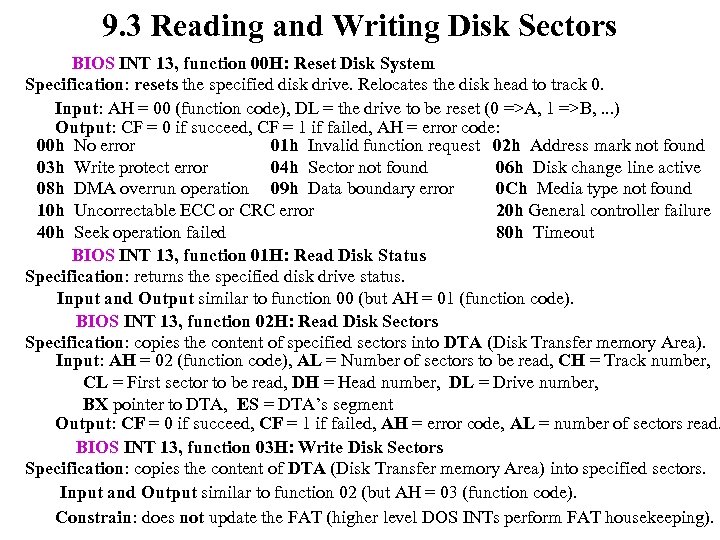 9. 3 Reading and Writing Disk Sectors BIOS INT 13, function 00 H: Reset Disk System Specification: resets the specified disk drive. Relocates the disk head to track 0. Input: AH = 00 (function code), DL = the drive to be reset (0 =>A, 1 =>B, . . . ) Output: CF = 0 if succeed, CF = 1 if failed, AH = error code: 00 h No error 01 h Invalid function request 02 h Address mark not found 03 h Write protect error 04 h Sector not found 06 h Disk change line active 08 h DMA overrun operation 09 h Data boundary error 0 Ch Media type not found 10 h Uncorrectable ECC or CRC error 20 h General controller failure 40 h Seek operation failed 80 h Timeout BIOS INT 13, function 01 H: Read Disk Status Specification: returns the specified disk drive status. Input and Output similar to function 00 (but AH = 01 (function code). BIOS INT 13, function 02 H: Read Disk Sectors Specification: copies the content of specified sectors into DTA (Disk Transfer memory Area). Input: AH = 02 (function code), AL = Number of sectors to be read, CH = Track number, CL = First sector to be read, DH = Head number, DL = Drive number, BX pointer to DTA, ES = DTA’s segment Output: CF = 0 if succeed, CF = 1 if failed, AH = error code, AL = number of sectors read. BIOS INT 13, function 03 H: Write Disk Sectors Specification: copies the content of DTA (Disk Transfer memory Area) into specified sectors. Input and Output similar to function 02 (but AH = 03 (function code). Constrain: does not update the FAT (higher level DOS INTs perform FAT housekeeping).
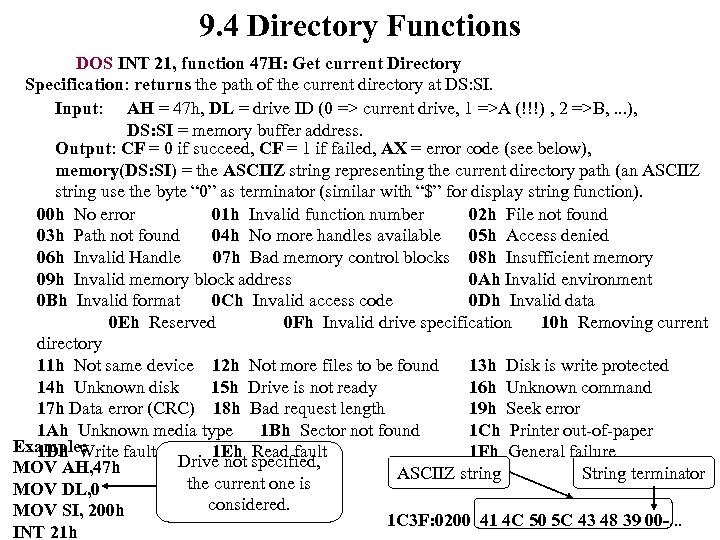 9. 4 Directory Functions DOS INT 21, function 47 H: Get current Directory Specification: returns the path of the current directory at DS: SI. Input: AH = 47 h, DL = drive ID (0 => current drive, 1 =>A (!!!) , 2 =>B, . . . ), DS: SI = memory buffer address. Output: CF = 0 if succeed, CF = 1 if failed, AX = error code (see below), memory(DS: SI) = the ASCIIZ string representing the current directory path (an ASCIIZ string use the byte “ 0” as terminator (similar with “$” for display string function). 00 h No error 01 h Invalid function number 02 h File not found 03 h Path not found 04 h No more handles available 05 h Access denied 06 h Invalid Handle 07 h Bad memory control blocks 08 h Insufficient memory 09 h Invalid memory block address 0 Ah Invalid environment 0 Bh Invalid format 0 Ch Invalid access code 0 Dh Invalid data 0 Eh Reserved 0 Fh Invalid drive specification 10 h Removing current directory 11 h Not same device 12 h Not more files to be found 13 h Disk is write protected 14 h Unknown disk 15 h Drive is not ready 16 h Unknown command 17 h Data error (CRC) 18 h Bad request length 19 h Seek error 1 Ah Unknown media type 1 Bh Sector not found 1 Ch Printer out-of-paper Example: 1 Dh Write fault 1 Eh Read fault 1 Fh General failure Drive not specified, MOV AH, 47 h ASCIIZ string String terminator the current one is MOV DL, 0 considered. MOV SI, 200 h 1 C 3 F: 0200 41 4 C 50 5 C 43 48 39 00 -. . . INT 21 h
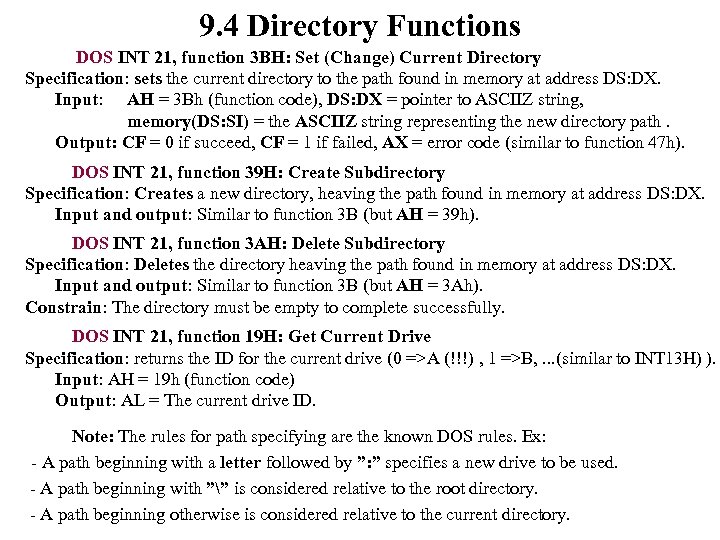 9. 4 Directory Functions DOS INT 21, function 3 BH: Set (Change) Current Directory Specification: sets the current directory to the path found in memory at address DS: DX. Input: AH = 3 Bh (function code), DS: DX = pointer to ASCIIZ string, memory(DS: SI) = the ASCIIZ string representing the new directory path. Output: CF = 0 if succeed, CF = 1 if failed, AX = error code (similar to function 47 h). DOS INT 21, function 39 H: Create Subdirectory Specification: Creates a new directory, heaving the path found in memory at address DS: DX. Input and output: Similar to function 3 B (but AH = 39 h). DOS INT 21, function 3 AH: Delete Subdirectory Specification: Deletes the directory heaving the path found in memory at address DS: DX. Input and output: Similar to function 3 B (but AH = 3 Ah). Constrain: The directory must be empty to complete successfully. DOS INT 21, function 19 H: Get Current Drive Specification: returns the ID for the current drive (0 =>A (!!!) , 1 =>B, . . . (similar to INT 13 H) ). Input: AH = 19 h (function code) Output: AL = The current drive ID. Note: The rules for path specifying are the known DOS rules. Ex: - A path beginning with a letter followed by ”: ” specifies a new drive to be used. - A path beginning with ”” is considered relative to the root directory. - A path beginning otherwise is considered relative to the current directory.
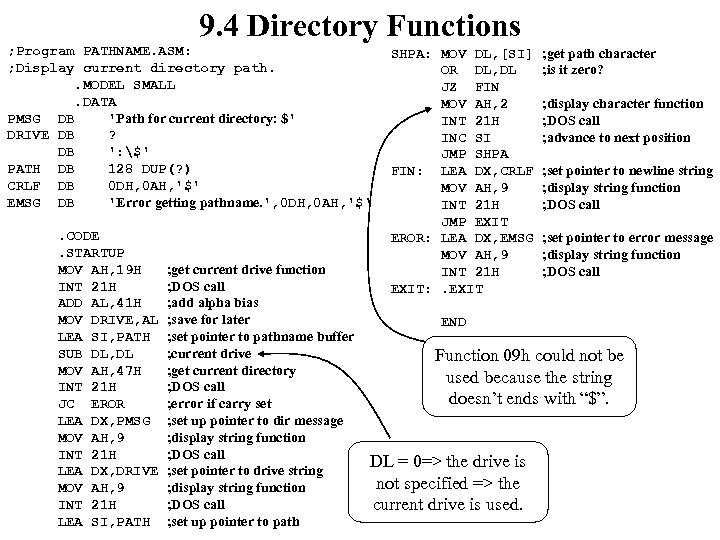 9. 4 Directory Functions ; Program PATHNAME. ASM: ; Display current directory path. . MODEL SMALL. DATA PMSG DB 'Path for current directory: $' DRIVE DB ? DB ': $' PATH DB 128 DUP(? ) CRLF DB 0 DH, 0 AH, '$' EMSG DB 'Error getting pathname. ', 0 DH, 0 AH, '$'. CODE. STARTUP MOV AH, 19 H INT 21 H ADD AL, 41 H MOV DRIVE, AL LEA SI, PATH SUB DL, DL MOV AH, 47 H INT 21 H JC EROR LEA DX, PMSG MOV AH, 9 INT 21 H LEA DX, DRIVE MOV AH, 9 INT 21 H LEA SI, PATH ; get current drive function ; DOS call ; add alpha bias ; save for later ; set pointer to pathname buffer ; current drive ; get current directory ; DOS call ; error if carry set ; set up pointer to dir message ; display string function ; DOS call ; set pointer to drive string ; display string function ; DOS call ; set up pointer to path SHPA: MOV DL, [SI] OR DL, DL JZ FIN MOV AH, 2 INT 21 H INC SI JMP SHPA FIN: LEA DX, CRLF MOV AH, 9 INT 21 H JMP EXIT EROR: LEA DX, EMSG MOV AH, 9 INT 21 H EXIT: . EXIT ; get path character ; is it zero? ; display character function ; DOS call ; advance to next position ; set pointer to newline string ; display string function ; DOS call ; set pointer to error message ; display string function ; DOS call END Function 09 h could not be used because the string doesn’t ends with “$”. DL = 0=> the drive is not specified => the current drive is used.