


 Скачать презентацию ECE CS 372 introduction to computer networks Lecture
96430c97cc7d1cbdfbb628e5303df9f9.ppt
- Количество слайдов: 47
 ECE/CS 372 – introduction to computer networks Lecture 5 Announcements: r Lab 1 is due today r Lab 2 is posted and is due next Tuesday Acknowledgement: slides drawn heavily from Kurose & Ross Chapter 2, slide: 1
 Chapter 1: recap By now, you should know: r the Internet and its components r circuit-switching networks vs. packet-switching networks r different network access technologies r the three Tiers 1, 2, and 3 r layered architecture of networks r types of delays and throughput analysis Chapter 2, slide: 2
 Chapter 2: Application Layer Our goals: r aspects of network application protocols v transport-layer service models v client-server paradigm v peer-to-peer paradigm r learn about protocols by examining popular application-level protocol: HTTP Chapter 2, slide: 3
 Some network apps r e-mail r voice over IP r web r real-time video r instant messaging r remote login conferencing r grid computing r P 2 P file sharing r multi-user network games r streaming stored video clips Chapter 2, slide: 4
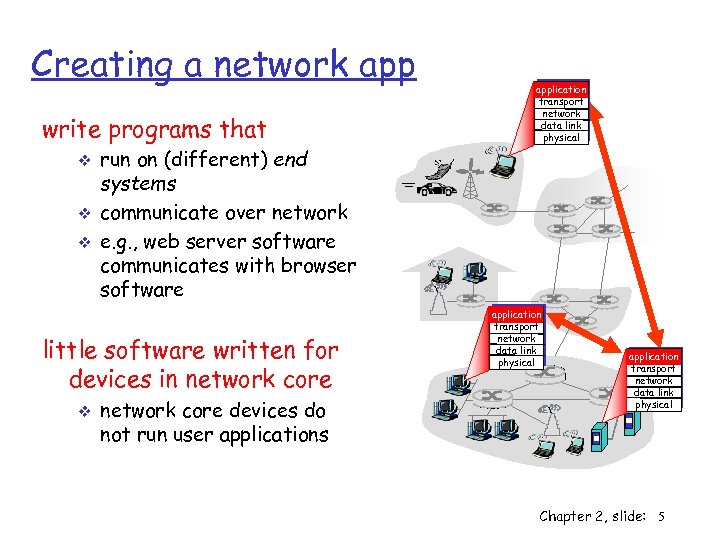 Creating a network app write programs that v v v run on (different) end systems communicate over network e. g. , web server software communicates with browser software little software written for devices in network core v application transport network data link physical network core devices do not run user applications application transport network data link physical Chapter 2, slide: 5
 Chapter 2: Application layer r Principles of network applications v app architectures v app requirements r Web and HTTP r P 2 P file sharing Chapter 2, slide: 6
 Application architectures There are 3 types of architectures: r Client-server r Peer-to-peer (P 2 P) r Hybrid of client-server and P 2 P Chapter 2, slide: 7
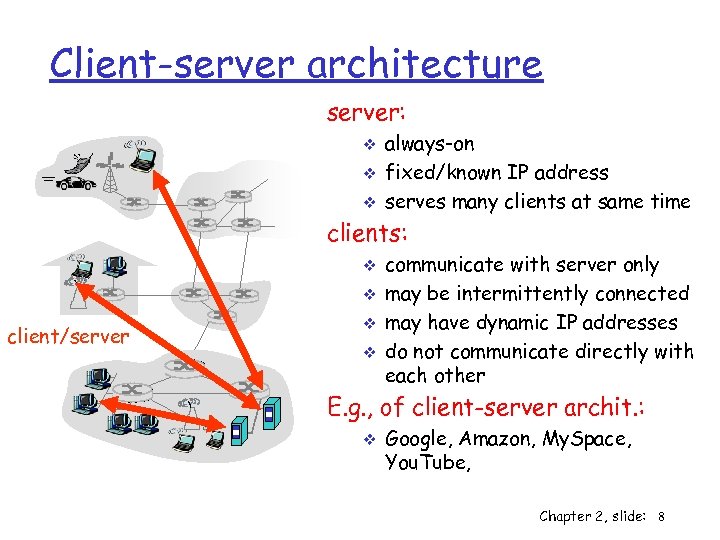 Client-server architecture server: v v v always-on fixed/known IP address serves many clients at same time clients: v v client/server v v communicate with server only may be intermittently connected may have dynamic IP addresses do not communicate directly with each other E. g. , of client-server archit. : v Google, Amazon, My. Space, You. Tube, Chapter 2, slide: 8
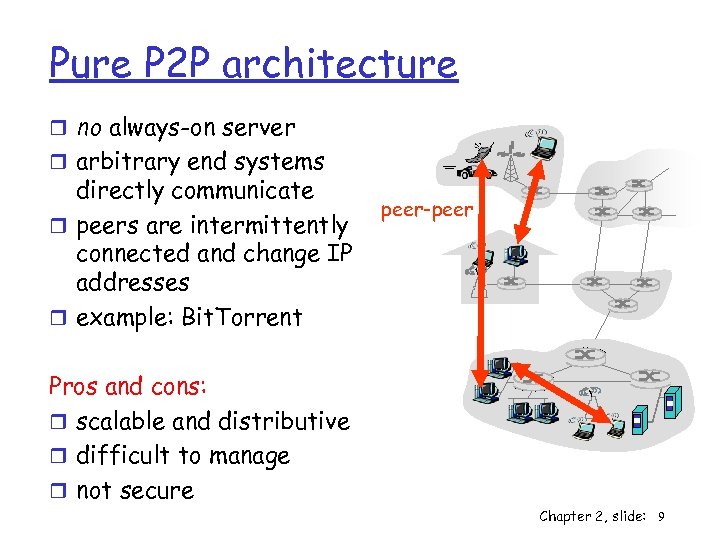 Pure P 2 P architecture r no always-on server r arbitrary end systems directly communicate r peers are intermittently connected and change IP addresses r example: Bit. Torrent peer-peer Pros and cons: r scalable and distributive r difficult to manage r not secure Chapter 2, slide: 9
 Hybrid of client-server and P 2 P Skype v voice-over-IP P 2 P application v centralized server: finding address of remote party v client-client connection: direct (not through server) Instant messaging v chatting between two users is P 2 P v centralized service: client presence location • user registers its IP address with central server when it comes online • user contacts central server to find IP addresses of buddies Chapter 2, slide: 10
 Processes communicating Process: is program running within a host. r processes in same host communicate using inter-process communication (managed by OS). r processes in different hosts communicate by exchanging messages Client process: process that initiates communication Server process: process that waits to be contacted r Note: applications with P 2 P architectures have client processes & server processes Chapter 2, slide: 11
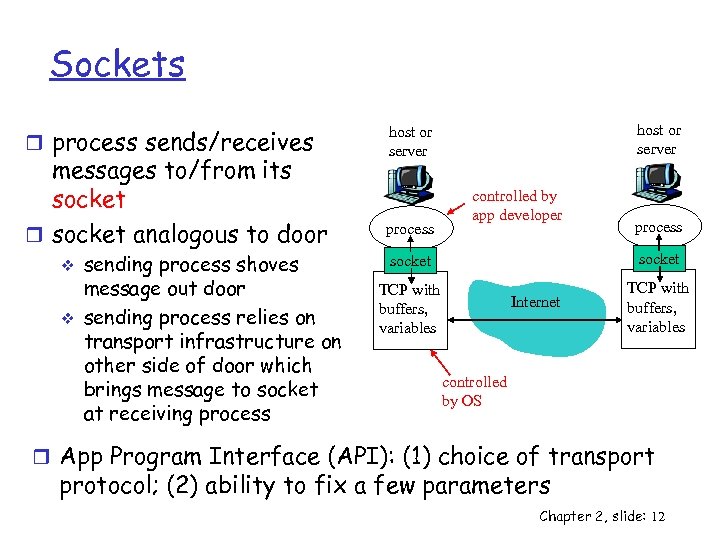 Sockets r process sends/receives messages to/from its socket r socket analogous to door v v sending process shoves message out door sending process relies on transport infrastructure on other side of door which brings message to socket at receiving process host or server process controlled by app developer process socket TCP with buffers, variables Internet TCP with buffers, variables controlled by OS r App Program Interface (API): (1) choice of transport protocol; (2) ability to fix a few parameters Chapter 2, slide: 12
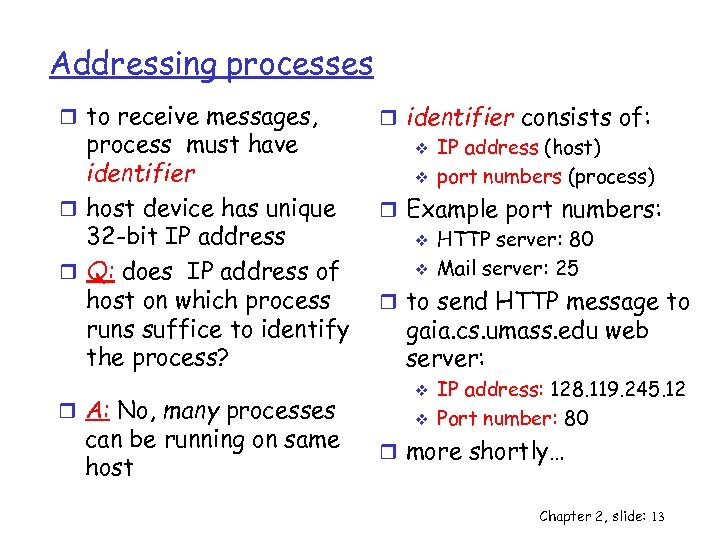 Addressing processes r to receive messages, process must have identifier r host device has unique 32 -bit IP address r Q: does IP address of host on which process runs suffice to identify the process? r A: No, many processes can be running on same host r identifier consists of: v IP address (host) v port numbers (process) r Example port numbers: v HTTP server: 80 v Mail server: 25 r to send HTTP message to gaia. cs. umass. edu web server: v v IP address: 128. 119. 245. 12 Port number: 80 r more shortly… Chapter 2, slide: 13
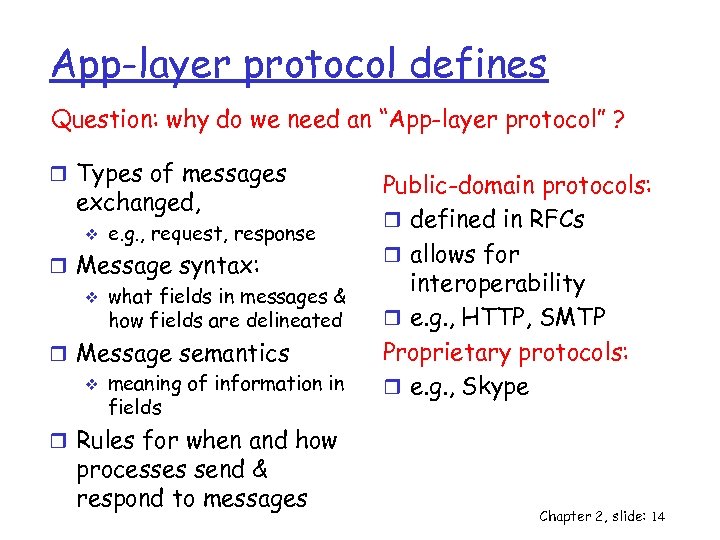 App-layer protocol defines Question: why do we need an “App-layer protocol” ? r Types of messages exchanged, v e. g. , request, response r Message syntax: v what fields in messages & how fields are delineated r Message semantics v meaning of information in fields Public-domain protocols: r defined in RFCs r allows for interoperability r e. g. , HTTP, SMTP Proprietary protocols: r e. g. , Skype r Rules for when and how processes send & respond to messages Chapter 2, slide: 14
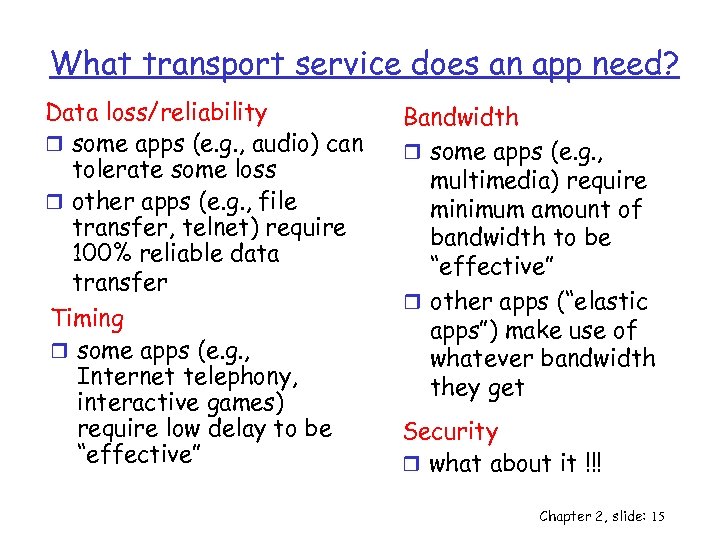 What transport service does an app need? Data loss/reliability r some apps (e. g. , audio) can tolerate some loss r other apps (e. g. , file transfer, telnet) require 100% reliable data transfer Timing r some apps (e. g. , Internet telephony, interactive games) require low delay to be “effective” Bandwidth r some apps (e. g. , multimedia) require minimum amount of bandwidth to be “effective” r other apps (“elastic apps”) make use of whatever bandwidth they get Security r what about it !!! Chapter 2, slide: 15
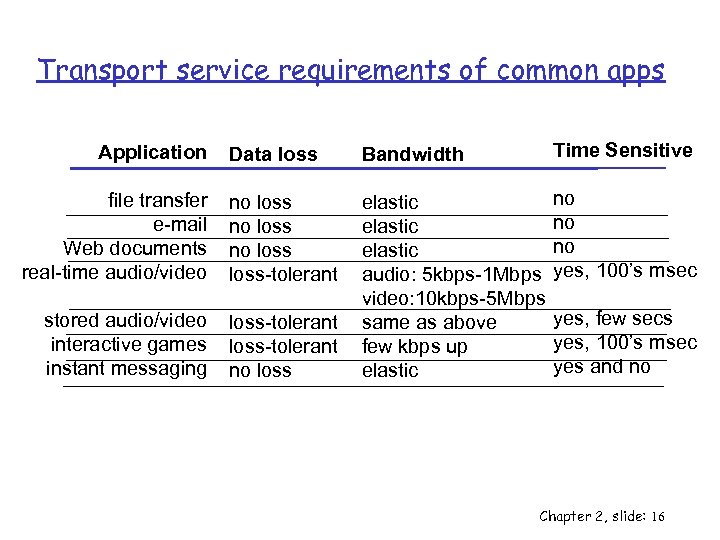 Transport service requirements of common apps Data loss Bandwidth Time Sensitive file transfer e-mail Web documents real-time audio/video no loss-tolerant no no no yes, 100’s msec stored audio/video interactive games instant messaging loss-tolerant no loss elastic audio: 5 kbps-1 Mbps video: 10 kbps-5 Mbps same as above few kbps up elastic Application yes, few secs yes, 100’s msec yes and no Chapter 2, slide: 16
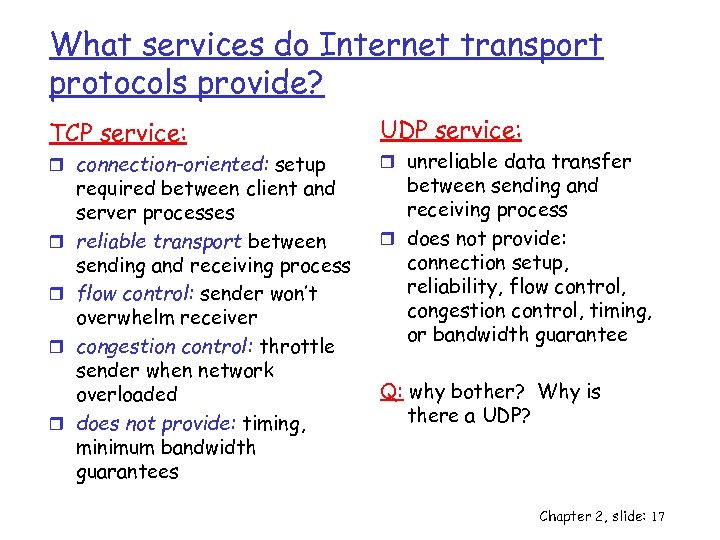 What services do Internet transport protocols provide? TCP service: r connection-oriented: setup r r required between client and server processes reliable transport between sending and receiving process flow control: sender won’t overwhelm receiver congestion control: throttle sender when network overloaded does not provide: timing, minimum bandwidth guarantees UDP service: r unreliable data transfer between sending and receiving process r does not provide: connection setup, reliability, flow control, congestion control, timing, or bandwidth guarantee Q: why bother? Why is there a UDP? Chapter 2, slide: 17
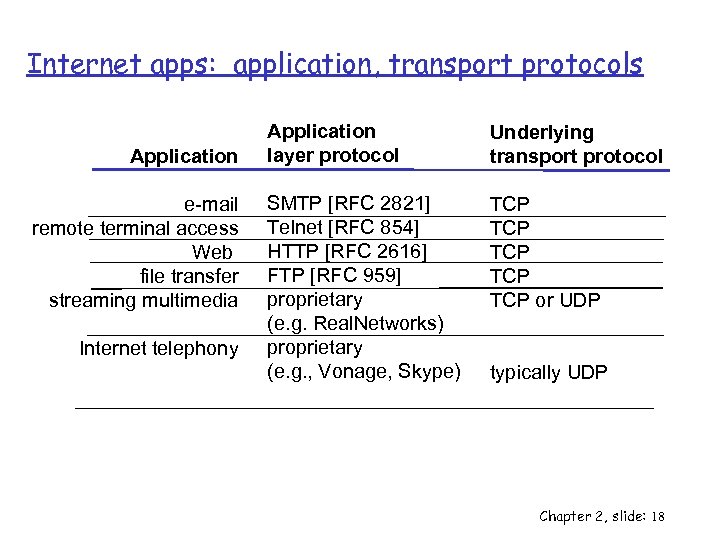 Internet apps: application, transport protocols Application e-mail remote terminal access Web file transfer streaming multimedia Internet telephony Application layer protocol Underlying transport protocol SMTP [RFC 2821] Telnet [RFC 854] HTTP [RFC 2616] FTP [RFC 959] proprietary (e. g. Real. Networks) proprietary (e. g. , Vonage, Skype) TCP TCP TCP or UDP typically UDP Chapter 2, slide: 18
 Chapter 2: Application layer r Principles of network applications v app architectures v app requirements r Web and HTTP r P 2 P file sharing Chapter 2, slide: 19
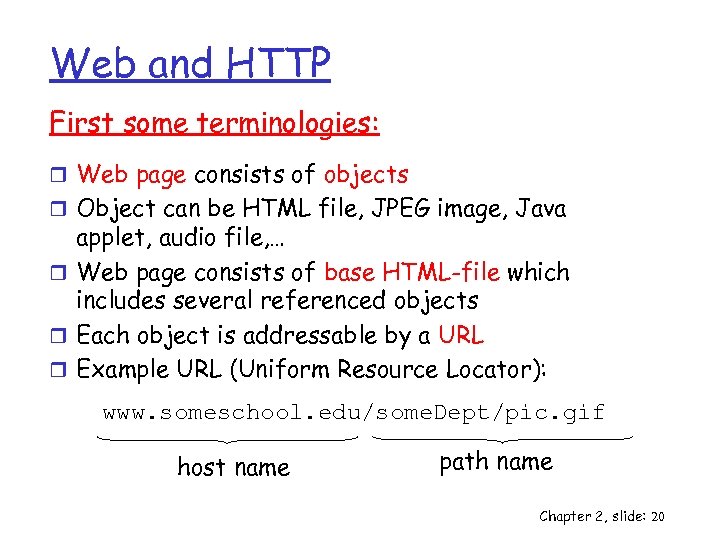 Web and HTTP First some terminologies: r Web page consists of objects r Object can be HTML file, JPEG image, Java applet, audio file, … r Web page consists of base HTML-file which includes several referenced objects r Each object is addressable by a URL r Example URL (Uniform Resource Locator): www. someschool. edu/some. Dept/pic. gif host name path name Chapter 2, slide: 20
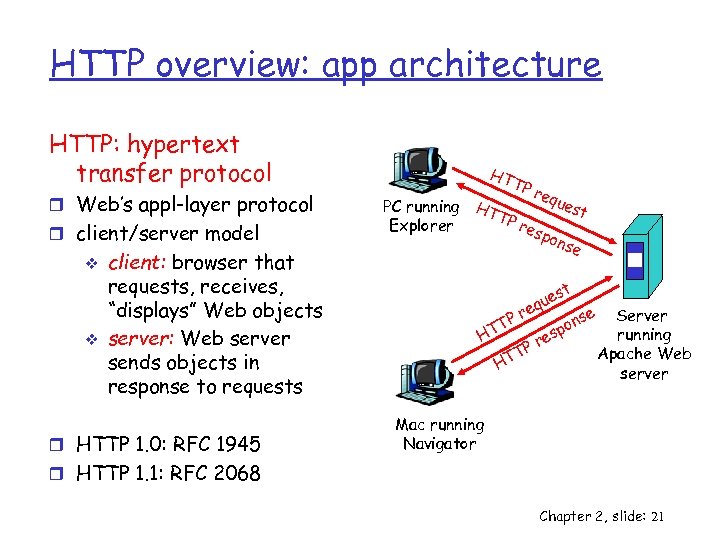 HTTP overview: app architecture HTTP: hypertext transfer protocol r Web’s appl-layer protocol r client/server model v v client: browser that requests, receives, “displays” Web objects server: Web server sends objects in response to requests r HTTP 1. 0: RFC 1945 HT TP req ues PC running HT t TP res Explorer pon se st ue eq r se Server TP on p running HT res P T Apache Web HT server Mac running Navigator r HTTP 1. 1: RFC 2068 Chapter 2, slide: 21
 HTTP overview (continued) Uses TCP: r client initiates TCP connection (creates socket) to server, port 80 r server accepts TCP connection from client r HTTP messages exchanged between browser (HTTP client) and Web server (HTTP server) r TCP connection closed HTTP is “stateless” r server maintains no information about past client requests aside Protocols that maintain “state” are complex! r past history (state) must be maintained r if server/client crashes, their views of “state” may be inconsistent, must be reconciled Chapter 2, slide: 22
 HTTP connections Nonpersistent HTTP r At most one object is sent over a TCP connection. r HTTP/1. 0 uses nonpersistent HTTP Persistent HTTP r Multiple objects can be sent over single TCP connection between client and server. r HTTP/1. 1 uses persistent connections in default mode Chapter 2, slide: 23
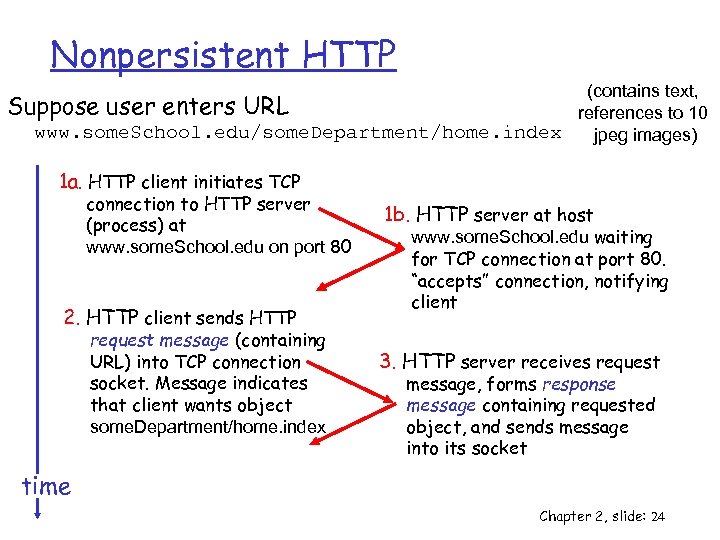 Nonpersistent HTTP (contains text, Suppose user enters URL references to 10 www. some. School. edu/some. Department/home. index jpeg images) 1 a. HTTP client initiates TCP connection to HTTP server (process) at www. some. School. edu on port 80 2. HTTP client sends HTTP request message (containing URL) into TCP connection socket. Message indicates that client wants object some. Department/home. index 1 b. HTTP server at host www. some. School. edu waiting for TCP connection at port 80. “accepts” connection, notifying client 3. HTTP server receives request message, forms response message containing requested object, and sends message into its socket time Chapter 2, slide: 24
 Nonpersistent HTTP (cont. ) 4. HTTP server closes TCP 5. HTTP client receives response connection. message containing html file, displays html. Parsing html file, finds 10 referenced jpeg objects time 6. Steps 1 -5 repeated for each of 10 jpeg objects Chapter 2, slide: 25
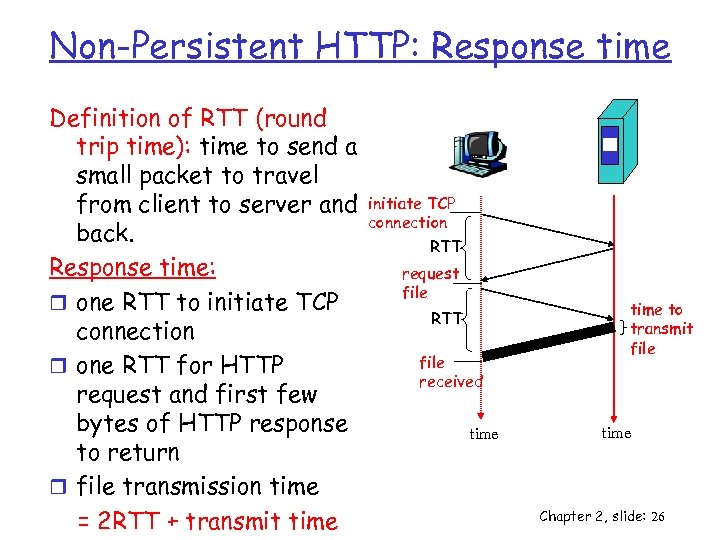 Non-Persistent HTTP: Response time Definition of RTT (round trip time): time to send a small packet to travel from client to server and back. Response time: r one RTT to initiate TCP connection r one RTT for HTTP request and first few bytes of HTTP response to return r file transmission time = 2 RTT + transmit time initiate TCP connection RTT request file RTT file received time to transmit file time Chapter 2, slide: 26
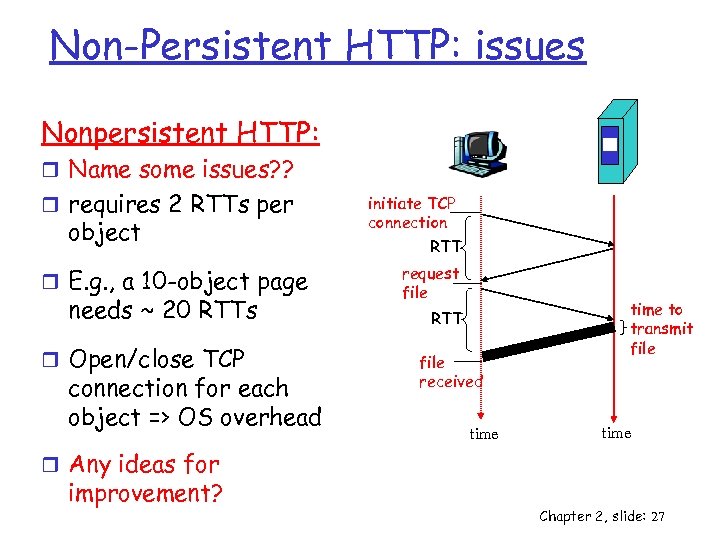 Non-Persistent HTTP: issues Nonpersistent HTTP: r Name some issues? ? r requires 2 RTTs per object r E. g. , a 10 -object page needs ~ 20 RTTs r Open/close TCP connection for each object => OS overhead initiate TCP connection RTT request file RTT file received time to transmit file time r Any ideas for improvement? Chapter 2, slide: 27
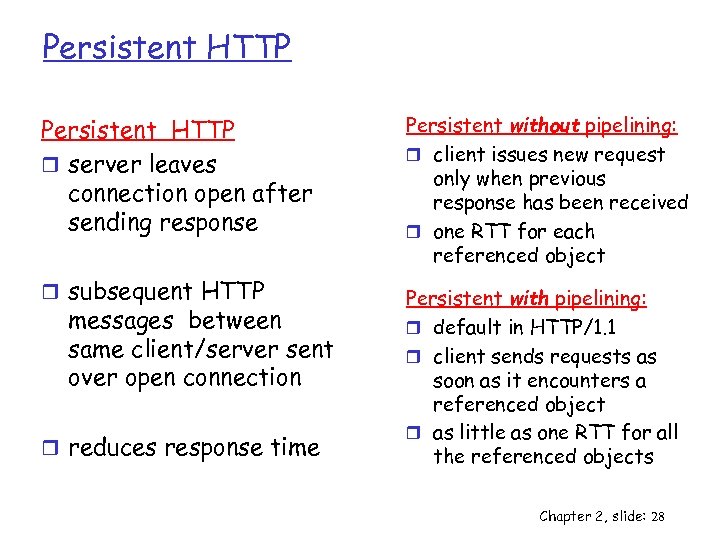 Persistent HTTP r server leaves connection open after sending response r subsequent HTTP messages between same client/server sent over open connection r reduces response time Persistent without pipelining: r client issues new request only when previous response has been received r one RTT for each referenced object Persistent with pipelining: r default in HTTP/1. 1 r client sends requests as soon as it encounters a referenced object r as little as one RTT for all the referenced objects Chapter 2, slide: 28
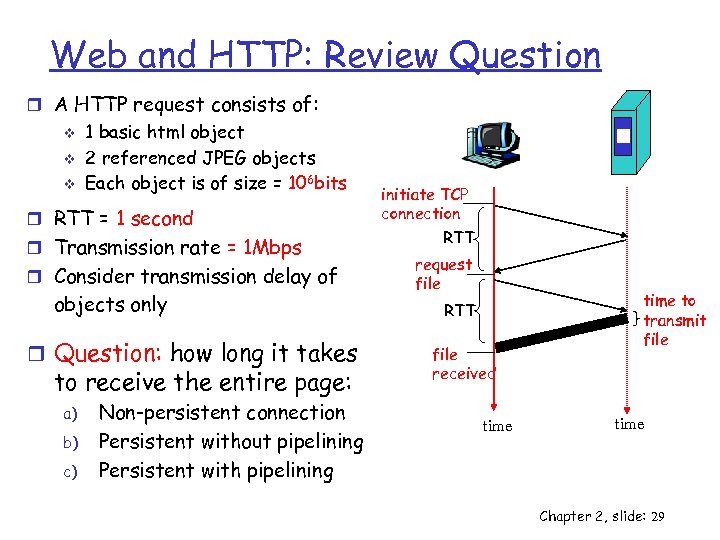 Web and HTTP: Review Question r A HTTP request consists of: v v v 1 basic html object 2 referenced JPEG objects Each object is of size = 106 bits r RTT = 1 second r Transmission rate = 1 Mbps r Consider transmission delay of objects only r Question: how long it takes to receive the entire page: a) b) c) Non-persistent connection Persistent without pipelining Persistent with pipelining initiate TCP connection RTT request file RTT file received time to transmit file time Chapter 2, slide: 29
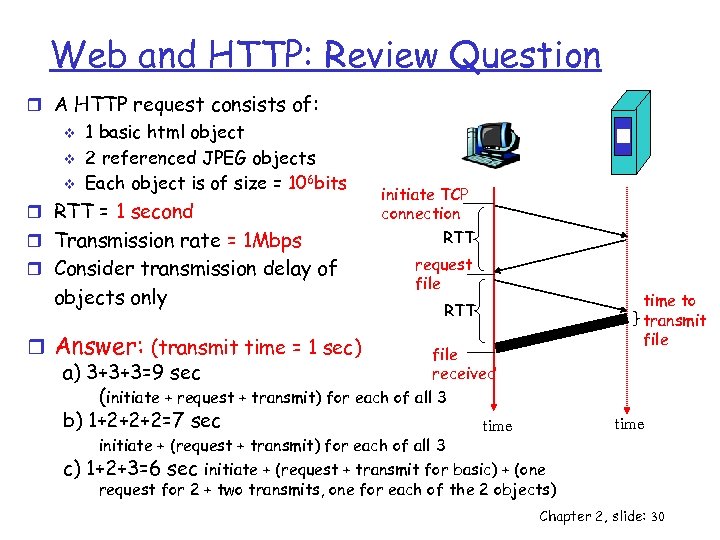 Web and HTTP: Review Question r A HTTP request consists of: v v v 1 basic html object 2 referenced JPEG objects Each object is of size = 106 bits r RTT = 1 second r Transmission rate = 1 Mbps r Consider transmission delay of objects only initiate TCP connection RTT request file r Answer: (transmit time = 1 sec) file a) 3+3+3=9 sec received (initiate + request + transmit) for each of all 3 b) 1+2+2+2=7 sec time c) time to transmit file RTT time initiate + (request + transmit) for each of all 3 1+2+3=6 sec initiate + (request + transmit for basic) + (one request for 2 + two transmits, one for each of the 2 objects) Chapter 2, slide: 30
 ECE/CS 372 – introduction to computer networks Lecture 6 Announcements: r Lab 2 is due next Tuesday Acknowledgement: slides drawn heavily from Kurose & Ross Chapter 2, slide: 31
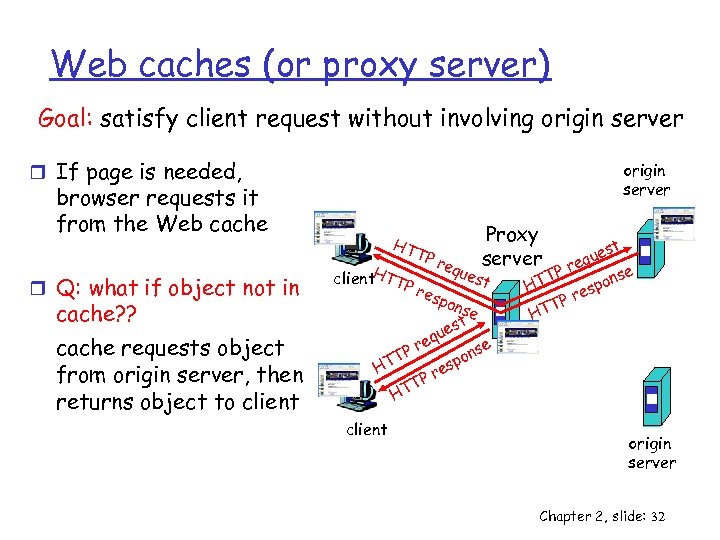 Web caches (or proxy server) Goal: satisfy client request without involving origin server r If page is needed, origin server browser requests it from the Web cache r Q: what if object not in cache? ? cache requests object from origin server, then returns object to client HT client. HTTP TP req ues Proxy server t res pon se t es qu e se Pr on T p HT res P TT H client st que re se TP pon HT es Pr T HT origin server Chapter 2, slide: 32
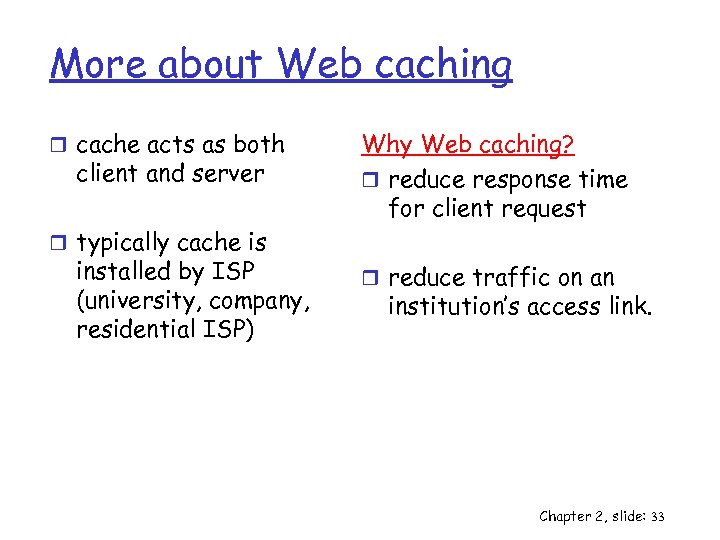 More about Web caching r cache acts as both client and server Why Web caching? r reduce response time for client request r typically cache is installed by ISP (university, company, residential ISP) r reduce traffic on an institution’s access link. Chapter 2, slide: 33
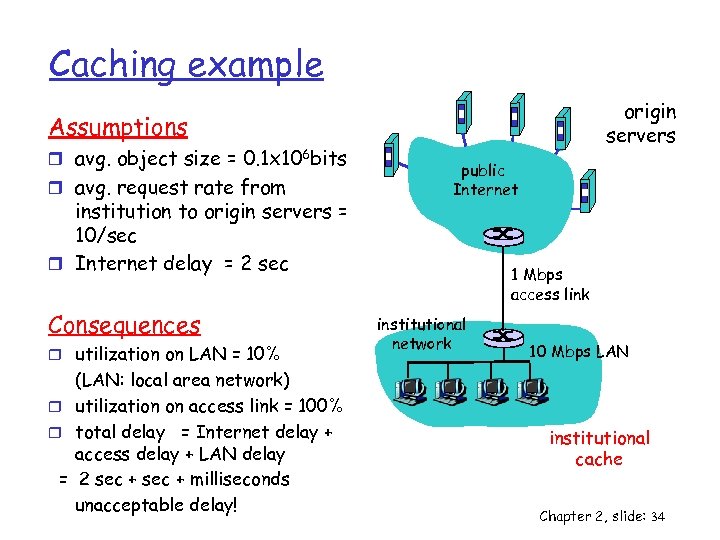 Caching example origin servers Assumptions r avg. object size = 0. 1 x 106 bits r avg. request rate from institution to origin servers = 10/sec r Internet delay = 2 sec Consequences r utilization on LAN = 10% (LAN: local area network) r utilization on access link = 100% r total delay = Internet delay + access delay + LAN delay = 2 sec + milliseconds unacceptable delay! public Internet 1 Mbps access link institutional network 10 Mbps LAN institutional cache Chapter 2, slide: 34
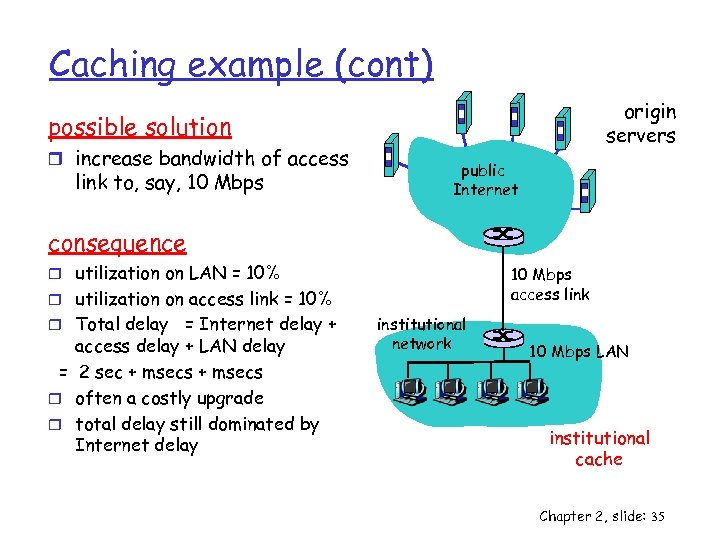 Caching example (cont) origin servers possible solution r increase bandwidth of access link to, say, 10 Mbps public Internet consequence r utilization on LAN = 10% 10 Mbps access link r utilization on access link = 10% r Total delay = Internet delay + access delay + LAN delay = 2 sec + msecs r often a costly upgrade r total delay still dominated by Internet delay institutional network 10 Mbps LAN institutional cache Chapter 2, slide: 35
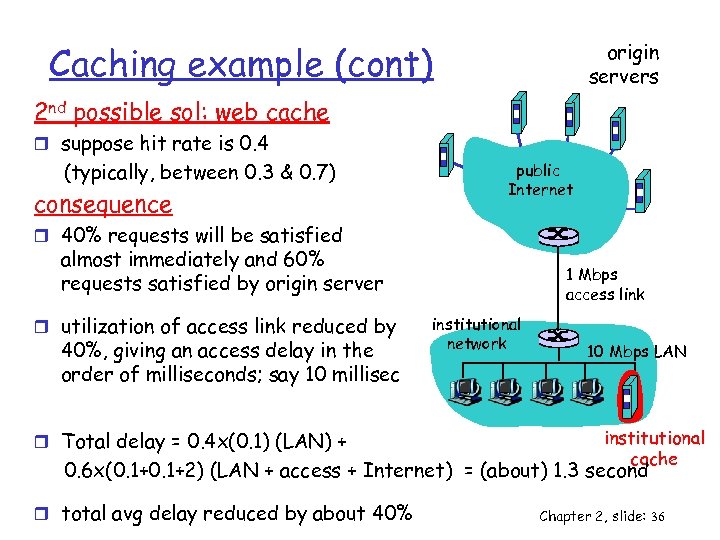 Caching example (cont) origin servers 2 nd possible sol: web cache r suppose hit rate is 0. 4 (typically, between 0. 3 & 0. 7) consequence public Internet r 40% requests will be satisfied almost immediately and 60% requests satisfied by origin server r utilization of access link reduced by 40%, giving an access delay in the order of milliseconds; say 10 millisec r Total delay = 0. 4 x(0. 1) (LAN) + 1 Mbps access link institutional network 10 Mbps LAN institutional cache 0. 6 x(0. 1+2) (LAN + access + Internet) = (about) 1. 3 second r total avg delay reduced by about 40% Chapter 2, slide: 36
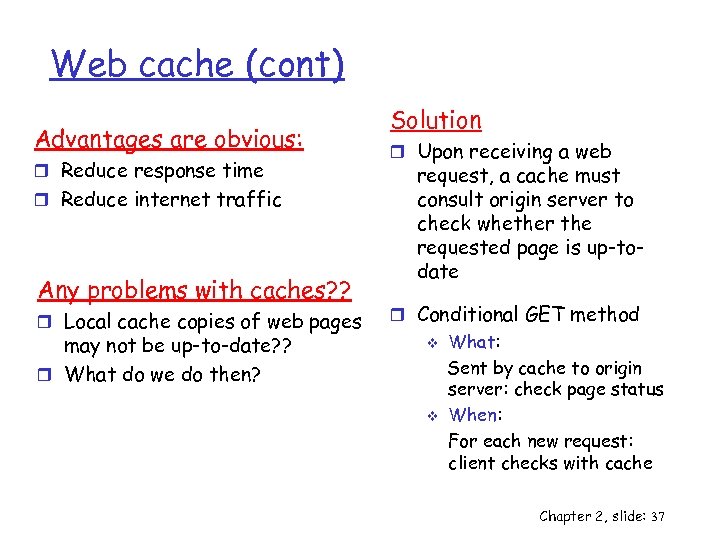 Web cache (cont) Advantages are obvious: r Reduce response time r Reduce internet traffic Any problems with caches? ? r Local cache copies of web pages may not be up-to-date? ? r What do we do then? Solution r Upon receiving a web request, a cache must consult origin server to check whether the requested page is up-todate r Conditional GET method v v What: Sent by cache to origin server: check page status When: For each new request: client checks with cache Chapter 2, slide: 37
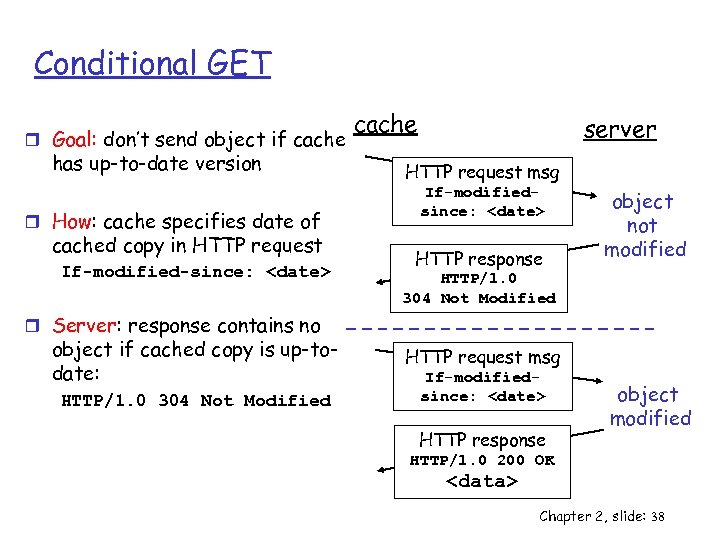 Conditional GET r Goal: don’t send object if cache has up-to-date version r How: cache specifies date of cached copy in HTTP request If-modified-since:
 Chapter 2: Application layer r Principles of network applications v app architectures v app requirements r Web and HTTP r P 2 P file sharing Chapter 2, slide: 39
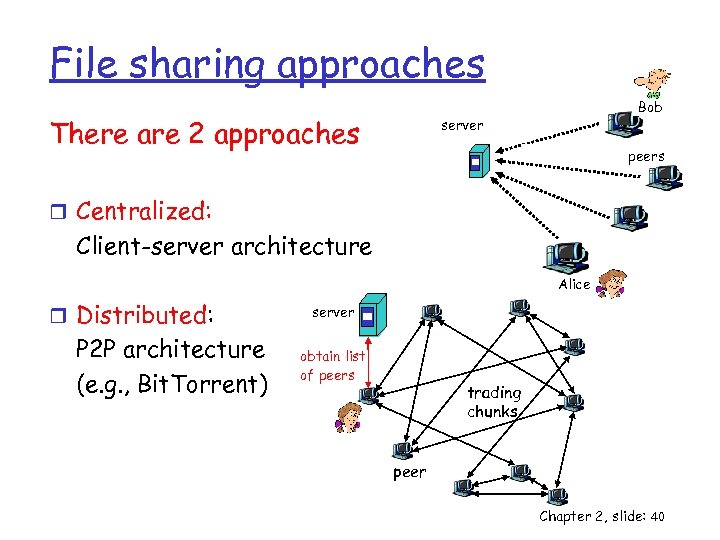 File sharing approaches There are 2 approaches Bob server peers r Centralized: Client-server architecture Alice r Distributed: P 2 P architecture (e. g. , Bit. Torrent) server obtain list of peers trading chunks peer Chapter 2, slide: 40
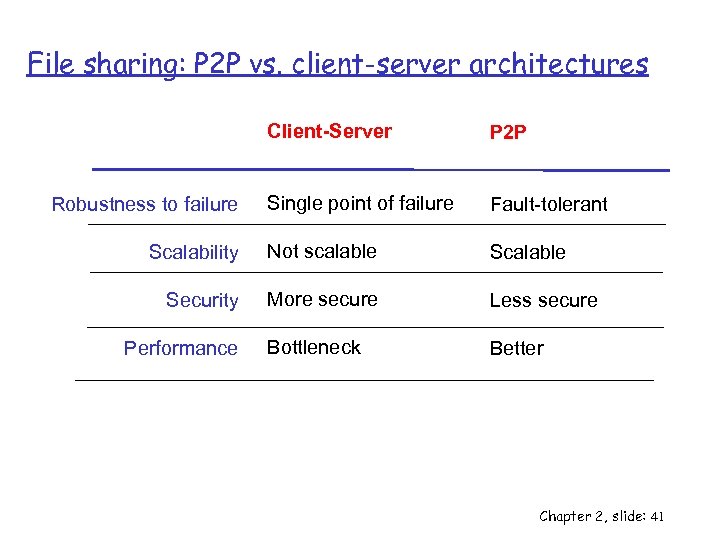 File sharing: P 2 P vs. client-server architectures Client-Server P 2 P Single point of failure Fault-tolerant Scalability Not scalable Security More secure Less secure Bottleneck Better Robustness to failure Performance Chapter 2, slide: 41
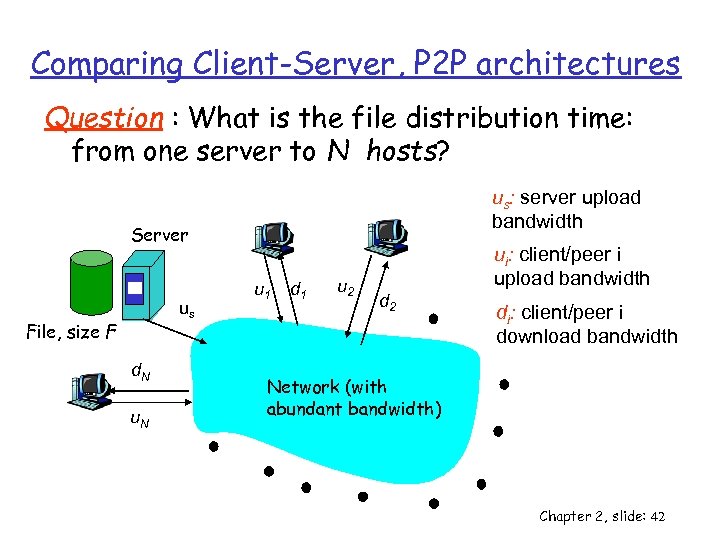 Comparing Client-Server, P 2 P architectures Question : What is the file distribution time: from one server to N hosts? us: server upload bandwidth Server us File, size F d. N u 1 d 1 u 2 ui: client/peer i upload bandwidth d 2 di: client/peer i download bandwidth Network (with abundant bandwidth) Chapter 2, slide: 42
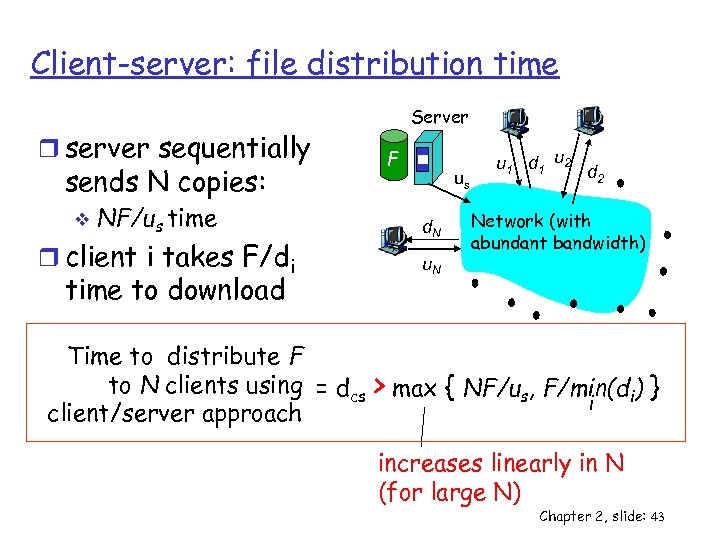 Client-server: file distribution time r server sequentially sends N copies: v NF/us time r client i takes F/di time to download Server F us d. N u 1 d 1 u 2 d 2 Network (with abundant bandwidth) Time to distribute F to N clients using = dcs > max { NF/us, F/min(di) } i client/server approach increases linearly in N (for large N) Chapter 2, slide: 43
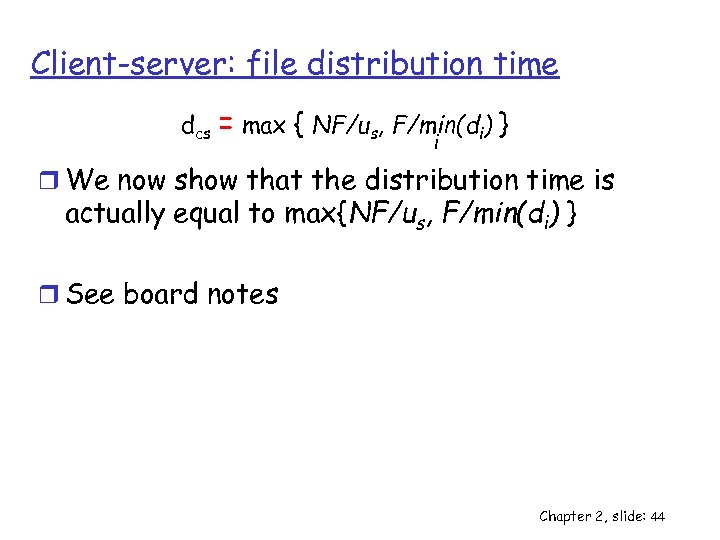 Client-server: file distribution time dcs = max { NF/us, F/min(di) } i r We now show that the distribution time is actually equal to max{NF/us, F/min(di) } r See board notes Chapter 2, slide: 44
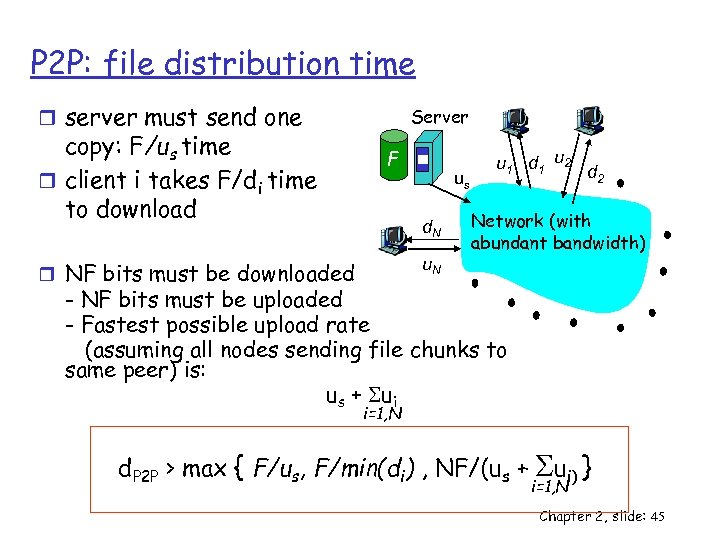 P 2 P: file distribution time r server must send one copy: F/us time r client i takes F/di time to download Server F us d. N u. N r NF bits must be downloaded u 1 d 1 u 2 d 2 Network (with abundant bandwidth) - NF bits must be uploaded - Fastest possible upload rate (assuming all nodes sending file chunks to same peer) is: us + Sui i=1, N d. P 2 P > max { F/us, F/min(di) , NF/(us + S } ui) i=1, N Chapter 2, slide: 45
 Comparing Client-server, P 2 P architectures Chapter 2, slide: 46
 Chapter 2: Summary We covered general concepts, like: r application architectures v client-server, P 2 P r application service requirements: v reliability, bandwidth, delay r Web and HTTP v Non-Persistent, persistent, web cache r Distribution time v Client-server, P 2 P Chapter 2, slide: 47