 Скачать презентацию EC Services IPOSS Token Process Distributor Training
364575e198c7a47630f8f3ef227dbabe.ppt
- Количество слайдов: 22



EC Services – IPOSS Token Process Distributor Training Version: 2. 0; Updated: 2014 -04 -15 Owner: pmtaylor@avaya. com
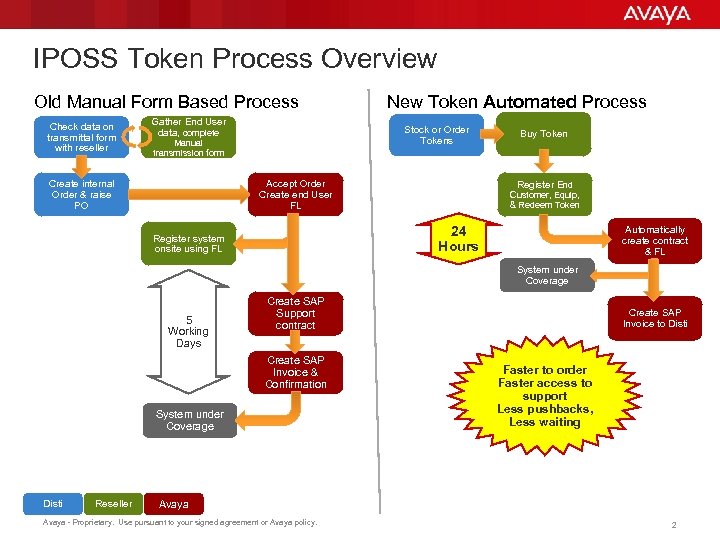
IPOSS Token Process Overview Old Manual Form Based Process Check data on transmittal form with reseller Gather End User data, complete Stock or Order Tokens Manual transmission form Create internal Order & raise PO New Token Automated Process Accept Order Create end User FL Buy Token Register End Customer, Equip, & Redeem Token 24 Hours Register system onsite using FL Automatically create contract & FL System under Coverage 5 Working Days Create SAP Support contract Create SAP Invoice & Confirmation System under Coverage Disti Reseller Create SAP Invoice to Disti Faster to order Faster access to support Less pushbacks, Less waiting Avaya - Proprietary. Use pursuant to your signed agreement or Avaya policy. 2
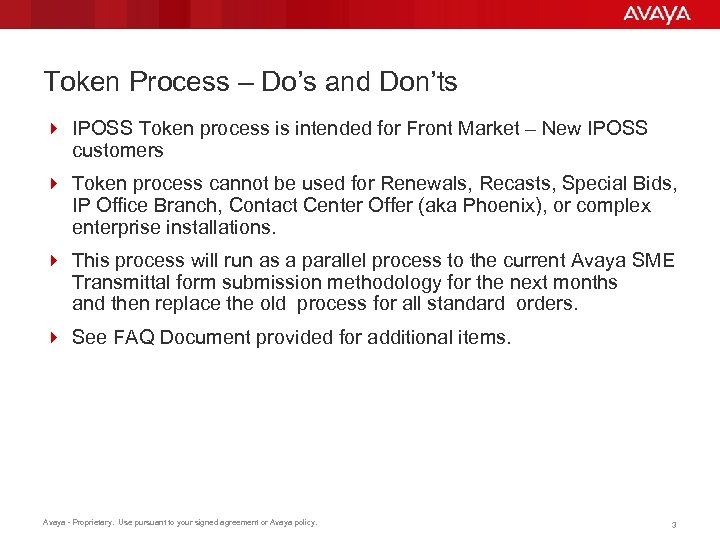
Token Process – Do’s and Don’ts 4 IPOSS Token process is intended for Front Market – New IPOSS customers 4 Token process cannot be used for Renewals, Recasts, Special Bids, IP Office Branch, Contact Center Offer (aka Phoenix), or complex enterprise installations. 4 This process will run as a parallel process to the current Avaya SME Transmittal form submission methodology for the next months and then replace the old process for all standard orders. 4 See FAQ Document provided for additional items. Avaya - Proprietary. Use pursuant to your signed agreement or Avaya policy. 3
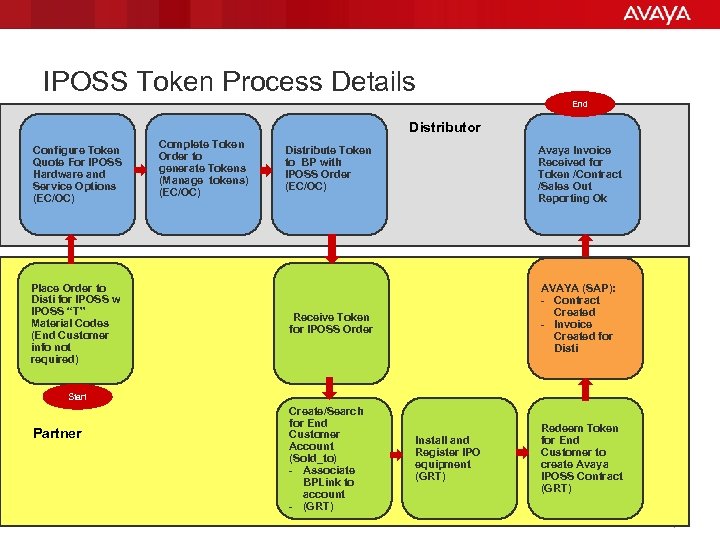
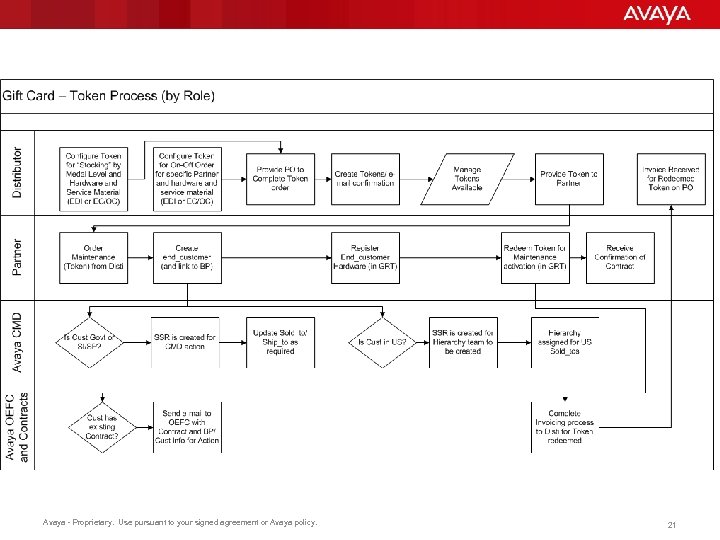
IPOSS Token Process Details End Distributor Configure Token Quote For IPOSS Hardware and Service Options (EC/OC) Place Order to Disti for IPOSS w IPOSS “T” Material Codes (End Customer info not required) Complete Token Order to generate Tokens (Manage tokens) (EC/OC) Distribute Token to BP with IPOSS Order (EC/OC) Avaya Invoice Received for Token /Contract /Sales Out Reporting Ok AVAYA (SAP): - Contract Created - Invoice Created for Disti Receive Token for IPOSS Order Start Partner Create/Search for End Customer Account (Sold_to) - Associate BPLink to account - (GRT) Avaya - Proprietary. Use pursuant to your signed agreement or Avaya policy. Install and Register IPO equipment (GRT) Redeem Token for End Customer to create Avaya IPOSS Contract (GRT) 4
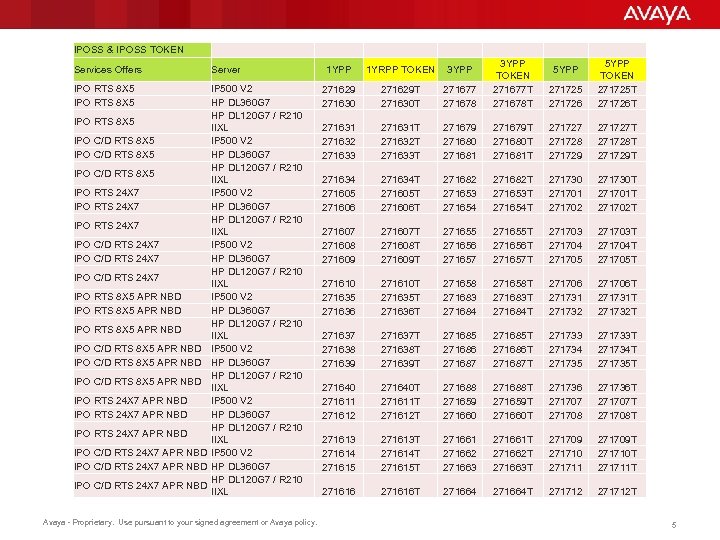
IPOSS & IPOSS TOKEN Services Offers Server IPO RTS 8 X 5 IP 500 V 2 HP DL 360 G 7 HP DL 120 G 7 / R 210 IIXL IP 500 V 2 HP DL 360 G 7 HP DL 120 G 7 / R 210 IIXL IPO RTS 8 X 5 IPO C/D RTS 8 X 5 IPO RTS 24 X 7 IPO C/D RTS 24 X 7 IPO RTS 8 X 5 APR NBD IPO C/D RTS 8 X 5 APR NBD IPO RTS 24 X 7 APR NBD IPO C/D RTS 24 X 7 APR NBD Avaya - Proprietary. Use pursuant to your signed agreement or Avaya policy. 271677 271678 3 YPP TOKEN 271677 T 271678 T 1 YPP 1 YRPP TOKEN 3 YPP 271629 271630 271629 T 271630 T 271631 271632 271633 271725 271726 5 YPP TOKEN 271725 T 271726 T 271631 T 271632 T 271633 T 271679 271680 271681 271679 T 271680 T 271681 T 271727 271728 271729 271727 T 271728 T 271729 T 271634 271605 271606 271634 T 271605 T 271606 T 271682 271653 271654 271682 T 271653 T 271654 T 271730 271701 271702 271730 T 271701 T 271702 T 271607 271608 271609 271607 T 271608 T 271609 T 271655 271656 271657 271655 T 271656 T 271657 T 271703 271704 271705 271703 T 271704 T 271705 T 271610 271635 271636 271610 T 271635 T 271636 T 271658 271683 271684 271658 T 271683 T 271684 T 271706 271731 271732 271706 T 271731 T 271732 T 271637 271638 271639 271637 T 271638 T 271639 T 271685 271686 271687 271685 T 271686 T 271687 T 271733 271734 271735 271733 T 271734 T 271735 T 271640 271611 271612 271640 T 271611 T 271612 T 271688 271659 271660 271688 T 271659 T 271660 T 271736 271707 271708 271736 T 271707 T 271708 T 271613 271614 271615 271613 T 271614 T 271615 T 271661 271662 271663 271661 T 271662 T 271663 T 271709 271710 271711 271709 T 271710 T 271711 T 271616 T 271664 T 271712 T 5 YPP 5
Content 4 This document will outline the steps in EC Services for creating IPOSS Token Quote. 4 Scenario Options covered: 4 1) “Back-to-Back” or “Just in Time” Order for a specific Partner/Reseller if known at time of Quote/Order or 4 2) Stocking Option for Quote/Order when Partner to sell to will be determined later Note: EDI Token Orders can be submitted as an alternative to the EC Quote/OC Order process. 4 Please note that this is not an EC Services training. The purpose of this document is to cover the IPOSS Token quote specific screens only! Avaya - Proprietary. Use pursuant to your signed agreement or Avaya policy. 6
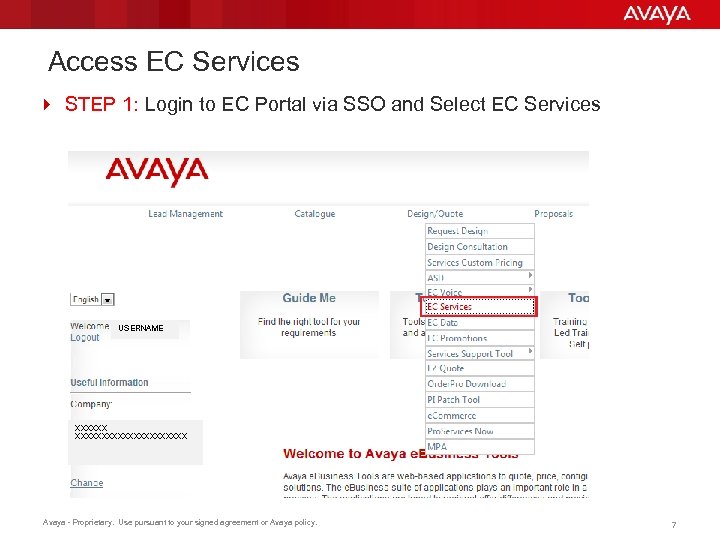
Access EC Services 4 STEP 1: Login to EC Portal via SSO and Select EC Services USERNAME XXXXXXXXXXXXXX Avaya - Proprietary. Use pursuant to your signed agreement or Avaya policy. 7
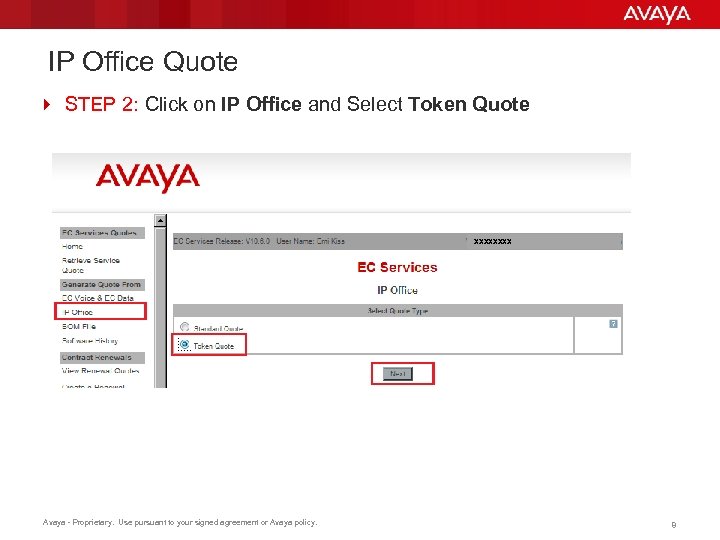
IP Office Quote 4 STEP 2: Click on IP Office and Select Token Quote XXXX Avaya - Proprietary. Use pursuant to your signed agreement or Avaya policy. 8
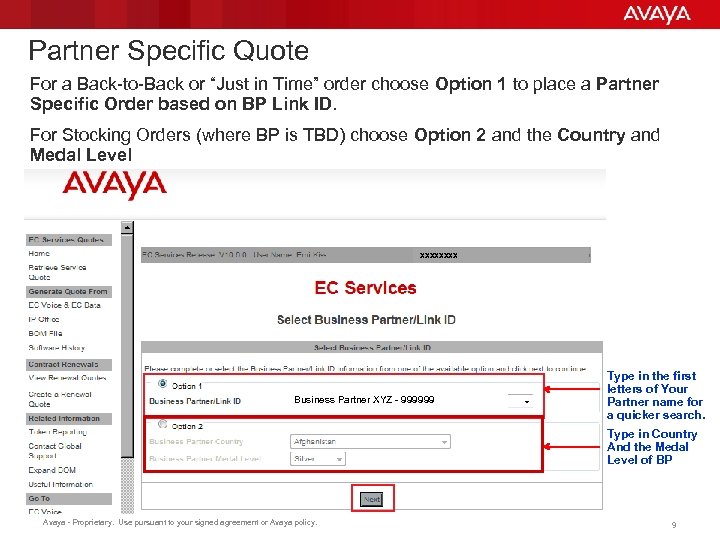
Partner Specific Quote For a Back-to-Back or “Just in Time” order choose Option 1 to place a Partner Specific Order based on BP Link ID. For Stocking Orders (where BP is TBD) choose Option 2 and the Country and Medal Level 4 STEP 3: Select Business Partner from the drop down list XXXX Business Partner XYZ - 999999 Type in the first letters of Your Partner name for a quicker search. Type in Country And the Medal Level of BP Avaya - Proprietary. Use pursuant to your signed agreement or Avaya policy. 9
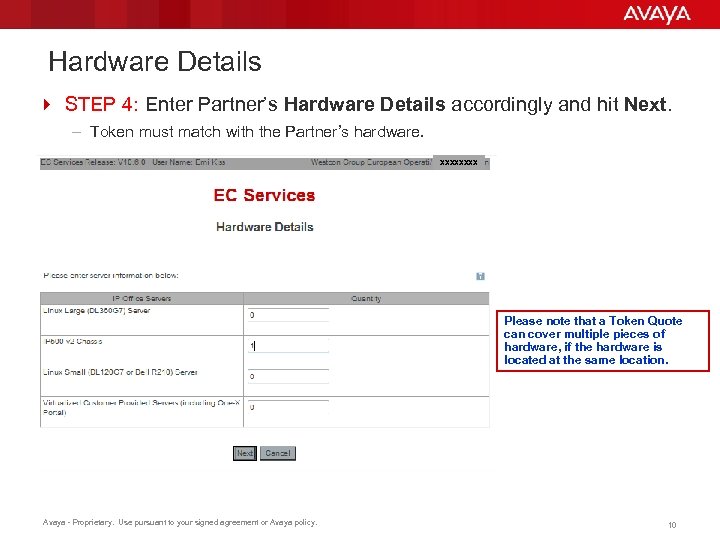
Hardware Details 4 STEP 4: Enter Partner’s Hardware Details accordingly and hit Next. – Token must match with the Partner’s hardware. XXXX Please note that a Token Quote can cover multiple pieces of hardware, if the hardware is located at the same location. Avaya - Proprietary. Use pursuant to your signed agreement or Avaya policy. 10
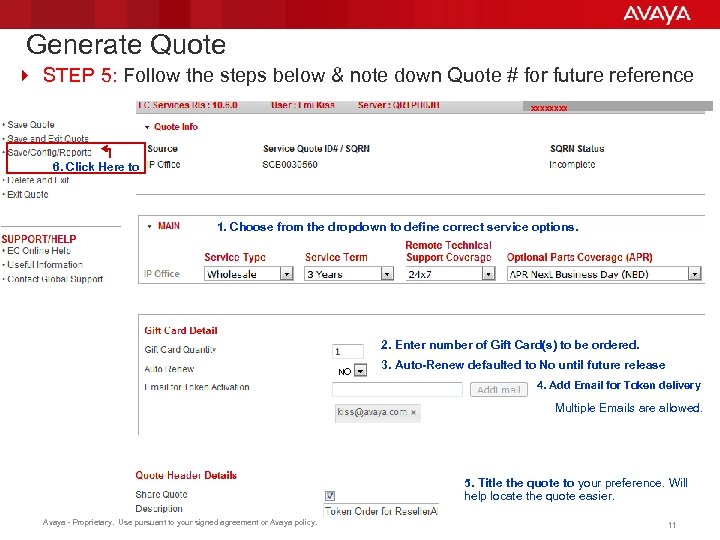
Generate Quote 4 STEP 5: Follow the steps below & note down Quote # for future reference XXXX 6. Click Here to 1. Choose from the dropdown to define correct service options. 2. Enter number of Gift Card(s) to be ordered. NO 3. Auto-Renew defaulted to No until future release 4. Add Email for Token delivery Multiple Emails are allowed. 5. Title the quote to your preference. Will help locate the quote easier. Avaya - Proprietary. Use pursuant to your signed agreement or Avaya policy. 11
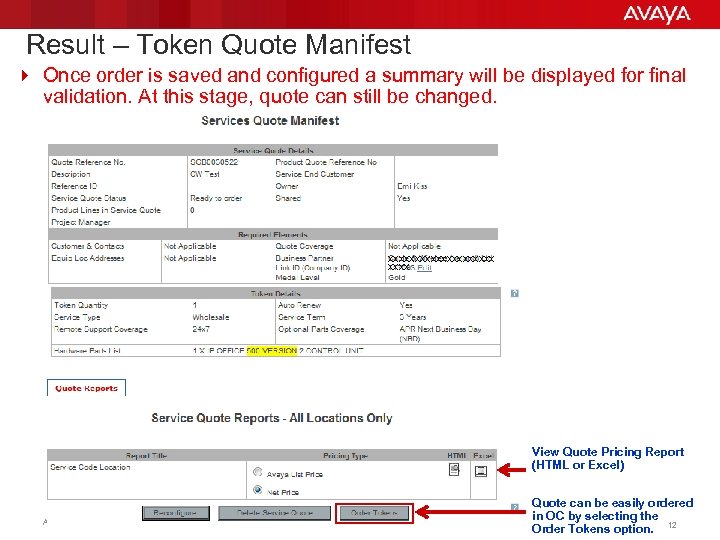
Result – Token Quote Manifest 4 Once order is saved and configured a summary will be displayed for final validation. At this stage, quote can still be changed. XXXXXXXXXX View Quote Pricing Report (HTML or Excel) Avaya - Proprietary. Use pursuant to your signed agreement or Avaya policy. Quote can be easily ordered in OC by selecting the Order Tokens option. 12
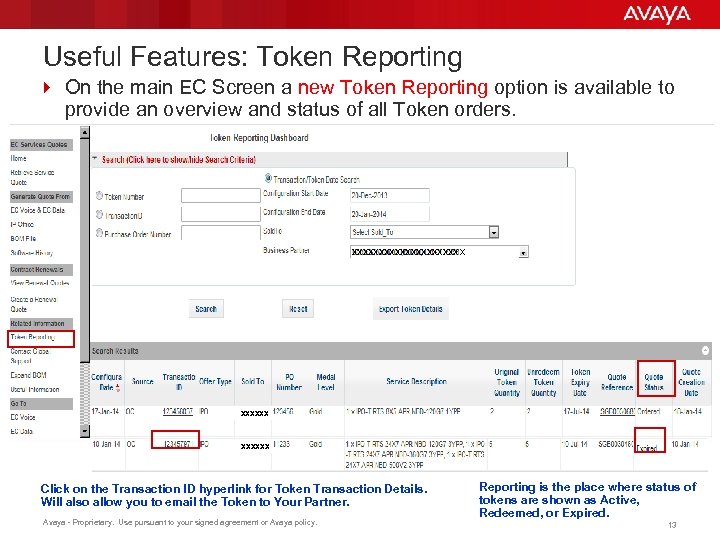
Useful Features: Token Reporting 4 On the main EC Screen a new Token Reporting option is available to provide an overview and status of all Token orders. XXXXXXXXXX X XXXXXX Click on the Transaction ID hyperlink for Token Transaction Details. Will also allow you to email the Token to Your Partner. Avaya - Proprietary. Use pursuant to your signed agreement or Avaya policy. Reporting is the place where status of tokens are shown as Active, Redeemed, or Expired. 13
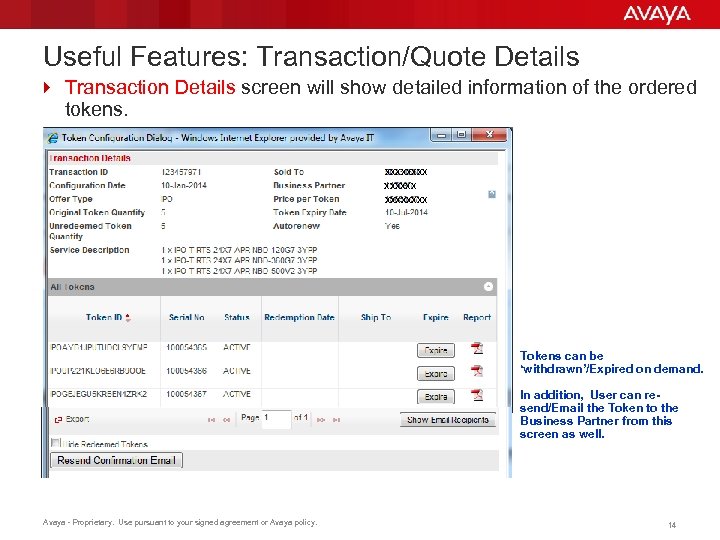
Useful Features: Transaction/Quote Details 4 Transaction Details screen will show detailed information of the ordered tokens. XXXXXXXX Tokens can be ‘withdrawn’/Expired on demand. In addition, User can resend/Email the Token to the Business Partner from this screen as well. Avaya - Proprietary. Use pursuant to your signed agreement or Avaya policy. 14
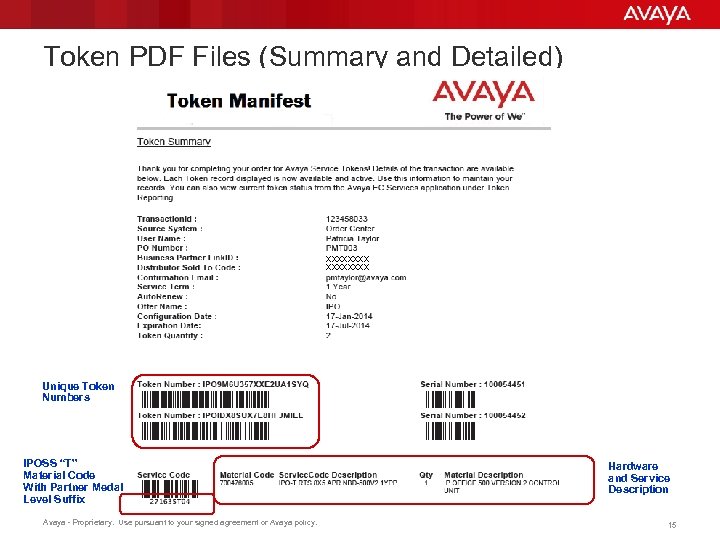
Token PDF Files (Summary and Detailed) XXXXXXXX Unique Token Numbers IPOSS “T” Material Code With Partner Medal Level Suffix Avaya - Proprietary. Use pursuant to your signed agreement or Avaya policy. Hardware and Service Description 15
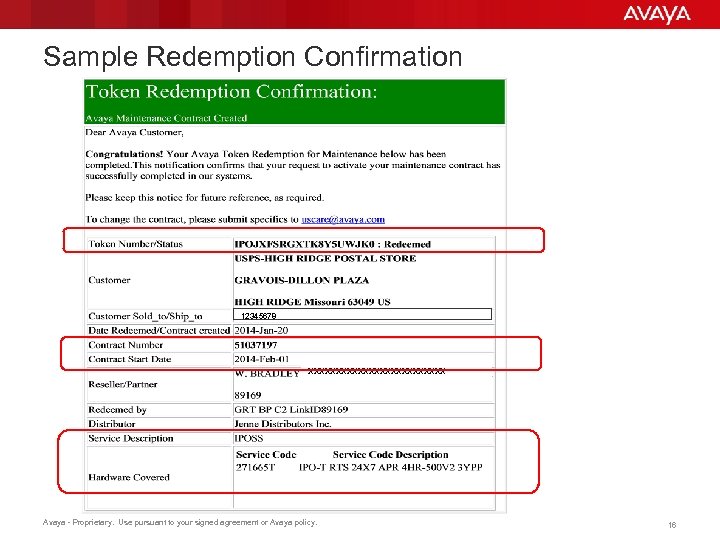
Sample Redemption Confirmation 12345678 xxxxxxxxxxxxx Avaya - Proprietary. Use pursuant to your signed agreement or Avaya policy. 16
Summary 4 An IPOSS Gift Card Token Quote can be created in maximum 15 minutes. 4 Quote to be ordered in Order Center as per normal process. 4 Simple Steps: – Receive the IPOSS “T” code order from your Partner – Configure Token and provide to Partner – Partner Completes Account setup, Registration and Token Redemption – Final Confirmation sent to all parties – Invoice from Avaya to Distributor at time of Redemption (per Token) – Report on Sales Out only after Invoiced for redeemed tokens. 4 Automated process allows for Fast IPOSS ordering!! Avaya - Proprietary. Use pursuant to your signed agreement or Avaya policy. 17
User Guides, Videos, and FAQ 4 For More Details and schedule of Training sessions: – https: //support. avaya. com/iposstoken 4 User Guides and Frequently Asked Questions – PDF: Avaya Global Registration Tool - IPOSS Gift Card Token User Guide PDF: IPOSS Gift Card Token Quick Reference Guide - Account Creation PDF: IPOSS Gift Card Token Quick Reference Guide - Token Redemption PDF: IPOSS Gift Card Token - FAQs 4 You. Tube Training Videos – Video: IPOSS Gift Card Token Quick - Account Creation Video: IPOSS Gift Card Token Quick - Token Redemption – Video: IPOSS Technical Registration of an IP Office For Questions Please Contact the Avaya team Patsy Taylor: pmtaylor@avaya. com Uwe Ehlert: uehlert@avaya. com Emi Kiss: ekiss@avaya. com Avaya - Proprietary. Use pursuant to your signed agreement or Avaya policy. 18
BACKUP SLIDES
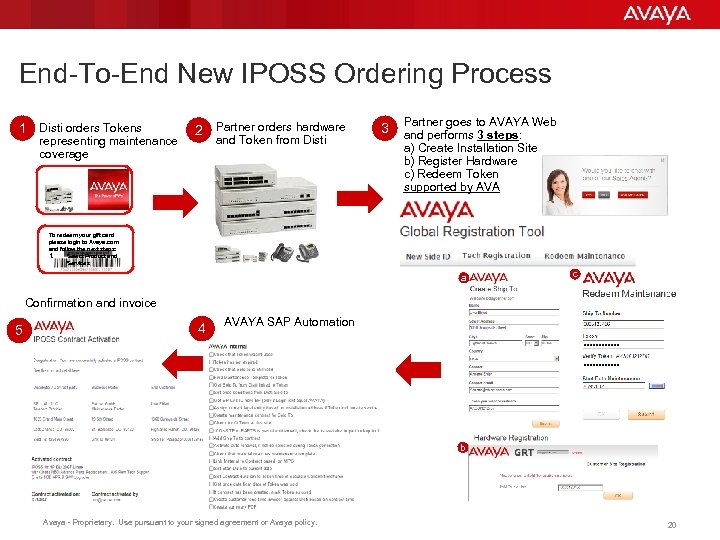
End-To-End New IPOSS Ordering Process 1 Disti orders Tokens representing maintenance coverage 2 Partner orders hardware and Token from Disti 3 Partner goes to AVAYA Web and performs 3 steps: a) Create Installation Site b) Register Hardware c) Redeem Token supported by AVA To redeem your gift card please login to Avaya. com and follow the next steps: 1. Select Product and Services a c Confirmation and invoice 5 4 AVAYA SAP Automation b Avaya - Proprietary. Use pursuant to your signed agreement or Avaya policy. 20
Avaya - Proprietary. Use pursuant to your signed agreement or Avaya policy. 21
END
Скачать презентацию EC Services IPOSS Token Process Distributor Training
364575e198c7a47630f8f3ef227dbabe.ppt