


 Скачать презентацию e-Government and the e-Readiness of NPOs in the
5dc469ca95ed98e39ea19749283b6a83.ppt
- Количество слайдов: 31
 e-Government and the e-Readiness of NPOs in the Western Cape Steve Vosloo
 Introduction n Centre for e-Innovation, PGWC n Design & Usability Project Leader n www. capegateway. gov. za
 Background Definitions: NPO, PGWC n Context of study n – NPOs recognised as important stakeholders and intermediaries between govt and citizens – “Digital divide” exists – NPOs at different levels of ICT-enablement – e-Govt in the WC: holistic approach requires the building of information society / knowledge economy – What are ICT adoption levels among NPOs? n Where do you start? e-Readiness assessment
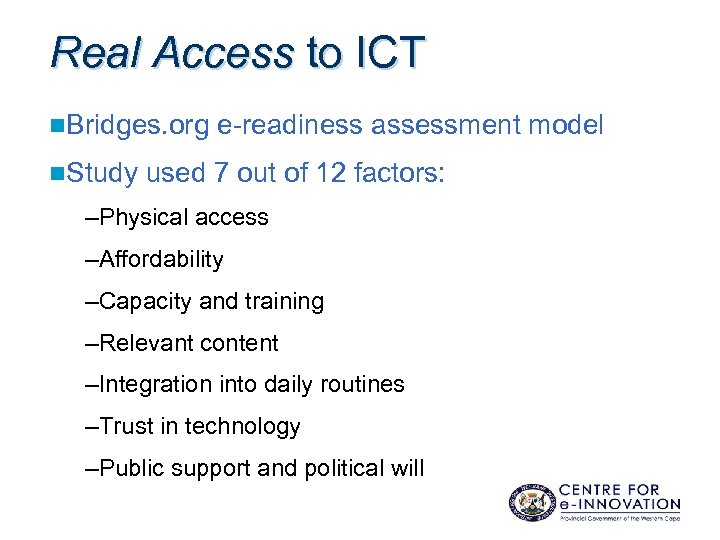 Real Access to ICT n. Bridges. org n. Study e-readiness assessment model used 7 out of 12 factors: –Physical access –Affordability –Capacity and training –Relevant content –Integration into daily routines –Trust in technology –Public support and political will
 Research Objectives n Determine if location of NPO (inside/outside CT Municipality) influences real access factors n Determine constraints to greater ICT-enablement of NPOs n Make recommendations to PGWC regarding the improvement of NPO e-readiness levels
 Research Design n Target pop: 2328 registered NPOs in WC n Random sample: 500 NPOs n Stratified on location: inside / outside CT Municipality (250 / 250) n Collection method: posted questionnaire n Response: 100 NPOs n Descriptive & inferential statistical analysis
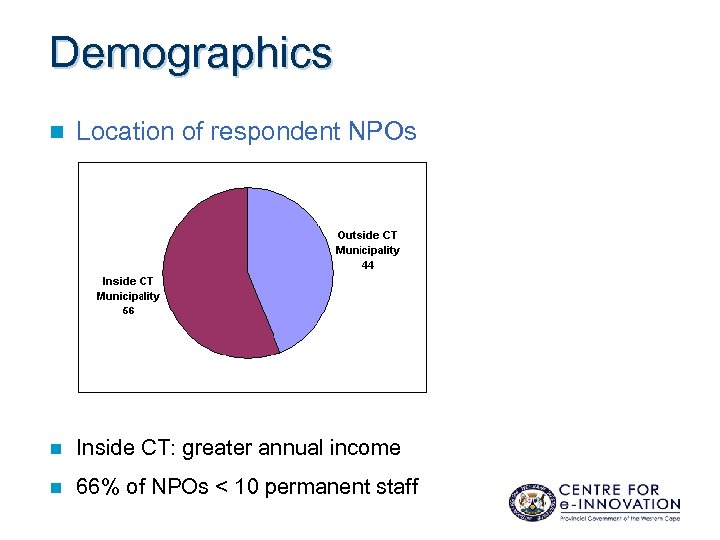 Demographics n Location of respondent NPOs n Inside CT: greater annual income n 66% of NPOs < 10 permanent staff
 Research Limitations n NPOs outside CT Municipality are not all equal (George vs Bitterfontein) n NPOs inside CT Municipality are not all equal (Khayalitsha vs Constantia) n Didn’t include informal / unregistered NPOs n Questionnaire only in English n Not all 12 real access factors considered
 Findings …
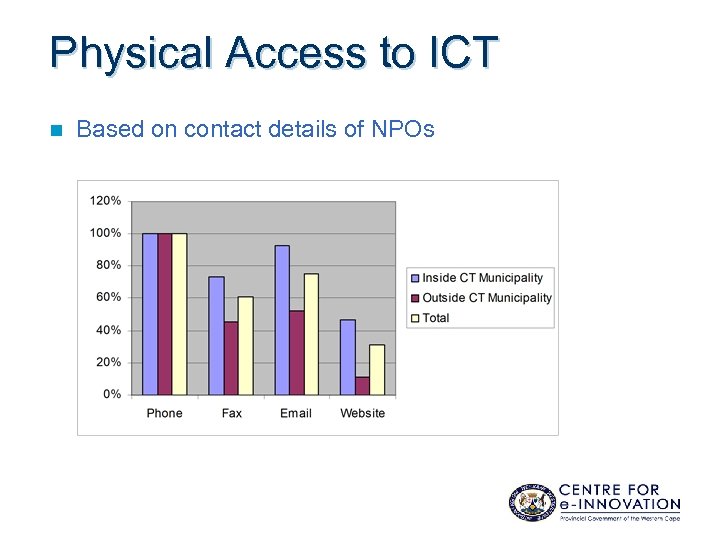 Physical Access to ICT n Based on contact details of NPOs
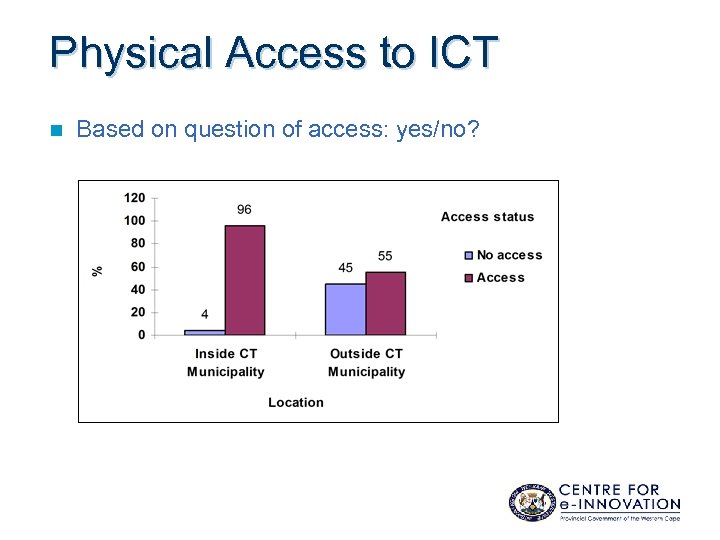 Physical Access to ICT n Based on question of access: yes/no?
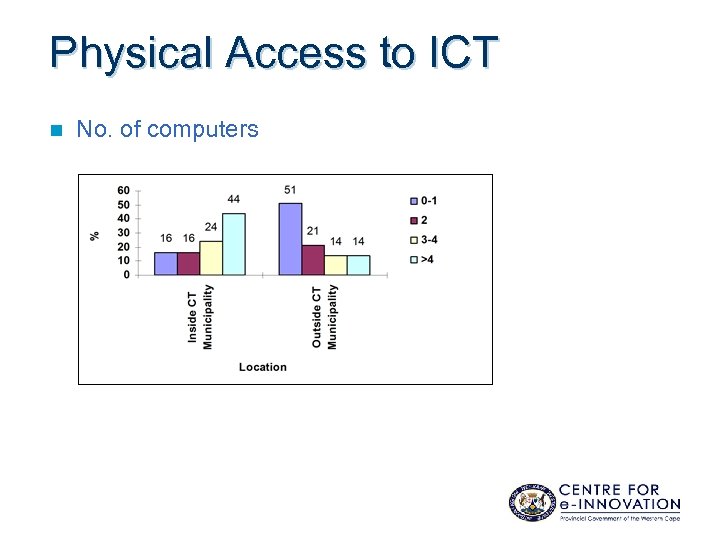 Physical Access to ICT n No. of computers
 Physical Access to ICT n Sharing email/Internet information with non-connected stakeholders – Much more commonplace inside CT – How is info shared? – Hardcopy distribution, e. g. circulating printouts, via fax or via post (46%) – Forwarding emails (to NPOs who don’t have WWW access) (42%) – Verbally, e. g. discussions, debates or telephonically (31%) – Reports, documented research, newsletters, etc. (15%)
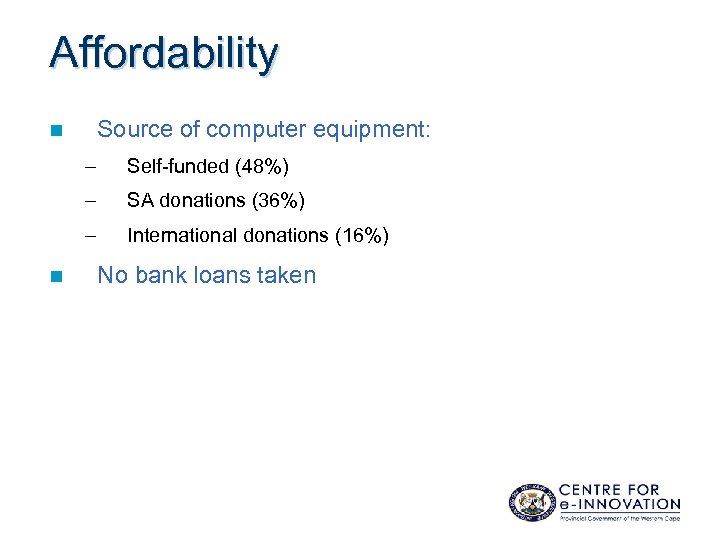 Affordability Source of computer equipment: n – – SA donations (36%) – n Self-funded (48%) International donations (16%) No bank loans taken
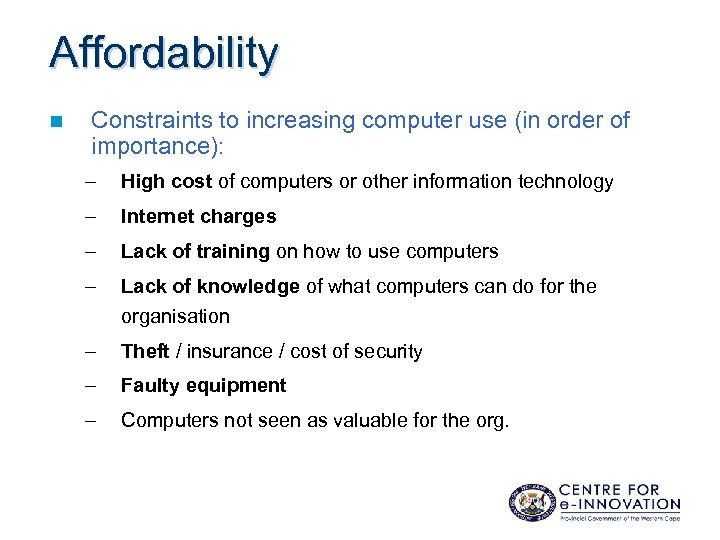 Affordability n Constraints to increasing computer use (in order of importance): – High cost of computers or other information technology – Internet charges – Lack of training on how to use computers – Lack of knowledge of what computers can do for the organisation – Theft / insurance / cost of security – Faulty equipment – Computers not seen as valuable for the org.
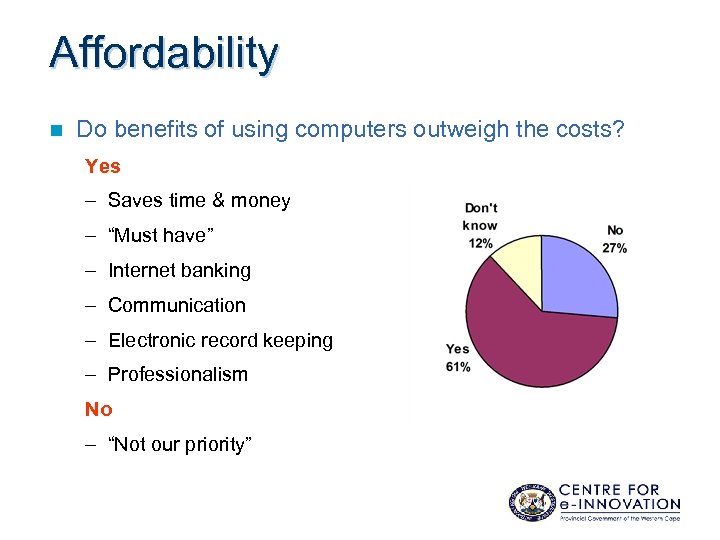 Affordability n Do benefits of using computers outweigh the costs? Yes – Saves time & money – “Must have” – Internet banking – Communication – Electronic record keeping – Professionalism No – “Not our priority”
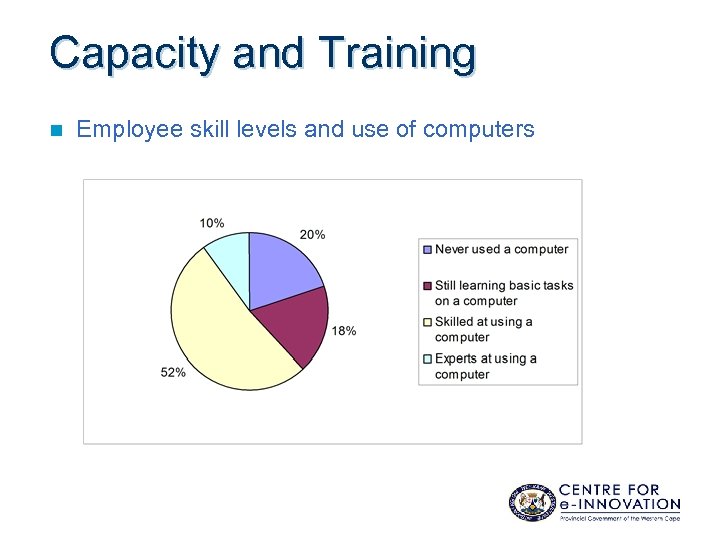 Capacity and Training n Employee skill levels and use of computers
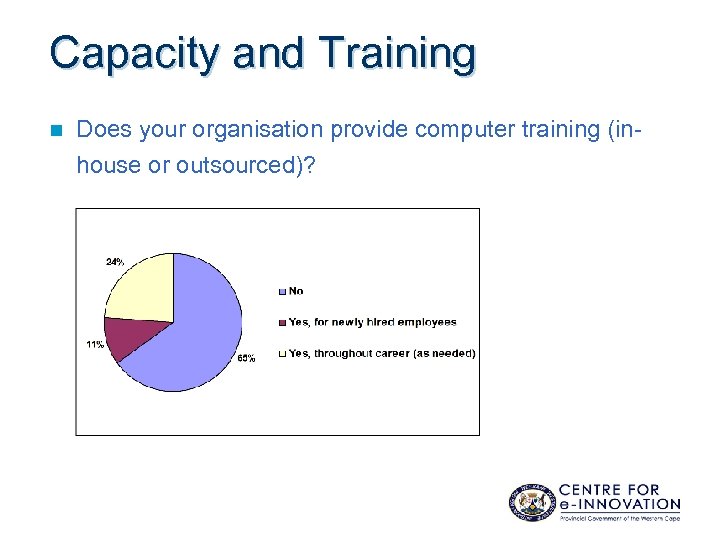 Capacity and Training n Does your organisation provide computer training (inhouse or outsourced)?
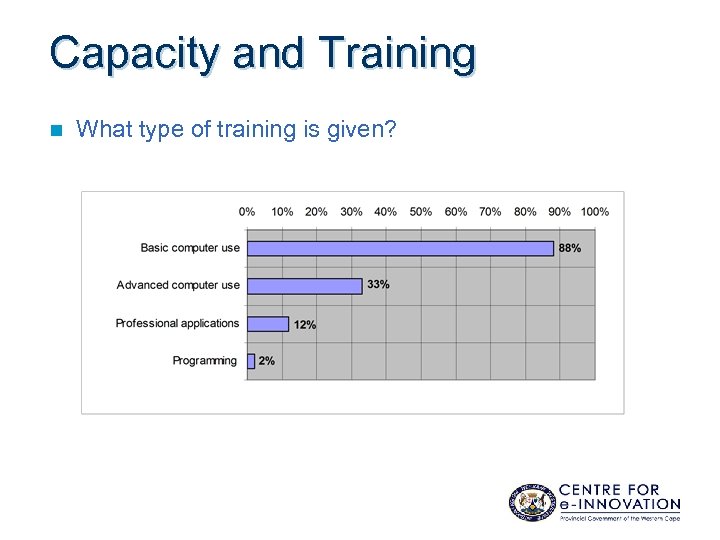 Capacity and Training n What type of training is given?
 Relevant Content n Do you access Govt information on the WWW? – Yes: 52% – Most commonly visited sites: – www. gov. za – www. sars. gov. za – www. labour. gov. za
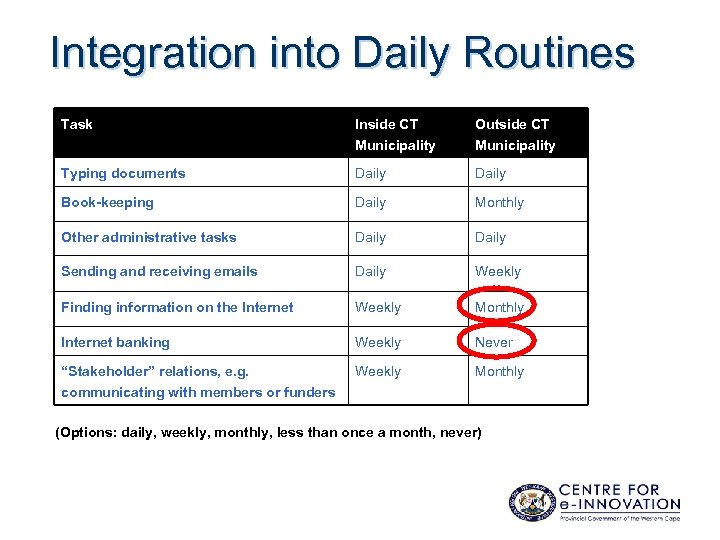 Integration into Daily Routines Task Inside CT Outside CT Municipality Typing documents Daily Book-keeping Daily Monthly Other administrative tasks Daily Sending and receiving emails Daily Weekly Finding information on the Internet Weekly Monthly Internet banking Weekly Never “Stakeholder” relations, e. g. Weekly Monthly communicating with members or funders (Options: daily, weekly, monthly, less than once a month, never)
 Trust in Technology n Organisations thought it safe to use a computer to: – Send messages to colleagues or stakeholders – Pay an account – File government forms – Purchase goods or services (Options: very safe, somewhat unsafe, very unsafe)
 Public Support and Political Will n Who should take responsibility for improving access to computers in your organisation? – The organisation itself (74%) – Funders (38%) – Provincial government (36%) – Local government (24%) – Businesses (16%) – National government (15%) – Individuals (15%) – Community organisations (12%)
 Public Support and Political Will n Has the government (local, provincial, or national) influenced your organisation's use of computers? – Yes: 12% – Main influence: by providing documents, proposals, contracts, etc. electronically (email or on Web)
 Public Support and Political Will n Rank the importance of the following activities for the PGWC: 1. Make computers (and Internet access) more affordable 2. Improve access to computers or the Internet for local communities 3. Provide training on how to use computers 4. Make the Internet safer 5. Make it easier to interact with government online, incl. filing forms 6. Make access to government information easier
 Public Support and Political Will n Interested in working with the PGWC to provide input to its future technology initiatives? – n Yes: 61% Types of support/roles: – Assist in computer training communities (capacity & facilities) – Vocalise the needs of communities – Liaise with communities and other NPOs – “Guinea pigs” (pilots, feasibility studies, etc. )
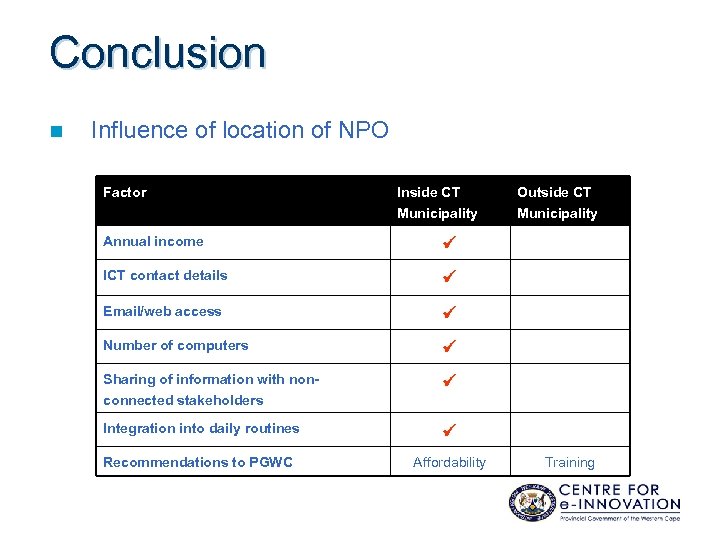 Conclusion n Influence of location of NPO Factor Inside CT Outside CT Municipality Annual income ICT contact details Email/web access Number of computers Sharing of information with non- connected stakeholders Integration into daily routines Recommendations to PGWC Affordability Training
 Conclusion n Constraint 1: High cost of ICT – TCO: hardware, software (+ upgrades), internet access, maintenance, training, theft & insurance! – Compounded by: • • n IT not core function of NPOs Constraint 2: Lack of training – – n Post-94 non-profit economic dynamics Too expensive Low budget allocation Constraint 3: Lack of basic ICT (outside CT)
 Conclusion Author’s Recommendations to Government n – Play a supportive role – create a framework for self-help ICT enablement: 1. Reduce costs (subsidize equipment, training, etc. ) 2. Reduce Internet charges (e-rate) 3. Promote e-literacy / Push ICT training • 4. Work with NPOs, PPPs, accredit, train the trainers Popularise ICT and its benefits
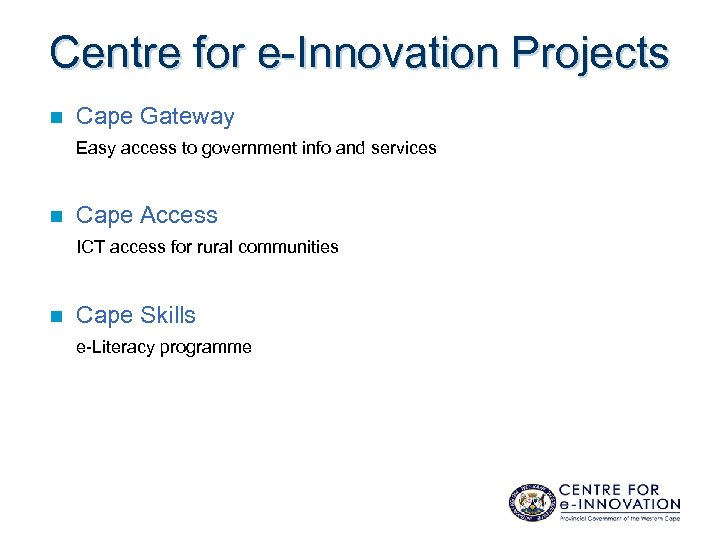 Centre for e-Innovation Projects n Cape Gateway Easy access to government info and services n Cape Access ICT access for rural communities n Cape Skills e-Literacy programme
 Questions? ? ? Steve Vosloo svosloo@pgwc. gov. za www. capegateway. gov. za