 Скачать презентацию E-commerce 2015 business technology society eleventh edition global
bad2d535d9064fa7931a58862c3939c4.ppt
- Количество слайдов: 62



E-commerce 2015 business. technology. society. eleventh edition global edition Kenneth C. Laudon Carol Guercio Traver Copyright © 2016 Pearson Education, Ltd.
Chapter 4 E-commerce Security and Payment Systems Copyright © 2016 Pearson Education, Ltd.
Class Discussion Cyberwar: MAD 2. 0 n What is the difference between hacking and cyberwar? n Why has cyberwar become more potentially devastating in the past decade? n Is it possible to find a political solution to MAD 2. 0? n What issues do programs like Monster. Mind and Plan X pose? Copyright © 2016 Pearson Education, Ltd. Slide 1 -3
The E-commerce Security Environment n Overall size and losses of cybercrime unclear v Reporting issues n 2013 survey: Average annualized cost of cybercrime was $11. 56 million/year n Underground economy marketplace: v Stolen information stored on underground economy servers Copyright © 2016 Pearson Education, Ltd. Slide 1 -4
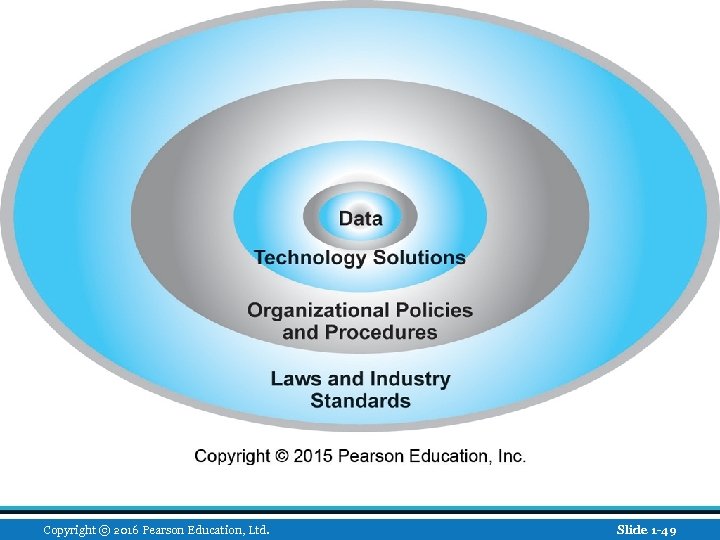
What Is Good E-commerce Security? n To achieve highest degree of security v New technologies v Organizational policies and procedures v Industry standards and government laws n Other factors v Time value of money v Cost of security vs. potential loss v Security often breaks at weakest link Copyright © 2016 Pearson Education, Ltd. Slide 1 -5
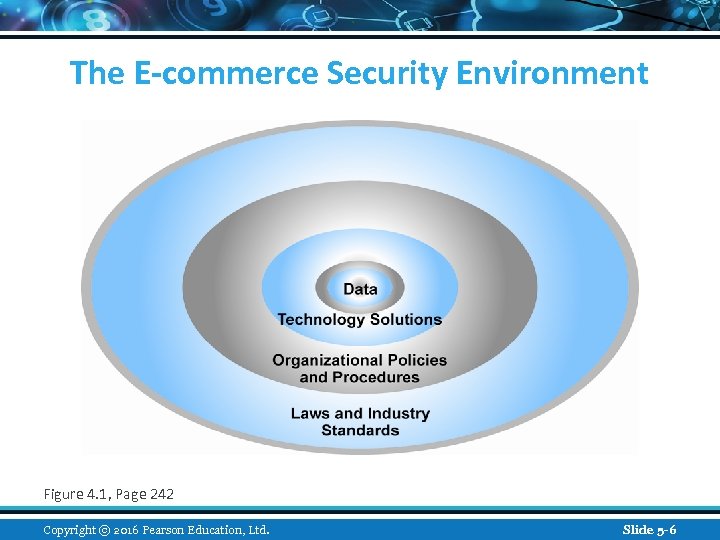
The E-commerce Security Environment Figure 4. 1, Page 242 Copyright © 2016 Pearson Education, Ltd. Slide 5 -6
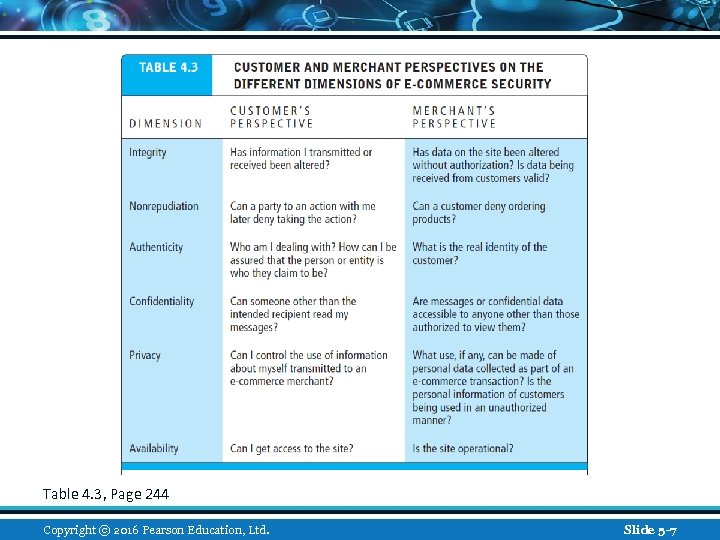
Table 4. 3, Page 244 Copyright © 2016 Pearson Education, Ltd. Slide 5 -7
The Tension Between Security and Other Values n Ease of use v The more security measures added, the more difficult a site is to use, and the slower it becomes n Public safety and criminal uses of the Internet v Use of technology by criminals to plan crimes or threaten nation-state Copyright © 2016 Pearson Education, Ltd. Slide 1 -8
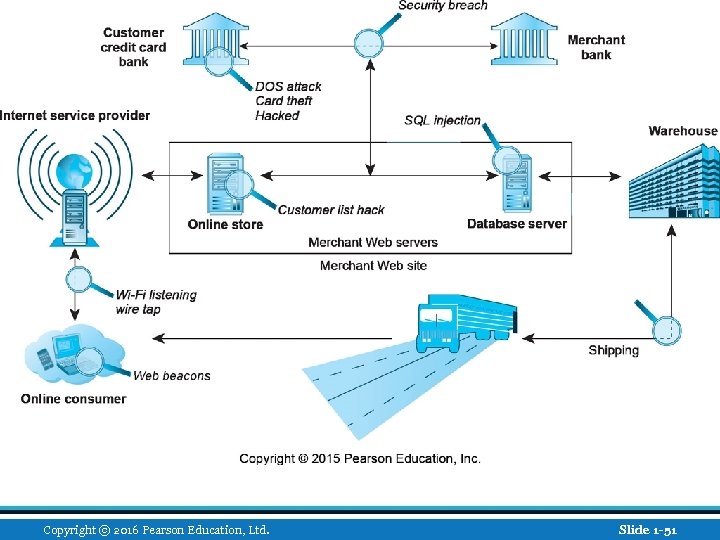
Security Threats in the E-commerce Environment n Three key points of vulnerability in e -commerce environment: 1. Client 2. Server 3. Communications pipeline (Internet communications channels) Copyright © 2016 Pearson Education, Ltd. Slide 1 -9
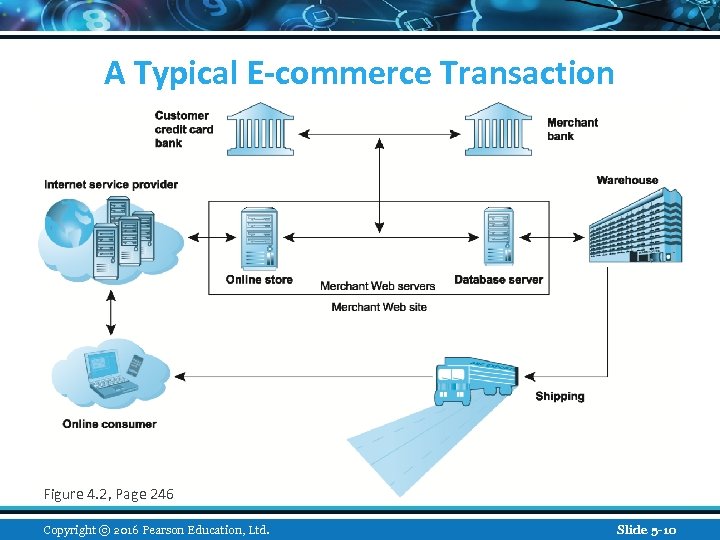
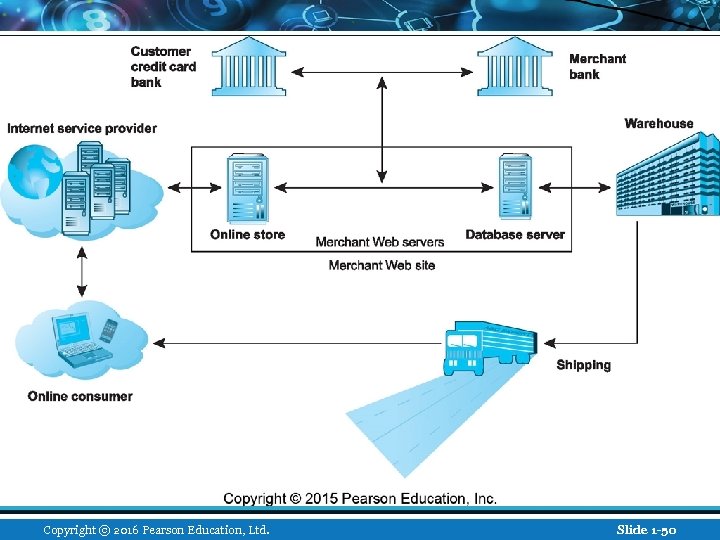
A Typical E-commerce Transaction Figure 4. 2, Page 246 Copyright © 2016 Pearson Education, Ltd. Slide 5 -10
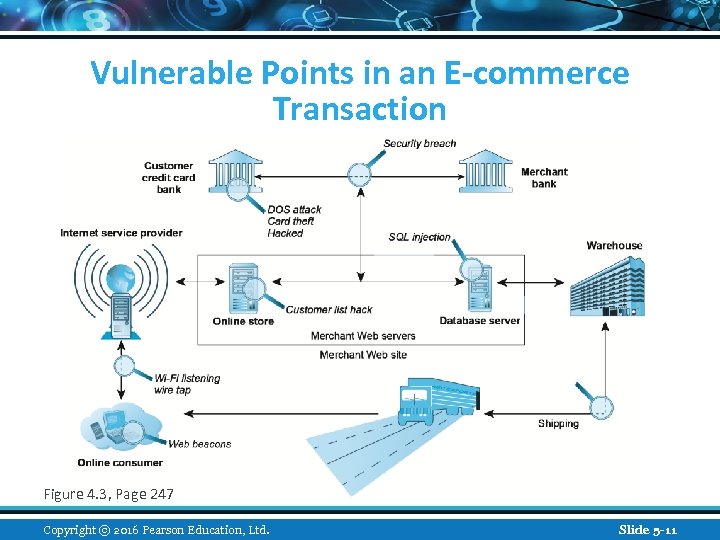
Vulnerable Points in an E-commerce Transaction Figure 4. 3, Page 247 Copyright © 2016 Pearson Education, Ltd. Slide 5 -11
Most Common Security Threats in the E-commerce Environment n Malicious code (malware) – threat at both client and server level v Exploits and exploit kits v Drive-by downloads v Viruses v Worms v Ransomware v Trojan horses v Backdoors v Bots, botnets Copyright © 2016 Pearson Education, Ltd. Slide 1 -12
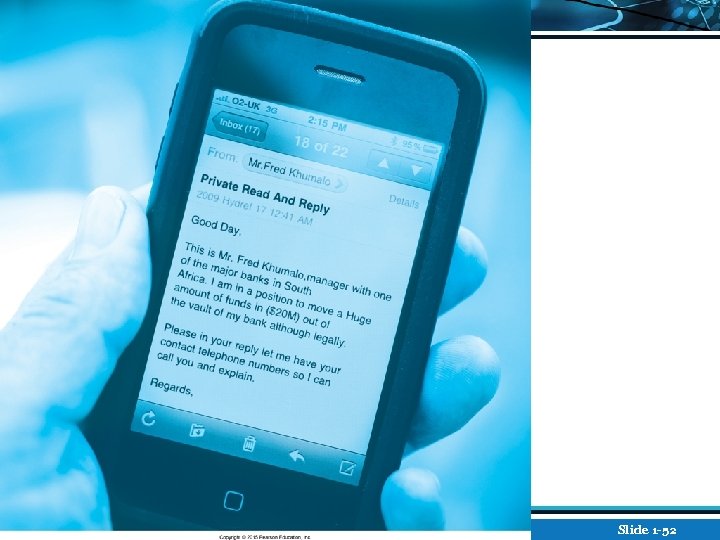
Most Common Security Threats (cont. ) n Potentially unwanted programs (PUPs) v Browser parasites v Adware v Spyware n Phishing v Social engineering v E-mail scams v Spear phishing v Identity fraud/theft Copyright © 2016 Pearson Education, Ltd. Slide 1 -13
Most Common Security Threats (cont. ) n Hacking v Hackers vs. crackers v Types of hackers: White, black, grey hats v Hacktivism n Cybervandalism: v Disrupting, defacing, destroying Web site n Data breach v Losing control over corporate information to outsiders Copyright © 2016 Pearson Education, Ltd. Slide 1 -14
Insight on Business: Class Discussion Hackers Infiltrate Target n What organizational and technological failures led to the data breach at Target? n What technical solutions are available to combat data breaches? n Have you or anyone you know experienced a data breach? Copyright © 2016 Pearson Education, Ltd. Slide 1 -15
Most Common Security Threats (cont. ) n Credit card fraud/theft n Identity fraud/theft n Spoofing n Pharming n Spam (junk) Web sites v Link farms n Denial of service (Do. S) attack v Site flooded with useless traffic to overwhelm network v Distributed denial of service (DDo. S) attack Copyright © 2016 Pearson Education, Ltd. Slide 1 -16
Most Common Security Threats (cont. ) n Sniffing v Eavesdropping program that monitors information traveling over a network n Insider attacks n Poorly designed software n Social network security issues n Mobile platform security issues v Vishing, smishing, madware n Cloud security issues Copyright © 2016 Pearson Education, Ltd. Slide 1 -17
Insight on Technology: Class Discussion Think Your Smartphone Is Secure? n What types of threats do smartphones face? n Are there any particular vulnerabilities to this type of device? n What did Nicolas Seriot’s “Spyphone” prove? n Are apps more or less likely to be subject to threats than traditional PC software programs? Copyright © 2016 Pearson Education, Ltd. Slide 1 -18
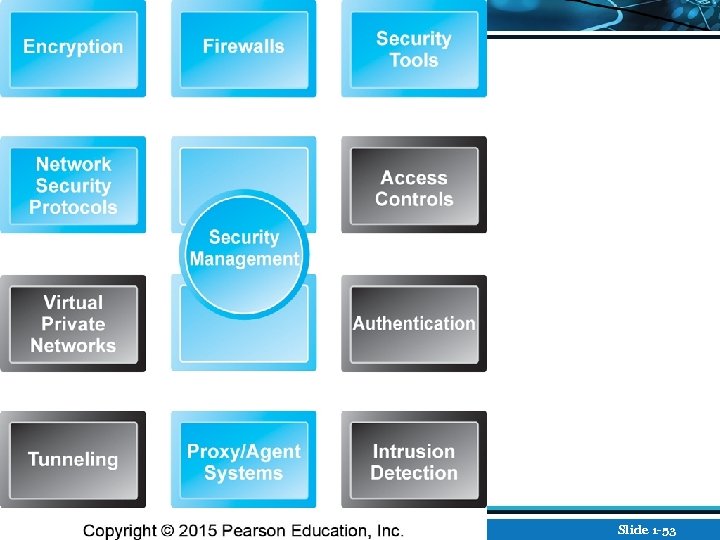
Technology Solutions n Protecting Internet communications v Cryptography n Securing channels of communication v SSL, TLS, VPNs, Wi-Fi n Protecting networks v Firewalls, proxy servers, IDS, IPS n Protecting servers and clients v OS security, anti-virus Copyright © 2016 Pearson Education, Ltd. Slide 1 -19
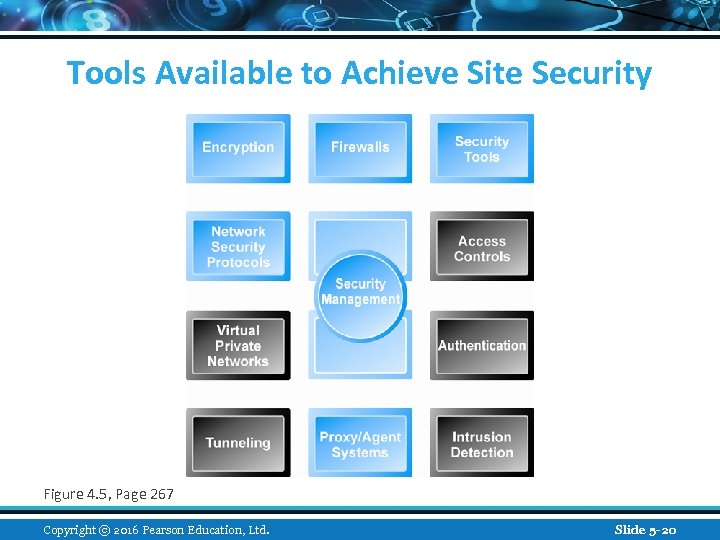
Tools Available to Achieve Site Security Figure 4. 5, Page 267 Copyright © 2016 Pearson Education, Ltd. Slide 5 -20
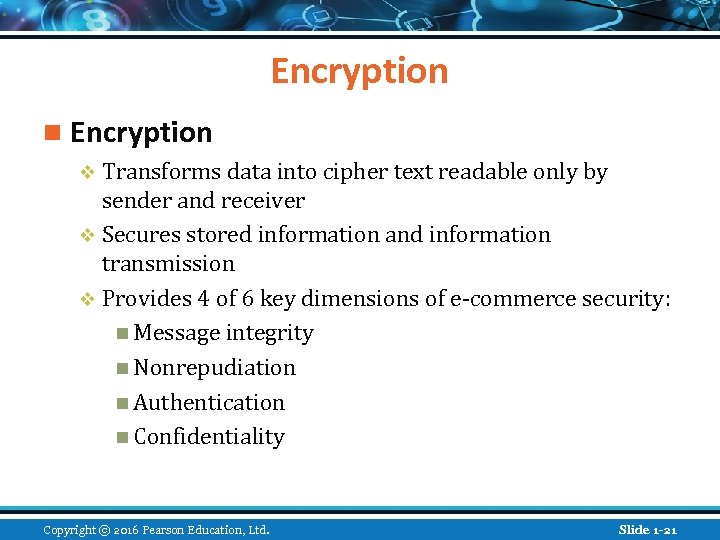
Encryption n Encryption v Transforms data into cipher text readable only by sender and receiver v Secures stored information and information transmission v Provides 4 of 6 key dimensions of e-commerce security: n Message integrity n Nonrepudiation n Authentication n Confidentiality Copyright © 2016 Pearson Education, Ltd. Slide 1 -21
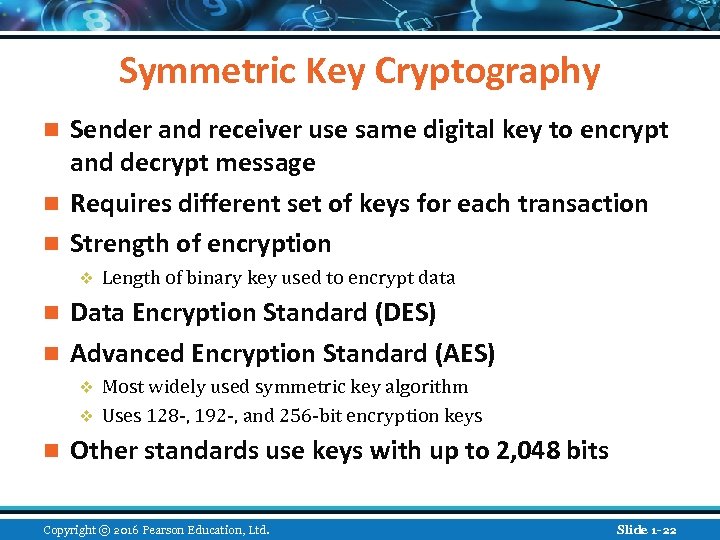
Symmetric Key Cryptography Sender and receiver use same digital key to encrypt and decrypt message n Requires different set of keys for each transaction n Strength of encryption n v Length of binary key used to encrypt data Data Encryption Standard (DES) n Advanced Encryption Standard (AES) n Most widely used symmetric key algorithm v Uses 128 -, 192 -, and 256 -bit encryption keys v n Other standards use keys with up to 2, 048 bits Copyright © 2016 Pearson Education, Ltd. Slide 1 -22
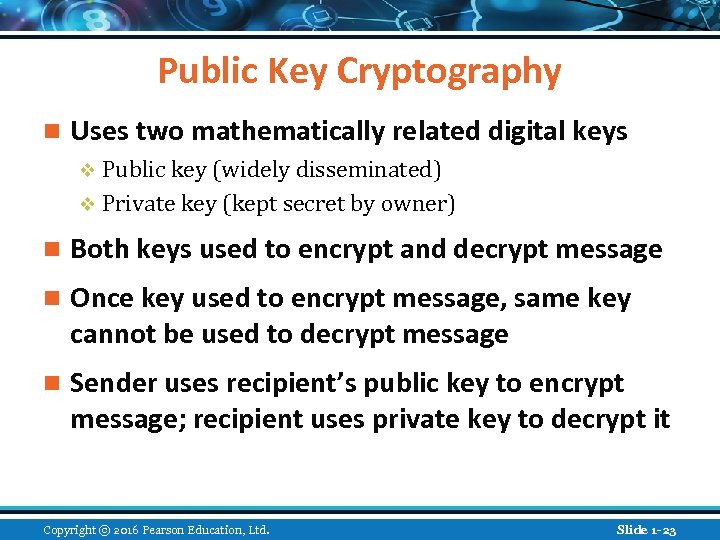
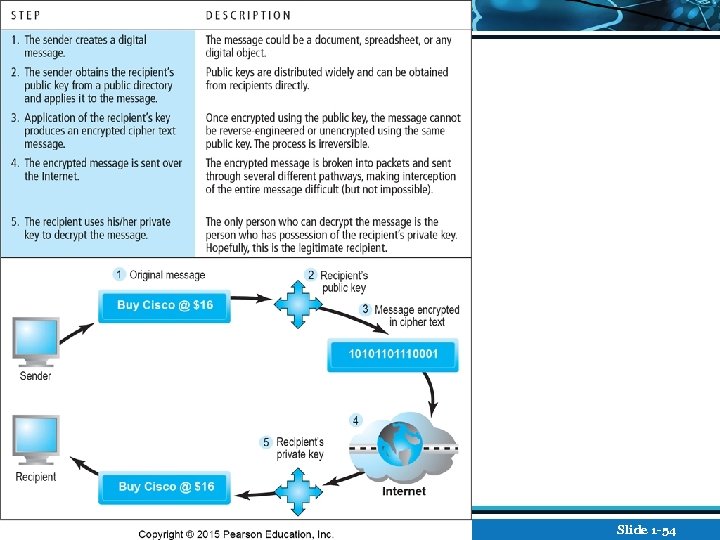
Public Key Cryptography n Uses two mathematically related digital keys v Public key (widely disseminated) v Private key (kept secret by owner) n Both keys used to encrypt and decrypt message n Once key used to encrypt message, same key cannot be used to decrypt message n Sender uses recipient’s public key to encrypt message; recipient uses private key to decrypt it Copyright © 2016 Pearson Education, Ltd. Slide 1 -23
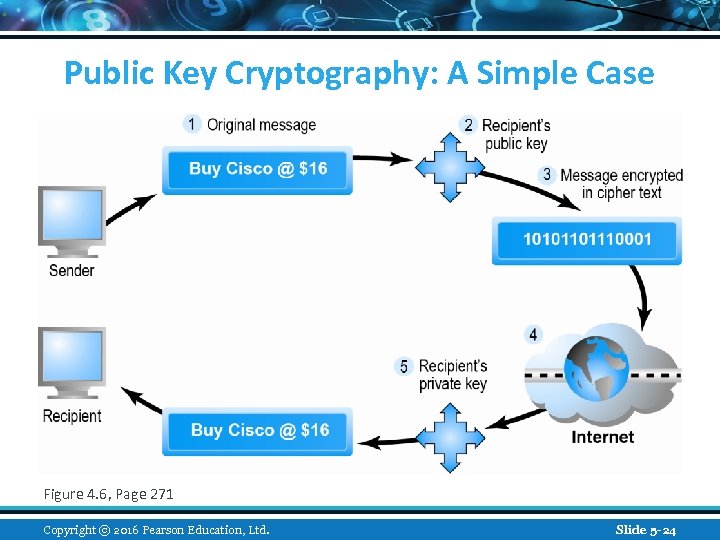
Public Key Cryptography: A Simple Case Figure 4. 6, Page 271 Copyright © 2016 Pearson Education, Ltd. Slide 5 -24
Public Key Cryptography using Digital Signatures and Hash Digests n Hash function: v Mathematical algorithm that produces fixed-length number called message or hash digest Hash digest of message sent to recipient along with message to verify integrity n Hash digest and message encrypted with recipient’s public key n Entire cipher text then encrypted with recipient’s private key—creating digital signature—for authenticity, nonrepudiation n Copyright © 2016 Pearson Education, Ltd. Slide 1 -25
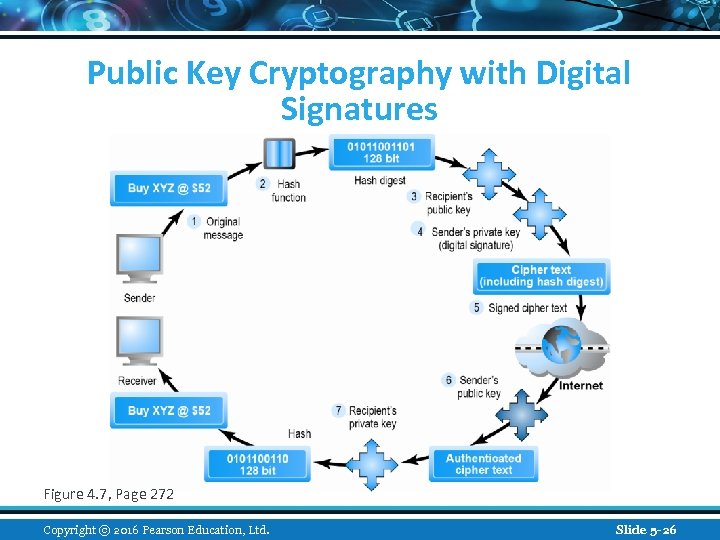
Public Key Cryptography with Digital Signatures Figure 4. 7, Page 272 Copyright © 2016 Pearson Education, Ltd. Slide 5 -26
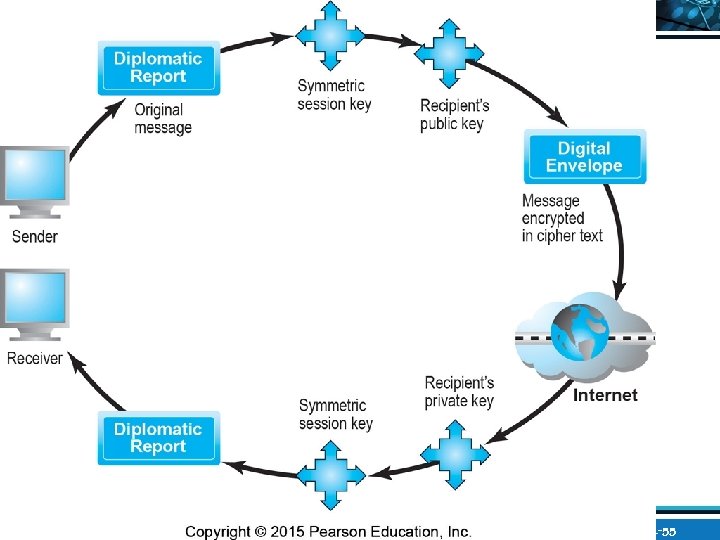
Digital Envelopes n Address weaknesses of: v Public key cryptography n Computationally slow, decreased transmission speed, increased processing time v Symmetric key cryptography n Insecure transmission lines n Uses symmetric key cryptography to encrypt document n Uses public key cryptography to encrypt and send symmetric key Copyright © 2016 Pearson Education, Ltd. Slide 1 -27
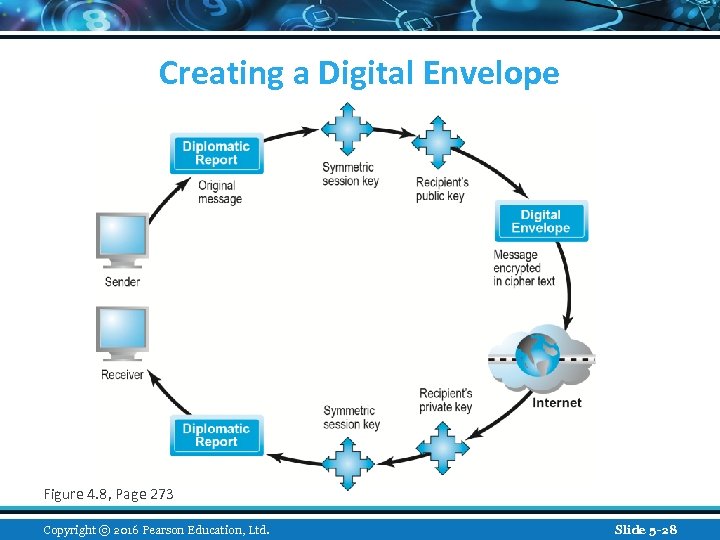
Creating a Digital Envelope Figure 4. 8, Page 273 Copyright © 2016 Pearson Education, Ltd. Slide 5 -28
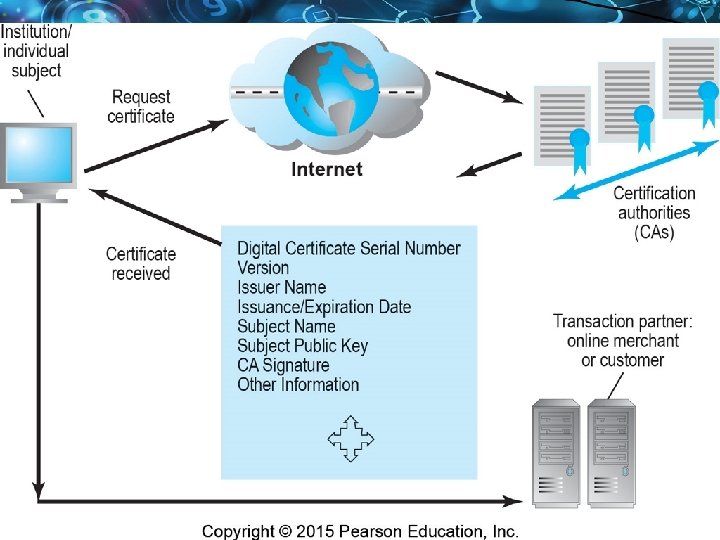
Digital Certificates and Public Key Infrastructure (PKI) n Digital certificate includes: v Name of subject/company v Subject’s public key v Digital certificate serial number v Expiration date, issuance date v Digital signature of CA n Public Key Infrastructure (PKI): v CAs and digital certificate procedures v PGP Copyright © 2016 Pearson Education, Ltd. Slide 1 -29
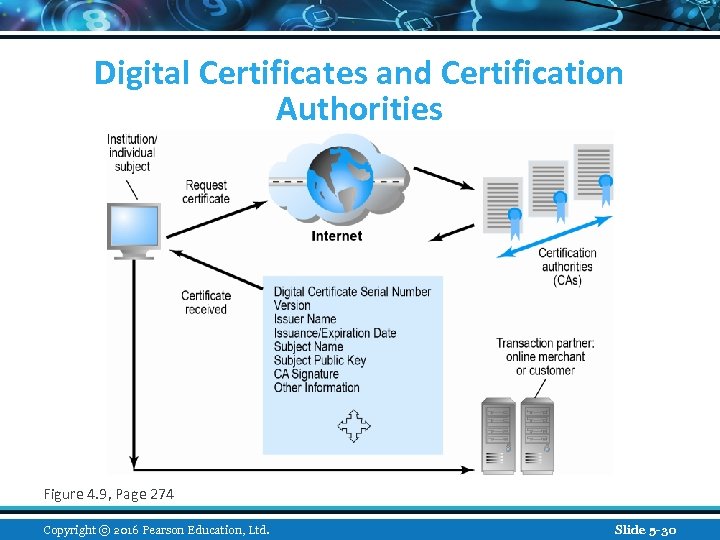
Digital Certificates and Certification Authorities Figure 4. 9, Page 274 Copyright © 2016 Pearson Education, Ltd. Slide 5 -30
Limits to Encryption Solutions n Doesn’t protect storage of private key v PKI not effective against insiders, employees v Protection of private keys by individuals may be haphazard n No guarantee that verifying computer of merchant is secure n CAs are unregulated, self-selecting organizations Copyright © 2016 Pearson Education, Ltd. Slide 1 -31
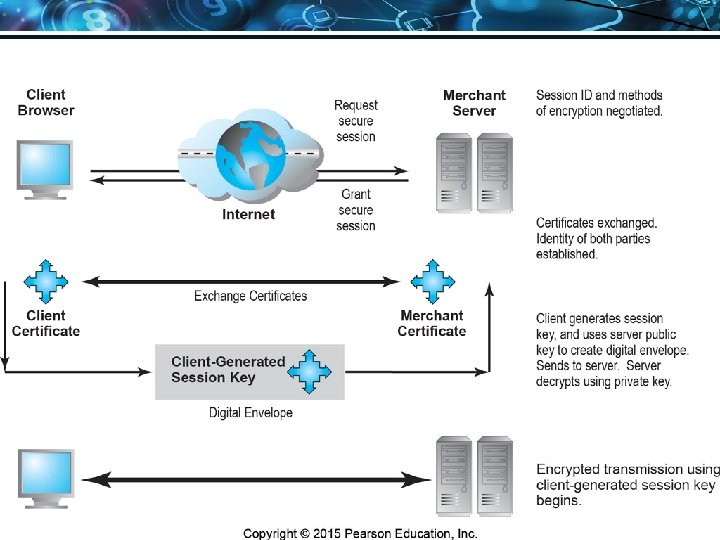
Securing Channels of Communication n Secure Sockets Layer (SSL)/Transport Layer Security (TLS) v Establishes secure, negotiated client–server session n Virtual Private Network (VPN) v Allows remote users to securely access internal network via the Internet n Wireless (Wi-Fi) networks v WPA 2 Copyright © 2016 Pearson Education, Ltd. Slide 1 -32
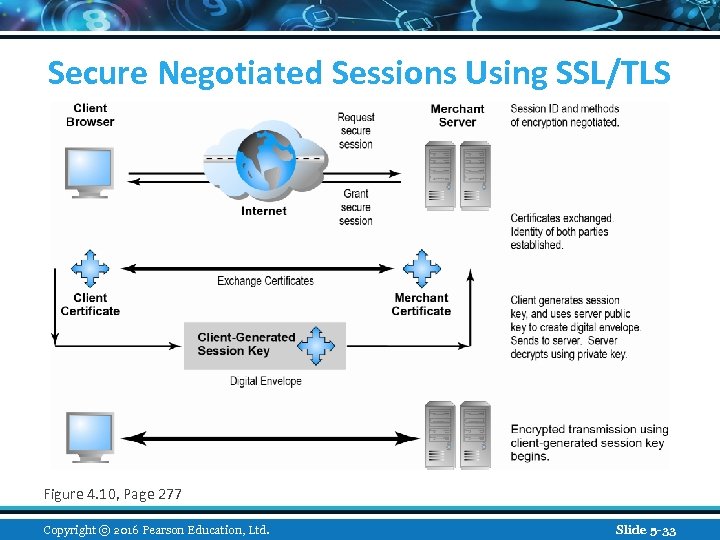
Secure Negotiated Sessions Using SSL/TLS Figure 4. 10, Page 277 Copyright © 2016 Pearson Education, Ltd. Slide 5 -33
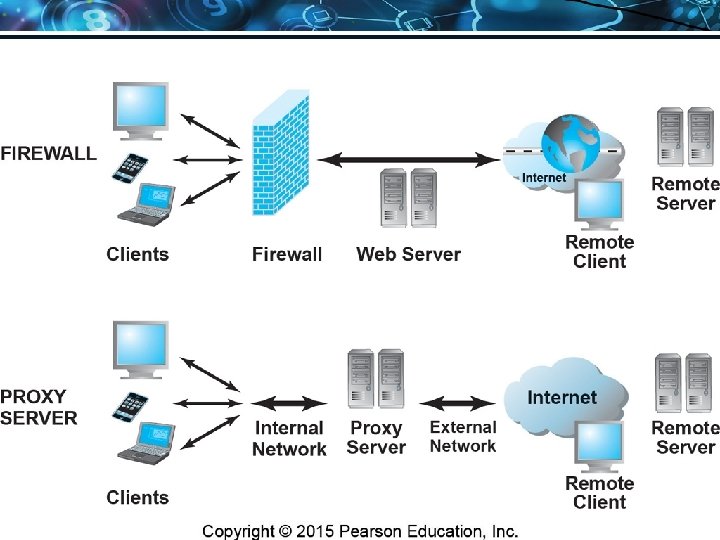
Protecting Networks n Firewall v Hardware or software that uses security policy to filter packets Packet filters n Application gateways n v Next-generation firewalls n Proxy servers (proxies) v Software servers that handle all communications from or sent to the Internet n Intrusion detection systems n Intrusion prevention systems Copyright © 2016 Pearson Education, Ltd. Slide 1 -34
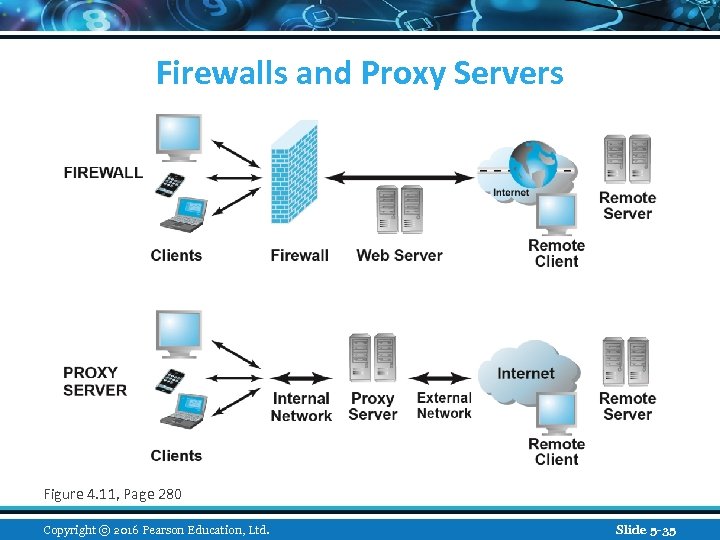
Firewalls and Proxy Servers Figure 4. 11, Page 280 Copyright © 2016 Pearson Education, Ltd. Slide 5 -35
Protecting Servers and Clients n Operating system security enhancements v Upgrades, patches n Anti-virus software v Easiest and least expensive way to prevent threats to system integrity v Requires daily updates Copyright © 2016 Pearson Education, Ltd. Slide 1 -36
Management Policies, Business Procedures, and Public Laws n Worldwide, companies spend more than $71 billion on security hardware, software, services n Managing risk includes: v Technology v Effective management policies v Public laws and active enforcement Copyright © 2016 Pearson Education, Ltd. Slide 1 -37
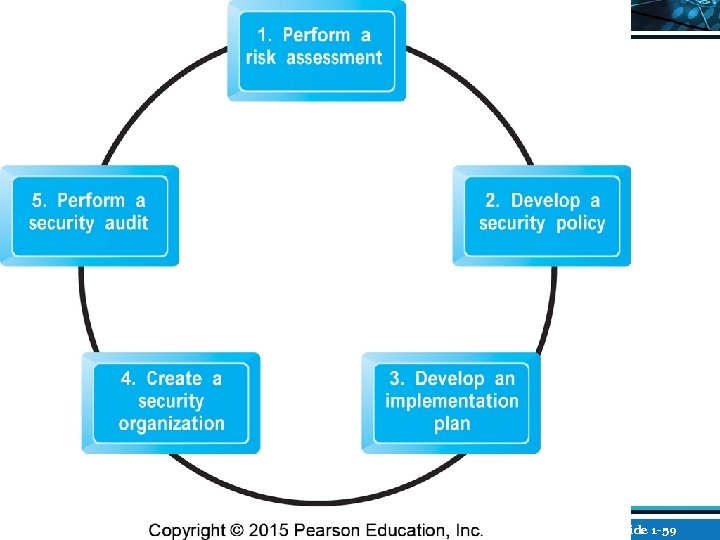
A Security Plan: Management Policies n Risk assessment n Security policy n Implementation plan v Security organization v Access controls v Authentication procedures, including biometrics v Authorization policies, authorization management systems n Security audit Copyright © 2016 Pearson Education, Ltd. Slide 1 -38
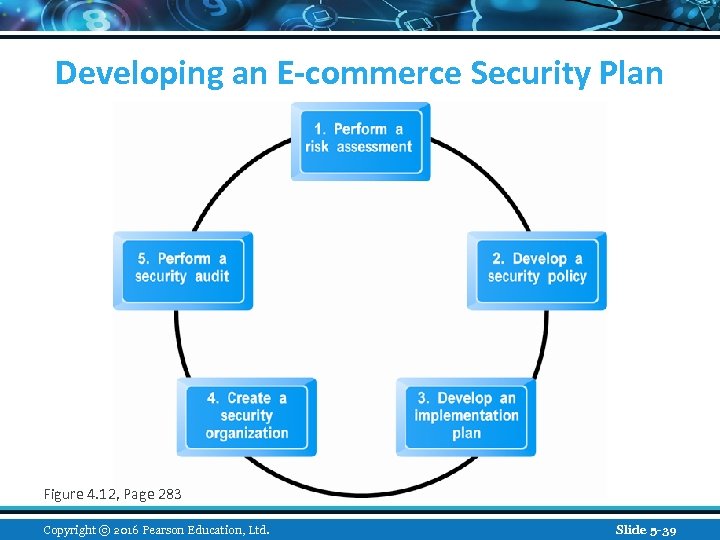
Developing an E-commerce Security Plan Figure 4. 12, Page 283 Copyright © 2016 Pearson Education, Ltd. Slide 5 -39
The Role of Laws and Public Policy n Laws that give authorities tools for identifying, tracing, prosecuting cybercriminals: USA Patriot Act v Homeland Security Act v n Private and private-public cooperation US-CERT v CERT Coordination Center v n Government policies and controls on encryption software v OECD, G 7/G 8, Council of Europe, Wassener Arrangement Copyright © 2016 Pearson Education, Ltd. Slide 1 -40
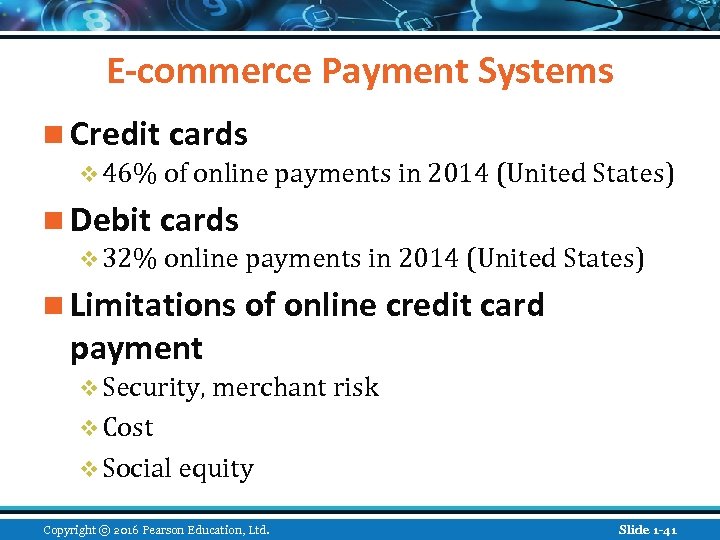
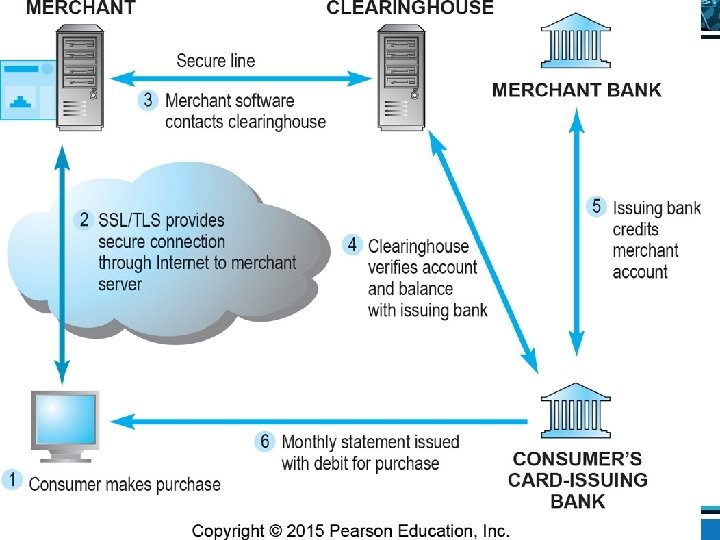
E-commerce Payment Systems n Credit cards v 46% of online payments in 2014 (United States) n Debit cards v 32% online payments in 2014 (United States) n Limitations of online credit card payment v Security, merchant risk v Cost v Social equity Copyright © 2016 Pearson Education, Ltd. Slide 1 -41
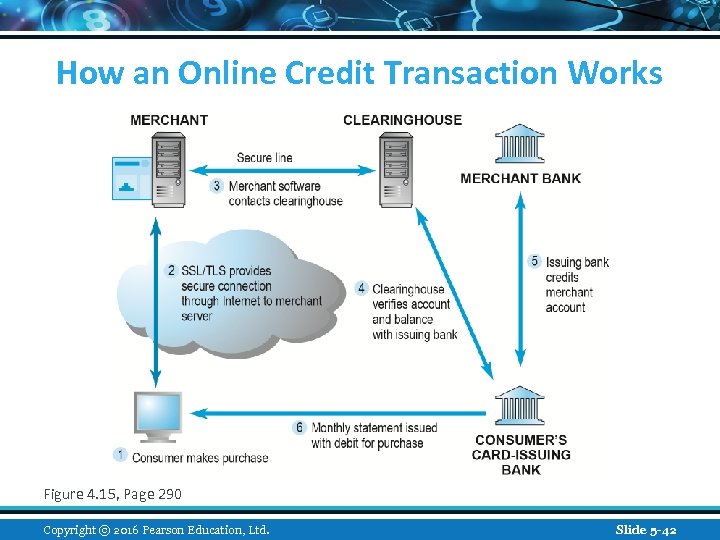
How an Online Credit Transaction Works Figure 4. 15, Page 290 Copyright © 2016 Pearson Education, Ltd. Slide 5 -42
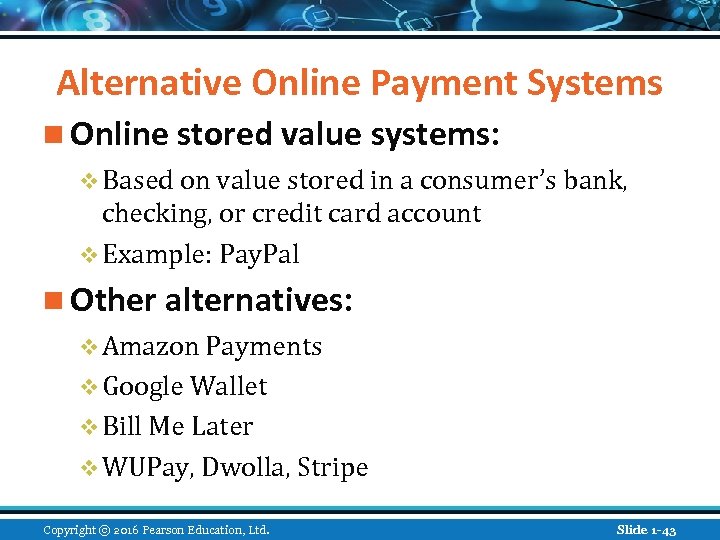
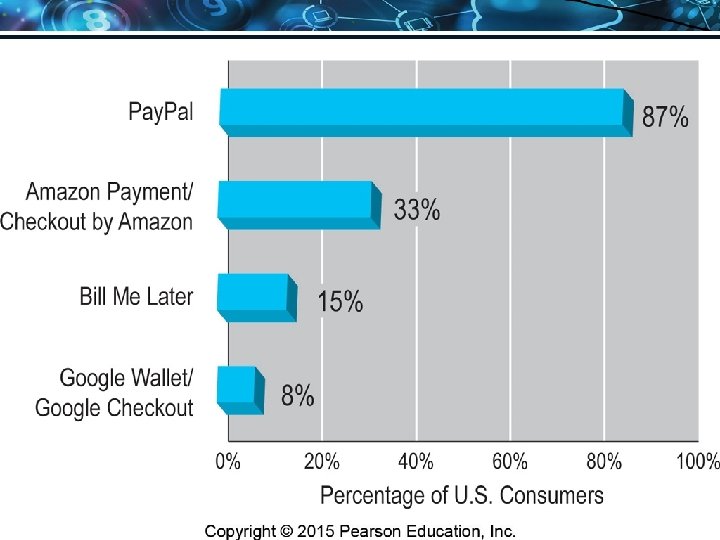
Alternative Online Payment Systems n Online stored value systems: v Based on value stored in a consumer’s bank, checking, or credit card account v Example: Pay. Pal n Other alternatives: v Amazon Payments v Google Wallet v Bill Me Later v WUPay, Dwolla, Stripe Copyright © 2016 Pearson Education, Ltd. Slide 1 -43
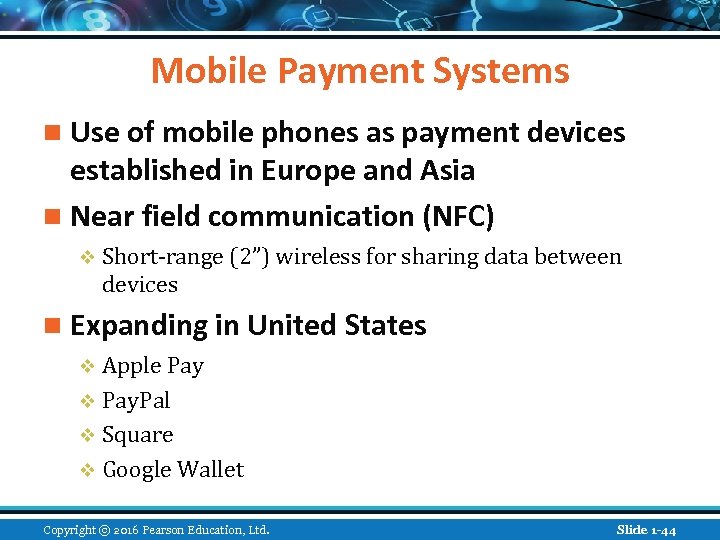
Mobile Payment Systems n Use of mobile phones as payment devices established in Europe and Asia n Near field communication (NFC) v Short-range (2”) wireless for sharing data between devices n Expanding in United States v Apple Pay v Pay. Pal v Square v Google Wallet Copyright © 2016 Pearson Education, Ltd. Slide 1 -44
Digital Cash and Virtual Currencies n Digital cash v Based on algorithm that generates unique tokens that can be used in “real” world v Example: Bitcoin n Virtual currencies v Circulate within internal virtual world v Example: Linden Dollars in Second Life, Facebook Credits Copyright © 2016 Pearson Education, Ltd. Slide 1 -45
Insight on Society: Class Discussion Bitcoin n What are some of the benefits of using a digital currency? n What are the risks involved to the user? n What are the political and economic repercussions of a digital currency? n Have you or anyone you know ever used Bitcoin? Copyright © 2016 Pearson Education, Ltd. Slide 1 -46
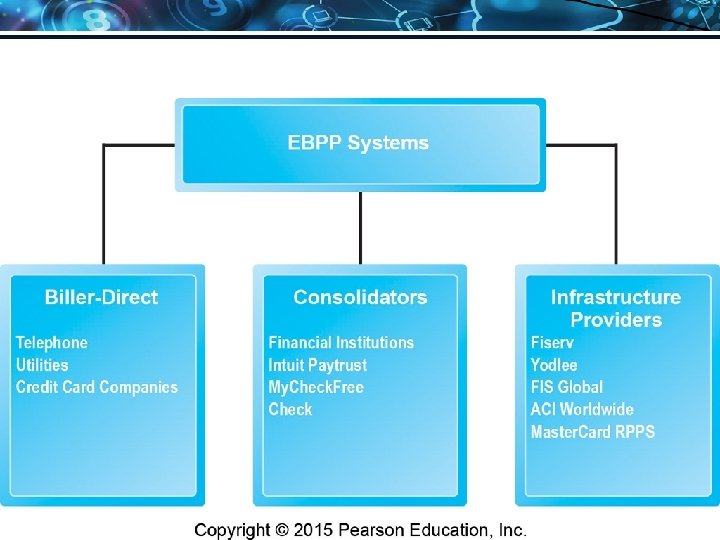
Electronic Billing Presentment and Payment (EBPP) n Online payment systems for monthly bills n Over 50% of all bill payments n Two competing EBPP business models: v Biller-direct (dominant model) v Consolidator n Both models are supported by EBPP infrastructure providers Copyright © 2016 Pearson Education, Ltd. Slide 1 -47
Copyright © 2016 Pearson Education, Ltd. Slide 1 -48
Copyright © 2016 Pearson Education, Ltd. Slide 1 -49
Copyright © 2016 Pearson Education, Ltd. Slide 1 -50
Copyright © 2016 Pearson Education, Ltd. Slide 1 -51
Copyright © 2016 Pearson Education, Ltd. Slide 1 -52
Copyright © 2016 Pearson Education, Ltd. Slide 1 -53
Copyright © 2016 Pearson Education, Ltd. Slide 1 -54
Copyright © 2016 Pearson Education, Ltd. Slide 1 -55
Copyright © 2016 Pearson Education, Ltd. Slide 1 -56
Copyright © 2016 Pearson Education, Ltd. Slide 1 -57
Copyright © 2016 Pearson Education, Ltd. Slide 1 -58
Copyright © 2016 Pearson Education, Ltd. Slide 1 -59
Copyright © 2016 Pearson Education, Ltd. Slide 1 -60
Copyright © 2016 Pearson Education, Ltd. Slide 1 -61
Copyright © 2016 Pearson Education, Ltd. Slide 1 -62
Скачать презентацию E-commerce 2015 business technology society eleventh edition global
bad2d535d9064fa7931a58862c3939c4.ppt