 Скачать презентацию E-Business Ethernet and OSI Specific Outcomes n n
c7a37963b6b4014df88895f6b7cbb65a.ppt
- Количество слайдов: 59



E-Business: Ethernet and OSI Specific Outcomes n n n Explain the overall hierarchy of the OSI stack Describe general specifications of cable and connector types and explain where they may be used within a Local Area Network (LAN) Compare and contrast the functionality of hubs vs. switches Explain how the Spanning Tree Protocol works Describe the Ethernet Frame and explain how a frame is routed through a LAN Apply all of the above theory to a given scenario
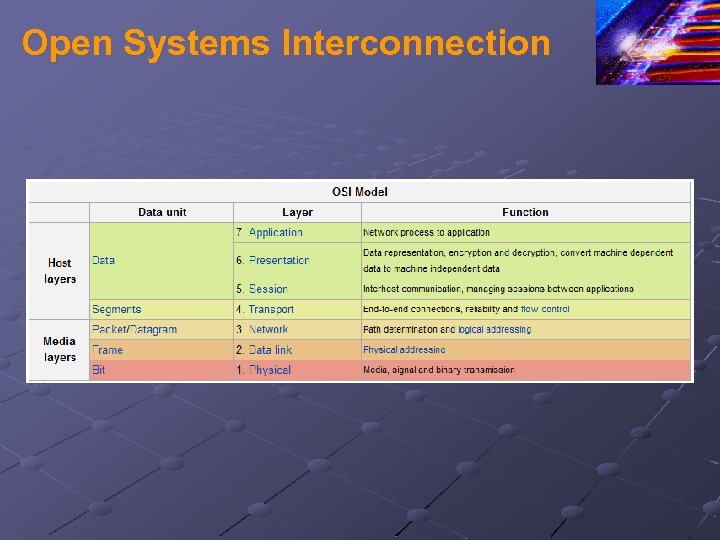
Open Systems Interconnection
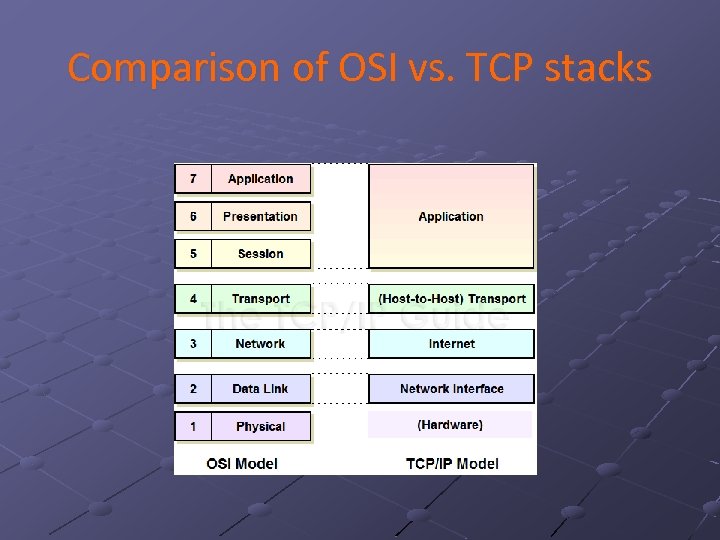
Comparison of OSI vs. TCP stacks
Ethernet Dominance The “hoover” of networks Ethernet is the dominant LAN technology n n Over 95% of LAN ports are Ethernet You need to know it well Basic Ethernet switching is very simple However, large Ethernet networks require more advanced knowledge
Ethernet History Developed at Xerox Palo Alto Research Center in the 1970 s n After a trip to the University of Hawaii’s Alohanet project. Taken over by the IEEE n n 802 LAN/MAN Standards Committee is in charge of LAN Standards. 802. 3 Working Group develops specific Ethernet standards. 802. 16 Busy refining Wi. Max standards. Other working groups create other standards.
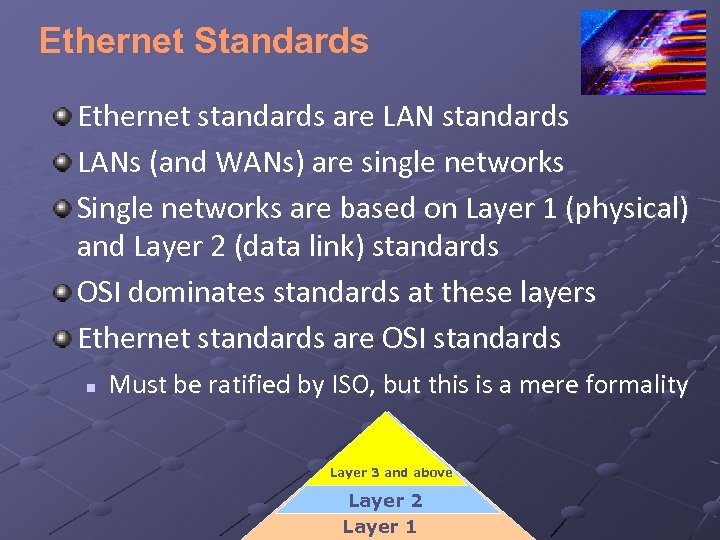
Ethernet Standards Ethernet standards are LAN standards LANs (and WANs) are single networks Single networks are based on Layer 1 (physical) and Layer 2 (data link) standards OSI dominates standards at these layers Ethernet standards are OSI standards n Must be ratified by ISO, but this is a mere formality Layer 3 and above Layer 2 Layer 1
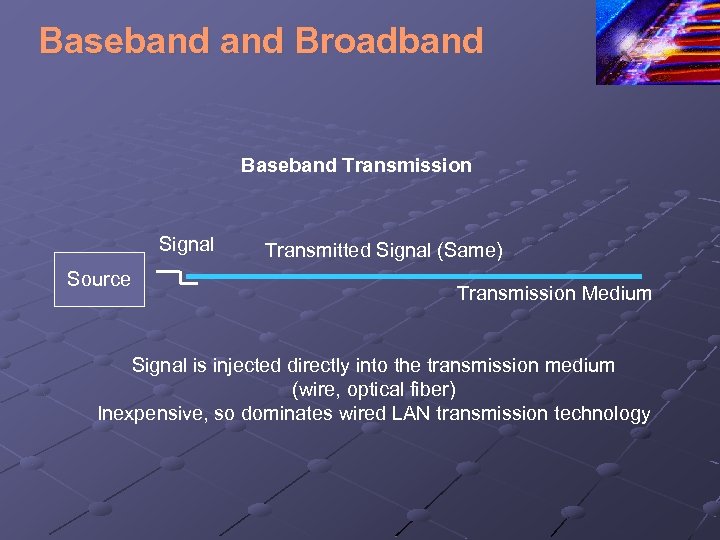
Baseband Broadband Baseband Transmission Signal Source Transmitted Signal (Same) Transmission Medium Signal is injected directly into the transmission medium (wire, optical fiber) Inexpensive, so dominates wired LAN transmission technology
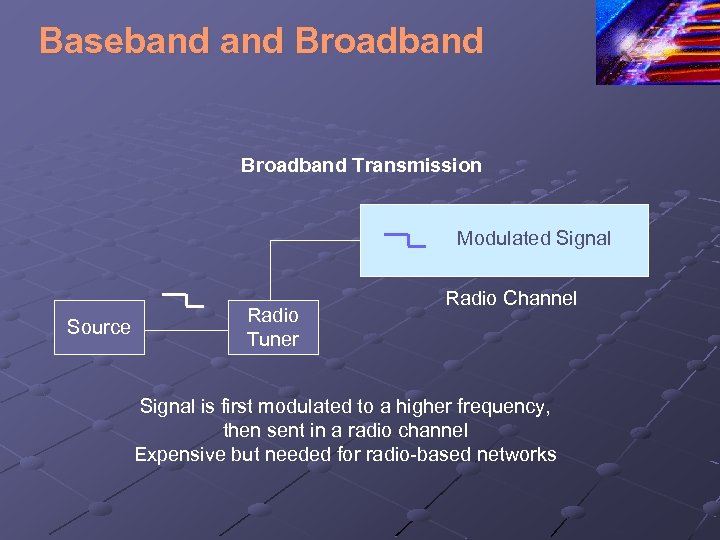
Baseband Broadband Transmission Modulated Signal Source Radio Tuner Radio Channel Signal is first modulated to a higher frequency, then sent in a radio channel Expensive but needed for radio-based networks
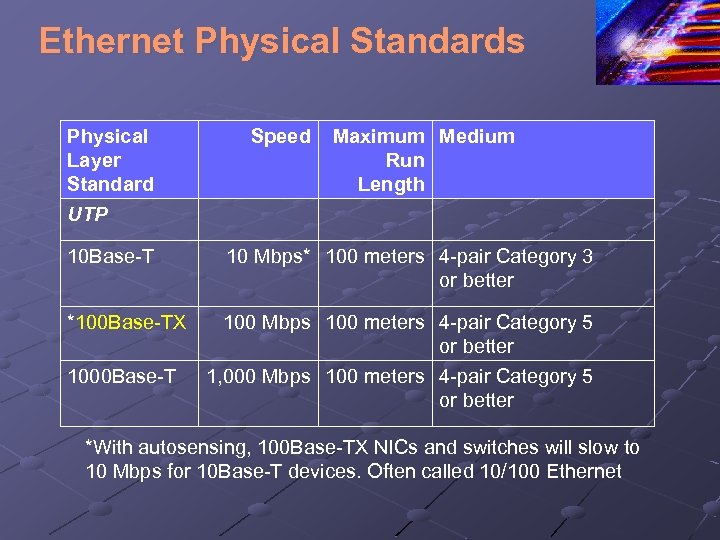
Ethernet Physical Standards Physical Layer Standard Speed Maximum Medium Run Length UTP 10 Base-T *100 Base-TX 1000 Base-T 10 Mbps* 100 meters 4 -pair Category 3 or better 100 Mbps 100 meters 4 -pair Category 5 or better 1, 000 Mbps 100 meters 4 -pair Category 5 or better *With autosensing, 100 Base-TX NICs and switches will slow to 10 Mbps for 10 Base-T devices. Often called 10/100 Ethernet
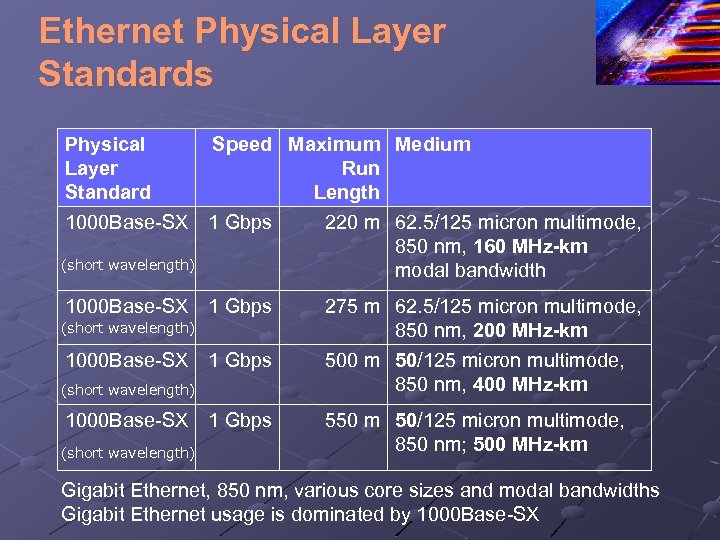
Ethernet Physical Layer Standards Physical Layer Standard Speed Maximum Medium Run Length 1000 Base-SX 1 Gbps (short wavelength) 220 m 62. 5/125 micron multimode, 850 nm, 160 MHz-km modal bandwidth 275 m 62. 5/125 micron multimode, 850 nm, 200 MHz-km 500 m 50/125 micron multimode, 850 nm, 400 MHz-km 550 m 50/125 micron multimode, 850 nm; 500 MHz-km Gigabit Ethernet, 850 nm, various core sizes and modal bandwidths Gigabit Ethernet usage is dominated by 1000 Base-SX
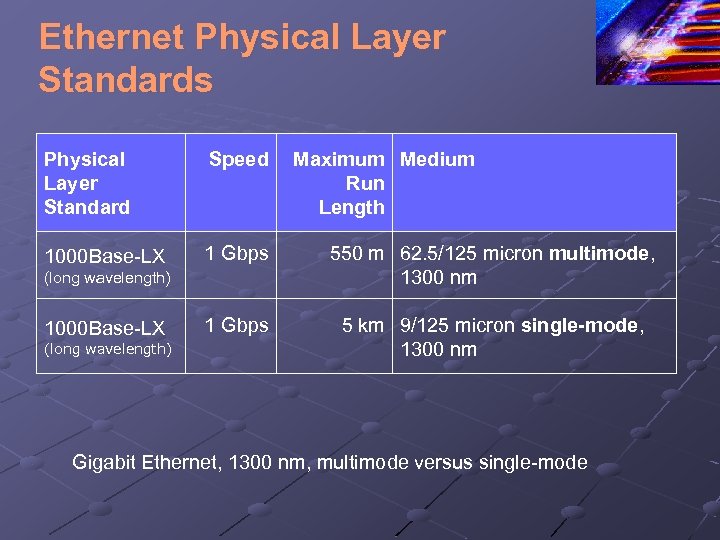
Ethernet Physical Layer Standards Physical Layer Standard Speed 1000 Base-LX 1 Gbps 550 m 62. 5/125 micron multimode, 1300 nm 1 Gbps 5 km 9/125 micron single-mode, 1300 nm (long wavelength) 1000 Base-LX (long wavelength) Maximum Medium Run Length Gigabit Ethernet, 1300 nm, multimode versus single-mode
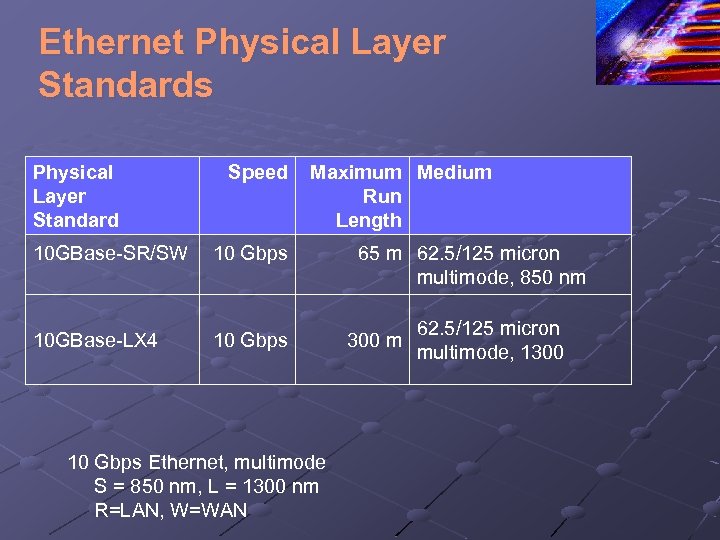
Ethernet Physical Layer Standards Physical Layer Standard Speed 10 GBase-SR/SW 10 Gbps 10 GBase-LX 4 Maximum Medium Run Length 10 Gbps Ethernet, multimode S = 850 nm, L = 1300 nm R=LAN, W=WAN 65 m 62. 5/125 micron multimode, 850 nm 300 m 62. 5/125 micron multimode, 1300
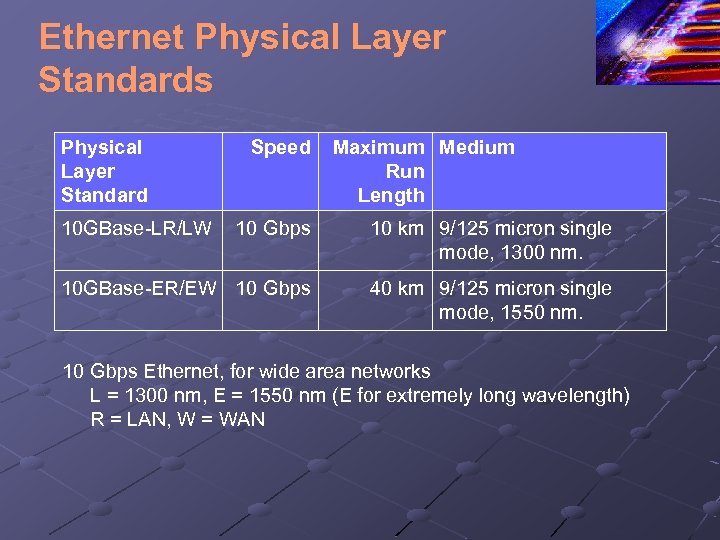
Ethernet Physical Layer Standards Physical Layer Standard 10 GBase-LR/LW Speed Maximum Medium Run Length 10 Gbps 10 km 9/125 micron single mode, 1300 nm. 10 GBase-ER/EW 10 Gbps 40 km 9/125 micron single mode, 1550 nm. 10 Gbps Ethernet, for wide area networks L = 1300 nm, E = 1550 nm (E for extremely long wavelength) R = LAN, W = WAN
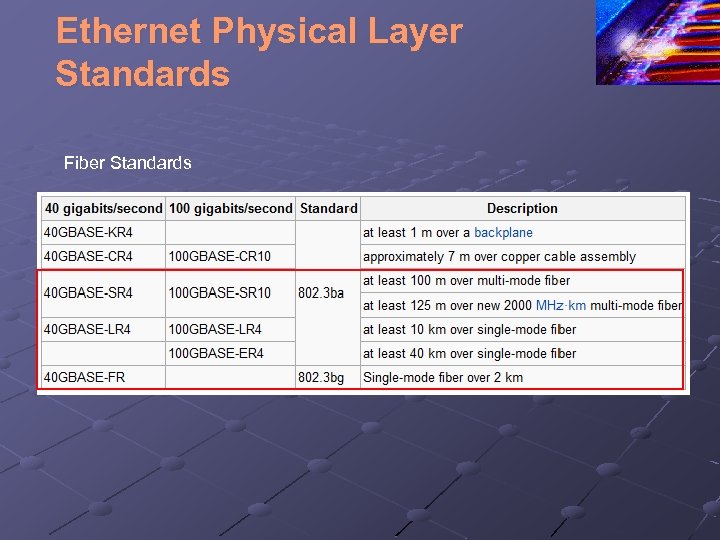
Ethernet Physical Layer Standards Fiber Standards
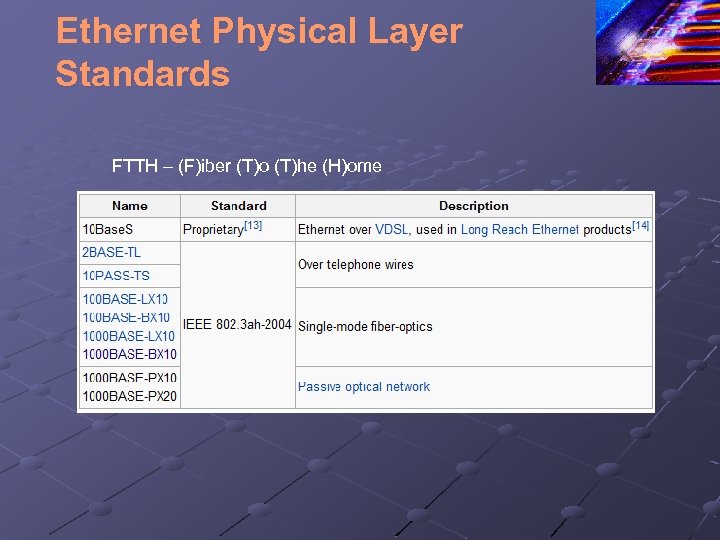
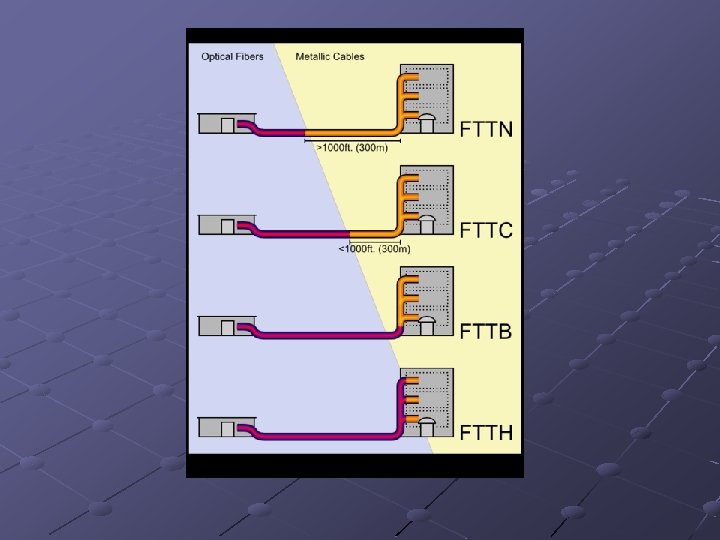
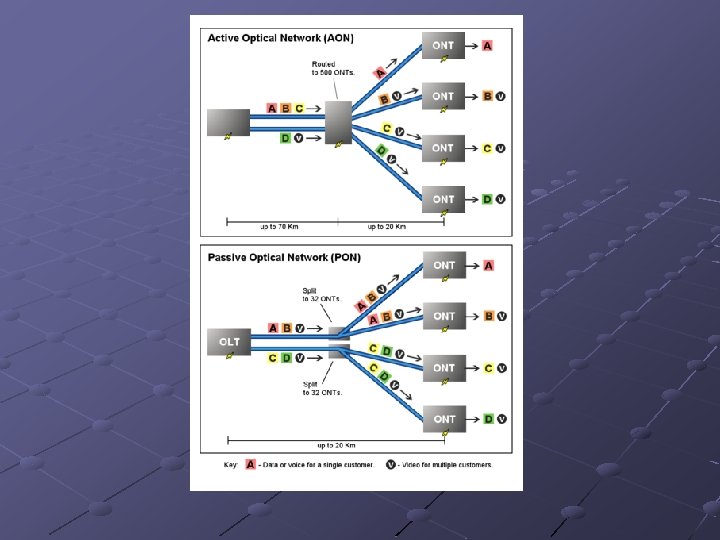
Ethernet Physical Layer Standards FTTH – (F)iber (T)o (T)he (H)ome
Ethernet Perspective Access links to client stations today are dominated by at least 100 Base-TX or 1000 Base T Trunk links today are dominated by 1000 Base. SX n n Short trunk links, however, use UTP Longer and faster trunk links use other fiber standards
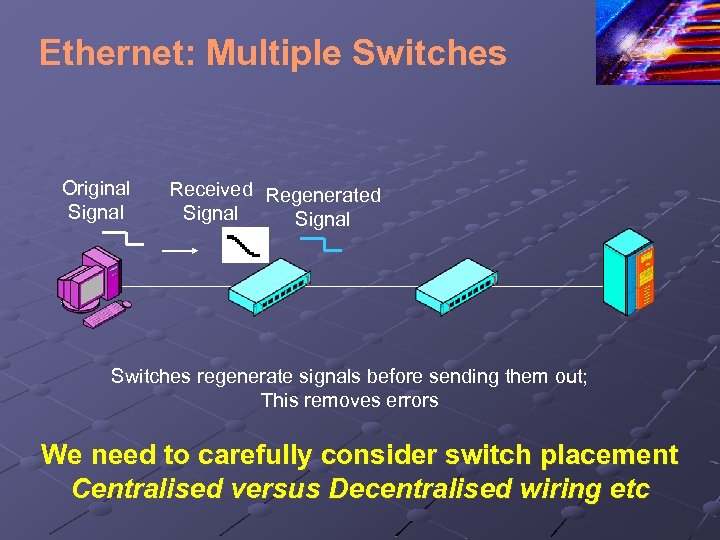
Ethernet: Multiple Switches Original Signal Received Regenerated Signal Switches regenerate signals before sending them out; This removes errors We need to carefully consider switch placement Centralised versus Decentralised wiring etc
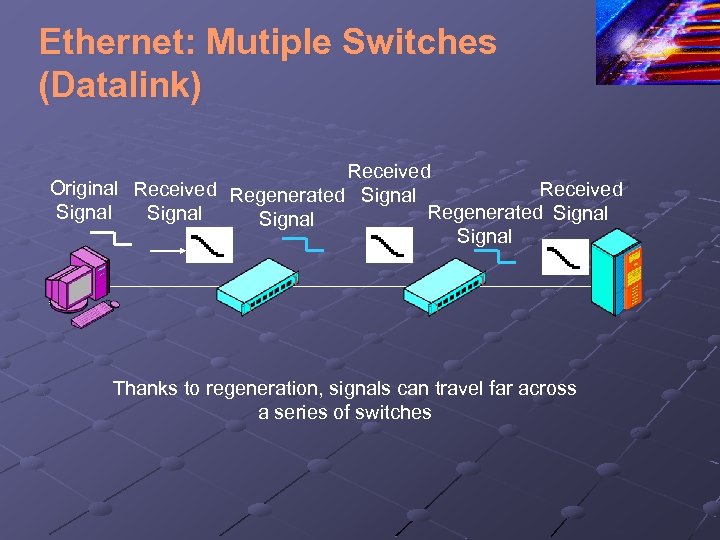
Ethernet: Mutiple Switches (Datalink) Received Original Received Regenerated Signal Received Signal Regenerated Signal Thanks to regeneration, signals can travel far across a series of switches
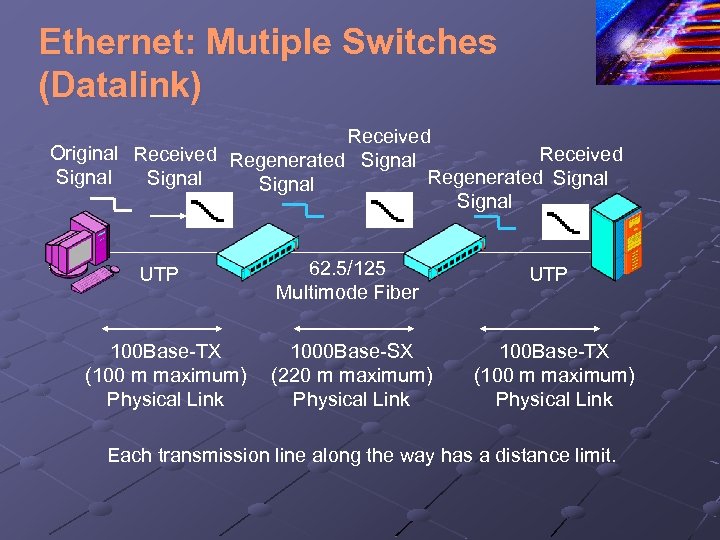
Ethernet: Mutiple Switches (Datalink) Received Original Received Regenerated Signal Received Signal Regenerated Signal UTP 100 Base-TX (100 m maximum) Physical Link 62. 5/125 Multimode Fiber UTP 1000 Base-SX (220 m maximum) Physical Link 100 Base-TX (100 m maximum) Physical Link Each transmission line along the way has a distance limit.
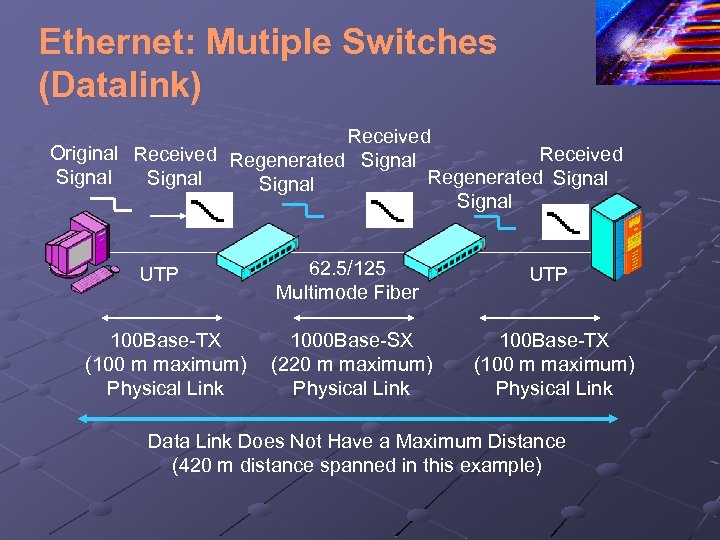
Ethernet: Mutiple Switches (Datalink) Received Original Received Regenerated Signal Received Signal Regenerated Signal UTP 100 Base-TX (100 m maximum) Physical Link 62. 5/125 Multimode Fiber UTP 1000 Base-SX (220 m maximum) Physical Link 100 Base-TX (100 m maximum) Physical Link Data Link Does Not Have a Maximum Distance (420 m distance spanned in this example)
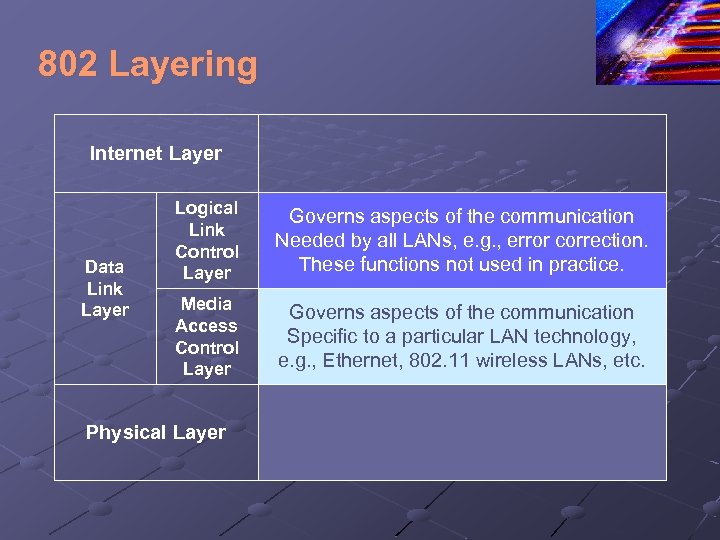
802 Layering Internet Layer Data Link Layer Logical Link Control Layer Governs aspects of the communication Needed by all LANs, e. g. , error correction. These functions not used in practice. Media Access Control Layer Governs aspects of the communication Specific to a particular LAN technology, e. g. , Ethernet, 802. 11 wireless LANs, etc. Physical Layer
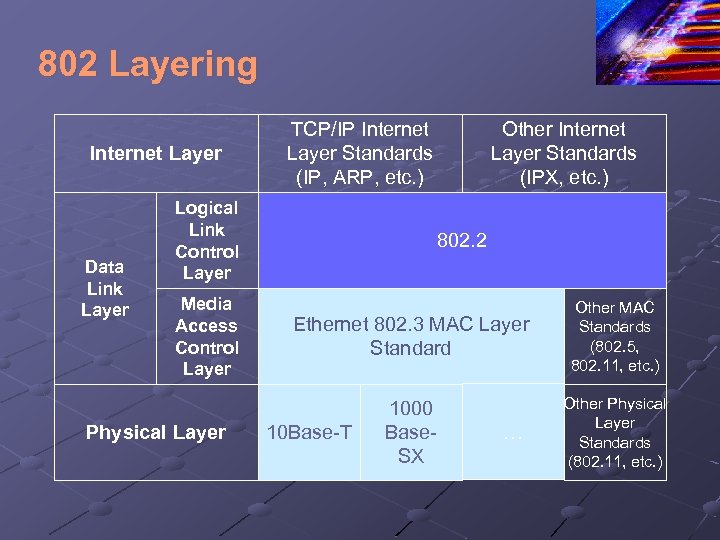
802 Layering Internet Layer Data Link Layer TCP/IP Internet Layer Standards (IP, ARP, etc. ) Logical Link Control Layer Media Access Control Layer Physical Layer Other Internet Layer Standards (IPX, etc. ) 802. 2 Ethernet 802. 3 MAC Layer Standard Other MAC Standards (802. 5, 802. 11, etc. ) 1000 Base. SX Other Physical Layer Standards (802. 11, etc. ) 10 Base-T …
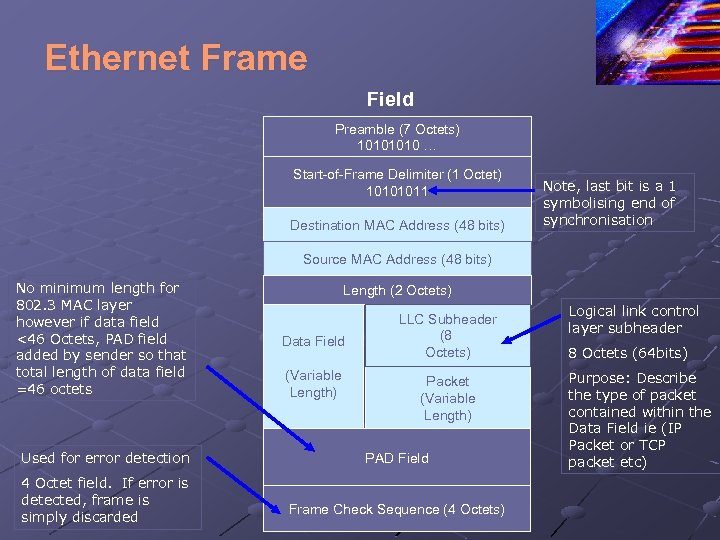
Ethernet Frame Field Preamble (7 Octets) 1010 … Start-of-Frame Delimiter (1 Octet) 10101011 Destination MAC Address (48 bits) Note, last bit is a 1 symbolising end of synchronisation Source MAC Address (48 bits) No minimum length for 802. 3 MAC layer however if data field <46 Octets, PAD field added by sender so that total length of data field =46 octets Used for error detection 4 Octet field. If error is detected, frame is simply discarded Length (2 Octets) Data Field (Variable Length) LLC Subheader (8 Octets) Packet (Variable Length) PAD Field Frame Check Sequence (4 Octets) Logical link control layer subheader 8 Octets (64 bits) Purpose: Describe the type of packet contained within the Data Field ie (IP Packet or TCP packet etc)
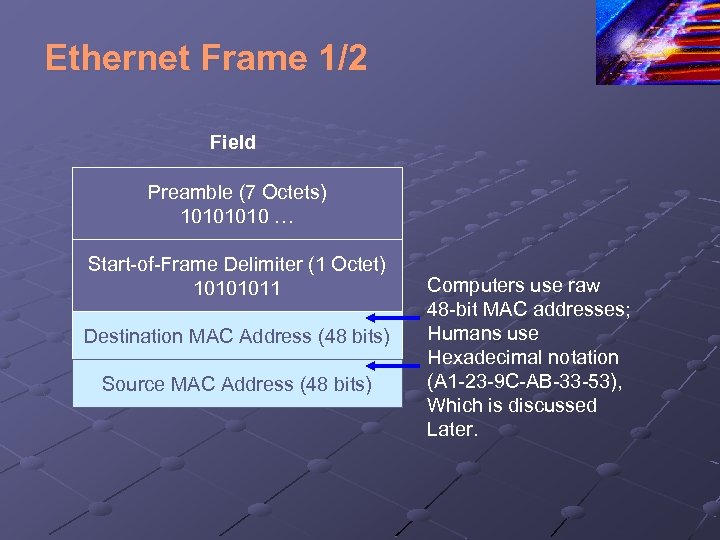
Ethernet Frame 1/2 Field Preamble (7 Octets) 1010 … Start-of-Frame Delimiter (1 Octet) 10101011 Destination MAC Address (48 bits) Source MAC Address (48 bits) Computers use raw 48 -bit MAC addresses; Humans use Hexadecimal notation (A 1 -23 -9 C-AB-33 -53), Which is discussed Later.
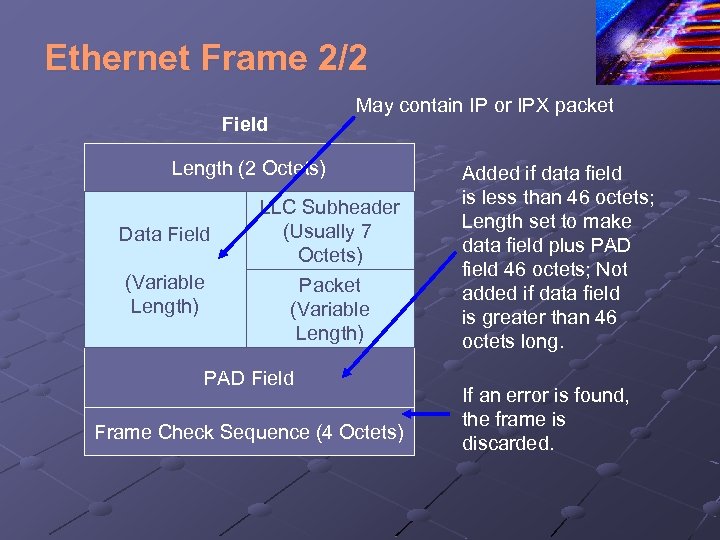
Ethernet Frame 2/2 Field May contain IP or IPX packet Length (2 Octets) Data Field (Variable Length) LLC Subheader (Usually 7 Octets) Packet (Variable Length) PAD Field Frame Check Sequence (4 Octets) Added if data field is less than 46 octets; Length set to make data field plus PAD field 46 octets; Not added if data field is greater than 46 octets long. If an error is found, the frame is discarded.
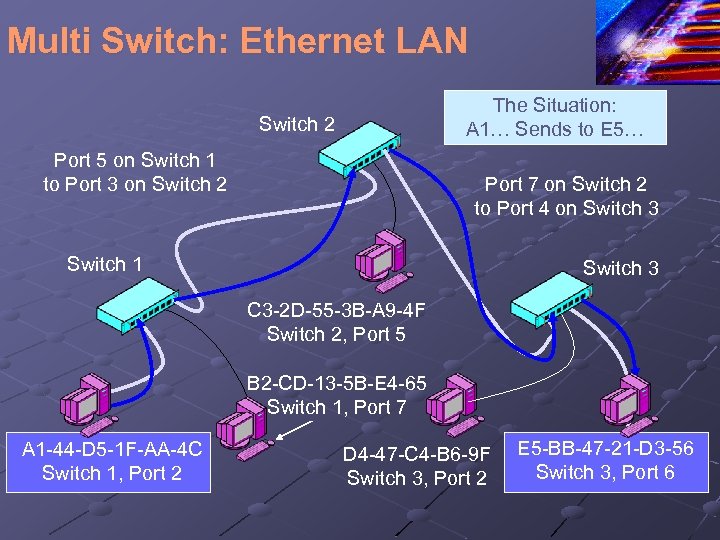
Multi Switch: Ethernet LAN The Situation: A 1… Sends to E 5… Switch 2 Port 5 on Switch 1 to Port 3 on Switch 2 Port 7 on Switch 2 to Port 4 on Switch 3 Switch 1 Switch 3 C 3 -2 D-55 -3 B-A 9 -4 F Switch 2, Port 5 B 2 -CD-13 -5 B-E 4 -65 Switch 1, Port 7 A 1 -44 -D 5 -1 F-AA-4 C Switch 1, Port 2 D 4 -47 -C 4 -B 6 -9 F Switch 3, Port 2 E 5 -BB-47 -21 -D 3 -56 Switch 3, Port 6
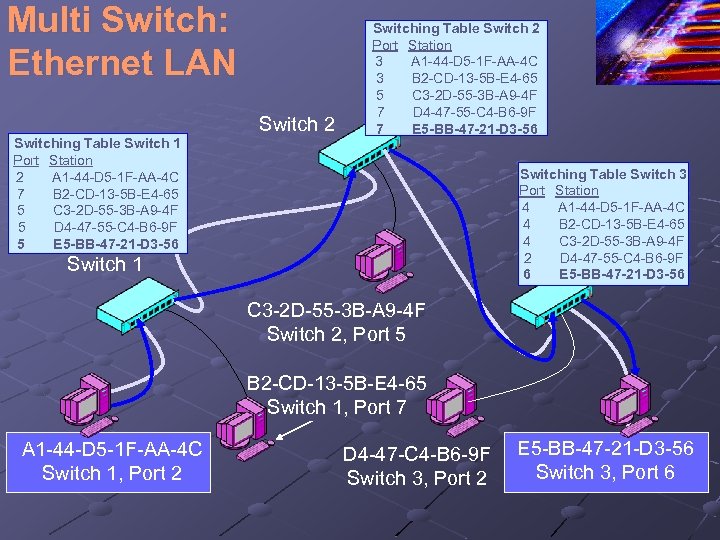
Multi Switch: Ethernet LAN Switch 2 Switching Table Switch 1 Port Station 2 A 1 -44 -D 5 -1 F-AA-4 C 7 B 2 -CD-13 -5 B-E 4 -65 5 C 3 -2 D-55 -3 B-A 9 -4 F 5 D 4 -47 -55 -C 4 -B 6 -9 F 5 E 5 -BB-47 -21 -D 3 -56 Switching Table Switch 2 Port Station 3 A 1 -44 -D 5 -1 F-AA-4 C 3 B 2 -CD-13 -5 B-E 4 -65 5 C 3 -2 D-55 -3 B-A 9 -4 F 7 D 4 -47 -55 -C 4 -B 6 -9 F 7 E 5 -BB-47 -21 -D 3 -56 Switching Table Switch 3 Port Station 4 A 1 -44 -D 5 -1 F-AA-4 C 4 B 2 -CD-13 -5 B-E 4 -65 4 C 3 -2 D-55 -3 B-A 9 -4 F 2 D 4 -47 -55 -C 4 -B 6 -9 F Switch 3 6 E 5 -BB-47 -21 -D 3 -56 Switch 1 C 3 -2 D-55 -3 B-A 9 -4 F Switch 2, Port 5 B 2 -CD-13 -5 B-E 4 -65 Switch 1, Port 7 A 1 -44 -D 5 -1 F-AA-4 C Switch 1, Port 2 D 4 -47 -C 4 -B 6 -9 F Switch 3, Port 2 E 5 -BB-47 -21 -D 3 -56 Switch 3, Port 6
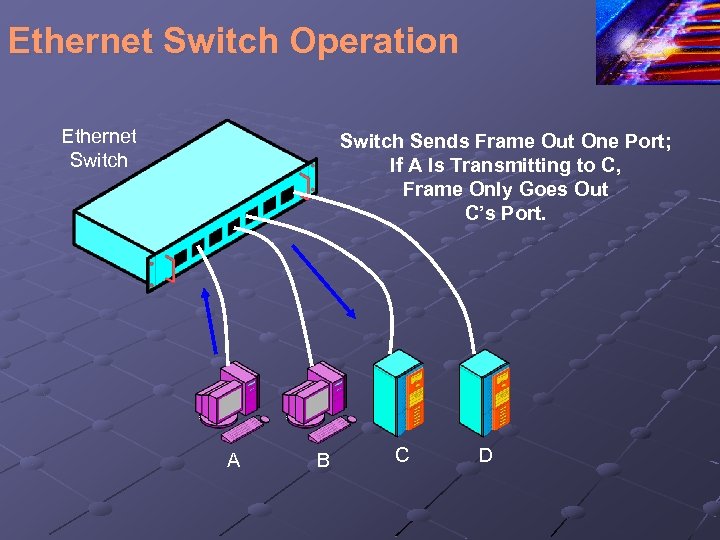
Ethernet Switch Operation Ethernet Switch Sends Frame Out One Port; If A Is Transmitting to C, Frame Only Goes Out C’s Port. A B C D
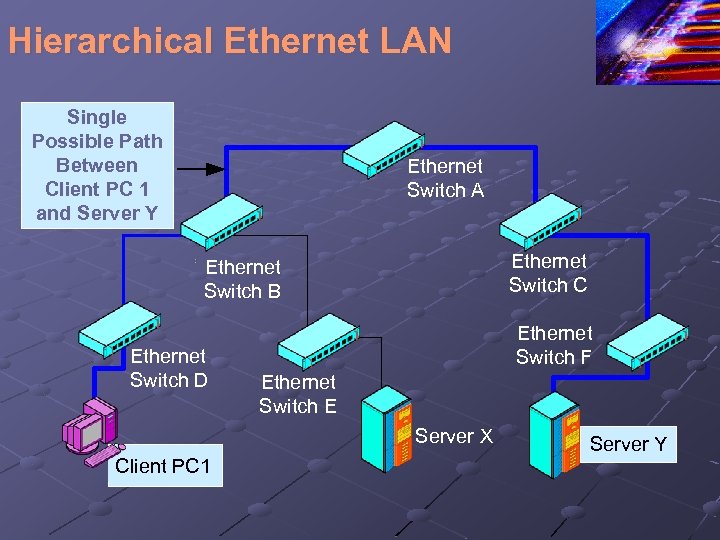
Hierarchical Ethernet LAN Single Possible Path Between Client PC 1 and Server Y Ethernet Switch A Ethernet Switch C Ethernet Switch B Ethernet Switch D Ethernet Switch F Ethernet Switch E Server X Client PC 1 Server Y
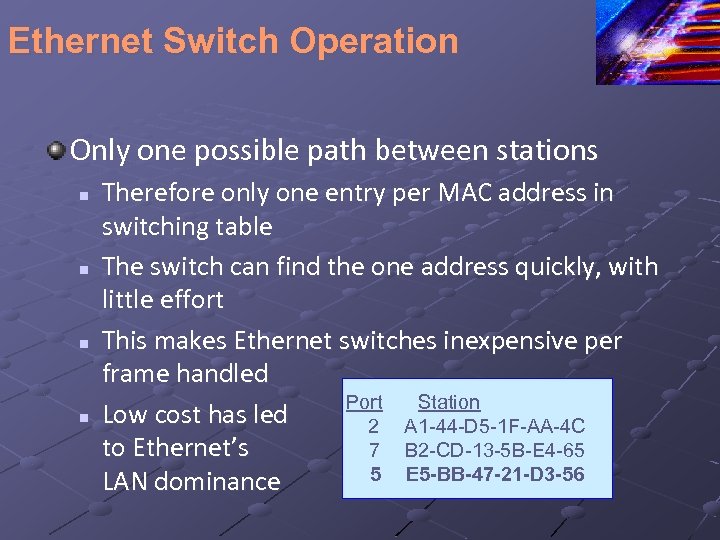
Ethernet Switch Operation Only one possible path between stations n n Therefore only one entry per MAC address in switching table The switch can find the one address quickly, with little effort This makes Ethernet switches inexpensive per frame handled Port Station Low cost has led 2 A 1 -44 -D 5 -1 F-AA-4 C to Ethernet’s 7 B 2 -CD-13 -5 B-E 4 -65 5 E 5 -BB-47 -21 -D 3 -56 LAN dominance
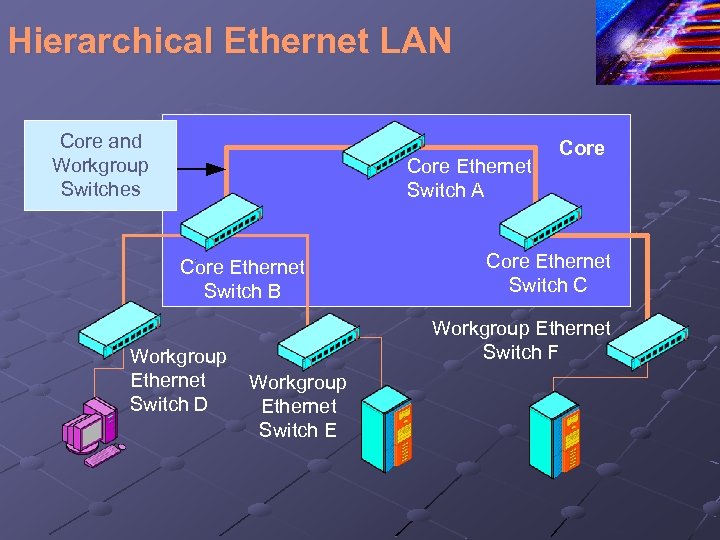
Hierarchical Ethernet LAN Core and Workgroup Switches Core Ethernet Switch A Core Ethernet Switch B Workgroup Ethernet Switch D Core Ethernet Switch C Workgroup Ethernet Switch F Workgroup Ethernet Switch E
Hierarchical Ethernet LAN Workgroup switches connect to stations via access lines Core switches higher in the hierarchy connect switches to other switches via trunk lines The core is the collection of all core switches Core switches need more capacity than workgroup switches because they have to handle the traffic of many conversations instead of just a few
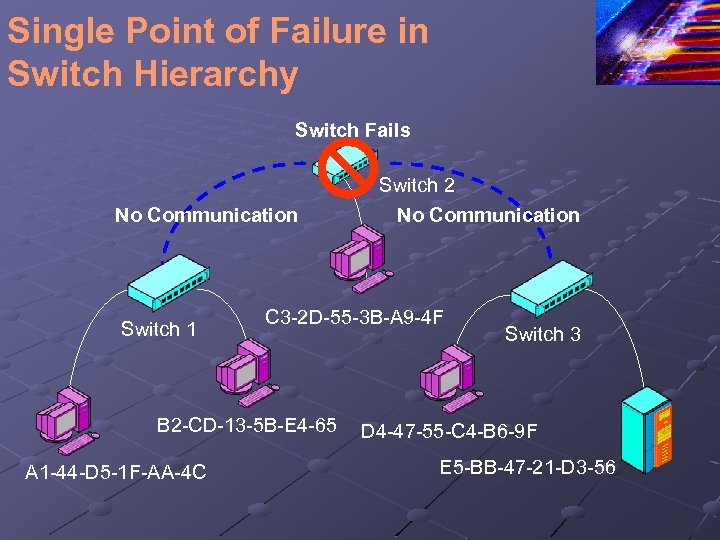
Single Point of Failure in Switch Hierarchy Switch Fails No Communication Switch 1 C 3 -2 D-55 -3 B-A 9 -4 F B 2 -CD-13 -5 B-E 4 -65 A 1 -44 -D 5 -1 F-AA-4 C Switch 2 No Communication Switch 3 D 4 -47 -55 -C 4 -B 6 -9 F E 5 -BB-47 -21 -D 3 -56
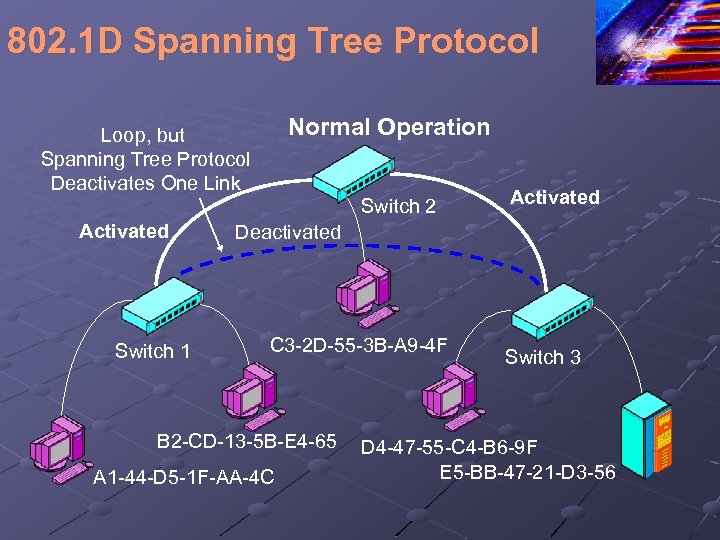
802. 1 D Spanning Tree Protocol Normal Operation Loop, but Spanning Tree Protocol Deactivates One Link Switch 2 Activated Switch 1 Activated Deactivated C 3 -2 D-55 -3 B-A 9 -4 F B 2 -CD-13 -5 B-E 4 -65 A 1 -44 -D 5 -1 F-AA-4 C Switch 3 D 4 -47 -55 -C 4 -B 6 -9 F E 5 -BB-47 -21 -D 3 -56
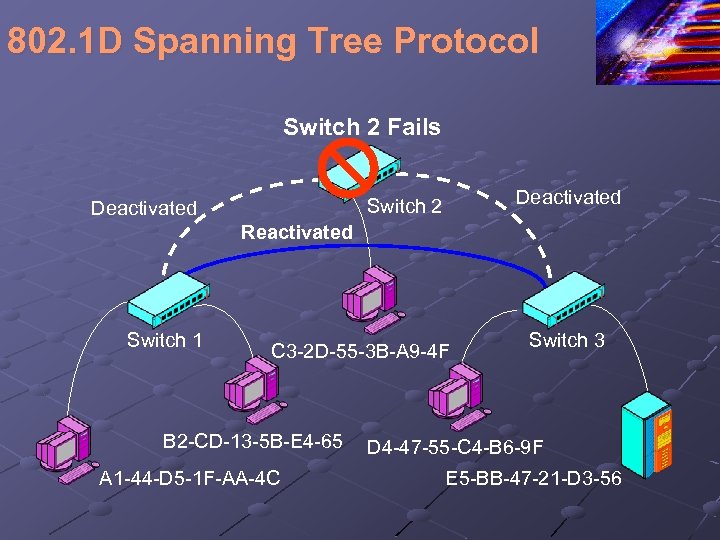
802. 1 D Spanning Tree Protocol Switch 2 Fails Deactivated Switch 2 Deactivated Reactivated Switch 1 C 3 -2 D-55 -3 B-A 9 -4 F B 2 -CD-13 -5 B-E 4 -65 A 1 -44 -D 5 -1 F-AA-4 C Switch 3 D 4 -47 -55 -C 4 -B 6 -9 F E 5 -BB-47 -21 -D 3 -56
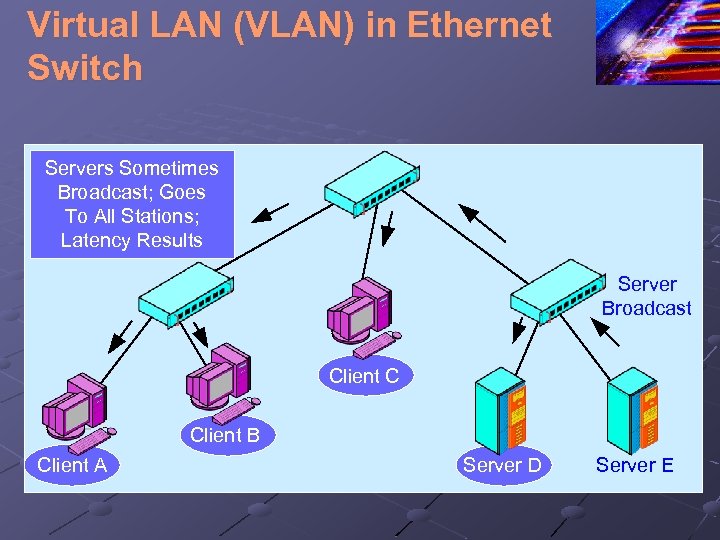
Virtual LAN (VLAN) in Ethernet Switch Servers Sometimes Broadcast; Goes To All Stations; Latency Results Server Broadcast Client C Client B Client A Server D Server E
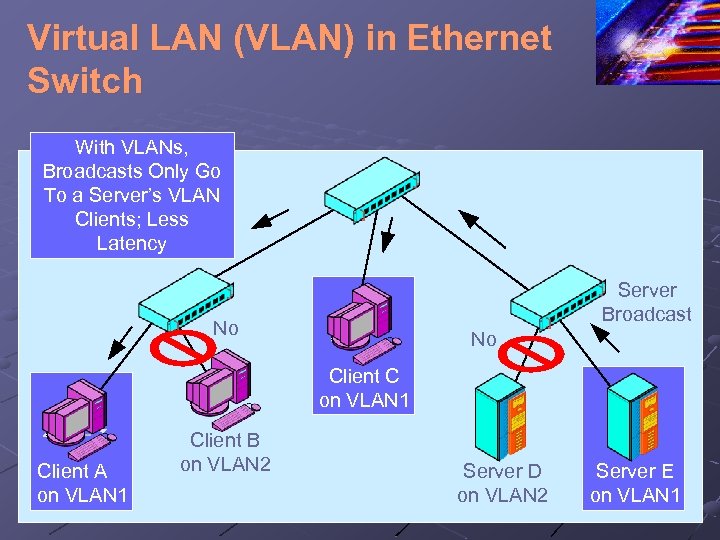
Virtual LAN (VLAN) in Ethernet Switch With VLANs, Broadcasts Only Go To a Server’s VLAN Clients; Less Latency Server Broadcast No No Client C on VLAN 1 Client A on VLAN 1 Client B on VLAN 2 Server D on VLAN 2 Server E on VLAN 1
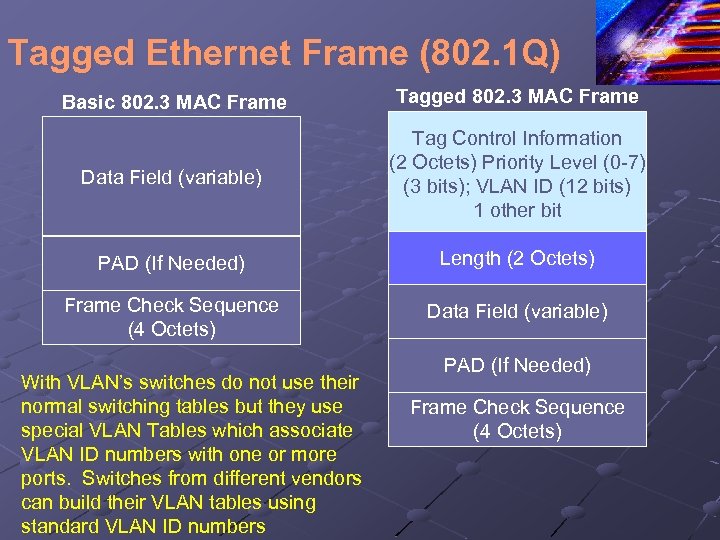
Tagged Ethernet Frame (802. 1 Q) Basic 802. 3 MAC Frame Tagged 802. 3 MAC Frame Data Field (variable) Tag Control Information (2 Octets) Priority Level (0 -7) (3 bits); VLAN ID (12 bits) 1 other bit PAD (If Needed) Length (2 Octets) Frame Check Sequence (4 Octets) Data Field (variable) With VLAN’s switches do not use their normal switching tables but they use special VLAN Tables which associate VLAN ID numbers with one or more ports. Switches from different vendors can build their VLAN tables using standard VLAN ID numbers PAD (If Needed) Frame Check Sequence (4 Octets)
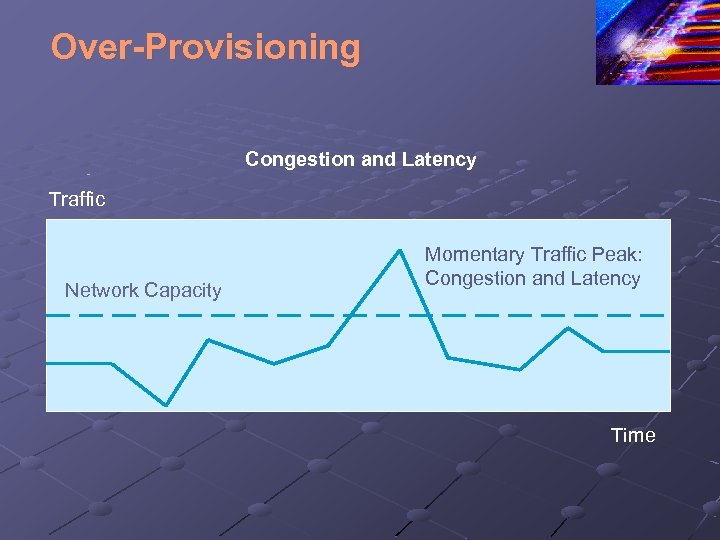
Over-Provisioning Congestion and Latency Traffic Network Capacity Momentary Traffic Peak: Congestion and Latency Time
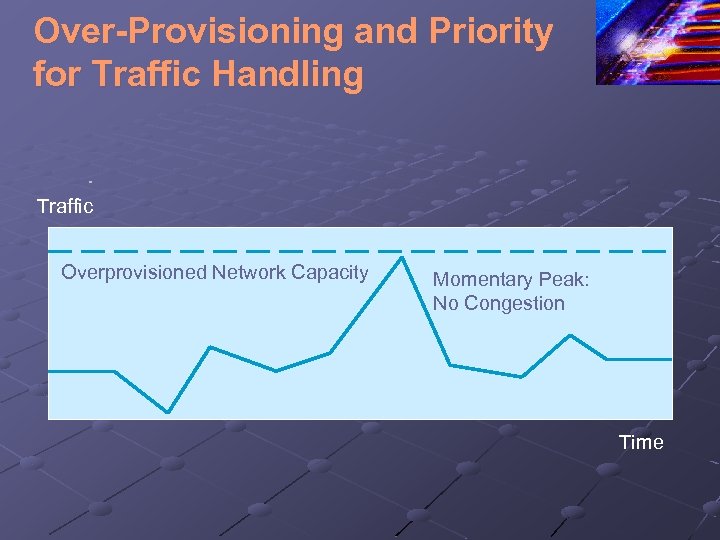
Over-Provisioning and Priority for Traffic Handling Traffic Overprovisioned Network Capacity Momentary Peak: No Congestion Time
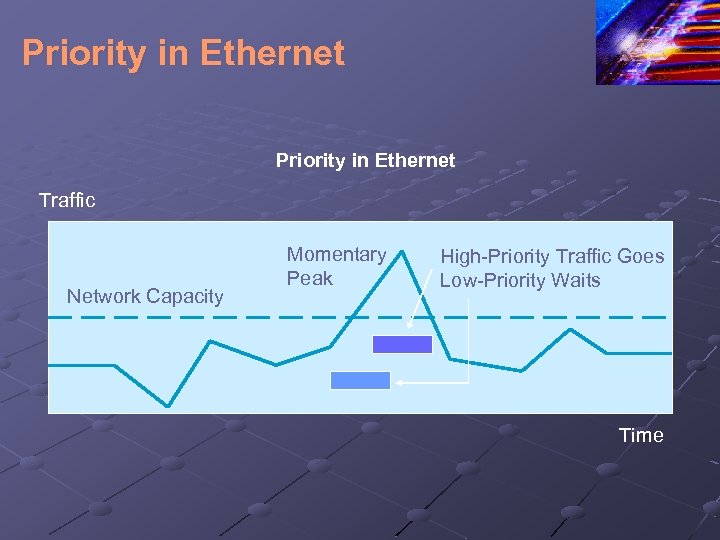
Priority in Ethernet Traffic Network Capacity Momentary Peak High-Priority Traffic Goes Low-Priority Waits Time
Switch Purchasing Considerations Number and Speeds of Ports n n n Decide on the number of ports needed and the speed of each Often can by a pre-built switch with the right configuration Modular switches can be configured with appropriate port modules before or after purchase
Switch Purchasing Considerations Switching Matrix Throughput n n n Aggregate throughput: total speed of switching matrix Nonblocking capacity: switching matrix sufficient even if there is maximum input on all ports Less than nonblocking capacity is workable For core switches, at least 80% For workgroup switches, at least 20%
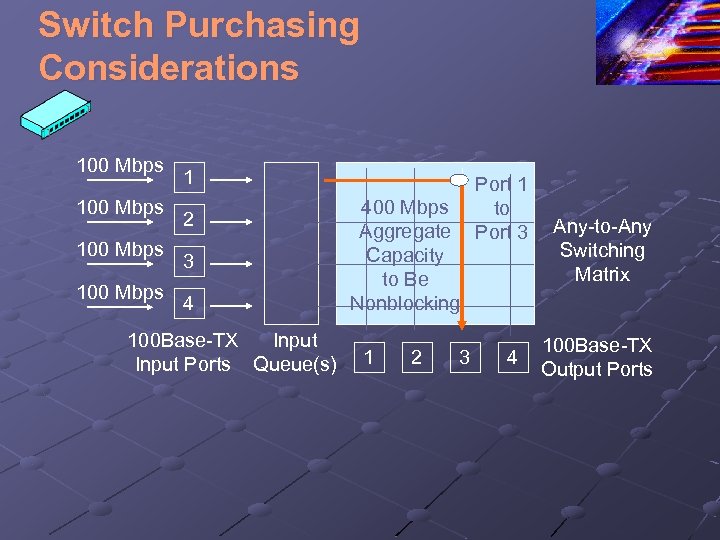
Switch Purchasing Considerations 100 Mbps 1 2 3 4 100 Base-TX Input Ports Queue(s) 400 Mbps Aggregate Capacity to Be Nonblocking 1 2 3 Port 1 to Port 3 4 Any-to-Any Switching Matrix 100 Base-TX Output Ports
Switch Purchasing Considerations Store-and-Forward Versus Cut-Through Switching (Figure 4 -18) n n n Store-and-forward Ethernet switches read whole frame before passing it on Cut-through Ethernet switches read only some fields before passing it on Perspective: Cut-through switches have less latency, but this is rarely important
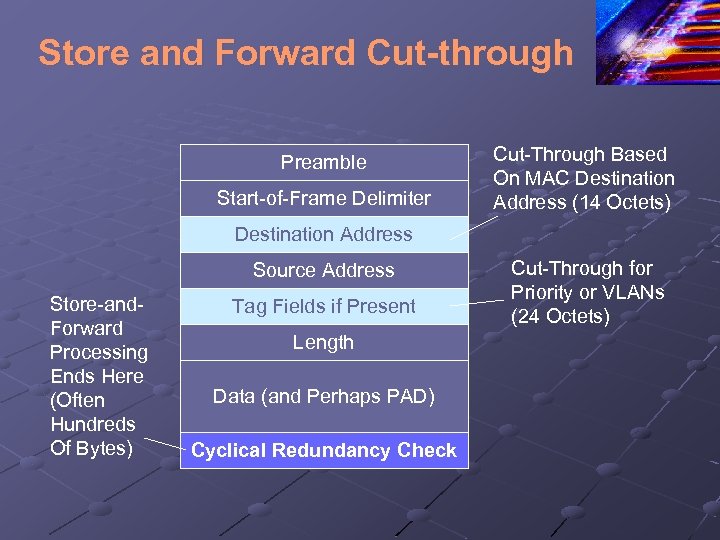
Store and Forward Cut-through Preamble Start-of-Frame Delimiter Cut-Through Based On MAC Destination Address (14 Octets) Destination Address Source Address Store-and. Forward Processing Ends Here (Often Hundreds Of Bytes) Tag Fields if Present Length Data (and Perhaps PAD) Cyclical Redundancy Check Cut-Through for Priority or VLANs (24 Octets)
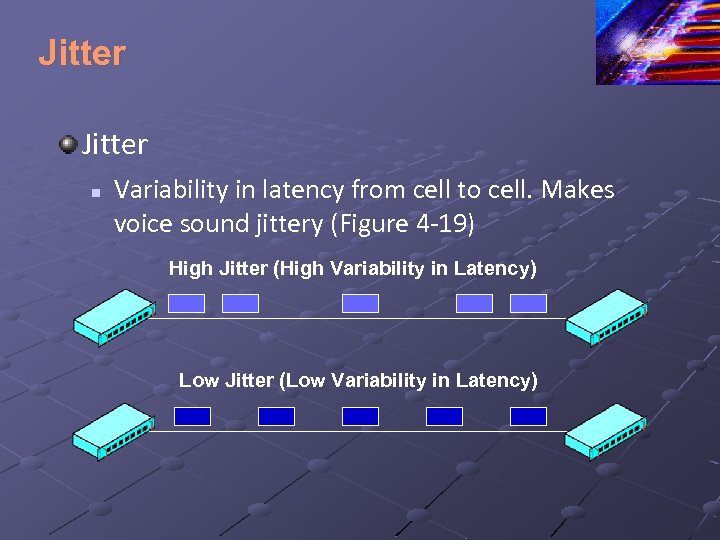
Jitter n Variability in latency from cell to cell. Makes voice sound jittery (Figure 4 -19) High Jitter (High Variability in Latency) Low Jitter (Low Variability in Latency)
Switch Purchasing Decisions Manageability n n Manager controls many managed switches (Figure 4 -20: Managed Switches) Polling to collect data and problem diagnosis Fixing switches remotely by changing their configurations Providing network administrator with summary performance data
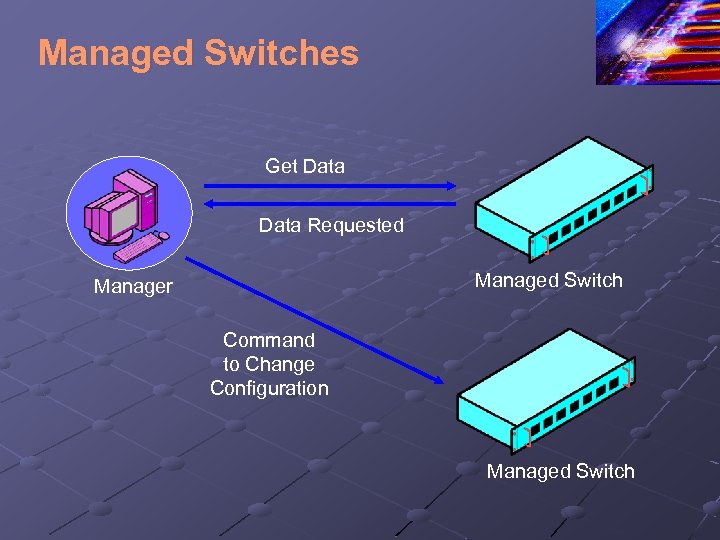
Managed Switches Get Data Requested Managed Switch Manager Command to Change Configuration Managed Switch
Managed Switches Manageability n Managed switches are substantially more expensive than unmanageable switches To purchase and even more to operate n However, in large networks, the savings in labor costs and rapid response are worth it
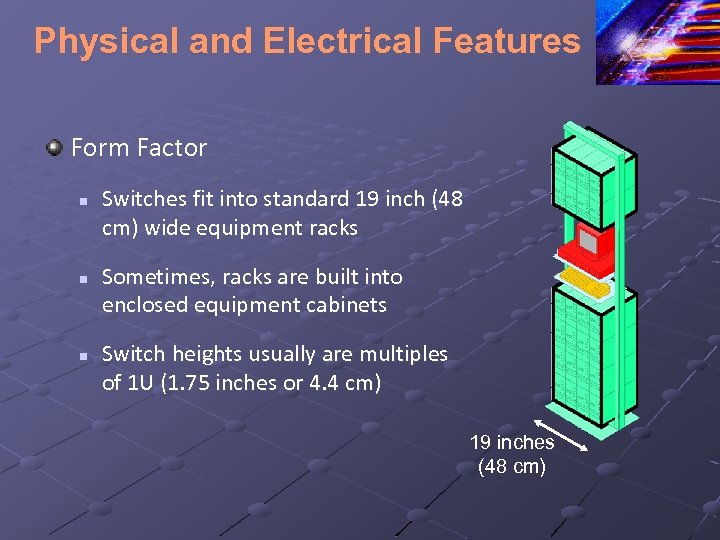
Physical and Electrical Features Form Factor n n n Switches fit into standard 19 inch (48 cm) wide equipment racks Sometimes, racks are built into enclosed equipment cabinets Switch heights usually are multiples of 1 U (1. 75 inches or 4. 4 cm) 19 inches (48 cm)
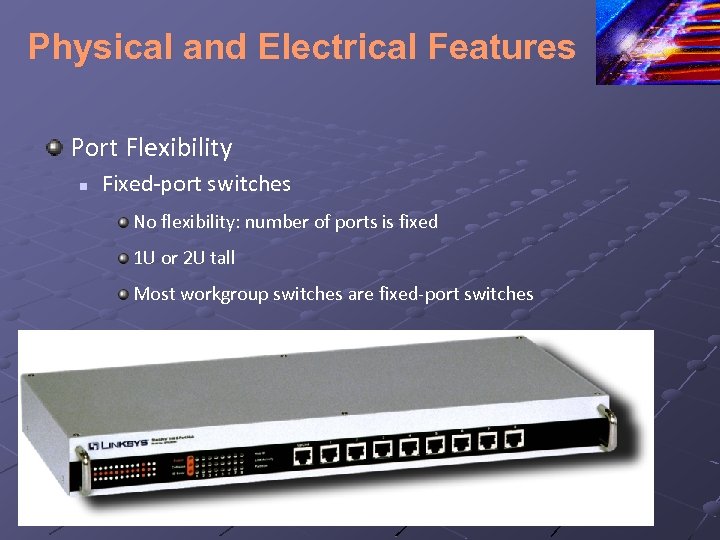
Physical and Electrical Features Port Flexibility n Fixed-port switches No flexibility: number of ports is fixed 1 U or 2 U tall Most workgroup switches are fixed-port switches
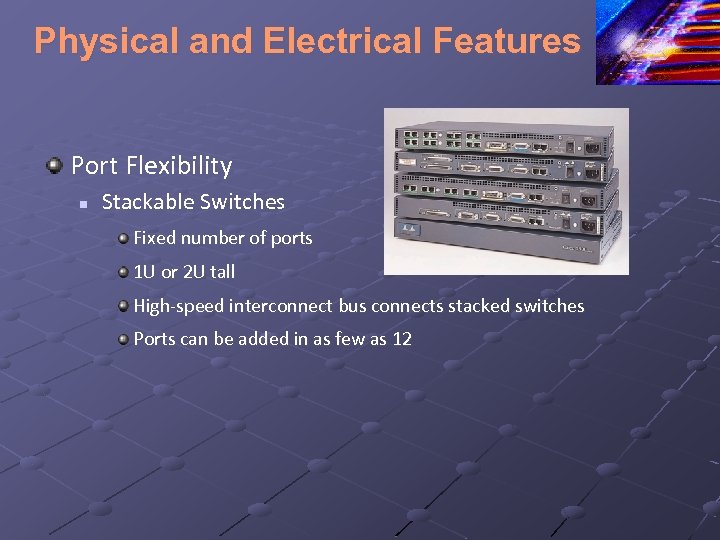
Physical and Electrical Features Port Flexibility n Stackable Switches Fixed number of ports 1 U or 2 U tall High-speed interconnect bus connects stacked switches Ports can be added in as few as 12
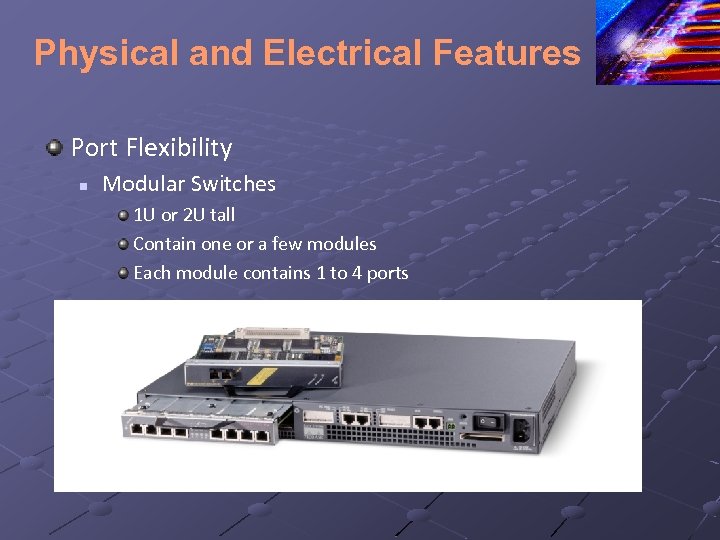
Physical and Electrical Features Port Flexibility n Modular Switches 1 U or 2 U tall Contain one or a few modules Each module contains 1 to 4 ports
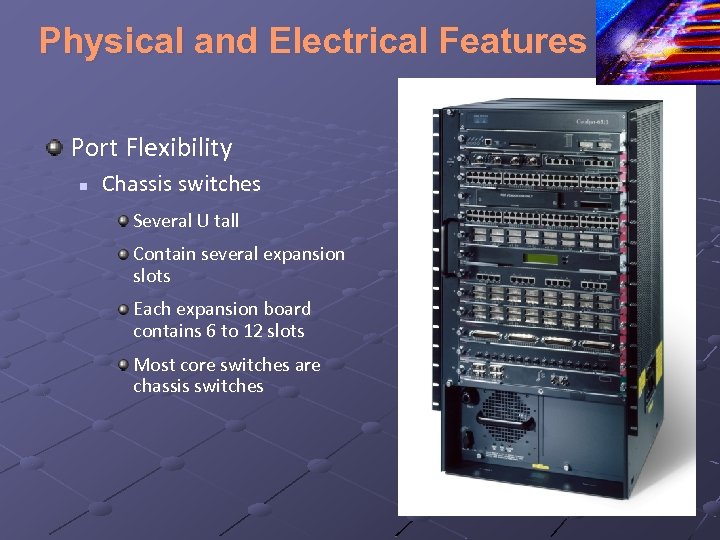
Physical and Electrical Features Port Flexibility n Chassis switches Several U tall Contain several expansion slots Each expansion board contains 6 to 12 slots Most core switches are chassis switches
Switch Interconnection UTP Uplink Ports n n n Normal Ethernet RJ-45 switch ports transmit on Pins 3 and 6 and listen on Pins 1 and 2 (NICs do the reverse) If you connect two normal ports on different switches, they will not be able to communicate Most switches have an uplink port, which transmits on Pins 1 and 2. You can connect a UTP uplink port on one switch to any normal port on a parent switch
References: Napier, A. , Judd, P. , Rivers, O. , and Adams, A. , (2003) E-Business Technologies Thomson Course Technologies ISBN: 0 -619 -06319 -x Panko, R (2005) Business Data Networks and Communications, 5 th edition, Prentice Hall ISBN: 0 -13 -127315 -9 Schneider E-Business, Eighth Edition ISBN-13: 978 -0 -324 -78807 -5 Hogan, F. , (2005) Internet Presentation
Скачать презентацию E-Business Ethernet and OSI Specific Outcomes n n
c7a37963b6b4014df88895f6b7cbb65a.ppt