


 Скачать презентацию Document for Technical and Sales Training KX-NS 300
f2386d10b0e513c165e5094507648ea0.ppt
- Количество слайдов: 101
 Document for Technical and Sales Training KX-NS 300 Basic Specification Rev 0. 2 September 6, 2013 Panasonic System Networks PBX SE team This document explains basic specification of KX-NS 300 version 1. It is recommended to know basic specification of KX-TDA 100 D and KX-TDA 600 before reading this document. However it is not required to know KX-TDE, KX-NCP and KX-NS 1000 before reading this document. Specifications are subject to change without notice.
 2
2
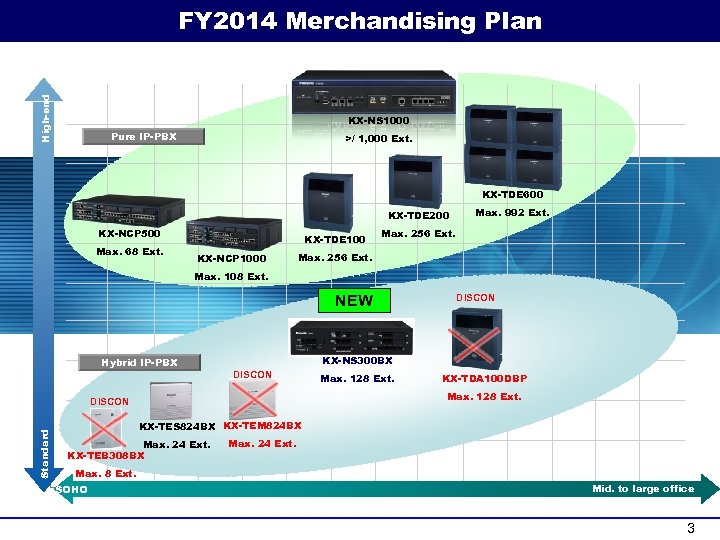 High-end FY 2014 Merchandising Plan KX-NS 1000 Pure IP-PBX >/ 1, 000 Ext. KX-TDE 600 KX-TDE 200 KX-NCP 500 Max. 68 Ext. KX-TDE 100 KX-NCP 1000 Max. 992 Ext. Max. 256 Ext. Max. 108 Ext. NEW KX-NS 300 BX Hybrid IP-PBX DISCON Max. 128 Ext. KX-TDA 100 DBP Max. 128 Ext. DISCON Standard DISCON KX-TES 824 BX KX-TEM 824 BX Max. 24 Ext. KX-TEB 308 BX Max. 24 Ext. Max. 8 Ext. SOHO Mid. to large office 3
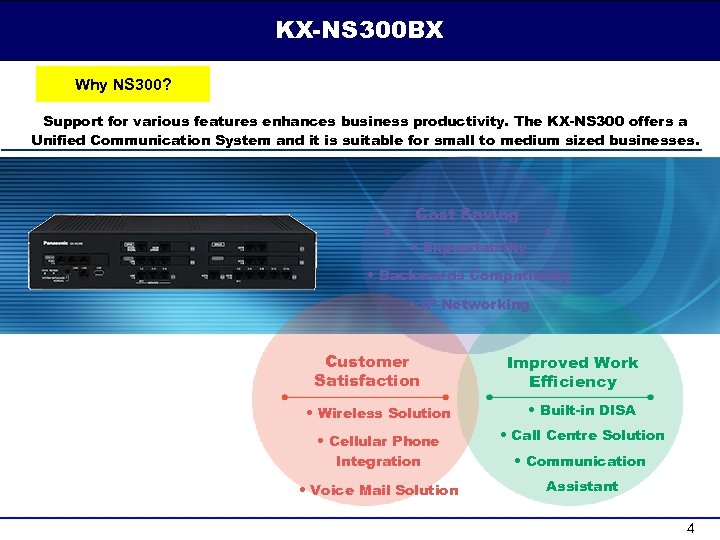 KX-NS 300 BX Why NS 300? Support for various features enhances business productivity. The KX-NS 300 offers a Unified Communication System and it is suitable for small to medium sized businesses. Cost Saving • Expandability • Backwards Compatibility • IP Networking Customer Satisfaction Improved Work Efficiency • Wireless Solution • Built-in DISA • Cellular Phone Integration • Call Centre Solution • Voice Mail Solution Assistant • Communication 4
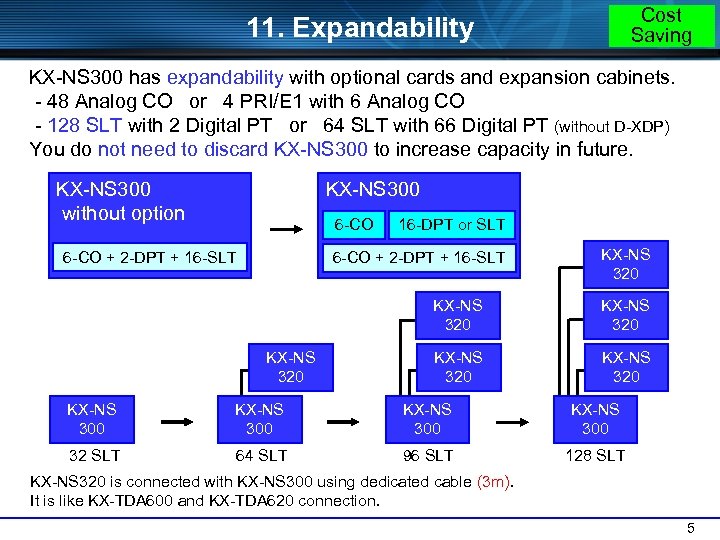 Cost Saving 11. Expandability KX-NS 300 has expandability with optional cards and expansion cabinets. - 48 Analog CO or 4 PRI/E 1 with 6 Analog CO - 128 SLT with 2 Digital PT or 64 SLT with 66 Digital PT (without D-XDP) You do not need to discard KX-NS 300 to increase capacity in future. KX-NS 300 without option KX-NS 300 6 -CO + 2 -DPT + 16 -SLT 16 -DPT or SLT 6 -CO + 2 -DPT + 16 -SLT KX-NS 320 KX-NS 320 KX-NS 300 32 SLT 64 SLT 96 SLT 128 SLT KX-NS 320 is connected with KX-NS 300 using dedicated cable (3 m). It is like KX-TDA 600 and KX-TDA 620 connection. 5
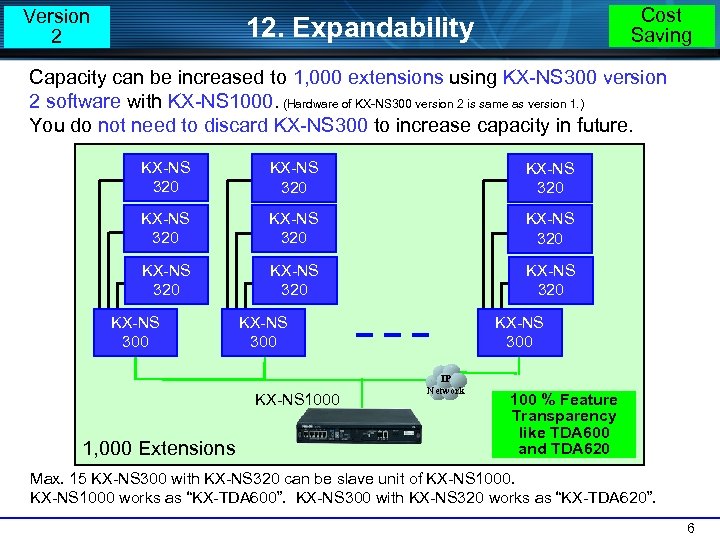 Version 2 Cost Saving 12. Expandability Capacity can be increased to 1, 000 extensions using KX-NS 300 version 2 software with KX-NS 1000. (Hardware of KX-NS 300 version 2 is same as version 1. ) You do not need to discard KX-NS 300 to increase capacity in future. KX-NS 320 KX-NS 320 KX-NS 320 KX-NS 300 KX-NS 1000 1, 000 Extensions KX-NS 300 IP Network 100 % Feature Transparency like TDA 600 and TDA 620 Max. 15 KX-NS 300 with KX-NS 320 can be slave unit of KX-NS 1000 works as “KX-TDA 600”. KX-NS 300 with KX-NS 320 works as “KX-TDA 620”. 6
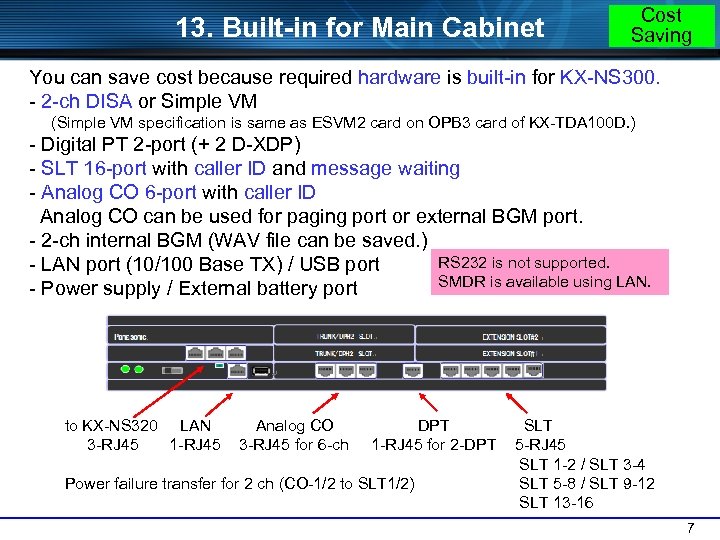 13. Built-in for Main Cabinet Cost Saving You can save cost because required hardware is built-in for KX-NS 300. - 2 -ch DISA or Simple VM (Simple VM specification is same as ESVM 2 card on OPB 3 card of KX-TDA 100 D. ) - Digital PT 2 -port (+ 2 D-XDP) - SLT 16 -port with caller ID and message waiting - Analog CO 6 -port with caller ID Analog CO can be used for paging port or external BGM port. - 2 -ch internal BGM (WAV file can be saved. ) RS 232 is not supported. - LAN port (10/100 Base TX) / USB port SMDR is available using LAN. - Power supply / External battery port to KX-NS 320 LAN 3 -RJ 45 1 -RJ 45 Analog CO 3 -RJ 45 for 6 -ch DPT 1 -RJ 45 for 2 -DPT Power failure transfer for 2 ch (CO-1/2 to SLT 1/2) SLT 5 -RJ 45 SLT 1 -2 / SLT 3 -4 SLT 5 -8 / SLT 9 -12 SLT 13 -16 7
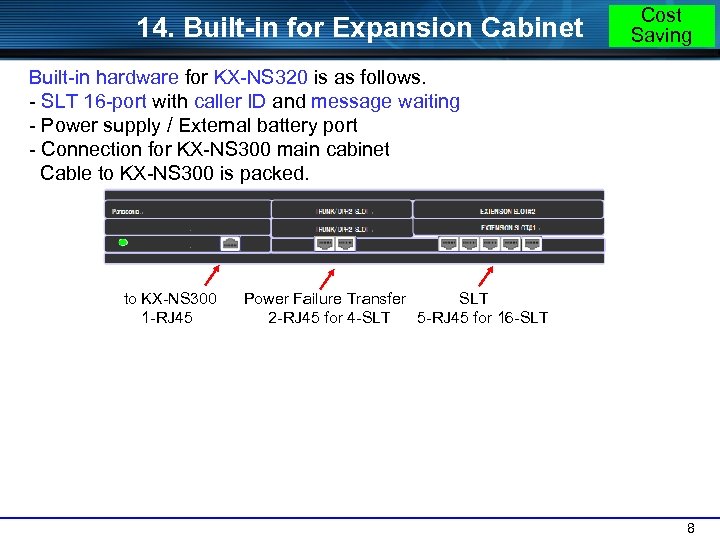 14. Built-in for Expansion Cabinet Cost Saving Built-in hardware for KX-NS 320 is as follows. - SLT 16 -port with caller ID and message waiting - Power supply / External battery port - Connection for KX-NS 300 main cabinet Cable to KX-NS 300 is packed. to KX-NS 300 1 -RJ 45 Power Failure Transfer SLT 2 -RJ 45 for 4 -SLT 5 -RJ 45 for 16 -SLT 8
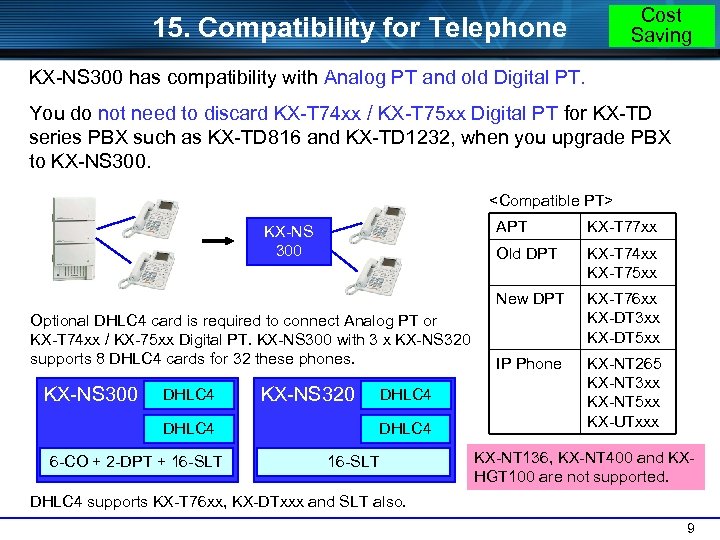 Cost Saving 15. Compatibility for Telephone KX-NS 300 has compatibility with Analog PT and old Digital PT. You do not need to discard KX-T 74 xx / KX-T 75 xx Digital PT for KX-TD series PBX such as KX-TD 816 and KX-TD 1232, when you upgrade PBX to KX-NS 300.
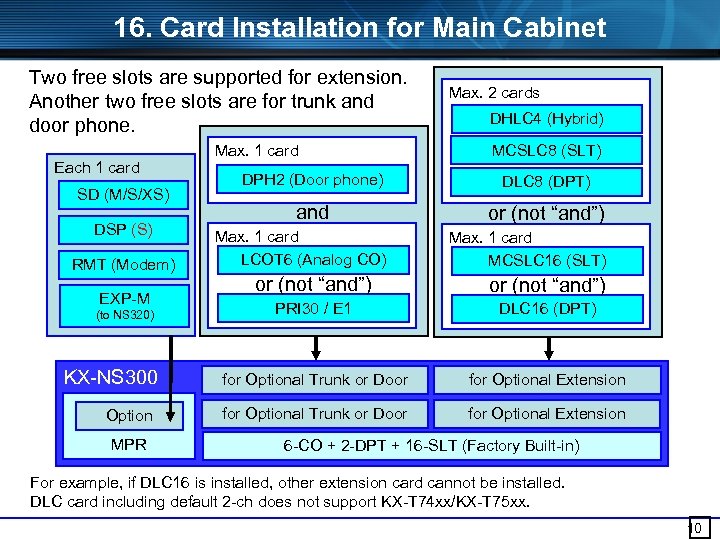 16. Card Installation for Main Cabinet Two free slots are supported for extension. Another two free slots are for trunk and door phone. Each 1 card SD (M/S/XS) DSP (S) RMT (Modem) EXP-M (to NS 320) KX-NS 300 Option MPR Max. 1 card Max. 2 cards DHLC 4 (Hybrid) MCSLC 8 (SLT) DPH 2 (Door phone) DLC 8 (DPT) and or (not “and”) Max. 1 card LCOT 6 (Analog CO) Max. 1 card MCSLC 16 (SLT) or (not “and”) PRI 30 / E 1 DLC 16 (DPT) for Optional Trunk or Door for Optional Extension 6 -CO + 2 -DPT + 16 -SLT (Factory Built-in) For example, if DLC 16 is installed, other extension card cannot be installed. DLC card including default 2 -ch does not support KX-T 74 xx/KX-T 75 xx. 10
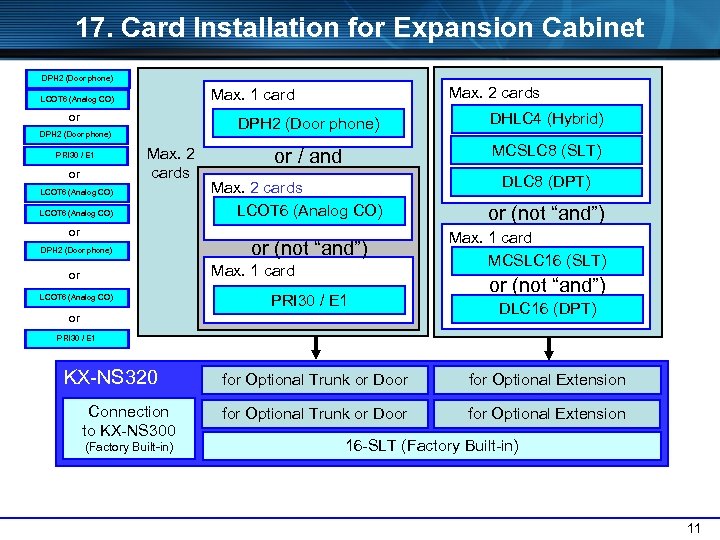 17. Card Installation for Expansion Cabinet DPH 2 (Door phone) or DPH 2 (Door phone) PRI 30 / E 1 or Max. 2 cards Max. 1 card LCOT 6 (Analog CO) Max. 2 cards LCOT 6 (Analog CO) or DPH 2 (Door phone) DHLC 4 (Hybrid) or / and MCSLC 8 (SLT) Max. 2 cards LCOT 6 (Analog CO) or (not “and”) Max. 1 card or LCOT 6 (Analog CO) PRI 30 / E 1 or DLC 8 (DPT) or (not “and”) Max. 1 card MCSLC 16 (SLT) or (not “and”) DLC 16 (DPT) PRI 30 / E 1 KX-NS 320 Connection to KX-NS 300 (Factory Built-in) for Optional Trunk or Door for Optional Extension 16 -SLT (Factory Built-in) 11
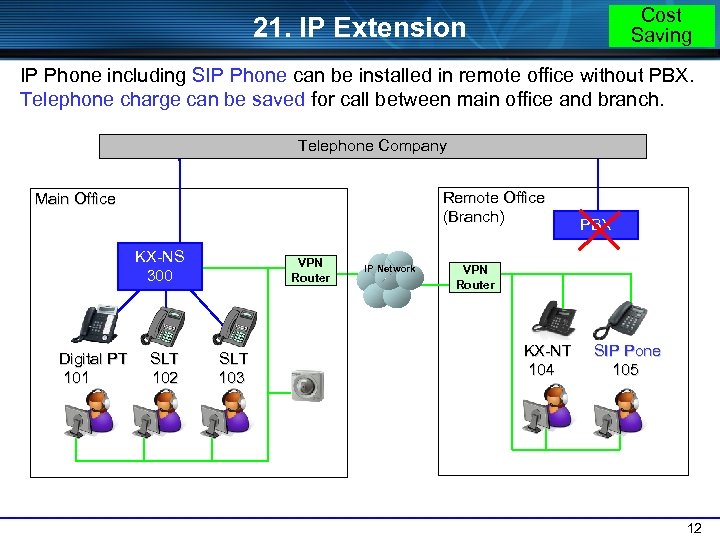 Cost Saving 21. IP Extension IP Phone including SIP Phone can be installed in remote office without PBX. Telephone charge can be saved for call between main office and branch. Telephone Company Remote Office (Branch) Main Office KX-NS 300 Digital PT 101 SLT 102 VPN Router SLT 103 IP Network PBX VPN Router KX-NT 104 SIP Pone 105 12
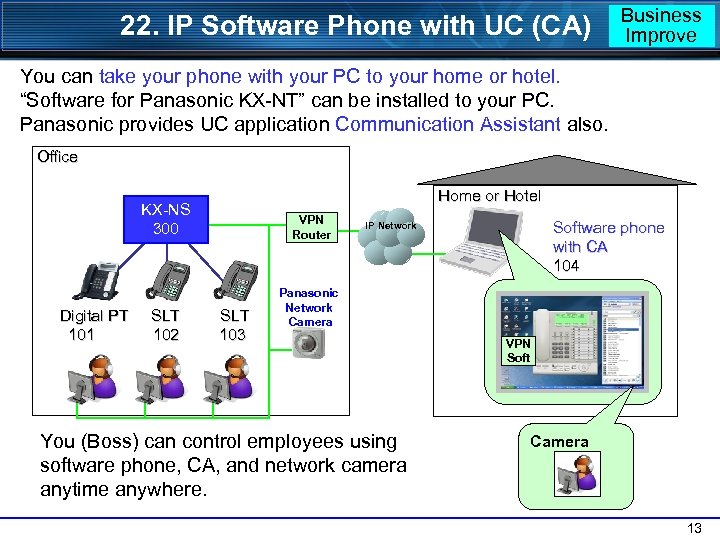 22. IP Software Phone with UC (CA) Business Improve You can take your phone with your PC to your home or hotel. “Software for Panasonic KX-NT” can be installed to your PC. Panasonic provides UC application Communication Assistant also. Office Home or Hotel KX-NS 300 Digital PT 101 SLT 102 VPN Router SLT 103 Software phone with CA 104 IP Network Panasonic Network Camera You (Boss) can control employees using software phone, CA, and network camera anytime anywhere. VPN Soft Camera 13
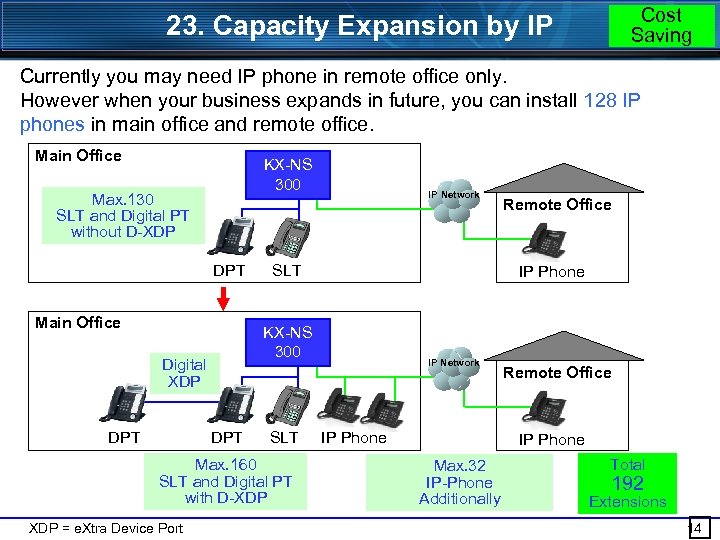 Cost Saving 23. Capacity Expansion by IP Currently you may need IP phone in remote office only. However when your business expands in future, you can install 128 IP phones in main office and remote office. Main Office KX-NS 300 Max. 130 SLT and Digital PT without D-XDP DPT Main Office SLT DPT SLT Max. 160 SLT and Digital PT with D-XDP = e. Xtra Device Port Remote Office IP Phone KX-NS 300 Digital XDP DPT IP Network IP Phone Remote Office IP Phone Max. 32 IP-Phone Additionally Total 192 Extensions 14
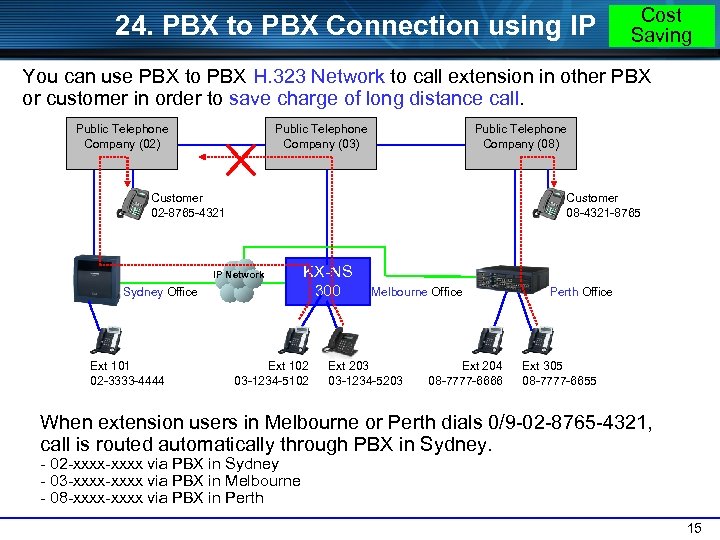 24. PBX to PBX Connection using IP Cost Saving You can use PBX to PBX H. 323 Network to call extension in other PBX or customer in order to save charge of long distance call. Public Telephone Company (02) Public Telephone Company (03) Public Telephone Company (08) Customer 02 -8765 -4321 Customer 08 -4321 -8765 IP Network Sydney Office Ext 101 02 -3333 -4444 KX-NS 300 Ext 102 03 -1234 -5102 Melbourne Office Ext 203 03 -1234 -5203 Ext 204 08 -7777 -6666 Perth Office Ext 305 08 -7777 -6655 When extension users in Melbourne or Perth dials 0/9 -02 -8765 -4321, call is routed automatically through PBX in Sydney. - 02 -xxxx via PBX in Sydney - 03 -xxxx via PBX in Melbourne - 08 -xxxx via PBX in Perth 15
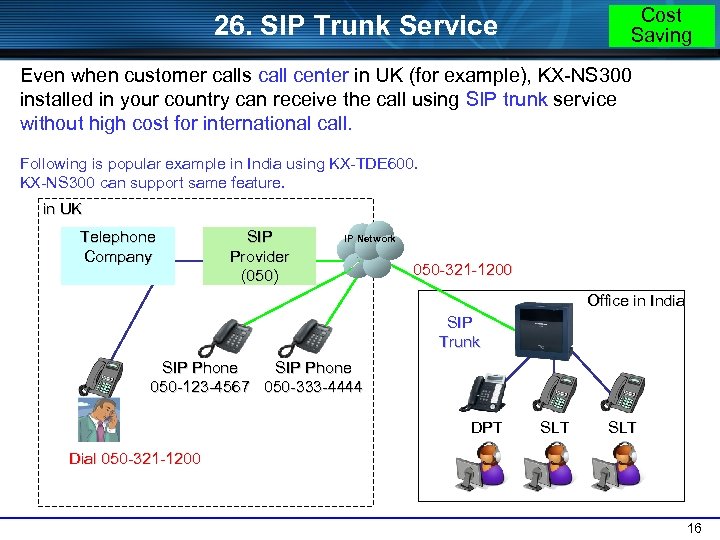 Cost Saving 26. SIP Trunk Service Even when customer calls call center in UK (for example), KX-NS 300 installed in your country can receive the call using SIP trunk service without high cost for international call. Following is popular example in India using KX-TDE 600. KX-NS 300 can support same feature. in UK Telephone Company SIP Provider (050) IP Network 050 -321 -1200 Office in India SIP Trunk SIP Phone 050 -123 -4567 050 -333 -4444 DPT SLT Dial 050 -321 -1200 16
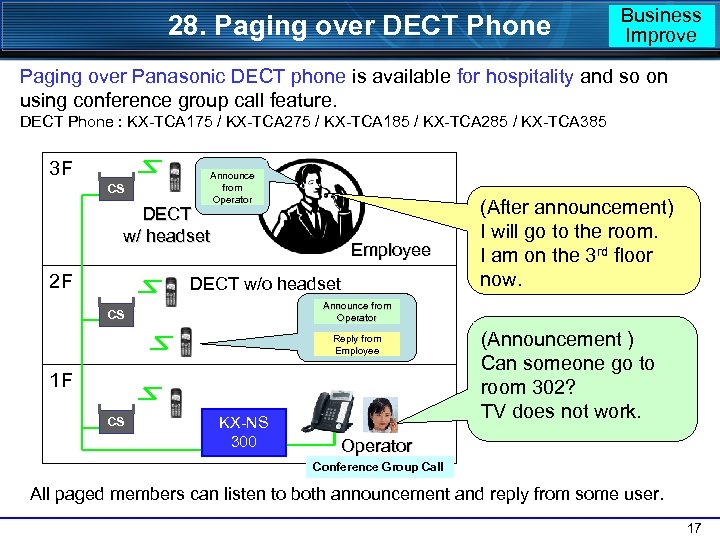 28. Paging over DECT Phone Business Improve Paging over Panasonic DECT phone is available for hospitality and so on using conference group call feature. DECT Phone : KX-TCA 175 / KX-TCA 275 / KX-TCA 185 / KX-TCA 285 / KX-TCA 385 3 F CS Announce from Operator DECT w/ headset 2 F Employee DECT w/o headset Announce from Operator CS Reply from Employee 1 F CS (After announcement) I will go to the room. I am on the 3 rd floor now. KX-NS 300 (Announcement ) Can someone go to room 302? TV does not work. Operator Conference Group Call All paged members can listen to both announcement and reply from some user. 17
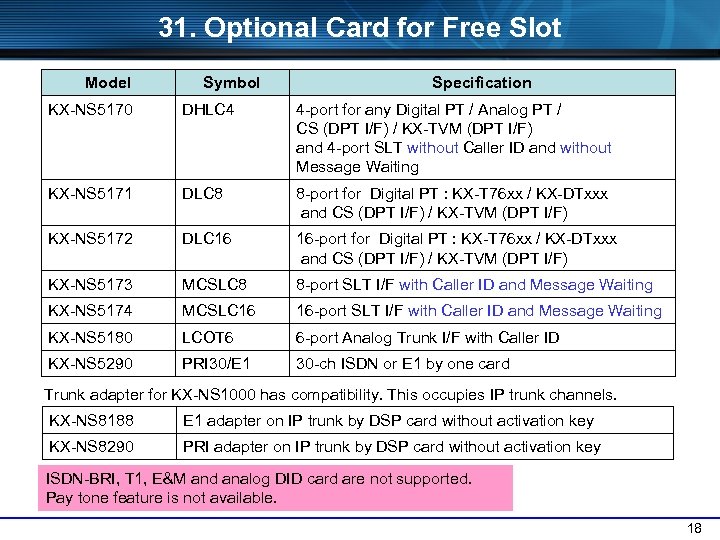 31. Optional Card for Free Slot Model Symbol Specification KX-NS 5170 DHLC 4 4 -port for any Digital PT / Analog PT / CS (DPT I/F) / KX-TVM (DPT I/F) and 4 -port SLT without Caller ID and without Message Waiting KX-NS 5171 DLC 8 8 -port for Digital PT : KX-T 76 xx / KX-DTxxx and CS (DPT I/F) / KX-TVM (DPT I/F) KX-NS 5172 DLC 16 16 -port for Digital PT : KX-T 76 xx / KX-DTxxx and CS (DPT I/F) / KX-TVM (DPT I/F) KX-NS 5173 MCSLC 8 8 -port SLT I/F with Caller ID and Message Waiting KX-NS 5174 MCSLC 16 16 -port SLT I/F with Caller ID and Message Waiting KX-NS 5180 LCOT 6 6 -port Analog Trunk I/F with Caller ID KX-NS 5290 PRI 30/E 1 30 -ch ISDN or E 1 by one card Trunk adapter for KX-NS 1000 has compatibility. This occupies IP trunk channels. KX-NS 8188 E 1 adapter on IP trunk by DSP card without activation key KX-NS 8290 PRI adapter on IP trunk by DSP card without activation key ISDN-BRI, T 1, E&M and analog DID card are not supported. Pay tone feature is not available. 18
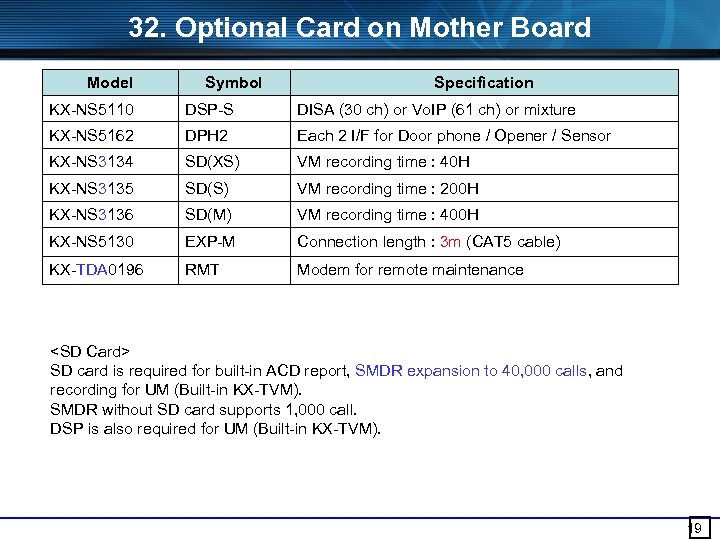 32. Optional Card on Mother Board Model Symbol Specification KX-NS 5110 DSP-S DISA (30 ch) or Vo. IP (61 ch) or mixture KX-NS 5162 DPH 2 Each 2 I/F for Door phone / Opener / Sensor KX-NS 3134 SD(XS) VM recording time : 40 H KX-NS 3135 SD(S) VM recording time : 200 H KX-NS 3136 SD(M) VM recording time : 400 H KX-NS 5130 EXP-M Connection length : 3 m (CAT 5 cable) KX-TDA 0196 RMT Modem for remote maintenance
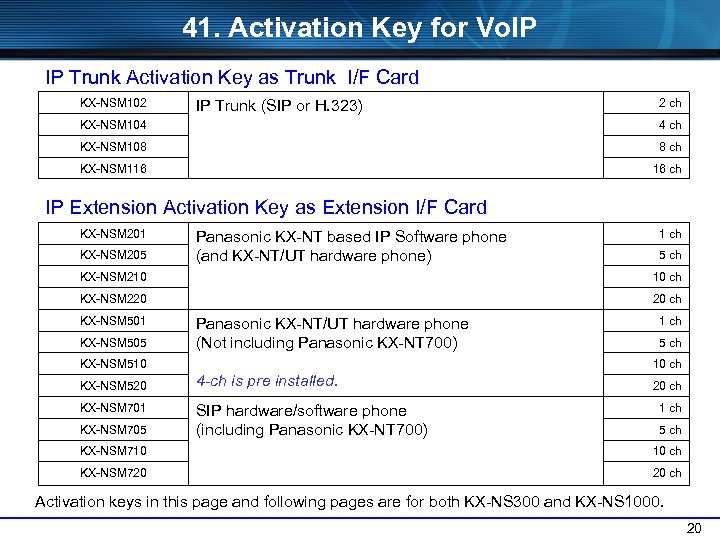 41. Activation Key for Vo. IP IP Trunk Activation Key as Trunk I/F Card KX-NSM 102 2 ch IP Trunk (SIP or H. 323) KX-NSM 104 4 ch KX-NSM 108 8 ch KX-NSM 116 16 ch IP Extension Activation Key as Extension I/F Card KX-NSM 201 KX-NSM 205 Panasonic KX-NT based IP Software phone (and KX-NT/UT hardware phone) 1 ch 5 ch KX-NSM 210 10 ch KX-NSM 220 20 ch KX-NSM 501 KX-NSM 505 Panasonic KX-NT/UT hardware phone (Not including Panasonic KX-NT 700) KX-NSM 510 KX-NSM 520 KX-NSM 701 KX-NSM 705 KX-NSM 710 KX-NSM 720 1 ch 5 ch 10 ch 4 -ch is pre installed. 20 ch SIP hardware/software phone (including Panasonic KX-NT 700) 1 ch 5 ch 10 ch 20 ch Activation keys in this page and following pages are for both KX-NS 300 and KX-NS 1000. 20
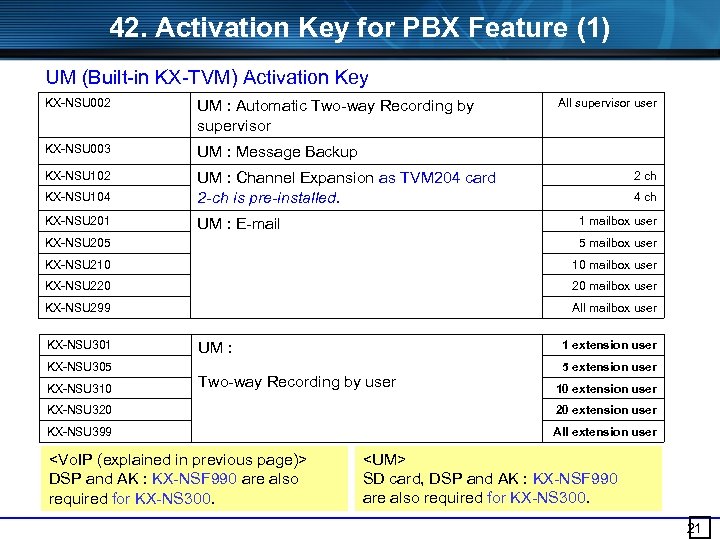 42. Activation Key for PBX Feature (1) UM (Built-in KX-TVM) Activation Key KX-NSU 002 UM : Automatic Two-way Recording by supervisor KX-NSU 003 UM : Message Backup KX-NSU 102 KX-NSU 104 UM : Channel Expansion as TVM 204 card 2 -ch is pre-installed. KX-NSU 201 UM : E-mail All supervisor user 2 ch 4 ch 1 mailbox user KX-NSU 205 5 mailbox user KX-NSU 210 10 mailbox user KX-NSU 220 20 mailbox user KX-NSU 299 All mailbox user KX-NSU 301 KX-NSU 305 KX-NSU 310 1 extension user UM : Two-way Recording by user 5 extension user 10 extension user KX-NSU 320 20 extension user KX-NSU 399 All extension user
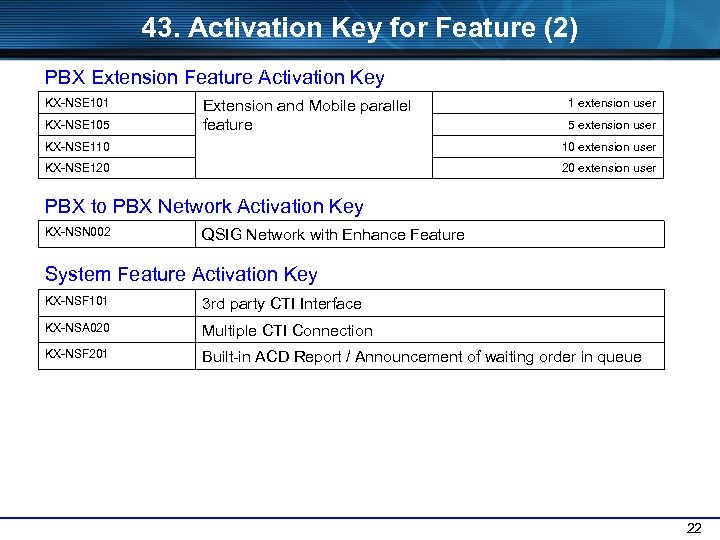 43. Activation Key for Feature (2) PBX Extension Feature Activation Key KX-NSE 101 KX-NSE 105 Extension and Mobile parallel feature 1 extension user 5 extension user KX-NSE 110 10 extension user KX-NSE 120 20 extension user PBX to PBX Network Activation Key KX-NSN 002 QSIG Network with Enhance Feature System Feature Activation Key KX-NSF 101 3 rd party CTI Interface KX-NSA 020 Multiple CTI Connection KX-NSF 201 Built-in ACD Report / Announcement of waiting order in queue 22
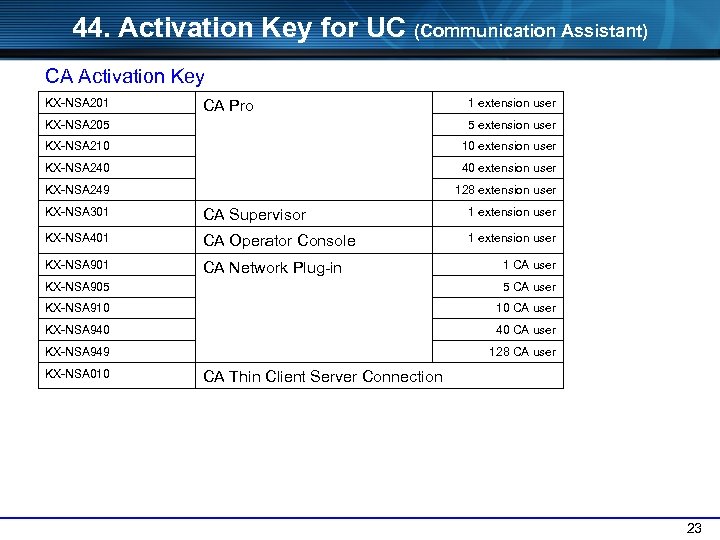 44. Activation Key for UC (Communication Assistant) CA Activation Key KX-NSA 201 1 extension user CA Pro KX-NSA 205 5 extension user KX-NSA 210 10 extension user KX-NSA 240 40 extension user KX-NSA 249 128 extension user KX-NSA 301 CA Supervisor 1 extension user KX-NSA 401 CA Operator Console 1 extension user KX-NSA 901 CA Network Plug-in 1 CA user KX-NSA 905 5 CA user KX-NSA 910 10 CA user KX-NSA 940 40 CA user KX-NSA 949 128 CA user KX-NSA 010 CA Thin Client Server Connection 23
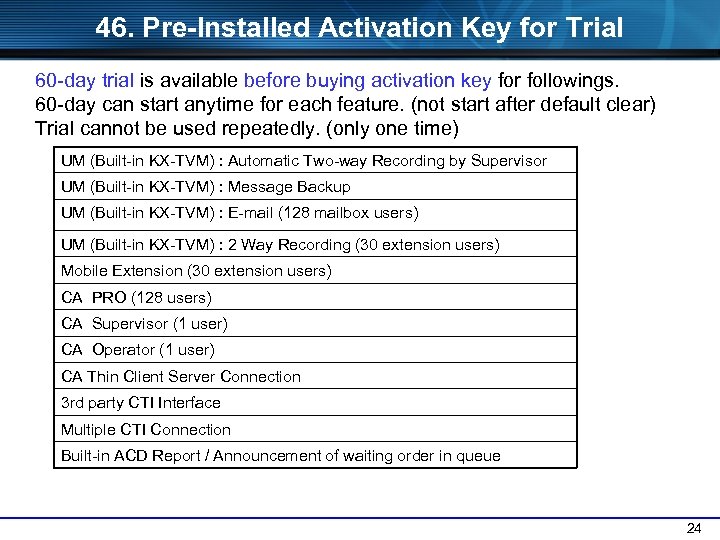 46. Pre-Installed Activation Key for Trial 60 -day trial is available before buying activation key for followings. 60 -day can start anytime for each feature. (not start after default clear) Trial cannot be used repeatedly. (only one time) UM (Built-in KX-TVM) : Automatic Two-way Recording by Supervisor UM (Built-in KX-TVM) : Message Backup UM (Built-in KX-TVM) : E-mail (128 mailbox users) UM (Built-in KX-TVM) : 2 Way Recording (30 extension users) Mobile Extension (30 extension users) CA PRO (128 users) CA Supervisor (1 user) CA Operator (1 user) CA Thin Client Server Connection 3 rd party CTI Interface Multiple CTI Connection Built-in ACD Report / Announcement of waiting order in queue 24
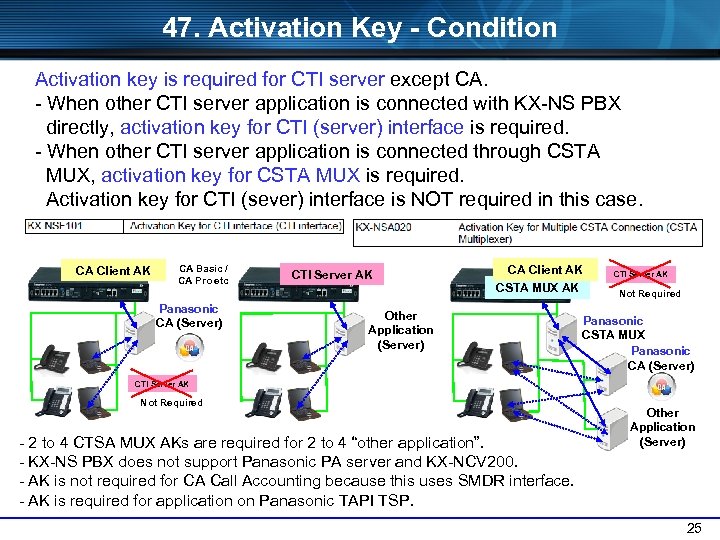 47. Activation Key - Condition Activation key is required for CTI server except CA. - When other CTI server application is connected with KX-NS PBX directly, activation key for CTI (server) interface is required. - When other CTI server application is connected through CSTA MUX, activation key for CSTA MUX is required. Activation key for CTI (sever) interface is NOT required in this case. CA Client AK CA Basic / CA Pro etc Panasonic CA (Server) CTI Server AK CA Client AK CSTA MUX AK Other Application (Server) CTI Server AK Not Required Panasonic CSTA MUX Panasonic CA (Server) CTI Server AK Not Required - 2 to 4 CTSA MUX AKs are required for 2 to 4 “other application”. - KX-NS PBX does not support Panasonic PA server and KX-NCV 200. - AK is not required for CA Call Accounting because this uses SMDR interface. - AK is required for application on Panasonic TAPI TSP. Other Application (Server) 25
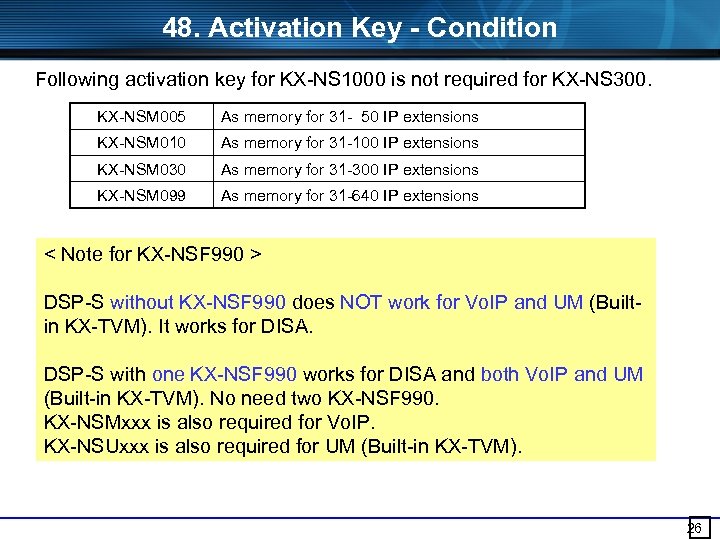 48. Activation Key - Condition Following activation key for KX-NS 1000 is not required for KX-NS 300. KX-NSM 005 As memory for 31 - 50 IP extensions KX-NSM 010 As memory for 31 -100 IP extensions KX-NSM 030 As memory for 31 -300 IP extensions KX-NSM 099 As memory for 31 -640 IP extensions < Note for KX-NSF 990 > DSP-S without KX-NSF 990 does NOT work for Vo. IP and UM (Builtin KX-TVM). It works for DISA. DSP-S with one KX-NSF 990 works for DISA and both Vo. IP and UM (Built-in KX-TVM). No need two KX-NSF 990. KX-NSMxxx is also required for Vo. IP. KX-NSUxxx is also required for UM (Built-in KX-TVM). 26
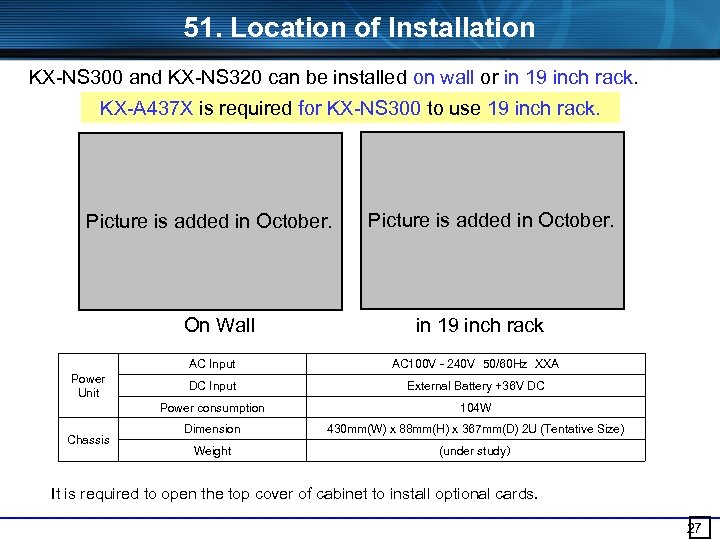 51. Location of Installation KX-NS 300 and KX-NS 320 can be installed on wall or in 19 inch rack. KX-A 437 X is required for KX-NS 300 to use 19 inch rack. Picture is added in October. On Wall Picture is added in October. in 19 inch rack AC Input Chassis AC 100 V - 240 V 50/60 Hz XXA DC Input External Battery +36 V DC Power consumption Power Unit 104 W Dimension 430 mm(W) x 88 mm(H) x 367 mm(D) 2 U (Tentative Size) Weight (under study) It is required to open the top cover of cabinet to install optional cards. 27
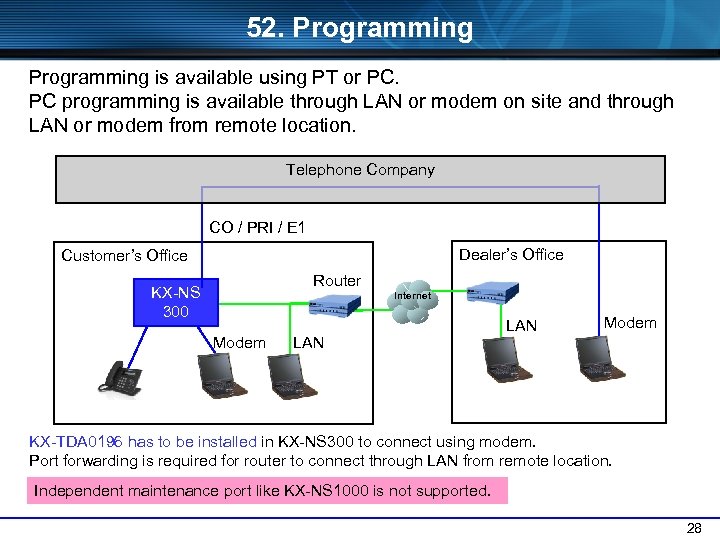 52. Programming is available using PT or PC. PC programming is available through LAN or modem on site and through LAN or modem from remote location. Telephone Company CO / PRI / E 1 Dealer’s Office Customer’s Office Router KX-NS 300 Internet Modem LAN Modem KX-TDA 0196 has to be installed in KX-NS 300 to connect using modem. Port forwarding is required for router to connect through LAN from remote location. Independent maintenance port like KX-NS 1000 is not supported. 28
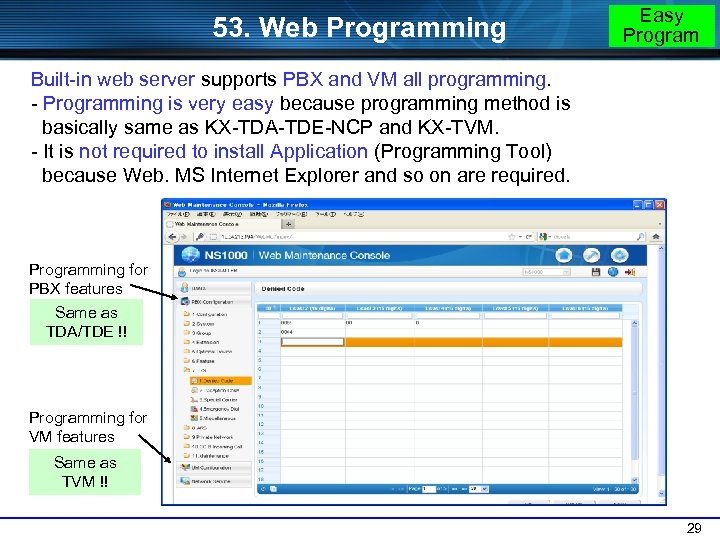 53. Web Programming Easy Program Built-in web server supports PBX and VM all programming. - Programming is very easy because programming method is basically same as KX-TDA-TDE-NCP and KX-TVM. - It is not required to install Application (Programming Tool) because Web. MS Internet Explorer and so on are required. Programming for PBX features Same as TDA/TDE !! Programming for VM features Same as TVM !! 29
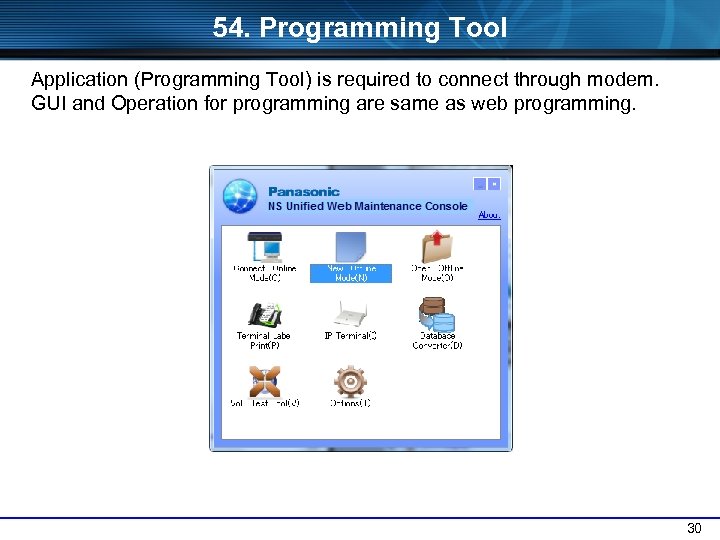 54. Programming Tool Application (Programming Tool) is required to connect through modem. GUI and Operation for programming are same as web programming. NS Unified Web Maintenance Console 30
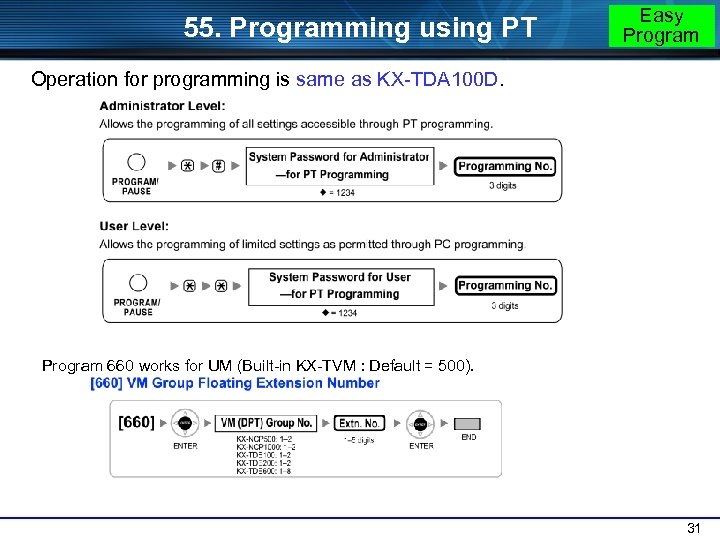 55. Programming using PT Easy Program Operation for programming is same as KX-TDA 100 D. Program 660 works for UM (Built-in KX-TVM : Default = 500). 31
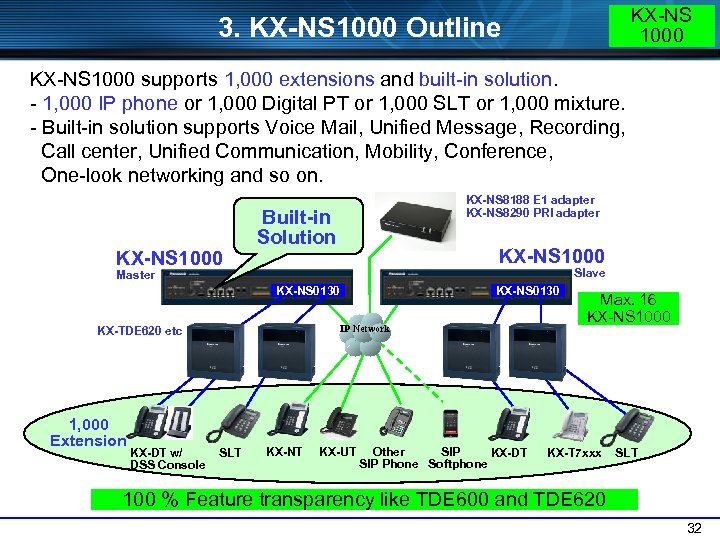 KX-NS 1000 3. KX-NS 1000 Outline KX-NS 1000 supports 1, 000 extensions and built-in solution. - 1, 000 IP phone or 1, 000 Digital PT or 1, 000 SLT or 1, 000 mixture. - Built-in solution supports Voice Mail, Unified Message, Recording, Call center, Unified Communication, Mobility, Conference, One-look networking and so on. KX-NS 1000 KX-NS 8188 E 1 adapter KX-NS 8290 PRI adapter Built-in Solution KX-NS 1000 Slave Master KX-NS 0130 IP Network KX-TDE 620 etc 1, 000 Extension KX-DT w/ DSS Console SLT KX-NT KX-UT Other SIP KX-DT SIP Phone Softphone Max. 16 KX-NS 1000 KX-T 7 xxx SLT 100 % Feature transparency like TDE 600 and TDE 620 32
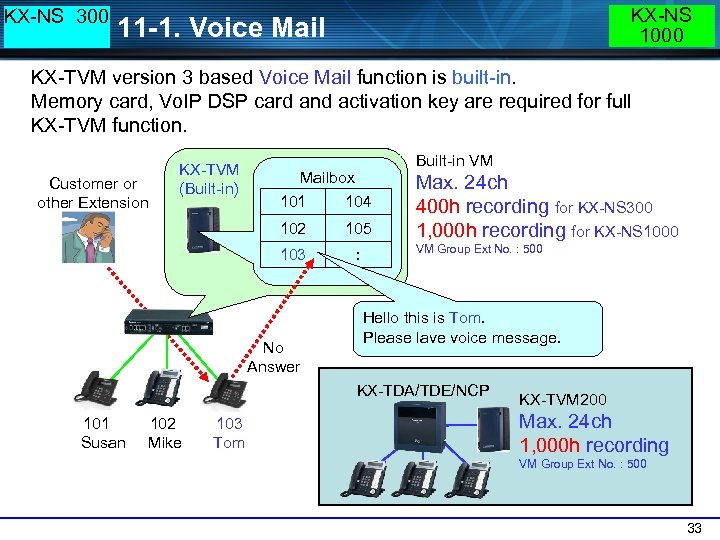 KX-NS 300 KX-NS 1000 11 -1. Voice Mail KX-TVM version 3 based Voice Mail function is built-in. Memory card, Vo. IP DSP card and activation key are required for full KX-TVM function. Customer or other Extension KX-TVM (Built-in) Built-in VM Mailbox 101 104 102 105 103 : No Answer Max. 24 ch 400 h recording for KX-NS 300 1, 000 h recording for KX-NS 1000 VM Group Ext No. : 500 Hello this is Tom. Please lave voice message. KX-TDA/TDE/NCP 101 Susan 102 Mike 103 Tom KX-TVM 200 Max. 24 ch 1, 000 h recording VM Group Ext No. : 500 33
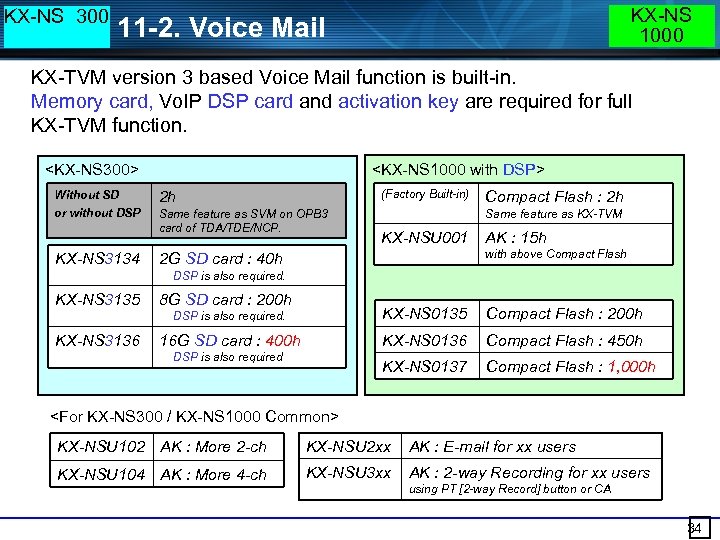 KX-NS 300 KX-NS 1000 11 -2. Voice Mail KX-TVM version 3 based Voice Mail function is built-in. Memory card, Vo. IP DSP card and activation key are required for full KX-TVM function.
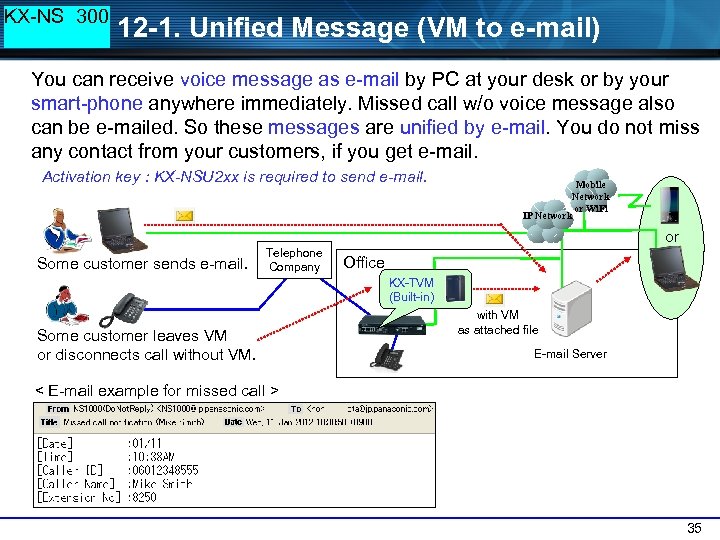 KX-NS 300 12 -1. Unified Message (VM to e-mail) You can receive voice message as e-mail by PC at your desk or by your smart-phone anywhere immediately. Missed call w/o voice message also can be e-mailed. So these messages are unified by e-mail. You do not miss any contact from your customers, if you get e-mail. Activation key : KX-NSU 2 xx is required to send e-mail. Mobile Network or Wi. Fi IP Network or Some customer sends e-mail. Telephone Company Office KX-TVM (Built-in) Some customer leaves VM or disconnects call without VM. with VM as attached file E-mail Server < E-mail example for missed call > 35
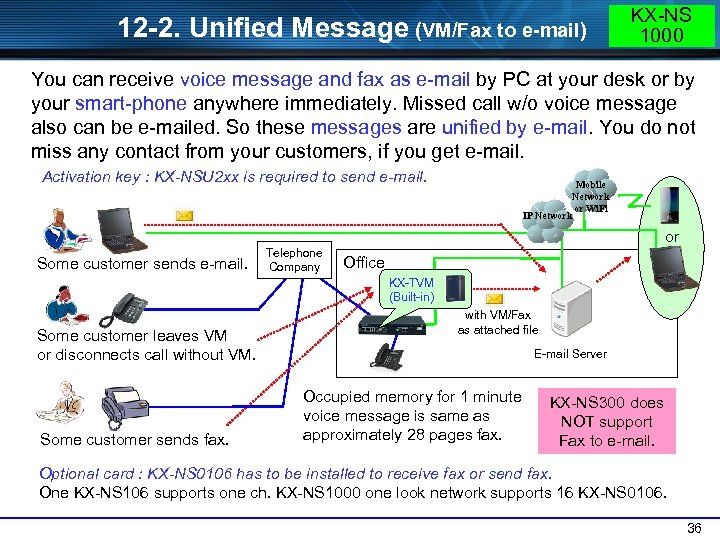 12 -2. Unified Message (VM/Fax to e-mail) KX-NS 1000 You can receive voice message and fax as e-mail by PC at your desk or by your smart-phone anywhere immediately. Missed call w/o voice message also can be e-mailed. So these messages are unified by e-mail. You do not miss any contact from your customers, if you get e-mail. Activation key : KX-NSU 2 xx is required to send e-mail. Mobile Network or Wi. Fi IP Network or Some customer sends e-mail. Telephone Company Office KX-TVM (Built-in) Some customer leaves VM or disconnects call without VM. Some customer sends fax. with VM/Fax as attached file E-mail Server Occupied memory for 1 minute voice message is same as approximately 28 pages fax. KX-NS 300 does NOT support Fax to e-mail. Optional card : KX-NS 0106 has to be installed to receive fax or send fax. One KX-NS 106 supports one ch. KX-NS 1000 one look network supports 16 KX-NS 0106. 36
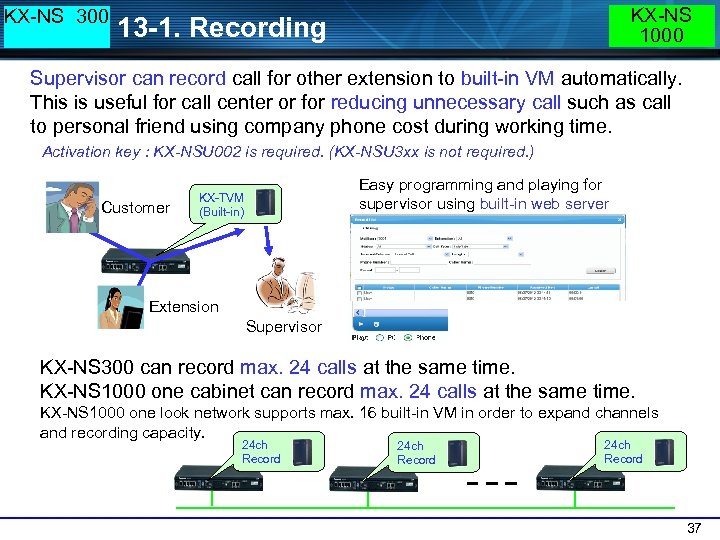 KX-NS 300 KX-NS 1000 13 -1. Recording Supervisor can record call for other extension to built-in VM automatically. This is useful for call center or for reducing unnecessary call such as call to personal friend using company phone cost during working time. Activation key : KX-NSU 002 is required. (KX-NSU 3 xx is not required. ) Customer Easy programming and playing for supervisor using built-in web server KX-TVM (Built-in) Extension Supervisor KX-NS 300 can record max. 24 calls at the same time. KX-NS 1000 one cabinet can record max. 24 calls at the same time. KX-NS 1000 one look network supports max. 16 built-in VM in order to expand channels and recording capacity. 24 ch Record 37
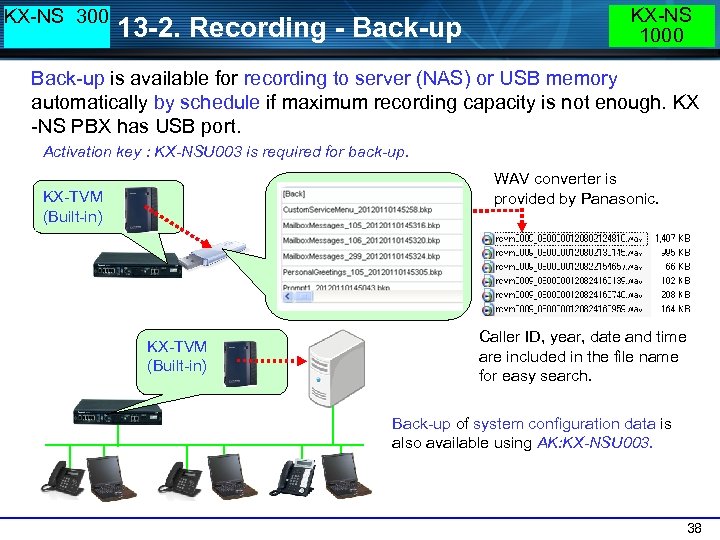 KX-NS 300 13 -2. Recording - Back-up KX-NS 1000 Back-up is available for recording to server (NAS) or USB memory automatically by schedule if maximum recording capacity is not enough. KX -NS PBX has USB port. Activation key : KX-NSU 003 is required for back-up. WAV converter is provided by Panasonic. KX-TVM (Built-in) Caller ID, year, date and time are included in the file name for easy search. Back-up of system configuration data is also available using AK: KX-NSU 003. 38
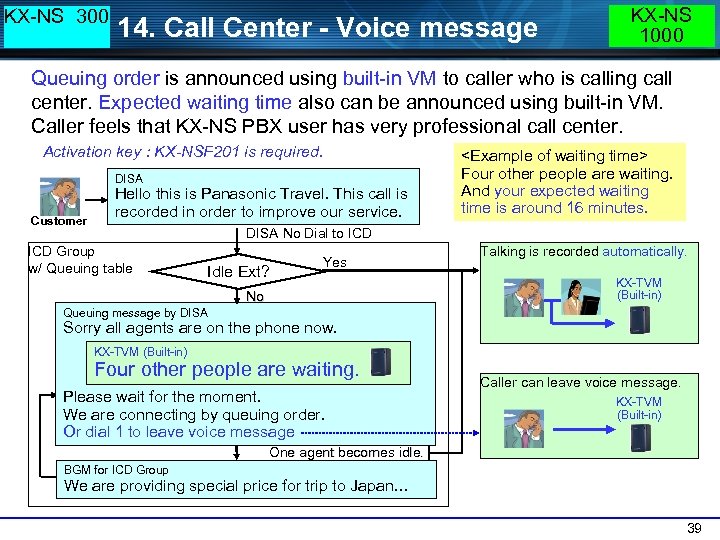 KX-NS 300 14. Call Center - Voice message KX-NS 1000 Queuing order is announced using built-in VM to caller who is calling call center. Expected waiting time also can be announced using built-in VM. Caller feels that KX-NS PBX user has very professional call center. Activation key : KX-NSF 201 is required. DISA Customer Hello this is Panasonic Travel. This call is recorded in order to improve our service.
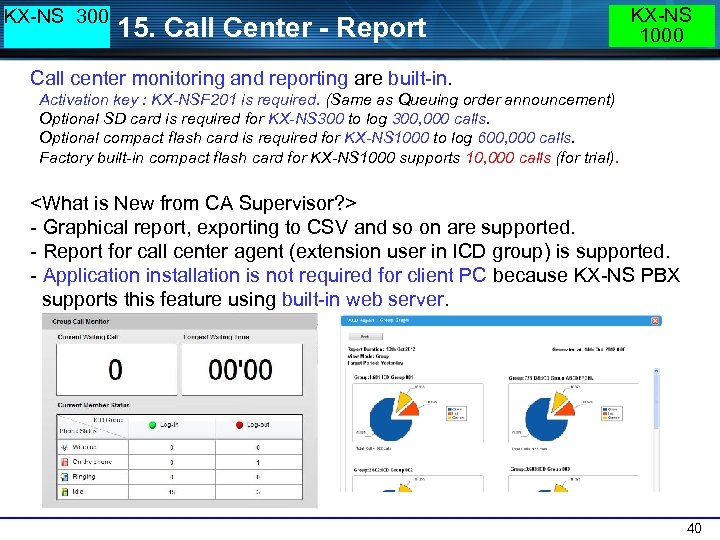 KX-NS 300 15. Call Center - Report KX-NS 1000 Call center monitoring and reporting are built-in. Activation key : KX-NSF 201 is required. (Same as Queuing order announcement) Optional SD card is required for KX-NS 300 to log 300, 000 calls. Optional compact flash card is required for KX-NS 1000 to log 600, 000 calls. Factory built-in compact flash card for KX-NS 1000 supports 10, 000 calls (for trial).
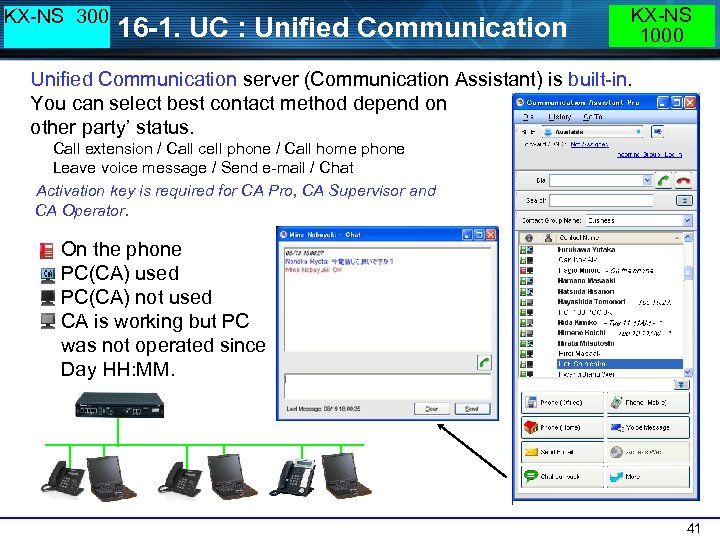 KX-NS 300 16 -1. UC : Unified Communication KX-NS 1000 Unified Communication server (Communication Assistant) is built-in. You can select best contact method depend on other party’ status. Call extension / Call cell phone / Call home phone Leave voice message / Send e-mail / Chat Activation key is required for CA Pro, CA Supervisor and CA Operator. On the phone PC(CA) used PC(CA) not used CA is working but PC was not operated since Day HH: MM. 41
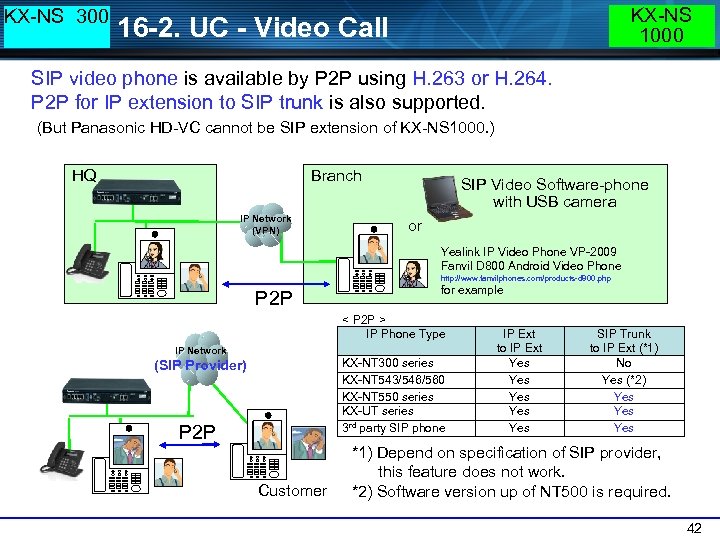 KX-NS 300 KX-NS 1000 16 -2. UC - Video Call SIP video phone is available by P 2 P using H. 263 or H. 264. P 2 P for IP extension to SIP trunk is also supported. (But Panasonic HD-VC cannot be SIP extension of KX-NS 1000. ) HQ Branch IP Network (VPN) SIP Video Software-phone with USB camera or Yealink IP Video Phone VP-2009 Fanvil D 800 Android Video Phone http: //www. fanvilphones. com/products-d 800. php P 2 P for example < P 2 P > IP Phone Type IP Network KX-NT 300 series KX-NT 543/546/560 KX-NT 550 series KX-UT series 3 rd party SIP phone (SIP Provider) P 2 P Customer IP Ext to IP Ext Yes Yes Yes SIP Trunk to IP Ext (*1) No Yes (*2) Yes Yes *1) Depend on specification of SIP provider, this feature does not work. *2) Software version up of NT 500 is required. 42
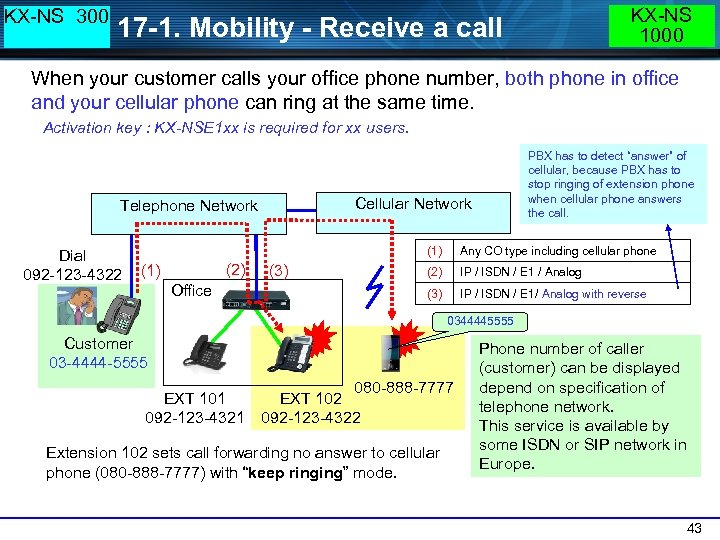 KX-NS 300 KX-NS 1000 17 -1. Mobility - Receive a call When your customer calls your office phone number, both phone in office and your cellular phone can ring at the same time. Activation key : KX-NSE 1 xx is required for xx users. Cellular Network Telephone Network Dial 092 -123 -4322 PBX has to detect “answer” of cellular, because PBX has to stop ringing of extension phone when cellular phone answers the call. (1) (2) (1) Office (2) IP / ISDN / E 1 / Analog (3) Any CO type including cellular phone IP / ISDN / E 1/ Analog with reverse 0344445555 Customer 03 -4444 -5555 EXT 101 092 -123 -4321 080 -888 -7777 EXT 102 092 -123 -4322 Extension 102 sets call forwarding no answer to cellular phone (080 -888 -7777) with “keep ringing” mode. Phone number of caller (customer) can be displayed depend on specification of telephone network. This service is available by some ISDN or SIP network in Europe. 43
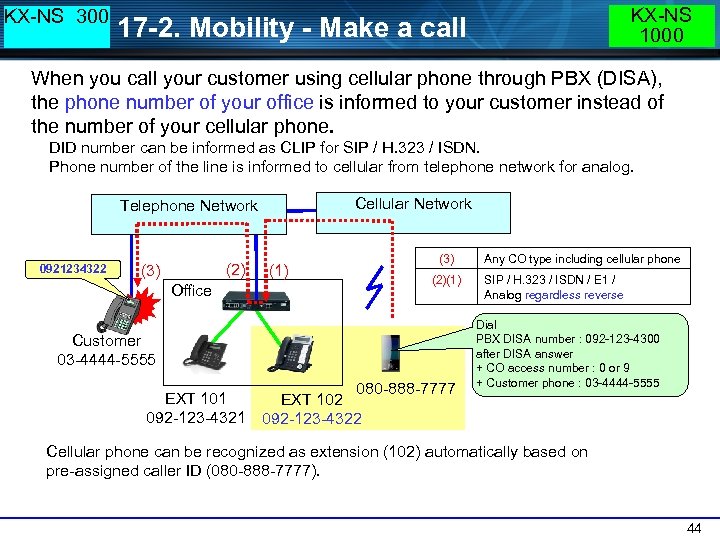 KX-NS 300 KX-NS 1000 17 -2. Mobility - Make a call When you call your customer using cellular phone through PBX (DISA), the phone number of your office is informed to your customer instead of the number of your cellular phone. DID number can be informed as CLIP for SIP / H. 323 / ISDN. Phone number of the line is informed to cellular from telephone network for analog. Cellular Network Telephone Network 0921234322 (2) (3) Office (1) (3) (2)(1) Customer 03 -4444 -5555 EXT 101 092 -123 -4321 080 -888 -7777 EXT 102 092 -123 -4322 Any CO type including cellular phone SIP / H. 323 / ISDN / E 1 / Analog regardless reverse Dial PBX DISA number : 092 -123 -4300 after DISA answer + CO access number : 0 or 9 + Customer phone : 03 -4444 -5555 Cellular phone can be recognized as extension (102) automatically based on pre-assigned caller ID (080 -888 -7777). 44
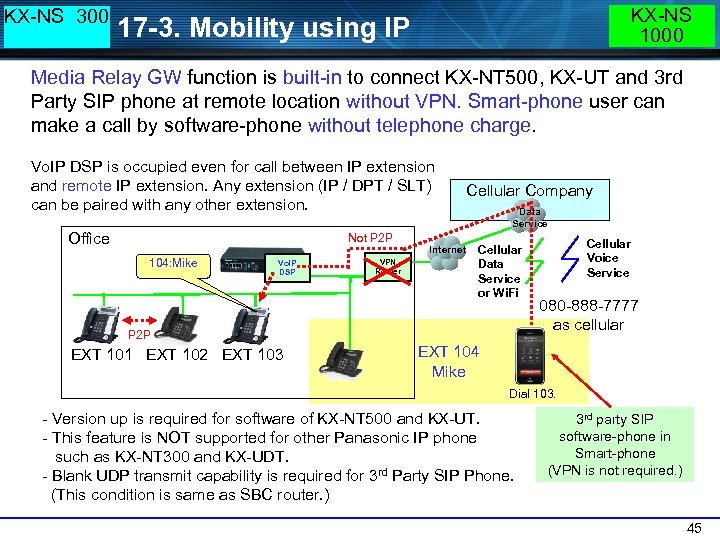 KX-NS 300 KX-NS 1000 17 -3. Mobility using IP Media Relay GW function is built-in to connect KX-NT 500, KX-UT and 3 rd Party SIP phone at remote location without VPN. Smart-phone user can make a call by software-phone without telephone charge. Vo. IP DSP is occupied even for call between IP extension and remote IP extension. Any extension (IP / DPT / SLT) can be paired with any other extension. Office Not P 2 P 104: Mike Vo. IP DSP VPN Router Internet Cellular Company Data Service Cellular Data Service or Wi. Fi P 2 P EXT 101 EXT 102 EXT 103 Cellular Voice Service 080 -888 -7777 as cellular EXT 104 Mike Dial 103. - Version up is required for software of KX-NT 500 and KX-UT. - This feature is NOT supported for other Panasonic IP phone such as KX-NT 300 and KX-UDT. - Blank UDP transmit capability is required for 3 rd Party SIP Phone. (This condition is same as SBC router. ) 3 rd party SIP software-phone in Smart-phone (VPN is not required. ) 45
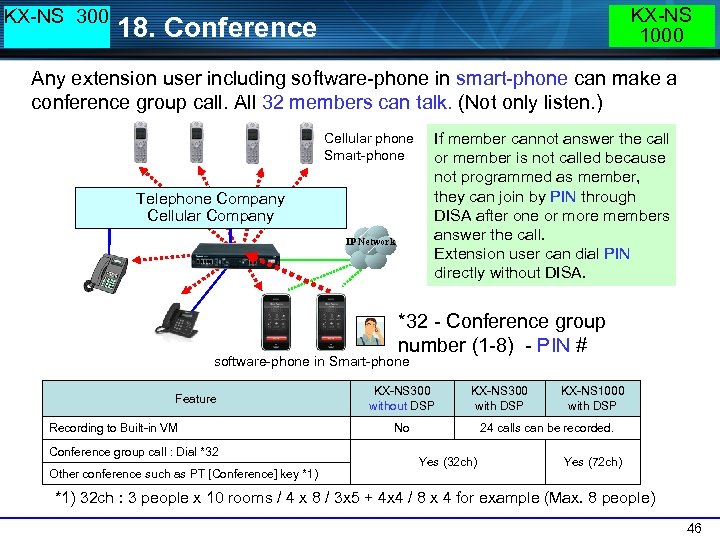 KX-NS 300 KX-NS 1000 18. Conference Any extension user including software-phone in smart-phone can make a conference group call. All 32 members can talk. (Not only listen. ) Cellular phone Smart-phone Telephone Company Cellular Company IP Network If member cannot answer the call or member is not called because not programmed as member, they can join by PIN through DISA after one or more members answer the call. Extension user can dial PIN directly without DISA. *32 - Conference group number (1 -8) - PIN # software-phone in Smart-phone Feature Recording to Built-in VM Conference group call : Dial *32 Other conference such as PT [Conference] key *1) KX-NS 300 without DSP KX-NS 300 with DSP No KX-NS 1000 with DSP 24 calls can be recorded. Yes (32 ch) Yes (72 ch) *1) 32 ch : 3 people x 10 rooms / 4 x 8 / 3 x 5 + 4 x 4 / 8 x 4 for example (Max. 8 people) 46
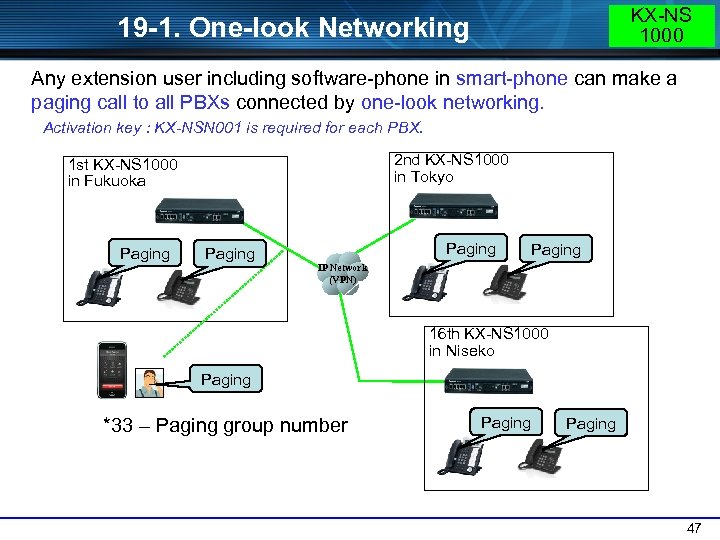 KX-NS 1000 19 -1. One-look Networking Any extension user including software-phone in smart-phone can make a paging call to all PBXs connected by one-look networking. Activation key : KX-NSN 001 is required for each PBX. 2 nd KX-NS 1000 in Tokyo 1 st KX-NS 1000 in Fukuoka Paging IP Network (VPN) 16 th KX-NS 1000 in Niseko Paging *33 – Paging group number Paging 47
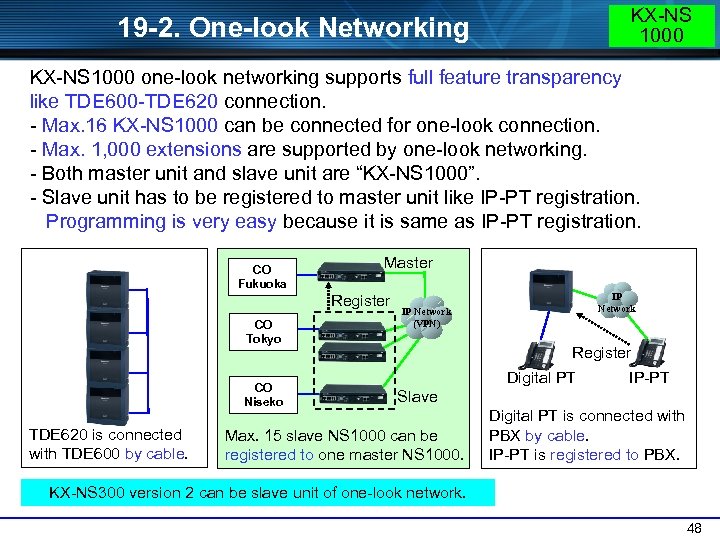 KX-NS 1000 19 -2. One-look Networking KX-NS 1000 one-look networking supports full feature transparency like TDE 600 -TDE 620 connection. - Max. 16 KX-NS 1000 can be connected for one-look connection. - Max. 1, 000 extensions are supported by one-look networking. - Both master unit and slave unit are “KX-NS 1000”. - Slave unit has to be registered to master unit like IP-PT registration. Programming is very easy because it is same as IP-PT registration. CO Fukuoka Master Register CO Tokyo CO Niseko TDE 620 is connected with TDE 600 by cable. IP Network (VPN) Register Digital PT IP-PT Slave Max. 15 slave NS 1000 can be registered to one master NS 1000. Digital PT is connected with PBX by cable. IP-PT is registered to PBX. KX-NS 300 version 2 can be slave unit of one-look network. 48
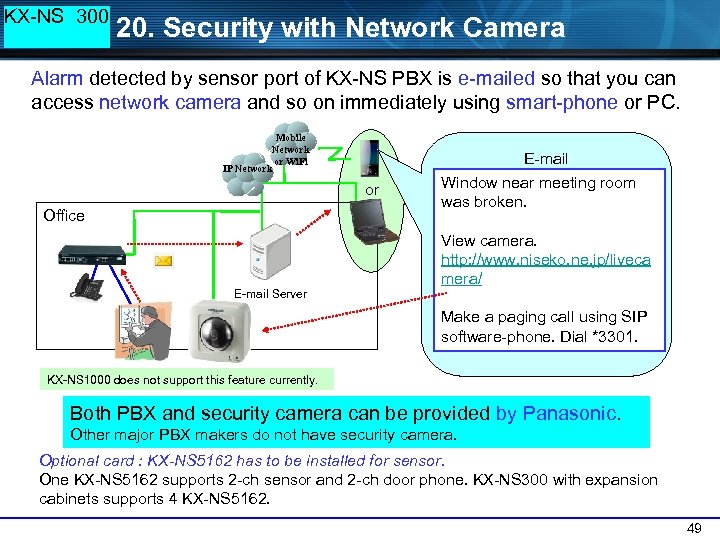 KX-NS 300 20. Security with Network Camera Alarm detected by sensor port of KX-NS PBX is e-mailed so that you can access network camera and so on immediately using smart-phone or PC. Mobile Network or Wi. Fi IP Network E-mail or Office E-mail Server Window near meeting room was broken. View camera. http: //www. niseko. ne. jp/liveca mera/ Make a paging call using SIP software-phone. Dial *3301. KX-NS 1000 does not support this feature currently. Both PBX and security camera can be provided by Panasonic. Other major PBX makers do not have security camera. Optional card : KX-NS 5162 has to be installed for sensor. One KX-NS 5162 supports 2 -ch sensor and 2 -ch door phone. KX-NS 300 with expansion cabinets supports 4 KX-NS 5162. 49
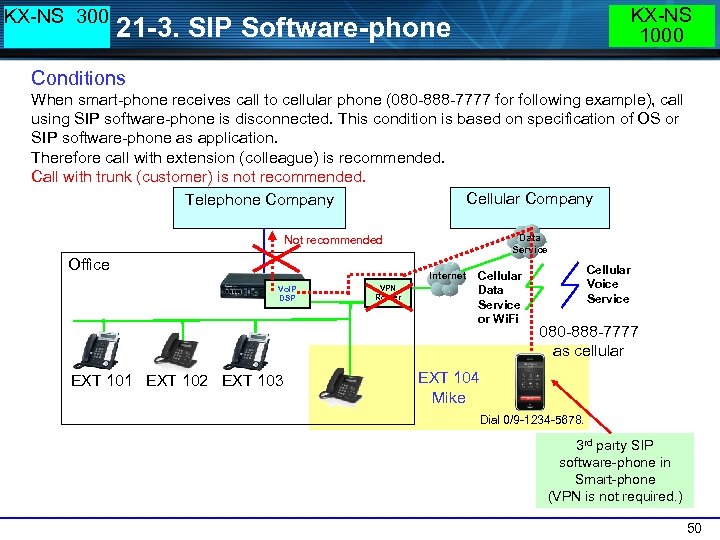 KX-NS 300 KX-NS 1000 21 -3. SIP Software-phone Conditions When smart-phone receives call to cellular phone (080 -888 -7777 for following example), call using SIP software-phone is disconnected. This condition is based on specification of OS or SIP software-phone as application. Therefore call with extension (colleague) is recommended. Call with trunk (customer) is not recommended. Cellular Company Telephone Company Data Service Not recommended Office Internet Vo. IP DSP EXT 101 EXT 102 EXT 103 VPN Router Cellular Data Service or Wi. Fi Cellular Voice Service 080 -888 -7777 as cellular EXT 104 Mike Dial 0/9 -1234 -5678. 3 rd party SIP software-phone in Smart-phone (VPN is not required. ) 50
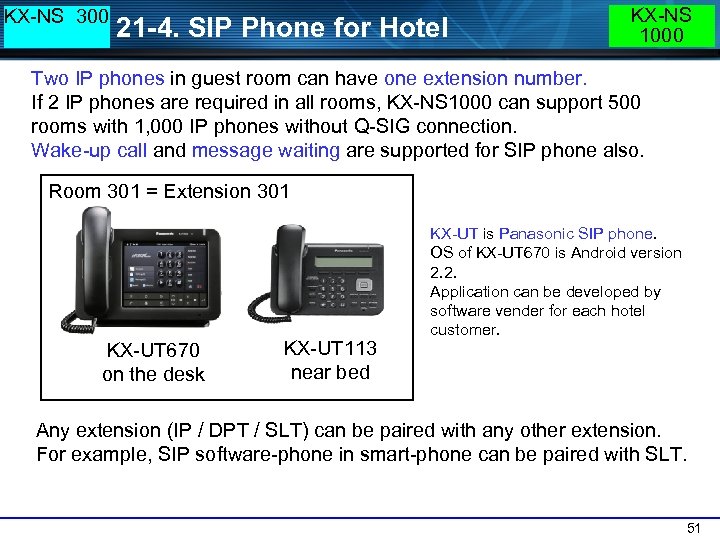 KX-NS 300 21 -4. SIP Phone for Hotel KX-NS 1000 Two IP phones in guest room can have one extension number. If 2 IP phones are required in all rooms, KX-NS 1000 can support 500 rooms with 1, 000 IP phones without Q-SIG connection. Wake-up call and message waiting are supported for SIP phone also. Room 301 = Extension 301 KX-UT 670 on the desk KX-UT 113 near bed KX-UT is Panasonic SIP phone. OS of KX-UT 670 is Android version 2. 2. Application can be developed by software vender for each hotel customer. Any extension (IP / DPT / SLT) can be paired with any other extension. For example, SIP software-phone in smart-phone can be paired with SLT. 51
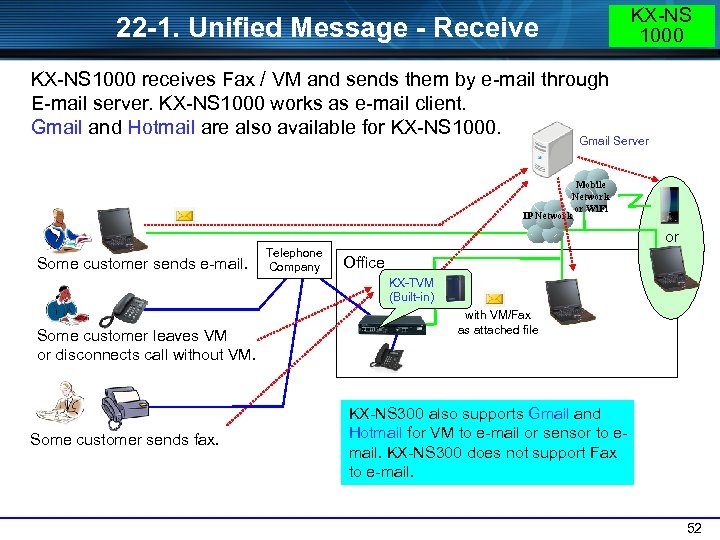 KX-NS 1000 22 -1. Unified Message - Receive KX-NS 1000 receives Fax / VM and sends them by e-mail through E-mail server. KX-NS 1000 works as e-mail client. Gmail and Hotmail are also available for KX-NS 1000. Gmail Server Mobile Network or Wi. Fi IP Network or Some customer sends e-mail. Telephone Company Office KX-TVM (Built-in) Some customer leaves VM or disconnects call without VM. Some customer sends fax. with VM/Fax as attached file KX-NS 300 also supports Gmail and Hotmail for VM to e-mail or sensor to email. KX-NS 300 does not support Fax to e-mail. 52
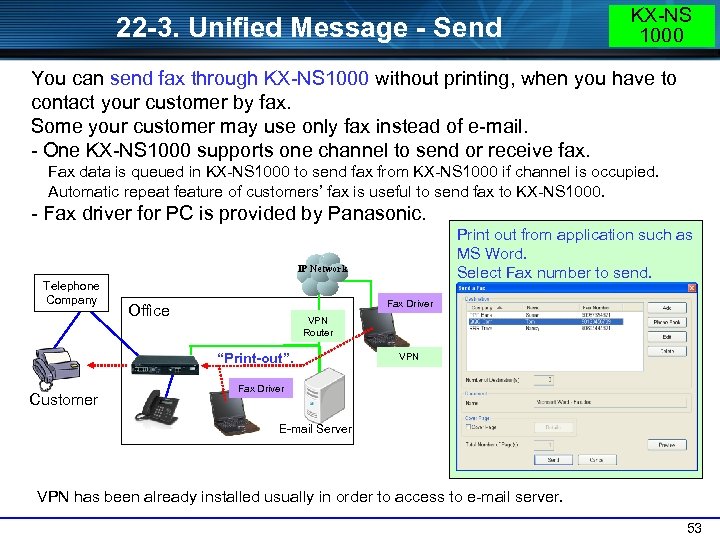 22 -3. Unified Message - Send KX-NS 1000 You can send fax through KX-NS 1000 without printing, when you have to contact your customer by fax. Some your customer may use only fax instead of e-mail. - One KX-NS 1000 supports one channel to send or receive fax. Fax data is queued in KX-NS 1000 to send fax from KX-NS 1000 if channel is occupied. Automatic repeat feature of customers’ fax is useful to send fax to KX-NS 1000. - Fax driver for PC is provided by Panasonic. Print out from application such as MS Word. Select Fax number to send. IP Network Telephone Company Fax Driver Office VPN Router “Print-out”. Customer VPN Fax Driver E-mail Server VPN has been already installed usually in order to access to e-mail server. 53
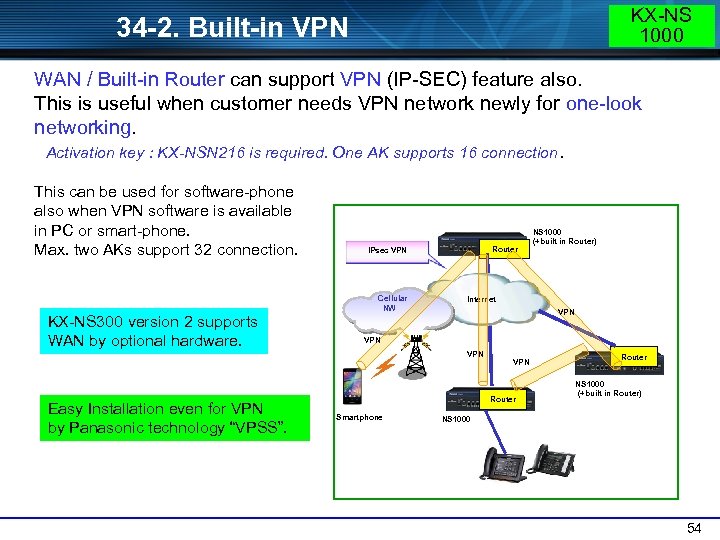 KX-NS 1000 34 -2. Built-in VPN WAN / Built-in Router can support VPN (IP-SEC) feature also. This is useful when customer needs VPN network newly for one-look networking. Activation key : KX-NSN 216 is required. One AK supports 16 connection. Internet VPN Easy Installation even for VPN by Panasonic technology “VPSS”. VPN Router Smartphone Cellular NW KX-NS 300 version 2 supports WAN by optional hardware. Router IPsec VPN NS 1000 (+built in Router) This can be used for software-phone also when VPN software is available in PC or smart-phone. Max. two AKs support 32 connection. Router NS 1000 (+built in Router) NS 1000 54
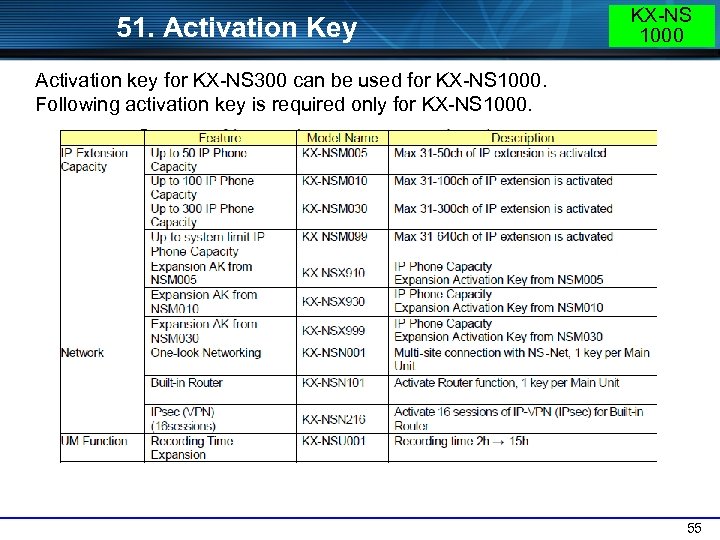 51. Activation Key KX-NS 1000 Activation key for KX-NS 300 can be used for KX-NS 1000. Following activation key is required only for KX-NS 1000. 55
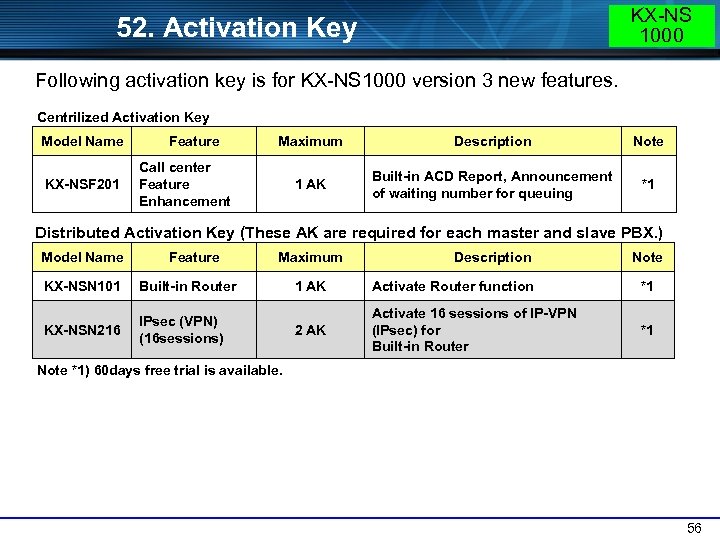 KX-NS 1000 52. Activation Key Following activation key is for KX-NS 1000 version 3 new features. Centrilized Activation Key Model Name KX-NSF 201 Feature Maximum Description Note 1 AK Built-in ACD Report, Announcement of waiting number for queuing *1 Call center Feature Enhancement Distributed Activation Key (These AK are required for each master and slave PBX. ) Model Name Feature KX-NSN 101 Built-in Router KX-NSN 216 Maximum IPsec (VPN) (16 sessions) Description Note 1 AK Activate Router function *1 2 AK Activate 16 sessions of IP-VPN (IPsec) for Built-in Router *1 Note *1) 60 days free trial is available. 56
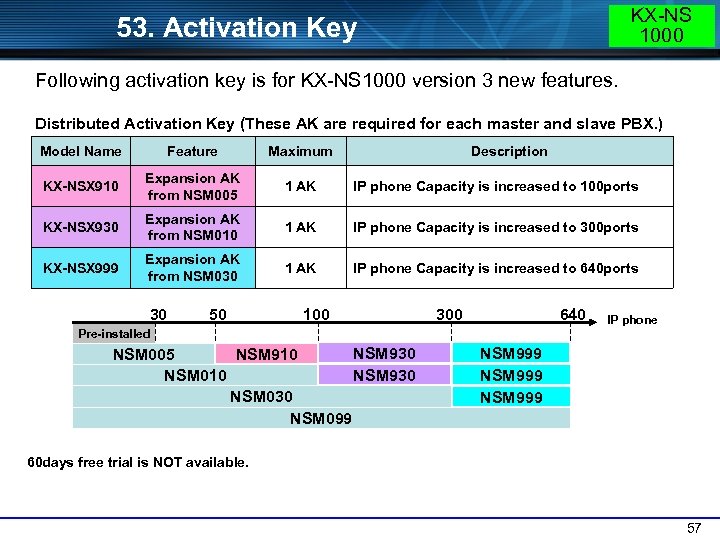 KX-NS 1000 53. Activation Key Following activation key is for KX-NS 1000 version 3 new features. Distributed Activation Key (These AK are required for each master and slave PBX. ) Model Name Feature Maximum KX-NSX 910 Expansion AK from NSM 005 1 AK IP phone Capacity is increased to 100 ports KX-NSX 930 Expansion AK from NSM 010 1 AK IP phone Capacity is increased to 300 ports KX-NSX 999 Expansion AK from NSM 030 1 AK IP phone Capacity is increased to 640 ports 30 50 Description 100 300 640 IP phone Pre-installed NSM 930 NSM 910 NSM 005 NSM 930 NSM 010 NSM 030 NSM 099 NSM 999 60 days free trial is NOT available. 57
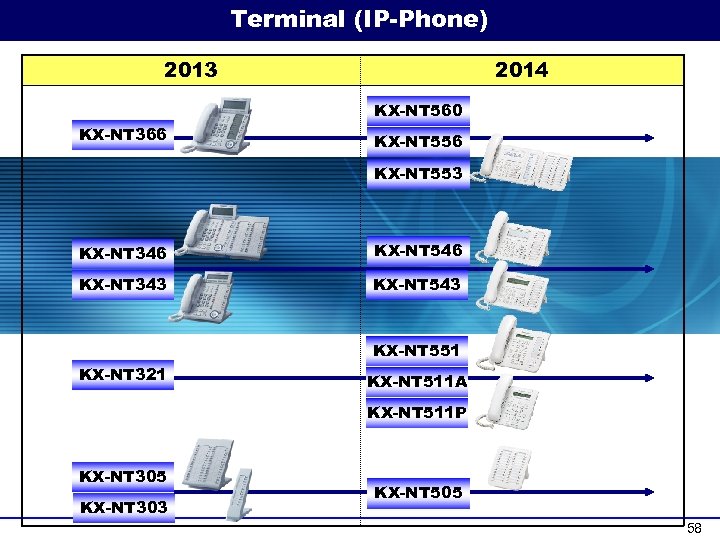 Terminal (IP-Phone) 2013 2014 KX-NT 560 KX-NT 366 KX-NT 553 KX-NT 346 KX-NT 546 KX-NT 343 KX-NT 551 KX-NT 321 KX-NT 511 A KX-NT 511 P KX-NT 305 KX-NT 303 KX-NT 505 58
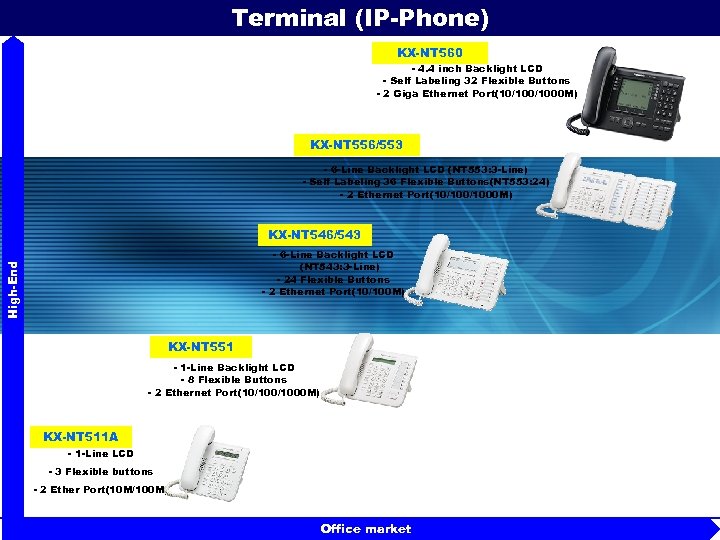 Terminal (IP-Phone) KX-NT 560 - 4. 4 inch Backlight LCD - Self Labeling 32 Flexible Buttons - 2 Giga Ethernet Port(10/1000 M) KX-NT 556/553 - 6 -Line Backlight LCD (NT 553: 3 -Line) - Self Labeling 36 Flexible Buttons(NT 553: 24) - 2 Ethernet Port(10/1000 M) KX-NT 546/543 High-End - 6 -Line Backlight LCD (NT 543: 3 -Line) - 24 Flexible Buttons - 2 Ethernet Port(10/100 M) KX-NT 551 - 1 -Line Backlight LCD - 8 Flexible Buttons - 2 Ethernet Port(10/1000 M) KX-NT 511 A - 1 -Line LCD - 3 Flexible buttons - 2 Ether Port(10 M/100 M) Office market 59
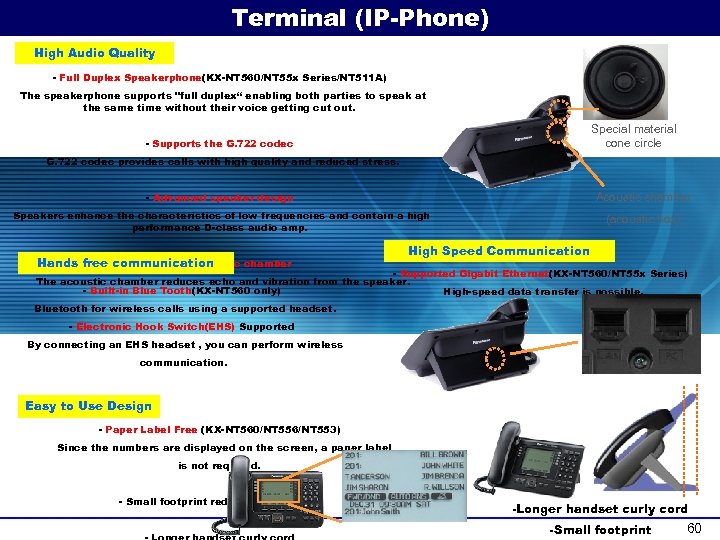 Terminal (IP-Phone) High Audio Quality - Full Duplex Speakerphone(KX-NT 560/NT 55 x Series/NT 511 A) The speakerphone supports "full duplex“ enabling both parties to speak at the same time without their voice getting cut out. Special material cone circle - Supports the G. 722 codec provides calls with high quality and reduced stress. - Advanced speaker design Acoustic chamber Speakers enhance the characteristics of low frequencies and contain a high performance D-class audio amp. (acoustic box) Hands free communication - Larger acoustic chamber High Speed Communication - Supported Gigabit Ethernet(KX-NT 560/NT 55 x Series) The acoustic chamber reduces echo and vibration from the speaker. - Built-in Blue Tooth(KX-NT 560 only) High-speed data transfer is possible. Bluetooth for wireless calls using a supported headset. - Electronic Hook Switch(EHS) Supported By connecting an EHS headset , you can perform wireless communication. Easy to Use Design - Paper Label Free (KX-NT 560/NT 556/NT 553) Since the numbers are displayed on the screen, a paper label is not required. - Small footprint reduces desk space -Longer handset curly cord -Small footprint 60
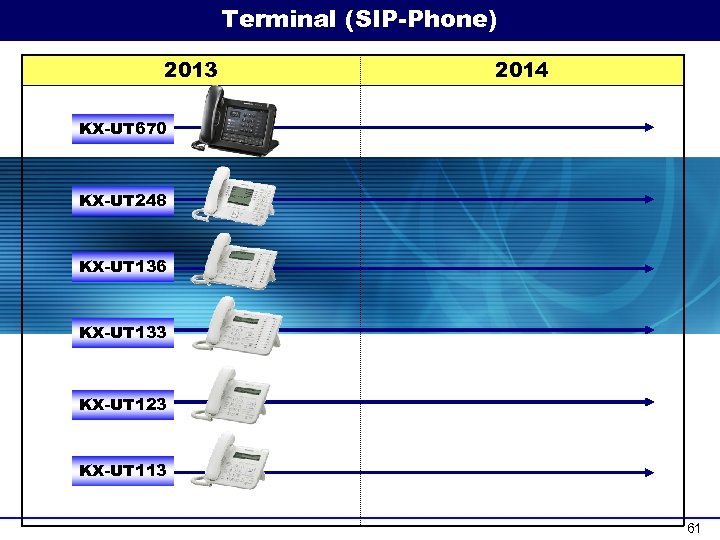 Terminal (SIP-Phone) 2013 2014 KX-UT 670 KX-UT 248 KX-UT 136 KX-UT 133 KX-UT 123 KX-UT 113 61
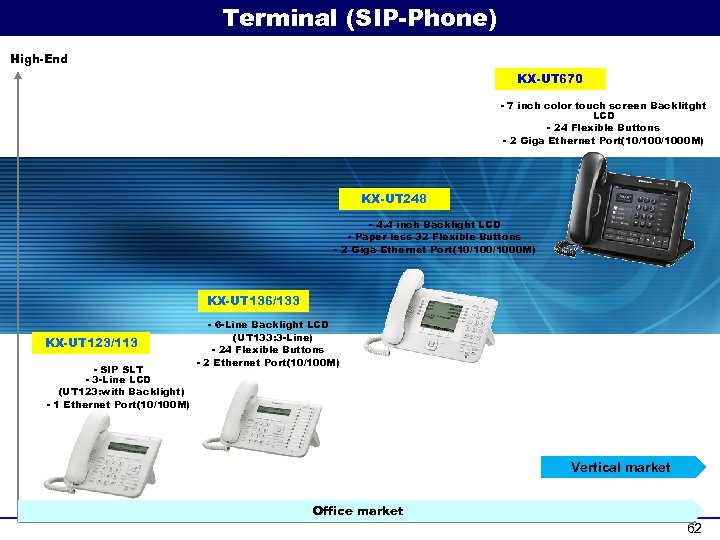 Terminal (SIP-Phone) High-End KX-UT 670 - 7 inch color touch screen Backlitght LCD - 24 Flexible Buttons - 2 Giga Ethernet Port(10/1000 M) KX-UT 248 - 4. 4 inch Backlight LCD - Paper less 32 Flexible Buttons - 2 Giga Ethernet Port(10/1000 M) KX-UT 136/133 KX-UT 123/113 - SIP SLT - 3 -Line LCD (UT 123: with Backlight) - 1 Ethernet Port(10/100 M) - 6 -Line Backlight LCD (UT 133: 3 -Line) - 24 Flexible Buttons - 2 Ethernet Port(10/100 M) Vertical market Office market 62
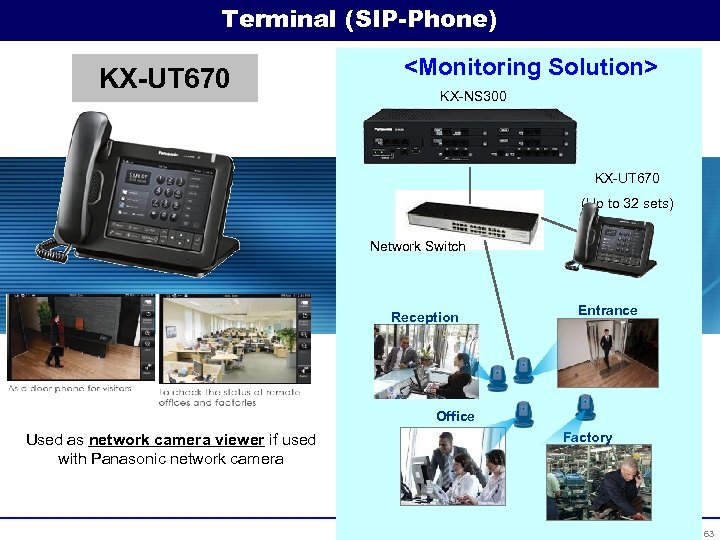 Terminal (SIP-Phone) KX-UT 670
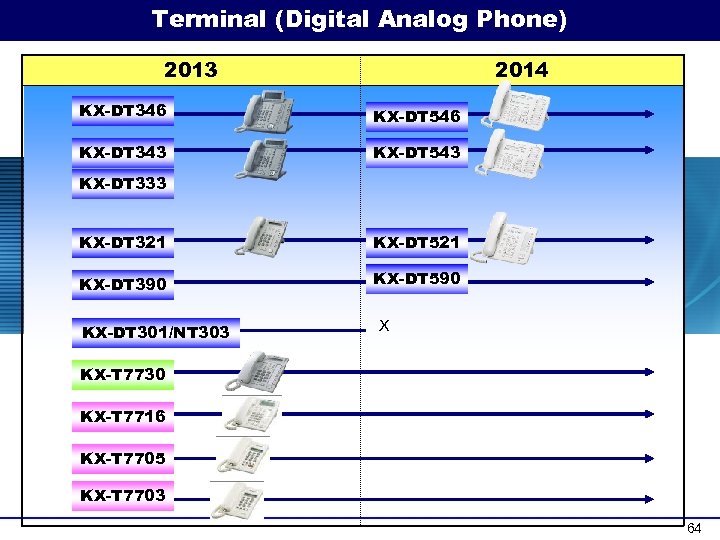 Terminal (Digital Analog Phone) 2013 2014 KX-DT 346 KX-DT 546 KX-DT 343 KX-DT 543 KX-DT 333 KX-DT 321 KX-DT 521 KX-DT 390 KX-DT 590 KX-DT 301/NT 303 X KX-T 7730 KX-T 7716 KX-T 7705 KX-T 7703 64
 KX-NS 1000 Version 1 Unified Messaging ~FAX, E-mail integration~ 65
 KX-NS 1000 V 1. 1 Unified Messaging ~Built-in Voice Messaging~ 66
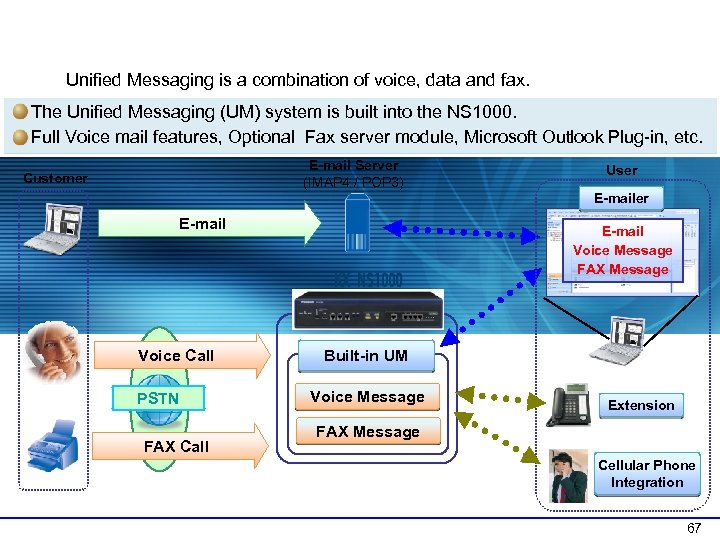 General Overview Unified Messaging is a combination of voice, data and fax. The Unified Messaging (UM) system is built into the NS 1000. Full Voice mail features, Optional Fax server module, Microsoft Outlook Plug-in, etc. E-mail Server (IMAP 4 / POP 3) Customer User E-mail Voice Call PSTN FAX Call E-mail Voice Message FAX Message Built-in UM Voice Message Extension FAX Message Cellular Phone Integration 67
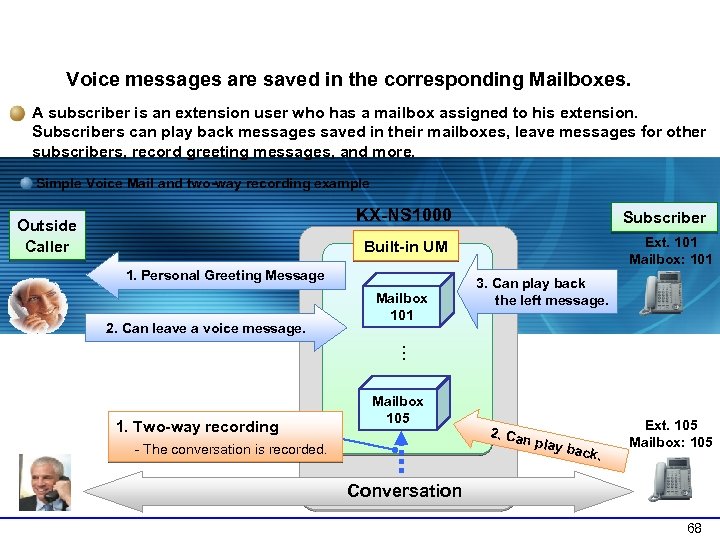 1 -1 Mailbox Overview Voice messages are saved in the corresponding Mailboxes. A subscriber is an extension user who has a mailbox assigned to his extension. Subscribers can play back messages saved in their mailboxes, leave messages for other subscribers, record greeting messages, and more. Simple Voice Mail and two-way recording example KX-NS 1000 Outside Caller Subscriber Ext. 101 Mailbox: 101 Built-in UM 1. Personal Greeting Message 2. Can leave a voice message. Mailbox 101 3. Can play back the left message. … 1. Two-way recording Mailbox 105 - The conversation is recorded. 2. Can play b a ck. Ext. 105 Mailbox: 105 Conversation 68
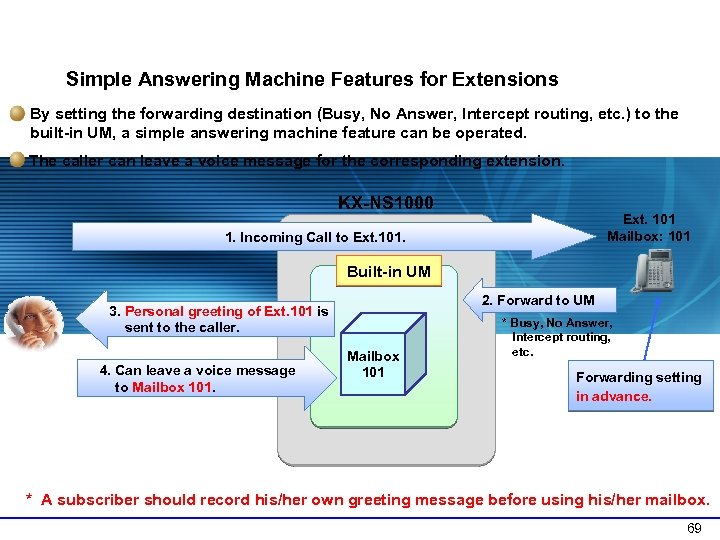 1 -2 Voice Recording Features (1) Simple Answering Machine Features for Extensions By setting the forwarding destination (Busy, No Answer, Intercept routing, etc. ) to the built-in UM, a simple answering machine feature can be operated. The caller can leave a voice message for the corresponding extension. KX-NS 1000 Ext. 101 Mailbox: 101 1. Incoming Call to Ext. 101. Built-in UM 2. Forward to UM 3. Personal greeting of Ext. 101 is sent to the caller. 4. Can leave a voice message to Mailbox 101 * Busy, No Answer, Intercept routing, etc. Forwarding setting in advance. * A subscriber should record his/her own greeting message before using his/her mailbox. 69
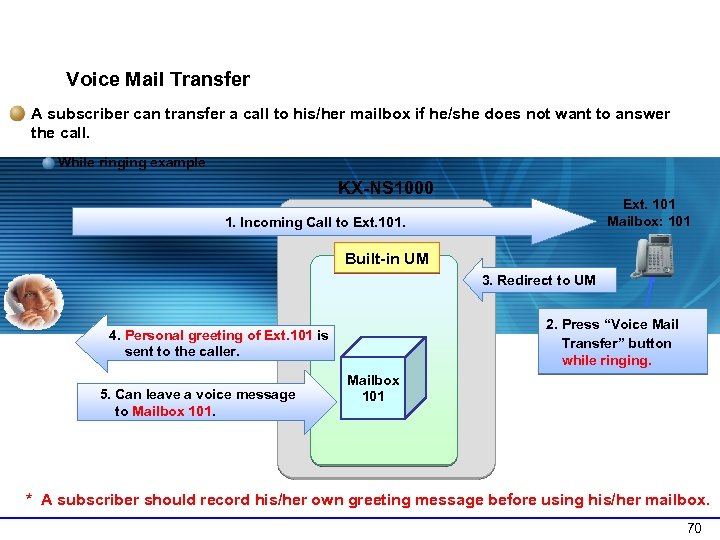 1 -2 Voice Recording Features (2) Voice Mail Transfer A subscriber can transfer a call to his/her mailbox if he/she does not want to answer the call. While ringing example KX-NS 1000 Ext. 101 Mailbox: 101 1. Incoming Call to Ext. 101. Built-in UM 3. Redirect to UM 2. Press “Voice Mail Transfer” button while ringing. 4. Personal greeting of Ext. 101 is sent to the caller. 5. Can leave a voice message to Mailbox 101 * A subscriber should record his/her own greeting message before using his/her mailbox. 70
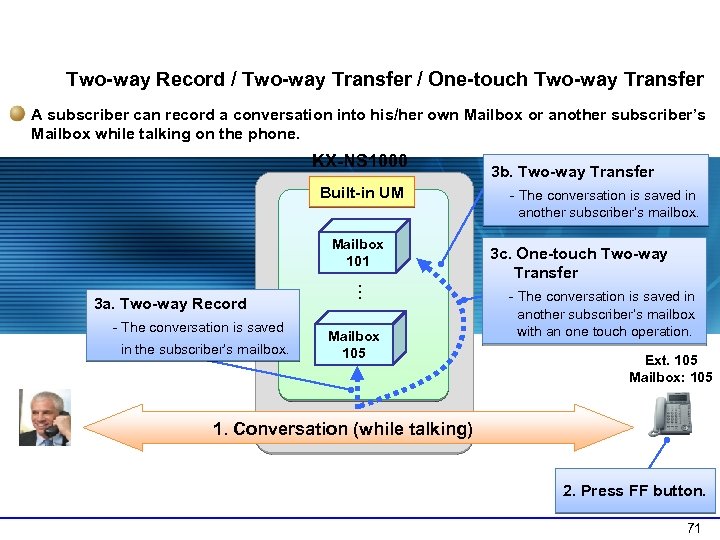 1 -2 Voice Recording Features (3) Two-way Record / Two-way Transfer / One-touch Two-way Transfer A subscriber can record a conversation into his/her own Mailbox or another subscriber’s Mailbox while talking on the phone. KX-NS 1000 Built-in UM Mailbox 101 - The conversation is saved in the subscriber’s mailbox. … 3 a. Two-way Record Mailbox 105 3 b. Two-way Transfer - The conversation is saved in another subscriber’s mailbox. 3 c. One-touch Two-way Transfer - The conversation is saved in another subscriber’s mailbox with an one touch operation. Ext. 105 Mailbox: 105 1. Conversation (while talking) 2. Press FF button. 71
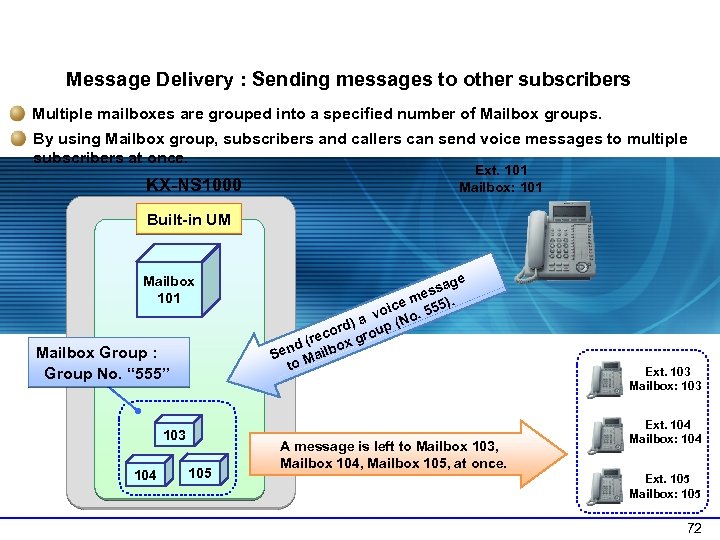 1 -6 Sending Messages (2) Message Delivery : Sending messages to other subscribers Multiple mailboxes are grouped into a specified number of Mailbox groups. By using Mailbox group, subscribers and callers can send voice messages to multiple subscribers at once. KX-NS 1000 Ext. 101 Mailbox: 101 Built-in UM Mailbox 101 Mailbox Group : Group No. “ 555” 103 104 105 age ess. ) em oic o. 555 v (N d) a cor group (re nd ailbox Se M to A message is left to Mailbox 103, Mailbox 104, Mailbox 105, at once. Ext. 103 Mailbox: 103 Ext. 104 Mailbox: 104 Ext. 105 Mailbox: 105 72
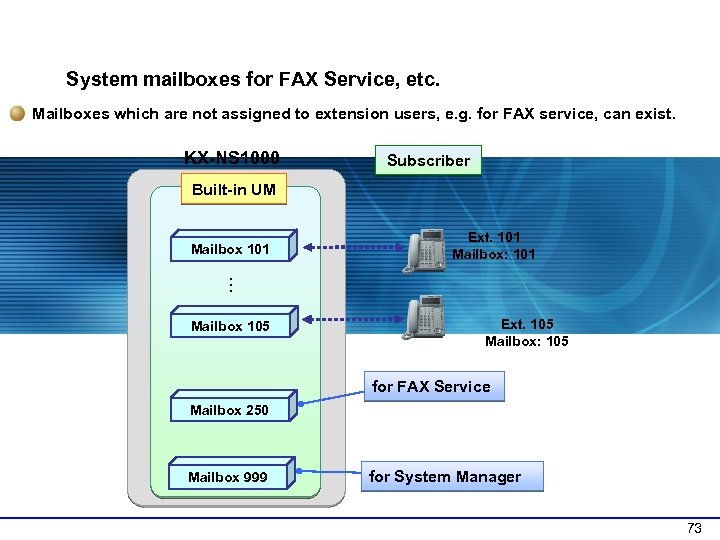 1 -7 Mailbox Options System mailboxes for FAX Service, etc. Mailboxes which are not assigned to extension users, e. g. for FAX service, can exist. KX-NS 1000 Subscriber Built-in UM Mailbox 101 Ext. 101 Mailbox: 101 … Mailbox 105 Ext. 105 Mailbox: 105 for FAX Service Mailbox 250 Mailbox 999 for System Manager 73
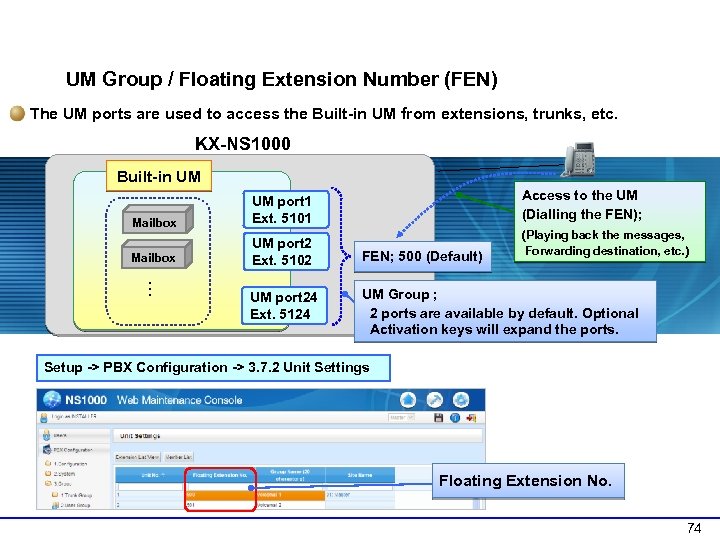 3 -2 Basic Settings : UM Group UM Group / Floating Extension Number (FEN) The UM ports are used to access the Built-in UM from extensions, trunks, etc. KX-NS 1000 Built-in UM Access to the UM (Dialling the FEN); Mailbox UM port 2 Ext. 5102 FEN; 500 (Default) UM port 24 Ext. 5124 UM Group ; 2 ports are available by default. Optional Activation keys will expand the ports. … Mailbox UM port 1 Ext. 5101 (Playing back the messages, Forwarding destination, etc. ) Setup -> PBX Configuration -> 3. 7. 2 Unit Settings Floating Extension No. 74
 KX-NS 1000 Version 1 Unified Messaging ~FAX, E-mail integration~ 75
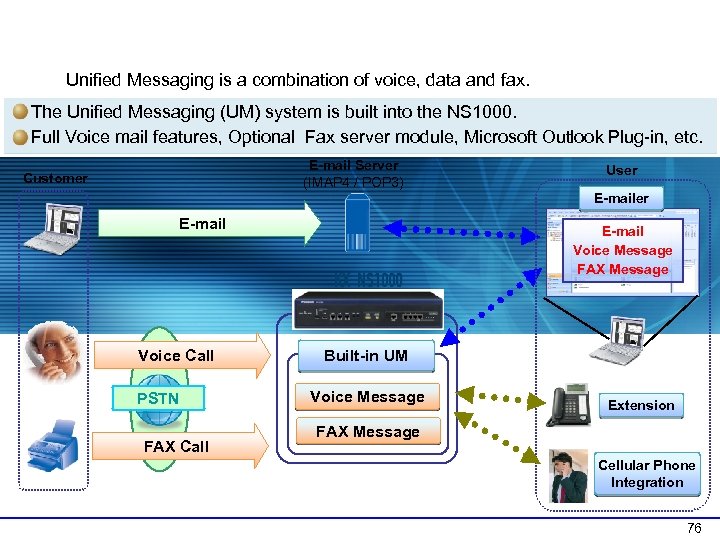 General Overview Unified Messaging is a combination of voice, data and fax. The Unified Messaging (UM) system is built into the NS 1000. Full Voice mail features, Optional Fax server module, Microsoft Outlook Plug-in, etc. E-mail Server (IMAP 4 / POP 3) Customer User E-mail Voice Call PSTN FAX Call E-mail Voice Message FAX Message Built-in UM Voice Message Extension FAX Message Cellular Phone Integration 76
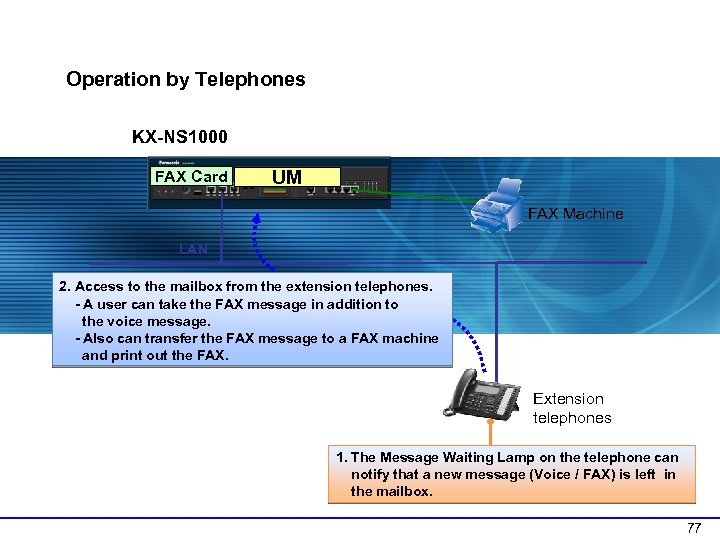 1 -2 Operation Overview (1) Operation by Telephones KX-NS 1000 FAX Card UM FAX Machine LAN 2. Access to the mailbox from the extension telephones. - A user can take the FAX message in addition to the voice message. - Also can transfer the FAX message to a FAX machine and print out the FAX. Extension telephones 1. The Message Waiting Lamp on the telephone can notify that a new message (Voice / FAX) is left in the mailbox. 77
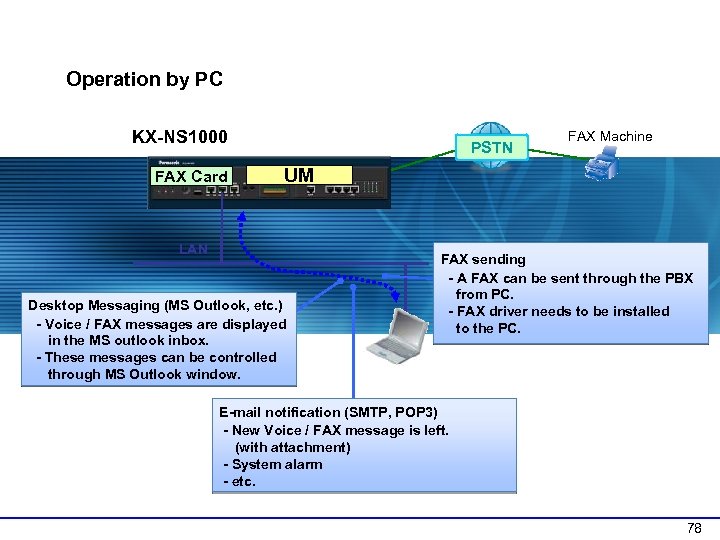 1 -2 Operation Overview (2) Operation by PC KX-NS 1000 FAX Card PSTN FAX Machine UM LAN Desktop Messaging (MS Outlook, etc. ) - Voice / FAX messages are displayed in the MS outlook inbox. - These messages can be controlled through MS Outlook window. FAX sending - A FAX can be sent through the PBX from PC. - FAX driver needs to be installed to the PC. E-mail notification (SMTP, POP 3) - New Voice / FAX message is left. (with attachment) - System alarm - etc. 78
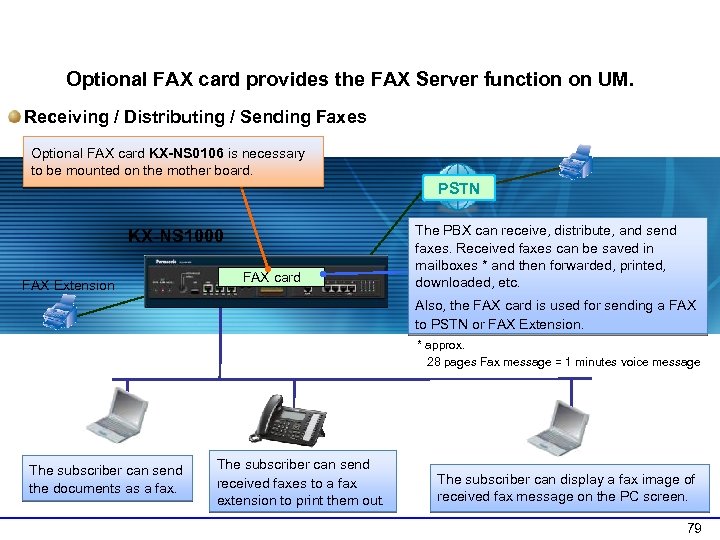 2 -1 FAX Server Overview Optional FAX card provides the FAX Server function on UM. Receiving / Distributing / Sending Faxes Optional FAX card KX-NS 0106 is necessary to be mounted on the mother board. PSTN KX-NS 1000 FAX Extension FAX card The PBX can receive, distribute, and send faxes. Received faxes can be saved in mailboxes * and then forwarded, printed, downloaded, etc. Also, the FAX card is used for sending a FAX to PSTN or FAX Extension. * approx. 28 pages Fax message = 1 minutes voice message The subscriber can send the documents as a fax. The subscriber can send received faxes to a fax extension to print them out. The subscriber can display a fax image of received fax message on the PC screen. 79
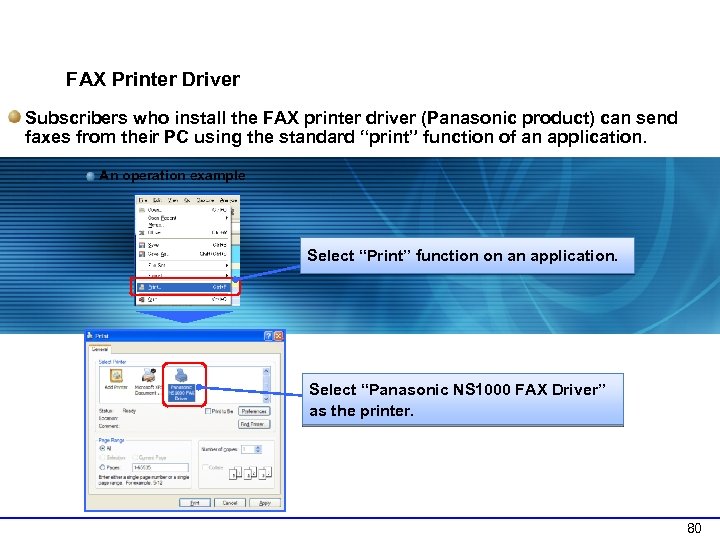 2 -3 Method to Send Faxes FAX Printer Driver Subscribers who install the FAX printer driver (Panasonic product) can send faxes from their PC using the standard “print” function of an application. An operation example Select “Print” function on an application. Select “Panasonic NS 1000 FAX Driver” as the printer. 80
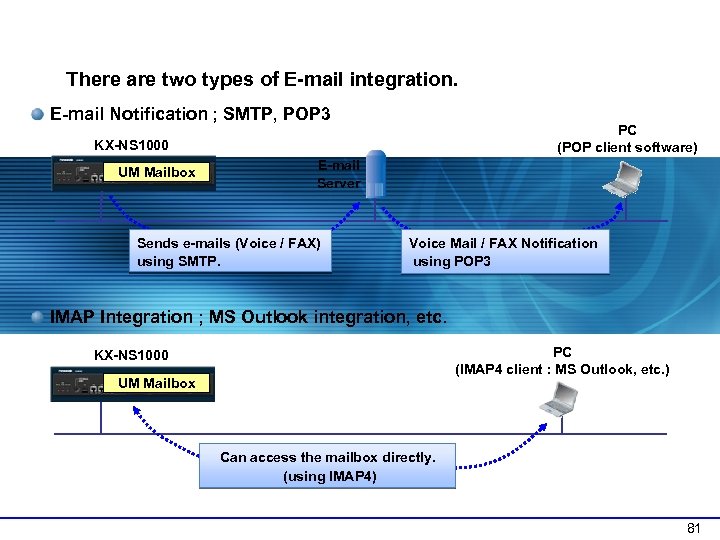 3 -1 E-mail Integration Overview There are two types of E-mail integration. E-mail Notification ; SMTP, POP 3 PC (POP client software) KX-NS 1000 UM Mailbox E-mail Server Sends e-mails (Voice / FAX) using SMTP. Voice Mail / FAX Notification using POP 3 IMAP Integration ; MS Outlook integration, etc. PC (IMAP 4 client : MS Outlook, etc. ) KX-NS 1000 UM Mailbox Can access the mailbox directly. (using IMAP 4) 81
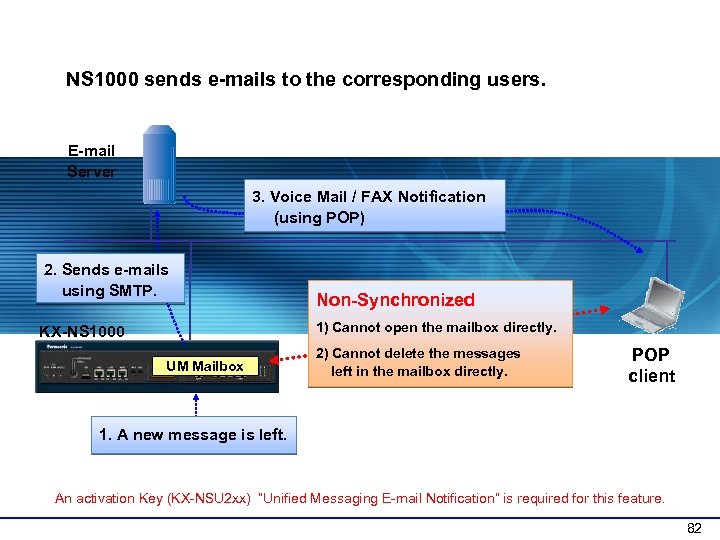 3 -3 E-mail Notification : Operation NS 1000 sends e-mails to the corresponding users. E-mail Server 3. Voice Mail / FAX Notification (using POP) 2. Sends e-mails using SMTP. Non-Synchronized 1) Cannot open the mailbox directly. KX-NS 1000 UM Mailbox 2) Cannot delete the messages left in the mailbox directly. POP client 1. A new message is left. An activation Key (KX-NSU 2 xx) “Unified Messaging E-mail Notification” is required for this feature. 82
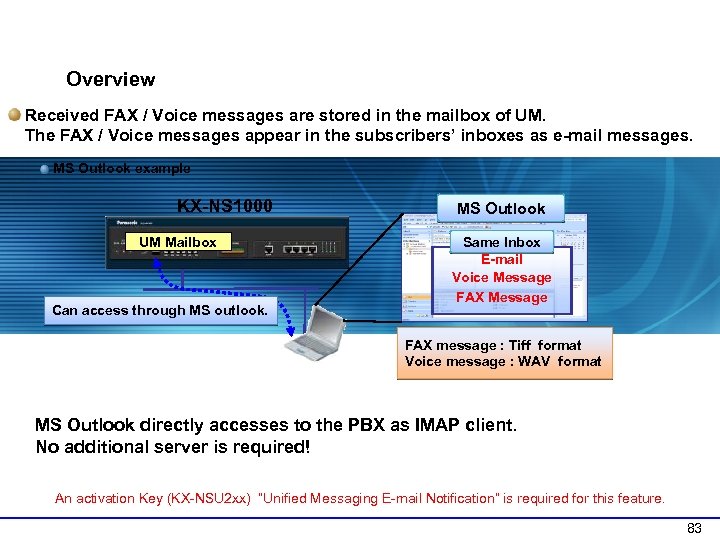 3 -5 IMAP Integration : Overview Received FAX / Voice messages are stored in the mailbox of UM. The FAX / Voice messages appear in the subscribers’ inboxes as e-mail messages. MS Outlook example KX-NS 1000 UM Mailbox Can access through MS outlook. MS Outlook Same Inbox E-mail Voice Message FAX message : Tiff format Voice message : WAV format MS Outlook directly accesses to the PBX as IMAP client. No additional server is required! An activation Key (KX-NSU 2 xx) “Unified Messaging E-mail Notification” is required for this feature. 83
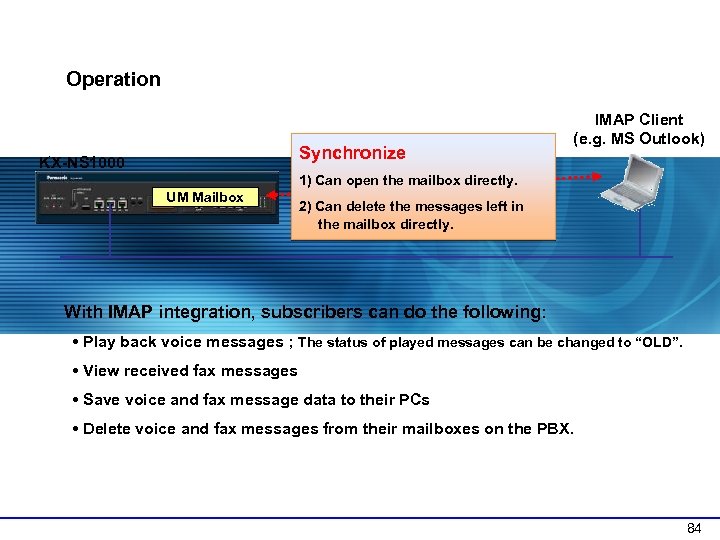 3 -6 IMAP Integration : Operation Synchronize KX-NS 1000 IMAP Client (e. g. MS Outlook) 1) Can open the mailbox directly. UM Mailbox 2) Can delete the messages left in the mailbox directly. With IMAP integration, subscribers can do the following: • Play back voice messages ; The status of played messages can be changed to “OLD”. • View received fax messages • Save voice and fax message data to their PCs • Delete voice and fax messages from their mailboxes on the PBX. 84
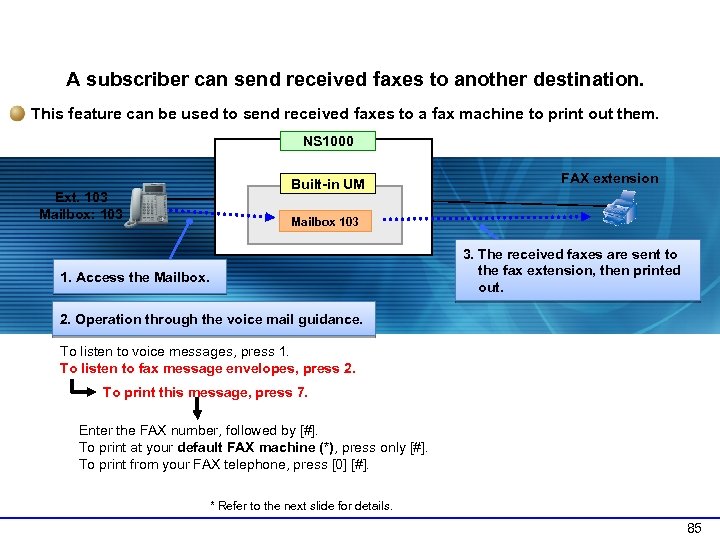 4 -10 Printing Out Faxes (1) A subscriber can send received faxes to another destination. This feature can be used to send received faxes to a fax machine to print out them. NS 1000 Ext. 103 Mailbox: 103 Built-in UM FAX extension Mailbox 103 3. The received faxes are sent to the fax extension, then printed out. 1. Access the Mailbox. 2. Operation through the voice mail guidance. To listen to voice messages, press 1. To listen to fax message envelopes, press 2. To print this message, press 7. Enter the FAX number, followed by [#]. To print at your default FAX machine (*), press only [#]. To print from your FAX telephone, press [0] [#]. * Refer to the next slide for details. 85
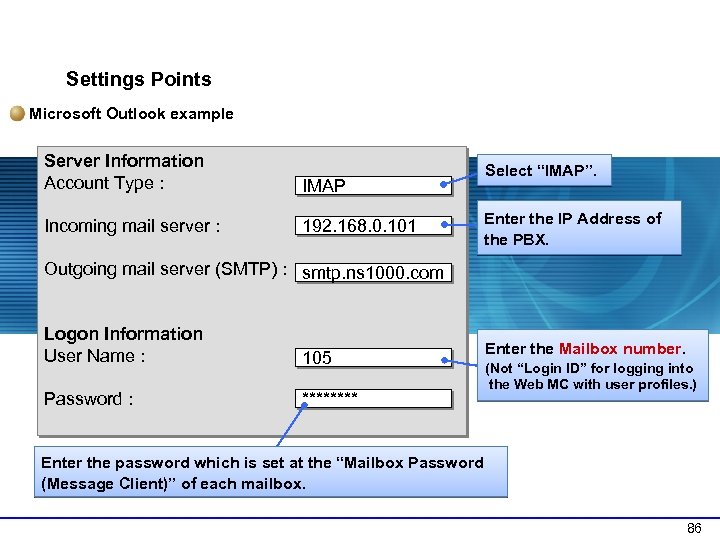 5 -5 IMAP Integration : Client Settings Points Microsoft Outlook example Server Information Account Type : IMAP Incoming mail server : 192. 168. 0. 101 Select “IMAP”. Enter the IP Address of the PBX. Outgoing mail server (SMTP) : smtp. ns 1000. com Logon Information User Name : 105 Password : **** Enter the Mailbox number. (Not “Login ID” for logging into the Web MC with user profiles. ) Enter the password which is set at the “Mailbox Password (Message Client)” of each mailbox. 86
 KX-NS 1000 Version 1 Unified Messaging ~FAX, E-mail integration~ 87
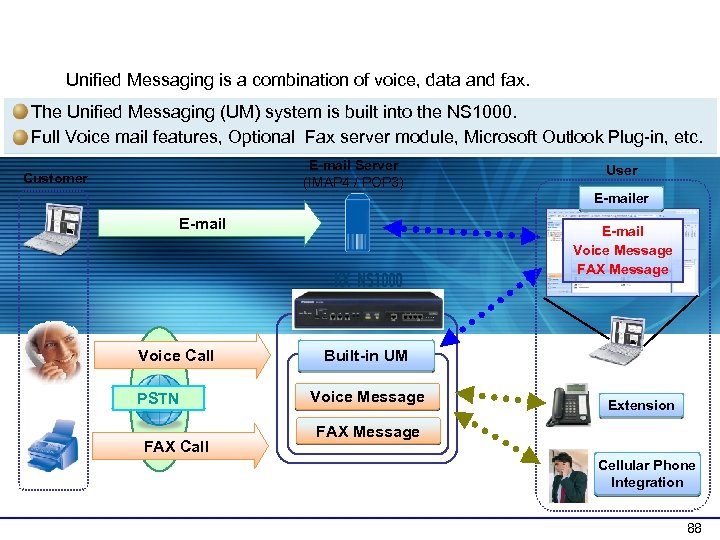 General Overview Unified Messaging is a combination of voice, data and fax. The Unified Messaging (UM) system is built into the NS 1000. Full Voice mail features, Optional Fax server module, Microsoft Outlook Plug-in, etc. E-mail Server (IMAP 4 / POP 3) Customer User E-mail Voice Call PSTN FAX Call E-mail Voice Message FAX Message Built-in UM Voice Message Extension FAX Message Cellular Phone Integration 88
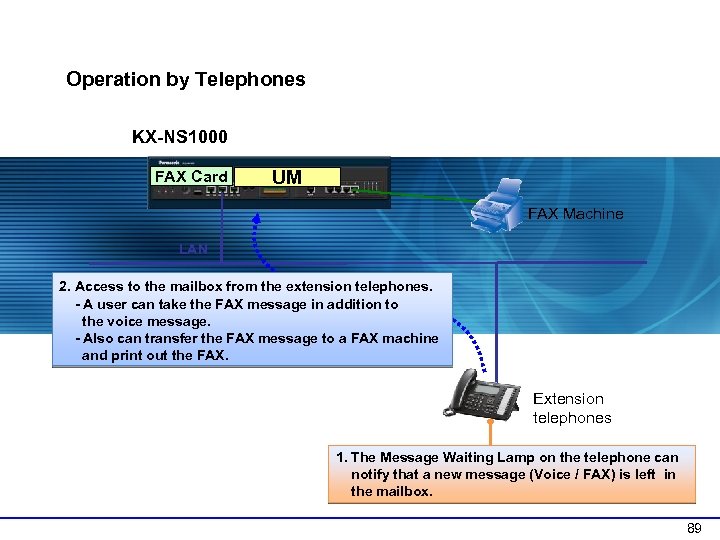 1 -2 Operation Overview (1) Operation by Telephones KX-NS 1000 FAX Card UM FAX Machine LAN 2. Access to the mailbox from the extension telephones. - A user can take the FAX message in addition to the voice message. - Also can transfer the FAX message to a FAX machine and print out the FAX. Extension telephones 1. The Message Waiting Lamp on the telephone can notify that a new message (Voice / FAX) is left in the mailbox. 89
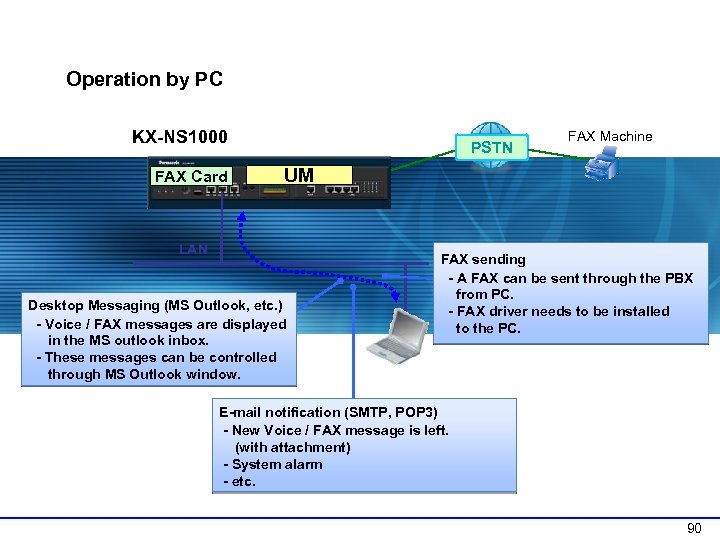 1 -2 Operation Overview (2) Operation by PC KX-NS 1000 FAX Card PSTN FAX Machine UM LAN Desktop Messaging (MS Outlook, etc. ) - Voice / FAX messages are displayed in the MS outlook inbox. - These messages can be controlled through MS Outlook window. FAX sending - A FAX can be sent through the PBX from PC. - FAX driver needs to be installed to the PC. E-mail notification (SMTP, POP 3) - New Voice / FAX message is left. (with attachment) - System alarm - etc. 90
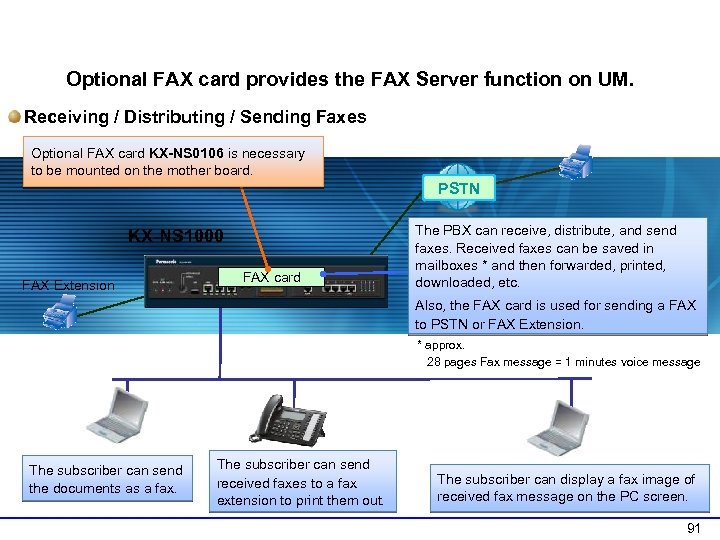 2 -1 FAX Server Overview Optional FAX card provides the FAX Server function on UM. Receiving / Distributing / Sending Faxes Optional FAX card KX-NS 0106 is necessary to be mounted on the mother board. PSTN KX-NS 1000 FAX Extension FAX card The PBX can receive, distribute, and send faxes. Received faxes can be saved in mailboxes * and then forwarded, printed, downloaded, etc. Also, the FAX card is used for sending a FAX to PSTN or FAX Extension. * approx. 28 pages Fax message = 1 minutes voice message The subscriber can send the documents as a fax. The subscriber can send received faxes to a fax extension to print them out. The subscriber can display a fax image of received fax message on the PC screen. 91
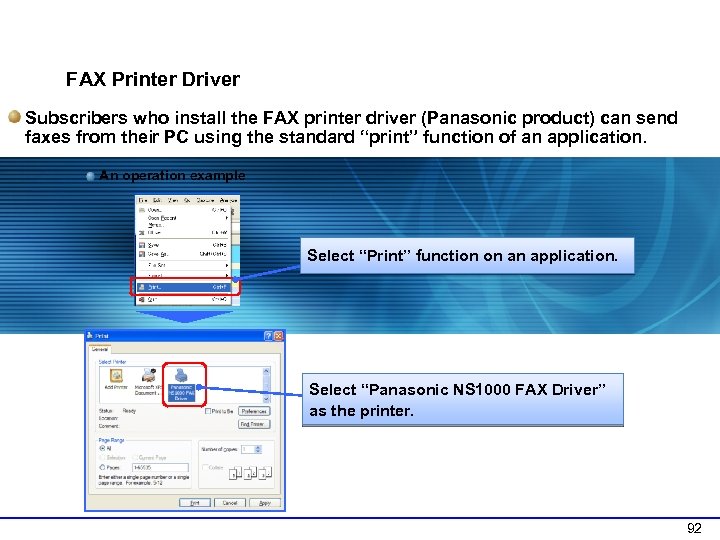 2 -3 Method to Send Faxes FAX Printer Driver Subscribers who install the FAX printer driver (Panasonic product) can send faxes from their PC using the standard “print” function of an application. An operation example Select “Print” function on an application. Select “Panasonic NS 1000 FAX Driver” as the printer. 92
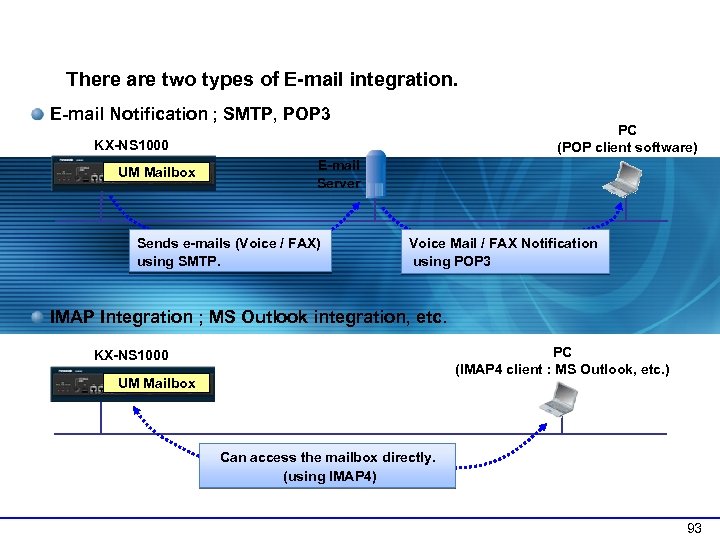 3 -1 E-mail Integration Overview There are two types of E-mail integration. E-mail Notification ; SMTP, POP 3 PC (POP client software) KX-NS 1000 UM Mailbox E-mail Server Sends e-mails (Voice / FAX) using SMTP. Voice Mail / FAX Notification using POP 3 IMAP Integration ; MS Outlook integration, etc. PC (IMAP 4 client : MS Outlook, etc. ) KX-NS 1000 UM Mailbox Can access the mailbox directly. (using IMAP 4) 93
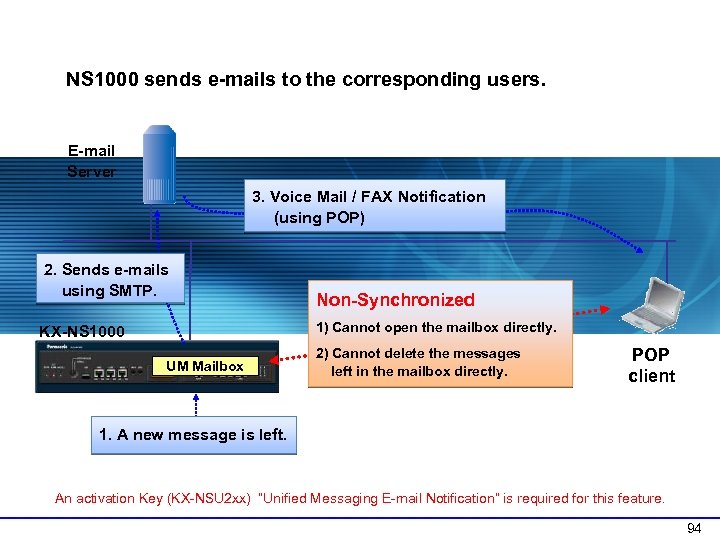 3 -3 E-mail Notification : Operation NS 1000 sends e-mails to the corresponding users. E-mail Server 3. Voice Mail / FAX Notification (using POP) 2. Sends e-mails using SMTP. Non-Synchronized 1) Cannot open the mailbox directly. KX-NS 1000 UM Mailbox 2) Cannot delete the messages left in the mailbox directly. POP client 1. A new message is left. An activation Key (KX-NSU 2 xx) “Unified Messaging E-mail Notification” is required for this feature. 94
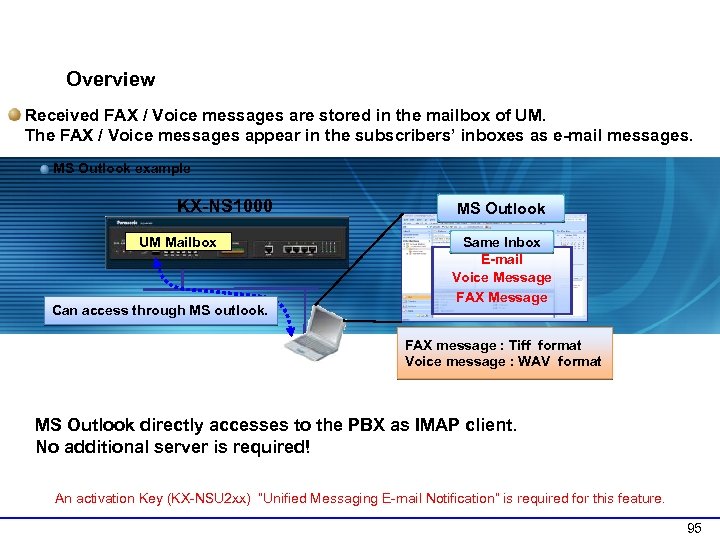 3 -5 IMAP Integration : Overview Received FAX / Voice messages are stored in the mailbox of UM. The FAX / Voice messages appear in the subscribers’ inboxes as e-mail messages. MS Outlook example KX-NS 1000 UM Mailbox Can access through MS outlook. MS Outlook Same Inbox E-mail Voice Message FAX message : Tiff format Voice message : WAV format MS Outlook directly accesses to the PBX as IMAP client. No additional server is required! An activation Key (KX-NSU 2 xx) “Unified Messaging E-mail Notification” is required for this feature. 95
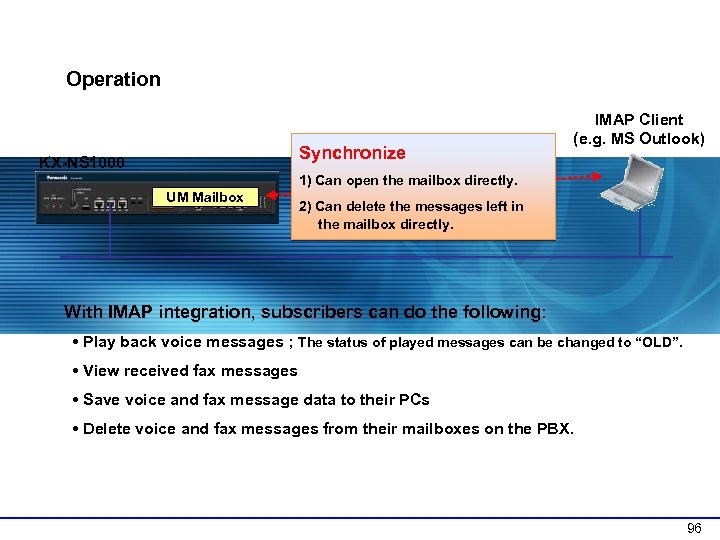 3 -6 IMAP Integration : Operation Synchronize KX-NS 1000 IMAP Client (e. g. MS Outlook) 1) Can open the mailbox directly. UM Mailbox 2) Can delete the messages left in the mailbox directly. With IMAP integration, subscribers can do the following: • Play back voice messages ; The status of played messages can be changed to “OLD”. • View received fax messages • Save voice and fax message data to their PCs • Delete voice and fax messages from their mailboxes on the PBX. 96
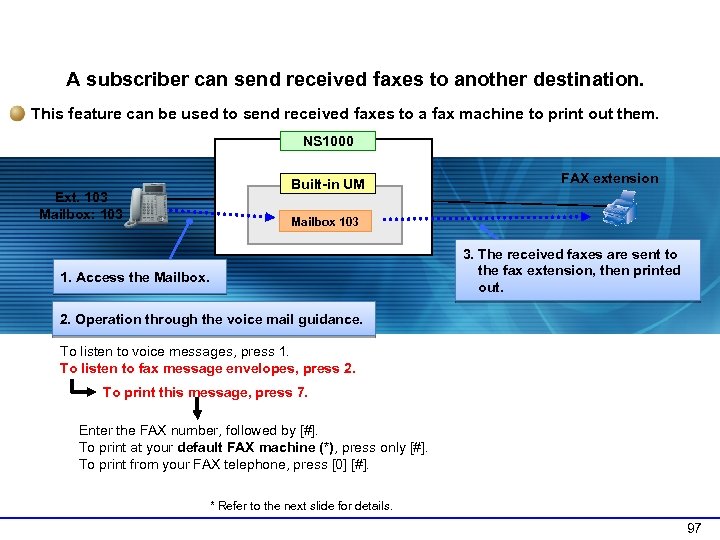 4 -10 Printing Out Faxes (1) A subscriber can send received faxes to another destination. This feature can be used to send received faxes to a fax machine to print out them. NS 1000 Ext. 103 Mailbox: 103 Built-in UM FAX extension Mailbox 103 3. The received faxes are sent to the fax extension, then printed out. 1. Access the Mailbox. 2. Operation through the voice mail guidance. To listen to voice messages, press 1. To listen to fax message envelopes, press 2. To print this message, press 7. Enter the FAX number, followed by [#]. To print at your default FAX machine (*), press only [#]. To print from your FAX telephone, press [0] [#]. * Refer to the next slide for details. 97
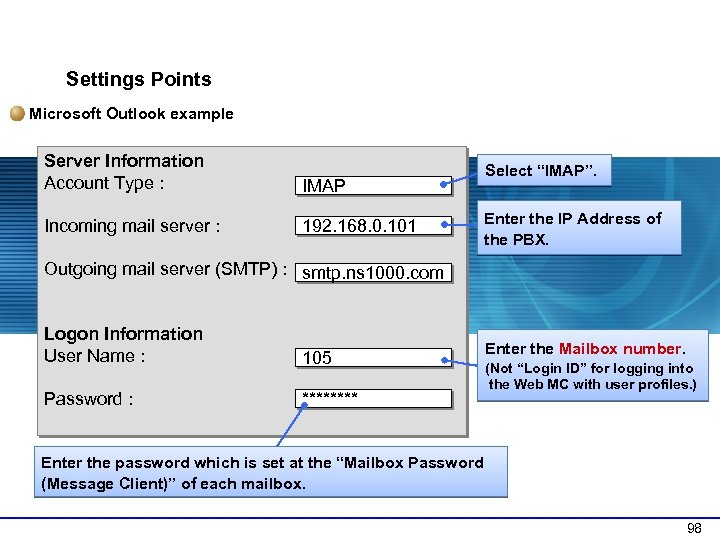 5 -5 IMAP Integration : Client Settings Points Microsoft Outlook example Server Information Account Type : IMAP Incoming mail server : 192. 168. 0. 101 Select “IMAP”. Enter the IP Address of the PBX. Outgoing mail server (SMTP) : smtp. ns 1000. com Logon Information User Name : 105 Password : **** Enter the Mailbox number. (Not “Login ID” for logging into the Web MC with user profiles. ) Enter the password which is set at the “Mailbox Password (Message Client)” of each mailbox. 98
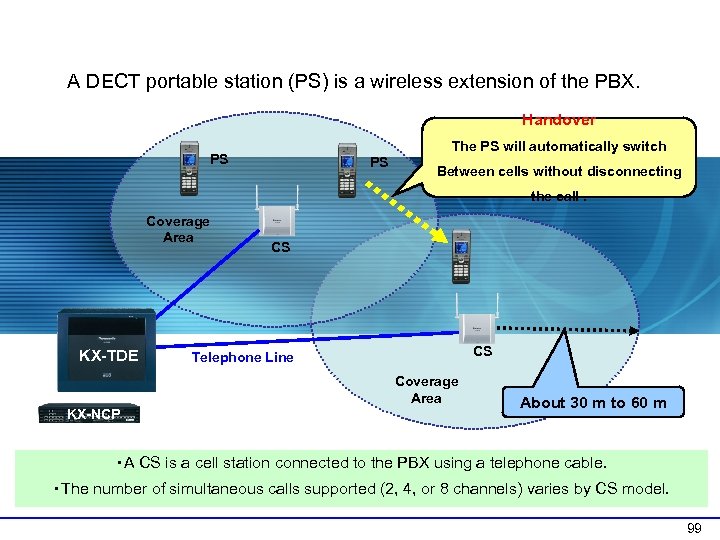 1 -1 System Overview A DECT portable station (PS) is a wireless extension of the PBX. Handover The PS will automatically switch PS PS Between cells without disconnecting the call. Coverage Area KX-TDE CS CS Telephone Line Coverage Area KX-NCP About 30 m to 60 m ・A CS is a cell station connected to the PBX using a telephone cable. ・The number of simultaneous calls supported (2, 4, or 8 channels) varies by CS model. 99
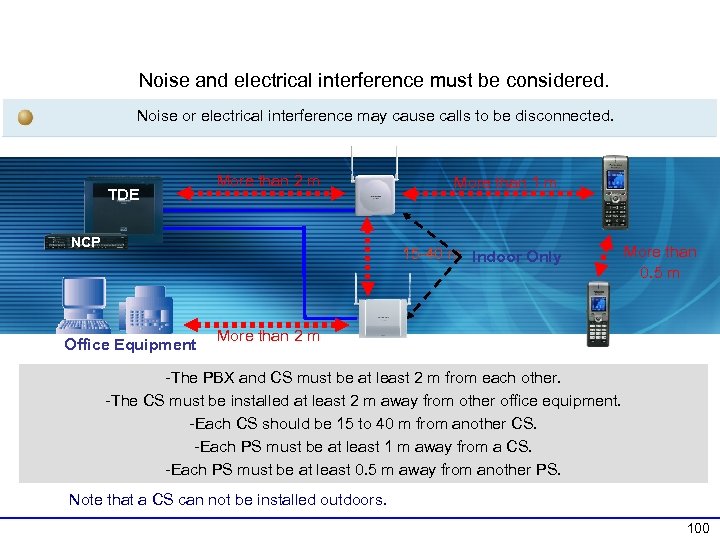 3 -1 Equipment, Distance Between Devices Noise and electrical interference must be considered. Noise or electrical interference may cause calls to be disconnected. TDE More than 2 m NCP More than 1 m 15 -40 m Indoor Only Office Equipment More than 0. 5 m More than 2 m -The PBX and CS must be at least 2 m from each other. -The CS must be installed at least 2 m away from other office equipment. -Each CS should be 15 to 40 m from another CS. -Each PS must be at least 1 m away from a CS. -Each PS must be at least 0. 5 m away from another PS. Note that a CS can not be installed outdoors. 100
 Thank you ! 101