


 Скачать презентацию Distance vector routing protocol This concept gives a
eda9316f4243f0659fdfa5d0a528d49d.ppt
- Количество слайдов: 29
 Distance vector routing protocol This concept gives a brief idea about the one type of forwarding protocol followed in routing. Subject: Communication Networks/ Computer networks Authors Parul Goradia Mentor Prof. Saravanan
 Learning Objectives After interacting with this Learning Object, the learner will be able to: • • Explain forwarding. Explain distance vector routing protocol. Complete the routing table of a given node. Identify the forwarding routes from one node to another node.
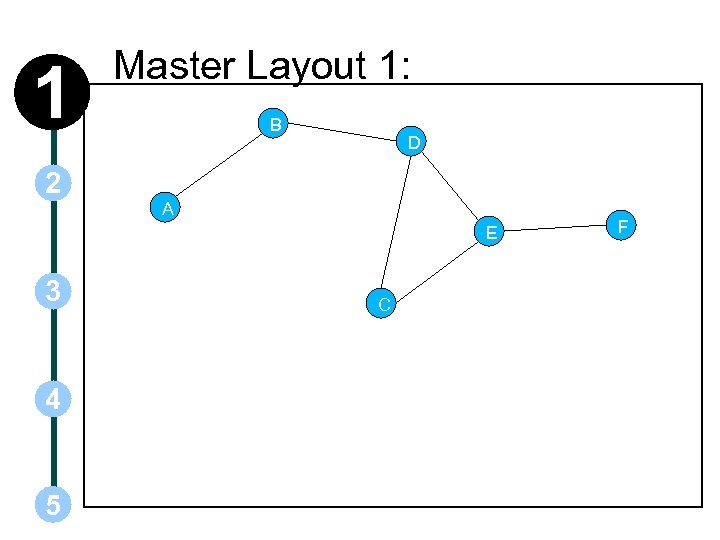 1 2 Master Layout 1: B D A E 3 4 5 C F
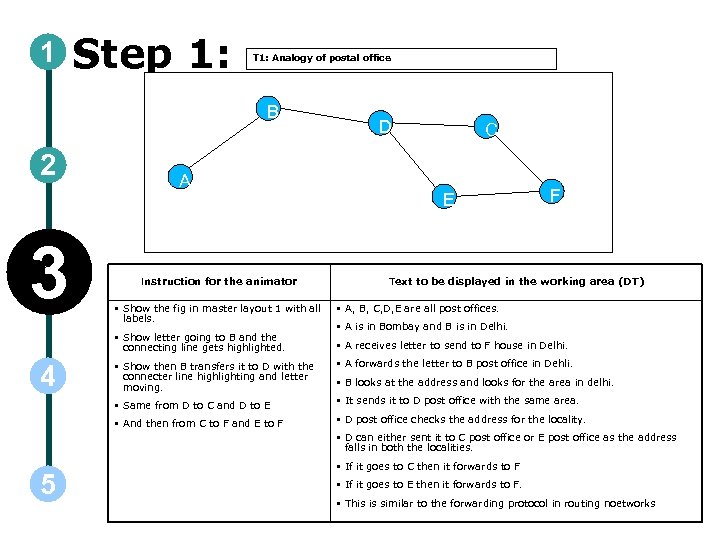 1 Step 1: T 1: Analogy of postal office B 2 3 A Instruction for the animator D C E F Text to be displayed in the working area (DT) • Show the fig in master layout 1 with all labels. • A, B, C, D, E are all post offices. • Show letter going to B and the connecting line gets highlighted. • A receives letter to send to F house in Delhi. • A is in Bombay and B is in Delhi. • A forwards the letter to B post office in Dehli. • Same from D to C and D to E • It sends it to D post office with the same area. • And then from C to F and E to F 4 • Show then B transfers it to D with the connecter line highlighting and letter moving. • D post office checks the address for the locality. • B looks at the address and looks for the area in delhi. • D can either sent it to C post office or E post office as the address falls in both the localities. 5 • If it goes to C then it forwards to F • If it goes to E then it forwards to F. • This is similar to the forwarding protocol in routing noetworks
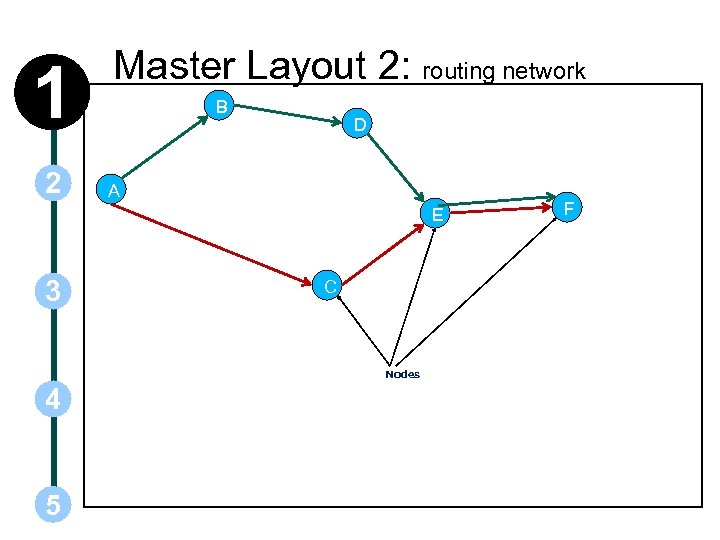 1 2 Master Layout 2: routing network B D A E 3 C Nodes 4 5 F
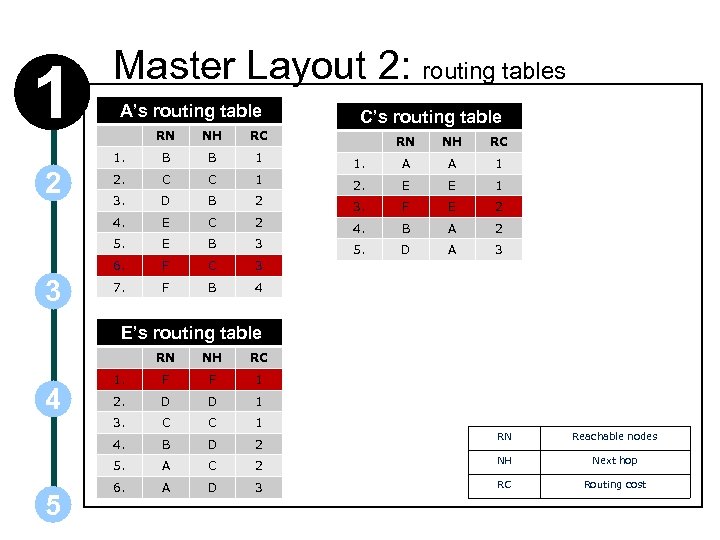 1 Master Layout 2: routing tables A’s routing table RN NH RC 1. B B 1 2. C C 1 3. D B 4. E 5. C’s routing table 3 NH RC 1. A A 1 2. E E 1 2 3. F E 2 C 2 4. B A 2 E B 3 5. D A 3 6. 2 RN F C 3 7. F B 4 E’s routing table RN 1. F F 1 2. D D 1 3. C C 1 B D 2 5. 5 RC 4. 4 NH A C 6. A D RN Reachable nodes 2 NH Next hop 3 RC Routing cost
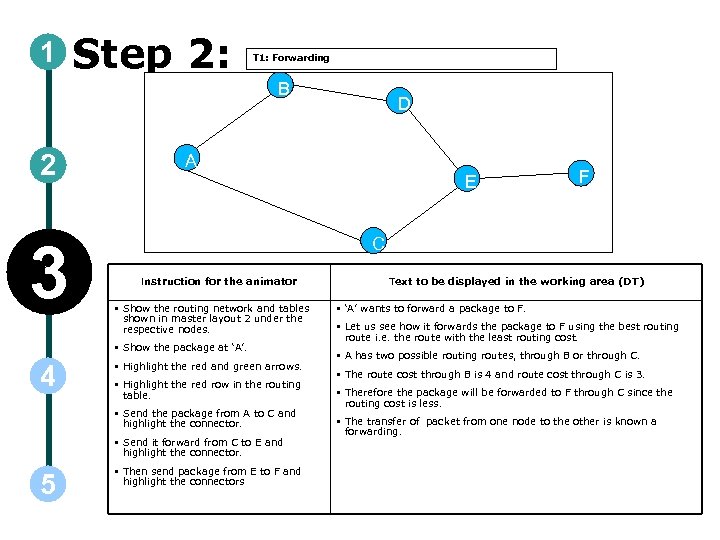 1 Step 2: T 1: Forwarding B 2 3 A E Instruction for the animator • Show the routing network and tables shown in master layout 2 under the respective nodes. • Highlight the red and green arrows. • Highlight the red row in the routing table. • Send the package from A to C and highlight the connector. • Send it forward from C to E and highlight the connector. 5 F C • Show the package at ‘A’. 4 D • Then send package from E to F and highlight the connectors Text to be displayed in the working area (DT) • ‘A’ wants to forward a package to F. • Let us see how it forwards the package to F using the best routing route i. e. the route with the least routing cost. • A has two possible routing routes, through B or through C. • The route cost through B is 4 and route cost through C is 3. • Therefore the package will be forwarded to F through C since the routing cost is less. • The transfer of packet from one node to the other is known a forwarding.
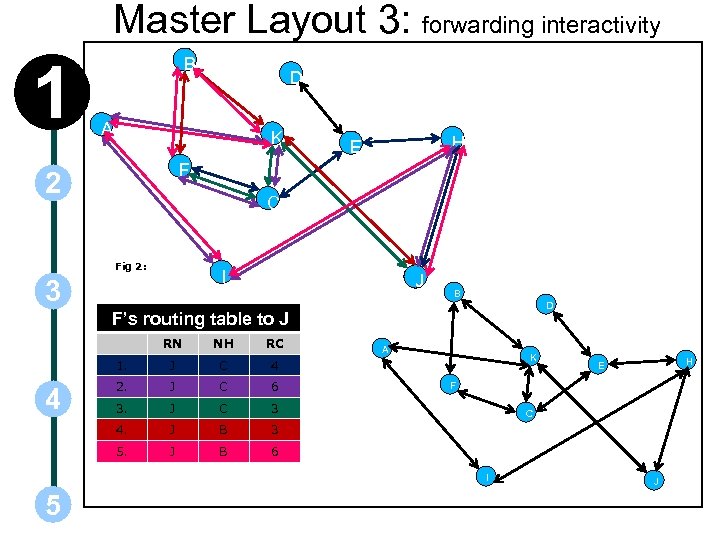 Master Layout 3: forwarding interactivity 1 B D A K H E F 2 C Fig 2: I 3 J B D F’s routing table to J RN RC 1. J C 4 2. J C 6 3. J C 3 4. J B 3 5. 4 NH J B 6 A K F C I 5 H E J
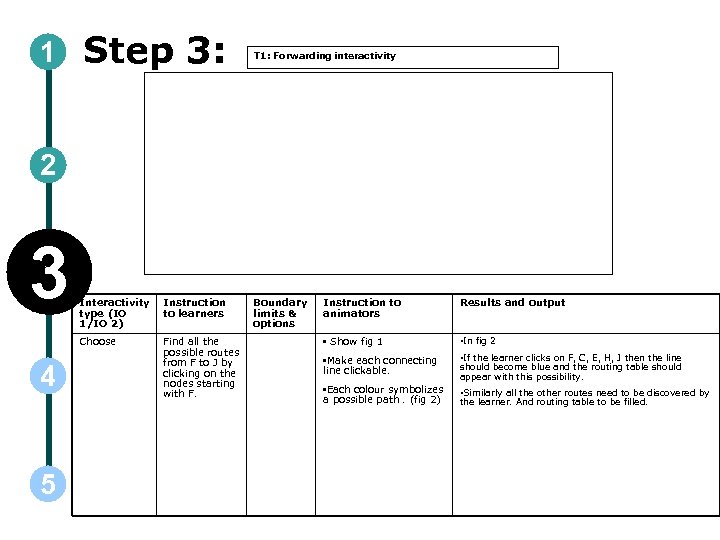 1 Step 3: T 1: Forwarding interactivity 2 3 5 Instruction to learners Choose 4 Interactivity type (IO 1/IO 2) Find all the possible routes from F to J by clicking on the nodes starting with F. Boundary limits & options Instruction to animators Results and output • Show fig 1 • In fig 2 • Make each connecting line clickable. • If the learner clicks on F, C, E, H, J then the line • Each colour symbolizes a possible path. (fig 2) • Similarly all the other routes need to be discovered by should become blue and the routing table should appear with this possibility. the learner. And routing table to be filled.
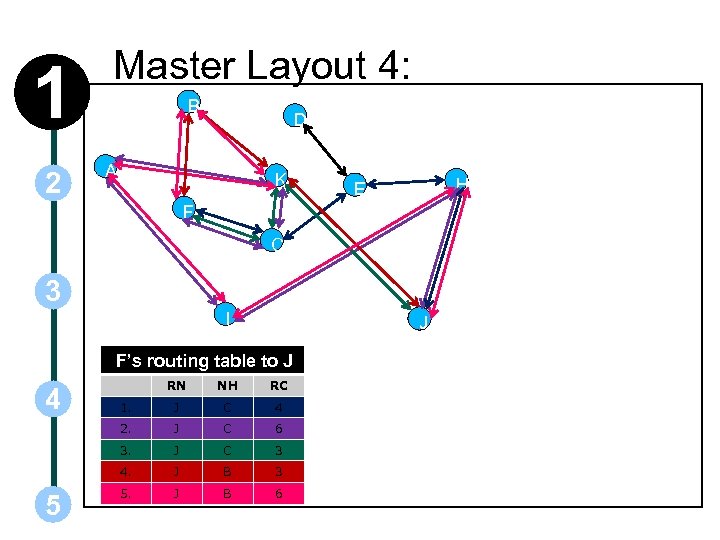 1 2 Master Layout 4: B D A K H E F C 3 I J F’s routing table to J RC 1. J C 4 J C 6 3. J C 3 4. 5 NH 2. 4 RN J B 3 5. J B 6
 1 Step 4: T 1: Forwarding 2 3 4 5 Instruction for the animator • Show the fig and the routing table in master layout 4 Text to be displayed in the working area (DT) • Routing is the process of constructing the routing tables in a network such that packets ex-changed between pairs of nodes take paths which have lowest cost among all available paths. • Routing is accomplished by a routing algorithm which is typically a distributed algorithm involving all the nodes in the network. The main reason for the distributed nature of most routing algorithms is that centralized routing algorithms are not scalable. • There are two main classes of routing protocols: • Distance vector routing protocol and • Link state routing protocols. • These protocols are easily illustrated using the graphical model of a network where nodes are represented by vertices on a graph and communication links are represented by edges in the graph. • Each edge has a cost associated with it and the goal of the routing algorithm is to find the lowest cost path between any pair of nodes. • Let us have a look at the Distance vector routing protocol.
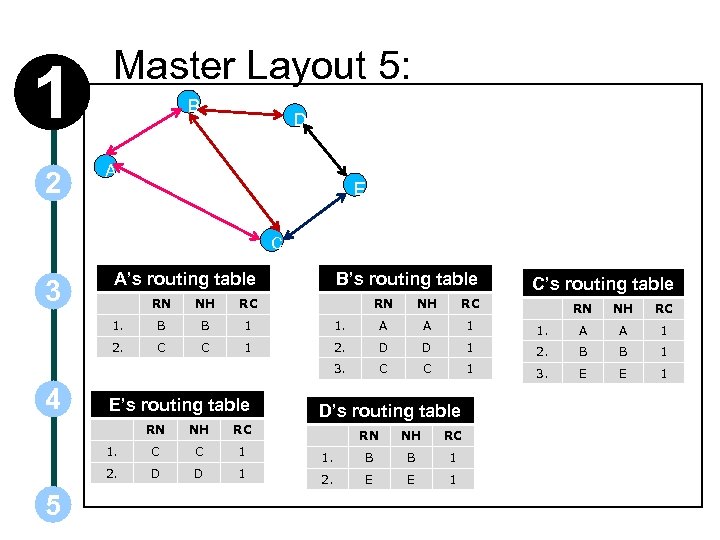 1 2 Master Layout 5: B D A E C 3 A’s routing table NH RC 1. B B 1 2. C C 1 E’s routing table RN C C 1 2. D D 1 NH A A 1 2. D D C C C’s routing table RC 1. NH RC 1. B B 1 2. E E 1 NH RC 1. A A 1 2. B B 1 1 RN RN 1 D’s routing table RC 1. 5 NH RN 3. 4 RN B’s routing table 3. E E 1
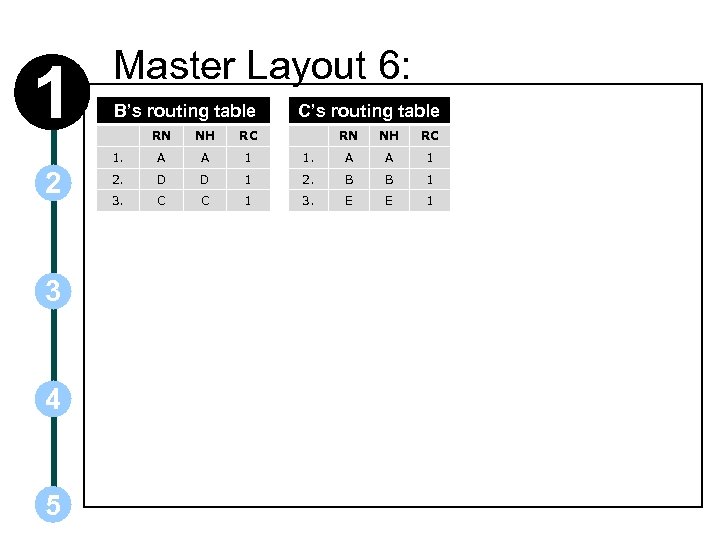 1 Master Layout 6: B’s routing table 3 4 5 NH RC 1. 2 RN A A 1 2. D D 3. C C C’s routing table RN NH RC 1. A A 1 1 2. B B 1 1 3. E E 1
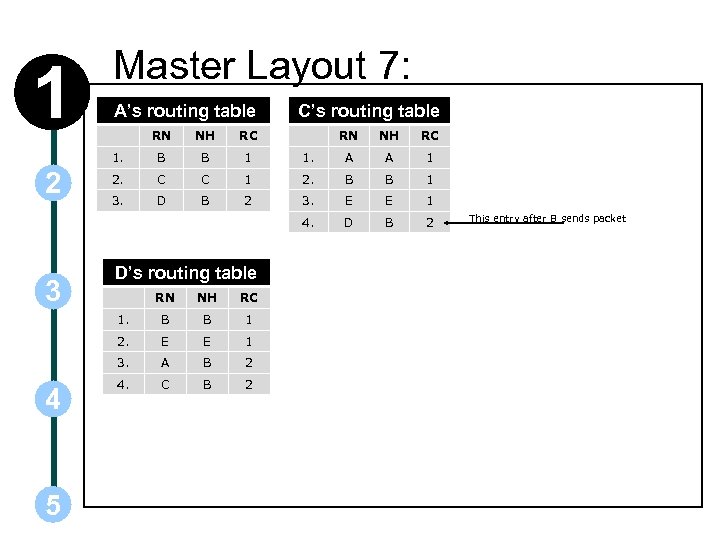 1 Master Layout 7: A’s routing table RN NH RC 1. A A 1 1 2. B B 1 2 3. E E 1 4. 3 NH RC 1. 2 RN B B 1 2. C C 3. D B C’s routing table D B 2 D’s routing table RC B B 1 2. E E 1 3. 5 NH 1. 4 RN A B 2 4. C B 2 This entry after B sends packet
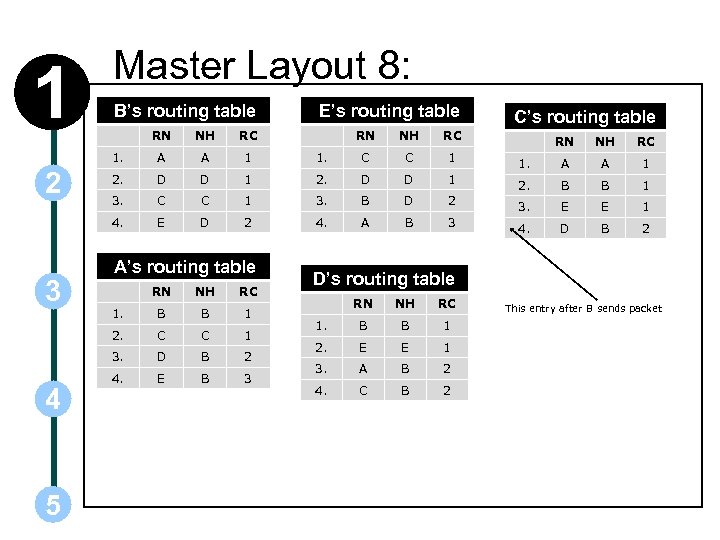 1 Master Layout 8: B’s routing table RC A A 1 2. D D 3. C 4. 3 NH 1. 2 RN E RN NH 1. C C 1 1 2. D D C 1 3. B D 2 4. A A’s routing table RN NH RC 1. B B 1 C C 1 3. 5 C’s routing table RC 2. 4 E’s routing table D B 2 4. E B 3 RN NH RC 1. A A 1 1 2. B B 1 D 2 3. E E 1 B 3 4. D B 2 D’s routing table RN NH RC 1. B B 1 2. E E 1 3. A B 2 4. C B 2 This entry after B sends packet
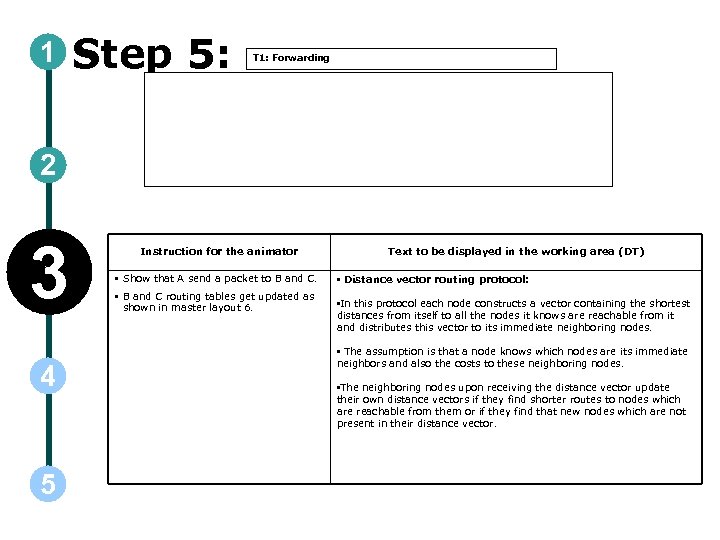 1 Step 5: T 1: Forwarding 2 3 4 5 Instruction for the animator Text to be displayed in the working area (DT) • Show that A send a packet to B and C. • Distance vector routing protocol: • In this protocol each node constructs a vector containing the shortest distances from itself to all the nodes it knows are reachable from it and distributes this vector to its immediate neighboring nodes. • B and C routing tables get updated as shown in master layout 6. • The assumption is that a node knows which nodes are its immediate neighbors and also the costs to these neighboring nodes. • The neighboring nodes upon receiving the distance vector update their own distance vectors if they find shorter routes to nodes which are reachable from them or if they find that new nodes which are not present in their distance vector.
 1 Step 6: T 1: Forwarding 2 3 4 5 Instruction for the animator • Show B sending packet to D, C and A. • Show the routing tables updated as in master layout 7 Text to be displayed in the working area (DT) • Each node sends its distance vector to its neighbors periodically resulting in a periodic update even when there are no changes in its routing table.
 1 Step 7: T 1: Forwarding 2 3 Instruction for the animator • Show D sending packet to B and E • Show the routing tables of B and E updated as in master layout 8. • Then show B sending packet to A and C. • And E sending packet to C and D. 4 5 • Show the routing tables of A, C, and D in master layout 8 Text to be displayed in the working area (DT) • When a change occurs in a node’s routing table it immediately sends its new distance vector resulting in a triggered update.
 1 Step 8: T 1: Forwarding 2 3 Instruction for the animator • Show c sending package to A • Show A routing table entry no 5 change • From E; B; 3 to E; C; 2. 4 5 • All these changes in the routing tables are to occur in the same animation. Text to be displayed in the working area (DT) • The periodic update is useful in identifying a node failure which can be characterized by the absence of the periodic update message in the last few update cycles.
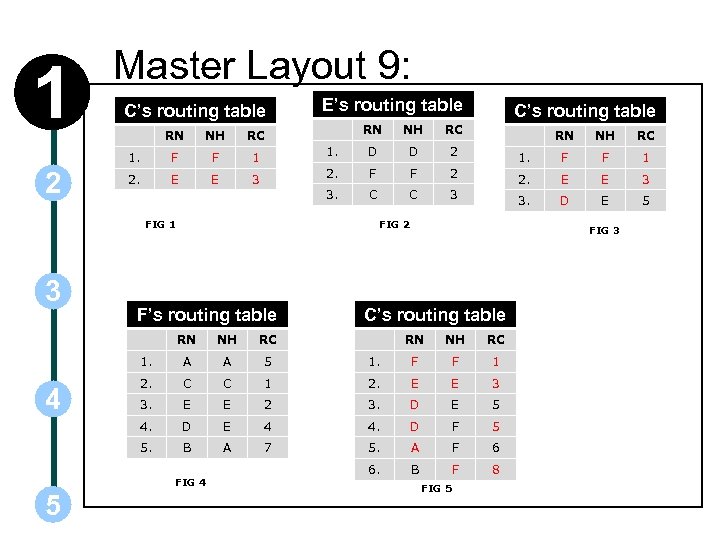 1 Master Layout 9: C’s routing table RN NH E’s routing table RN RC NH RC D D C’s routing table 2 RN NH RC 1. F F 1 1. 2. E E 3 2. F F 2 2. E E 3 3. C C 3 3. D E 5 FIG 1 3 FIG 2 F’s routing table RN A A 5 2. C C 3. E 4. 5. RN NH RC 1. F F 1 1 2. E E 3 E 2 3. D E 5 D E 4 4. D F 5 B A 7 5. A F 6 6. B F 8 FIG 4 5 C’s routing table RC 1. 4 NH FIG 3 FIG 5
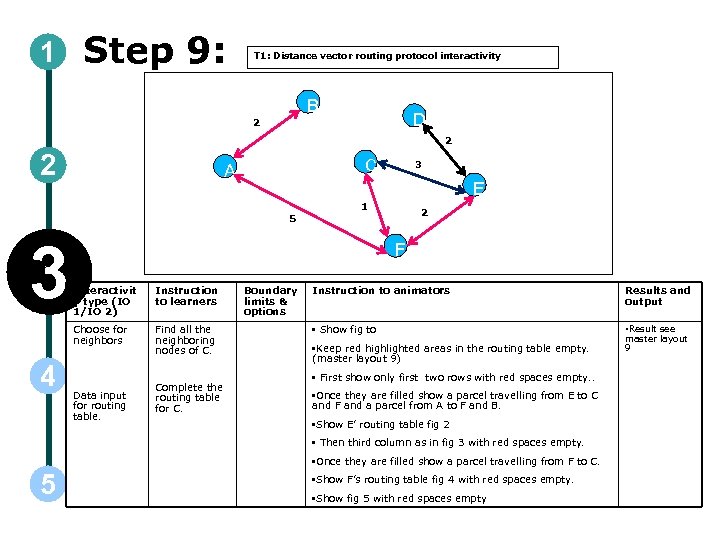 1 Step 9: T 1: Distance vector routing protocol interactivity B D 2 2 2 C A E 5 3 1 2 F Interactivit y type (IO 1/IO 2) Instruction to learners Choose for neighbors 4 3 Find all the neighboring nodes of C. Data input for routing table. Complete the routing table for C. Boundary limits & options Instruction to animators Results and output • Show fig to • Result see • Keep red highlighted areas in the routing table empty. (master layout 9) • First show only first two rows with red spaces empty. . • Once they are filled show a parcel travelling from E to C and F and a parcel from A to F and B. • Show E’ routing table fig 2 • Then third column as in fig 3 with red spaces empty. • Once they are filled show a parcel travelling from F to C. 5 • Show F’s routing table fig 4 with red spaces empty. • Show fig 5 with red spaces empty master layout 9
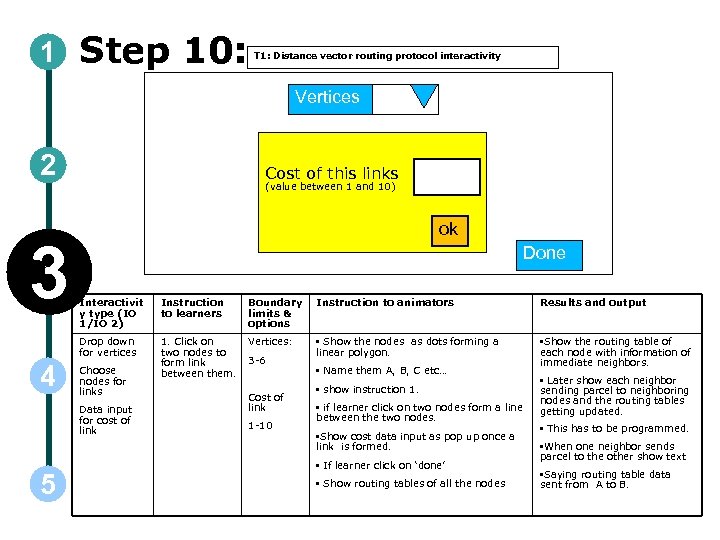 1 Step 10: T 1: Distance vector routing protocol interactivity Vertices 2 3 Cost of this links (value between 1 and 10) ok Done Instruction to learners Boundary limits & options Instruction to animators Results and output Drop down for vertices 4 Interactivit y type (IO 1/IO 2) 1. Click on two nodes to form link between them. Vertices: • Show the nodes as dots forming a linear polygon. • Show the routing table of each node with information of immediate neighbors. Choose nodes for links Data input for cost of link 5 3 -6 Cost of link 1 -10 • Name them A, B, C etc… • show instruction 1. • if learner click on two nodes form a line between the two nodes. • Show cost data input as pop up once a link is formed. • If learner click on ‘done’ • Show routing tables of all the nodes • Later show each neighbor sending parcel to neighboring nodes and the routing tables getting updated. • This has to be programmed. • When one neighbor sends parcel to the other show text • Saying routing table data sent from A to B.
 1 Concepts: • 2 • • • 3 RN; Reachable node: All the destinations/ nodes that can be reached by a node. NH; Next hop: The next hop, or gateway, is the address of the next station to which the packet is to be sent on the way to its final destination RC; Routing Cost: The cost or metric of the path through which the packet is to be sent Routing table: • When a node needs to send data to another node on a network, it must know where to send it, first. If the node cannot directly connect to the destination node, it has to send it via other nodes along a proper route to the destination node. • 4 • 5 Most nodes do not try to figure out which route(s) might work; instead, a node will send an IP packet to a gateway in the LAN, which then decides how to route the "package" of data to the correct destination. Each gateway will need to keep track of which way to deliver various packages of data, and for this it uses a Routing Table. A routing table is a database which keeps track of paths, like a map, and allows the gateway to provide this information to the node requesting the information.
 1 2 3 4 5 Concepts: Route: As the size of a network grows, many pairs of nodes will not be directly connected to each other and will depend on intermediate nodes to relay packets between them. A sequence of relay nodes which transfer information between a source-destination node pair is called a route. Routing: Routing is the process of constructing the routing tables in a network such that packets ex-changed between pairs of nodes take paths which have lowest cost among all available paths. Distance vector routing protocol: The main idea behind DVRP is that each node constructs a vector containing the shortest distances from itself to all the nodes it knows are reachable from it and distributes this vector to its immediate neighboring nodes. The assumption is that a node knows which nodes are its immediate neighbors and also the costs to these neighboring nodes. The neighboring nodes upon receiving the distance vector update their own distance vectors if they find shorter routes to nodes which are reachable from them or if they find that new nodes which are not present in their distance vector.
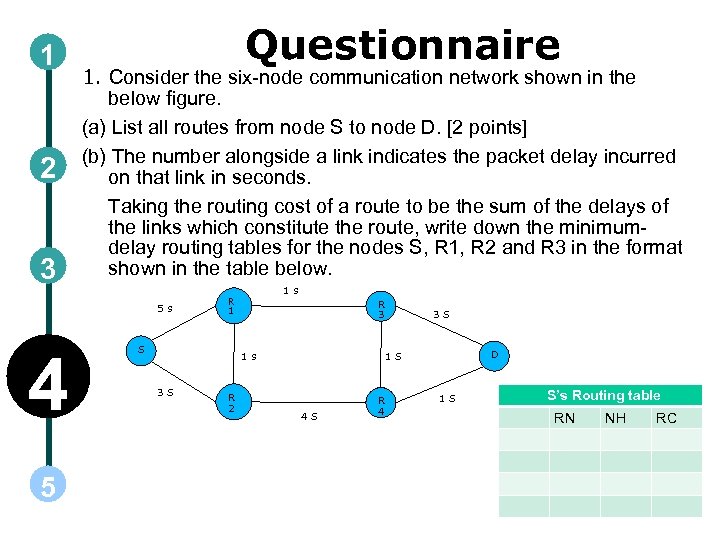 1 2 3 Questionnaire 1. Consider the six-node communication network shown in the below figure. (a) List all routes from node S to node D. [2 points] (b) The number alongside a link indicates the packet delay incurred on that link in seconds. Taking the routing cost of a route to be the sum of the delays of the links which constitute the route, write down the minimumdelay routing tables for the nodes S, R 1, R 2 and R 3 in the format shown in the table below. 5 s 4 5 1 s R 1 S R 3 1 s 3 S R 2 3 S D 1 S 4 S R 4 1 S S’s Routing table RN NH RC
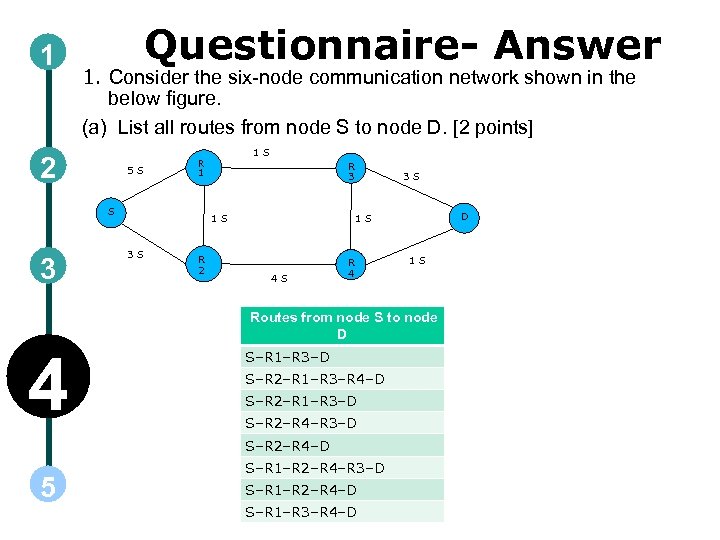 1 Questionnaire- Answer 1. Consider the six-node communication network shown in the below figure. (a) List all routes from node S to node D. [2 points] 2 5 S S 3 1 S R 1 R 3 1 S 3 S R 2 3 S D 1 S 4 S R 4 1 S Routes from node S to node D 4 S–R 1–R 3–D S–R 2–R 1–R 3–R 4–D S–R 2–R 1–R 3–D S–R 2–R 4–D 5 S–R 1–R 2–R 4–R 3–D S–R 1–R 2–R 4–D S–R 1–R 3–R 4–D
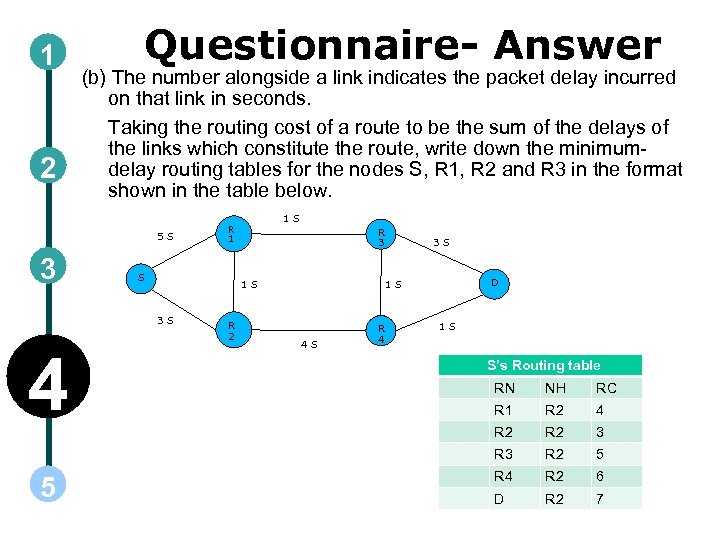 1 2 Questionnaire- Answer (b) The number alongside a link indicates the packet delay incurred on that link in seconds. Taking the routing cost of a route to be the sum of the delays of the links which constitute the route, write down the minimumdelay routing tables for the nodes S, R 1, R 2 and R 3 in the format shown in the table below. 5 S 3 S R 3 1 S 3 S 4 1 S R 1 R 2 3 S D 1 S 4 S R 4 1 S S’s Routing table NH RC R 1 R 2 4 R 2 3 R 3 5 RN R 2 5 R 4 R 2 6 D R 2 7
 Links for further reading Reference websites: Books: Computer Networks – Andrew S. Tanenbaum fourth edition Communication networks – Leon-Garcia and Widijaja second edition Research papers:
 Summary • • The transfer of packet from one node to the other is known a forwarding. • Distance vector routing protocol: In this protocol each node constructs a vector containing the shortest distances from itself to all the nodes it knows are reachable from it and distributes this vector to its immediate neighboring nodes. Routing is the process of constructing the routing tables in a network such that packets ex-changed between pairs of nodes take paths which have lowest cost among all available paths. • There are two main classes of routing protocols: • Distance vector routing protocol and • Link state routing protocols. • The assumption is that a node knows which nodes are its immediate neighbors and also the costs to these neighboring nodes. • The neighboring nodes upon receiving the distance vector update their own distance vectors if they find shorter routes to nodes which are reachable from them or if they find that new nodes which are not present in their distance vector. • Each node sends its distance vector to its neighbors periodically resulting in a periodic update even when there are no changes in its routing table. • When a change occurs in a node’s routing table it immediately sends its new distance vector resulting in a triggered update. • The periodic update is useful in identifying a node failure which can be characterized by the absence of the periodic update message in the last few update cycles.