 Скачать презентацию Digital Library Service Integration Michael Bieber Il Im
8353316f3e3ab70aa73d7378f8b576c7.ppt
- Количество слайдов: 24



Digital Library Service Integration Michael Bieber, Il Im, Yi-Fang Wu Xin Chen, Dong-ho Kim, Nkechi Nnadi Vikas Achhpiliya Information Systems Department College of Computing Sciences New Jersey Institute of Technology http: //is. njit. edu/dlsi October 2003
Integration Through Linking • automatically generate links anchors on elements we recognize – Structural relationships (to information/services) – Lexical relationships – through relationship analysis • automatically generate links • provide additional link-based services – User-declared links, annotation, guided tours, discussion, etc.
DLSI: Integration through Linking
Prototype
Prototype
Benefits of Integration for a system (collection/service) • Users: direct access to related systems – enlarges a system’s feature set • DLSI leads users to a system – systems gain wider use • Users become aware of other systems – systems gain wider awareness • Direct access to a system’s features – streamlined access (bypassing menus)
Finding Links • Structural links – when we know the object type • Lexical analysis (Professor Wu) – NJIT Noun Phrase Extractor – NJIT Ontology Developer
Filtering & Rank Ordering Links • Collaborative Filtering (Professor Im) – customize the link set for each user • based on: – user-direct evaluations (ratings) – indirect evaluation (clickstream data) • using a Collaborative Filtering Engine
How to Integrate (1) Develop a Wrapper – Parse all display screens to identify the “elements of interest” that DLSI will make into link anchors. • Parse each kind of display screen • Parse based on the standard template/layout or metadata provided – Also call the lexical analysis routines to identify key phrases for you
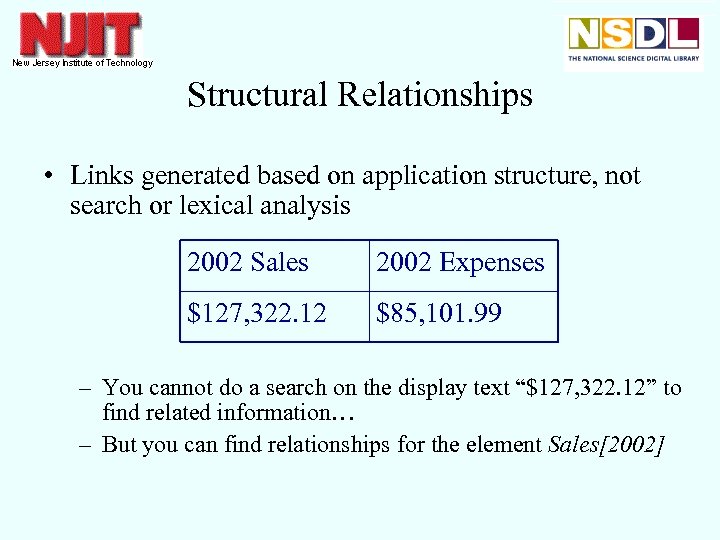
Structural Relationships • Links generated based on application structure, not search or lexical analysis 2002 Sales 2002 Expenses $127, 322. 12 $85, 101. 99 – You cannot do a search on the display text “$127, 322. 12” to find related information… – But you can find relationships for the element Sales[2002]
How to Integrate, cont. (2) Develop Linking Rules to Related Information and Services – specify the “structural relationships” for recognized object types within the system being integrated. • e. g. , author, address, concept, spacecraft, measurement – one rule per object type (class) per link – all linking rules are merged by DLSI, so rules for other systems apply automatically to your system • (e. g. , annotations, discussions, related documents)
Example Linking Rule to Ask. NSDL – a) element type (“concept”) – b) link display label (“Ask an expert about this concept”) – c) relationship metadata – d) destination collection or service (“Ask NSDL”) – e) the exact command to send to the destination system • (logs the user into Ask. NSDL, opens question template, fills in the element instance (i. e. , “Plant Pathology”) as the subject, and places the cursor in the question area) – f) any relevant conditions for including this relationship
How to Integrate, cont. (3) Identify glossaries and thesauri: – These will be used for lexical linking (i. e. , key phrases)
Current Projects • • • Atmospheric Visualization Collection Ask NSDL Metis Earth Science Picture of the Day NASA’s National Space Science Data Center • looking for others!
Project 1 Atmospheric Visualization Collection • Provides visualization tools and images of weather data from Atmospheric Radiation Measurement (ARM) program • ARM: the largest global change research program supported by the U. S. Dept. of Energy • based at the Argonne National Laboratory • URL: http: //www. nsdl. arm. gov/visualization. shtml
Automated Links (AVC) • From concepts found in the glossary and from instruments: – link to the glossary definition – link to lesson plans containing it – link to an instrument's page – link to ARM publications containing the keyword/instrument
Automated Links, cont. (AVC) • From any relevant object to the appropriate data display page • From any relevant object to the appropriate internal data file (for AVC internal developers)
Automated Links, cont. (AVC) and, of course: • Links to related objects, teaching notes and documents in other systems • Links for additional services such as discussion, comments, guided tours, etc.
In planning: NSDL Core Integration Services • The NSDL system has several “core integration projects” we need to coordinate with: • Search services • Metadata repository • Access management (user information)
Evaluation (Il Im) • Goal: – does DLSI provide more effective services? – to gather suggestions • Usability through protocol analysis • User surveys (on-line, with pilot first) – after initial integration – after final prototype (more data available for filtering)
Issues • Services designed for one system may need modification/generalization for others – e. g. , peer review process: anonymity, # reviewers, locations – where to store data about external collections • Applying static services to dynamic information – e. g. , placing a comment on the results of a query
Integration Through Linking • automatically generate links anchors on elements we recognize – Structural relationships (to information/services) – Lexical relationships – through relationship analysis • automatically generate links • provide additional link-based services – User-declared links, annotation, guided tours, discussion, etc.
Contributions • straightforward, sustainable approach for integrating DL collections and services – integration through linking • developing filtering mechanisms for customizing large sets of links • combining structural links with lexical analysis links • using advanced lexical analysis tools (Noun Phrase Extractor and Concept Hierarchy Developer) • first large-scale test of the Dynamic Hypermedia Engine
Скачать презентацию Digital Library Service Integration Michael Bieber Il Im
8353316f3e3ab70aa73d7378f8b576c7.ppt