


 Скачать презентацию Device -to-Device Authentication Nitesh Saxena Polytechnic Institute of NYU
cf45f1d351fda76b870b8889238f4ea2.ppt
- Количество слайдов: 43
 Device(-to-Device) Authentication Nitesh Saxena Polytechnic Institute of NYU
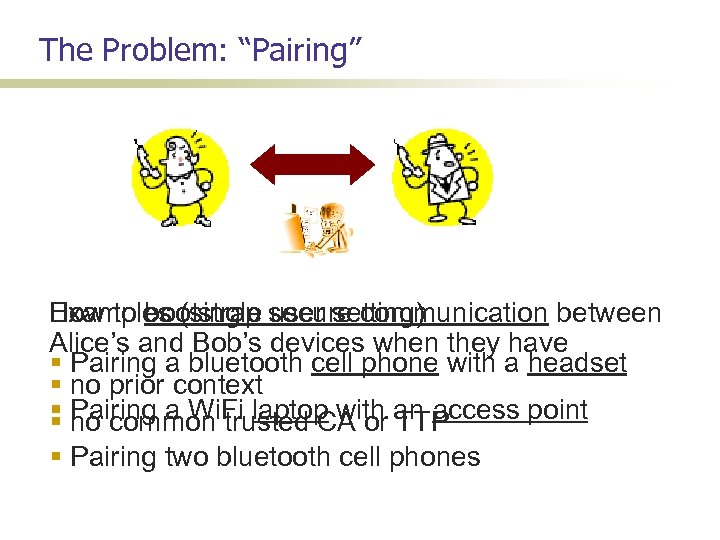 The Problem: “Pairing” Examples (single user setting) How to bootstrap secure communication between Alice’s and Bob’s devices when they have Pairing a bluetooth cell phone with a headset no prior context Pairing a Wi. Fi laptop with an access point no common trusted CA or TTP Pairing two bluetooth cell phones
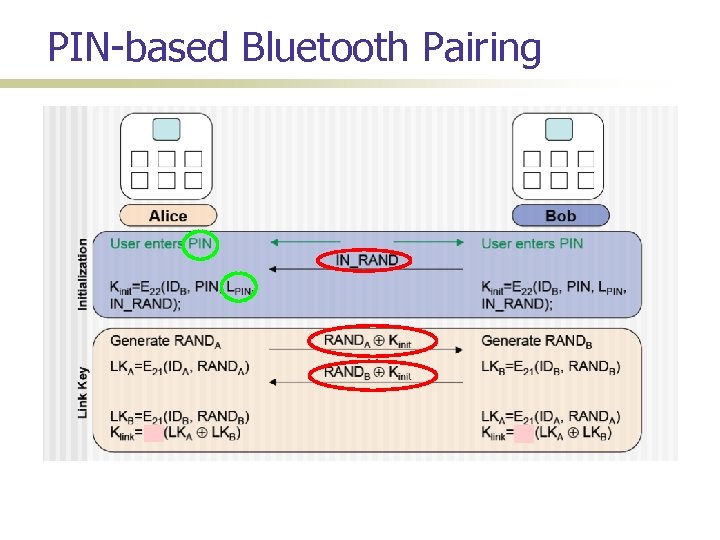 PIN-based Bluetooth Pairing
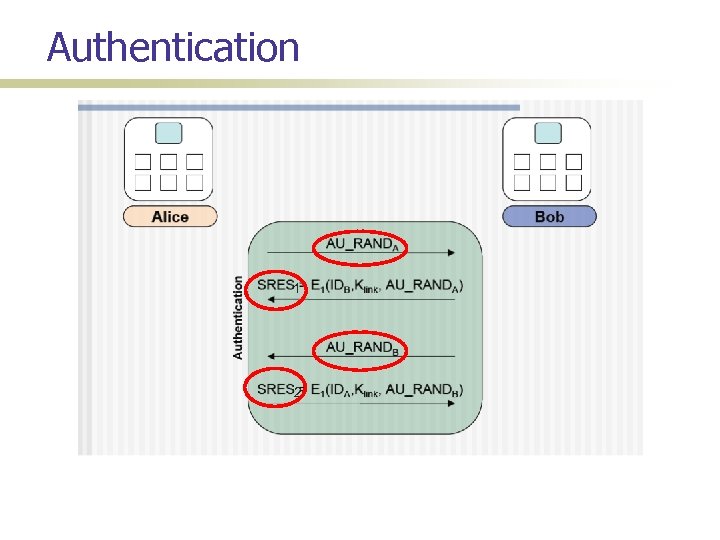 Authentication 1 2
 (In)Security of PIN-based Pairing Long believed to be insecure for short PINs Why? First to demonstrate this insecurity; Shaked and Wool [Mobisys’ 05]
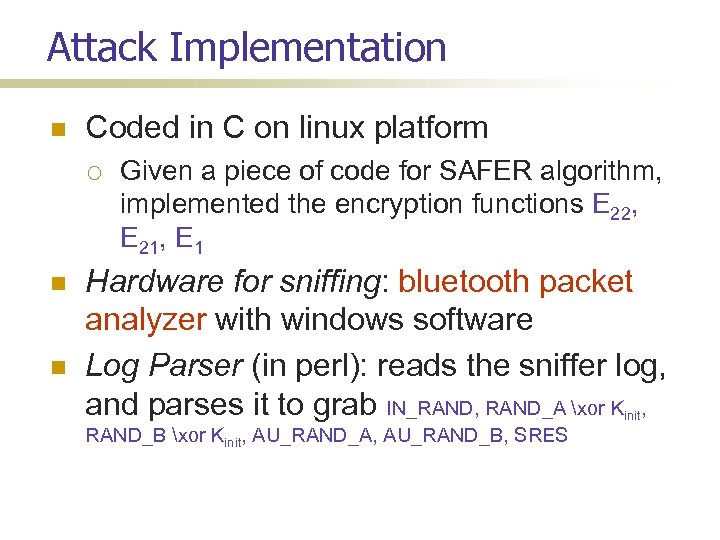 Attack Implementation Coded in C on linux platform Given a piece of code for SAFER algorithm, implemented the encryption functions E 22, E 21, E 1 Hardware for sniffing: bluetooth packet analyzer with windows software Log Parser (in perl): reads the sniffer log, and parses it to grab IN_RAND, RAND_A xor Kinit, RAND_B xor Kinit, AU_RAND_A, AU_RAND_B, SRES
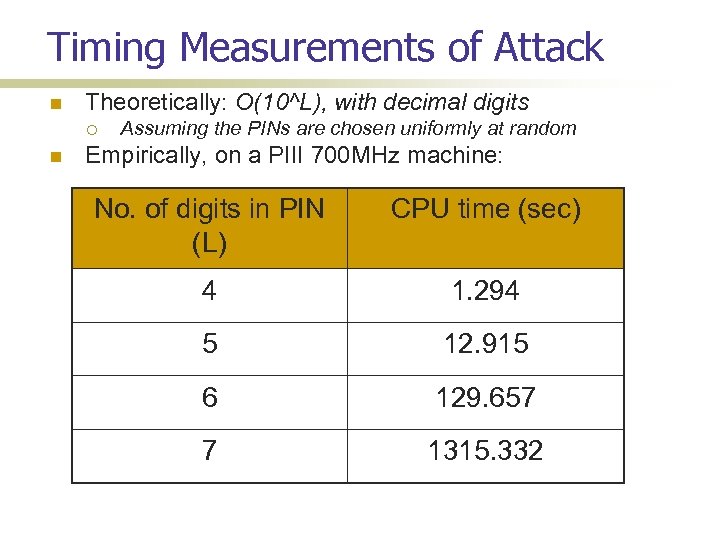 Timing Measurements of Attack Theoretically: O(10^L), with decimal digits Assuming the PINs are chosen uniformly at random Empirically, on a PIII 700 MHz machine: No. of digits in PIN (L) CPU time (sec) 4 1. 294 5 12. 915 6 129. 657 7 1315. 332
 Timing of Attack and User Issues ASCII PINs: O(90^L), assuming there are 90 ascii characters that can be typed on a mobile phone However, in practice the actual space will be quite small Assuming random pins Users choose weak PINs; User find it hard to type in ascii characters on mobile devices Another problem: shoulder surfing (manual or automated)
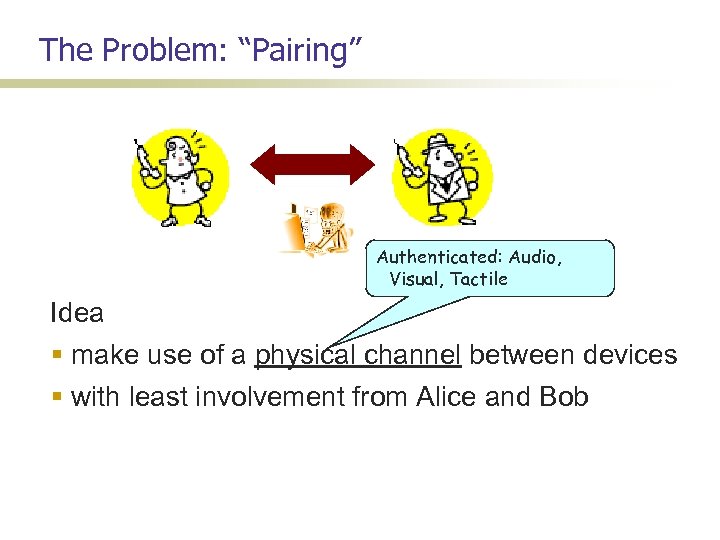 The Problem: “Pairing” Authenticated: Audio, Visual, Tactile Idea make use of a physical channel between devices with least involvement from Alice and Bob
![Seeing-is-Believing (Mc. Cune et al. [Oakland’ 05]) Insecure Channel Protocol (Balfanz, et al. [NDSS’](https://present5.com/presentation/cf45f1d351fda76b870b8889238f4ea2/image-10.jpg "Seeing-is-Believing (Mc. Cune et al. [Oakland’ 05]) Insecure Channel Protocol (Balfanz, et al. [NDSS’") Seeing-is-Believing (Mc. Cune et al. [Oakland’ 05]) Insecure Channel Protocol (Balfanz, et al. [NDSS’ 02]) Authenticated Channel pk. A pk. B A H(pk. A) H(pk. B) Rohs, Gfeller [Perv. Comp’ 04] B Secure if H(. ) weak CR 80 -bit for permanent 48 -bit for ephemeral
Seeing-is-Believing (Mc. Cune et al. [Oakland’ 05]) Insecure Channel Protocol (Balfanz, et al. [NDSS’ 02]) Authenticated Channel pk. A pk. B A H(pk. A) H(pk. B) Rohs, Gfeller [Perv. Comp’ 04] B Secure if H(. ) weak CR 80 -bit for permanent 48 -bit for ephemeral
 Challenges OOB channels are low-bandwidth! One of the device might not have a receiver! Neither has a receiver and only one has a good quality transmitter (Non-)Universality! Usability Evalutation Protocols might be slow – multiple executions! Multiple devices – scalability!
 Challenges OOB channels are low-bandwidth! One of the device might not have a receiver! Neither has a receiver and only one has a good quality transmitter (Non-)Universality! Usability! Multiple devices -- scalability
![Protocol: Short Authenticated Strings (SAS) Vaudenay [Crypto’ 05] Insecure Channel Authenticated Channel RA ε](https://present5.com/presentation/cf45f1d351fda76b870b8889238f4ea2/image-13.jpg "Protocol: Short Authenticated Strings (SAS) Vaudenay [Crypto’ 05] Insecure Channel Authenticated Channel RA ε") Protocol: Short Authenticated Strings (SAS) Vaudenay [Crypto’ 05] Insecure Channel Authenticated Channel RA ε {0, 1}k c. A, d. A comm(pk. A, RA) pk. A, c. A pk. B, c. B d. A A RB open(pk. B, c. B, d. B) SASA = RA RB Secure (with prob. 1 -2 -k ) RB ε {0, 1}k c. B, d. B comm(pk. B, RB) RA open(pk. A, c. A, d. A) d. B SASA SASB Accept (pk. B, B) if SASB = RA RB B SASB = RA RB Laur et al. [eprint’ 05] Pasini-Vaudenay [PKC’ 06] Accept (pk. B, A) if SASA = RA RB
Protocol: Short Authenticated Strings (SAS) Vaudenay [Crypto’ 05] Insecure Channel Authenticated Channel RA ε {0, 1}k c. A, d. A comm(pk. A, RA) pk. A, c. A pk. B, c. B d. A A RB open(pk. B, c. B, d. B) SASA = RA RB Secure (with prob. 1 -2 -k ) RB ε {0, 1}k c. B, d. B comm(pk. B, RB) RA open(pk. A, c. A, d. A) d. B SASA SASB Accept (pk. B, B) if SASB = RA RB B SASB = RA RB Laur et al. [eprint’ 05] Pasini-Vaudenay [PKC’ 06] Accept (pk. B, A) if SASA = RA RB
 Challenges OOB channels are low-bandwidth! One of the devices might not have a receiver! Neither has a receiver and only one has a good quality transmitter e. g. , keyboard-desktop; AP-phone (Non-)Universality! Usability Protocols might be slow – multiple executions! Multiple devices -- scalability
![Unidirectional SAS (Saxena et al. [S&P’ 06]) Insecure Channel Authenticated Channel Blinking-Lights User I/O](https://present5.com/presentation/cf45f1d351fda76b870b8889238f4ea2/image-15.jpg "Unidirectional SAS (Saxena et al. [S&P’ 06]) Insecure Channel Authenticated Channel Blinking-Lights User I/O") Unidirectional SAS (Saxena et al. [S&P’ 06]) Insecure Channel Authenticated Channel Blinking-Lights User I/O pk. A , H(RA) pk. B, RB A RA Galois MAC B Secure (with prob. 1 -2 -15) if 15 -bit AU hs() hs(RA, RB; pk. A, pk. B) Success/Failure Muliple Blinking LEDs (Saxena-Uddin [MWNS’ 08])
Unidirectional SAS (Saxena et al. [S&P’ 06]) Insecure Channel Authenticated Channel Blinking-Lights User I/O pk. A , H(RA) pk. B, RB A RA Galois MAC B Secure (with prob. 1 -2 -15) if 15 -bit AU hs() hs(RA, RB; pk. A, pk. B) Success/Failure Muliple Blinking LEDs (Saxena-Uddin [MWNS’ 08])
 Challenges OOB channels are low-bandwidth! One of the device might not have a receiver! Neither has a receiver and only one has a good quality transmitter e. g. , AP-laptop/PDA Usability! Multiple devices -- scalability
![A Universal Pairing Method Prasad-Saxena [ACNS’ 08] Use existing SAS protocols The strings transmitted](https://present5.com/presentation/cf45f1d351fda76b870b8889238f4ea2/image-17.jpg "A Universal Pairing Method Prasad-Saxena [ACNS’ 08] Use existing SAS protocols The strings transmitted") A Universal Pairing Method Prasad-Saxena [ACNS’ 08] Use existing SAS protocols The strings transmitted by both devices over physical channel should be the same, if everything is fine different, if there is an attack/fault Both devices encode these strings using a pattern of Synchronized beeping/blinking The user acts as a reader and verifies if the two patterns are same or not
A Universal Pairing Method Prasad-Saxena [ACNS’ 08] Use existing SAS protocols The strings transmitted by both devices over physical channel should be the same, if everything is fine different, if there is an attack/fault Both devices encode these strings using a pattern of Synchronized beeping/blinking The user acts as a reader and verifies if the two patterns are same or not
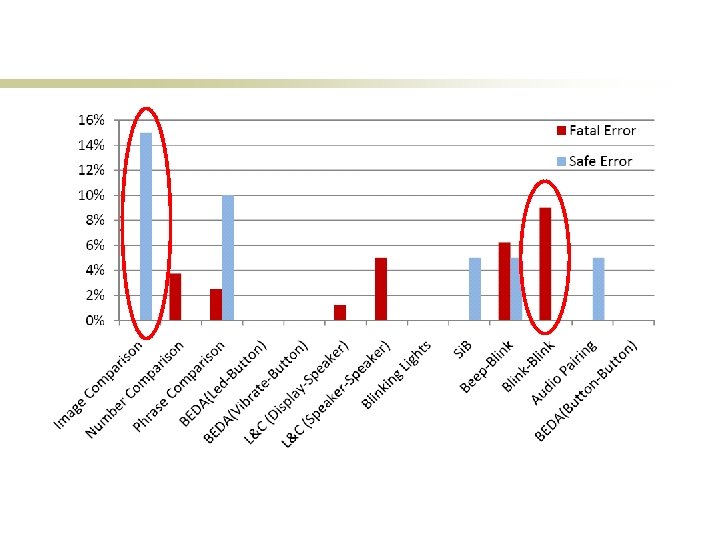
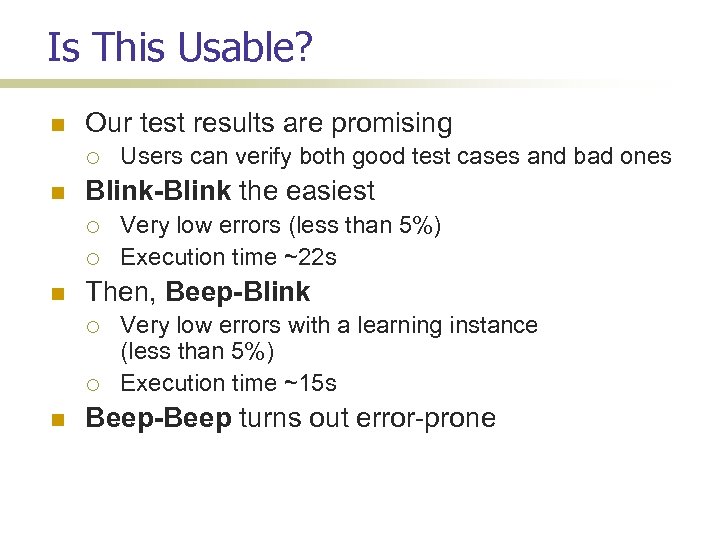 Is This Usable? Our test results are promising Blink-Blink the easiest Very low errors (less than 5%) Execution time ~22 s Then, Beep-Blink Users can verify both good test cases and bad ones Very low errors with a learning instance (less than 5%) Execution time ~15 s Beep-Beep turns out error-prone
![Further Improvement: Auxiliary Device Saxena et al. [SOUPS’ 08] A Success/Failure B Auxiliary device](https://present5.com/presentation/cf45f1d351fda76b870b8889238f4ea2/image-19.jpg "Further Improvement: Auxiliary Device Saxena et al. [SOUPS’ 08] A Success/Failure B Auxiliary device") Further Improvement: Auxiliary Device Saxena et al. [SOUPS’ 08] A Success/Failure B Auxiliary device needs a camera and/or microphone – a smart phone Does not need to be trusted with cryptographic data Does not need to communicate with the devices
Further Improvement: Auxiliary Device Saxena et al. [SOUPS’ 08] A Success/Failure B Auxiliary device needs a camera and/or microphone – a smart phone Does not need to be trusted with cryptographic data Does not need to communicate with the devices
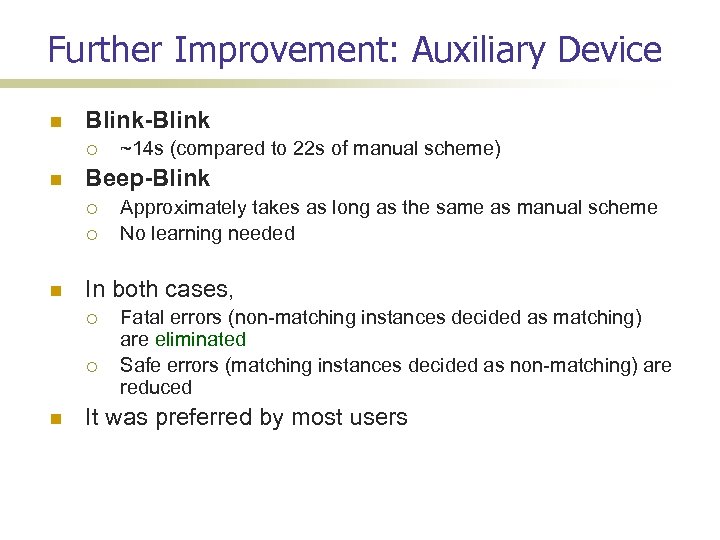 Further Improvement: Auxiliary Device Blink-Blink Beep-Blink Approximately takes as long as the same as manual scheme No learning needed In both cases, ~14 s (compared to 22 s of manual scheme) Fatal errors (non-matching instances decided as matching) are eliminated Safe errors (matching instances decided as non-matching) are reduced It was preferred by most users
 Challenges OOB channels are low-bandwidth! One of the device might not have a receiver! Neither has a receiver and only one has a good quality transmitter (Non-)Universality! Comparative Usability! Multiple devices -- scalability
![Comparative Usability Study: Summary Kumar et al. [Percom’ 09] Manual Comparison or Transfer Numbers](https://present5.com/presentation/cf45f1d351fda76b870b8889238f4ea2/image-22.jpg "Comparative Usability Study: Summary Kumar et al. [Percom’ 09] Manual Comparison or Transfer Numbers") Comparative Usability Study: Summary Kumar et al. [Percom’ 09] Manual Comparison or Transfer Numbers (Uzun et al. [USEC’ 06]) Spoken/Displayed Phrases L&C (Goodrich et al. [ICDCS’ 06]) Images (Random Arts, see http: //www. random-art. org/) Synchronized Comparison Blink-Blink and Beep-Blink BEDA (Soriente et al. [IWSSI’ 07]) Automated Si. B (Mc. Cune et al. [S&P’ 05]) Blinking Lights (Saxena et al. [S&P’ 06]) Audio Transfer (Soriente et al. [IWSSI’ 07]) Automated testing framework 20 participants; over a 2 month long period Surprise: Users don’t like automated methods: handling cameras not easy
Comparative Usability Study: Summary Kumar et al. [Percom’ 09] Manual Comparison or Transfer Numbers (Uzun et al. [USEC’ 06]) Spoken/Displayed Phrases L&C (Goodrich et al. [ICDCS’ 06]) Images (Random Arts, see http: //www. random-art. org/) Synchronized Comparison Blink-Blink and Beep-Blink BEDA (Soriente et al. [IWSSI’ 07]) Automated Si. B (Mc. Cune et al. [S&P’ 05]) Blinking Lights (Saxena et al. [S&P’ 06]) Audio Transfer (Soriente et al. [IWSSI’ 07]) Automated testing framework 20 participants; over a 2 month long period Surprise: Users don’t like automated methods: handling cameras not easy
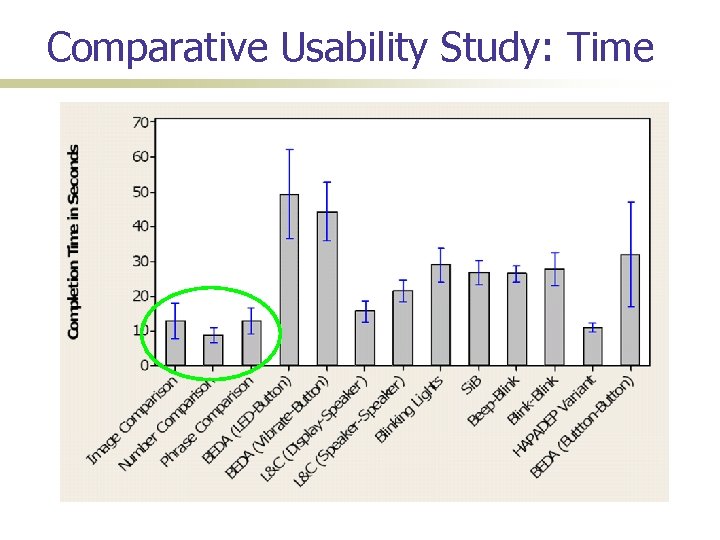 Comparative Usability Study: Time
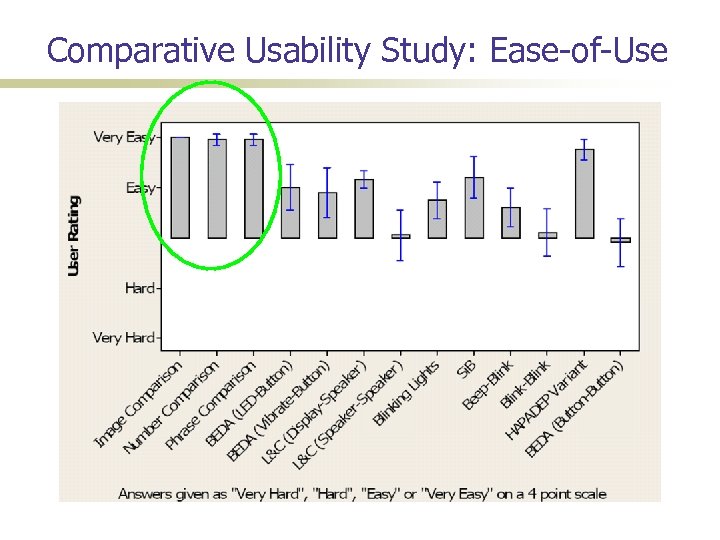 Comparative Usability Study: Ease-of-Use
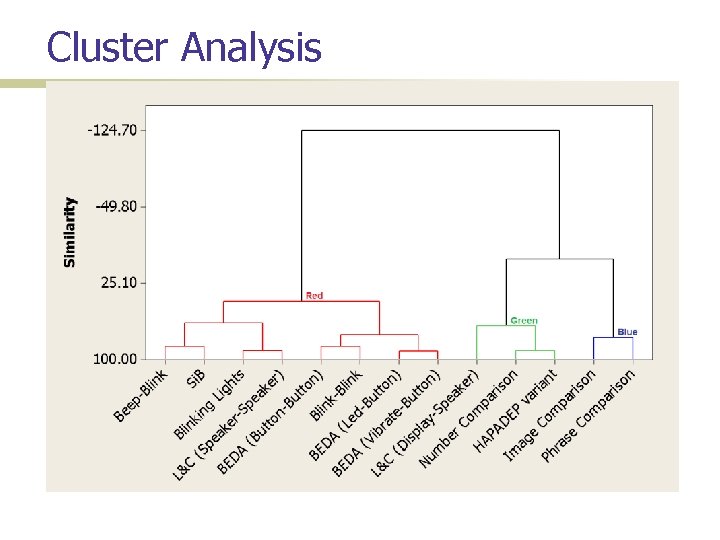 Cluster Analysis
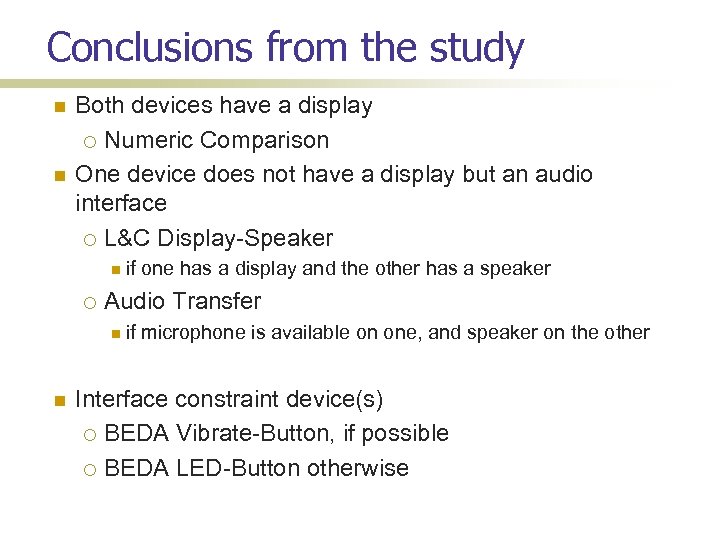 Conclusions from the study Both devices have a display Numeric Comparison One device does not have a display but an audio interface L&C Display-Speaker if Audio Transfer if one has a display and the other has a speaker microphone is available on one, and speaker on the other Interface constraint device(s) BEDA Vibrate-Button, if possible BEDA LED-Button otherwise
 Challenges OOB channels are low-bandwidth! One of the device might not have a receiver! Neither has a receiver and only one has a good quality transmitter (Non-)Universality! Usability! Multiple devices – scalability
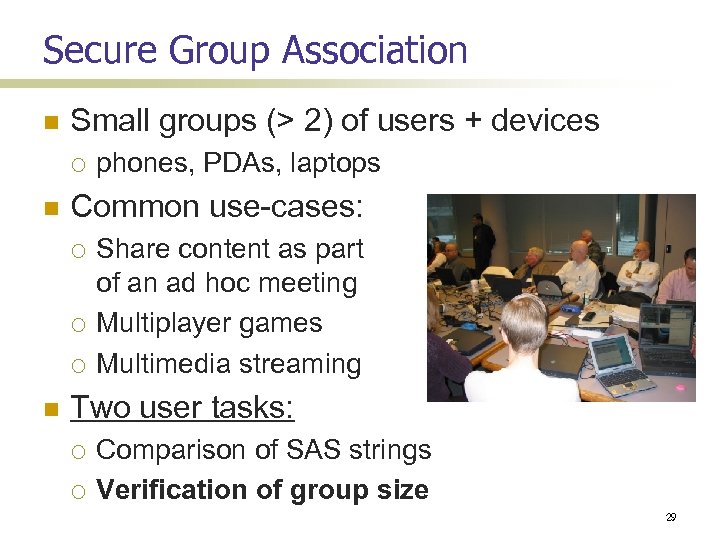 Secure Group Association Small groups (> 2) of users + devices Common use-cases: phones, PDAs, laptops Share content as part of an ad hoc meeting Multiplayer games Multimedia streaming Two user tasks: Comparison of SAS strings Verification of group size 29
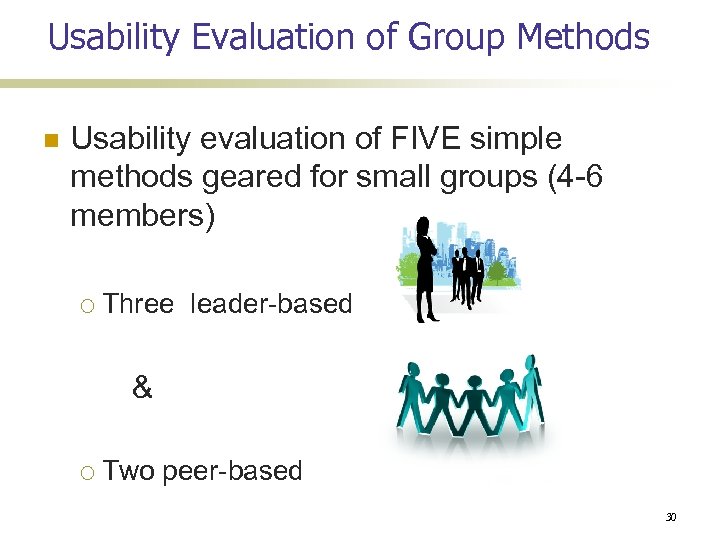 Usability Evaluation of Group Methods Usability evaluation of FIVE simple methods geared for small groups (4 -6 members) Three leader-based & Two peer-based 30
 Study Goals How well do users perform the two tasks when multiple devices and users are involved: Comparison/Transfer of SAS strings? Counting number of group members? 31
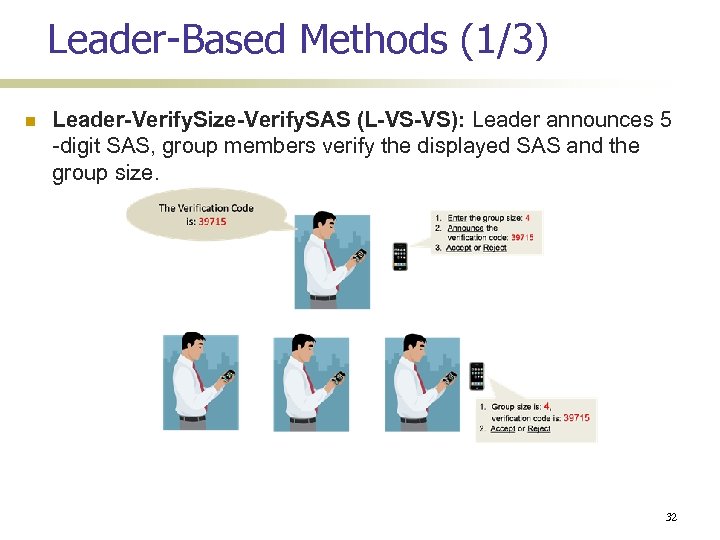 Leader-Based Methods (1/3) Leader-Verify. Size-Verify. SAS (L-VS-VS): Leader announces 5 -digit SAS, group members verify the displayed SAS and the group size. 32
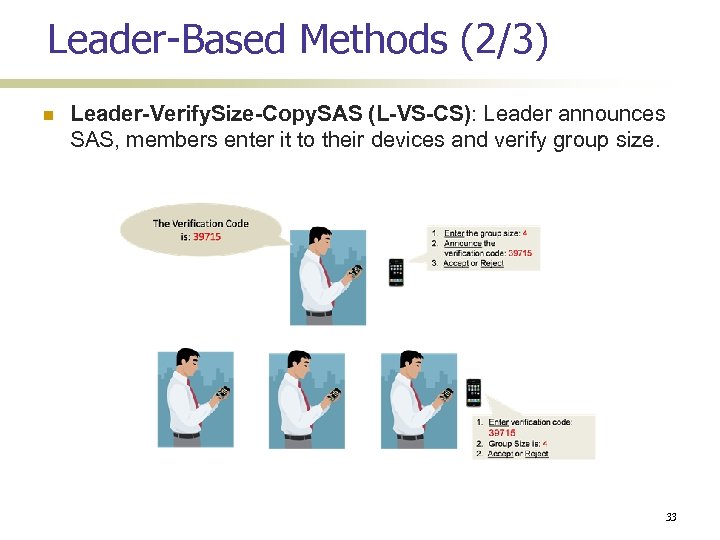 Leader-Based Methods (2/3) Leader-Verify. Size-Copy. SAS (L-VS-CS): Leader announces SAS, members enter it to their devices and verify group size. 33
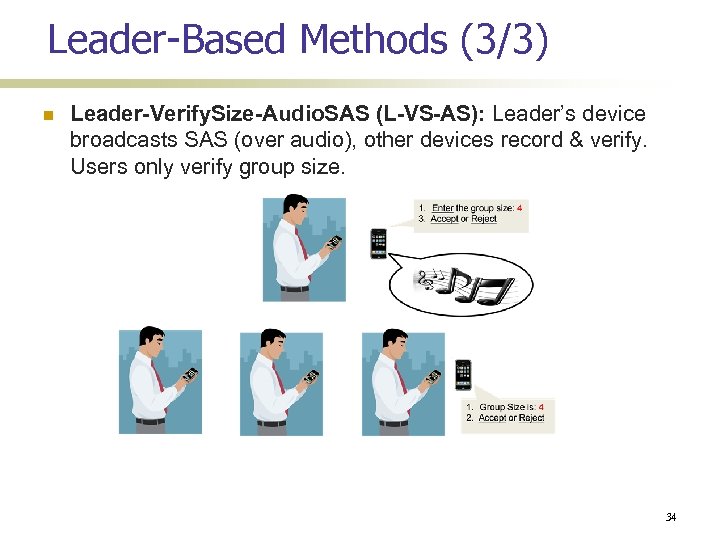 Leader-Based Methods (3/3) Leader-Verify. Size-Audio. SAS (L-VS-AS): Leader’s device broadcasts SAS (over audio), other devices record & verify. Users only verify group size. 34
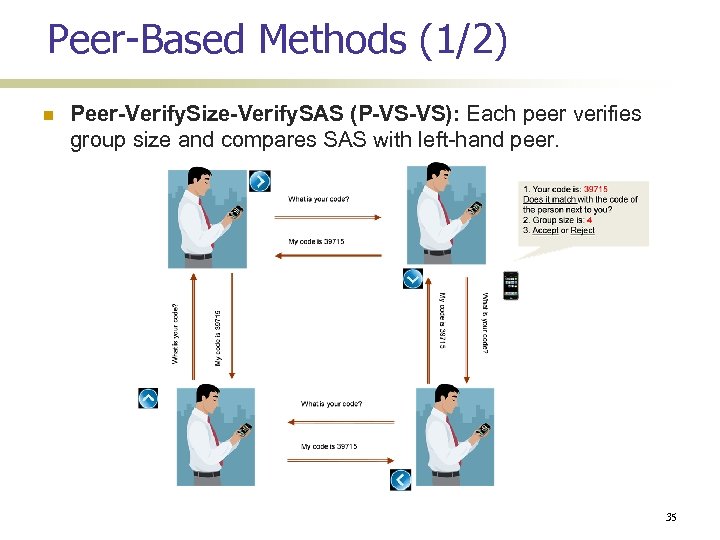 Peer-Based Methods (1/2) Peer-Verify. Size-Verify. SAS (P-VS-VS): Each peer verifies group size and compares SAS with left-hand peer. 35
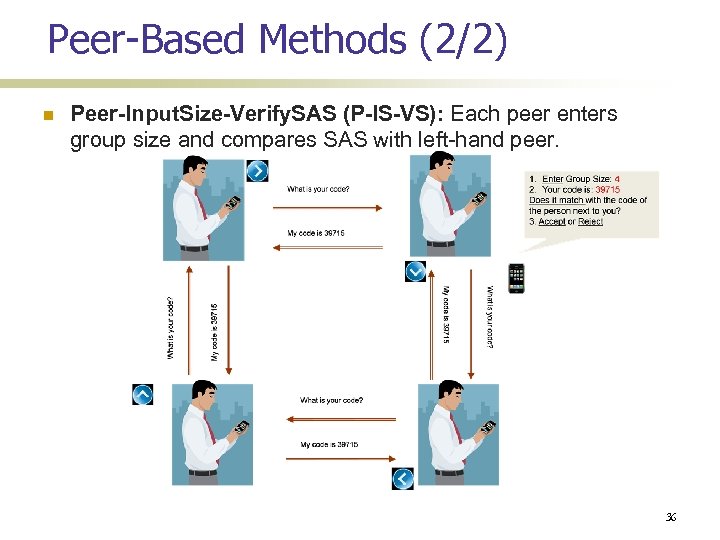 Peer-Based Methods (2/2) Peer-Input. Size-Verify. SAS (P-IS-VS): Each peer enters group size and compares SAS with left-hand peer. 36
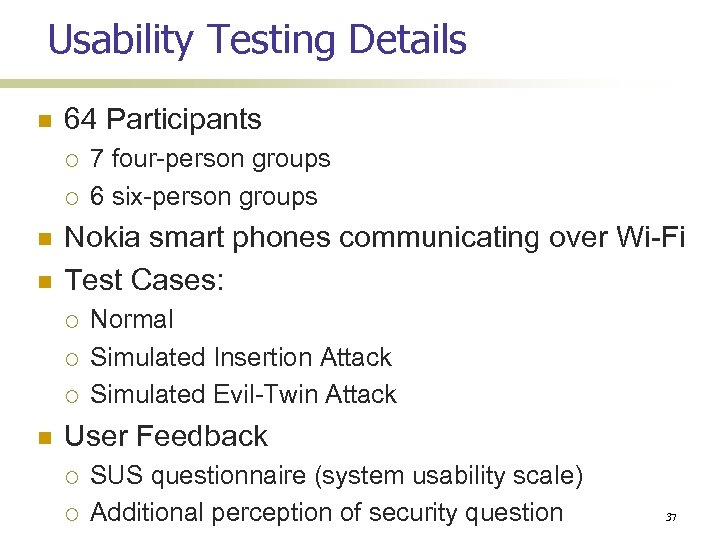 Usability Testing Details 64 Participants Nokia smart phones communicating over Wi-Fi Test Cases: 7 four-person groups 6 six-person groups Normal Simulated Insertion Attack Simulated Evil-Twin Attack User Feedback SUS questionnaire (system usability scale) Additional perception of security question 37
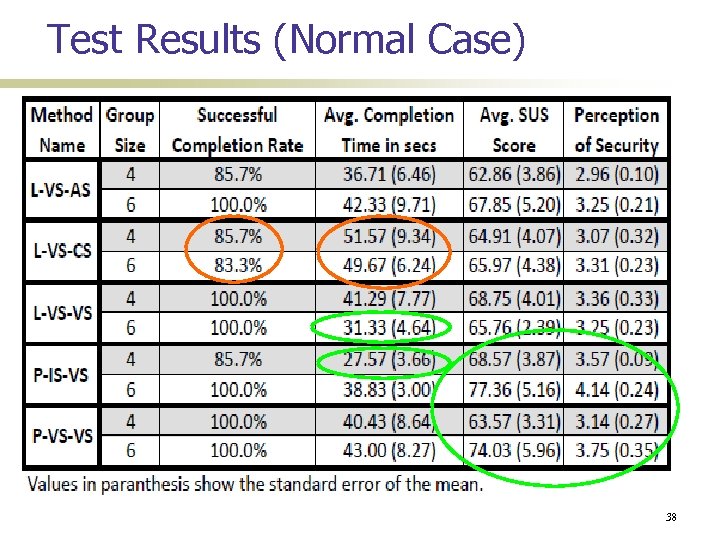 Test Results (Normal Case) 38
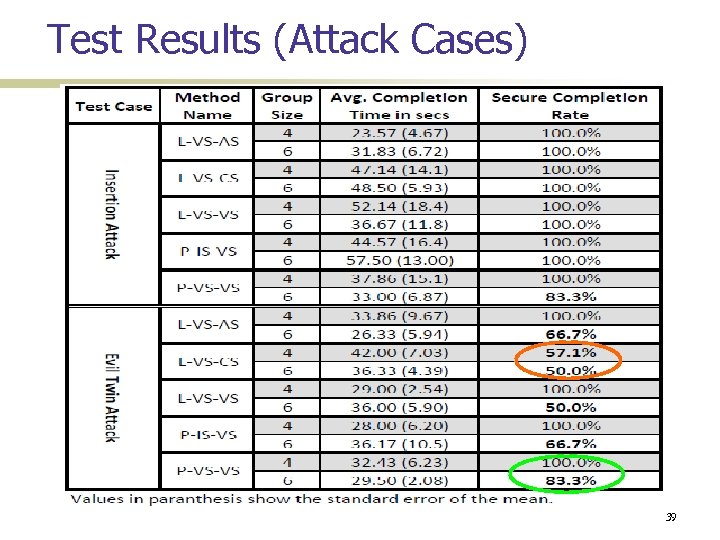 Test Results (Attack Cases) 39
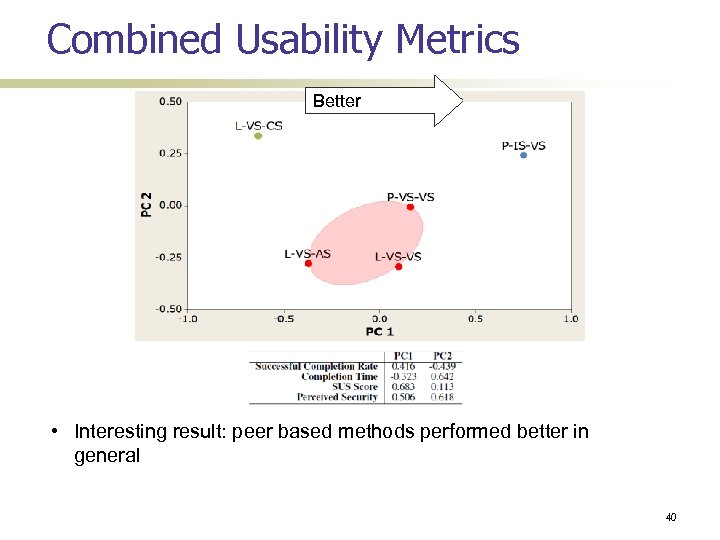 Combined Usability Metrics Better • Interesting result: peer based methods performed better in general 40
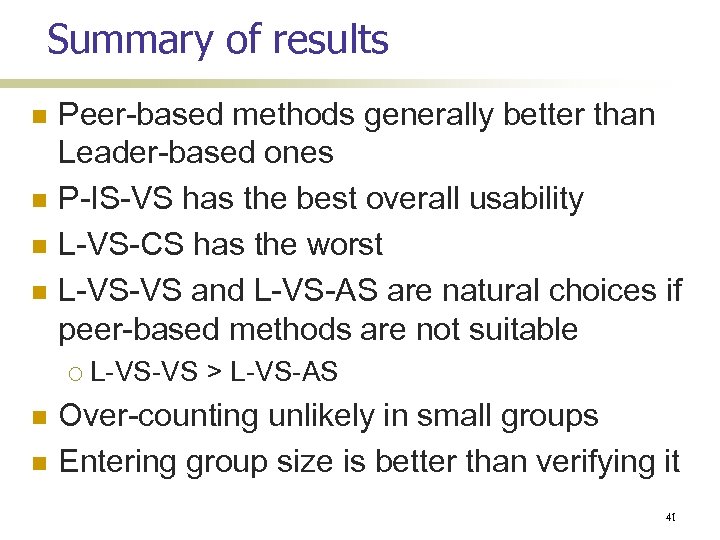 Summary of results Peer-based methods generally better than Leader-based ones P-IS-VS has the best overall usability L-VS-CS has the worst L-VS-VS and L-VS-AS are natural choices if peer-based methods are not suitable L-VS-VS > L-VS-AS Over-counting unlikely in small groups Entering group size is better than verifying it 41
![Other open questions Rushing user behavior (Saxena-Uddin [ACNS’ 09]) Hawthorne effect Security priming More](https://present5.com/presentation/cf45f1d351fda76b870b8889238f4ea2/image-42.jpg "Other open questions Rushing user behavior (Saxena-Uddin [ACNS’ 09]) Hawthorne effect Security priming More") Other open questions Rushing user behavior (Saxena-Uddin [ACNS’ 09]) Hawthorne effect Security priming More usability tests
Other open questions Rushing user behavior (Saxena-Uddin [ACNS’ 09]) Hawthorne effect Security priming More usability tests
 References Many of them on my publications page