 Скачать презентацию Developing Vo IP Enabled Applications using Host Processing
27f93e2ab8a6c9046e3a7921686b2104.ppt
- Количество слайдов: 45



Developing Vo. IP Enabled Applications using Host Processing Darren Cooper – Senior Software Engineer Michael Ward – Director, Product Line Management Trinity Convergence August 3 -4, 2004 • San Jose, CA • www. voipdeveloper. com
Trinity Convergence • Developer of embedded communications software for Vo. IP and Wireless markets – Veri. Call™ an Integrated Vo. IP Software Framework – Vo. IP-Enablement from the Edge to the Core • Headquartered in Research Triangle Park, NC • R&D located in Cambridge, England • Partnered with ARM Ltd, Freescale, MIPS Technology & Star. Core LLC • ISO 9001 Accredited August 3 -4, 2004 • San Jose, CA • www. voipdeveloper. com
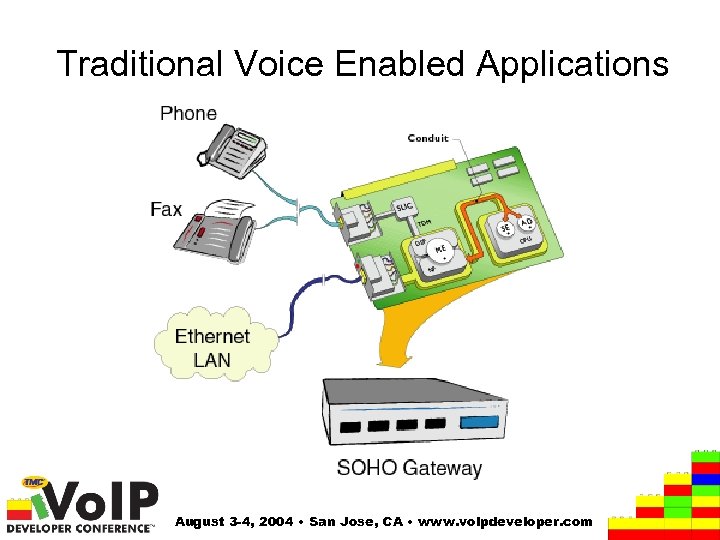
Traditional Voice Enabled Applications August 3 -4, 2004 • San Jose, CA • www. voipdeveloper. com
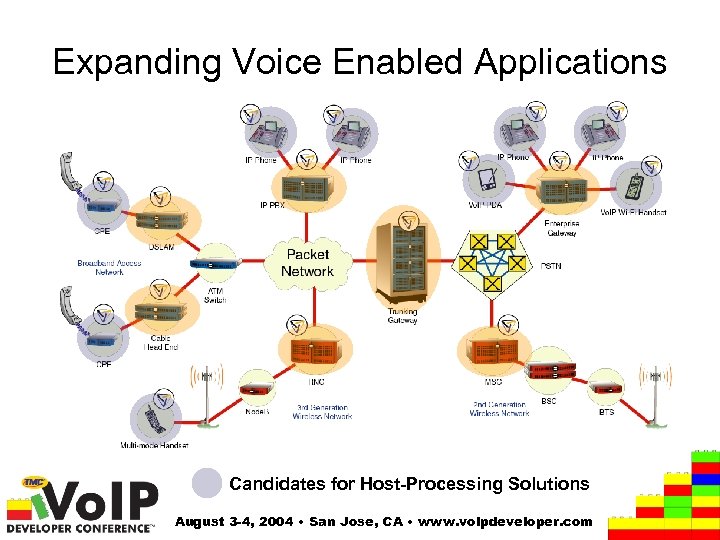
Expanding Voice Enabled Applications Candidates for Host-Processing Solutions August 3 -4, 2004 • San Jose, CA • www. voipdeveloper. com
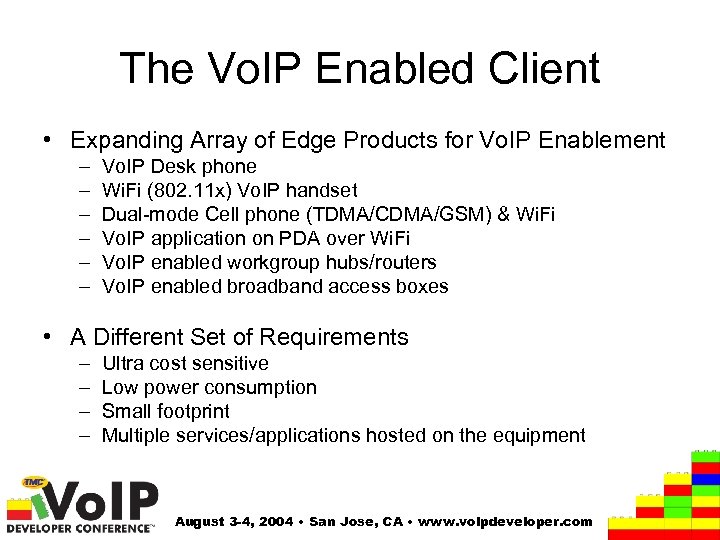
The Vo. IP Enabled Client • Expanding Array of Edge Products for Vo. IP Enablement – – – Vo. IP Desk phone Wi. Fi (802. 11 x) Vo. IP handset Dual-mode Cell phone (TDMA/CDMA/GSM) & Wi. Fi Vo. IP application on PDA over Wi. Fi Vo. IP enabled workgroup hubs/routers Vo. IP enabled broadband access boxes • A Different Set of Requirements – – Ultra cost sensitive Low power consumption Small footprint Multiple services/applications hosted on the equipment August 3 -4, 2004 • San Jose, CA • www. voipdeveloper. com
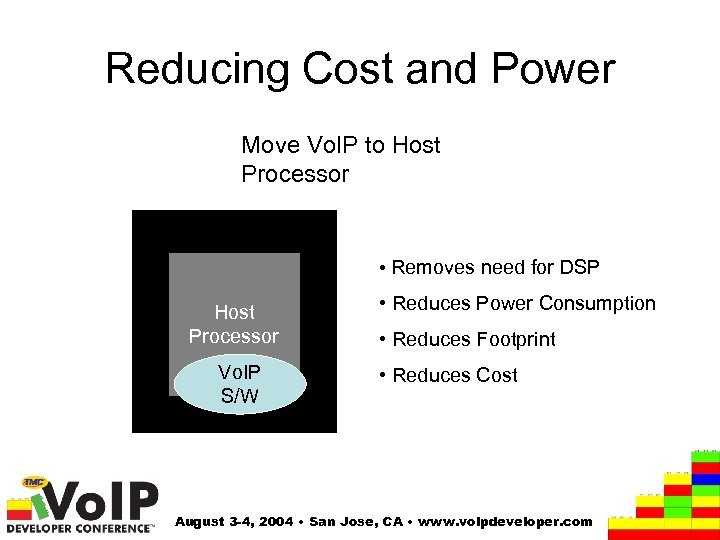
Reducing Cost and Power Move Vo. IP to Host Processor • Removes need for DSP Host Processor Vo. IP S/W • Reduces Power Consumption • Reduces Footprint • Reduces Cost August 3 -4, 2004 • San Jose, CA • www. voipdeveloper. com
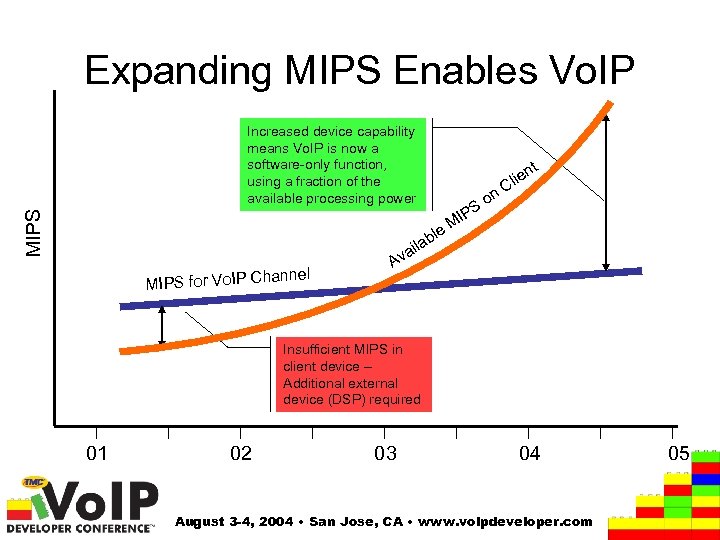
Expanding MIPS Enables Vo. IP MIPS Increased device capability means Vo. IP is now a software-only function, using a fraction of the available processing power t PS MI e on n lie C l b ila a hannel MIPS for Vo. IP C Av Insufficient MIPS in client device – Additional external device (DSP) required 01 02 03 04 August 3 -4, 2004 • San Jose, CA • www. voipdeveloper. com 05
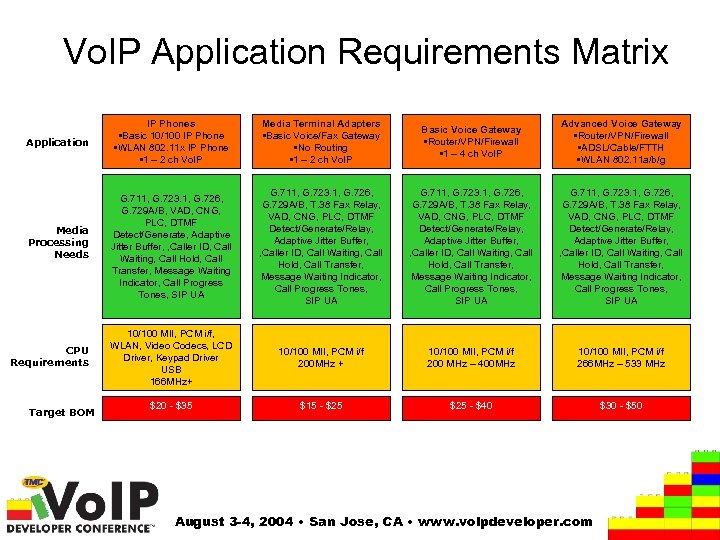
Vo. IP Application Requirements Matrix Application IP Phones • Basic 10/100 IP Phone • WLAN 802. 11 x IP Phone • 1 – 2 ch Vo. IP Media Terminal Adapters • Basic Voice/Fax Gateway • No Routing • 1 – 2 ch Vo. IP Basic Voice Gateway • Router/VPN/Firewall • 1 – 4 ch Vo. IP Advanced Voice Gateway • Router/VPN/Firewall • ADSL/Cable/FTTH • WLAN 802. 11 a/b/g Media Processing Needs G. 711, G. 723. 1, G. 726, G. 729 A/B, VAD, CNG, PLC, DTMF Detect/Generate, Adaptive Jitter Buffer, , Caller ID, Call Waiting, Call Hold, Call Transfer, Message Waiting Indicator, Call Progress Tones, SIP UA G. 711, G. 723. 1, G. 726, G. 729 A/B, T. 38 Fax Relay, VAD, CNG, PLC, DTMF Detect/Generate/Relay, Adaptive Jitter Buffer, , Caller ID, Call Waiting, Call Hold, Call Transfer, Message Waiting Indicator, Call Progress Tones, SIP UA CPU Requirements 10/100 MII, PCM i/f, WLAN, Video Codecs, LCD Driver, Keypad Driver USB 166 MHz+ 10/100 MII, PCM i/f 200 MHz + 10/100 MII, PCM i/f 200 MHz – 400 MHz 10/100 MII, PCM i/f 266 MHz – 533 MHz $20 - $35 $15 - $25 - $40 $30 - $50 Target BOM August 3 -4, 2004 • San Jose, CA • www. voipdeveloper. com
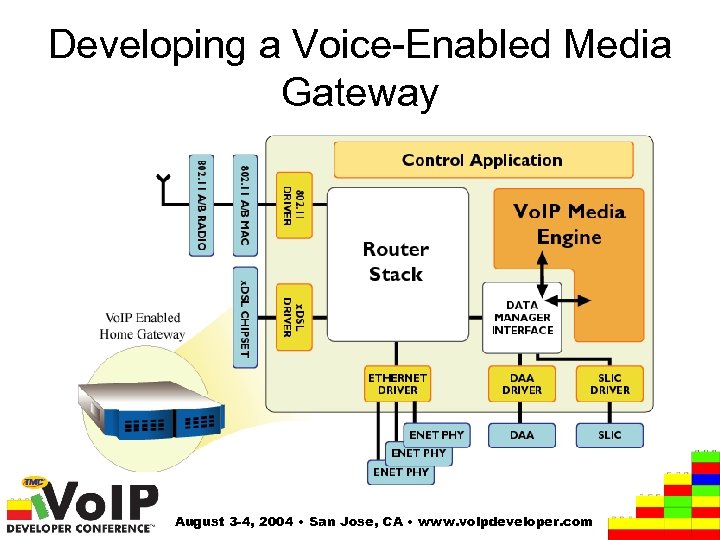
Developing a Voice-Enabled Media Gateway August 3 -4, 2004 • San Jose, CA • www. voipdeveloper. com
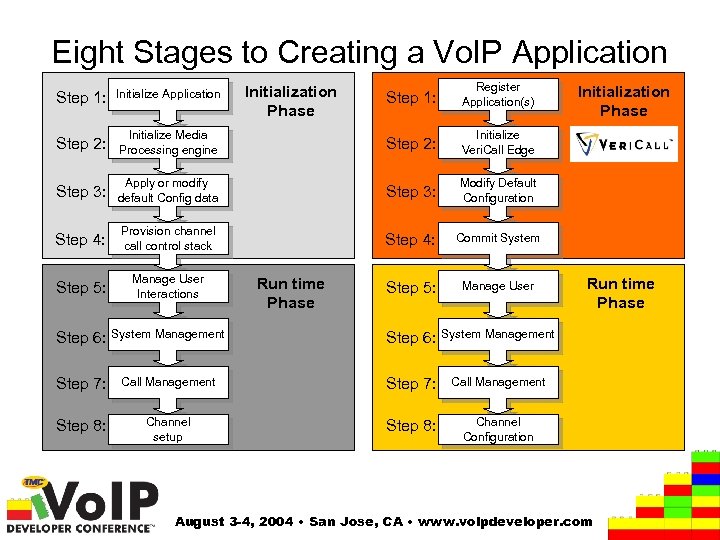
Eight Stages to Creating a Vo. IP Application Step 1: Register Application(s) Initialize Media Processing engine Step 2: Initialize Veri. Call Edge Step 3: Apply or modify default Config data Step 3: Modify Default Configuration Step 4: Provision channel call control stack Step 4: Commit System Step 5: Manage User Interactions Step 5: Manage User Step 1: Initialize Application Step 2: Initialization Phase Run time Phase Step 6: System Management Call Management Step 7: Call Management Step 8: Channel setup Step 8: Run time Phase Step 6: System Management Step 7: Initialization Phase Channel Configuration August 3 -4, 2004 • San Jose, CA • www. voipdeveloper. com
Step 1 – Application Initialization • Support single or multi-threaded environment, without imposing constraints on the gateway solutions architecture. • Support capability for Multiple Applications • Manage the routing of messages to the appropriate application – without increasing the complexity of the user level application design. August 3 -4, 2004 • San Jose, CA • www. voipdeveloper. com
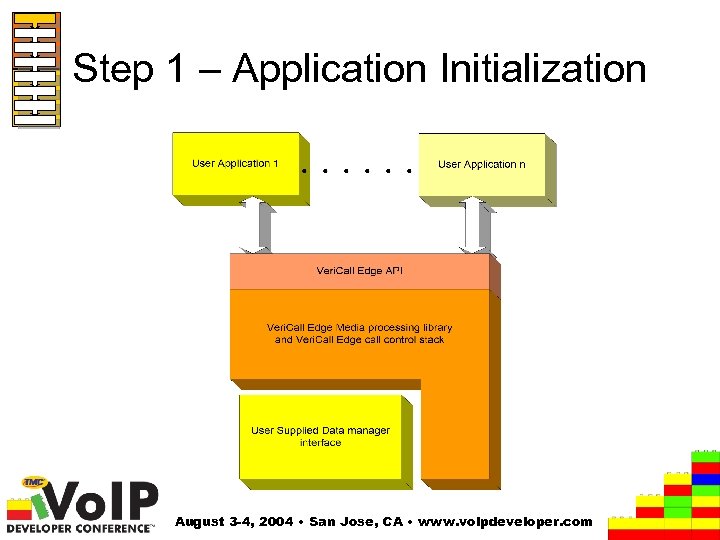
Step 1 – Application Initialization August 3 -4, 2004 • San Jose, CA • www. voipdeveloper. com
Step 2 – Initialize Media Engine • Should be simple to initialize and configure • Should apply factory default configurations – to simplify the user application – allows the user application designer to concentrate on value added services • Should allow user application to change or remove any factory default configurations August 3 -4, 2004 • San Jose, CA • www. voipdeveloper. com
Step 3 – Modify the Configuration • Default configuration and user supplied data may be subsequently: – Over-written by the user application – Read by the user application – Removed by the user application • Set customized configuration for application – SIP Address – Desired Codec selections August 3 -4, 2004 • San Jose, CA • www. voipdeveloper. com
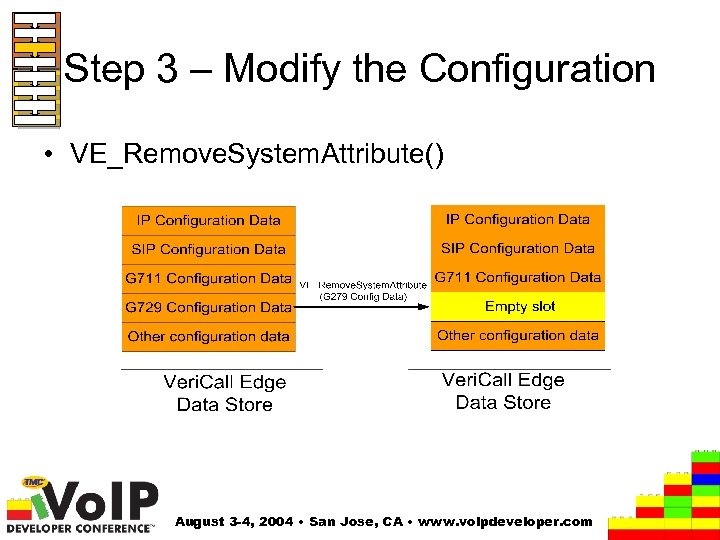
Step 3 – Modify the Configuration • VE_Remove. System. Attribute() August 3 -4, 2004 • San Jose, CA • www. voipdeveloper. com
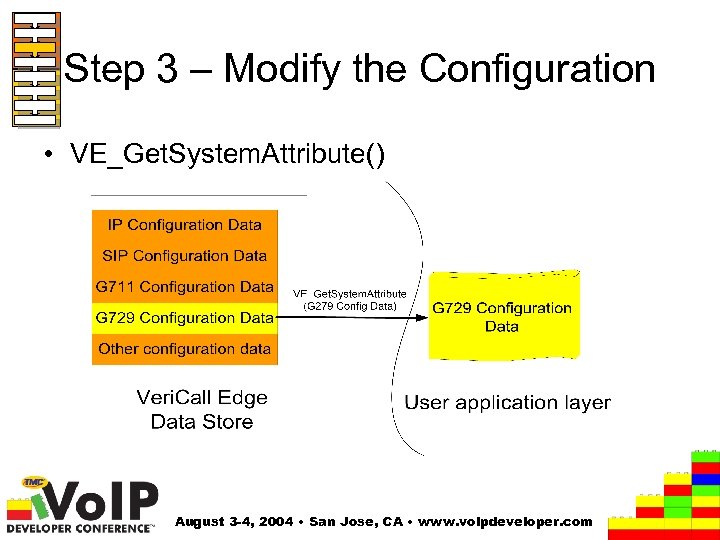
Step 3 – Modify the Configuration • VE_Get. System. Attribute() August 3 -4, 2004 • San Jose, CA • www. voipdeveloper. com
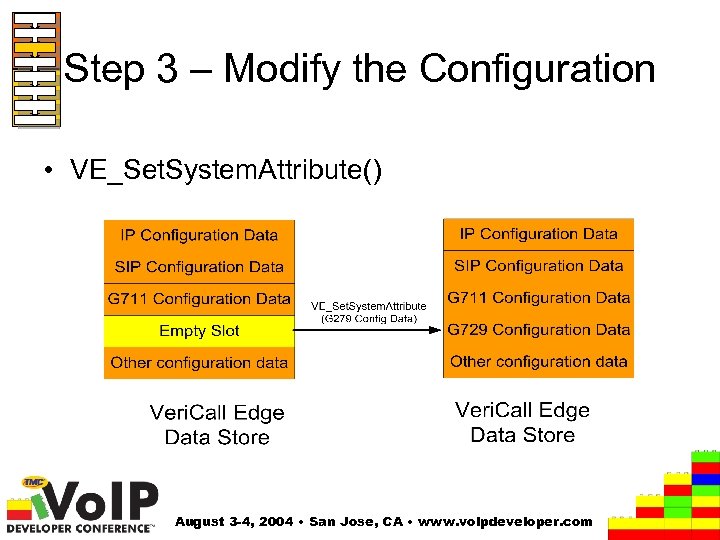
Step 3 – Modify the Configuration • VE_Set. System. Attribute() August 3 -4, 2004 • San Jose, CA • www. voipdeveloper. com
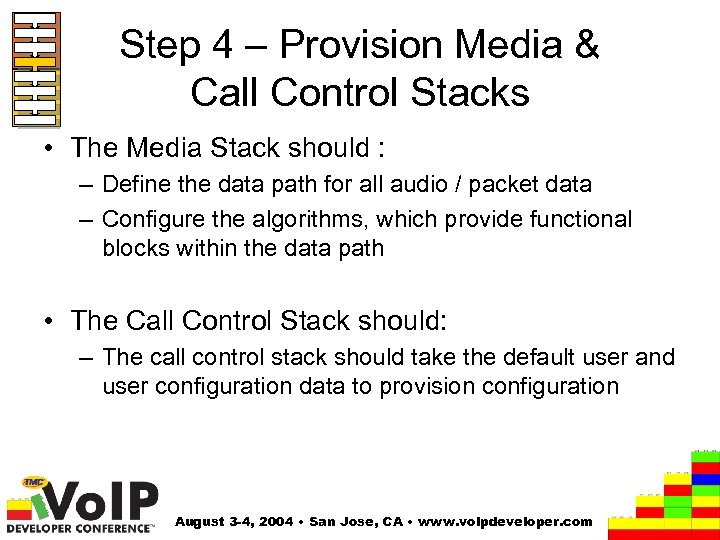
Step 4 – Provision Media & Call Control Stacks • The Media Stack should : – Define the data path for all audio / packet data – Configure the algorithms, which provide functional blocks within the data path • The Call Control Stack should: – The call control stack should take the default user and user configuration data to provision configuration August 3 -4, 2004 • San Jose, CA • www. voipdeveloper. com
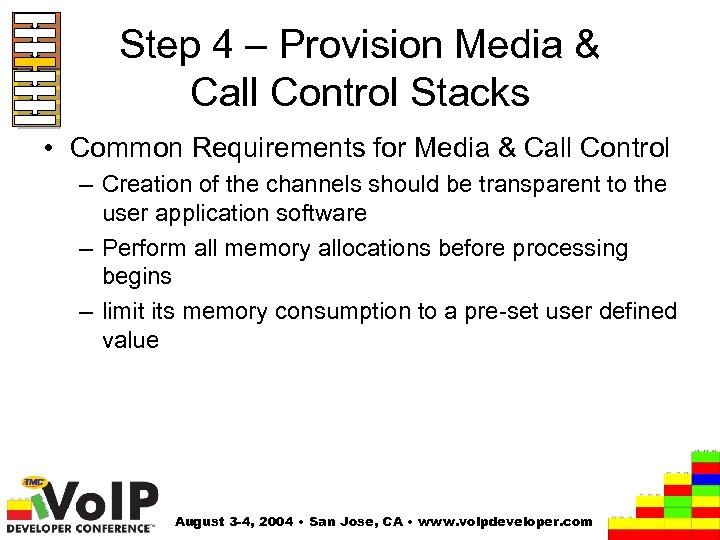
Step 4 – Provision Media & Call Control Stacks • Common Requirements for Media & Call Control – Creation of the channels should be transparent to the user application software – Perform all memory allocations before processing begins – limit its memory consumption to a pre-set user defined value August 3 -4, 2004 • San Jose, CA • www. voipdeveloper. com
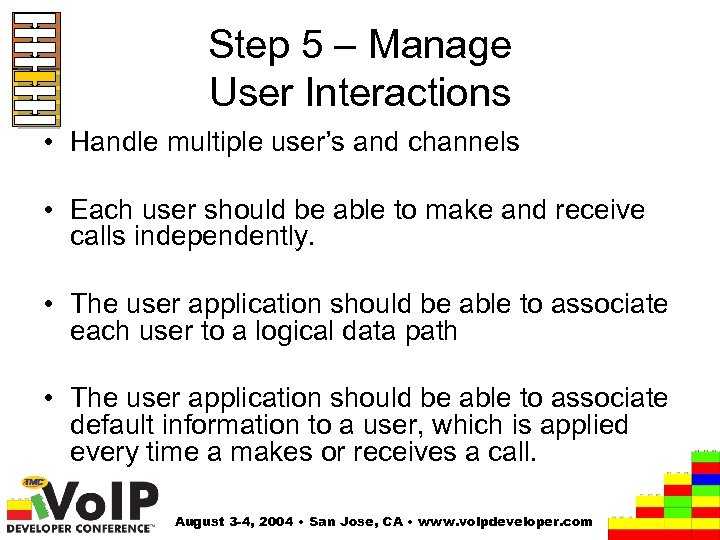
Step 5 – Manage User Interactions • Handle multiple user’s and channels • Each user should be able to make and receive calls independently. • The user application should be able to associate each user to a logical data path • The user application should be able to associate default information to a user, which is applied every time a makes or receives a call. August 3 -4, 2004 • San Jose, CA • www. voipdeveloper. com
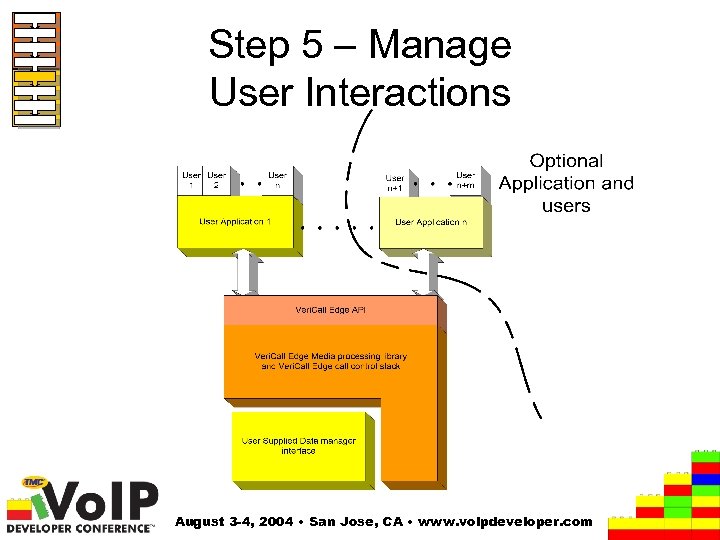
Step 5 – Manage User Interactions August 3 -4, 2004 • San Jose, CA • www. voipdeveloper. com
Step 6 – System Management • The Media and Call Control stacks: – should not block the calling application to allow the application to provide other functionality – must allow the user application to retrieve the events and alarms – must not allow the user application delay or stall the media or call processing capability. – provide a simple interface to enable shutdown and resource release August 3 -4, 2004 • San Jose, CA • www. voipdeveloper. com
Step 7 – Call Management • Decouple Media and Call Control stacks • The Media Stack should have no dependency on the Call Control stack • The Media Stack should provide a flexible framework to enable easy integration of 3 rd party Call Control stacks August 3 -4, 2004 • San Jose, CA • www. voipdeveloper. com
Step 8 – Channel Setup • The media stack should: – Allow the user application the ability to configure a media channel independently of the call control stack – Enable independent activation and deactivation of each media channel – Provide a simple interface to support all media channel configuration capability August 3 -4, 2004 • San Jose, CA • www. voipdeveloper. com
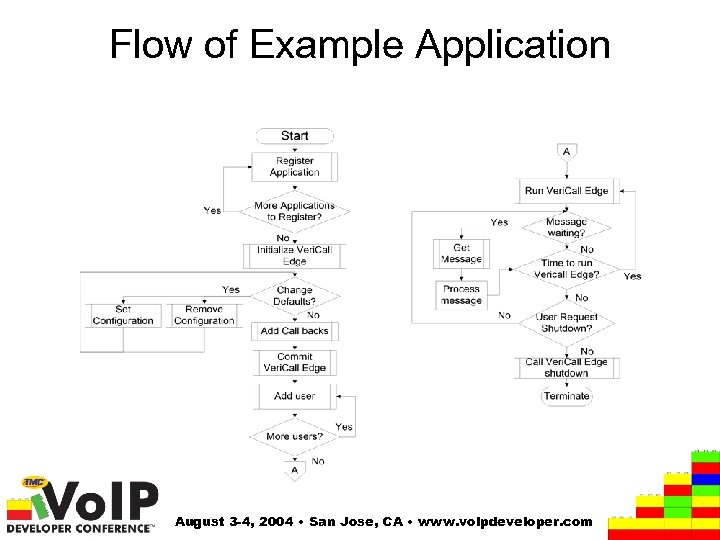
Flow of Example Application August 3 -4, 2004 • San Jose, CA • www. voipdeveloper. com
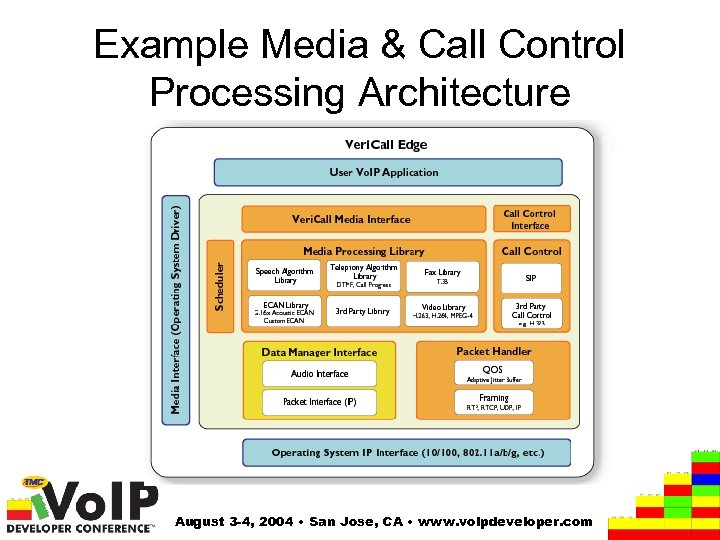
Example Media & Call Control Processing Architecture August 3 -4, 2004 • San Jose, CA • www. voipdeveloper. com

Thank You… Come see the Veri. Call™ Edge Demo in Booth 406 www. Trinity. Convergence. com August 3 -4, 2004 • San Jose, CA • www. voipdeveloper. com
Supplemental Material Details on APIs used in example application August 3 -4, 2004 • San Jose, CA • www. voipdeveloper. com
Step 1 – Register Application(s) • Veri. Call Edge’s Solution – Veri. Call Edge provides a flexible media engine framework, providing Vo. IP services to the providers of Vo. IP gateway and IP phone solutions. – Veri. Call Edge imposes minimal design restrictions on the designer of the Vo. IP solution, allowing the user to architecture their solution as either single or multi-threaded. – Veri. Call Edge provides this flexible approach by provision of a application registration service, thus allowing one or more applications to use the services that Veri. Call Edge provides. – Each application will be provided with a unique application ID. This is used to authenticate future transactions and provide a route for messaging. – API: • VE_Register. App () August 3 -4, 2004 • San Jose, CA • www. voipdeveloper. com
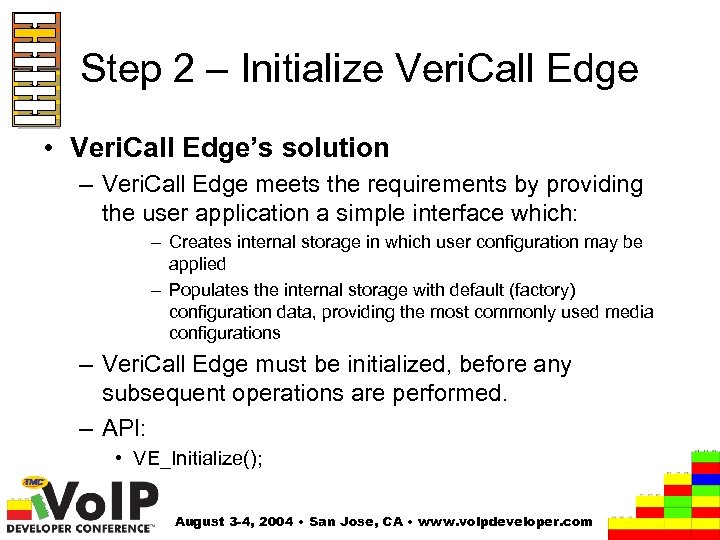
Step 2 – Initialize Veri. Call Edge • Veri. Call Edge’s solution – Veri. Call Edge meets the requirements by providing the user application a simple interface which: – Creates internal storage in which user configuration may be applied – Populates the internal storage with default (factory) configuration data, providing the most commonly used media configurations – Veri. Call Edge must be initialized, before any subsequent operations are performed. – API: • VE_Initialize(); August 3 -4, 2004 • San Jose, CA • www. voipdeveloper. com
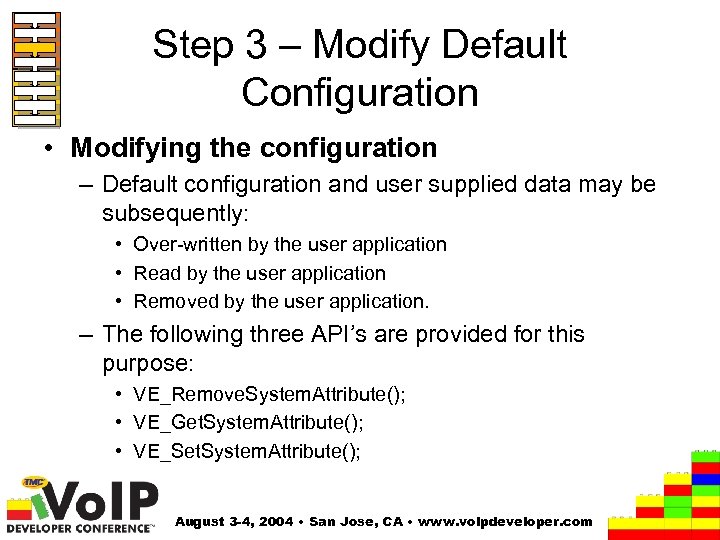
Step 3 – Modify Default Configuration • Modifying the configuration – Default configuration and user supplied data may be subsequently: • Over-written by the user application • Read by the user application • Removed by the user application. – The following three API’s are provided for this purpose: • VE_Remove. System. Attribute(); • VE_Get. System. Attribute(); • VE_Set. System. Attribute(); August 3 -4, 2004 • San Jose, CA • www. voipdeveloper. com
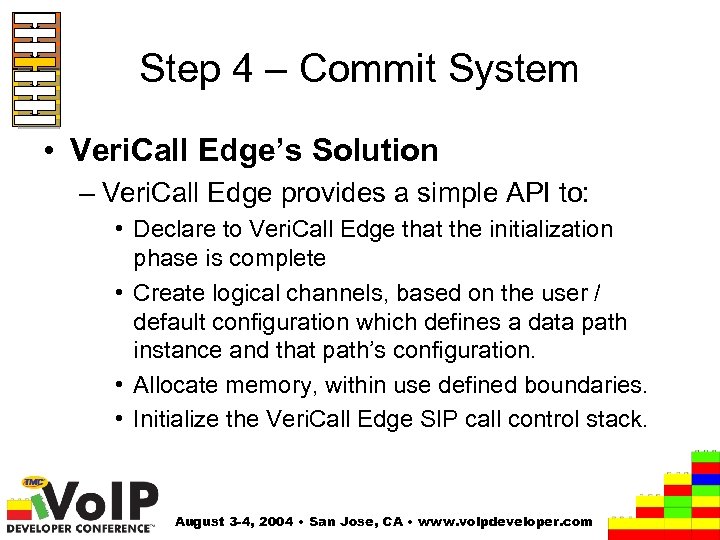
Step 4 – Commit System • Veri. Call Edge’s Solution – Veri. Call Edge provides a simple API to: • Declare to Veri. Call Edge that the initialization phase is complete • Create logical channels, based on the user / default configuration which defines a data path instance and that path’s configuration. • Allocate memory, within use defined boundaries. • Initialize the Veri. Call Edge SIP call control stack. August 3 -4, 2004 • San Jose, CA • www. voipdeveloper. com
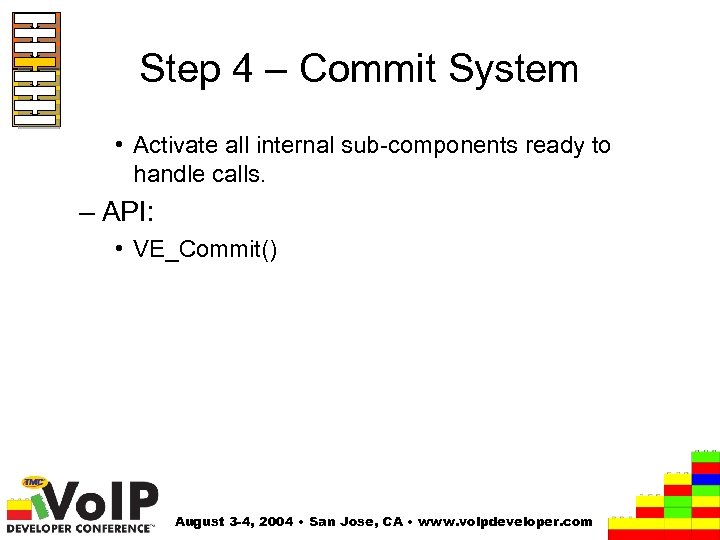
Step 4 – Commit System • Activate all internal sub-components ready to handle calls. – API: • VE_Commit() August 3 -4, 2004 • San Jose, CA • www. voipdeveloper. com
Step 5 – Manage User • Veri. Call Edge’s solution – Veri. Call Edge provides a simple set of API’s to enable user management. – A user can be classified as any person that wishes to make or receive a call via Veri. Call Edge. – Before any user can make or receive calls, that user must be registered with Veri. Call Edge. – A user must be registered with Veri. Call Edge regardless of the method of call control. A user is provided with a unique ID, which is used to identify the user, and ultimately, the channel on which to perform channel control functions August 3 -4, 2004 • San Jose, CA • www. voipdeveloper. com
Step 5 – Manage User – User registration data associates a user to a URI and an internal channel number. – Three user management functions: • VE_Add. User() – This registers the user with Veri. Call Edge • VE_Remove. User() – Removes a registered from Veri. Call Edge. • VE_Update. User() – Updates the registration data with Veri. Call Edge. August 3 -4, 2004 • San Jose, CA • www. voipdeveloper. com
Step 6 – System Management • Veri. Call Edge’s solution. Two system management API’s provided to the user application: – System Tick • To process Audio, transfer commands from the user application layer to Veri. Call Edge and to process message from Veri. Call Edge, Veri. Call Edge must be ‘ticked’ on a regular basis. • The ‘tick’ function performs is a non-blocking operation which acts as an internal scheduler, responsible for invoking all of Veri. Call Edge’s sub-components. • API: – VE_Run. Vericall. Edge() August 3 -4, 2004 • San Jose, CA • www. voipdeveloper. com
Step 6 – System Management – Retrieve Veri. Call Edge message • All events and alarms placed on an internal queuing system, when the system is ‘ticked’, as a message. • To enable the user to retrieve these message, a single API is provided. This API uses the application ID passed into the API, to determine which messages should be retreived: • Used in conjunction with VE_Run. Vericall. Edge(), needs only be invoked when function states that messages are available. August 3 -4, 2004 • San Jose, CA • www. voipdeveloper. com
Step 6 – System Management • API: – VE_Get. Next. Event() August 3 -4, 2004 • San Jose, CA • www. voipdeveloper. com
Step 6 – System Management • Veri. Call Edge Shutdown – Sends a request to all internal subcomponents to shutdown and free resources – User must await for response, before terminating the application. – API: • VE_Shutdown() August 3 -4, 2004 • San Jose, CA • www. voipdeveloper. com
Step 7 – Call Management • Veri. Call Edge Call control – Veri. Call Edge is provided complete with an standards compliant SIP stack. The use of this SIP stack is optional. – Veri. Call Edge provides a flexible framework to allow easy integration of a 3 rd party call control stack • Integration of 3 rd Party Call Control stacks – The integration of such call control stacks are performed at the user application level. – Veri. Call Edge is agnostic to the type of call control stack utilized. August 3 -4, 2004 • San Jose, CA • www. voipdeveloper. com
Step 7 – Call Management – Veri. Call Edge SIP Call control Stack • Veri. Call Edge supplies a fully standards compliant SIP stack. • The user of the SIP stack is optional and is decoupled from the media library. • The Veri. Call Edge SIP stack presents a number of high level API’s to the user application. This API allows the user application to easily handle call negotiation without detailed knowledge of the SIP protocol. August 3 -4, 2004 • San Jose, CA • www. voipdeveloper. com
Step 7 – Call Management • The Veri. Call SIP stack operates in the same thread as the rest of the Veri. Call Edge system and is run by the user application invoked ‘tick’ function. • APIs: – VE_Register. User() – Registers a previously added user with an external SIP registration server – VE_Deregister. User() – Registers a previously added user with an external SIP registration server August 3 -4, 2004 • San Jose, CA • www. voipdeveloper. com
Step 7 – Call Management – VE_Start. SIPSession() – Starts the negotiation of a SIP call with another SIP enabled gateway or phone. – VE_SIPSession. Response() – Allows the user to respond to a incoming call request event. – VE_Stop. SIPSession() – Allows the application to terminate a SIP session. August 3 -4, 2004 • San Jose, CA • www. voipdeveloper. com
Step 8 – Channel Configuration • Veri. Call Edge channel Control – Upon successful negotiation of a call, by the user’s chosen call control stack, a media channel must be configured an invoked to set up the voice path. • Veri. Call Edge provides two simple API’s to allow initiation or termination of an audio (voice) stream. – Initiation of a audio stream must is performed with configuration data that the call control will have negotiated. This data will include information such as the media encoder / decoder type e. g. , G 711, destination address and port etc. August 3 -4, 2004 • San Jose, CA • www. voipdeveloper. com
Step 8 – Channel Configuration • APIs: – VE_Start. Stream() – VE_Stop. Stream() August 3 -4, 2004 • San Jose, CA • www. voipdeveloper. com
Скачать презентацию Developing Vo IP Enabled Applications using Host Processing
27f93e2ab8a6c9046e3a7921686b2104.ppt