 Скачать презентацию Design Win Replication FX 3 Cypress USB 3
ca7c79c725edf4bc3519eda561c00ab8.ppt
- Количество слайдов: 15



Design Win Replication: FX 3: Cypress USB 3. 0 Solution for HD Video Sharper Images From a One-Chip Solution: FX 3 Powers the World’s Most Advanced HD Video Cameras Engineering Presentation 001 -77701 Rev *H Owner: MARF Tech lead: RAJV Presentation: To provide an engineering overview to customers for a Cypress solution Title slide: To define what the presentation will cover. The subtitle is a one-sentence statement of the key opportunity.
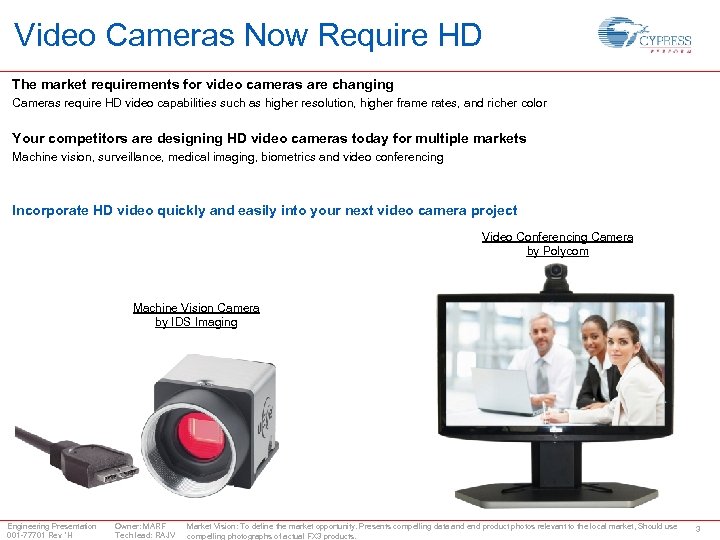
Video Cameras Now Require HD The market requirements for video cameras are changing Cameras require HD video capabilities such as higher resolution, higher frame rates, and richer color Your competitors are designing HD video cameras today for multiple markets Machine vision, surveillance, medical imaging, biometrics and video conferencing Incorporate HD video quickly and easily into your next video camera project Video Conferencing Camera by Polycom Machine Vision Camera by IDS Imaging Engineering Presentation 001 -77701 Rev *H Owner: MARF Tech lead: RAJV Market Vision: To define the market opportunity. Presents compelling data and end product photos relevant to the local market, Should use compelling photographs of actual FX 3 products. 3
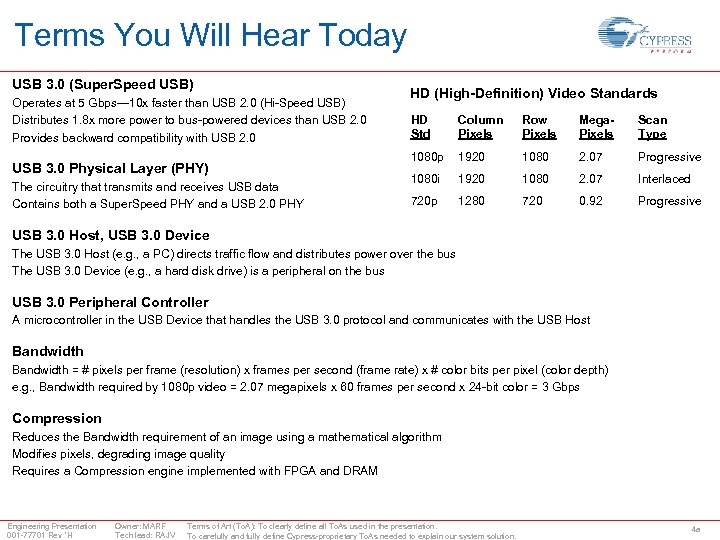
Terms You Will Hear Today USB 3. 0 (Super. Speed USB) Operates at 5 Gbps— 10 x faster than USB 2. 0 (Hi-Speed USB) Distributes 1. 8 x more power to bus-powered devices than USB 2. 0 Provides backward compatibility with USB 2. 0 USB 3. 0 Physical Layer (PHY) The circuitry that transmits and receives USB data Contains both a Super. Speed PHY and a USB 2. 0 PHY HD (High-Definition) Video Standards HD Std Column Pixels Row Pixels Mega. Pixels Scan Type 1080 p 1920 1080 2. 07 Progressive 1080 i 1920 1080 2. 07 Interlaced 720 p 1280 720 0. 92 Progressive USB 3. 0 Host, USB 3. 0 Device The USB 3. 0 Host (e. g. , a PC) directs traffic flow and distributes power over the bus The USB 3. 0 Device (e. g. , a hard disk drive) is a peripheral on the bus USB 3. 0 Peripheral Controller A microcontroller in the USB Device that handles the USB 3. 0 protocol and communicates with the USB Host Bandwidth = # pixels per frame (resolution) x frames per second (frame rate) x # color bits per pixel (color depth) e. g. , Bandwidth required by 1080 p video = 2. 07 megapixels x 60 frames per second x 24 -bit color = 3 Gbps Compression Reduces the Bandwidth requirement of an image using a mathematical algorithm Modifies pixels, degrading image quality Requires a Compression engine implemented with FPGA and DRAM Engineering Presentation 001 -77701 Rev *H Owner: MARF Tech lead: RAJV Terms of Art (To. A): To clearly define all To. As used in the presentation. To carefully and fully define Cypress-proprietary To. As needed to explain our system solution. 4 a
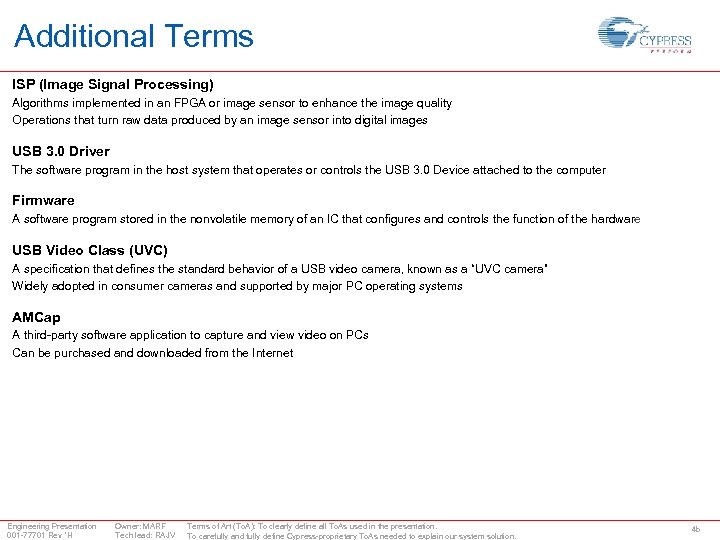
Additional Terms ISP (Image Signal Processing) Algorithms implemented in an FPGA or image sensor to enhance the image quality Operations that turn raw data produced by an image sensor into digital images USB 3. 0 Driver The software program in the host system that operates or controls the USB 3. 0 Device attached to the computer Firmware A software program stored in the nonvolatile memory of an IC that configures and controls the function of the hardware USB Video Class (UVC) A specification that defines the standard behavior of a USB video camera, known as a “UVC camera” Widely adopted in consumer cameras and supported by major PC operating systems AMCap A third-party software application to capture and view video on PCs Can be purchased and downloaded from the Internet Engineering Presentation 001 -77701 Rev *H Owner: MARF Tech lead: RAJV Terms of Art (To. A): To clearly define all To. As used in the presentation. To carefully and fully define Cypress-proprietary To. As needed to explain our system solution. 4 b
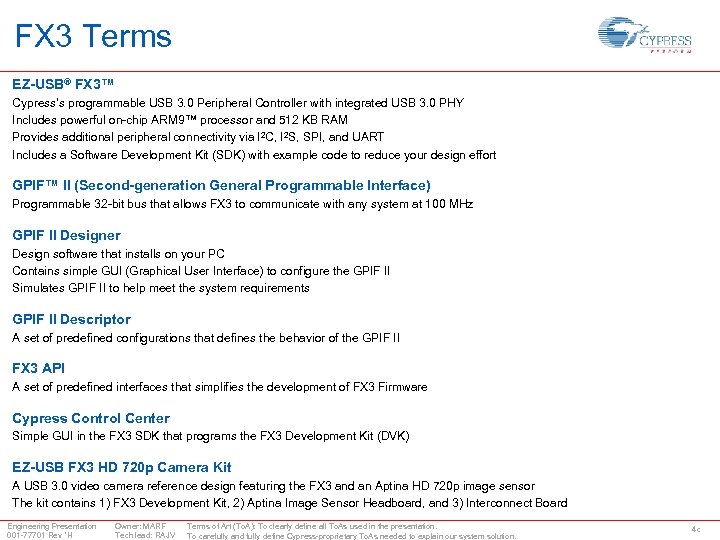
FX 3 Terms EZ-USB® FX 3™ Cypress’s programmable USB 3. 0 Peripheral Controller with integrated USB 3. 0 PHY Includes powerful on-chip ARM 9™ processor and 512 KB RAM Provides additional peripheral connectivity via I 2 C, I 2 S, SPI, and UART Includes a Software Development Kit (SDK) with example code to reduce your design effort GPIF™ II (Second-generation General Programmable Interface) Programmable 32 -bit bus that allows FX 3 to communicate with any system at 100 MHz GPIF II Designer Design software that installs on your PC Contains simple GUI (Graphical User Interface) to configure the GPIF II Simulates GPIF II to help meet the system requirements GPIF II Descriptor A set of predefined configurations that defines the behavior of the GPIF II FX 3 API A set of predefined interfaces that simplifies the development of FX 3 Firmware Cypress Control Center Simple GUI in the FX 3 SDK that programs the FX 3 Development Kit (DVK) EZ-USB FX 3 HD 720 p Camera Kit A USB 3. 0 video camera reference design featuring the FX 3 and an Aptina HD 720 p image sensor The kit contains 1) FX 3 Development Kit, 2) Aptina Image Sensor Headboard, and 3) Interconnect Board Engineering Presentation 001 -77701 Rev *H Owner: MARF Tech lead: RAJV Terms of Art (To. A): To clearly define all To. As used in the presentation. To carefully and fully define Cypress-proprietary To. As needed to explain our system solution. 4 c
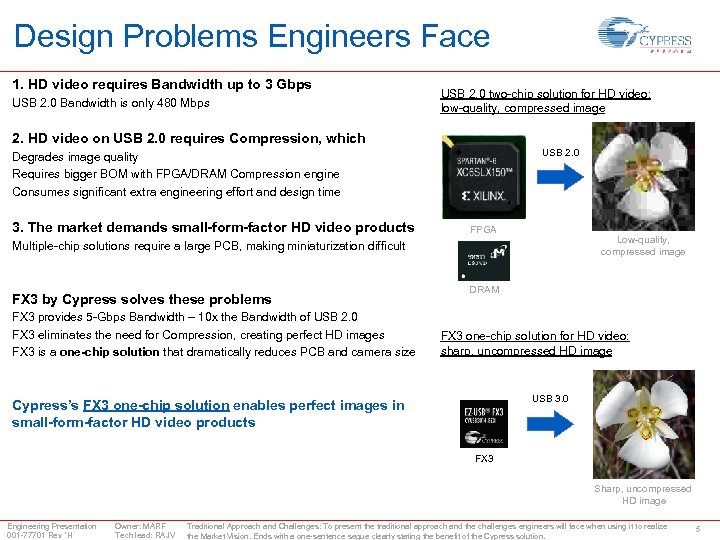
Design Problems Engineers Face 1. HD video requires Bandwidth up to 3 Gbps USB 2. 0 Bandwidth is only 480 Mbps USB 2. 0 two-chip solution for HD video: low-quality, compressed image 2. HD video on USB 2. 0 requires Compression, which USB 2. 0 Degrades image quality Requires bigger BOM with FPGA/DRAM Compression engine Consumes significant extra engineering effort and design time 3. The market demands small-form-factor HD video products FPGA Low-quality, compressed image Multiple-chip solutions require a large PCB, making miniaturization difficult FX 3 by Cypress solves these problems FX 3 provides 5 -Gbps Bandwidth – 10 x the Bandwidth of USB 2. 0 FX 3 eliminates the need for Compression, creating perfect HD images FX 3 is a one-chip solution that dramatically reduces PCB and camera size DRAM FX 3 one-chip solution for HD video: sharp, uncompressed HD image USB 3. 0 Cypress’s FX 3 one-chip solution enables perfect images in small-form-factor HD video products FX 3 Sharp, uncompressed HD image Engineering Presentation 001 -77701 Rev *H Owner: MARF Tech lead: RAJV Traditional Approach and Challenges: To present the traditional approach and the challenges engineers will face when using it to realize the Market Vision. Ends with a one-sentence segue clearly stating the benefit of the Cypress solution. 5
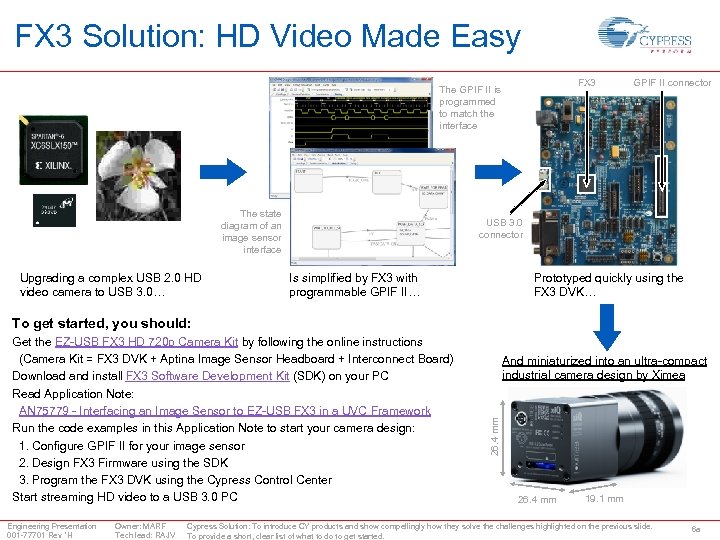
FX 3 Solution: HD Video Made Easy FX 3 The GPIF II is programmed to match the interface The state diagram of an image sensor interface Upgrading a complex USB 2. 0 HD video camera to USB 3. 0… GPIF II connector USB 3. 0 connector Is simplified by FX 3 with programmable GPIF II… Prototyped quickly using the FX 3 DVK… To get started, you should: Engineering Presentation 001 -77701 Rev *H Owner: MARF Tech lead: RAJV And miniaturized into an ultra-compact industrial camera design by Ximea 26. 4 mm Get the EZ-USB FX 3 HD 720 p Camera Kit by following the online instructions (Camera Kit = FX 3 DVK + Aptina Image Sensor Headboard + Interconnect Board) Download and install FX 3 Software Development Kit (SDK) on your PC Read Application Note: AN 75779 - Interfacing an Image Sensor to EZ-USB FX 3 in a UVC Framework Run the code examples in this Application Note to start your camera design: 1. Configure GPIF II for your image sensor 2. Design FX 3 Firmware using the SDK 3. Program the FX 3 DVK using the Cypress Control Center Start streaming HD video to a USB 3. 0 PC 26. 4 mm 19. 1 mm Cypress Solution: To introduce CY products and show compellingly how they solve the challenges highlighted on the previous slide. To provide a short, clear list of what to do to get started. 6 a
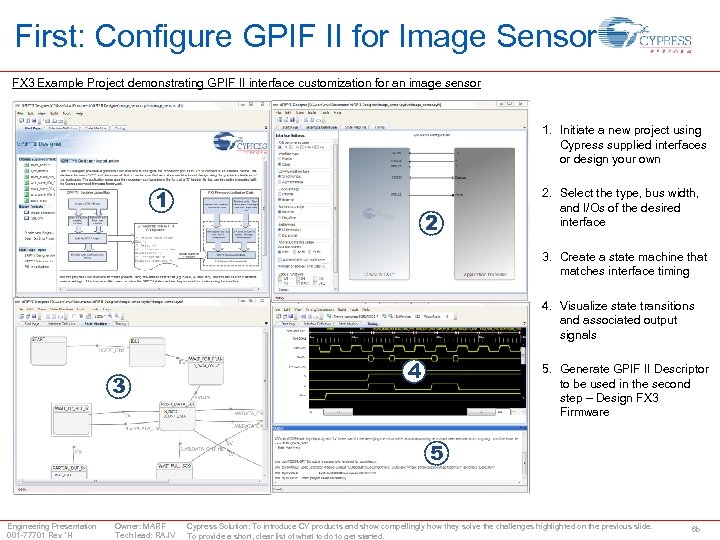
First: Configure GPIF II for Image Sensor FX 3 Example Project demonstrating GPIF II interface customization for an image sensor 1. Initiate a new project using Cypress supplied interfaces or design your own 1 2 2. Select the type, bus width, and I/Os of the desired interface 3. Create a state machine that matches interface timing 4. Visualize state transitions and associated output signals 3 4 5. Generate GPIF II Descriptor to be used in the second step – Design FX 3 Firmware 5 Engineering Presentation 001 -77701 Rev *H Owner: MARF Tech lead: RAJV Cypress Solution: To introduce CY products and show compellingly how they solve the challenges highlighted on the previous slide. To provide a short, clear list of what to do to get started. 6 b
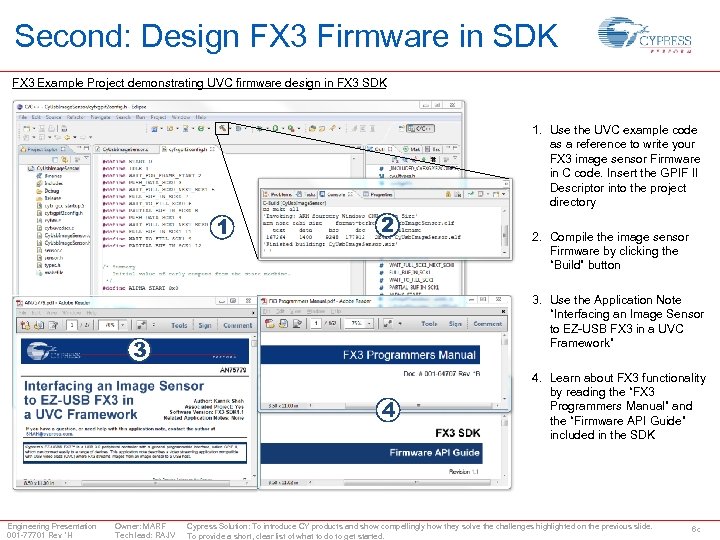
Second: Design FX 3 Firmware in SDK FX 3 Example Project demonstrating UVC firmware design in FX 3 SDK 1. Use the UVC example code as a reference to write your FX 3 image sensor Firmware in C code. Insert the GPIF II Descriptor into the project directory 1 2 3. Use the Application Note “Interfacing an Image Sensor to EZ-USB FX 3 in a UVC Framework” 3 4 Engineering Presentation 001 -77701 Rev *H Owner: MARF Tech lead: RAJV 2. Compile the image sensor Firmware by clicking the “Build” button 4. Learn about FX 3 functionality by reading the “FX 3 Programmers Manual” and the “Firmware API Guide” included in the SDK Cypress Solution: To introduce CY products and show compellingly how they solve the challenges highlighted on the previous slide. To provide a short, clear list of what to do to get started. 6 c
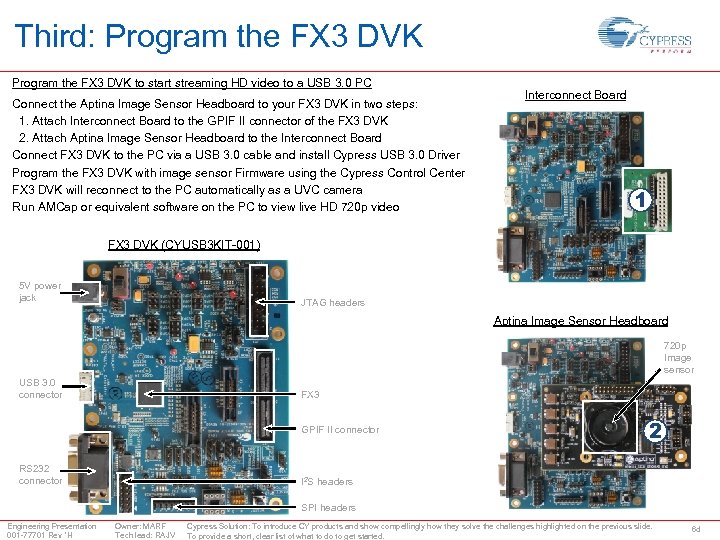
Third: Program the FX 3 DVK to start streaming HD video to a USB 3. 0 PC Connect the Aptina Image Sensor Headboard to your FX 3 DVK in two steps: 1. Attach Interconnect Board to the GPIF II connector of the FX 3 DVK 2. Attach Aptina Image Sensor Headboard to the Interconnect Board Connect FX 3 DVK to the PC via a USB 3. 0 cable and install Cypress USB 3. 0 Driver Program the FX 3 DVK with image sensor Firmware using the Cypress Control Center FX 3 DVK will reconnect to the PC automatically as a UVC camera Run AMCap or equivalent software on the PC to view live HD 720 p video Interconnect Board 1 FX 3 DVK (CYUSB 3 KIT-001) 5 V power jack JTAG headers Aptina Image Sensor Headboard 720 p Image sensor USB 3. 0 connector FX 3 GPIF II connector RS 232 connector 2 I 2 S headers SPI headers Engineering Presentation 001 -77701 Rev *H Owner: MARF Tech lead: RAJV Cypress Solution: To introduce CY products and show compellingly how they solve the challenges highlighted on the previous slide. To provide a short, clear list of what to do to get started. 6 d
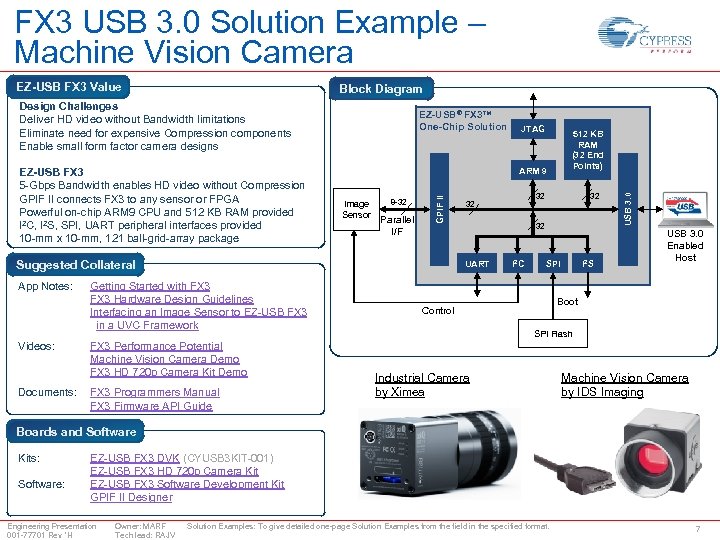
FX 3 USB 3. 0 Solution Example – Machine Vision Camera EZ-USB FX 3 Value Block Diagram Image Sensor 8 -32 Parallel I/F Suggested Collateral App Notes: Videos: Documents: FX 3 Performance Potential Machine Vision Camera Demo FX 3 HD 720 p Camera Kit Demo FX 3 Programmers Manual FX 3 Firmware API Guide 512 KB RAM (32 End Points) 32 32 UART Getting Started with FX 3 Hardware Design Guidelines Interfacing an Image Sensor to EZ-USB FX 3 in a UVC Framework JTAG ARM 9 GPIF II EZ-USB FX 3 5 -Gbps Bandwidth enables HD video without Compression GPIF II connects FX 3 to any sensor or FPGA Powerful on-chip ARM 9 CPU and 512 KB RAM provided I 2 C, I 2 S, SPI, UART peripheral interfaces provided 10 -mm x 10 -mm, 121 ball-grid-array package EZ-USB® FX 3™ One-Chip Solution I 2 C SPI I 2 S USB 3. 0 Design Challenges Deliver HD video without Bandwidth limitations Eliminate need for expensive Compression components Enable small form factor camera designs USB 3. 0 Enabled Host Boot Control SPI Flash Industrial Camera by Ximea Machine Vision Camera by IDS Imaging Boards and Software Kits: Software: EZ-USB FX 3 DVK (CYUSB 3 KIT-001) EZ-USB FX 3 HD 720 p Camera Kit EZ-USB FX 3 Software Development Kit GPIF II Designer Engineering Presentation 001 -77701 Rev *H Owner: MARF Tech lead: RAJV Solution Examples: To give detailed one-page Solution Examples from the field in the specified format. 7
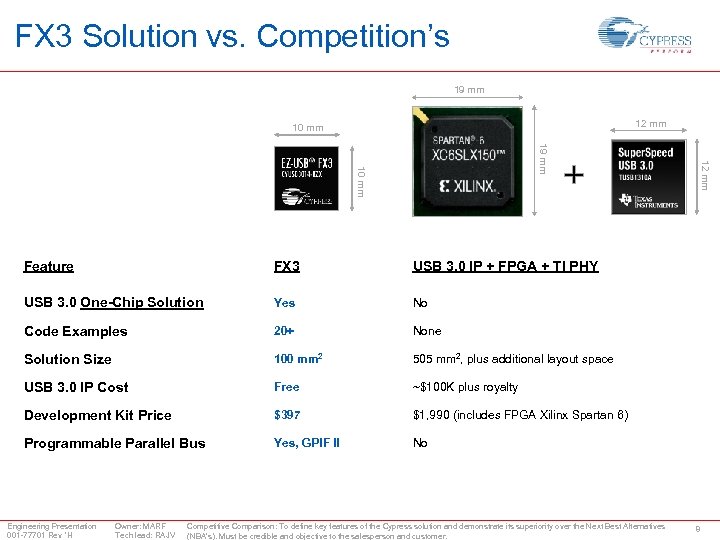
FX 3 Solution vs. Competition’s 19 mm 12 mm 10 mm FX 3 USB 3. 0 IP + FPGA + TI PHY USB 3. 0 One-Chip Solution Yes No Code Examples 20+ None Solution Size 100 mm 2 505 mm 2, plus additional layout space USB 3. 0 IP Cost Free ~$100 K plus royalty Development Kit Price $397 $1, 990 (includes FPGA Xilinx Spartan 6) Programmable Parallel Bus Yes, GPIF II 12 mm 19 mm 10 mm Feature No Engineering Presentation 001 -77701 Rev *H Owner: MARF Tech lead: RAJV Competitive Comparison: To define key features of the Cypress solution and demonstrate its superiority over the Next Best Alternatives (NBA’s). Must be credible and objective to the salesperson and customer. 8
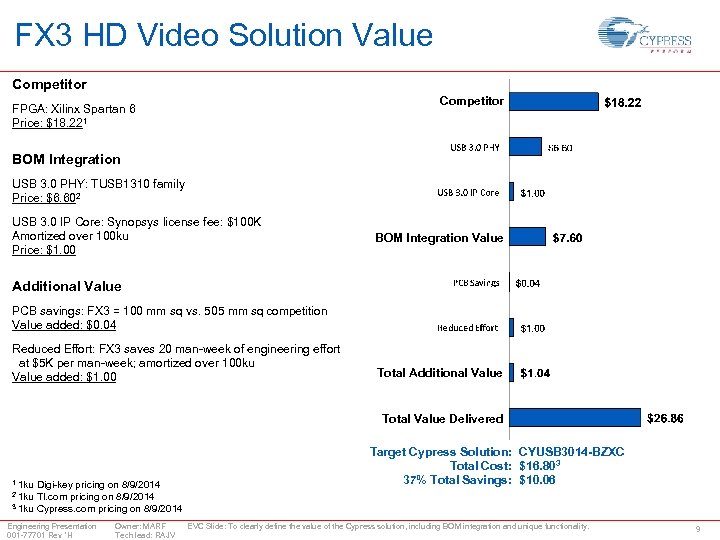
FX 3 HD Video Solution Value Competitor FPGA: Xilinx Spartan 6 Price: $18. 221 BOM Integration USB 3. 0 PHY: TUSB 1310 family Price: $6. 602 USB 3. 0 IP Core: Synopsys license fee: $100 K Amortized over 100 ku Price: $1. 00 BOM Integration Value Additional Value PCB savings: FX 3 = 100 mm sq vs. 505 mm sq competition Value added: $0. 04 Reduced Effort: FX 3 saves 20 man-week of engineering effort at $5 K per man-week; amortized over 100 ku Value added: $1. 00 Total Additional Value Total Value Delivered 1 1 ku Digi-key pricing on 8/9/2014 TI. com pricing on 8/9/2014 3 1 ku Cypress. com pricing on 8/9/2014 Target Cypress Solution: CYUSB 3014 -BZXC Total Cost: $16. 803 37% Total Savings: $10. 06 2 1 ku Engineering Presentation 001 -77701 Rev *H Owner: MARF Tech lead: RAJV EVC Slide: To clearly define the value of the Cypress solution, including BOM integration and unique functionality. 9
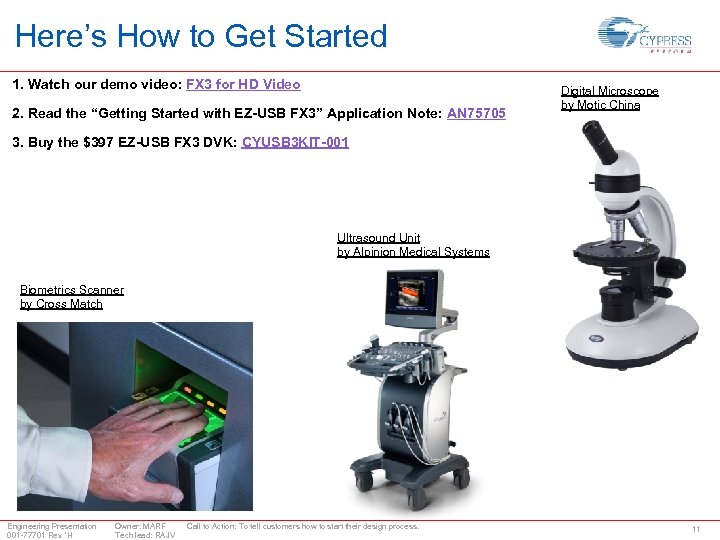
Here’s How to Get Started 1. Watch our demo video: FX 3 for HD Video 2. Read the “Getting Started with EZ-USB FX 3” Application Note: AN 75705 Digital Microscope by Motic China 3. Buy the $397 EZ-USB FX 3 DVK: CYUSB 3 KIT-001 Ultrasound Unit by Alpinion Medical Systems Biometrics Scanner by Cross Match Engineering Presentation 001 -77701 Rev *H Owner: MARF Tech lead: RAJV Call to Action: To tell customers how to start their design process. 11
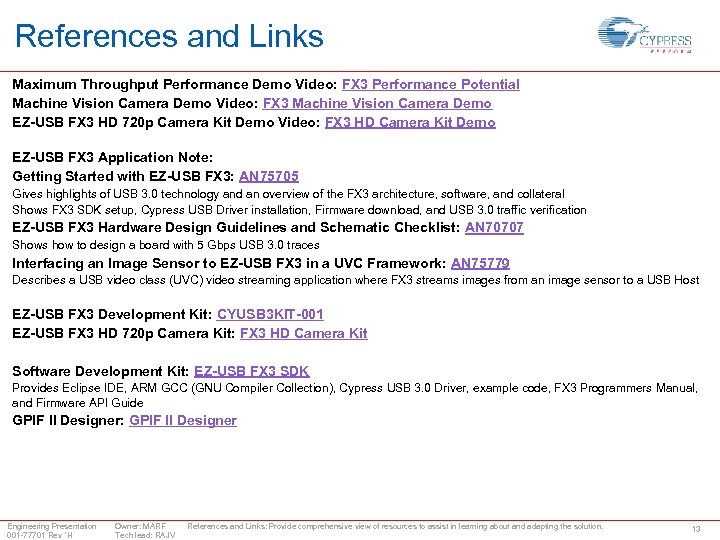
References and Links Maximum Throughput Performance Demo Video: FX 3 Performance Potential Machine Vision Camera Demo Video: FX 3 Machine Vision Camera Demo EZ-USB FX 3 HD 720 p Camera Kit Demo Video: FX 3 HD Camera Kit Demo EZ-USB FX 3 Application Note: Getting Started with EZ-USB FX 3: AN 75705 Gives highlights of USB 3. 0 technology and an overview of the FX 3 architecture, software, and collateral Shows FX 3 SDK setup, Cypress USB Driver installation, Firmware download, and USB 3. 0 traffic verification EZ-USB FX 3 Hardware Design Guidelines and Schematic Checklist: AN 70707 Shows how to design a board with 5 Gbps USB 3. 0 traces Interfacing an Image Sensor to EZ-USB FX 3 in a UVC Framework: AN 75779 Describes a USB video class (UVC) video streaming application where FX 3 streams images from an image sensor to a USB Host EZ-USB FX 3 Development Kit: CYUSB 3 KIT-001 EZ-USB FX 3 HD 720 p Camera Kit: FX 3 HD Camera Kit Software Development Kit: EZ-USB FX 3 SDK Provides Eclipse IDE, ARM GCC (GNU Compiler Collection), Cypress USB 3. 0 Driver, example code, FX 3 Programmers Manual, and Firmware API Guide GPIF II Designer: GPIF II Designer Engineering Presentation 001 -77701 Rev *H Owner: MARF Tech lead: RAJV References and Links: Provide comprehensive view of resources to assist in learning about and adapting the solution. 13
Скачать презентацию Design Win Replication FX 3 Cypress USB 3
ca7c79c725edf4bc3519eda561c00ab8.ppt