


 Скачать презентацию Deploying non-HA NSM Components in a Microsoft Cluster
1c9801a907a1cdfc2c2fee5495e67d02.ppt
- Количество слайдов: 99
 Deploying non-HA NSM Components in a Microsoft Cluster Environment - Unicenter NSM Release 11. 1 SP 1 - Last Revision October 30, 2007
 Glossary The following terms and abbreviations are used in this presentation: - “HA” = Highly Available - “NSM” = Unicenter Network Systems Management - “USD” = Unicenter Service Desk - “MSCS” = Microsoft Cluster Server - “Cluster Name” = Network name associated with the cluster group - “AMS” = Unicenter Alert Management System - “UNS” = Unicenter Notification System 2 © 2005 Computer Associates International, Inc. (CA). All trademarks, trade names, services marks and logos referenced herein belong to their respective companies.
 Disclaimer - This presentation pertains to Unicenter NSM r 11. 1 SP 1; it does not apply to r 11. 0 - This document represents field best practice. As such, it is supported on a “best effort” basis - as are any field developed tools. - CA reserves to right to update this document as needed in response to any issue. Therefore, you should check for an updated version before opening any issue related to this best practice. 3 © 2005 Computer Associates International, Inc. (CA). All trademarks, trade names, services marks and logos referenced herein belong to their respective companies.
 Objectives - The procedures provided in the presentation are designed for architectures where: - Intermix of non-HA and HA components is required as part of a migration from Unicenter NSM 3. 1 to NSM r 11. 1 SP 1 - Certain non-HA components, such as the Alert Management System (AMS), must be installed alongside other components which are. 4 © 2005 Computer Associates International, Inc. (CA). All trademarks, trade names, services marks and logos referenced herein belong to their respective companies.
 Scope - This presentation includes a summary of installation procedure for selected non-HA components - It does not include information on how to make these non-HA components Highly Available. That is beyond the scope of this presentation. - However, wherever possible, testing has been carried out with the view to make them HA. 5 © 2005 Computer Associates International, Inc. (CA). All trademarks, trade names, services marks and logos referenced herein belong to their respective companies.
 Non-HA Components - Components that have been verified as non-HA include: - Alert Management System (AMS) - Unicenter Notification Service (UNS) - EM Provider - Unicenter Repository Bridge - Unicenter Dynamic Containment Service (DCS) - The following Agent Technology (AT) components: - OS Agent Gateway - AS/400 Agent - Active Directory Services Agent - Management Command Center (MCC) 6 © 2005 Computer Associates International, Inc. (CA). All trademarks, trade names, services marks and logos referenced herein belong to their respective companies.
 Non-HA Components - The following non-HA components are also available for install but have not been tested: - Worldview DMI Manager - Continuous Discovery (Agent and Manager) - Continuous Discovery WV classes may not be defined. If so, Continuous Manager will not function correctly - Web reports and Dashboards - Unicenter Browser interface - Use caution if you must install these components as they have not been certified or tested. 7 © 2005 Computer Associates International, Inc. (CA). All trademarks, trade names, services marks and logos referenced herein belong to their respective companies.
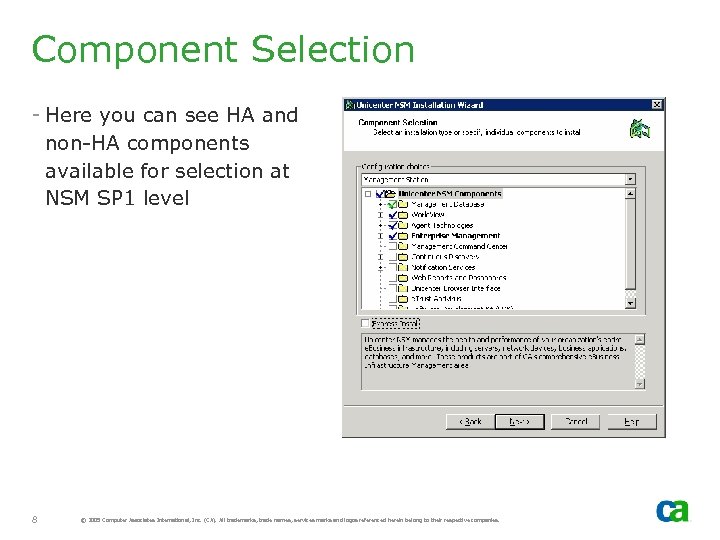 Component Selection - Here you can see HA and non-HA components available for selection at NSM SP 1 level 8 © 2005 Computer Associates International, Inc. (CA). All trademarks, trade names, services marks and logos referenced herein belong to their respective companies.
 For additional information…. . - Appendix C “Making Components Cluster Aware and Highly Available” in the Unicenter NMS r 11. 1 Implementation Guide - “Best Practices for Implementing Unicenter NSM r 11. 1 in an HA MSCS Environment Part I and Part II” presentations available on the Fault Tolerance page of the Implementation Best Practices site (http: //supportconnectw. ca. com/public/impcd/r 11/ Fault. Tolerance/Fault. Tolerance_Frame. htm) 9 © 2005 Computer Associates International, Inc. (CA). All trademarks, trade names, services marks and logos referenced herein belong to their respective companies.
 Non-HA Components Cluster Resource Kit
 Cluster Resources Kit - Non-HA NSM components cluster resource kit is included in the package - Automatically detects which non-HA components were installed and defines the cluster resources for them - Cluster Resources for Continuous Discovery Agent and Manager are not automatically defined - If required classes are defined for Continuous Discovery, then Continuous Discovery resources will be defined provided “Discovery” is specified as the first argument 11 © 2005 Computer Associates International, Inc. (CA). All trademarks, trade names, services marks and logos referenced herein belong to their respective companies.
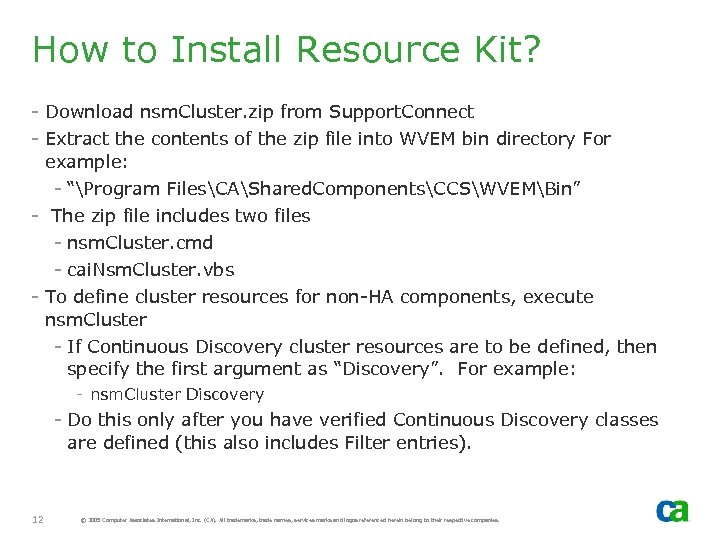 How to Install Resource Kit? - Download nsm. Cluster. zip from Support. Connect - Extract the contents of the zip file into WVEM bin directory For example: - “Program FilesCAShared. ComponentsCCSWVEMBin” - The zip file includes two files - nsm. Cluster. cmd - cai. Nsm. Cluster. vbs - To define cluster resources for non-HA components, execute nsm. Cluster - If Continuous Discovery cluster resources are to be defined, then specify the first argument as “Discovery”. For example: - nsm. Cluster Discovery - Do this only after you have verified Continuous Discovery classes are defined (this also includes Filter entries). 12 © 2005 Computer Associates International, Inc. (CA). All trademarks, trade names, services marks and logos referenced herein belong to their respective companies.
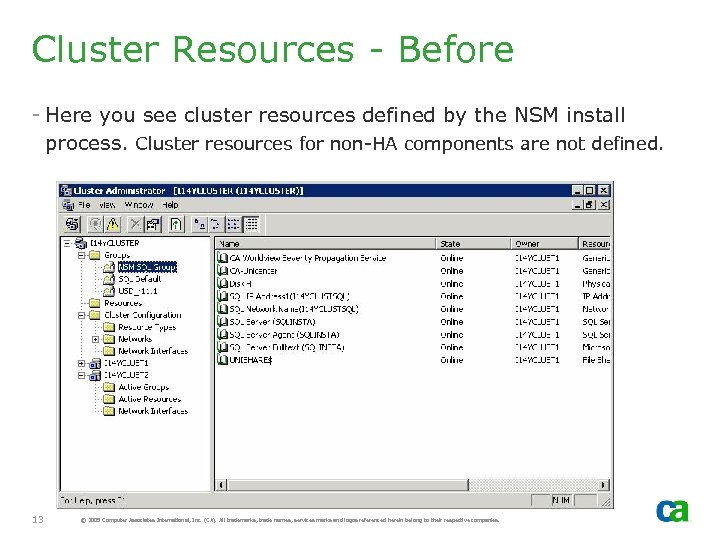 Cluster Resources - Before - Here you see cluster resources defined by the NSM install process. Cluster resources for non-HA components are not defined. 13 © 2005 Computer Associates International, Inc. (CA). All trademarks, trade names, services marks and logos referenced herein belong to their respective companies.
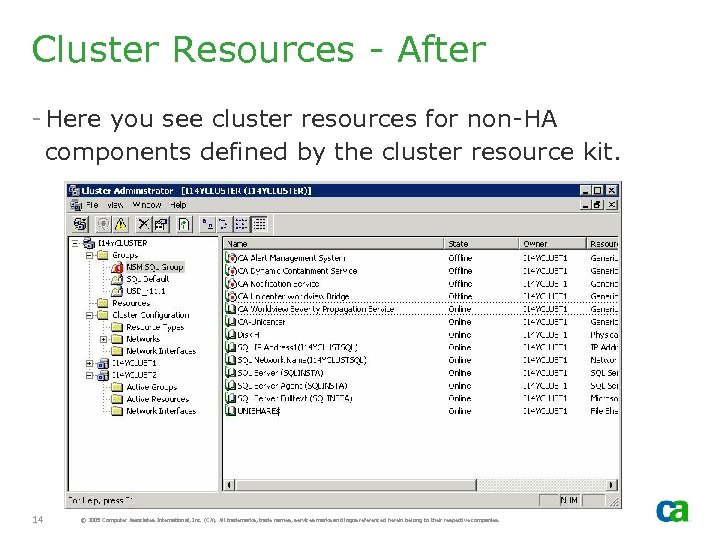 Cluster Resources - After - Here you see cluster resources for non-HA components defined by the cluster resource kit. 14 © 2005 Computer Associates International, Inc. (CA). All trademarks, trade names, services marks and logos referenced herein belong to their respective companies.
 Installing Non-HA Components with HA Components
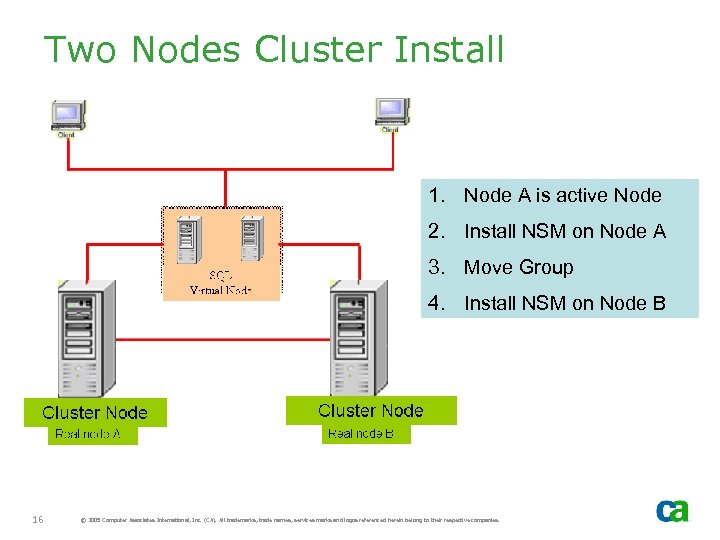 Two Nodes Cluster Install 1. Node A is active Node 2. Install NSM on Node A 3. Move Group 4. Install NSM on Node B 16 © 2005 Computer Associates International, Inc. (CA). All trademarks, trade names, services marks and logos referenced herein belong to their respective companies.
 Prerequisites - Before you install components on Node A verify the cluster setup: - Move Groups to verify cluster is set up correctly - Identify the SQL Cluster resource group for NSM r 11. 1 - Verify NSM is not previously installed as non-HA - Move Group to Cluster Node A if Cluster Node A is not active node 17 © 2005 Computer Associates International, Inc. (CA). All trademarks, trade names, services marks and logos referenced herein belong to their respective companies.
 Install Summary – Node A - Install NSM HA and non-HA components on Node A - Install NSM Cluster Resource Kit and execute nsm. Cluster. cmd to define cluster resources for non -HA components - Online and offline these cluster resources. - This will change the required services from Automatic to Manual - Further customization is not recommended until all the components installed on the Node A are also installed on the second node 18 © 2005 Computer Associates International, Inc. (CA). All trademarks, trade names, services marks and logos referenced herein belong to their respective companies.
 Install Summary – Node B - If NSM Resources are not offline, offline them using the Cluster Administrator (note that this should have been done by the NSM install process on Node A) - Move Group to Cluster Node B (since resources are offline, they will not start on Node B) - Install NSM components on Node B, being careful to select the same options installed on Node A. - Note that Cluster Resource Group Selection dialog will NOT be displayed when installing on second or subsequent nodes. It is only displayed for the first node - Once the install on Node B is completed, the system is ready for customization 19 © 2005 Computer Associates International, Inc. (CA). All trademarks, trade names, services marks and logos referenced herein belong to their respective companies.
 MDB - MDB is created during install on first cluster node. - On the subsequent cluster nodes, install verifies the MDB exists and is at the correct MDB level (1. 0. 4) - If it is at the correct level, which it should be, the MDB is NOT upgraded or recreated 20 © 2005 Computer Associates International, Inc. (CA). All trademarks, trade names, services marks and logos referenced herein belong to their respective companies.
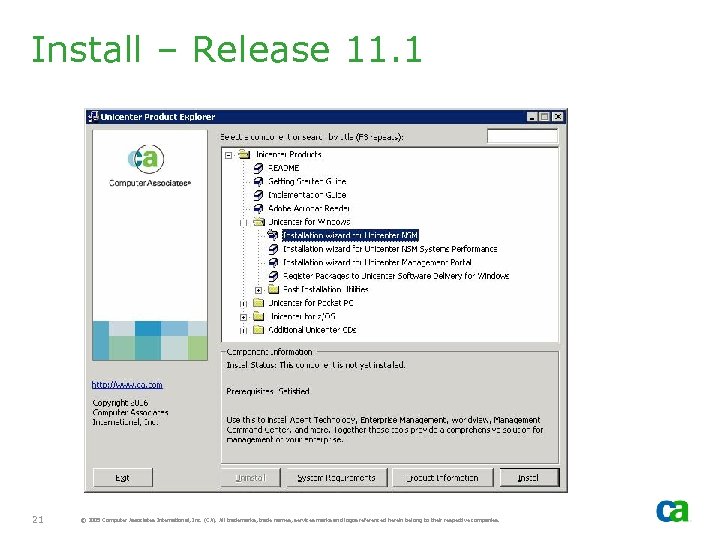 Install – Release 11. 1 21 © 2005 Computer Associates International, Inc. (CA). All trademarks, trade names, services marks and logos referenced herein belong to their respective companies.
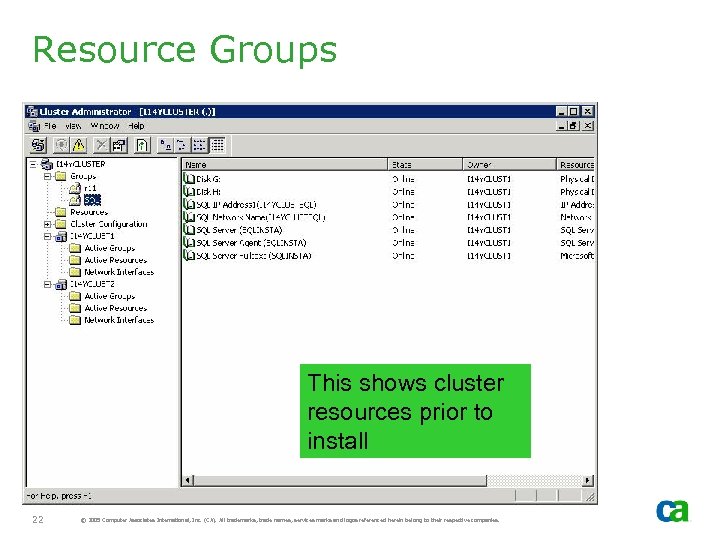 Resource Groups This shows cluster resources prior to install 22 © 2005 Computer Associates International, Inc. (CA). All trademarks, trade names, services marks and logos referenced herein belong to their respective companies.
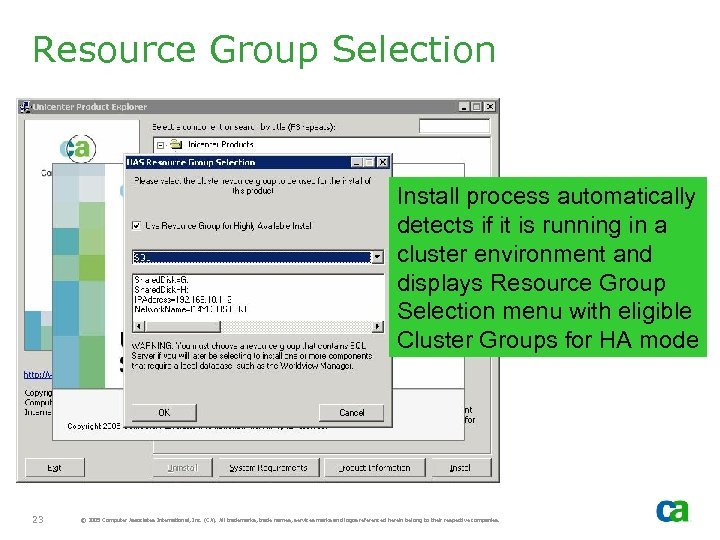 Resource Group Selection Install process automatically detects if it is running in a cluster environment and displays Resource Group Selection menu with eligible Cluster Groups for HA mode 23 © 2005 Computer Associates International, Inc. (CA). All trademarks, trade names, services marks and logos referenced herein belong to their respective companies.
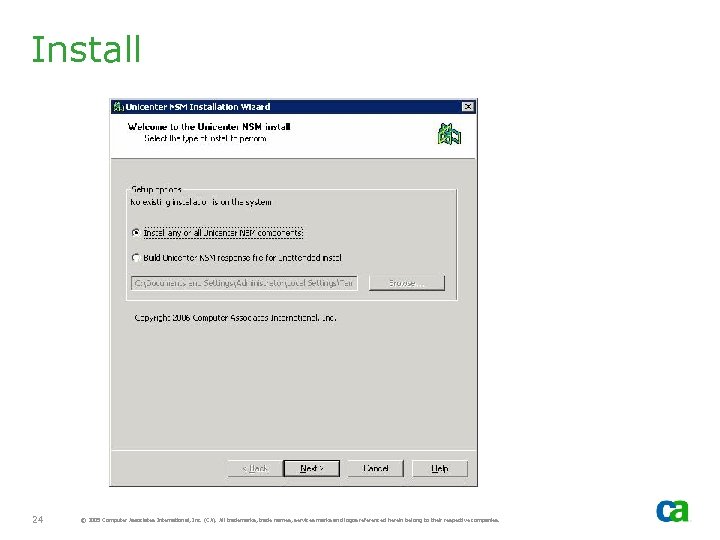 Install 24 © 2005 Computer Associates International, Inc. (CA). All trademarks, trade names, services marks and logos referenced herein belong to their respective companies.
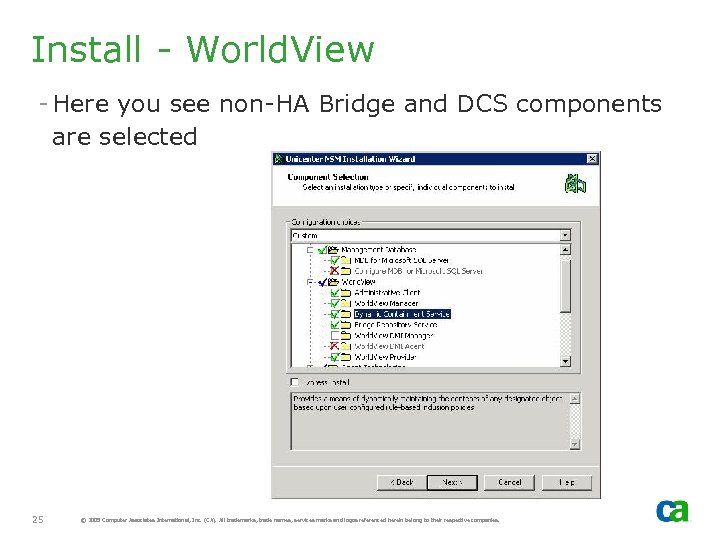 Install - World. View - Here you see non-HA Bridge and DCS components are selected 25 © 2005 Computer Associates International, Inc. (CA). All trademarks, trade names, services marks and logos referenced herein belong to their respective companies.
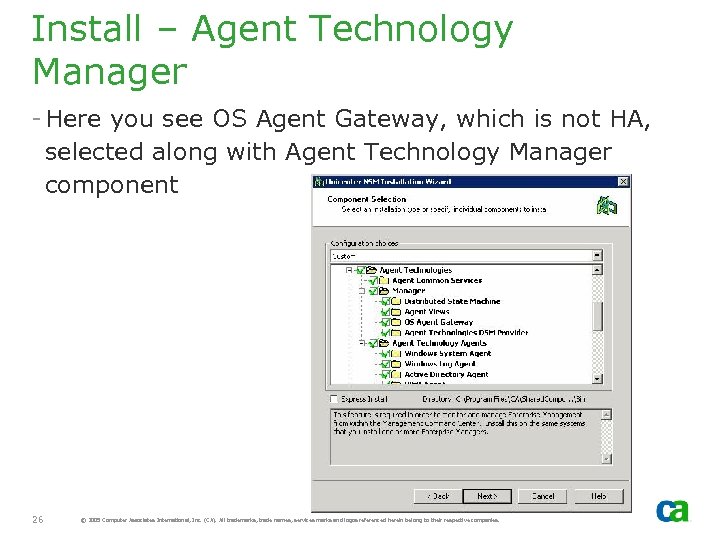 Install – Agent Technology Manager - Here you see OS Agent Gateway, which is not HA, selected along with Agent Technology Manager component AT Manager 26 © 2005 Computer Associates International, Inc. (CA). All trademarks, trade names, services marks and logos referenced herein belong to their respective companies.
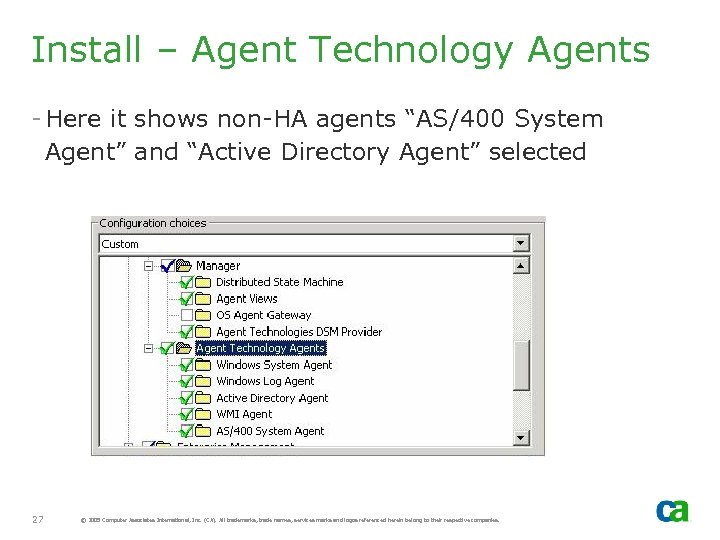 Install – Agent Technology Agents - Here it shows non-HA agents “AS/400 System Agent” and “Active Directory Agent” selected 27 © 2005 Computer Associates International, Inc. (CA). All trademarks, trade names, services marks and logos referenced herein belong to their respective companies.
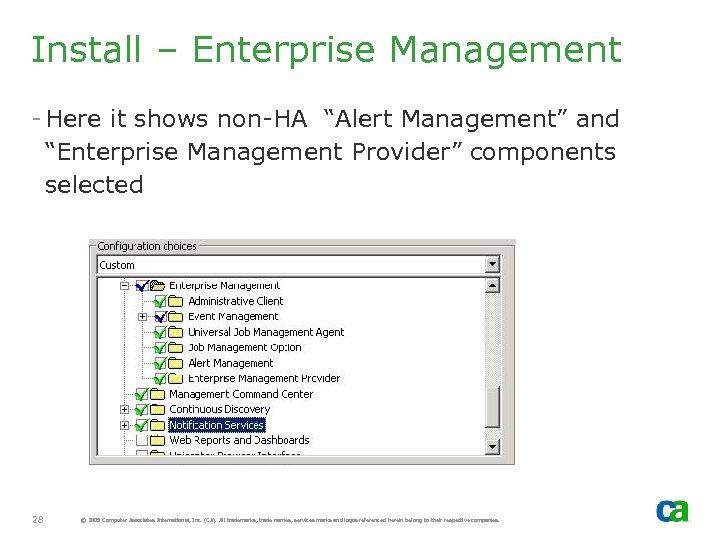 Install – Enterprise Management - Here it shows non-HA “Alert Management” and “Enterprise Management Provider” components selected 28 © 2005 Computer Associates International, Inc. (CA). All trademarks, trade names, services marks and logos referenced herein belong to their respective companies.
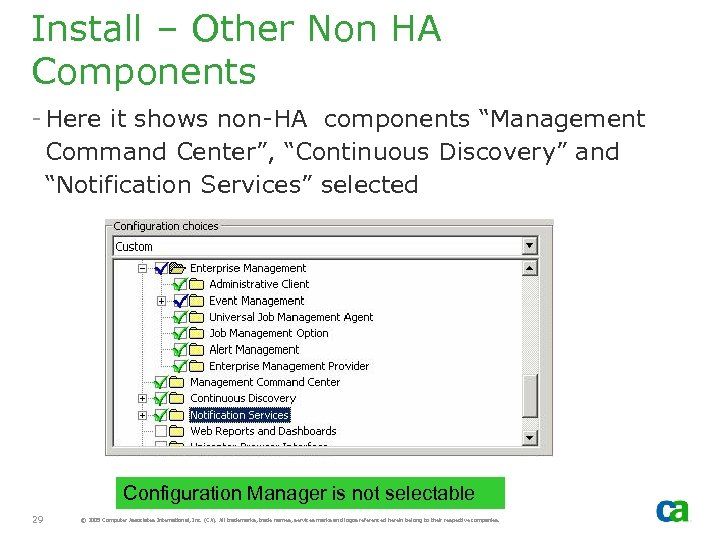 Install – Other Non HA Components - Here it shows non-HA components “Management Command Center”, “Continuous Discovery” and “Notification Services” selected Configuration Manager is not selectable 29 © 2005 Computer Associates International, Inc. (CA). All trademarks, trade names, services marks and logos referenced herein belong to their respective companies.
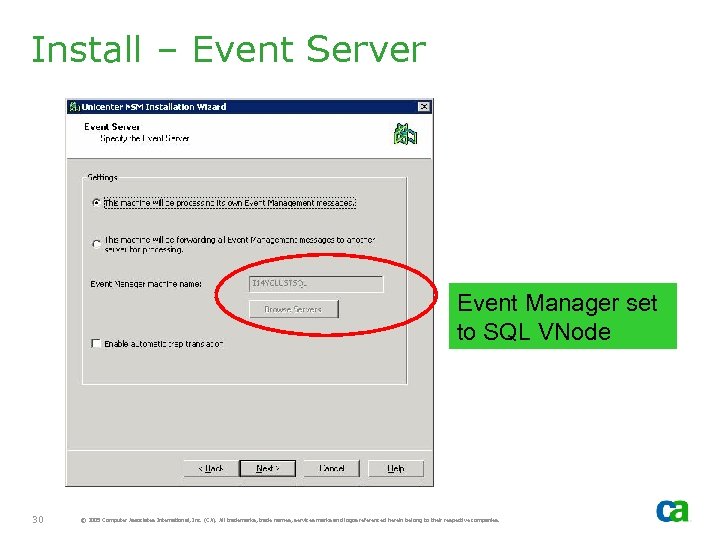 Install – Event Server Event Manager set to SQL VNode 30 © 2005 Computer Associates International, Inc. (CA). All trademarks, trade names, services marks and logos referenced herein belong to their respective companies.
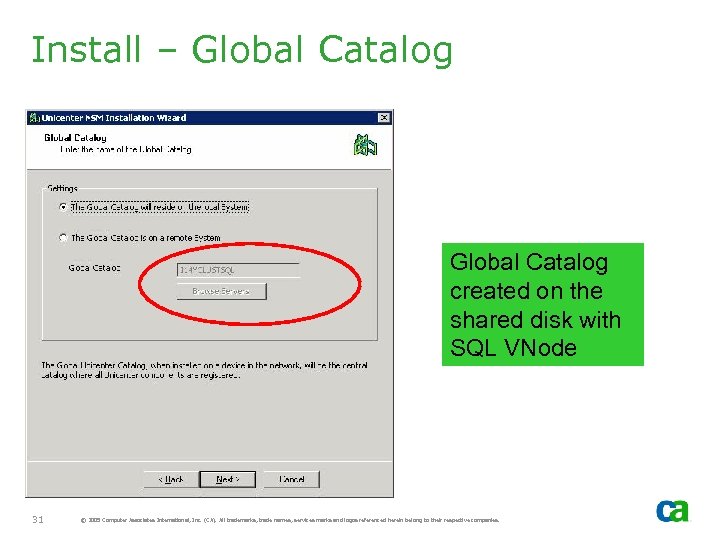 Install – Global Catalog created on the shared disk with SQL VNode 31 © 2005 Computer Associates International, Inc. (CA). All trademarks, trade names, services marks and logos referenced herein belong to their respective companies.
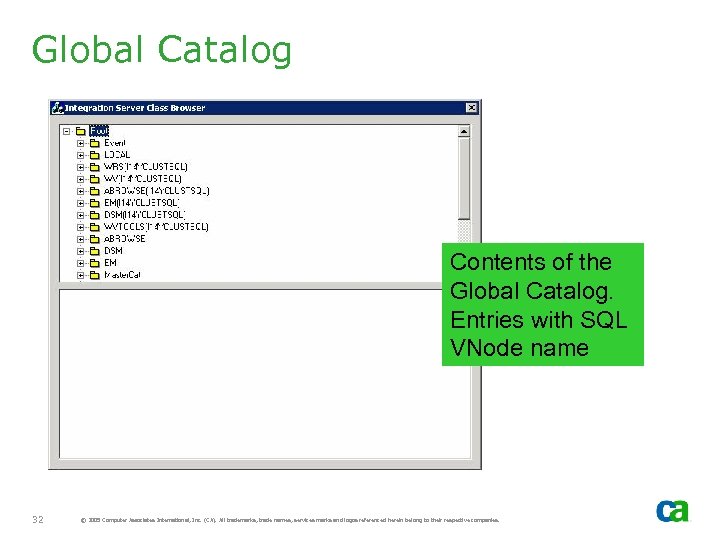 Global Catalog Contents of the Global Catalog. Entries with SQL VNode name 32 © 2005 Computer Associates International, Inc. (CA). All trademarks, trade names, services marks and logos referenced herein belong to their respective companies.
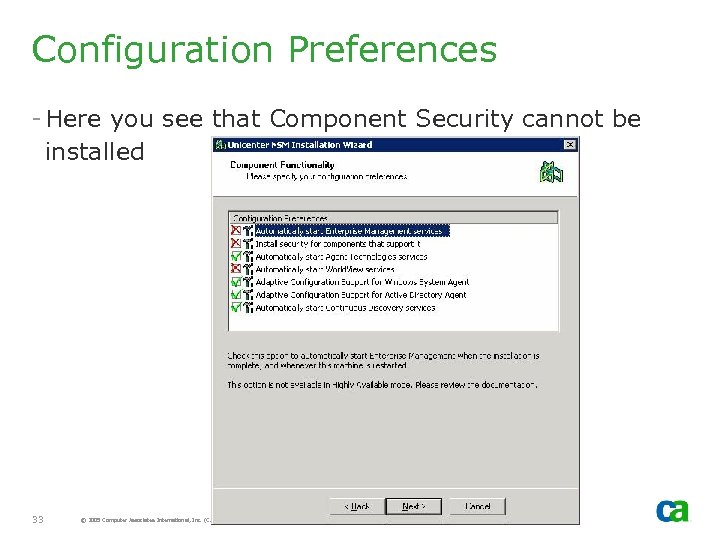 Configuration Preferences - Here you see that Component Security cannot be installed 33 © 2005 Computer Associates International, Inc. (CA). All trademarks, trade names, services marks and logos referenced herein belong to their respective companies.
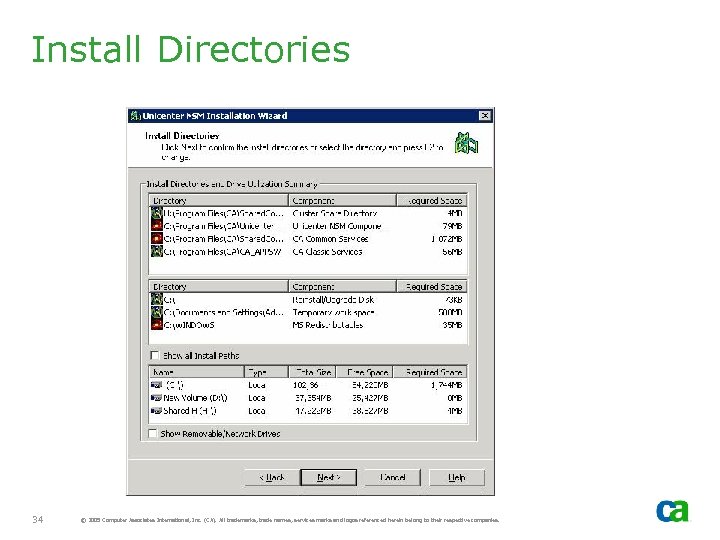 Install Directories 34 © 2005 Computer Associates International, Inc. (CA). All trademarks, trade names, services marks and logos referenced herein belong to their respective companies.
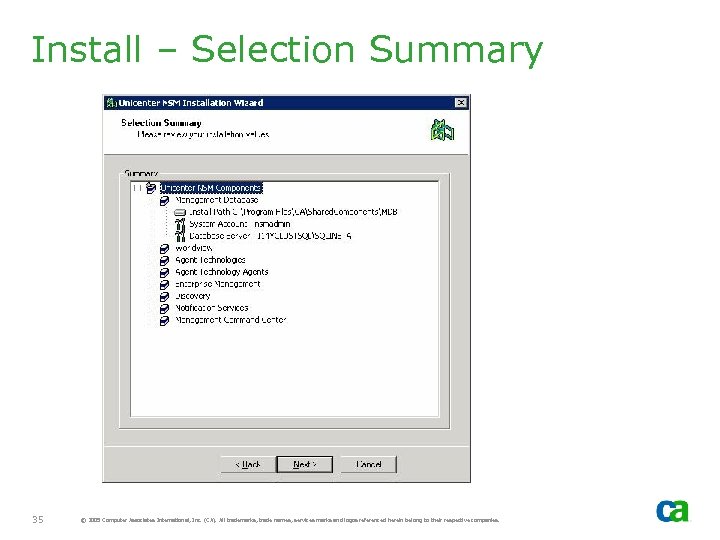 Install – Selection Summary 35 © 2005 Computer Associates International, Inc. (CA). All trademarks, trade names, services marks and logos referenced herein belong to their respective companies.
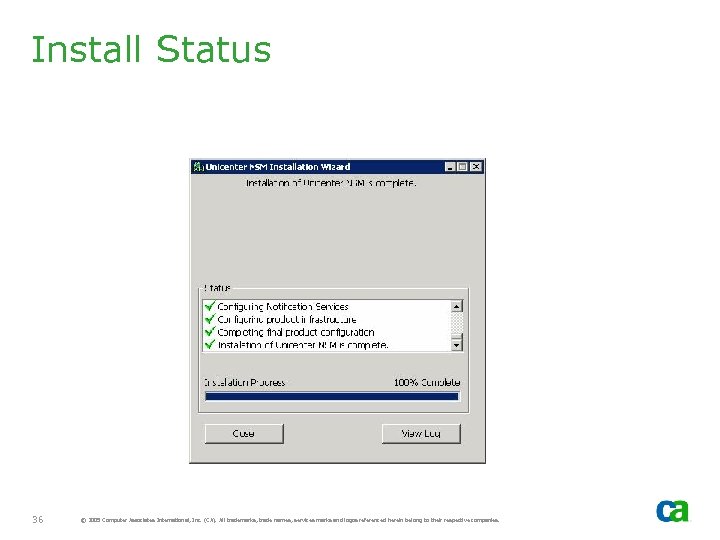 Install Status 36 © 2005 Computer Associates International, Inc. (CA). All trademarks, trade names, services marks and logos referenced herein belong to their respective companies.
 Offline Resources - NSM Resources should be set to offline by the install process. If they are not offline, offline them prior to moving groups - If NSM Resources are not offline, it will attempt to start NSM components with move group and will fail as components are not yet installed on the new active node. 37 © 2005 Computer Associates International, Inc. (CA). All trademarks, trade names, services marks and logos referenced herein belong to their respective companies.
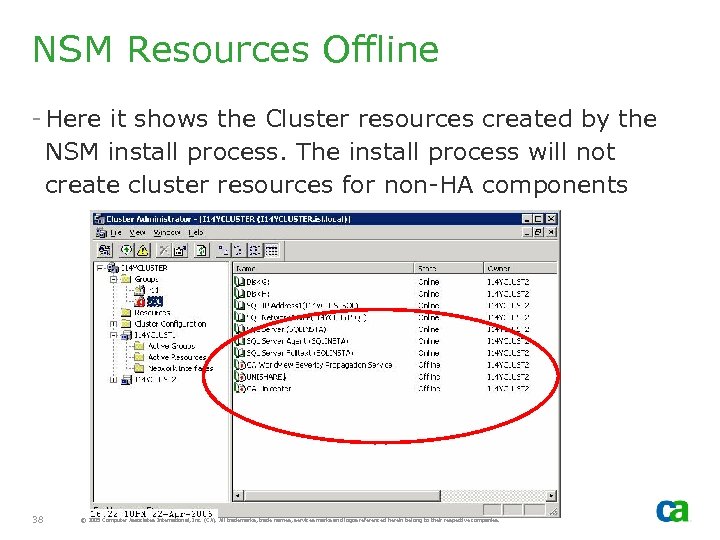 NSM Resources Offline - Here it shows the Cluster resources created by the NSM install process. The install process will not create cluster resources for non-HA components 38 © 2005 Computer Associates International, Inc. (CA). All trademarks, trade names, services marks and logos referenced herein belong to their respective companies.
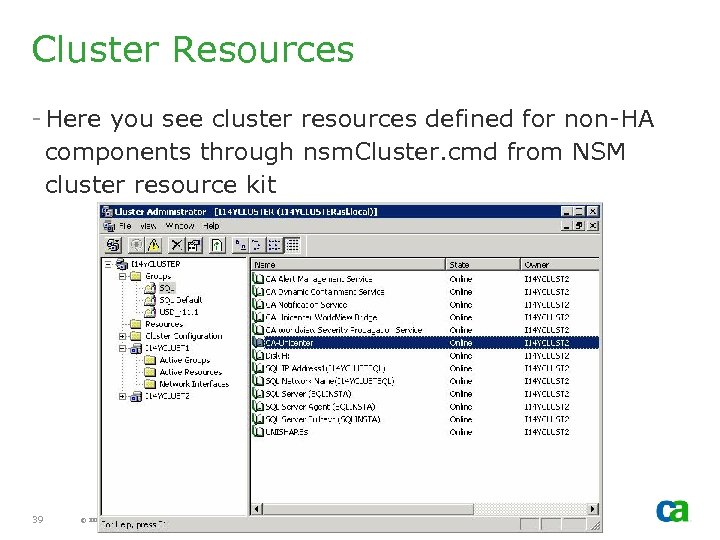 Cluster Resources - Here you see cluster resources defined for non-HA components through nsm. Cluster. cmd from NSM cluster resource kit 39 © 2005 Computer Associates International, Inc. (CA). All trademarks, trade names, services marks and logos referenced herein belong to their respective companies.
 Install on Cluster Node B - Install NSM Components on cluster node B. Node B will be active after Move Group - Select the same options (e. g. , directory names, shared disk, etc. ) that you selected for Node A with the exception of non-HA Agent Technology services (e. g. , AS 400 Agent, OS Agent Gateway, etc. ) 40 © 2005 Computer Associates International, Inc. (CA). All trademarks, trade names, services marks and logos referenced herein belong to their respective companies.
 Reboot - After the install completes on all cluster nodes, start the customization. - If the install process requires reboot, do the following: - Move Group to Cluster Node A. If reboot was required on Node A, this should have been carried out while Node B was active - Put NSM cluster resources online if they are offline - Reboot Cluster Node B 41 © 2005 Computer Associates International, Inc. (CA). All trademarks, trade names, services marks and logos referenced herein belong to their respective companies.
 Alert Management System
 Alert Management System - AMS - Alert Management system is not HA but, if implemented correctly, will provide HA to some degree. This includes: - Consolidation of Events - Events Generated from Node A will be consolidated with Alerts generated from other nodes - AMS must be active on the ACTIVE NODE only. It should NOT be active on all cluster nodes 43 © 2005 Computer Associates International, Inc. (CA). All trademarks, trade names, services marks and logos referenced herein belong to their respective companies.
 Hold Queue - If the AMS server is not available, AMS caches alerts on the local disk WVEMAMSHOLD directory - When the AMS Server is back online it generates alerts from the cached entries in the hold queue - In a cluster environment, because these alerts are cached on the local disk, they will not be regenerated after failover. Therefore, you will need to manually generate them. - Under normal circumstances, however, there should not be any cached entries. 44 © 2005 Computer Associates International, Inc. (CA). All trademarks, trade names, services marks and logos referenced herein belong to their respective companies.
 Management Command Center
 MCC - MCC can be installed on the cluster nodes, if required. - It should not be launched from inactive cluster node. If you attempt to launch MCC Client from inactive cluster node, MCC will exit without displaying MCC dialog. 46 © 2005 Computer Associates International, Inc. (CA). All trademarks, trade names, services marks and logos referenced herein belong to their respective companies.
 MCC - Alert RHP - If MCC launched from Remote node (non-cluster node), both real nodes of the cluster will be displayed. - Alert Management System service is started on the active node only - Alert details on both nodes displayed should be identical. - DIA runs on all cluster nodes (active and inactive nodes) - If MCC launched from the cluster node, then only active node will be displayed 47 © 2005 Computer Associates International, Inc. (CA). All trademarks, trade names, services marks and logos referenced herein belong to their respective companies.
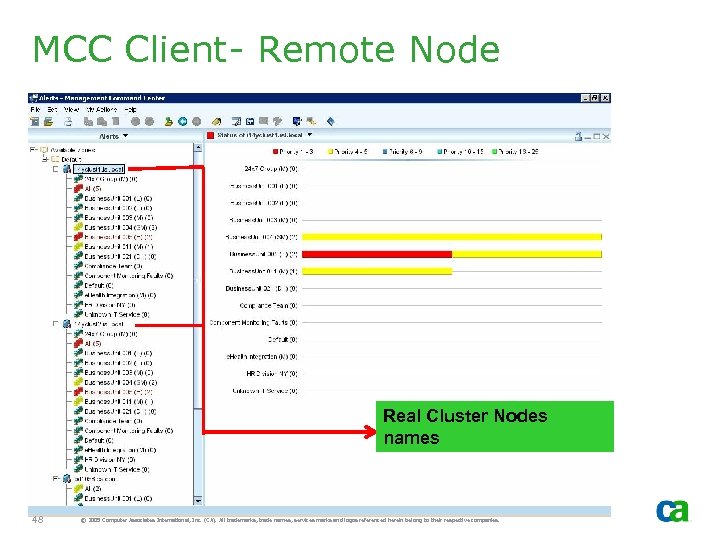 MCC Client- Remote Node Real Cluster Nodes names 48 © 2005 Computer Associates International, Inc. (CA). All trademarks, trade names, services marks and logos referenced herein belong to their respective companies.
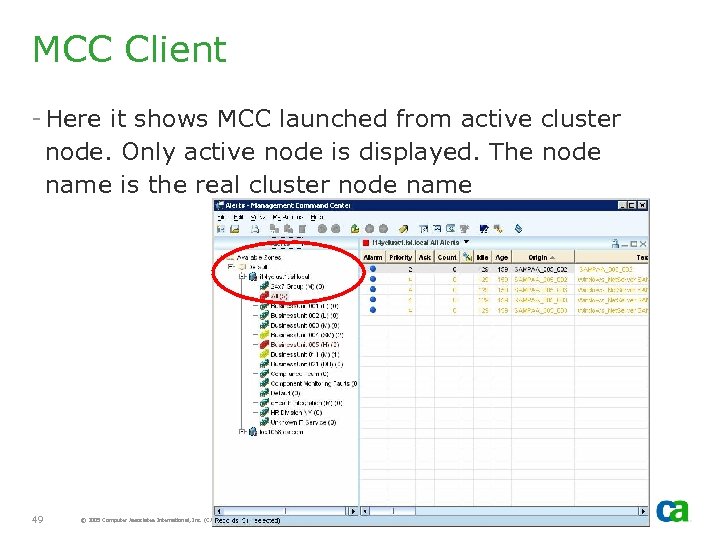 MCC Client - Here it shows MCC launched from active cluster node. Only active node is displayed. The node name is the real cluster node name 49 © 2005 Computer Associates International, Inc. (CA). All trademarks, trade names, services marks and logos referenced herein belong to their respective companies.
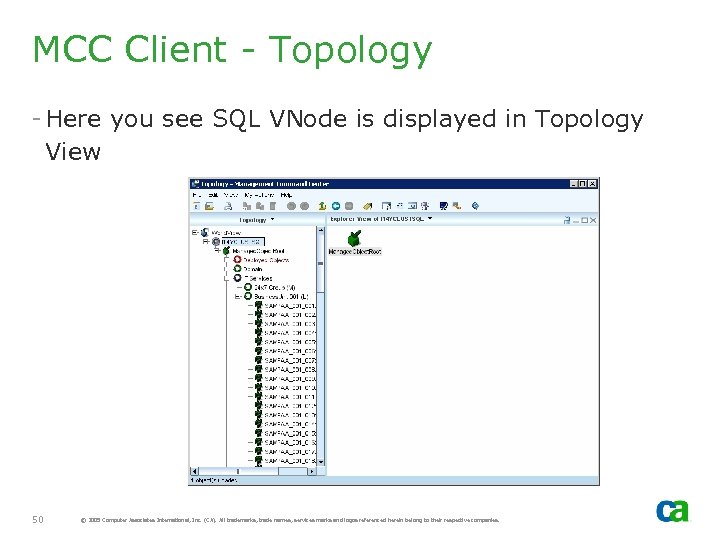 MCC Client - Topology - Here you see SQL VNode is displayed in Topology View 50 © 2005 Computer Associates International, Inc. (CA). All trademarks, trade names, services marks and logos referenced herein belong to their respective companies.
 MCC and Failover - If the AMS server (in this case, the cluster node) fails over, the remote MCC client will continue and automatically pick up the alerts from the new active node. - In some cases, such as Enterprise Management, it may require re-connection. - For a list of other MCC caveats, review the NSM HA presentation. 51 © 2005 Computer Associates International, Inc. (CA). All trademarks, trade names, services marks and logos referenced herein belong to their respective companies.
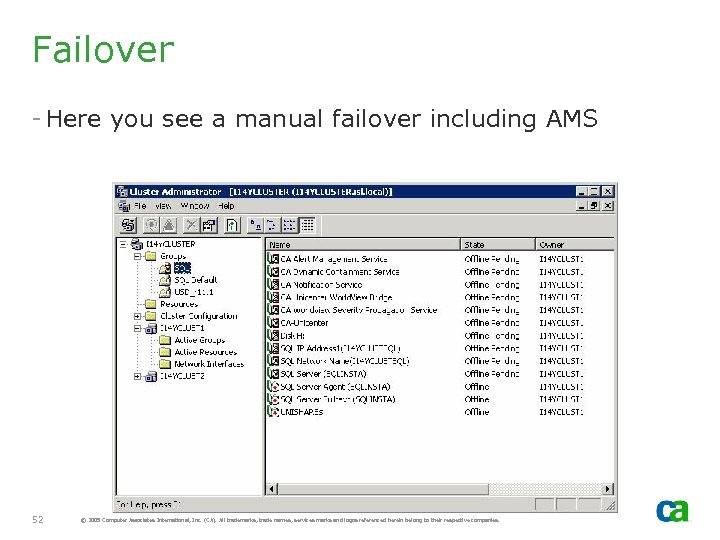 Failover - Here you see a manual failover including AMS 52 © 2005 Computer Associates International, Inc. (CA). All trademarks, trade names, services marks and logos referenced herein belong to their respective companies.
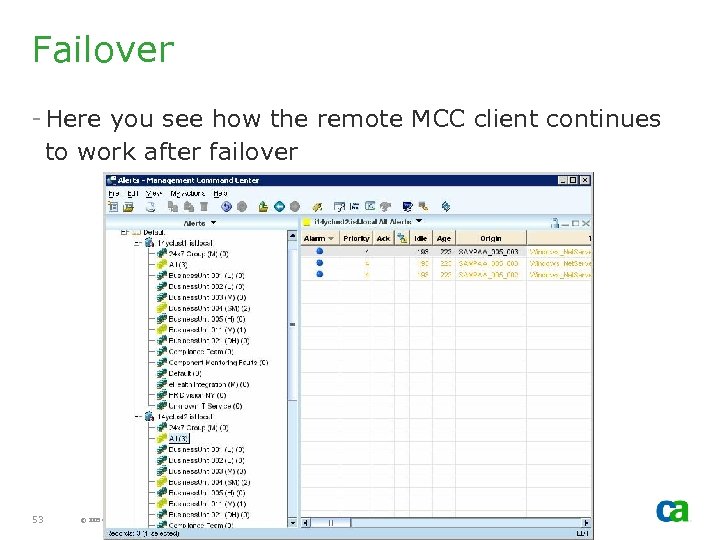 Failover - Here you see how the remote MCC client continues to work after failover 53 © 2005 Computer Associates International, Inc. (CA). All trademarks, trade names, services marks and logos referenced herein belong to their respective companies.
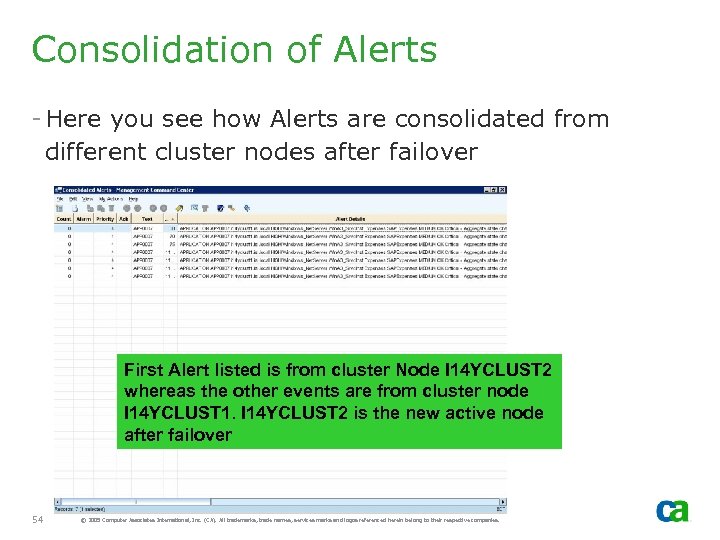 Consolidation of Alerts - Here you see how Alerts are consolidated from different cluster nodes after failover First Alert listed is from cluster Node I 14 YCLUST 2 whereas the other events are from cluster node I 14 YCLUST 1. I 14 YCLUST 2 is the new active node after failover 54 © 2005 Computer Associates International, Inc. (CA). All trademarks, trade names, services marks and logos referenced herein belong to their respective companies.
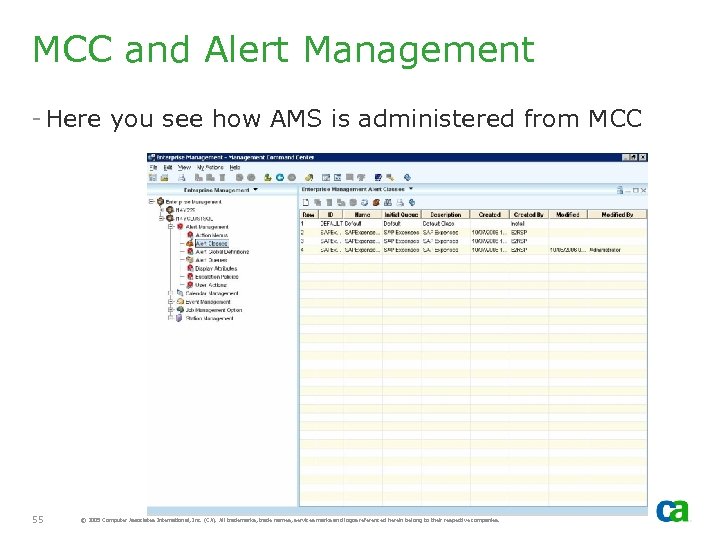 MCC and Alert Management - Here you see how AMS is administered from MCC 55 © 2005 Computer Associates International, Inc. (CA). All trademarks, trade names, services marks and logos referenced herein belong to their respective companies.
 AMS Gotchas - The command line utilities, such as caamspurge, will not work when executed from command prompt and will typically generate an abend. - caamspurge utility is not HA and does not recognize cluster setup. Thus, it attempts to purge alerts using real node name and is not successful. - If purging of alerts based on age is a key requirement and Service Availability Management Pack (SAMP) is installed, then simply execute the following command: - cawto SAMPAMS_PROXY
 Continuous Discovery
 Continuous Discovery Classes - For Continuous Discovery to function correctly, required World. View classes must be defined. - These may be missing if installed with HA NSM. - If classes are missing, Continuous Discovery Manager will start but nothing will be discovered 58 © 2005 Computer Associates International, Inc. (CA). All trademarks, trade names, services marks and logos referenced herein belong to their respective companies.
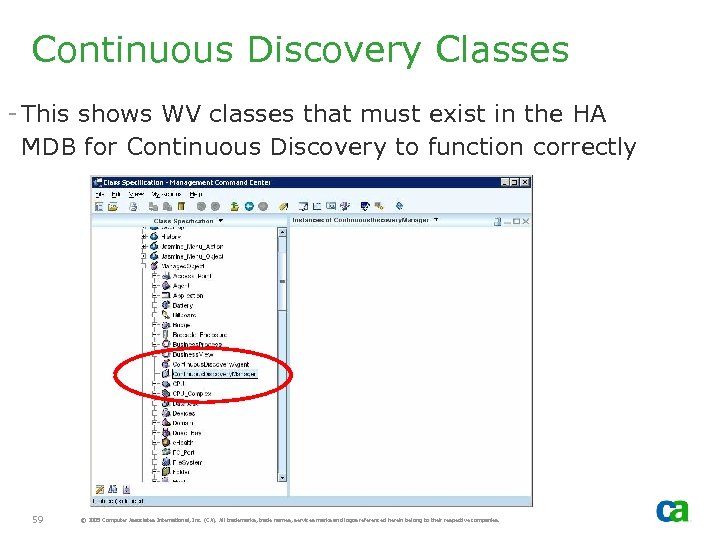 Continuous Discovery Classes - This shows WV classes that must exist in the HA MDB for Continuous Discovery to function correctly 59 © 2005 Computer Associates International, Inc. (CA). All trademarks, trade names, services marks and logos referenced herein belong to their respective companies.
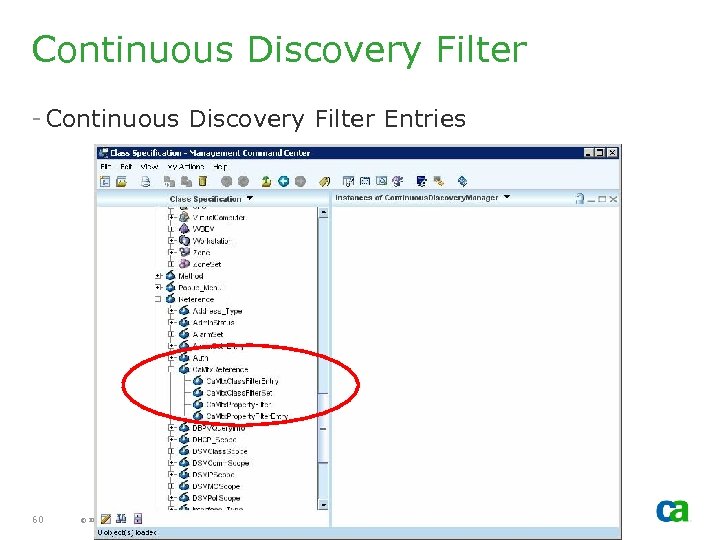 Continuous Discovery Filter - Continuous Discovery Filter Entries 60 © 2005 Computer Associates International, Inc. (CA). All trademarks, trade names, services marks and logos referenced herein belong to their respective companies.
 Unicenter Notification Service (UNS)
 Unicenter Notification Service - Unicenter Notification Service (UNS) is not HA outof-box - It is installed on local disk and any customization has to be carried out on all cluster nodes. 62 © 2005 Computer Associates International, Inc. (CA). All trademarks, trade names, services marks and logos referenced herein belong to their respective companies.
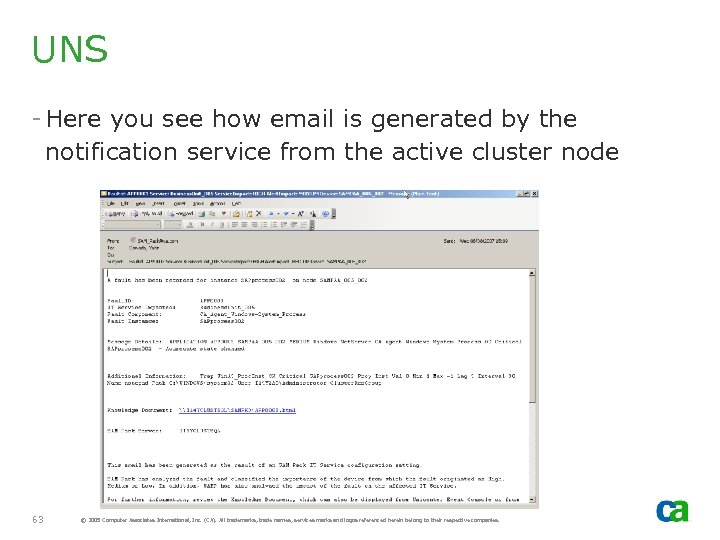 UNS - Here you see how email is generated by the notification service from the active cluster node 63 © 2005 Computer Associates International, Inc. (CA). All trademarks, trade names, services marks and logos referenced herein belong to their respective companies.
 Unicenter Repository Bridge
 Unicenter Repository Bridge - Bridge is not HA out-of-box - It is installed on local disk, however, the TBC files can be moved to a shared disk so that the configuration can be shared by all cluster nodes. - It is dependent on SQL Server 65 © 2005 Computer Associates International, Inc. (CA). All trademarks, trade names, services marks and logos referenced herein belong to their respective companies.
 Config Files - Change the location of Bridge configuration files to a shared disk to enable it to be shared by all cluster nodes - Create Bridge directory on the shared disk - Update Config File Path to a shared disk - This should be carried out on all cluster nodes - Restart Bridge service to pick the new location 66 © 2005 Computer Associates International, Inc. (CA). All trademarks, trade names, services marks and logos referenced herein belong to their respective companies.
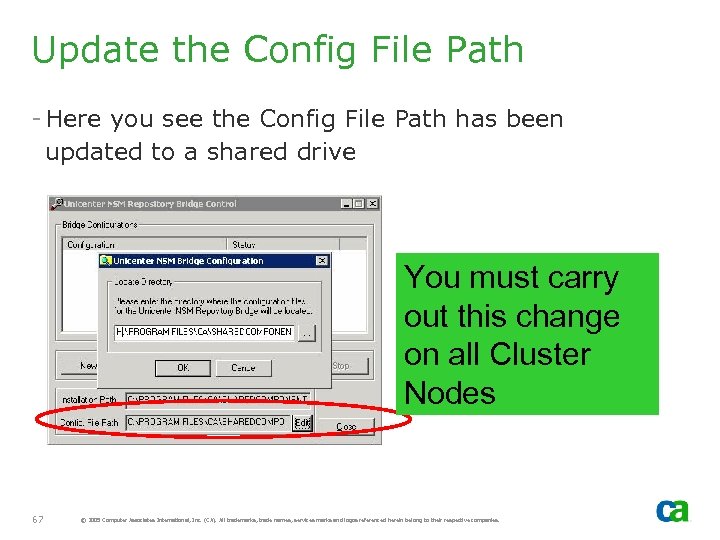 Update the Config File Path - Here you see the Config File Path has been updated to a shared drive You must carry out this change on all Cluster Nodes 67 © 2005 Computer Associates International, Inc. (CA). All trademarks, trade names, services marks and logos referenced herein belong to their respective companies.
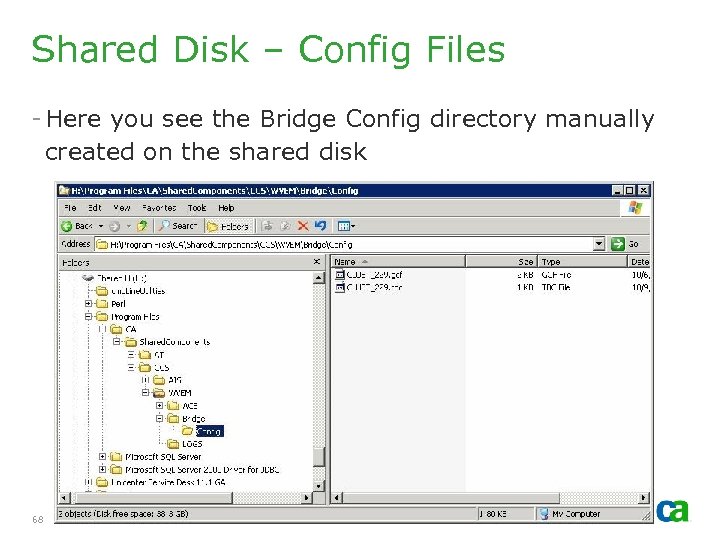 Shared Disk – Config Files - Here you see the Bridge Config directory manually created on the shared disk 68 © 2005 Computer Associates International, Inc. (CA). All trademarks, trade names, services marks and logos referenced herein belong to their respective companies.
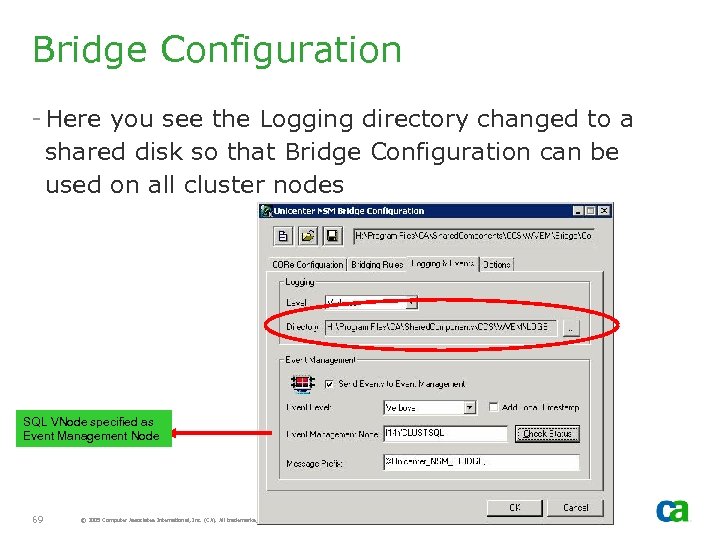 Bridge Configuration - Here you see the Logging directory changed to a shared disk so that Bridge Configuration can be used on all cluster nodes SQL VNode specified as Event Management Node 69 © 2005 Computer Associates International, Inc. (CA). All trademarks, trade names, services marks and logos referenced herein belong to their respective companies.
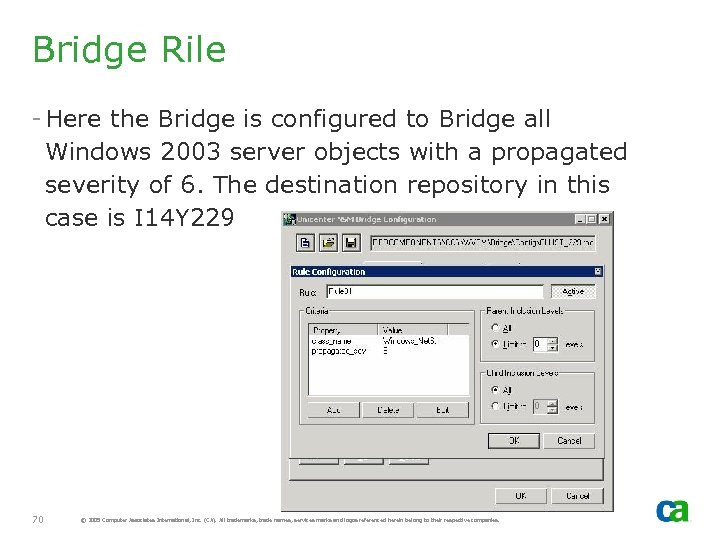 Bridge Rile - Here the Bridge is configured to Bridge all Windows 2003 server objects with a propagated severity of 6. The destination repository in this case is I 14 Y 229 70 © 2005 Computer Associates International, Inc. (CA). All trademarks, trade names, services marks and logos referenced herein belong to their respective companies.
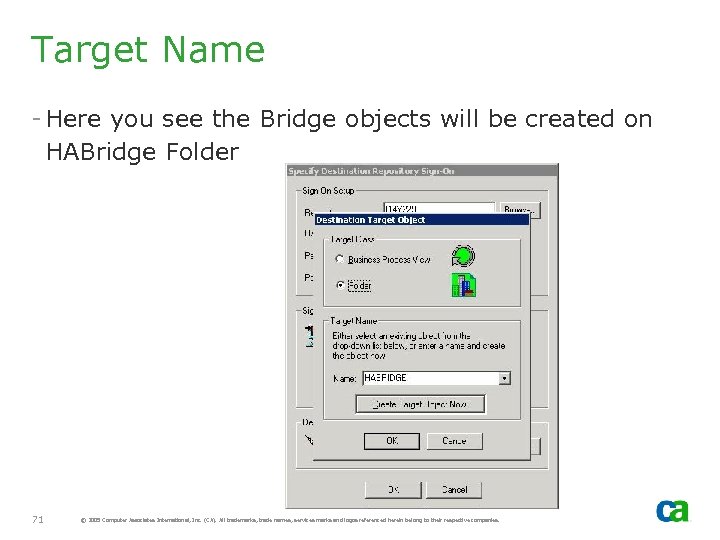 Target Name - Here you see the Bridge objects will be created on HABridge Folder 71 © 2005 Computer Associates International, Inc. (CA). All trademarks, trade names, services marks and logos referenced herein belong to their respective companies.
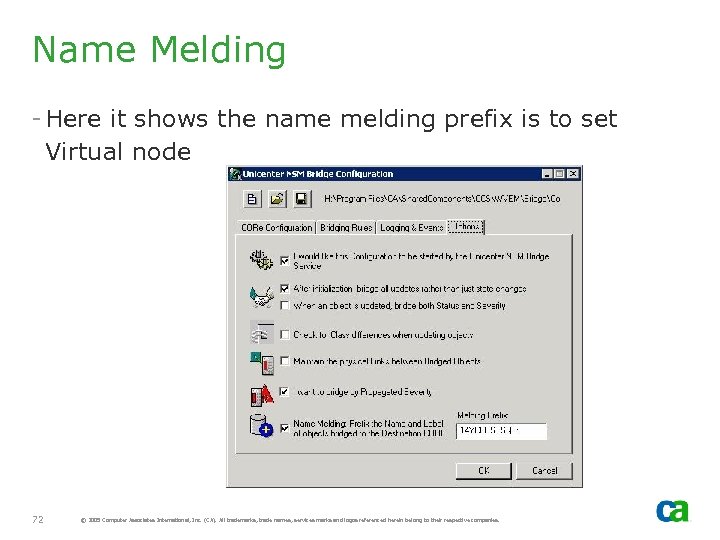 Name Melding - Here it shows the name melding prefix is to set Virtual node 72 © 2005 Computer Associates International, Inc. (CA). All trademarks, trade names, services marks and logos referenced herein belong to their respective companies.
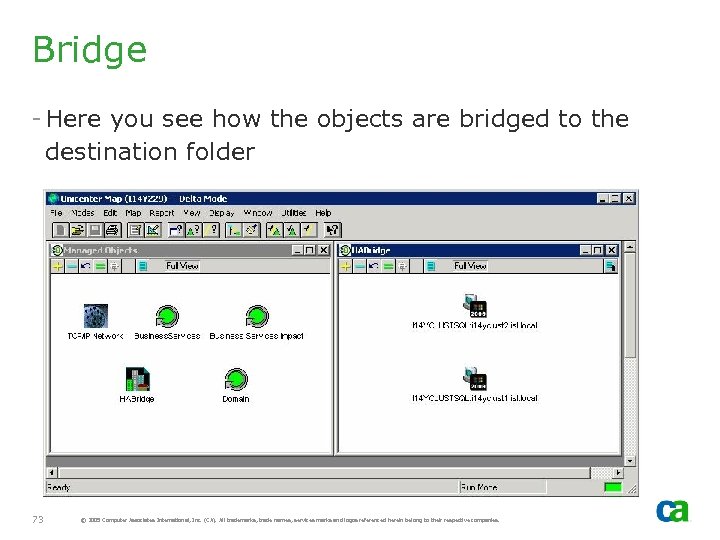 Bridge - Here you see how the objects are bridged to the destination folder 73 © 2005 Computer Associates International, Inc. (CA). All trademarks, trade names, services marks and logos referenced herein belong to their respective companies.
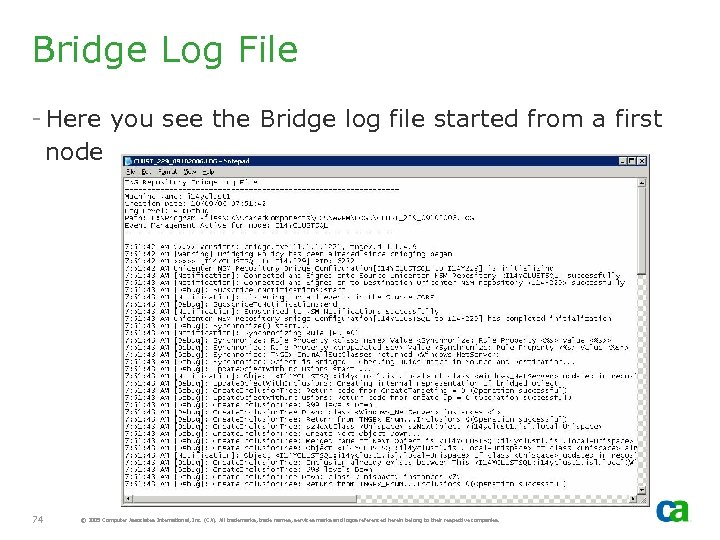 Bridge Log File - Here you see the Bridge log file started from a first node 74 © 2005 Computer Associates International, Inc. (CA). All trademarks, trade names, services marks and logos referenced herein belong to their respective companies.
 Dynamic Containment Service (DCS)
 Dynamic Containment Service - Dynamic Containment Service (DCS) is not HA. - Define Cluster Resource for DCS Service - Re-locate the Configuration file to a shared drive so that the configuration can be shared all cluster nodes - Set the log file to a shared disk so that the configuration can be shared 76 © 2005 Computer Associates International, Inc. (CA). All trademarks, trade names, services marks and logos referenced herein belong to their respective companies.
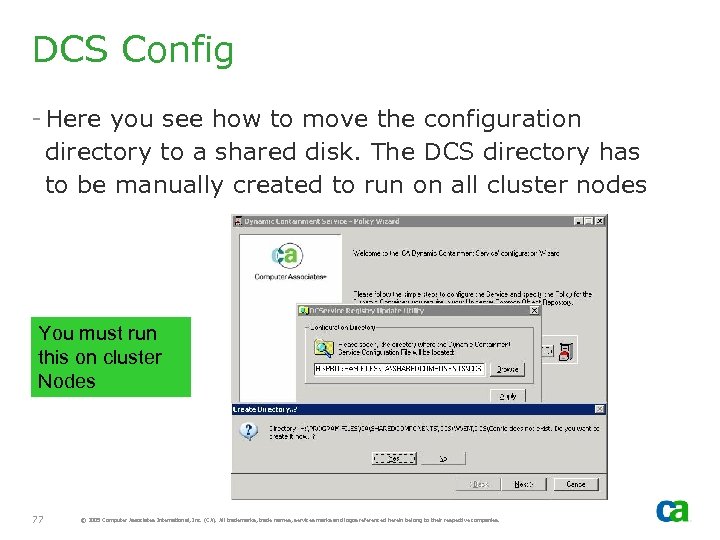 DCS Config - Here you see how to move the configuration directory to a shared disk. The DCS directory has to be manually created to run on all cluster nodes You must run this on cluster Nodes 77 © 2005 Computer Associates International, Inc. (CA). All trademarks, trade names, services marks and logos referenced herein belong to their respective companies.
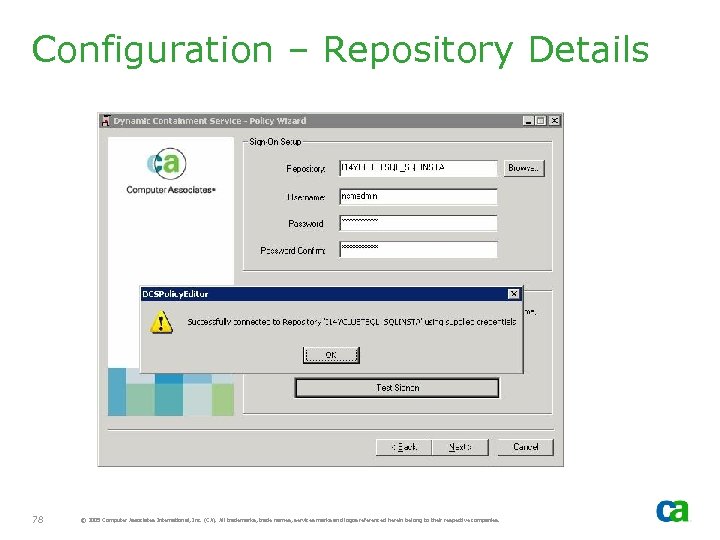 Configuration – Repository Details 78 © 2005 Computer Associates International, Inc. (CA). All trademarks, trade names, services marks and logos referenced herein belong to their respective companies.
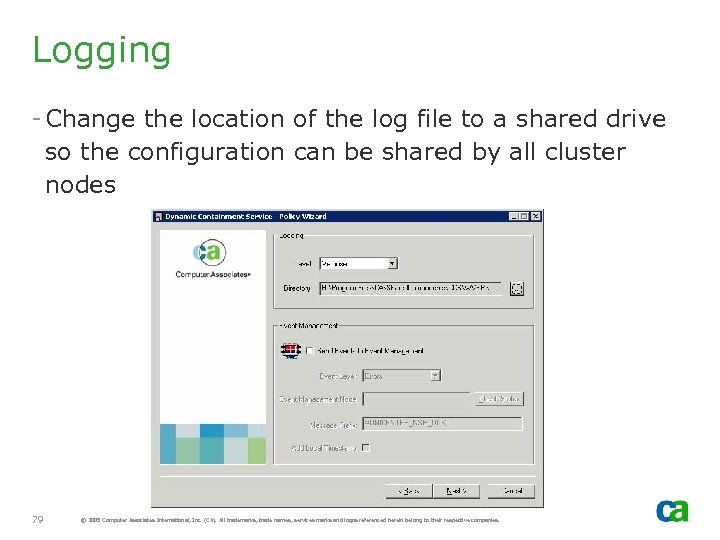 Logging - Change the location of the log file to a shared drive so the configuration can be shared by all cluster nodes 79 © 2005 Computer Associates International, Inc. (CA). All trademarks, trade names, services marks and logos referenced herein belong to their respective companies.
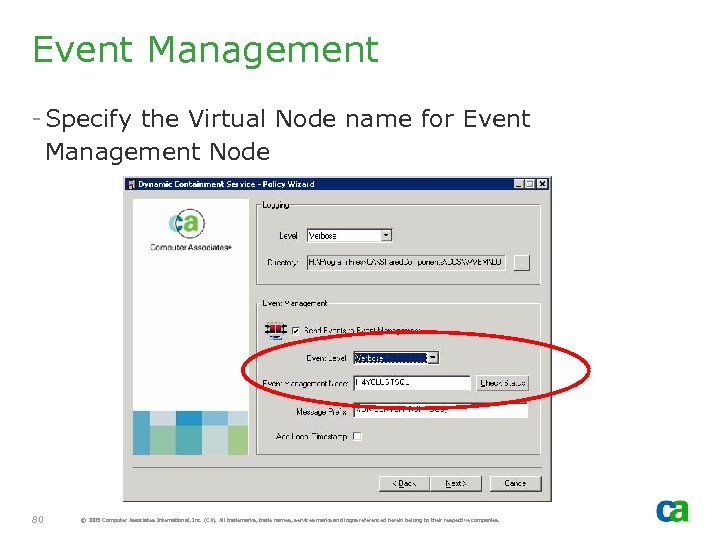 Event Management - Specify the Virtual Node name for Event Management Node 80 © 2005 Computer Associates International, Inc. (CA). All trademarks, trade names, services marks and logos referenced herein belong to their respective companies.
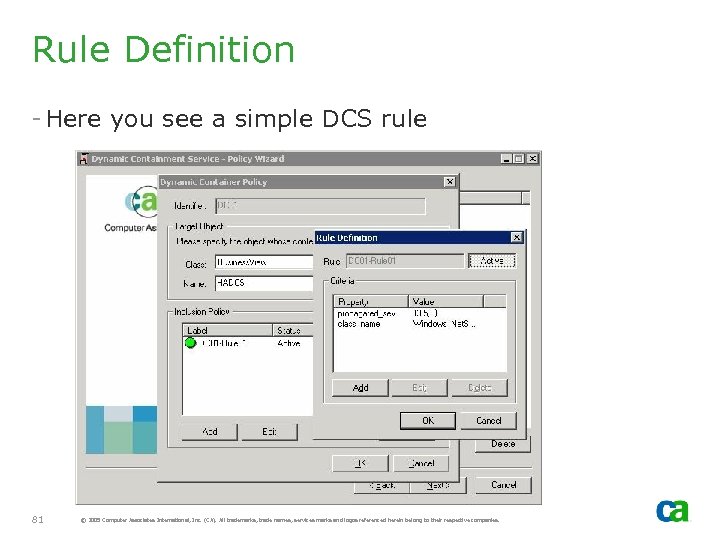 Rule Definition - Here you see a simple DCS rule 81 © 2005 Computer Associates International, Inc. (CA). All trademarks, trade names, services marks and logos referenced herein belong to their respective companies.
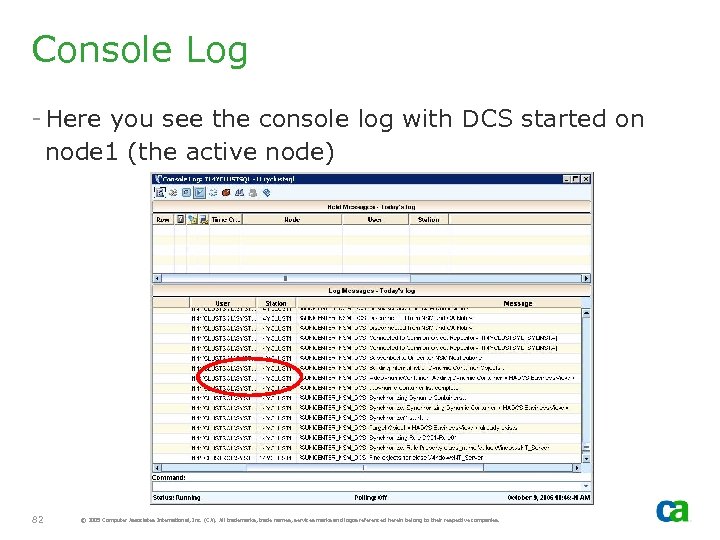 Console Log - Here you see the console log with DCS started on node 1 (the active node) 82 © 2005 Computer Associates International, Inc. (CA). All trademarks, trade names, services marks and logos referenced herein belong to their respective companies.
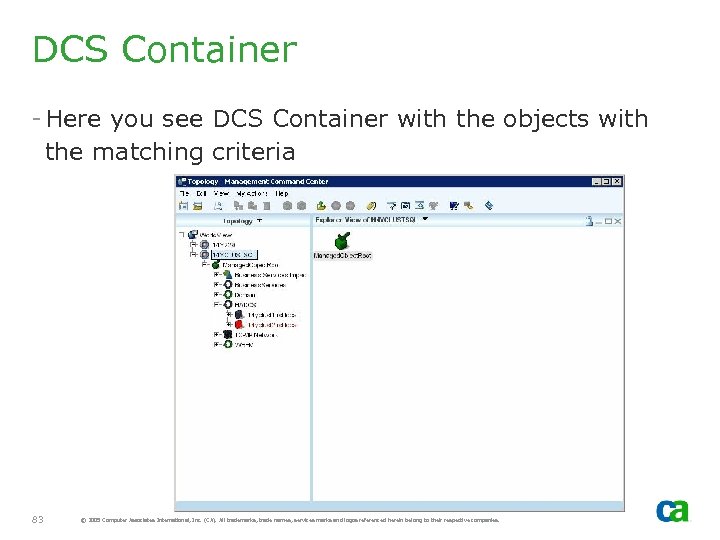 DCS Container - Here you see DCS Container with the objects with the matching criteria 83 © 2005 Computer Associates International, Inc. (CA). All trademarks, trade names, services marks and logos referenced herein belong to their respective companies.
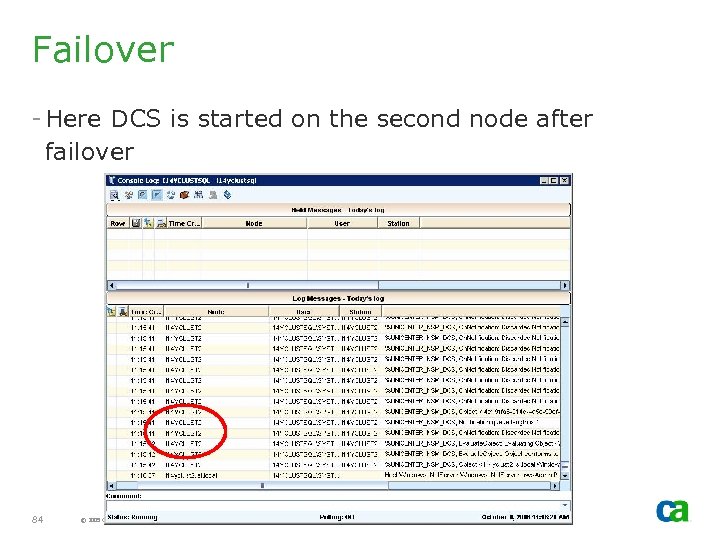 Failover - Here DCS is started on the second node after failover 84 © 2005 Computer Associates International, Inc. (CA). All trademarks, trade names, services marks and logos referenced herein belong to their respective companies.
 Enterprise Management Provider
 EM Provider - EM Provider cannot be selected with HA components out-of-box. - MCC clients uses SQL Virtual Node and thus no requirement to know the active cluster node 86 © 2005 Computer Associates International, Inc. (CA). All trademarks, trade names, services marks and logos referenced herein belong to their respective companies.
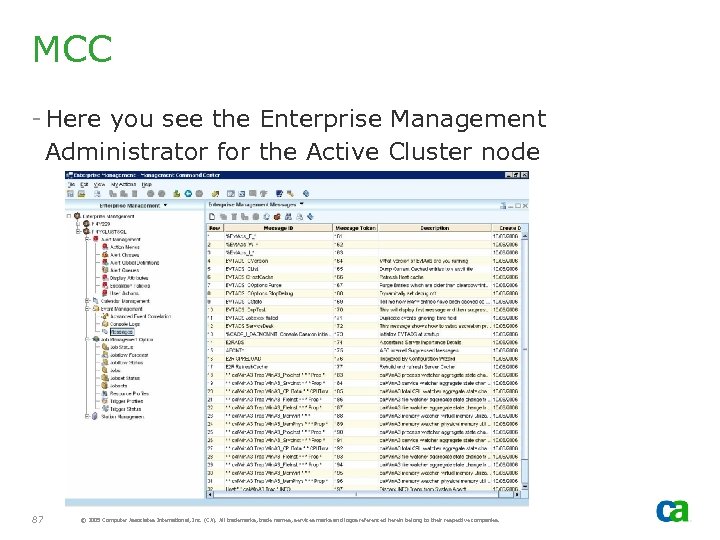 MCC - Here you see the Enterprise Management Administrator for the Active Cluster node 87 © 2005 Computer Associates International, Inc. (CA). All trademarks, trade names, services marks and logos referenced herein belong to their respective companies.
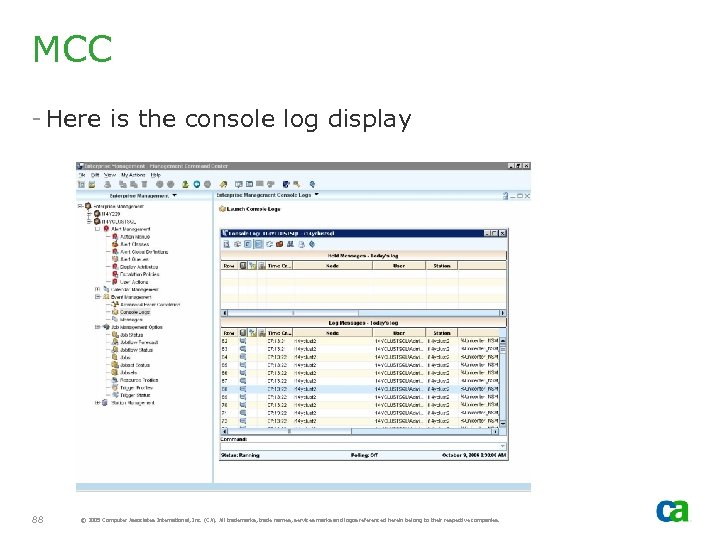 MCC - Here is the console log display 88 © 2005 Computer Associates International, Inc. (CA). All trademarks, trade names, services marks and logos referenced herein belong to their respective companies.
 Non-HA Agent Technology Services
 OS Agent Gateway - This must be active on the Active node or installed on one node only. Otherwise, multiple services will be running on different cluster nodes. - Awservices will be active on all cluster nodes. Thus, if installed on multiple nodes, it requires additional considerations 90 © 2005 Computer Associates International, Inc. (CA). All trademarks, trade names, services marks and logos referenced herein belong to their respective companies.
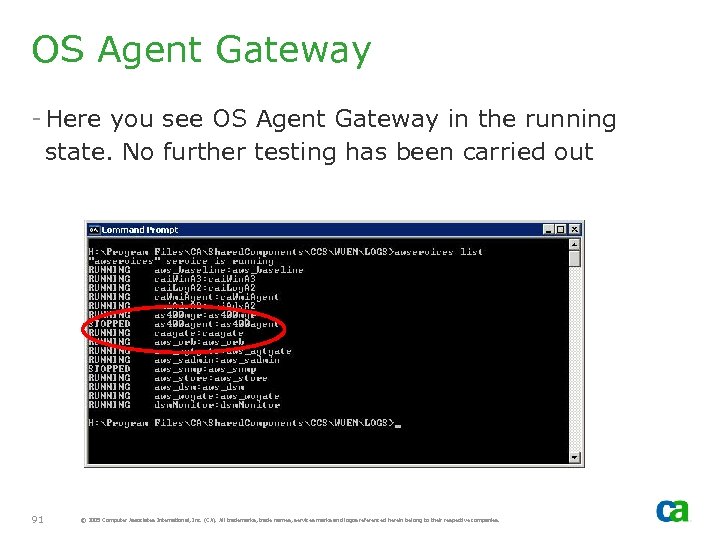 OS Agent Gateway - Here you see OS Agent Gateway in the running state. No further testing has been carried out 91 © 2005 Computer Associates International, Inc. (CA). All trademarks, trade names, services marks and logos referenced herein belong to their respective companies.
 AS 400 Agent - If selected, it should only be installed on one cluster node. Otherwise, multiple as 400 managers will be active on different nodes 92 © 2005 Computer Associates International, Inc. (CA). All trademarks, trade names, services marks and logos referenced herein belong to their respective companies.
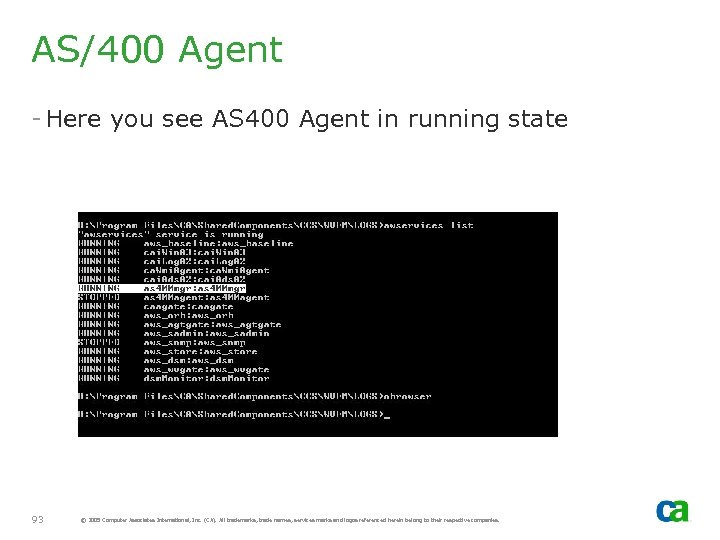 AS/400 Agent - Here you see AS 400 Agent in running state 93 © 2005 Computer Associates International, Inc. (CA). All trademarks, trade names, services marks and logos referenced herein belong to their respective companies.
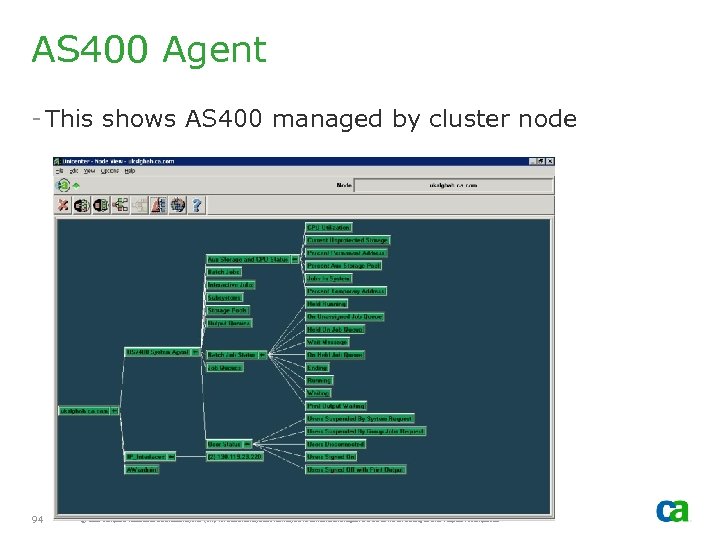 AS 400 Agent - This shows AS 400 managed by cluster node 94 © 2005 Computer Associates International, Inc. (CA). All trademarks, trade names, services marks and logos referenced herein belong to their respective companies.
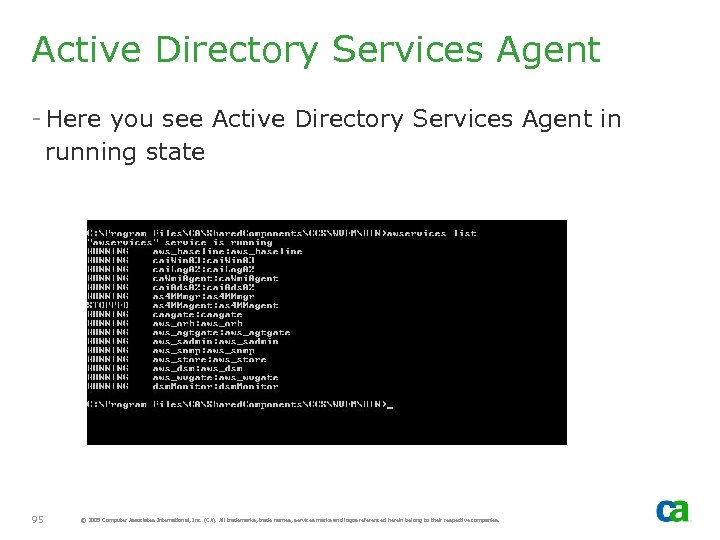 Active Directory Services Agent - Here you see Active Directory Services Agent in running state 95 © 2005 Computer Associates International, Inc. (CA). All trademarks, trade names, services marks and logos referenced herein belong to their respective companies.
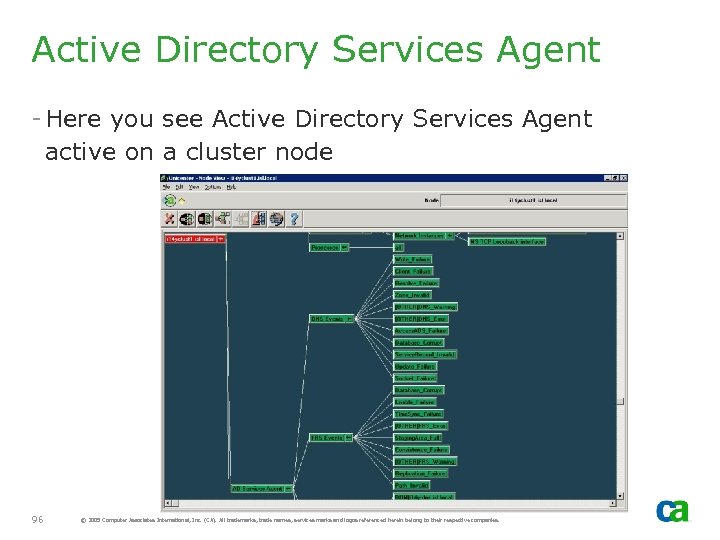 Active Directory Services Agent - Here you see Active Directory Services Agent active on a cluster node 96 © 2005 Computer Associates International, Inc. (CA). All trademarks, trade names, services marks and logos referenced herein belong to their respective companies.
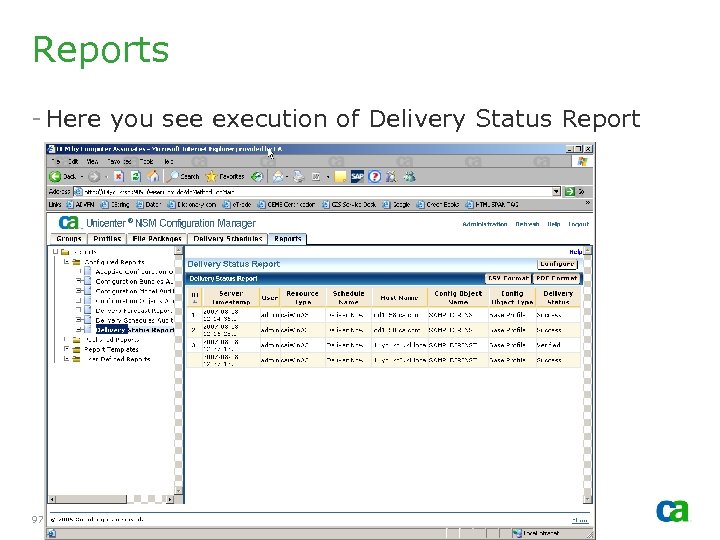 Reports - Here you see execution of Delivery Status Report 97 © 2005 Computer Associates International, Inc. (CA). All trademarks, trade names, services marks and logos referenced herein belong to their respective companies.
 Master. KB - Since DIA is active on ALL nodes of the cluster, do NOT define Master. KB on the cluster node. - If Master. KDB is defined on the cluster node, you may experience issues with DIA Grid synchronization - Recommendation is to install Master. KB on non-cluster node. - If you have to install Master. KB on the cluster nodes consider defining the SRV record with Priority #1 for the key cluster node and Priority #2 for the dormant (inactive) cluster node (for a two-node cluster configuration). Note that this option has not fully tested. 98 © 2005 Computer Associates International, Inc. (CA). All trademarks, trade names, services marks and logos referenced herein belong to their respective companies.
 Questions? ? - Mail to: - Imp. CDFeedback@ca. com 99 © 2005 Computer Associates International, Inc. (CA). All trademarks, trade names, services marks and logos referenced herein belong to their respective companies.