


 Скачать презентацию Department of National Defence Resource Manager s Course
53f0a2bd11ffb18e67800dacfdd2d14c.ppt
- Количество слайдов: 129
 Department of National Defence Resource Manager’s Course
 Module 1 Introduction • Getting to Know Each Other • Expectations • Overview of Resource Management • Course Objectives • Relationship to Resource Manager’s Guide • Course Outline and Schedule
 Overview of Resource Management • Course provides a framework for management of resources from perspective of resource manager • Resources considered are: – Financial – People – Materiel – Information
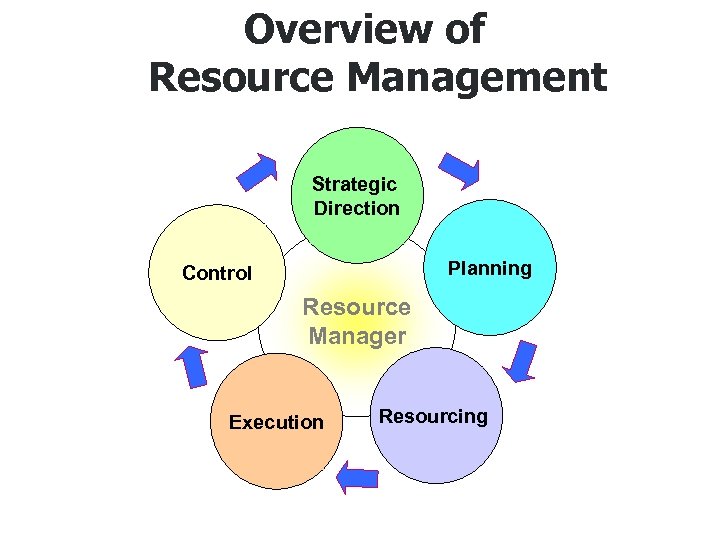 Overview of Resource Management Strategic Direction Planning Control Resource Manager Execution Resourcing
 Course Objectives • Provide overview of Modern Comptrollership and resource management framework • Provide help in understanding management of financial, human, materiel and information resources • Prepare participants to meet their responsibilities as Resource Managers
 Resource Manager’s Guide • This course covers the contents of the Resource Manager’s Guide • For more detail on resource management, please consult the guide • Guide provides linkages to internet sites and publications which provide even greater detail
 Module 2 Managing Financial Resources
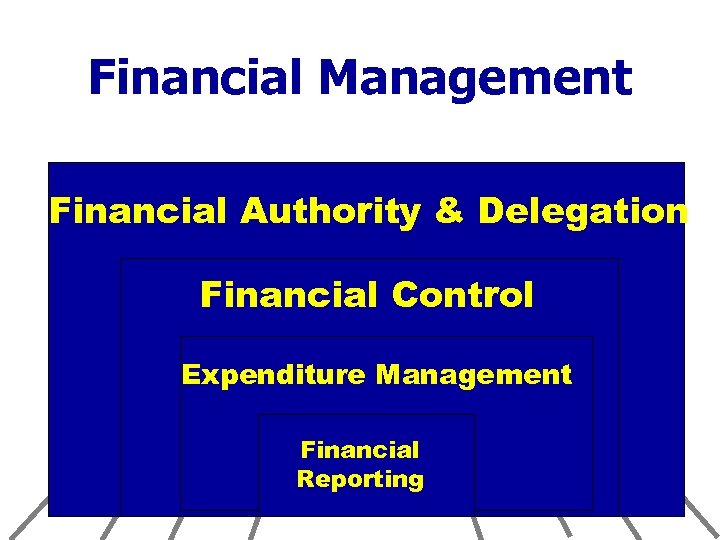 Financial Management Financial Authority & Delegation Financial Control Expenditure Management Financial Reporting
 Financial Authority & Delegation Authority & Financial Control Delegation Expenditure Management Financial Reporting
 DND Financial Structure Under the FAA • The Financial Administration Act (FAA) assigns responsibility and accountability to the Deputy Minister for financial matters • The DM is accountable to the Minister who in turn is accountable to Parliament and Treasury Board for sound financial management
 DND Financial Structure Under the FAA • The DM has appointed ADM (Fin CS) as the Senior Financial Officer (SFO) • DG Finance is designated as the Senior Full-time Financial Officer (SFFO) and Departmental Comptroller • Other responsibilities and delegations are set out in the Delegation of Signing Authorities (i. e. contracting authorities from PWGSC, classification and staffing authorities)
 Department Level Resource Management Structures • VCDS is the Departmental Strategic Resource Manager and receives direction and advice from two Departmental Committees: – Defence Management Committee (DMC) co-chaired by DM and CDS – Program Management Board (PMB) chaired by VCDS
 Defence Management Committee (DMC) • DMC considers all resource matters affecting the strategic direction of Defence such as: – Defence Planning Guidance (DPG) – Aspects of overall resource management framework – Mid-year and end-year corporate performance results
 Program Management Board (PMB) • PMB provides resource management oversight and considers matter such as: 1. structure or resource options for inclusion in the Defence Plan 2. in-year resource management issues and performance management 3. Long Term Capital Plan and major projects 4. Financial Status Reports 5. Resource matters arising from changes in policy/direction 6. not funded and not forecasted tasking
 Funds Centre Hierarchy • Funds Centre 1. organizational units receiving budget (money) 2. arranged in hierarchy reflecting the organizational budget allocation process as depicted in the Business Plan 3. Funds Centre identifies responsibility for budgets, revenues and expenditures 4. there is ONE funds centre hierarchy for the entire department and for all funds
 Funds Centre Hierarchy • Cost Centre 1. primary cost collectors within Financial Management Accounting System (FMAS) 2. permits managers to plan, forecast, and monitor revenues and expenditures at lowest level 3. cost centres have no budgets (money) and are given spending authority or commitment budget by their superior Funds Centre
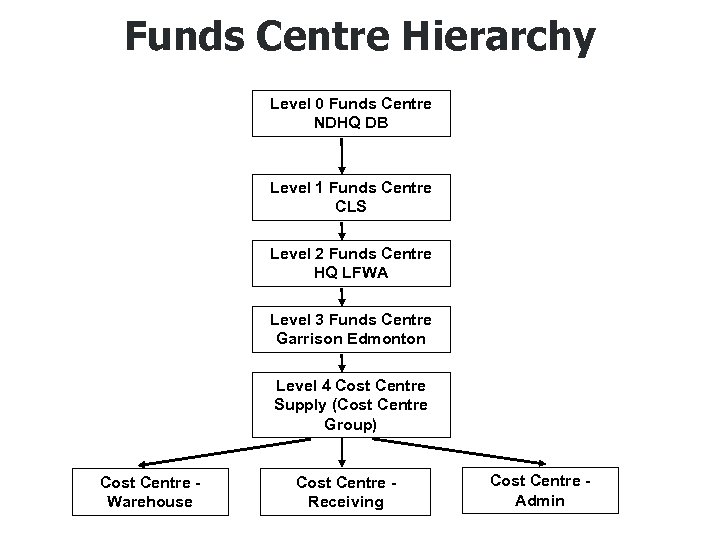 Funds Centre Hierarchy Level 0 Funds Centre NDHQ DB Level 1 Funds Centre CLS Level 2 Funds Centre HQ LFWA Level 3 Funds Centre Garrison Edmonton Level 4 Cost Centre Supply (Cost Centre Group) Cost Centre - Warehouse Cost Centre - Receiving Cost Centre - Admin
 Financial Controls Financial Authority & Delegation Expenditure Management Financial Reporting
 Financial Controls Effective management: • depends on managers who understand their responsibilities; and • are able and willing to use the tools and processes to achieve their goals. The Control Framework is therefore peopleoriented and based on Modern Comptrollership: – – – – Leadership Motivated People Shared Values and Ethics Integrated Performance Information Mature Risk Management Rigorous Stewardship Clear Accountability
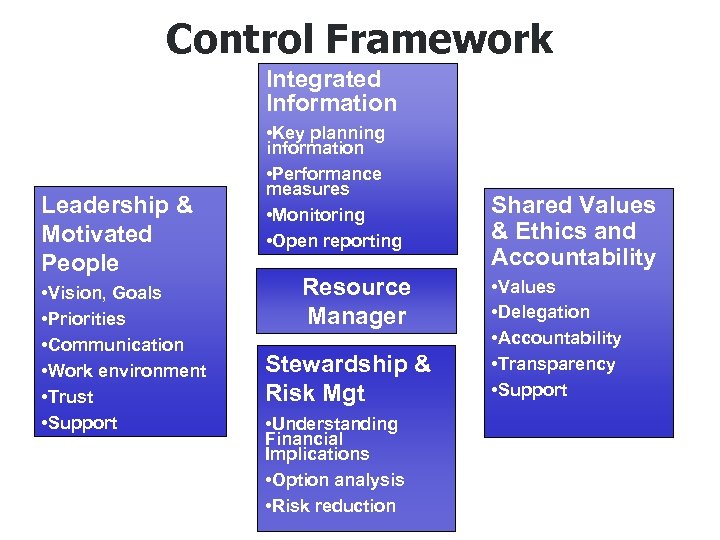 Control Framework Integrated Information Leadership & Motivated People • Vision, Goals • Priorities • Communication • Work environment • Trust • Support • Key planning information • Performance measures • Monitoring • Open reporting Resource Manager Stewardship & Risk Mgt • Understanding Financial Implications • Option analysis • Risk reduction Shared Values & Ethics and Accountability • Values • Delegation • Accountability • Transparency • Support
 Expenditure Financial Control Management Financial Authority & Delegation Expenditure Management Financial Reporting
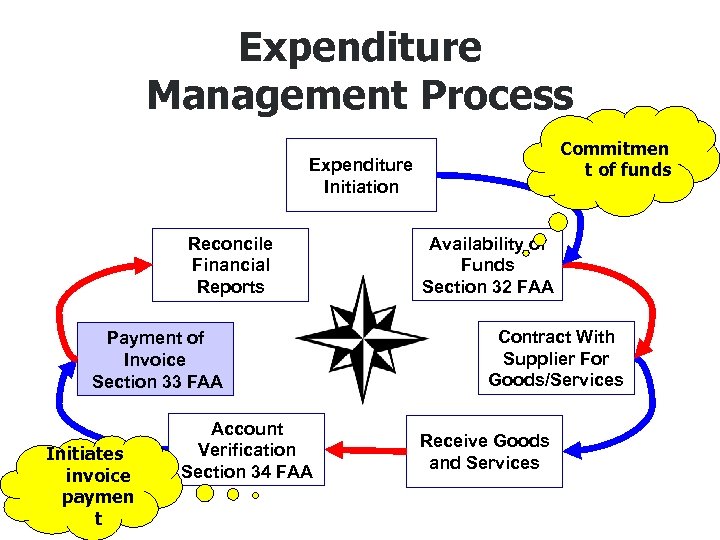 Expenditure Management Process Commitmen t of funds Expenditure Initiation Reconcile Financial Reports Payment of Invoice Section 33 FAA Initiates invoice paymen t Account Verification Section 34 FAA Availability of Funds Section 32 FAA Contract With Supplier For Goods/Services Receive Goods and Services
 Initiate Expenditure • Authority to make decisions to obtain goods or services that will result in expenditure of public funds i. e. hire staff, authorize travel, buy goods • Objective is to give Resource Managers early control and primary responsibility over their funds
 FAA Section 32 Availability of Funds • RM can not initiate an expense unless there is a free balance of appropriate funds (i. e. SWE, OT, O&M, Cap, etc. ) • The RM is confirming the availability of funds for the contract in signing Sect 32 • Authority for Section 32 is identified in “Delegation of Authority for Financial Administration in DND” • In establishing a commitment, this sets funds aside and reduces the free balance
 FAA Section 32 Availability of Funds Control of commitments. (1) No contract or other arrangement providing for a payment shall be entered into with respect to any program for which there is an appropriation by Parliament or an item included in estimates then before the House of Commons to which the payment will be charged unless there is a sufficient unencumbered balance available out of the appropriation or item to discharge any debt that, under the contract or other arrangement, will be incurred during the fiscal year in which the contract or other arrangement is entered into. Record of commitments. (2) The deputy head or other person charged with the administration of a program for which there is an appropriation by Parliament or an item included in estimates then before the House of Commons shall, as the Treasury Board may prescribe, establish procedures and maintain records respecting the control of financial commitments chargeable to each appropriation or item.
 FAA Section 34 Account Verification • No payment shall be made unless RM certifies that: – goods or services received IAW contract – price is IAW contract – any payment in advance of completion is IAW contract and is reasonable – supplier is entitled to the payment • Must be certified/signed by authorized individual
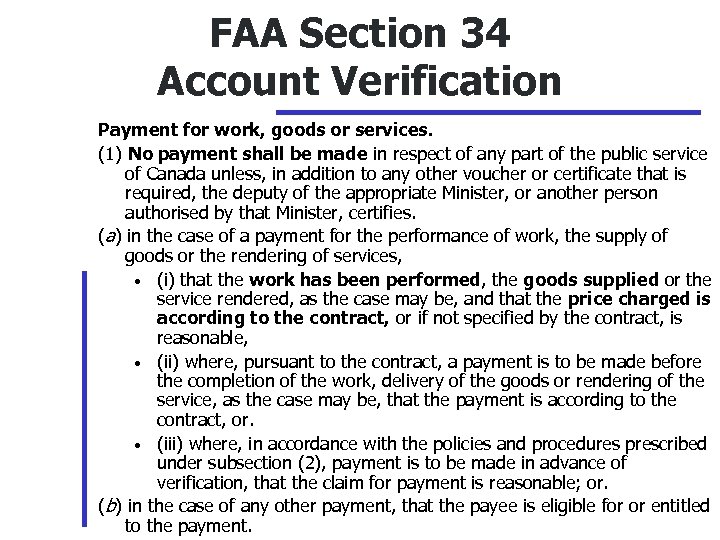 FAA Section 34 Account Verification Payment for work, goods or services. (1) No payment shall be made in respect of any part of the public service of Canada unless, in addition to any other voucher or certificate that is required, the deputy of the appropriate Minister, or another person authorised by that Minister, certifies. (a) in the case of a payment for the performance of work, the supply of goods or the rendering of services, • (i) that the work has been performed, the goods supplied or the service rendered, as the case may be, and that the price charged is according to the contract, or if not specified by the contract, is reasonable, • (ii) where, pursuant to the contract, a payment is to be made before the completion of the work, delivery of the goods or rendering of the service, as the case may be, that the payment is according to the contract, or. • (iii) where, in accordance with the policies and procedures prescribed under subsection (2), payment is to be made in advance of verification, that the claim for payment is reasonable; or. (b) in the case of any other payment, that the payee is eligible for or entitled to the payment.
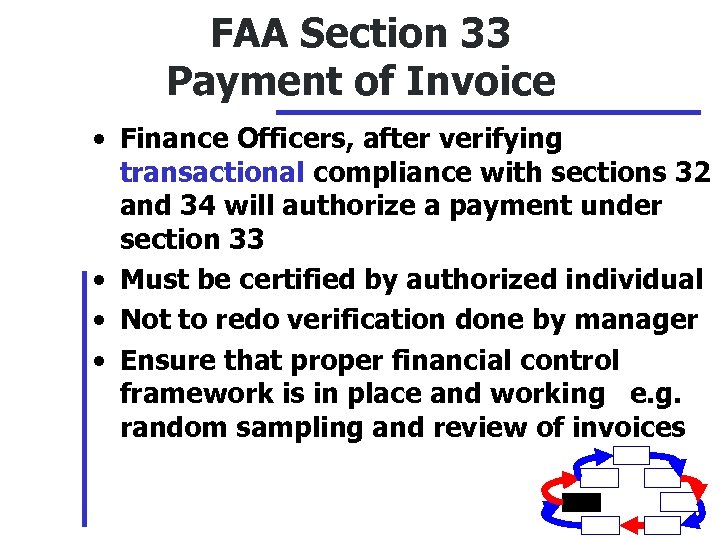 FAA Section 33 Payment of Invoice • Finance Officers, after verifying transactional compliance with sections 32 and 34 will authorize a payment under section 33 • Must be certified by authorized individual • Not to redo verification done by manager • Ensure that proper financial control framework is in place and working e. g. random sampling and review of invoices
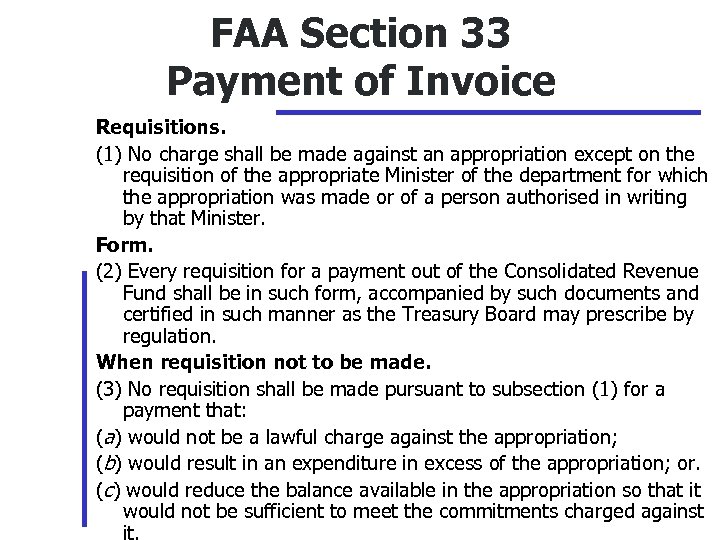 FAA Section 33 Payment of Invoice Requisitions. (1) No charge shall be made against an appropriation except on the requisition of the appropriate Minister of the department for which the appropriation was made or of a person authorised in writing by that Minister. Form. (2) Every requisition for a payment out of the Consolidated Revenue Fund shall be in such form, accompanied by such documents and certified in such manner as the Treasury Board may prescribe by regulation. When requisition not to be made. (3) No requisition shall be made pursuant to subsection (1) for a payment that: (a) would not be a lawful charge against the appropriation; (b) would result in an expenditure in excess of the appropriation; or. (c) would reduce the balance available in the appropriation so that it would not be sufficient to meet the commitments charged against it.
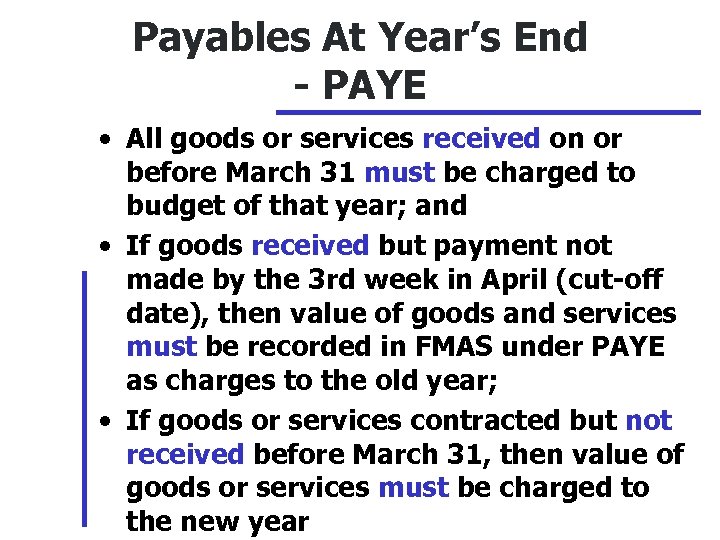 Payables At Year’s End - PAYE • All goods or services received on or before March 31 must be charged to budget of that year; and • If goods received but payment not made by the 3 rd week in April (cut-off date), then value of goods and services must be recorded in FMAS under PAYE as charges to the old year; • If goods or services contracted but not received before March 31, then value of goods or services must be charged to the new year
 Carry Forward • A RM may request carry forward of any funds in the Fall Review. Seek advice from Comptroller. Decision on approval is in first quarter of next FY • Up to 2 % of an original operating budget may be carried forward to the next year. However criteria may change from year to year • Any one above you in your chain of command may use the carry-forward for higher priorities
 Financial Control Reporting Financial Authority & Delegation Expenditure Management Financial Reporting
 Level 2 Funds Center Manager Level 3 Funds Center Manager Plan Variance Report - PVR Presentation CO_4200 Level 4 Funds Center Manager
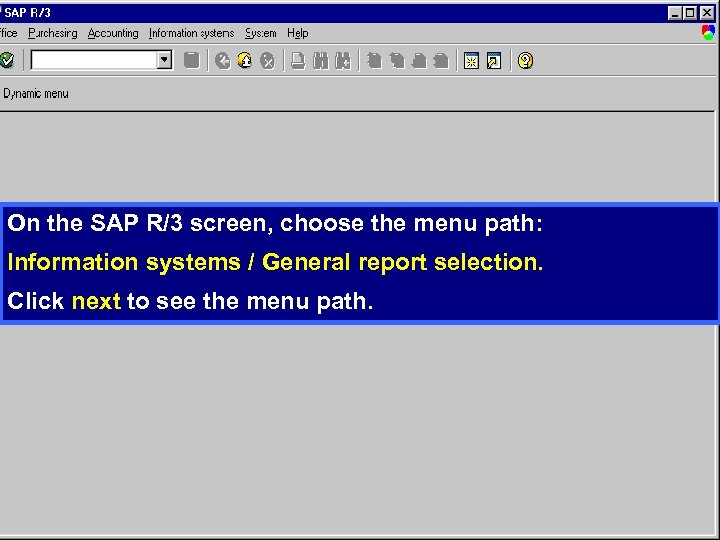 On the SAP R/3 screen, choose the menu path: Information systems / General report selection. Click next to see the menu path.
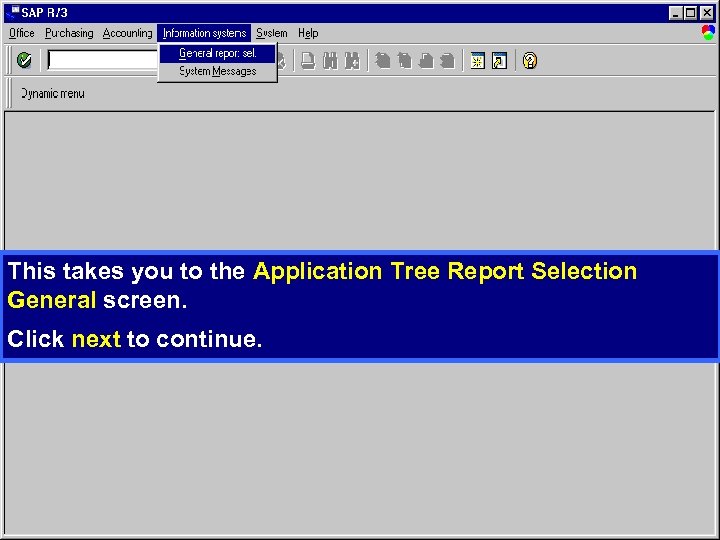 This takes you to the Application Tree Report Selection General screen. Click next to continue.
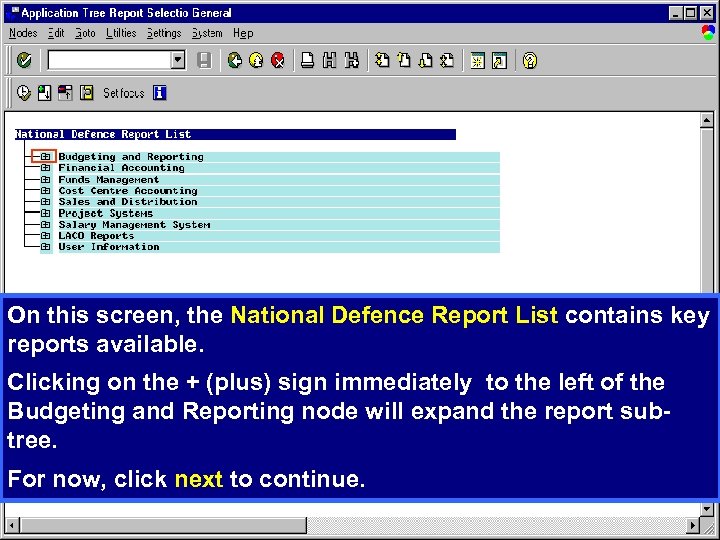 On this screen, the National Defence Report List contains key reports available. Clicking on the + (plus) sign immediately to the left of the Budgeting and Reporting node will expand the report subtree. For now, click next to continue.
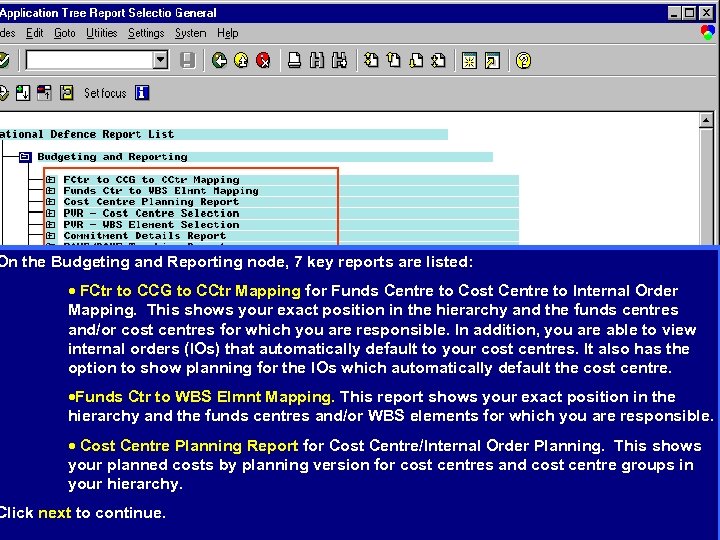 On the Budgeting and Reporting node, 7 key reports are listed: · FCtr to CCG to CCtr Mapping for Funds Centre to Cost Centre to Internal Order Mapping. This shows your exact position in the hierarchy and the funds centres and/or cost centres for which you are responsible. In addition, you are able to view internal orders (IOs) that automatically default to your cost centres. It also has the option to show planning for the IOs which automatically default the cost centre. ·Funds Ctr to WBS Elmnt Mapping. This report shows your exact position in the hierarchy and the funds centres and/or WBS elements for which you are responsible. · Cost Centre Planning Report for Cost Centre/Internal Order Planning. This shows your planned costs by planning version for cost centres and cost centre groups in your hierarchy. Click next to continue.
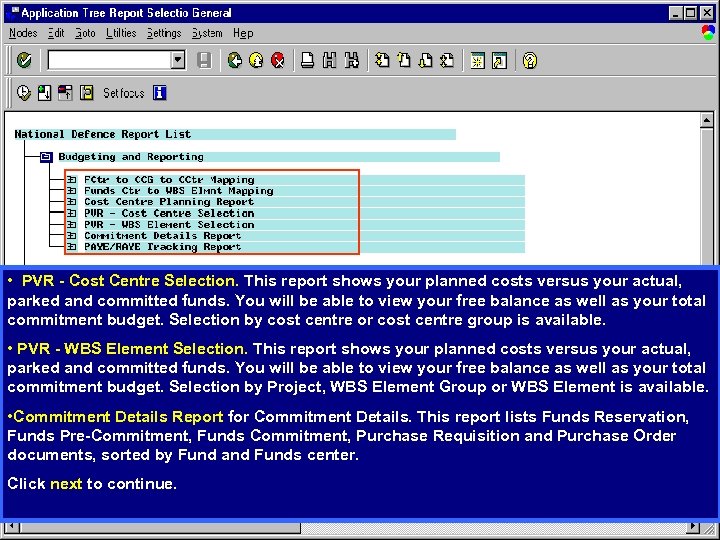 • PVR - Cost Centre Selection. This report shows your planned costs versus your actual, parked and committed funds. You will be able to view your free balance as well as your total commitment budget. Selection by cost centre or cost centre group is available. • PVR - WBS Element Selection. This report shows your planned costs versus your actual, parked and committed funds. You will be able to view your free balance as well as your total commitment budget. Selection by Project, WBS Element Group or WBS Element is available. • Commitment Details Report for Commitment Details. This report lists Funds Reservation, Funds Pre-Commitment, Funds Commitment, Purchase Requisition and Purchase Order documents, sorted by Fund and Funds center. Click next to continue.
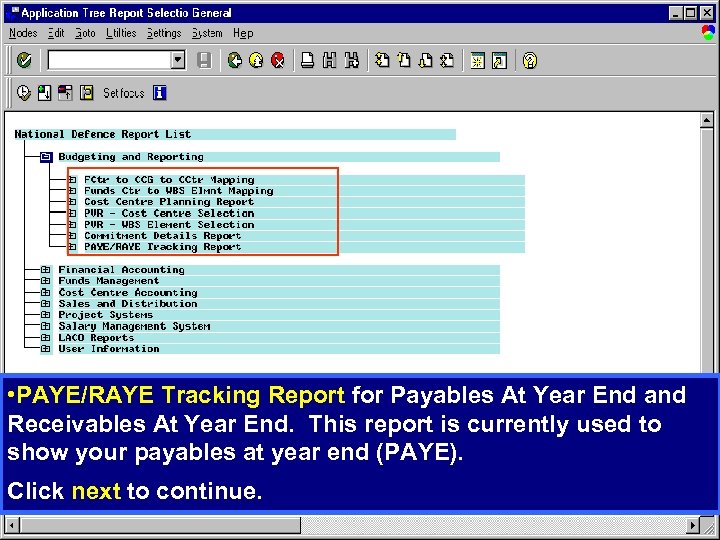 • PAYE/RAYE Tracking Report for Payables At Year End and Receivables At Year End. This report is currently used to show your payables at year end (PAYE). Click next to continue.
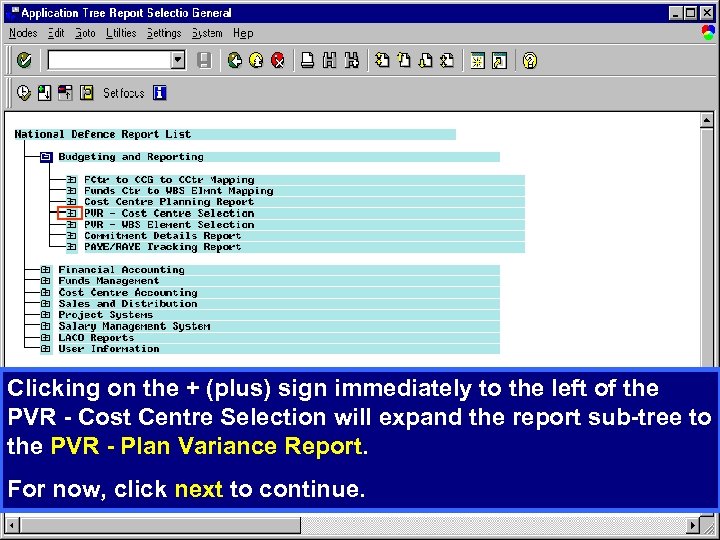 Clicking on the + (plus) sign immediately to the left of the PVR - Cost Centre Selection will expand the report sub-tree to the PVR - Plan Variance Report. For now, click next to continue.
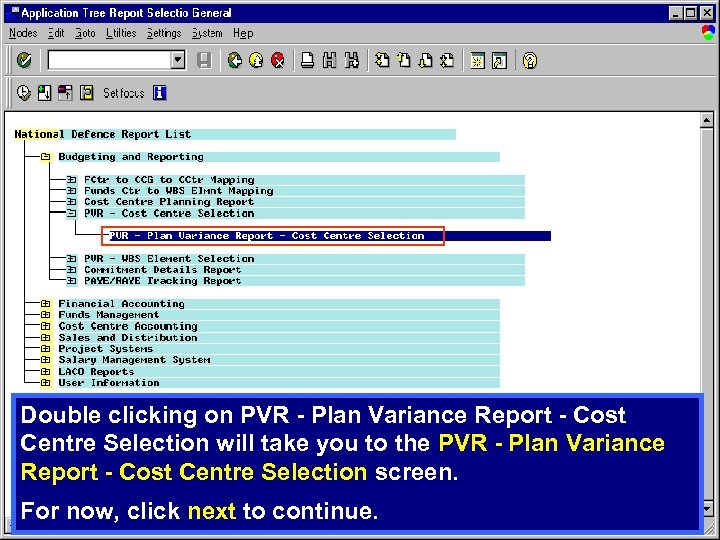 Double clicking on PVR - Plan Variance Report - Cost Centre Selection will take you to the PVR - Plan Variance Report - Cost Centre Selection screen. For now, click next to continue.
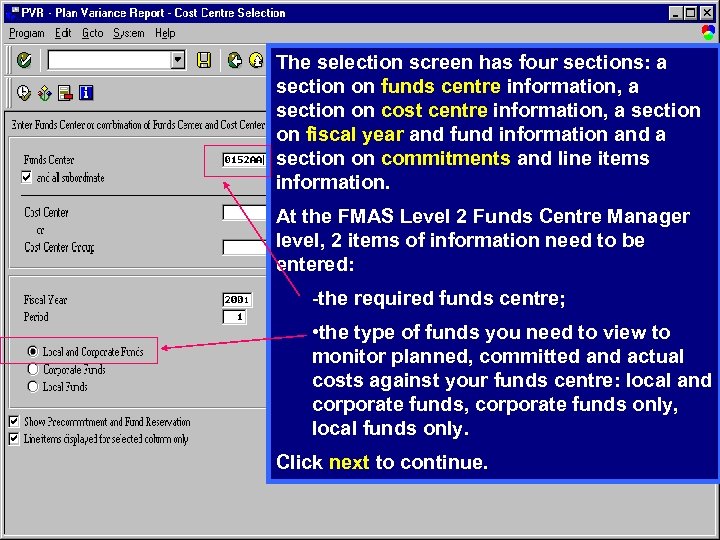 The selection screen has four sections: a section on funds centre information, a section on cost centre information, a section on fiscal year and fund information and a section on commitments and line items information. At the FMAS Level 2 Funds Centre Manager level, 2 items of information need to be entered: -the required funds centre; • the type of funds you need to view to monitor planned, committed and actual costs against your funds centre: local and corporate funds, corporate funds only, local funds only. Click next to continue.
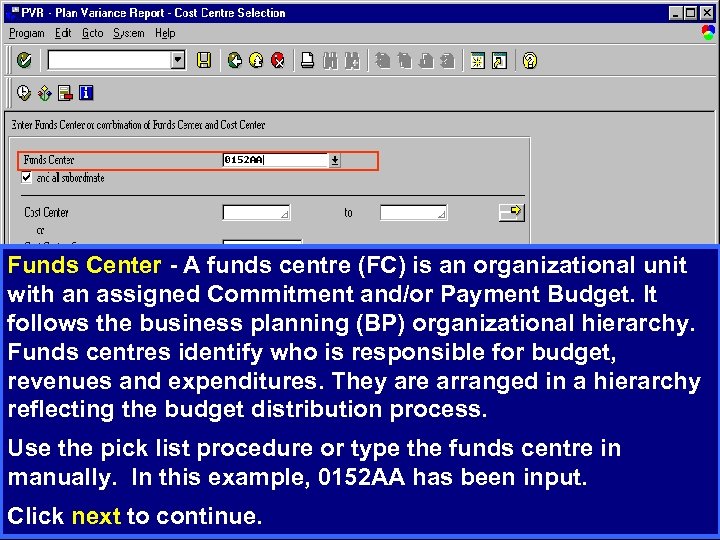 Funds Center - A funds centre (FC) is an organizational unit with an assigned Commitment and/or Payment Budget. It follows the business planning (BP) organizational hierarchy. Funds centres identify who is responsible for budget, revenues and expenditures. They are arranged in a hierarchy reflecting the budget distribution process. Use the pick list procedure or type the funds centre in manually. In this example, 0152 AA has been input. Click next to continue.
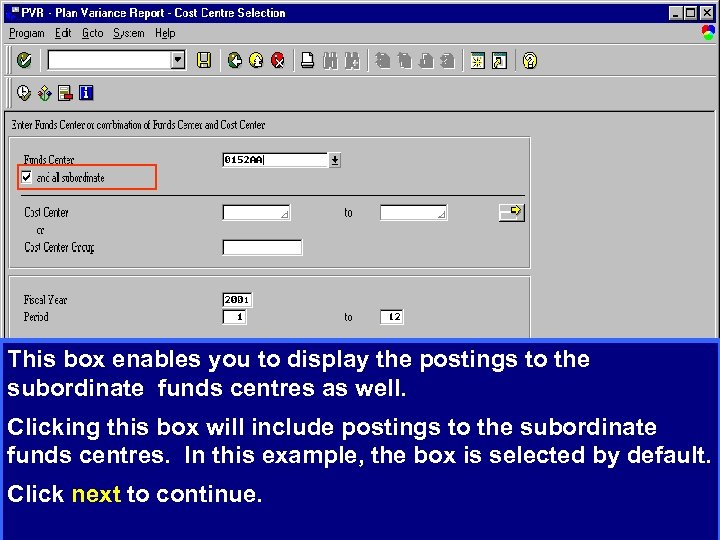 This box enables you to display the postings to the subordinate funds centres as well. Clicking this box will include postings to the subordinate funds centres. In this example, the box is selected by default. Click next to continue.
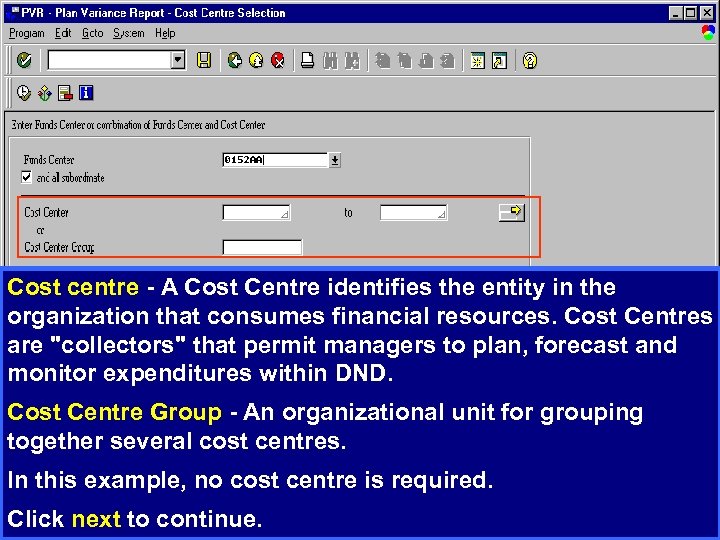 Cost centre - A Cost Centre identifies the entity in the organization that consumes financial resources. Cost Centres are "collectors" that permit managers to plan, forecast and monitor expenditures within DND. Cost Centre Group - An organizational unit for grouping together several cost centres. In this example, no cost centre is required. Click next to continue.
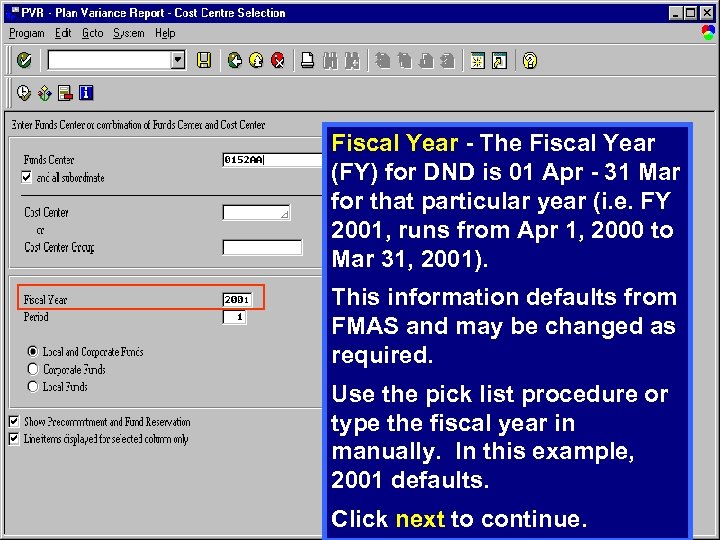 Fiscal Year - The Fiscal Year (FY) for DND is 01 Apr - 31 Mar for that particular year (i. e. FY 2001, runs from Apr 1, 2000 to Mar 31, 2001). This information defaults from FMAS and may be changed as required. Use the pick list procedure or type the fiscal year in manually. In this example, 2001 defaults. Click next to continue.
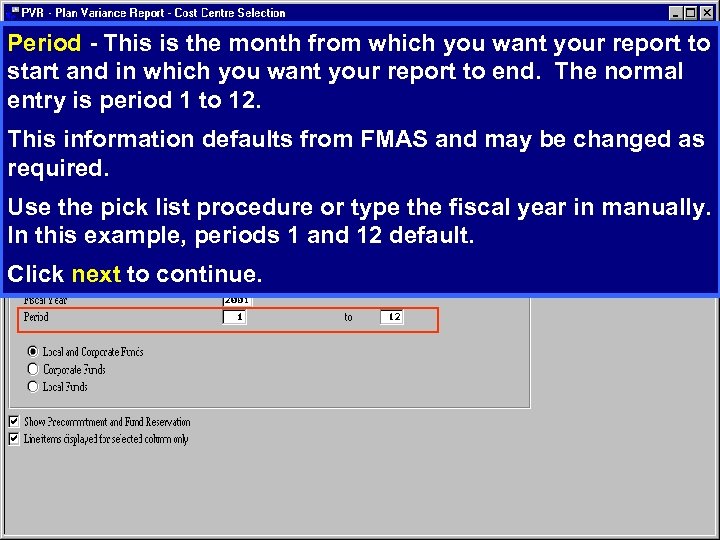 Period - This is the month from which you want your report to start and in which you want your report to end. The normal entry is period 1 to 12. This information defaults from FMAS and may be changed as required. Use the pick list procedure or type the fiscal year in manually. In this example, periods 1 and 12 default. Click next to continue.
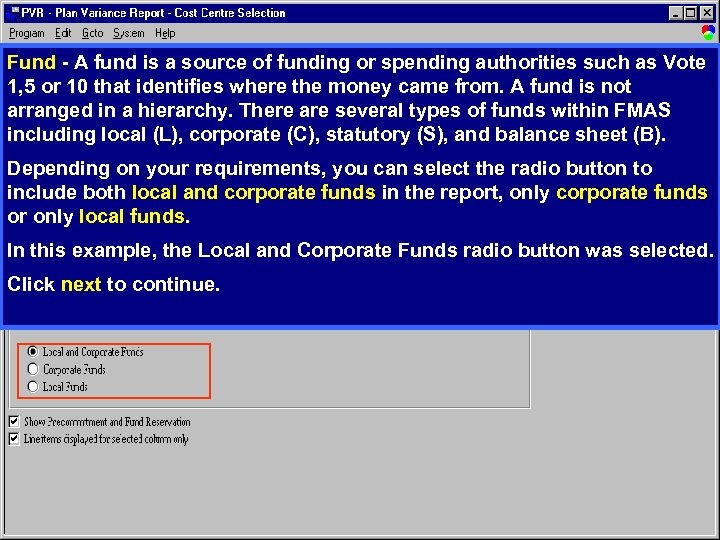 Fund - A fund is a source of funding or spending authorities such as Vote 1, 5 or 10 that identifies where the money came from. A fund is not arranged in a hierarchy. There are several types of funds within FMAS including local (L), corporate (C), statutory (S), and balance sheet (B). Depending on your requirements, you can select the radio button to include both local and corporate funds in the report, only corporate funds or only local funds. In this example, the Local and Corporate Funds radio button was selected. Click next to continue.
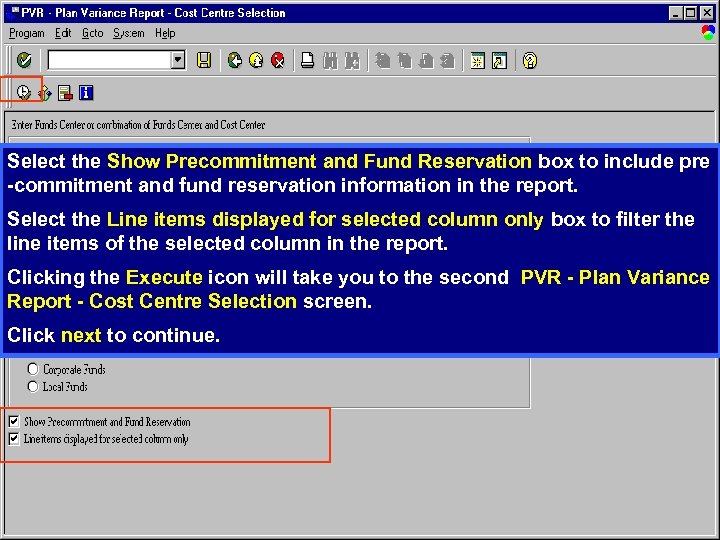 Select the Show Precommitment and Fund Reservation box to include pre -commitment and fund reservation information in the report. Select the Line items displayed for selected column only box to filter the line items of the selected column in the report. Clicking the Execute icon will take you to the second PVR - Plan Variance Report - Cost Centre Selection screen. Click next to continue.
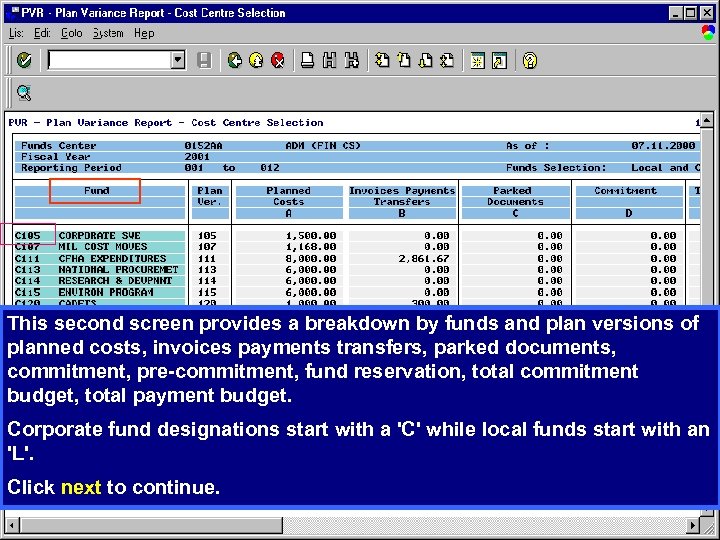 This second screen provides a breakdown by funds and plan versions of planned costs, invoices payments transfers, parked documents, commitment, pre-commitment, fund reservation, total commitment budget, total payment budget. Corporate fund designations start with a 'C' while local funds start with an 'L'. Click next to continue.
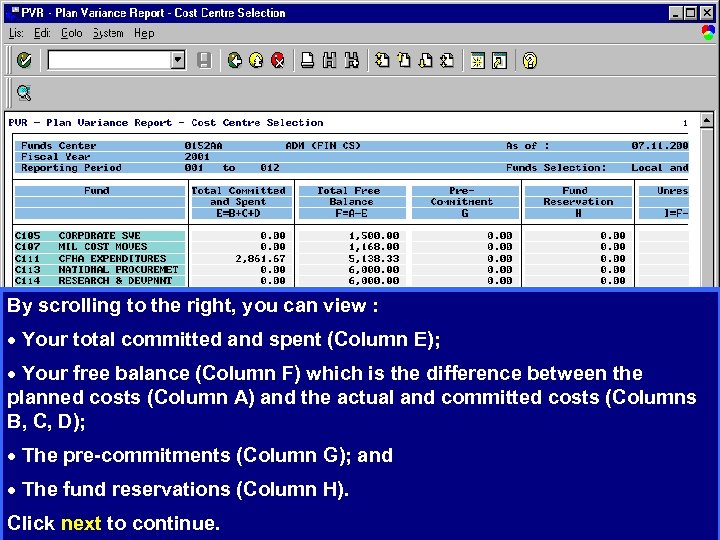 By scrolling to the right, you can view : · Your total committed and spent (Column E); · Your free balance (Column F) which is the difference between the planned costs (Column A) and the actual and committed costs (Columns B, C, D); · The pre-commitments (Column G); and · The fund reservations (Column H). Click next to continue.
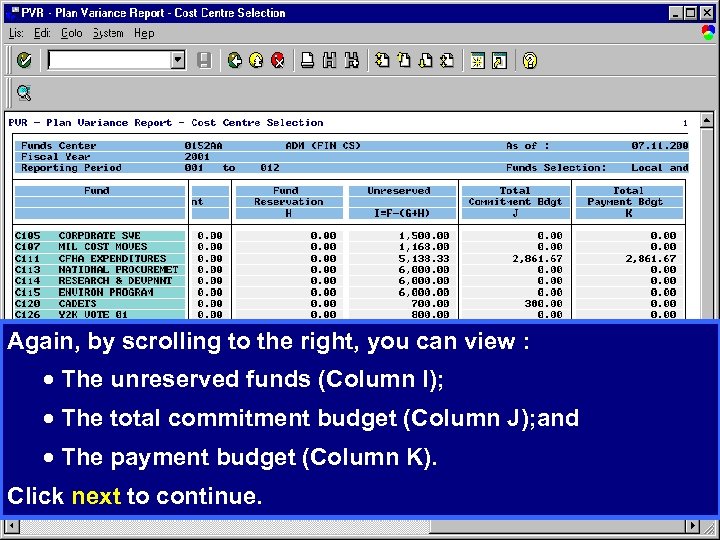 Again, by scrolling to the right, you can view : · The unreserved funds (Column I); · The total commitment budget (Column J); and · The payment budget (Column K). Click next to continue.
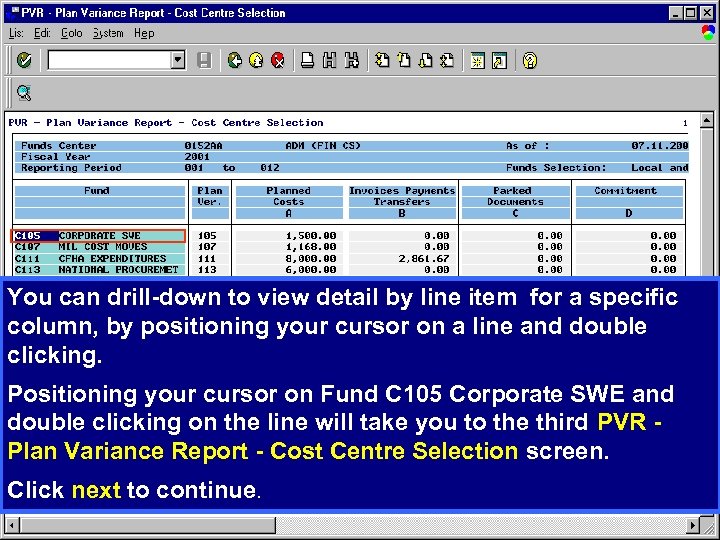 You can drill-down to view detail by line item for a specific column, by positioning your cursor on a line and double clicking. Positioning your cursor on Fund C 105 Corporate SWE and double clicking on the line will take you to the third PVR - Plan Variance Report - Cost Centre Selection screen. Click next to continue.
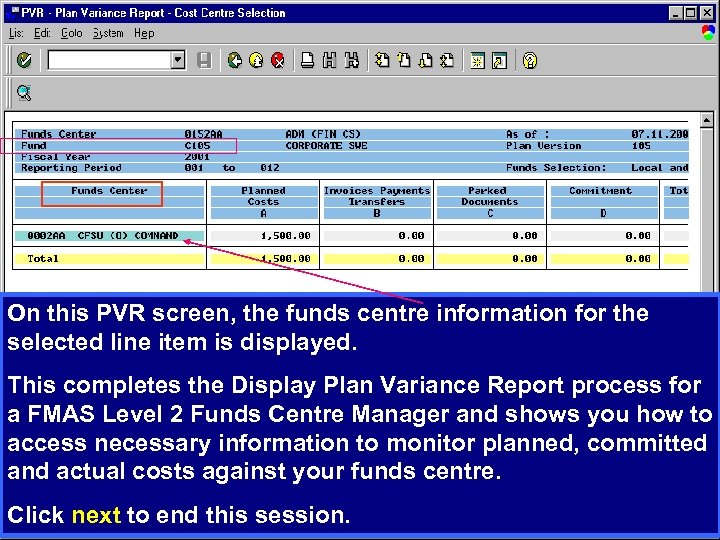 On this PVR screen, the funds centre information for the selected line item is displayed. This completes the Display Plan Variance Report process for a FMAS Level 2 Funds Centre Manager and shows you how to access necessary information to monitor planned, committed and actual costs against your funds centre. Click next to end this session.
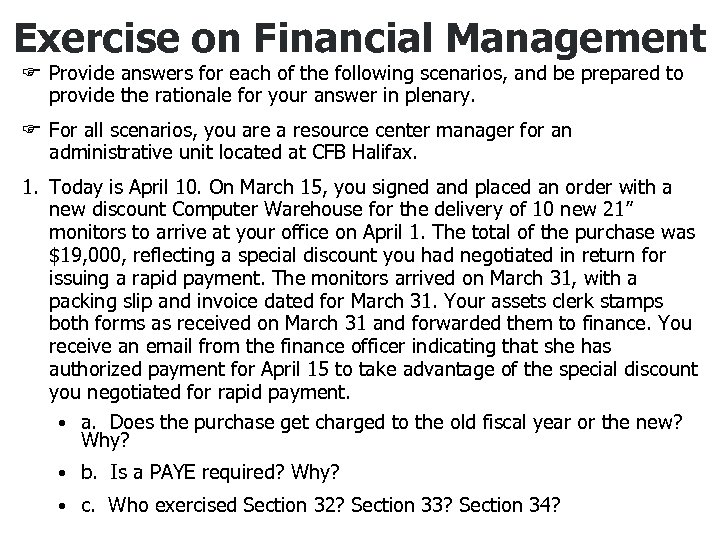 Exercise on Financial Management F Provide answers for each of the following scenarios, and be prepared to provide the rationale for your answer in plenary. F For all scenarios, you are a resource center manager for an administrative unit located at CFB Halifax. 1. Today is April 10. On March 15, you signed and placed an order with a new discount Computer Warehouse for the delivery of 10 new 21” monitors to arrive at your office on April 1. The total of the purchase was $19, 000, reflecting a special discount you had negotiated in return for issuing a rapid payment. The monitors arrived on March 31, with a packing slip and invoice dated for March 31. Your assets clerk stamps both forms as received on March 31 and forwarded them to finance. You receive an email from the finance officer indicating that she has authorized payment for April 15 to take advantage of the special discount you negotiated for rapid payment. • a. Does the purchase get charged to the old fiscal year or the new? Why? • b. Is a PAYE required? Why? • c. Who exercised Section 32? Section 33? Section 34?
 Exercise on Financial Management 2. It is June 30 th and most of the staff have taken off already for the long-weekend (including your finance officer and assets clerk). You receive a voice mail message from the internal auditor in the finance shop. In what sounds like a vindictive and sarcastic tone, he has indicated that you have contravened an explicit policy of the department regarding the computer monitor purchase, and that he is on his way down to see you to discuss the specifics. You have had run-ins with this auditor before as you have a reputation as a “rule-bender”. As your emotions begin to rise, you sit and wonder what decision point is being questioned. • a. What values did you employ when making certain key decisions regarding the above noted scenarios. • b. Are there any potential problems in the control mechanisms that you could blame for the potential problem area?
 Module 3 Managing Human Resources
 Human Resources Staffing - Overview • Recent Government wide initiatives have severely reduced the number of personnel available • At the same time there has been no corresponding reduction in the workload
 Resourcing Options • Military Personnel • Civilian Personnel • Contract Resources
 Background • Op Renaissance began the process of reengineering human resource processes within DND • RM’s now have HR Management system available to assist them • RMs also have a range of options for resourcing an activity
 HR Management System • OP Enterprise is a major project to provide information technology support to DND's human resource processes
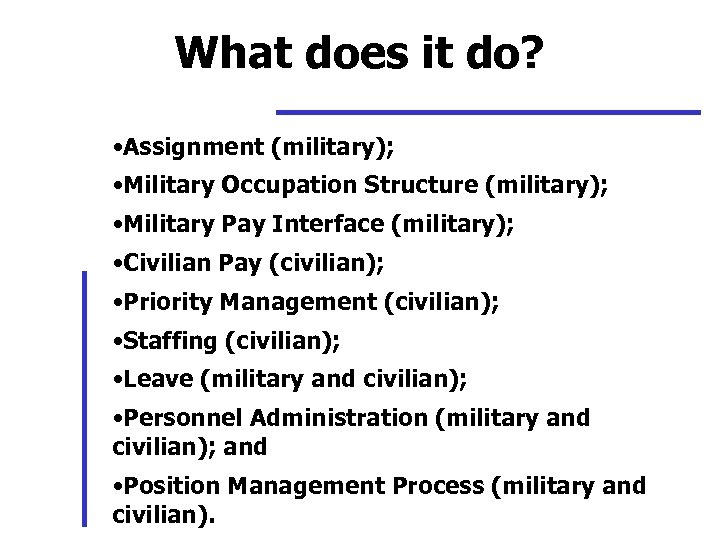 What does it do? • Assignment (military); • Military Occupation Structure (military); • Military Pay Interface (military); • Civilian Pay (civilian); • Priority Management (civilian); • Staffing (civilian); • Leave (military and civilian); • Personnel Administration (military and civilian); and • Position Management Process (military and civilian).
 Advantages • Replaces outdated systems • Integrated data base for military and civilian staff • HR mgmt will speed up dramatically as processes are devolved
 Output • Human Resources Database System –” People. Soft” • Produces ready-made and custom reports
 Allocation of Military Personnel • Within constraints dictated by Parliament, Mil Pers Levels are distributed in each DPG with a “Start State” • Through reductions and transfers there may be a different “End State” • Long-term changes are put into action through an Establishment Change (EC)
 Establishment Change (EC) • ECs are used to create or modify a unit or individual position • Process is done within existing resources and uses Peoplesoft as the tool • RM initiates change in writing to the FM • FM enters request in Peoplesoft • Request proceeds up the chain to DGSP • After approval ADM (HR Mil) takes action • After approval, Director Budget (DB) takes action
 Short-term Requests for Military Personnel • Addresses both Reserve and Regular positions • A clear Military requirement should exist • Position(s) funded by local budget
 Public Service (PS) Personnel • Delivering service through PS employees is often most cost effective approach – less costly than CF Personnel – PS not required to deploy on operations – terms of employment more flexible than individual service contractors • Resource Managers need to know their options in employing PS
 PS Staffing Processes and Options • HR Advisor should be consulted early • The policies and procedures for staffing are demanding, time consuming and changing • The process starts by having a classified position. If staffing for a new position, need to use the Universal Classification Standard (UCS) • There are several staffing options
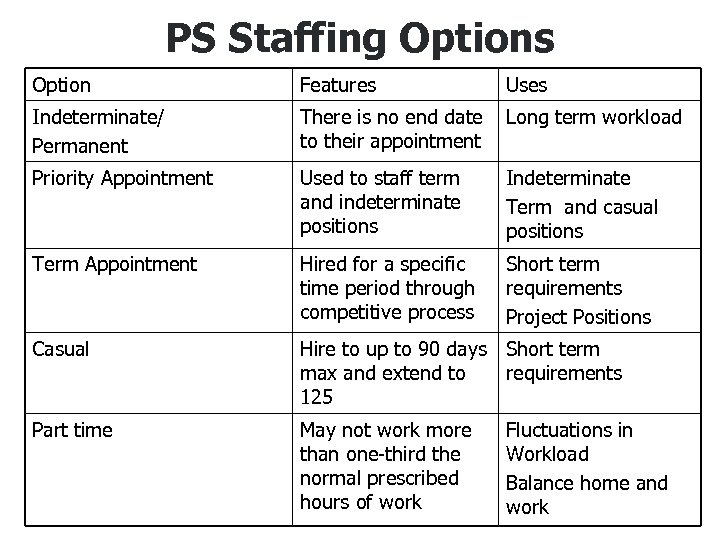 PS Staffing Options Option Features Uses Indeterminate/ Permanent There is no end date to their appointment Long term workload Priority Appointment Used to staff term and indeterminate positions Indeterminate Term and casual positions Term Appointment Hired for a specific time period through competitive process Short term requirements Project Positions Casual Hire to up to 90 days Short term max and extend to requirements 125 Part time May not work more than one-third the normal prescribed hours of work Fluctuations in Workload Balance home and work
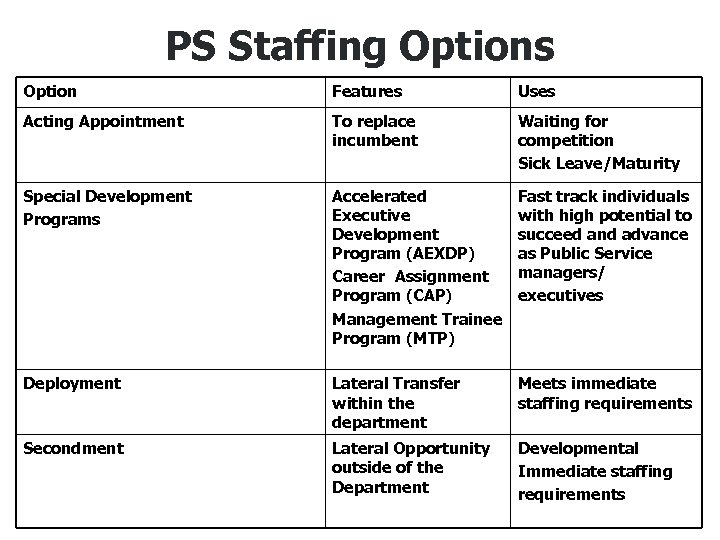 PS Staffing Options Option Features Uses Acting Appointment To replace incumbent Waiting for competition Sick Leave/Maturity Special Development Programs Accelerated Executive Development Program (AEXDP) Career Assignment Program (CAP) Management Trainee Program (MTP) Fast track individuals with high potential to succeed and advance as Public Service managers/ executives Deployment Lateral Transfer within the department Meets immediate staffing requirements Secondment Lateral Opportunity outside of the Department Developmental Immediate staffing requirements
 Funding PS Positions • Within Operating Budget of Unit, budget established by CCM to fund PS salaries in Cost Centre • Statutory Costs (20% of salary budget) held by ADM (HR) to pay for benefits: EI, CPP, Medical, Dental, Insurance etc. • Funding necessary for training, tools
 Contracting for Individual Services • Contracting for Individual Services would be used where: – specific skills are needed – time duration is short – need for detachment or objective perspective for specific task – previous experience is required to reduce risk, cost and time required
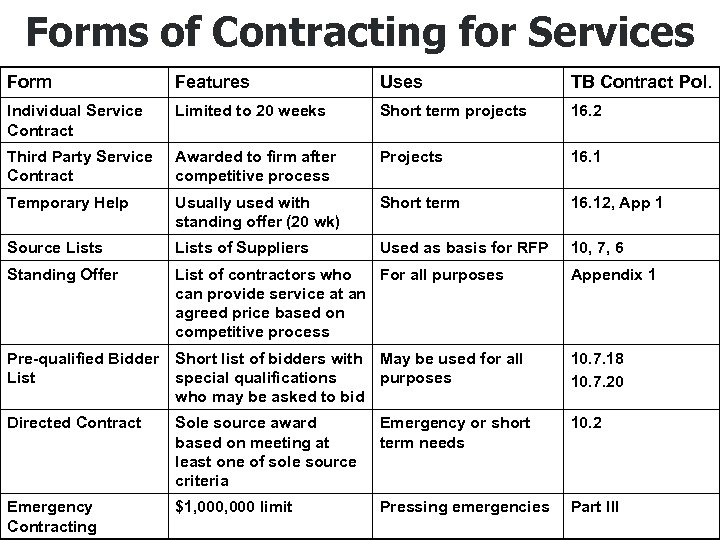 Forms of Contracting for Services Form Features Uses TB Contract Pol. Individual Service Contract Limited to 20 weeks Short term projects 16. 2 Third Party Service Contract Awarded to firm after competitive process Projects 16. 1 Temporary Help Usually used with standing offer (20 wk) Short term 16. 12, App 1 Source Lists of Suppliers Used as basis for RFP 10, 7, 6 Standing Offer List of contractors who For all purposes can provide service at an agreed price based on competitive process Appendix 1 Pre-qualified Bidder Short list of bidders with May be used for all List special qualifications purposes who may be asked to bid 10. 7. 18 10. 7. 20 Directed Contract Sole source award based on meeting at least one of sole source criteria Emergency or short term needs 10. 2 Emergency Contracting $1, 000 limit Pressing emergencies Part III
 Sole-Source or Directed Contracts • For sole source contracts one of four criteria must be met: 1. pressing urgency where delay would be harmful to public interest 2. estimated expenditure will not exceed $25, 000 including GST 3. nature of work is such that it would not be in public interest to solicit bids 4. only one firm or person is capable of performing the contract
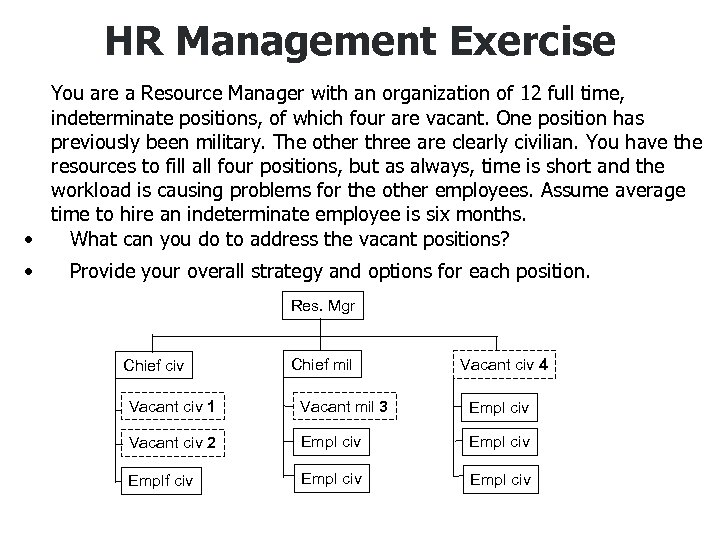 HR Management Exercise You are a Resource Manager with an organization of 12 full time, indeterminate positions, of which four are vacant. One position has previously been military. The other three are clearly civilian. You have the resources to fill all four positions, but as always, time is short and the workload is causing problems for the other employees. Assume average time to hire an indeterminate employee is six months. • What can you do to address the vacant positions? • Provide your overall strategy and options for each position. Res. Mgr Chief civ Chief mil Vacant civ 4 Vacant civ 1 Vacant mil 3 Empl civ Vacant civ 2 Empl civ Emplf civ Empl civ
 Module 4 Managing Materiel Resources
 Background • Chief Review Services conducted an audit of local procurement practices and found that: – materiel and financial policies were out of date; – inappropriate purchasing practices; – inventory management was inconsistent; – FAA Sect 34 not properly conducted; and – Resource Managers and their staff not properly trained
 Resulting Action • New policy developed • Materiel Management Guide for Resource Managers prepared • One Day Training module developed • Greater devolution to Resource Managers • New systems and procedures now in place • Overview of Local Procurement included in Resource Managers Course
 Roles and Responsibilities General • The Resource Manager’s role is to see that: 1. unit receives value for money in planning, procuring, using and disposal of materiel 2. functional experts (Distribution Account Holder, Supply, Contracting Authority, Comptroller) are used where appropriate
 Roles and Responsibilities Specific • Resource Managers: – define goods and services requirements – justify expenditures and provide funds – procure goods and services using best contracting means – ensure proper training and safety of personnel – operate assets to optimize value for money – assure safety of assets against abuse, theft, etc.
 Roles and Responsibilities Specific … • Asset Management Specialists – ADM(Mat) develops departmental asset management policies and ensures their implementation • DA Holder/ Base Supply: – facilitates procurement of goods and services, working with PWGSC as required – maintains up-to-date records of materiel – monitors asset management performance
 Life Cycle Management Resource Managers must use Life Cycle Management approach in managing assets • • Planning Procurement Inventory Management Disposal
 Planning • Requirement for materiel is identified • Request for materiel is vetted to: – validate justification and entitlement, – ensure funds are available (FAA Section 32), and – purchase amount is within authority • Must ensure item is not centrally managed, under restriction or hazardous materiel, if so, go to CFSS
 Procurement Considerations • Determine preferred contracting method • Only authorized personnel can contract as per Delegation of Authorities Document • Ensure competition through consideration of at least three quotes if purchase is over $1, 000 and NEGOTIATE BEST DEAL! • Quotes to be evaluated to determine best overall value to the Department • Decision must be fair, impartial and able to withstand public scrutiny
 Procurement Alternatives • Acquisition Cards: – preferred method of contracting for local procurement – restricted to $5, 000 or delegated authority – purchases made by cardholder must be authorized by contracting authority – you are responsible for all use of the Card in your unit – credit card can not be used over Internet due to security concerns - telephone instead
 Resource Manager’s Acquisition Cards Responsibilities • Identify who will receive a card • Determine card limits • Establish operating procedures for your unit • Ensure proper documentation is retained • Ensure cards are properly controlled • Monitor card usage • Apply Sect 34 FAA to monthly statements • Provide financial coding • Ensure assets are recorded on DA Account
 Card Holder Responsibilities • • • Use card only for authorized purchases Do not let anyone else use card Obtain invoice/slip at time of purchase Keep a register of purchases (must) Review purchases against monthly statement • Return card when requested • Inform local coordinator of any changes in business status
 Acquisition Card Restrictions • The acquisition card must not be used for: – personal use – cash advances – travel related expenses – vehicle operating or maintenance expenses – interdepartmental transactions
 Procurement Alternatives • Customer Corporate Account: – Units are free to arrange these accounts with vendors – must still seek competitive quotes – manage similar to Acquisition Card Invoices
 Procurement Alternatives • Petty Cash: – can contract up to $ 1, 000 – where supplier does not accept Acquisition Card
 Procurement Alternatives • Local Purchase Order (LPO): – can be used up to $ 5, 000 or lesser delegated authority where supplier does not accept Acquisition Card – LPO is arranged by supporting Supply section
 Procurement Alternatives • Standing Offer Agreement (SOA): – means of procuring materiel or services where supplier has been pre -selected through competitive process – contract value likely in excess of delegated authority because contract established via PWGSC
 Procurement Alternatives • Supply Arrangements (SA): - contractors are pre-qualified, but still requires competitive process
 Receipt of Goods and Services - FAA Section 34 • Invoices received must be compared to contract to ensure compliance with terms and conditions • Must ensure goods/services actually received are as specified in the contract • Ensure that payment has not already been made and that GST or HST is properly applied and no PST is charged • Input to FMAS to initiate payment
 Inventory Management • Resource Managers are responsible to see that materiel is brought on charge either in the CFSS (items valued at $1, 000 or more) or in local systems (if attractive or sensitive item) • Loan cards should be used for attractive or sensitive items
 Inventory Management • Employee Use of Material Off Premises: – personnel have the authority to use resources off premises for a purpose directly related to the Defence Services Program – employees are not responsible for loss unless there is negligence involved
 Inventory Management Loan of Government Materiel- Refer to Provision of Services Agreement: • to other departments – strongly encouraged but must be signed for • outside government – only in support of delivery of government programs – loan must be by contract – costs are borne by borrower • contractors – generally, except for major projects, equipment is not loaned to contractors
 Disposal • Resource Manager can initiate disposal • assets surplus to requirement will be disposed through Supply • can dispose by sale to public at market value using contract arranged by PWGSC • benefits of sale of locally purchased assets go to custodian unit
 Disposal • Losses: 1. Resource Managers are responsible for preventing losses of money or public property 2. if money or materiel can not be located, the matter must be investigated and suspected fraud or theft in accordance with QR&O, reported to the Military Police 3. if material can not be found must be written off
 Disposal • Write-offs: 1. write-off authorizes an adjustment of records to reflect losses due to destruction, inventory shortage, fire, theft or loss 2. manager cannot write-off materiel he/she is directly responsible for 3. write-off delegation, for specified financial limits, is to Commanding Officers and higher
 Materiel Management Exercise You are a Resource Manager, with an acquisition card, and you are personally responsible for moving your 12 people into a new office space. The following needs to be obtained: • Moving services for existing files and furniture; • Some new furniture; • Stationery; • Computers, software and associated equipment; • Office equipment e. g. hole punch, staplers, etc; and • Cell phones, Palm Pilots, speaker type intercom. • How should you go about contracting for these goods and services?
 Module 5 Risk Management
 What Is Risk? • Risk is a recognition of future uncertainty, the inability to know what the future will bring in response to a given action today • Risk implies that a given action has more than one possible outcome • Risk becomes one criterion for deciding what course of action to pursue
 What Is Risk? • Risk is the probability that a decision or action will have negative consequences • Risk cannot be eliminated, but it can be managed • Risk management means identifying the risk and taking appropriate action to reduce the risk where it is cost beneficial to do so
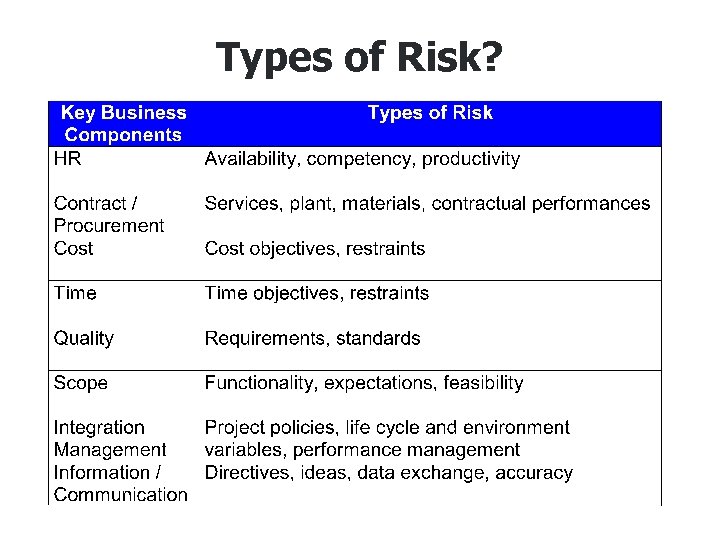 Types of Risk?
 What is Risk Management? • Risk management is a process by which one: 1. identifies. 2. analyses. 3. develops responses to. 4. controls potential threats. . . to the success of a given project. throughout the life cycle, and in the. best interests of its objectives. • Extent of risk management must be commensurate with size, complexity, and significance of issues.
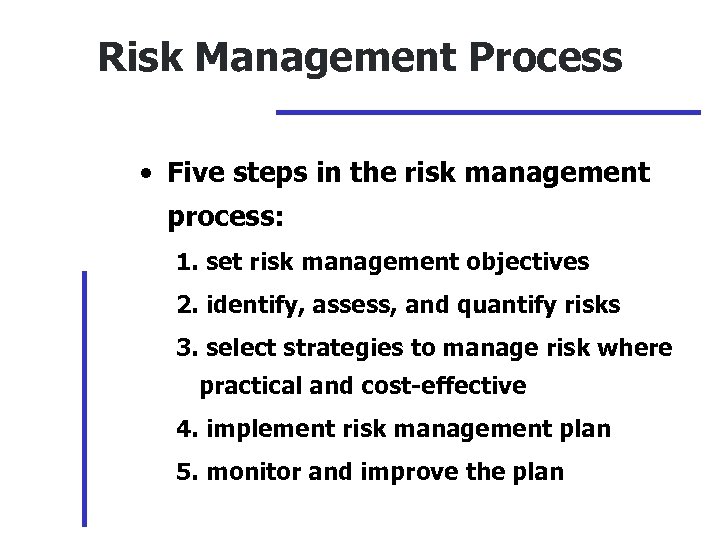 Risk Management Process • Five steps in the risk management process: 1. set risk management objectives 2. identify, assess, and quantify risks 3. select strategies to manage risk where practical and cost-effective 4. implement risk management plan 5. monitor and improve the plan
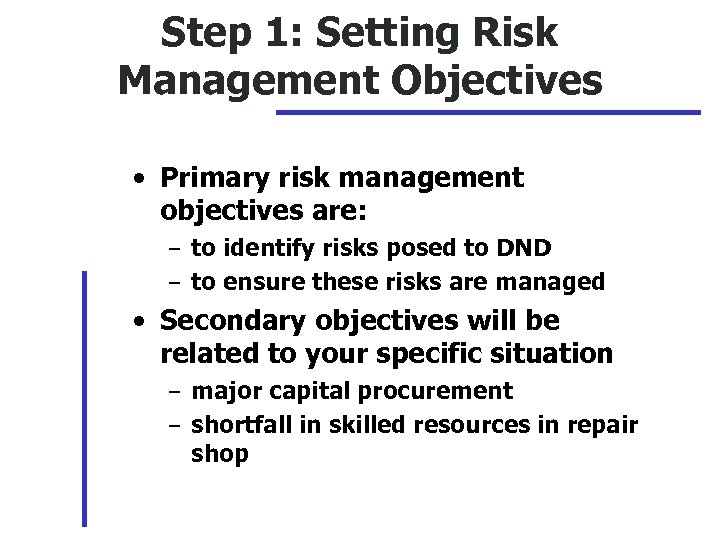 Step 1: Setting Risk Management Objectives • Primary risk management objectives are: – to identify risks posed to DND – to ensure these risks are managed • Secondary objectives will be related to your specific situation – major capital procurement – shortfall in skilled resources in repair shop
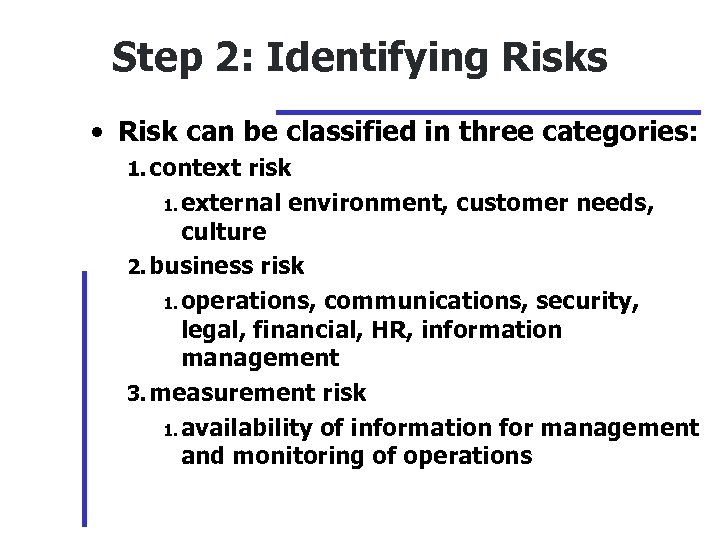 Step 2: Identifying Risks • Risk can be classified in three categories: 1. context risk 1. external environment, customer needs, culture 2. business risk 1. operations, communications, security, legal, financial, HR, information management 3. measurement risk 1. availability of information for management and monitoring of operations
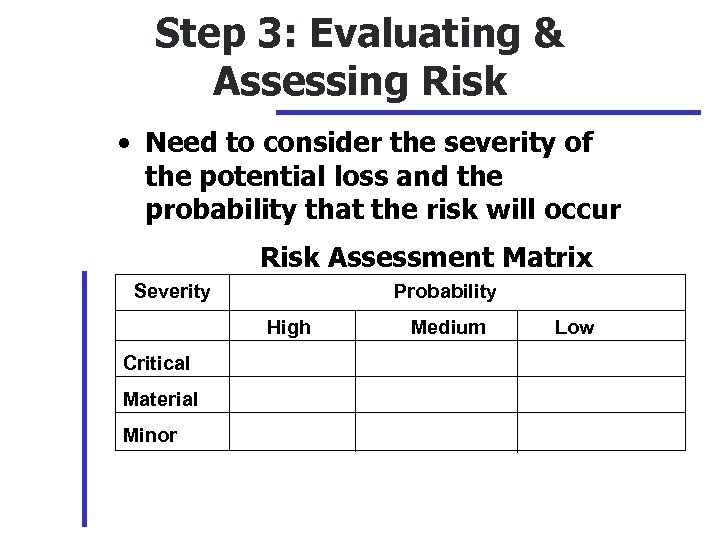 Step 3: Evaluating & Assessing Risk • Need to consider the severity of the potential loss and the probability that the risk will occur Risk Assessment Matrix Severity Probability High Critical Material Minor Medium Low
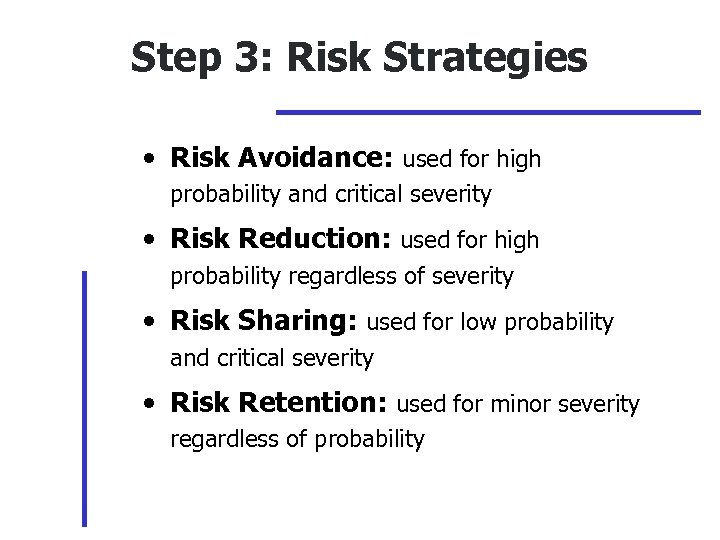 Step 3: Risk Strategies • Risk Avoidance: used for high probability and critical severity • Risk Reduction: used for high probability regardless of severity • Risk Sharing: used for low probability and critical severity • Risk Retention: used for minor severity regardless of probability
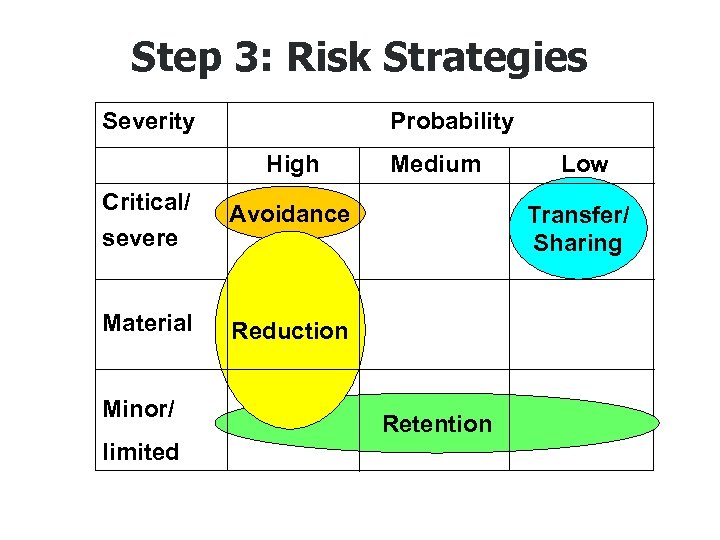 Step 3: Risk Strategies Severity Probability High Critical/ Avoidance severe Medium Material Reduction Minor/ limited Retention Low Transfer/ Sharing
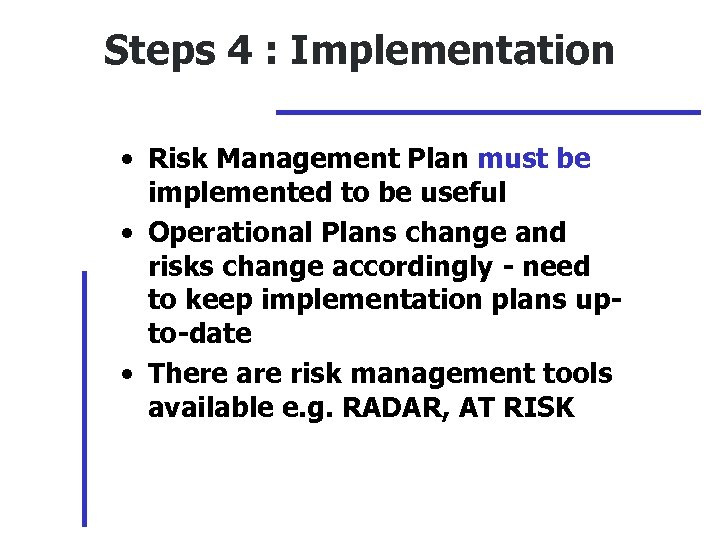 Steps 4 : Implementation • Risk Management Plan must be implemented to be useful • Operational Plans change and risks change accordingly - need to keep implementation plans upto-date • There are risk management tools available e. g. RADAR, AT RISK
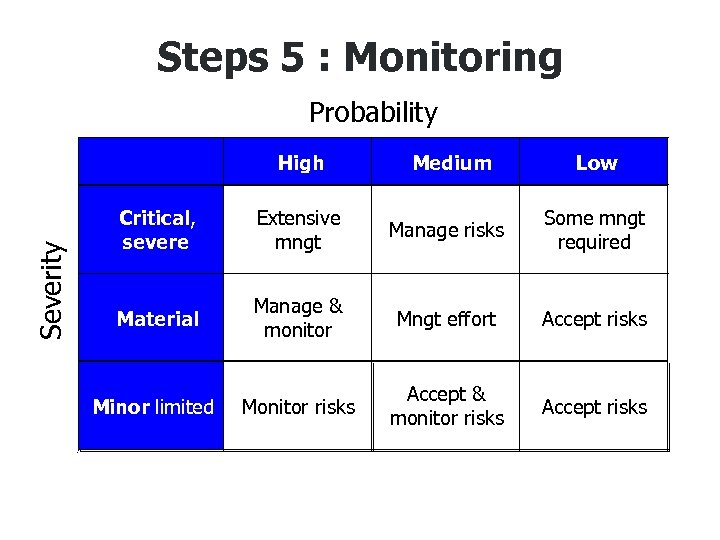 Steps 5 : Monitoring Probability Low Extensive mngt Manage risks Some mngt required Material Manage & monitor Mngt effort Accept risks Minor limited • Medium Critical, severe Severity High Monitor risks Accept & monitor risks Accept risks
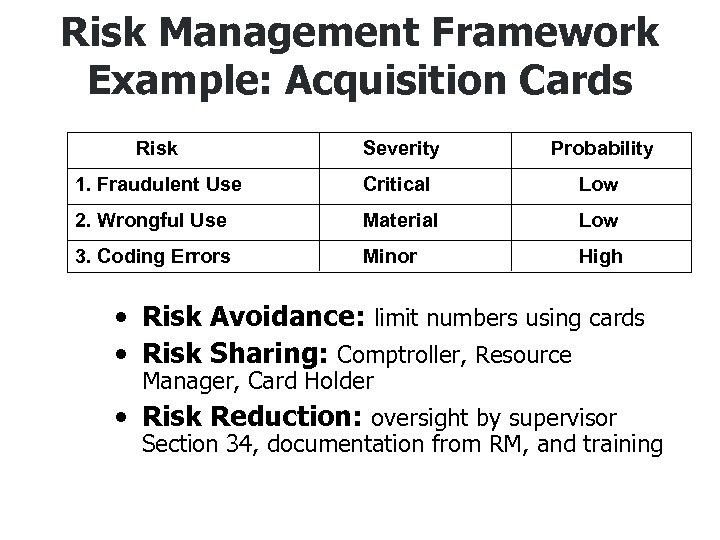 Risk Management Framework Example: Acquisition Cards Risk Severity Probability 1. Fraudulent Use Critical Low 2. Wrongful Use Material Low 3. Coding Errors Minor High • Risk Avoidance: limit numbers using cards • Risk Sharing: Comptroller, Resource Manager, Card Holder • Risk Reduction: oversight by supervisor Section 34, documentation from RM, and training

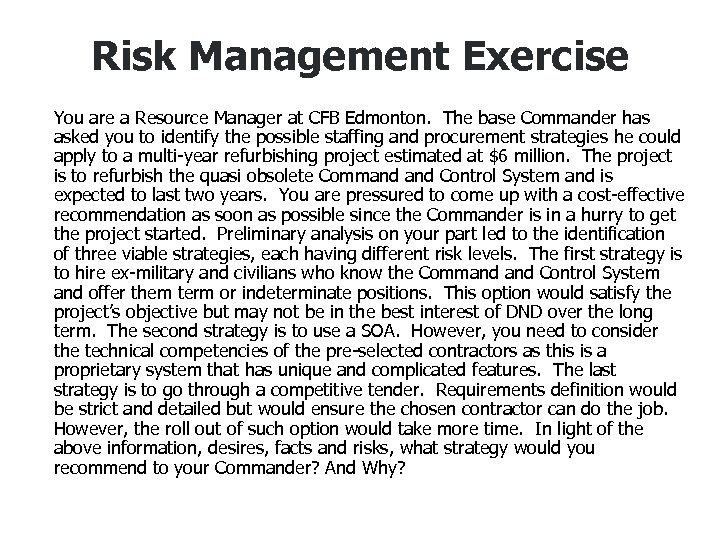 Risk Management Exercise You are a Resource Manager at CFB Edmonton. The base Commander has asked you to identify the possible staffing and procurement strategies he could apply to a multi-year refurbishing project estimated at $6 million. The project is to refurbish the quasi obsolete Command Control System and is expected to last two years. You are pressured to come up with a cost-effective recommendation as soon as possible since the Commander is in a hurry to get the project started. Preliminary analysis on your part led to the identification of three viable strategies, each having different risk levels. The first strategy is to hire ex-military and civilians who know the Command Control System and offer them term or indeterminate positions. This option would satisfy the project’s objective but may not be in the best interest of DND over the long term. The second strategy is to use a SOA. However, you need to consider the technical competencies of the pre-selected contractors as this is a proprietary system that has unique and complicated features. The last strategy is to go through a competitive tender. Requirements definition would be strict and detailed but would ensure the chosen contractor can do the job. However, the roll out of such option would take more time. In light of the above information, desires, facts and risks, what strategy would you recommend to your Commander? And Why?

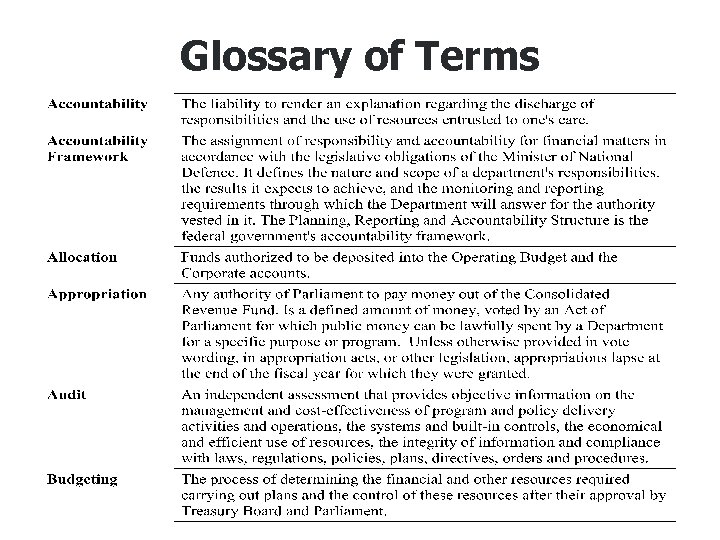 Glossary of Terms
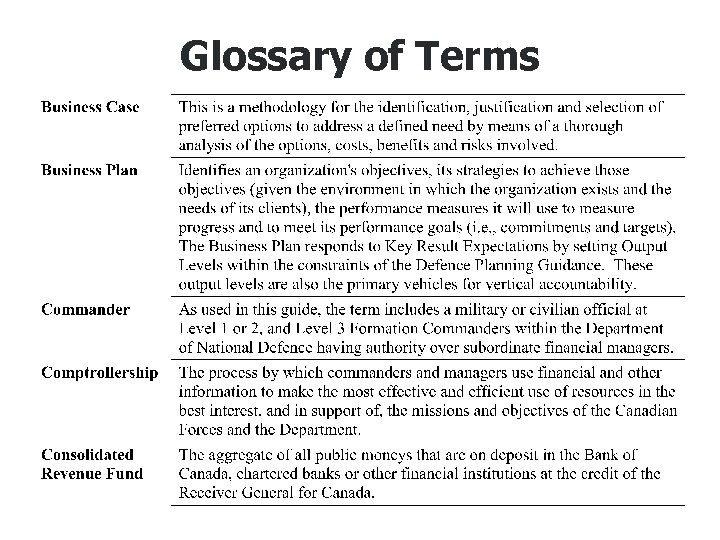 Glossary of Terms
 Glossary of Terms
 Glossary of Terms
 Glossary of Terms
 Glossary of Terms
 Glossary of Terms
 Glossary of Terms
 Glossary of Terms
 Glossary of Terms