


 Скачать презентацию DECISION IN EVERYDAY LIFE The Gaddis and Irvine
9088349a8c2608ec553d72269c401a29.ppt
- Количество слайдов: 120
 DECISION (IN EVERYDAY LIFE) The Gaddis and Irvine slides have been modified and added to by Dr. David Scanlan, CSUS Copyright © 2007 Pearson Education, Inc. Publishing as Pearson Addison-Wesley
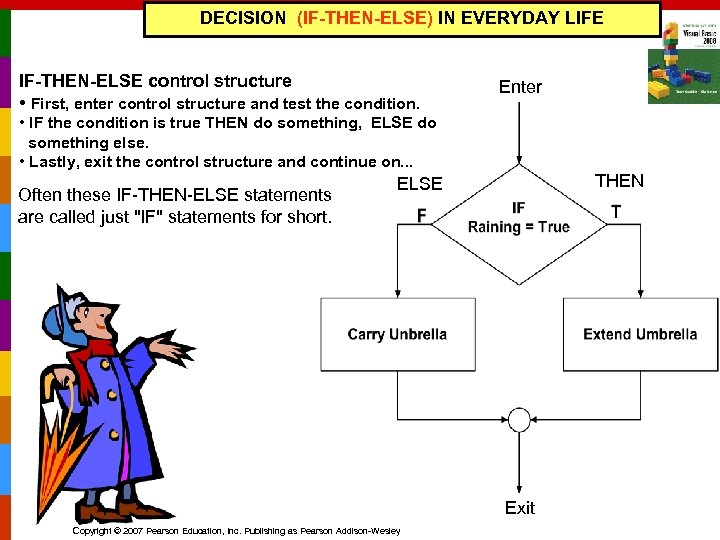 DECISION (IF-THEN-ELSE) IN EVERYDAY LIFE IF-THEN-ELSE control structure • First, enter control structure and test the condition. Enter • IF the condition is true THEN do something, ELSE do something else. • Lastly, exit the control structure and continue on. . . Often these IF-THEN-ELSE statements are called just "IF" statements for short. THEN ELSE Exit Copyright © 2007 Pearson Education, Inc. Publishing as Pearson Addison-Wesley
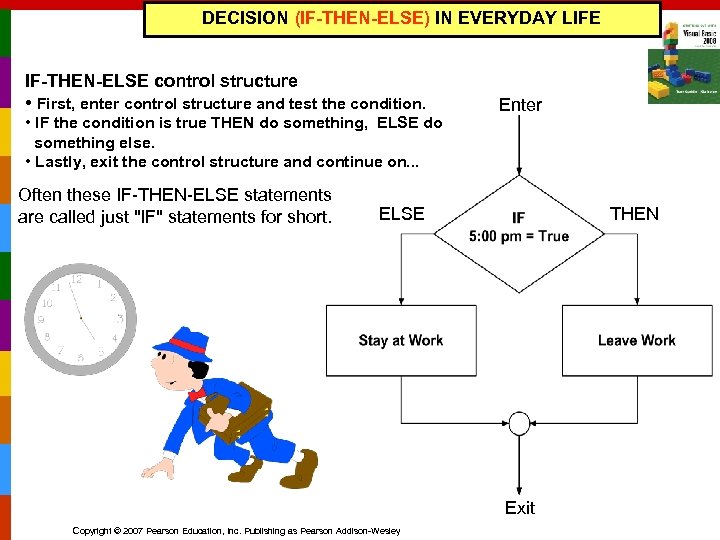 DECISION (IF-THEN-ELSE) IN EVERYDAY LIFE IF-THEN-ELSE control structure • First, enter control structure and test the condition. • IF the condition is true THEN do something, ELSE do something else. • Lastly, exit the control structure and continue on. . . Often these IF-THEN-ELSE statements are called just "IF" statements for short. Enter ELSE THEN Exit Copyright © 2007 Pearson Education, Inc. Publishing as Pearson Addison-Wesley
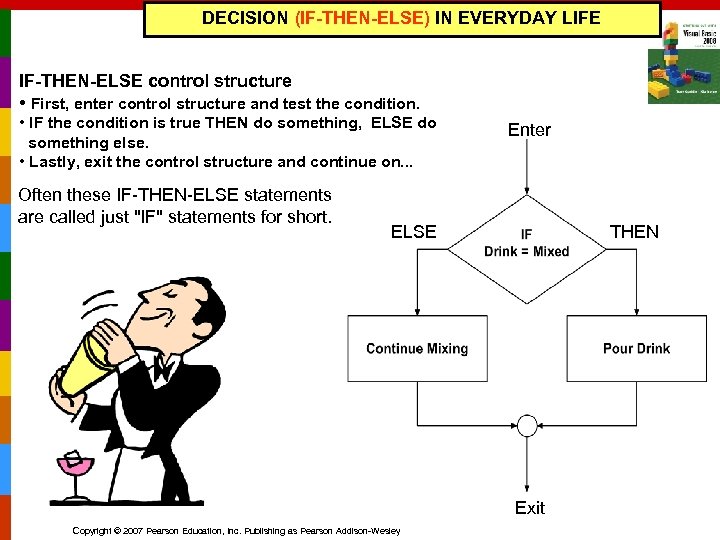 DECISION (IF-THEN-ELSE) IN EVERYDAY LIFE IF-THEN-ELSE control structure • First, enter control structure and test the condition. • IF the condition is true THEN do something, ELSE do something else. • Lastly, exit the control structure and continue on. . . Often these IF-THEN-ELSE statements are called just "IF" statements for short. Enter ELSE THEN Exit Copyright © 2007 Pearson Education, Inc. Publishing as Pearson Addison-Wesley
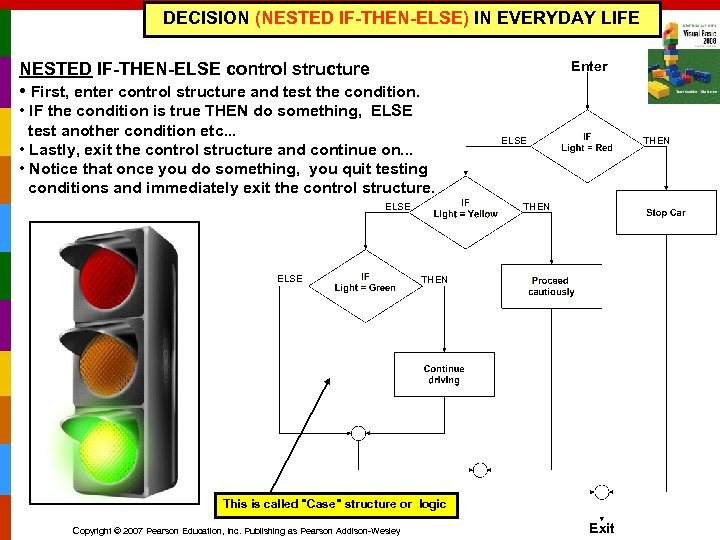 DECISION (NESTED IF-THEN-ELSE) IN EVERYDAY LIFE Enter NESTED IF-THEN-ELSE control structure • First, enter control structure and test the condition. • IF the condition is true THEN do something, ELSE test another condition etc. . . • Lastly, exit the control structure and continue on. . . • Notice that once you do something, you quit testing conditions and immediately exit the control structure. ELSE THEN This is called "Case" structure or logic Copyright © 2007 Pearson Education, Inc. Publishing as Pearson Addison-Wesley Exit
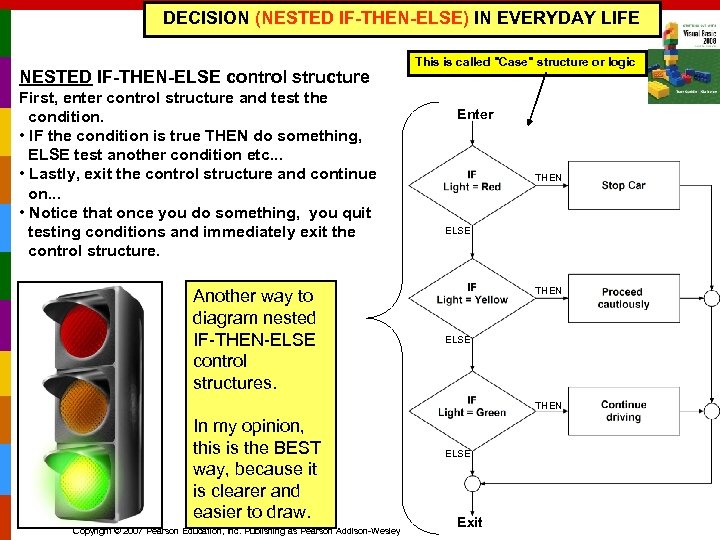 DECISION (NESTED IF-THEN-ELSE) IN EVERYDAY LIFE NESTED IF-THEN-ELSE control structure First, enter control structure and test the condition. • IF the condition is true THEN do something, ELSE test another condition etc. . . • Lastly, exit the control structure and continue on. . . • Notice that once you do something, you quit testing conditions and immediately exit the control structure. Another way to diagram nested IF-THEN-ELSE control structures. This is called "Case" structure or logic Enter THEN ELSE THEN In my opinion, this is the BEST way, because it is clearer and easier to draw. Copyright © 2007 Pearson Education, Inc. Publishing as Pearson Addison-Wesley ELSE Exit
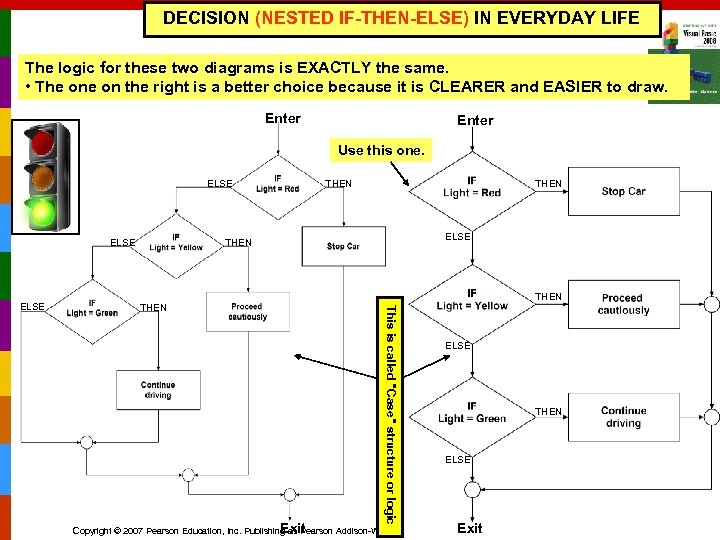 DECISION (NESTED IF-THEN-ELSE) IN EVERYDAY LIFE The logic for these two diagrams is EXACTLY the same. • The on the right is a better choice because it is CLEARER and EASIER to draw. Enter Use this one. ELSE THEN THEN This is called "Case" structure or logic ELSE THEN Exit Copyright © 2007 Pearson Education, Inc. Publishing as Pearson Addison-Wesley ELSE THEN ELSE Exit
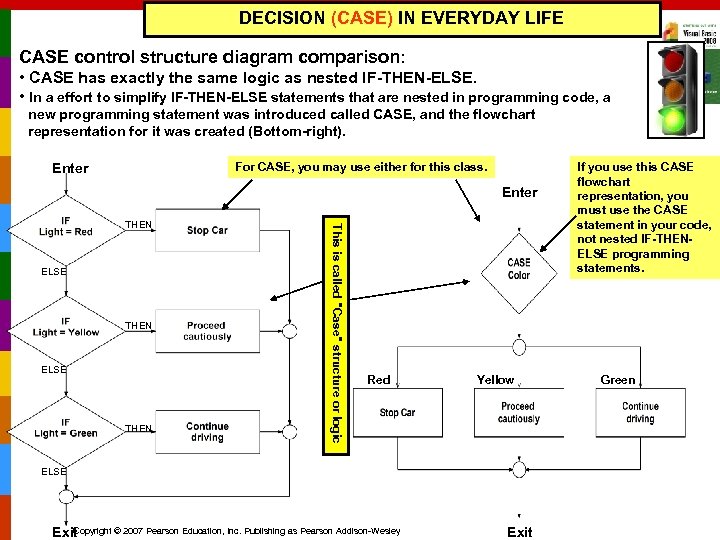 DECISION (CASE) IN EVERYDAY LIFE CASE control structure diagram comparison: • CASE has exactly the same logic as nested IF-THEN-ELSE. • In a effort to simplify IF-THEN-ELSE statements that are nested in programming code, a new programming statement was introduced called CASE, and the flowchart representation for it was created (Bottom-right). For CASE, you may use either for this class. Enter ELSE THEN This is called "Case" structure or logic THEN Red Yellow ELSE Copyright © 2007 Pearson Education, Inc. Publishing as Pearson Addison-Wesley Exit If you use this CASE flowchart representation, you must use the CASE statement in your code, not nested IF-THENELSE programming statements. Green
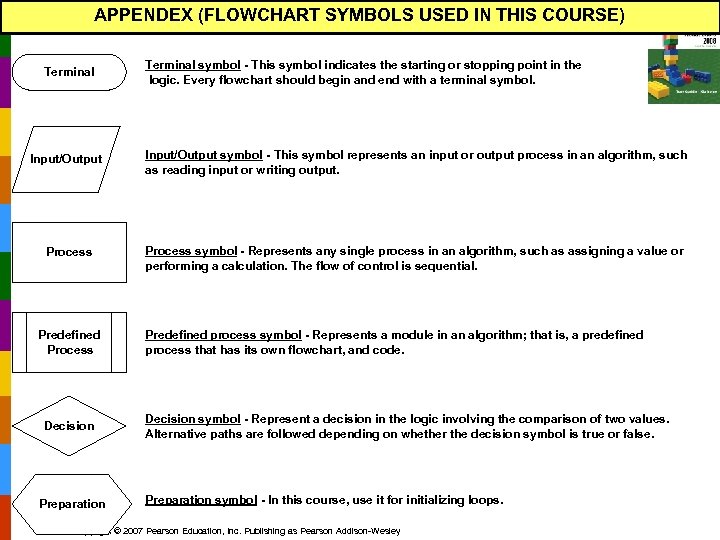 APPENDEX (FLOWCHART SYMBOLS USED IN THIS COURSE) Terminal symbol - This symbol indicates the starting or stopping point in the logic. Every flowchart should begin and end with a terminal symbol. Input/Output symbol - This symbol represents an input or output process in an algorithm, such as reading input or writing output. Process symbol - Represents any single process in an algorithm, such as assigning a value or performing a calculation. The flow of control is sequential. Predefined Process Decision Preparation Predefined process symbol - Represents a module in an algorithm; that is, a predefined process that has its own flowchart, and code. Decision symbol - Represent a decision in the logic involving the comparison of two values. Alternative paths are followed depending on whether the decision symbol is true or false. Preparation symbol - In this course, use it for initializing loops. Copyright © 2007 Pearson Education, Inc. Publishing as Pearson Addison-Wesley
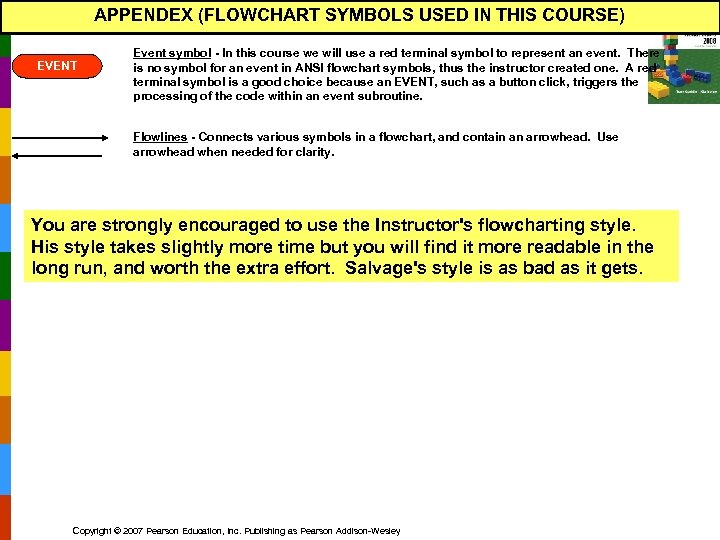 APPENDEX (FLOWCHART SYMBOLS USED IN THIS COURSE) EVENT Event symbol - In this course we will use a red terminal symbol to represent an event. There is no symbol for an event in ANSI flowchart symbols, thus the instructor created one. A red terminal symbol is a good choice because an EVENT, such as a button click, triggers the processing of the code within an event subroutine. Flowlines - Connects various symbols in a flowchart, and contain an arrowhead. Use arrowhead when needed for clarity. You are strongly encouraged to use the Instructor's flowcharting style. His style takes slightly more time but you will find it more readable in the long run, and worth the extra effort. Salvage's style is as bad as it gets. Copyright © 2007 Pearson Education, Inc. Publishing as Pearson Addison-Wesley
 STARTING OUT WITH Visual Basic 2008 FOURTH EDITION Tony Gaddis Haywood Community College Kip Irvine Florida International University Copyright © 2007 Pearson Education, Inc. Publishing as Pearson Addison-Wesley Slide 4 - 11
 Chapter 4 Making Decisions and Working With Strings Copyright © 2007 Pearson Education, Inc. Publishing as Pearson Addison-Wesley
 Introduction n This chapter covers the Visual Basic decision statements n n n If…Then…Else. If Select Case [Note: There is always an Else as you will see. ] It also discusses the use of n Radio Buttons n Message Boxes Copyright © 2007 Pearson Education, Inc. Publishing as Pearson Addison-Wesley Slide 4 - 13
 4. 1 The Decision Structure Allows a Program to Have More Than One Path of Execution Copyright © 2007 Pearson Education, Inc. Publishing as Pearson Addison-Wesley
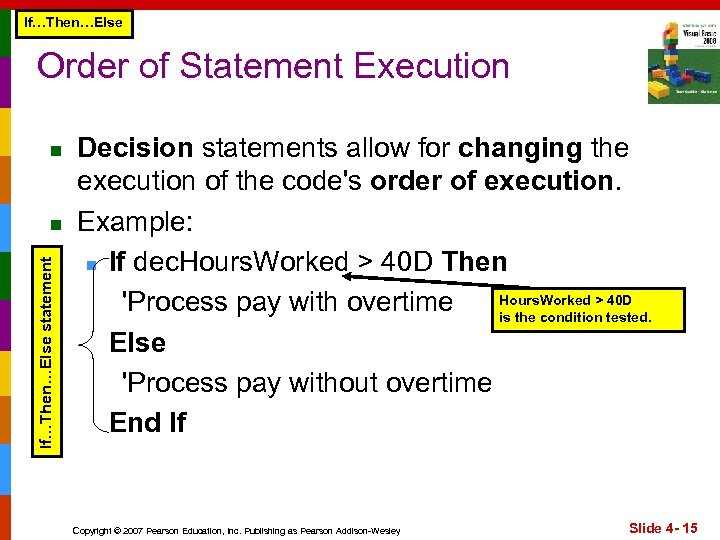 If…Then…Else Order of Statement Execution n If…Then…Else statement n Decision statements allow for changing the execution of the code's order of execution. Example: n If dec. Hours. Worked > 40 D Then Hours. Worked > 40 D 'Process pay with overtime is the condition tested. Else 'Process pay without overtime End If Copyright © 2007 Pearson Education, Inc. Publishing as Pearson Addison-Wesley Slide 4 - 15
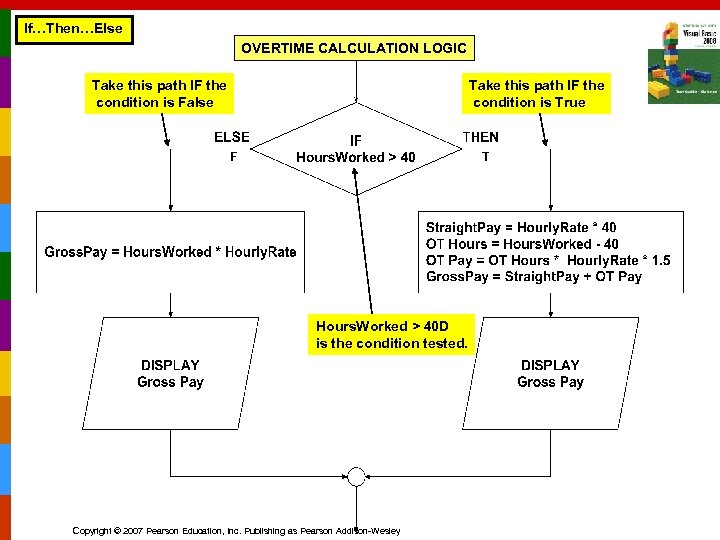 If…Then…Else OVERTIME CALCULATION LOGIC Take this path IF the condition is False Take this path IF the condition is True F T Hours. Worked > 40 D is the condition tested. Copyright © 2007 Pearson Education, Inc. Publishing as Pearson Addison-Wesley
 4. 2 The If…Then Statement Causes Other Statements to Execute Only Under a Certain Condition Copyright © 2007 Pearson Education, Inc. Publishing as Pearson Addison-Wesley
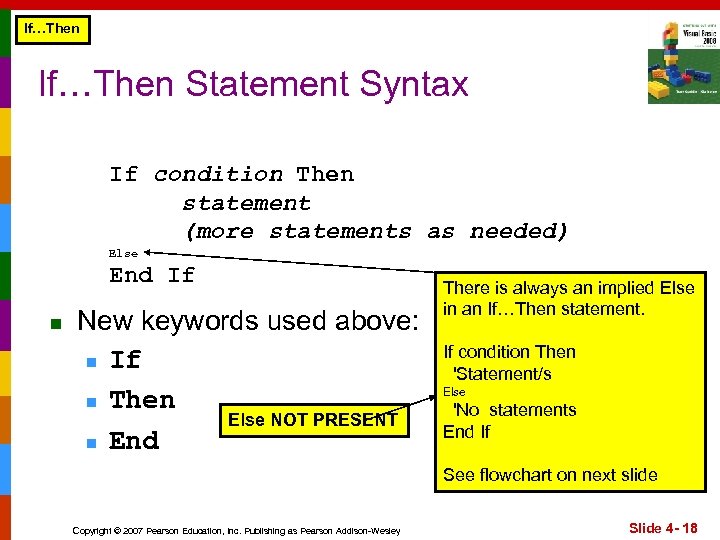 If…Then Statement Syntax If condition Then statement (more statements as needed) Else End If n New keywords used above: n If n Then Else NOT PRESENT n End There is always an implied Else in an If…Then statement. If condition Then 'Statement/s Else 'No statements End If See flowchart on next slide Copyright © 2007 Pearson Education, Inc. Publishing as Pearson Addison-Wesley Slide 4 - 18
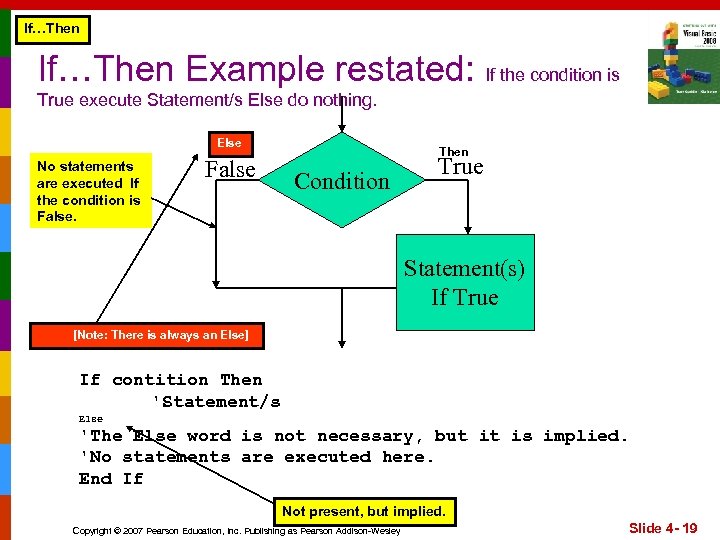 If…Then Example restated: If the condition is True execute Statement/s Else do nothing. Else No statements are executed If the condition is False Then Condition True Statement(s) If True [Note: There is always an Else] If contition Then 'Statement/s Else 'The Else word is not necessary, but it is implied. 'No statements are executed here. End If Not present, but implied. Copyright © 2007 Pearson Education, Inc. Publishing as Pearson Addison-Wesley Slide 4 - 19
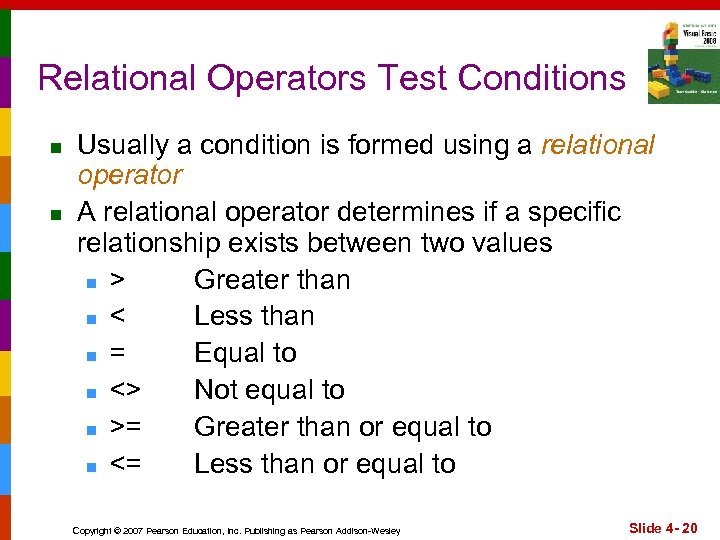 Relational Operators Test Conditions n n Usually a condition is formed using a relational operator A relational operator determines if a specific relationship exists between two values n > Greater than n < Less than n = Equal to n <> Not equal to n >= Greater than or equal to n <= Less than or equal to Copyright © 2007 Pearson Education, Inc. Publishing as Pearson Addison-Wesley Slide 4 - 20
 Binary Operators n Relational operators use two operands, for example: int. Length > int. Width int. Size <= 10 n Is length greater than width? Is size less than or equal 10? Relational operators yield a True or False result Copyright © 2007 Pearson Education, Inc. Publishing as Pearson Addison-Wesley Slide 4 - 21
 If…Then Examples Boolean value: The condition is True or False ‘Bonus awarded if sales greater than 50000 If dec. Sales > 50000 D Then bln. Gets. Bonus = True End If ‘Bonus, 12% commission rate, and a day off ‘awarded if sales greater than 50000 If dec. Sales > 50000 D Then bln. Gets. Bonus = True dec. Commission. Rate = 0. 12 int. Days. Off = int. Days. Off + 1 End If Copyright © 2007 Pearson Education, Inc. Publishing as Pearson Addison-Wesley Slide 4 - 22
 If…Then Rules n n n The If and the Then must be on the same line Only a remark may follow the Then The End If must be on a separate line Only a remark may follow the End If Tutorial 4 -1 presents an application that uses the If…Then statement Copyright © 2007 Pearson Education, Inc. Publishing as Pearson Addison-Wesley Slide 4 - 23
 If…Then Programming Style n n The code between the If…Then and the End If is indented Visual Basic does not require this It is a convention among programmers to aid in the readability of programs By default, the Visual Basic editor will automatically do this indentation as you enter your program Copyright © 2007 Pearson Education, Inc. Publishing as Pearson Addison-Wesley Slide 4 - 24
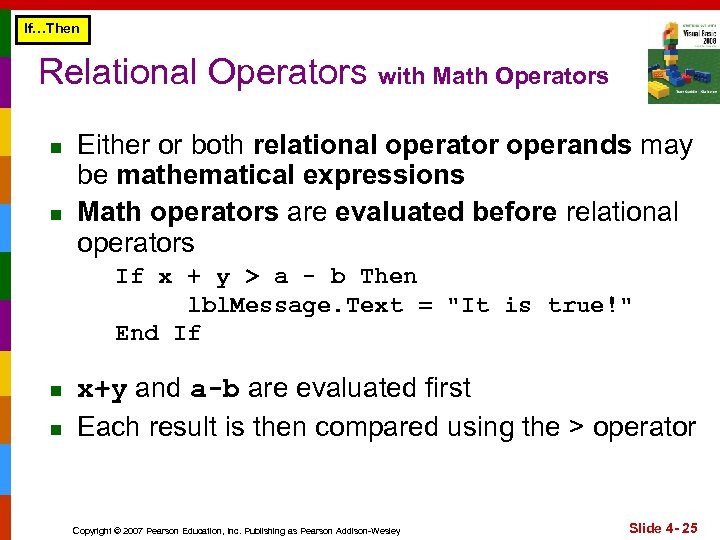 If…Then Relational Operators with Math Operators n n Either or both relational operator operands may be mathematical expressions Math operators are evaluated before relational operators If x + y > a - b Then lbl. Message. Text = "It is true!" End If n n x+y and a-b are evaluated first Each result is then compared using the > operator Copyright © 2007 Pearson Education, Inc. Publishing as Pearson Addison-Wesley Slide 4 - 25
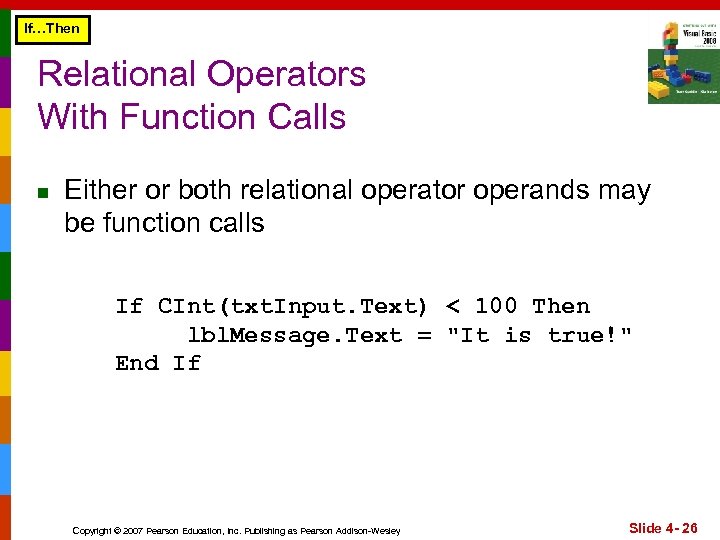 If…Then Relational Operators With Function Calls n Either or both relational operator operands may be function calls If CInt(txt. Input. Text) < 100 Then lbl. Message. Text = "It is true!" End If Copyright © 2007 Pearson Education, Inc. Publishing as Pearson Addison-Wesley Slide 4 - 26
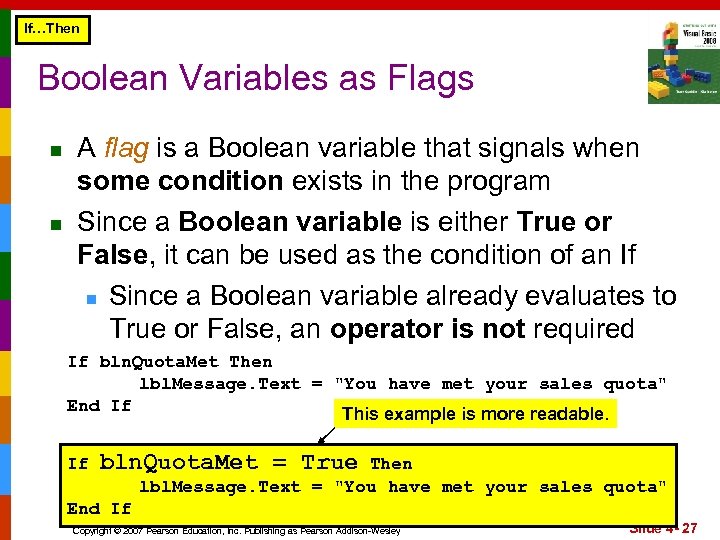 If…Then Boolean Variables as Flags n n A flag is a Boolean variable that signals when some condition exists in the program Since a Boolean variable is either True or False, it can be used as the condition of an If n Since a Boolean variable already evaluates to True or False, an operator is not required If bln. Quota. Met Then lbl. Message. Text = "You have met your sales quota" End If This example is more readable. If bln. Quota. Met = True Then lbl. Message. Text = "You have met your sales quota" End If Copyright © 2007 Pearson Education, Inc. Publishing as Pearson Addison-Wesley Slide 4 - 27
 4. 3 The If…Then…Else Statement The If. . . Then. . . Else Statement Executes One Group of Statements If the Condition Is True and Another Group of Statements If the Condition Is False Copyright © 2007 Pearson Education, Inc. Publishing as Pearson Addison-Wesley
 If…Then vs. If…Then…Else n n n The If…Then construct will execute or ignore a group of statements (do something or do nothing) The If…Then…Else construct will execute one group of statements or another group (do this or do that) Tutorial 4 -2 contains an example of the If…Then…Else construct Copyright © 2007 Pearson Education, Inc. Publishing as Pearson Addison-Wesley Slide 4 - 29
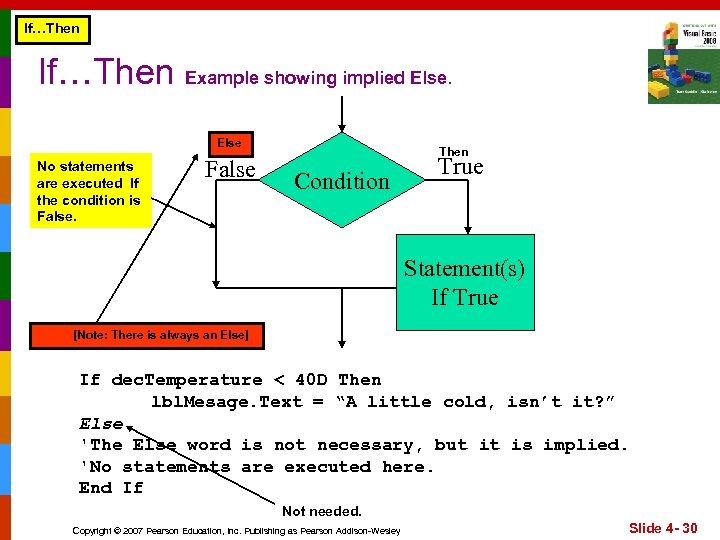 If…Then Example showing implied Else No statements are executed If the condition is False Then Condition True Statement(s) If True [Note: There is always an Else] If dec. Temperature < 40 D Then lbl. Mesage. Text = “A little cold, isn’t it? ” Else 'The Else word is not necessary, but it is implied. 'No statements are executed here. End If Not needed. Copyright © 2007 Pearson Education, Inc. Publishing as Pearson Addison-Wesley Slide 4 - 30
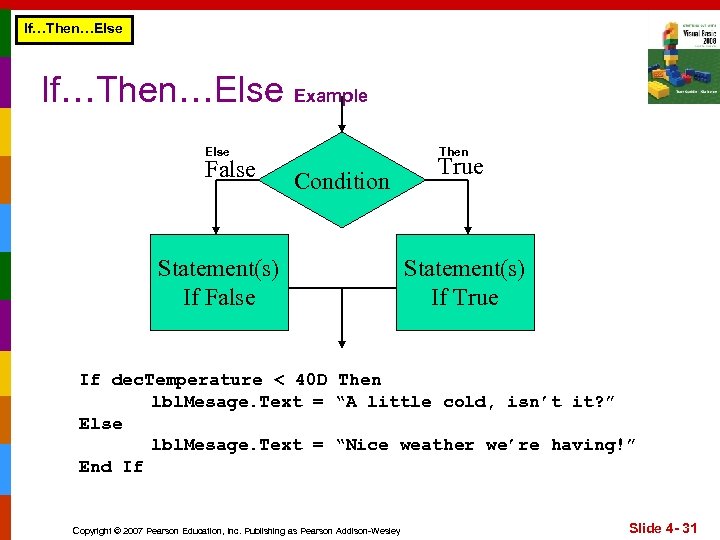 If…Then…Else Example Else False Then Condition Statement(s) If False True Statement(s) If True If dec. Temperature < 40 D Then lbl. Mesage. Text = “A little cold, isn’t it? ” Else lbl. Mesage. Text = “Nice weather we’re having!” End If Copyright © 2007 Pearson Education, Inc. Publishing as Pearson Addison-Wesley Slide 4 - 31
 4. 4 The If…Then…Else. If Statement The If. . . Then…Elseif Statement Is Like a Chain of If. . . Then. . . Else Statements They Perform Their Tests, One After the Other, Until One of Them Is Found to Be True Copyright © 2007 Pearson Education, Inc. Publishing as Pearson Addison-Wesley
 If…Then…Else Two Mutually Exclusive Choices n The If…Then…Else has two choices n n n The condition will either be True or False So either the Then clause or Else clause will be executed These are two mutually exclusive choices Copyright © 2007 Pearson Education, Inc. Publishing as Pearson Addison-Wesley Slide 4 - 33
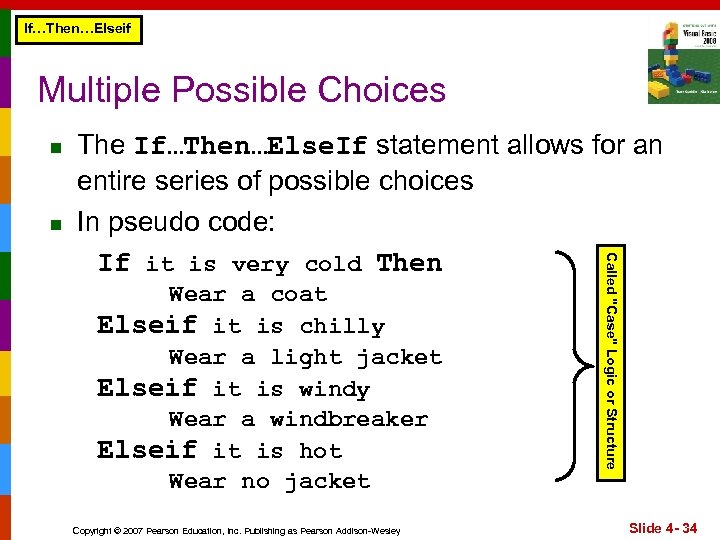 If…Then…Elseif Multiple Possible Choices n n Wear a coat Elseif it is chilly Wear a light jacket Elseif it is windy Wear a windbreaker Elseif it is hot Wear no jacket Copyright © 2007 Pearson Education, Inc. Publishing as Pearson Addison-Wesley Called "Case" Logic or Structure The If…Then…Else. If statement allows for an entire series of possible choices In pseudo code: If it is very cold Then Slide 4 - 34
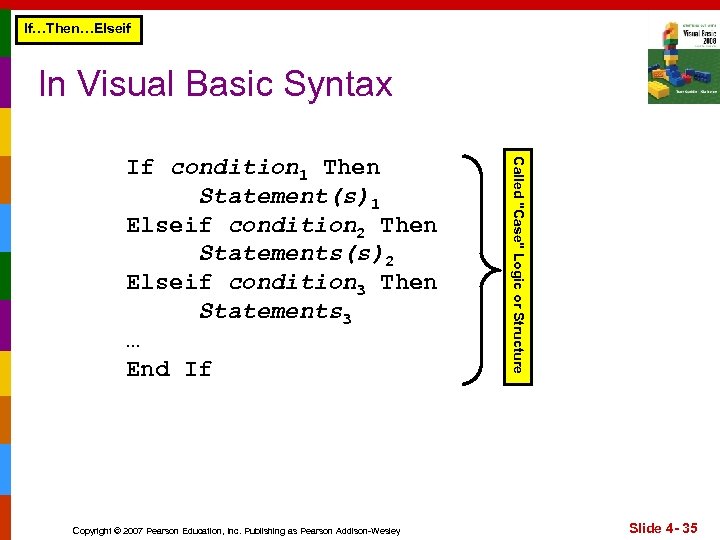 If…Then…Elseif In Visual Basic Syntax Copyright © 2007 Pearson Education, Inc. Publishing as Pearson Addison-Wesley Called "Case" Logic or Structure If condition 1 Then Statement(s)1 Elseif condition 2 Then Statements(s)2 Elseif condition 3 Then Statements 3 … End If Slide 4 - 35
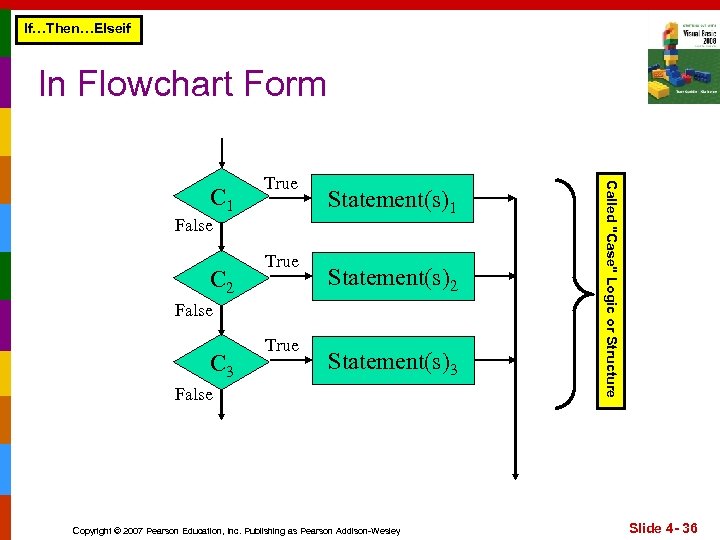 If…Then…Elseif In Flowchart Form False C 2 True Statement(s)1 Statement(s)2 False C 3 True Statement(s)3 False Copyright © 2007 Pearson Education, Inc. Publishing as Pearson Addison-Wesley Called "Case" Logic or Structure C 1 True Slide 4 - 36
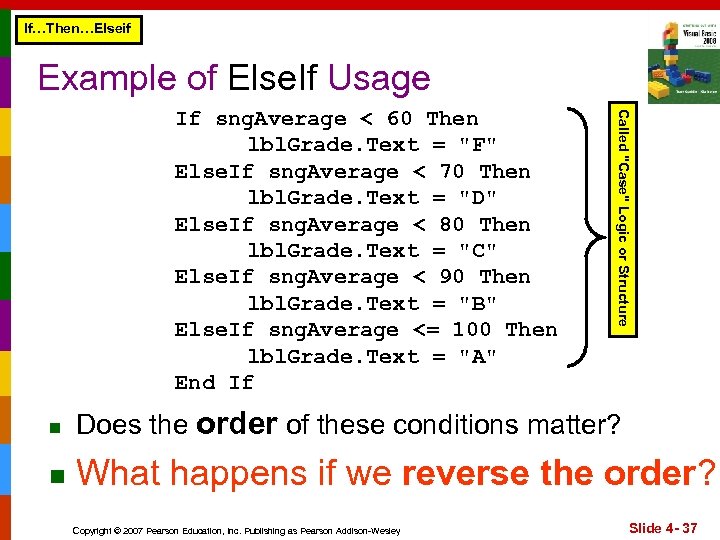 If…Then…Elseif Example of Else. If Usage Called "Case" Logic or Structure If sng. Average < 60 Then lbl. Grade. Text = "F" Else. If sng. Average < 70 Then lbl. Grade. Text = "D" Else. If sng. Average < 80 Then lbl. Grade. Text = "C" Else. If sng. Average < 90 Then lbl. Grade. Text = "B" Else. If sng. Average <= 100 Then lbl. Grade. Text = "A" End If n Does the order of these conditions matter? n What happens if we reverse the order? Copyright © 2007 Pearson Education, Inc. Publishing as Pearson Addison-Wesley Slide 4 - 37
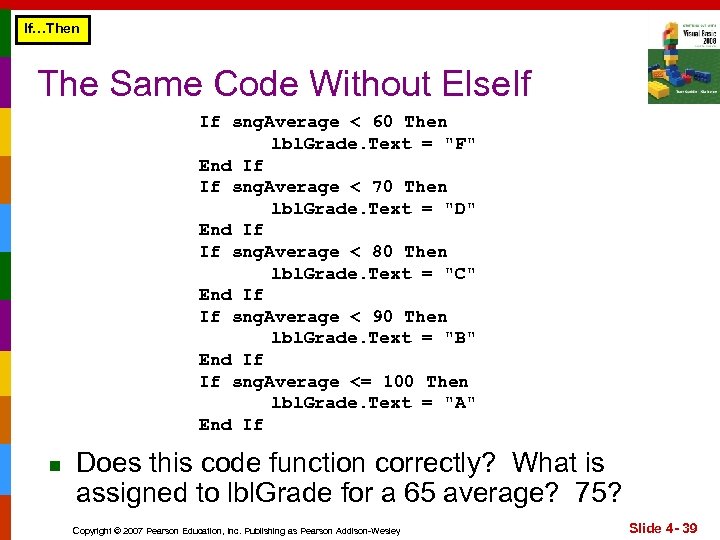 If…Then The Same Code Without Else. If If sng. Average < 60 Then lbl. Grade. Text = "F" End If If sng. Average < 70 Then lbl. Grade. Text = "D" End If If sng. Average < 80 Then lbl. Grade. Text = "C" End If If sng. Average < 90 Then lbl. Grade. Text = "B" End If If sng. Average <= 100 Then lbl. Grade. Text = "A" End If n Does this code function correctly? What is assigned to lbl. Grade for a 65 average? 75? Copyright © 2007 Pearson Education, Inc. Publishing as Pearson Addison-Wesley Slide 4 - 39
 If…Then…Elseif The (Optional) Trailing Else n n A sequence of Else. If’s may end with a plain Else, called a trailing Else If none of the conditions are True, the trailing Else statement(s) will be executed Copyright © 2007 Pearson Education, Inc. Publishing as Pearson Addison-Wesley Slide 4 - 40
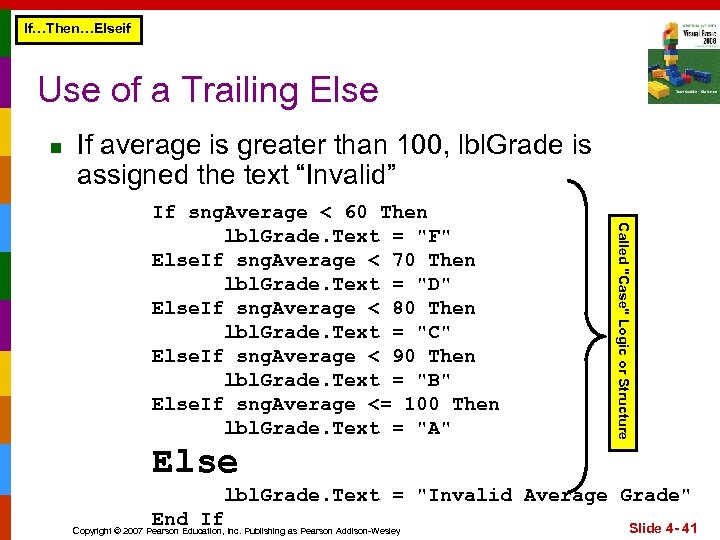 If…Then…Elseif Use of a Trailing Else n If average is greater than 100, lbl. Grade is assigned the text “Invalid” Called "Case" Logic or Structure If sng. Average < 60 Then lbl. Grade. Text = "F" Else. If sng. Average < 70 Then lbl. Grade. Text = "D" Else. If sng. Average < 80 Then lbl. Grade. Text = "C" Else. If sng. Average < 90 Then lbl. Grade. Text = "B" Else. If sng. Average <= 100 Then lbl. Grade. Text = "A" Else lbl. Grade. Text = "Invalid Average Grade" End If Copyright © 2007 Pearson Education, Inc. Publishing as Pearson Addison-Wesley Slide 4 - 41
 4. 5 Nested If Statements A Nested If Statement Is an If Statement in the Conditionally Executed Code of Another If Statement Copyright © 2007 Pearson Education, Inc. Publishing as Pearson Addison-Wesley
 If Statements Within If Statements n If statements within If statements create a more complex decision structure called a Nested If Copyright © 2007 Pearson Education, Inc. Publishing as Pearson Addison-Wesley Slide 4 - 43
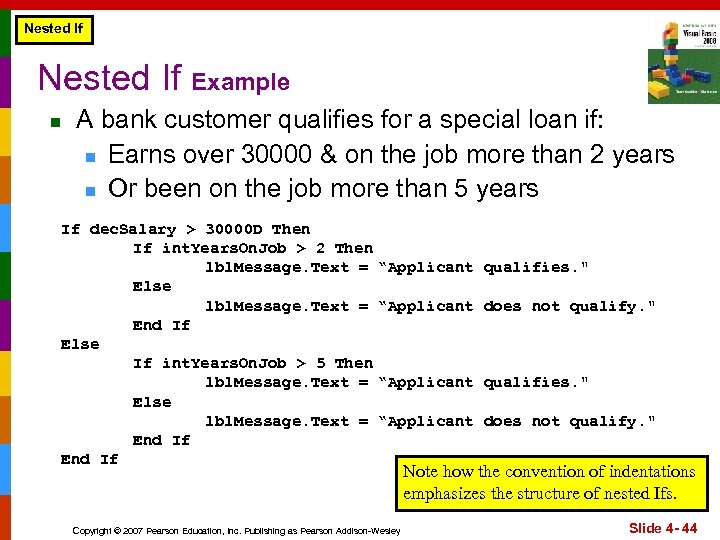 Nested If Example n A bank customer qualifies for a special loan if: n Earns over 30000 & on the job more than 2 years n Or been on the job more than 5 years If dec. Salary > 30000 D Then If int. Years. On. Job > 2 Then lbl. Message. Text = Else lbl. Message. Text = End If Else If int. Years. On. Job > 5 Then lbl. Message. Text = Else lbl. Message. Text = End If “Applicant qualifies. " “Applicant does not qualify. " Copyright © 2007 Pearson Education, Inc. Publishing as Pearson Addison-Wesley Note how the convention of indentations emphasizes the structure of nested Ifs. Slide 4 - 44
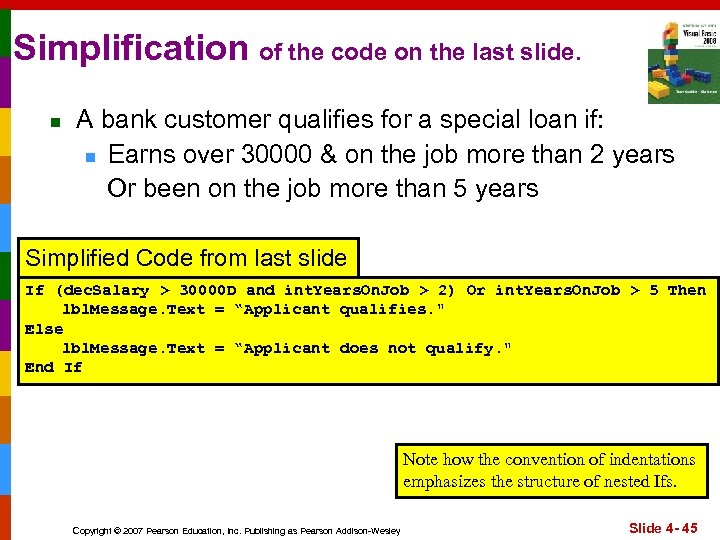 Simplification of the code on the last slide. n A bank customer qualifies for a special loan if: n Earns over 30000 & on the job more than 2 years Or been on the job more than 5 years Simplified Code from last slide If (dec. Salary > 30000 D and int. Years. On. Job > 2) Or int. Years. On. Job > 5 Then lbl. Message. Text = “Applicant qualifies. " Else lbl. Message. Text = “Applicant does not qualify. " End If Note how the convention of indentations emphasizes the structure of nested Ifs. Copyright © 2007 Pearson Education, Inc. Publishing as Pearson Addison-Wesley Slide 4 - 45
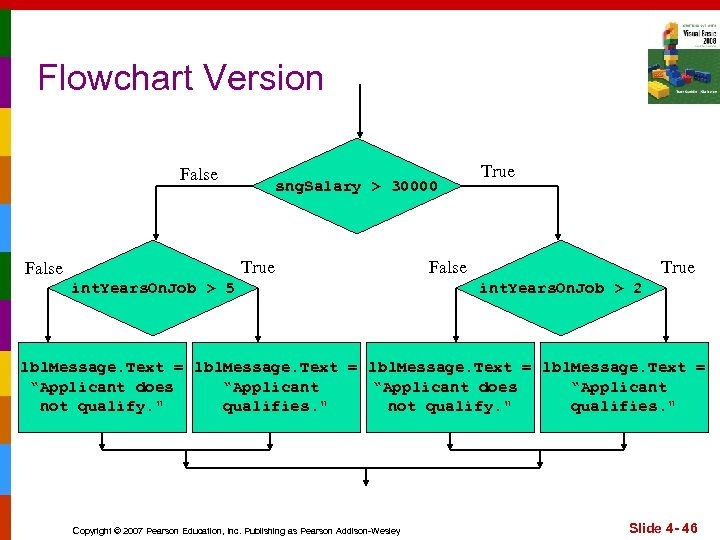 Flowchart Version False sng. Salary > 30000 True False int. Years. On. Job > 5 True False True int. Years. On. Job > 2 lbl. Message. Text = “Applicant does “Applicant not qualify. " qualifies. " Copyright © 2007 Pearson Education, Inc. Publishing as Pearson Addison-Wesley Slide 4 - 46
 4. 6 Logical Operators Combine Two or More Relational Expressions Into a Single Expression Copyright © 2007 Pearson Education, Inc. Publishing as Pearson Addison-Wesley
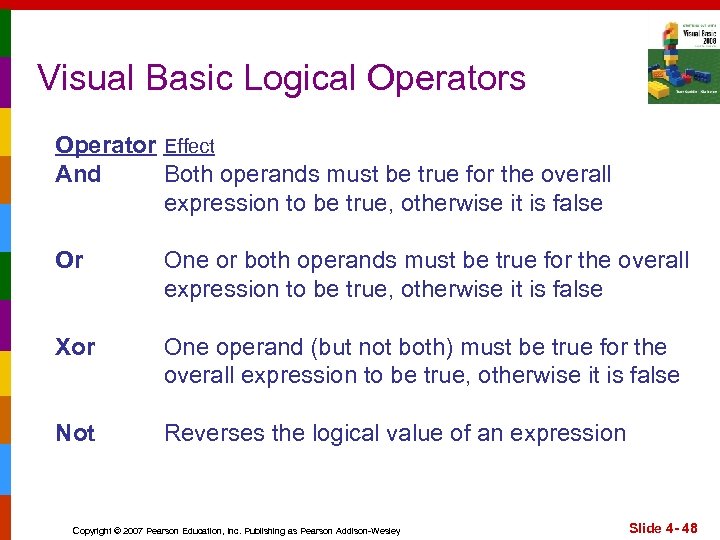 Visual Basic Logical Operators Operator Effect And Both operands must be true for the overall expression to be true, otherwise it is false Or One or both operands must be true for the overall expression to be true, otherwise it is false Xor One operand (but not both) must be true for the overall expression to be true, otherwise it is false Not Reverses the logical value of an expression Copyright © 2007 Pearson Education, Inc. Publishing as Pearson Addison-Wesley Slide 4 - 48
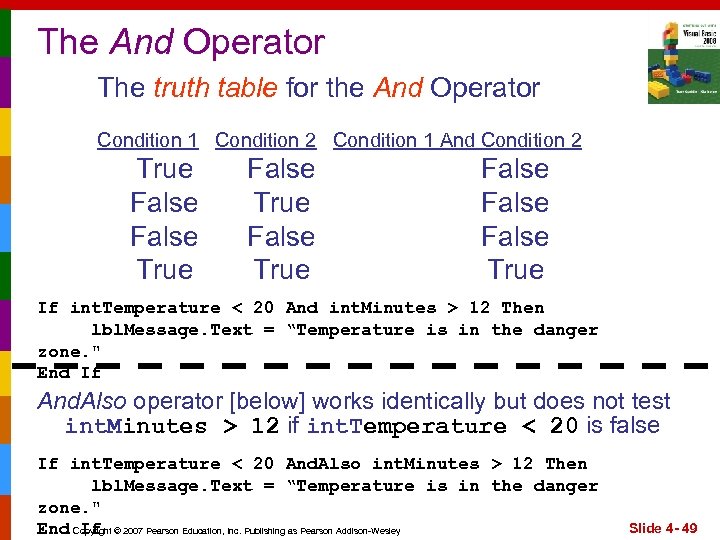 The And Operator The truth table for the And Operator Condition 1 Condition 2 Condition 1 And Condition 2 True False True False True If int. Temperature < 20 And int. Minutes > 12 Then lbl. Message. Text = “Temperature is in the danger zone. " End If And. Also operator [below] works identically but does not test int. Minutes > 12 if int. Temperature < 20 is false If int. Temperature < 20 And. Also int. Minutes > 12 Then lbl. Message. Text = “Temperature is in the danger zone. " End Copyright © 2007 Pearson Education, Inc. Publishing as Pearson Addison-Wesley If Slide 4 - 49
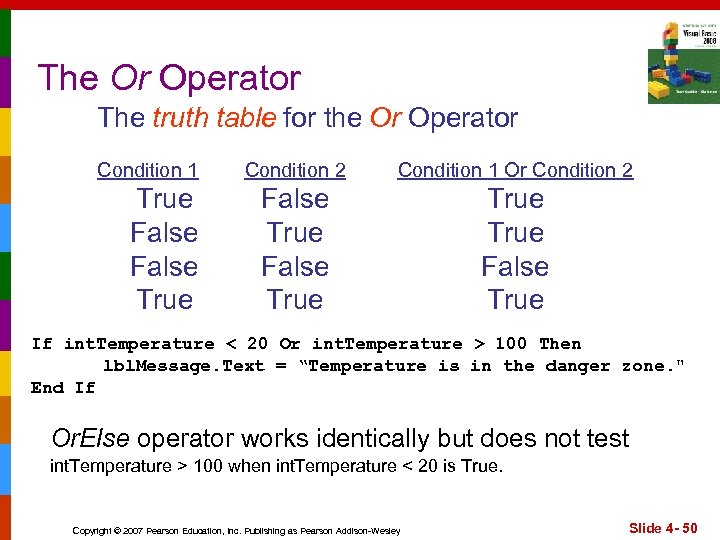 The Or Operator The truth table for the Or Operator Condition 1 True False True Condition 2 Condition 1 Or Condition 2 False True False True If int. Temperature < 20 Or int. Temperature > 100 Then lbl. Message. Text = “Temperature is in the danger zone. " End If Or. Else operator works identically but does not test int. Temperature > 100 when int. Temperature < 20 is True. Copyright © 2007 Pearson Education, Inc. Publishing as Pearson Addison-Wesley Slide 4 - 50
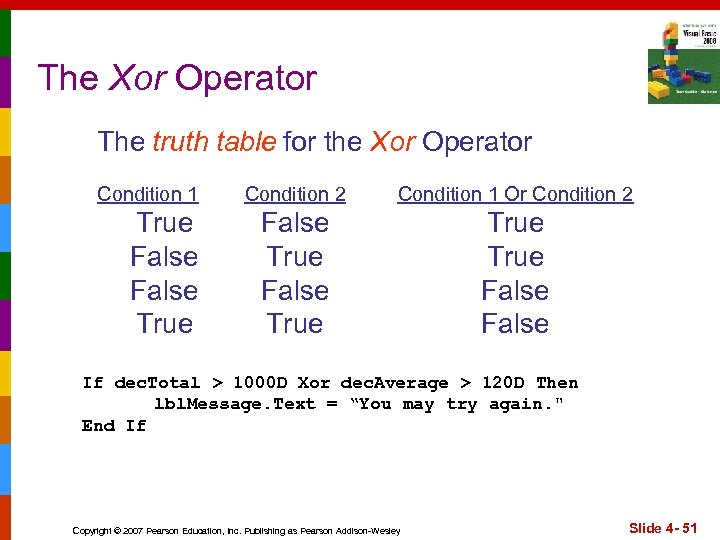 The Xor Operator The truth table for the Xor Operator Condition 1 True False True Condition 2 Condition 1 Or Condition 2 False True False If dec. Total > 1000 D Xor dec. Average > 120 D Then lbl. Message. Text = “You may try again. " End If Copyright © 2007 Pearson Education, Inc. Publishing as Pearson Addison-Wesley Slide 4 - 51
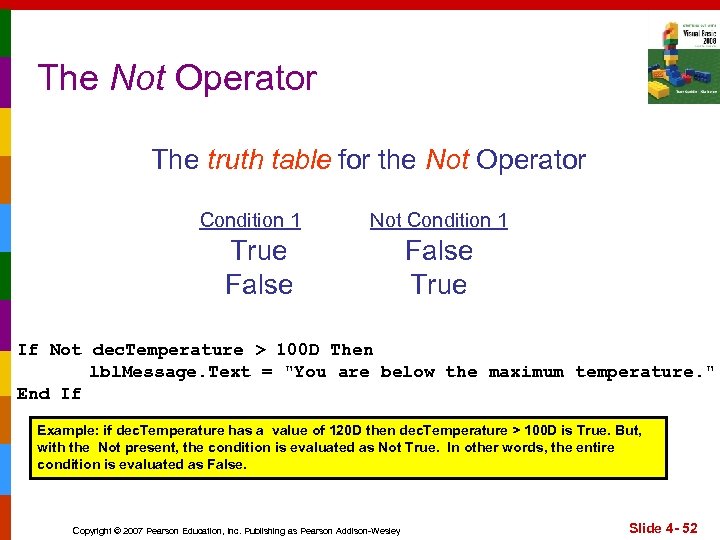 The Not Operator The truth table for the Not Operator Condition 1 Not Condition 1 True False True If Not dec. Temperature > 100 D Then lbl. Message. Text = "You are below the maximum temperature. " End If Example: if dec. Temperature has a value of 120 D then dec. Temperature > 100 D is True. But, with the Not present, the condition is evaluated as Not True. In other words, the entire condition is evaluated as False. Copyright © 2007 Pearson Education, Inc. Publishing as Pearson Addison-Wesley Slide 4 - 52
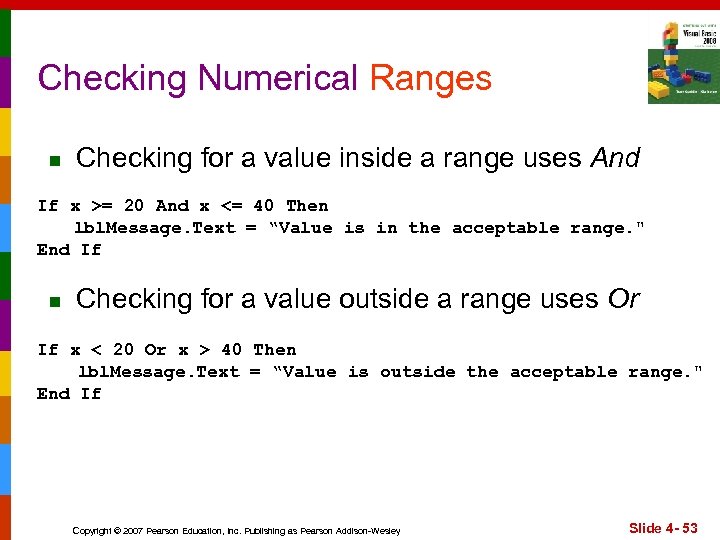 Checking Numerical Ranges n Checking for a value inside a range uses And If x >= 20 And x <= 40 Then lbl. Message. Text = “Value is in the acceptable range. " End If n Checking for a value outside a range uses Or If x < 20 Or x > 40 Then lbl. Message. Text = “Value is outside the acceptable range. " End If Copyright © 2007 Pearson Education, Inc. Publishing as Pearson Addison-Wesley Slide 4 - 53
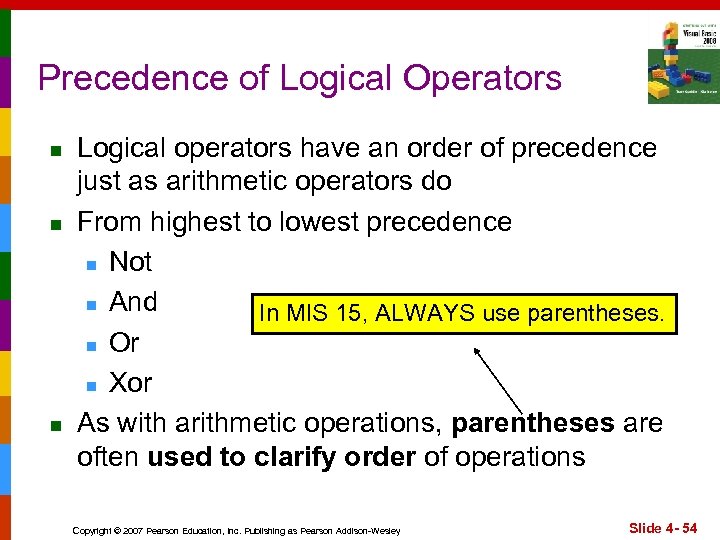 Precedence of Logical Operators n n n Logical operators have an order of precedence just as arithmetic operators do From highest to lowest precedence n Not n And In MIS 15, ALWAYS use parentheses. n Or n Xor As with arithmetic operations, parentheses are often used to clarify order of operations Copyright © 2007 Pearson Education, Inc. Publishing as Pearson Addison-Wesley Slide 4 - 54
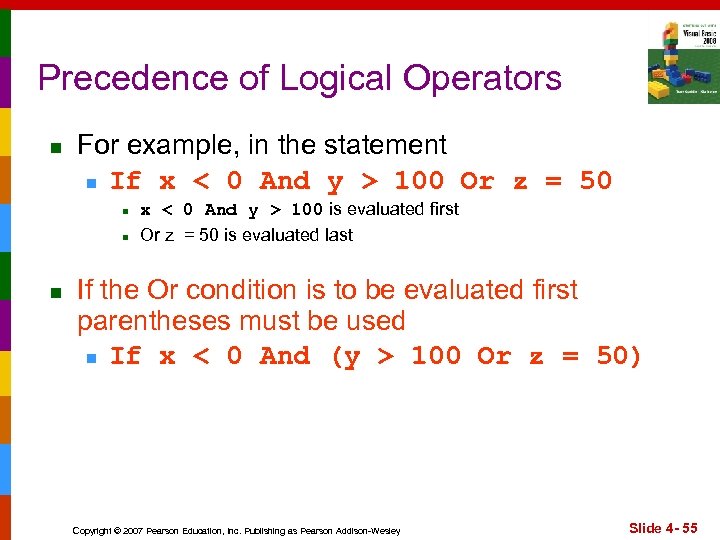 Precedence of Logical Operators n For example, in the statement n If x < 0 And y > 100 Or z = 50 n n n x < 0 And y > 100 is evaluated first Or z = 50 is evaluated last If the Or condition is to be evaluated first parentheses must be used n If x < 0 And (y > 100 Or z = 50) Copyright © 2007 Pearson Education, Inc. Publishing as Pearson Addison-Wesley Slide 4 - 55
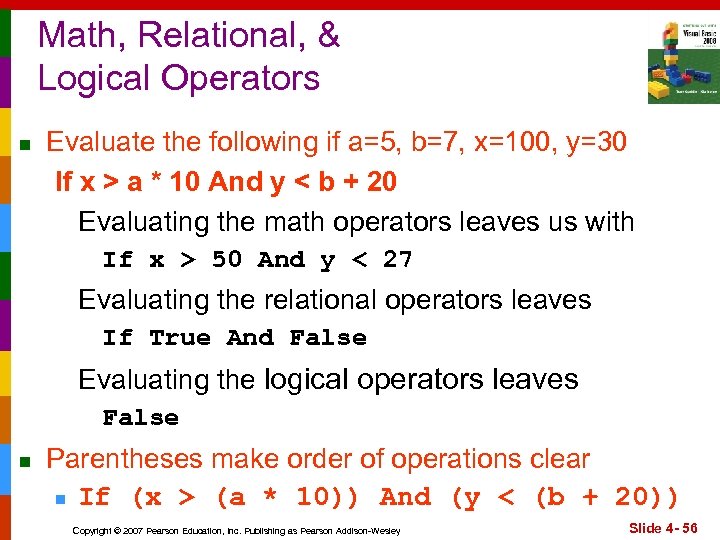 Math, Relational, & Logical Operators n Evaluate the following if a=5, b=7, x=100, y=30 If x > a * 10 And y < b + 20 Evaluating the math operators leaves us with If x > 50 And y < 27 Evaluating the relational operators leaves If True And False Evaluating the logical operators leaves False n Parentheses make order of operations clear n If (x > (a * 10)) And (y < (b + 20)) Copyright © 2007 Pearson Education, Inc. Publishing as Pearson Addison-Wesley Slide 4 - 56
 Comparing Numeric Variables and Constants Notes by Dr. Scanlan Slides 57 to 67 Copyright © 2007 Pearson Education, Inc. Publishing as Pearson Addison-Wesley
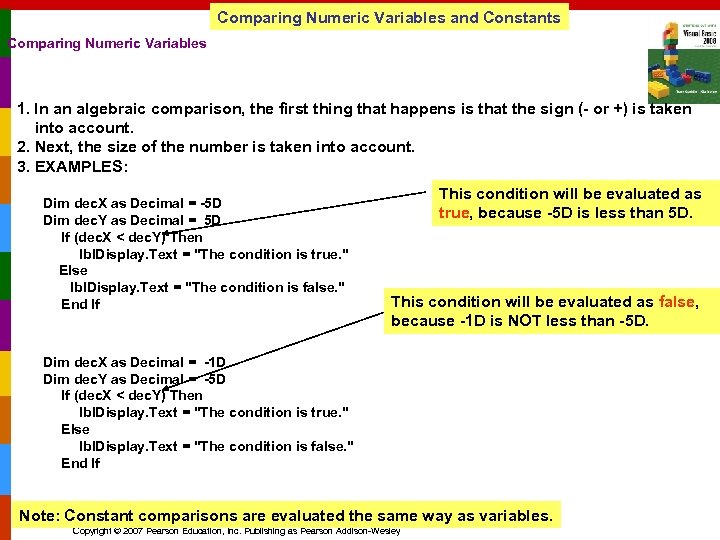 Comparing Numeric Variables and Constants Comparing Numeric Variables 1. In an algebraic comparison, the first thing that happens is that the sign (- or +) is taken into account. 2. Next, the size of the number is taken into account. 3. EXAMPLES: Dim dec. X as Decimal = -5 D Dim dec. Y as Decimal = 5 D If (dec. X < dec. Y) Then lbl. Display. Text = "The condition is true. " Else lbl. Display. Text = "The condition is false. " End If This condition will be evaluated as true, because -5 D is less than 5 D. This condition will be evaluated as false, because -1 D is NOT less than -5 D. Dim dec. X as Decimal = -1 D Dim dec. Y as Decimal = -5 D If (dec. X < dec. Y) Then lbl. Display. Text = "The condition is true. " Else lbl. Display. Text = "The condition is false. " End If Note: Constant comparisons are evaluated the same way as variables. Copyright © 2007 Pearson Education, Inc. Publishing as Pearson Addison-Wesley
 Comparing Strings Notes by Dr. Scanlan Slides 57 to 67 Copyright © 2007 Pearson Education, Inc. Publishing as Pearson Addison-Wesley
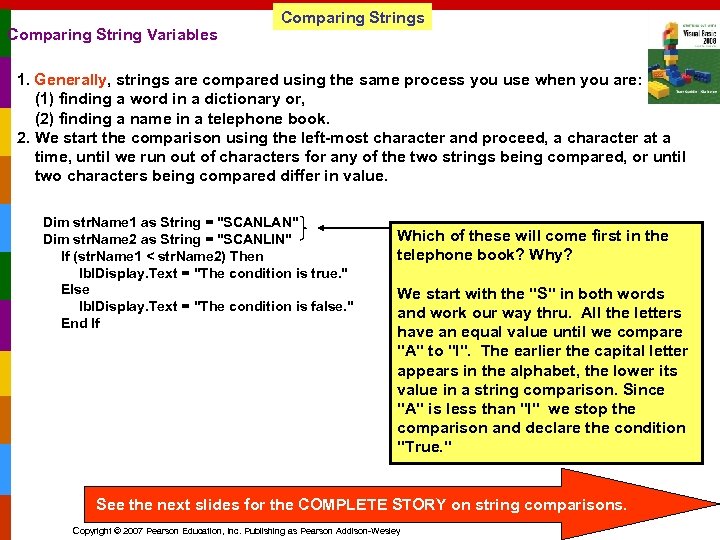 Comparing String Variables Comparing Strings 1. Generally, strings are compared using the same process you use when you are: (1) finding a word in a dictionary or, (2) finding a name in a telephone book. 2. We start the comparison using the left-most character and proceed, a character at a time, until we run out of characters for any of the two strings being compared, or until two characters being compared differ in value. Dim str. Name 1 as String = "SCANLAN" Dim str. Name 2 as String = "SCANLIN" If (str. Name 1 < str. Name 2) Then lbl. Display. Text = "The condition is true. " Else lbl. Display. Text = "The condition is false. " End If Which of these will come first in the telephone book? Why? We start with the "S" in both words and work our way thru. All the letters have an equal value until we compare "A" to "I". The earlier the capital letter appears in the alphabet, the lower its value in a string comparison. Since "A" is less than "I" we stop the comparison and declare the condition "True. " See the next slides for the COMPLETE STORY on string comparisons. Copyright © 2007 Pearson Education, Inc. Publishing as Pearson Addison-Wesley
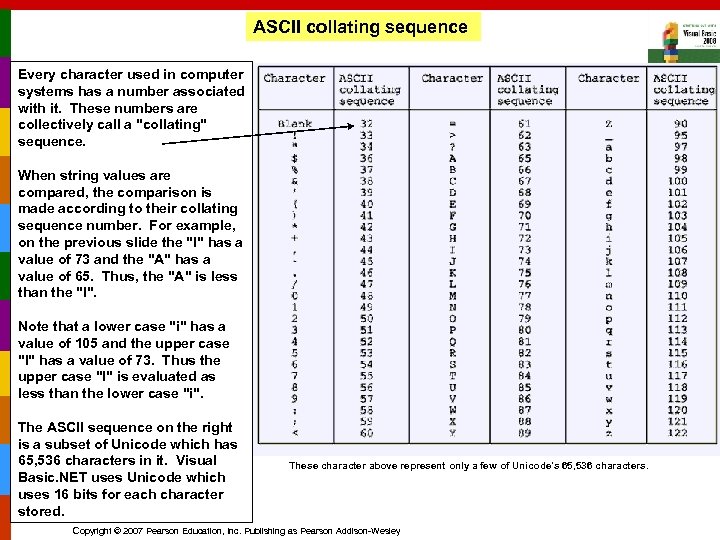 ASCII collating sequence Every character used in computer systems has a number associated with it. These numbers are collectively call a "collating" sequence. When string values are compared, the comparison is made according to their collating sequence number. For example, on the previous slide the "I" has a value of 73 and the "A" has a value of 65. Thus, the "A" is less than the "I". Note that a lower case "i" has a value of 105 and the upper case "I" has a value of 73. Thus the upper case "I" is evaluated as less than the lower case "i". The ASCII sequence on the right is a subset of Unicode which has 65, 536 characters in it. Visual Basic. NET uses Unicode which uses 16 bits for each character stored. These character above represent only a few of Unicode's 65, 536 characters. Copyright © 2007 Pearson Education, Inc. Publishing as Pearson Addison-Wesley
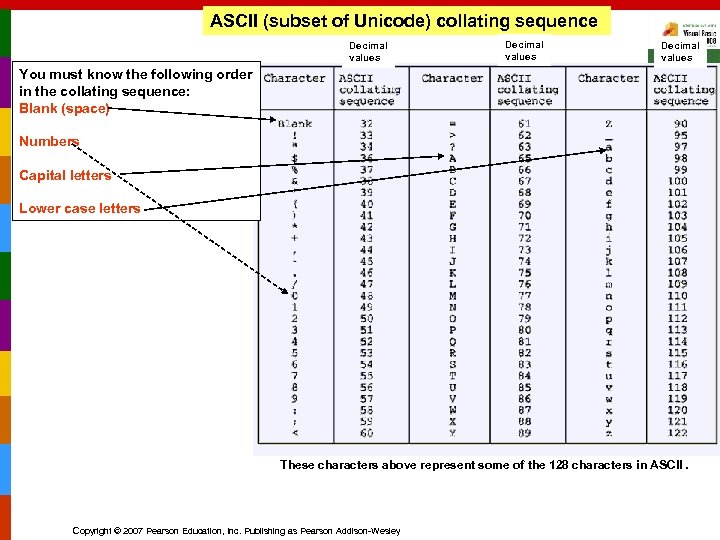 ASCII (subset of Unicode) collating sequence Decimal values You must know the following order in the collating sequence: Blank (space) Numbers Capital letters Lower case letters These characters above represent some of the 128 characters in ASCII. Copyright © 2007 Pearson Education, Inc. Publishing as Pearson Addison-Wesley
 How Characters in a String are Stored in Memory Copyright © 2007 Pearson Education, Inc. Publishing as Pearson Addison-Wesley
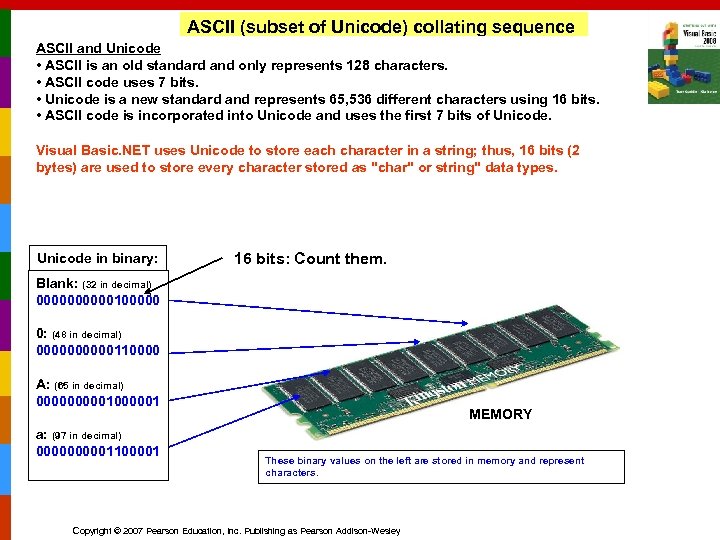 ASCII (subset of Unicode) collating sequence ASCII and Unicode • ASCII is an old standard and only represents 128 characters. • ASCII code uses 7 bits. • Unicode is a new standard and represents 65, 536 different characters using 16 bits. • ASCII code is incorporated into Unicode and uses the first 7 bits of Unicode. Visual Basic. NET uses Unicode to store each character in a string; thus, 16 bits (2 bytes) are used to store every character stored as "char" or string" data types. Unicode in binary: 16 bits: Count them. Blank: (32 in decimal) 00000100000 0: (48 in decimal) 00000110000 A: (65 in decimal) 000001000001 a: (97 in decimal) 000001100001 MEMORY These binary values on the left are stored in memory and represent characters. Copyright © 2007 Pearson Education, Inc. Publishing as Pearson Addison-Wesley
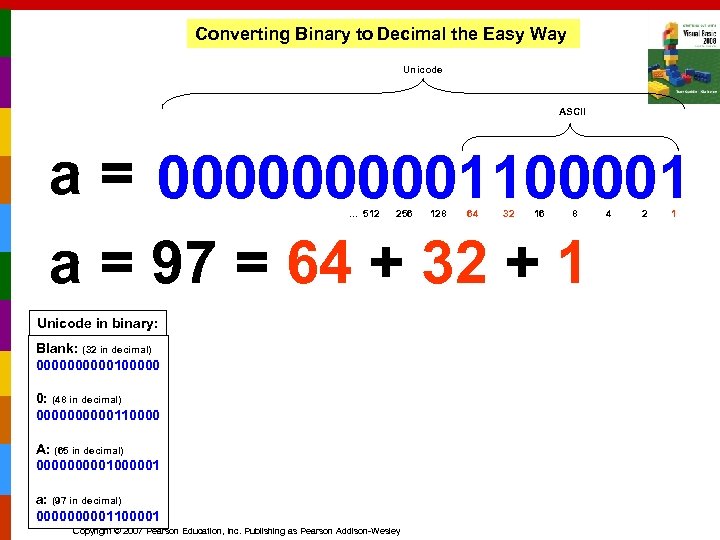 Converting Binary to Decimal the Easy Way Unicode ASCII a = 000001100001 a = 97 = 64 + 32 + 1. . . 512 256 Unicode in binary: Blank: (32 in decimal) 00000100000 0: (48 in decimal) 00000110000 A: (65 in decimal) 000001000001 a: (97 in decimal) 000001100001 Copyright © 2007 Pearson Education, Inc. Publishing as Pearson Addison-Wesley 128 64 32 16 8 4 2 1
 How Characters in a String are "Really" Compared Notes by Dr. Scanlan Slides 57 to 67 Copyright © 2007 Pearson Education, Inc. Publishing as Pearson Addison-Wesley
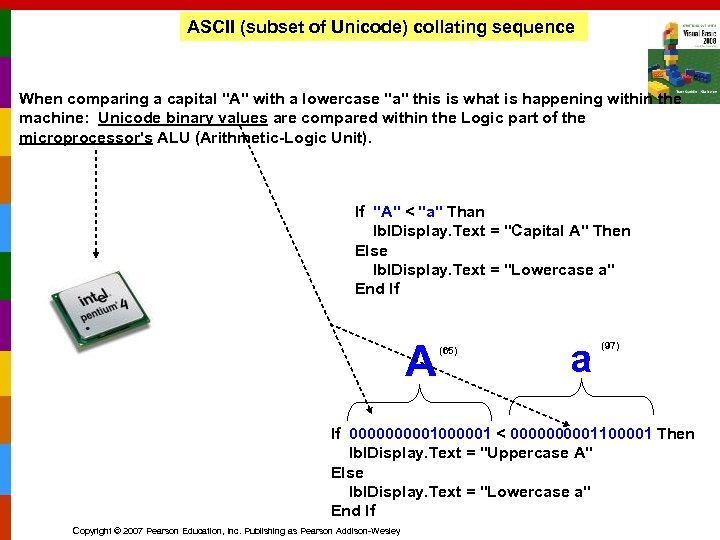 ASCII (subset of Unicode) collating sequence When comparing a capital "A" with a lowercase "a" this is what is happening within the machine: Unicode binary values are compared within the Logic part of the microprocessor's ALU (Arithmetic-Logic Unit). If "A" < "a" Than lbl. Display. Text = "Capital A" Then Else lbl. Display. Text = "Lowercase a" End If A (65) a (97) If 000001000001 < 000001100001 Then lbl. Display. Text = "Uppercase A" Else lbl. Display. Text = "Lowercase a" End If Copyright © 2007 Pearson Education, Inc. Publishing as Pearson Addison-Wesley
 4. 7 Comparing, Testing, and Working With Strings This Section Shows You How to Use Relational Operators to Compare Strings, and Discusses Several Intrinsic Functions That Perform Tests and Manipulations on Strings Copyright © 2007 Pearson Education, Inc. Publishing as Pearson Addison-Wesley
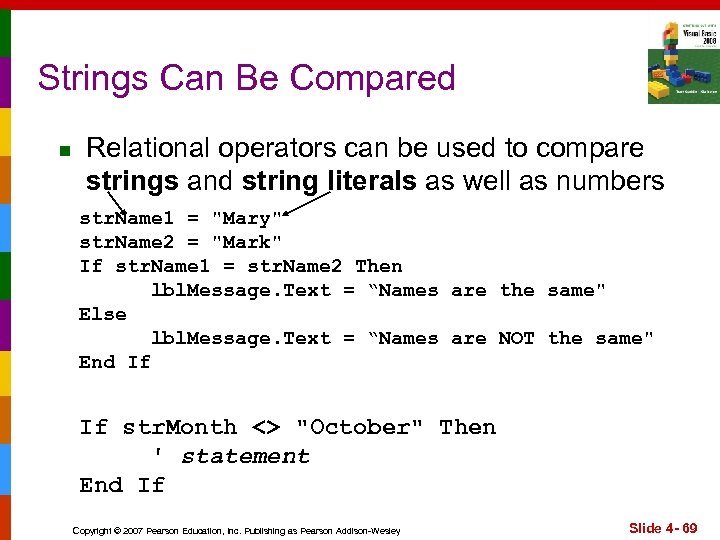 Strings Can Be Compared n Relational operators can be used to compare strings and string literals as well as numbers str. Name 1 = "Mary" str. Name 2 = "Mark" If str. Name 1 = str. Name 2 Then lbl. Message. Text = “Names are the same" Else lbl. Message. Text = “Names are NOT the same" End If If str. Month <> "October" Then ' statement End If Copyright © 2007 Pearson Education, Inc. Publishing as Pearson Addison-Wesley Slide 4 - 69
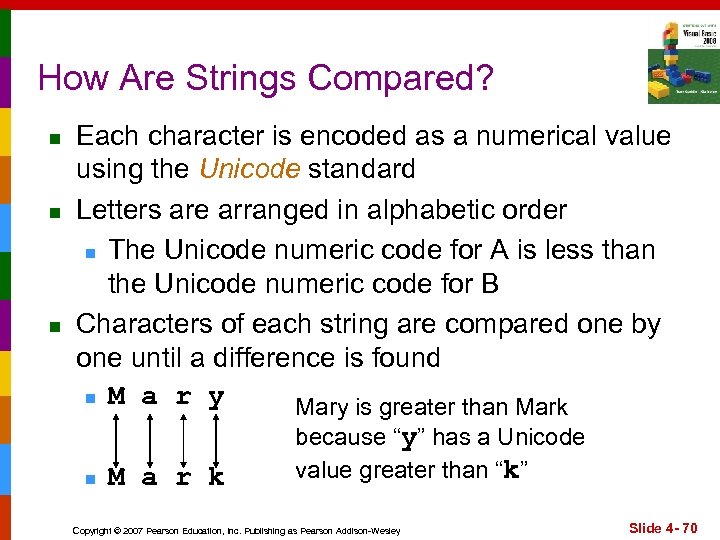 How Are Strings Compared? n n n Each character is encoded as a numerical value using the Unicode standard Letters are arranged in alphabetic order n The Unicode numeric code for A is less than the Unicode numeric code for B Characters of each string are compared one by one until a difference is found n M a r y Mary is greater than Mark because “y” has a Unicode value greater than “k” n M a r k Copyright © 2007 Pearson Education, Inc. Publishing as Pearson Addison-Wesley Slide 4 - 70
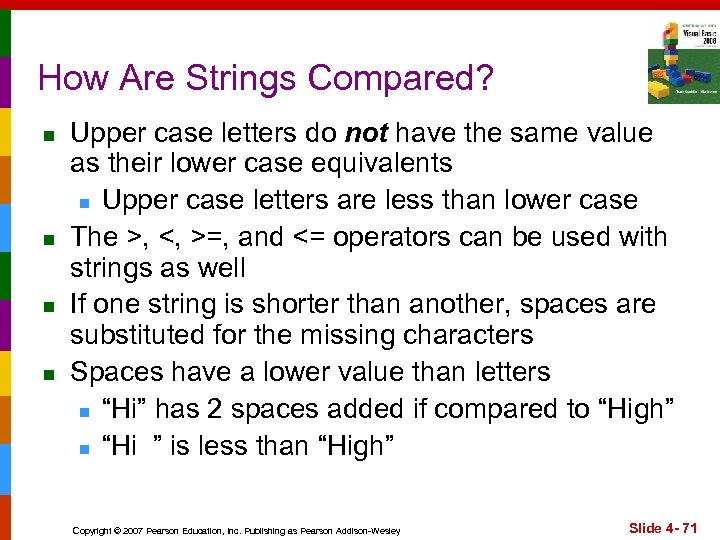 How Are Strings Compared? n n Upper case letters do not have the same value as their lower case equivalents n Upper case letters are less than lower case The >, <, >=, and <= operators can be used with strings as well If one string is shorter than another, spaces are substituted for the missing characters Spaces have a lower value than letters n “Hi” has 2 spaces added if compared to “High” n “Hi ” is less than “High” Copyright © 2007 Pearson Education, Inc. Publishing as Pearson Addison-Wesley Slide 4 - 71
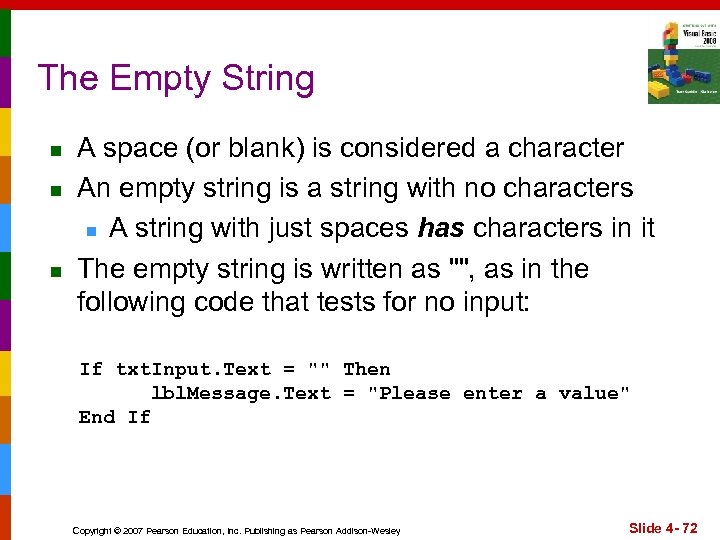 The Empty String n n n A space (or blank) is considered a character An empty string is a string with no characters n A string with just spaces has characters in it The empty string is written as "", as in the following code that tests for no input: If txt. Input. Text = "" Then lbl. Message. Text = "Please enter a value" End If Copyright © 2007 Pearson Education, Inc. Publishing as Pearson Addison-Wesley Slide 4 - 72
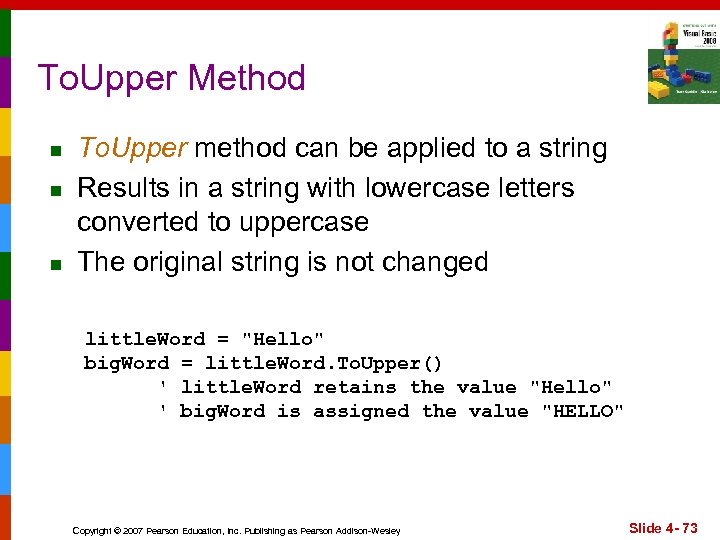 To. Upper Method n n n To. Upper method can be applied to a string Results in a string with lowercase letters converted to uppercase The original string is not changed little. Word = "Hello" big. Word = little. Word. To. Upper() ' little. Word retains the value "Hello" ' big. Word is assigned the value "HELLO" Copyright © 2007 Pearson Education, Inc. Publishing as Pearson Addison-Wesley Slide 4 - 73
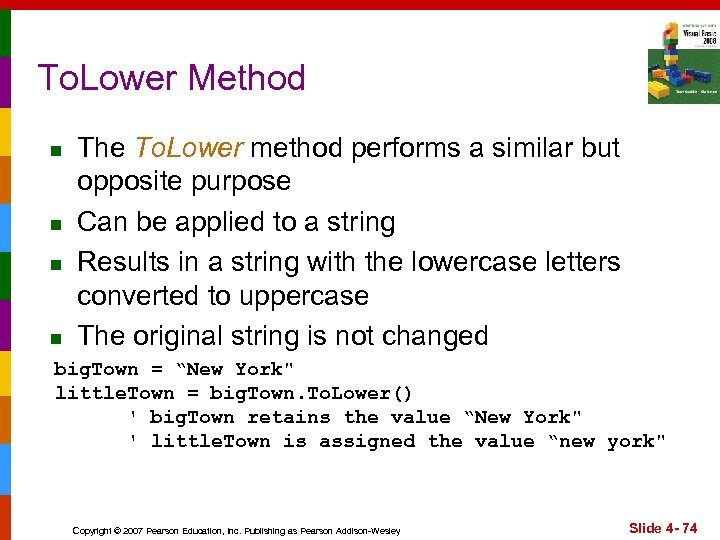 To. Lower Method n n The To. Lower method performs a similar but opposite purpose Can be applied to a string Results in a string with the lowercase letters converted to uppercase The original string is not changed big. Town = “New York" little. Town = big. Town. To. Lower() ' big. Town retains the value “New York" ' little. Town is assigned the value “new york" Copyright © 2007 Pearson Education, Inc. Publishing as Pearson Addison-Wesley Slide 4 - 74
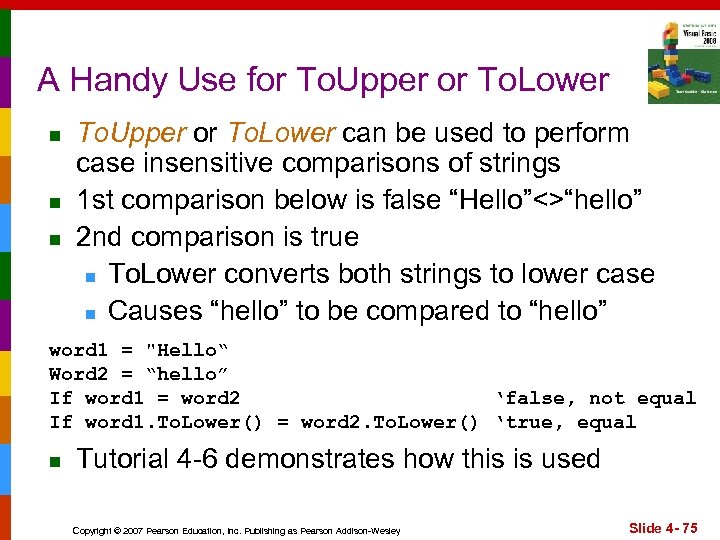 A Handy Use for To. Upper or To. Lower n n n To. Upper or To. Lower can be used to perform case insensitive comparisons of strings 1 st comparison below is false “Hello”<>“hello” 2 nd comparison is true n To. Lower converts both strings to lower case n Causes “hello” to be compared to “hello” word 1 = "Hello“ Word 2 = “hello” If word 1 = word 2 ‘false, not equal If word 1. To. Lower() = word 2. To. Lower() ‘true, equal n Tutorial 4 -6 demonstrates how this is used Copyright © 2007 Pearson Education, Inc. Publishing as Pearson Addison-Wesley Slide 4 - 75
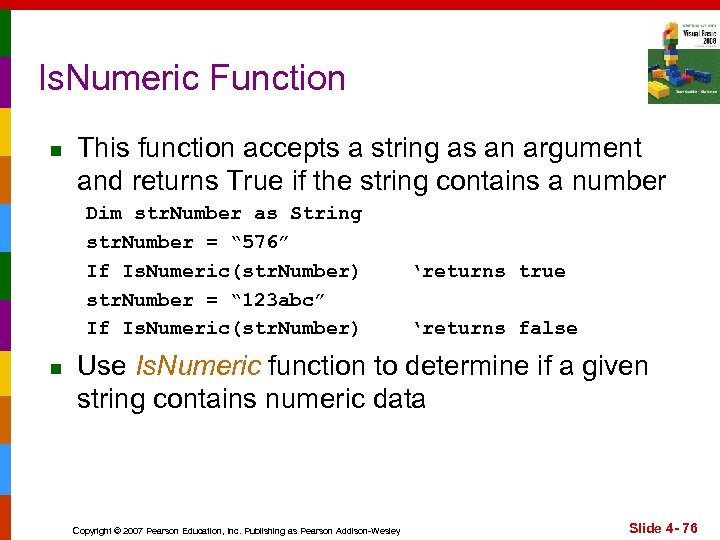 Is. Numeric Function n This function accepts a string as an argument and returns True if the string contains a number Dim str. Number as String str. Number = “ 576” If Is. Numeric(str. Number) str. Number = “ 123 abc” If Is. Numeric(str. Number) n ‘returns true ‘returns false Use Is. Numeric function to determine if a given string contains numeric data Copyright © 2007 Pearson Education, Inc. Publishing as Pearson Addison-Wesley Slide 4 - 76
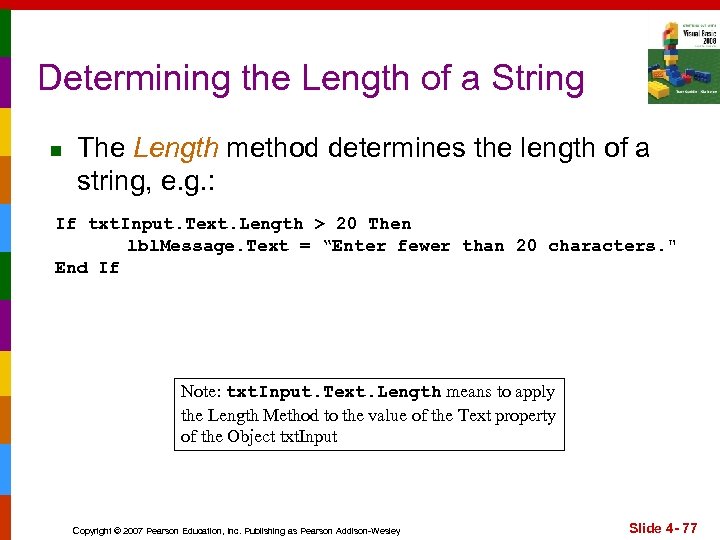 Determining the Length of a String n The Length method determines the length of a string, e. g. : If txt. Input. Text. Length > 20 Then lbl. Message. Text = “Enter fewer than 20 characters. " End If Note: txt. Input. Text. Length means to apply the Length Method to the value of the Text property of the Object txt. Input Copyright © 2007 Pearson Education, Inc. Publishing as Pearson Addison-Wesley Slide 4 - 77
 Trimming Spaces from Strings n There are three Methods that remove spaces from strings: n Trim. Start – removes leading spaces n Trim. End – removes trailing spaces n Trim – removes leading and trailing spaces greeting = " Hello " lbl. Message 1. Text = greeting. Trim. Start() ' Returns the value "Hello " lbl. Message 1. Text = greeting. Trim() ‘ Returns the value "Hello" Copyright © 2007 Pearson Education, Inc. Publishing as Pearson Addison-Wesley Slide 4 - 78
 The Substring Method n n The Substring method returns a portion of a string or a “string within a string” (a substring) Each character position is numbered sequentially with the 1 st character referred to as position zero String. Expression. Substring(Start) n returns the characters from the Start position to the end String. Expression. Substring(Start, Length) n returns the number of characters specified by Length beginning with the Start position Copyright © 2007 Pearson Education, Inc. Publishing as Pearson Addison-Wesley Slide 4 - 79
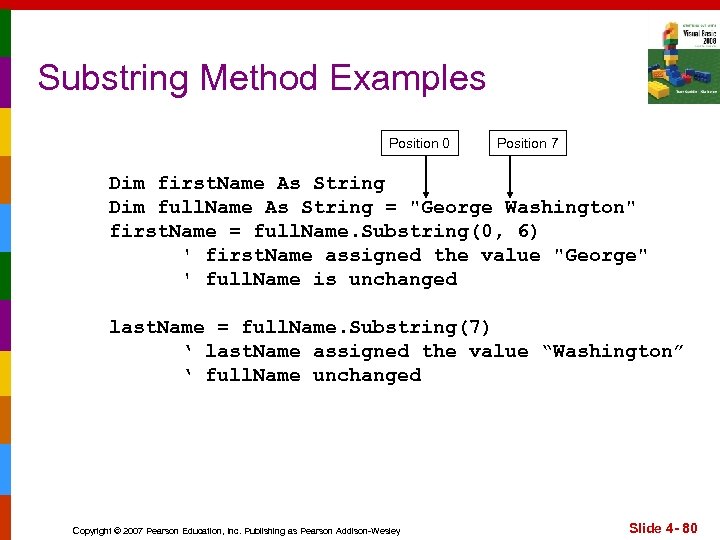 Substring Method Examples Position 0 Position 7 Dim first. Name As String Dim full. Name As String = "George Washington" first. Name = full. Name. Substring(0, 6) ' first. Name assigned the value "George" ' full. Name is unchanged last. Name = full. Name. Substring(7) ‘ last. Name assigned the value “Washington” ‘ full. Name unchanged Copyright © 2007 Pearson Education, Inc. Publishing as Pearson Addison-Wesley Slide 4 - 80
 Search for a String Within a String n n Use the Index. Of method String. Expression. Index. Of(Searchstring) n Searches the entire string for Searchstring String. Expression. Index. Of(Search. String, Start) n Starts at the character position Start and searches for Searchstring from that point String. Expr. Index. Of(Search. String, Start, Count) n Starts at the character position Start and searches Count characters for Search. String Copyright © 2007 Pearson Education, Inc. Publishing as Pearson Addison-Wesley Slide 4 - 81
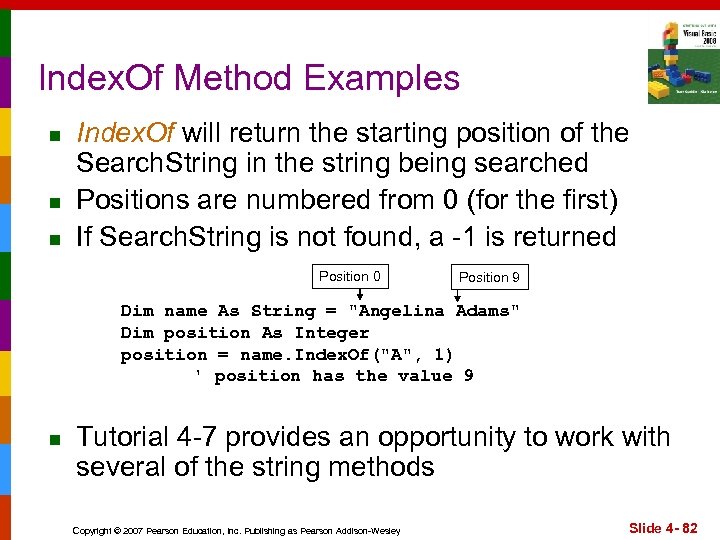 Index. Of Method Examples n n n Index. Of will return the starting position of the Search. String in the string being searched Positions are numbered from 0 (for the first) If Search. String is not found, a -1 is returned Position 0 Position 9 Dim name As String = "Angelina Adams" Dim position As Integer position = name. Index. Of("A", 1) ' position has the value 9 n Tutorial 4 -7 provides an opportunity to work with several of the string methods Copyright © 2007 Pearson Education, Inc. Publishing as Pearson Addison-Wesley Slide 4 - 82
 4. 8 The Message Box Sometimes You Need a Convenient Way to Display a Message to the User This Section Discusses the Messagebox. Show Method, Which Allows You to Display a Message in a Dialog Box Copyright © 2007 Pearson Education, Inc. Publishing as Pearson Addison-Wesley
 Message Box Arguments n n A message box is a dialog box with a user message in a pop-up window The following can be specified n Message - text to display within the box n Caption - title for the top bar of the box n Buttons - indicates which buttons to display n Icon - indicates icon to display n Default. Button - indicates which button corresponds to the Return Key n All arguments but the Message are optional n Use of an argument requires those before it Copyright © 2007 Pearson Education, Inc. Publishing as Pearson Addison-Wesley Slide 4 - 84
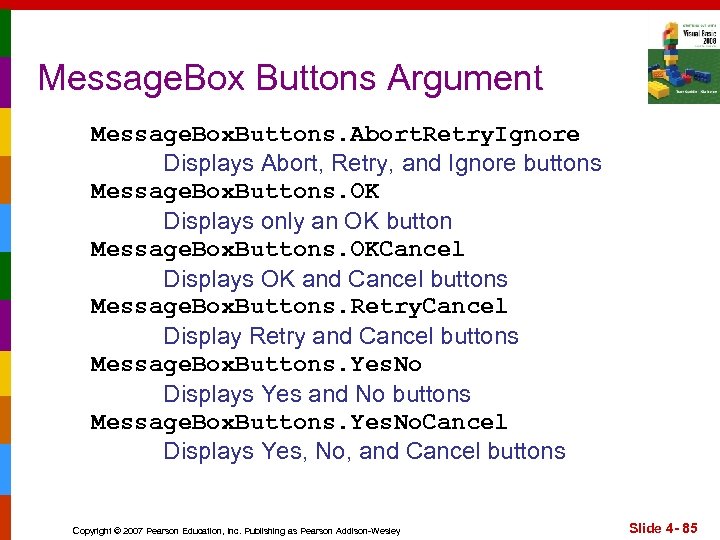 Message. Box Buttons Argument Message. Box. Buttons. Abort. Retry. Ignore Displays Abort, Retry, and Ignore buttons Message. Box. Buttons. OK Displays only an OK button Message. Box. Buttons. OKCancel Displays OK and Cancel buttons Message. Box. Buttons. Retry. Cancel Display Retry and Cancel buttons Message. Box. Buttons. Yes. No Displays Yes and No buttons Message. Box. Buttons. Yes. No. Cancel Displays Yes, No, and Cancel buttons Copyright © 2007 Pearson Education, Inc. Publishing as Pearson Addison-Wesley Slide 4 - 85
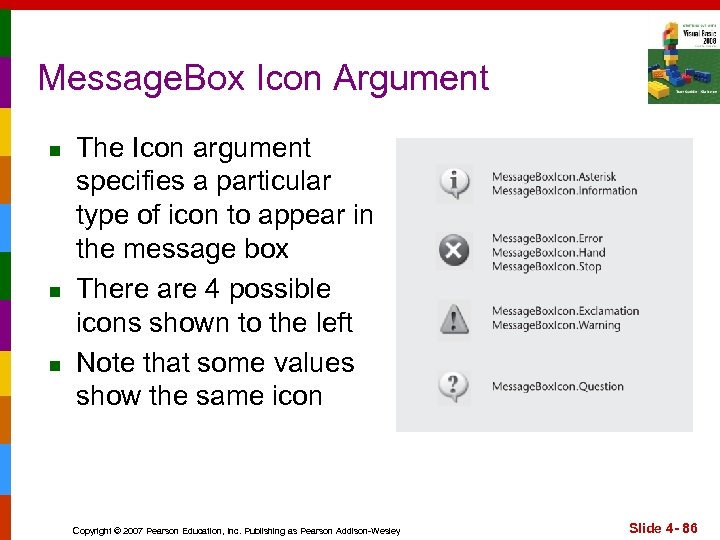 Message. Box Icon Argument n n n The Icon argument specifies a particular type of icon to appear in the message box There are 4 possible icons shown to the left Note that some values show the same icon Copyright © 2007 Pearson Education, Inc. Publishing as Pearson Addison-Wesley Slide 4 - 86
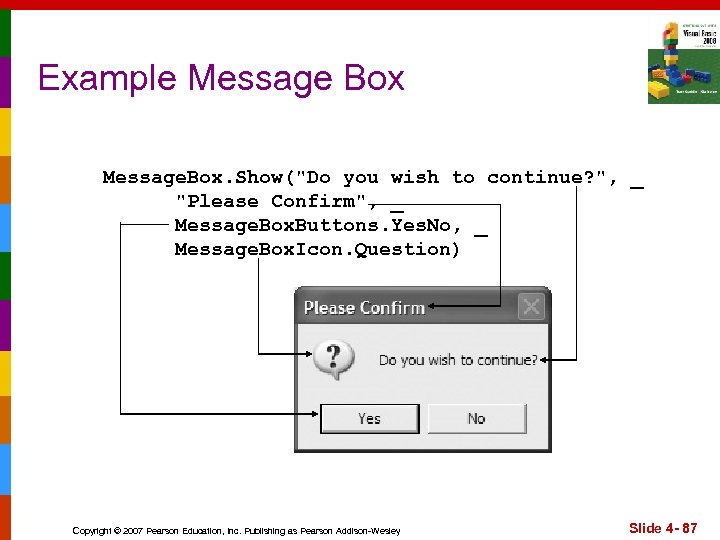 Example Message Box Message. Box. Show("Do you wish to continue? ", _ "Please Confirm", _ Message. Box. Buttons. Yes. No, _ Message. Box. Icon. Question) Copyright © 2007 Pearson Education, Inc. Publishing as Pearson Addison-Wesley Slide 4 - 87
 Which Button Was Clicked n Message. Box returns a value indicating which button the user clicked: n Dialog. Result. Abort n Dialog. Result. Cancel n Dialog. Result. Ignore n Dialog. Result. No n Dialog. Result. OK n Dialog. Result. Retry n Dialog. Result. Yes Copyright © 2007 Pearson Education, Inc. Publishing as Pearson Addison-Wesley Slide 4 - 88
 Which Button Was Clicked Example Dim result As Integer result = Message. Box. Show("Do you wish to continue? ", _ "Please Confirm", Message. Box. Buttons. Yes. No) If result = Dialog. Result. Yes Then ' Perform an action here Else. If result = Dialog. Result. No Then ' Perform another action here End If Copyright © 2007 Pearson Education, Inc. Publishing as Pearson Addison-Wesley Slide 4 - 89
 4. 9 The Select Case Statement In a Select Case Statement, One of Several Possible Actions Is Taken, Depending on the Value of an Expression Copyright © 2007 Pearson Education, Inc. Publishing as Pearson Addison-Wesley
 Select Case Statement n Similar to If…Then…Else. If Performs a series of tests n Conditionally executes the first true condition Select Case is different in that: n A single test expression may be evaluated n The test expression is listed once n The possible values of the expression are then listed with their conditional statements Case Else may be included and executed if none of the values match the expression n Copyright © 2007 Pearson Education, Inc. Publishing as Pearson Addison-Wesley Slide 4 - 91
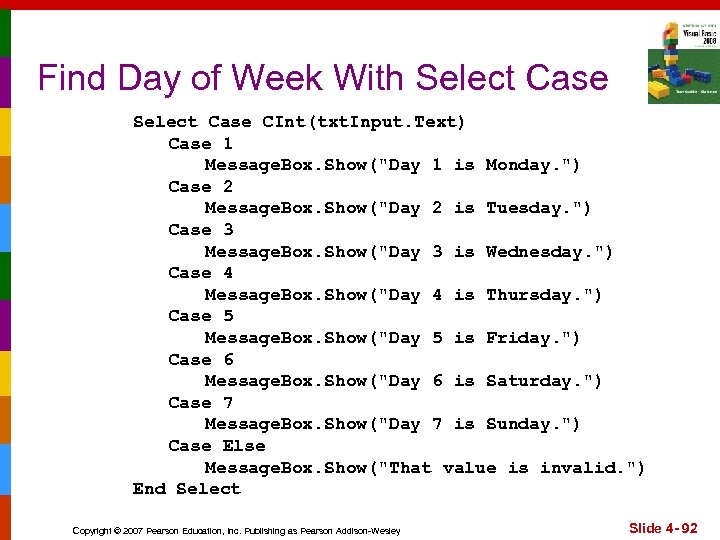 Find Day of Week With Select Case CInt(txt. Input. Text) Case 1 Message. Box. Show("Day 1 is Monday. ") Case 2 Message. Box. Show("Day 2 is Tuesday. ") Case 3 Message. Box. Show("Day 3 is Wednesday. ") Case 4 Message. Box. Show("Day 4 is Thursday. ") Case 5 Message. Box. Show("Day 5 is Friday. ") Case 6 Message. Box. Show("Day 6 is Saturday. ") Case 7 Message. Box. Show("Day 7 is Sunday. ") Case Else Message. Box. Show("That value is invalid. ") End Select Copyright © 2007 Pearson Education, Inc. Publishing as Pearson Addison-Wesley Slide 4 - 92
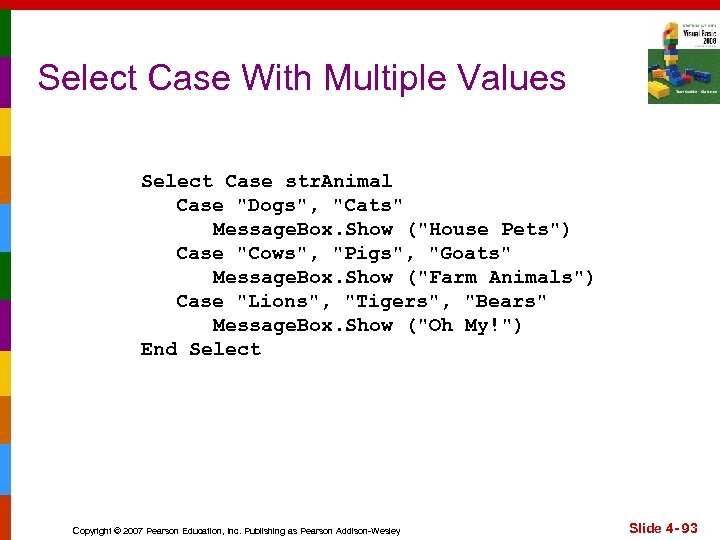 Select Case With Multiple Values Select Case str. Animal Case "Dogs", "Cats" Message. Box. Show ("House Pets") Case "Cows", "Pigs", "Goats" Message. Box. Show ("Farm Animals") Case "Lions", "Tigers", "Bears" Message. Box. Show ("Oh My!") End Select Copyright © 2007 Pearson Education, Inc. Publishing as Pearson Addison-Wesley Slide 4 - 93
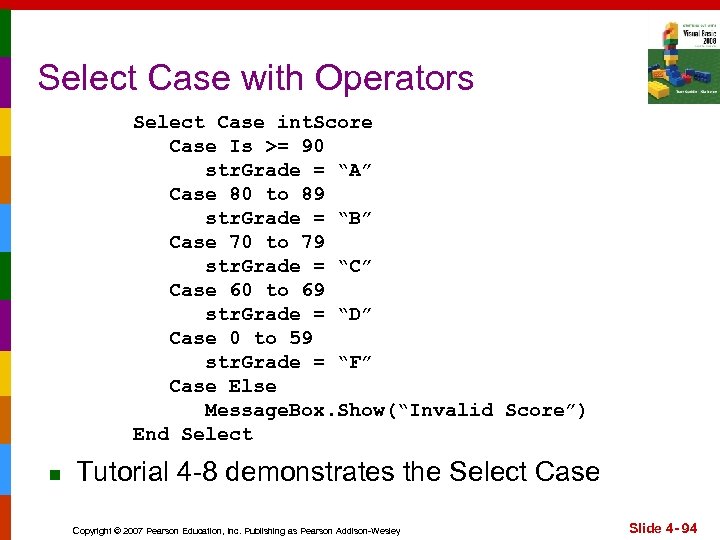 Select Case with Operators Select Case int. Score Case Is >= 90 str. Grade = “A” Case 80 to 89 str. Grade = “B” Case 70 to 79 str. Grade = “C” Case 60 to 69 str. Grade = “D” Case 0 to 59 str. Grade = “F” Case Else Message. Box. Show(“Invalid Score”) End Select n Tutorial 4 -8 demonstrates the Select Case Copyright © 2007 Pearson Education, Inc. Publishing as Pearson Addison-Wesley Slide 4 - 94
 4. 10 Introduction to Input Validation Is the Process of Inspecting Input Values and Determining Whether They Are Valid Copyright © 2007 Pearson Education, Inc. Publishing as Pearson Addison-Wesley
 Validation Example n n Output is only as good as the input n “Garbage In, Garbage Out”…GIGO Input validation is the process of inspecting user input to see that it meets certain rules The Try. Parse method verifies that an input value is in a valid numeric or date format Decision structures are often used to validate input Copyright © 2007 Pearson Education, Inc. Publishing as Pearson Addison-Wesley Slide 4 - 96
 The Try. Parse Method n Converts an input value to another format n Verifies input format of entered data n Returns Boolean value n n n True if successful False if unsuccessful Types of data useable with Try. Parse method: n n All numeric variables Date and Boolean data types Copyright © 2007 Pearson Education, Inc. Publishing as Pearson Addison-Wesley Slide 4 - 97
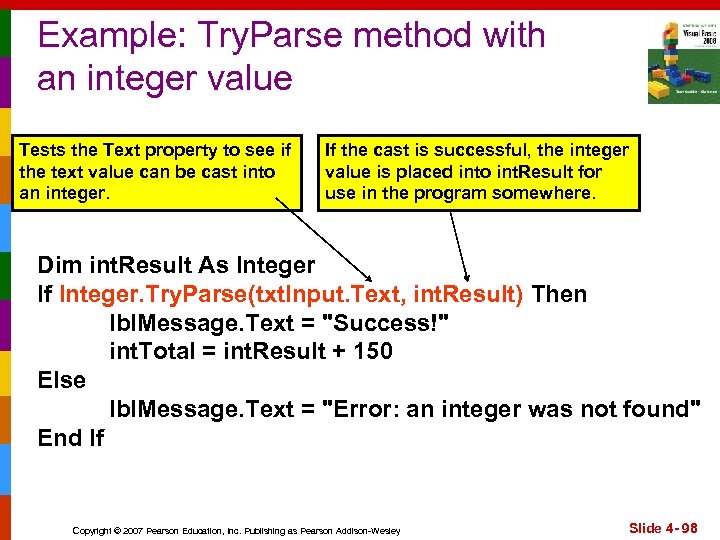 Example: Try. Parse method with an integer value Tests the Text property to see if the text value can be cast into an integer. If the cast is successful, the integer value is placed into int. Result for use in the program somewhere. Dim int. Result As Integer If Integer. Try. Parse(txt. Input. Text, int. Result) Then lbl. Message. Text = "Success!" int. Total = int. Result + 150 Else lbl. Message. Text = "Error: an integer was not found" End If Copyright © 2007 Pearson Education, Inc. Publishing as Pearson Addison-Wesley Slide 4 - 98
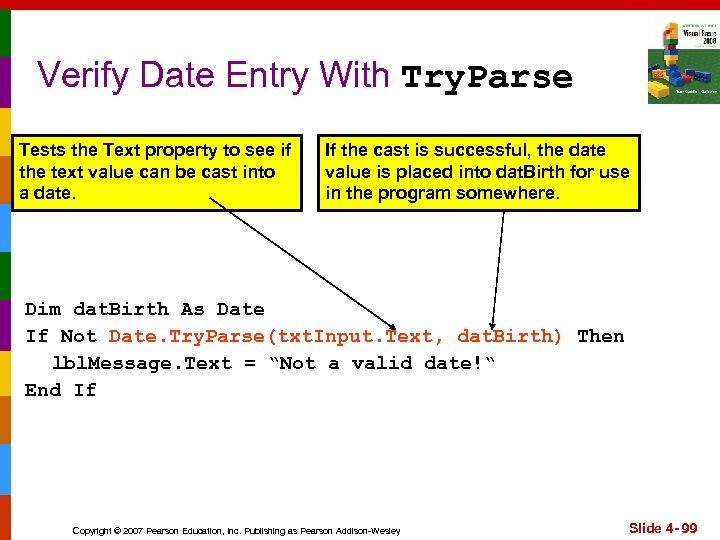 Verify Date Entry With Try. Parse Tests the Text property to see if the text value can be cast into a date. If the cast is successful, the date value is placed into dat. Birth for use in the program somewhere. Dim dat. Birth As Date If Not Date. Try. Parse(txt. Input. Text, dat. Birth) Then lbl. Message. Text = “Not a valid date!“ End If Copyright © 2007 Pearson Education, Inc. Publishing as Pearson Addison-Wesley Slide 4 - 99
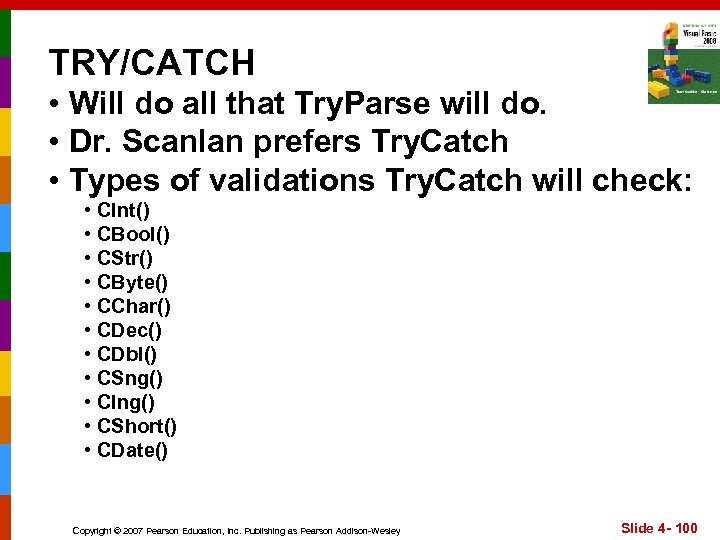 TRY/CATCH • Will do all that Try. Parse will do. • Dr. Scanlan prefers Try. Catch • Types of validations Try. Catch will check: • CInt() • CBool() • CStr() • CByte() • CChar() • CDec() • CDbl() • CSng() • Clng() • CShort() • CDate() Copyright © 2007 Pearson Education, Inc. Publishing as Pearson Addison-Wesley Slide 4 - 100
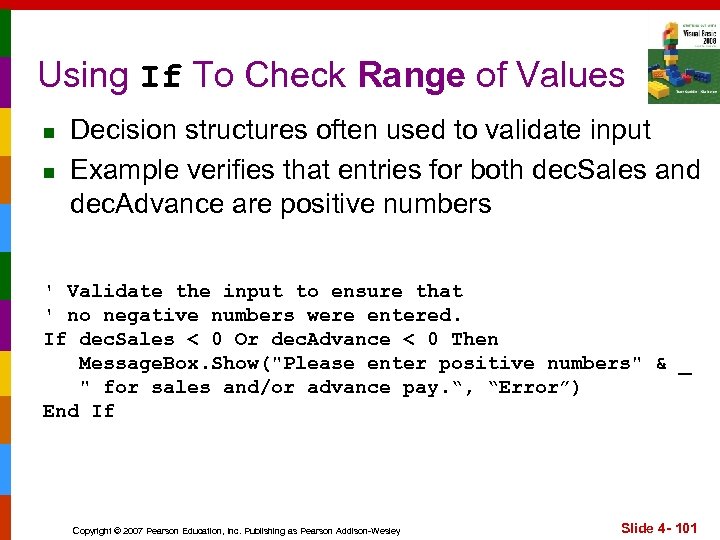 Using If To Check Range of Values n n Decision structures often used to validate input Example verifies that entries for both dec. Sales and dec. Advance are positive numbers ' Validate the input to ensure that ' no negative numbers were entered. If dec. Sales < 0 Or dec. Advance < 0 Then Message. Box. Show("Please enter positive numbers" & _ " for sales and/or advance pay. “, “Error”) End If Copyright © 2007 Pearson Education, Inc. Publishing as Pearson Addison-Wesley Slide 4 - 101
 4. 11 Radio Buttons and Check Boxes Radio Buttons Appear in Groups of Two or More and Allow the User to Select One of Several Possible Options Check Boxes Allow an Item to Be Selected or Deselected by Checking or Unchecking a Box Copyright © 2007 Pearson Education, Inc. Publishing as Pearson Addison-Wesley
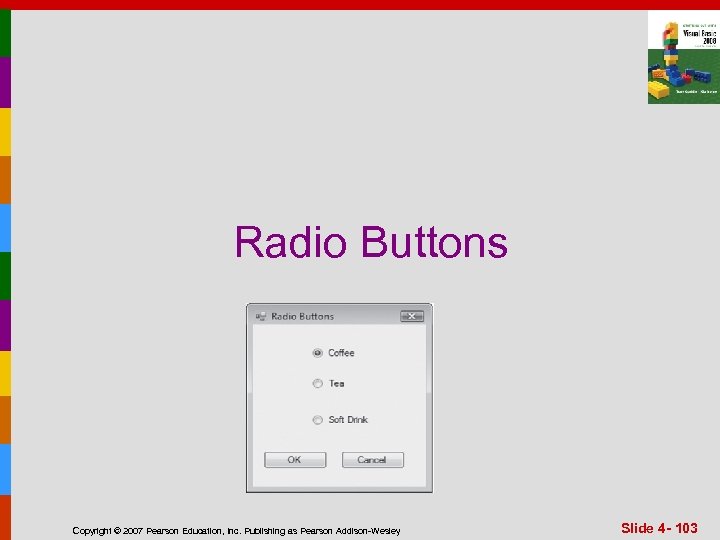 Radio Buttons Copyright © 2007 Pearson Education, Inc. Publishing as Pearson Addison-Wesley Slide 4 - 103
 Radio Buttons n n n Used when only one of several possible options may be selected at one time n Car radio buttons select one station at a time May be placed in a group box n Group box defines a set of radio buttons n Can select only one button within a group box n Those on a form but not inside a group box are considered members of the same group Radio buttons have a boolean Checked property and a Check. Changed event Copyright © 2007 Pearson Education, Inc. Publishing as Pearson Addison-Wesley Slide 4 - 104
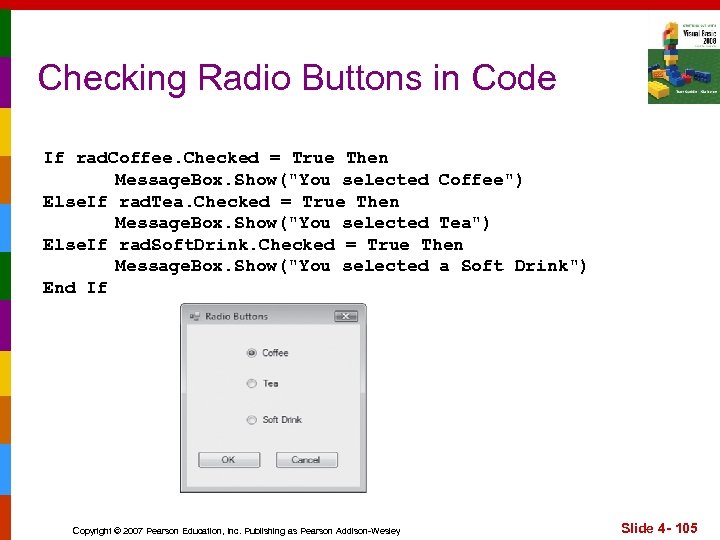 Checking Radio Buttons in Code If rad. Coffee. Checked = True Then Message. Box. Show("You selected Coffee") Else. If rad. Tea. Checked = True Then Message. Box. Show("You selected Tea") Else. If rad. Soft. Drink. Checked = True Then Message. Box. Show("You selected a Soft Drink") End If Copyright © 2007 Pearson Education, Inc. Publishing as Pearson Addison-Wesley Slide 4 - 105
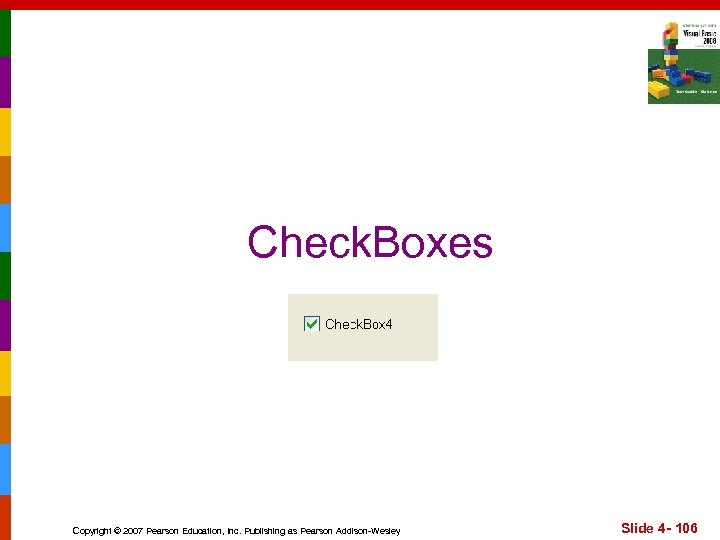 Check. Boxes Copyright © 2007 Pearson Education, Inc. Publishing as Pearson Addison-Wesley Slide 4 - 106
 Check Boxes n n Can select: n One or more checkboxes at a time. Check boxes: n n n Checked property Check. Changed event Tutorial 4 -9 provides radio button and check box examples Copyright © 2007 Pearson Education, Inc. Publishing as Pearson Addison-Wesley Slide 4 - 107
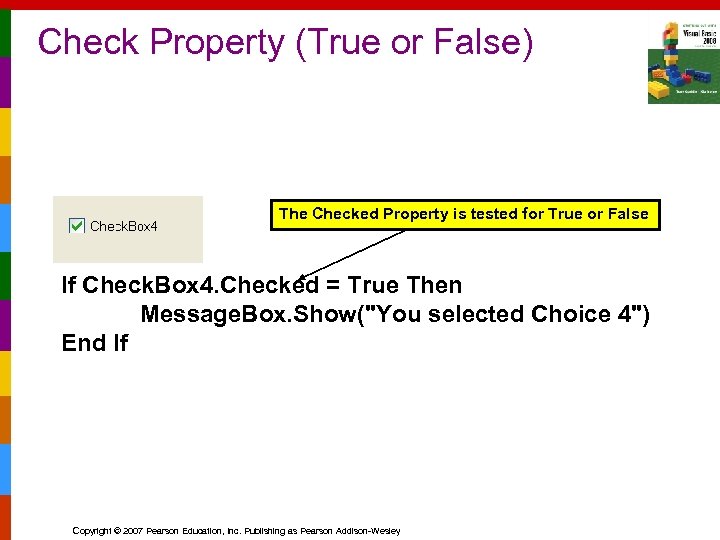 Check Property (True or False) The Checked Property is tested for True or False If Check. Box 4. Checked = True Then Message. Box. Show("You selected Choice 4") End If Copyright © 2007 Pearson Education, Inc. Publishing as Pearson Addison-Wesley
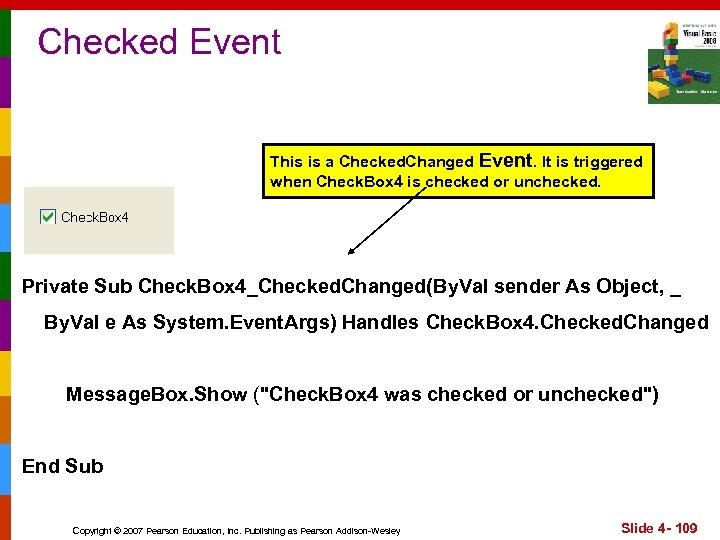 Checked Event This is a Checked. Changed Event. It is triggered when Check. Box 4 is checked or unchecked. Private Sub Check. Box 4_Checked. Changed(By. Val sender As Object, _ By. Val e As System. Event. Args) Handles Check. Box 4. Checked. Changed Message. Box. Show ("Check. Box 4 was checked or unchecked") End Sub Copyright © 2007 Pearson Education, Inc. Publishing as Pearson Addison-Wesley Slide 4 - 109
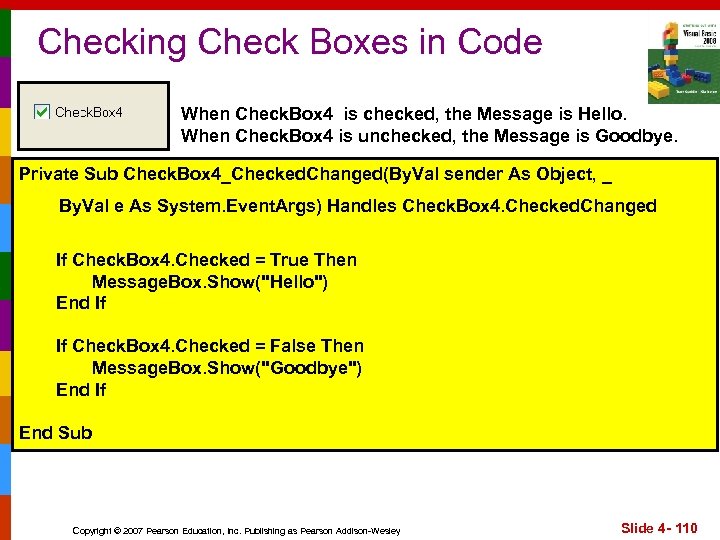 Checking Check Boxes in Code When Check. Box 4 is checked, the Message is Hello. When Check. Box 4 is unchecked, the Message is Goodbye. Private Sub Check. Box 4_Checked. Changed(By. Val sender As Object, _ By. Val e As System. Event. Args) Handles Check. Box 4. Checked. Changed If Check. Box 4. Checked = True Then Message. Box. Show("Hello") End If If Check. Box 4. Checked = False Then Message. Box. Show("Goodbye") End If End Sub Copyright © 2007 Pearson Education, Inc. Publishing as Pearson Addison-Wesley Slide 4 - 110
 Cov ere d 4. 12 in C hap ter 3 n ote s, a lso. Module-level variables are the same as Class-level variables Module-level variables are not local to any procedure. In a Form, they are declared outside of any procedure, and may be accessed by statements in any procedure in the same Form Copyright © 2007 Pearson Education, Inc. Publishing as Pearson Addison-Wesley
 Scope of Module-level variables n n n Variable scope refers to the portion of a program in which that variable is visible or usable. Variables declared inside a procedure or method have local-level scope n Only visible inside that procedure or method Sometimes a variable needs to be visible to many procedures or methods within a form Variables declared outside a procedure but within a form have module-level scope These are visible throughout the form n Makes communication between procedures easy Copyright © 2007 Pearson Education, Inc. Publishing as Pearson Addison-Wesley Slide 4 - 112
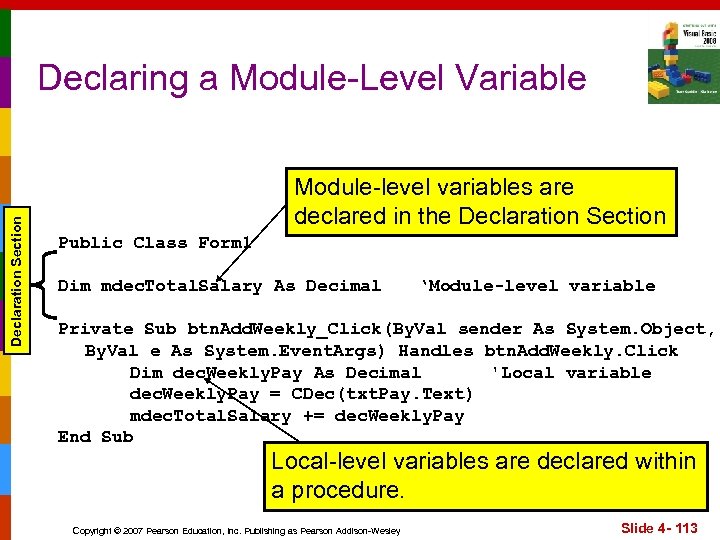 Declaration Section Declaring a Module-Level Variable Module-level variables are declared in the Declaration Section Public Class Form 1 Dim mdec. Total. Salary As Decimal ‘Module-level variable Private Sub btn. Add. Weekly_Click(By. Val sender As System. Object, By. Val e As System. Event. Args) Handles btn. Add. Weekly. Click Dim dec. Weekly. Pay As Decimal 'Local variable dec. Weekly. Pay = CDec(txt. Pay. Text) mdec. Total. Salary += dec. Weekly. Pay End Sub Local-level variables are declared within a procedure. Copyright © 2007 Pearson Education, Inc. Publishing as Pearson Addison-Wesley Slide 4 - 113
 Module-level Variables Disadvantages n n Module-level variables should be used sparingly - only when really needed. Why? Increases COUPLING BETWEEN PROCEDURES. Copyright © 2007 Pearson Education, Inc. Publishing as Pearson Addison-Wesley Slide 4 - 114
 4. 13 The Health Club Membership Fee Calculator Application The Health Club Membership Fee Calculator uses features discussed in this chapter, including If statements, a Select Case statement, radio buttons, and check boxes Copyright © 2007 Pearson Education, Inc. Publishing as Pearson Addison-Wesley
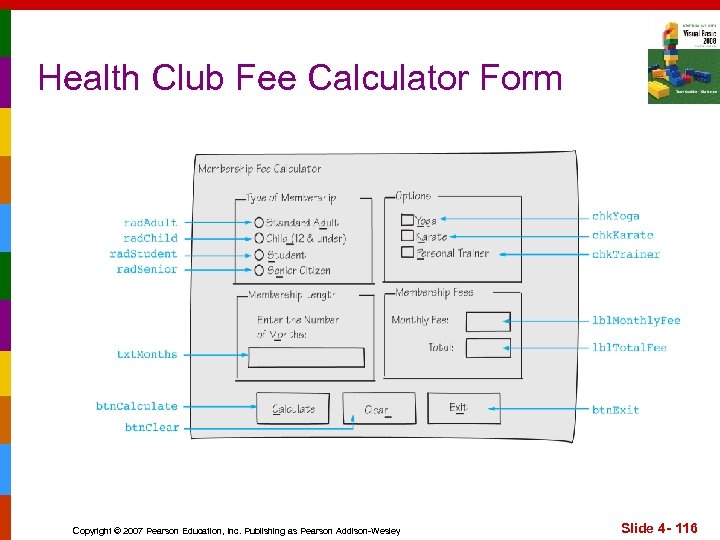 Health Club Fee Calculator Form Copyright © 2007 Pearson Education, Inc. Publishing as Pearson Addison-Wesley Slide 4 - 116
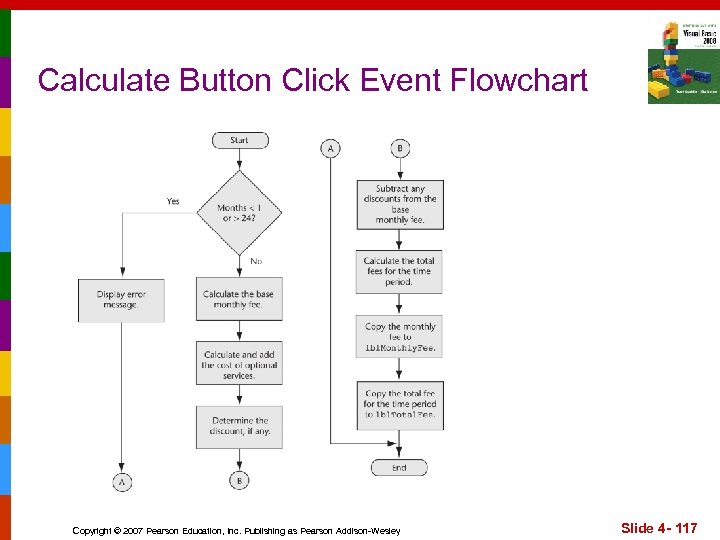 Calculate Button Click Event Flowchart Copyright © 2007 Pearson Education, Inc. Publishing as Pearson Addison-Wesley Slide 4 - 117
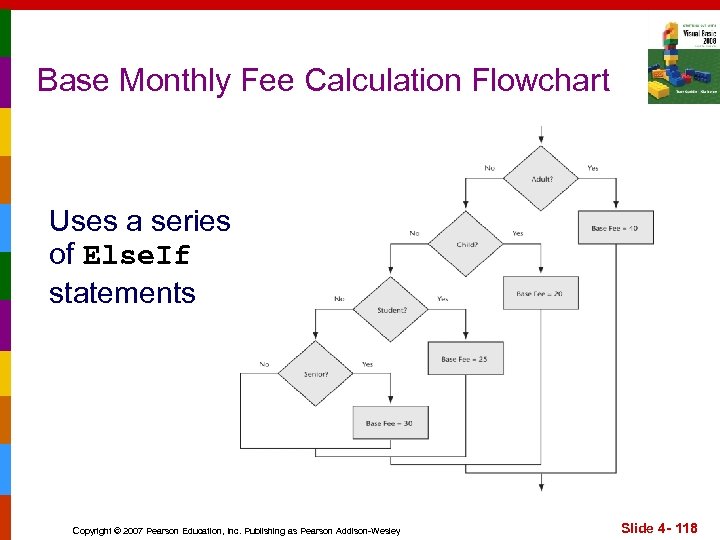 Base Monthly Fee Calculation Flowchart Uses a series of Else. If statements Copyright © 2007 Pearson Education, Inc. Publishing as Pearson Addison-Wesley Slide 4 - 118
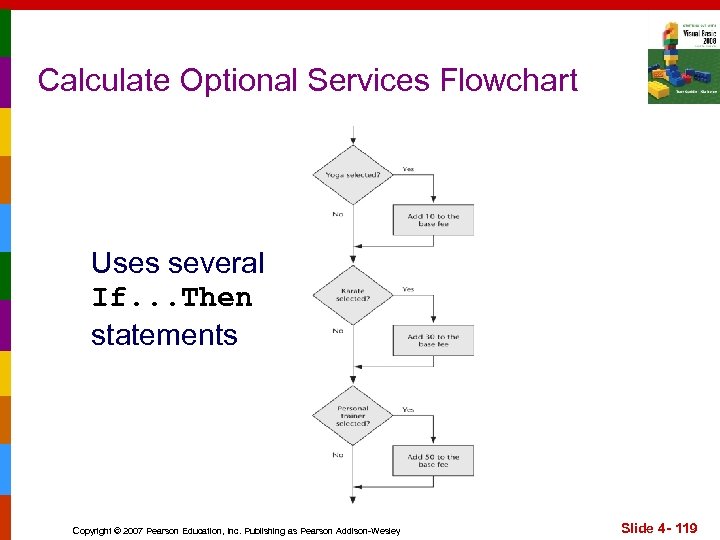 Calculate Optional Services Flowchart Uses several If. . . Then statements Copyright © 2007 Pearson Education, Inc. Publishing as Pearson Addison-Wesley Slide 4 - 119
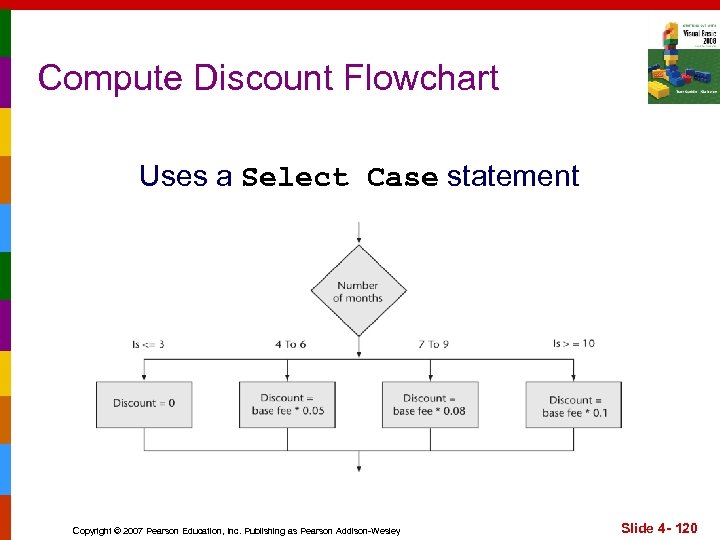 Compute Discount Flowchart Uses a Select Case statement Copyright © 2007 Pearson Education, Inc. Publishing as Pearson Addison-Wesley Slide 4 - 120