


 Скачать презентацию Data Flow Diagrams Dolinski 2007 What
c4b937109a77a441004f7040e9d819c1.ppt
- Количество слайдов: 8
 Data Flow Diagrams © Dolinski 2007
 What are they? • Data flow diagrams show us how data moves through a system. • It is a diagram which looks at all the main aspects of a system and breaks them down into stages.
 Example • Booking a ticket online for a concert involves lots of stages. • You can use a DFD to help you understand the stages of this booking.
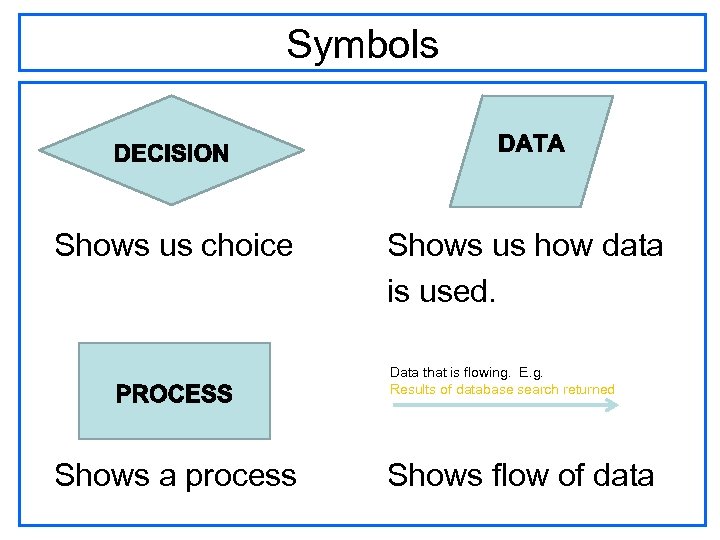 Symbols Shows us choice Shows us how data is used. Data that is flowing. E. g. Results of database search returned Shows a process Shows flow of data
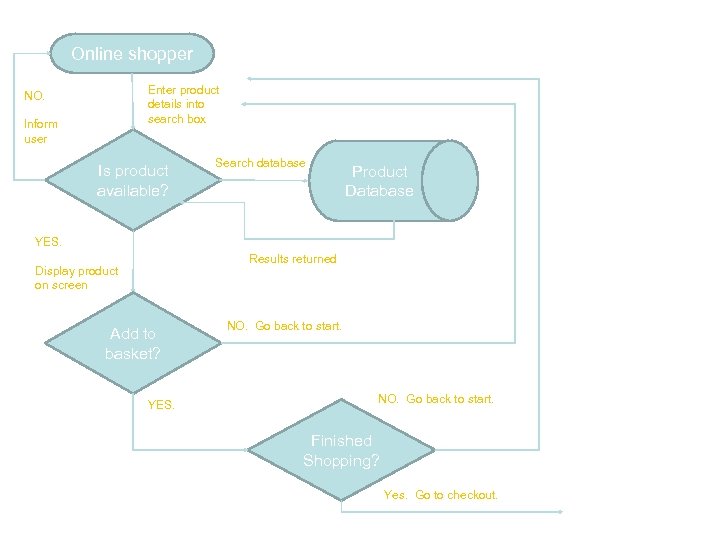 Online shopper Enter product details into search box NO. Inform user Is product available? Search database Product Database YES. Results returned Display product on screen Add to basket? YES. NO. Go back to start. Finished Shopping? Yes. Go to checkout.
 Things that could have been included • For your DFD you must make sure that you include everything. • That was a simple example. • It could also have the following: – Receipts – Delivery confirmation – Order tracking
 What you need to do • Create a DFD that shows how data flows through your system during a particular event e. g. • Lego. Land – How people can book tickets • Argos – How people can order products • H&M – How people can buy clothes. • You may need to carry out some research into all the possible methods for doing these things.
 TOP TIPS • Make sure you explain what data is being passed. • Make sure your DFD is neat and that lines to not cross each other. • Make sure your arrow heads are pointing the right direction • Remember that data should go in full circle. – If a customer orders a product make sure you show the product goes back to the user.