 Скачать презентацию CSE 293 CS E Design Laboratory Prof
0aa017213381bf899b4198243599eaec.ppt
- Количество слайдов: 19



CSE 293 CS & E Design Laboratory Prof. Alexander A. Shvartsman Computer Science & Engineering Department The University of Connecticut 371 Fairfield Way, Unit 2155 Storrs, CT 06269 aas@cse. uconn. edu http: //www. engr. uconn. edu/~aas (860) 486 -2672 Acknowledgment: Based on a presentation by Prof. S. A. Demurjian, Jr.
Course Goals § CSE 293: The “Second” Project Based Course Follows CSE 261, 262, 263, 265, 268, 269 q Similar Goals and Objectives But… v You Control Project - “Group Independent Study” v You Make Decisions, Resolve Problems, etc. v You “Apply” your Coursework/Experiences § What is the Instructor’s Role? q Provide a set of potential project topics q Serve as a manager - organize meetings, available for questions, etc. q
Course Philosophy § CSE 293: q q q Demonstrate Ability v to Work as a Group v with Minimal or No Guidance Team Organizes, Plans, Designs, Prototypes, and Delivers! Periodic Updates and “Current” Web Repositories
Course Process and Overview § § § § Identify Problem Develop Detailed Specification Interactions and Feedback Explore Design Alternatives Detailed Design and Testing Implementation and Integration Team Interactions and Dynamics § Setting and Meeting Milestones § Evaluating Success/Failure § CSE 26 X First Time Through Lots of Guidance Suggestions/Advice Instructor as Hands-On Manager § CSE 293 Second Time Minimal Guidance Instructor - Mentor and Troubleshooter - Coordinate Major Design - Experience - Evaluate Results
Texts and Class Materials § Primarily project-specific – gathered by the team § CSE 293 web site at www. engr. uconn. edu/~steve/Cse 293/cse 293. html q Course materials made available on-line § Other examples of class materials/texts q Software Download - Ghostview/Ghostscript q Together Control Center - UML Tool q UML Explained, K. Scott, Addison Wesley q
Milestones with Dates (Initial Schedule Subject to Change) § § § Project 1: Project Proposal – 3 days after 1 st class Project 2: Initial Specification – 3 rd Class Project 3: Part I - Revised Specification – 4 th class Project 3: Part II – Initial Design – 5 th class Project 3: Part III - Revised Design – 6 th class Project 4: Prototyping/Mgmt. Plan – 6 th class Project 4: Proto/Dev-t Report 1/Presentation – 9 th class Project 4: Proto/Dev-t Report 2/Presentation – 11 th class Project 4: Proto/Dev-t Report 3/Presentation – 13 th class Project 4: Final Report/User Manual – End of Semester Project 4: Final Student Assessment – End of Semester January 2007 6
Specification! § Typical discussion § User to developer: “The system is not operating as specified!” § Developer to user: “No, the system is behaving exactly as specified!” § How can they both be right? § How to avoid this? January 2007 7
Course Projects Using UML and Together CC § Typical project will be UML Based § UML is a Language for Specifying, Visualizing, Constructing, and Documenting Software Artifacts § What Does a Modeling Language Provide? q Model Elements: Concepts and Semantics q Notation: Visual Rendering of Model Elements q Guidelines: Hints and Suggestions for Using Elements in Notation § References and Resources q Web: www. rational. com/uml/documentation. html q “The Unified Modeling Language Reference Manual”, Addison-Wesley, 1999.
UML Modeling Constructs/Diagrams Static vs. Dynamic Perspectives § A Diagram is a View Into a Model Presented From the Aspect of a Particular Stakeholder q Provides a Partial Representation of the System q Is Semantically Consistent With Other Views § In the UML, There Are Nine Standard Diagrams q Static Views: Use Case, Class, Object, Component, Deployment q Dynamic Views: Sequence, Collaboration, Statechart, Activity q January 2007 9
UML Modeling Constructs/Diagrams Classification by Capability/Timeline § Use-Case Diagrams § Class and Object Diagrams § Behavior Diagrams Statechart Diagrams q Activity Diagrams § Interaction Diagrams q Sequence Diagram q Collaboration Diagram § Implementation Diagrams q Component Diagram q Deployment Diagram q
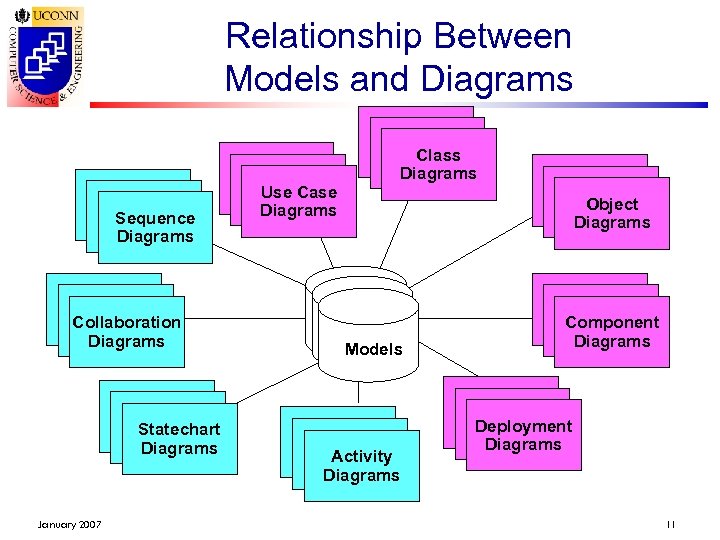
Relationship Between Models and Diagrams Use Case Diagrams Sequence Diagrams Scenario Diagrams Collaboration Diagrams Scenario Diagrams Statechart Diagrams January 2007 Use Case Diagrams State Diagrams Class Diagrams Models State Diagrams Object Diagrams State Diagrams Component Diagrams Deployment Diagrams Activity Diagrams 11
Semester Requirements § See cse 293 requirements. pdf on web page § Summary q q q q Teams of 5 or 6 students W course means 15 pages/team member Revisions cycles count towards page total Web-Page for each Team with all materials BLOG for each team member Use of IDE (e. g. , Visual Studio, Eclipse, etc. ) Source Code Control (Subversion)
Course Projects Using UML and Together Architect 1. 0 or Eclipse. UML § Information on Both Forthcoming - q q www. togethersoft. com www. eclipse. org

Documentation Packages/Requirements § All Project Specifications (Written Documents) Must be Done using: q MS Word (unless there is an acceptable reason not to) § All Project Presentations Must be Done Using Powerpoint (PPT) q Help yourselves: Utilize Samples on Web Page for UML and CT Insurance Dept. Link for Guide § Submit Both Hard Copy and Electronic Versions q Hard Copy Produced on Laser Printer q Electronic as a Directory zipped v Team. Name. Proj. X. zip
Projects Considered in the Past § § § Marklin Digital Trains Atari 800 Renovation PDFA and/or Cell Phones Web-Based Journal Editor Auditory Perception of Alphabet Letters Heating System Design and Engineering
Additional Project Ideas § Simple atomic read/write data service for dunamic networks q Talk to me § Use experimental IDE for the (new) Tempo language to model and simulate Internet Supercomputing q Talk to me § Web Auction System q Talk to Prof. Kiayias January 2007 16
Project: Web Auction System § Design an online community-based auction-type web-portal based on a novel price discrimination technology that q enables considerably better discount opportunities for buyers as well as q maximization of profit margin for sellers. § The methodology is new, different from E-bay, Priceline, etc. q It was developed recently by a Prof. Kiayias in collaboration with RSA Security and is currently considered for commercialization. § The system will be web-based and include q (1) front end for sellers and buyers, q (2) reputation system, q (3) market coordination. § Some knowledge of computer security is a plus. q Talk to Prof. Kiayias q January 2007 17
Project/Team Web Page/Documentation § Each Team MUST Develop a Web Page for their Project See Links for Former Projects as Examples q Use To Post On-Going Documents § Augment Web Page with Detailed Design Documents q Together CC Generates Documentation q Frame Based HTML Resembles Java Doc q Make Sure you Select “All” Diagrams § Documentation of Java with Java Doc q Utilize Together Architect q Utilize IDE q
Today’s Tasks § Choosing Teams - 3 Teams of 5 -6 people Self-Organized Teams q Instructor Sets Teams § Meet & Brainstorming q Remainder of Class q Exchange Email and Phone Numbers q Discuss Project Ideas q Visit Prior Web Pages § First Project Due – 3 days after first class at 9 am - Expect Feedback by End of Day § First Project Presentation – 2 nd class q 5 to 10 minutes per team q Copy of Slides/Create & Post on Web Page q
Скачать презентацию CSE 293 CS E Design Laboratory Prof
0aa017213381bf899b4198243599eaec.ppt