


 Скачать презентацию CS 502 Introduction to Operating Systems Fall 98
9f2dcb8b4cb7d5cec267213bdc959e58.ppt
- Количество слайдов: 19
 CS 502 Introduction to Operating Systems Fall 98 Waltham Campus
 Operating Systems Introduction Outline • Course Introduction – Administration – Major components • • Homework Research Paper Presentation Exams Project – Syllabus • Operating Systems Background – Context of Operating Systems – Definitions of an Operating System – Historical Perspective • Computer Organization and Operating Systems 1
 Administration • Professor Thomas Bressoud – Stratus Computer (Ascend) – (508) 490 -6329 – Tom_Bressoud@stratus. com • Office Hours – Before class – By appointment – 24 hour email response • Class Email List -- cs 502 w@cs. wpi. edu • Web Re. Course – http: //penguin. wpi. edu: 4545 • Textbook 2
 Course Components • Homework – Two in the first half of the semester. 10% of grade. • Research Paper Presentation – Select a current research paper in the operating systems field and read and understand it and present a short presentation summarizing the work and detailing some aspect of the work. • Exams – A midterm on Oct. 27 and a final on Dec. 15. They count 20% and 30% of your grade respectively. Closed book. One handwritten note sheet permitted. • The Project – Totals 25% of your grade. See next transparency. • Class Participation – 5% of your grade 3
 The CS 502 Project • By the end of the semester you will write an operating system for the Z 502 computer architecture. The Z 502 is a hypothetical processor that is defined for you. • You will be given a simulator for the Z 502 and a suite of user programs to test your Operating System implementation. • This is a large project, involving upwards of a couple thousand lines of code. You must start early to succeed. • To encourage students to begin early, I will divide Phase 1 into a set of milestones that get turned in for “checkmark” credit. The first two of these milestones are due next week. 4
 CS 502 Project (cont. ) • What did you like about this course/lab? – “The project was interesting and challenging. It is a good way to learn the inner workings of an operating system” – “The project was extremely well thought-out” – “Everything was pretty good, but the project was a lot of fun to work on” • What did you dislike about this course/lab? – “Sometimes too much work to do” – “It took a lot of time to do the lab” – “Project very time consuming” • What strategy would you advise a friend? – “Start working on project phases as early as possible” – “Start the project early!” – “Hire a full time maid to keep the house going …” 5
 Overall Cautions • Substantial time commitment – This is a major project class; students that try to take another class simply run out of time. – This burden is lessened if you start early. • Substantial programming required in C (C++ possible) – This is not the time to learn C. – Students who have not built modular structures in C (I. e. have mostly built < 100 line programs) can get lost in the effort to program in the large. • This is an introduction to operating systems – Considerable overlap with undergraduate OS courses – If you are had a CS undergraduate major and/or have taken a course on OS, then the implementation project may be the primary value-add for taking this course. See me. 6
 For Next Week: • Milestone 1: Build a queue abstract data type (ADT). – The assignment is as described for “Phase 0” in the project documentation. This is a very straightforward programming task. Focus on unit testing and clean modular design. – URLS: • http: //www. cs. wpi. edu/~cs 502/f 98/Waltham/project/phase 0. html • http: //www. cs. wpi. edu/~cs 502/f 98/Waltham/project/implement. C. html • http: //www. cs. wpi. edu/~cs 502/f 98/Waltham/project/grading. html • Milestone 2: Build the Z 502 simulator – Download the C source for the Z 502 into your development environment and build it. For instructions, see the Student Manual • http: //www. cs. wpi. edu/~cs 502/f 98/Waltham/project/student. html – Deliverables: • Makefile or equivalent • Log of execution run with and without “sample” argument 7
 What is an Operating System? • Class provided definitions … 8
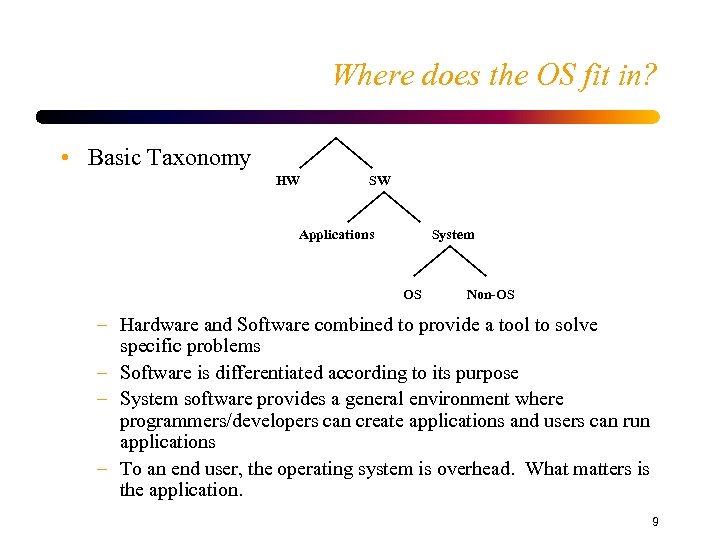 Where does the OS fit in? • Basic Taxonomy HW SW Applications System OS Non-OS – Hardware and Software combined to provide a tool to solve specific problems – Software is differentiated according to its purpose – System software provides a general environment where programmers/developers can create applications and users can run applications – To an end user, the operating system is overhead. What matters is the application. 9
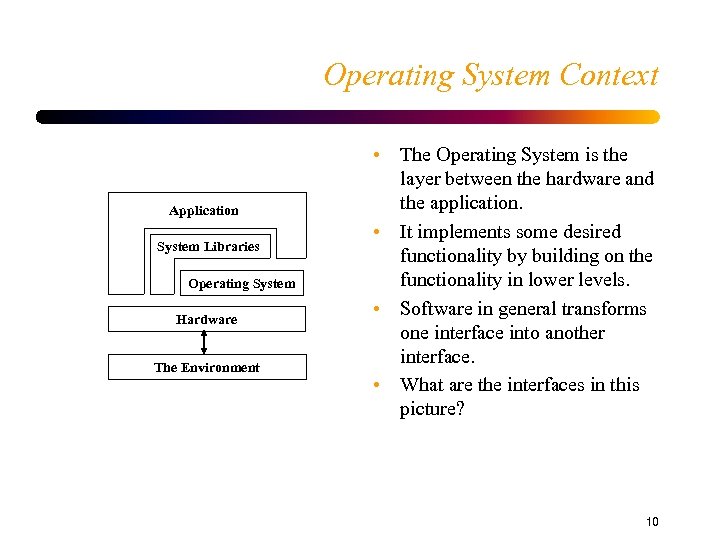 Operating System Context Application System Libraries Operating System Hardware The Environment • The Operating System is the layer between the hardware and the application. • It implements some desired functionality by building on the functionality in lower levels. • Software in general transforms one interface into another interface. • What are the interfaces in this picture? 10
 Non-OS System Software 11
 What does an Operating System Do? • Objectives of an OS – Convenience • An operating system makes a computer more convenient to use. – Efficiency • An operating system allows the computer system resources to be used in an efficient manner. – Ability to Evolve • Should permit effective development, testing, and introduction of new system features and functions without interfering with service. • Perspective-based OS Definition: – The OS is a manager of the computer system resources – The OS implements/manages virtual computers 12
 Hardware Resources • Processor – Component capable of executing instructions • Memory – Contains all instructions and data used by a processor – Sometimes referred to as physical or primary memory • Disk Devices – Long term storage of data • I/O Controllers – Processors that are able to transfer data between memory and devices – Video, Terminal, Network, Mouse, Tape Drives, etc. 13
 The Functions of Resource Management • Transformation – Hardware resources have complex interfaces – Operating system transforms physical resources into virtual resources that provide similar functionality to their physical counterpart, but have a simper interface. • Multiplexing – Provide the sharing of physical resources among multiple users – Time division multiplexing • Exclusive use at different points in time • Appropriate when the resource cannot be divided into smaller versions of itself. – Space division multiplexing • A resource is divided into smaller versions of itself and each app/user is given its own part of the resource. 14
 Resource Management (Cont. ) • Scheduling – Deciding which users should be allocated what resources and when they should get it. – Includes allocation and security/protection. 15
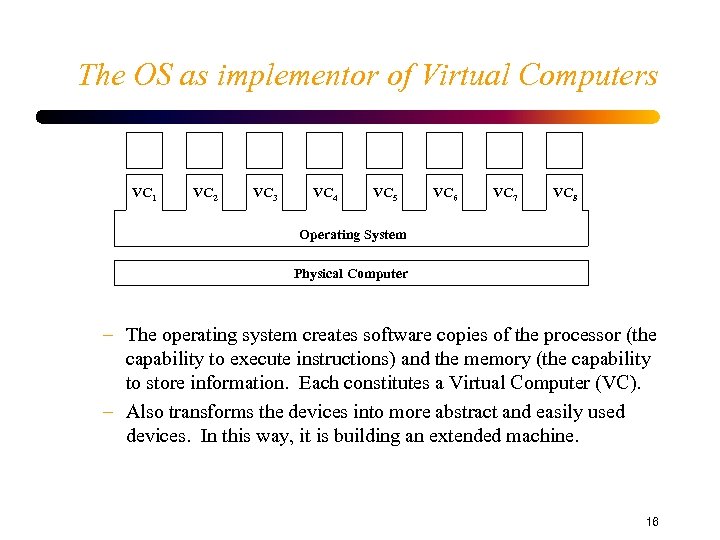 The OS as implementor of Virtual Computers VC 1 VC 2 VC 3 VC 4 VC 5 VC 6 VC 7 VC 8 Operating System Physical Computer – The operating system creates software copies of the processor (the capability to execute instructions) and the memory (the capability to store information. Each constitutes a Virtual Computer (VC). – Also transforms the devices into more abstract and easily used devices. In this way, it is building an extended machine. 16
 The Virtual Computer • The Virtual Processor – Nearly the same interface to the user as the physical processor (I. e. nearly the same instructions) for efficiency. – Removes some of the physical processor instructions and adds some other “instructions” (operations). • Instructions are removed by making them privileged • Added operations are system calls. These allow the virtual processor to request virtual resources from the operating system: – – – Create new virtual computers Communicate with other virtual computers Allocate storage as needed Perform I/O Access persistent storage through file system model – Shares the physical processor through time multiplexing 17
 The Virtual Computer (Cont. ) • Virtual Primary Memory – Create the illusion of memory similar to hardware memory. – Start at 0 and addressable in bytes, load and store in words. – Shared via a combination of time multiplex and space multiplex of physical memory and space multiplex of secondary storage. • Virtual Persistent Storage – File System – Shared via space multiplex • Virtual I/O controllers and communications devices – Generally time multiplex most other devices. 18