 Скачать презентацию CS 4513 Distributed Computer Systems The Web Ch
466685948c506646c6a6ef9594a28d14.ppt
- Количество слайдов: 38



CS 4513 Distributed Computer Systems The Web (Ch 11. 1)
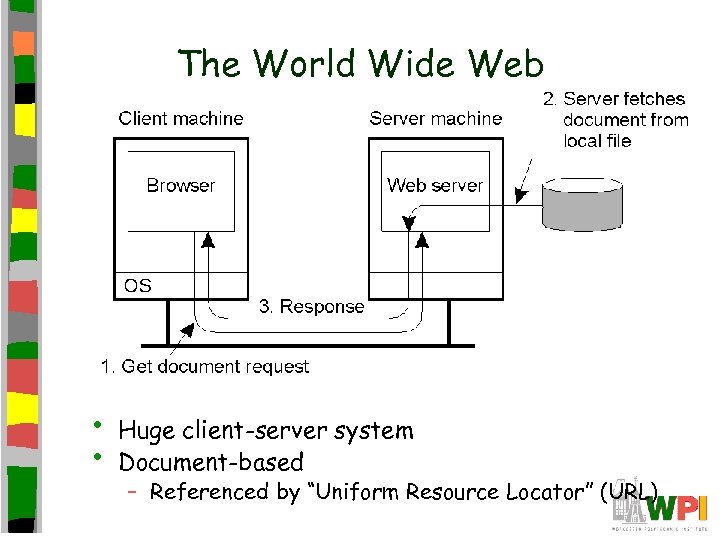
The World Wide Web • • Huge client-server system Document-based – Referenced by “Uniform Resource Locator” (URL)
Outline • Introduction • Document Model • Architecture • Communication • Processes • Naming • Caching • Security (done) (next)
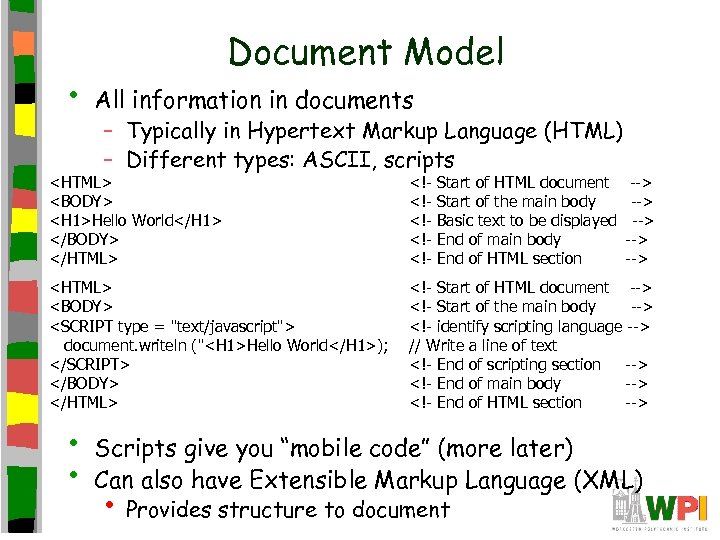
• Document Model All information in documents – Typically in Hypertext Markup Language (HTML) – Different types: ASCII, scripts <HTML> <BODY> <H 1>Hello World</H 1> </BODY> </HTML> <!<!<!- <HTML> <BODY> <SCRIPT type = "text/javascript"> document. writeln ("<H 1>Hello World</H 1>); </SCRIPT> </BODY> </HTML> <!- Start of HTML document --> <!- Start of the main body --> <!- identify scripting language --> // Write a line of text <!- End of scripting section --> <!- End of main body --> <!- End of HTML section --> • • Start of HTML document Start of the main body Basic text to be displayed End of main body End of HTML section --> --> --> Scripts give you “mobile code” (more later) Can also have Extensible Markup Language (XML) • Provides structure to document
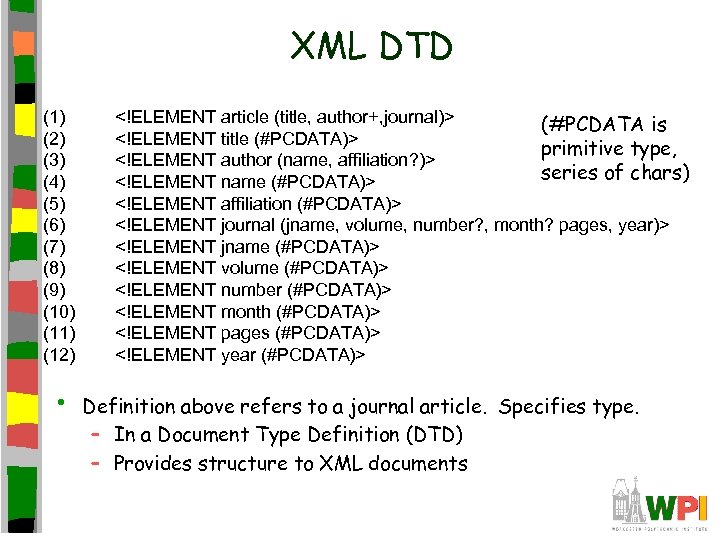
XML DTD (1) (2) (3) (4) (5) (6) (7) (8) (9) (10) (11) (12) • <!ELEMENT article (title, author+, journal)> (#PCDATA is <!ELEMENT title (#PCDATA)> primitive type, <!ELEMENT author (name, affiliation? )> series of chars) <!ELEMENT name (#PCDATA)> <!ELEMENT affiliation (#PCDATA)> <!ELEMENT journal (jname, volume, number? , month? pages, year)> <!ELEMENT jname (#PCDATA)> <!ELEMENT volume (#PCDATA)> <!ELEMENT number (#PCDATA)> <!ELEMENT month (#PCDATA)> <!ELEMENT pages (#PCDATA)> <!ELEMENT year (#PCDATA)> Definition above refers to a journal article. Specifies type. – In a Document Type Definition (DTD) – Provides structure to XML documents
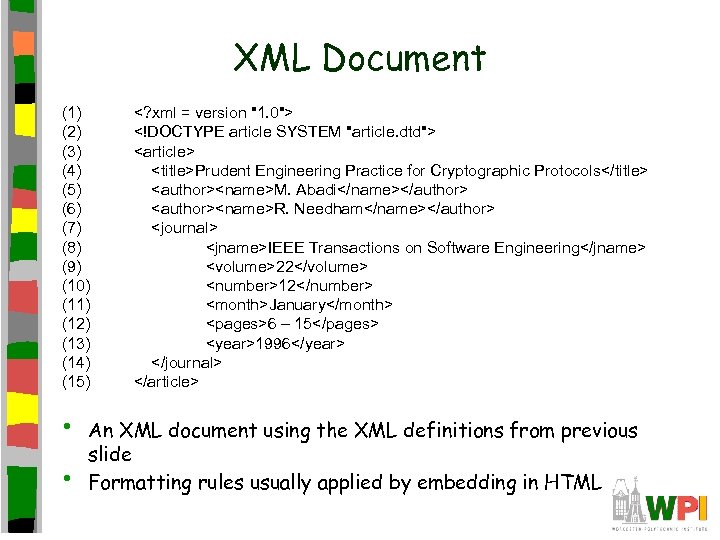
XML Document (1) (2) (3) (4) (5) (6) (7) (8) (9) (10) (11) (12) (13) (14) (15) • • <? xml = version "1. 0"> <!DOCTYPE article SYSTEM "article. dtd"> <article> <title>Prudent Engineering Practice for Cryptographic Protocols</title> <author><name>M. Abadi</name></author> <author><name>R. Needham</name></author> <journal> <jname>IEEE Transactions on Software Engineering</jname> <volume>22</volume> <number>12</number> <month>January</month> <pages>6 – 15</pages> <year>1996</year> </journal> </article> An XML document using the XML definitions from previous slide Formatting rules usually applied by embedding in HTML
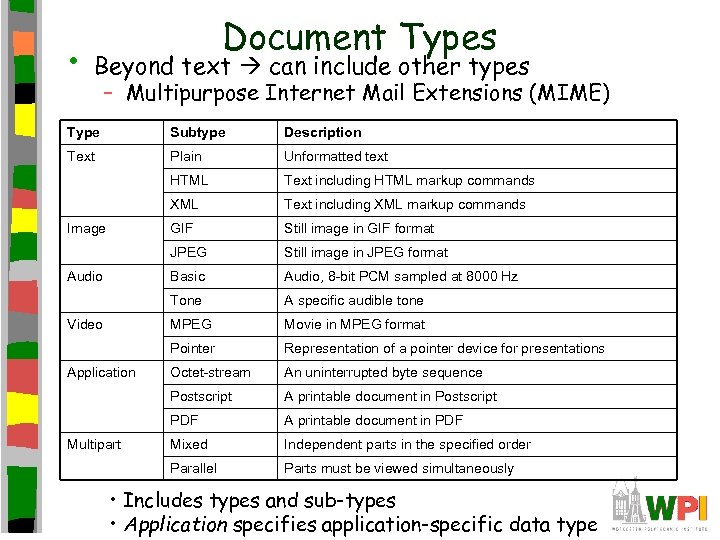
• Document Types Beyond text can include other types – Multipurpose Internet Mail Extensions (MIME) Type Subtype Description Text Plain Unformatted text HTML Text including HTML markup commands XML Text including XML markup commands GIF Still image in GIF format JPEG Still image in JPEG format Basic Audio, 8 -bit PCM sampled at 8000 Hz Tone A specific audible tone MPEG Movie in MPEG format Pointer Representation of a pointer device for presentations Octet-stream An uninterrupted byte sequence Postscript A printable document in Postscript PDF A printable document in PDF Mixed Independent parts in the specified order Parallel Parts must be viewed simultaneously Image Audio Video Application Multipart • Includes types and sub-types • Application specifies application-specific data type
Outline • Introduction • Document Model • Architecture • Communication • Processes • Naming • Caching • Security (done) (next)
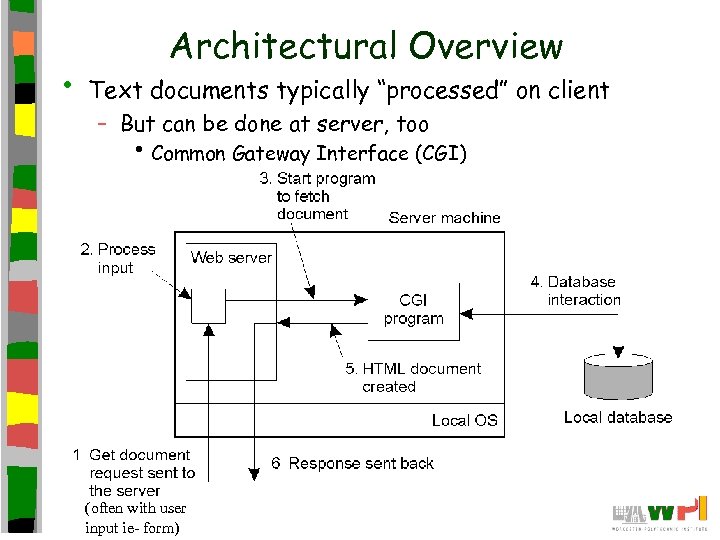
• Architectural Overview Text documents typically “processed” on client – But can be done at server, too • Common Gateway Interface (CGI) (often with user input ie- form)
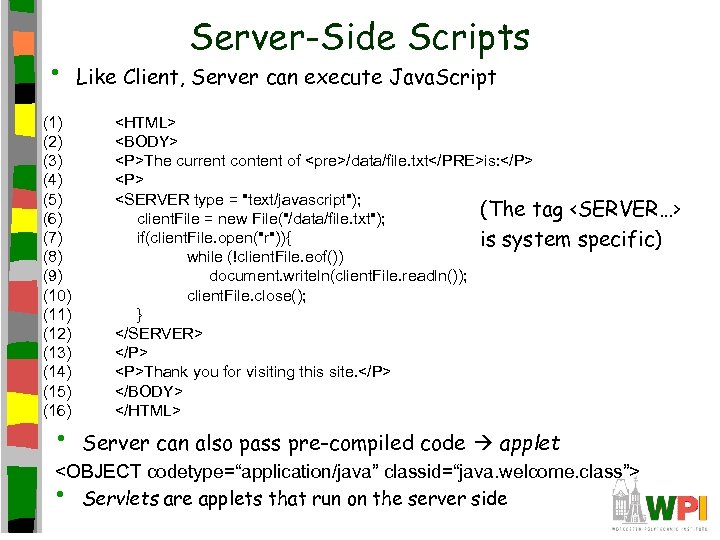
• (1) (2) (3) (4) (5) (6) (7) (8) (9) (10) (11) (12) (13) (14) (15) (16) • Server-Side Scripts Like Client, Server can execute Java. Script <HTML> <BODY> <P>The current content of <pre>/data/file. txt</PRE>is: </P> <SERVER type = "text/javascript"); (The tag <SERVER…> client. File = new File("/data/file. txt"); if(client. File. open("r")){ is system specific) while (!client. File. eof()) document. writeln(client. File. readln()); client. File. close(); } </SERVER> </P> <P>Thank you for visiting this site. </P> </BODY> </HTML> Server can also pass pre-compiled code applet <OBJECT codetype=“application/java” classid=“java. welcome. class”> • Servlets are applets that run on the server side
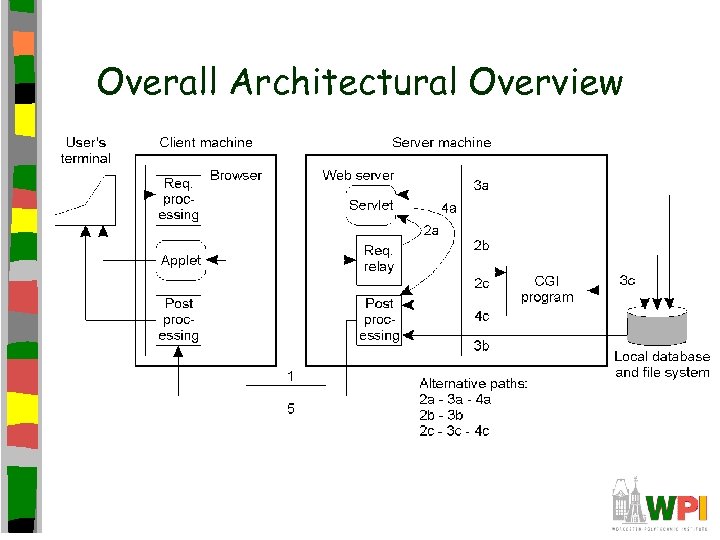
Overall Architectural Overview
Outline • Introduction • Document Model • Architecture • Communication • Processes • Naming • Caching • Security (done) (next)
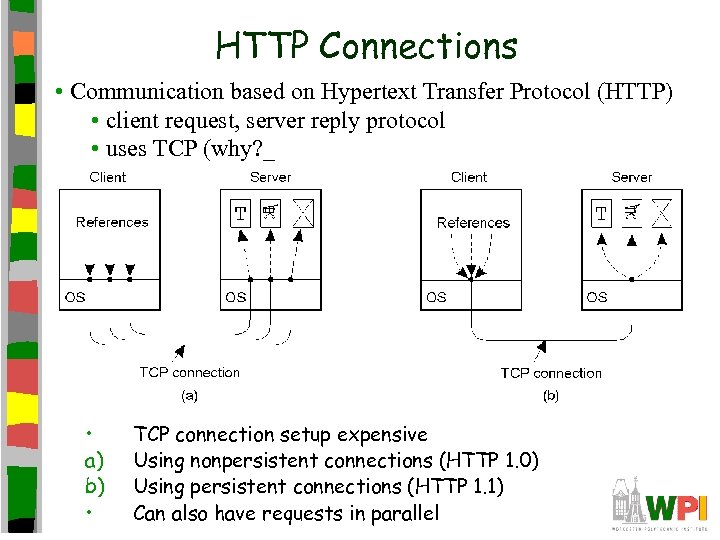
HTTP Connections • Communication based on Hypertext Transfer Protocol (HTTP) • client request, server reply protocol • uses TCP (why? _ • a) b) • TCP connection setup expensive Using nonpersistent connections (HTTP 1. 0) Using persistent connections (HTTP 1. 1) Can also have requests in parallel
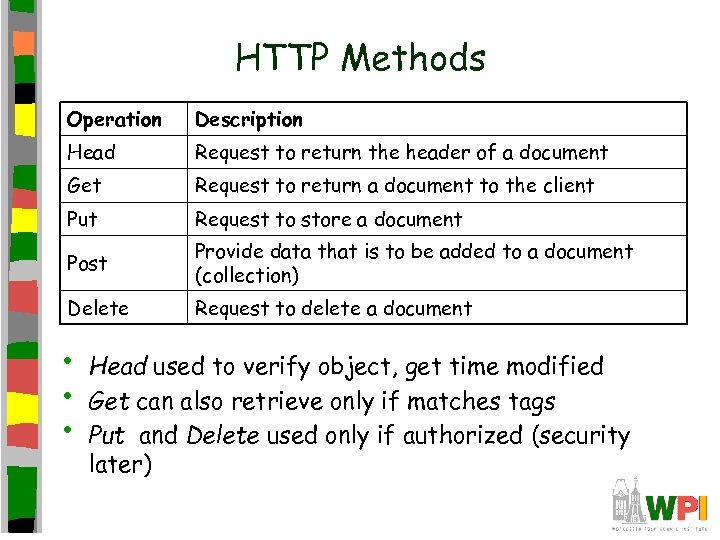
HTTP Methods Operation Description Head Request to return the header of a document Get Request to return a document to the client Put Request to store a document Post Provide data that is to be added to a document (collection) Delete Request to delete a document • • • Head used to verify object, get time modified Get can also retrieve only if matches tags Put and Delete used only if authorized (security later)
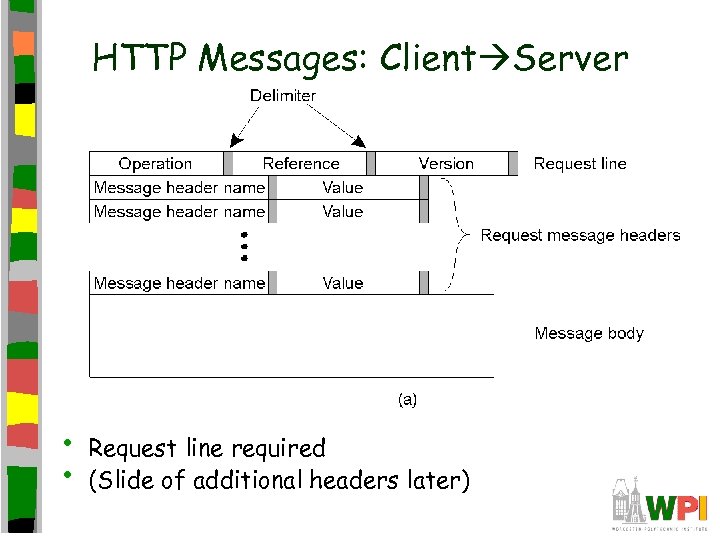
HTTP Messages: Client Server • • Request line required (Slide of additional headers later)
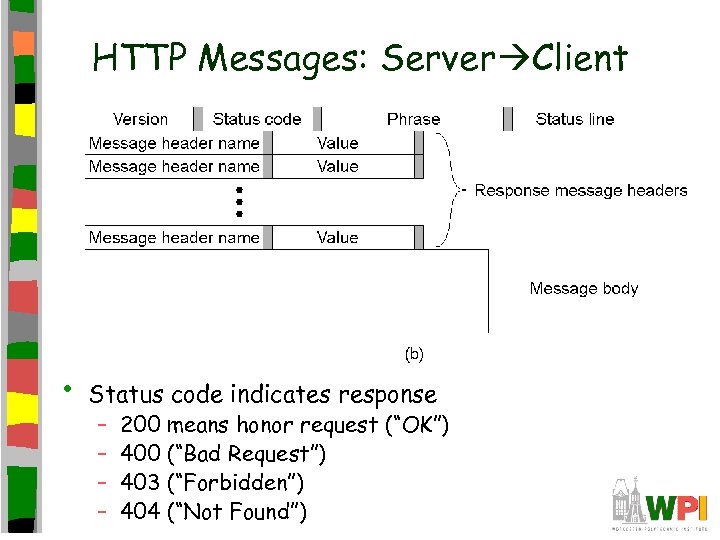
HTTP Messages: Server Client • Status code indicates response – – 200 means honor request (“OK”) 400 (“Bad Request”) 403 (“Forbidden”) 404 (“Not Found”)
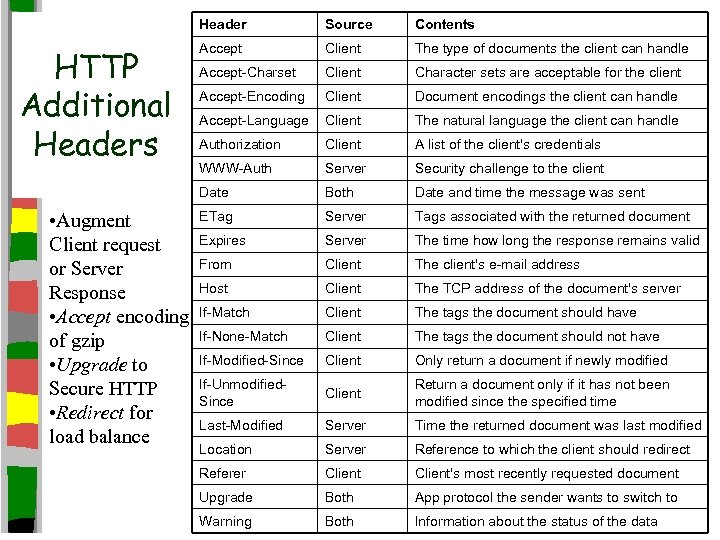
Header • Augment Client request or Server Response • Accept encoding of gzip • Upgrade to Secure HTTP • Redirect for load balance Contents Accept Client The type of documents the client can handle Accept-Charset Client Character sets are acceptable for the client Accept-Encoding Client Document encodings the client can handle Accept-Language Client The natural language the client can handle Authorization Client A list of the client's credentials WWW-Auth Server Security challenge to the client Date HTTP Additional Headers Source Both Date and time the message was sent ETag Server Tags associated with the returned document Expires Server The time how long the response remains valid From Client The client's e-mail address Host Client The TCP address of the document's server If-Match Client The tags the document should have If-None-Match Client The tags the document should not have If-Modified-Since Client Only return a document if newly modified If-Unmodified. Since Client Return a document only if it has not been modified since the specified time Last-Modified Server Time the returned document was last modified Location Server Reference to which the client should redirect Referer Client's most recently requested document Upgrade Both App protocol the sender wants to switch to Warning Both Information about the status of the data
Outline • Introduction • Document Model • Architecture • Communication • Processes • Naming • Caching • Security (done) (next)
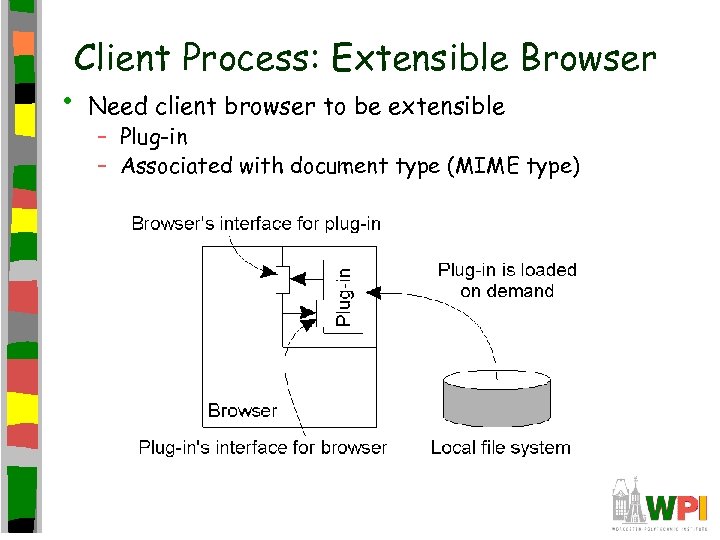
Client Process: Extensible Browser • Need client browser to be extensible – Plug-in – Associated with document type (MIME type)
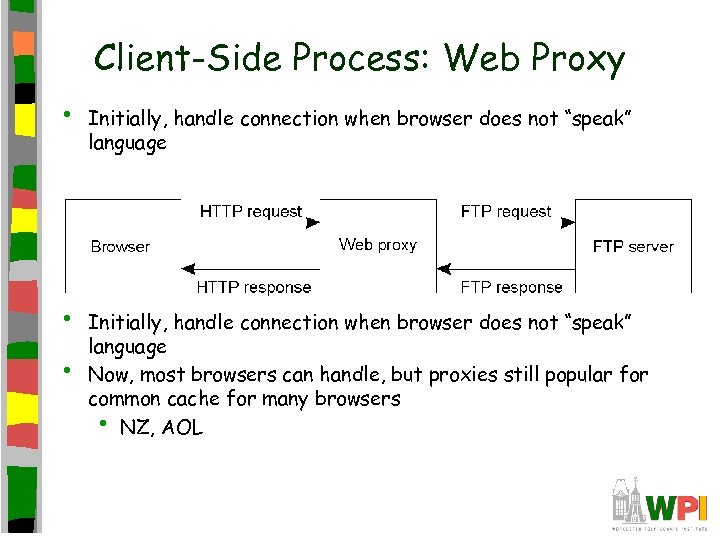
Client-Side Process: Web Proxy • • • Initially, handle connection when browser does not “speak” language Now, most browsers can handle, but proxies still popular for common cache for many browsers • NZ, AOL
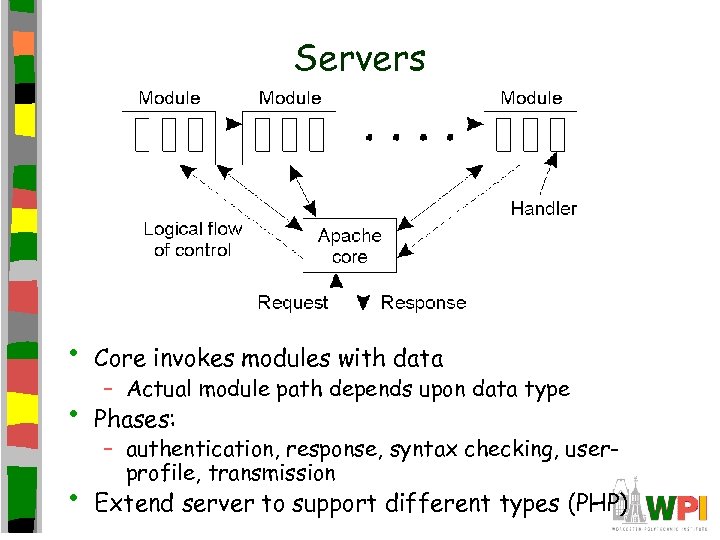
Servers • Core invokes modules with data • Phases: • Extend server to support different types (PHP) – Actual module path depends upon data type – authentication, response, syntax checking, userprofile, transmission
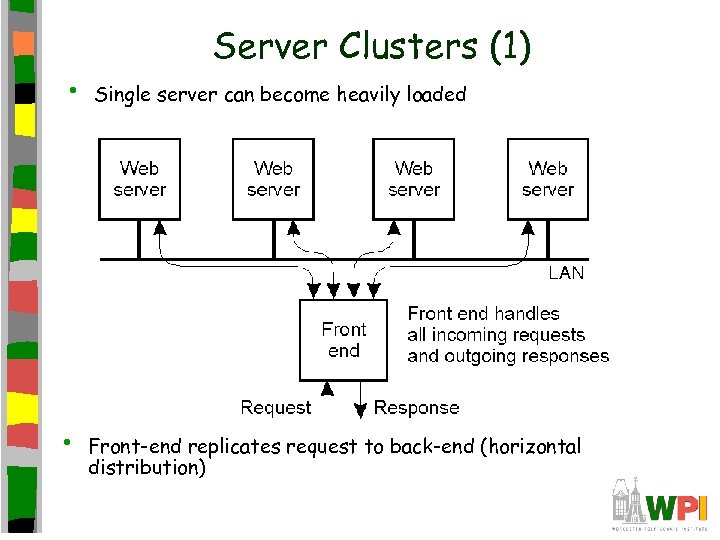
• • Server Clusters (1) Single server can become heavily loaded Front-end replicates request to back-end (horizontal distribution)
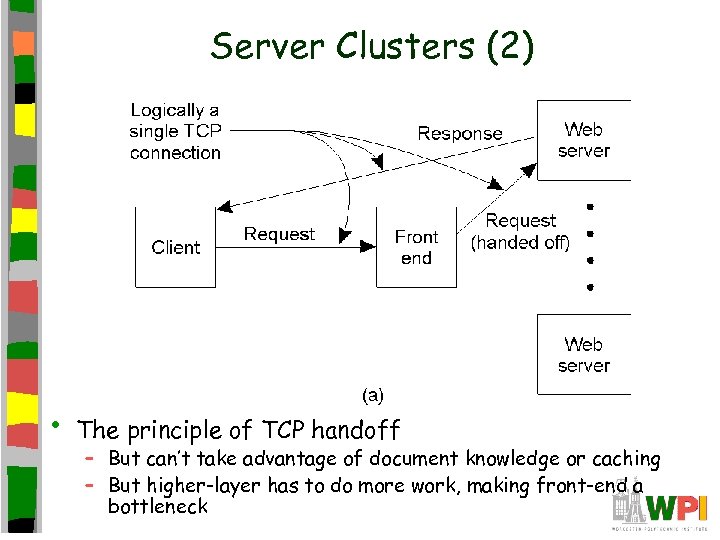
Server Clusters (2) • The principle of TCP handoff – But can’t take advantage of document knowledge or caching – But higher-layer has to do more work, making front-end a bottleneck
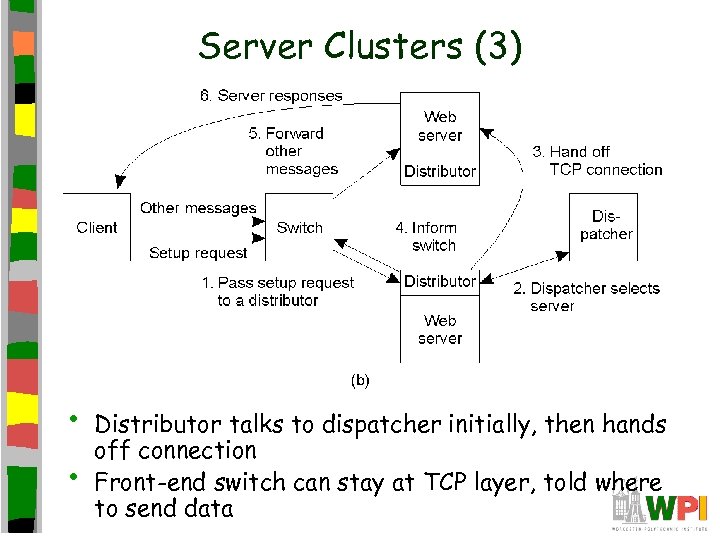
Server Clusters (3) • • Distributor talks to dispatcher initially, then hands off connection Front-end switch can stay at TCP layer, told where to send data
Outline • Introduction • Document Model • Architecture • Communication • Processes • Naming • Caching • Security (done) (done) (naming)
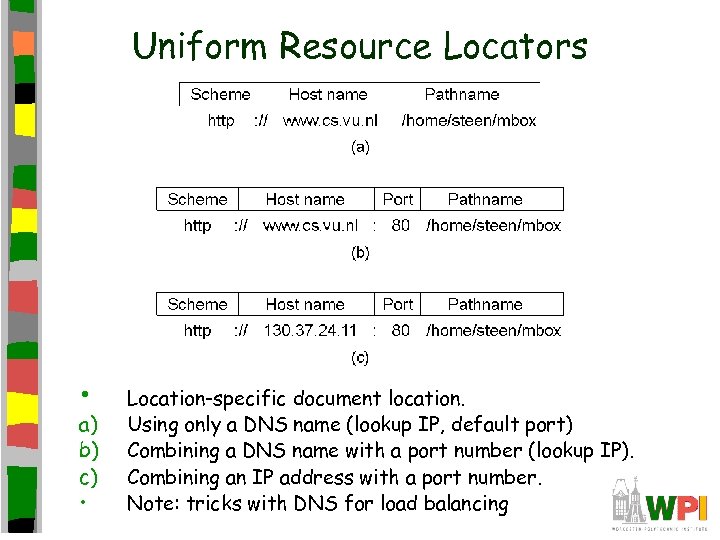
Uniform Resource Locators • a) b) c) • Location-specific document location. Using only a DNS name (lookup IP, default port) Combining a DNS name with a port number (lookup IP). Combining an IP address with a port number. Note: tricks with DNS for load balancing
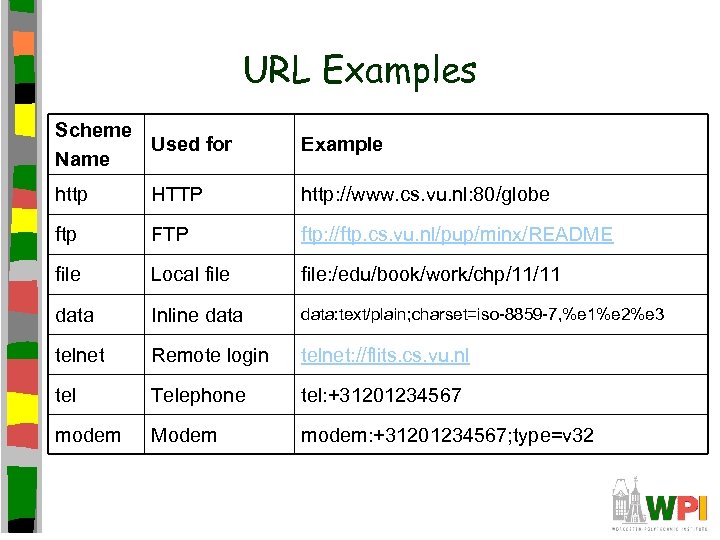
URL Examples Scheme Used for Name Example http HTTP http: //www. cs. vu. nl: 80/globe ftp FTP ftp: //ftp. cs. vu. nl/pup/minx/README file Local file: /edu/book/work/chp/11/11 data Inline data: text/plain; charset=iso-8859 -7, %e 1%e 2%e 3 telnet Remote login telnet: //flits. cs. vu. nl tel Telephone tel: +31201234567 modem Modem modem: +31201234567; type=v 32
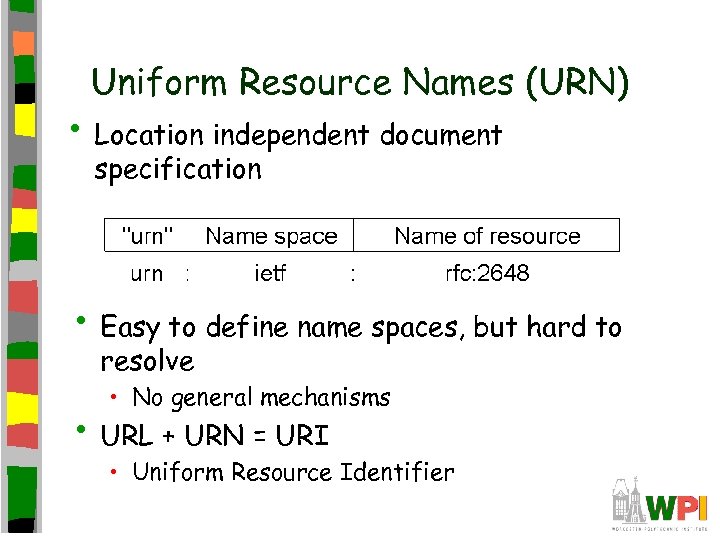
Uniform Resource Names (URN) • Location independent document specification • Easy to define name spaces, but hard to resolve • No general mechanisms • URL + URN = URI • Uniform Resource Identifier
Outline • Introduction • Document Model • Architecture • Communication • Processes • Naming • Caching • Security (done) (done) (next)
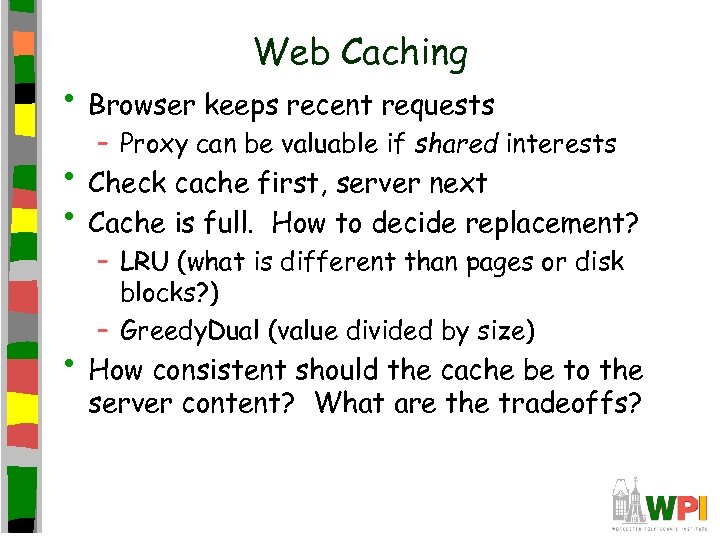
Web Caching • Browser keeps recent requests – Proxy can be valuable if shared interests • Check cache first, server next • Cache is full. How to decide replacement? – LRU (what is different than pages or disk blocks? ) – Greedy. Dual (value divided by size) • How consistent should the cache be to the server content? What are the tradeoffs?
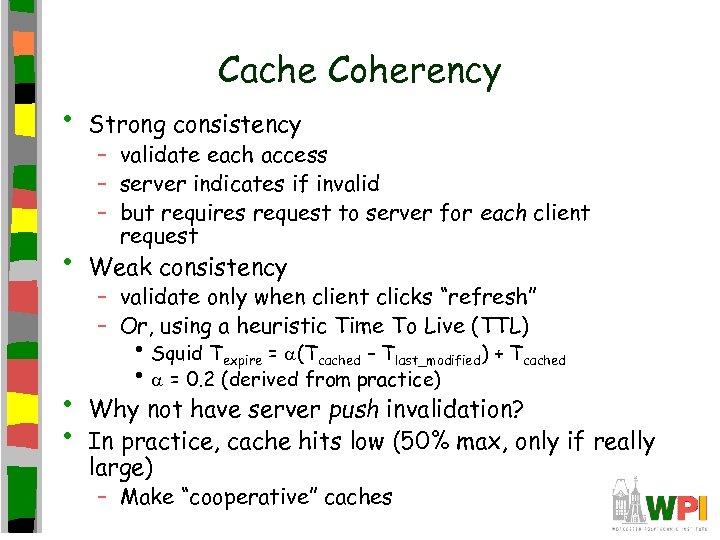
Cache Coherency • Strong consistency • Weak consistency • • – validate each access – server indicates if invalid – but requires request to server for each client request – validate only when client clicks “refresh” – Or, using a heuristic Time To Live (TTL) • Squid Texpire = (Tcached – Tlast_modified) + Tcached • = 0. 2 (derived from practice) Why not have server push invalidation? In practice, cache hits low (50% max, only if really large) – Make “cooperative” caches
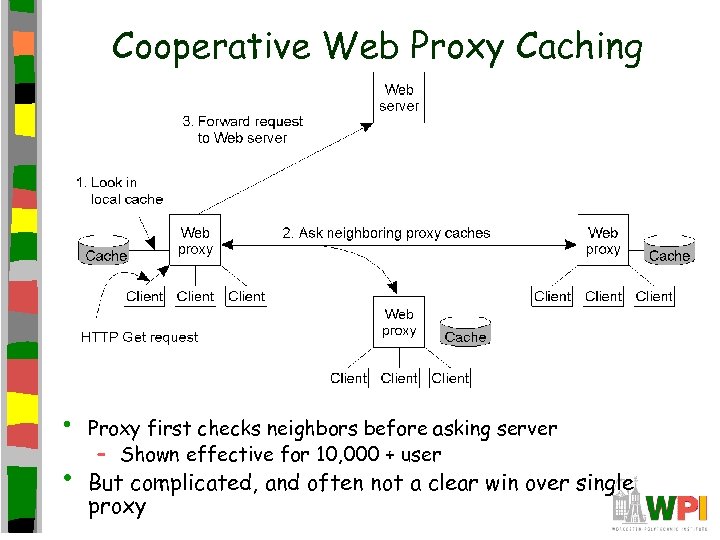
Cooperative Web Proxy Caching • • Proxy first checks neighbors before asking server – Shown effective for 10, 000 + user But complicated, and often not a clear win over single proxy
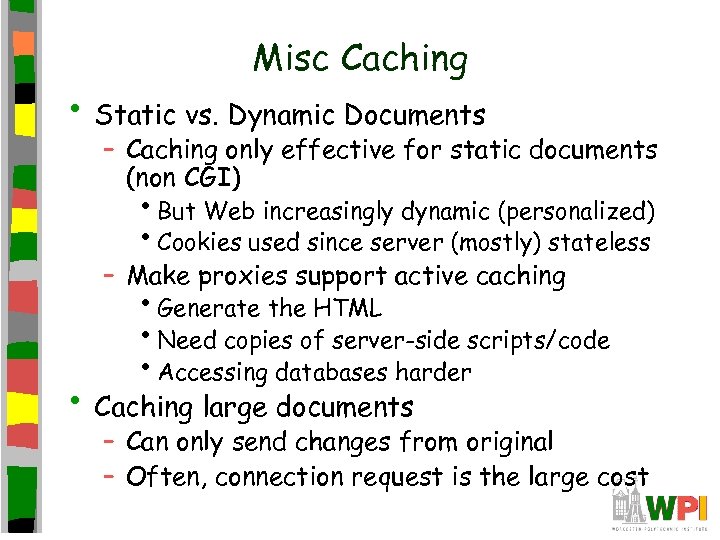
Misc Caching • Static vs. Dynamic Documents – Caching only effective for static documents (non CGI) • But Web increasingly dynamic (personalized) • Cookies used since server (mostly) stateless – Make proxies support active caching • Generate the HTML • Need copies of server-side scripts/code • Accessing databases harder • Caching large documents – Can only send changes from original – Often, connection request is the large cost
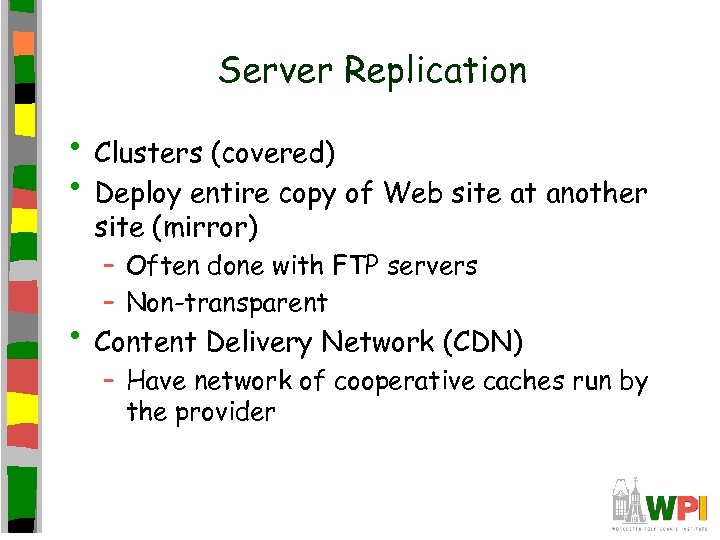
Server Replication • Clusters (covered) • Deploy entire copy of Web site at another site (mirror) – Often done with FTP servers – Non-transparent • Content Delivery Network (CDN) – Have network of cooperative caches run by the provider
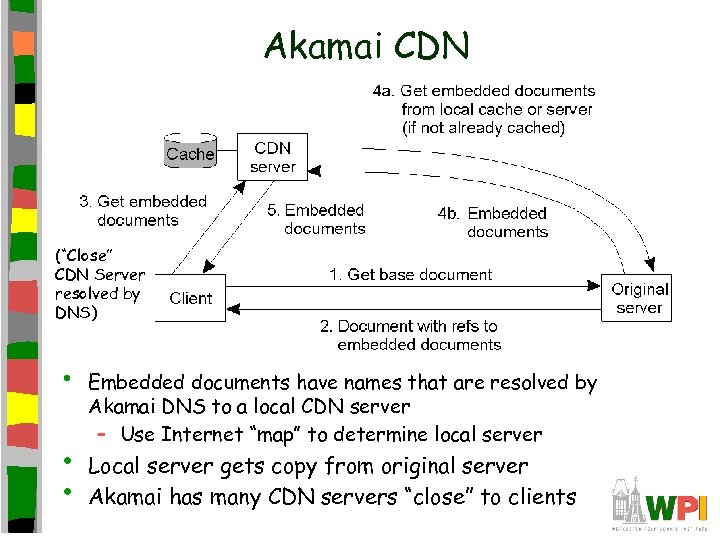
Akamai CDN (“Close” CDN Server resolved by DNS) • • • Embedded documents have names that are resolved by Akamai DNS to a local CDN server – Use Internet “map” to determine local server Local server gets copy from original server Akamai has many CDN servers “close” to clients
Outline • Introduction • Document Model • Architecture • Communication • Processes • Naming • Caching • Security (done) (done) (next) – Secure Socket Layer (SSL)
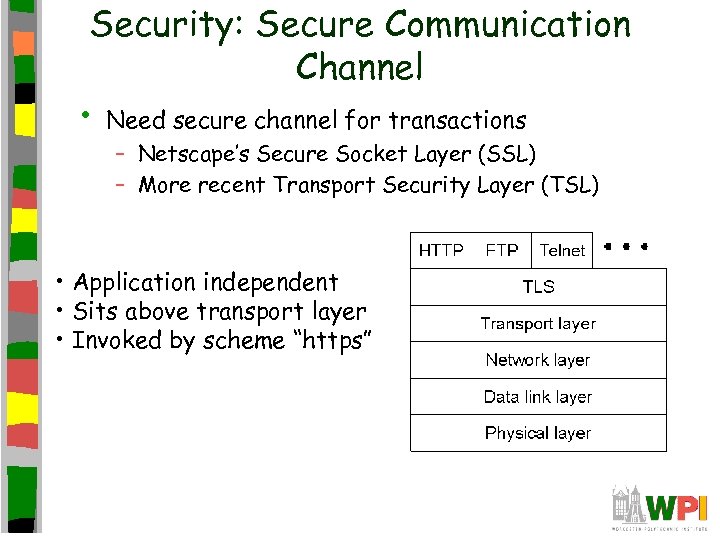
Security: Secure Communication Channel • Need secure channel for transactions – Netscape’s Secure Socket Layer (SSL) – More recent Transport Security Layer (TSL) • Application independent • Sits above transport layer • Invoked by scheme “https”
Establishing an SSL connection 1. 2. 3. 4. 5. 6. 7. Client sends SSL version number, cipher settings, randomly generated data and other information server needs. Server sends server SSL version number, cipher settings, randomly generated data, servers own certificate. 1. (Optional) Server may request client's certificate. Client authenticates server certificate by using public key of certificate authority (CA) Client creates premaster key for session and encrypts it with servers public key (obtained from server's certificate) and sends to server. 1. (Optional) Client sends encrypted data based on own private key if client needs authentication. Server generates master secret, sends to server Both client and server use master secret to generate session keys, which are symmetric keys for encryption/decryption of exchanged information during SSL session. Client and server inform each other session key has been created. SSL handshake is complete.
Скачать презентацию CS 4513 Distributed Computer Systems The Web Ch
466685948c506646c6a6ef9594a28d14.ppt