 Скачать презентацию CS 3695 Vulnerability Assessment Network Review
011773bab59e24b4a79b70a0f8cd4a63.ppt
- Количество слайдов: 34



CS 3695 – Vulnerability Assessment – Network Review Taught by Scott Coté
Objectives • Know the Internet key infrastructures, including MAEs • The difference between the web and the internet • What OSI model is and the purpose of each of its 7 layers • TCP/IP protocols • The difference between connection orientated & connectionless orientated
Objectives • The format of an IP address, as well as a network and broadcast address • The difference between static and dynamic addressing • How a three-way handshake works • What a DNS does and how it works • Understand what ARP is and how it works. • Know when a packet is sent to a router • Be able to AND two addresses to see if on the same subnet
Objectives • Know what a port is and how it is used to identify services – also be able to list or identify common port numbers • The difference between logical and physical addresses • How a packet travels (and changes) as it crosses the Internet. . . • Understand the basics of the FTP and ICMP protocols, and how we will use them within this course.
A Network Review… • Before we can get into scanning a range of IP Addresses, we need to ensure you understand how networks, and the Internet (really just a network of networks) works… • Since the Internet is just a network with some special properties, we will perform the review by looking into how the Internet works…
The OSI Model • To aid in the Internet’s and the Web’s growth, the International Organization for Standardization (ISO) recognized that there was a need to create a network model that would help network builders implement networks that could communicate and work together (interoperability) and released the OSI (Open Systems Interconnection) reference model in 1984.
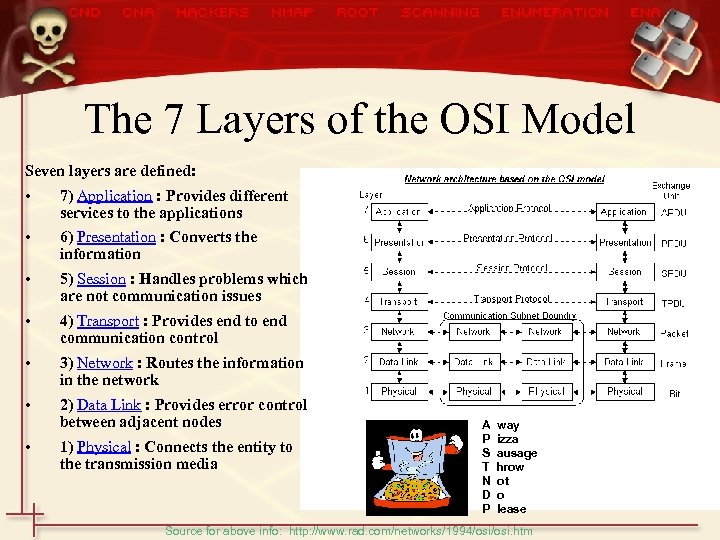
The 7 Layers of the OSI Model Seven layers are defined: • 7) Application : Provides different services to the applications • 6) Presentation : Converts the information • 5) Session : Handles problems which are not communication issues • 4) Transport : Provides end to end communication control • 3) Network : Routes the information in the network • 2) Data Link : Provides error control between adjacent nodes • 1) Physical : Connects the entity to the transmission media A P S T N D P way izza ausage hrow ot o lease Source for above info: http: //www. rad. com/networks/1994/osi. htm
So What’s a Protocol? • Protocols are the rules that govern the transmission, security, and presentation of the internet. They control every aspect of data delivery. • Different protocols apply to different layers – TCP/IP layers 3 & 4, HTTP Layer 7 • Usually covered in depth by RFCs (Requests For Comments) – A good site for info on RFCs: • • http: //www. rfc-editor. org/ Note that they are the logical structures that are later implemented in the physical world… they define how the 1’s and 0’s on the wire represent information…
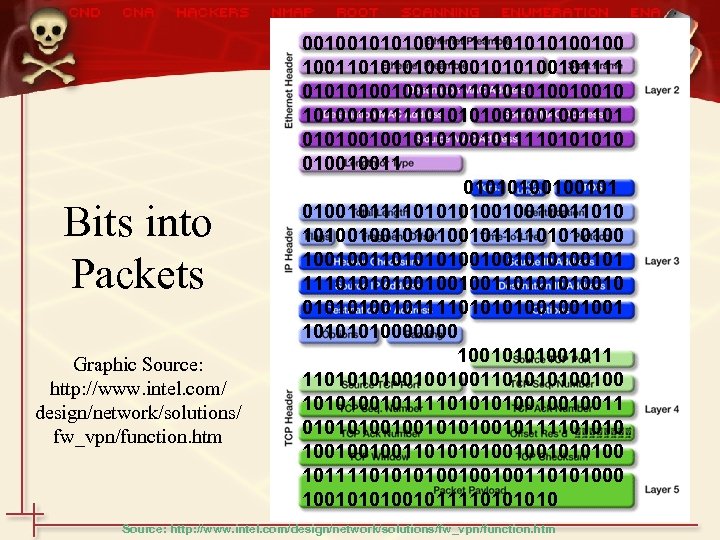
Bits into Packets Graphic Source: http: //www. intel. com/ design/network/solutions/ fw_vpn/function. htm 001001011110100100 100110100100101111 0101010010010011010010010 1010010111101001001001101 010100100101111010 010010011 0101010010010111101001001001101001001011110100 100100110100100101 111010010010011010010 0101010010111101001001001 1010000000 10010101001011 110100100100110100100 1010100101111010010010011 0101010010111101010 1001001001101001001010100 1011110100100100110101000 1001010100101111010 Source: http: //www. intel. com/design/network/solutions/fw_vpn/function. htm
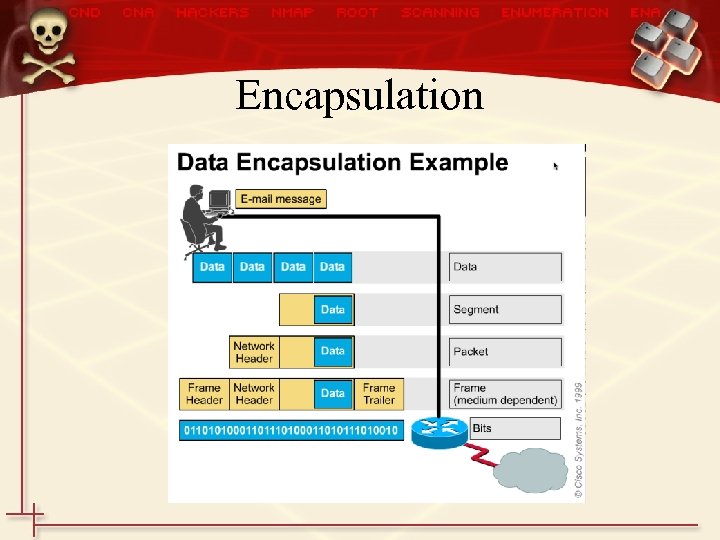
Encapsulation
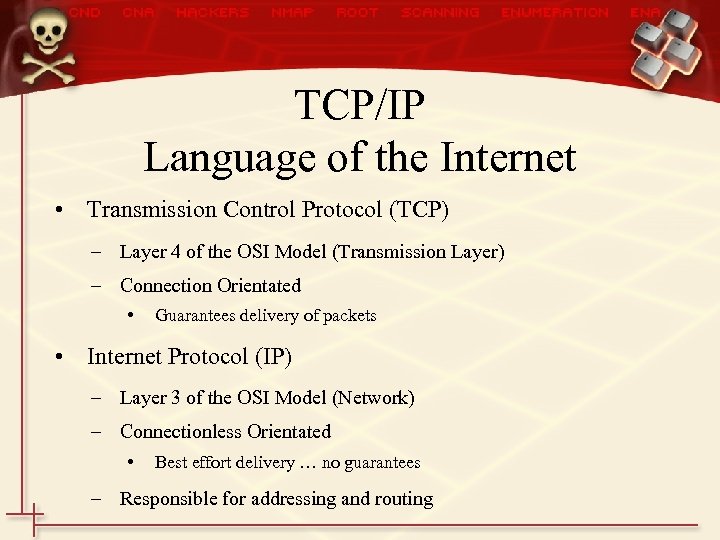
TCP/IP Language of the Internet • Transmission Control Protocol (TCP) – Layer 4 of the OSI Model (Transmission Layer) – Connection Orientated • Guarantees delivery of packets • Internet Protocol (IP) – Layer 3 of the OSI Model (Network) – Connectionless Orientated • Best effort delivery … no guarantees – Responsible for addressing and routing
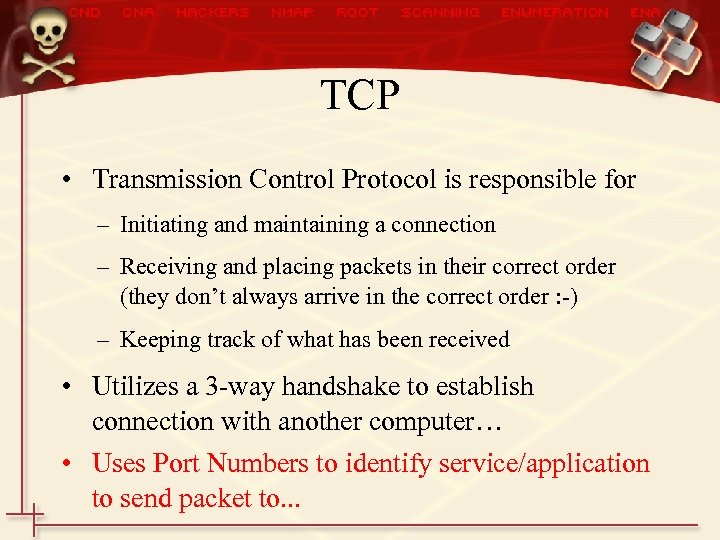
TCP • Transmission Control Protocol is responsible for – Initiating and maintaining a connection – Receiving and placing packets in their correct order (they don’t always arrive in the correct order : -) – Keeping track of what has been received • Utilizes a 3 -way handshake to establish connection with another computer… • Uses Port Numbers to identify service/application to send packet to. . .
TCP Segment Format (RFC 793) One segment of the total data!
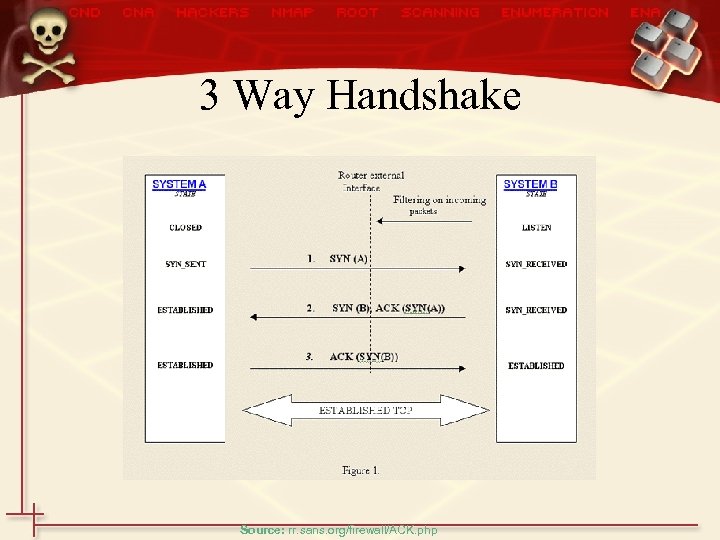
3 Way Handshake Source: rr. sans. org/firewall/ACK. php
Ports • Ports identify the service (application) a packet/segment is bound for. . . – Web servers run on port 80. . . • There is also a port number for the application that requested the information – a random # between 1024 - 65535 – computer tracks these and sends them to the proper application. . . – So your web browser might use port 1025 to request a web page. . .
Common Ports • Some of the more common ports (listed in Hacking Exposed as well). . . – 21 - FTP – 22 - SSH – 23 - Telnet – 53 - DNS – 80 - WEb Servers – 139 -netbios
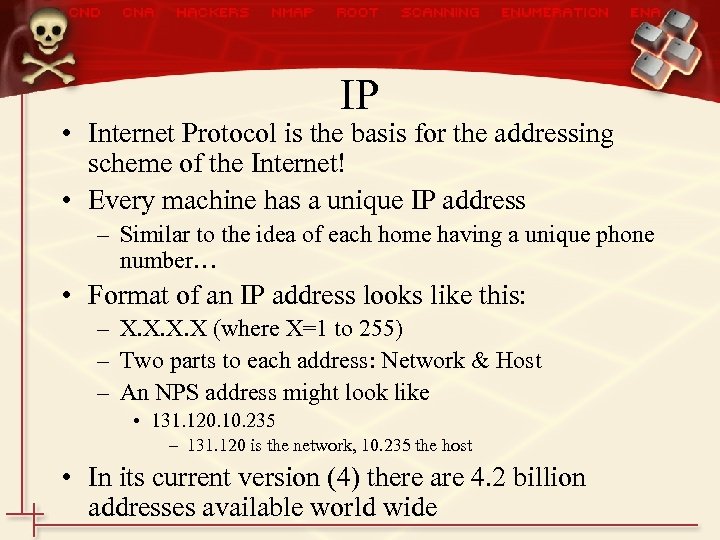
IP • Internet Protocol is the basis for the addressing scheme of the Internet! • Every machine has a unique IP address – Similar to the idea of each home having a unique phone number… • Format of an IP address looks like this: – X. X (where X=1 to 255) – Two parts to each address: Network & Host – An NPS address might look like • 131. 120. 10. 235 – 131. 120 is the network, 10. 235 the host • In its current version (4) there are 4. 2 billion addresses available world wide
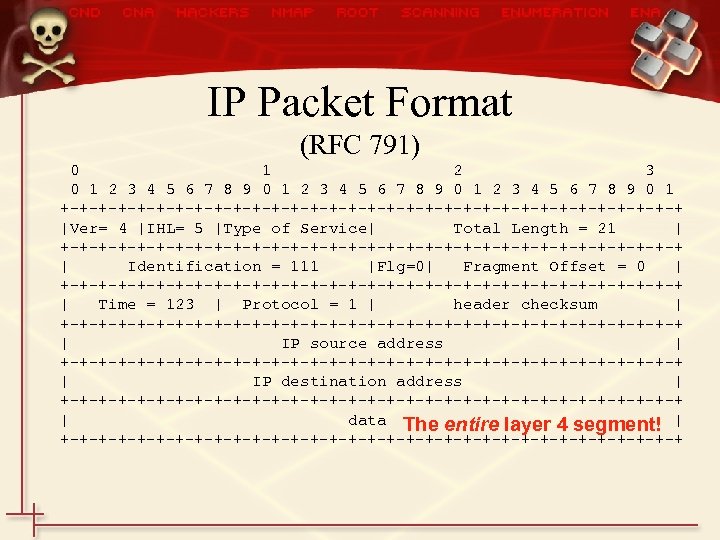
IP Packet Format (RFC 791) 0 1 2 3 4 5 6 7 8 9 0 1 +-+-+-+-+-+-+-+-+-+-+-+-+-+-+-+-+ |Ver= 4 |IHL= 5 |Type of Service| Total Length = 21 | +-+-+-+-+-+-+-+-+-+-+-+-+-+-+-+-+ | Identification = 111 |Flg=0| Fragment Offset = 0 | +-+-+-+-+-+-+-+-+-+-+-+-+-+-+-+-+ | Time = 123 | Protocol = 1 | header checksum | +-+-+-+-+-+-+-+-+-+-+-+-+-+-+-+-+ | IP source address | +-+-+-+-+-+-+-+-+-+-+-+-+-+-+-+-+ | IP destination address | +-+-+-+-+-+-+-+-+-+-+-+-+-+-+-+-+ | data The entire layer 4 segment! | +-+-+-+-+-+-+-+-+-+-+-+-+-+-+-+-+
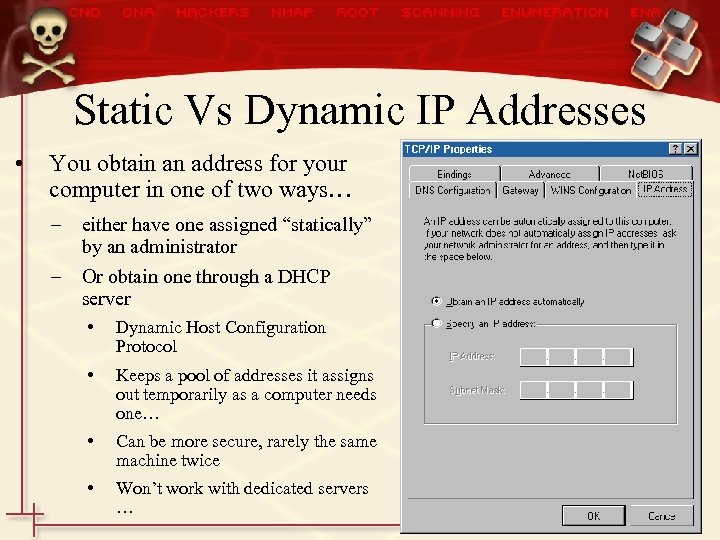
Static Vs Dynamic IP Addresses • You obtain an address for your computer in one of two ways… – either have one assigned “statically” by an administrator – Or obtain one through a DHCP server • Dynamic Host Configuration Protocol • Keeps a pool of addresses it assigns out temporarily as a computer needs one… • Can be more secure, rarely the same machine twice • Won’t work with dedicated servers …
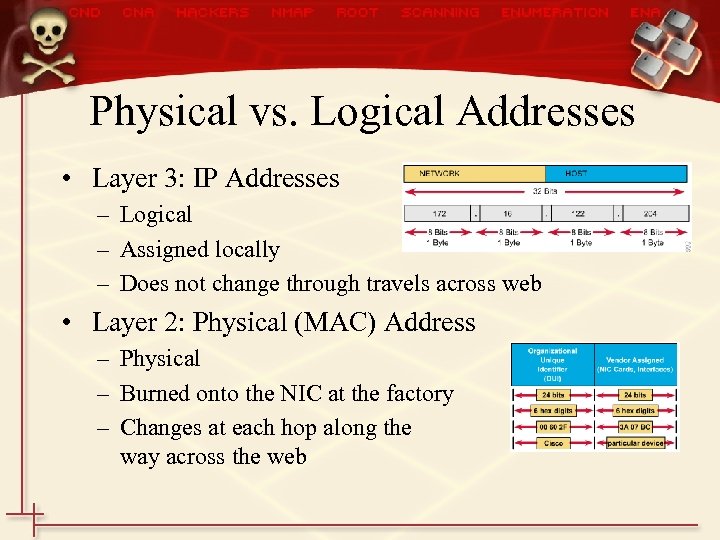
Physical vs. Logical Addresses • Layer 3: IP Addresses – Logical – Assigned locally – Does not change through travels across web • Layer 2: Physical (MAC) Address – Physical – Burned onto the NIC at the factory – Changes at each hop along the way across the web
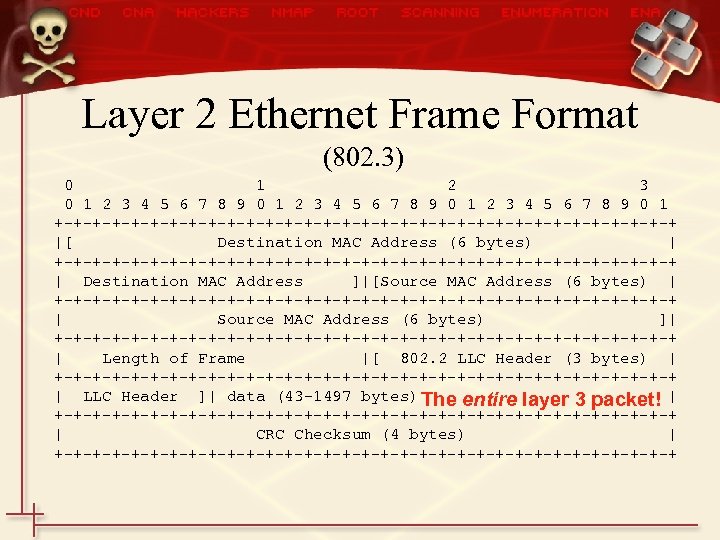
Layer 2 Ethernet Frame Format (802. 3) 0 1 2 3 4 5 6 7 8 9 0 1 +-+-+-+-+-+-+-+-+-+-+-+-+-+-+-+-+ |[ Destination MAC Address (6 bytes) | +-+-+-+-+-+-+-+-+-+-+-+-+-+-+-+-+ | Destination MAC Address ]|[Source MAC Address (6 bytes) | +-+-+-+-+-+-+-+-+-+-+-+-+-+-+-+-+ | Source MAC Address (6 bytes) ]| +-+-+-+-+-+-+-+-+-+-+-+-+-+-+-+-+ | Length of Frame |[ 802. 2 LLC Header (3 bytes) | +-+-+-+-+-+-+-+-+-+-+-+-+-+-+-+-+ | LLC Header ]| data (43 -1497 bytes) The entire layer 3 packet! | +-+-+-+-+-+-+-+-+-+-+-+-+-+-+-+-+ | CRC Checksum (4 bytes) | +-+-+-+-+-+-+-+-+-+-+-+-+-+-+-+-+
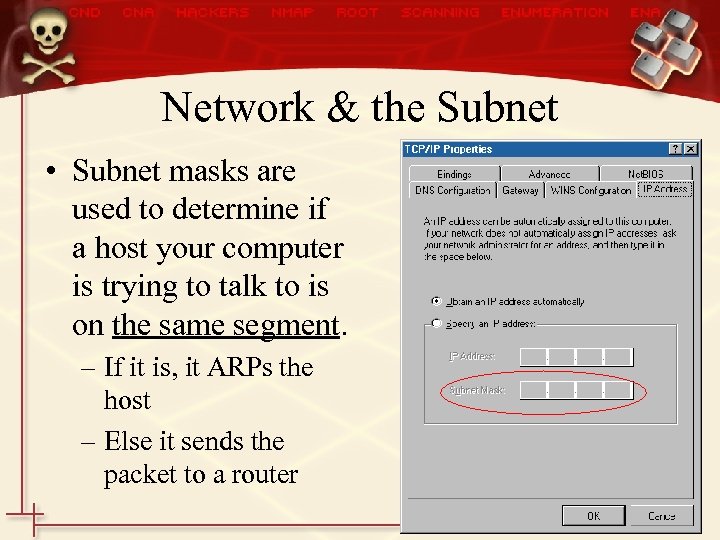
Network & the Subnet • Subnet masks are used to determine if a host your computer is trying to talk to is on the same segment. – If it is, it ARPs the host – Else it sends the packet to a router
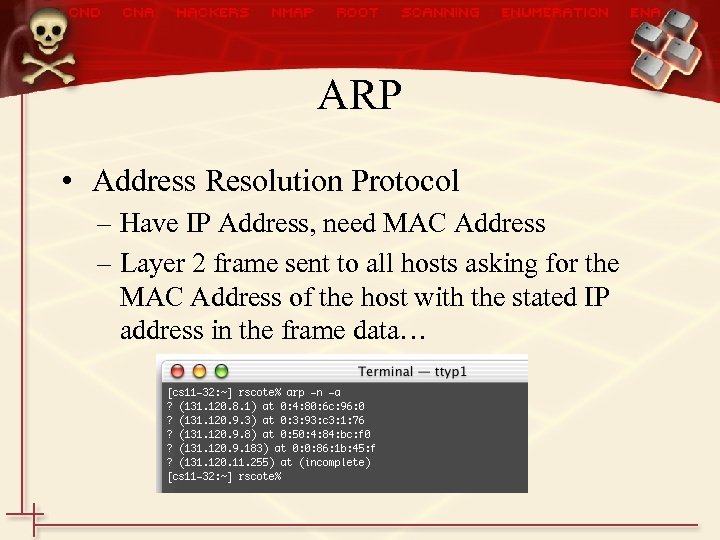
ARP • Address Resolution Protocol – Have IP Address, need MAC Address – Layer 2 frame sent to all hosts asking for the MAC Address of the host with the stated IP address in the frame data…
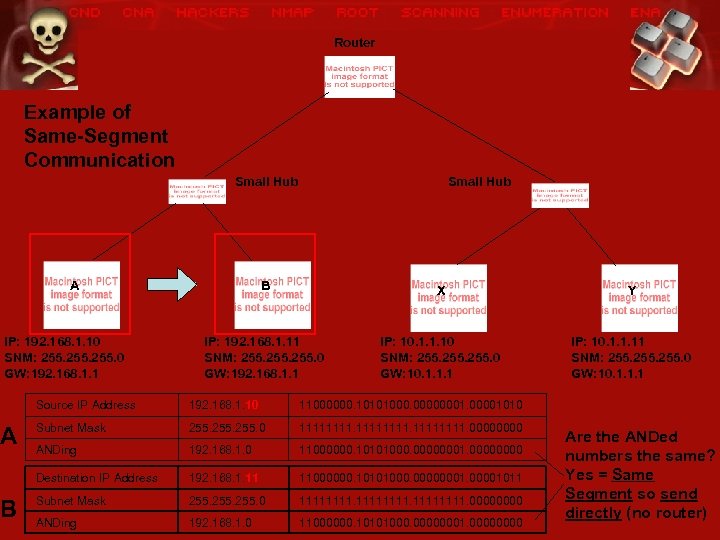
Router Example of Same-Segment Communication Small Hub A IP: 192. 168. 1. 10 SNM: 255. 0 GW: 192. 168. 1. 1 A B Small Hub B X Y IP: 192. 168. 1. 11 SNM: 255. 0 GW: 192. 168. 1. 1 IP: 10. 1. 1. 10 SNM: 255. 0 GW: 10. 1. 1. 1 IP: 10. 1. 1. 11 SNM: 255. 0 GW: 10. 1. 1. 1 Source IP Address 192. 168. 1. 10 11000000. 10101000. 00000001010 Subnet Mask 255. 0 11111111. 0000 ANDing 192. 168. 1. 0 11000000. 10101000. 00000001. 0000 Destination IP Address 192. 168. 1. 11 11000000. 10101000. 00000001011 Subnet Mask 255. 0 11111111. 0000 ANDing 192. 168. 1. 0 11000000. 10101000. 00000001. 0000 Are the ANDed numbers the same? Yes = Same Segment so send directly (no router)
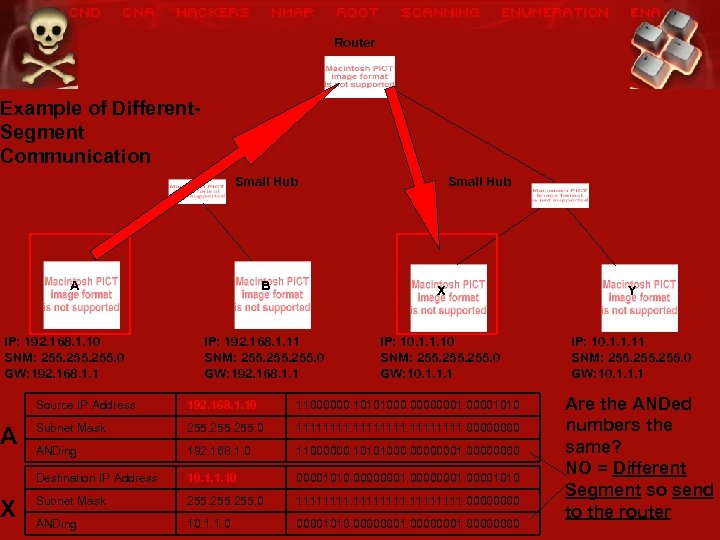
Router Example of Different. Segment Communication Small Hub A IP: 192. 168. 1. 10 SNM: 255. 0 GW: 192. 168. 1. 1 A X Small Hub B X Y IP: 192. 168. 1. 11 SNM: 255. 0 GW: 192. 168. 1. 1 IP: 10. 1. 1. 10 SNM: 255. 0 GW: 10. 1. 1. 1 IP: 10. 1. 1. 11 SNM: 255. 0 GW: 10. 1. 1. 1 Source IP Address 192. 168. 1. 10 11000000. 10101000. 00000001010 Subnet Mask 255. 0 11111111. 0000 ANDing 192. 168. 1. 0 11000000. 10101000. 00000001. 0000 Destination IP Address 10. 1. 1. 10 00001010. 00000001010 Subnet Mask 255. 0 11111111. 0000 ANDing 10. 1. 1. 0 00001010. 00000001. 0000 Are the ANDed numbers the same? NO = Different Segment so send to the router
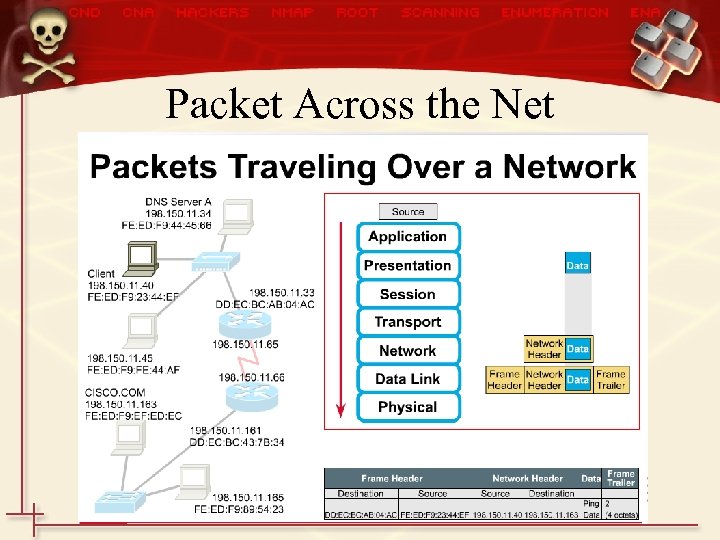
Packet Across the Net
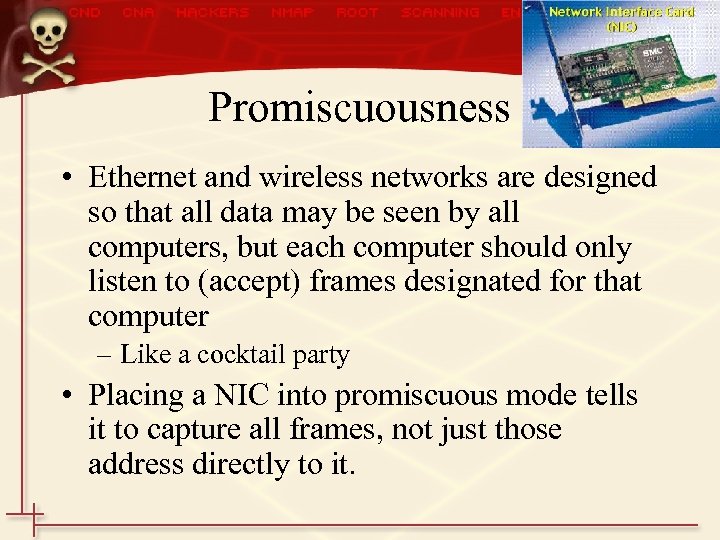
Promiscuousness • Ethernet and wireless networks are designed so that all data may be seen by all computers, but each computer should only listen to (accept) frames designated for that computer – Like a cocktail party • Placing a NIC into promiscuous mode tells it to capture all frames, not just those address directly to it.
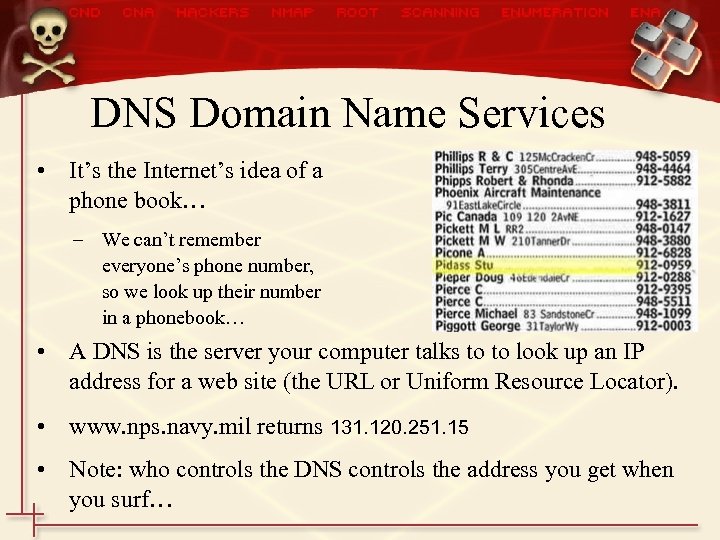
DNS Domain Name Services • It’s the Internet’s idea of a phone book… – We can’t remember everyone’s phone number, so we look up their number in a phonebook… • A DNS is the server your computer talks to to look up an IP address for a web site (the URL or Uniform Resource Locator). • www. nps. navy. mil returns 131. 120. 251. 15 • Note: who controls the DNS controls the address you get when you surf…
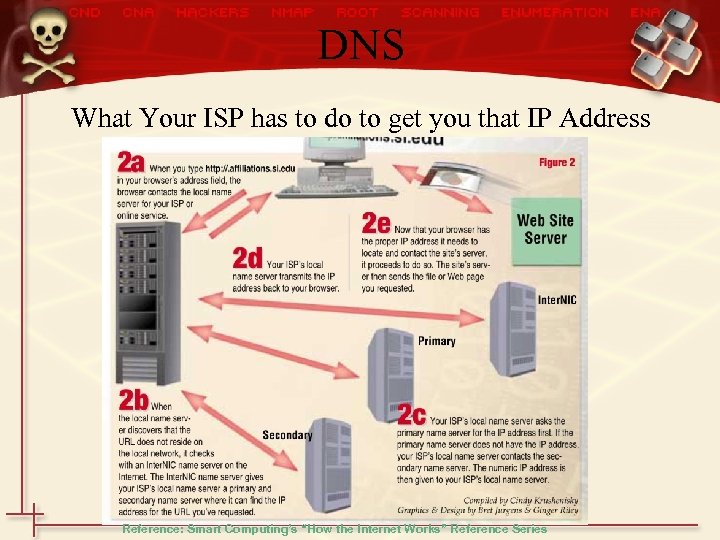
DNS What Your ISP has to do to get you that IP Address Reference: Smart Computing’s “How the Internet Works” Reference Series
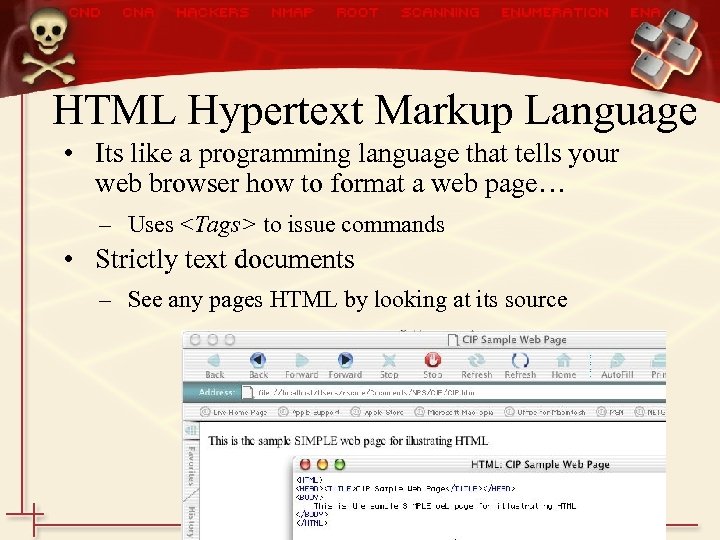
HTML Hypertext Markup Language • Its like a programming language that tells your web browser how to format a web page… – Uses <Tags> to issue commands • Strictly text documents – See any pages HTML by looking at its source
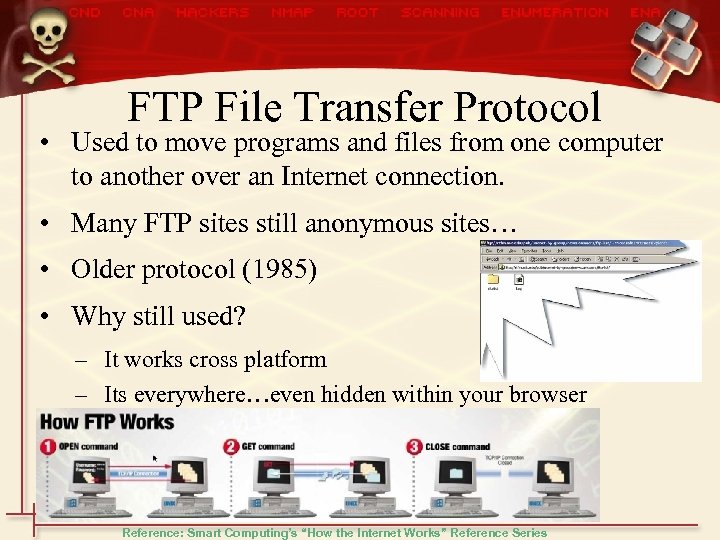
FTP File Transfer Protocol • Used to move programs and files from one computer to another over an Internet connection. • Many FTP sites still anonymous sites… • Older protocol (1985) • Why still used? – It works cross platform – Its everywhere…even hidden within your browser Reference: Smart Computing’s “How the Internet Works” Reference Series
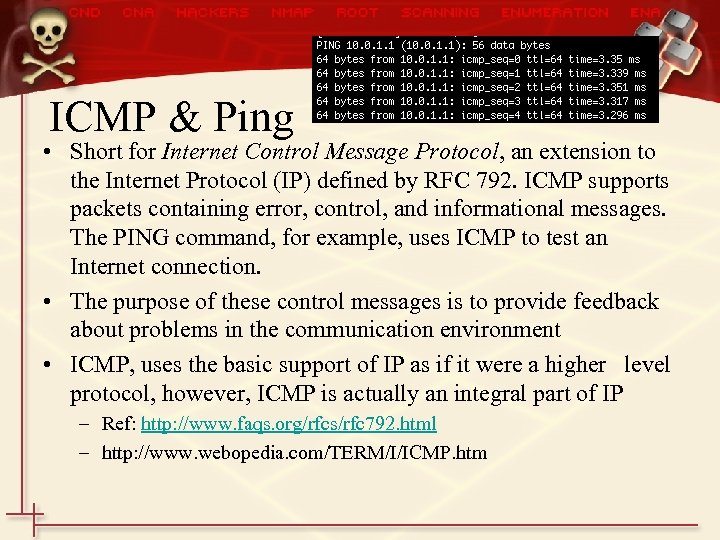
ICMP & Ping • Short for Internet Control Message Protocol, an extension to the Internet Protocol (IP) defined by RFC 792. ICMP supports packets containing error, control, and informational messages. The PING command, for example, uses ICMP to test an Internet connection. • The purpose of these control messages is to provide feedback about problems in the communication environment • ICMP, uses the basic support of IP as if it were a higher level protocol, however, ICMP is actually an integral part of IP – Ref: http: //www. faqs. org/rfcs/rfc 792. html – http: //www. webopedia. com/TERM/I/ICMP. htm
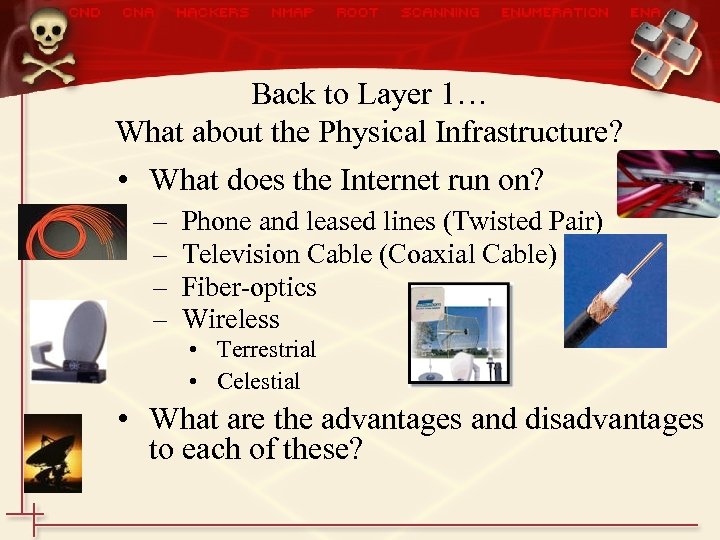
Back to Layer 1… What about the Physical Infrastructure? • What does the Internet run on? – – Phone and leased lines (Twisted Pair) Television Cable (Coaxial Cable) Fiber-optics Wireless • Terrestrial • Celestial • What are the advantages and disadvantages to each of these?
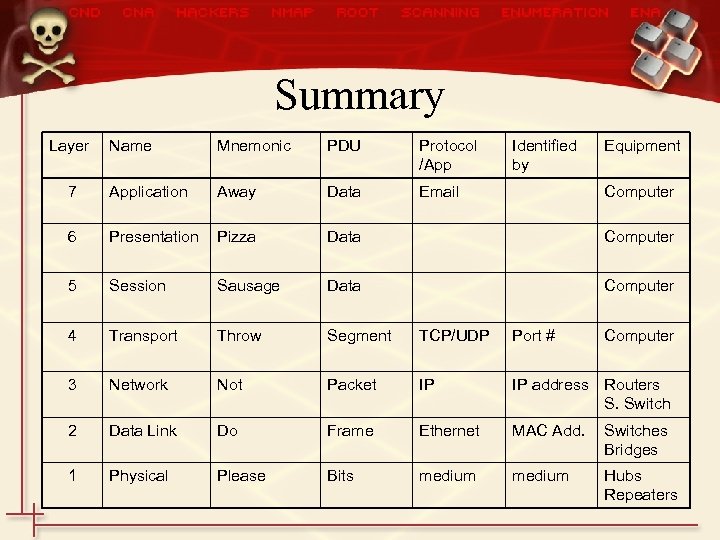
Summary Layer Name Mnemonic PDU Protocol /App Identified by Equipment 7 Application Away Data Email 6 Presentation Pizza Data Computer 5 Session Sausage Data Computer 4 Transport Throw Segment TCP/UDP Port # 3 Network Not Packet IP IP address Routers S. Switch 2 Data Link Do Frame Ethernet MAC Add. Switches Bridges 1 Physical Please Bits medium Hubs Repeaters Computer
Скачать презентацию CS 3695 Vulnerability Assessment Network Review
011773bab59e24b4a79b70a0f8cd4a63.ppt