


 Скачать презентацию CS 283 Systems Programming Process Management and Signals
012c95d2f4d713e6718e8fd29d9dd4d6.ppt
- Количество слайдов: 80
 CS 283 Systems Programming Process Management and Signals William M. Mongan Some material drawn from CSAPP: Bryant and O’Hallaron, and Practical UNIX Programming by Robbins and Robbins
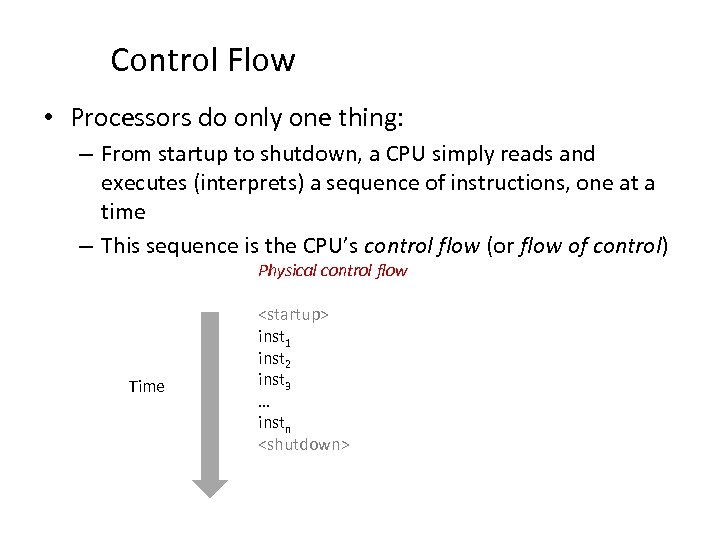 Control Flow • Processors do only one thing: – From startup to shutdown, a CPU simply reads and executes (interprets) a sequence of instructions, one at a time – This sequence is the CPU’s control flow (or flow of control) Physical control flow Time
 Altering the Control Flow • Up to now: two mechanisms for changing control flow: – Jumps and branches – Call and return Both react to changes in program state • Insufficient for a useful system: Difficult to react to changes in system state – – data arrives from a disk or a network adapter instruction divides by zero user hits Ctrl-C at the keyboard System timer expires • System needs mechanisms for “exceptional control flow”
 Exceptional Control Flow • Exists at all levels of a computer system • Low level mechanisms – Exceptions • change in control flow in response to a system event (i. e. , change in system state) – Combination of hardware and OS software • Higher level mechanisms – – Process context switch Signals Nonlocal jumps: setjmp()/longjmp() Implemented by either: • OS software (context switch and signals) • C language runtime library (nonlocal jumps)
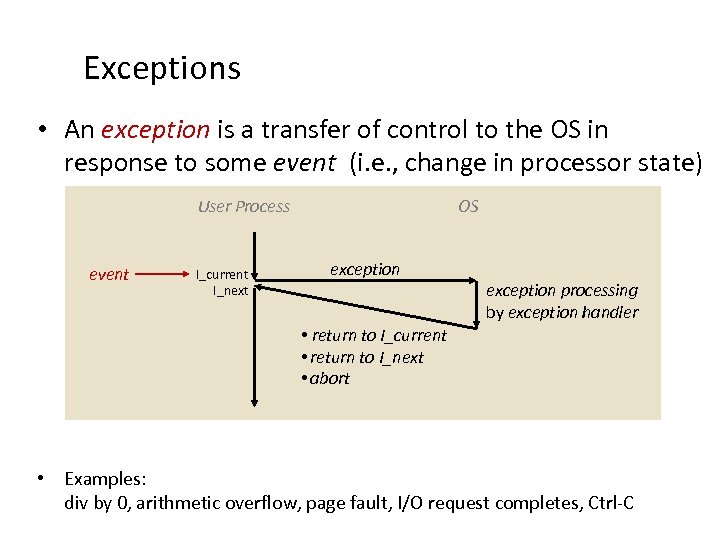 Exceptions • An exception is a transfer of control to the OS in response to some event (i. e. , change in processor state) User Process event I_current I_next OS exception processing by exception handler • return to I_current • return to I_next • abort • Examples: div by 0, arithmetic overflow, page fault, I/O request completes, Ctrl-C
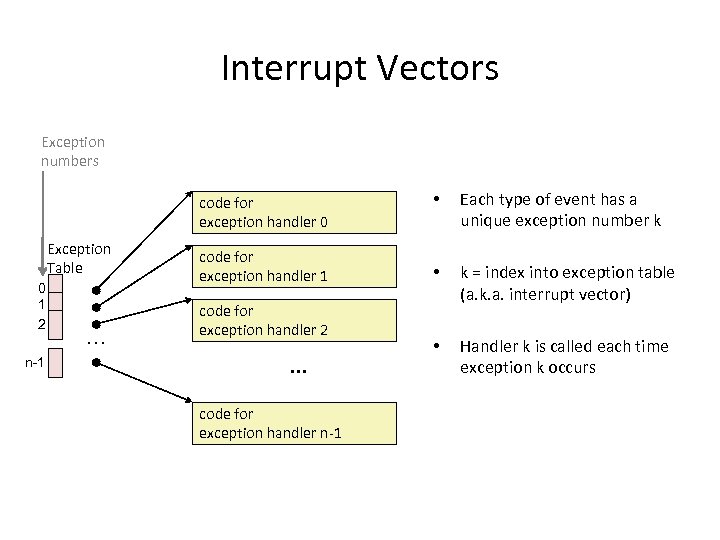 Interrupt Vectors Exception numbers code for exception handler 0 Exception Table 0 1 2 n-1 . . . code for exception handler 1 code for exception handler 2 . . . code for exception handler n-1 • Each type of event has a unique exception number k • k = index into exception table (a. k. a. interrupt vector) • Handler k is called each time exception k occurs
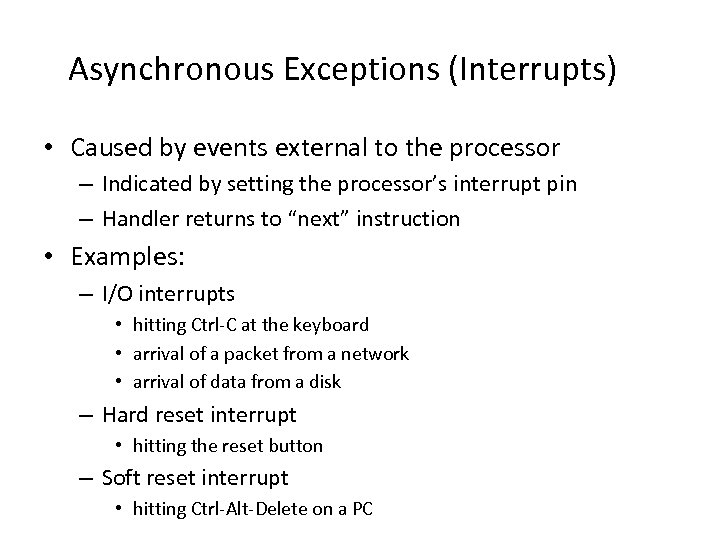 Asynchronous Exceptions (Interrupts) • Caused by events external to the processor – Indicated by setting the processor’s interrupt pin – Handler returns to “next” instruction • Examples: – I/O interrupts • hitting Ctrl-C at the keyboard • arrival of a packet from a network • arrival of data from a disk – Hard reset interrupt • hitting the reset button – Soft reset interrupt • hitting Ctrl-Alt-Delete on a PC
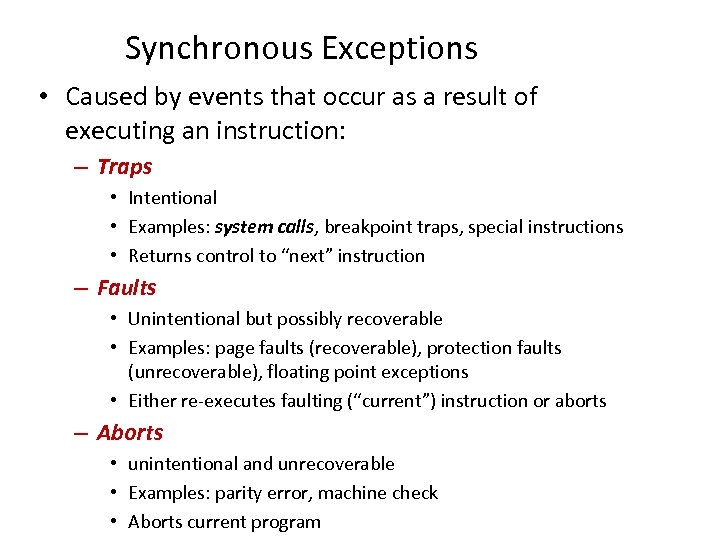 Synchronous Exceptions • Caused by events that occur as a result of executing an instruction: – Traps • Intentional • Examples: system calls, breakpoint traps, special instructions • Returns control to “next” instruction – Faults • Unintentional but possibly recoverable • Examples: page faults (recoverable), protection faults (unrecoverable), floating point exceptions • Either re-executes faulting (“current”) instruction or aborts – Aborts • unintentional and unrecoverable • Examples: parity error, machine check • Aborts current program
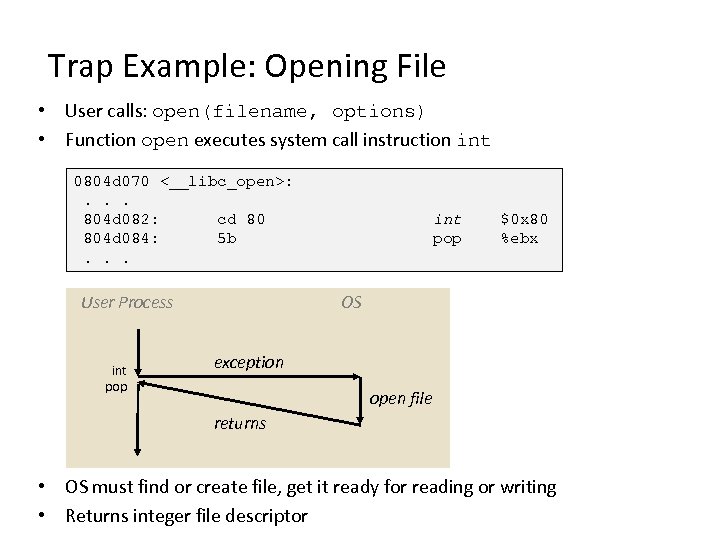 Trap Example: Opening File • User calls: open(filename, options) • Function open executes system call instruction int 0804 d 070 <__libc_open>: . . . 804 d 082: cd 80 804 d 084: 5 b. . . User Process int pop $0 x 80 %ebx OS exception open file returns • OS must find or create file, get it ready for reading or writing • Returns integer file descriptor
![Fault Example: Page Faulta[1000]; int main () { a[500] = 13; } • User](https://present5.com/presentation/012c95d2f4d713e6718e8fd29d9dd4d6/image-10.jpg "Fault Example: Page Faulta[1000]; int main () { a[500] = 13; } • User") Fault Example: Page Faulta[1000]; int main () { a[500] = 13; } • User writes to memory location • That portion (page) of user’s memory is currently on disk 80483 b 7: c 7 05 10 9 d 04 08 0 d User Process movl OS exception: page fault returns Create page and load into memory • Page handler must load page into physical memory • Returns to faulting instruction • Successful on second try $0 xd, 0 x 8049 d 10
Fault Example: Page Faulta[1000]; int main () { a[500] = 13; } • User writes to memory location • That portion (page) of user’s memory is currently on disk 80483 b 7: c 7 05 10 9 d 04 08 0 d User Process movl OS exception: page fault returns Create page and load into memory • Page handler must load page into physical memory • Returns to faulting instruction • Successful on second try $0 xd, 0 x 8049 d 10
![Fault Example: Invalid Memory Reference int a[1000]; main () { a[5000] = 13; }](https://present5.com/presentation/012c95d2f4d713e6718e8fd29d9dd4d6/image-11.jpg "Fault Example: Invalid Memory Reference int a[1000]; main () { a[5000] = 13; }") Fault Example: Invalid Memory Reference int a[1000]; main () { a[5000] = 13; } 80483 b 7: c 7 05 60 e 3 04 08 0 d User Process movl $0 xd, 0 x 804 e 360 OS exception: page fault detect invalid address signal process • Page handler detects invalid address • Sends SIGSEGV signal to user process • User process exits with “segmentation fault”
Fault Example: Invalid Memory Reference int a[1000]; main () { a[5000] = 13; } 80483 b 7: c 7 05 60 e 3 04 08 0 d User Process movl $0 xd, 0 x 804 e 360 OS exception: page fault detect invalid address signal process • Page handler detects invalid address • Sends SIGSEGV signal to user process • User process exits with “segmentation fault”
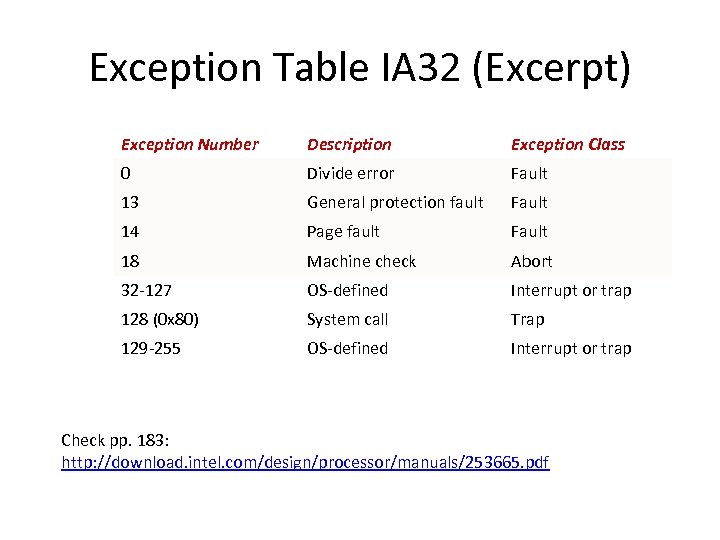 Exception Table IA 32 (Excerpt) Exception Number Description Exception Class 0 Divide error Fault 13 General protection fault Fault 14 Page fault Fault 18 Machine check Abort 32 -127 OS-defined Interrupt or trap 128 (0 x 80) System call Trap 129 -255 OS-defined Interrupt or trap Check pp. 183: http: //download. intel. com/design/processor/manuals/253665. pdf
 Processes • Definition: A process is an instance of a running program. – One of the most profound ideas in computer science – Not the same as “program” or “processor” • Process provides each program with two key abstractions: – Logical control flow • Each program seems to have exclusive use of the CPU – Private virtual address space • Each program seems to have exclusive use of main memory • How are these Illusions maintained? – Process executions interleaved (multitasking) – Address spaces managed by virtual memory system
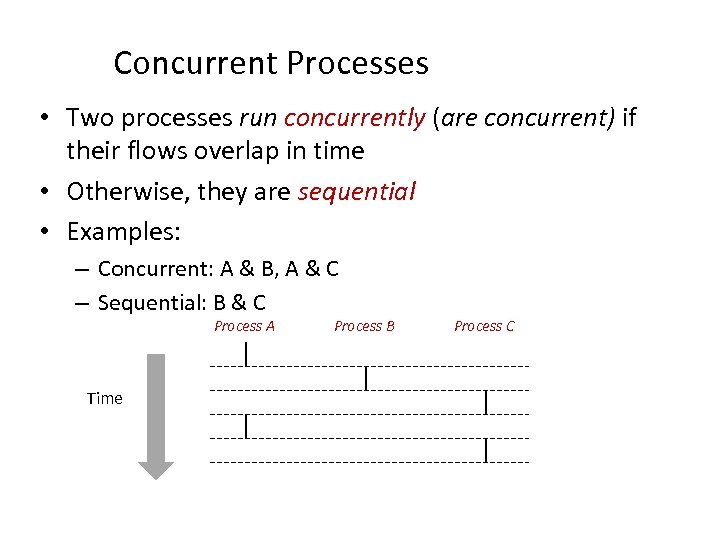 Concurrent Processes • Two processes run concurrently (are concurrent) if their flows overlap in time • Otherwise, they are sequential • Examples: – Concurrent: A & B, A & C – Sequential: B & C Process A Time Process B Process C
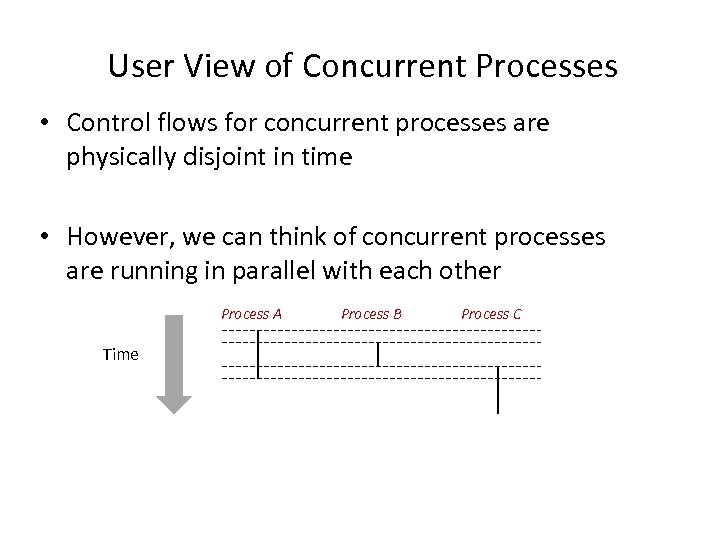 User View of Concurrent Processes • Control flows for concurrent processes are physically disjoint in time • However, we can think of concurrent processes are running in parallel with each other Process A Time Process B Process C
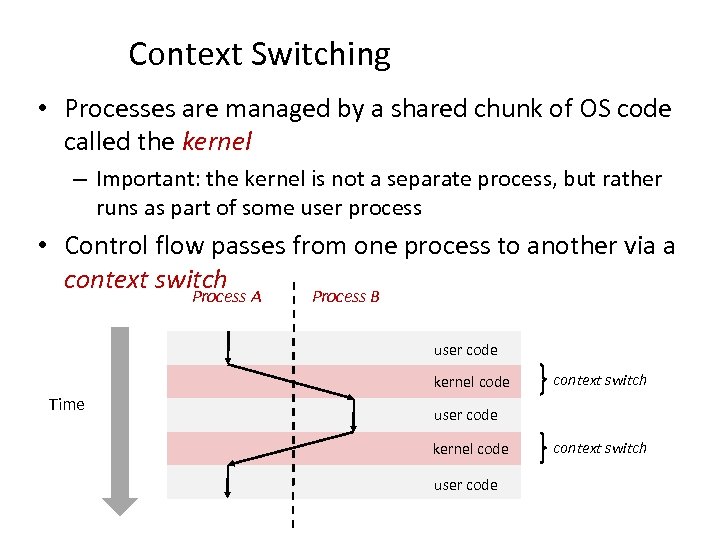 Context Switching • Processes are managed by a shared chunk of OS code called the kernel – Important: the kernel is not a separate process, but rather runs as part of some user process • Control flow passes from one process to another via a context switch Process A Process B user code kernel code Time context switch user code kernel code user code context switch
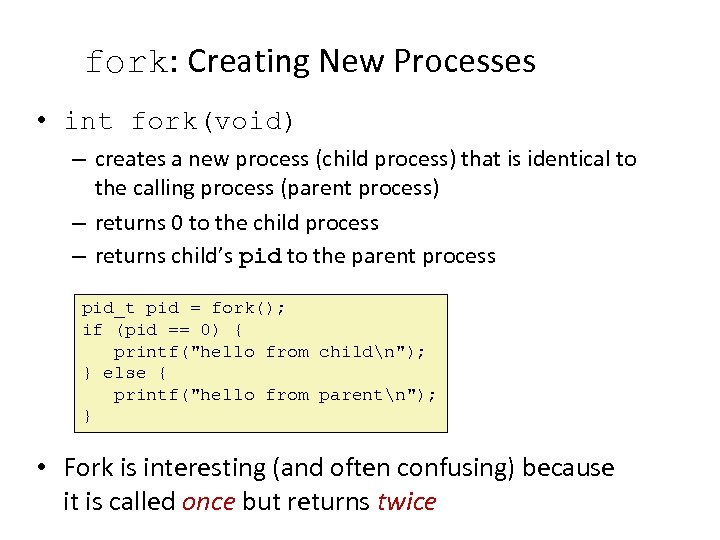 fork: Creating New Processes • int fork(void) – creates a new process (child process) that is identical to the calling process (parent process) – returns 0 to the child process – returns child’s pid to the parent process pid_t pid = fork(); if (pid == 0) { printf("hello from childn"); } else { printf("hello from parentn"); } • Fork is interesting (and often confusing) because it is called once but returns twice
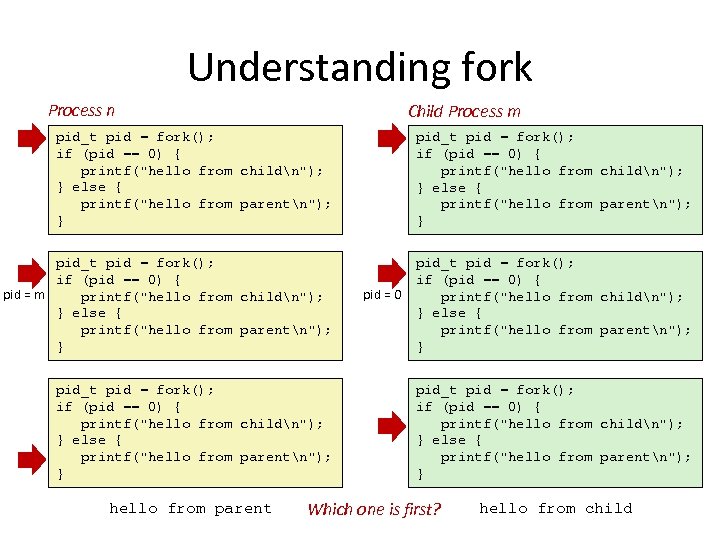 Understanding fork Process n Child Process m pid_t pid = fork(); if (pid == 0) { printf("hello from childn"); } else { printf("hello from parentn"); } pid_t pid = fork(); if (pid == 0) { pid = m printf("hello from childn"); } else { printf("hello from parentn"); } pid_t pid = fork(); if (pid == 0) { printf("hello from childn"); } else { printf("hello from parentn"); } hello from parent pid = 0 pid_t pid = fork(); if (pid == 0) { printf("hello from childn"); } else { printf("hello from parentn"); } Which one is first? hello from child
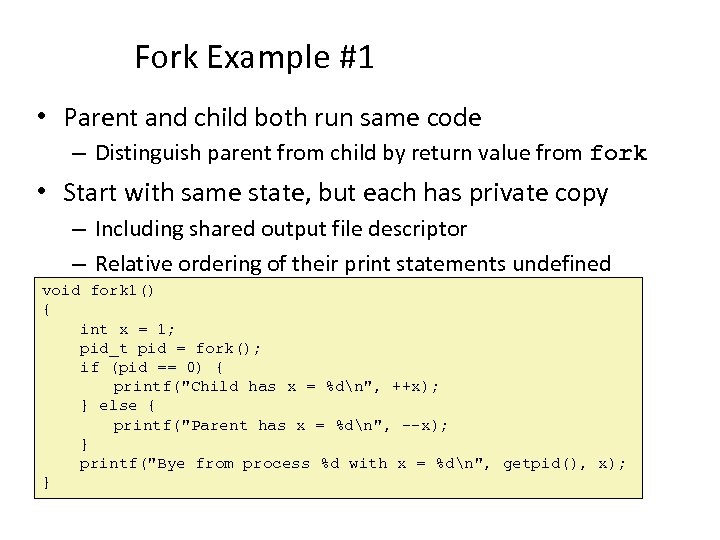 Fork Example #1 • Parent and child both run same code – Distinguish parent from child by return value from fork • Start with same state, but each has private copy – Including shared output file descriptor – Relative ordering of their print statements undefined void fork 1() { int x = 1; pid_t pid = fork(); if (pid == 0) { printf("Child has x = %dn", ++x); } else { printf("Parent has x = %dn", --x); } printf("Bye from process %d with x = %dn", getpid(), x); }
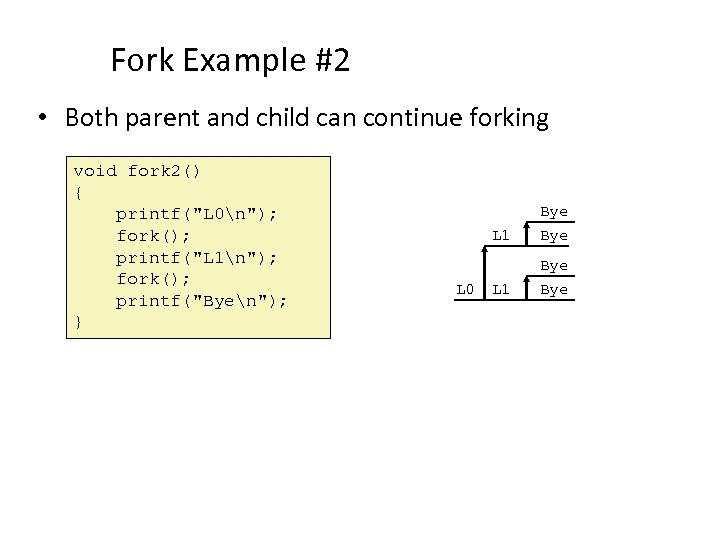 Fork Example #2 • Both parent and child can continue forking void fork 2() { printf("L 0n"); fork(); printf("L 1n"); fork(); printf("Byen"); } L 1 L 0 Bye L 1 Bye
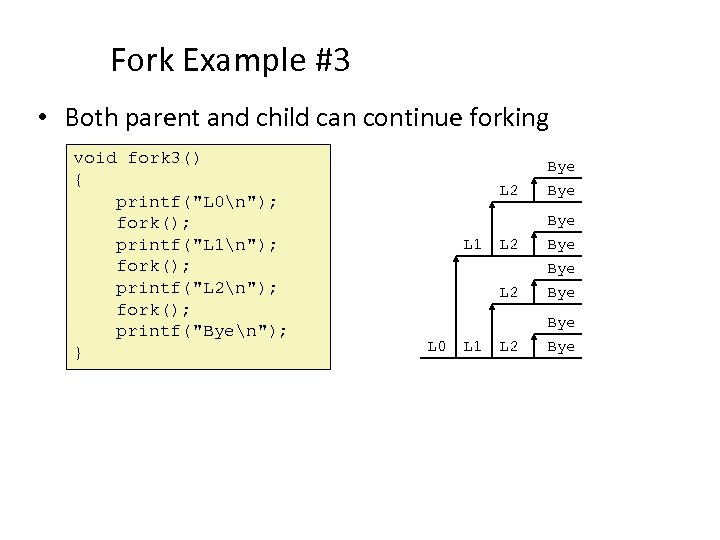 Fork Example #3 • Both parent and child can continue forking void fork 3() { printf("L 0n"); fork(); printf("L 1n"); fork(); printf("L 2n"); fork(); printf("Byen"); } L 2 L 0 L 1 L 2 Bye L 2 L 1 Bye Bye L 2 Bye
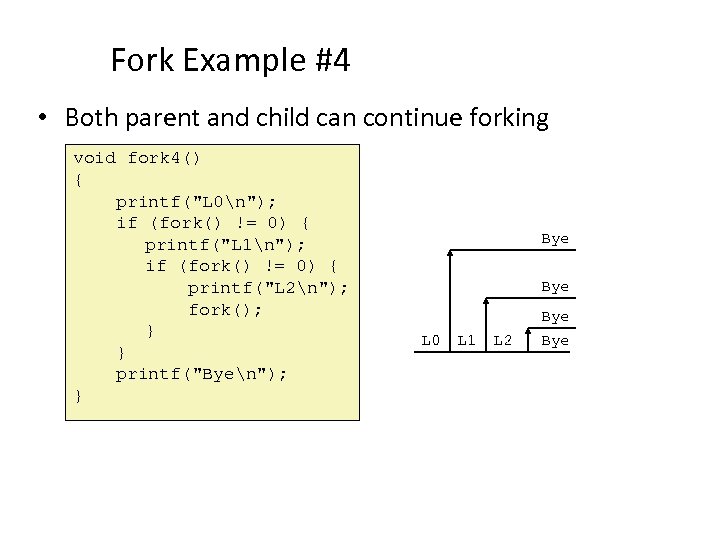 Fork Example #4 • Both parent and child can continue forking void fork 4() { printf("L 0n"); if (fork() != 0) { printf("L 1n"); if (fork() != 0) { printf("L 2n"); fork(); } } printf("Byen"); } Bye L 0 L 1 L 2 Bye
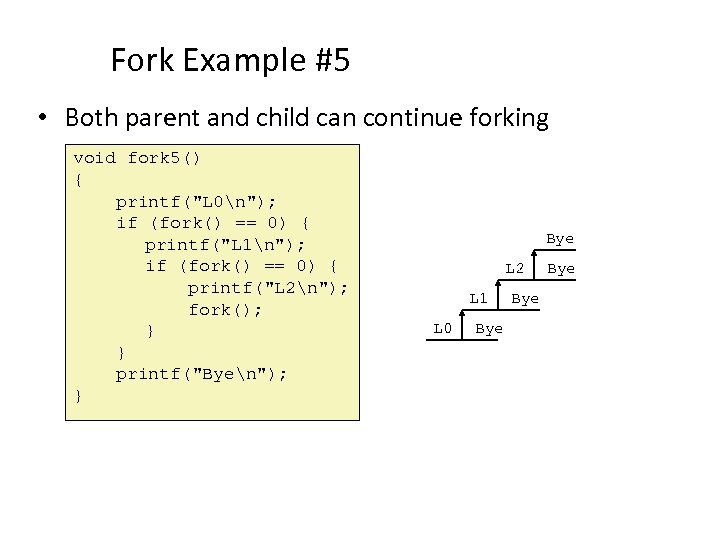 Fork Example #5 • Both parent and child can continue forking void fork 5() { printf("L 0n"); if (fork() == 0) { printf("L 1n"); if (fork() == 0) { printf("L 2n"); fork(); } } printf("Byen"); } Bye L 2 L 1 L 0 Bye Bye
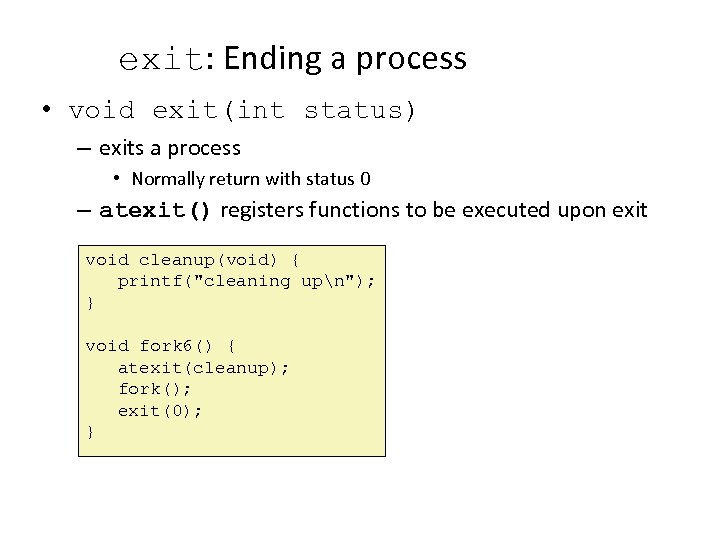 exit: Ending a process • void exit(int status) – exits a process • Normally return with status 0 – atexit() registers functions to be executed upon exit void cleanup(void) { printf("cleaning upn"); } void fork 6() { atexit(cleanup); fork(); exit(0); }
 Zombies • Idea – When process terminates, still consumes system resources • Various tables maintained by OS – Called a “zombie” • Living corpse, half alive and half dead • Reaping – Performed by parent on terminated child – Parent is given exit status information – Kernel discards process • What if parent doesn’t reap? – If any parent terminates without reaping a child, then child will be reaped by init process – So, only need explicit reaping in long-running processes • e. g. , shells and servers
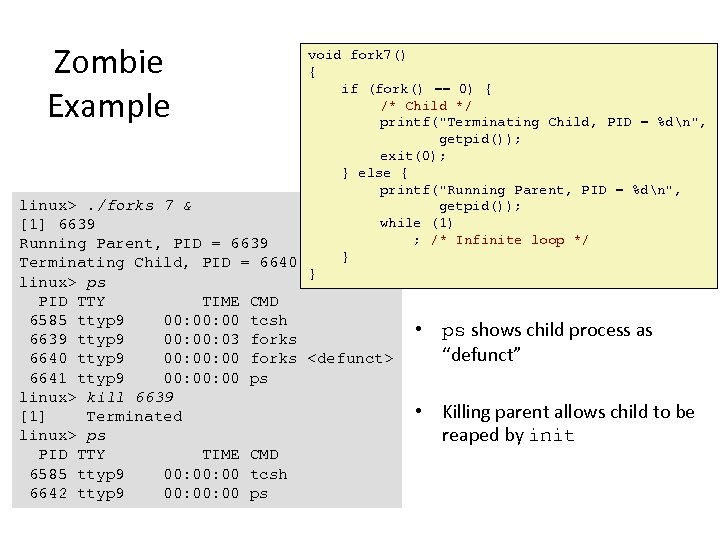 Zombie Example void fork 7() { if (fork() == 0) { /* Child */ printf("Terminating Child, PID = %dn", getpid()); exit(0); } else { printf("Running Parent, PID = %dn", linux>. /forks 7 & getpid()); while (1) [1] 6639 ; /* Infinite loop */ Running Parent, PID = 6639 } Terminating Child, PID = 6640 } linux> ps PID TTY TIME 6585 ttyp 9 00: 00 6639 ttyp 9 00: 03 6640 ttyp 9 00: 00 6641 ttyp 9 00: 00 linux> kill 6639 [1] Terminated linux> ps PID TTY TIME 6585 ttyp 9 00: 00 6642 ttyp 9 00: 00 CMD tcsh forks
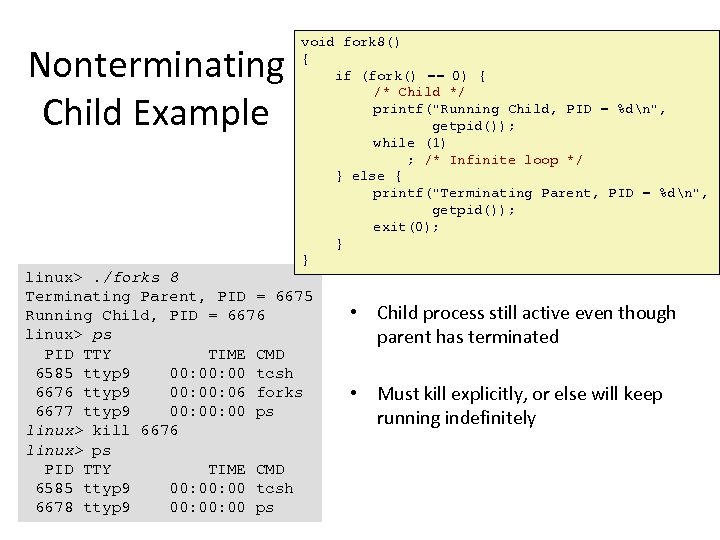 Nonterminating Child Example void fork 8() { if (fork() == 0) { /* Child */ printf("Running Child, PID = %dn", getpid()); while (1) ; /* Infinite loop */ } else { printf("Terminating Parent, PID = %dn", getpid()); exit(0); } } linux>. /forks 8 Terminating Parent, PID = 6675 Running Child, PID = 6676 linux> ps PID TTY TIME CMD 6585 ttyp 9 00: 00 tcsh 6676 ttyp 9 00: 06 forks 6677 ttyp 9 00: 00 ps linux> kill 6676 linux> ps PID TTY TIME CMD 6585 ttyp 9 00: 00 tcsh 6678 ttyp 9 00: 00 ps • Child process still active even though parent has terminated • Must kill explicitly, or else will keep running indefinitely
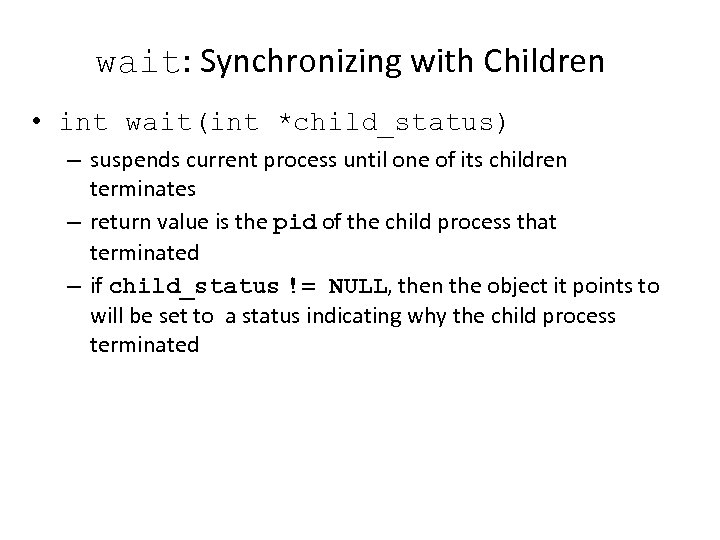 wait: Synchronizing with Children • int wait(int *child_status) – suspends current process until one of its children terminates – return value is the pid of the child process that terminated – if child_status != NULL, then the object it points to will be set to a status indicating why the child process terminated
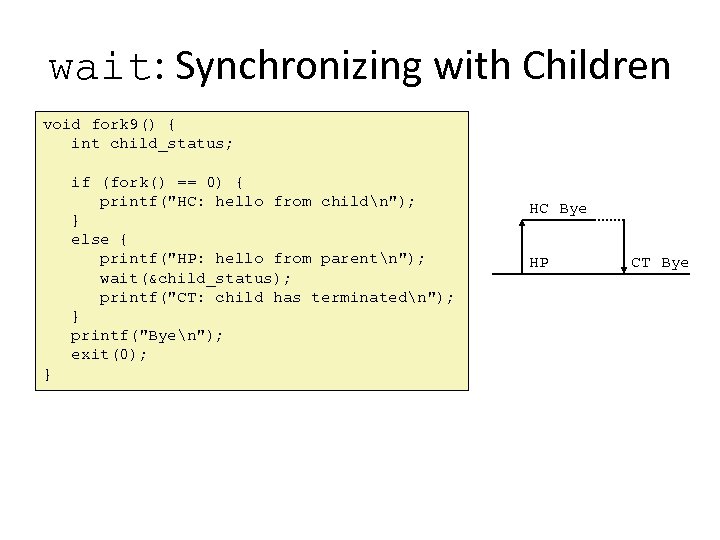 wait: Synchronizing with Children void fork 9() { int child_status; if (fork() == 0) { printf("HC: hello from childn"); } else { printf("HP: hello from parentn"); wait(&child_status); printf("CT: child has terminatedn"); } printf("Byen"); exit(0); } HC Bye HP CT Bye
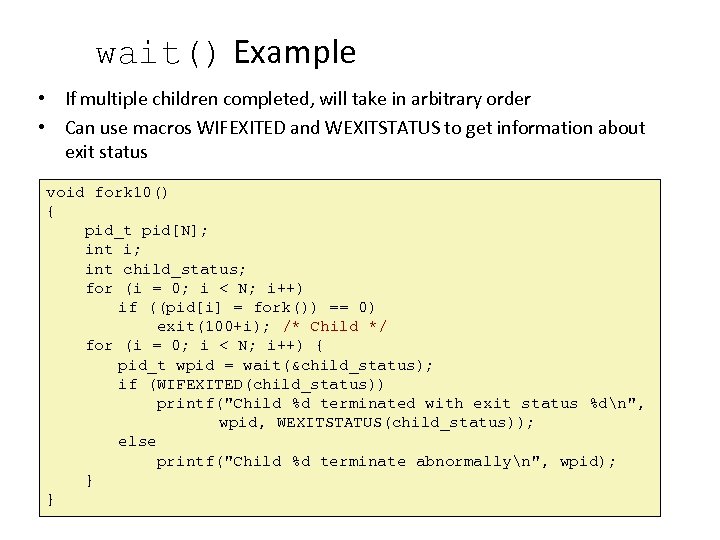 wait() Example • If multiple children completed, will take in arbitrary order • Can use macros WIFEXITED and WEXITSTATUS to get information about exit status void fork 10() { pid_t pid[N]; int i; int child_status; for (i = 0; i < N; i++) if ((pid[i] = fork()) == 0) exit(100+i); /* Child */ for (i = 0; i < N; i++) { pid_t wpid = wait(&child_status); if (WIFEXITED(child_status)) printf("Child %d terminated with exit status %dn", wpid, WEXITSTATUS(child_status)); else printf("Child %d terminate abnormallyn", wpid); } }
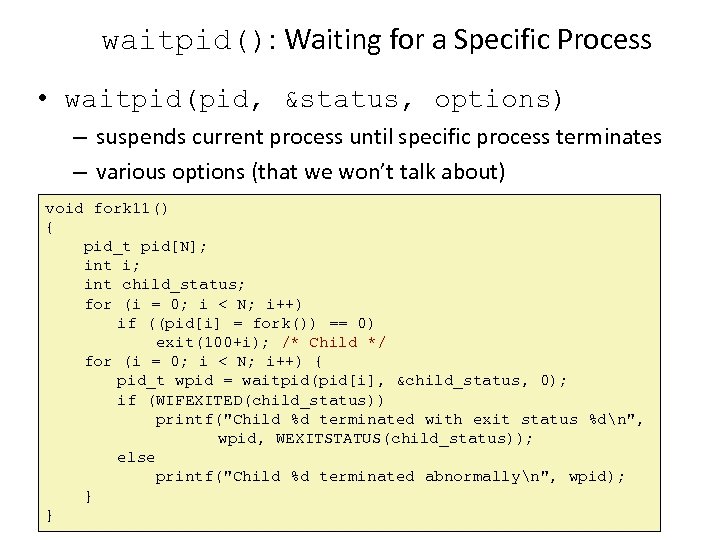 waitpid(): Waiting for a Specific Process • waitpid(pid, &status, options) – suspends current process until specific process terminates – various options (that we won’t talk about) void fork 11() { pid_t pid[N]; int i; int child_status; for (i = 0; i < N; i++) if ((pid[i] = fork()) == 0) exit(100+i); /* Child */ for (i = 0; i < N; i++) { pid_t wpid = waitpid(pid[i], &child_status, 0); if (WIFEXITED(child_status)) printf("Child %d terminated with exit status %dn", wpid, WEXITSTATUS(child_status)); else printf("Child %d terminated abnormallyn", wpid); } }
![execve: Loading and Running Programs • int execve( char *filename, char *argv[], char *envp](https://present5.com/presentation/012c95d2f4d713e6718e8fd29d9dd4d6/image-32.jpg "execve: Loading and Running Programs • int execve( char *filename, char *argv[], char *envp") execve: Loading and Running Programs • int execve( char *filename, char *argv[], char *envp ) 0 xbfffffff • Loads and runs – Executable filename – With argument list argv – And environment variable list envp • Does not return (unless error) • Overwrites process, keeps pid • Environment variables: – “name=value” strings Stack Null-terminated environment variable strings Null-terminated commandline arg strings unused envp[n] = NULL envp[n-1] … envp[0] argv[argc] = NULL argv[argc-1] … argv[0] Linker vars envp argv argc
execve: Loading and Running Programs • int execve( char *filename, char *argv[], char *envp ) 0 xbfffffff • Loads and runs – Executable filename – With argument list argv – And environment variable list envp • Does not return (unless error) • Overwrites process, keeps pid • Environment variables: – “name=value” strings Stack Null-terminated environment variable strings Null-terminated commandline arg strings unused envp[n] = NULL envp[n-1] … envp[0] argv[argc] = NULL argv[argc-1] … argv[0] Linker vars envp argv argc
![execve: Example envp[n] = NULL envp[n-1] … envp[0] “PWD=/usr/droh” “PRINTER=iron” “USER=droh” argv[argc] = NULL](https://present5.com/presentation/012c95d2f4d713e6718e8fd29d9dd4d6/image-33.jpg "execve: Example envp[n] = NULL envp[n-1] … envp[0] “PWD=/usr/droh” “PRINTER=iron” “USER=droh” argv[argc] = NULL") execve: Example envp[n] = NULL envp[n-1] … envp[0] “PWD=/usr/droh” “PRINTER=iron” “USER=droh” argv[argc] = NULL argv[argc-1] … argv[0] “/usr/include” “-lt” “ls”
execve: Example envp[n] = NULL envp[n-1] … envp[0] “PWD=/usr/droh” “PRINTER=iron” “USER=droh” argv[argc] = NULL argv[argc-1] … argv[0] “/usr/include” “-lt” “ls”
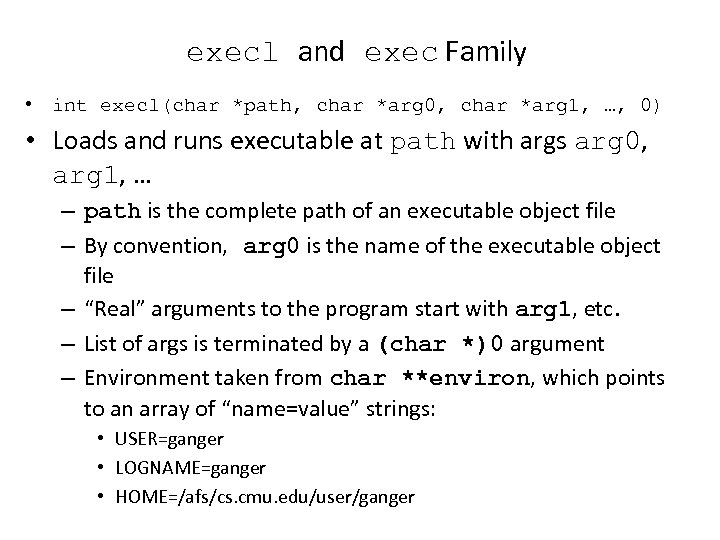 execl and exec Family • int execl(char *path, char *arg 0, char *arg 1, …, 0) • Loads and runs executable at path with args arg 0, arg 1, … – path is the complete path of an executable object file – By convention, arg 0 is the name of the executable object file – “Real” arguments to the program start with arg 1, etc. – List of args is terminated by a (char *)0 argument – Environment taken from char **environ, which points to an array of “name=value” strings: • USER=ganger • LOGNAME=ganger • HOME=/afs/cs. cmu. edu/user/ganger
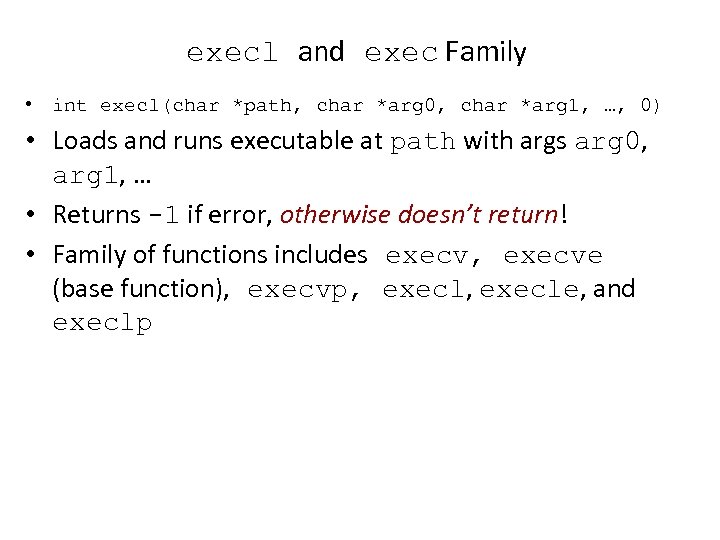 execl and exec Family • int execl(char *path, char *arg 0, char *arg 1, …, 0) • Loads and runs executable at path with args arg 0, arg 1, … • Returns -1 if error, otherwise doesn’t return! • Family of functions includes execv, execve (base function), execvp, execle, and execlp
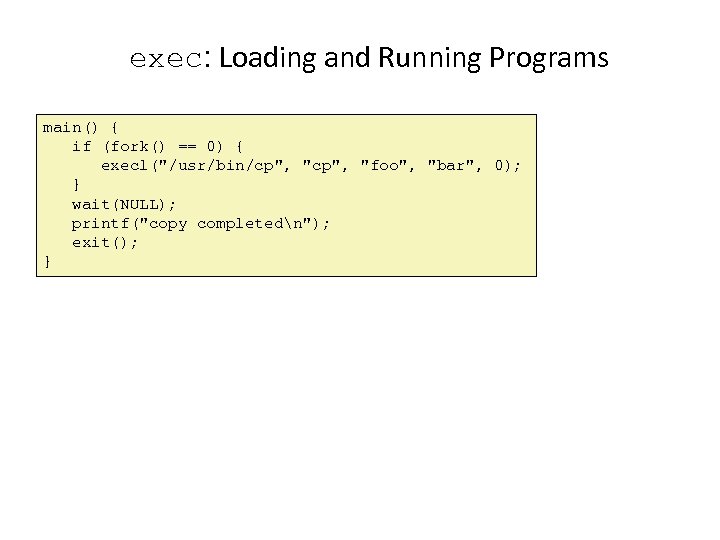 exec: Loading and Running Programs main() { if (fork() == 0) { execl("/usr/bin/cp", "foo", "bar", 0); } wait(NULL); printf("copy completedn"); exit(); }
 Summary • Exceptions – Events that require nonstandard control flow – Generated externally (interrupts) or internally (traps and faults) • Processes – At any given time, system has multiple active processes – Only one can execute at a time, though – Each process appears to have total control of processor + private memory space
 Summary (cont. ) • Spawning processes – Call to fork – One call, two returns • Process completion – Call exit – One call, no return • Reaping and waiting for Processes – Call wait or waitpid • Loading and running Programs – Call execl (or variant) – One call, (normally) no return
 The World of Multitasking • System runs many processes concurrently • Process: executing program – State includes memory image + register values + program counter • Regularly switches from one process to another – Suspend process when it needs I/O resource or timer event occurs – Resume process when I/O available or given scheduling priority • Appears to user(s) as if all processes executing simultaneously – Even though most systems can only execute one process at a time – Except possibly with lower performance than if running alone
 Programmer’s Model of Multitasking • Basic functions – fork() spawns new process • Called once, returns twice – exit() terminates own process • Called once, never returns • Puts it into “zombie” status – wait() and waitpid() wait for and reap terminated children – execl() and execve() run new program in existing process • Called once, (normally) never returns • Programming challenge – Understanding the nonstandard semantics of the functions – Avoiding improper use of system resources • E. g. “Fork bombs” can disable a system
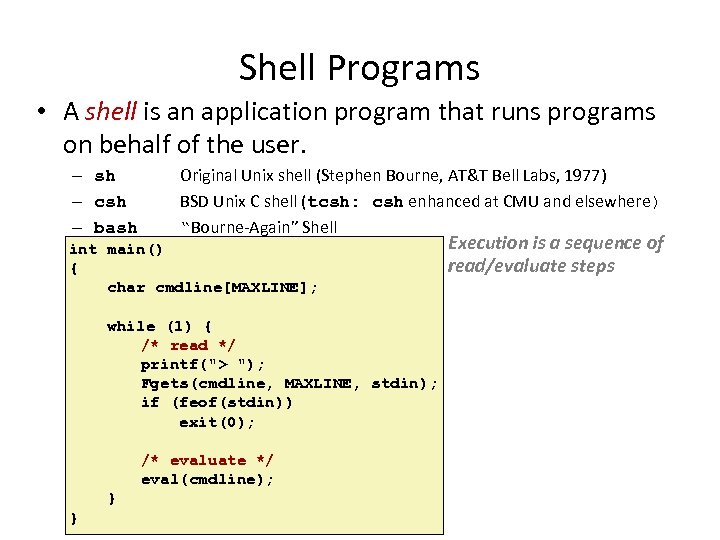 Shell Programs • A shell is an application program that runs programs on behalf of the user. – sh – csh – bash Original Unix shell (Stephen Bourne, AT&T Bell Labs, 1977) BSD Unix C shell (tcsh: csh enhanced at CMU and elsewhere) “Bourne-Again” Shell int main() { char cmdline[MAXLINE]; while (1) { /* read */ printf("> "); Fgets(cmdline, MAXLINE, stdin); if (feof(stdin)) exit(0); /* evaluate */ eval(cmdline); } } Execution is a sequence of read/evaluate steps
![Simple Shell eval Function void eval(char *cmdline) { char *argv[MAXARGS]; /* argv for execve()](https://present5.com/presentation/012c95d2f4d713e6718e8fd29d9dd4d6/image-42.jpg "Simple Shell eval Function void eval(char *cmdline) { char *argv[MAXARGS]; /* argv for execve()") Simple Shell eval Function void eval(char *cmdline) { char *argv[MAXARGS]; /* argv for execve() */ int bg; /* should the job run in bg or fg? */ pid_t pid; /* process id */ bg = parseline(cmdline, argv); if (!builtin_command(argv)) { if ((pid = Fork()) == 0) { /* child runs user job */ if (execve(argv[0], argv, environ) < 0) { printf("%s: Command not found. n", argv[0]); exit(0); } } if (!bg) { /* parent waits for fg job to terminate */ int status; if (waitpid(pid, &status, 0) < 0) unix_error("waitfg: waitpid error"); } else /* otherwise, don’t wait for bg job */ printf("%d %s", pid, cmdline); } }
Simple Shell eval Function void eval(char *cmdline) { char *argv[MAXARGS]; /* argv for execve() */ int bg; /* should the job run in bg or fg? */ pid_t pid; /* process id */ bg = parseline(cmdline, argv); if (!builtin_command(argv)) { if ((pid = Fork()) == 0) { /* child runs user job */ if (execve(argv[0], argv, environ) < 0) { printf("%s: Command not found. n", argv[0]); exit(0); } } if (!bg) { /* parent waits for fg job to terminate */ int status; if (waitpid(pid, &status, 0) < 0) unix_error("waitfg: waitpid error"); } else /* otherwise, don’t wait for bg job */ printf("%d %s", pid, cmdline); } }
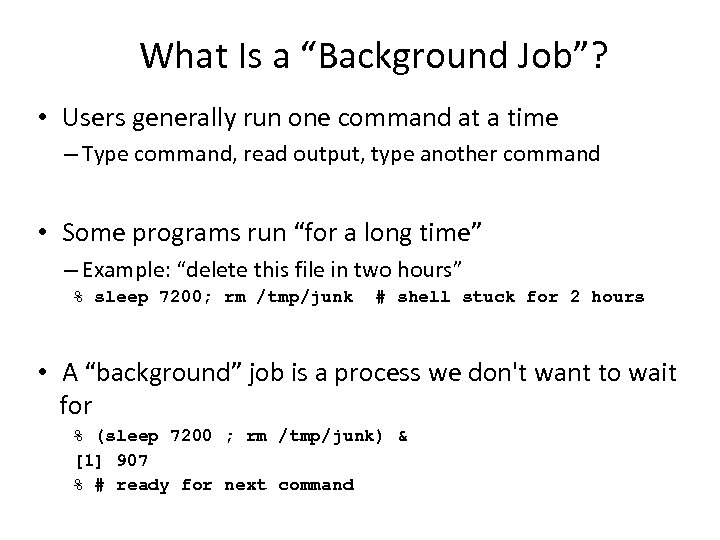 What Is a “Background Job”? • Users generally run one command at a time – Type command, read output, type another command • Some programs run “for a long time” – Example: “delete this file in two hours” % sleep 7200; rm /tmp/junk # shell stuck for 2 hours • A “background” job is a process we don't want to wait for % (sleep 7200 ; rm /tmp/junk) & [1] 907 % # ready for next command
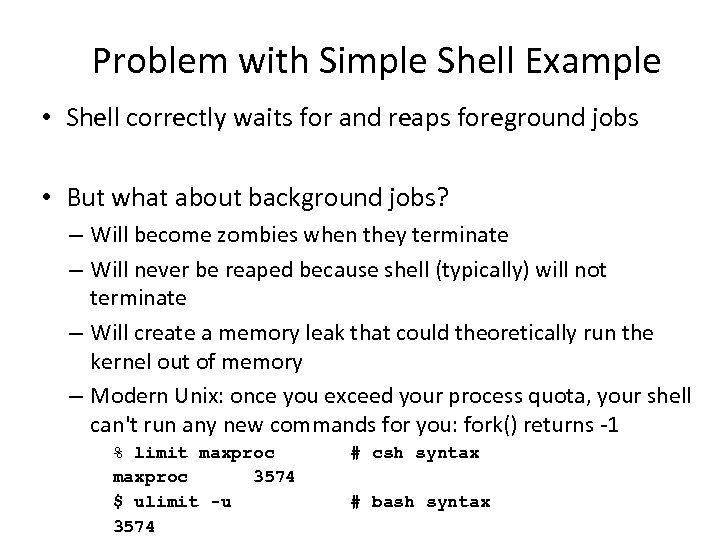 Problem with Simple Shell Example • Shell correctly waits for and reaps foreground jobs • But what about background jobs? – Will become zombies when they terminate – Will never be reaped because shell (typically) will not terminate – Will create a memory leak that could theoretically run the kernel out of memory – Modern Unix: once you exceed your process quota, your shell can't run any new commands for you: fork() returns -1 % limit maxproc 3574 $ ulimit -u 3574 # csh syntax # bash syntax
 ECF to the Rescue! • Problem – The shell doesn't know when a background job will finish – By nature, it could happen at any time – The shell's regular control flow can't reap exited background processes in a timely fashion – Regular control flow is “wait until running job completes, then reap it” • Solution: Exceptional control flow – The kernel will interrupt regular processing to alert us when a background process completes – In Unix, the alert mechanism is called a signal
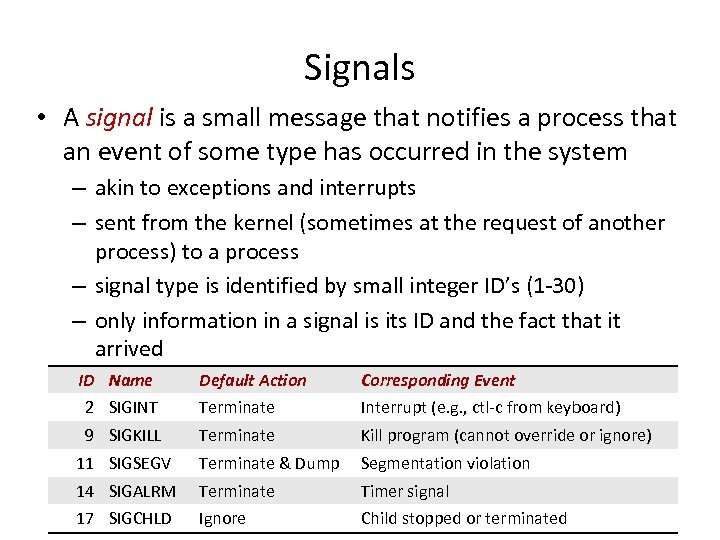 Signals • A signal is a small message that notifies a process that an event of some type has occurred in the system – akin to exceptions and interrupts – sent from the kernel (sometimes at the request of another process) to a process – signal type is identified by small integer ID’s (1 -30) – only information in a signal is its ID and the fact that it arrived ID Name Default Action Corresponding Event 2 SIGINT Terminate Interrupt (e. g. , ctl-c from keyboard) 9 SIGKILL Terminate Kill program (cannot override or ignore) 11 SIGSEGV Terminate & Dump Segmentation violation 14 SIGALRM Terminate Timer signal 17 SIGCHLD Ignore Child stopped or terminated
 Sending a Signal • Kernel sends (delivers) a signal to a destination process by updating some state in the context of the destination process • Kernel sends a signal for one of the following reasons: – Kernel has detected a system event such as divide-by-zero (SIGFPE) or the termination of a child process (SIGCHLD) – Another process has invoked the kill system call to explicitly request the kernel to send a signal to the destination process
 Receiving a Signal • A destination process receives a signal when it is forced by the kernel to react in some way to the delivery of the signal • Three possible ways to react: – Ignore the signal (do nothing) – Terminate the process (with optional core dump) – Catch the signal by executing a user-level function called signal handler • Akin to a hardware exception handler being called in response to an asynchronous interrupt
 Signal Concepts (continued) • A signal is pending if sent but not yet received – There can be at most one pending signal of any particular type – Important: Signals are not queued • If a process has a pending signal of type k, then subsequent signals of type k that are sent to that process are discarded • A process can block the receipt of certain signals – Blocked signals can be delivered, but will not be received until the signal is unblocked • A pending signal is received at most once
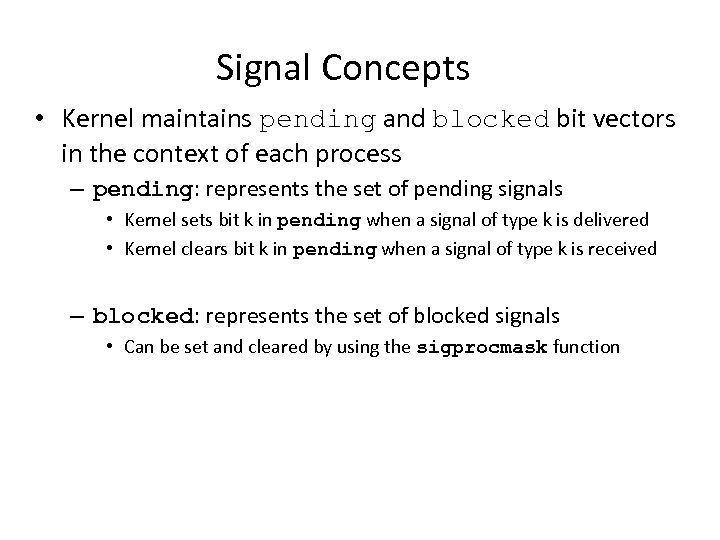 Signal Concepts • Kernel maintains pending and blocked bit vectors in the context of each process – pending: represents the set of pending signals • Kernel sets bit k in pending when a signal of type k is delivered • Kernel clears bit k in pending when a signal of type k is received – blocked: represents the set of blocked signals • Can be set and cleared by using the sigprocmask function
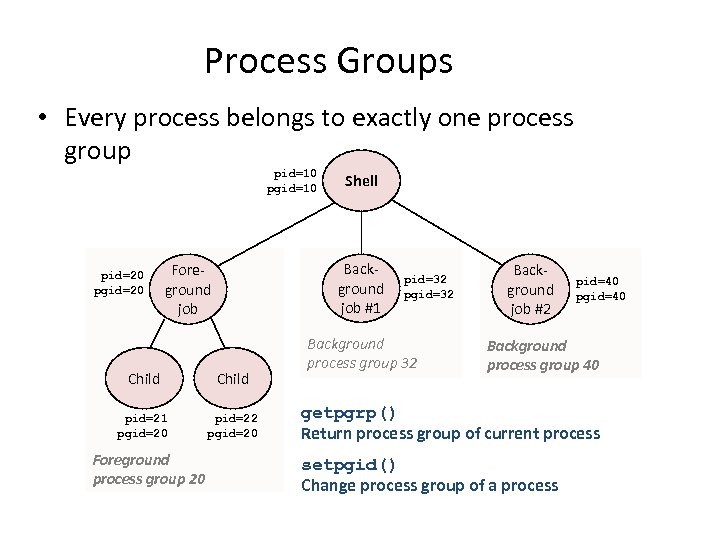 Process Groups • Every process belongs to exactly one process group pid=10 pgid=10 pid=20 pgid=20 Background job #1 Foreground job Child pid=21 pgid=20 pid=22 pgid=20 Foreground process group 20 Shell pid=32 pgid=32 Background process group 32 Background job #2 pid=40 pgid=40 Background process group 40 getpgrp() Return process group of current process setpgid() Change process group of a process
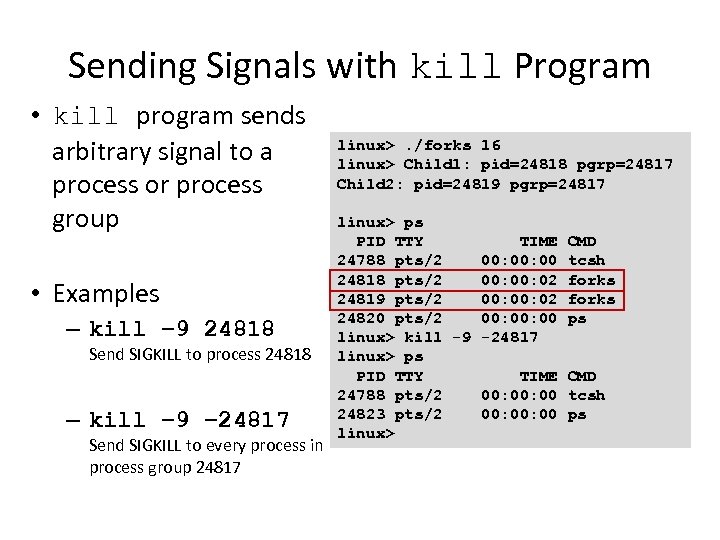 Sending Signals with kill Program • kill program sends arbitrary signal to a process or process group • Examples – kill – 9 24818 Send SIGKILL to process 24818 – kill – 9 – 24817 Send SIGKILL to every process in process group 24817 linux>. /forks 16 linux> Child 1: pid=24818 pgrp=24817 Child 2: pid=24819 pgrp=24817 linux> ps PID TTY TIME CMD 24788 pts/2 00: 00 tcsh 24818 pts/2 00: 02 forks 24819 pts/2 00: 02 forks 24820 pts/2 00: 00 ps linux> kill -9 -24817 linux> ps PID TTY TIME CMD 24788 pts/2 00: 00 tcsh 24823 pts/2 00: 00 ps linux>
![Sending Signals with kill Function void fork 12() { pid_t pid[N]; int i, child_status;](https://present5.com/presentation/012c95d2f4d713e6718e8fd29d9dd4d6/image-53.jpg "Sending Signals with kill Function void fork 12() { pid_t pid[N]; int i, child_status;") Sending Signals with kill Function void fork 12() { pid_t pid[N]; int i, child_status; for (i = 0; i < N; i++) if ((pid[i] = fork()) == 0) while(1); /* Child infinite loop */ /* Parent terminates the child processes */ for (i = 0; i < N; i++) { printf("Killing process %dn", pid[i]); kill(pid[i], SIGINT); } /* Parent reaps terminated children */ for (i = 0; i < N; i++) { pid_t wpid = wait(&child_status); if (WIFEXITED(child_status)) printf("Child %d terminated with exit status %dn", wpid, WEXITSTATUS(child_status)); else printf("Child %d terminated abnormallyn", wpid); } }
Sending Signals with kill Function void fork 12() { pid_t pid[N]; int i, child_status; for (i = 0; i < N; i++) if ((pid[i] = fork()) == 0) while(1); /* Child infinite loop */ /* Parent terminates the child processes */ for (i = 0; i < N; i++) { printf("Killing process %dn", pid[i]); kill(pid[i], SIGINT); } /* Parent reaps terminated children */ for (i = 0; i < N; i++) { pid_t wpid = wait(&child_status); if (WIFEXITED(child_status)) printf("Child %d terminated with exit status %dn", wpid, WEXITSTATUS(child_status)); else printf("Child %d terminated abnormallyn", wpid); } }
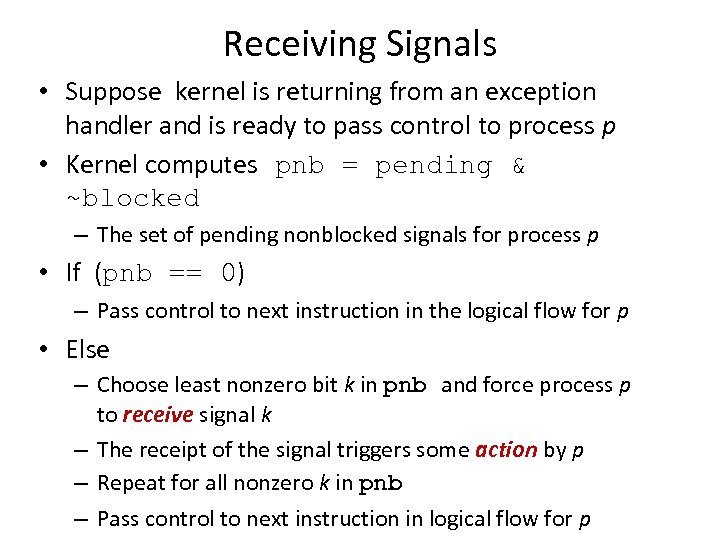 Receiving Signals • Suppose kernel is returning from an exception handler and is ready to pass control to process p • Kernel computes pnb = pending & ~blocked – The set of pending nonblocked signals for process p • If (pnb == 0) – Pass control to next instruction in the logical flow for p • Else – Choose least nonzero bit k in pnb and force process p to receive signal k – The receipt of the signal triggers some action by p – Repeat for all nonzero k in pnb – Pass control to next instruction in logical flow for p
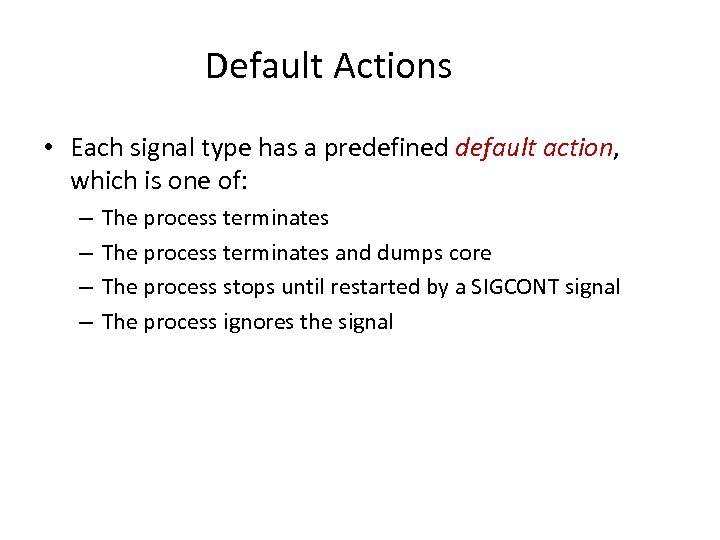 Default Actions • Each signal type has a predefined default action, which is one of: – – The process terminates and dumps core The process stops until restarted by a SIGCONT signal The process ignores the signal
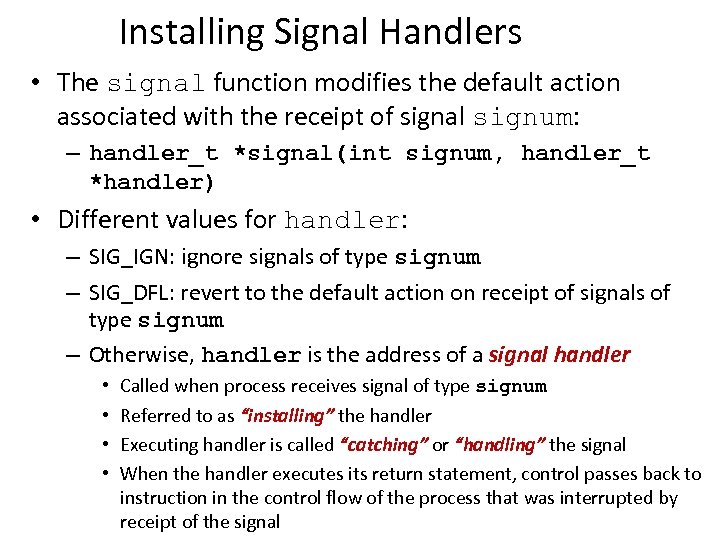 Installing Signal Handlers • The signal function modifies the default action associated with the receipt of signal signum: – handler_t *signal(int signum, handler_t *handler) • Different values for handler: – SIG_IGN: ignore signals of type signum – SIG_DFL: revert to the default action on receipt of signals of type signum – Otherwise, handler is the address of a signal handler • • Called when process receives signal of type signum Referred to as “installing” the handler Executing handler is called “catching” or “handling” the signal When the handler executes its return statement, control passes back to instruction in the control flow of the process that was interrupted by receipt of the signal
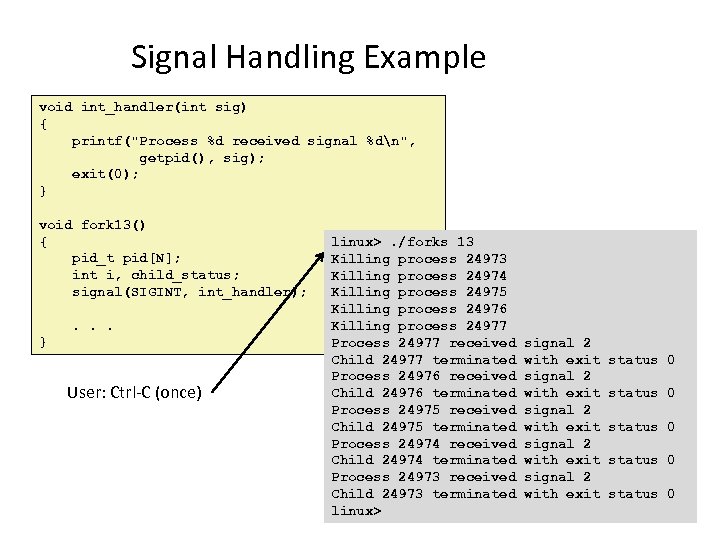 Signal Handling Example void int_handler(int sig) { printf("Process %d received signal %dn", getpid(), sig); exit(0); } void fork 13() { pid_t pid[N]; int i, child_status; signal(SIGINT, int_handler); . . . } User: Ctrl-C (once) linux>. /forks 13 Killing process 24974 Killing process 24975 Killing process 24976 Killing process 24977 Process 24977 received Child 24977 terminated Process 24976 received Child 24976 terminated Process 24975 received Child 24975 terminated Process 24974 received Child 24974 terminated Process 24973 received Child 24973 terminated linux> signal 2 with exit signal 2 with exit status 0 status 0
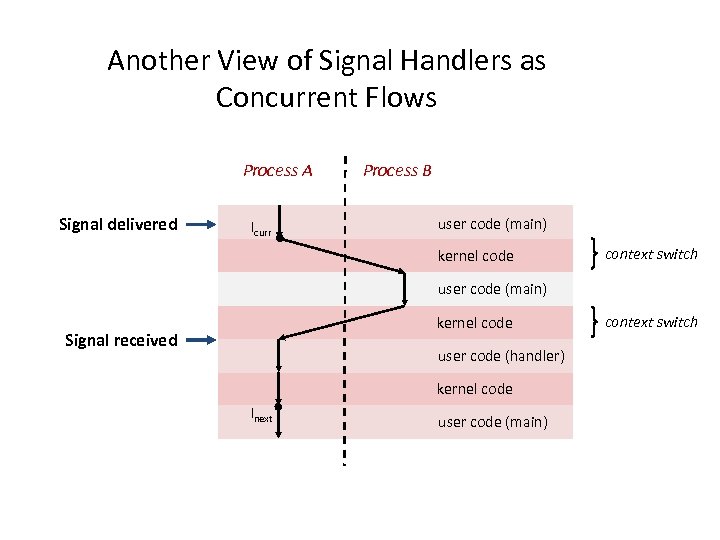
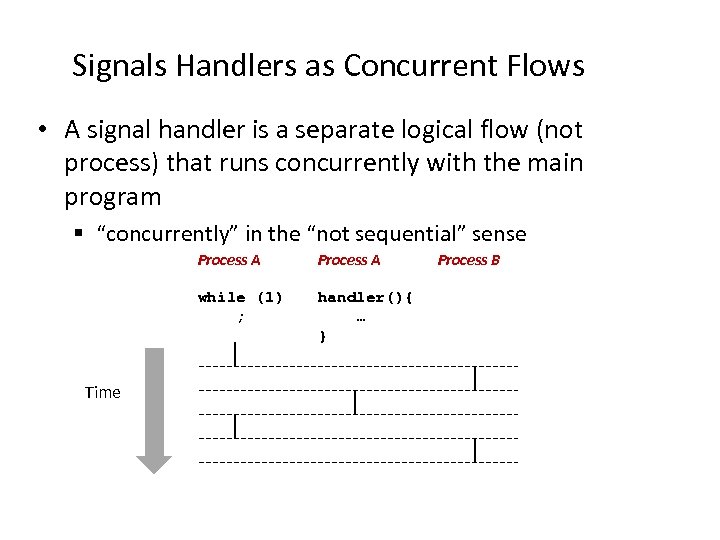 Signals Handlers as Concurrent Flows • A signal handler is a separate logical flow (not process) that runs concurrently with the main program § “concurrently” in the “not sequential” sense Process A while (1) ; Time Process A handler(){ … } Process B
 Another View of Signal Handlers as Concurrent Flows Process A Signal delivered Icurr Process B user code (main) kernel code context switch user code (main) kernel code Signal received user code (handler) kernel code Inext user code (main) context switch
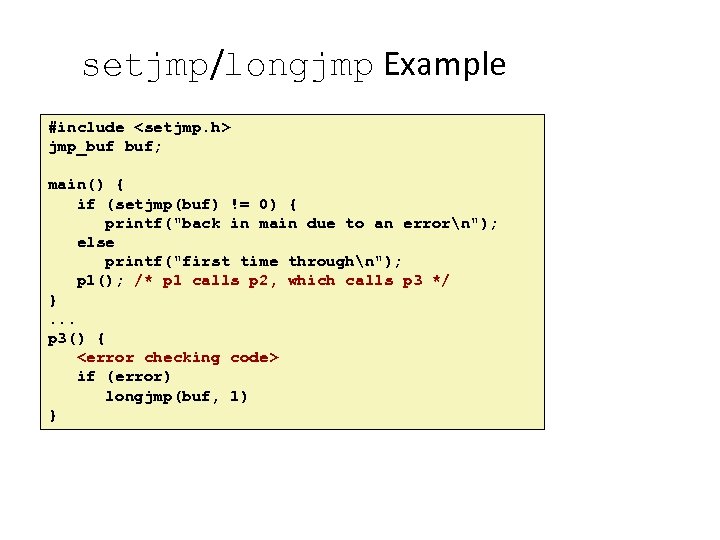
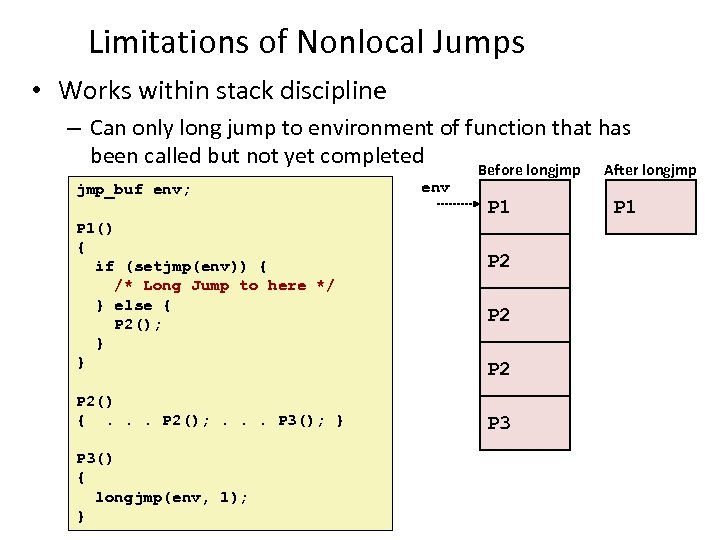
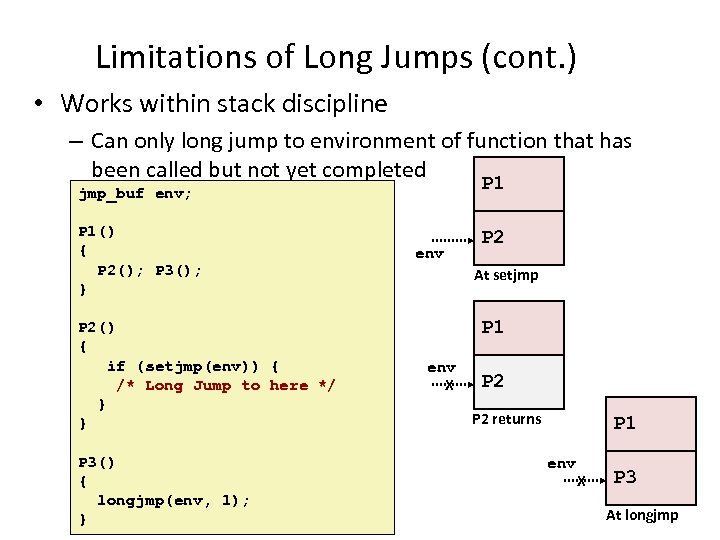
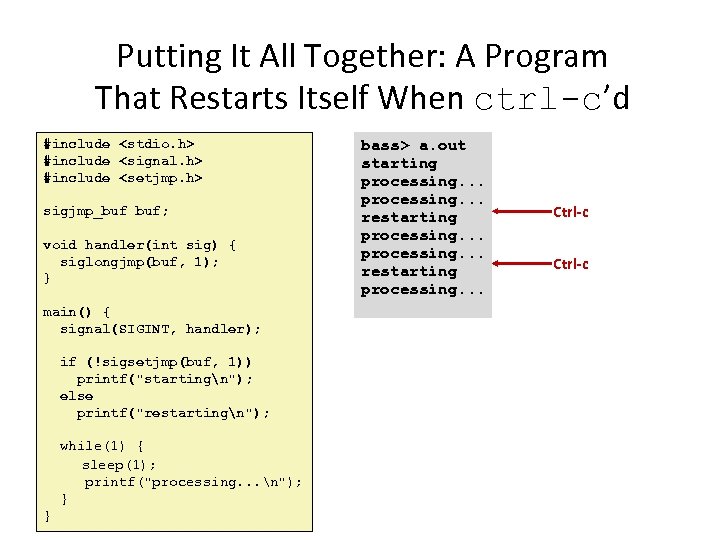
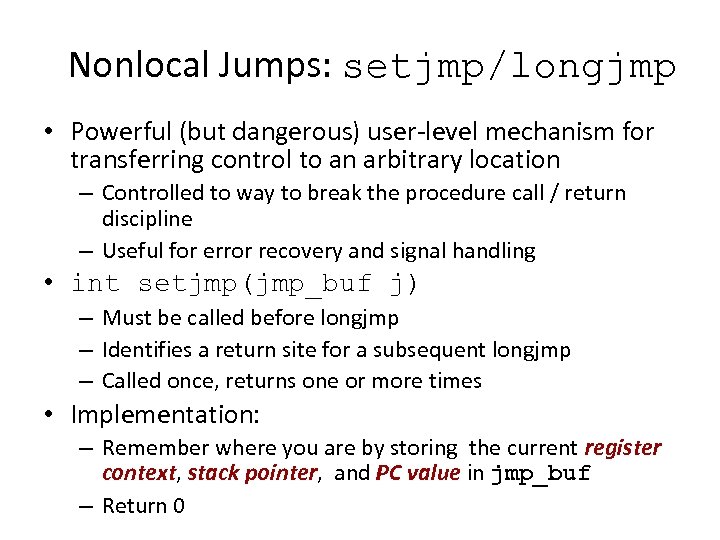 Nonlocal Jumps: setjmp/longjmp • Powerful (but dangerous) user-level mechanism for transferring control to an arbitrary location – Controlled to way to break the procedure call / return discipline – Useful for error recovery and signal handling • int setjmp(jmp_buf j) – Must be called before longjmp – Identifies a return site for a subsequent longjmp – Called once, returns one or more times • Implementation: – Remember where you are by storing the current register context, stack pointer, and PC value in jmp_buf – Return 0
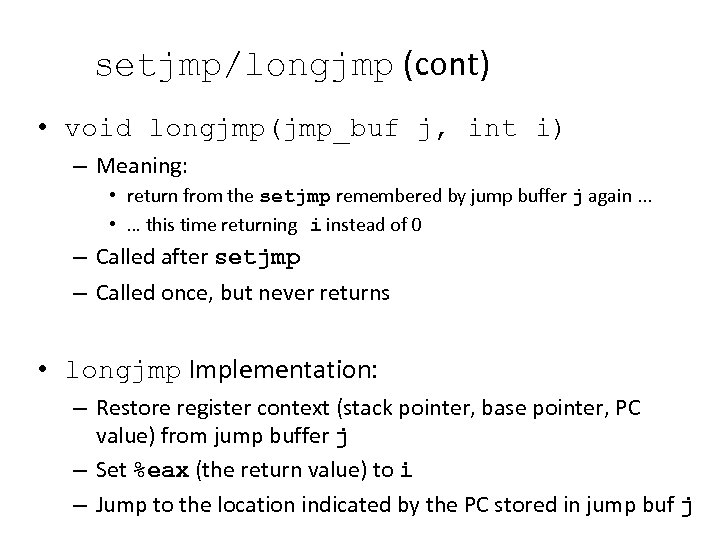 setjmp/longjmp (cont) • void longjmp(jmp_buf j, int i) – Meaning: • return from the setjmp remembered by jump buffer j again. . . • … this time returning i instead of 0 – Called after setjmp – Called once, but never returns • longjmp Implementation: – Restore register context (stack pointer, base pointer, PC value) from jump buffer j – Set %eax (the return value) to i – Jump to the location indicated by the PC stored in jump buf j
 setjmp/longjmp Example #include
 Limitations of Nonlocal Jumps • Works within stack discipline – Can only long jump to environment of function that has been called but not yet completed Before longjmp After longjmp jmp_buf env; P 1() { if (setjmp(env)) { /* Long Jump to here */ } else { P 2(); } } P 2() {. . . P 2(); . . . P 3(); } P 3() { longjmp(env, 1); } env P 1 P 2 P 2 P 3 P 1
 Limitations of Long Jumps (cont. ) • Works within stack discipline – Can only long jump to environment of function that has been called but not yet completed P 1 jmp_buf env; P 1() { P 2(); P 3(); } P 2() { if (setjmp(env)) { /* Long Jump to here */ } } P 3() { longjmp(env, 1); } env P 2 At setjmp P 1 env X P 2 returns P 1 env X P 3 At longjmp
 Putting It All Together: A Program That Restarts Itself When ctrl-c’d #include
 Summary • Signals provide process-level exception handling – Can generate from user programs – Can define effect by declaring signal handler • Some caveats – Very high overhead • >10, 000 clock cycles • Only use for exceptional conditions – Don’t have queues • Just one bit for each pending signal type • Nonlocal jumps provide exceptional control flow within process – Within constraints of stack discipline
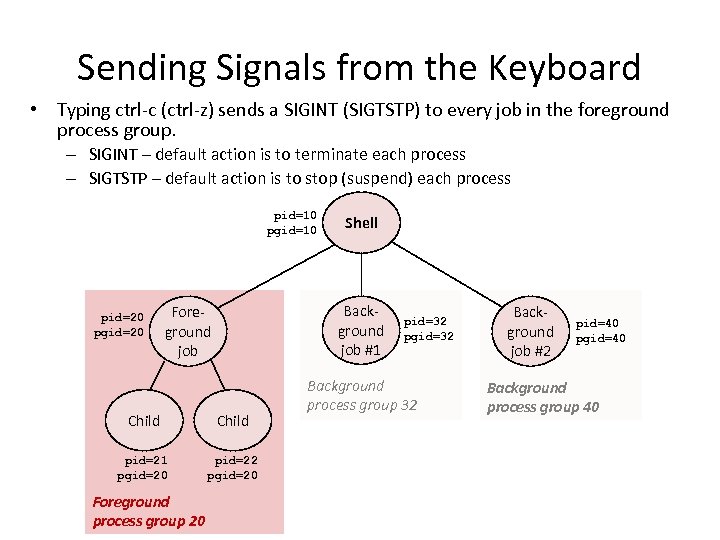 Sending Signals from the Keyboard • Typing ctrl-c (ctrl-z) sends a SIGINT (SIGTSTP) to every job in the foreground process group. – SIGINT – default action is to terminate each process – SIGTSTP – default action is to stop (suspend) each process pid=10 pgid=10 pid=20 pgid=20 Background job #1 Foreground job Child pid=21 pgid=20 pid=22 pgid=20 Foreground process group 20 Shell pid=32 pgid=32 Background process group 32 Background job #2 pid=40 pgid=40 Background process group 40
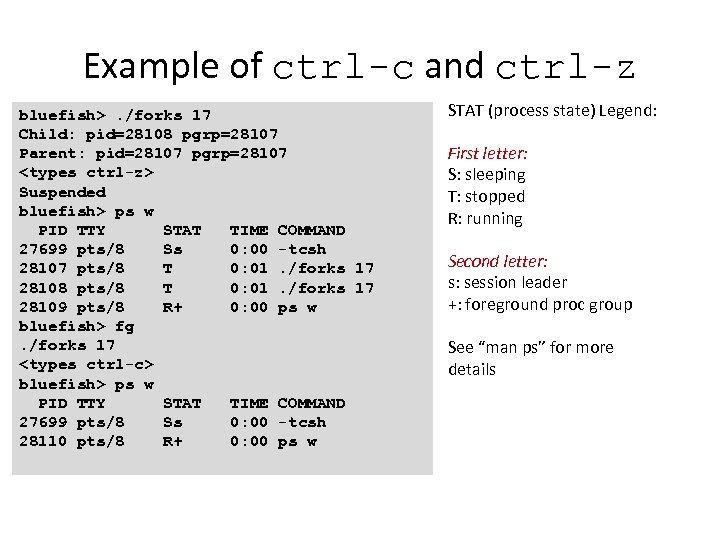 Example of ctrl-c and ctrl-z bluefish>. /forks 17 Child: pid=28108 pgrp=28107 Parent: pid=28107 pgrp=28107
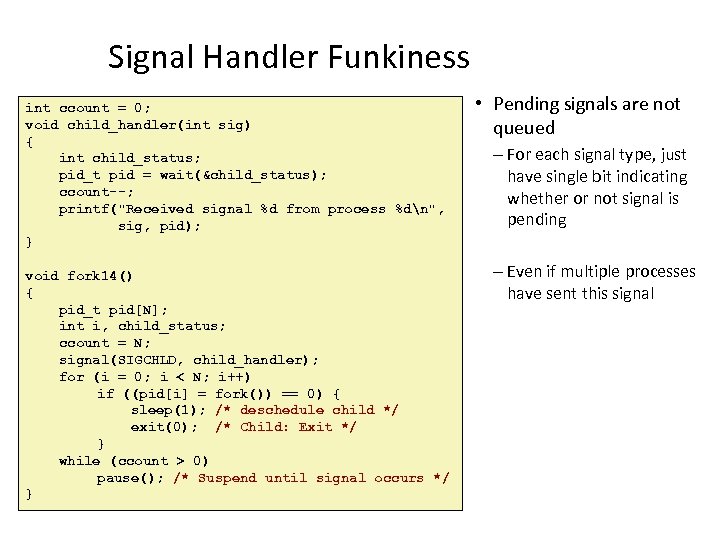 Signal Handler Funkiness int ccount = 0; void child_handler(int sig) { int child_status; pid_t pid = wait(&child_status); ccount--; printf("Received signal %d from process %dn", sig, pid); } void fork 14() { pid_t pid[N]; int i, child_status; ccount = N; signal(SIGCHLD, child_handler); for (i = 0; i < N; i++) if ((pid[i] = fork()) == 0) { sleep(1); /* deschedule child */ exit(0); /* Child: Exit */ } while (ccount > 0) pause(); /* Suspend until signal occurs */ } • Pending signals are not queued – For each signal type, just have single bit indicating whether or not signal is pending – Even if multiple processes have sent this signal
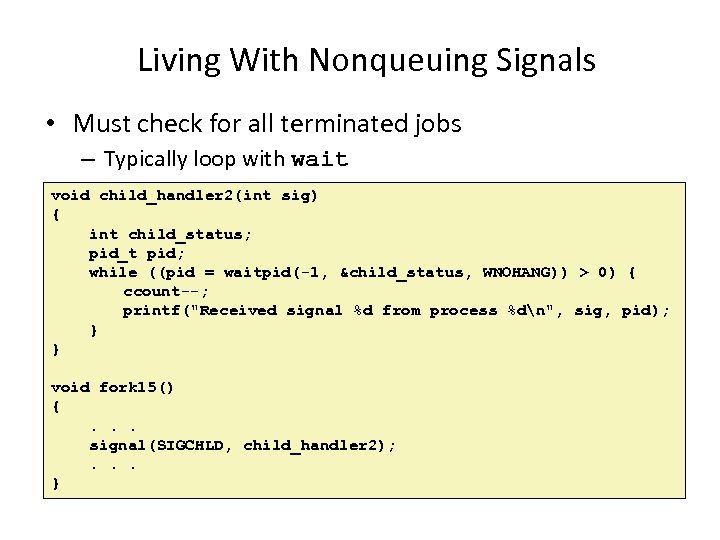 Living With Nonqueuing Signals • Must check for all terminated jobs – Typically loop with wait void child_handler 2(int sig) { int child_status; pid_t pid; while ((pid = waitpid(-1, &child_status, WNOHANG)) > 0) { ccount--; printf("Received signal %d from process %dn", sig, pid); } } void fork 15() {. . . signal(SIGCHLD, child_handler 2); . . . }
 Signal Handler Funkiness (Cont. ) • Signal arrival during long system calls (say a read) • Signal handler interrupts read() call – Linux: upon return from signal handler, the read() call is restarted automatically – Some other flavors of Unix can cause the read() call to fail with an EINTER error number (errno) in this case, the application program can restart the slow system call • Subtle differences like these complicate the writing of portable code that uses signals
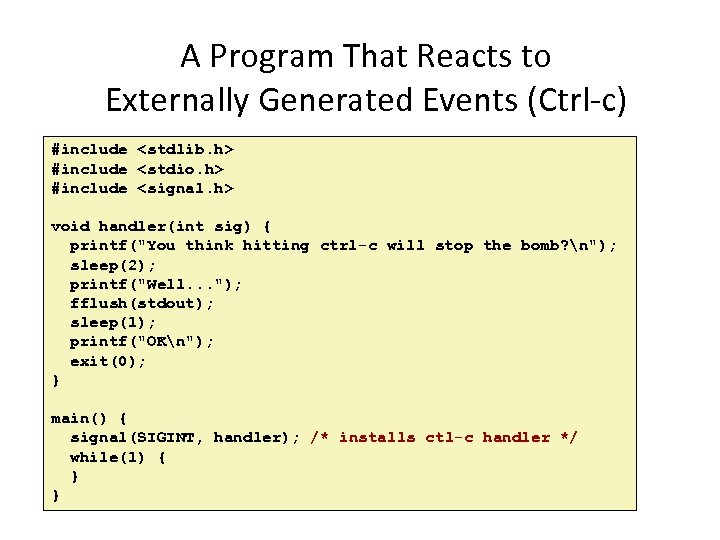 A Program That Reacts to Externally Generated Events (Ctrl-c) #include
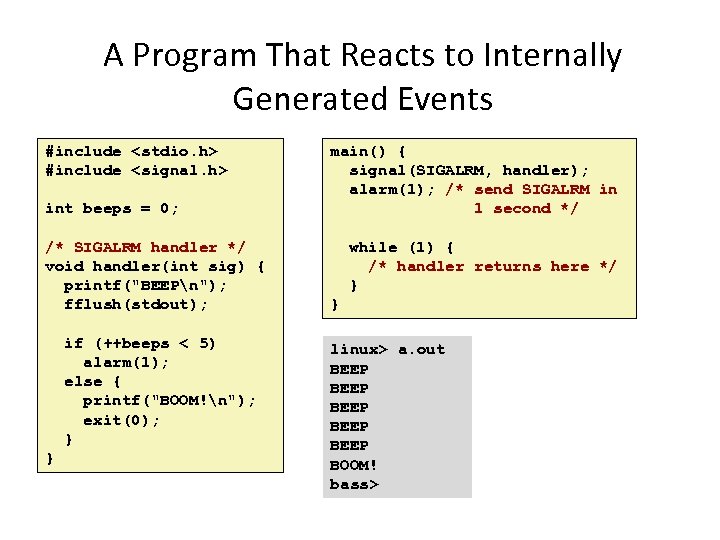 A Program That Reacts to Internally Generated Events #include
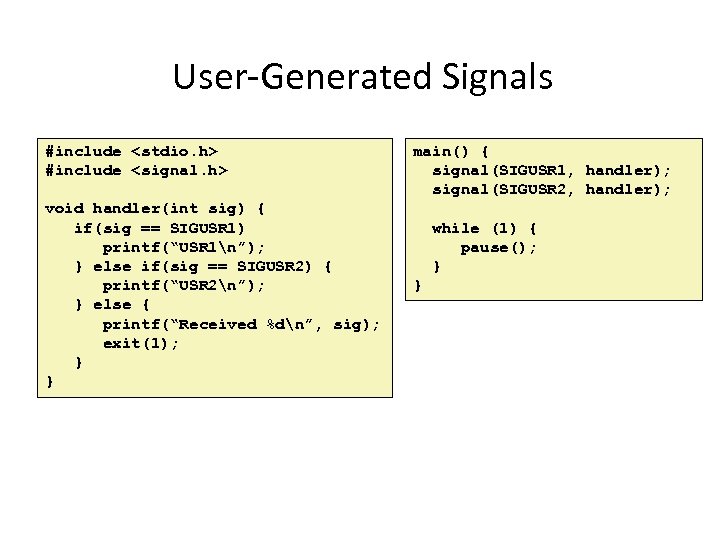 User-Generated Signals #include
 Synchronizing Processes • Preemptive scheduler run multiple programs “concurrently” by time slicing – How does time slicing work? – The scheduler can stop a program at any point – Signal handler code can run at any point, too • Program behaviors depend on how the scheduler interleaves the execution of processes • Racing condition between parent and child! – Why?
 Race Hazard • Different behaviors of program depending upon how the schedule interleaves the execution of code.
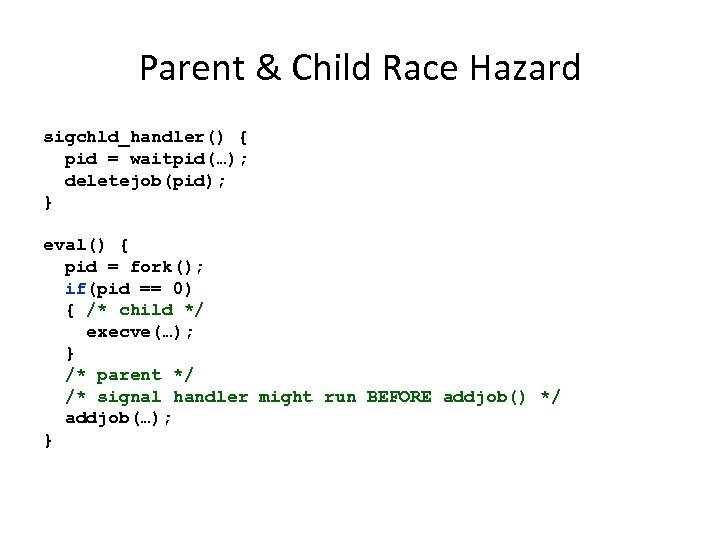 Parent & Child Race Hazard sigchld_handler() { pid = waitpid(…); deletejob(pid); } eval() { pid = fork(); if(pid == 0) { /* child */ execve(…); } /* parent */ /* signal handler might run BEFORE addjob() */ addjob(…); }
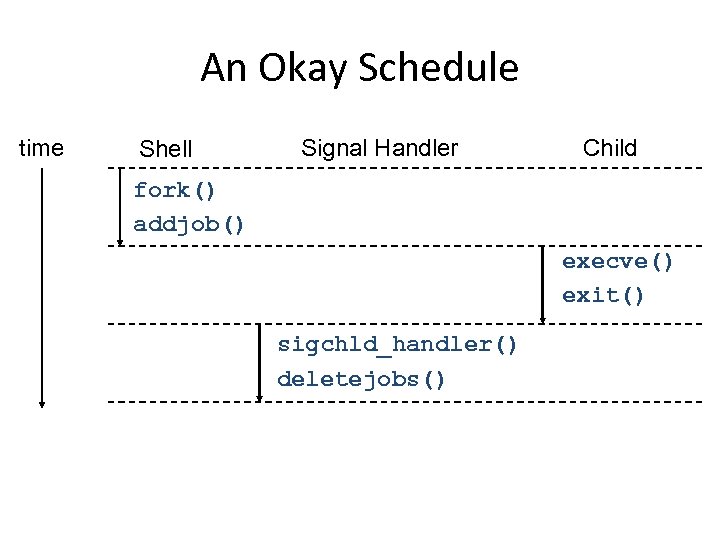 An Okay Schedule time Shell Signal Handler Child fork() addjob() execve() exit() sigchld_handler() deletejobs()
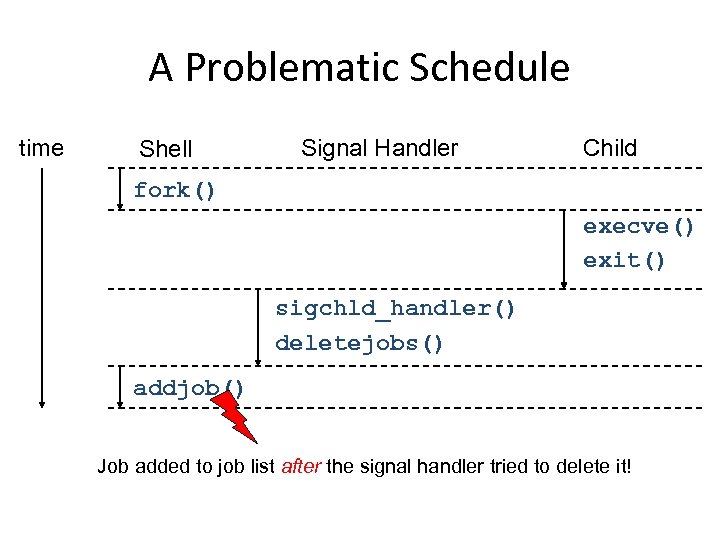 A Problematic Schedule time Shell Signal Handler Child fork() execve() exit() sigchld_handler() deletejobs() addjob() Job added to job list after the signal handler tried to delete it!
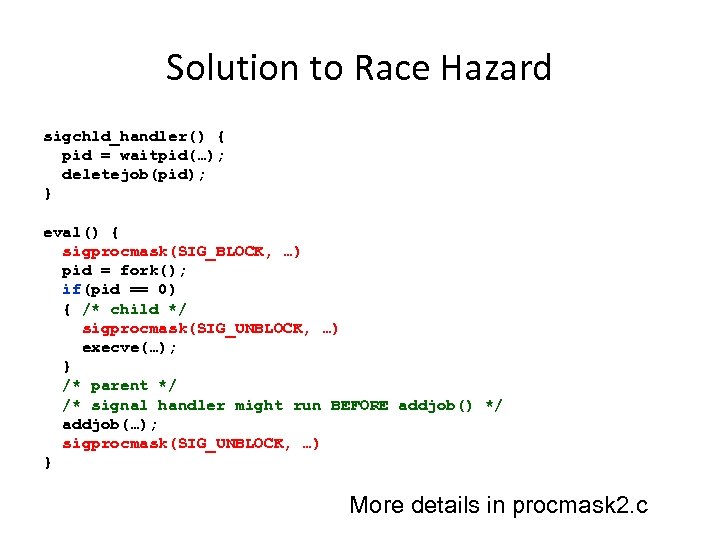 Solution to Race Hazard sigchld_handler() { pid = waitpid(…); deletejob(pid); } eval() { sigprocmask(SIG_BLOCK, …) pid = fork(); if(pid == 0) { /* child */ sigprocmask(SIG_UNBLOCK, …) execve(…); } /* parent */ /* signal handler might run BEFORE addjob() */ addjob(…); sigprocmask(SIG_UNBLOCK, …) } More details in procmask 2. c