


 Скачать презентацию CS 218 Advanced Computer Networks Fall 2017 Course
b9abee6c90369e09e74208f03ef865b3.ppt
- Количество слайдов: 68
 CS 218 Advanced Computer Networks Fall 2017 Course ID : CS 218 Class hour : MW 8: 00 - 10: 00 pm Dodd 78
 Course Admin Details • Prof Peter Reiher: BH 3532 F reiher@cs. ucla. edu – Replacing Prof. Gerla, who was originally scheduled for the class • Office Hrs: TTh 1 -2 or by appointment • Teaching assistant: – Vince Rabsatt (rrabsatt@cs. ucla. edu ) • Prerequisites : CS 118 or equivalent • Course grading – – Paper presentation 10% Quizzes: 15% Midterm : 25% Term project/presentation : 50%
 Course objectives • Introduce active research areas in the field of networking • This year, we target: – Wireless networks • W-LANs, ad hoc nets, mobile P 2 P • Ad hoc routing and transport • Network Coding • Vehicular networks • Wireless health • Wireless security • Mobile Cloud Computing – Internet transport protocols • TCP congestion control; bandwidth estimation; • Open. Flow, SDN; • P 2 P applications • Term Projects: • Student teams investigate a specific topic in more depth (via analysis, simulation, implementation or measurements)
 Course Content A. Wireless Networks i. Wireless LANs (802. 11, Bluetooth, Zig. Bee); MAC layer protocols ii. Wireless security iii. Vehicular networking B. Internet protocols i. Congestion control, TCP, streaming ii. Open. Flow; SDNs C. Internet security i. iii. iv. Securing BGP Securing DNS IP spoofing DDo. S
 Paper Presentations • Each student will be asked to present one research paper for one class – Chosen from a set I will provide • A 15 minute presentation of the paper’s content • Followed by leading a 15 minute class discussion on the paper • Presentation should briefly outline: – – What the paper is about What is interesting about the paper’s approach Strong points of the research Weak points of the research • We will schedule presentations at the end of the 1 st week of class
 Quizzes • • Weekly During the recitation section Four to five short answer questions Covering material in the previous week’s readings and lectures • Easy if you’ve read and attended class
 Class Projects • Substantial projects with research components • Original work on an advanced topic in networking – Not necessarily one the class lectures cover • Typically requiring simulation or implementation Not just a paper • Expected project outputs: – A written report covering all aspects of the project – Simulation or actual measurement results – An in-class presentation • Projects to be done in groups – 5 -7 students per group – Outcomes should be commensurate with group size
 Project Membership • Choose your own teams • If you have trouble finding a team, consult our TA • Lists of team members required by Friday October 6 – No requirement to discuss subject of the project at this point • If you do not find your own team by then, you will be assigned a team at our discretion
 Project Proposal • A 3 -5 page proposal of your project • Including: – – Description of basic concept Outline of your approach A schedule Description of criteria for evaluating it (which must include quantitative criteria measured directly or through simulation) – Breakdown of project responsibilities among team members • Insufficient detail in any of these will result in rejection of proposal – Requiring revision – Also losing points on the grade • Due Friday October 13
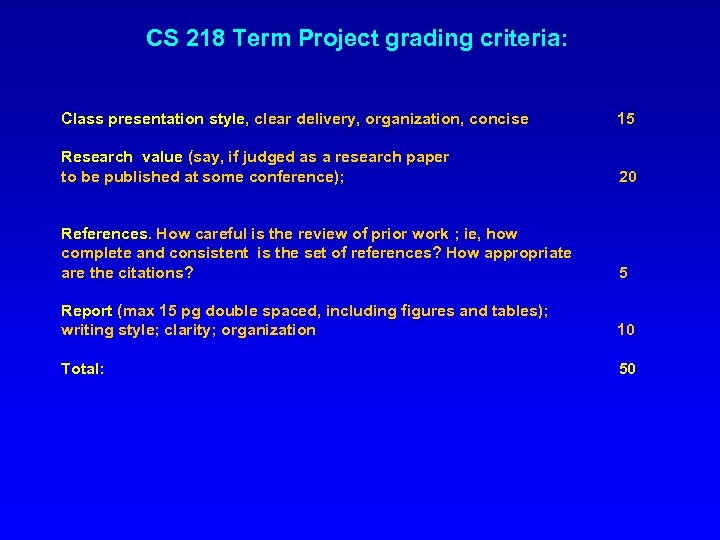 CS 218 Term Project grading criteria: Class presentation style, clear delivery, organization, concise 15 Research value (say, if judged as a research paper to be published at some conference); 20 References. How careful is the review of prior work ; ie, how complete and consistent is the set of references? How appropriate are the citations? 5 Report (max 15 pg double spaced, including figures and tables); writing style; clarity; organization 10 Total: 50
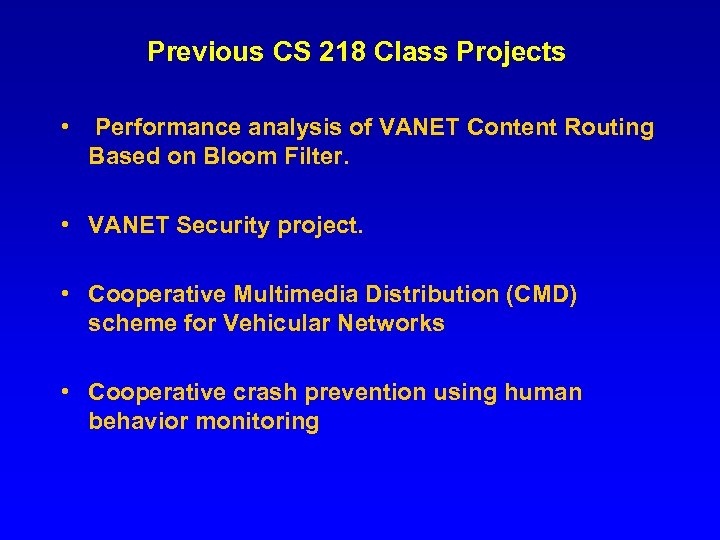 Previous CS 218 Class Projects • Performance analysis of VANET Content Routing Based on Bloom Filter. • VANET Security project. • Cooperative Multimedia Distribution (CMD) scheme for Vehicular Networks • Cooperative crash prevention using human behavior monitoring
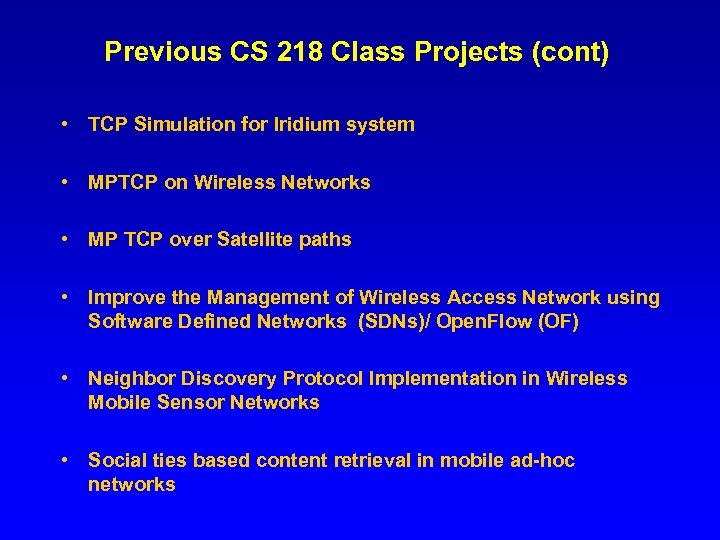 Previous CS 218 Class Projects (cont) • TCP Simulation for Iridium system • MPTCP on Wireless Networks • MP TCP over Satellite paths • Improve the Management of Wireless Access Network using Software Defined Networks (SDNs)/ Open. Flow (OF) • Neighbor Discovery Protocol Implementation in Wireless Mobile Sensor Networks • Social ties based content retrieval in mobile ad-hoc networks
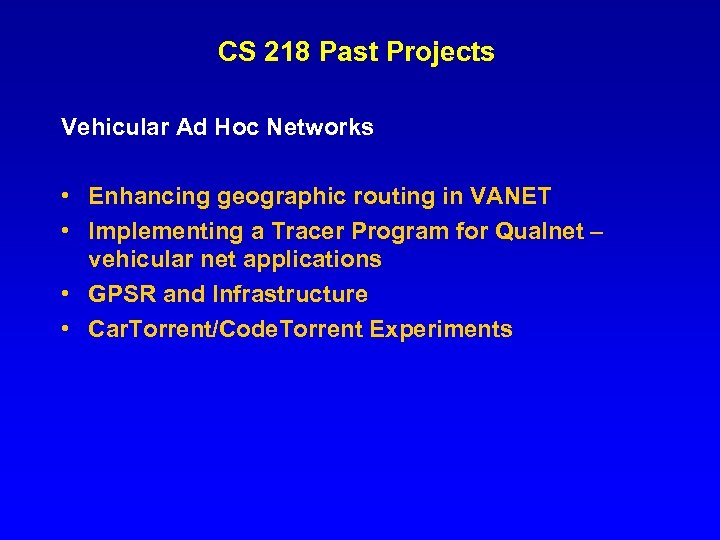 CS 218 Past Projects Vehicular Ad Hoc Networks • Enhancing geographic routing in VANET • Implementing a Tracer Program for Qualnet – vehicular net applications • GPSR and Infrastructure • Car. Torrent/Code. Torrent Experiments
 Past Projects (cont) Mobile P 2 P / Mobile Security • Blue. Torrent in Medical situation (Health. Net): Bluetooth-based patients data distribution system. • Blue. Torrent in Smart. Phones • Smart phone Bluetooth P 2 P • Survey on mobile ad-hoc network security. • Proof of Security of a Mesh Architecture
 Past Projects (cont) Ad Hoc Networking • Experiments on a Real Wireless Mesh Network (WMN) • Cross-Layer LANMAR Routing Protocol in MIMO System • Dynamic hybrid MAC protocol for 802. 15. 4 • Don’t Pass “Packets” to Your Neighbors • Multicast in Ad Hoc Networks (Fair. Cast) • Under Water ad hoc routing
 Past Projects (cont) Security • Secure, legitimate profit sharing in P 2 P content distribution • Implementation of ANODR – Anonymous Ad Hoc Routing Vehicle comms • Car. Torrent: Cooperative Downloading in Vehicular Ad Hoc Wireless Networks • Flea. Net: Mobile Market Place on the Vehicular Network • Studying the Dynamics of P 2 P File Pollution • Online Games in Vehicular Networks
 CS 218 F 17 – Class Schedule • • • Week 1 Oct 2 – M: Wireless LAN Intro; MAC Layer Oct 4 - W: MAC Layer-BT - Zbee ( 6 TISH) Oct 6 – F: Group membership lists due Week 2 Oct 9 - M: Wireless Ad Hoc Route + Geo. Route Oct 11 – W: Multicast, Epidemic Dissemination Oct 13 – F: Project proposals due Schedule of lectures for remaining weeks to be announced Week 5 Nov 1 – Midterm exam Weeks 9 -10 – Presentations of projects
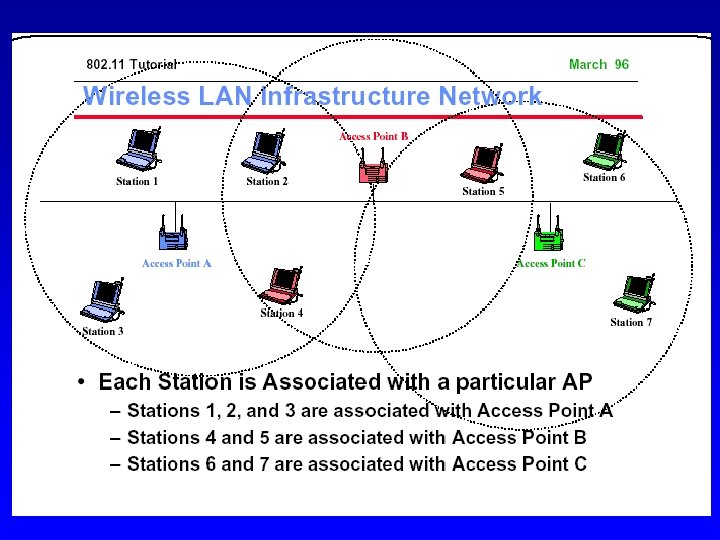
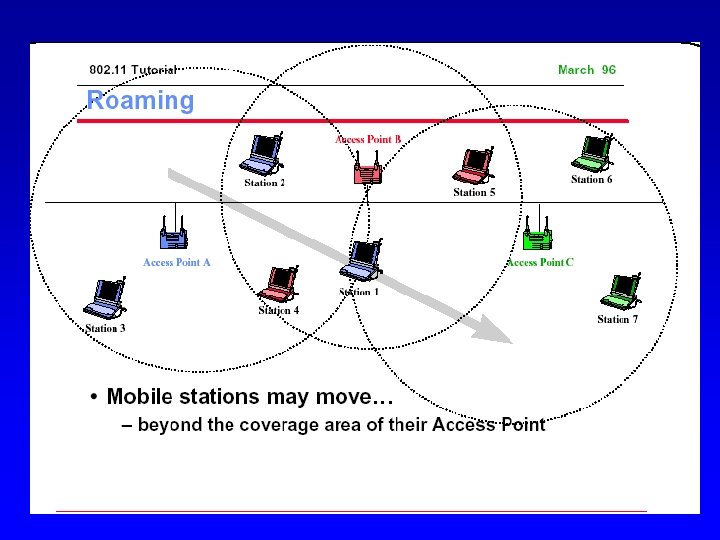
 Wireless Local Area Networks • The core wireless technology used today • Providing a limited area with networking capability • Through use of various radio technologies • Enabling mobile computing • And easing even non-mobile computing
 The three mobile wireless “waves” • Wave #1: cellular telephony (1980) – Still, biggest profit maker • Wave #2 : wireless Internet access (2000) – – Initially, Ethernet wireless replacement (late ‘ 90) Now, most Internet access is wireless (Campus, home, office, etc) Urban Hot Spots are rapidly proliferating (pedestrians, vehicles) Cellular: 2. 5 G, 3 G trying to keep up; competitive edge ( -> LTE)? • Wave #3: ad hoc wireless nets (now) – Commercial “opportunistic” ad hoc apps happening now – Note: Military “wave” actually started in 1970, followed by civil emergency/disaster recovery appls
 The Wireless Internet Access: Cellular • 2. 5 G – 1 x. RTT (EVDO): CDMA based; 144 Kbps – GPRS: Time Division based (GSM); < 100 Kbps – Packet oriented; “always on”; per packet (instead of per call) charge • 3 G – UMTS: Wide Band CDMA from 384 Kbps to 2 Mbps – Integrates packet service with connection oriented service (voice, video, etc) • LTE (Long Term Evolution) – New technology: OFDM, MIMO – Higher bandwidth: > 20 Mbps – Femtocells
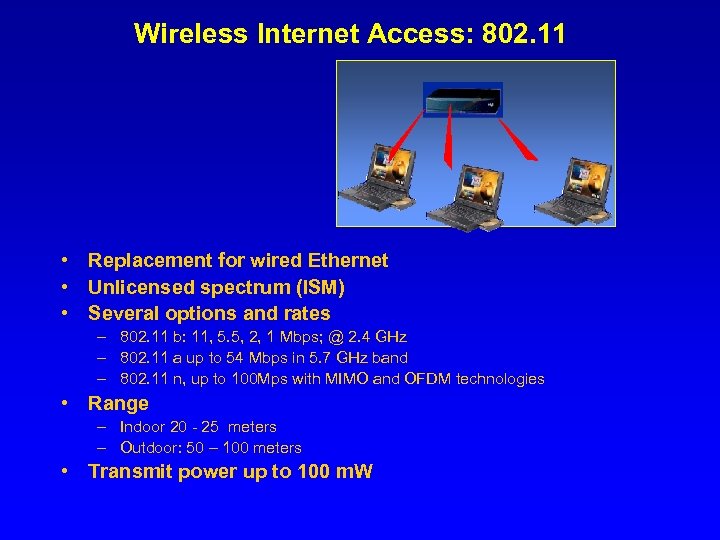 Wireless Internet Access: 802. 11 • Replacement for wired Ethernet • Unlicensed spectrum (ISM) • Several options and rates – 802. 11 b: 11, 5. 5, 2, 1 Mbps; @ 2. 4 GHz – 802. 11 a up to 54 Mbps in 5. 7 GHz band – 802. 11 n, up to 100 Mps with MIMO and OFDM technologies • Range – Indoor 20 - 25 meters – Outdoor: 50 – 100 meters • Transmit power up to 100 m. W
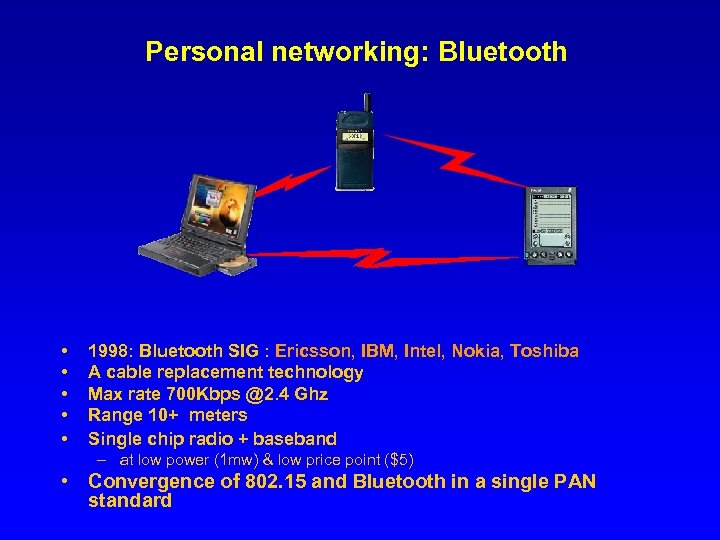 Personal networking: Bluetooth • • • 1998: Bluetooth SIG : Ericsson, IBM, Intel, Nokia, Toshiba A cable replacement technology Max rate 700 Kbps @2. 4 Ghz Range 10+ meters Single chip radio + baseband – at low power (1 mw) & low price point ($5) • Convergence of 802. 15 and Bluetooth in a single PAN standard
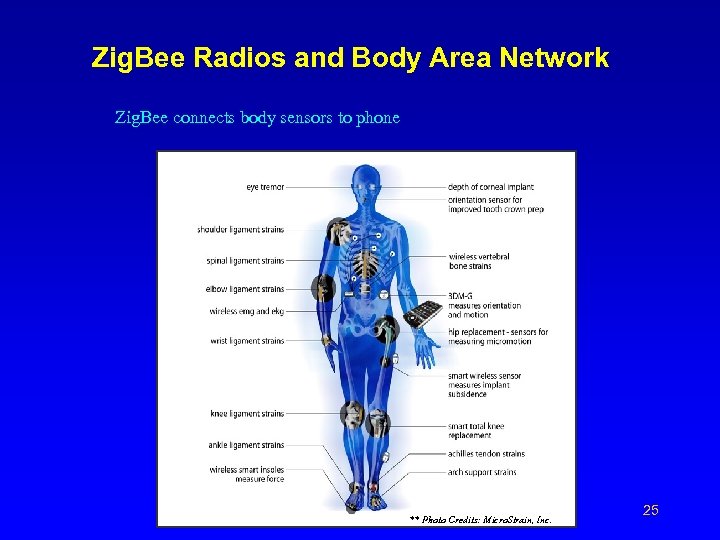 Zig. Bee Radios and Body Area Network Zig. Bee connects body sensors to phone ** Photo Credits: Micro. Strain, Inc. 25
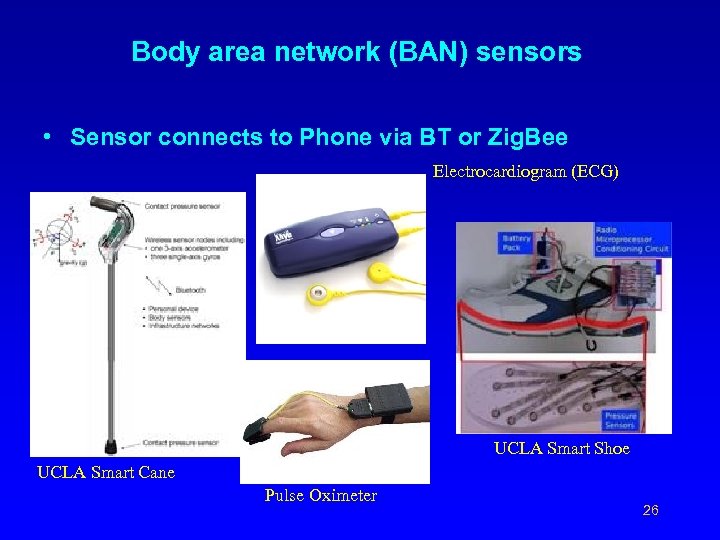 Body area network (BAN) sensors • Sensor connects to Phone via BT or Zig. Bee Electrocardiogram (ECG) UCLA Smart Shoe UCLA Smart Cane Pulse Oximeter 26
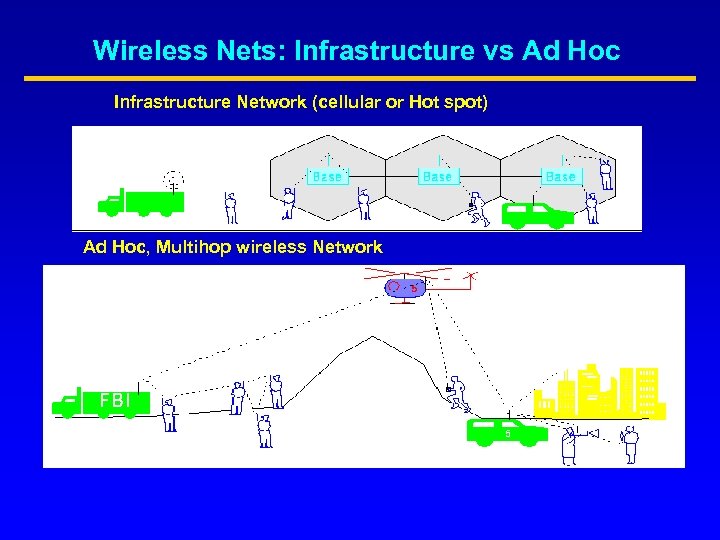 Wireless Nets: Infrastructure vs Ad Hoc Infrastructure Network (cellular or Hot spot) Ad Hoc, Multihop wireless Network
 General Ad Hoc Network Characteristics • Instantly deployable, re-configurable (No fixed infrastructure) • Created to satisfy a “temporary” need • Node portability (eg sensors), mobility • Limited battery power • Multi-hopping ( to save power, overcome obstacles, enhance spatial spectrum reuse, etc. )
 Ad Hoc Network Applications Military – Automated battlefield Civilian – – – Disaster Recovery (flood, fire, earthquakes etc) Law enforcement (crowd control) Homeland defense Search and rescue in remote areas Environment monitoring (sensors) Space/planet exploration
 Ad Hoc Network Applications (cont) Commercial – – Sport events, festivals, conventions Ad hoc collaborative computing (Bluetooth) Sensors on cars (car navigation safety); sensors on cows Networked video games at amusement parks, etc Opportunistic ad hoc extensions (of Wireless Internet) – – – Indoor W-LAN extended coverage Indoor network appliances (Bluetooth, Home RF) Hot spots (Mesh Networks) Campus, shopping mall, etc Urban grid
 The Battlefield • Do. D was first to understand the value of ad hoc networks for the automated battlefield • In 1971 (two years after ARPANET), DARPA starts the Packet Radio project • ONR (Office of Naval Research) sponsors MINUTEMAN - a 5 year program at UCLA (2000– 2005) • Goal: develop an “unmanned” , airborne ad hoc architecture
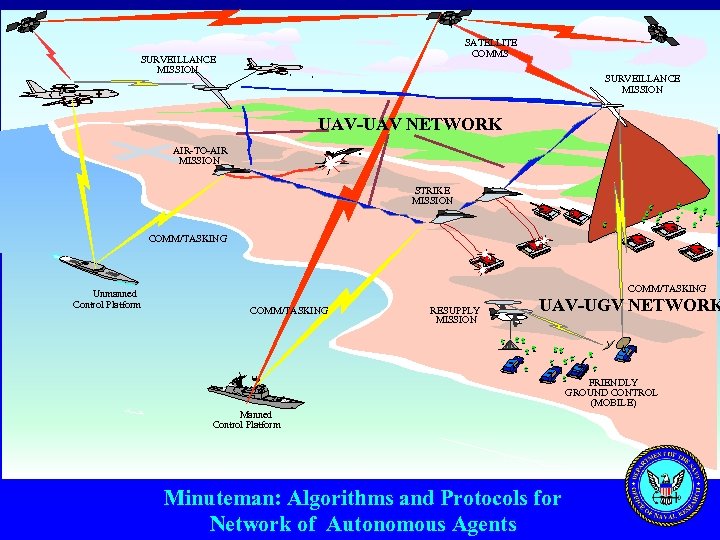 SATELLITE COMMS SURVEILLANCE MISSION UAV-UAV NETWORK AIR-TO-AIR MISSION STRIKE MISSION COMM/TASKING Unmanned Control Platform COMM/TASKING RESUPPLY MISSION UAV-UGV NETWORK FRIENDLY GROUND CONTROL (MOBILE) Manned Control Platform Minuteman: Algorithms and Protocols for Network of Autonomous Agents
 Transferring Battlefield technology to civilian applications Disaster recovery: • Flood, mud slide, eruption, chemical or nuclear plant disaster • Several rescue teams involved, with different functions • Autonomous vehicle swarms (ground/airborne) are deployed (with sensors/actuators) • Manned and unmanned teams cooperate in rescue • “Ad Hoc networking” will be central to make the operation work
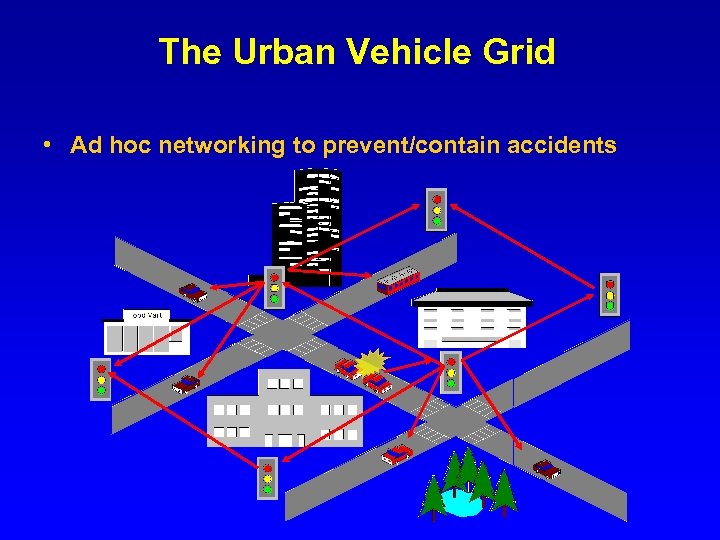 The Urban Vehicle Grid • Ad hoc networking to prevent/contain accidents
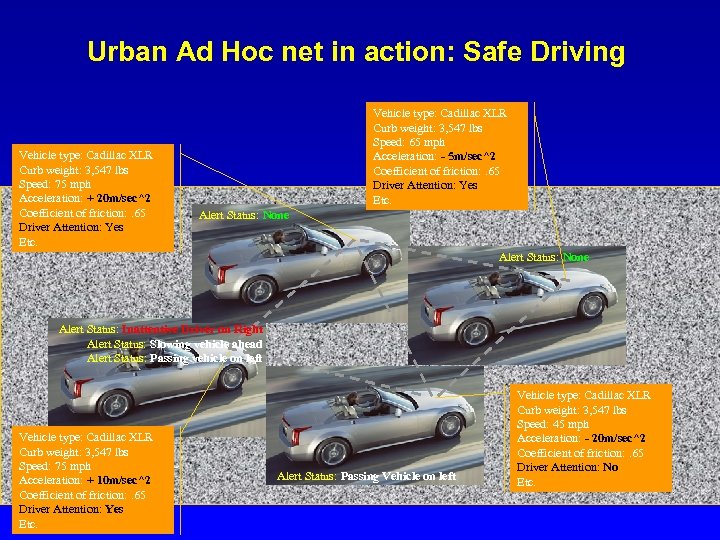 Urban Ad Hoc net in action: Safe Driving Vehicle type: Cadillac XLR Curb weight: 3, 547 lbs Speed: 75 mph Acceleration: + 20 m/sec^2 Coefficient of friction: . 65 Driver Attention: Yes Etc. Vehicle type: Cadillac XLR Curb weight: 3, 547 lbs Speed: 65 mph Acceleration: - 5 m/sec^2 Coefficient of friction: . 65 Driver Attention: Yes Etc. Alert Status: None Alert Status: Inattentive Driver on Right Alert Status: Slowing vehicle ahead Alert Status: Passing vehicle on left Vehicle type: Cadillac XLR Curb weight: 3, 547 lbs Speed: 75 mph Acceleration: + 10 m/sec^2 Coefficient of friction: . 65 Driver Attention: Yes Etc. Alert Status: Passing Vehicle on left Vehicle type: Cadillac XLR Curb weight: 3, 547 lbs Speed: 45 mph Acceleration: - 20 m/sec^2 Coefficient of friction: . 65 Driver Attention: No Etc.
 CS 218 Fall 2017 Wireless Nets – the MAC layer Part I • • FDMA/TDMA/CDMA MAC Protocols Overview MAC layer in the DARPA Packet Radio testbed MAC in wireless LANs (MACA and IEEE 802. 11)
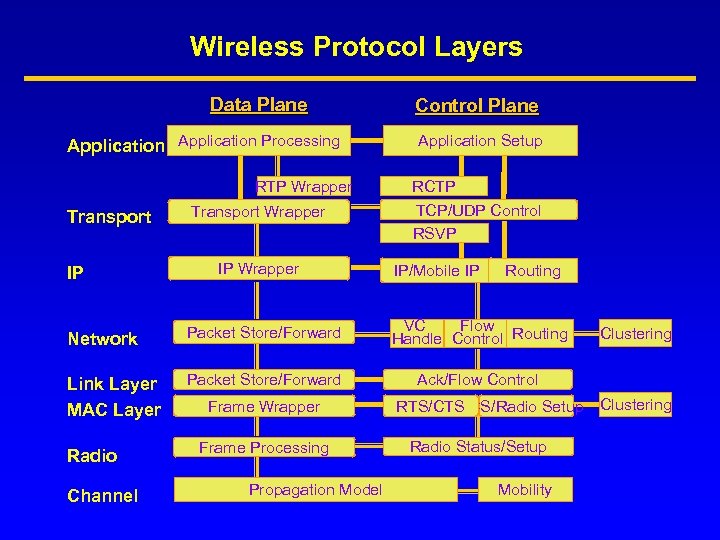 Wireless Protocol Layers Data Plane Application Processing RTP Wrapper Transport IP Transport Wrapper IP Wrapper Control Plane Application Setup RCTP TCP/UDP Control RSVP IP/Mobile IP Routing Network Packet Store/Forward VC Flow Handle Control Routing Link Layer MAC Layer Packet Store/Forward Ack/Flow Control Radio Channel Frame Wrapper Frame Processing Propagation Model RTS/CTS CS/Radio Setup Radio Status/Setup Mobility Clustering
 MAC Layer • Media Access Control protocol: coordination and scheduling of transmissions among competing neighbors • Used when multiple potential senders use the same underlying link • Goals: low latency, good channel utilization; best effort + real time support • MAC layer clustering: aggregation of nodes in a cluster (= cell) for MAC enhancement
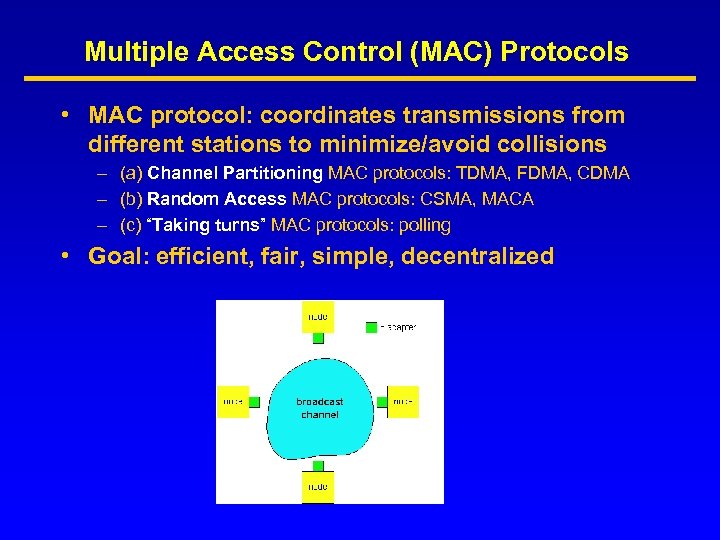 Multiple Access Control (MAC) Protocols • MAC protocol: coordinates transmissions from different stations to minimize/avoid collisions – (a) Channel Partitioning MAC protocols: TDMA, FDMA, CDMA – (b) Random Access MAC protocols: CSMA, MACA – (c) “Taking turns” MAC protocols: polling • Goal: efficient, fair, simple, decentralized
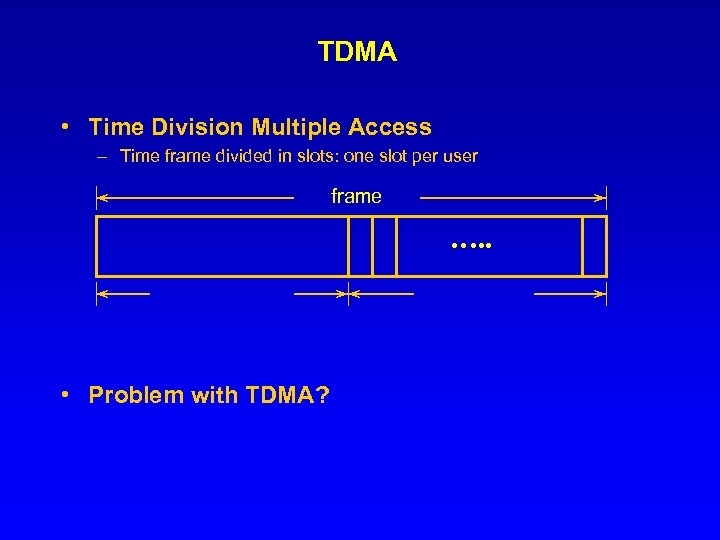 TDMA • Time Division Multiple Access – Time frame divided in slots: one slot per user frame …. . • Problem with TDMA?
 Channel Partitioning (CDMA) • CDMA (Code Division Multiple Access): exploits spread spectrum (DS or FH) encoding scheme • unique “code” assigned to each user; ie, code set partitioning • Used mostly in wireless broadcast channels (cellular, satellite, etc) • All users share the same frequency, but each user has own “chipping” sequence (ie, code)
 Frequency Hopping (FH) • Frequency spectrum sliced into frequency subbands (eg, 125 subbands in a 25 Mhz range) • Time is subdivided into slots; each slot can typically carry one packet (or fraction of it) – A Bluetooth packet covers up to 5 freq slots • Users are clock and slot synchronized – They frequency hop slot by slot according to unique, predefined sequence • Ideally, hopping sequences are “orthogonal” across networks (i. e. , no overlap) • In practice, conflicts occur
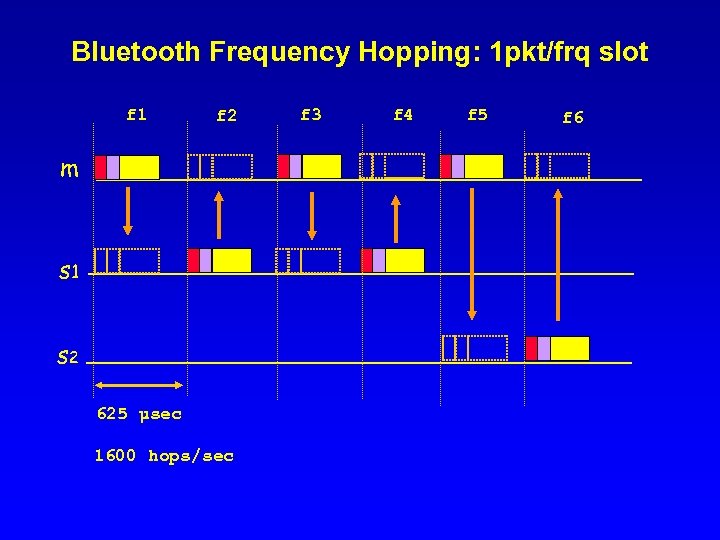 Bluetooth Frequency Hopping: 1 pkt/frq slot f 1 f 2 m s 1 s 2 625 µsec 1600 hops/sec f 3 f 4 f 5 f 6
 MAC protocols • (a) Channel Partitioning : TDMA, FDMA, CDMA • (b) Random Access : CSMA, MACA • (c) “Taking turns” : polling
 Random Access Protocols • A node transmits at random (i. e. , no a priori coordination among nodes) at full channel data rate R • If two or more nodes “collide”, they retransmit at random times • The random access MAC protocol specifies how to detect collisions and how to recover from them (e. g. , retx) • Examples: (a) SLOTTED ALOHA (b) ALOHA (c) CSMA and CSMA/CD
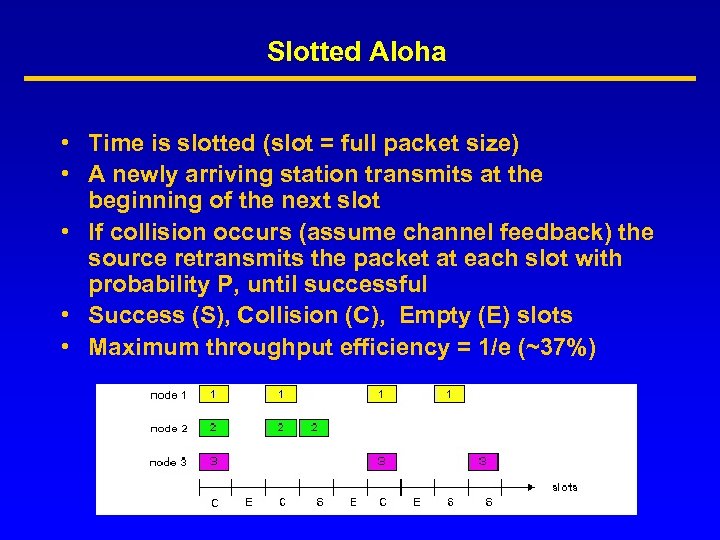 Slotted Aloha • Time is slotted (slot = full packet size) • A newly arriving station transmits at the beginning of the next slot • If collision occurs (assume channel feedback) the source retransmits the packet at each slot with probability P, until successful • Success (S), Collision (C), Empty (E) slots • Maximum throughput efficiency = 1/e (~37%)
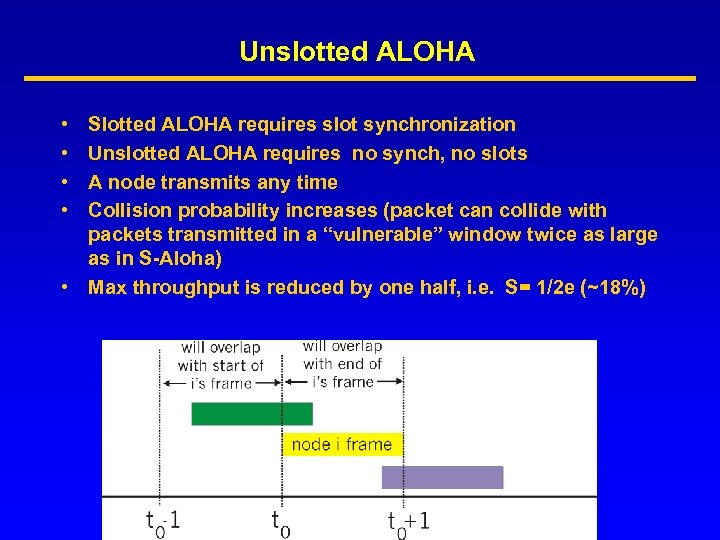 Unslotted ALOHA • • Slotted ALOHA requires slot synchronization Unslotted ALOHA requires no synch, no slots A node transmits any time Collision probability increases (packet can collide with packets transmitted in a “vulnerable” window twice as large as in S-Aloha) • Max throughput is reduced by one half, i. e. S= 1/2 e (~18%)
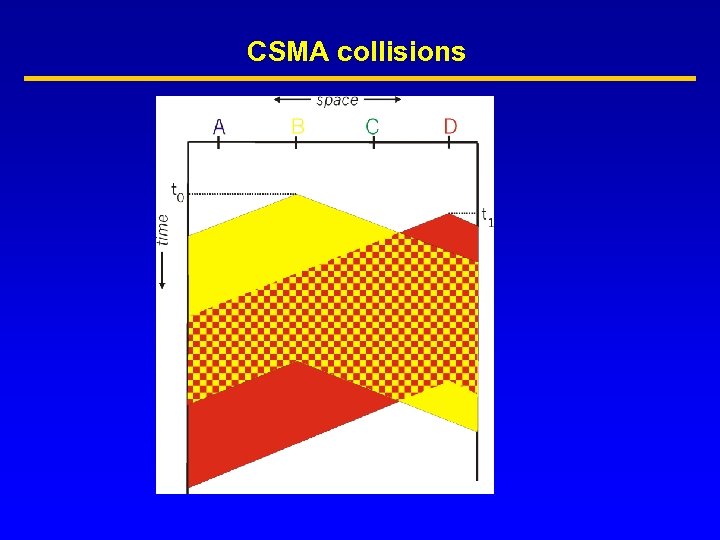
 CSMA (Carrier Sense Multiple Access) • CSMA: listen before transmit. If channel is sensed busy, defer transmission • Persistent CSMA: retry immediately when channel becomes idle (this may cause instability) • Non persistent CSMA: retry after random interval • Note: collisions may still exist, since two stations may sense the channel idle at the same time ( or better, within a “vulnerable” window = round trip delay) • In case of collision, the entire packet is retransmitted
 CSMA collisions
 CSMA/CD (Collision Detection) • • • CSMA/CD: carrier sensing like in CSMA. Now, collisions are detected within a few bit times. Transmission is then aborted, reducing channel OH, wastage CSMA/CD can approach channel utilization = 1 in LANs (low ratio of propagation over packet transmission time) Collision detection is easy in wired LANs (e. g. , E-net): – Can measure signal strength on the line, or code violations, or compare transmit and receive signals Collision detection cannot be done in wireless LANs (the receiver is shut off while transmitting, to avoid damaging it with excess power)
 IEEE 802. 11 and Wireless LANs • Wireless LANs – Base station ( like cellular) – Or ad hoc networking (mostly point to point) – Standards: • IEEE 802. 11 (various versions) • Hyper. LAN (ETSI) • Bluetooth
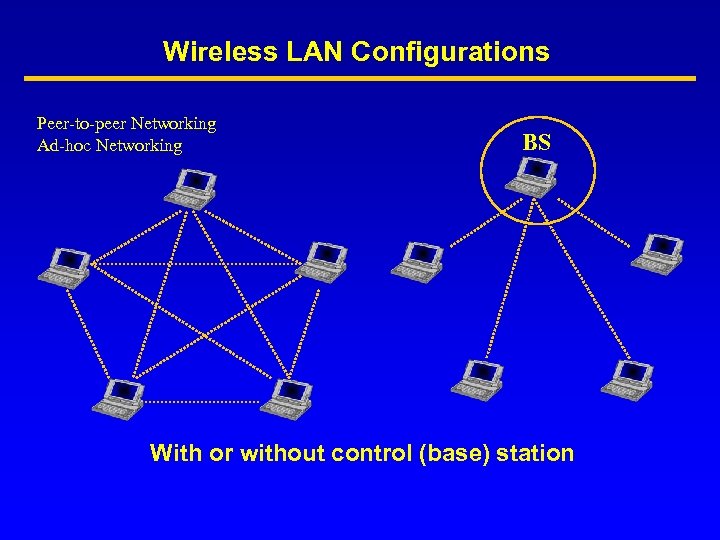 Wireless LAN Configurations Peer-to-peer Networking Ad-hoc Networking BS With or without control (base) station
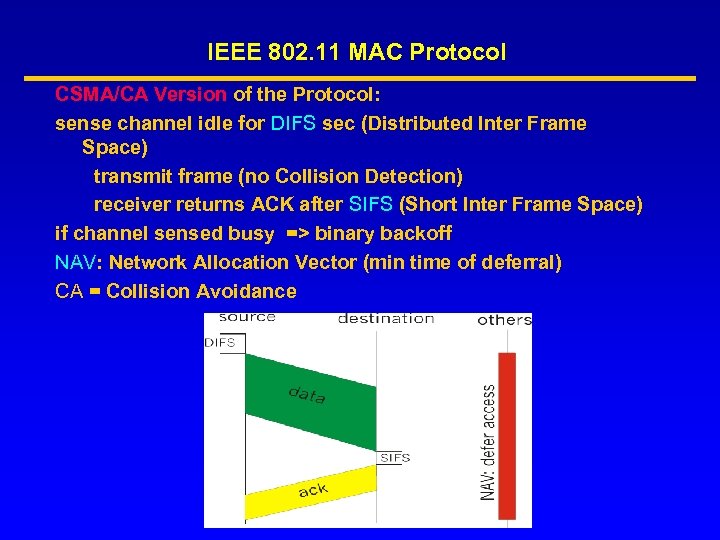 IEEE 802. 11 MAC Protocol CSMA/CA Version of the Protocol: sense channel idle for DIFS sec (Distributed Inter Frame Space) transmit frame (no Collision Detection) receiver returns ACK after SIFS (Short Inter Frame Space) if channel sensed busy => binary backoff NAV: Network Allocation Vector (min time of deferral) CA = Collision Avoidance
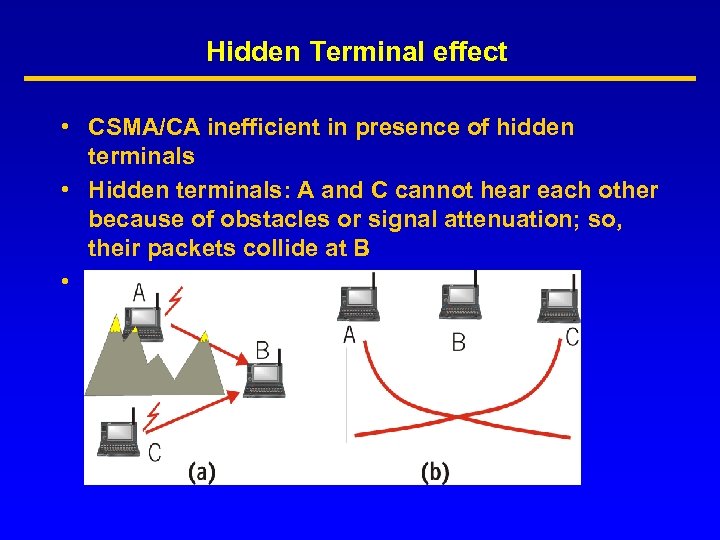 Hidden Terminal effect • CSMA/CA inefficient in presence of hidden terminals • Hidden terminals: A and C cannot hear each other because of obstacles or signal attenuation; so, their packets collide at B • Solution? CSMA/CA+ RTS/CTS
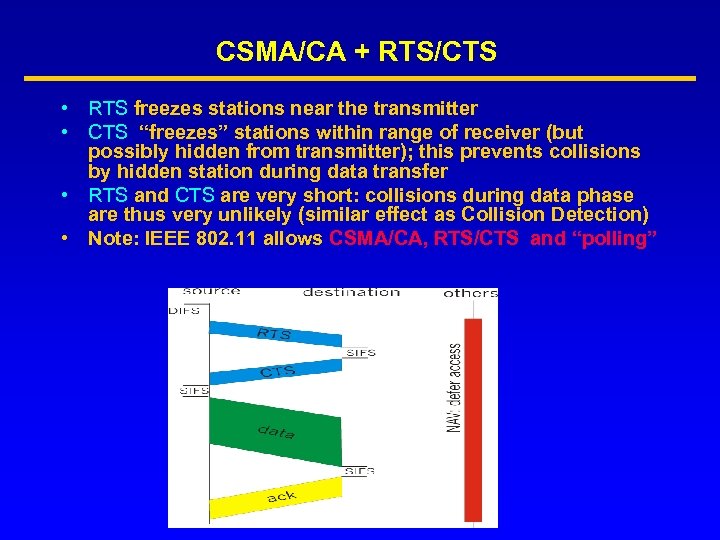 CSMA/CA + RTS/CTS • RTS freezes stations near the transmitter • CTS “freezes” stations within range of receiver (but possibly hidden from transmitter); this prevents collisions by hidden station during data transfer • RTS and CTS are very short: collisions during data phase are thus very unlikely (similar effect as Collision Detection) • Note: IEEE 802. 11 allows CSMA/CA, RTS/CTS and “polling”
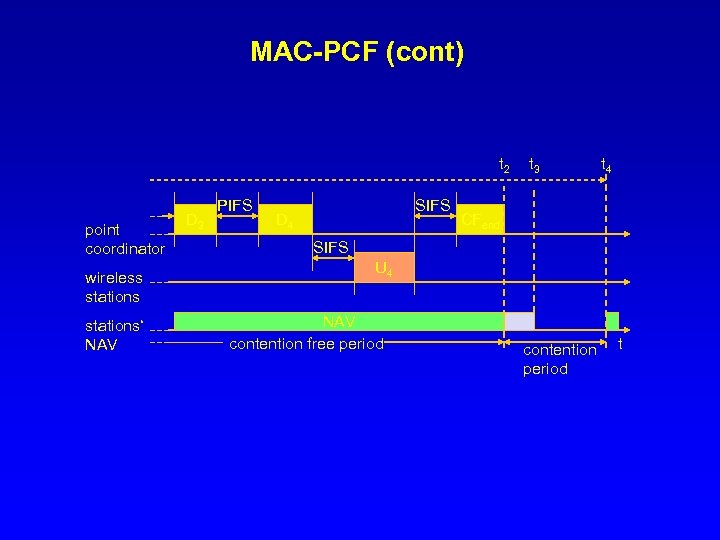
 802. 11 - MAC layer • Access methods – MAC-DCF CSMA/CA (mandatory) • collision avoidance via randomized back-off • minimum distance between consecutive packets • ACK packet for acknowledgements (not for broadcasts) – MAC-DCF w/ RTS/CTS (optional) • Distributed Foundation Wireless MAC • avoids hidden terminal problem – MAC- PCF (optional) • access point polls terminals according to a list
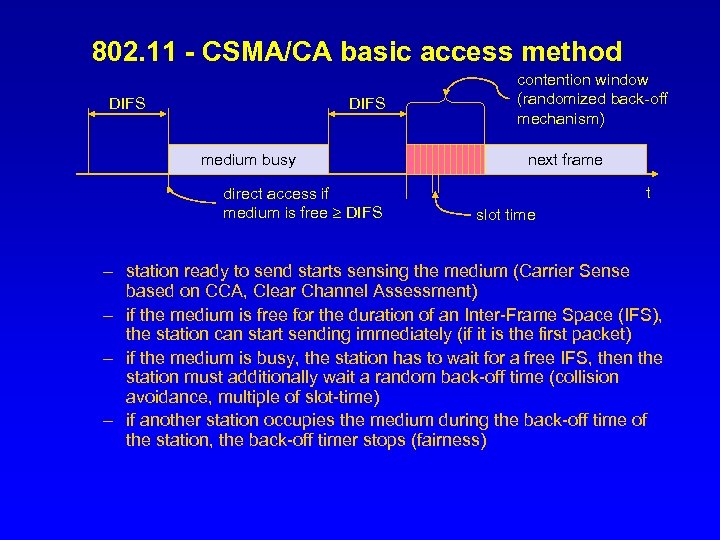 802. 11 - CSMA/CA basic access method DIFS medium busy direct access if medium is free DIFS contention window (randomized back-off mechanism) next frame t slot time – station ready to send starts sensing the medium (Carrier Sense based on CCA, Clear Channel Assessment) – if the medium is free for the duration of an Inter-Frame Space (IFS), the station can start sending immediately (if it is the first packet) – if the medium is busy, the station has to wait for a free IFS, then the station must additionally wait a random back-off time (collision avoidance, multiple of slot-time) – if another station occupies the medium during the back-off time of the station, the back-off timer stops (fairness)
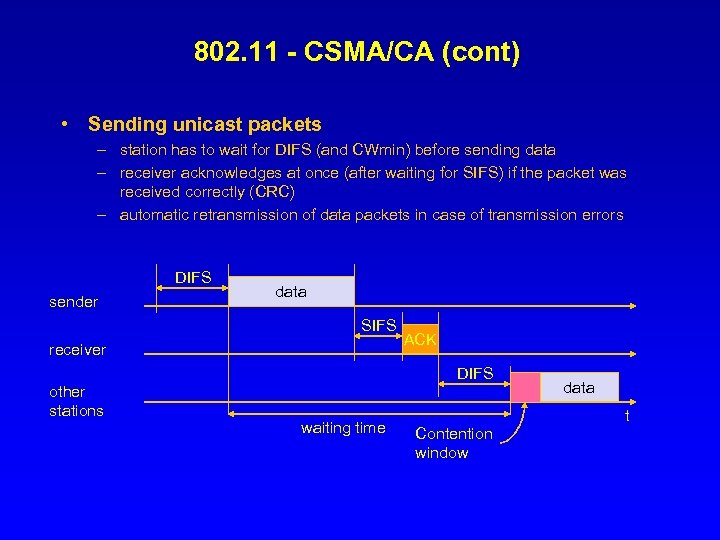 802. 11 - CSMA/CA (cont) • Sending unicast packets – station has to wait for DIFS (and CWmin) before sending data – receiver acknowledges at once (after waiting for SIFS) if the packet was received correctly (CRC) – automatic retransmission of data packets in case of transmission errors DIFS sender data SIFS receiver ACK DIFS other stations waiting time data t Contention window
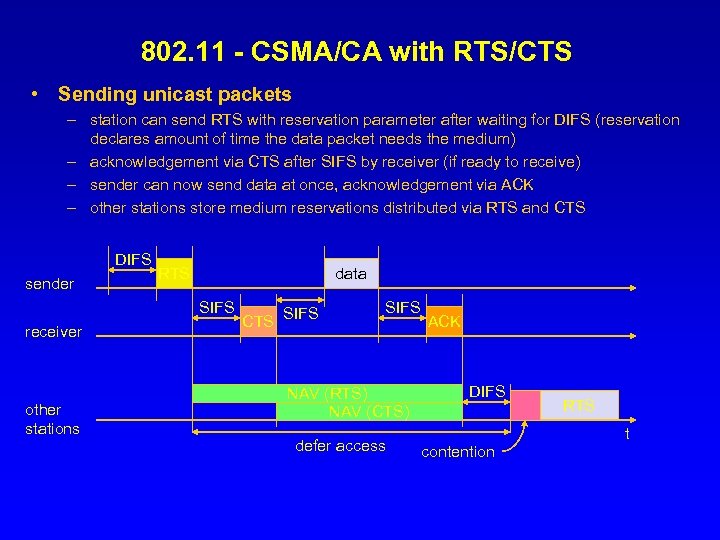 802. 11 - CSMA/CA with RTS/CTS • Sending unicast packets – station can send RTS with reservation parameter after waiting for DIFS (reservation declares amount of time the data packet needs the medium) – acknowledgement via CTS after SIFS by receiver (if ready to receive) – sender can now send data at once, acknowledgement via ACK – other stations store medium reservations distributed via RTS and CTS DIFS sender RTS data SIFS receiver other stations CTS SIFS NAV (RTS) NAV (CTS) defer access ACK DIFS RTS t contention
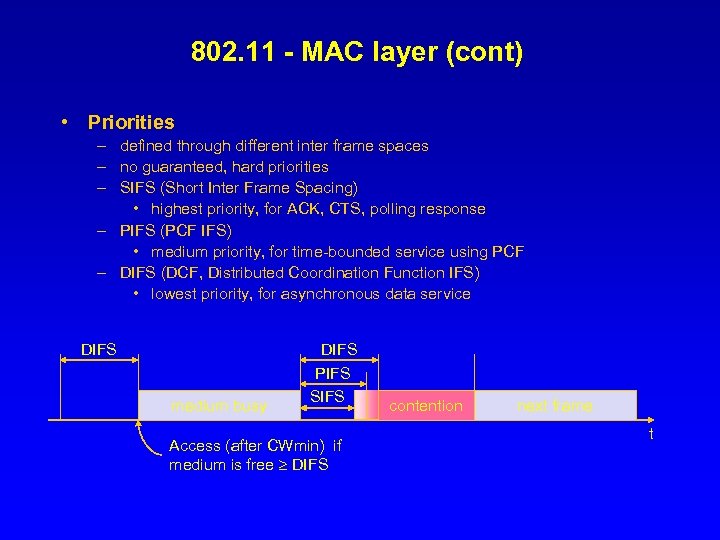 802. 11 - MAC layer (cont) • Priorities – defined through different inter frame spaces – no guaranteed, hard priorities – SIFS (Short Inter Frame Spacing) • highest priority, for ACK, CTS, polling response – PIFS (PCF IFS) • medium priority, for time-bounded service using PCF – DIFS (DCF, Distributed Coordination Function IFS) • lowest priority, for asynchronous data service DIFS medium busy DIFS PIFS SIFS Access (after CWmin) if medium is free DIFS contention next frame t
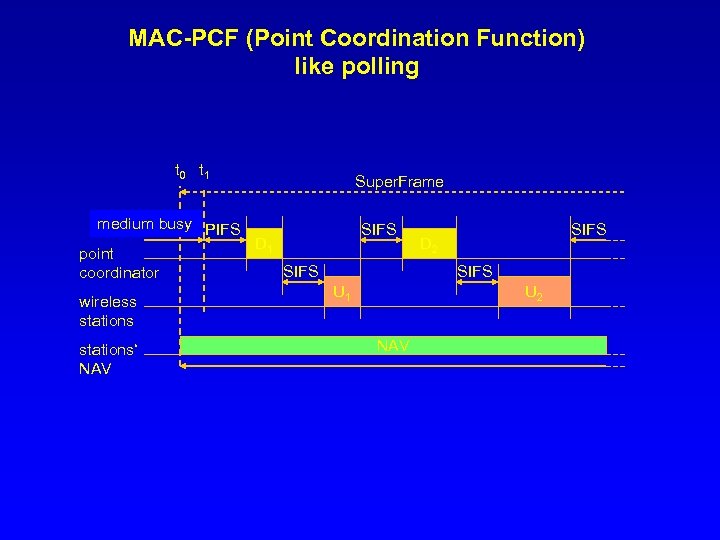 MAC-PCF (Point Coordination Function) like polling t 0 t 1 Super. Frame medium busy PIFS D 1 point SIFS coordinator wireless stations‘ NAV SIFS D 2 SIFS U 1 U 2 NAV
 MAC-PCF (cont) t 2 point coordinator wireless stations‘ NAV D 3 PIFS SIFS D 4 t 3 t 4 CFend SIFS U 4 NAV contention free period contention period t
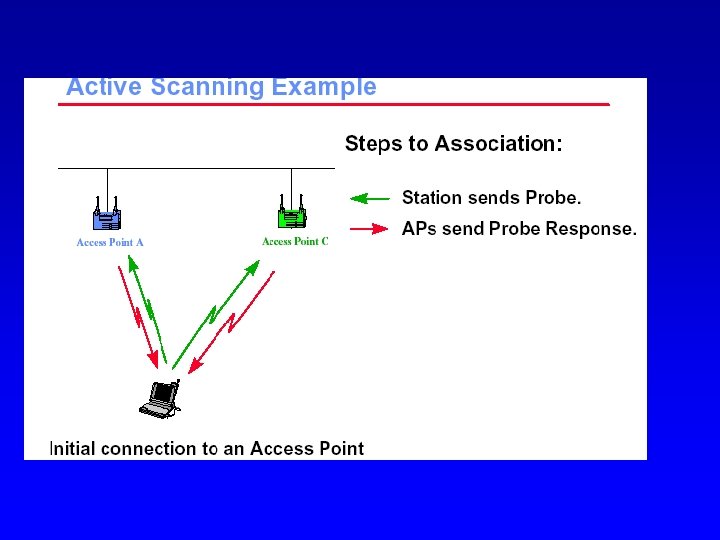
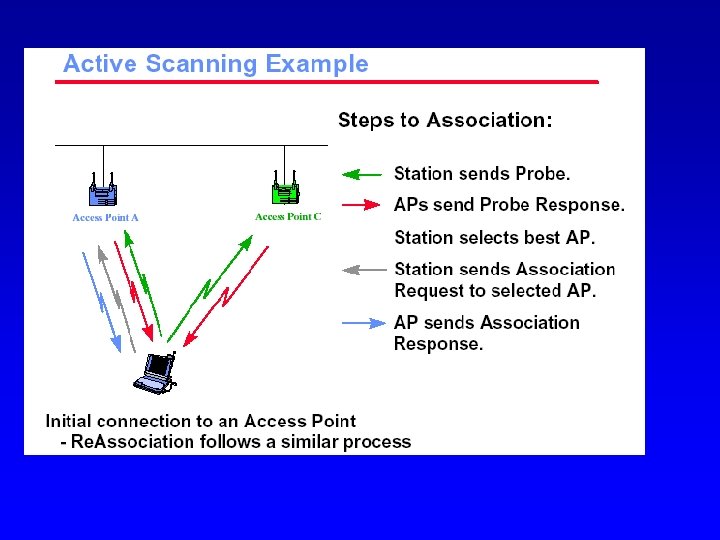
 Higher Speeds? • IEEE 802. 11 a – compatible MAC, but now 5. 8 GHz ISM band – OFDM (orthogonal freq division multiplexing) – transmission rates up to 50 Mbit/s – close cooperation with BRAN (ETSI Broadband Radio Access Network) • IEEE 802. 11 g: up to 50 Mbps, in the 2. 5 range • IEEE 802. 11 n: up to 100 Mbps, using OFDM and MIMO technologies