


 Скачать презентацию CS 162 Operating Systems and Systems Programming Lecture
479b64ed6fa2941d3b363c92b7bf4d28.ppt
- Количество слайдов: 43
 CS 162 Operating Systems and Systems Programming Lecture 10 Tips for Handling Group Projects Thread Scheduling October 3, 2005 Prof. John Kubiatowicz http: //inst. eecs. berkeley. edu/~cs 162
 Review: Deadlock • Starvation vs. Deadlock – Starvation: thread waits indefinitely – Deadlock: circular waiting for resources – Deadlock Starvation, but not other way around • Four conditions for deadlocks – Mutual exclusion » Only one thread at a time can use a resource – Hold and wait » Thread holding at least one resource is waiting to acquire additional resources held by other threads – No preemption » Resources are released only voluntarily by the threads – Circular wait » There exists a set {T 1, …, Tn} of threads with a cyclic waiting pattern 10/03/05 Kubiatowicz CS 162 ©UCB Fall 2005 Lec 10. 2
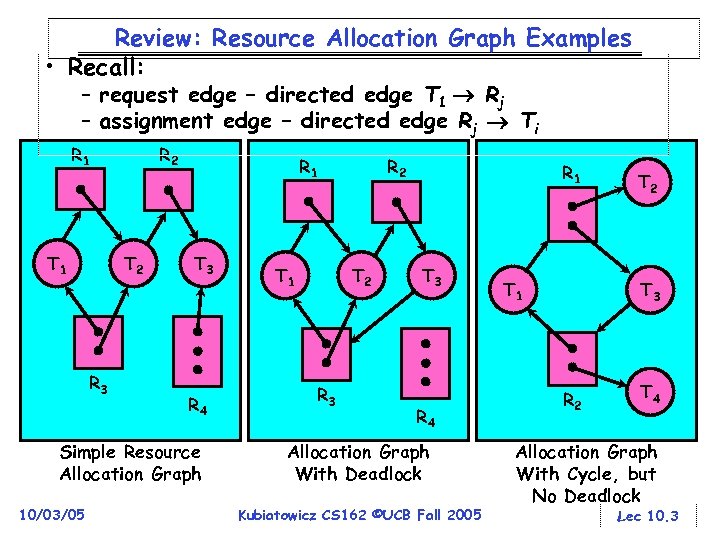 Review: Resource Allocation Graph Examples • Recall: – request edge – directed edge T 1 Rj – assignment edge – directed edge Rj Ti R 1 T 1 R 2 T 2 R 3 R 1 T 3 R 4 Simple Resource Allocation Graph 10/03/05 T 1 R 2 T 2 R 3 R 1 T 3 R 4 Allocation Graph With Deadlock Kubiatowicz CS 162 ©UCB Fall 2005 T 1 T 2 T 3 R 2 T 4 Allocation Graph With Cycle, but No Deadlock Lec 10. 3
 Review: Methods for Handling Deadlocks • Allow system to enter deadlock and then recover – Requires deadlock detection algorithm – Some technique for selectively preempting resources and/or terminating tasks • Ensure that system will never enter a deadlock – Need to monitor all lock acquisitions – Selectively deny those that might lead to deadlock • Ignore the problem and pretend that deadlocks never occur in the system – used by most operating systems, including UNIX 10/03/05 Kubiatowicz CS 162 ©UCB Fall 2005 Lec 10. 4
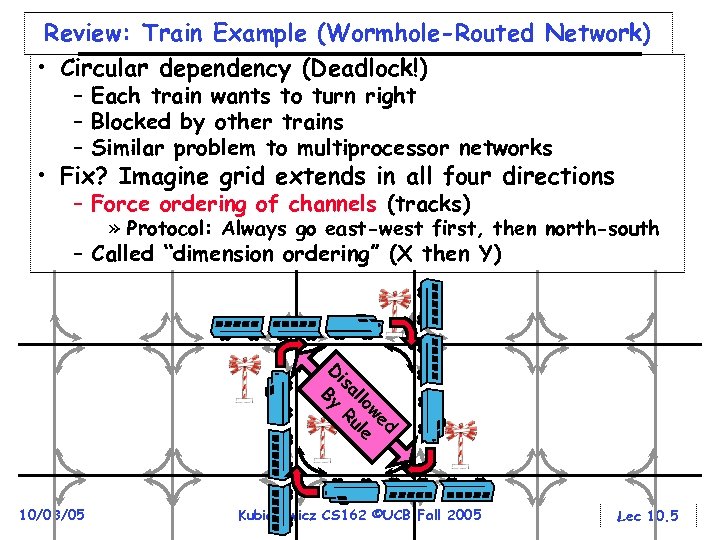 Review: Train Example (Wormhole-Routed Network) • Circular dependency (Deadlock!) – Each train wants to turn right – Blocked by other trains – Similar problem to multiprocessor networks • Fix? Imagine grid extends in all four directions – Force ordering of channels (tracks) » Protocol: Always go east-west first, then north-south – Called “dimension ordering” (X then Y) d we lo le al u is R D By 10/03/05 Kubiatowicz CS 162 ©UCB Fall 2005 Lec 10. 5
 Review: Banker’s Algorithm for Preventing Deadlock • Monitor every request to see if it has the potential to lead to deadlock – Every thread must state a “maximum” expected allocation ahead of time – Keeps system in a “SAFE” state there always exists a sequence {T 1, T 2, … Tn} with T 1 able to request all its remaining resources and finish, then T 2 able to request all its remaining resources and finish, etc. . – Evaluate each request and grant if some ordering of threads is still deadlock free afterward » Technique: pretend each request is granted, then run deadlock detection algorithm, substituting [Maxnode]-[Allocnode] for [Requestnode] Grant request if result is deadlock free (conservative!) – Algorithm allows the sum of maximum resource needs of all current threads to be greater than total resources 10/03/05 Kubiatowicz CS 162 ©UCB Fall 2005 Lec 10. 6
 Goals for Today • • Tips for Programming in a Project Team Scheduling Policy goals Policy Options Implementation Considerations Note: Some slides and/or pictures in the following are adapted from slides © 2005 Silberschatz, Galvin, and Gagne 10/03/05 Kubiatowicz CS 162 ©UCB Fall 2005 Lec 10. 7
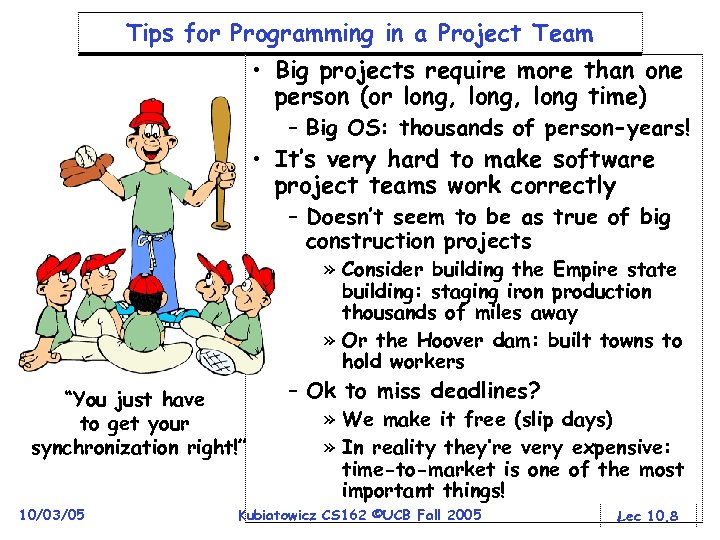 Tips for Programming in a Project Team • Big projects require more than one person (or long, long time) – Big OS: thousands of person-years! • It’s very hard to make software project teams work correctly – Doesn’t seem to be as true of big construction projects » Consider building the Empire state building: staging iron production thousands of miles away » Or the Hoover dam: built towns to hold workers “You just have to get your synchronization right!” 10/03/05 – Ok to miss deadlines? » We make it free (slip days) » In reality they’re very expensive: time-to-market is one of the most important things! Kubiatowicz CS 162 ©UCB Fall 2005 Lec 10. 8
 Big Projects • What is a big project? – Time/work estimation is hard – Programmers are eternal optimistics (it will only take two days)! » This is why we bug you about starting the project early » Had a grad student who used to say he just needed “ 10 minutes” to fix something. Two hours later… • Can a project be efficiently partitioned? – Partitionable task decreases in time as you add people – But, if you require communication: » Time reaches a minimum bound » With complex interactions, time increases! – Mythical person-month problem: 10/03/05 » You estimate how long a project will take » Starts to fall behind, so you add more people » Project takes even more time! Kubiatowicz CS 162 ©UCB Fall 2005 Lec 10. 9
 Techniques for Partitioning Tasks • Functional – Person A implements threads, Person B implements semaphores, Person C implements locks… – Problem: Lots of communication across APIs » If B changes the API, A may need to make changes » Story: Large airline company spent $200 million on a new scheduling and booking system. Two teams “working together. ” After two years, went to merge software. Failed! Interfaces had changed (documented, but no one noticed). Result: would cost another $200 million to fix. • Task – Person A designs, Person B writes code, Person C tests – May be difficult to find right balance, but can focus on each person’s strengths (Theory vs systems hacker) – Since Debugging is hard, Microsoft has two testers for each programmer • Most CS 162 project teams are functional, but people have had success with task-based divisions 10/03/05 Kubiatowicz CS 162 ©UCB Fall 2005 Lec 10. 10
 Communication • More people mean more communication – Changes have to be propagated to more people – Think about person writing code for most fundamental component of system: everyone depends on them! • Miscommunication is common – “Index starts at 0? I thought you said 1!” • Who makes decisions? – Individual decisions are fast but trouble – Group decisions take time – Centralized decisions require a big picture view (someone who can be the “system architect”) • Often designating someone as the system architect can be a good thing – Better not be clueless – Better have good people skills – Better let other people do work 10/03/05 Kubiatowicz CS 162 ©UCB Fall 2005 Lec 10. 11
 Coordination • More people no one can make all meetings! – They miss decisions and associated discussion – Example from earlier class: one person missed meetings and did something group had rejected – Why do we limit groups to 5 people? » You would never be able to schedule meetings – Why do we require 3 or 4 people minimum? » You need to experience groups to get ready for real world • People have different work styles – Some people work in the morning, some at night – How do you decide when to meet or work together? • What about project slippage? – It will happen, guaranteed! – Another example: final project in CS 152, everyone busy but not talking. One person way behind. No one knew until very end – too late! • Hard to add people to existing group – Members have already figured out how to work together 10/03/05 Kubiatowicz CS 162 ©UCB Fall 2005 Lec 10. 12
 How to Make it Work? • People are human. Get over it. – People will make mistakes, miss meetings, miss deadlines, etc. You need to live with it and adapt – It is better to anticipate problems than clean up afterwards. • Document, document – Why Document? » Expose decisions and communicate to others » Easier to spot mistakes early » Easier to estimate progress – What to document? » Everything (but don’t overwhelm people or no one will read) – Standardize! » One programming format: variable naming conventions, tab indents, etc. » Comments (Requires, effects, modifies)—javadoc? 10/03/05 Kubiatowicz CS 162 ©UCB Fall 2005 Lec 10. 13
 Suggested Documents for You to Maintain • Project objectives: goals, constraints, and priorities • Specifications: the manual plus performance specs – This should be the first document generated and the last one finished • Meeting notes – Document all decisions – You can often cut & paste for the design documents • Schedule: What is your anticipated timing? – This document is critical! • Organizational Chart – Who is responsible for what task? 10/03/05 Kubiatowicz CS 162 ©UCB Fall 2005 Lec 10. 14
 Use Software Tools • Source revision control software (CVS) – Easy to go back and see history – Figure out where and why a bug got introduced – Communicates changes to everyone (use CVS’s features) • Use automated testing tools – Write scripts for non-interactive software – Use “expect” for interactive software – Microsoft rebuild the XP kernel every night with the day’s changes. Everyone is running/testing the latest software • Use E-mail and instant messaging consistently to leave a history trail 10/03/05 Kubiatowicz CS 162 ©UCB Fall 2005 Lec 10. 15
 Test Continuously • Integration tests all the time, not at 11 pm on due date! – Write dummy stubs with simple functionality » Let’s people test continuously, but more work – Schedule periodic integration tests » Get everyone in the same room, check out code, build, and test. » Don’t wait until it is too late! • Testing types: – Unit tests: check each module in isolation (use JUnit? ) – Daemons: subject code to exceptional cases – Random testing: Subject code to random timing changes • Test early, test later, test again – Tendency is to test once and forget; what if something changes in some other part of the code? 10/03/05 Kubiatowicz CS 162 ©UCB Fall 2005 Lec 10. 16
 Administrivia • Midterm I coming up in < two weeks: – Wednesday, 10/12, 5: 30 – 8: 30, Here – Should be 2 hour exam with extra time – Closed book, one page of hand-written notes (both sides) • No class on day of Midterm – I will post extra office hours for people who have questions about the material (or life, whatever) • Midterm Topics – Topics: Everything up to that Monday, 10/10 – History, Concurrency, Multithreading, Synchronization, Protection/Address Spaces 10/03/05 Kubiatowicz CS 162 ©UCB Fall 2005 Lec 10. 17
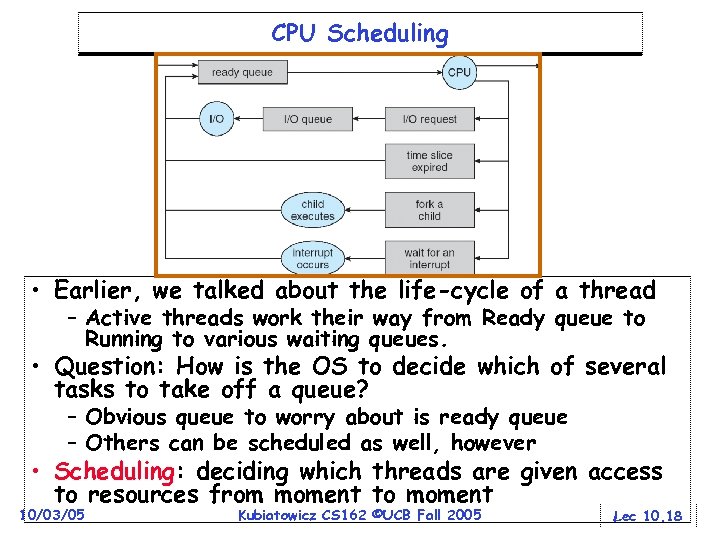 CPU Scheduling • Earlier, we talked about the life-cycle of a thread – Active threads work their way from Ready queue to Running to various waiting queues. • Question: How is the OS to decide which of several tasks to take off a queue? – Obvious queue to worry about is ready queue – Others can be scheduled as well, however • Scheduling: deciding which threads are given access to resources from moment to moment 10/03/05 Kubiatowicz CS 162 ©UCB Fall 2005 Lec 10. 18
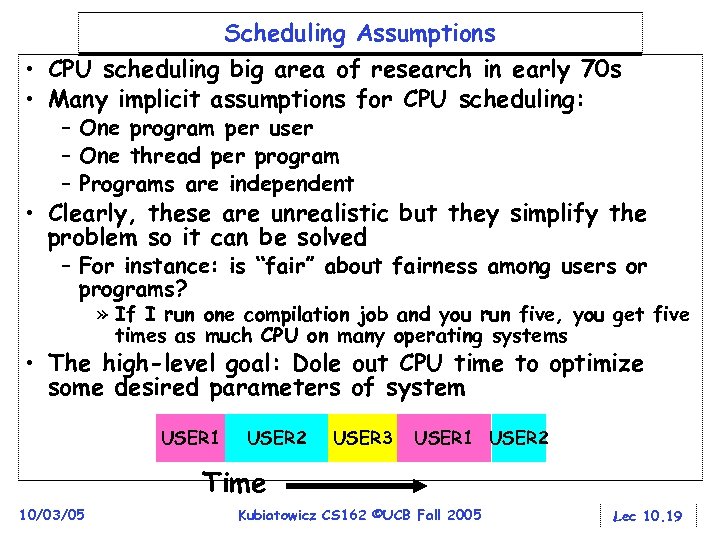 Scheduling Assumptions • CPU scheduling big area of research in early 70 s • Many implicit assumptions for CPU scheduling: – One program per user – One thread per program – Programs are independent • Clearly, these are unrealistic but they simplify the problem so it can be solved – For instance: is “fair” about fairness among users or programs? » If I run one compilation job and you run five, you get five times as much CPU on many operating systems • The high-level goal: Dole out CPU time to optimize some desired parameters of system USER 1 USER 2 USER 3 USER 1 USER 2 Time 10/03/05 Kubiatowicz CS 162 ©UCB Fall 2005 Lec 10. 19
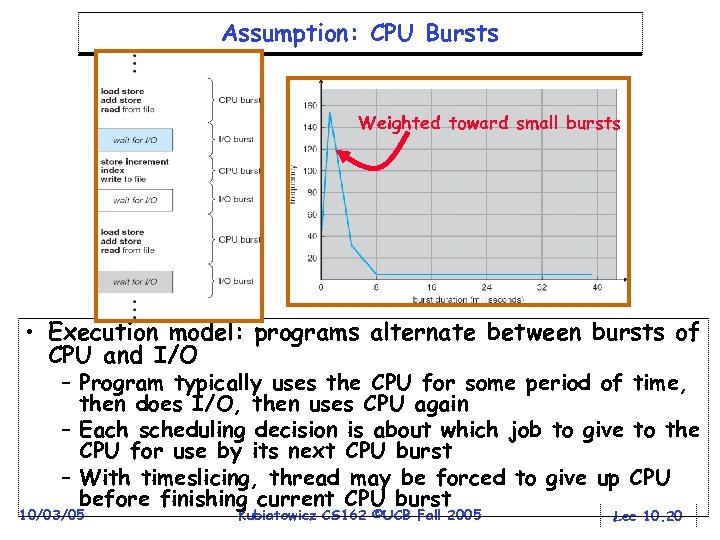 Assumption: CPU Bursts Weighted toward small bursts • Execution model: programs alternate between bursts of CPU and I/O – Program typically uses the CPU for some period of time, then does I/O, then uses CPU again – Each scheduling decision is about which job to give to the CPU for use by its next CPU burst – With timeslicing, thread may be forced to give up CPU before finishing current CPU burst 10/03/05 Kubiatowicz CS 162 ©UCB Fall 2005 Lec 10. 20
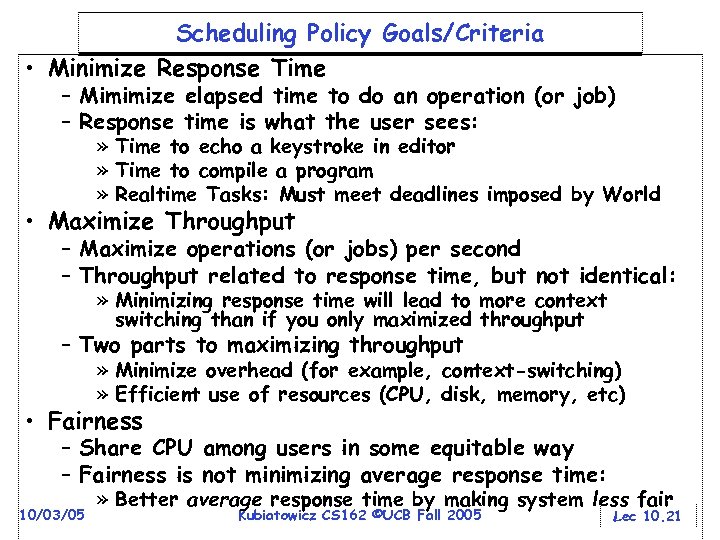 Scheduling Policy Goals/Criteria • Minimize Response Time – Mimimize elapsed time to do an operation (or job) – Response time is what the user sees: » Time to echo a keystroke in editor » Time to compile a program » Realtime Tasks: Must meet deadlines imposed by World • Maximize Throughput – Maximize operations (or jobs) per second – Throughput related to response time, but not identical: » Minimizing response time will lead to more context switching than if you only maximized throughput – Two parts to maximizing throughput » Minimize overhead (for example, context-switching) » Efficient use of resources (CPU, disk, memory, etc) • Fairness – Share CPU among users in some equitable way – Fairness is not minimizing average response time: 10/03/05 » Better average response time by making system less fair Kubiatowicz CS 162 ©UCB Fall 2005 Lec 10. 21
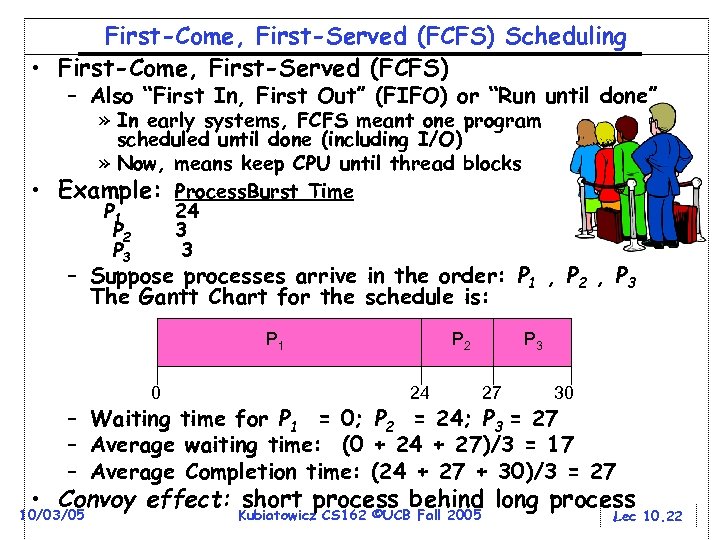 First-Come, First-Served (FCFS) Scheduling • First-Come, First-Served (FCFS) – Also “First In, First Out” (FIFO) or “Run until done” » In early systems, FCFS meant one program scheduled until done (including I/O) » Now, means keep CPU until thread blocks • Example: Process. Burst Time P 1 24 P 2 3 P 3 3 – Suppose processes arrive in the order: P 1 , P 2 , P 3 The Gantt Chart for the schedule is: P 1 0 P 2 24 P 3 27 30 – Waiting time for P 1 = 0; P 2 = 24; P 3 = 27 – Average waiting time: (0 + 24 + 27)/3 = 17 – Average Completion time: (24 + 27 + 30)/3 = 27 • Convoy effect: short process behind long process 10/03/05 Kubiatowicz CS 162 ©UCB Fall 2005 Lec 10. 22
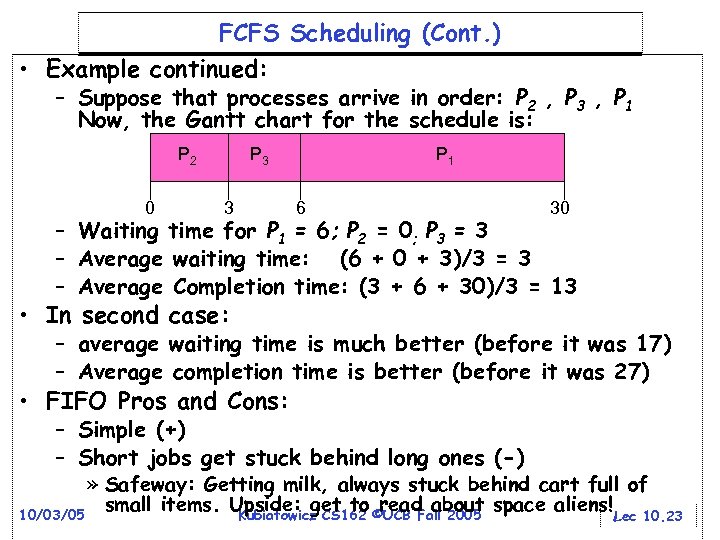 FCFS Scheduling (Cont. ) • Example continued: – Suppose that processes arrive in order: P 2 , P 3 , P 1 Now, the Gantt chart for the schedule is: P 2 0 P 3 3 P 1 6 30 – Waiting time for P 1 = 6; P 2 = 0; P 3 = 3 – Average waiting time: (6 + 0 + 3)/3 = 3 – Average Completion time: (3 + 6 + 30)/3 = 13 • In second case: – average waiting time is much better (before it was 17) – Average completion time is better (before it was 27) • FIFO Pros and Cons: – Simple (+) – Short jobs get stuck behind long ones (-) » Safeway: Getting milk, always stuck behind cart full of small items. Upside: get to ©UCB Fall 2005 space aliens! Lec 10. 23 read about 10/03/05 Kubiatowicz CS 162
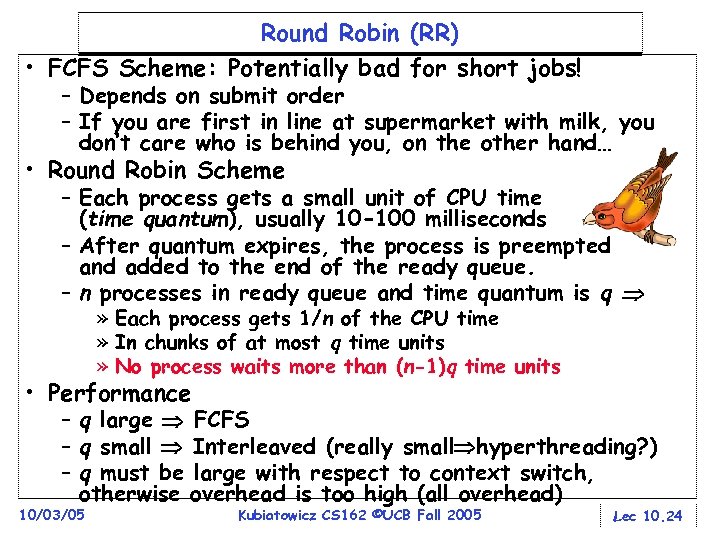 Round Robin (RR) • FCFS Scheme: Potentially bad for short jobs! – Depends on submit order – If you are first in line at supermarket with milk, you don’t care who is behind you, on the other hand… • Round Robin Scheme – Each process gets a small unit of CPU time (time quantum), usually 10 -100 milliseconds – After quantum expires, the process is preempted and added to the end of the ready queue. – n processes in ready queue and time quantum is q » Each process gets 1/n of the CPU time » In chunks of at most q time units » No process waits more than (n-1)q time units • Performance – q large FCFS – q small Interleaved (really small hyperthreading? ) – q must be large with respect to context switch, otherwise overhead is too high (all overhead) 10/03/05 Kubiatowicz CS 162 ©UCB Fall 2005 Lec 10. 24
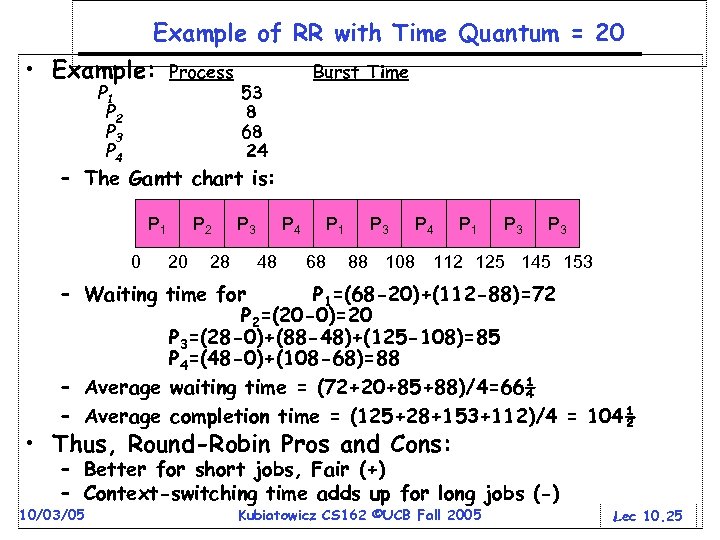 Example of RR with Time Quantum = 20 • Example: P 1 P 2 P 3 P 4 Process Burst Time 53 8 68 24 – The Gantt chart is: P 1 0 P 2 20 28 P 3 P 4 48 P 1 68 P 3 P 4 P 1 P 3 88 108 112 125 145 153 – Waiting time for P 1=(68 -20)+(112 -88)=72 P 2=(20 -0)=20 P 3=(28 -0)+(88 -48)+(125 -108)=85 P 4=(48 -0)+(108 -68)=88 – Average waiting time = (72+20+85+88)/4=66¼ – Average completion time = (125+28+153+112)/4 = 104½ • Thus, Round-Robin Pros and Cons: – Better for short jobs, Fair (+) – Context-switching time adds up for long jobs (-) 10/03/05 Kubiatowicz CS 162 ©UCB Fall 2005 Lec 10. 25
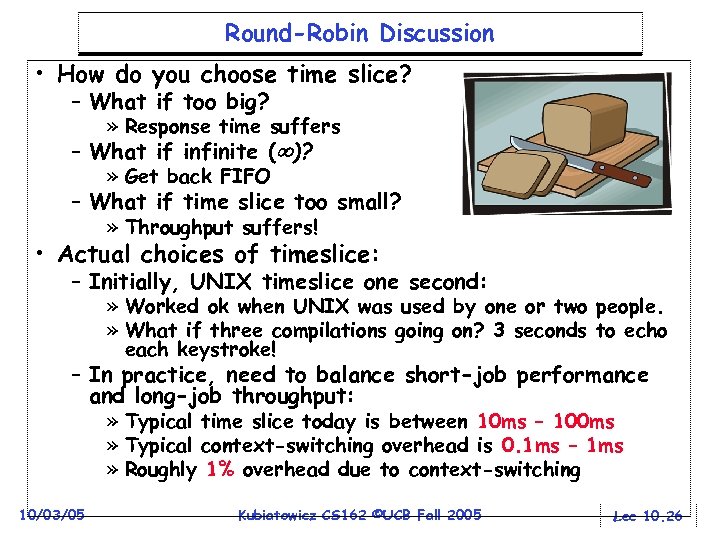 Round-Robin Discussion • How do you choose time slice? – What if too big? » Response time suffers – What if infinite ( )? » Get back FIFO – What if time slice too small? » Throughput suffers! • Actual choices of timeslice: – Initially, UNIX timeslice one second: » Worked ok when UNIX was used by one or two people. » What if three compilations going on? 3 seconds to echo each keystroke! – In practice, need to balance short-job performance and long-job throughput: » Typical time slice today is between 10 ms – 100 ms » Typical context-switching overhead is 0. 1 ms – 1 ms » Roughly 1% overhead due to context-switching 10/03/05 Kubiatowicz CS 162 ©UCB Fall 2005 Lec 10. 26
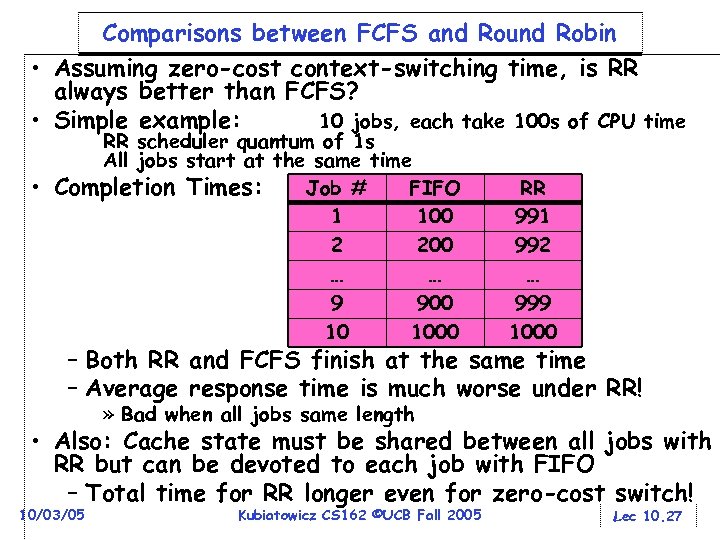 Comparisons between FCFS and Round Robin • Assuming zero-cost context-switching time, is RR always better than FCFS? • Simple example: 10 jobs, each take 100 s of CPU time • RR scheduler quantum of 1 s All jobs start at the same time Job # FIFO Completion Times: 1 100 2 200 … … 9 900 10 1000 RR 991 992 … 999 1000 – Both RR and FCFS finish at the same time – Average response time is much worse under RR! » Bad when all jobs same length • Also: Cache state must be shared between all jobs with RR but can be devoted to each job with FIFO – Total time for RR longer even for zero-cost switch! 10/03/05 Kubiatowicz CS 162 ©UCB Fall 2005 Lec 10. 27
![Earlier Example with Different Time Quantum P 2 [8] Best FCFS: 0 P 4](https://present5.com/presentation/479b64ed6fa2941d3b363c92b7bf4d28/image-28.jpg "Earlier Example with Different Time Quantum P 2 [8] Best FCFS: 0 P 4") Earlier Example with Different Time Quantum P 2 [8] Best FCFS: 0 P 4 [24] 8 32 Quantum Best FCFS Q = 1 Q = 5 Wait Q = 8 Time Q = 10 Q = 20 Worst FCFS Best FCFS Q = 1 Q = 5 Completion Q = 8 Time Q = 10 Q = 20 Worst FCFS 10/03/05 P 1 [53] P 1 32 84 82 80 82 72 68 85 137 135 133 135 121 P 3 [68] 85 P 2 0 22 20 8 10 20 145 8 30 28 16 18 28 153 P 3 85 85 85 0 153 153 153 68 Kubiatowicz CS 162 ©UCB Fall 2005 153 P 4 8 57 58 56 68 88 121 32 81 82 80 92 112 145 Average 31¼ 62 61¼ 57¼ 61¼ 66¼ 83½ 69½ 100½ 99½ 95½ 99½ 104½ 121¾ Lec 10. 28
Earlier Example with Different Time Quantum P 2 [8] Best FCFS: 0 P 4 [24] 8 32 Quantum Best FCFS Q = 1 Q = 5 Wait Q = 8 Time Q = 10 Q = 20 Worst FCFS Best FCFS Q = 1 Q = 5 Completion Q = 8 Time Q = 10 Q = 20 Worst FCFS 10/03/05 P 1 [53] P 1 32 84 82 80 82 72 68 85 137 135 133 135 121 P 3 [68] 85 P 2 0 22 20 8 10 20 145 8 30 28 16 18 28 153 P 3 85 85 85 0 153 153 153 68 Kubiatowicz CS 162 ©UCB Fall 2005 153 P 4 8 57 58 56 68 88 121 32 81 82 80 92 112 145 Average 31¼ 62 61¼ 57¼ 61¼ 66¼ 83½ 69½ 100½ 99½ 95½ 99½ 104½ 121¾ Lec 10. 28
 What if we Knew the Future? • Could we always mirror best FCFS? • Shortest Job First (SJF): – Run whatever job has the least amount of computation to do – Sometimes called “Shortest Time to Completion First” (STCF) • Shortest Remaining Time First (SRTF): – Preemptive version of SJF: if job arrives and has a shorter time to completion than the remaining time on the current job, immediately preempt CPU – Sometimes called “Shortest Remaining Time to Completion First” (SRTCF) • These can be applied either to a whole program or the current CPU burst of each program – Idea is to get short jobs out of the system – Big effect on short jobs, only small effect on long ones – Result is better average response time 10/03/05 Kubiatowicz CS 162 ©UCB Fall 2005 Lec 10. 29
 Discussion • SJF/SRTF are the best you can do at minimizing average response time – Provably optimal (SJF among non-preemptive, SRTF among preemptive) – Since SRTF is always at least as good as SJF, focus on SRTF • Comparison of SRTF with FCFS and RR – What if all jobs the same length? » SRTF becomes the same as FCFS (i. e. FCFS is best can do if all jobs the same length) – What if jobs have varying length? » SRTF (and RR): short jobs not stuck behind long ones 10/03/05 Kubiatowicz CS 162 ©UCB Fall 2005 Lec 10. 30
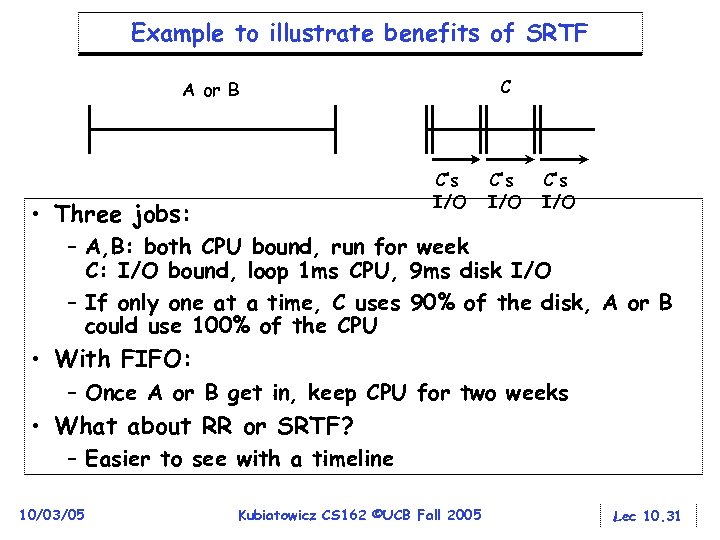 Example to illustrate benefits of SRTF C A or B C’s I/O • Three jobs: C’s I/O – A, B: both CPU bound, run for week C: I/O bound, loop 1 ms CPU, 9 ms disk I/O – If only one at a time, C uses 90% of the disk, A or B could use 100% of the CPU • With FIFO: – Once A or B get in, keep CPU for two weeks • What about RR or SRTF? – Easier to see with a timeline 10/03/05 Kubiatowicz CS 162 ©UCB Fall 2005 Lec 10. 31
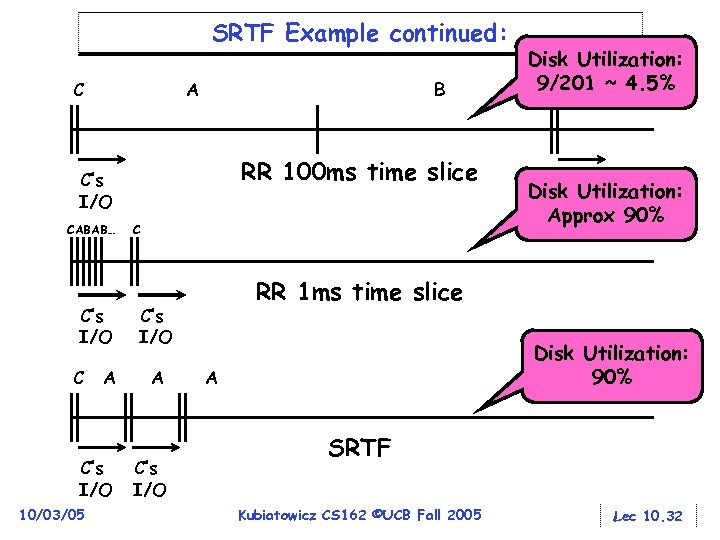 SRTF Example continued: C A B RR 100 ms time slice C’s I/O CABAB… C’s I/O C A C’s I/O 10/03/05 C C’s I/O C’s Disk Utilization: I/O Approx 90% RR 1 ms time slice C’s I/O A Disk Utilization: 9/201 ~ 4. 5% C Disk Utilization: 90% A SRTF Kubiatowicz CS 162 ©UCB Fall 2005 Lec 10. 32
 • Starvation SRTF Further discussion – SRTF can lead to starvation if many small jobs! – Large jobs never get to run • Somehow need to predict future – How can we do this? – Some systems ask the user » when you submit a job, have to say how long it will take » To stop cheating, system kills job if takes too long – But: Even non-malicious users have trouble predicting runtime of their jobs • Bottom line, can’t really know how long job will take – However, can use SRTF as a yardstick for measuring other policies – Optimal, so can’t do any better • SRTF Pros & Cons – Optimal (average response time) (+) – Hard to predict future (-) – Unfair (-) 10/03/05 Kubiatowicz CS 162 ©UCB Fall 2005 Lec 10. 33
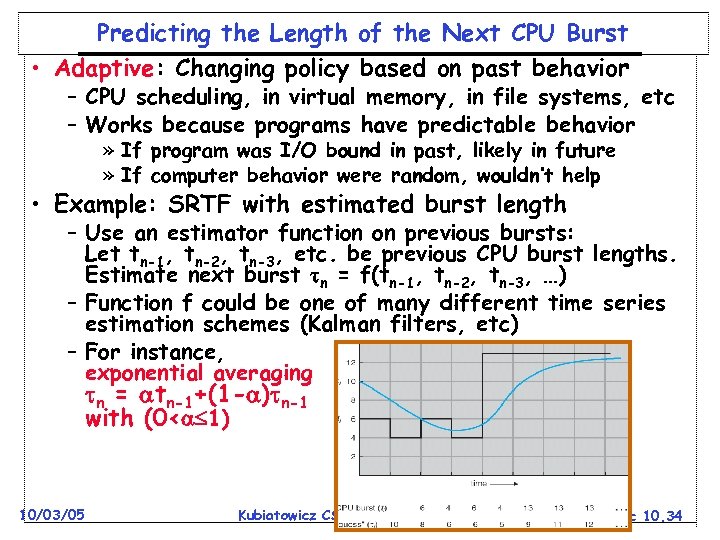 Predicting the Length of the Next CPU Burst • Adaptive: Changing policy based on past behavior – CPU scheduling, in virtual memory, in file systems, etc – Works because programs have predictable behavior » If program was I/O bound in past, likely in future » If computer behavior were random, wouldn’t help • Example: SRTF with estimated burst length – Use an estimator function on previous bursts: Let tn-1, tn-2, tn-3, etc. be previous CPU burst lengths. Estimate next burst n = f(tn-1, tn-2, tn-3, …) – Function f could be one of many different time series estimation schemes (Kalman filters, etc) – For instance, exponential averaging n = tn-1+(1 - ) n-1 with (0< 1) 10/03/05 Kubiatowicz CS 162 ©UCB Fall 2005 Lec 10. 34
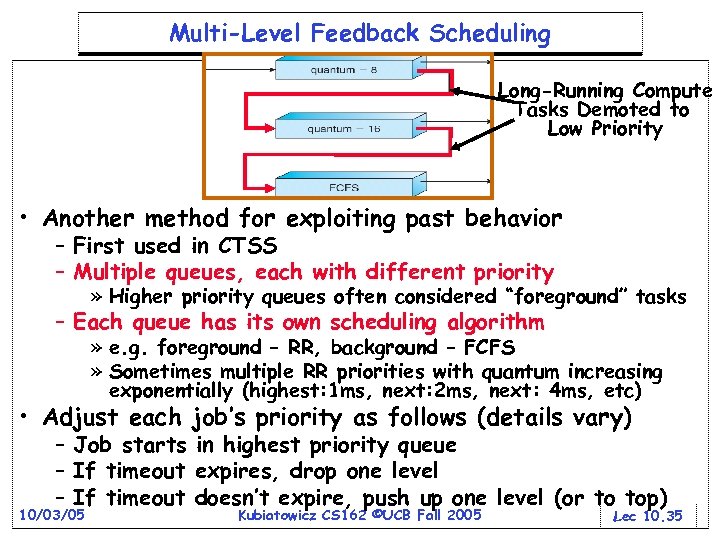 Multi-Level Feedback Scheduling Long-Running Compute Tasks Demoted to Low Priority • Another method for exploiting past behavior – First used in CTSS – Multiple queues, each with different priority » Higher priority queues often considered “foreground” tasks – Each queue has its own scheduling algorithm » e. g. foreground – RR, background – FCFS » Sometimes multiple RR priorities with quantum increasing exponentially (highest: 1 ms, next: 2 ms, next: 4 ms, etc) • Adjust each job’s priority as follows (details vary) – Job starts in highest priority queue – If timeout expires, drop one level – If timeout doesn’t expire, push up one level (or to top) 10/03/05 Kubiatowicz CS 162 ©UCB Fall 2005 Lec 10. 35
 Scheduling Details • Result approximates SRTF: – CPU bound jobs drop like a rock – Short-running I/O bound jobs stay near top • Scheduling must be done between the queues – Fixed priority scheduling: » serve all from highest priority, then next priority, etc. – Time slice: » each queue gets a certain amount of CPU time » e. g. , 70% to highest, 20% next, 10% lowest • Countermeasure: user action that can foil intent of the OS designer – For multilevel feedback, put in a bunch of meaningless I/O to keep job’s priority high – Of course, if everyone did this, wouldn’t work! • Example of Othello program: – Playing against competitor, so key was to do computing at higher priority the competitors. 10/03/05 » Put in printf’s, ran much faster! 2005 Kubiatowicz CS 162 ©UCB Fall Lec 10. 36
 What about Fairness? • What about fairness? – Strict fixed-priority scheduling between queues is unfair (run highest, then next, etc): » long running jobs may never get CPU » In Multics, shut down machine, found 10 -year-old job – Must give long-running jobs a fraction of the CPU even when there are shorter jobs to run – Tradeoff: fairness gained by hurting avg response time! • How to implement fairness? – Could give each queue some fraction of the CPU » What if one long-running job and 100 short-running ones? » Like express lanes in a supermarket—sometimes express lanes get so long, get better service by going into one of the other lines – Could increase priority of jobs that don’t get service 10/03/05 » What is done in UNIX » This is ad hoc—what rate should you increase priorities? » And, as system gets overloaded, no job gets CPU time, so everyone increases in priority Interactive jobs suffer Kubiatowicz CS 162 ©UCB Fall 2005 Lec 10. 37
 Lottery Scheduling • Yet another alternative: Lottery Scheduling – Give each job some number of lottery tickets – On each time slice, randomly pick a winning ticket – On average, CPU time is proportional to number of tickets given to each job • How to assign tickets? – To approximate SRTF, short running jobs get more, long running jobs get fewer – To avoid starvation, every job gets at least one ticket (everyone makes progress) • Advantage over strict priority scheduling: behaves gracefully as load changes – Adding or deleting a job affects all jobs proportionally, independent of how many tickets each job possesses 10/03/05 Kubiatowicz CS 162 ©UCB Fall 2005 Lec 10. 38
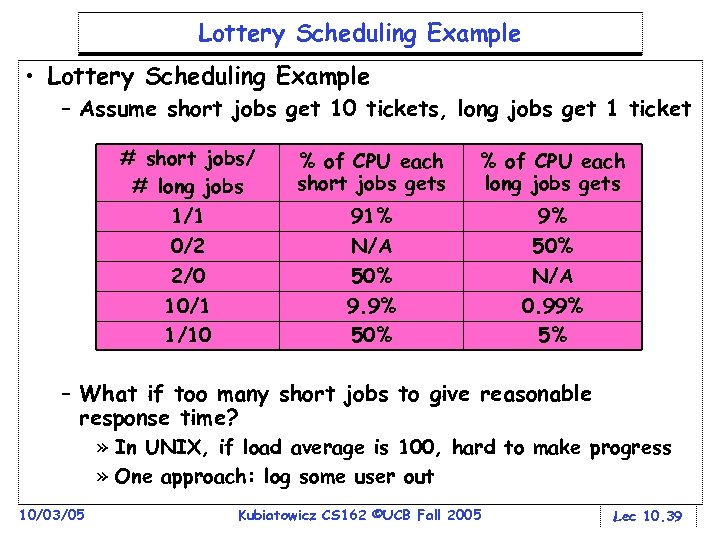 Lottery Scheduling Example • Lottery Scheduling Example – Assume short jobs get 10 tickets, long jobs get 1 ticket # short jobs/ # long jobs 1/1 0/2 2/0 10/1 1/10 % of CPU each short jobs gets % of CPU each long jobs gets 91% N/A 50% 9. 9% 50% N/A 0. 99% 5% – What if too many short jobs to give reasonable response time? » In UNIX, if load average is 100, hard to make progress » One approach: log some user out 10/03/05 Kubiatowicz CS 162 ©UCB Fall 2005 Lec 10. 39
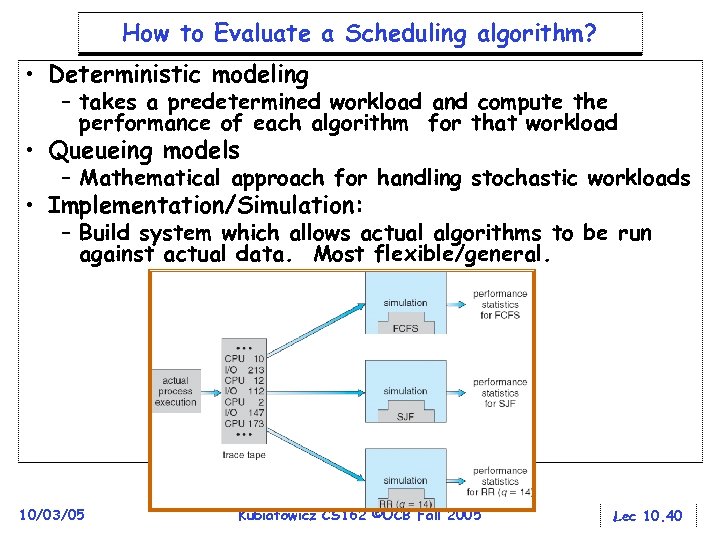 How to Evaluate a Scheduling algorithm? • Deterministic modeling – takes a predetermined workload and compute the performance of each algorithm for that workload • Queueing models – Mathematical approach for handling stochastic workloads • Implementation/Simulation: – Build system which allows actual algorithms to be run against actual data. Most flexible/general. 10/03/05 Kubiatowicz CS 162 ©UCB Fall 2005 Lec 10. 40
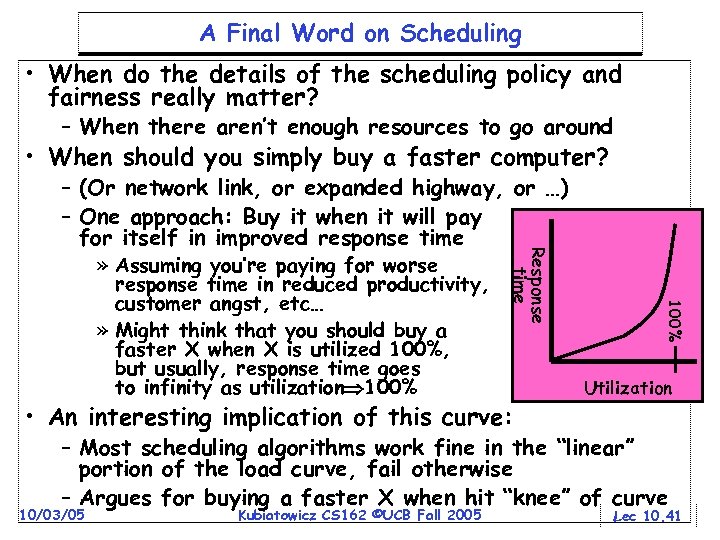 A Final Word on Scheduling • When do the details of the scheduling policy and fairness really matter? – When there aren’t enough resources to go around • When should you simply buy a faster computer? • An interesting implication of this curve: 100% » Assuming you’re paying for worse response time in reduced productivity, customer angst, etc… » Might think that you should buy a faster X when X is utilized 100%, but usually, response time goes to infinity as utilization 100% Response time – (Or network link, or expanded highway, or …) – One approach: Buy it when it will pay for itself in improved response time Utilization – Most scheduling algorithms work fine in the “linear” portion of the load curve, fail otherwise – Argues for buying a faster X when hit “knee” of curve 10/03/05 Kubiatowicz CS 162 ©UCB Fall 2005 Lec 10. 41
 Summary • Suggestions for dealing with Project Partners – Start Early, Meet Often – Develop Good Organizational Plan, Document Everything, Use the right tools – Develop a Comprehensive Testing Plan – (Oh, and add 2 years to every deadline!) • Scheduling: selecting a waiting process from the ready queue and allocating the CPU to it • FCFS Scheduling: – Run threads to completion in order of submission – Pros: Simple – Cons: Short jobs get stuck behind long ones • Round-Robin Scheduling: – Give each thread a small amount of CPU time when it executes; cycle between all ready threads – Pros: Better for short jobs – Cons: Poor when jobs are same length 10/03/05 Kubiatowicz CS 162 ©UCB Fall 2005 Lec 10. 42
 Summary (2) • Shortest Job First (SJF)/Shortest Remaining Time First (SRTF): – Run whatever job has the least amount of computation to do/least remaining amount of computation to do – Pros: Optimal (average response time) – Cons: Hard to predict future, Unfair • Multi-Level Feedback Scheduling: – Multiple queues of different priorities – Automatic promotion/demotion of process priority in order to approximate SJF/SRTF • Lottery Scheduling: – Give each thread a priority-dependent number of tokens (short tasks more tokens) – Reserve a minimum number of tokens for every thread to ensure forward progress/fairness 10/03/05 Kubiatowicz CS 162 ©UCB Fall 2005 Lec 10. 43