


 Скачать презентацию CS 162 Operating Systems and Systems Programming Lecture
652cef316b0ac02819ca3e956b64407e.ppt
- Количество слайдов: 37
 CS 162 Operating Systems and Systems Programming Lecture 25 Protection and Security in Distributed Systems April 27, 2010 Ion Stoica http: //inst. eecs. berkeley. edu/~cs 162
 Goals for Today • Security Properties – – Authentication Data integrity Confidentiality Non-repudiation • Cryptographic Mechanisms Note: Some slides and/or pictures in the following are adapted from slides © 2005 Silberschatz, Galvin, and Gagne, and lecture notes by Kubiatowicz 27/4/10 CS 162 ©UCB Spring 2010 Lec 25. 2
 Protection vs Security • Protection: one or more mechanisms for controlling the access of programs, processes, or users to resources – Page Table Mechanism – File Access Mechanism • Security: use of protection mechanisms to prevent misuse of resources – Misuse defined with respect to policy » E. g. : prevent exposure of certain sensitive information » E. g. : prevent unauthorized modification/deletion of data – Requires consideration of the external environment within which the system operates » Most well-constructed system cannot protect information if user accidentally reveals password • What we hope to gain today and next time – Conceptual understanding of how to make systems secure – Some examples, to illustrate why providing security is really hard in practice 27/4/10 CS 162 ©UCB Spring 2010 Lec 25. 3
 Preventing Misuse • Types of Misuse: – Accidental: » If I delete shell, can’t log in to fix it! » Could make it more difficult by asking: “do you really want to delete the shell? ” – Intentional: » Some high school brat who can’t get a date, so instead he transfers $3 billion from B to A. » Doesn’t help to ask if they want to do it (of course!) • Three Pieces to Security – Authentication: who the user actually is – Authorization: who is allowed to do what – Enforcement: make sure people do only what they are supposed to do • Loopholes in any carefully constructed system: – Log in as superuser and you’ve circumvented authentication – Log in as self and can do anything with your resources; for instance: run program that erases all of your files – Can you trust software to correctly enforce Authentication and Authorization? 27/4/10 CS 162 ©UCB Spring 2010 Lec 25. 4
 Administrivia • Final Exam – Friday, May 14, 7: 00 PM-10: 00 PM – All material from the course » With slightly more focus on second half, but you are still responsible for all the material – Two sheets of notes, both sides • Should be working on Project 4 – Final Project due on Friday, May 7 27/4/10 CS 162 ©UCB Spring 2010 Lec 25. 5
 Security Requirements • Authentication – Ensures that a user is who is claiming to be • Data integrity – Ensure that data is not changed from source to destination or after being written on a storage device • Confidentiality – Ensures that data is read only by authorized users • Non-repudiation – Sender can’t later claim didn’t send data – Receiver can’t claim didn’t receive data 27/4/10 CS 162 ©UCB Spring 2010 Lec 25. 6
 Securing Communication: Cryptography • Cryptography: communication in the presence of adversaries • Studied for thousands of years – See the Simon Singh’s The Code Book for an excellent, highly readable history • Central goal: confidentiality – How to encode information so that an adversary can’t extract it, but a friend can • General premise: there is a key, possession of which allows decoding, but without which decoding is infeasible – Thus, key must be kept secret and not guessable 27/4/10 CS 162 ©UCB Spring 2010 Lec 25. 7
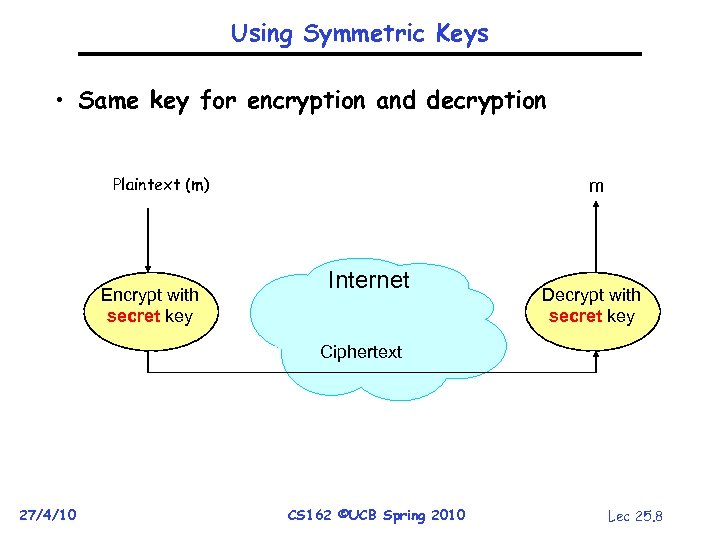 Using Symmetric Keys • Same key for encryption and decryption Plaintext (m) Encrypt with secret key m Internet Decrypt with secret key Ciphertext 27/4/10 CS 162 ©UCB Spring 2010 Lec 25. 8
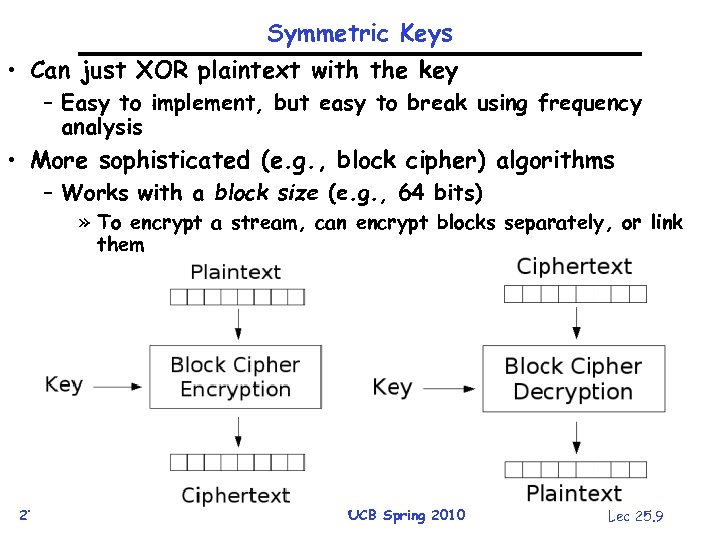 Symmetric Keys • Can just XOR plaintext with the key – Easy to implement, but easy to break using frequency analysis • More sophisticated (e. g. , block cipher) algorithms – Works with a block size (e. g. , 64 bits) » To encrypt a stream, can encrypt blocks separately, or link them 27/4/10 CS 162 ©UCB Spring 2010 Lec 25. 9
 Symmetric Key Ciphers - DES & AES • Data Encryption Standard (DES) – Developed by IBM in 1970 s, standardized by NBS/NIST – 56 -bit key (decreased from 64 bits at NSA’s request) – Still fairly strong other than brute-forcing the key space » But custom hardware can crack a key in < 24 hours – Today many financial institutions use Triple DES = DES applied 3 times, with 3 keys totaling 168 bits • Advanced Encryption Standard (AES) • Replacement for DES standardized in 2002 • Key size: 128, 192 or 256 bits • How fundamentally strong are they? • No one knows (no proofs exist) 27/4/10 CS 162 ©UCB Spring 2010 Lec 25. 10
 Authentication via Symmetric Crypto • Authenticate entity by its secret key • Example: – – 27/4/10 You know Alice’s secret key You are talking with a person claiming she is Alice Question: How do you verify she is indeed Alice? Answer: Just verify she knows Alice’s secret key! CS 162 ©UCB Spring 2010 Lec 25. 11
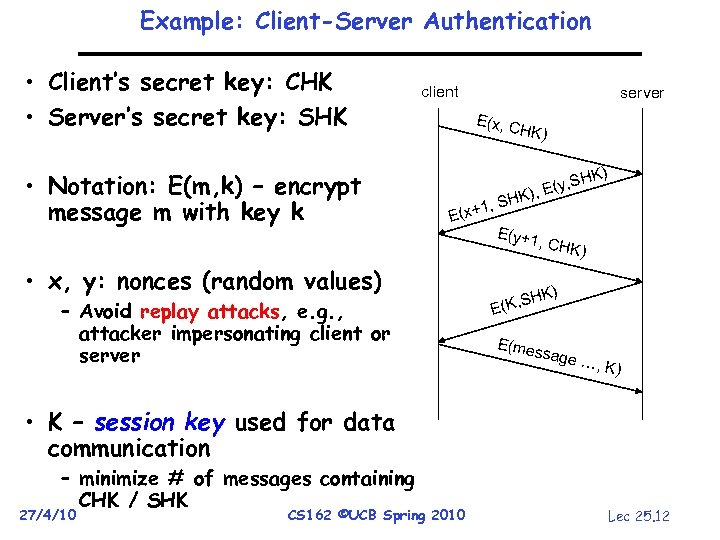 Example: Client-Server Authentication • Client’s secret key: CHK • Server’s secret key: SHK • Notation: E(m, k) – encrypt message m with key k client server E(x, C HK) K) , SH , E(y E( K) , SH x+1 E(y+1 , CHK • x, y: nonces (random values) – Avoid replay attacks, e. g. , attacker impersonating client or server ) HK) S E(K, E(mes sage …, K) • K – session key used for data communication – minimize # of messages containing CHK / SHK 27/4/10 CS 162 ©UCB Spring 2010 Lec 25. 12
 Integrity: Cryptographic Hashes • Basic building block for integrity: hashing – Associate hash with byte-stream, receiver verifies match » Assures data hasn’t been modified, either accidentally or maliciously • Approach: - Sender computes a digest of message m, i. e. , H(m) » H() is a publicly known hash function - Send digest (d = H(m)) to receiver in a secure way, e. g. , » Using another physical channel » Using encryption - Upon receiving m and d, receiver re-computes H(m) to see whether result agrees with d 27/4/10 CS 162 ©UCB Spring 2010 Lec 25. 13
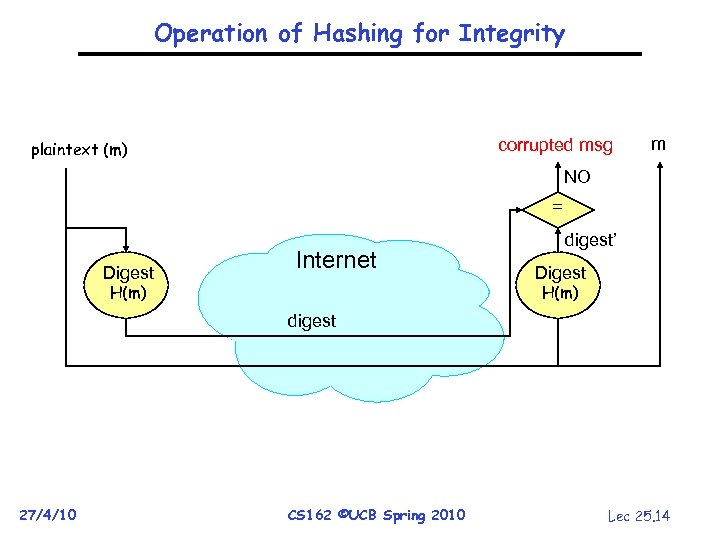 Operation of Hashing for Integrity corrupted msg plaintext (m) m NO = Digest Internet H(m) digest’ Digest H(m) digest 27/4/10 CS 162 ©UCB Spring 2010 Lec 25. 14
 Standard Cryptographic Hash Functions • MD 5 (Message Digest version 5) – – Developed in 1991 (Rivest) Produces 128 bit hashes Widely used (RFC 1321) Broken: » Recent work quickly finds collisions • SHA-1 (Secure Hash Algorithm) – – Developed by NSA in 1995 as successor to MD 5 Produces 160 bit hashes Widely used (SSL/TLS, SSH, PGP, IPSEC) Broken: » Recent work finds collisions, though not really quickly … yet 27/4/10 CS 162 ©UCB Spring 2010 Lec 25. 15
 Asymmetric Encryption (Public Key) • Idea: use two different keys, one to encrypt (e) and one to decrypt (d) – A key pair • Crucial property: knowing e does not give away d • Therefore e can be public: everyone knows it! • If Alice wants to send to Bob, she fetches Bob’s public key (say from Bob’s home page) and encrypts with it – Alice can’t decrypt what she’s sending to Bob … – … but then, neither can anyone else (except Bob) 27/4/10 CS 162 ©UCB Spring 2010 Lec 25. 16
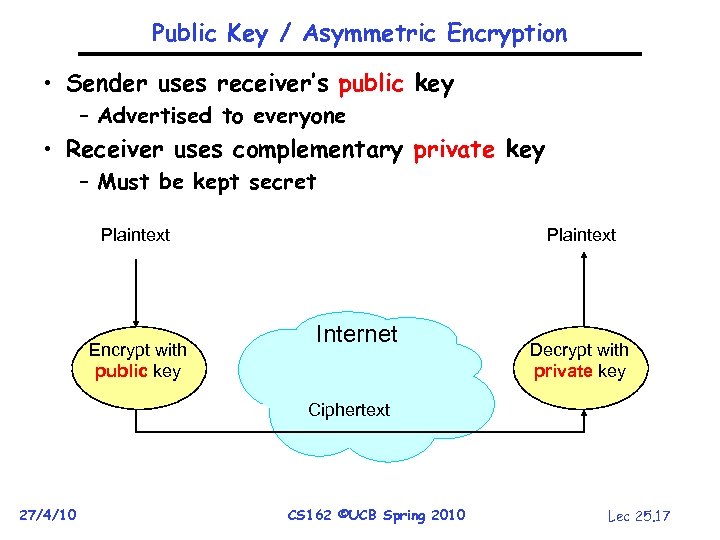 Public Key / Asymmetric Encryption • Sender uses receiver’s public key – Advertised to everyone • Receiver uses complementary private key – Must be kept secret Plaintext Encrypt with public key Internet Decrypt with private key Ciphertext 27/4/10 CS 162 ©UCB Spring 2010 Lec 25. 17
 Public Key Cryptography • Invented in the 1970 s – Revolutionized cryptography – (Was actually invented earlier by British intelligence) • How can we construct an encryption/decryption algorithm using a key pair with the public/private properties? – Answer: Number Theory • Most fully developed approach: RSA – Rivest / Shamir / Adleman, 1977; RFC 3447 – Based on modular multiplication of very large integers – Very widely used (e. g. , SSL/TLS for https) 27/4/10 CS 162 ©UCB Spring 2010 Lec 25. 18
 Properties of RSA • Requires generating large, random prime numbers – Algorithms exist for quickly finding these (probabilistic!) • Requires exponentiating very large numbers – Again, fairly fast algorithms exist • Overall, much slower than symmetric key crypto – One general strategy: use public key crypto to exchange a (short) symmetric session key » Use that key then with AES or such • How difficult is recovering d, the private key? – Equivalent to finding prime factors of a large number » Many have tried - believed to be very hard (= brute force only) » (Though quantum computers can do so in polynomial time!) 27/4/10 CS 162 ©UCB Spring 2010 Lec 25. 19
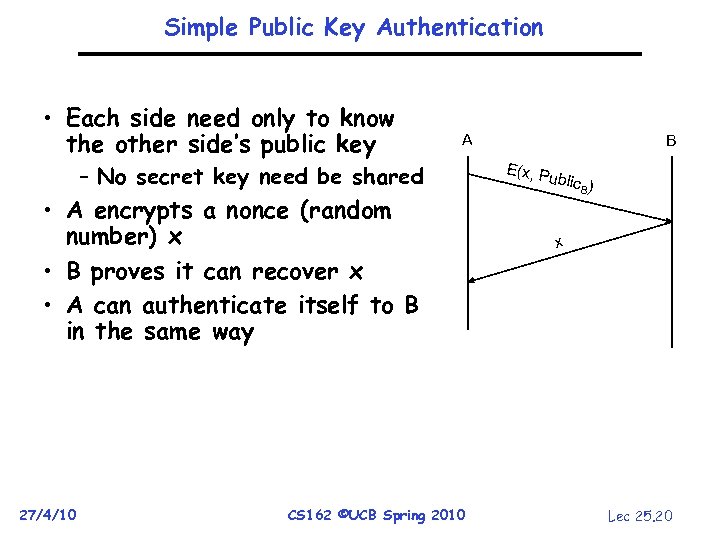 Simple Public Key Authentication • Each side need only to know the other side’s public key A – No secret key need be shared • A encrypts a nonce (random number) x • B proves it can recover x • A can authenticate itself to B in the same way 27/4/10 CS 162 ©UCB Spring 2010 B E(x, P ublic B) x Lec 25. 20
 Non-Repudiation: RSA Crypto & Signatures • Suppose Alice has published public key KE • If she wishes to prove who she is, she can send a message x encrypted with her private key KD (i. e. , she sends D(x, KD)) – Anyone knowing Alice’s public key KE can recover x, verify that Alice must have sent the message » It provides a signature – Alice can’t deny it non-repudiation 27/4/10 CS 162 ©UCB Spring 2010 Lec 25. 21
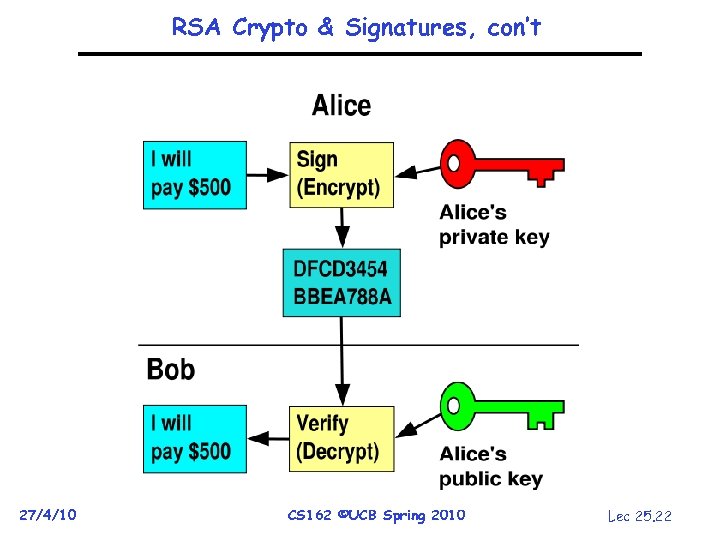 RSA Crypto & Signatures, con’t 27/4/10 CS 162 ©UCB Spring 2010 Lec 25. 22
 Digital Certificates • How do you know KE is Alice’s public key? • Trusted authority (e. g. , Verisign) signs binding between Alice and KE with its private key KVprivate – C = E({Alice, KE}, KVprivate) – C: digital certificate • Alice: distribute her digital certificate, C • Anyone: use trusted authority’s KVpublic, to extract Alice’s public key from C – {Alice, KE} = D(C, KVpublic) 27/4/10 CS 162 ©UCB Spring 2010 Lec 25. 23
 Summary of Our Crypto Toolkit • If we can securely distribute a key, then – Symmetric ciphers (e. g. , AES) offer fast, presumably strong confidentiality • Public key cryptography does away with (potentially major) problem of secure key distribution – But: not as computationally efficient » Often addressed by using public key crypto to exchange a session key • Digital signature binds the public key to an entity 27/4/10 CS 162 ©UCB Spring 2010 Lec 25. 24
 Putting It All Together - HTTPS What happens when you click on https: //www. amazon. com? https = “Use HTTP over SSL/TLS” • • SSL = Secure Socket Layer TLS = Transport Layer Security • Successor to SSL, and compatible with it • RFC 4346 • Provides security layer (authentication, encryption) on top of TCP • Fairly transparent to the app • • 27/4/10 CS 162 ©UCB Spring 2010 Lec 25. 25
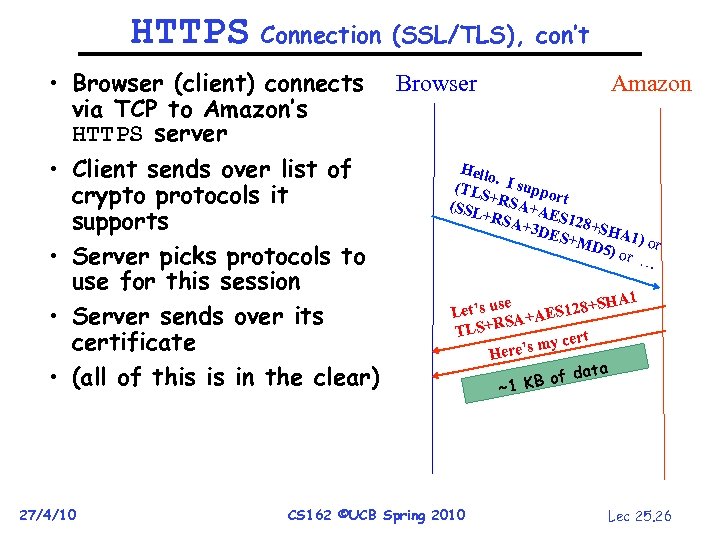 HTTPS Connection (SSL/TLS), con’t • Browser (client) connects Browser Amazon via TCP to Amazon’s HTTPS server Hello • Client sends over list of. (TLS I suppo r + crypto protocols it (SSL RSA+A t E +RS A+3 D S 128+SH supports ES+M A 1 D 5) o ) or r … • Server picks protocols to use for this session A 1 t’s use AES 128+SH Le • Server sends over its A+ LS+RS T certificate e’s my Her ata • (all of this is in the clear) B of d ~1 K 27/4/10 CS 162 ©UCB Spring 2010 Lec 25. 26
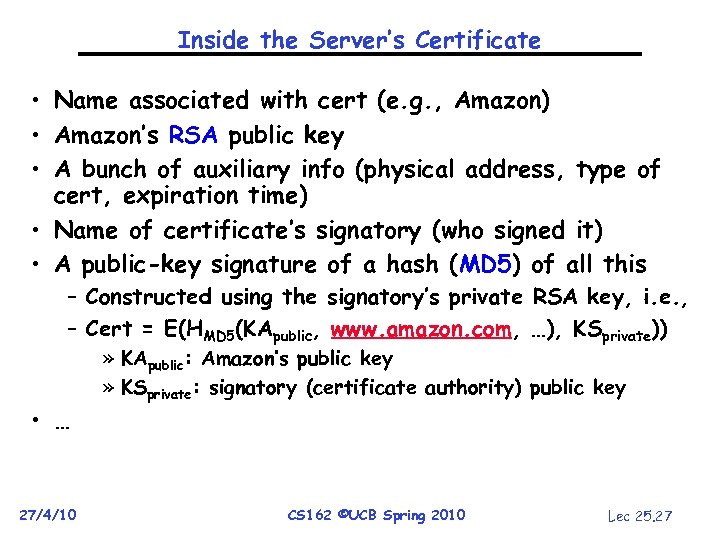 Inside the Server’s Certificate • Name associated with cert (e. g. , Amazon) • Amazon’s RSA public key • A bunch of auxiliary info (physical address, type of cert, expiration time) • Name of certificate’s signatory (who signed it) • A public-key signature of a hash (MD 5) of all this – Constructed using the signatory’s private RSA key, i. e. , – Cert = E(HMD 5(KApublic, www. amazon. com, …), KSprivate)) • … 27/4/10 » KApublic: Amazon’s public key » KSprivate: signatory (certificate authority) public key CS 162 ©UCB Spring 2010 Lec 25. 27
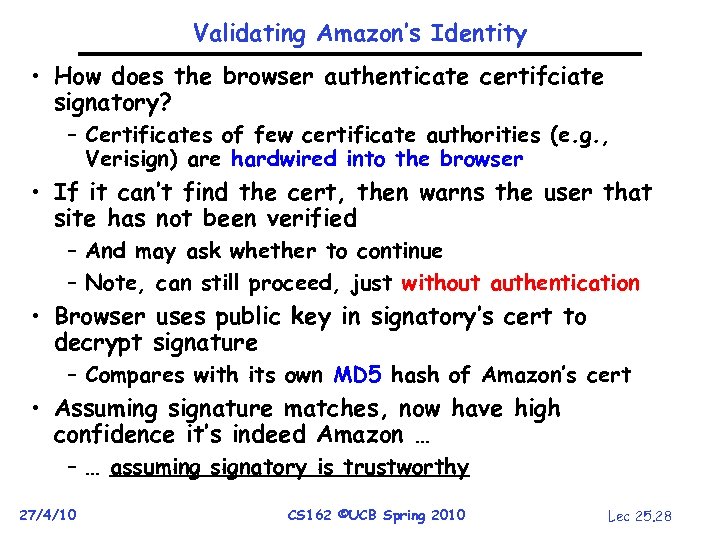 Validating Amazon’s Identity • How does the browser authenticate certifciate signatory? – Certificates of few certificate authorities (e. g. , Verisign) are hardwired into the browser • If it can’t find the cert, then warns the user that site has not been verified – And may ask whether to continue – Note, can still proceed, just without authentication • Browser uses public key in signatory’s cert to decrypt signature – Compares with its own MD 5 hash of Amazon’s cert • Assuming signature matches, now have high confidence it’s indeed Amazon … – … assuming signatory is trustworthy 27/4/10 CS 162 ©UCB Spring 2010 Lec 25. 28
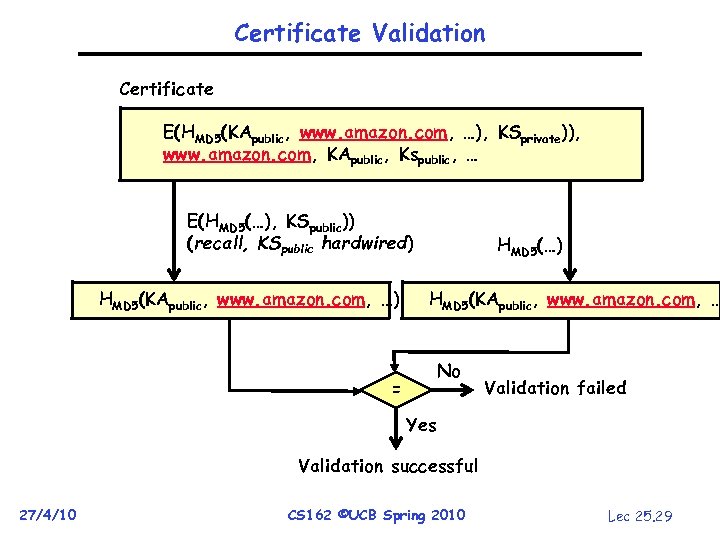 Certificate Validation Certificate E(HMD 5(KApublic, www. amazon. com, …), KSprivate)), www. amazon. com, KApublic, Kspublic, … E(HMD 5(…), KSpublic)) (recall, KSpublic hardwired) HMD 5(KApublic, www. amazon. com, …) HMD 5(KApublic, www. amazon. com, … No = Validation failed Yes Validation successful 27/4/10 CS 162 ©UCB Spring 2010 Lec 25. 29
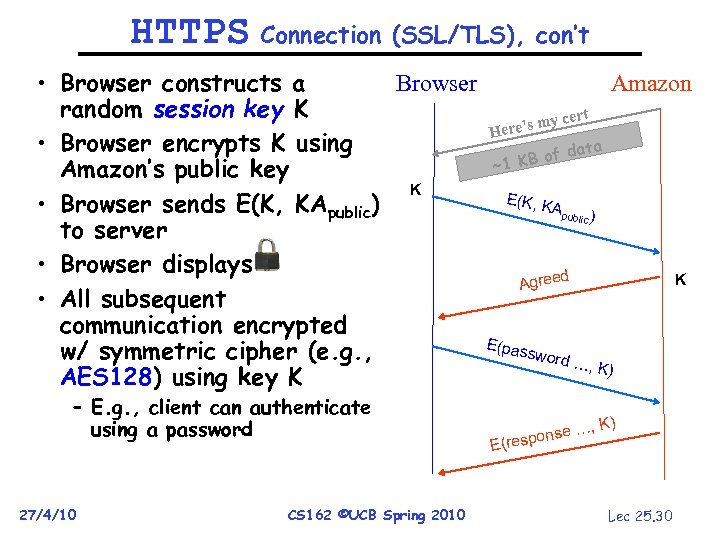 HTTPS Connection (SSL/TLS), con’t • Browser constructs a Browser random session key K • Browser encrypts K using Amazon’s public key K • Browser sends E(K, KApublic) to server • Browser displays • All subsequent communication encrypted w/ symmetric cipher (e. g. , AES 128) using key K – E. g. , client can authenticate using a password 27/4/10 CS 162 ©UCB Spring 2010 Amazon ert yc ere’s m H data KB of ~1 E(K, K Apu blic ) d Agree E(pas sword K …, K) onse … E(resp Lec 25. 30
 Authentication: Passwords • Shared secret between two parties • Since only user knows password, someone types correct password must be user typing it • Very common technique • System must keep copy of secret to check against passwords – What if malicious user gains access to list of passwords? » Need to obscure information somehow – Mechanism: utilize a transformation that is difficult to reverse without the right key (e. g. encryption) 27/4/10 CS 162 ©UCB Spring 2010 Lec 25. 31
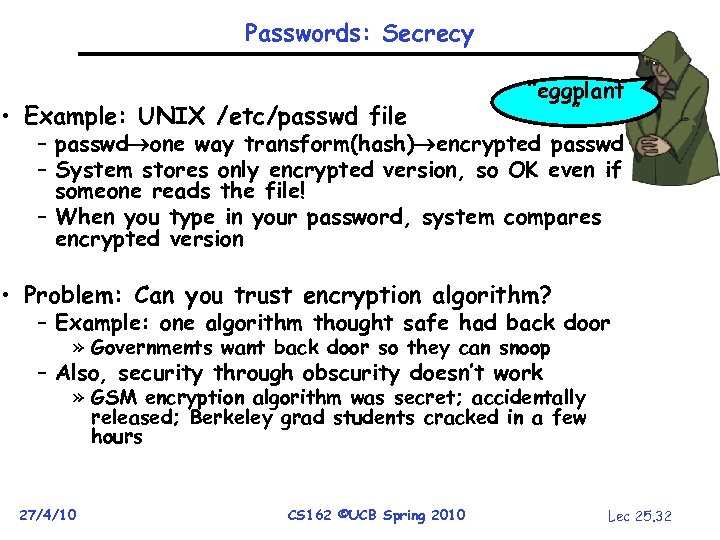 Passwords: Secrecy “eggplant ” • Example: UNIX /etc/passwd file – passwd one way transform(hash) encrypted passwd – System stores only encrypted version, so OK even if someone reads the file! – When you type in your password, system compares encrypted version • Problem: Can you trust encryption algorithm? – Example: one algorithm thought safe had back door » Governments want back door so they can snoop – Also, security through obscurity doesn’t work » GSM encryption algorithm was secret; accidentally released; Berkeley grad students cracked in a few hours 27/4/10 CS 162 ©UCB Spring 2010 Lec 25. 32
 Passwords: How easy to guess? • Ways of Compromising Passwords – Password Guessing: » Often people use obvious information like birthday, favorite color, girlfriend’s name, etc… – Dictionary Attack: » Work way through dictionary and compare encrypted version of dictionary words with entries in /etc/passwd – Dumpster Diving: » Find pieces of paper with passwords written on them » (Also used to get social-security numbers, etc) • Paradox: – Short passwords are easy to crack – Long ones, people write down! • Technology means we have to use longer passwords – UNIX initially required lowercase, 5 -letter passwords: total of 265=10 million passwords » In 1975, 10 ms to check a password 1 day to crack » In 2005, . 01μs to check a password 0. 1 seconds to crack – Takes less time to check for all words in the dictionary! 27/4/10 CS 162 ©UCB Spring 2010 Lec 25. 33
 Passwords: Making harder to crack • How can we make passwords harder to crack? – Can’t make it impossible, but can help • Technique 1: Extend everyone’s password with a unique number (stored in password file) – Called “salt”. UNIX uses 12 -bit “salt”, making dictionary attacks 4096 times harder – Without salt, would be possible to pre-compute all the words in the dictionary hashed with the UNIX algorithm: would make comparing with /etc/passwd easy! • Technique 2: Require more complex passwords – Make people use at least 8 -character passwords with upper-case, lower-case, and numbers » 708=6 x 1014=6 million seconds=69 days@0. 01μs/check – Unfortunately, people still pick common patterns » e. g. Capitalize first letter of common word, add one digit 27/4/10 CS 162 ©UCB Spring 2010 Lec 25. 34
 Passwords: Making harder to crack (con’t) • Technique 3: Delay checking of passwords – If attacker doesn’t have access to /etc/passwd, delay every remote login attempt by 1 second – Makes it infeasible for rapid-fire dictionary attack • Technique 4: Assign very long passwords – Long passwords or pass-phrases can have more entropy (randomness harder to crack) – Give everyone a smart card (or ATM card) to carry around to remember password » Requires physical theft to steal password » Can require PIN from user before authenticates self – Better: have smartcard generate pseudorandom number » Client and server share initial seed » Each second/login attempt advances to next random number • Technique 5: “Zero-Knowledge Proof” – Require a series of challenge-response questions » Distribute secret algorithm to user » Server presents a number, say “ 5”; user computes something from the number and returns answer to server » Server never asks same “question” twice – Often performed by smartcard plugged into system 27/4/10 CS 162 ©UCB Spring 2010 Lec 25. 35
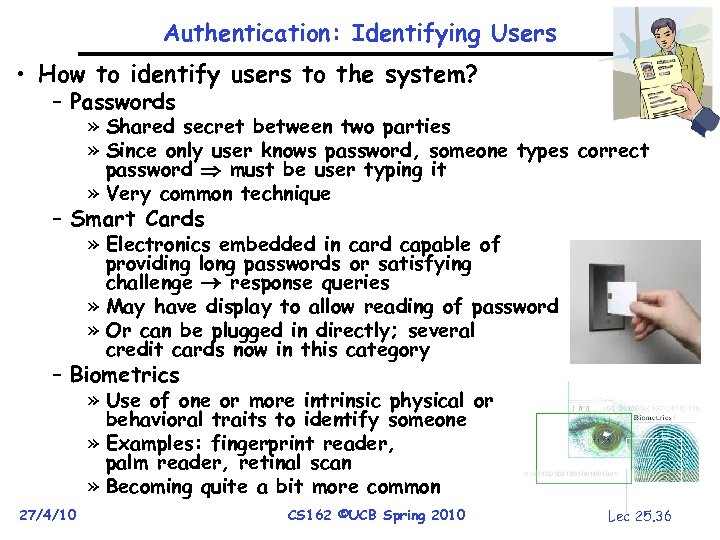 Authentication: Identifying Users • How to identify users to the system? – Passwords » Shared secret between two parties » Since only user knows password, someone types correct password must be user typing it » Very common technique – Smart Cards » Electronics embedded in card capable of providing long passwords or satisfying challenge response queries » May have display to allow reading of password » Or can be plugged in directly; several credit cards now in this category – Biometrics » Use of one or more intrinsic physical or behavioral traits to identify someone » Examples: fingerprint reader, palm reader, retinal scan » Becoming quite a bit more common 27/4/10 CS 162 ©UCB Spring 2010 Lec 25. 36
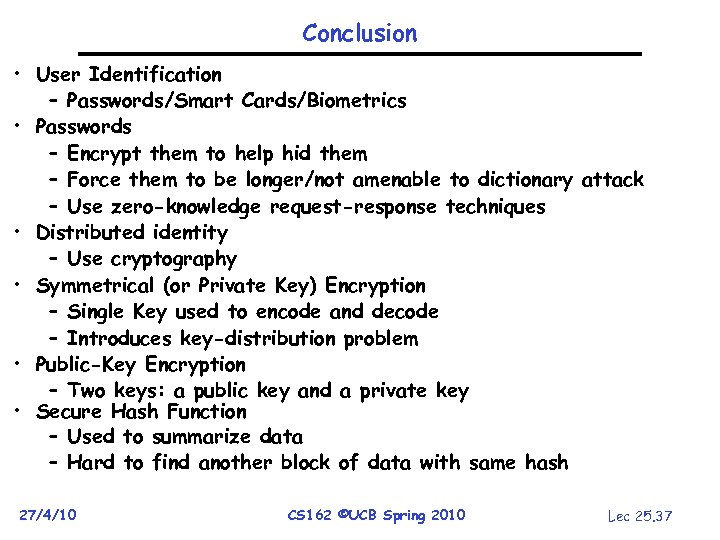 Conclusion • User Identification – Passwords/Smart Cards/Biometrics • Passwords – Encrypt them to help hid them – Force them to be longer/not amenable to dictionary attack – Use zero-knowledge request-response techniques • Distributed identity – Use cryptography • Symmetrical (or Private Key) Encryption – Single Key used to encode and decode – Introduces key-distribution problem • Public-Key Encryption – Two keys: a public key and a private key • Secure Hash Function – Used to summarize data – Hard to find another block of data with same hash 27/4/10 CS 162 ©UCB Spring 2010 Lec 25. 37