 Скачать презентацию CS 151 B Computer System Architecture Instructor Savio
f63ecee80de9dc18c3270eace511eb00.ppt
- Количество слайдов: 37



CS 151 B Computer System Architecture Instructor: Savio Chau, Ph. D. Office: BH 4531 N Class Location: Class: Mon & Wed 4: 00 - 6: 00 p. m. Office Hour: Mon & Wed 6: 00 - 7: 00 p. m. TA 1: 1 Savio Chau
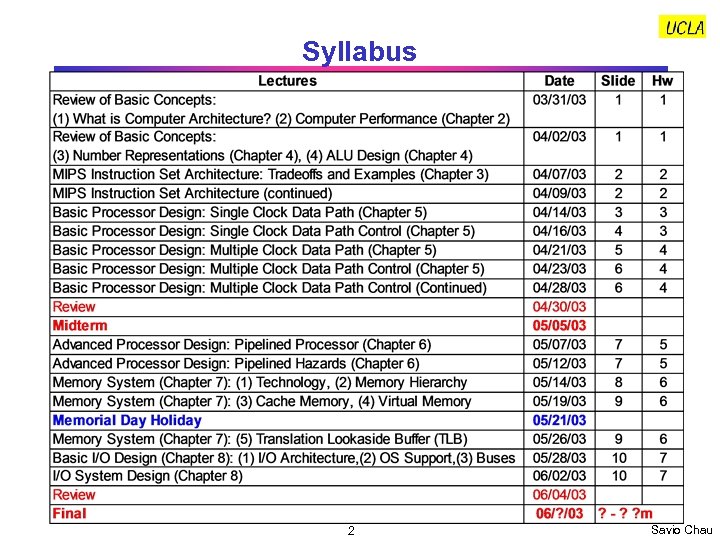
Syllabus 2 Savio Chau
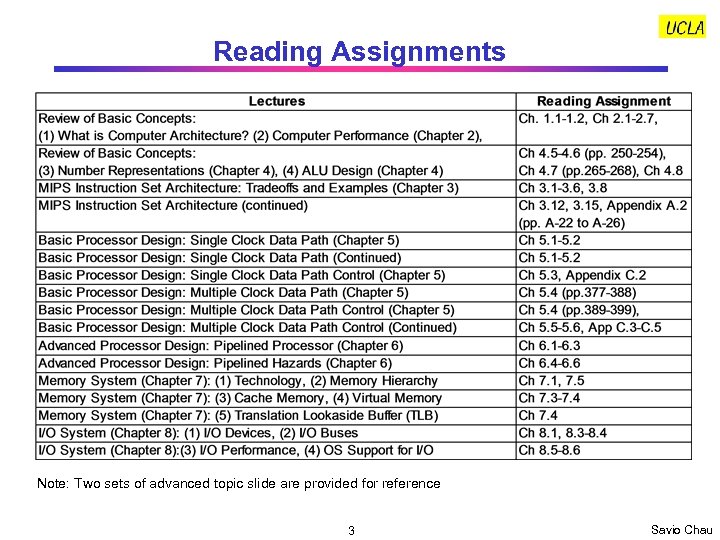
Reading Assignments Note: Two sets of advanced topic slide are provided for reference 3 Savio Chau
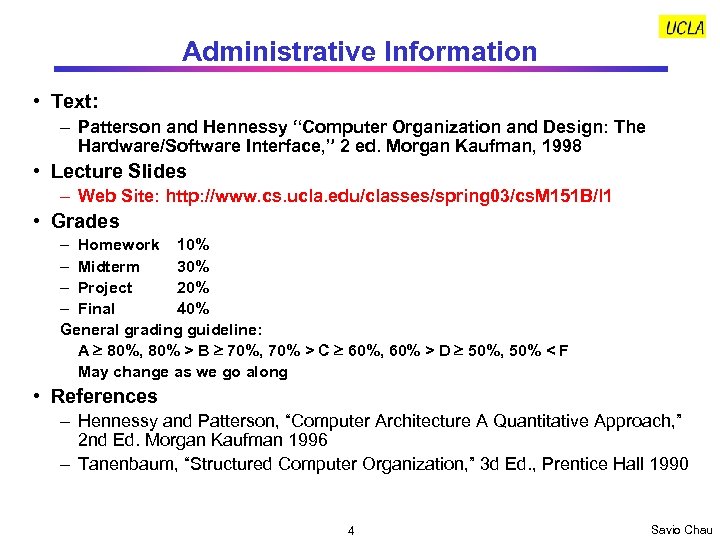
Administrative Information • Text: – Patterson and Hennessy “Computer Organization and Design: The Hardware/Software Interface, ” 2 ed. Morgan Kaufman, 1998 • Lecture Slides – Web Site: http: //www. cs. ucla. edu/classes/spring 03/cs. M 151 B/l 1 • Grades – Homework 10% – Midterm 30% – Project 20% – Final 40% General grading guideline: A 80%, 80% > B 70%, 70% > C 60%, 60% > D 50%, 50% < F May change as we go along • References – Hennessy and Patterson, “Computer Architecture A Quantitative Approach, ” 2 nd Ed. Morgan Kaufman 1996 – Tanenbaum, “Structured Computer Organization, ” 3 d Ed. , Prentice Hall 1990 4 Savio Chau
Administrative Information Contact Information • Instructor: Savio Chau Email: savio. chau@jpl. nasa. gov • TA: Donald Lam Office: BH 4428 Email: donaldl@cs. ucla. edu Tel: 310 479 6553 Homework: • Turn in the original of your homework to the following drop boxes on or before due day: – Discussion Class 2 A: BH 4428, Box C-10 • Make a copy of your homework and turn it in to me on due day. The copy will be kept by me for record. (Too many students complained about TA losing their homework in the past. ) 5 Savio Chau

Homework Grading Policy • Unless consented by the instructor, homework that is up to 2 calendar days late will receive half credit. Homework more than 2 days late will receive no credit. • Homework must be reasonably tidy. Unreadable homework will not be graded • Unaided work on homework problems will be graded mainly based on effort. However, you must answer every part of the question, and the answer must address that part of the question. Always show your work, and make your answer as clear as possible. • Group work is OK. However: – Each member of the group MUST turn in his/her homework separately. – If you worked with other students on a question, you must state the names of all students in the group. Homework that have identical answers without this information may be investigated for violating the academic integrity policy, so please record any cooperation. – Group work on a homework problem will be graded on accuracy, and there will be deductions for mistakes. Each student should first attempt to answer every question on his or her own prior to meeting with the group or asking another student for help. After meeting with the group or seeking help, each student should verify the correctness of the answer 6 Savio Chau

Start of Lectures 7 Savio Chau
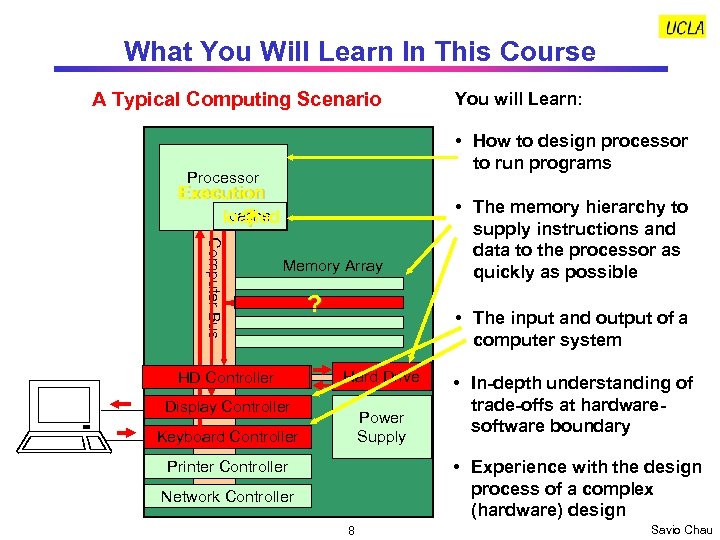
What You Will Learn In This Course A Typical Computing Scenario You will Learn: • How to design processor to run programs Processor Execution cache loaded ? Computer Bus Memory Array HD Controller ? • The memory hierarchy to supply instructions and data to the processor as quickly as possible • The input and output of a computer system Hard Drive Display Controller Power Supply Keyboard Controller • In-depth understanding of trade-offs at hardwaresoftware boundary • Experience with the design process of a complex (hardware) design Printer Controller Network Controller 8 Savio Chau
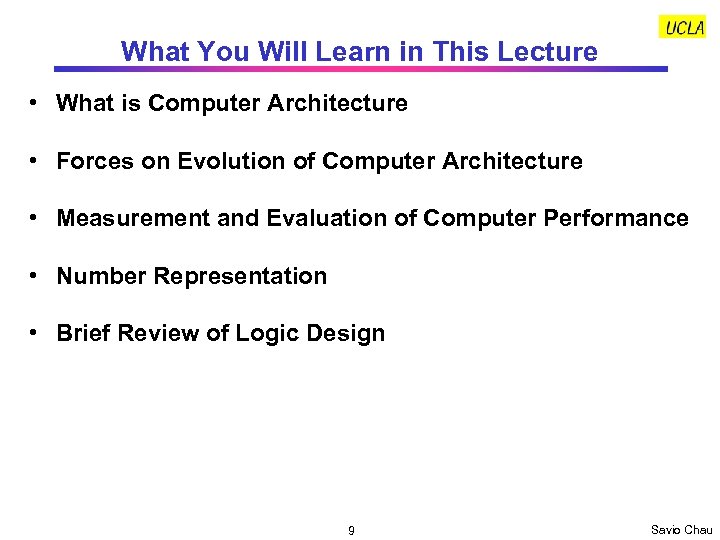
What You Will Learn in This Lecture • What is Computer Architecture • Forces on Evolution of Computer Architecture • Measurement and Evaluation of Computer Performance • Number Representation • Brief Review of Logic Design 9 Savio Chau
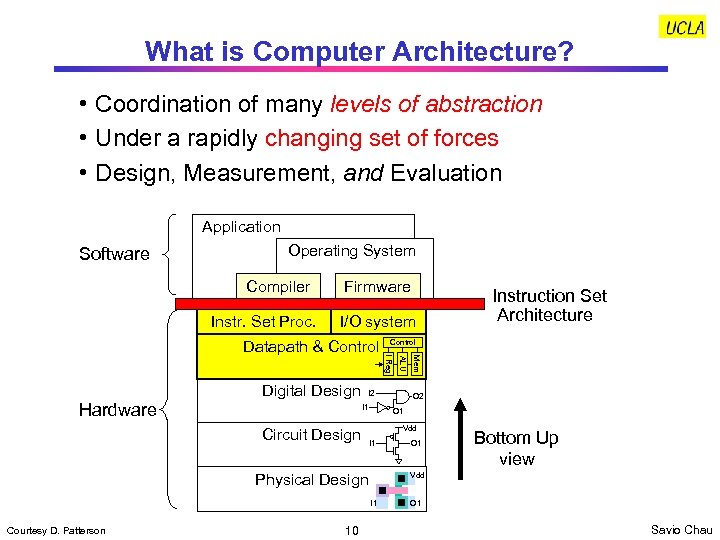
What is Computer Architecture? • Coordination of many levels of abstraction • Under a rapidly changing set of forces • Design, Measurement, and Evaluation Application Software Operating System Compiler Instr. Set Proc. Firmware I/O system Circuit Design Vdd I 1 O 1 Bottom Up view Vdd I 1 10 O 2 O 1 Physical Design Courtesy D. Patterson ALU Hardware I 2 I 1 Mem Digital Design Control I Reg Datapath & Control Instruction Set Architecture O 1 Savio Chau
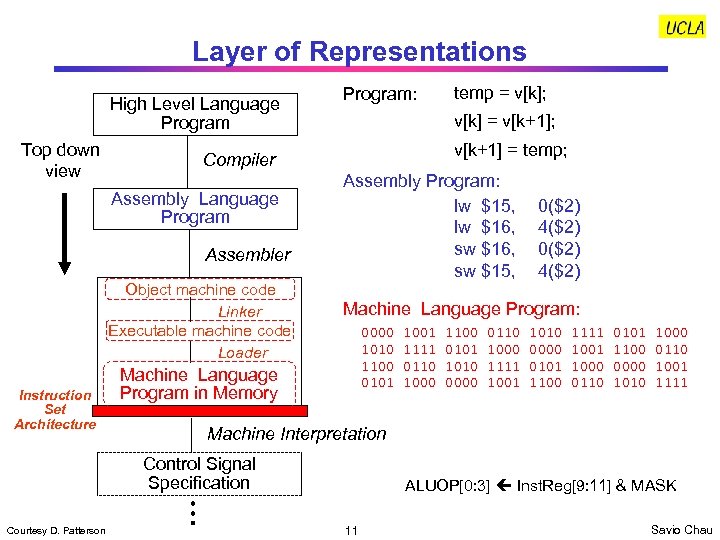
Layer of Representations High Level Language Program Top down view Assembler Object machine code Linker Executable machine code Loader v[k+1] = temp; Assembly Program: lw $15, lw $16, sw $15, 0($2) 4($2) Machine Language Program: 0000 1010 1100 0101 Machine Language Program in Memory 1001 1111 0110 1000 1100 0101 1010 0000 0110 1000 1111 1001 1010 0000 0101 1100 1111 1000 0110 0101 1100 0000 1010 1000 0110 1001 1111 Machine Interpretation Control Signal Specification Courtesy D. Patterson temp = v[k]; v[k] = v[k+1]; Compiler Assembly Language Program Instruction Set Architecture Program: ALUOP[0: 3] Inst. Reg[9: 11] & MASK 11 Savio Chau
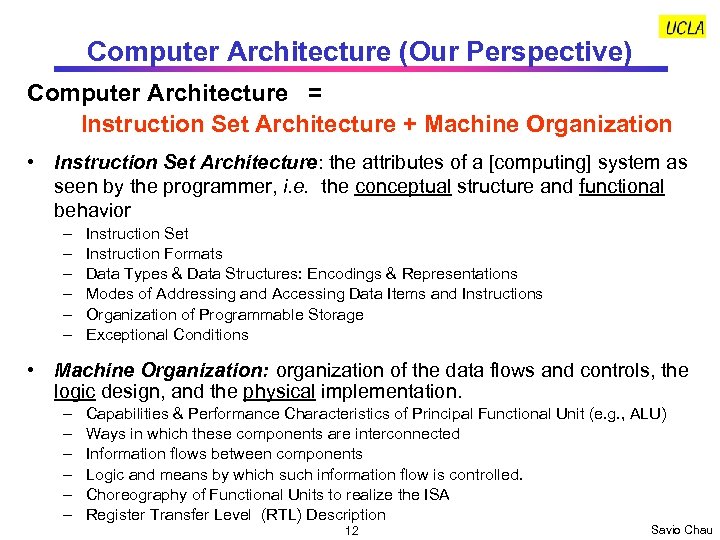
Computer Architecture (Our Perspective) Computer Architecture = Instruction Set Architecture + Machine Organization • Instruction Set Architecture: the attributes of a [computing] system as seen by the programmer, i. e. the conceptual structure and functional behavior – – – Instruction Set Instruction Formats Data Types & Data Structures: Encodings & Representations Modes of Addressing and Accessing Data Items and Instructions Organization of Programmable Storage Exceptional Conditions • Machine Organization: organization of the data flows and controls, the logic design, and the physical implementation. – – – Capabilities & Performance Characteristics of Principal Functional Unit (e. g. , ALU) Ways in which these components are interconnected Information flows between components Logic and means by which such information flow is controlled. Choreography of Functional Units to realize the ISA Register Transfer Level (RTL) Description 12 Savio Chau
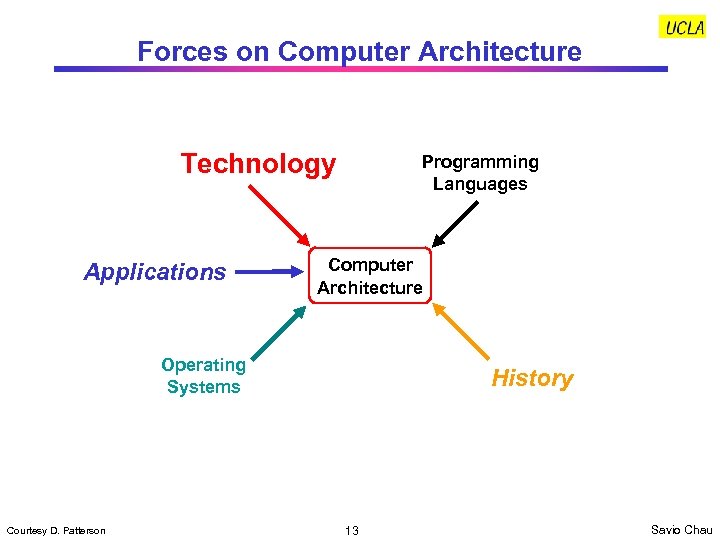
Forces on Computer Architecture Technology Applications Programming Languages Computer Architecture Operating Systems Courtesy D. Patterson History 13 Savio Chau
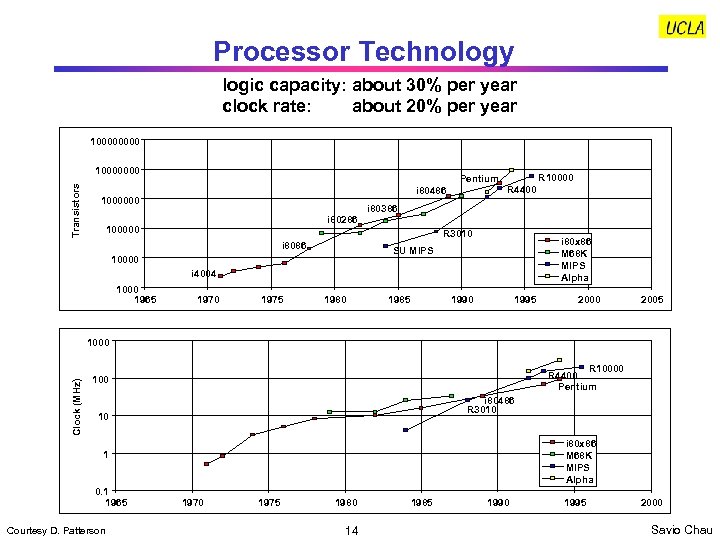
Processor Technology logic capacity: about 30% per year clock rate: about 20% per year 10000 Transistors 10000000 Pentium i 80486 1000000 i 80286 100000 R 10000 R 4400 i 80386 R 3010 i 8086 i 80 x 86 M 68 K MIPS Alpha SU MIPS 10000 i 4004 1000 1965 1970 1975 1980 1985 1990 1995 2000 2005 Clock (MHz) 1000 R 10000 R 4400 Pentium 100 i 80486 R 3010 10 i 80 x 86 M 68 K MIPS Alpha 1 0. 1 1965 Courtesy D. Patterson 1970 1975 1980 14 1985 1990 1995 2000 Savio Chau
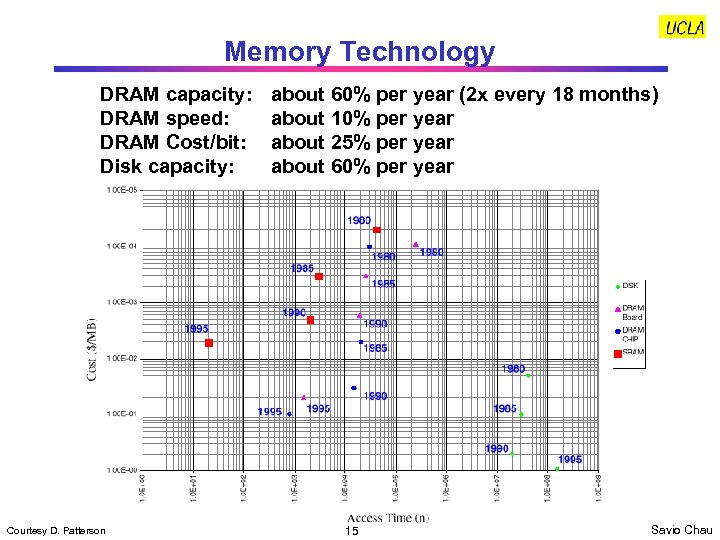
Memory Technology DRAM capacity: DRAM speed: DRAM Cost/bit: Disk capacity: Courtesy D. Patterson about 60% per year (2 x every 18 months) about 10% per year about 25% per year about 60% per year 15 Savio Chau
How Technology Impacts Computer Architecture • Higher level of integration enables more complex architectures. Examples: – On-chip memory – Super scaler processors • Higher level of integration enables more application specific architectures (e. g. , a variety of microcontrollers and DSPs) • Larger logic capacity and higher performance allow more freedom in architecture trade-offs. Computer architects can focus more on what should be done rather than worrying about physical constraints • Lower cost generates a wider market. Profitability and competition stimulates architecture innovations 16 Savio Chau
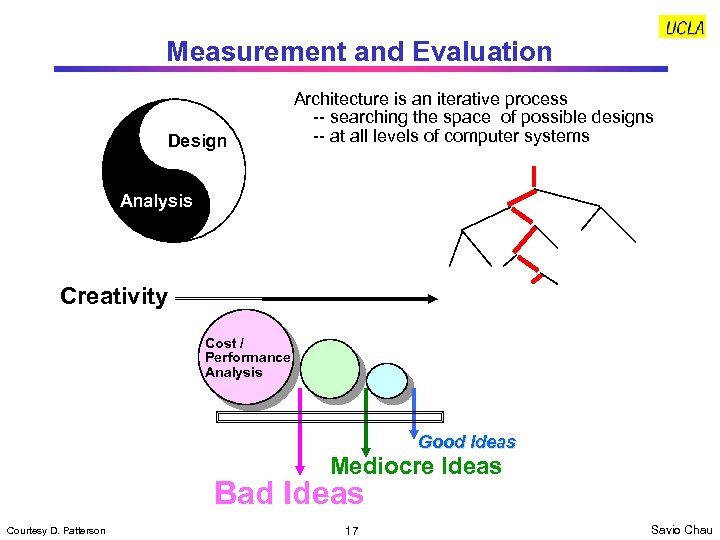
Measurement and Evaluation Design Architecture is an iterative process -- searching the space of possible designs -- at all levels of computer systems Analysis Creativity Cost / Performance Analysis Good Ideas Mediocre Ideas Bad Ideas Courtesy D. Patterson 17 Savio Chau
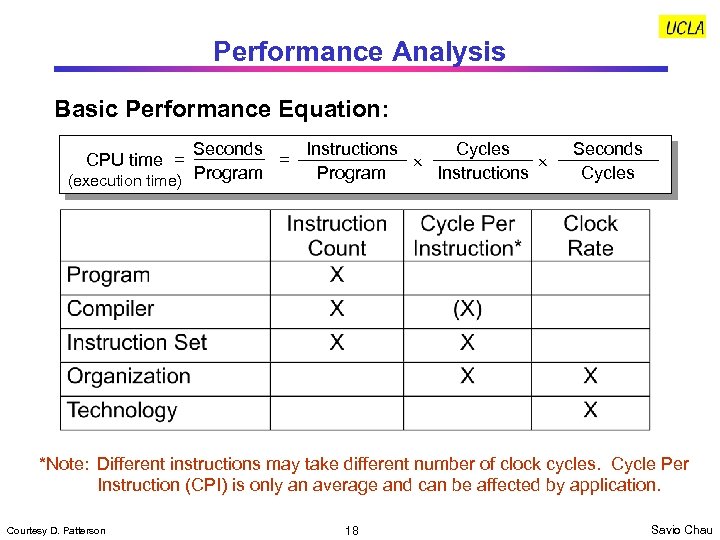
Performance Analysis Basic Performance Equation: Seconds Instructions Cycles = Instructions Program (execution time) CPU time = Seconds Cycles *Note: Different instructions may take different number of clock cycles. Cycle Per Instruction (CPI) is only an average and can be affected by application. Courtesy D. Patterson 18 Savio Chau
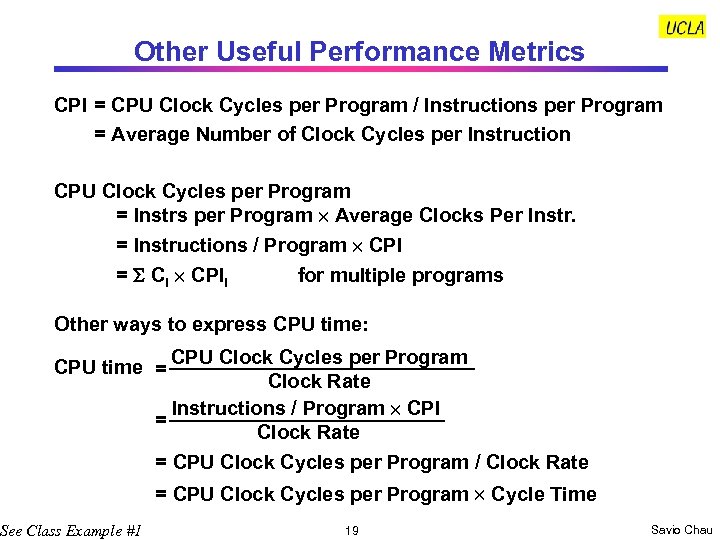
Other Useful Performance Metrics CPI = CPU Clock Cycles per Program / Instructions per Program = Average Number of Clock Cycles per Instruction CPU Clock Cycles per Program = Instrs per Program Average Clocks Per Instr. = Instructions / Program CPI = Ci CPIi for multiple programs Other ways to express CPU time: CPU time = CPU Clock Cycles per Program Clock Rate Instructions / Program CPI = Clock Rate = CPU Clock Cycles per Program / Clock Rate See Class Example #1 = CPU Clock Cycles per Program Cycle Time 19 Savio Chau
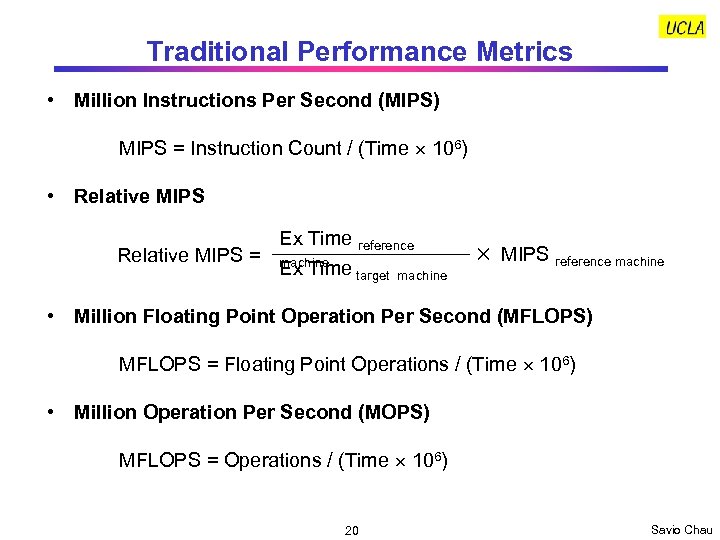
Traditional Performance Metrics • Million Instructions Per Second (MIPS) MIPS = Instruction Count / (Time 106) • Relative MIPS Ex Time reference Relative MIPS = machine Ex Time target machine MIPS reference machine • Million Floating Point Operation Per Second (MFLOPS) MFLOPS = Floating Point Operations / (Time 106) • Million Operation Per Second (MOPS) MFLOPS = Operations / (Time 106) 20 Savio Chau
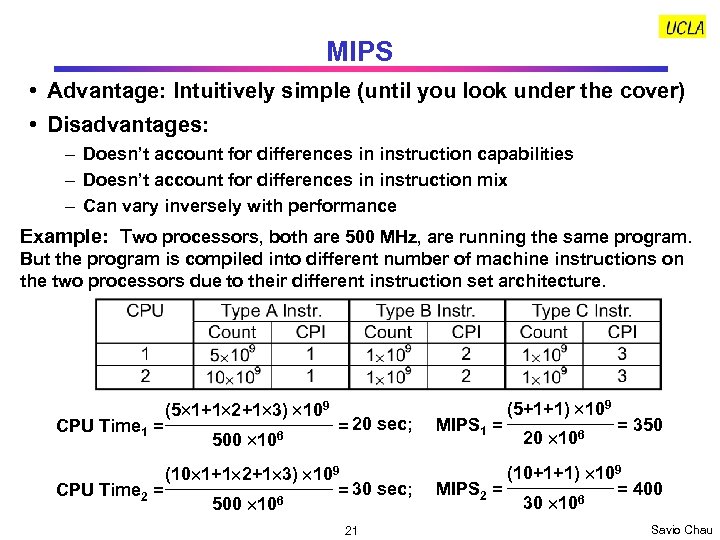
MIPS • Advantage: Intuitively simple (until you look under the cover) • Disadvantages: – Doesn’t account for differences in instruction capabilities – Doesn’t account for differences in instruction mix – Can vary inversely with performance Example: Two processors, both are 500 MHz, are running the same program. But the program is compiled into different number of machine instructions on the two processors due to their different instruction set architecture. CPU Time 1 = (5 1+1 2+1 3) 109 500 106 = 20 sec; (10 1+1 2+1 3) 109 = 30 sec; CPU Time 2 = 6 500 10 21 MIPS 1 = (5+1+1) 109 20 106 = 350 (10+1+1) 109 = 400 MIPS 2 = 6 30 10 Savio Chau
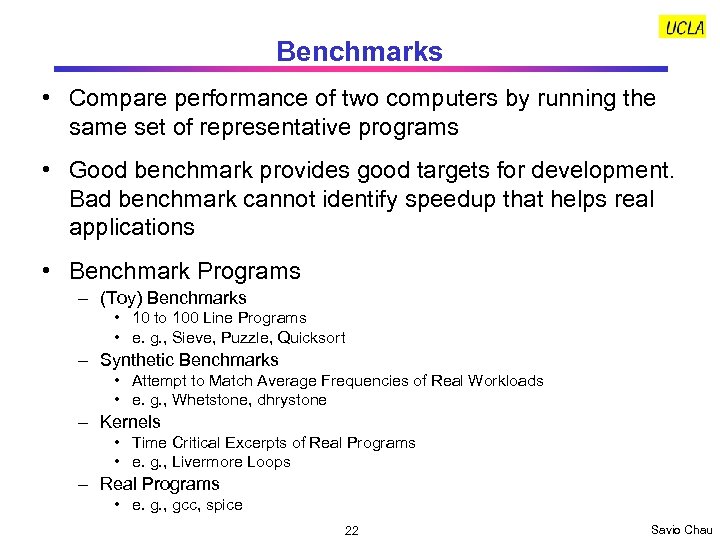
Benchmarks • Compare performance of two computers by running the same set of representative programs • Good benchmark provides good targets for development. Bad benchmark cannot identify speedup that helps real applications • Benchmark Programs – (Toy) Benchmarks • 10 to 100 Line Programs • e. g. , Sieve, Puzzle, Quicksort – Synthetic Benchmarks • Attempt to Match Average Frequencies of Real Workloads • e. g. , Whetstone, dhrystone – Kernels • Time Critical Excerpts of Real Programs • e. g. , Livermore Loops – Real Programs • e. g. , gcc, spice 22 Savio Chau
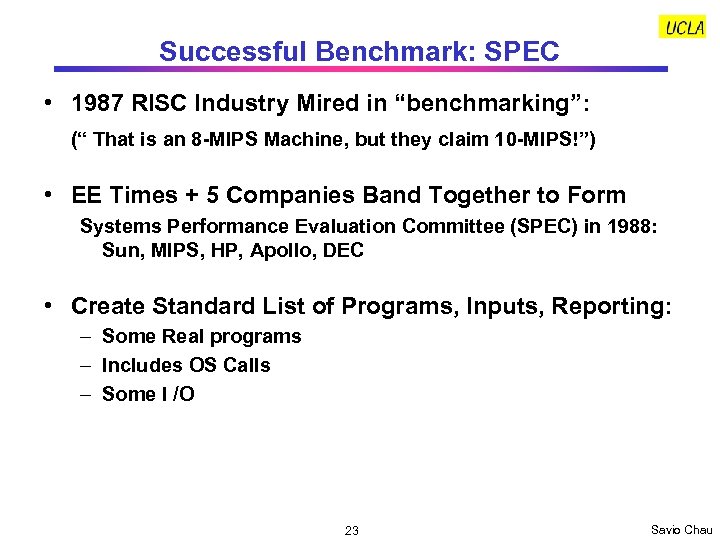
Successful Benchmark: SPEC • 1987 RISC Industry Mired in “benchmarking”: (“ That is an 8 -MIPS Machine, but they claim 10 -MIPS!”) • EE Times + 5 Companies Band Together to Form Systems Performance Evaluation Committee (SPEC) in 1988: Sun, MIPS, HP, Apollo, DEC • Create Standard List of Programs, Inputs, Reporting: – Some Real programs – Includes OS Calls – Some I /O 23 Savio Chau
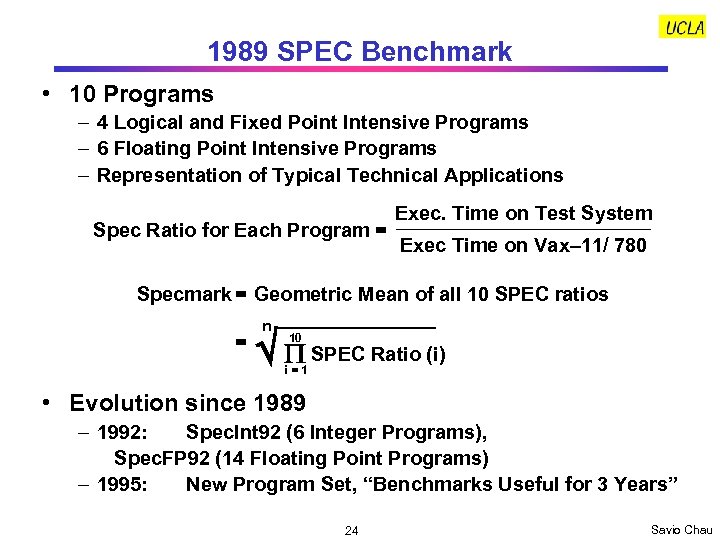
1989 SPEC Benchmark • 10 Programs – 4 Logical and Fixed Point Intensive Programs – 6 Floating Point Intensive Programs – Representation of Typical Technical Applications Spec Ratio for Each Program = Exec. Time on Test System Exec Time on Vax– 11/ 780 Specmark = Geometric Mean of all 10 SPEC ratios = n P SPEC Ratio (i) 10 i=1 • Evolution since 1989 – 1992: Spec. Int 92 (6 Integer Programs), Spec. FP 92 (14 Floating Point Programs) – 1995: New Program Set, “Benchmarks Useful for 3 Years” 24 Savio Chau
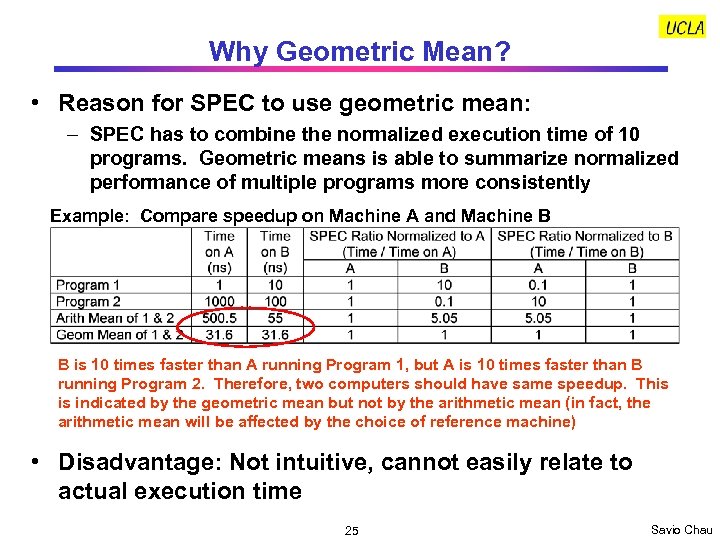
Why Geometric Mean? • Reason for SPEC to use geometric mean: – SPEC has to combine the normalized execution time of 10 programs. Geometric means is able to summarize normalized performance of multiple programs more consistently Example: Compare speedup on Machine A and Machine B B is 10 times faster than A running Program 1, but A is 10 times faster than B running Program 2. Therefore, two computers should have same speedup. This is indicated by the geometric mean but not by the arithmetic mean (in fact, the arithmetic mean will be affected by the choice of reference machine) • Disadvantage: Not intuitive, cannot easily relate to actual execution time 25 Savio Chau
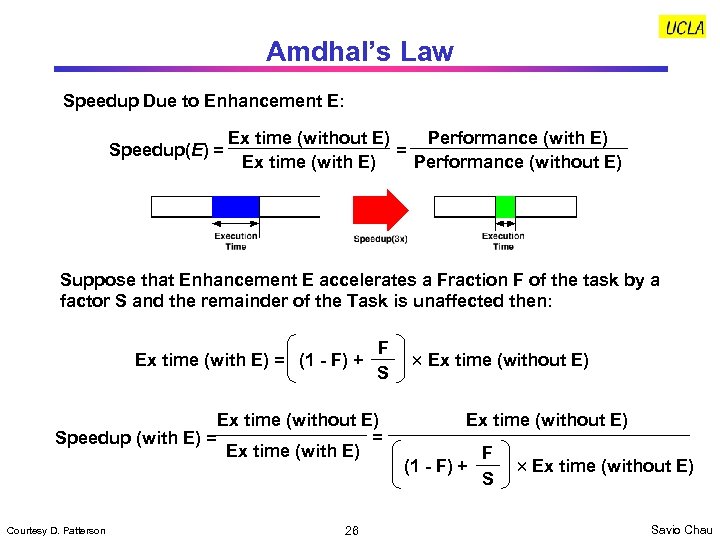
Amdhal’s Law Speedup Due to Enhancement E: Ex time (without E) Performance (with E) Speedup(E) = = Ex time (with E) Performance (without E) Suppose that Enhancement E accelerates a Fraction F of the task by a factor S and the remainder of the Task is unaffected then: Ex time (with E) = (1 - F) + F S Ex time (without E) = Speedup (with E) = Ex time (with E) Courtesy D. Patterson 26 Ex time (without E) (1 - F) + F S Ex time (without E) Savio Chau
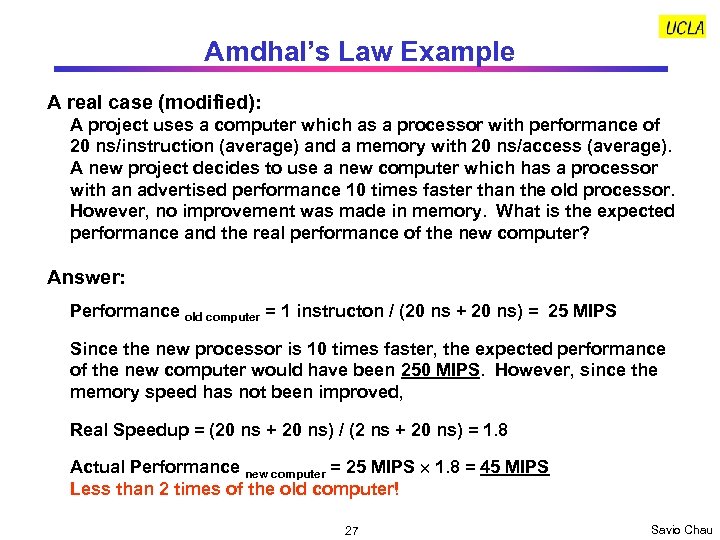
Amdhal’s Law Example A real case (modified): A project uses a computer which as a processor with performance of 20 ns/instruction (average) and a memory with 20 ns/access (average). A new project decides to use a new computer which has a processor with an advertised performance 10 times faster than the old processor. However, no improvement was made in memory. What is the expected performance and the real performance of the new computer? Answer: Performance old computer = 1 instructon / (20 ns + 20 ns) = 25 MIPS Since the new processor is 10 times faster, the expected performance of the new computer would have been 250 MIPS. However, since the memory speed has not been improved, Real Speedup = (20 ns + 20 ns) / (2 ns + 20 ns) = 1. 8 Actual Performance new computer = 25 MIPS 1. 8 = 45 MIPS Less than 2 times of the old computer! 27 Savio Chau
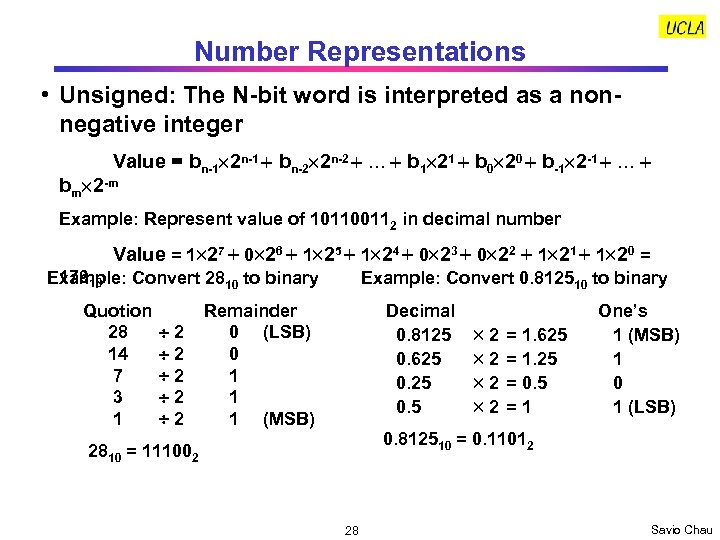
Number Representations • Unsigned: The N-bit word is interpreted as a nonnegative integer Value = bn-1 2 n-1 bn-2 2 n-2 … b 1 21 b 0 20 b-1 2 -1 … bm 2 -m Example: Represent value of 101100112 in decimal number Value = 1 27 0 26 1 25 1 24 0 23 0 22 1 21 1 20 = 17910 Example: Convert 2810 to binary Quotion 28 14 7 3 1 2 2 2 Example: Convert 0. 812510 to binary Remainder 0 (LSB) 0 1 1 1 (MSB) Decimal 0. 8125 0. 625 0. 5 2 2 = 1. 625 = 1. 25 = 0. 5 =1 One’s 1 (MSB) 1 0 1 (LSB) 0. 812510 = 0. 11012 2810 = 111002 28 Savio Chau
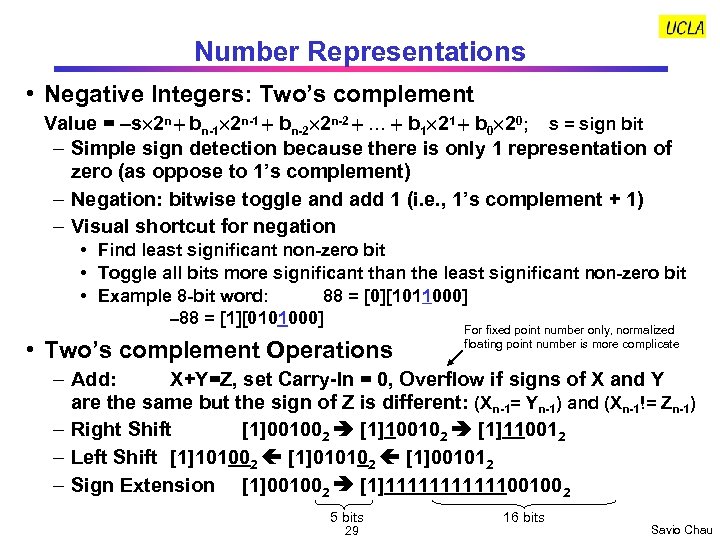
Number Representations • Negative Integers: Two’s complement Value = s 2 n bn-1 2 n-1 bn-2 2 n-2 … b 1 21 b 0 20; s = sign bit – Simple sign detection because there is only 1 representation of zero (as oppose to 1’s complement) – Negation: bitwise toggle and add 1 (i. e. , 1’s complement + 1) – Visual shortcut for negation • Find least significant non-zero bit • Toggle all bits more significant than the least significant non-zero bit • Example 8 -bit word: 88 = [0][1011000] 88 = [1][0101000] • Two’s complement Operations For fixed point number only, normalized floating point number is more complicate – Add: X+Y=Z, set Carry-In = 0, Overflow if signs of X and Y are the same but the sign of Z is different: (Xn-1= Yn-1) and (Xn-1!= Zn-1) – Right Shift [1]001002 [1]100102 [1]110012 – Left Shift [1]101002 [1]010102 [1]001012 – Sign Extension [1]001002 [1]111111001002 5 bits 29 16 bits Savio Chau
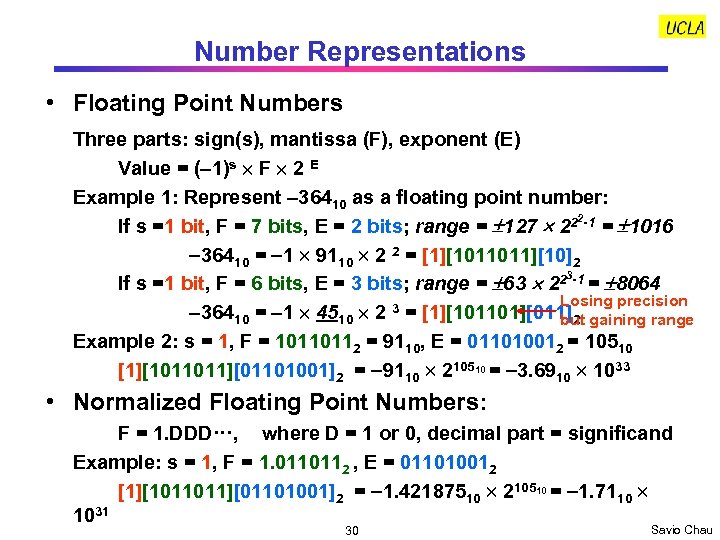
Number Representations • Floating Point Numbers Three parts: sign(s), mantissa (F), exponent (E) Value = ( 1)s F 2 E Example 1: Represent 36410 as a floating point number: 2 If s =1 bit, F = 7 bits, E = 2 bits; range = 127 22 -1 = 1016 36410 = 1 9110 2 2 = [1][1011011][10]2 3 If s =1 bit, F = 6 bits, E = 3 bits; range = 63 22 -1 = 8064 Losing precision 36410 = 1 4510 2 3 = [1][101101][011]2 gaining range but Example 2: s = 1, F = 10110112 = 9110, E = 011010012 = 10510 [1][1011011][01101001]2 = 9110 210510 = 3. 6910 1033 • Normalized Floating Point Numbers: F = 1. DDD···, where D = 1 or 0, decimal part = significand Example: s = 1, F = 1. 0110112 , E = 011010012 [1][1011011][01101001]2 = 1. 42187510 210510 = 1. 7110 1031 30 Savio Chau
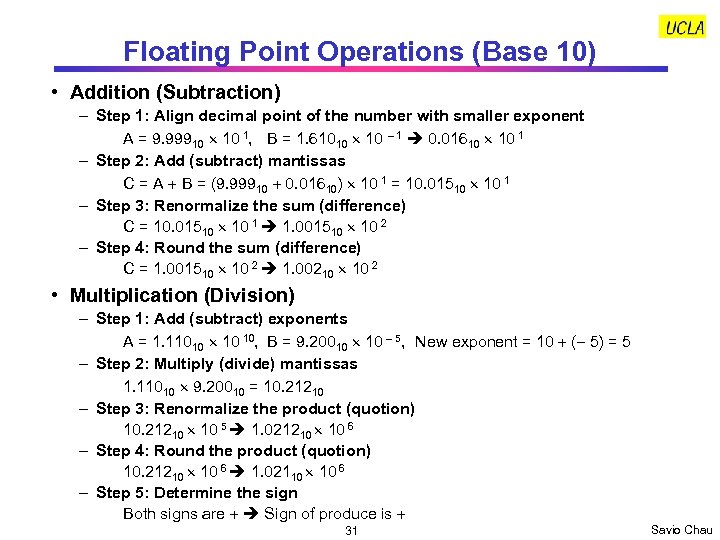
Floating Point Operations (Base 10) • Addition (Subtraction) – Step 1: Align decimal point of the number with smaller exponent A = 9. 99910 10 1, B = 1. 61010 1 0. 01610 10 1 – Step 2: Add (subtract) mantissas C = A + B = (9. 99910 + 0. 01610) 10 1 = 10. 01510 10 1 – Step 3: Renormalize the sum (difference) C = 10. 01510 10 1 1. 001510 10 2 – Step 4: Round the sum (difference) C = 1. 001510 10 2 1. 00210 10 2 • Multiplication (Division) – Step 1: Add (subtract) exponents A = 1. 11010 10 10, B = 9. 20010 5, New exponent = 10 + ( 5) = 5 – Step 2: Multiply (divide) mantissas 1. 11010 9. 20010 = 10. 21210 – Step 3: Renormalize the product (quotion) 10. 21210 10 5 1. 021210 10 6 – Step 4: Round the product (quotion) 10. 21210 10 6 1. 02110 10 6 – Step 5: Determine the sign Both signs are + Sign of produce is + 31 Savio Chau
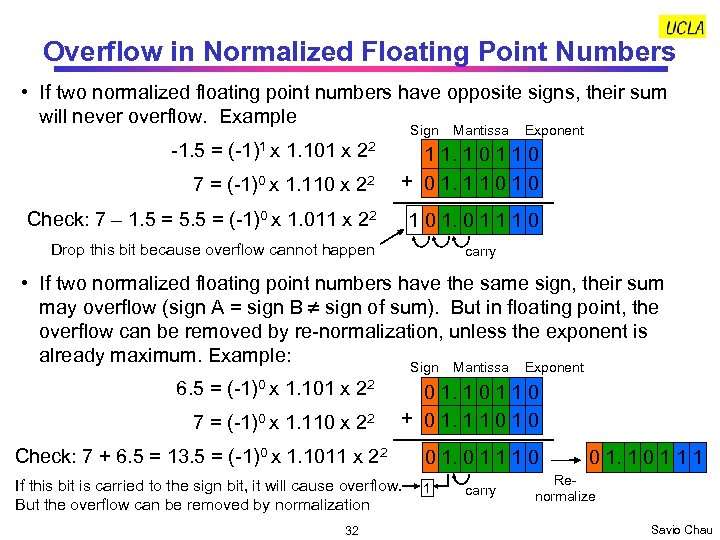
Overflow in Normalized Floating Point Numbers • If two normalized floating point numbers have opposite signs, their sum will never overflow. Example Sign -1. 5 = (-1)1 x 1. 101 x 22 Mantissa Exponent 7 = (-1)0 x 1. 110 x 22 1 1. 1 0 1 1 0 + 0 1. 1 1 0 Check: 7 – 1. 5 = 5. 5 = (-1)0 x 1. 011 x 22 1 0 1 1 1 0 Drop this bit because overflow cannot happen carry • If two normalized floating point numbers have the same sign, their sum may overflow (sign A = sign B sign of sum). But in floating point, the overflow can be removed by re-normalization, unless the exponent is already maximum. Example: Sign 6. 5 = (-1)0 x 1. 101 x 22 7 = (-1)0 x 1. 110 x 22 Check: 7 + 6. 5 = 13. 5 = (-1)0 x 1. 1011 x 22 Exponent 0 1. 1 0 1 1 0 + 0 1. 1 1 0 0 1 1 1 0 If this bit is carried to the sign bit, it will cause overflow. 1 But the overflow can be removed by normalization 32 Mantissa carry 0 1. 1 0 1 1 1 Renormalize Savio Chau
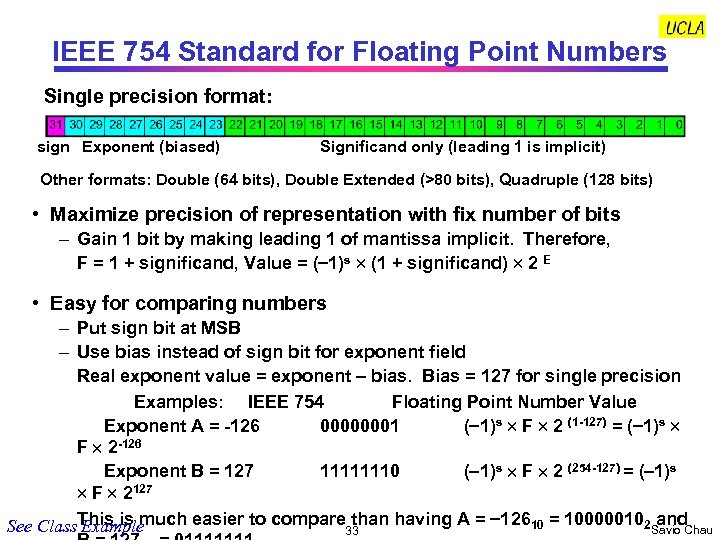
IEEE 754 Standard for Floating Point Numbers Single precision format: sign Exponent (biased) Significand only (leading 1 is implicit) Other formats: Double (64 bits), Double Extended (>80 bits), Quadruple (128 bits) • Maximize precision of representation with fix number of bits – Gain 1 bit by making leading 1 of mantissa implicit. Therefore, F = 1 + significand, Value = ( 1)s (1 + significand) 2 E • Easy for comparing numbers – Put sign bit at MSB – Use bias instead of sign bit for exponent field Real exponent value = exponent – bias. Bias = 127 for single precision Examples: IEEE 754 Floating Point Number Value Exponent A = -126 00000001 ( 1)s F 2 (1 -127) = ( 1)s F 2 -126 Exponent B = 127 11111110 ( 1)s F 2 (254 -127) = ( 1)s F 2127 and See Class. This is much easier to compare than having A = 12610 = 100000102 Savio Chau Example 33
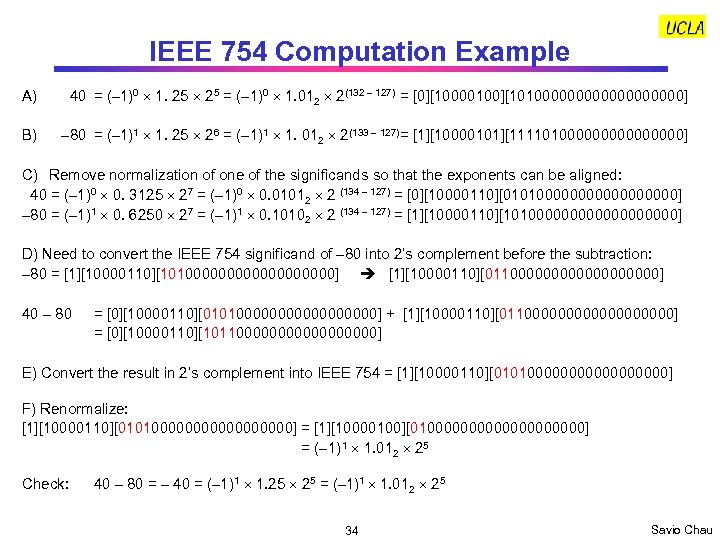
IEEE 754 Computation Example A) 40 = (– 1)0 1. 25 = (– 1)0 1. 012 2(132 – 127) = [0][10000100][101000000000] B) – 80 = (– 1)1 1. 25 26 = (– 1)1 1. 012 2(133 – 127) = [1][10000101][11110100000000] C) Remove normalization of one of the significands so that the exponents can be aligned: 40 = (– 1)0 0. 3125 27 = (– 1)0 0. 01012 2 (134 – 127) = [0][10000110][0101000000000] – 80 = (– 1)1 0. 6250 27 = (– 1)1 0. 10102 2 (134 – 127) = [1][10000110][101000000000] D) Need to convert the IEEE 754 significand of – 80 into 2’s complement before the subtraction: – 80 = [1][10000110][101000000000] [1][10000110][011000000000] 40 – 80 = [0][10000110][0101000000000] + [1][10000110][011000000000] = [0][10000110][1011000000000] E) Convert the result in 2’s complement into IEEE 754 = [1][10000110][0101000000000] F) Renormalize: [1][10000110][0101000000000] = [1][10000100][010000000000] = (– 1) 1 1. 012 25 Check: 40 – 80 = – 40 = (– 1)1 1. 25 = (– 1)1 1. 012 25 34 Savio Chau
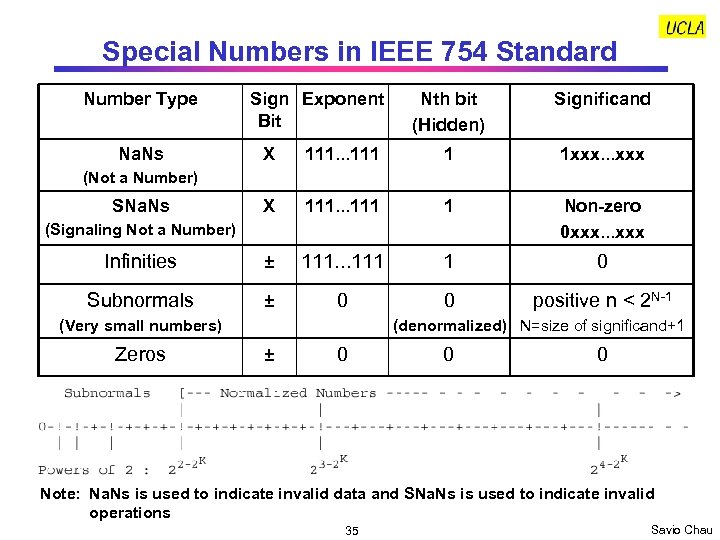
Special Numbers in IEEE 754 Standard Number Type Na. Ns Sign Exponent Bit Nth bit (Hidden) Significand X 111. . . 111 1 1 xxx. . . xxx X 111. . . 111 1 Non-zero 0 xxx. . . xxx Infinities ± 111. . . 111 1 0 Subnormals ± 0 0 positive n < 2 N-1 (Not a Number) SNa. Ns (Signaling Not a Number) (Very small numbers) Zeros (denormalized) N=size of significand+1 ± 0 0 0 Note: Na. Ns is used to indicate invalid data and SNa. Ns is used to indicate invalid operations 35 Savio Chau
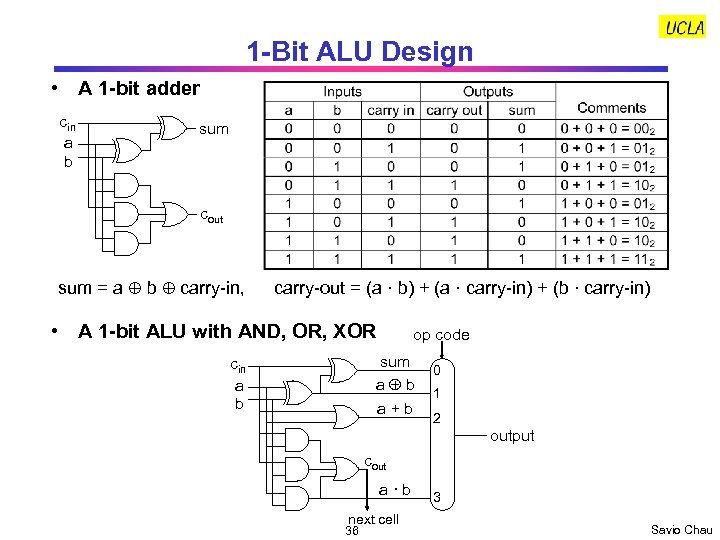
1 -Bit ALU Design • A 1 -bit adder cin a b sum cout sum = a b carry-in, carry-out = (a · b) + (a · carry-in) + (b · carry-in) • A 1 -bit ALU with AND, OR, XOR op code sum a b cin a b a + b 0 1 2 output cout a · b next cell 36 3 Savio Chau
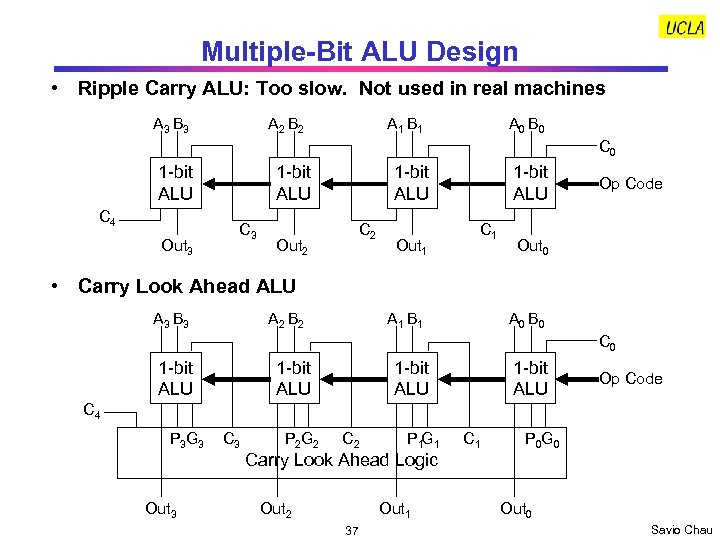
Multiple-Bit ALU Design • Ripple Carry ALU: Too slow. Not used in real machines A 3 B 3 A 2 B 2 A 1 B 1 A 0 B 0 C 0 1 -bit ALU C 4 Out 3 1 -bit ALU C 2 Out 1 1 -bit ALU C 1 Op Code Out 0 • Carry Look Ahead ALU A 3 B 3 A 2 B 2 A 1 B 1 A 0 B 0 C 0 1 -bit ALU Op Code C 4 P 3 G 3 Out 3 C 3 P 2 G 2 C 2 P 1 G 1 Carry Look Ahead Logic Out 2 Out 1 37 C 1 P 0 G 0 Out 0 Savio Chau
Скачать презентацию CS 151 B Computer System Architecture Instructor Savio
f63ecee80de9dc18c3270eace511eb00.ppt