


 Скачать презентацию CS 1302 Computer Networks Unit — 5
1ade20c43d7f2e4fefd9f454c8d05dc5.ppt
- Количество слайдов: 133
 CS 1302 Computer Networks — Unit - 5 — — Application Layer — n Text Book Behrouz. A. Forouzan, “Data communication and Networking”, Tata Mc. Graw. Hill, 2004 3/18/2018 Unit-5 : Application Layer 1
 Domain Name System 3/18/2018 Unit-5 : Application Layer 2
 25. 1 Name Space Flat Name Space Hierarchical Name Space 3/18/2018 Unit-5 : Application Layer 3
 25. 2 Domain Name Space Label Domain Name 3/18/2018 Unit-5 : Application Layer 4
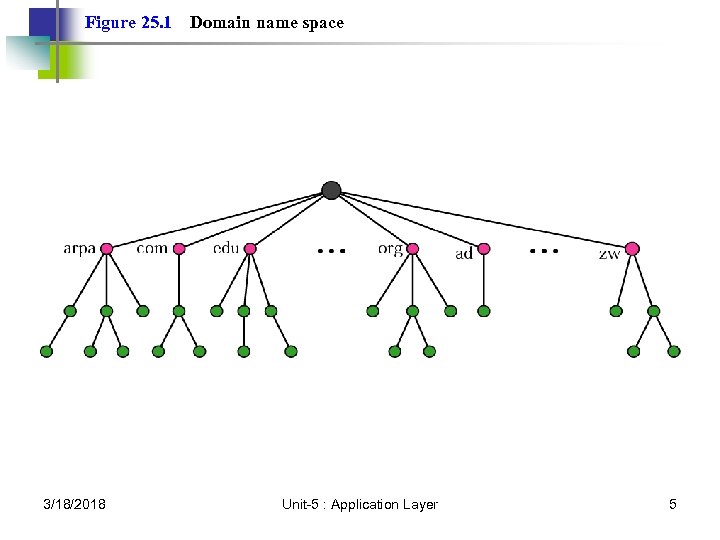 Figure 25. 1 3/18/2018 Domain name space Unit-5 : Application Layer 5
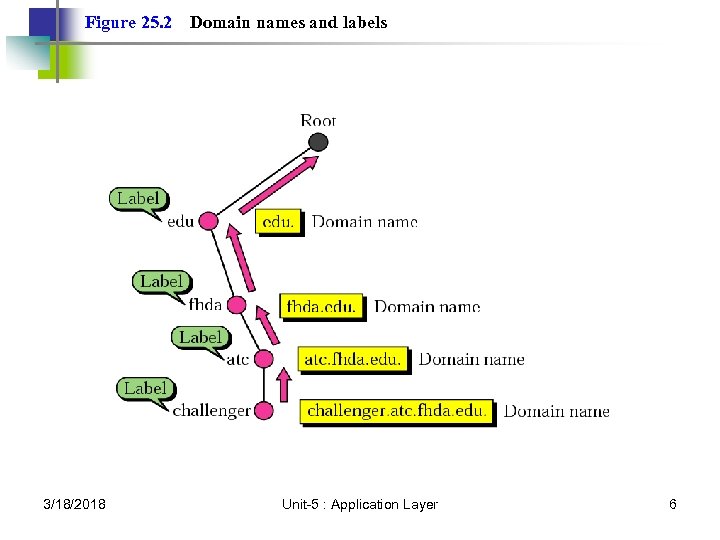 Figure 25. 2 3/18/2018 Domain names and labels Unit-5 : Application Layer 6
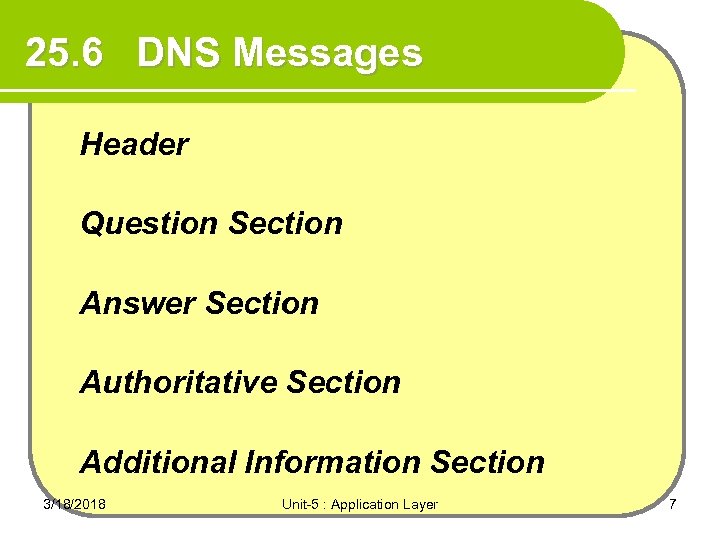 25. 6 DNS Messages Header Question Section Answer Section Authoritative Section Additional Information Section 3/18/2018 Unit-5 : Application Layer 7
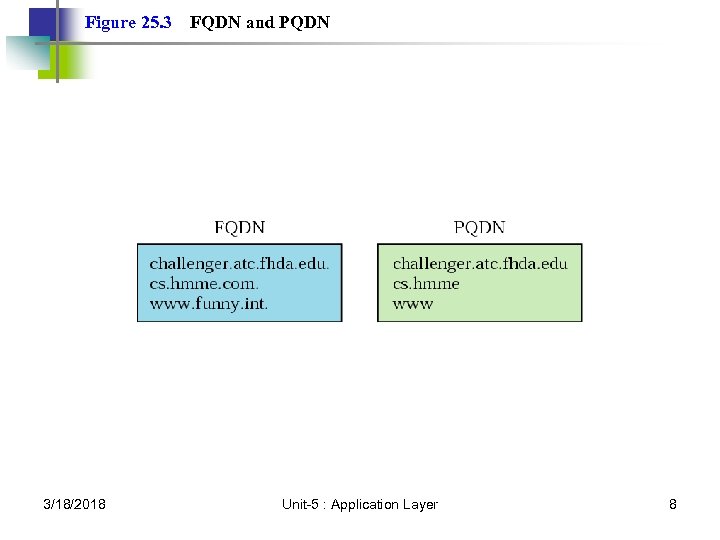 Figure 25. 3 3/18/2018 FQDN and PQDN Unit-5 : Application Layer 8
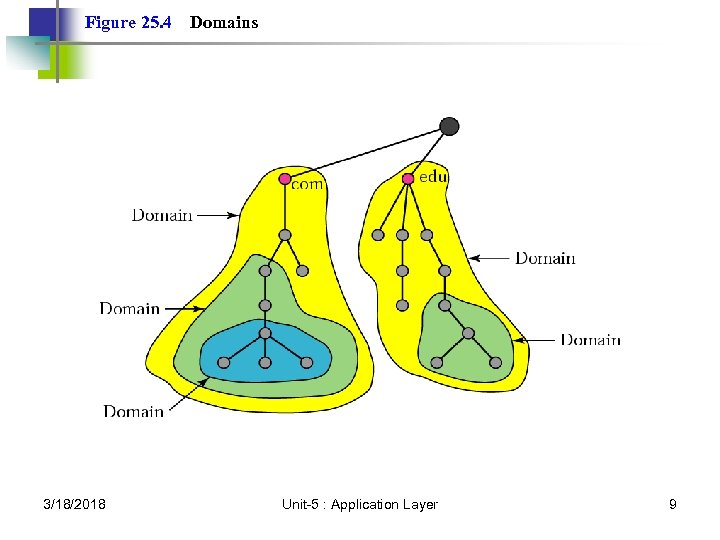 Figure 25. 4 3/18/2018 Domains Unit-5 : Application Layer 9
 25. 3 Distribution of Name Spaces Hierarchy of Name Servers Zone Root Server Primary and Secondary Servers 3/18/2018 Unit-5 : Application Layer 10
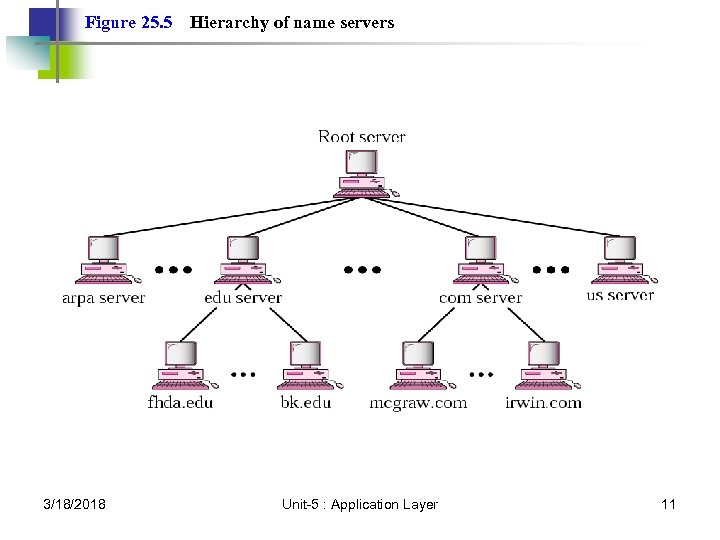 Figure 25. 5 3/18/2018 Hierarchy of name servers Unit-5 : Application Layer 11
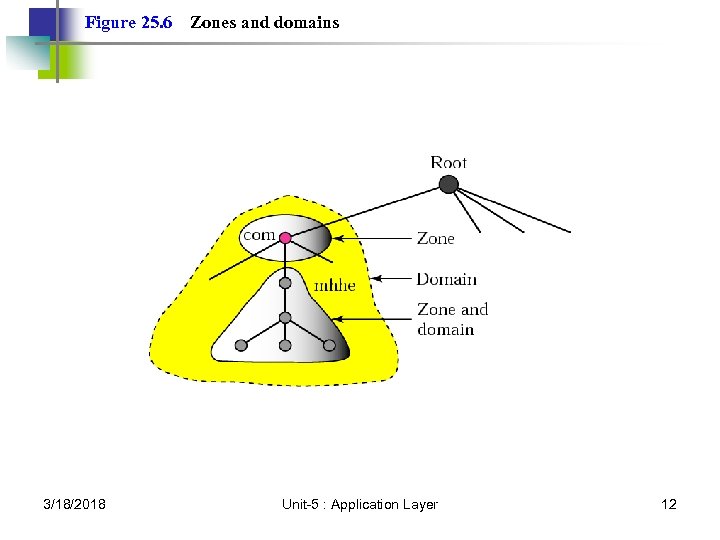 Figure 25. 6 3/18/2018 Zones and domains Unit-5 : Application Layer 12
 Note: A primary server loads all information from the disk file; the secondary server loads all information from the primary server. 3/18/2018 Unit-5 : Application Layer 13
 25. 4 DNS In The Internet Generic Domain Country Domain Inverse Domain 3/18/2018 Unit-5 : Application Layer 14
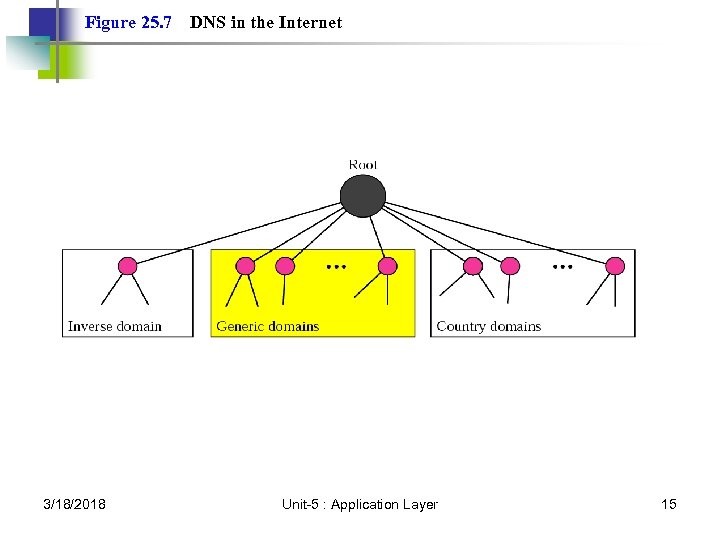 Figure 25. 7 3/18/2018 DNS in the Internet Unit-5 : Application Layer 15
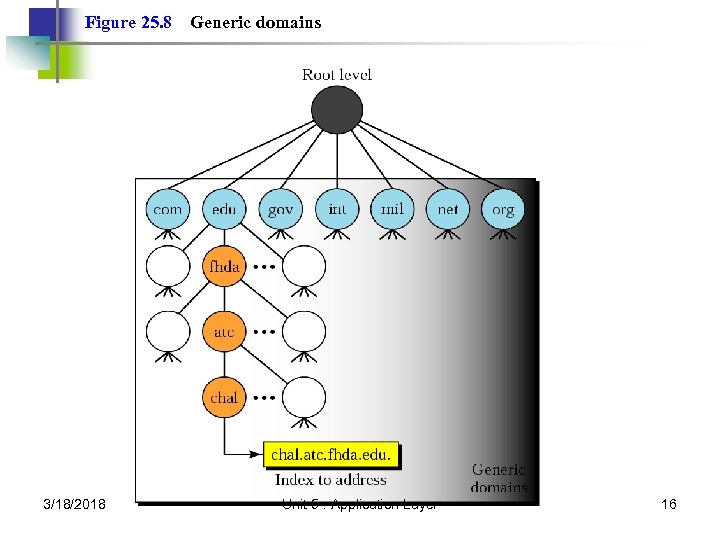 Figure 25. 8 3/18/2018 Generic domains Unit-5 : Application Layer 16
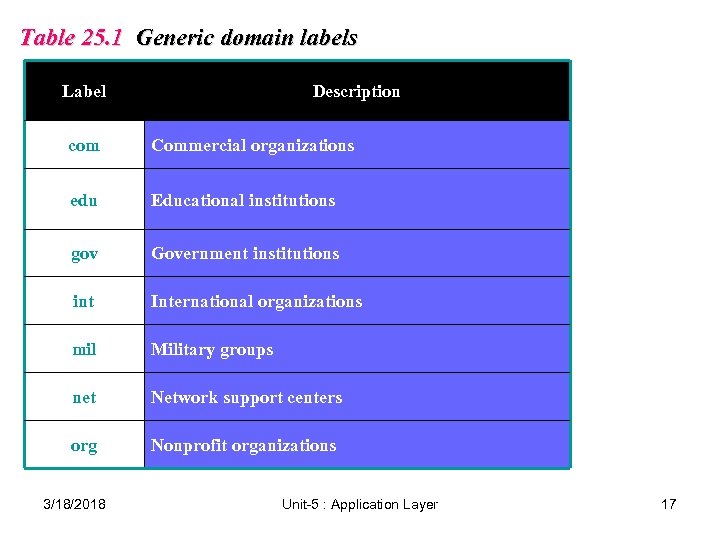 Table 25. 1 Generic domain labels Label Description com Commercial organizations edu Educational institutions gov Government institutions int International organizations mil Military groups net Network support centers org Nonprofit organizations 3/18/2018 Unit-5 : Application Layer 17
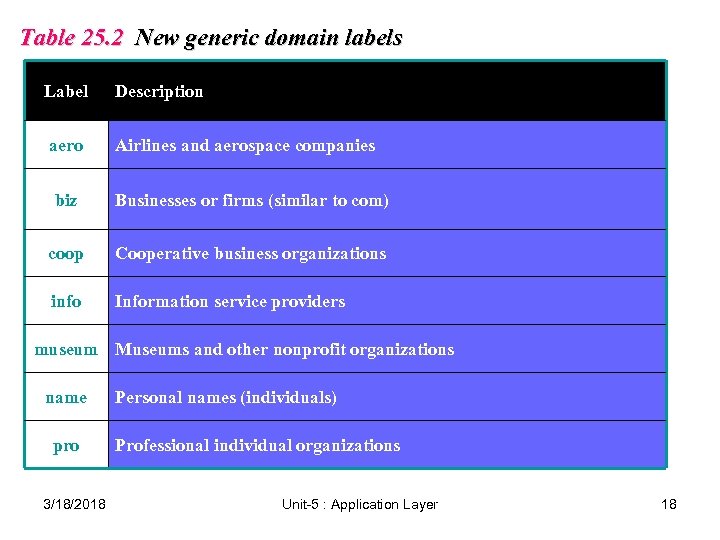 Table 25. 2 New generic domain labels Label Description aero Airlines and aerospace companies biz Businesses or firms (similar to com) coop Cooperative business organizations info Information service providers museum Museums and other nonprofit organizations name pro 3/18/2018 Personal names (individuals) Professional individual organizations Unit-5 : Application Layer 18
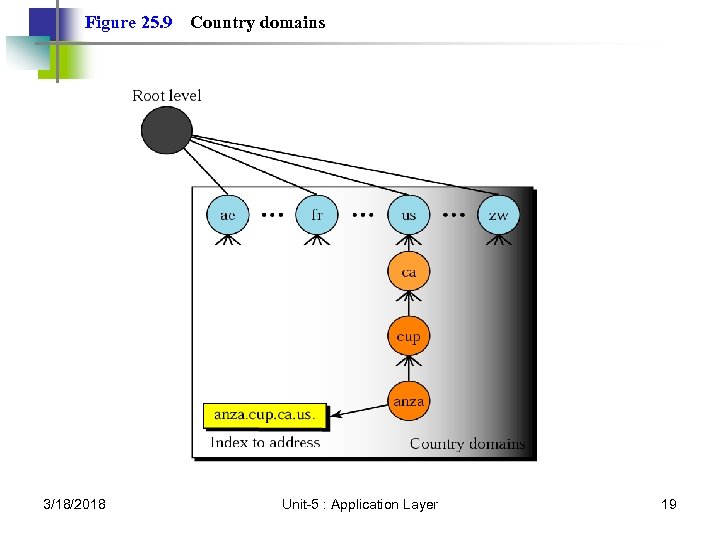 Figure 25. 9 3/18/2018 Country domains Unit-5 : Application Layer 19
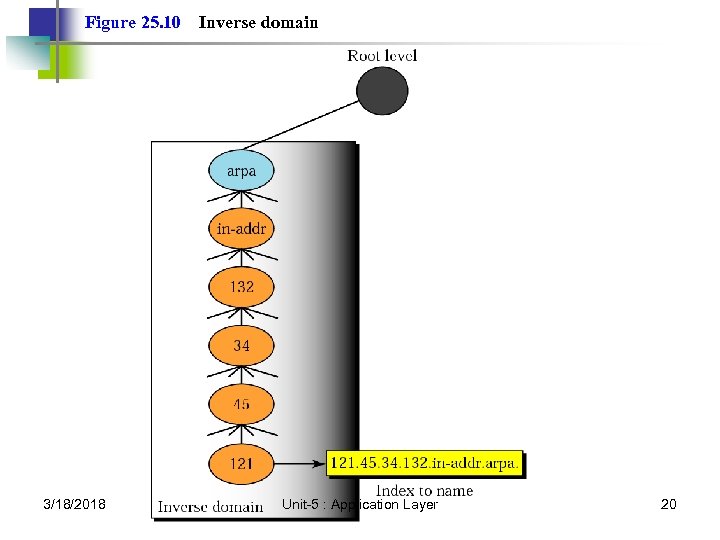 Figure 25. 10 3/18/2018 Inverse domain Unit-5 : Application Layer 20
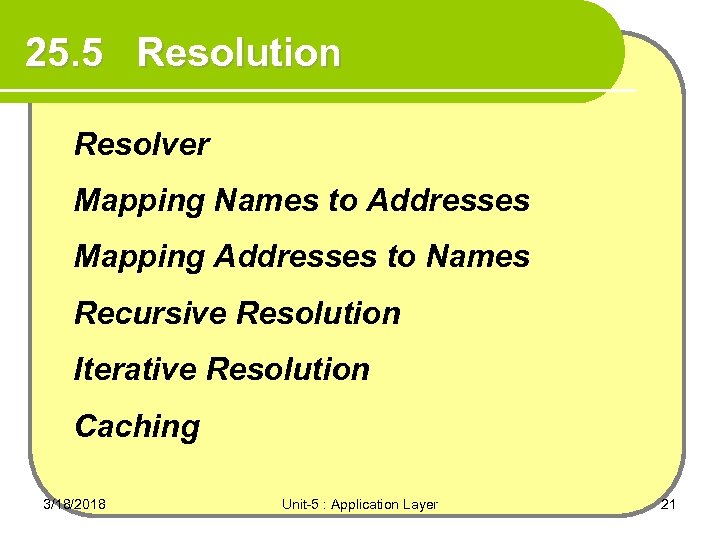 25. 5 Resolution Resolver Mapping Names to Addresses Mapping Addresses to Names Recursive Resolution Iterative Resolution Caching 3/18/2018 Unit-5 : Application Layer 21
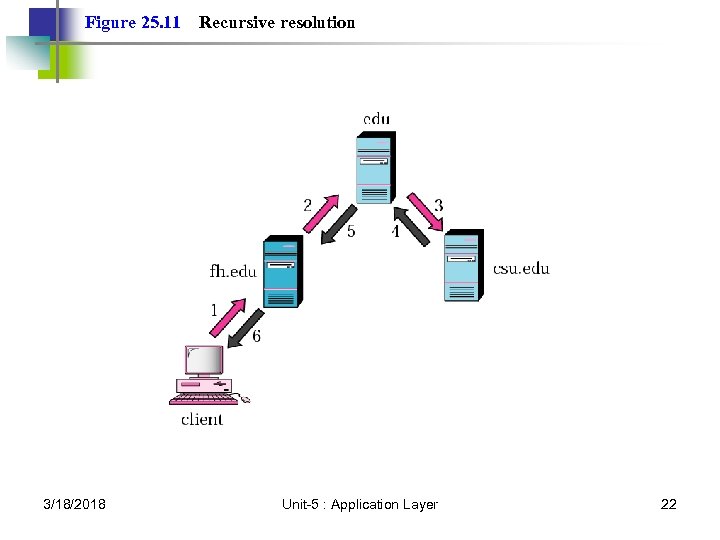 Figure 25. 11 3/18/2018 Recursive resolution Unit-5 : Application Layer 22
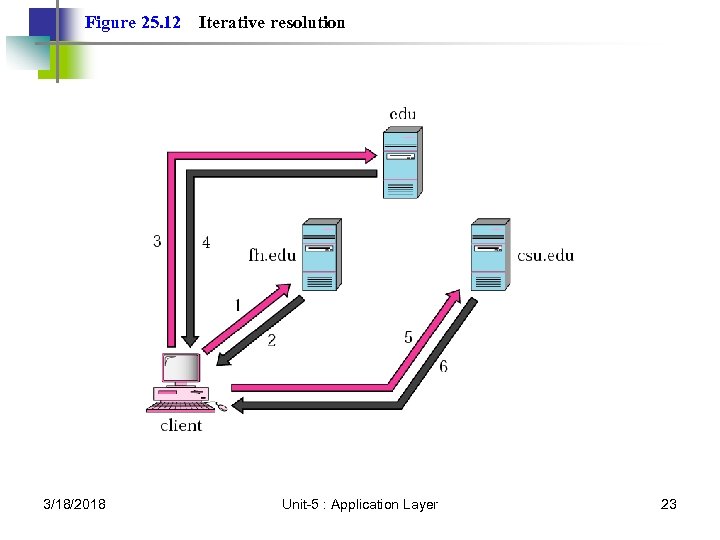 Figure 25. 12 3/18/2018 Iterative resolution Unit-5 : Application Layer 23
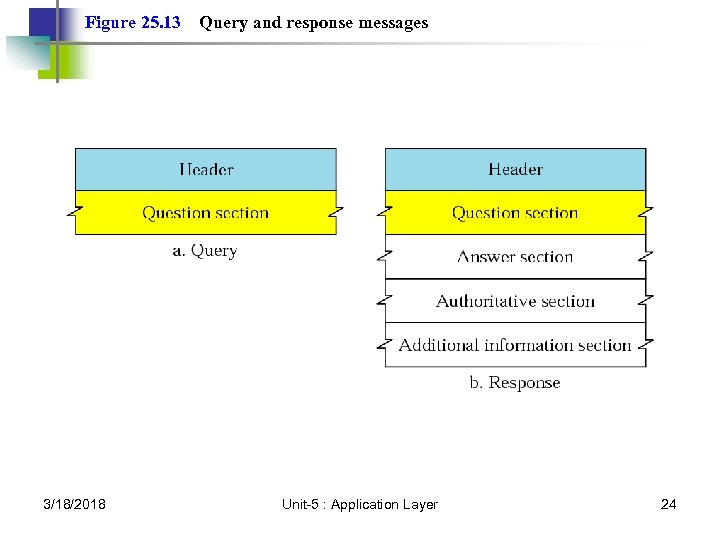 Figure 25. 13 3/18/2018 Query and response messages Unit-5 : Application Layer 24
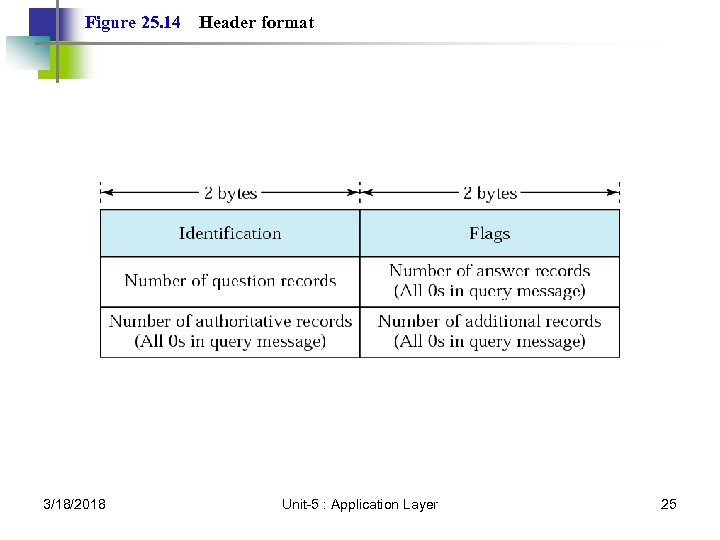 Figure 25. 14 3/18/2018 Header format Unit-5 : Application Layer 25
 Note: DNS can use the services of UDP or TCP, using the well-known port 53. 3/18/2018 Unit-5 : Application Layer 26
 SMTP and FTP 3/18/2018 Unit-5 : Application Layer 27
 26. 1 Electronic Mail Sending/Receiving Mail Addresses User Agent MIME Mail Transfer Agent Mail Access Protocols 3/18/2018 Unit-5 : Application Layer 28
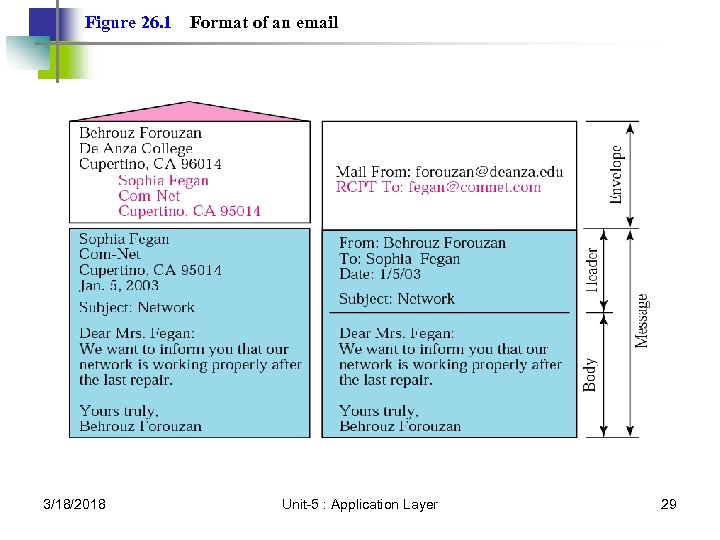 Figure 26. 1 3/18/2018 Format of an email Unit-5 : Application Layer 29
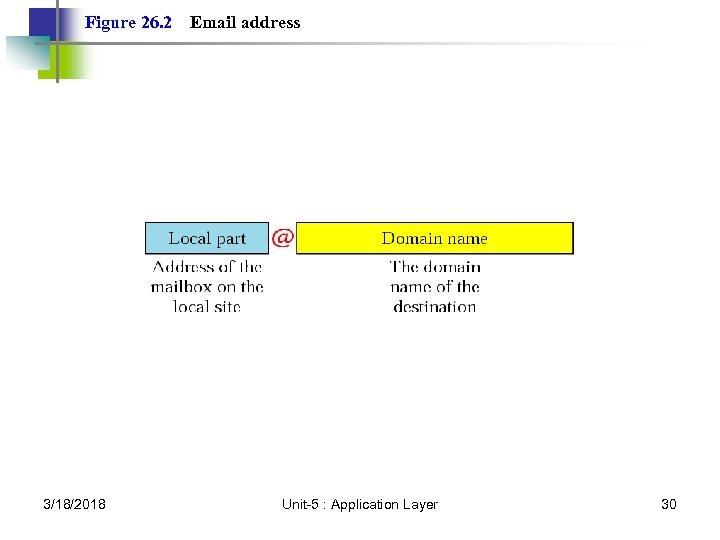 Figure 26. 2 3/18/2018 Email address Unit-5 : Application Layer 30
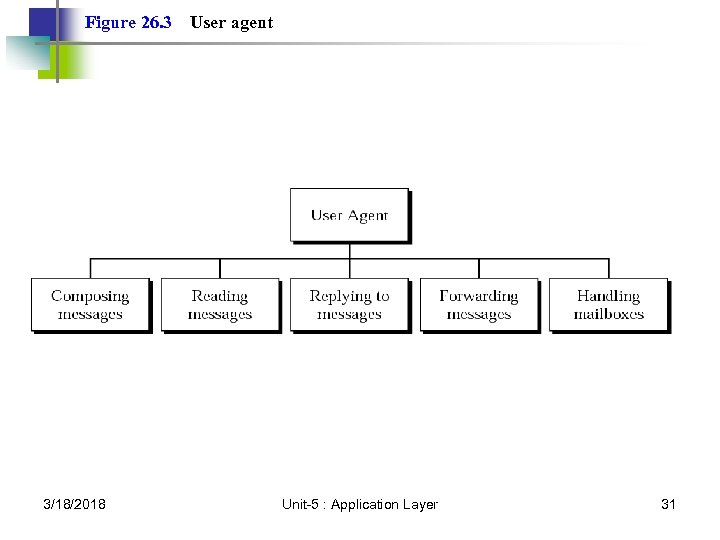 Figure 26. 3 3/18/2018 User agent Unit-5 : Application Layer 31
 Note: Some examples of command-driven user agents are mail, pine, and elm. 3/18/2018 Unit-5 : Application Layer 32
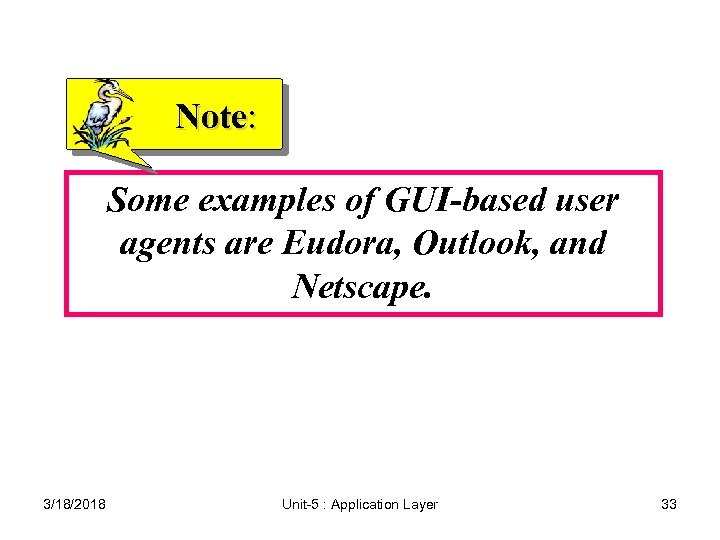 Note: Some examples of GUI-based user agents are Eudora, Outlook, and Netscape. 3/18/2018 Unit-5 : Application Layer 33
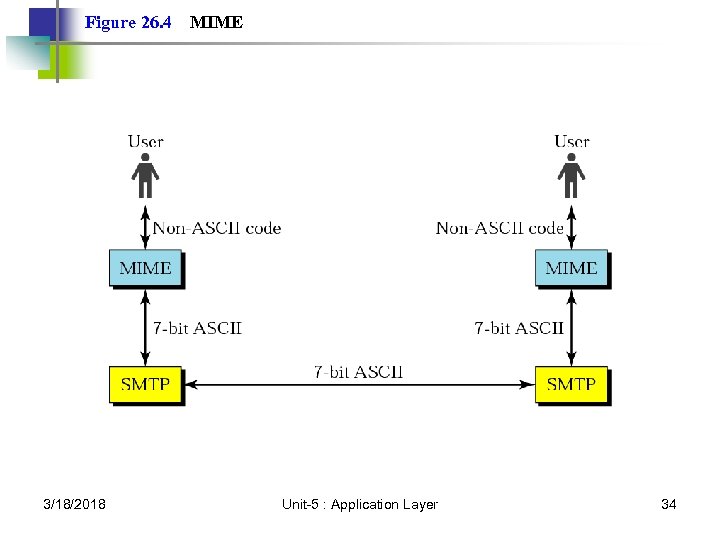 Figure 26. 4 3/18/2018 MIME Unit-5 : Application Layer 34
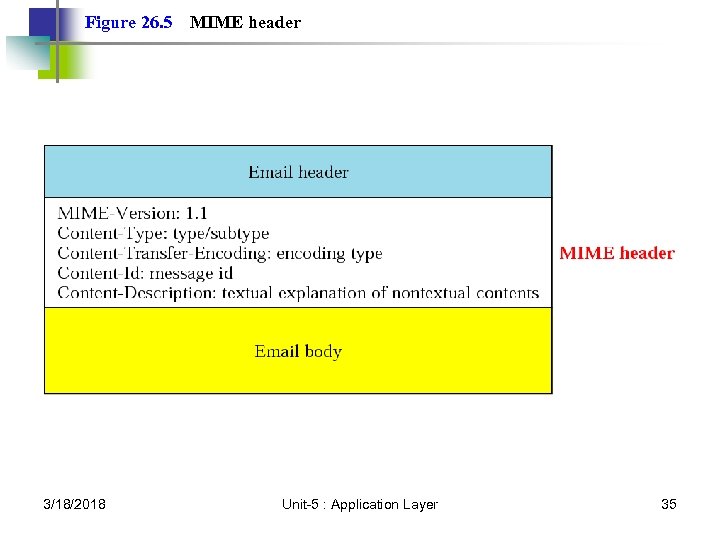 Figure 26. 5 3/18/2018 MIME header Unit-5 : Application Layer 35
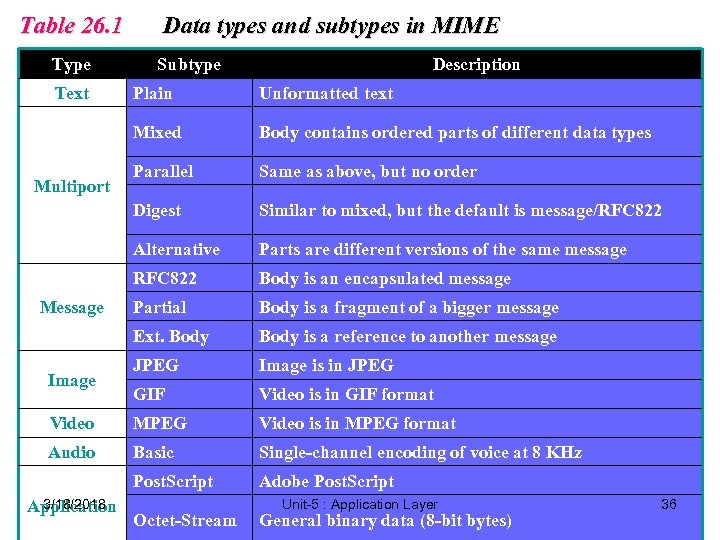 Table 26. 1 Type Text Data types and subtypes in MIME Subtype Description Plain Unformatted text Mixed Body contains ordered parts of different data types Parallel Same as above, but no order Digest Similar to mixed, but the default is message/RFC 822 Alternative Parts are different versions of the same message RFC 822 Body is an encapsulated message Partial Body is a fragment of a bigger message Ext. Body is a reference to another message JPEG Image is in JPEG GIF Video is in GIF format Video MPEG Video is in MPEG format Audio Basic Single-channel encoding of voice at 8 KHz Post. Script Adobe Post. Script Multiport Message Image 3/18/2018 Application Octet-Stream Unit-5 : Application Layer General binary data (8 -bit bytes) 36
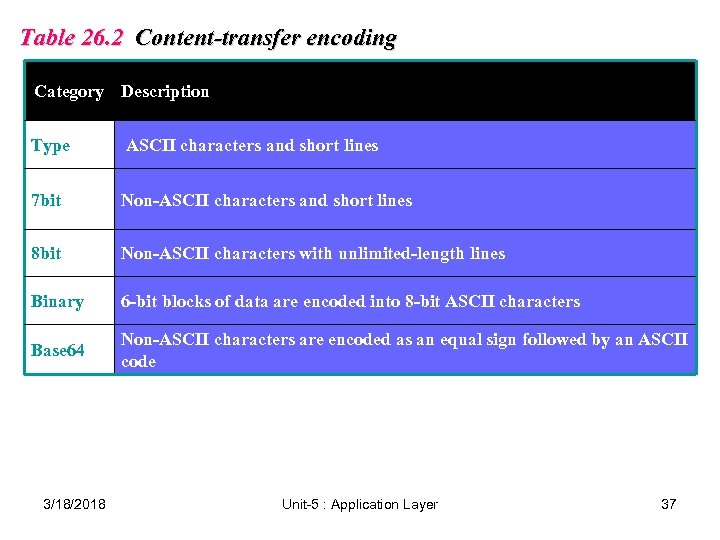 Table 26. 2 Content-transfer encoding Category Description Type ASCII characters and short lines 7 bit Non-ASCII characters and short lines 8 bit Non-ASCII characters with unlimited-length lines Binary 6 -bit blocks of data are encoded into 8 -bit ASCII characters Base 64 Non-ASCII characters are encoded as an equal sign followed by an ASCII code 3/18/2018 Unit-5 : Application Layer 37
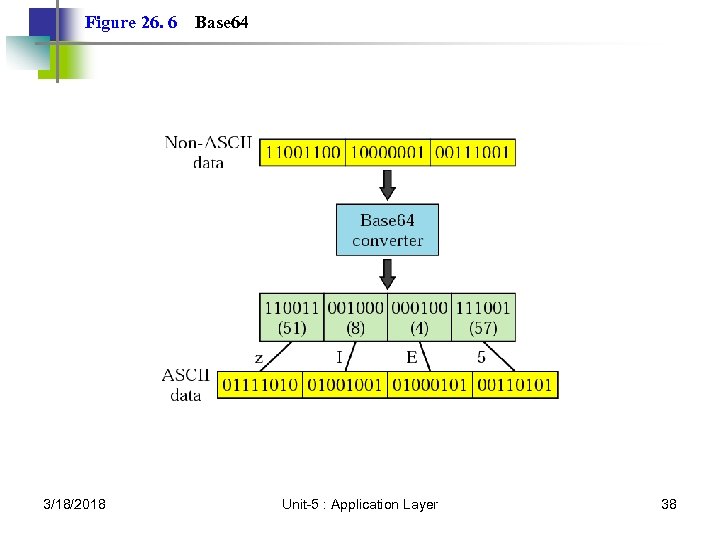 Figure 26. 6 3/18/2018 Base 64 Unit-5 : Application Layer 38
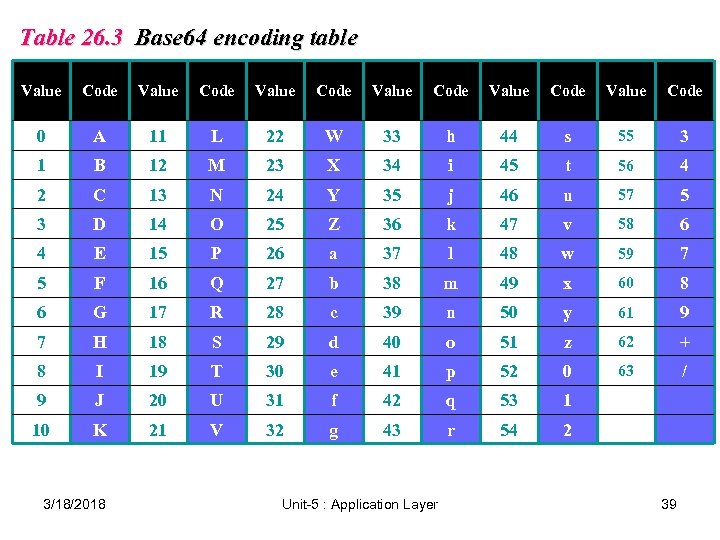 Table 26. 3 Base 64 encoding table Value Code Value Code 0 A 11 L 22 W 33 h 44 s 55 3 1 B 12 M 23 X 34 i 45 t 56 4 2 C 13 N 24 Y 35 j 46 u 57 5 3 D 14 O 25 Z 36 k 47 v 58 6 4 E 15 P 26 a 37 l 48 w 59 7 5 F 16 Q 27 b 38 m 49 x 60 8 6 G 17 R 28 c 39 n 50 y 61 9 7 H 18 S 29 d 40 o 51 z 62 + 8 I 19 T 30 e 41 p 52 0 63 / 9 J 20 U 31 f 42 q 53 1 10 K 21 V 32 g 43 r 54 2 3/18/2018 Unit-5 : Application Layer 39
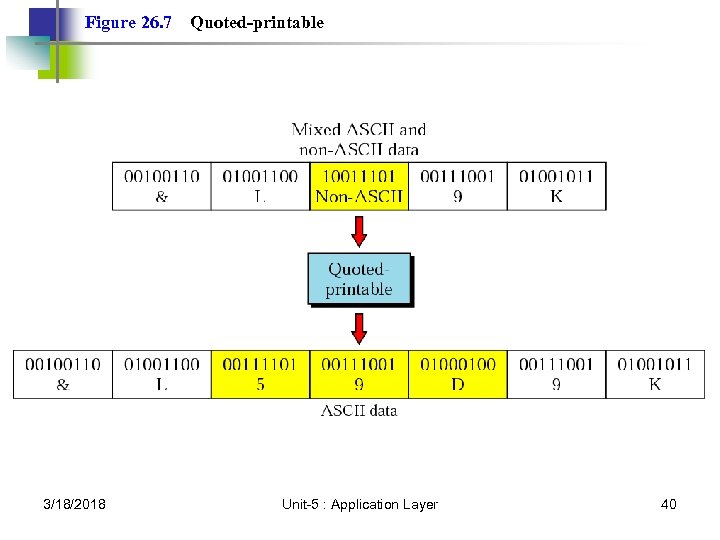 Figure 26. 7 3/18/2018 Quoted-printable Unit-5 : Application Layer 40
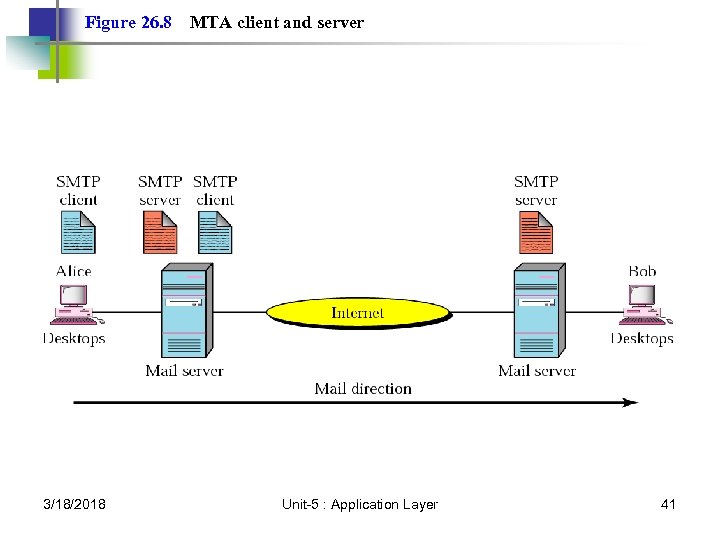 Figure 26. 8 3/18/2018 MTA client and server Unit-5 : Application Layer 41
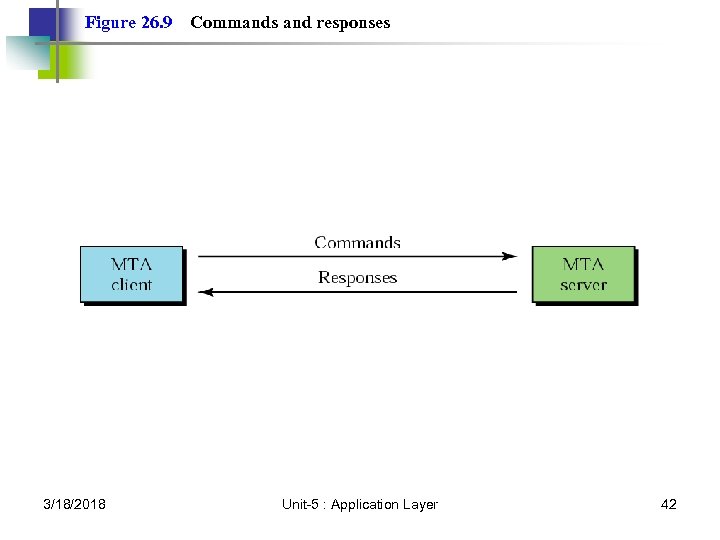 Figure 26. 9 3/18/2018 Commands and responses Unit-5 : Application Layer 42
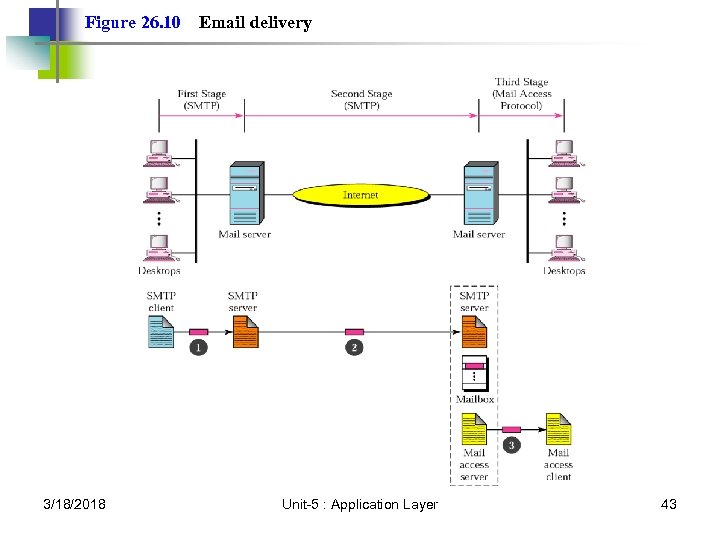 Figure 26. 10 3/18/2018 Email delivery Unit-5 : Application Layer 43
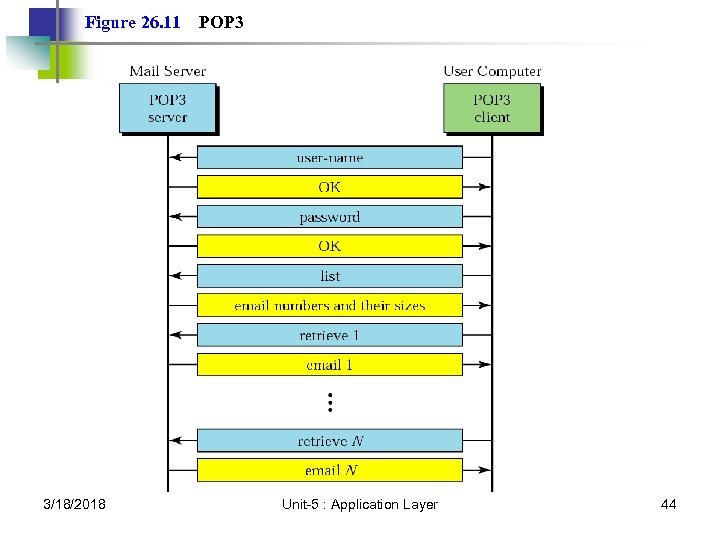 Figure 26. 11 3/18/2018 POP 3 Unit-5 : Application Layer 44
 26. 2 File Transfer Connections Communication File Transfer User Interface Anonymous 3/18/2018 Unit-5 : Application Layer 45
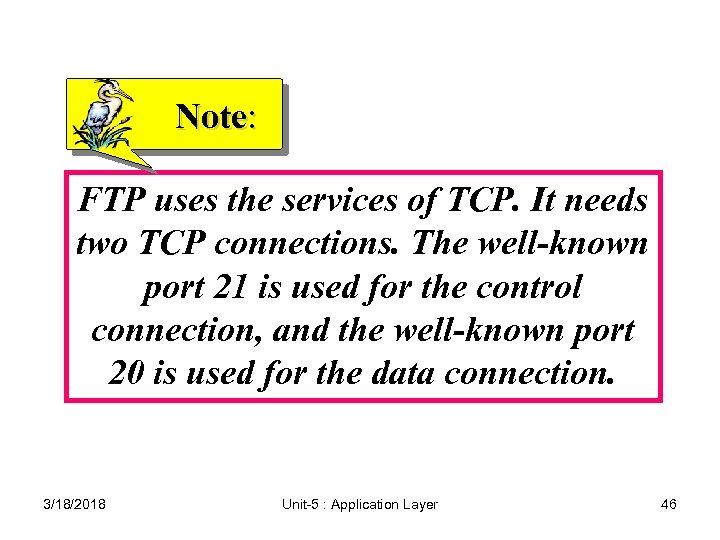 Note: FTP uses the services of TCP. It needs two TCP connections. The well-known port 21 is used for the control connection, and the well-known port 20 is used for the data connection. 3/18/2018 Unit-5 : Application Layer 46
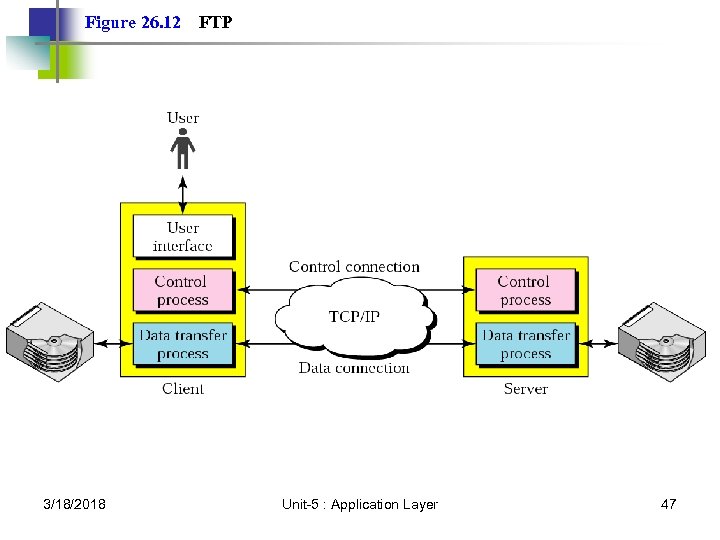 Figure 26. 12 3/18/2018 FTP Unit-5 : Application Layer 47
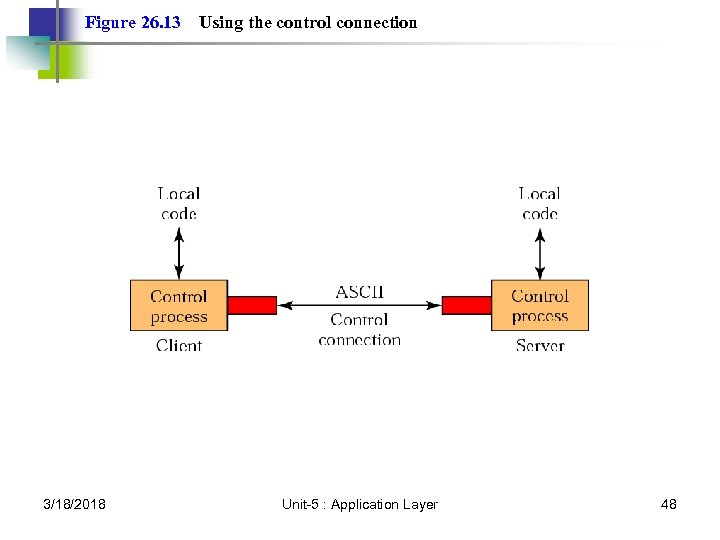 Figure 26. 13 3/18/2018 Using the control connection Unit-5 : Application Layer 48
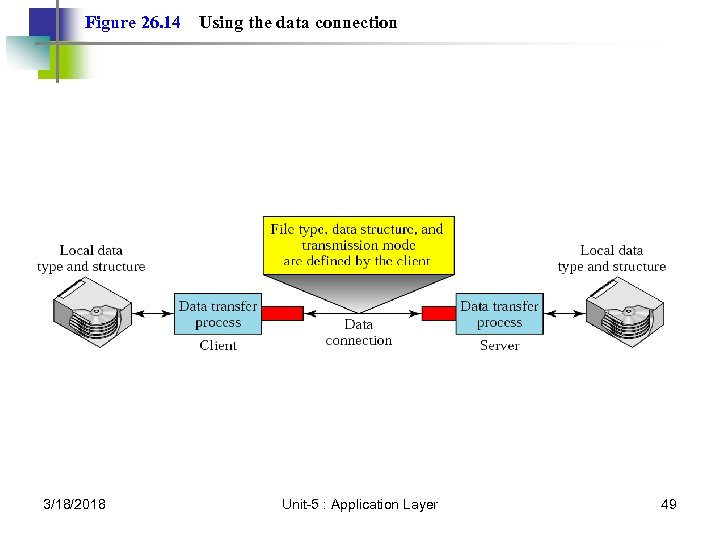 Figure 26. 14 3/18/2018 Using the data connection Unit-5 : Application Layer 49
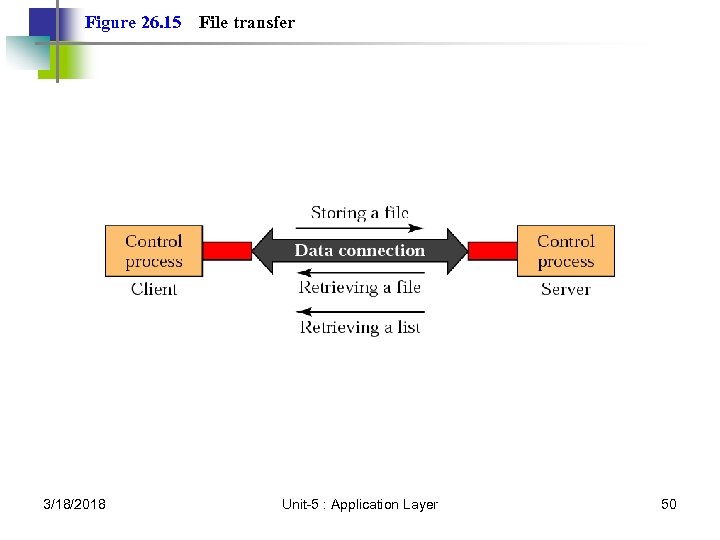 Figure 26. 15 3/18/2018 File transfer Unit-5 : Application Layer 50
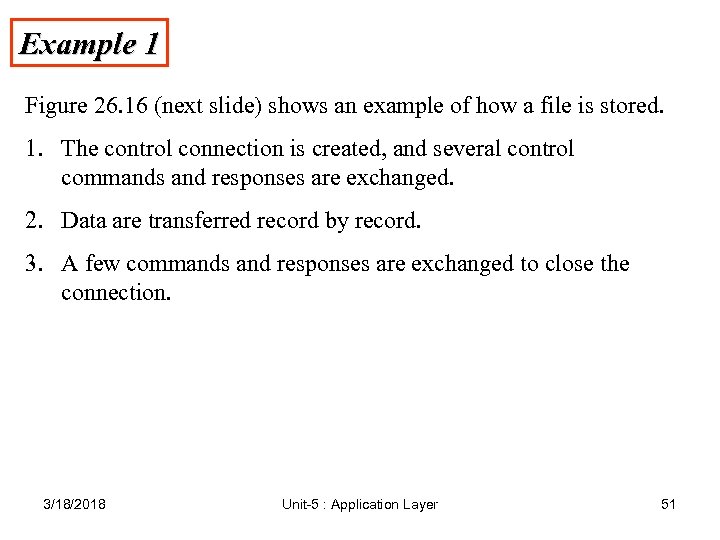 Example 1 Figure 26. 16 (next slide) shows an example of how a file is stored. 1. The control connection is created, and several control commands and responses are exchanged. 2. Data are transferred record by record. 3. A few commands and responses are exchanged to close the connection. 3/18/2018 Unit-5 : Application Layer 51
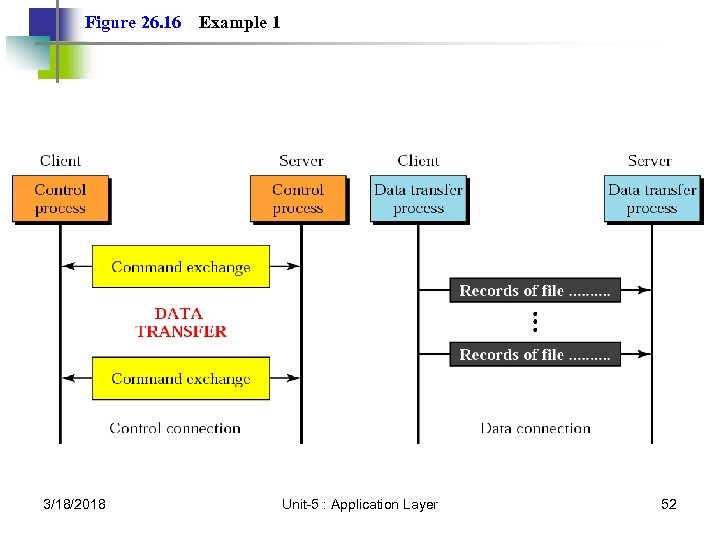 Figure 26. 16 3/18/2018 Example 1 Unit-5 : Application Layer 52
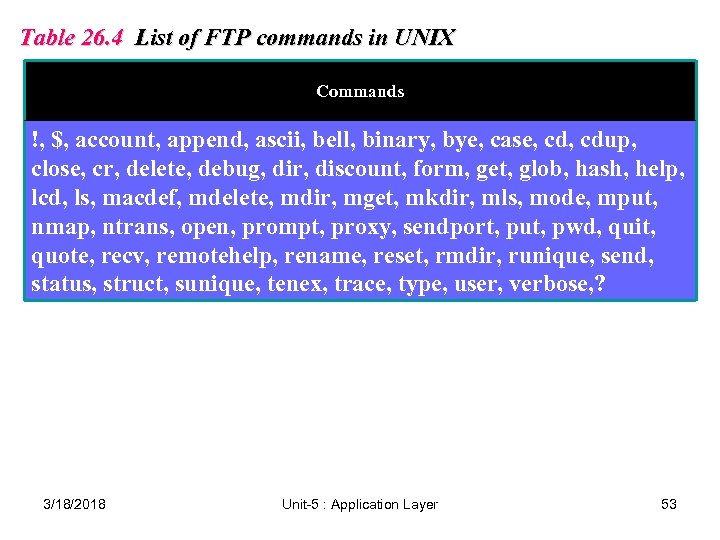 Table 26. 4 List of FTP commands in UNIX Commands !, $, account, append, ascii, bell, binary, bye, case, cdup, close, cr, delete, debug, dir, discount, form, get, glob, hash, help, lcd, ls, macdef, mdelete, mdir, mget, mkdir, mls, mode, mput, nmap, ntrans, open, prompt, proxy, sendport, put, pwd, quit, quote, recv, remotehelp, rename, reset, rmdir, runique, send, status, struct, sunique, tenex, trace, type, user, verbose, ? 3/18/2018 Unit-5 : Application Layer 53
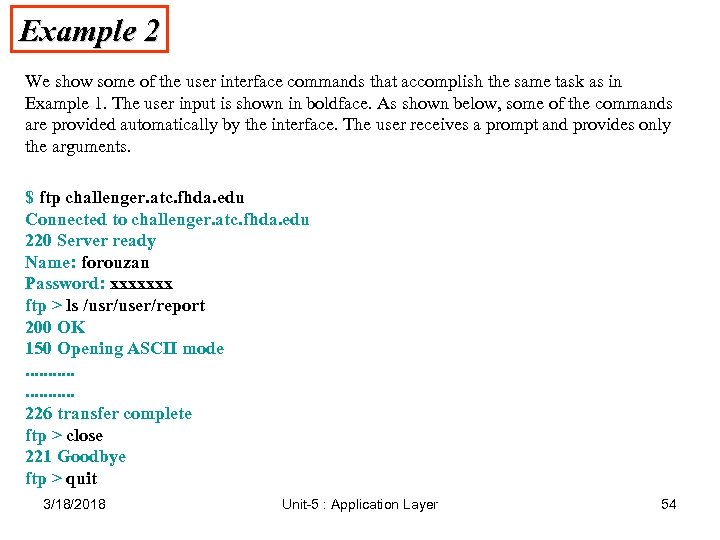 Example 2 We show some of the user interface commands that accomplish the same task as in Example 1. The user input is shown in boldface. As shown below, some of the commands are provided automatically by the interface. The user receives a prompt and provides only the arguments. $ ftp challenger. atc. fhda. edu Connected to challenger. atc. fhda. edu 220 Server ready Name: forouzan Password: xxxxxxx ftp > ls /usr/user/report 200 OK 150 Opening ASCII mode. . . . . 226 transfer complete ftp > close 221 Goodbye ftp > quit 3/18/2018 Unit-5 : Application Layer 54
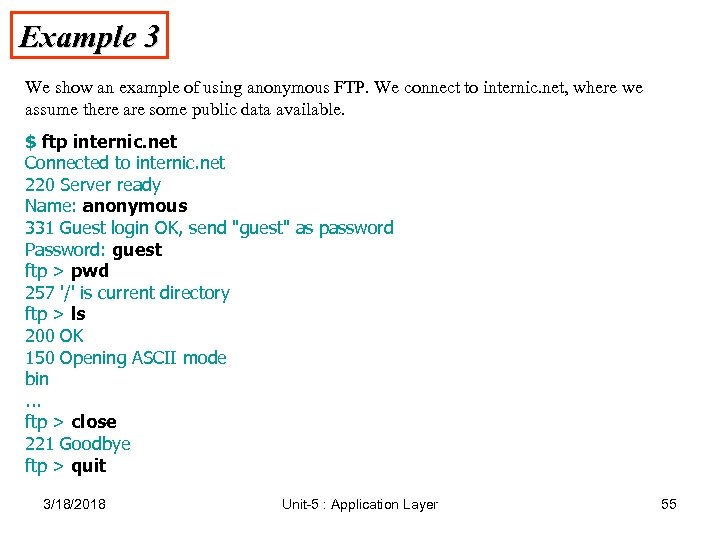 Example 3 We show an example of using anonymous FTP. We connect to internic. net, where we assume there are some public data available. $ ftp internic. net Connected to internic. net 220 Server ready Name: anonymous 331 Guest login OK, send "guest" as password Password: guest ftp > pwd 257 '/' is current directory ftp > ls 200 OK 150 Opening ASCII mode bin. . . ftp > close 221 Goodbye ftp > quit 3/18/2018 Unit-5 : Application Layer 55
 HTTP and WWW 3/18/2018 Unit-5 : Application Layer 56
 27. 1 HTTP Transaction Request Message Response Message Headers 3/18/2018 Unit-5 : Application Layer 57
 Note: HTTP uses the services of TCP on well -known port 80. 3/18/2018 Unit-5 : Application Layer 58
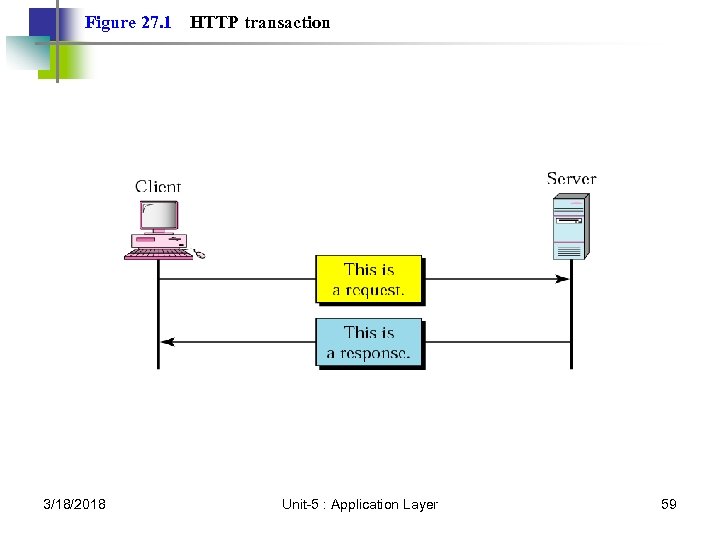 Figure 27. 1 3/18/2018 HTTP transaction Unit-5 : Application Layer 59
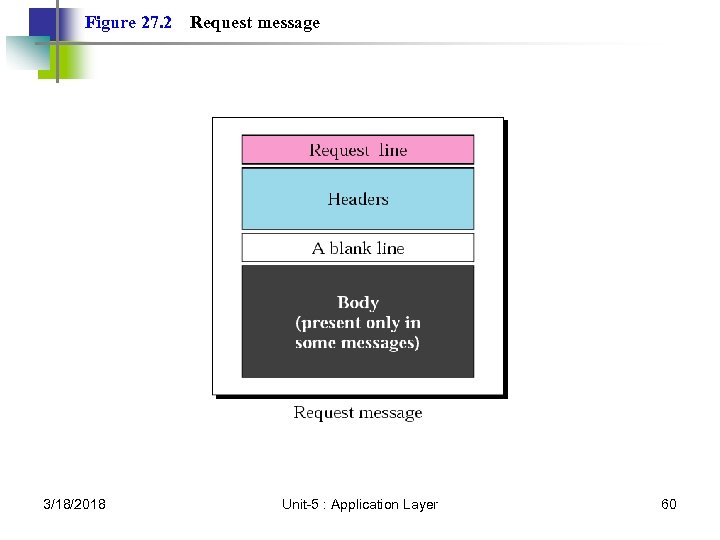 Figure 27. 2 3/18/2018 Request message Unit-5 : Application Layer 60
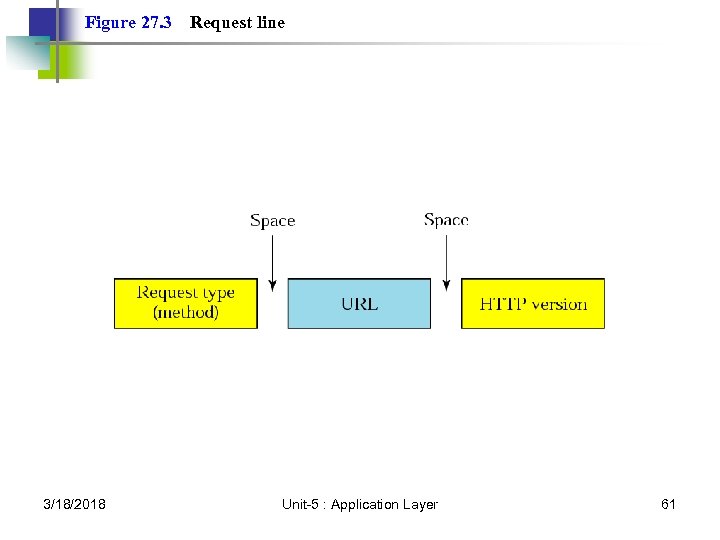 Figure 27. 3 3/18/2018 Request line Unit-5 : Application Layer 61
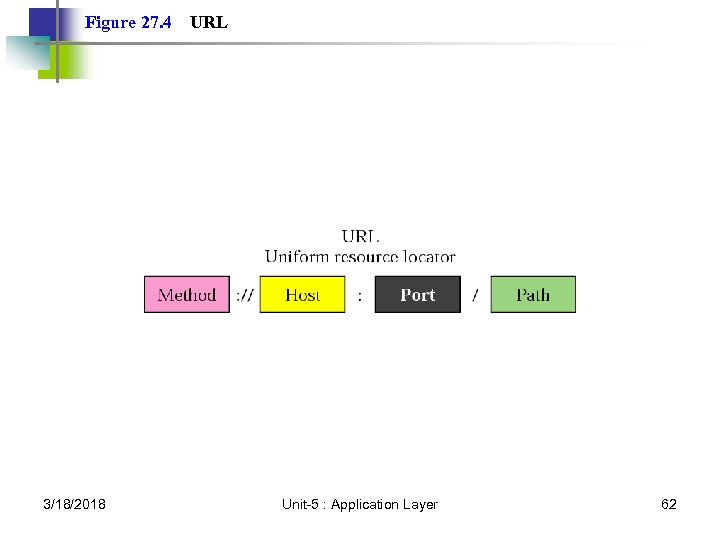 Figure 27. 4 3/18/2018 URL Unit-5 : Application Layer 62
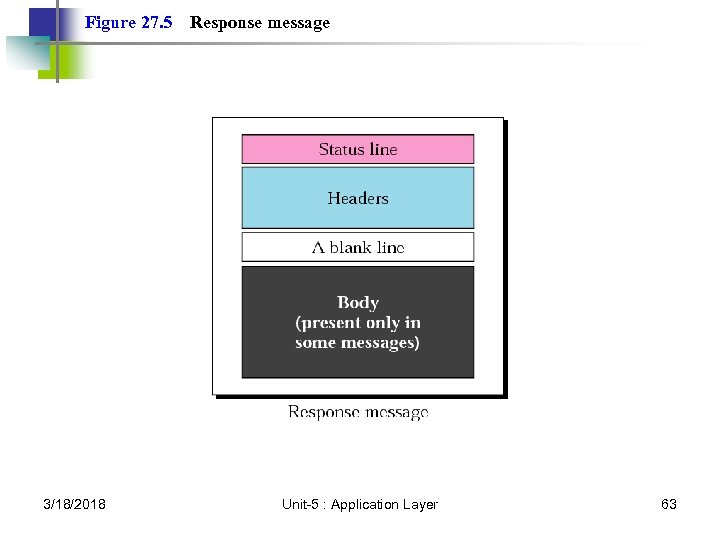 Figure 27. 5 3/18/2018 Response message Unit-5 : Application Layer 63
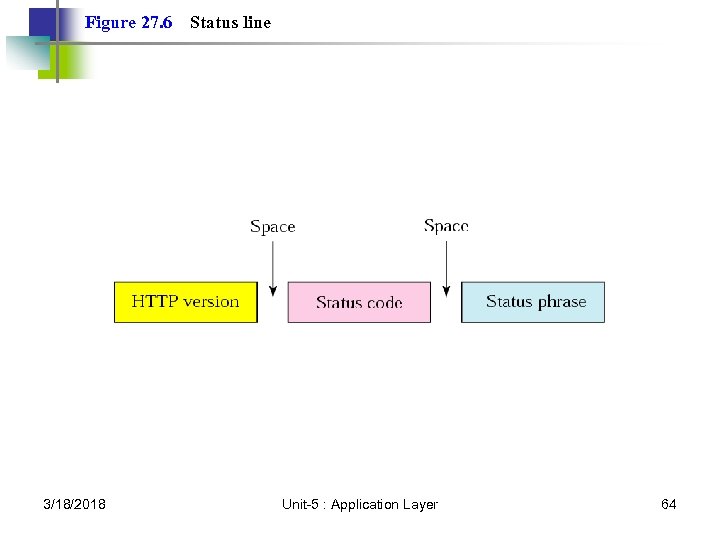 Figure 27. 6 3/18/2018 Status line Unit-5 : Application Layer 64
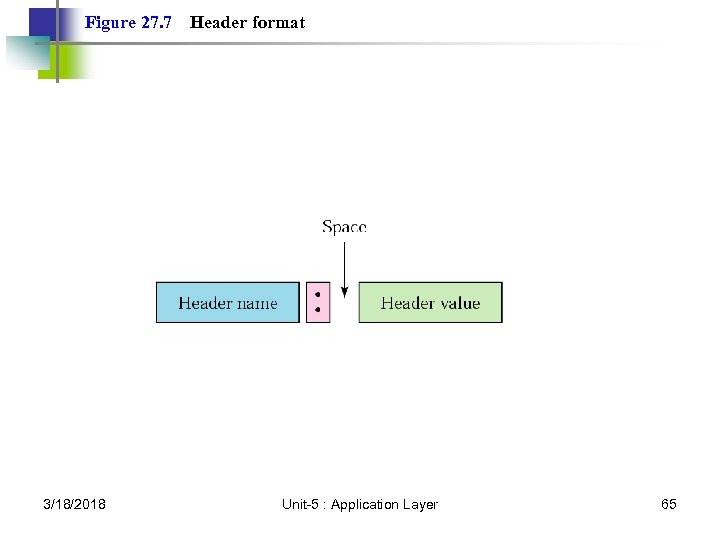 Figure 27. 7 3/18/2018 Header format Unit-5 : Application Layer 65
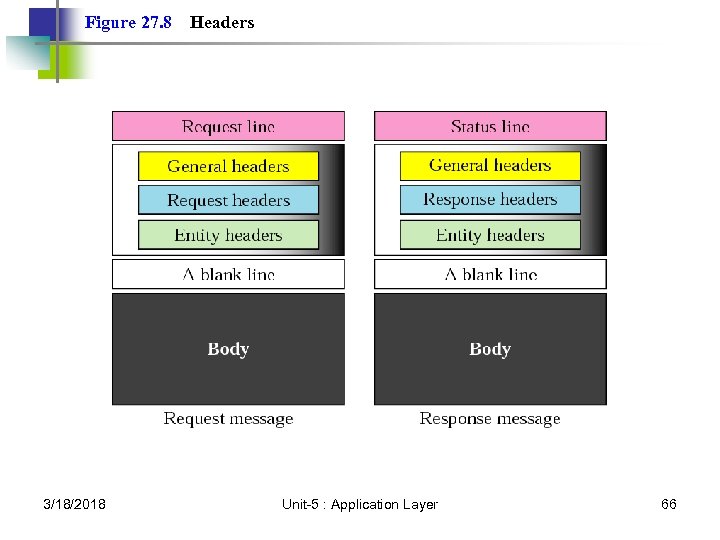 Figure 27. 8 3/18/2018 Headers Unit-5 : Application Layer 66
 Example 1 This example retrieves a document. We use the GET method to retrieve an image with the path /usr/bin/image 1. The request line shows the method (GET), the URL, and the HTTP version (1. 1). The header has two lines that show that the client can accept images in GIF and JPEG format. The request does not have a body. The response message contains the status line and four lines of header. The header lines define the date, server, MIME version, and length of the document. The body of the document follows the header (see Fig. 27. 9, next slide). 3/18/2018 Unit-5 : Application Layer 67
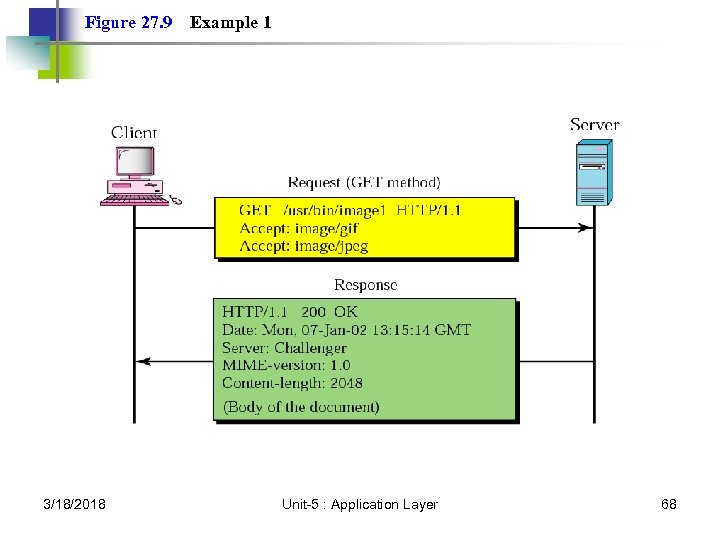 Figure 27. 9 3/18/2018 Example 1 Unit-5 : Application Layer 68
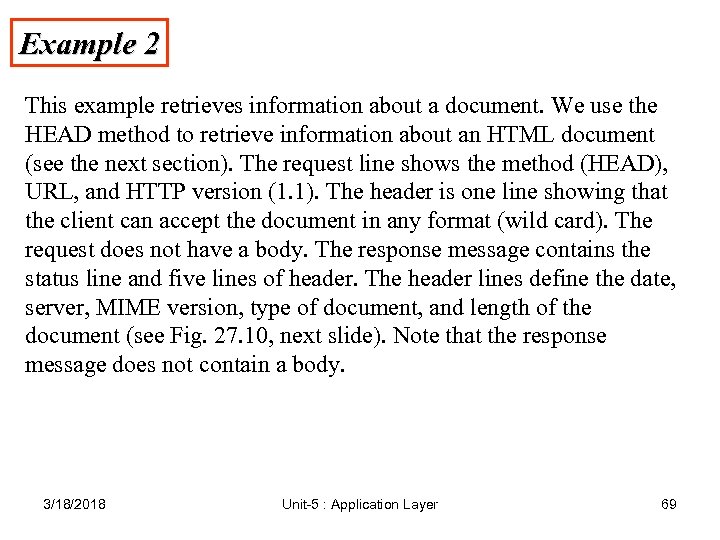 Example 2 This example retrieves information about a document. We use the HEAD method to retrieve information about an HTML document (see the next section). The request line shows the method (HEAD), URL, and HTTP version (1. 1). The header is one line showing that the client can accept the document in any format (wild card). The request does not have a body. The response message contains the status line and five lines of header. The header lines define the date, server, MIME version, type of document, and length of the document (see Fig. 27. 10, next slide). Note that the response message does not contain a body. 3/18/2018 Unit-5 : Application Layer 69
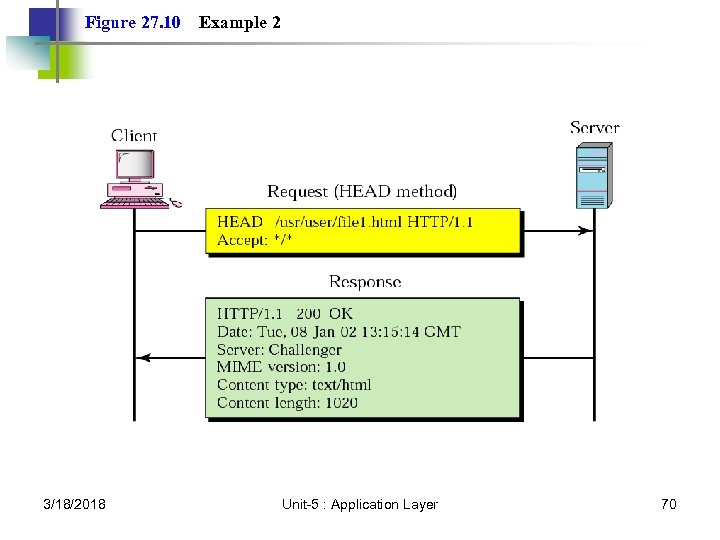 Figure 27. 10 3/18/2018 Example 2 Unit-5 : Application Layer 70
 Note: HTTP version 1. 1 specifies a persistent connection by default. 3/18/2018 Unit-5 : Application Layer 71
 27. 2 World Wide Web Hypertext and Hypermedia Browser Architecture Static Document/HTML Dynamic Document/CGI Active Document/Java 3/18/2018 Unit-5 : Application Layer 72
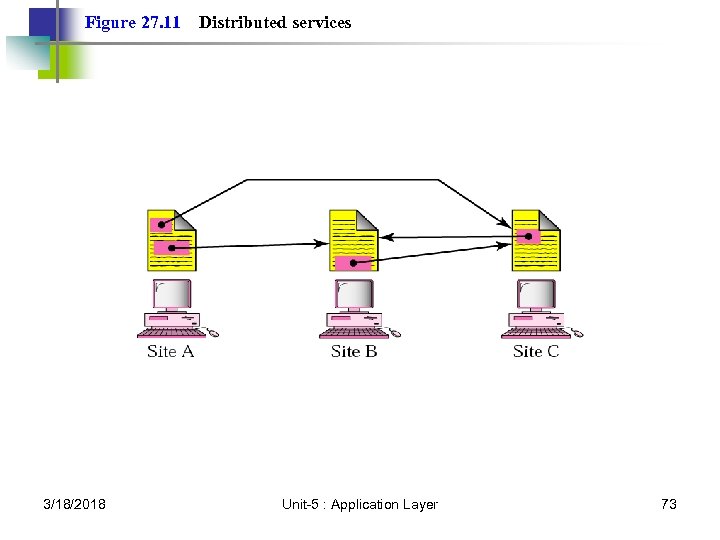 Figure 27. 11 3/18/2018 Distributed services Unit-5 : Application Layer 73
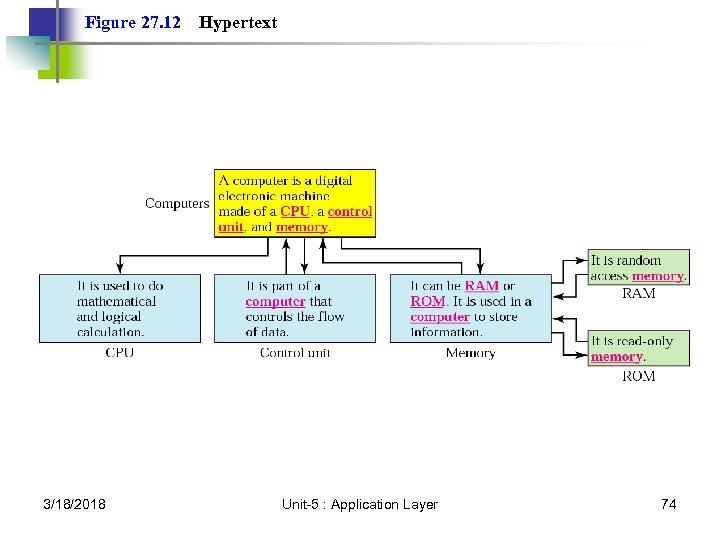 Figure 27. 12 3/18/2018 Hypertext Unit-5 : Application Layer 74
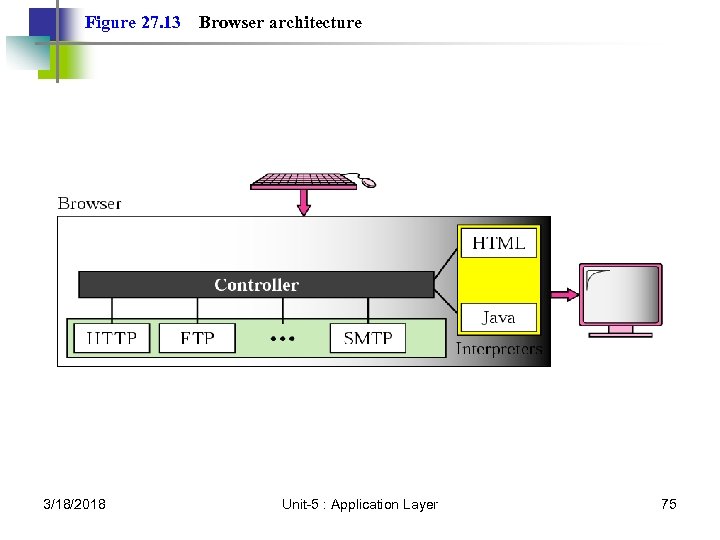 Figure 27. 13 3/18/2018 Browser architecture Unit-5 : Application Layer 75
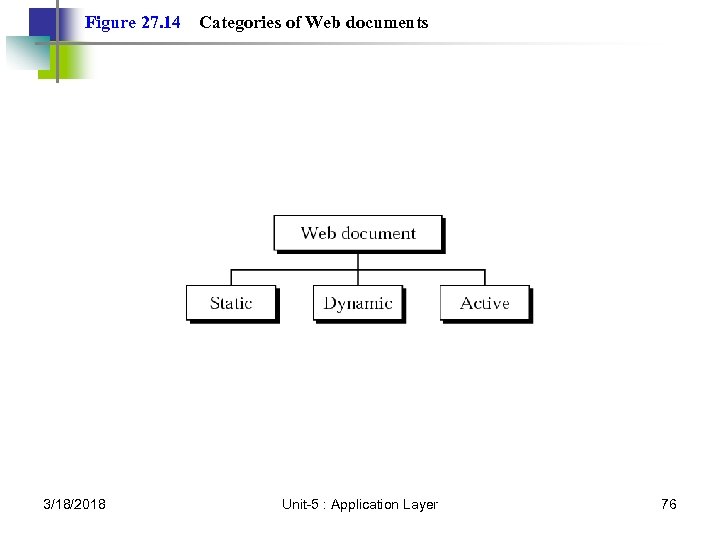 Figure 27. 14 3/18/2018 Categories of Web documents Unit-5 : Application Layer 76
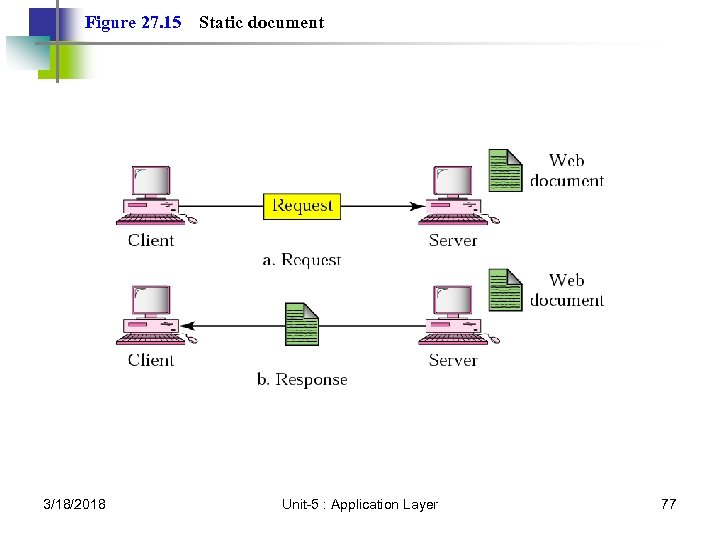 Figure 27. 15 3/18/2018 Static document Unit-5 : Application Layer 77
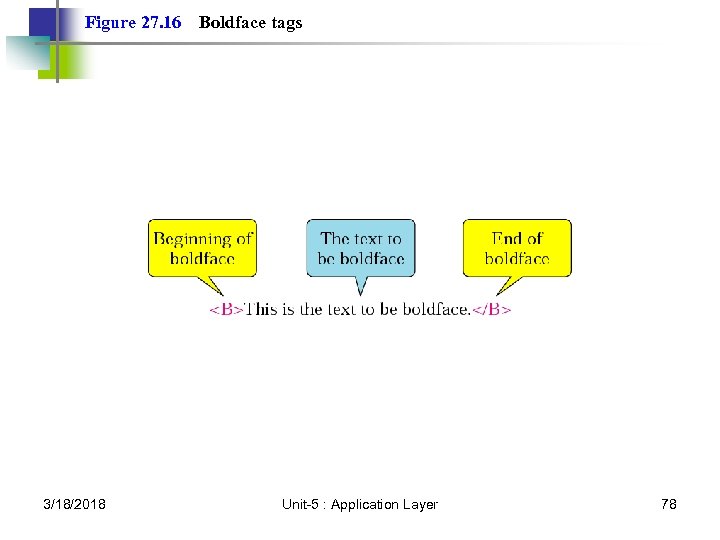 Figure 27. 16 3/18/2018 Boldface tags Unit-5 : Application Layer 78
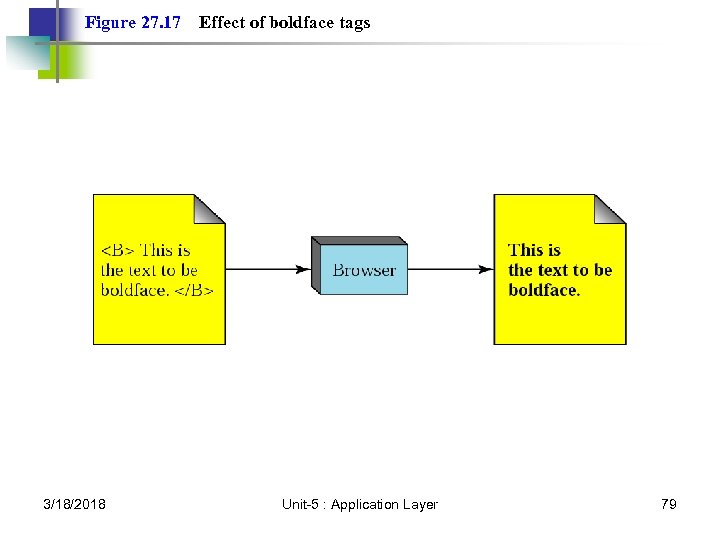 Figure 27. 17 3/18/2018 Effect of boldface tags Unit-5 : Application Layer 79
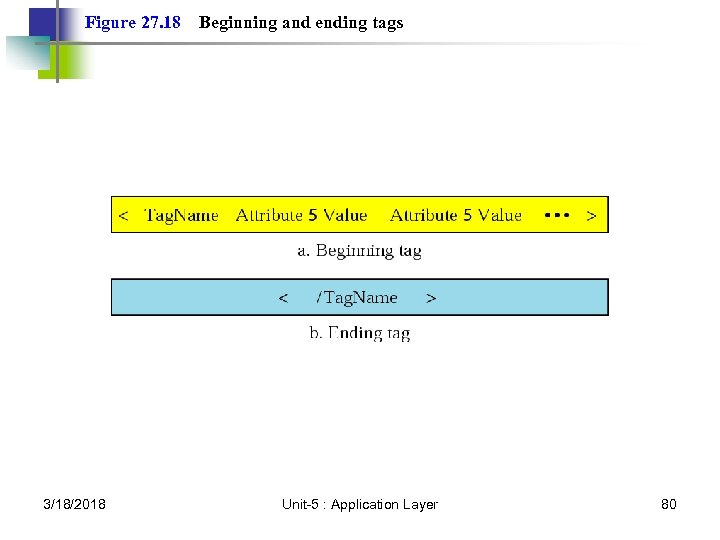 Figure 27. 18 3/18/2018 Beginning and ending tags Unit-5 : Application Layer 80
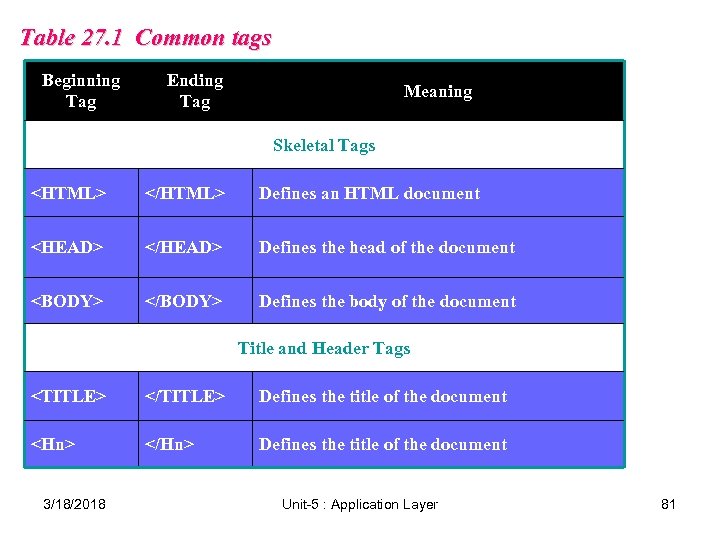 Table 27. 1 Common tags Beginning Tag Ending Tag Meaning Skeletal Tags Defines an HTML document
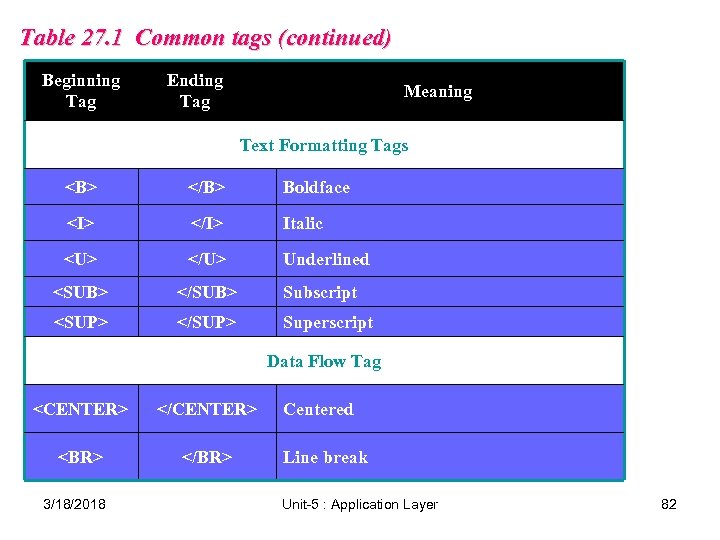 Table 27. 1 Common tags (continued) Beginning Tag Ending Tag Meaning Text Formatting Tags Boldface Italic Underlined Subscript Superscript Data Flow Tag
3/18/2018 Centered Line break Unit-5 : Application Layer 82
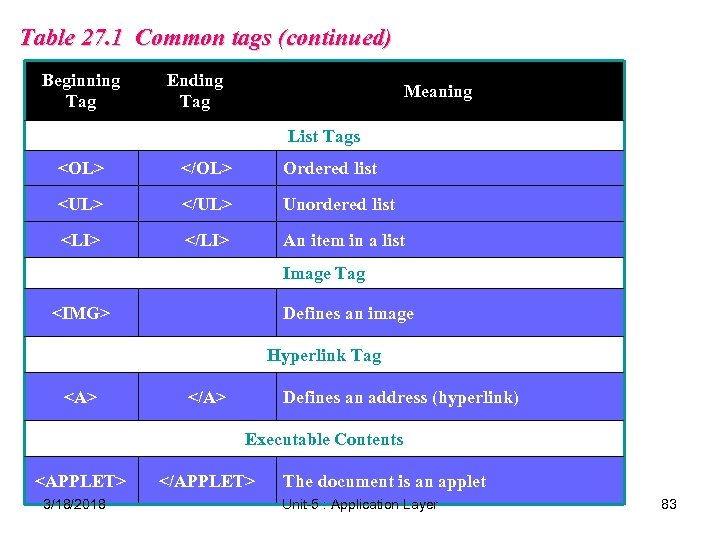 Table 27. 1 Common tags (continued) Beginning Tag Ending Tag Meaning List Tags
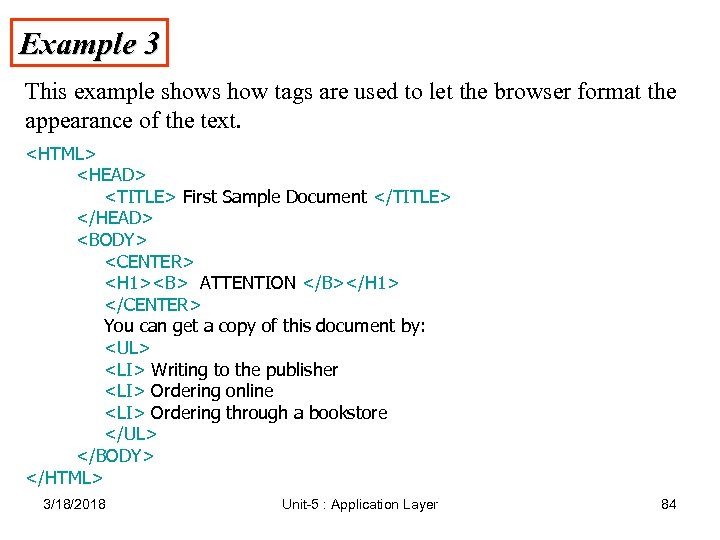 Example 3 This example shows how tags are used to let the browser format the appearance of the text.
- Writing to the publisher
- Ordering online
- Ordering through a bookstore
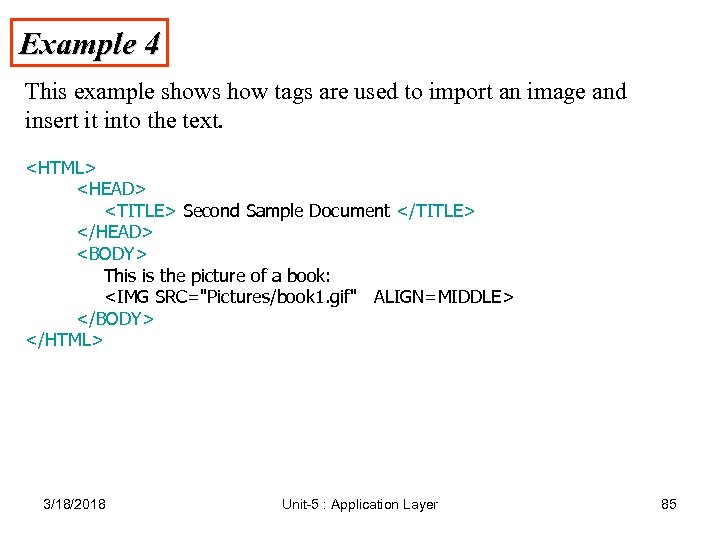 Example 4 This example shows how tags are used to import an image and insert it into the text.
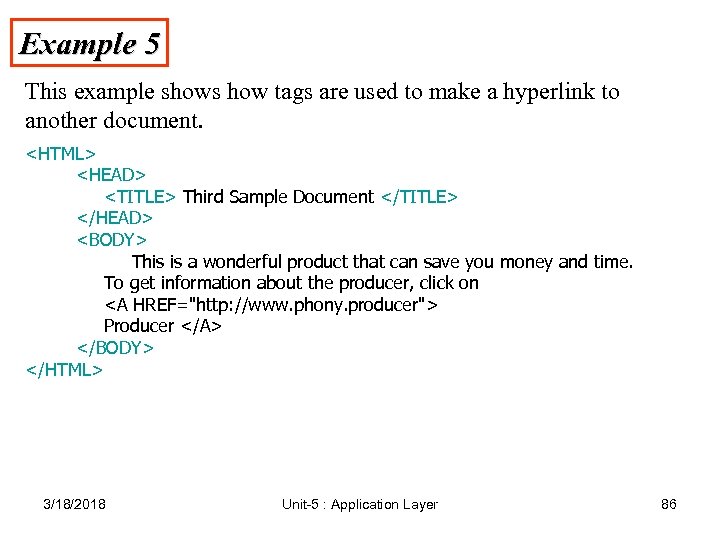 Example 5 This example shows how tags are used to make a hyperlink to another document.
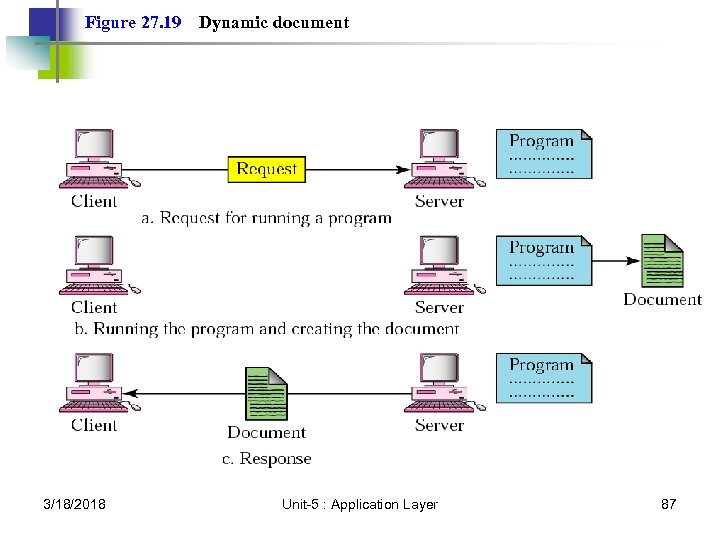 Figure 27. 19 3/18/2018 Dynamic document Unit-5 : Application Layer 87
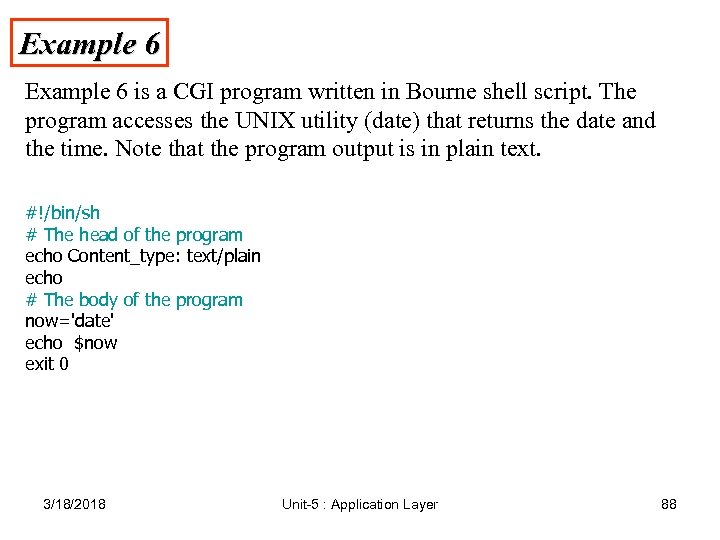 Example 6 is a CGI program written in Bourne shell script. The program accesses the UNIX utility (date) that returns the date and the time. Note that the program output is in plain text. #!/bin/sh # The head of the program echo Content_type: text/plain echo # The body of the program now='date' echo $now exit 0 3/18/2018 Unit-5 : Application Layer 88
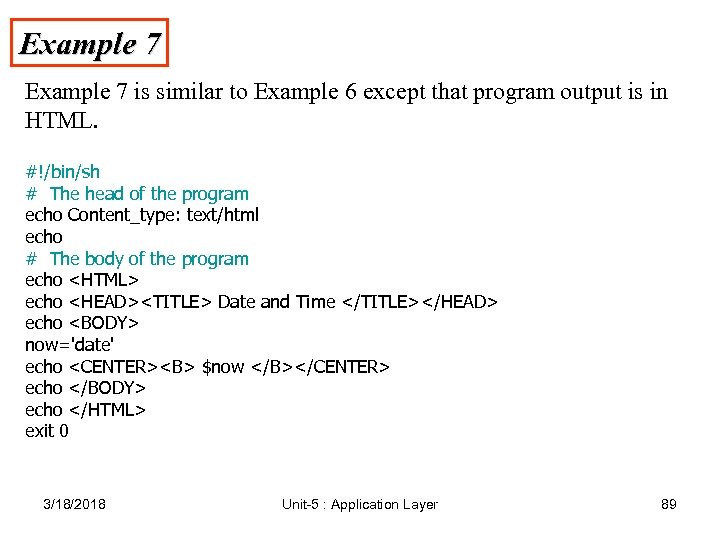 Example 7 is similar to Example 6 except that program output is in HTML. #!/bin/sh # The head of the program echo Content_type: text/html echo # The body of the program echo echo
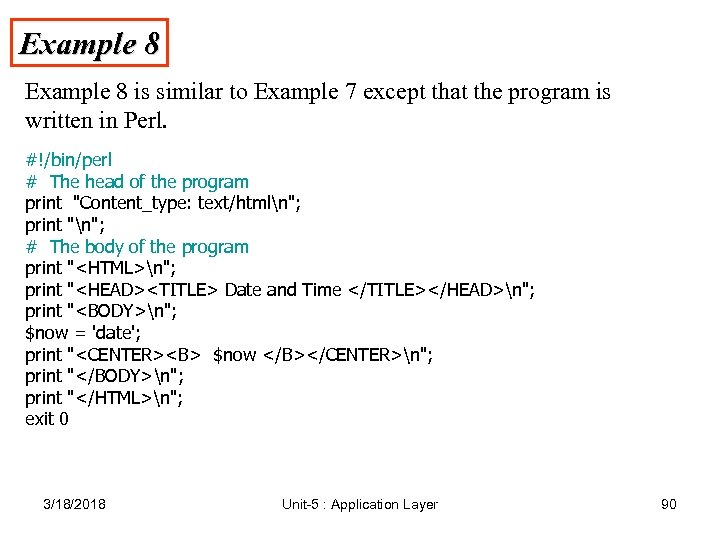 Example 8 is similar to Example 7 except that the program is written in Perl. #!/bin/perl # The head of the program print "Content_type: text/htmln"; print "n"; # The body of the program print "n"; print "
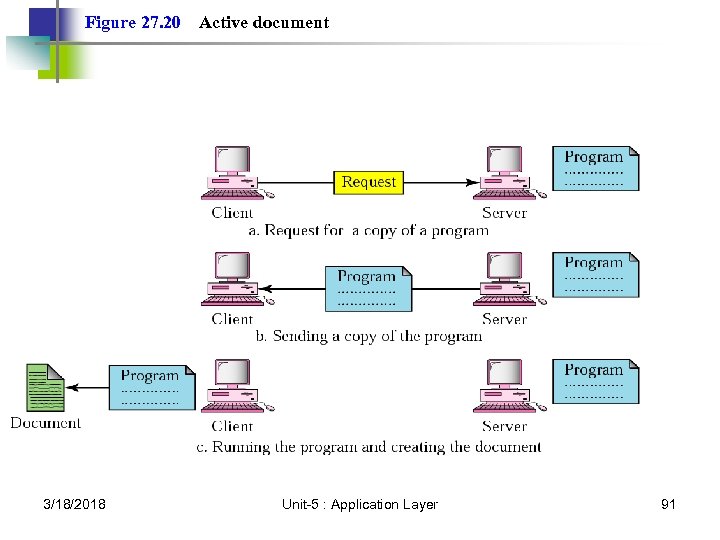 Figure 27. 20 3/18/2018 Active document Unit-5 : Application Layer 91
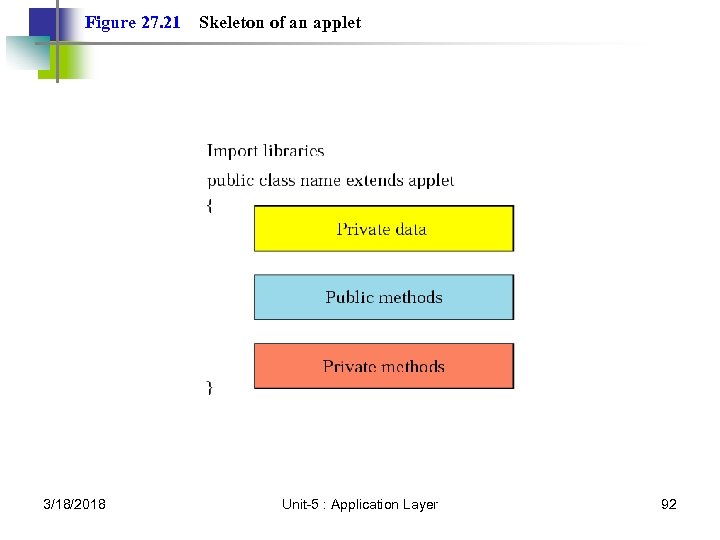 Figure 27. 21 3/18/2018 Skeleton of an applet Unit-5 : Application Layer 92
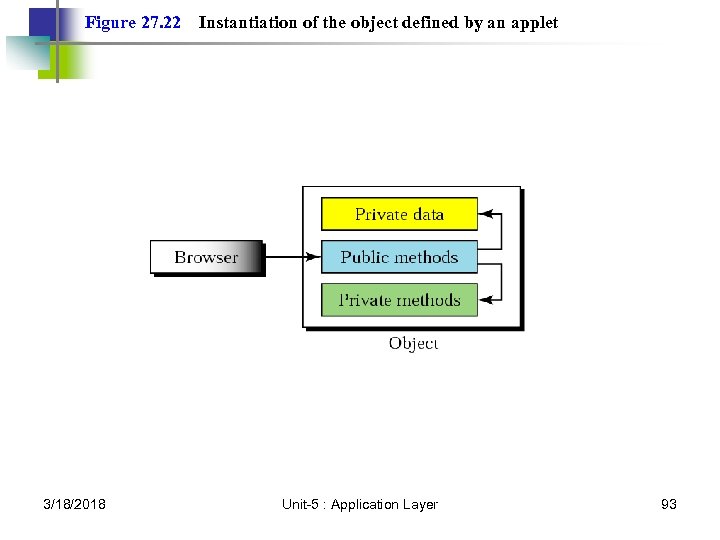 Figure 27. 22 3/18/2018 Instantiation of the object defined by an applet Unit-5 : Application Layer 93
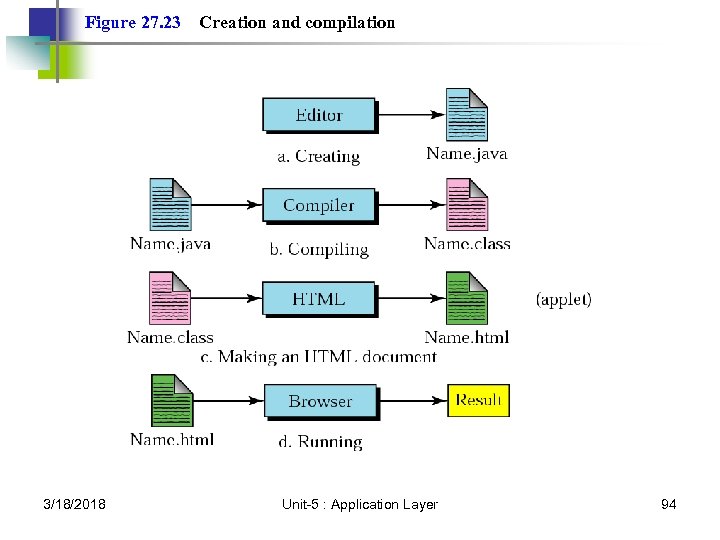 Figure 27. 23 3/18/2018 Creation and compilation Unit-5 : Application Layer 94
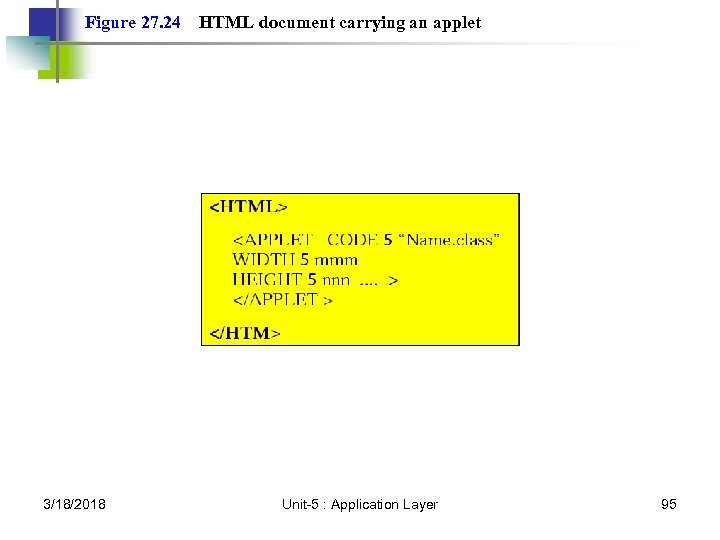 Figure 27. 24 3/18/2018 HTML document carrying an applet Unit-5 : Application Layer 95
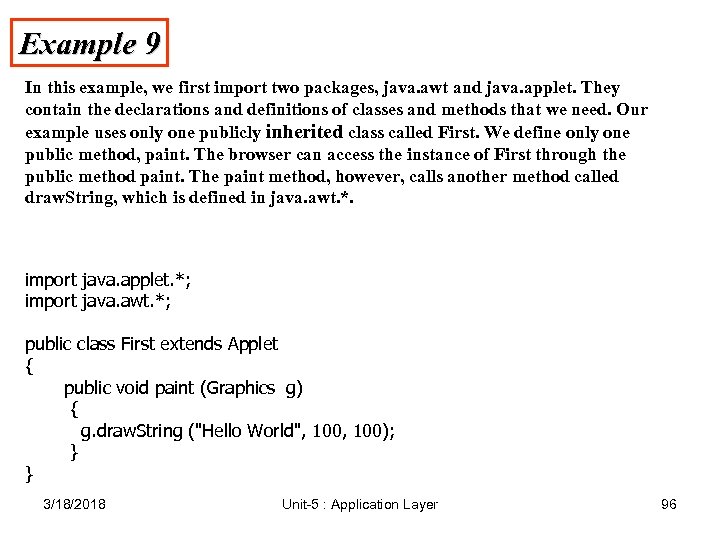 Example 9 In this example, we first import two packages, java. awt and java. applet. They contain the declarations and definitions of classes and methods that we need. Our example uses only one publicly inherited class called First. We define only one public method, paint. The browser can access the instance of First through the public method paint. The paint method, however, calls another method called draw. String, which is defined in java. awt. *. import java. applet. *; import java. awt. *; public class First extends Applet { public void paint (Graphics g) { g. draw. String ("Hello World", 100); } } 3/18/2018 Unit-5 : Application Layer 96
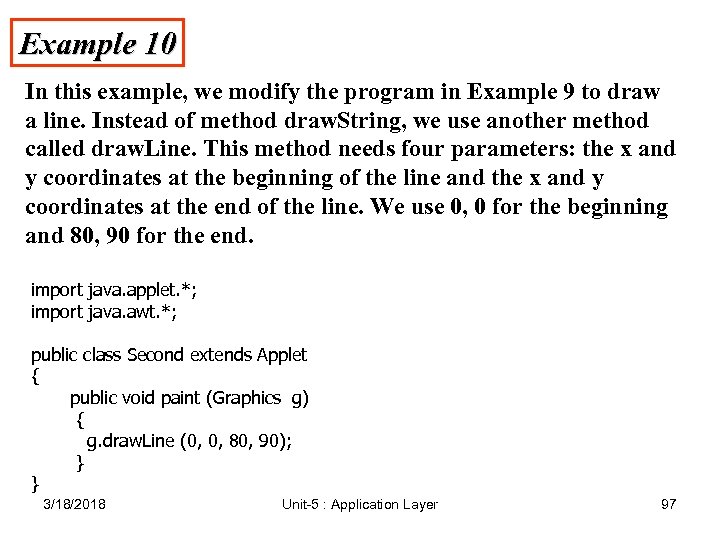 Example 10 In this example, we modify the program in Example 9 to draw a line. Instead of method draw. String, we use another method called draw. Line. This method needs four parameters: the x and y coordinates at the beginning of the line and the x and y coordinates at the end of the line. We use 0, 0 for the beginning and 80, 90 for the end. import java. applet. *; import java. awt. *; public class Second extends Applet { public void paint (Graphics g) { g. draw. Line (0, 0, 80, 90); } } 3/18/2018 Unit-5 : Application Layer 97
 Security 3/18/2018 Unit-5 : Application Layer 98
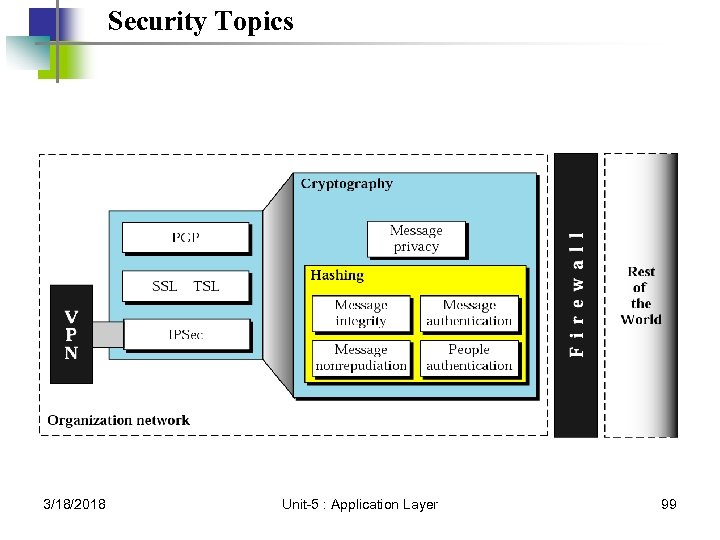 Security Topics 3/18/2018 Unit-5 : Application Layer 99
 Cryptography 3/18/2018 Unit-5 : Application Layer 100
 29. 1 Introduction to Cryptography 3/18/2018 Unit-5 : Application Layer 101
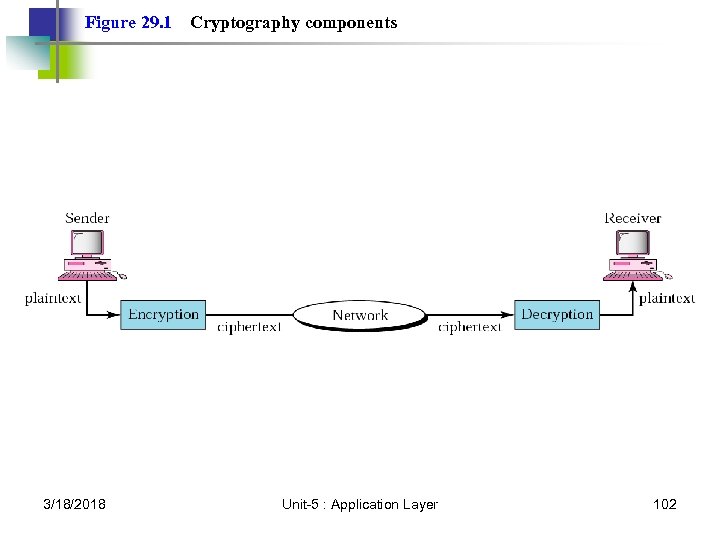 Figure 29. 1 3/18/2018 Cryptography components Unit-5 : Application Layer 102
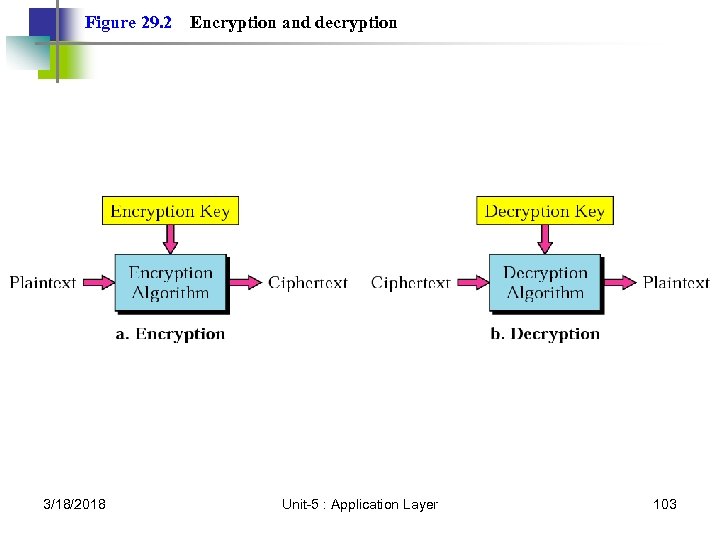 Figure 29. 2 3/18/2018 Encryption and decryption Unit-5 : Application Layer 103
 Note: In cryptography, the encryption/decryption algorithms are public; the keys are secret. 3/18/2018 Unit-5 : Application Layer 104
 29. 2 Symmetric-Key Cryptography Traditional Cipher Block Cipher Operation Modes 3/18/2018 Unit-5 : Application Layer 105
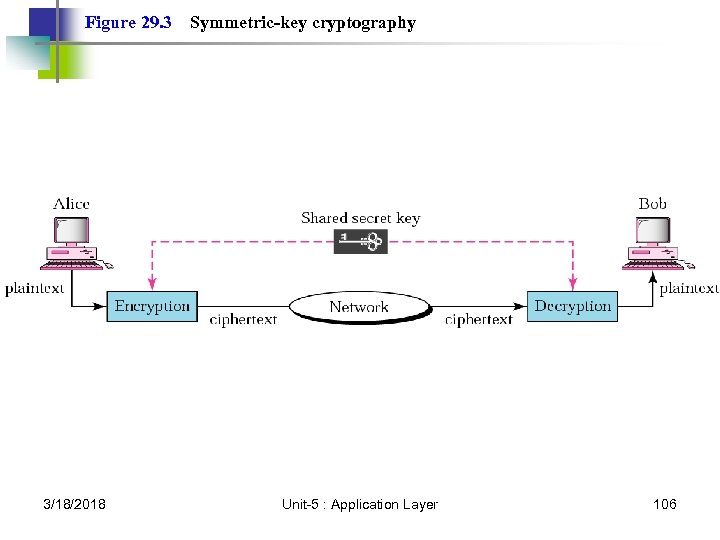 Figure 29. 3 3/18/2018 Symmetric-key cryptography Unit-5 : Application Layer 106
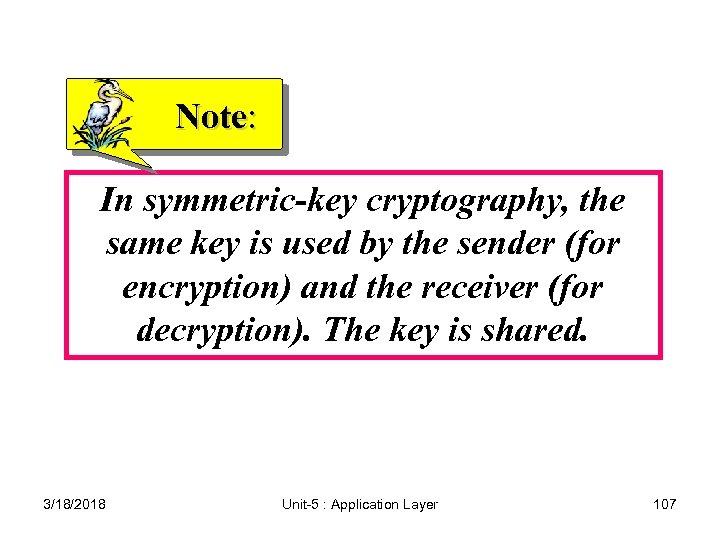 Note: In symmetric-key cryptography, the same key is used by the sender (for encryption) and the receiver (for decryption). The key is shared. 3/18/2018 Unit-5 : Application Layer 107
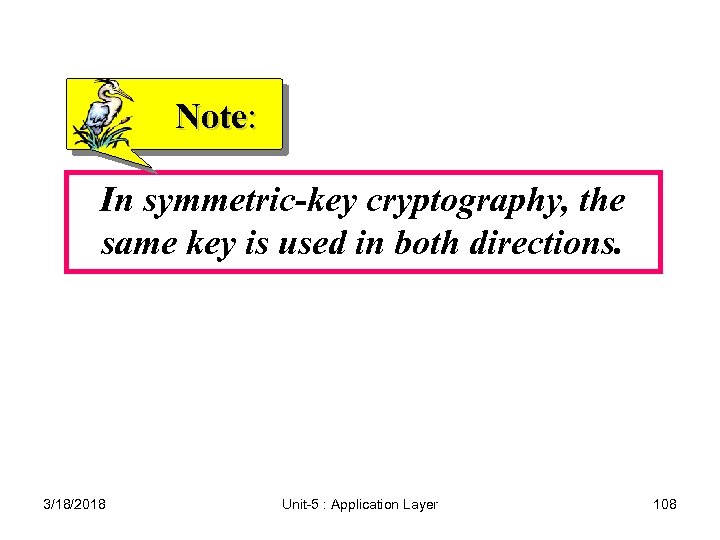 Note: In symmetric-key cryptography, the same key is used in both directions. 3/18/2018 Unit-5 : Application Layer 108
 Note: Symmetric-key cryptography is often used for long messages. 3/18/2018 Unit-5 : Application Layer 109
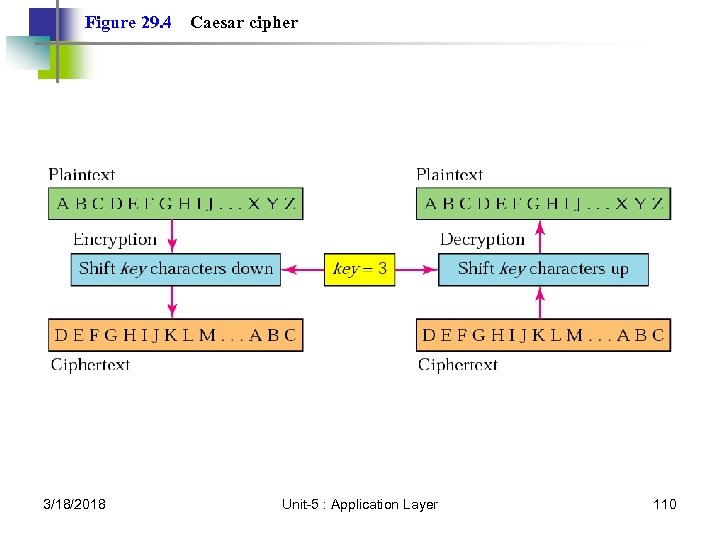 Figure 29. 4 3/18/2018 Caesar cipher Unit-5 : Application Layer 110
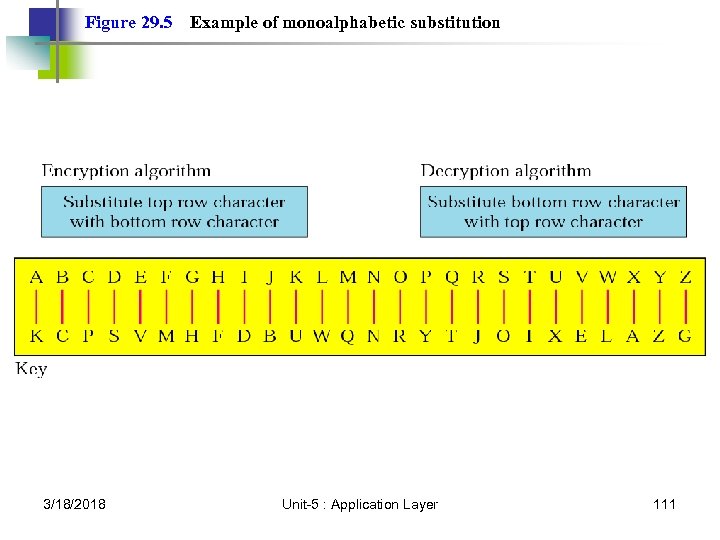 Figure 29. 5 3/18/2018 Example of monoalphabetic substitution Unit-5 : Application Layer 111
 Note: In monoalphabetic substitution, the relationship between a character in the plaintext to the character in the ciphertext is always one-to-one. 3/18/2018 Unit-5 : Application Layer 112
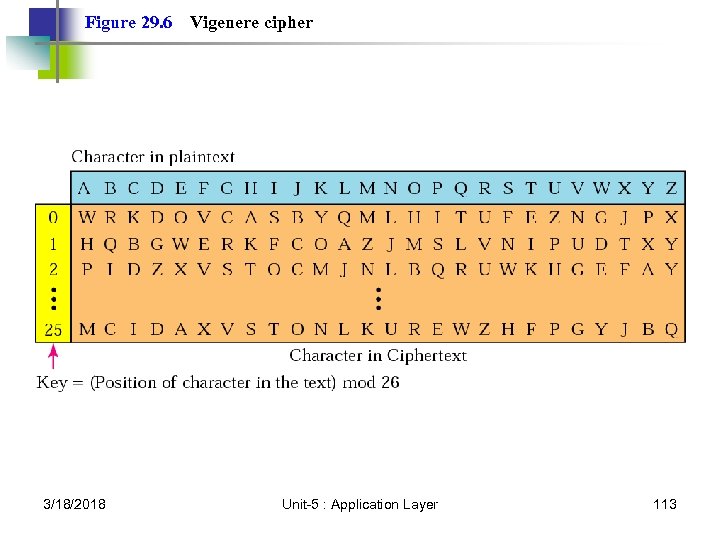 Figure 29. 6 3/18/2018 Vigenere cipher Unit-5 : Application Layer 113
 Note: In polyalphabetic substitution, the relationship between a character in the plaintext and a character in the ciphertext is one-to-many. 3/18/2018 Unit-5 : Application Layer 114
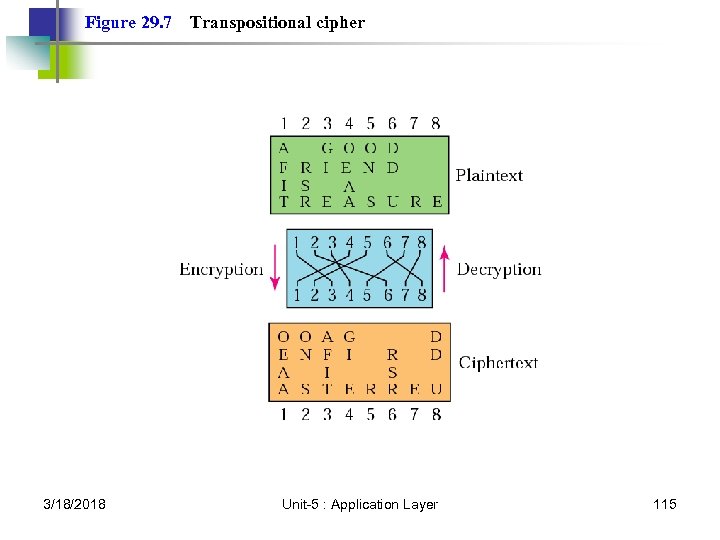 Figure 29. 7 3/18/2018 Transpositional cipher Unit-5 : Application Layer 115
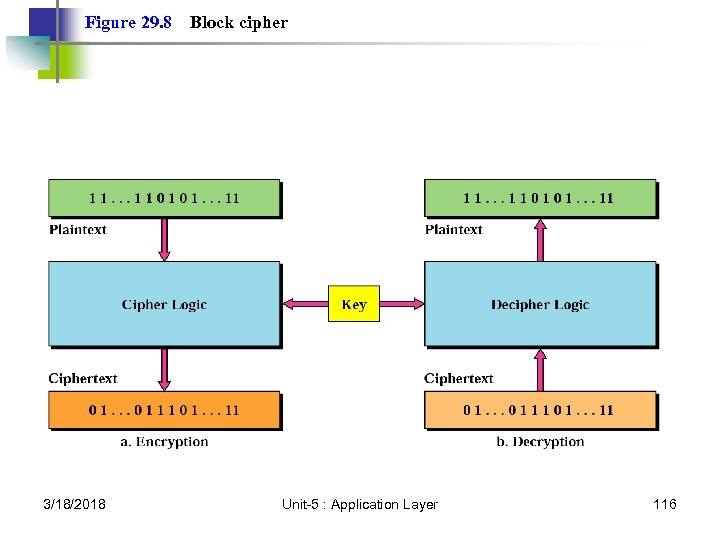 Figure 29. 8 3/18/2018 Block cipher Unit-5 : Application Layer 116
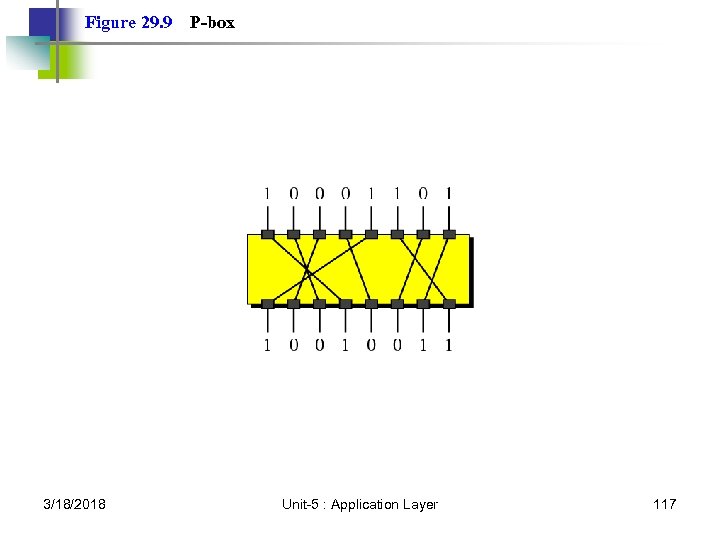 Figure 29. 9 3/18/2018 P-box Unit-5 : Application Layer 117
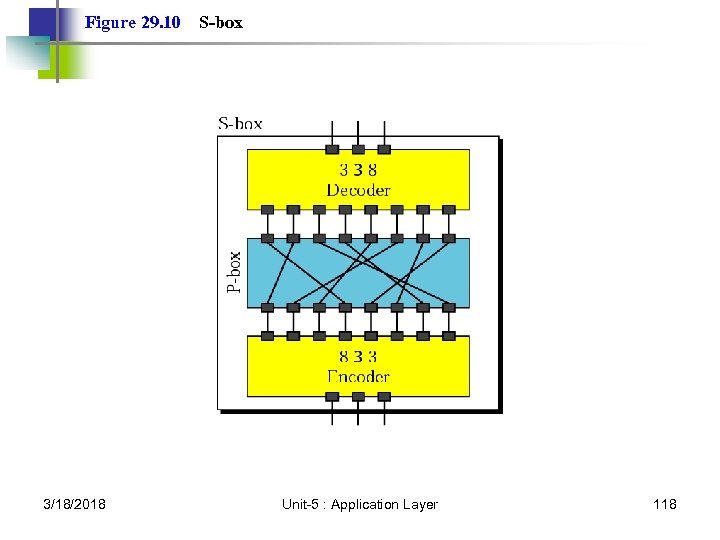 Figure 29. 10 3/18/2018 S-box Unit-5 : Application Layer 118
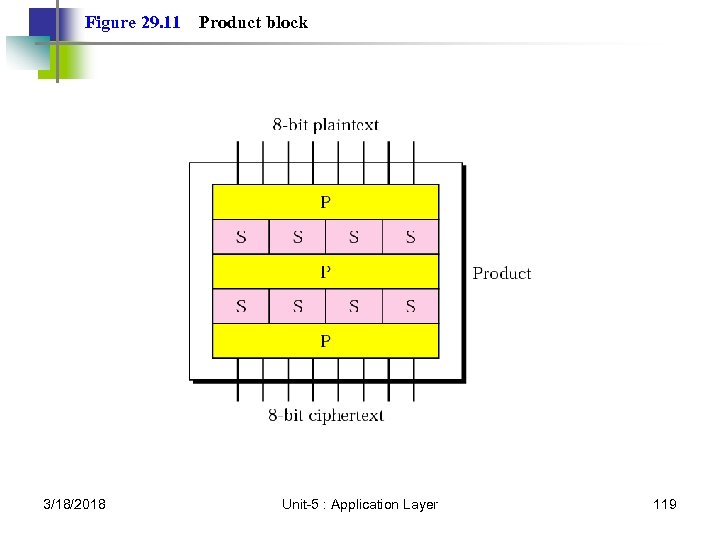 Figure 29. 11 3/18/2018 Product block Unit-5 : Application Layer 119
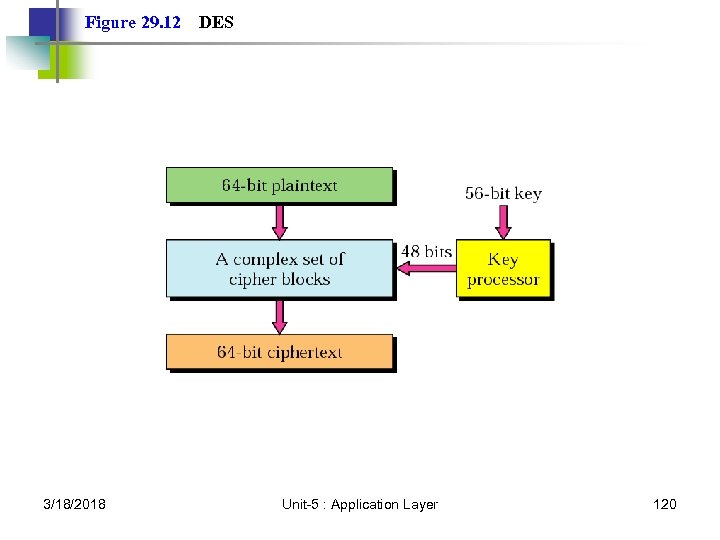 Figure 29. 12 3/18/2018 DES Unit-5 : Application Layer 120
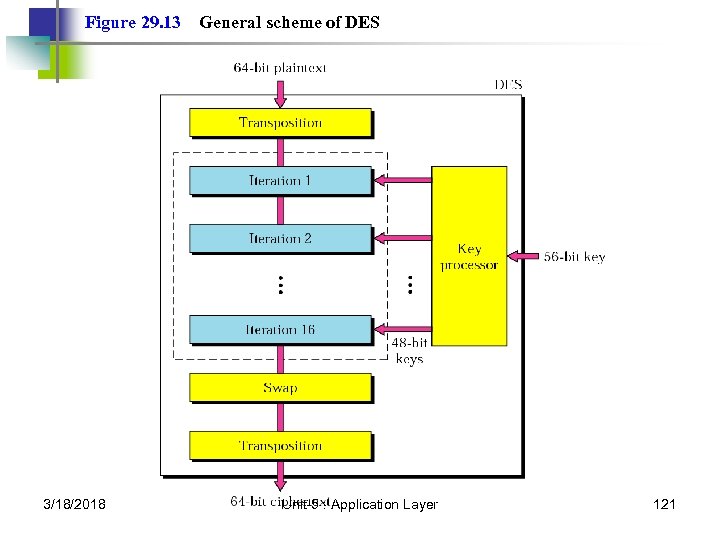 Figure 29. 13 3/18/2018 General scheme of DES Unit-5 : Application Layer 121
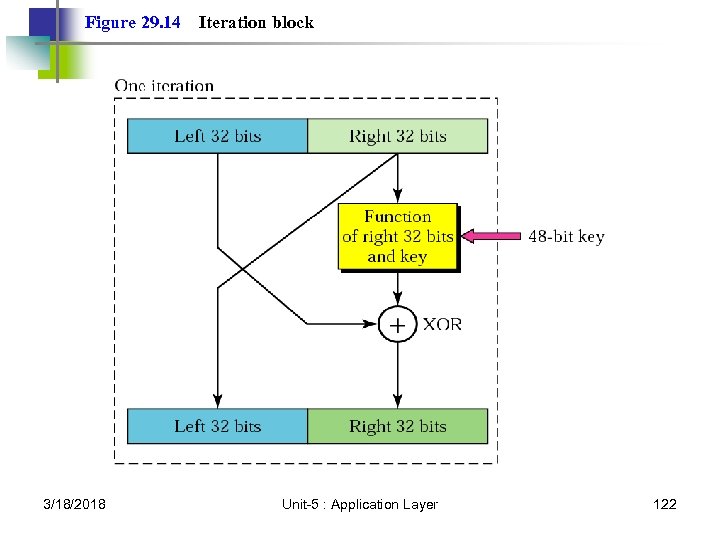 Figure 29. 14 3/18/2018 Iteration block Unit-5 : Application Layer 122
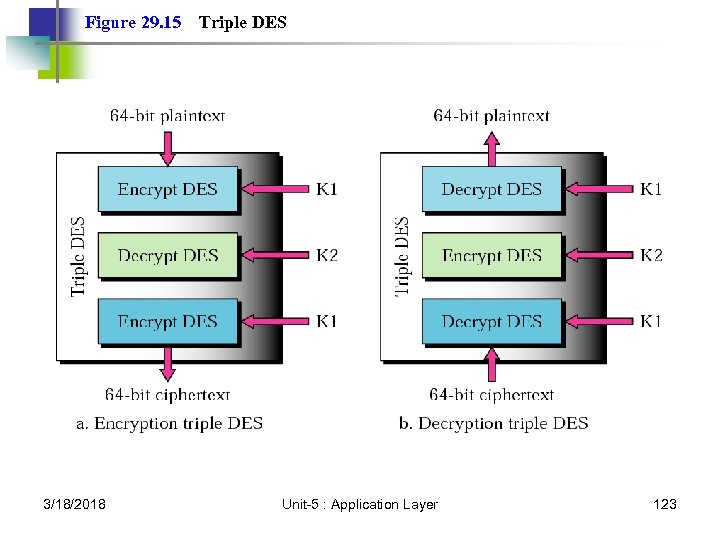 Figure 29. 15 3/18/2018 Triple DES Unit-5 : Application Layer 123
 Note: The DES cipher uses the same concept as the Caesar cipher, but the encryption/decryption algorithm is much more complex due to the sixteen 48 -bit keys derived from a 56 -bit key. 3/18/2018 Unit-5 : Application Layer 124
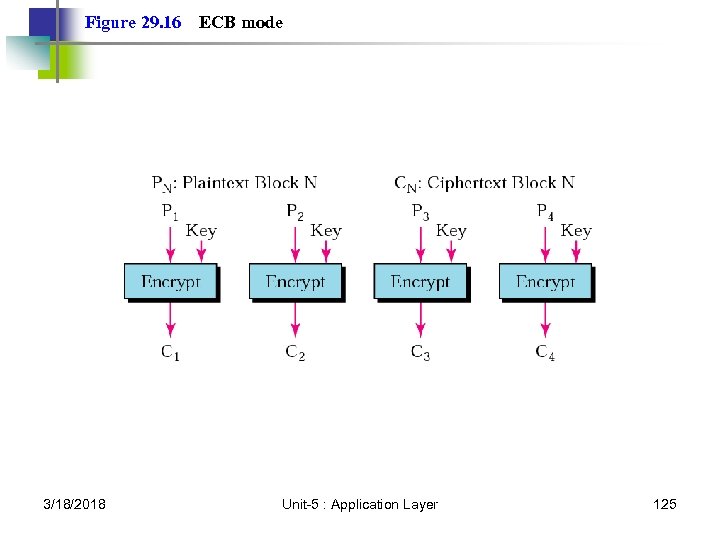 Figure 29. 16 3/18/2018 ECB mode Unit-5 : Application Layer 125
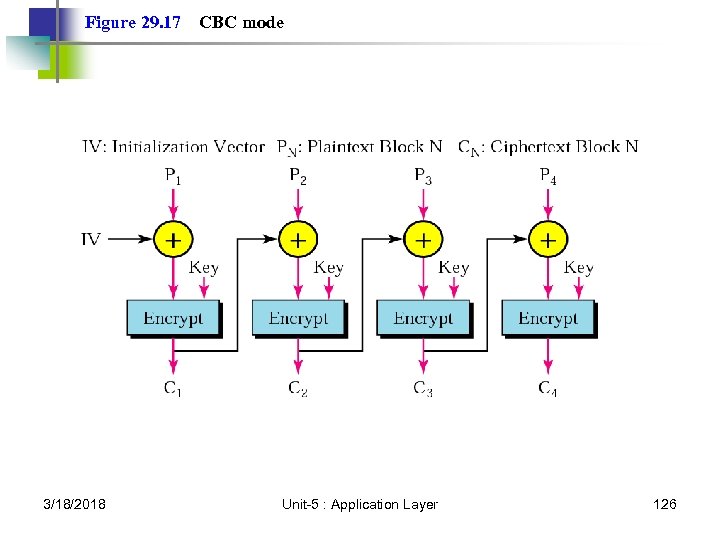 Figure 29. 17 3/18/2018 CBC mode Unit-5 : Application Layer 126
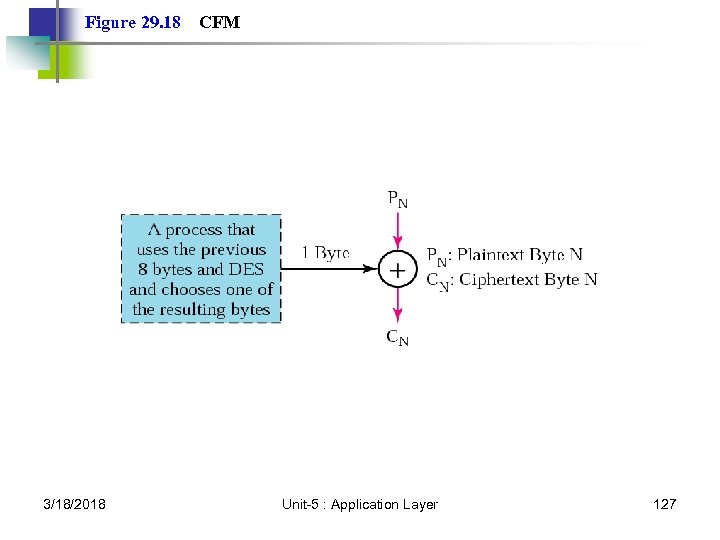 Figure 29. 18 3/18/2018 CFM Unit-5 : Application Layer 127
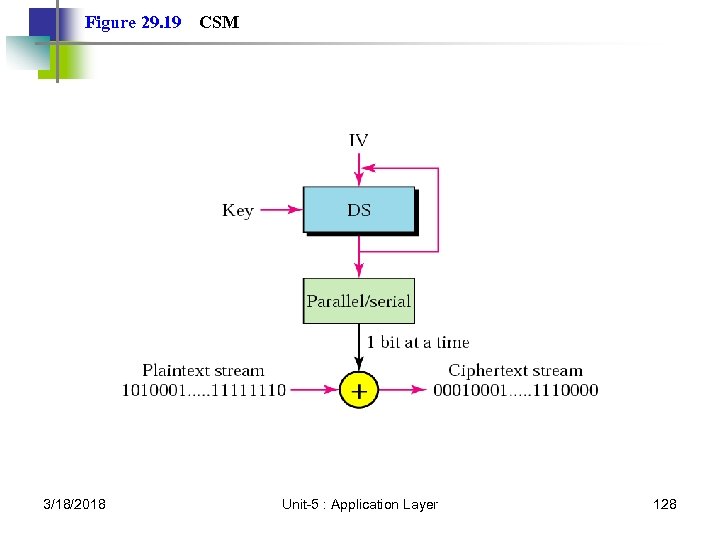 Figure 29. 19 3/18/2018 CSM Unit-5 : Application Layer 128
 29. 3 Public-Key Cryptography RSA Choosing Public and Private Keys 3/18/2018 Unit-5 : Application Layer 129
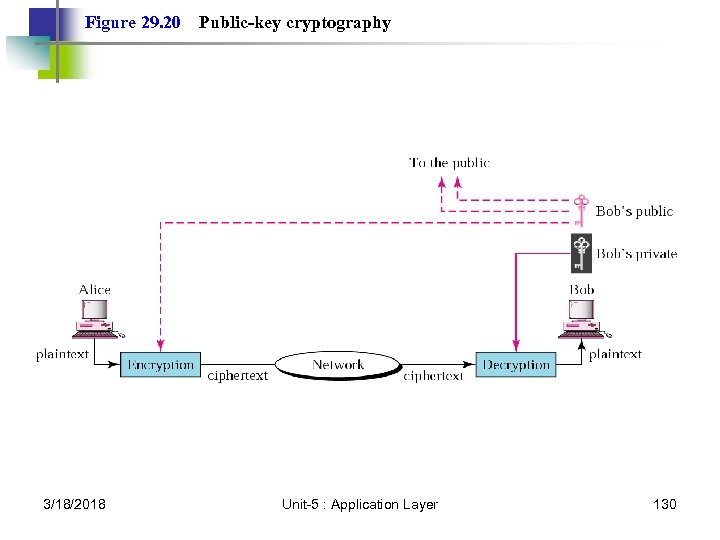 Figure 29. 20 3/18/2018 Public-key cryptography Unit-5 : Application Layer 130
 Note: Public-key algorithms are more efficient for short messages. 3/18/2018 Unit-5 : Application Layer 131
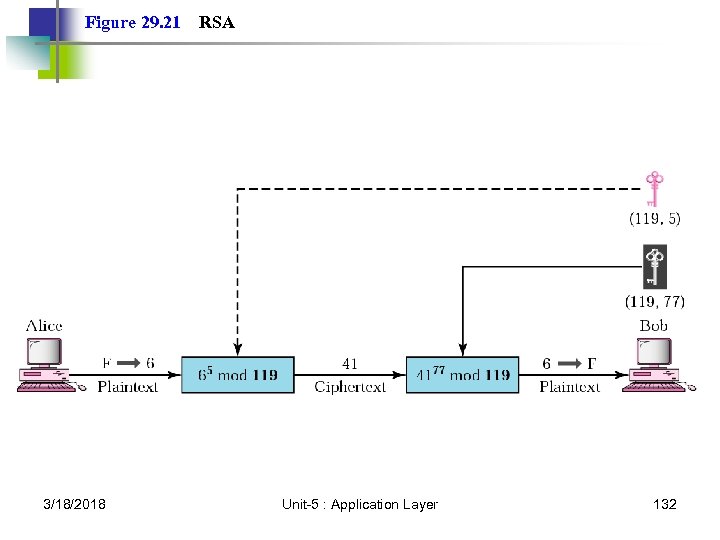 Figure 29. 21 3/18/2018 RSA Unit-5 : Application Layer 132
 END (Effort Never Dies) 3/18/2018 Unit-5 : Application Layer 133