


 Скачать презентацию CPE 631 Storage Electrical and Computer Engineering University
26edab4ff8d6081eab83e5a2410dd91e.ppt
- Количество слайдов: 53
 CPE 631: Storage Electrical and Computer Engineering University of Alabama in Huntsville Aleksandar Milenkovic milenka@ece. uah. edu http: //www. ece. uah. edu/~milenka UAH-CPE 631
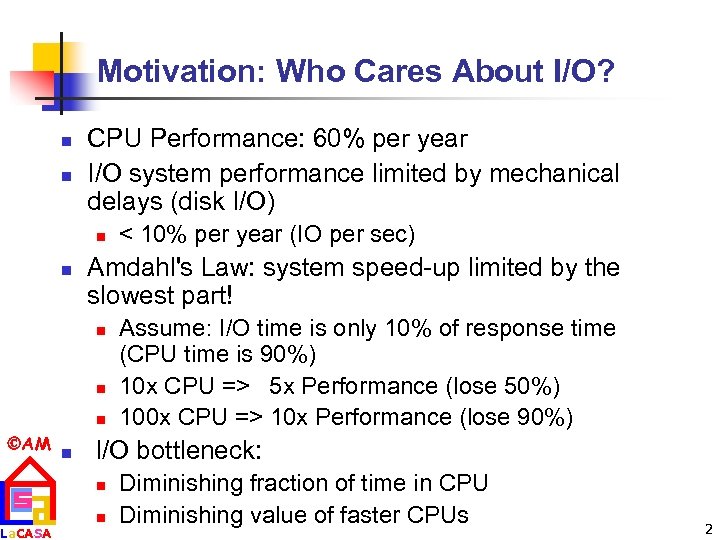 Motivation: Who Cares About I/O? n n CPU Performance: 60% per year I/O system performance limited by mechanical delays (disk I/O) n n Amdahl's Law: system speed-up limited by the slowest part! n n n AM La. CASA n < 10% per year (IO per sec) Assume: I/O time is only 10% of response time (CPU time is 90%) 10 x CPU => 5 x Performance (lose 50%) 100 x CPU => 10 x Performance (lose 90%) I/O bottleneck: n n Diminishing fraction of time in CPU Diminishing value of faster CPUs 2
 Big Picture: Who cares about CPUs? n Why still important to keep CPUs busy vs. IO devices ("CPU time"), as CPUs not costly? n n AM La. CASA Moore's Law leads to both large, fast CPUs but also to very small, cheap CPUs 2001 Hypothesis: 600 MHz PC is fast enough for Office Tools? PC slowdown since fast enough unless games, new apps? People care more about storing information and communicating information than calculating n n n "Information Technology" vs. "Computer Science" 1960 s and 1980 s: Computing Revolution 1990 s and 2000 s: Information Age 3
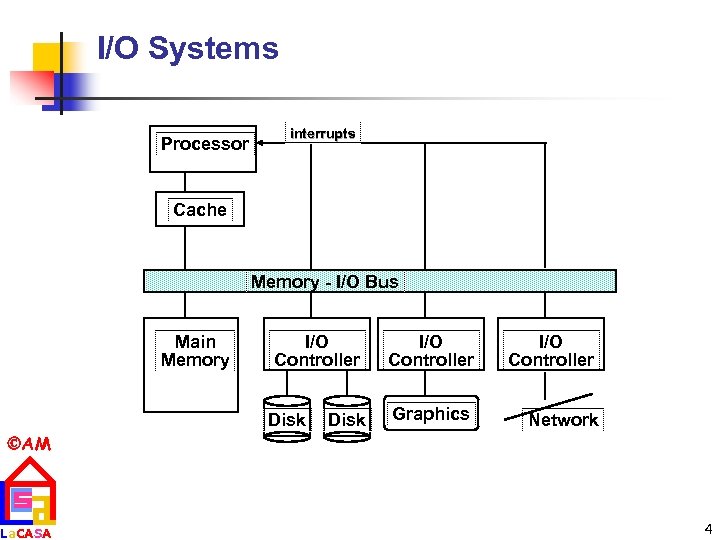 I/O Systems Processor interrupts Cache Memory - I/O Bus Main Memory I/O Controller Disk I/O Controller Graphics Network AM La. CASA 4
 Storage Technology Drivers n Driven by the prevailing computing paradigm n n 1950 s: migration from batch to on-line processing 1990 s: migration to ubiquitous computing n n n Effects on storage industry: n Embedded storage n n AM La. CASA computers in phones, books, cars, video cameras, … nationwide fiber optical network with wireless tails smaller, cheaper, more reliable, lower power Data utilities n high capacity, hierarchically managed storage 5
 Outline n n n Disk Basics Disk History Disk options in 2000 Disk fallacies and performance Tapes RAID AM La. CASA 6
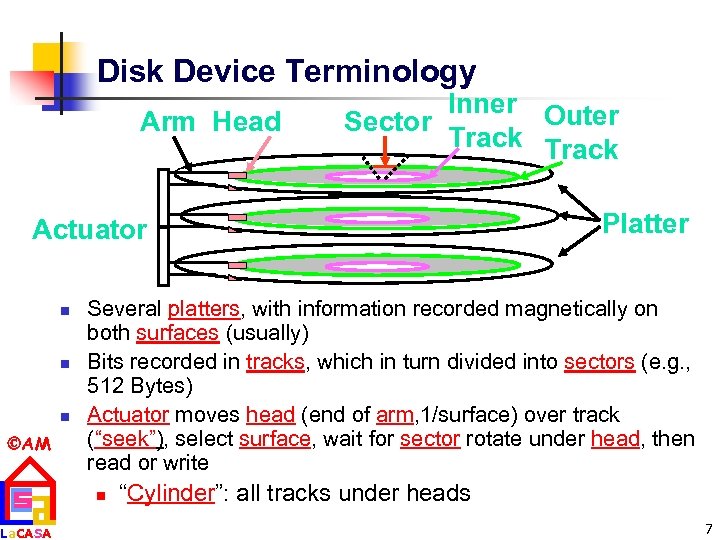 Disk Device Terminology Arm Head Inner Outer Sector Track Actuator n n n AM La. CASA Platter Several platters, with information recorded magnetically on both surfaces (usually) Bits recorded in tracks, which in turn divided into sectors (e. g. , 512 Bytes) Actuator moves head (end of arm, 1/surface) over track (“seek”), select surface, wait for sector rotate under head, then read or write n “Cylinder”: all tracks under heads 7
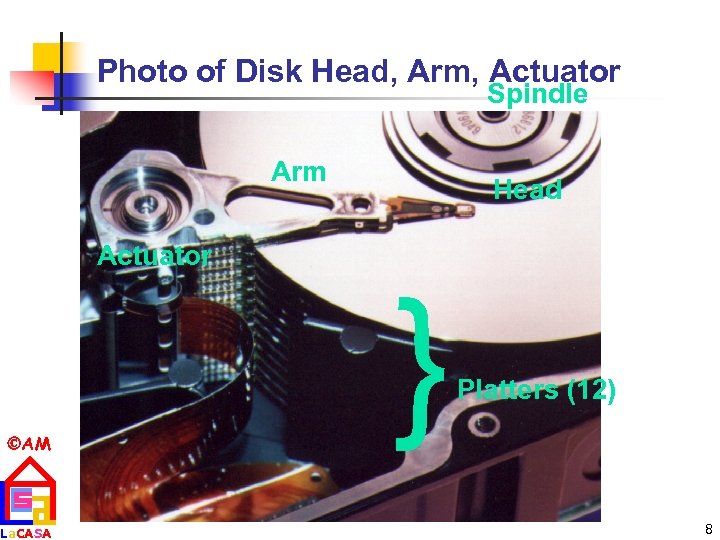 Photo of Disk Head, Arm, Actuator Spindle Arm Head Actuator La. CASA { AM Platters (12) 8
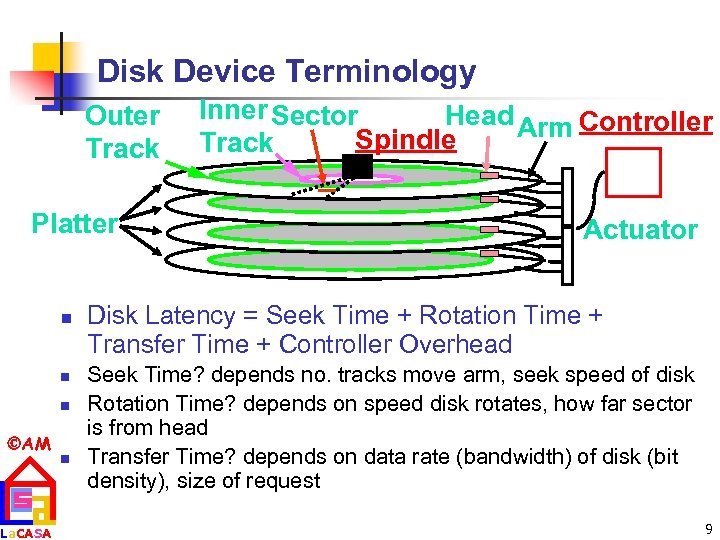 Disk Device Terminology Outer Track Platter n n n AM La. CASA n Inner Sector Head Arm Controller Spindle Track Actuator Disk Latency = Seek Time + Rotation Time + Transfer Time + Controller Overhead Seek Time? depends no. tracks move arm, seek speed of disk Rotation Time? depends on speed disk rotates, how far sector is from head Transfer Time? depends on data rate (bandwidth) of disk (bit density), size of request 9
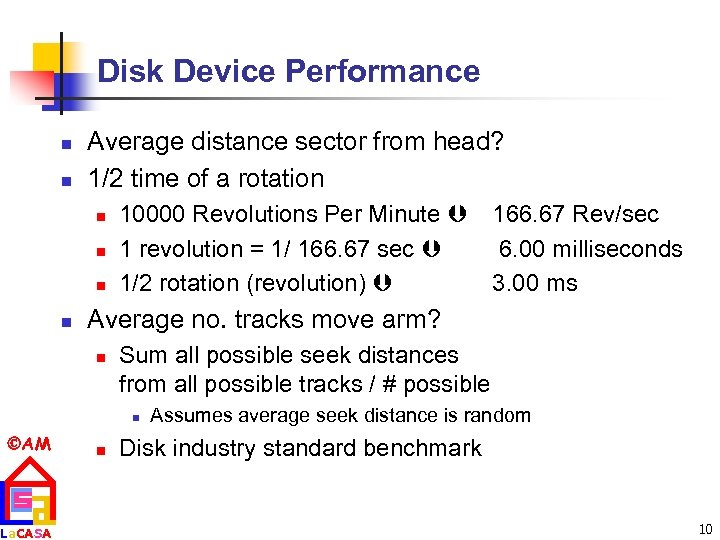 Disk Device Performance n n Average distance sector from head? 1/2 time of a rotation n n 10000 Revolutions Per Minute 166. 67 Rev/sec 1 revolution = 1/ 166. 67 sec 6. 00 milliseconds 1/2 rotation (revolution) 3. 00 ms Average no. tracks move arm? n Sum all possible seek distances from all possible tracks / # possible n AM La. CASA n Assumes average seek distance is random Disk industry standard benchmark 10
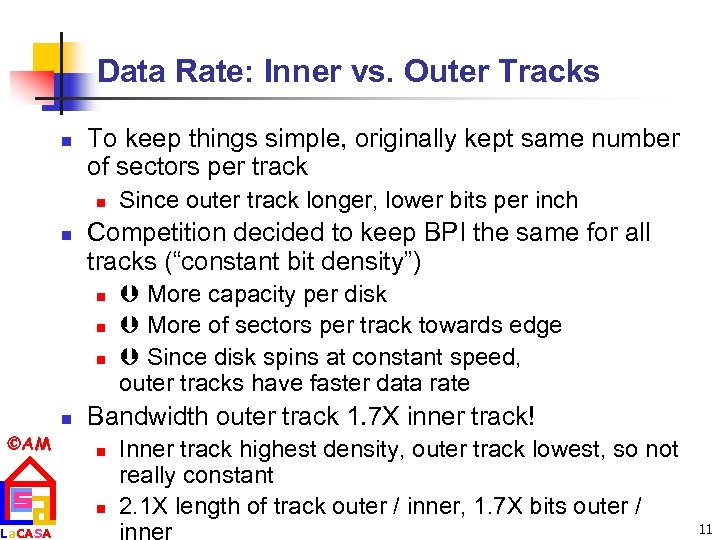 Data Rate: Inner vs. Outer Tracks n To keep things simple, originally kept same number of sectors per track n n Competition decided to keep BPI the same for all tracks (“constant bit density”) n n AM La. CASA Since outer track longer, lower bits per inch More capacity per disk More of sectors per track towards edge Since disk spins at constant speed, outer tracks have faster data rate Bandwidth outer track 1. 7 X inner track! n n Inner track highest density, outer track lowest, so not really constant 2. 1 X length of track outer / inner, 1. 7 X bits outer / 11
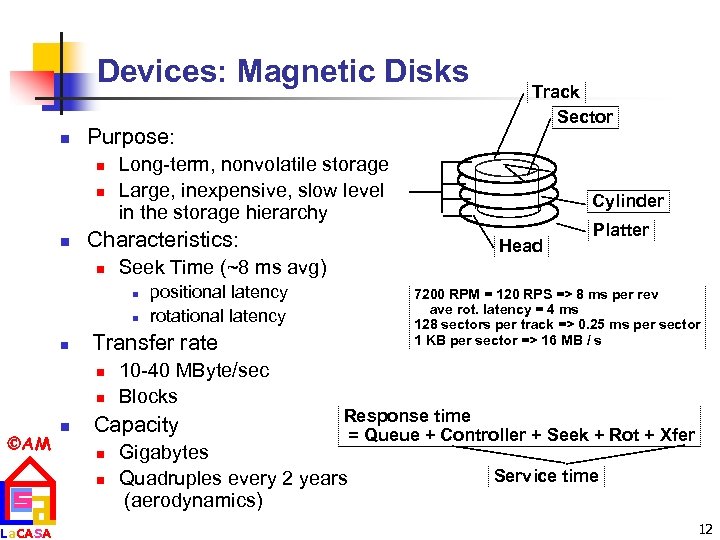 Devices: Magnetic Disks n Purpose: n n n Long-term, nonvolatile storage Large, inexpensive, slow level in the storage hierarchy Characteristics: n n n AM La. CASA n Head positional latency rotational latency 10 -40 MByte/sec Blocks Capacity n n Platter 7200 RPM = 120 RPS => 8 ms per rev ave rot. latency = 4 ms 128 sectors per track => 0. 25 ms per sector 1 KB per sector => 16 MB / s Transfer rate n Cylinder Seek Time (~8 ms avg) n n Track Sector Response time = Queue + Controller + Seek + Rot + Xfer Gigabytes Quadruples every 2 years (aerodynamics) Service time 12
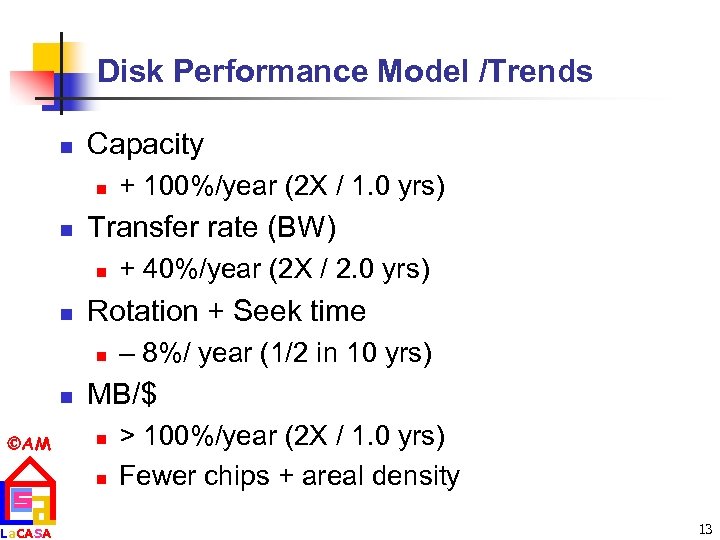 Disk Performance Model /Trends n Capacity n n Transfer rate (BW) n n AM La. CASA + 40%/year (2 X / 2. 0 yrs) Rotation + Seek time n n + 100%/year (2 X / 1. 0 yrs) – 8%/ year (1/2 in 10 yrs) MB/$ n n > 100%/year (2 X / 1. 0 yrs) Fewer chips + areal density 13
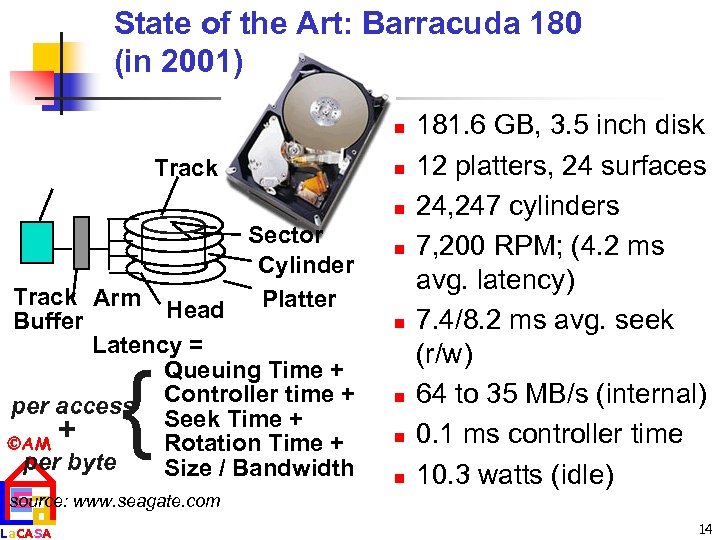 State of the Art: Barracuda 180 (in 2001) n Track n n Sector Cylinder Track Arm Platter Head Buffer Latency = Queuing Time + Controller time + per access Seek Time + + AM Rotation Time + per byte Size / Bandwidth { n n n 181. 6 GB, 3. 5 inch disk 12 platters, 24 surfaces 24, 247 cylinders 7, 200 RPM; (4. 2 ms avg. latency) 7. 4/8. 2 ms avg. seek (r/w) 64 to 35 MB/s (internal) 0. 1 ms controller time 10. 3 watts (idle) source: www. seagate. com La. CASA 14
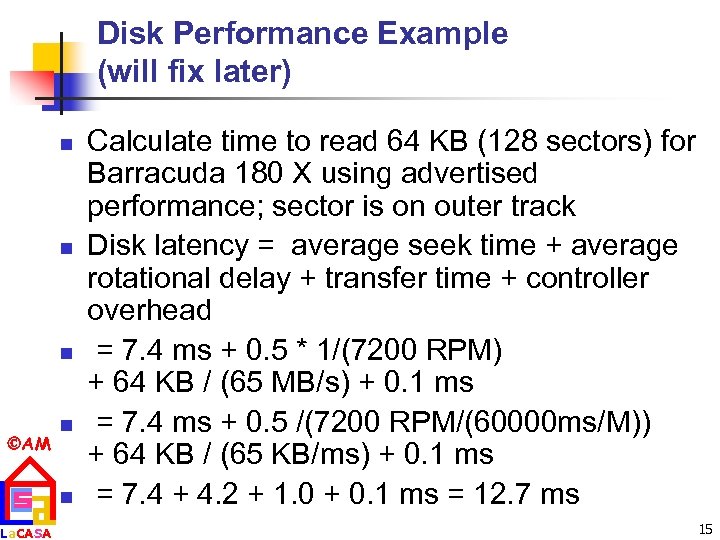 Disk Performance Example (will fix later) n n n AM La. CASA n n Calculate time to read 64 KB (128 sectors) for Barracuda 180 X using advertised performance; sector is on outer track Disk latency = average seek time + average rotational delay + transfer time + controller overhead = 7. 4 ms + 0. 5 * 1/(7200 RPM) + 64 KB / (65 MB/s) + 0. 1 ms = 7. 4 ms + 0. 5 /(7200 RPM/(60000 ms/M)) + 64 KB / (65 KB/ms) + 0. 1 ms = 7. 4 + 4. 2 + 1. 0 + 0. 1 ms = 12. 7 ms 15
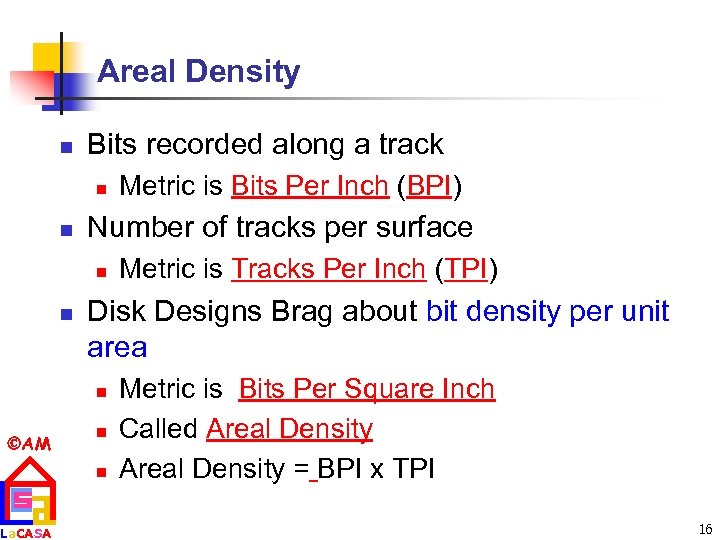 Areal Density n Bits recorded along a track n n Number of tracks per surface n n La. CASA Metric is Tracks Per Inch (TPI) Disk Designs Brag about bit density per unit area n AM Metric is Bits Per Inch (BPI) n n Metric is Bits Per Square Inch Called Areal Density = BPI x TPI 16
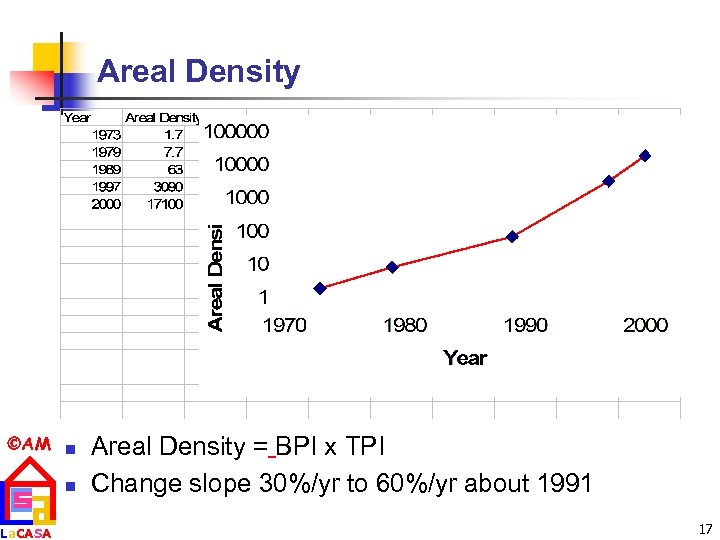 Areal Density AM n La. CASA n Areal Density = BPI x TPI Change slope 30%/yr to 60%/yr about 1991 17
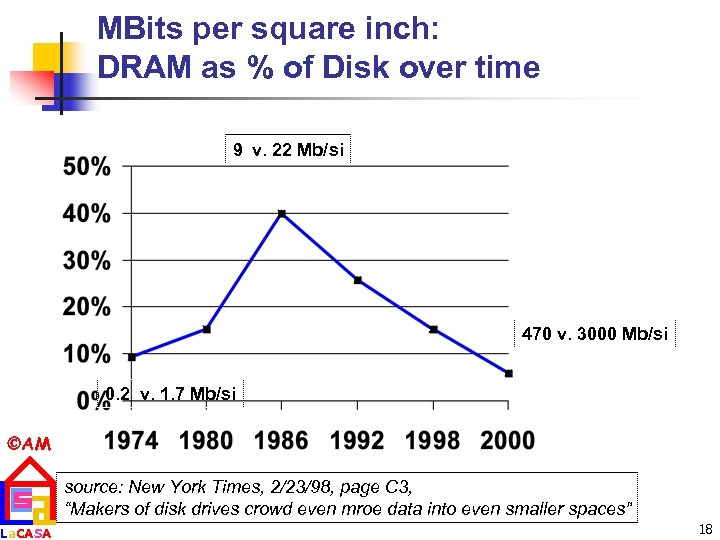 MBits per square inch: DRAM as % of Disk over time 9 v. 22 Mb/si 470 v. 3000 Mb/si 0. 2 v. 1. 7 Mb/si AM La. CASA source: New York Times, 2/23/98, page C 3, “Makers of disk drives crowd even mroe data into even smaller spaces” 18
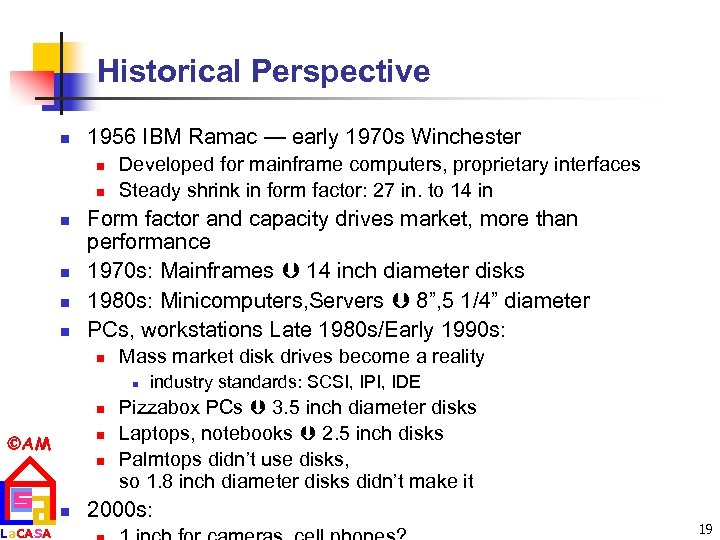 Historical Perspective n 1956 IBM Ramac — early 1970 s Winchester n n n Developed for mainframe computers, proprietary interfaces Steady shrink in form factor: 27 in. to 14 in Form factor and capacity drives market, more than performance 1970 s: Mainframes 14 inch diameter disks 1980 s: Minicomputers, Servers 8”, 5 1/4” diameter PCs, workstations Late 1980 s/Early 1990 s: n Mass market disk drives become a reality n n n AM La. CASA n n industry standards: SCSI, IPI, IDE Pizzabox PCs 3. 5 inch diameter disks Laptops, notebooks 2. 5 inch disks Palmtops didn’t use disks, so 1. 8 inch diameter disks didn’t make it 2000 s: 19
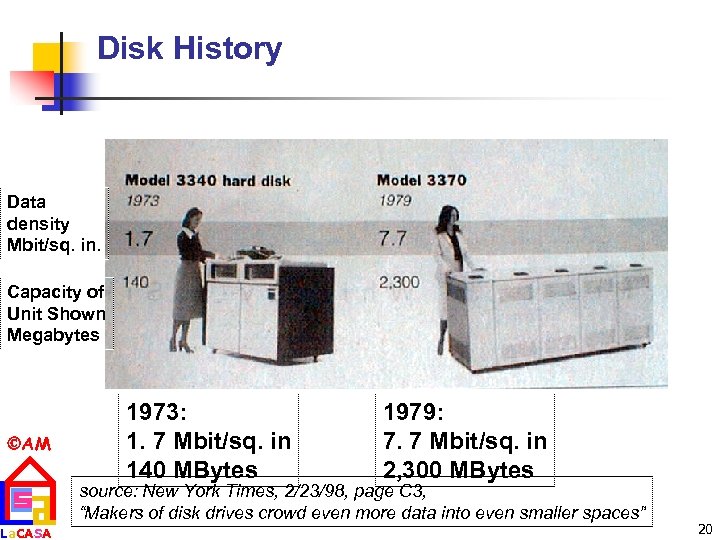 Disk History Data density Mbit/sq. in. Capacity of Unit Shown Megabytes AM La. CASA 1973: 1. 7 Mbit/sq. in 140 MBytes 1979: 7. 7 Mbit/sq. in 2, 300 MBytes source: New York Times, 2/23/98, page C 3, “Makers of disk drives crowd even more data into even smaller spaces” 20
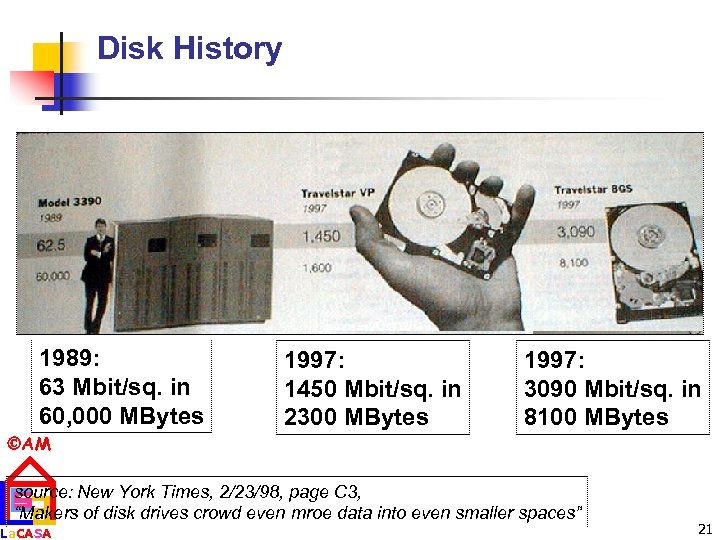 Disk History 1989: 63 Mbit/sq. in 60, 000 MBytes 1997: 1450 Mbit/sq. in 2300 MBytes 1997: 3090 Mbit/sq. in 8100 MBytes AM source: New York Times, 2/23/98, page C 3, “Makers of disk drives crowd even mroe data into even smaller spaces” La. CASA 21
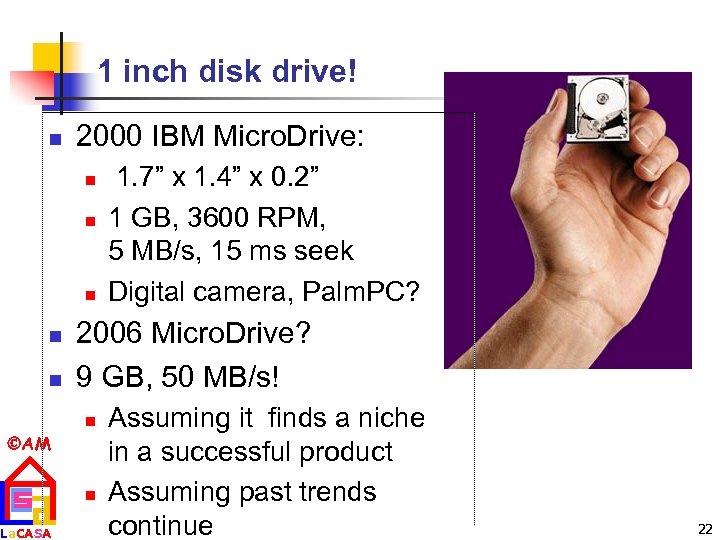 1 inch disk drive! n 2000 IBM Micro. Drive: n n n 2006 Micro. Drive? 9 GB, 50 MB/s! n AM La. CASA 1. 7” x 1. 4” x 0. 2” 1 GB, 3600 RPM, 5 MB/s, 15 ms seek Digital camera, Palm. PC? n Assuming it finds a niche in a successful product Assuming past trends continue 22
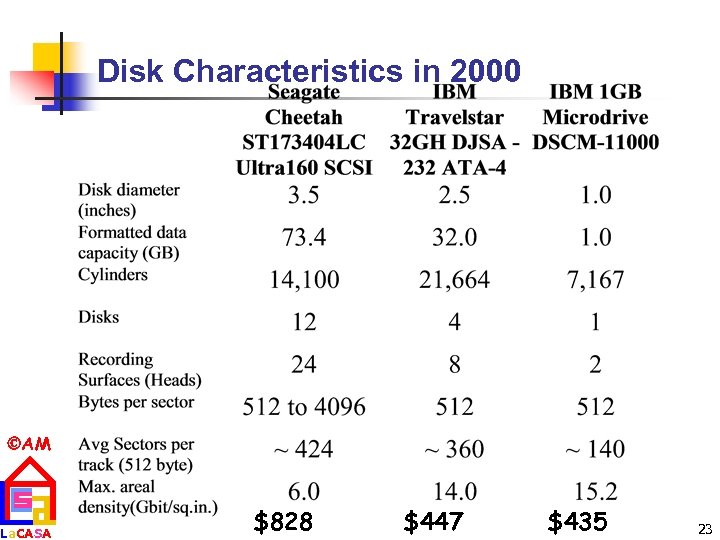 Disk Characteristics in 2000 AM La. CASA $828 $447 $435 23
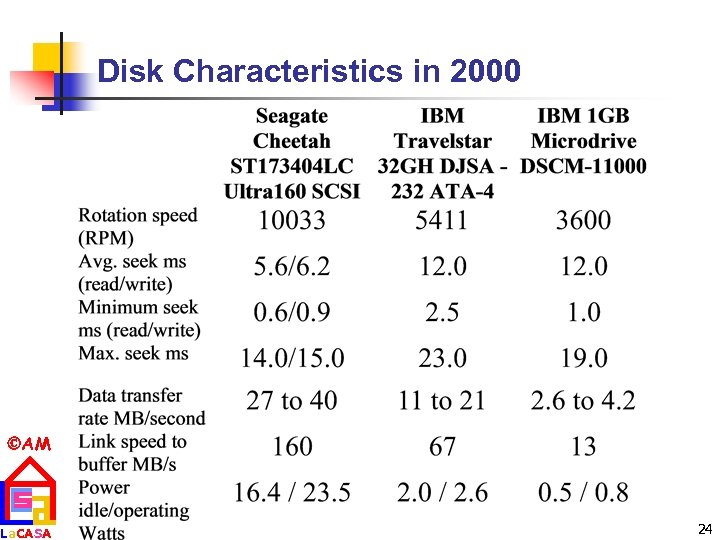 Disk Characteristics in 2000 AM La. CASA 24
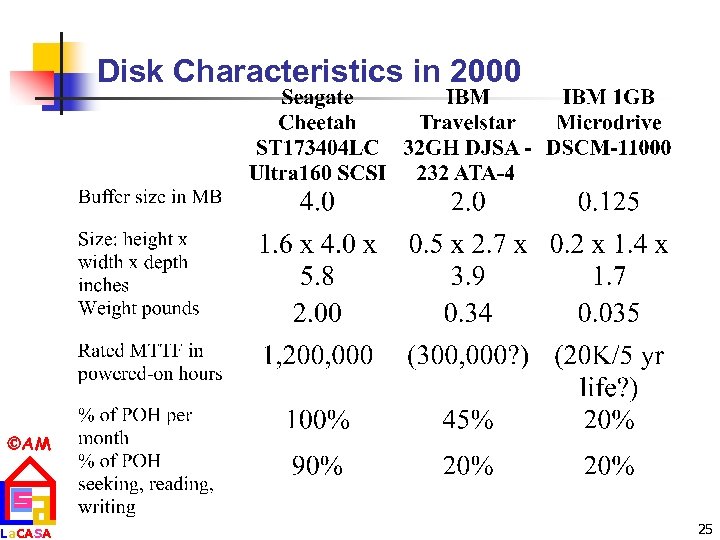 Disk Characteristics in 2000 AM La. CASA 25
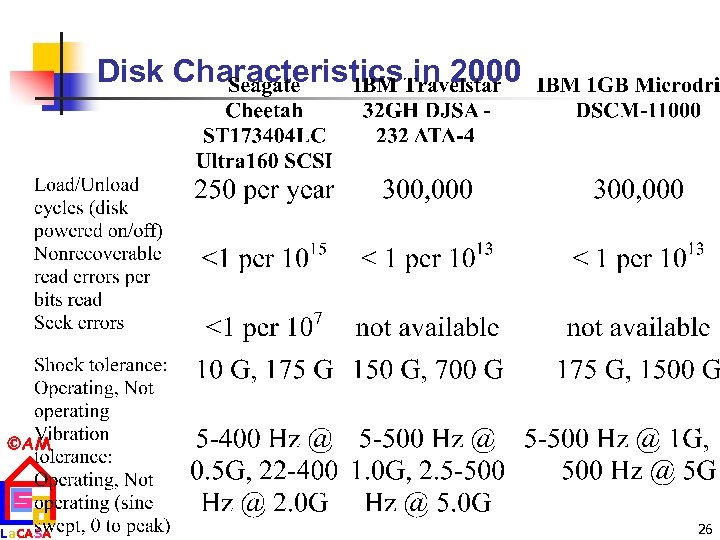 Disk Characteristics in 2000 AM La. CASA 26
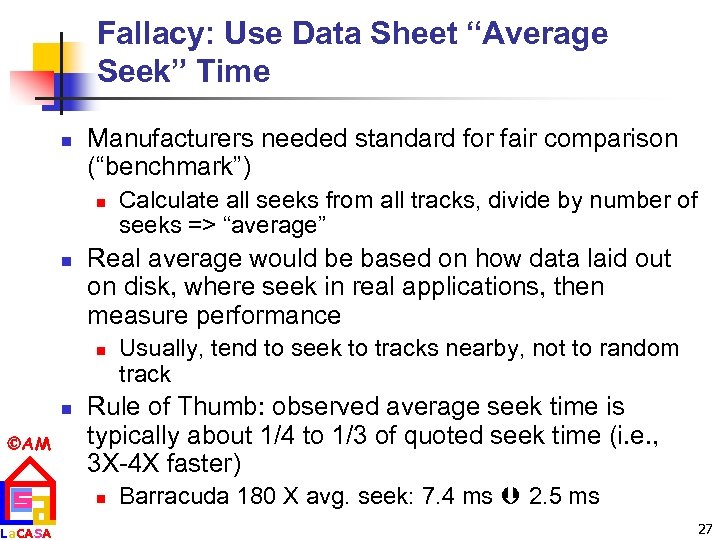 Fallacy: Use Data Sheet “Average Seek” Time n Manufacturers needed standard for fair comparison (“benchmark”) n n Real average would be based on how data laid out on disk, where seek in real applications, then measure performance n n AM La. CASA Calculate all seeks from all tracks, divide by number of seeks => “average” Usually, tend to seek to tracks nearby, not to random track Rule of Thumb: observed average seek time is typically about 1/4 to 1/3 of quoted seek time (i. e. , 3 X-4 X faster) n Barracuda 180 X avg. seek: 7. 4 ms 2. 5 ms 27
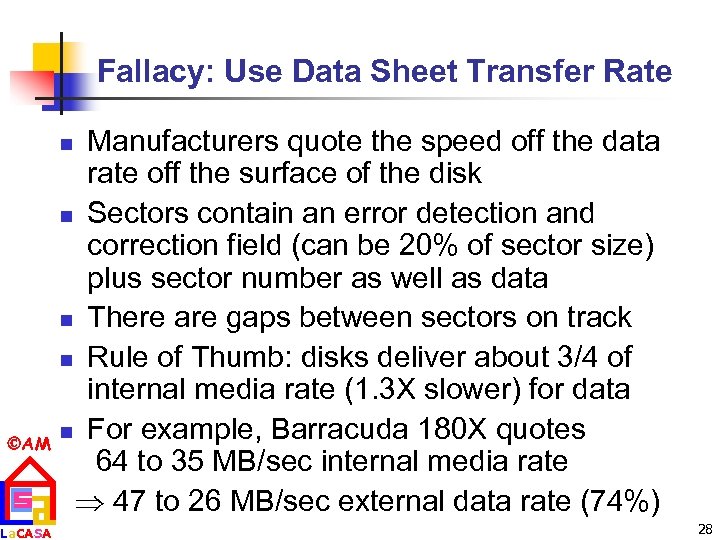 Fallacy: Use Data Sheet Transfer Rate Manufacturers quote the speed off the data rate off the surface of the disk n Sectors contain an error detection and correction field (can be 20% of sector size) plus sector number as well as data n There are gaps between sectors on track n Rule of Thumb: disks deliver about 3/4 of internal media rate (1. 3 X slower) for data n For example, Barracuda 180 X quotes 64 to 35 MB/sec internal media rate 47 to 26 MB/sec external data rate (74%) n AM La. CASA 28
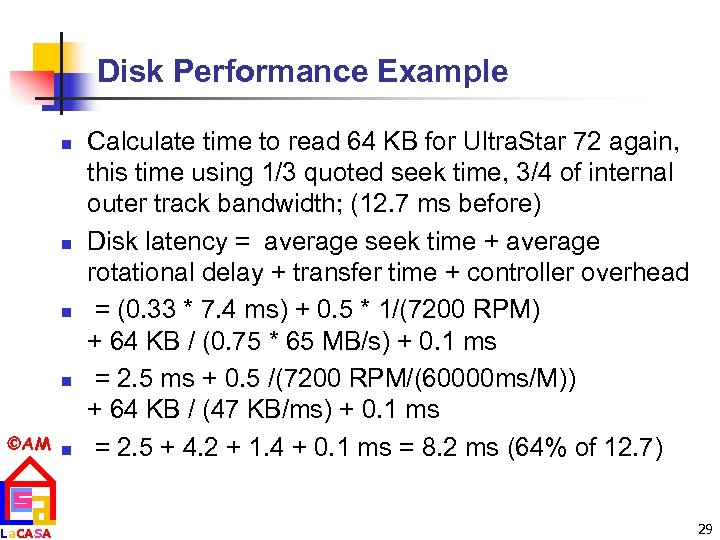 Disk Performance Example n n AM n La. CASA Calculate time to read 64 KB for Ultra. Star 72 again, this time using 1/3 quoted seek time, 3/4 of internal outer track bandwidth; (12. 7 ms before) Disk latency = average seek time + average rotational delay + transfer time + controller overhead = (0. 33 * 7. 4 ms) + 0. 5 * 1/(7200 RPM) + 64 KB / (0. 75 * 65 MB/s) + 0. 1 ms = 2. 5 ms + 0. 5 /(7200 RPM/(60000 ms/M)) + 64 KB / (47 KB/ms) + 0. 1 ms = 2. 5 + 4. 2 + 1. 4 + 0. 1 ms = 8. 2 ms (64% of 12. 7) 29
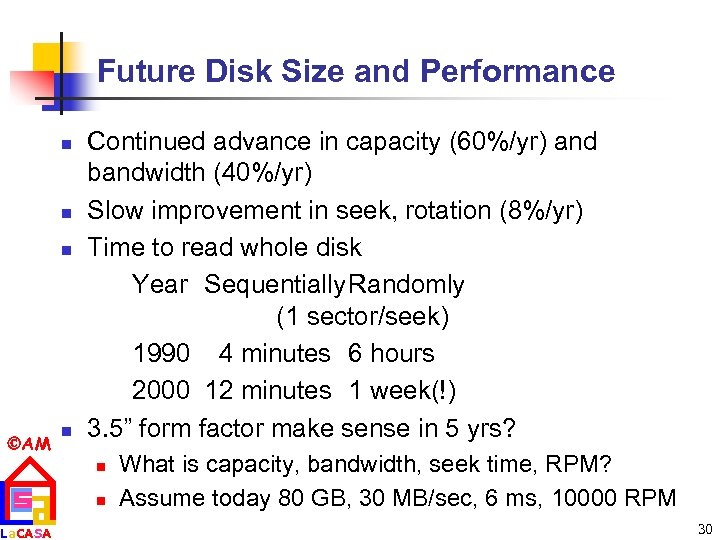 Future Disk Size and Performance n n n AM La. CASA n Continued advance in capacity (60%/yr) and bandwidth (40%/yr) Slow improvement in seek, rotation (8%/yr) Time to read whole disk Year Sequentially. Randomly (1 sector/seek) 1990 4 minutes 6 hours 2000 12 minutes 1 week(!) 3. 5” form factor make sense in 5 yrs? n n What is capacity, bandwidth, seek time, RPM? Assume today 80 GB, 30 MB/sec, 6 ms, 10000 RPM 30
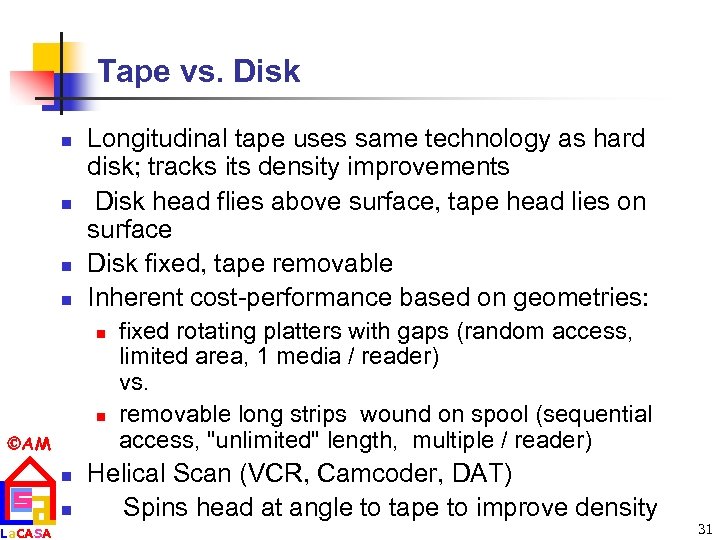 Tape vs. Disk n n Longitudinal tape uses same technology as hard disk; tracks its density improvements Disk head flies above surface, tape head lies on surface Disk fixed, tape removable Inherent cost-performance based on geometries: n n AM La. CASA n n fixed rotating platters with gaps (random access, limited area, 1 media / reader) vs. removable long strips wound on spool (sequential access, "unlimited" length, multiple / reader) Helical Scan (VCR, Camcoder, DAT) Spins head at angle to tape to improve density 31
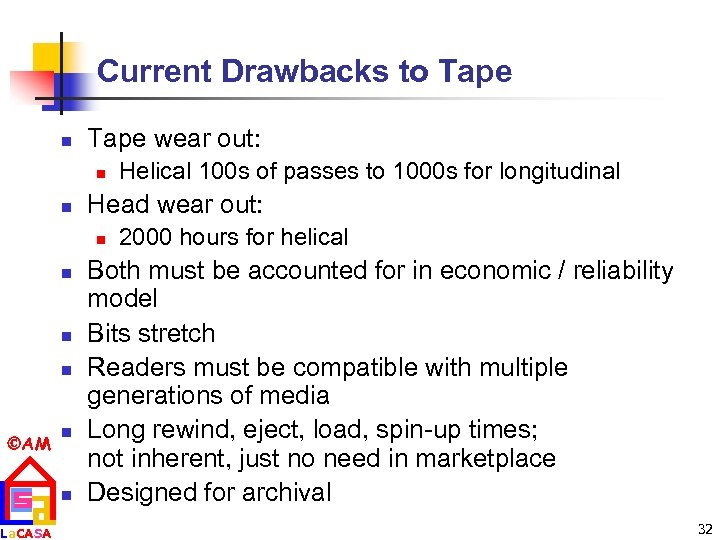 Current Drawbacks to Tape n Tape wear out: n n Head wear out: n n AM La. CASA n n Helical 100 s of passes to 1000 s for longitudinal 2000 hours for helical Both must be accounted for in economic / reliability model Bits stretch Readers must be compatible with multiple generations of media Long rewind, eject, load, spin-up times; not inherent, just no need in marketplace Designed for archival 32
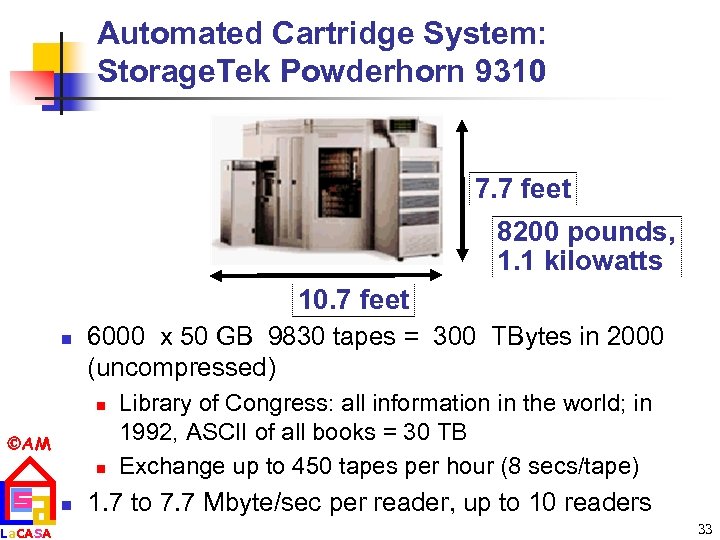 Automated Cartridge System: Storage. Tek Powderhorn 9310 7. 7 feet 8200 pounds, 1. 1 kilowatts 10. 7 feet n 6000 x 50 GB 9830 tapes = 300 TBytes in 2000 (uncompressed) n AM La. CASA n n Library of Congress: all information in the world; in 1992, ASCII of all books = 30 TB Exchange up to 450 tapes per hour (8 secs/tape) 1. 7 to 7. 7 Mbyte/sec per reader, up to 10 readers 33
 Library vs. Storage n Getting books today as quaint as the way I learned to program n n n AM n La. CASA n punch cards, batch processing wander thru shelves, anticipatory purchasing Cost $1 per book to check out $30 for a catalogue entry 30% of all books never checked out Write only journals? Digital library can transform campuses 34
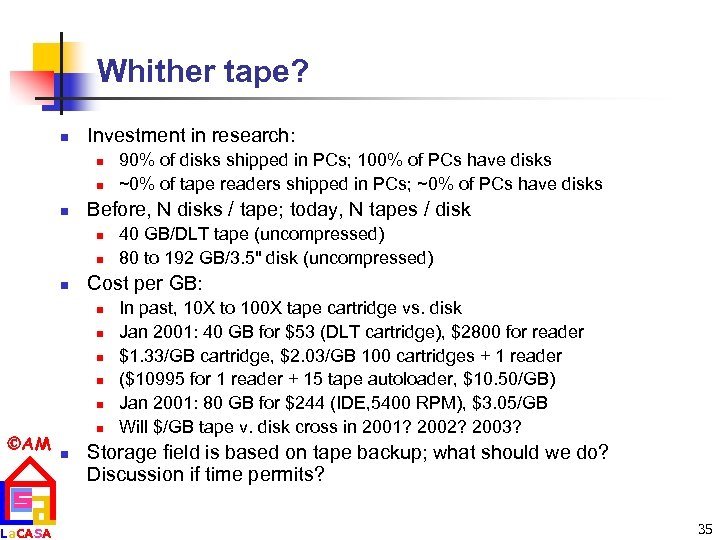 Whither tape? n Investment in research: n n n Before, N disks / tape; today, N tapes / disk n n n n La. CASA n n 40 GB/DLT tape (uncompressed) 80 to 192 GB/3. 5" disk (uncompressed) Cost per GB: n AM 90% of disks shipped in PCs; 100% of PCs have disks ~0% of tape readers shipped in PCs; ~0% of PCs have disks In past, 10 X to 100 X tape cartridge vs. disk Jan 2001: 40 GB for $53 (DLT cartridge), $2800 for reader $1. 33/GB cartridge, $2. 03/GB 100 cartridges + 1 reader ($10995 for 1 reader + 15 tape autoloader, $10. 50/GB) Jan 2001: 80 GB for $244 (IDE, 5400 RPM), $3. 05/GB Will $/GB tape v. disk cross in 2001? 2002? 2003? Storage field is based on tape backup; what should we do? Discussion if time permits? 35
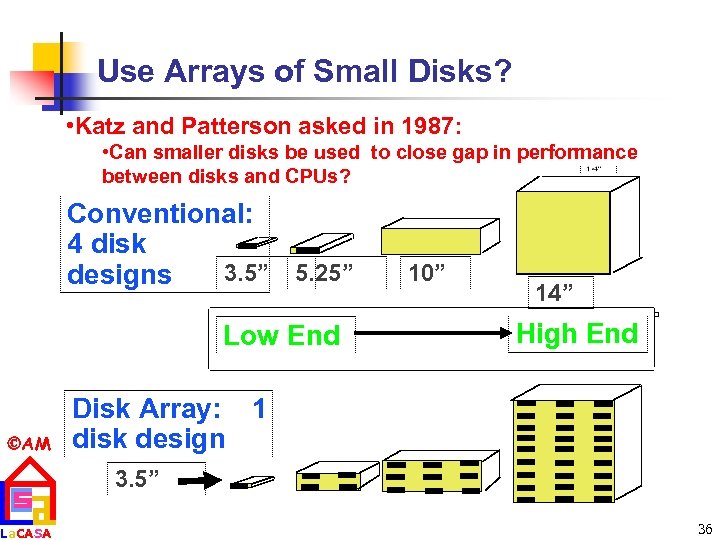 Use Arrays of Small Disks? • Katz and Patterson asked in 1987: • Can smaller disks be used to close gap in performance between disks and CPUs? Conventional: 4 disk 3. 5” 5. 25” 10” designs Low End AM La. CASA 14” High End Disk Array: 1 disk design 3. 5” 36
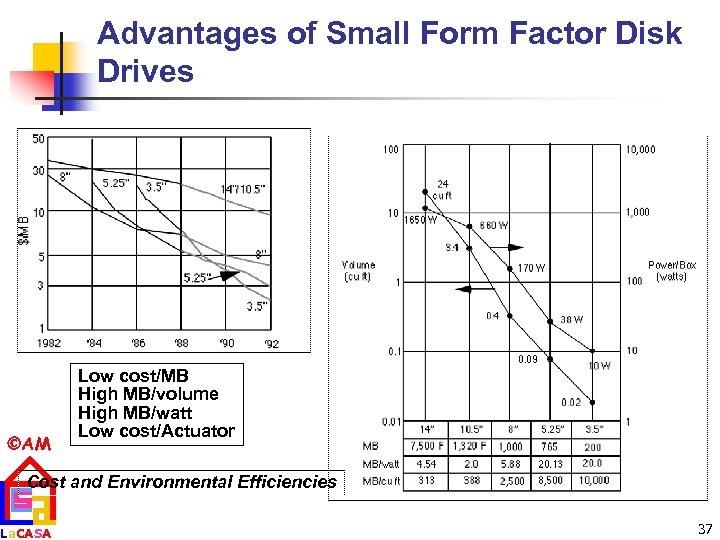 Advantages of Small Form Factor Disk Drives AM Low cost/MB High MB/volume High MB/watt Low cost/Actuator Cost and Environmental Efficiencies La. CASA 37
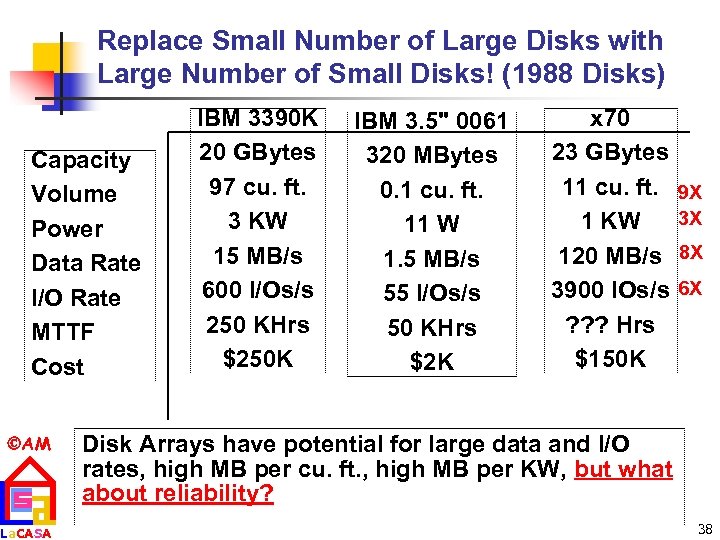 Replace Small Number of Large Disks with Large Number of Small Disks! (1988 Disks) Capacity Volume Power Data Rate I/O Rate MTTF Cost AM La. CASA IBM 3390 K 20 GBytes 97 cu. ft. 3 KW 15 MB/s 600 I/Os/s 250 KHrs $250 K IBM 3. 5" 0061 320 MBytes 0. 1 cu. ft. 11 W 1. 5 MB/s 55 I/Os/s 50 KHrs $2 K x 70 23 GBytes 11 cu. ft. 1 KW 120 MB/s 3900 IOs/s ? ? ? Hrs $150 K 9 X 3 X 8 X 6 X Disk Arrays have potential for large data and I/O rates, high MB per cu. ft. , high MB per KW, but what about reliability? 38
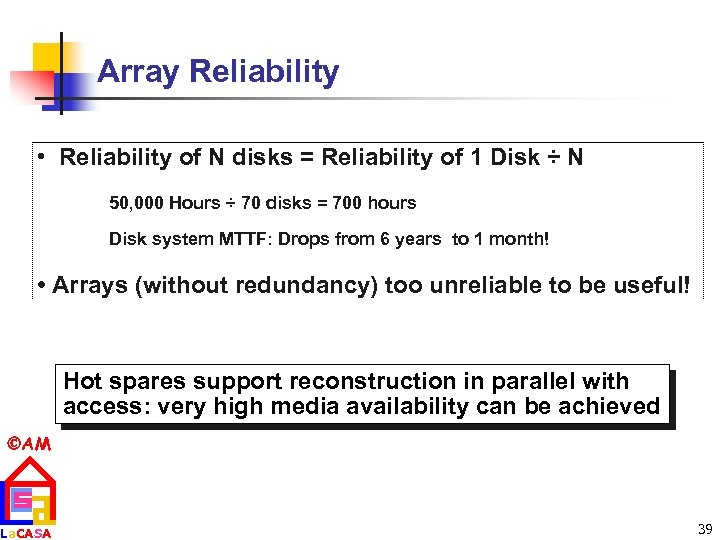 Array Reliability • Reliability of N disks = Reliability of 1 Disk ÷ N 50, 000 Hours ÷ 70 disks = 700 hours Disk system MTTF: Drops from 6 years to 1 month! • Arrays (without redundancy) too unreliable to be useful! Hot spares support reconstruction in parallel with access: very high media availability can be achieved AM La. CASA 39
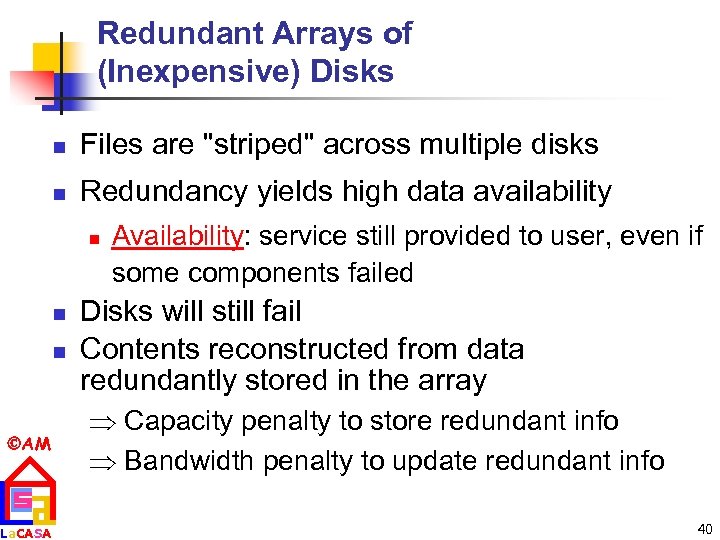 Redundant Arrays of (Inexpensive) Disks n Files are "striped" across multiple disks n Redundancy yields high data availability n n n AM La. CASA Availability: service still provided to user, even if some components failed Disks will still fail Contents reconstructed from data redundantly stored in the array Capacity penalty to store redundant info Bandwidth penalty to update redundant info 40
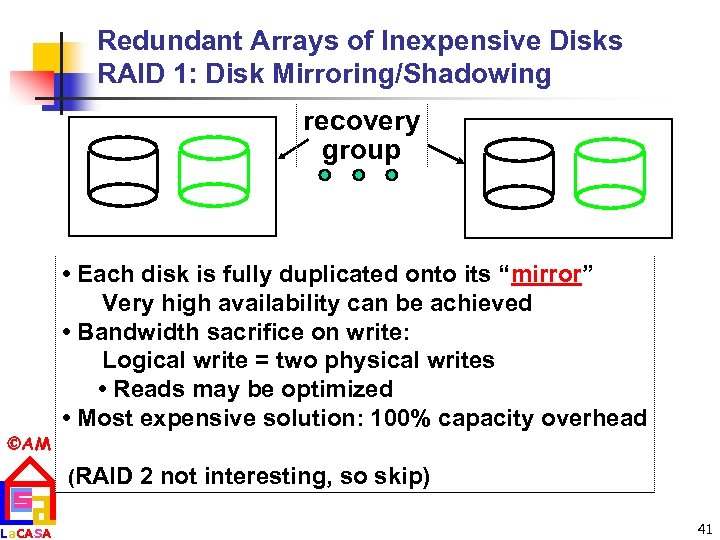 Redundant Arrays of Inexpensive Disks RAID 1: Disk Mirroring/Shadowing recovery group • Each disk is fully duplicated onto its “mirror” Very high availability can be achieved • Bandwidth sacrifice on write: Logical write = two physical writes • Reads may be optimized • Most expensive solution: 100% capacity overhead AM La. CASA (RAID 2 not interesting, so skip) 41
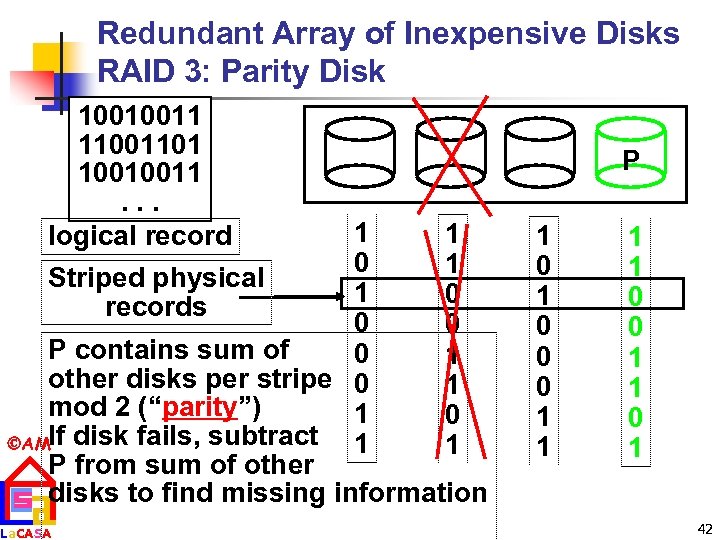 Redundant Array of Inexpensive Disks RAID 3: Parity Disk 10010011 11001101 10010011. . . logical record 1 1 0 1 Striped physical 1 0 records 0 0 P contains sum of 0 1 other disks per stripe 0 1 mod 2 (“parity”) 1 0 AMIf disk fails, subtract 1 1 P from sum of other disks to find missing information La. CASA P 1 0 0 0 1 1 0 1 42
 RAID 3 n n AM La. CASA Sum computed across recovery group to protect against hard disk failures, stored in P disk Logically, a single high capacity, high transfer rate disk: good for large transfers Wider arrays reduce capacity costs, but decreases availability 33% capacity cost for parity in this configuration 43
 Inspiration for RAID 4 n n RAID 3 relies on parity disk to discover errors on Read But every sector has an error detection field Rely on error detection field to catch errors on read, not on the parity disk Allows independent reads to different disks simultaneously AM La. CASA 44
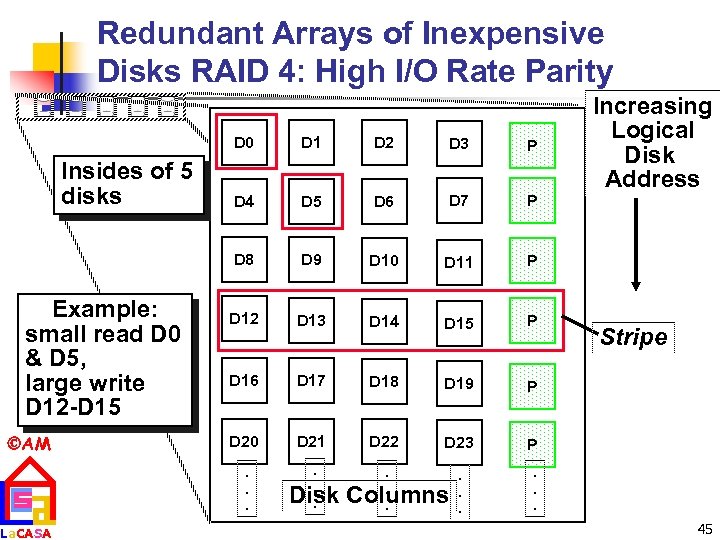 Redundant Arrays of Inexpensive Disks RAID 4: High I/O Rate Parity D 0 Example: small read D 0 & D 5, large write D 12 -D 15 AM La. CASA D 2 D 3 P D 4 D 5 D 6 D 7 P D 8 Insides of 5 disks D 1 D 9 D 10 D 11 P D 12 D 13 D 14 D 15 P D 16 D 17 D 18 D 19 P D 20 D 21 D 22 D 23 Increasing Logical Disk Address P . . . . Disk Columns. . Stripe . . . 45
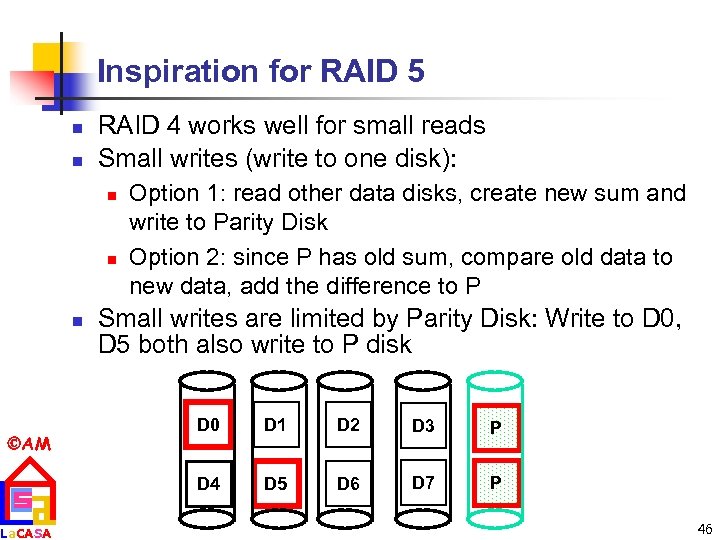 Inspiration for RAID 5 n n RAID 4 works well for small reads Small writes (write to one disk): n n n AM La. CASA Option 1: read other data disks, create new sum and write to Parity Disk Option 2: since P has old sum, compare old data to new data, add the difference to P Small writes are limited by Parity Disk: Write to D 0, D 5 both also write to P disk D 0 D 1 D 2 D 3 P D 4 D 5 D 6 D 7 P 46
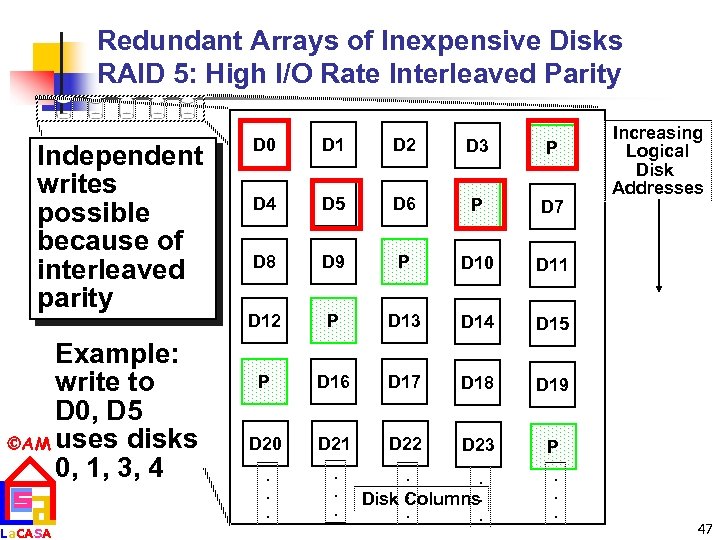 Redundant Arrays of Inexpensive Disks RAID 5: High I/O Rate Interleaved Parity Independent writes possible because of interleaved parity Example: write to D 0, D 5 AM uses disks 0, 1, 3, 4 La. CASA D 0 D 1 D 2 D 3 P D 4 D 5 D 6 P D 7 D 8 D 9 P D 10 D 11 D 12 P D 13 D 14 D 15 P D 16 D 17 D 18 D 19 D 20 D 21 D 22 D 23 P . . . Increasing Logical Disk Addresses . . . Disk Columns. . . 47
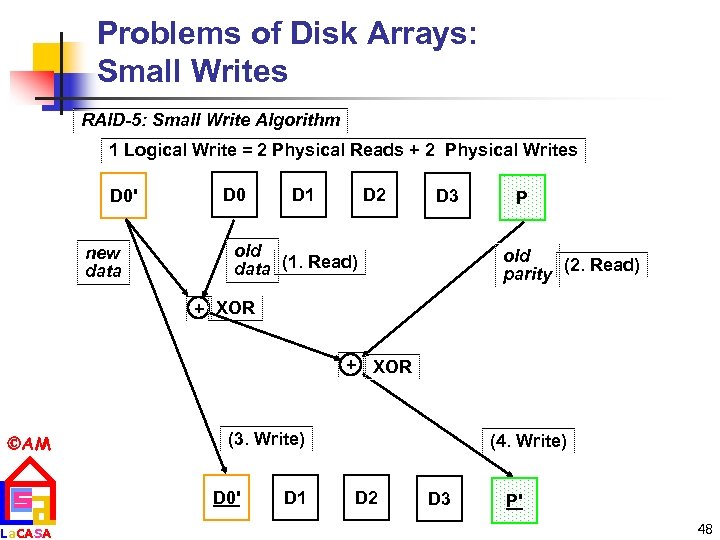 Problems of Disk Arrays: Small Writes RAID-5: Small Write Algorithm 1 Logical Write = 2 Physical Reads + 2 Physical Writes D 0' new data D 0 D 1 D 2 D 3 old data (1. Read) P old (2. Read) parity + XOR AM La. CASA (3. Write) D 0' D 1 (4. Write) D 2 D 3 P' 48
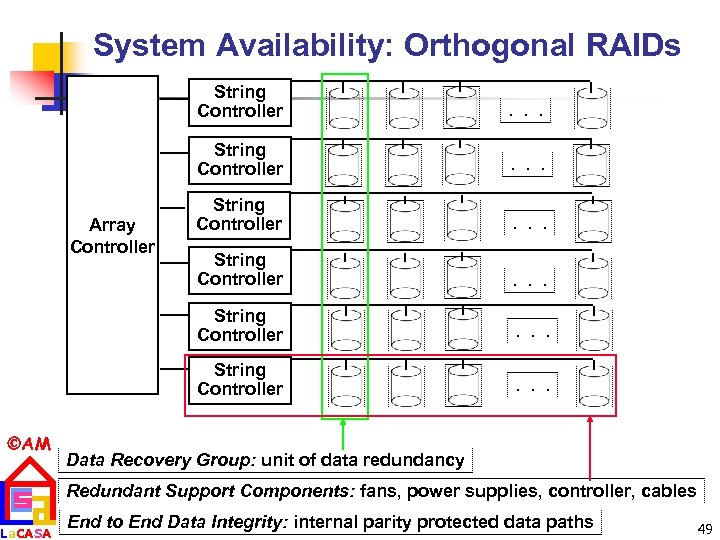 System Availability: Orthogonal RAIDs String Controller La. CASA String Controller . . . String Controller AM . . . String Controller Array Controller . . . Data Recovery Group: unit of data redundancy Redundant Support Components: fans, power supplies, controller, cables End to End Data Integrity: internal parity protected data paths 49
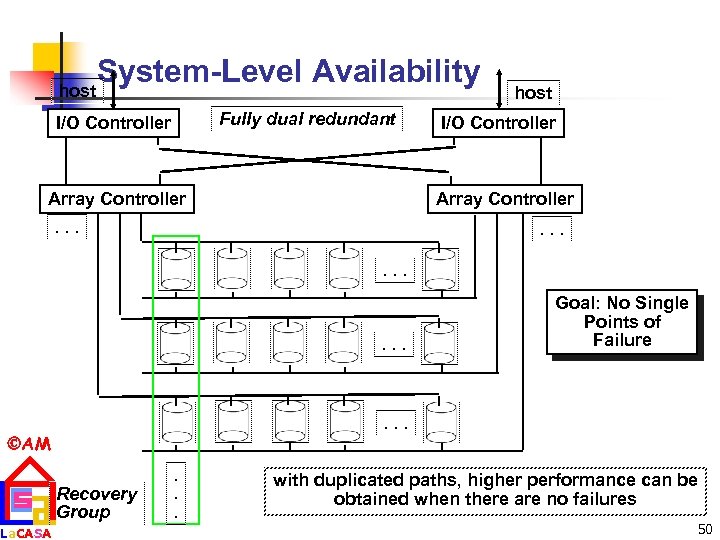 System-Level Availability host Fully dual redundant I/O Controller Array Controller host I/O Controller Array Controller . . . . AM La. CASA Goal: No Single Points of Failure Recovery Group . . . with duplicated paths, higher performance can be obtained when there are no failures 50
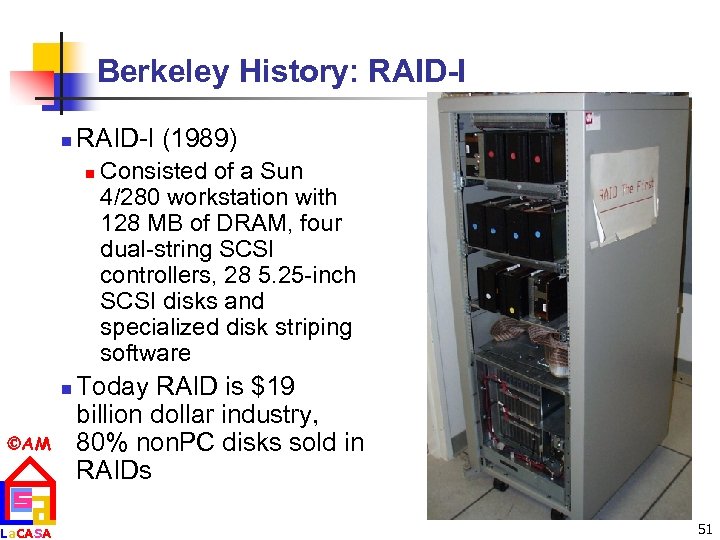 Berkeley History: RAID-I n RAID-I (1989) n n AM La. CASA Consisted of a Sun 4/280 workstation with 128 MB of DRAM, four dual-string SCSI controllers, 28 5. 25 -inch SCSI disks and specialized disk striping software Today RAID is $19 billion dollar industry, 80% non. PC disks sold in RAIDs 51
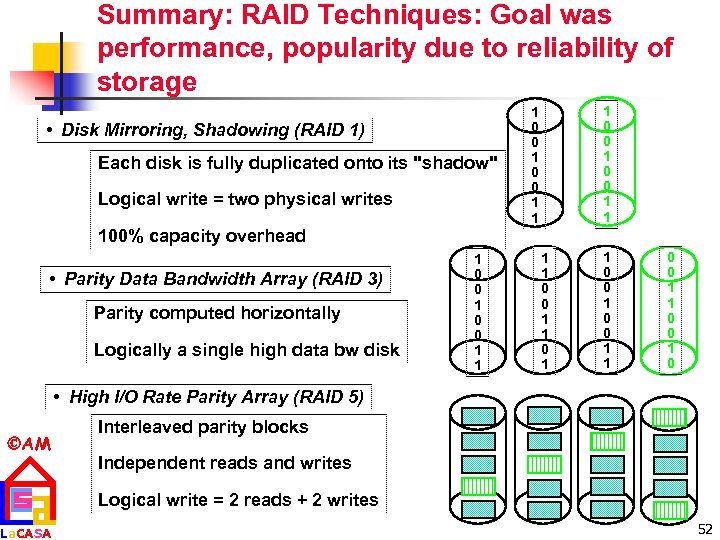 Summary: RAID Techniques: Goal was performance, popularity due to reliability of storage • Disk Mirroring, Shadowing (RAID 1) Each disk is fully duplicated onto its "shadow" Logical write = two physical writes 1 0 0 1 1 100% capacity overhead • Parity Data Bandwidth Array (RAID 3) Parity computed horizontally Logically a single high data bw disk 1 0 0 1 1 0 0 1 0 • High I/O Rate Parity Array (RAID 5) AM La. CASA Interleaved parity blocks Independent reads and writes Logical write = 2 reads + 2 writes 52
 Summary Storage n Disks: n n Tapes n AM La. CASA Extraodinary advance in capacity/drive, $/GB Currently 17 Gbit/sq. in. ; can continue past 100 Gbit/sq. in. ? Bandwidth, seek time not keeping up: 3. 5 inch form factor makes sense? 2. 5 inch form factor in near future? 1. 0 inch form factor in long term? n n No investment, must be backwards compatible Are they already dead? What is a tapeless backup system? 53