


 Скачать презентацию Concocting an Instruction Set Nerd Chef at work
59b0fa211785bb7d59ba6153de260274.ppt
- Количество слайдов: 32
 Concocting an Instruction Set Nerd Chef at work. Read: Chapter 2. 1 -2. 6 Comp 441 – Spring 2007 1/23/07 L 04 – Instruction Set 1
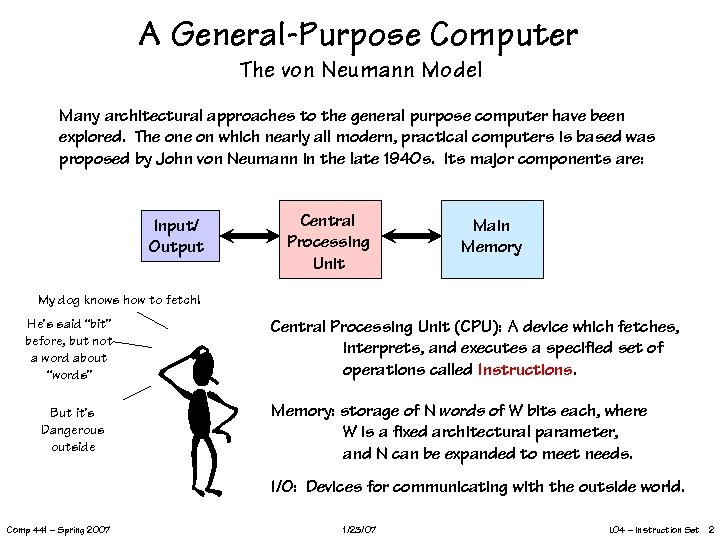 A General-Purpose Computer The von Neumann Model Many architectural approaches to the general purpose computer have been explored. The on which nearly all modern, practical computers is based was proposed by John von Neumann in the late 1940 s. Its major components are: Input/ Output Central Processing Unit Main Memory My dog knows how to fetch! He’s said “bit” before, but not a word about “words” But it’s Dangerous outside Central Processing Unit (CPU): A device which fetches, interprets, and executes a specified set of operations called Instructions. Memory: storage of N words of W bits each, where W is a fixed architectural parameter, and N can be expanded to meet needs. I/O: Devices for communicating with the outside world. Comp 441 – Spring 2007 1/23/07 L 04 – Instruction Set 2
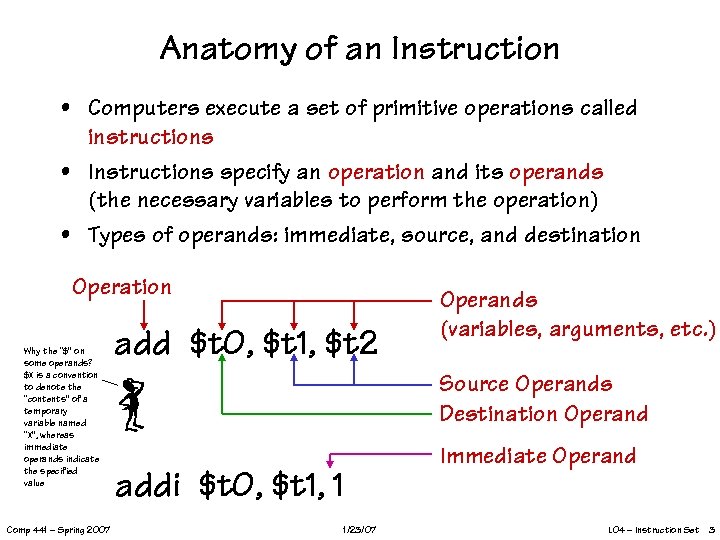 Anatomy of an Instruction • Computers execute a set of primitive operations called instructions • Instructions specify an operation and its operands (the necessary variables to perform the operation) • Types of operands: immediate, source, and destination Operation Why the “$” on some operands? $X is a convention to denote the “contents” of a temporary variable named “X”, whereas immediate operands indicate the specified value Comp 441 – Spring 2007 add $t 0, $t 1, $t 2 Operands (variables, arguments, etc. ) Source Operands Destination Operand Immediate Operand addi $t 0, $t 1, 1 1/23/07 L 04 – Instruction Set 3
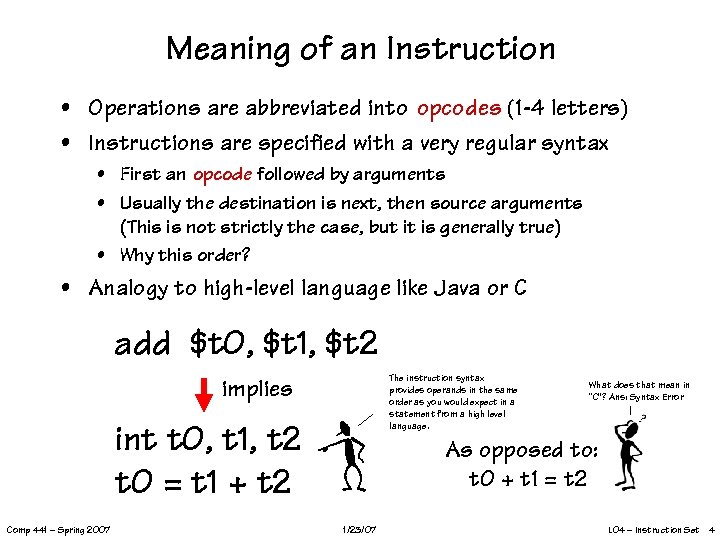 Meaning of an Instruction • Operations are abbreviated into opcodes (1 -4 letters) • Instructions are specified with a very regular syntax • First an opcode followed by arguments • Usually the destination is next, then source arguments (This is not strictly the case, but it is generally true) • Why this order? • Analogy to high-level language like Java or C add $t 0, $t 1, $t 2 The instruction syntax provides operands in the same order as you would expect in a statement from a high level language. implies int t 0, t 1, t 2 t 0 = t 1 + t 2 Comp 441 – Spring 2007 What does that mean in “C”? Ans: Syntax Error As opposed to: t 0 + t 1 = t 2 1/23/07 L 04 – Instruction Set 4
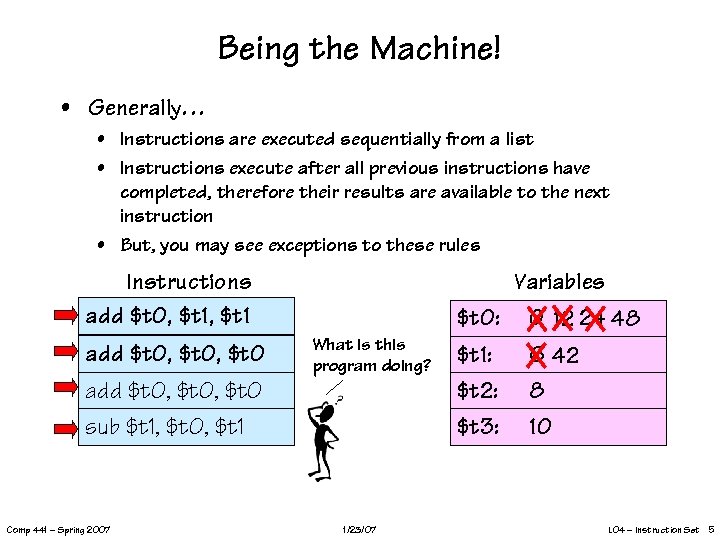 Being the Machine! • Generally… • Instructions are executed sequentially from a list • Instructions execute after all previous instructions have completed, therefore their results are available to the next instruction • But, you may see exceptions to these rules Variables Instructions add $t 0, $t 1 add $t 0, $t 0: What is this program doing? add $t 0, $t 0 sub $t 1, $t 0, $t 1 Comp 441 – Spring 2007 1/23/07 $t 1: $t 2: $t 3: 0 12 24 48 6 42 8 10 L 04 – Instruction Set 5
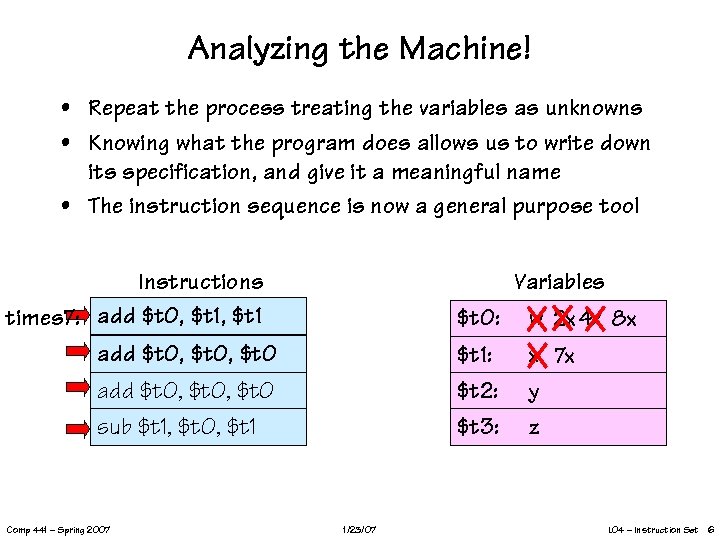 Analyzing the Machine! • Repeat the process treating the variables as unknowns • Knowing what the program does allows us to write down its specification, and give it a meaningful name • The instruction sequence is now a general purpose tool Variables Instructions times 7: add $t 0, $t 1 add $t 0, $t 0: $t 1: $t 2: $t 3: add $t 0, $t 0 sub $t 1, $t 0, $t 1 Comp 441 – Spring 2007 1/23/07 w 2 x 4 x 8 x x 7 x y z L 04 – Instruction Set 6
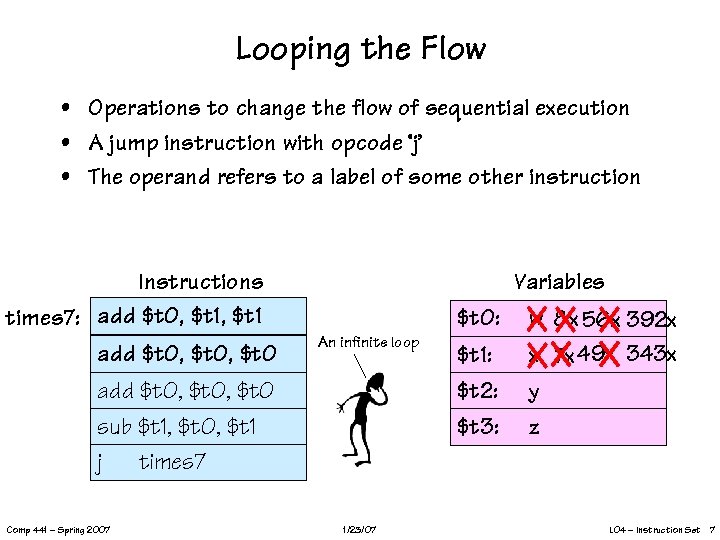 Looping the Flow • Operations to change the flow of sequential execution • A jump instruction with opcode ‘j’ • The operand refers to a label of some other instruction Instructions times 7: add $t 0, $t 1 add $t 0, $t 0 Variables $t 0: An infinite loop add $t 0, $t 0 sub $t 1, $t 0, $t 1 j times 7 Comp 441 – Spring 2007 1/23/07 $t 1: $t 2: $t 3: w 8 x 56 x 392 x x 7 x 49 x 343 x y z L 04 – Instruction Set 7
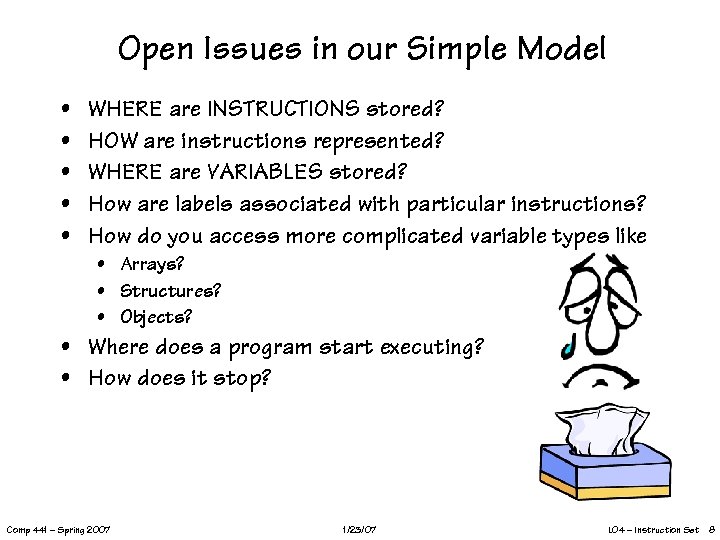 Open Issues in our Simple Model • • • WHERE are INSTRUCTIONS stored? HOW are instructions represented? WHERE are VARIABLES stored? How are labels associated with particular instructions? How do you access more complicated variable types like • Arrays? • Structures? • Objects? • Where does a program start executing? • How does it stop? Comp 441 – Spring 2007 1/23/07 L 04 – Instruction Set 8
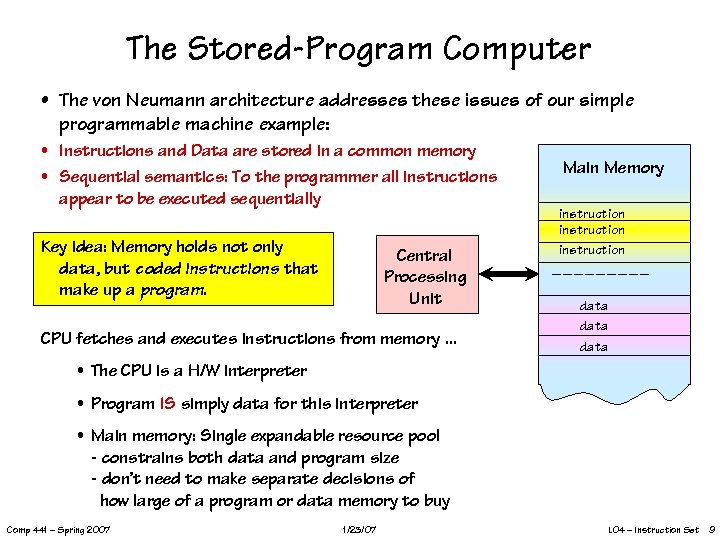 The Stored-Program Computer • The von Neumann architecture addresses these issues of our simple programmable machine example: • Instructions and Data are stored in a common memory • Sequential semantics: To the programmer all instructions appear to be executed sequentially Key idea: Memory holds not only data, but coded instructions that make up a program. Central Processing Unit CPU fetches and executes instructions from memory. . . Main Memory instruction data • The CPU is a H/W interpreter • Program IS simply data for this interpreter • Main memory: Single expandable resource pool - constrains both data and program size - don’t need to make separate decisions of how large of a program or data memory to buy Comp 441 – Spring 2007 1/23/07 L 04 – Instruction Set 9
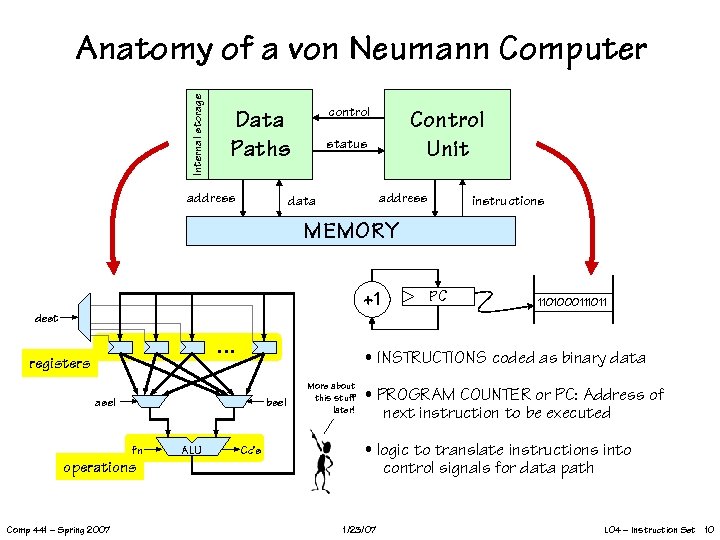 Internal storage Anatomy of a von Neumann Computer control Data Paths address Control Unit status address data instructions MEMORY +1 PC 1101000111011 dest … registers • INSTRUCTIONS coded as binary data asel bsel fn operations Comp 441 – Spring 2007 ALU Cc’s More about this stuff later! • PROGRAM COUNTER or PC: Address of next instruction to be executed • logic to translate instructions into control signals for data path 1/23/07 L 04 – Instruction Set 10
 Instruction Set Architecture (ISA) Our representative example: the Comp 441 – Spring 2007 1/23/07 MIPS architecture! L 04 – Instruction Set 11
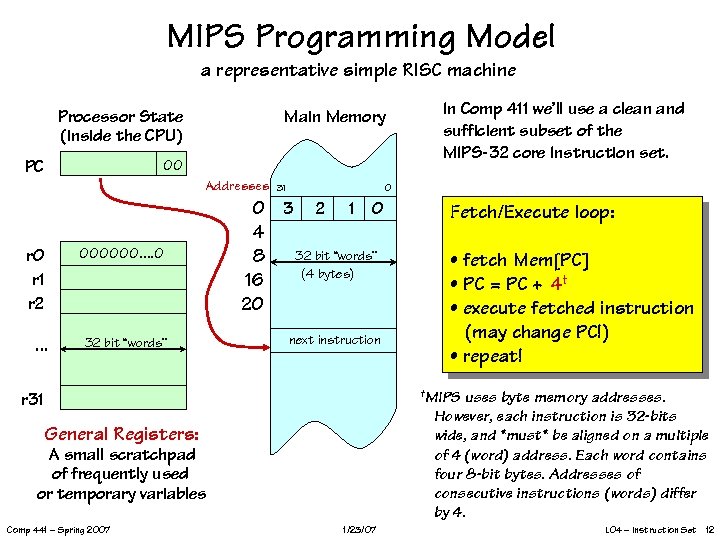 MIPS Programming Model a representative simple RISC machine Processor State (inside the CPU) Main Memory 00 PC Addresses 31 0 r 1 r 2 000000. . 0 0 3 2 1 0 4 32 bit “words” 8 (4 bytes) 16 20 . . . 32 bit “words” next instruction Fetch/Execute loop: • fetch Mem[PC] • PC = PC + 4† • execute fetched instruction (may change PC!) • repeat! †MIPS uses byte memory addresses. However, each instruction is 32 -bits wide, and *must* be aligned on a multiple of 4 (word) address. Each word contains four 8 -bit bytes. Addresses of consecutive instructions (words) differ by 4. r 31 General Registers: A small scratchpad of frequently used or temporary variables Comp 441 – Spring 2007 In Comp 411 we’ll use a clean and sufficient subset of the MIPS-32 core Instruction set. 1/23/07 L 04 – Instruction Set 12
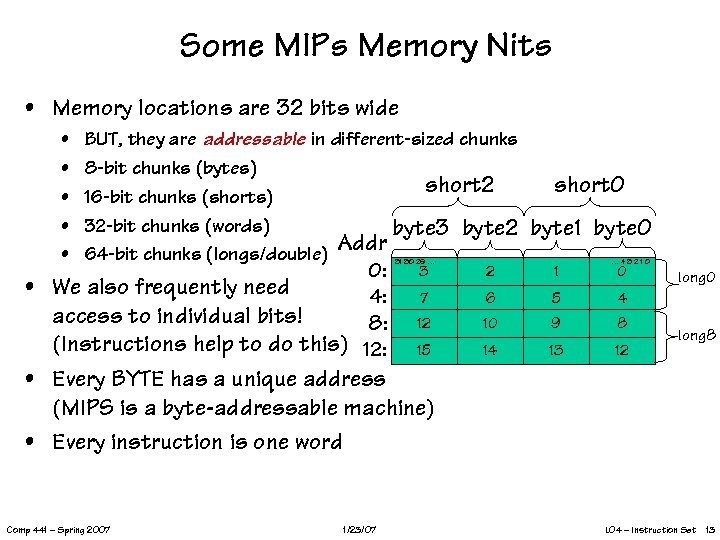 Some MIPs Memory Nits • Memory locations are 32 bits wide • • • BUT, they are addressable in different-sized chunks 8 -bit chunks (bytes) short 2 16 -bit chunks (shorts) 32 -bit chunks (words) byte 3 byte 2 Addr 64 -bit chunks (longs/double) 0: • We also frequently need 4: access to individual bits! 8: (Instructions help to do this) 12: 31 30 29 … short 0 byte 1 byte 0 … 43210 3 2 1 0 7 6 5 4 12 10 9 8 15 14 13 12 long 0 long 8 • Every BYTE has a unique address (MIPS is a byte-addressable machine) • Every instruction is one word Comp 441 – Spring 2007 1/23/07 L 04 – Instruction Set 13
 MIPS Register Nits Comp 441 – Spring 2007 1/23/07 L 04 – Instruction Set 14
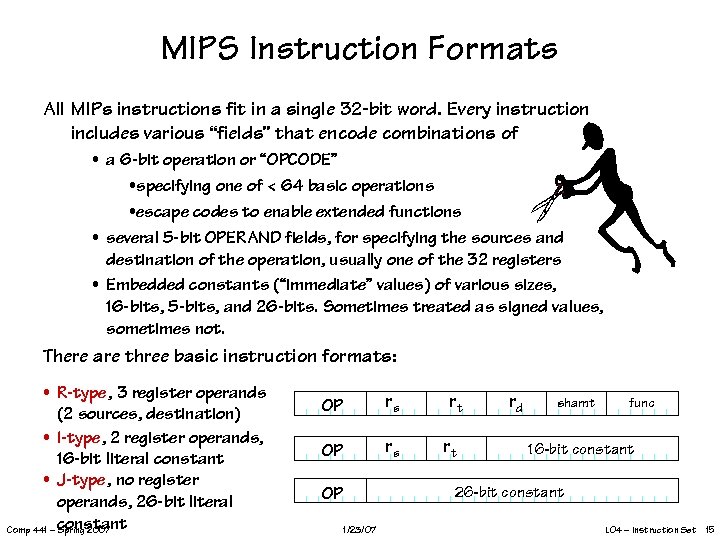 MIPS Instruction Formats All MIPs instructions fit in a single 32 -bit word. Every instruction includes various “fields” that encode combinations of • a 6 -bit operation or “OPCODE” • specifying one of < 64 basic operations • escape codes to enable extended functions • several 5 -bit OPERAND fields, for specifying the sources and destination of the operation, usually one of the 32 registers • Embedded constants (“immediate” values) of various sizes, 16 -bits, 5 -bits, and 26 -bits. Sometimes treated as signed values, sometimes not. There are three basic instruction formats: • R-type, 3 register operands (2 sources, destination) • I-type, 2 register operands, 16 -bit literal constant • J-type, no register operands, 26 -bit literal Comp 441 – constant Spring 2007 OP rs rt rd shamt func 16 -bit constant 26 -bit constant OP 1/23/07 L 04 – Instruction Set 15
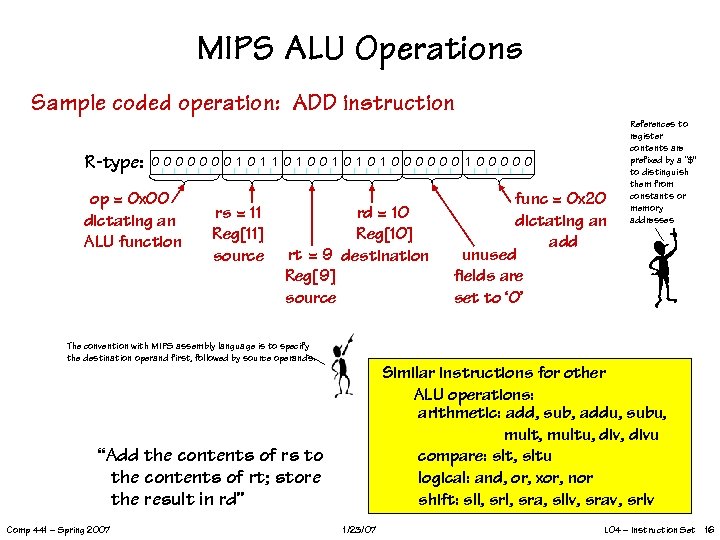 MIPS ALU Operations Sample coded operation: ADD instruction R-type: 0000000 1 1 0 1 0 1 000000 1 00000 op = 0 x 00 dictating an ALU function rs = 11 Reg[11] source rd = 10 Reg[10] rt = 9 destination Reg[9] source func = 0 x 20 dictating an add unused fields are set to ‘ 0’ References to register contents are prefixed by a “$” to distinguish them from constants or memory addresses The convention with MIPS assembly language is to specify the destination operand first, followed by source operands. Similar instructions for other ALU operations: arithmetic: add, sub, addu, subu, multu, divu compare: slt, sltu logical: and, or, xor, nor shift: sll, sra, sllv, srav, srlv “Add the contents of rs to the contents of rt; store the result in rd” Comp 441 – Spring 2007 1/23/07 L 04 – Instruction Set 16
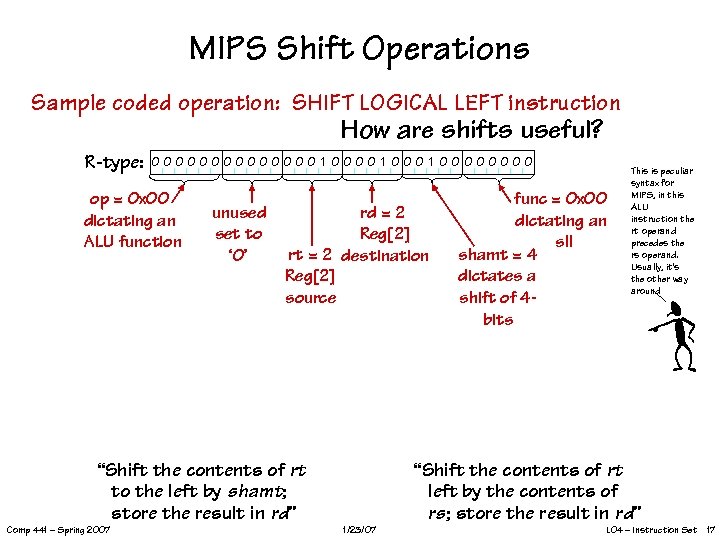 MIPS Shift Operations Sample coded operation: SHIFT LOGICAL LEFT instruction How are shifts useful? R-type: 0000000 1 0000 op = 0 x 00 dictating an ALU function unused set to ‘ 0’ rd = 2 Reg[2] rt = 2 destination Reg[2] source “Shift the contents of rt left by the contents of rs; store the result in rd” “Shift the contents of rt to the left by shamt; store the result in rd” Comp 441 – Spring 2007 func = 0 x 00 dictating an sll shamt = 4 dictates a shift of 4 bits This is peculiar syntax for MIPS, in this ALU instruction the rt operand precedes the rs operand. Usually, it’s the other way around 1/23/07 L 04 – Instruction Set 17
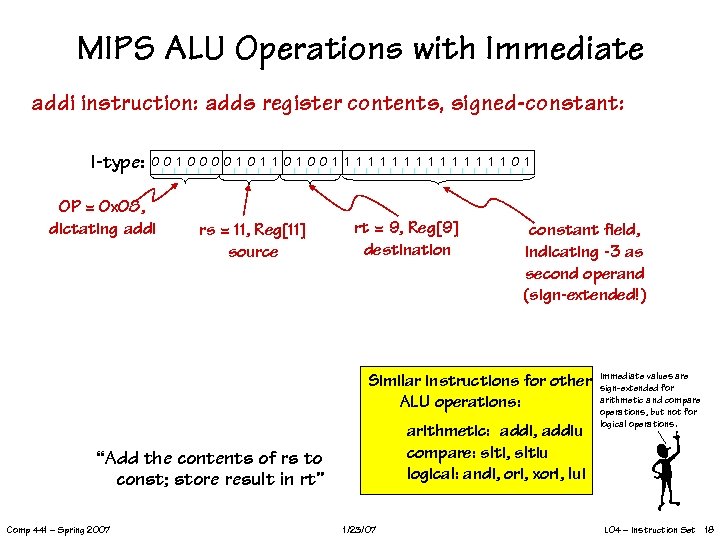 MIPS ALU Operations with Immediate addi instruction: adds register contents, signed-constant: I-type: 00 1 0000 1 1 0 1 00 1 1 1 1 0 1 OP = 0 x 08, dictating addi rs = 11, Reg[11] source rt = 9, Reg[9] destination constant field, indicating -3 as second operand (sign-extended!) Similar instructions for other ALU operations: arithmetic: addi, addiu compare: slti, sltiu logical: andi, ori, xori, lui “Add the contents of rs to const; store result in rt” Comp 441 – Spring 2007 1/23/07 Immediate values are sign-extended for arithmetic and compare operations, but not for logical operations. L 04 – Instruction Set 18
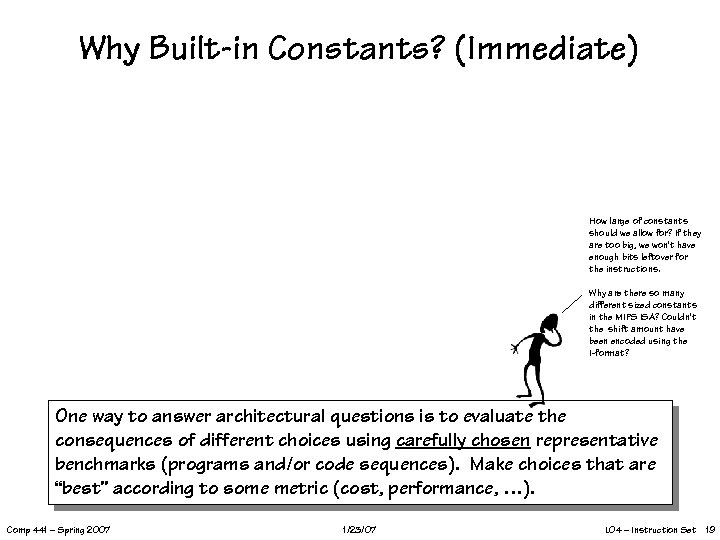 Why Built-in Constants? (Immediate) How large of constants should we allow for? If they are too big, we won’t have enough bits leftover for the instructions. Why are there so many different sized constants in the MIPS ISA? Couldn’t the shift amount have been encoded using the I-format? One way to answer architectural questions is to evaluate the consequences of different choices using carefully chosen representative benchmarks (programs and/or code sequences). Make choices that are “best” according to some metric (cost, performance, …). Comp 441 – Spring 2007 1/23/07 L 04 – Instruction Set 19
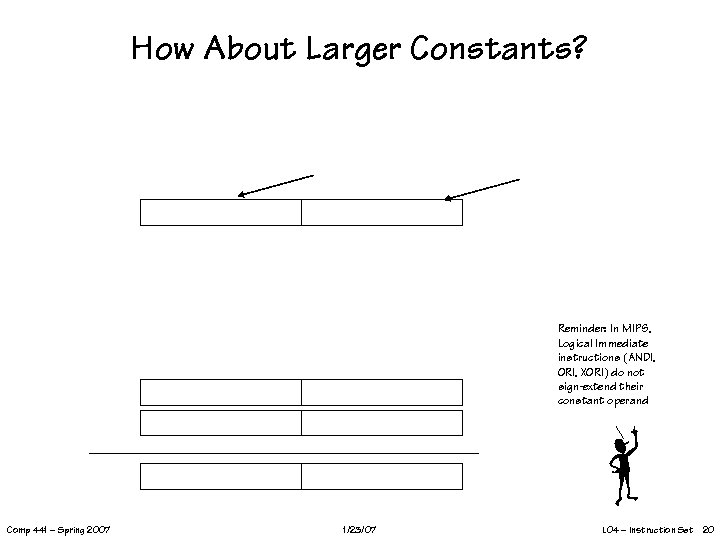 How About Larger Constants? Reminder: In MIPS, Logical Immediate instructions (ANDI, ORI, XORI) do not sign-extend their constant operand Comp 441 – Spring 2007 1/23/07 L 04 – Instruction Set 20
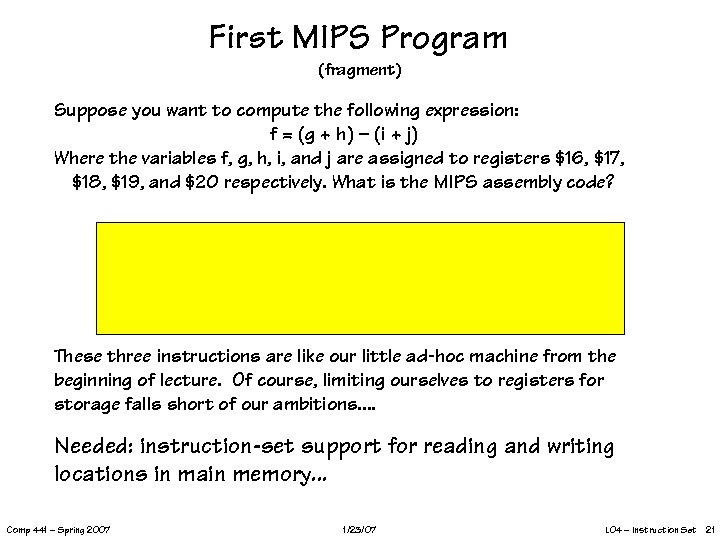 First MIPS Program (fragment) Suppose you want to compute the following expression: f = (g + h) – (i + j) Where the variables f, g, h, i, and j are assigned to registers $16, $17, $18, $19, and $20 respectively. What is the MIPS assembly code? These three instructions are like our little ad-hoc machine from the beginning of lecture. Of course, limiting ourselves to registers for storage falls short of our ambitions. . Needed: instruction-set support for reading and writing locations in main memory. . . Comp 441 – Spring 2007 1/23/07 L 04 – Instruction Set 21
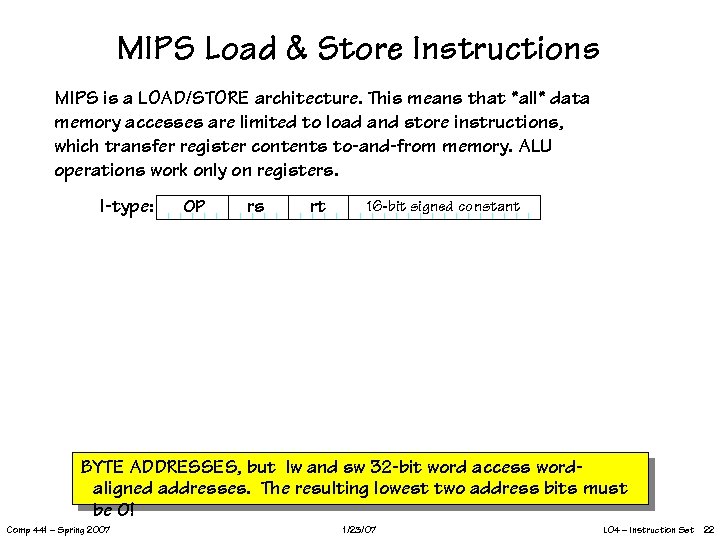 MIPS Load & Store Instructions MIPS is a LOAD/STORE architecture. This means that *all* data memory accesses are limited to load and store instructions, which transfer register contents to-and-from memory. ALU operations work only on registers. I-type: OP rs rt 16 -bit signed constant BYTE ADDRESSES, but lw and sw 32 -bit word access wordaligned addresses. The resulting lowest two address bits must be 0! Comp 441 – Spring 2007 1/23/07 L 04 – Instruction Set 22
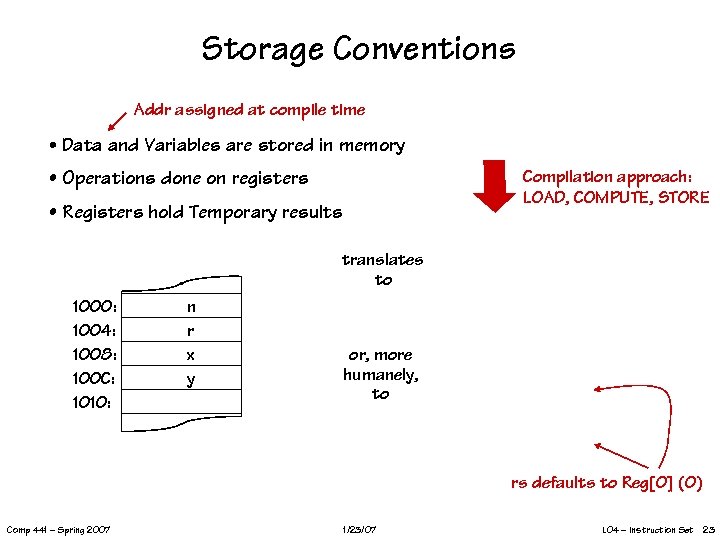 Storage Conventions Addr assigned at compile time • Data and Variables are stored in memory Compilation approach: LOAD, COMPUTE, STORE • Operations done on registers • Registers hold Temporary results translates to 1000: 1004: 1008: 100 C: 1010: n r x y or, more humanely, to rs defaults to Reg[0] (0) Comp 441 – Spring 2007 1/23/07 L 04 – Instruction Set 23
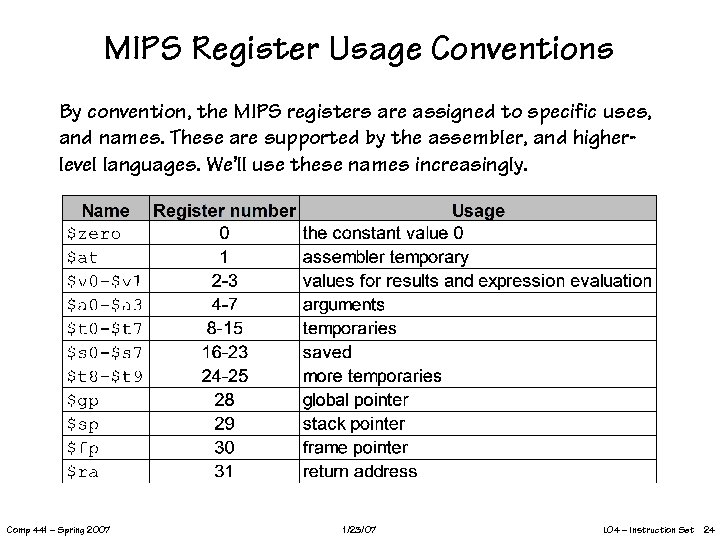 MIPS Register Usage Conventions By convention, the MIPS registers are assigned to specific uses, and names. These are supported by the assembler, and higherlevel languages. We’ll use these names increasingly. Comp 441 – Spring 2007 1/23/07 L 04 – Instruction Set 24
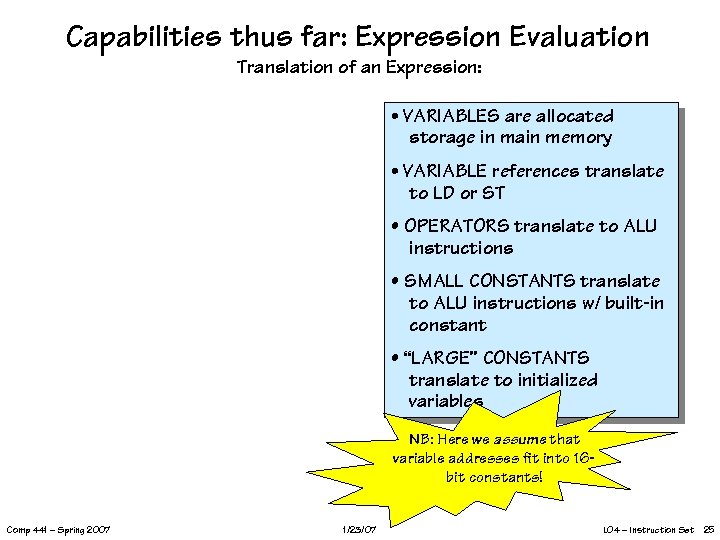 Capabilities thus far: Expression Evaluation Translation of an Expression: • VARIABLES are allocated storage in main memory • VARIABLE references translate to LD or ST • OPERATORS translate to ALU instructions • SMALL CONSTANTS translate to ALU instructions w/ built-in constant • “LARGE” CONSTANTS translate to initialized variables NB: Here we assume that variable addresses fit into 16 bit constants! Comp 441 – Spring 2007 1/23/07 L 04 – Instruction Set 25
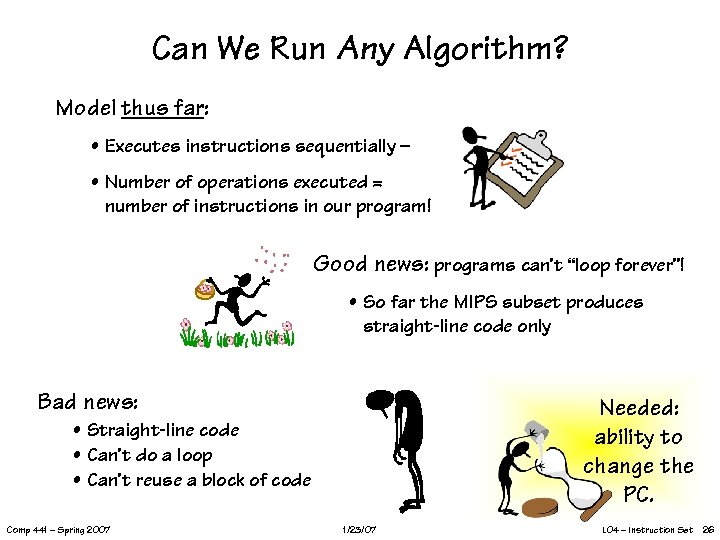 Can We Run Any Algorithm? Model thus far: • Executes instructions sequentially – • Number of operations executed = number of instructions in our program! Good news: programs can’t “loop forever”! • So far the MIPS subset produces straight-line code only Bad news: Needed: ability to change the PC. • Straight-line code • Can’t do a loop • Can’t reuse a block of code Comp 441 – Spring 2007 1/23/07 L 04 – Instruction Set 26
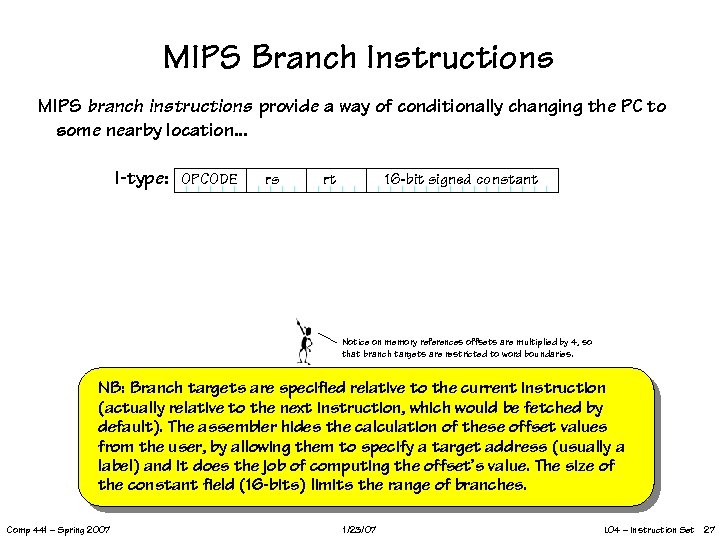 MIPS Branch Instructions MIPS branch instructions provide a way of conditionally changing the PC to some nearby location. . . I-type: OPCODE rs rt 16 -bit signed constant Notice on memory references offsets are multiplied by 4, so that branch targets are restricted to word boundaries. NB: Branch targets are specified relative to the current instruction (actually relative to the next instruction, which would be fetched by default). The assembler hides the calculation of these offset values from the user, by allowing them to specify a target address (usually a label) and it does the job of computing the offset’s value. The size of the constant field (16 -bits) limits the range of branches. Comp 441 – Spring 2007 1/23/07 L 04 – Instruction Set 27
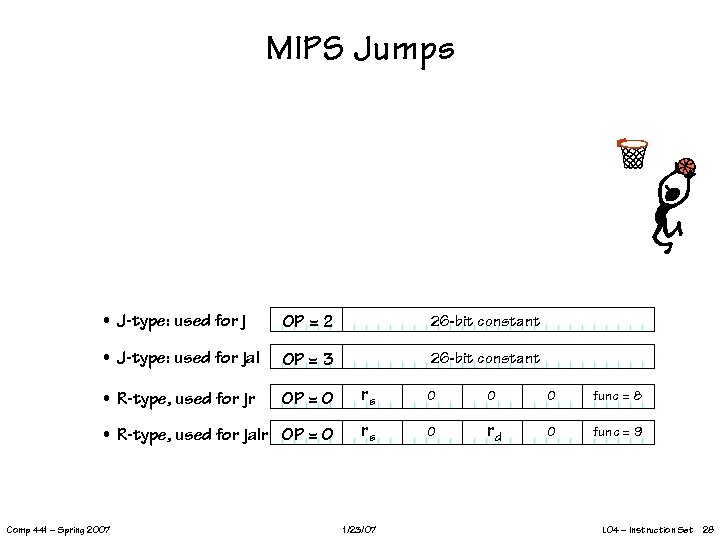 MIPS Jumps • J-type: used for j OP = 2 26 -bit constant • J-type: used for jal OP = 3 26 -bit constant • R-type, used for jr OP = 0 rs 0 0 0 func = 8 • R-type, used for jalr OP = 0 rs 0 rd 0 func = 9 Comp 441 – Spring 2007 1/23/07 L 04 – Instruction Set 28
 Now we can do a real program: Factorial. . . Synopsis (in C): • Input in n, output in ans • r 1, r 2 used for temporaries • follows algorithm of our earlier data paths. MIPS code, in assembly language: Comp 441 – Spring 2007 1/23/07 L 04 – Instruction Set 29
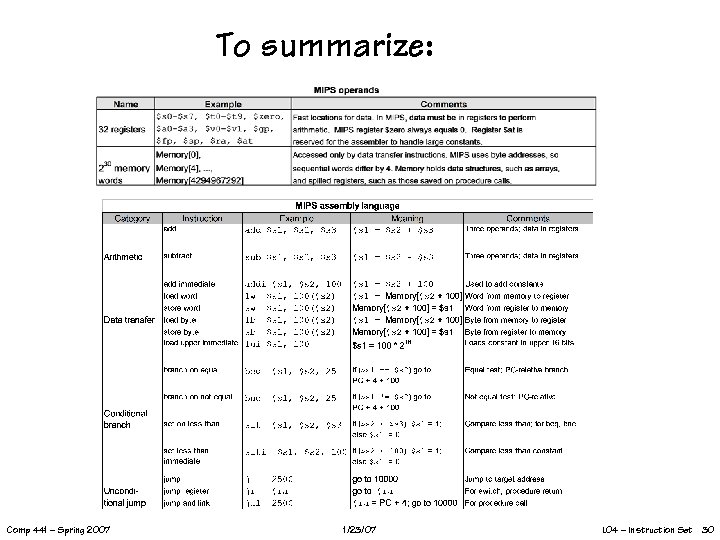 To summarize: Comp 441 – Spring 2007 1/23/07 L 04 – Instruction Set 30
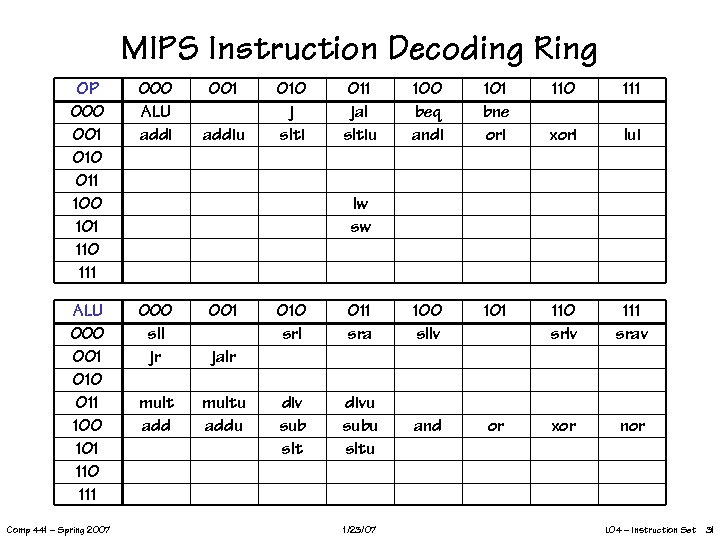 MIPS Instruction Decoding Ring OP 000 001 010 011 100 101 110 111 000 ALU addi ALU 000 001 010 011 100 101 110 111 000 sll jr 001 mult add multu addu Comp 441 – Spring 2007 001 addiu 010 j slti 011 jal sltiu 100 beq andi 101 bne ori 110 111 xori lui lw sw 010 srl 011 sra 100 sllv 101 110 srlv 111 srav div sub slt divu subu sltu and or xor nor jalr 1/23/07 L 04 – Instruction Set 31
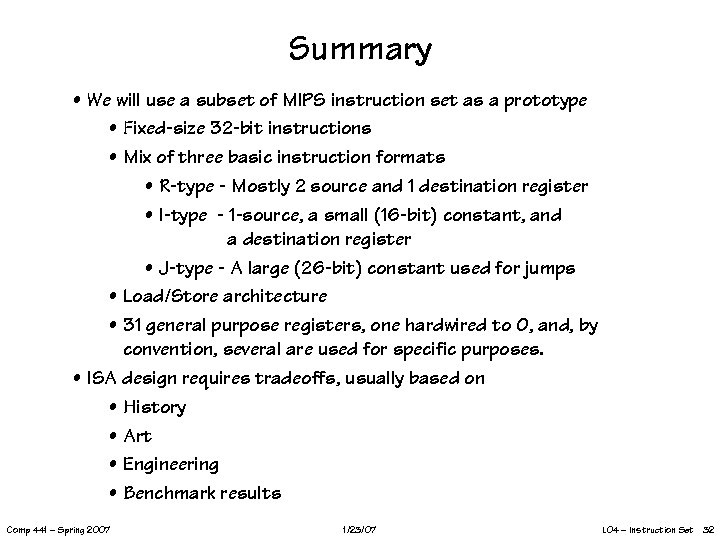 Summary • We will use a subset of MIPS instruction set as a prototype • Fixed-size 32 -bit instructions • Mix of three basic instruction formats • R-type - Mostly 2 source and 1 destination register • I-type - 1 -source, a small (16 -bit) constant, and a destination register • J-type - A large (26 -bit) constant used for jumps • Load/Store architecture • 31 general purpose registers, one hardwired to 0, and, by convention, several are used for specific purposes. • ISA design requires tradeoffs, usually based on • History • Art • Engineering • Benchmark results Comp 441 – Spring 2007 1/23/07 L 04 – Instruction Set 32