


 Скачать презентацию Computer Security Principles and Practice Chapter 3 User
b35a0406e1f162a497e560c40e89aeb8.ppt
- Количество слайдов: 41
 Computer Security: Principles and Practice Chapter 3: User Authentication EECS 710: Information Security Professor Hossein Saiedian Fall 2014
 Chapter 3 overview • • Electronic user authentication principles Password-based authentication Token-based authentication Biometric authentication Remote user authentication Security issues for user authentication Practical application: an iris biometric system Case stury: security problems for ATM systems 2
 Learning objectives • • • Discuss the four general means of authenticating a user’s identity Explain the mechanism by which hashed passwords used for user authentication Understand the use of the Bloom filters in password management Present an overview of token-based user authentication Discuss the issues involved and the approaches for remote user authentication 3
 User Authentication • Fundamental security building block – basis of access control & user accountability The process of verifying an identity claimed by or for a system entity • Two steps: • identification: specify identifier – verification: bind entity (person) and identifier – • Distinct from message authentication (when communicating parties are concerned with the integrity of the exchanges messages) 4
 A model for electronic user authentication NIST SP 800 -63 -2 defines EUA as: the process of establishing confidence in user identity that are electronically presented • The NIST SP 800 -63 -2 model • – – – – User applies to registration authority (RA) and becomes a subscriber of a credential service provider (CSP) RA is a trusted entity The CSP exchanges with the subscriber The credential (a data structure) binds an identity to a token possessed by the subscriber Claimant: the party to be authenticated Verifier: the party verifying The verifier passes an assertion about the subscriber to the relaying party (PR) 5
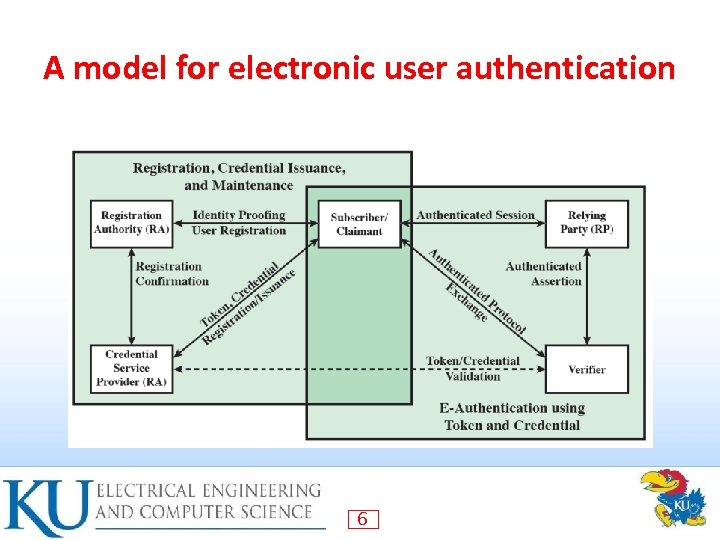 A model for electronic user authentication 6
 Means of user authentication Four means of authenticating user's identity • Based one something the individual • knows, e. g. password, PIN – possesses, e. g. key, token, smartcard – is (static biometrics), e. g. fingerprint, retina – does (dynamic biometrics), e. g. voice, sign – Can use alone or combined • All can provide user authentication • All have issues • 7
 Risk assessment for user authentication • Assurance level: the degree of certainty that a user has presented a credential that refers to his/her identity Level 1: little confidence (an online forum) – Level 2: some confidence (professional organizations) – Level 3: High confidence (patent office applicants) – Level 4: Very high confidence (employees accessing restricted/sensitive services) – • Potential impact: low, moderate, impact 8
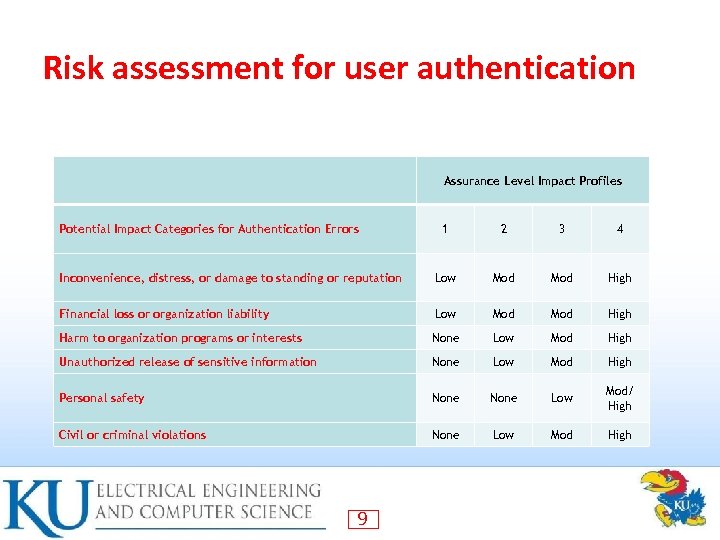 Risk assessment for user authentication Assurance Level Impact Profiles Potential Impact Categories for Authentication Errors 1 2 3 4 Inconvenience, distress, or damage to standing or reputation Low Mod High Financial loss or organization liability Low Mod High Harm to organization programs or interests None Low Mod High Unauthorized release of sensitive information None Low Mod High Personal safety None Low Mod/ High Civil or criminal violations None Low Mod High 9
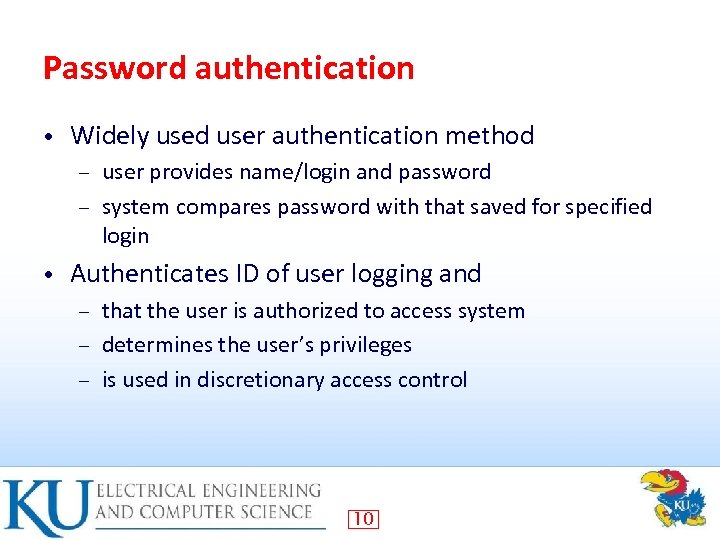 Password authentication • Widely used user authentication method user provides name/login and password – system compares password with that saved for specified login – • Authenticates ID of user logging and that the user is authorized to access system – determines the user’s privileges – is used in discretionary access control – 10
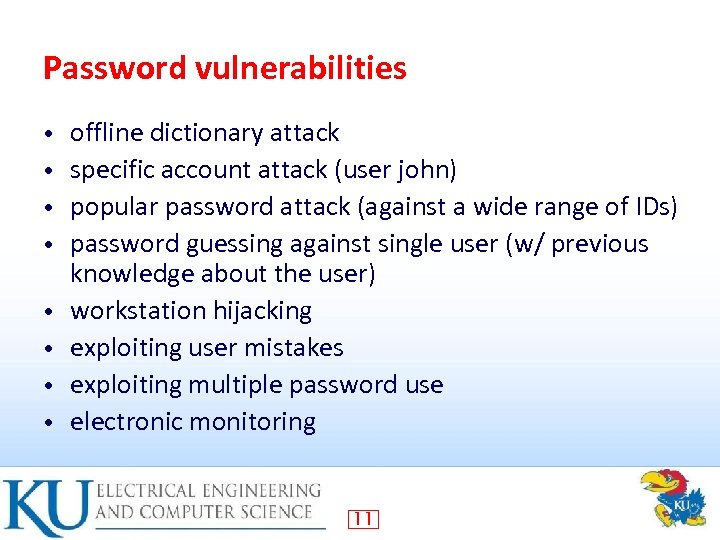 Password vulnerabilities • • offline dictionary attack specific account attack (user john) popular password attack (against a wide range of IDs) password guessing against single user (w/ previous knowledge about the user) workstation hijacking exploiting user mistakes exploiting multiple password use electronic monitoring 11
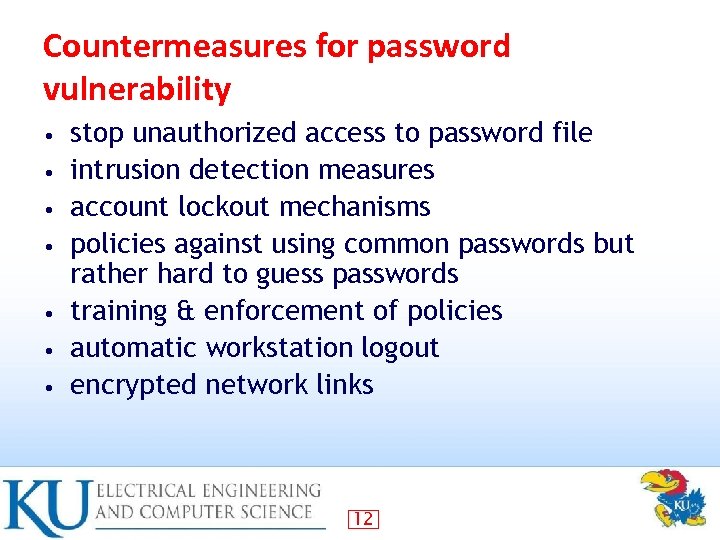 Countermeasures for password vulnerability • • stop unauthorized access to password file intrusion detection measures account lockout mechanisms policies against using common passwords but rather hard to guess passwords training & enforcement of policies automatic workstation logout encrypted network links 12
 Countermeasures for password vulnerability • It is worthwhile to study/research password and password vulnerabilities Most common – Still the most efficient – 13
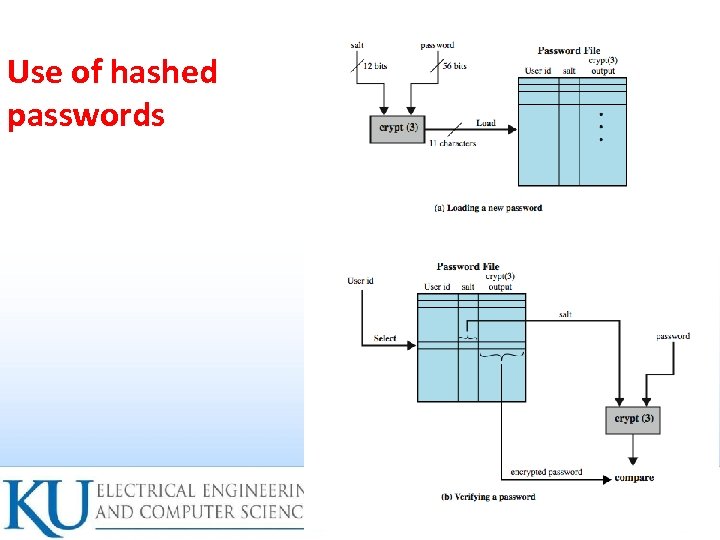 Use of hashed passwords 14
 Why a salt value? Prevents duplicate passwords from being visible in the password file • Increases the difficulty of offline dictionary attacks • Nearly impossible to tell if a person used the same password on multiple systems • 15
 UNIX Implementation • Original scheme 8 character password form 56 -bit key – 12 -bit salt used to modify DES encryption into a one-way hash function – output translated to 11 character sequence – • Now regarded as woefully insecure – • e. g. supercomputer, 50 million tests, 80 min Sometimes still used for compatibility 16
 Improved implementations Have other, stronger, hash/salt variants • Many systems now use MD 5 • with 48 -bit salt – password length is unlimited – is hashed with 1000 times inner loop – produces 128 -bit hash – • Open. BSD uses Blowfish block cipher based and hash algorithm called Bcrypt – uses 128 -bit salt to create 192 -bit hash value 17
 Password Cracking • Dictionary attacks – • try each word then obvious variants in large dictionary against hash in password file Rainbow table attacks a large dict of possible passwords – for each password: – precompute tables of hash values for all salts • a mammoth table of hash values: e. g. 1. 4 GB table cracks 99. 9% of alphanumeric Windows passwords in 13. 8 secs • – not feasible if larger salt values used 18
 Password choices/concerns • users may pick short passwords e. g. 3% were 3 chars or less, easily guessed – system can reject choices that are too short – • users may pick guessable passwords so crackers use lists of likely passwords – e. g. one study of 14000 encrypted passwords guessed nearly 1/4 of them – would take about 1 hour on fastest systems to compute all variants, and only need 1 break! – 19
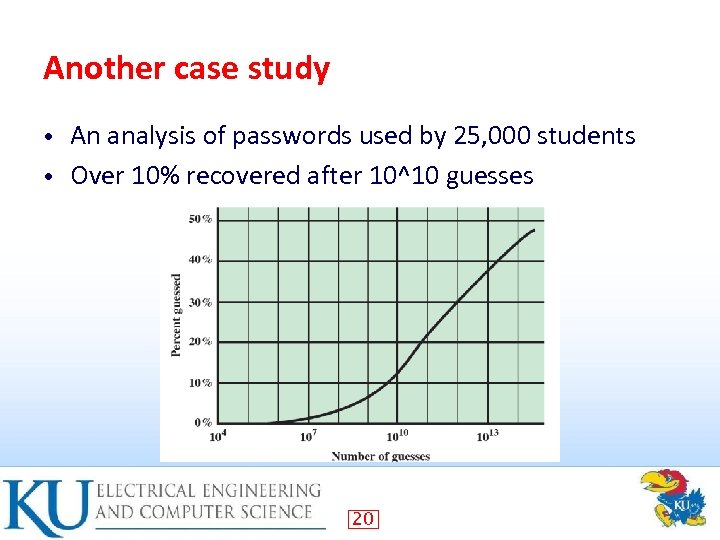 Another case study An analysis of passwords used by 25, 000 students • Over 10% recovered after 10^10 guesses • 20
 Password File Access Control • Can block offline guessing attacks by denying access to encrypted passwords make available only to privileged users – often using a separate shadow password (for su only) – • Still have vulnerabilities – – – exploit O/S bug accident with permissions making it readable users with same password on other systems access from unprotected backup media sniff passwords in unprotected network traffic 21
 Using Better Passwords Clearly have problems with passwords • Goal to eliminate guessable passwords • – • Still easy for user to remember Techniques user education – computer-generated passwords – reactive password checking (periodic checking) – proactive password checking (at the time of selection) – 22
 Proactive Password Checking • Rule enforcement plus user advice, e. g. 8+ chars, upper/lower/numeric/punctuation – may not suffice – • Password cracker list of bad passwords – time and space issues – • Markov Model generates guessable passwords – hence reject any password it might generate – • Bloom Filter use to build table based on dictionary using hashes – check desired password against this table – 23
 Token-based authentication • Object user possesses to authenticate, e. g. memory card (magnetic stripe) – smartcard – 24
 Memory Card • • • store but do not process data magnetic stripe card, e. g. bank card electronic memory card used alone for physical access (e. g. , hotel rooms) some with password/PIN (e. g. , ATMs) Drawbacks of memory cards include: need special reader – loss of token issues – user dissatisfaction (OK for ATM, not OK for computer access) – 25
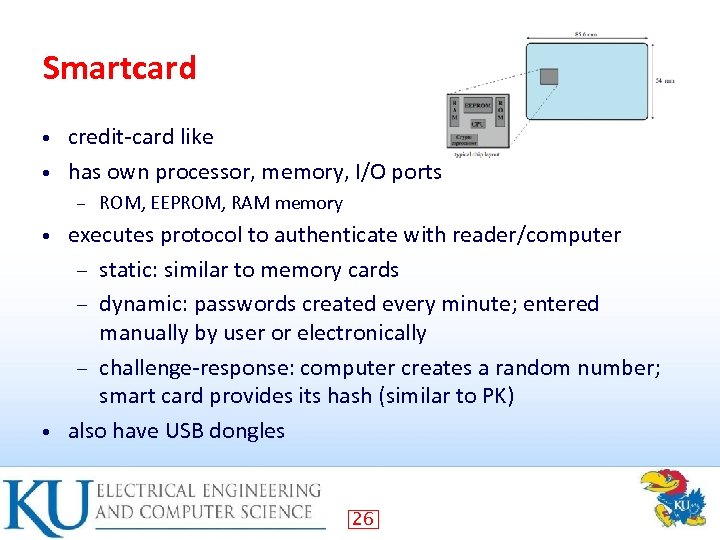 Smartcard credit-card like • has own processor, memory, I/O ports • – ROM, EEPROM, RAM memory executes protocol to authenticate with reader/computer – static: similar to memory cards – dynamic: passwords created every minute; entered manually by user or electronically – challenge-response: computer creates a random number; smart card provides its hash (similar to PK) • also have USB dongles • 26
 Electronic identify cards An important application of smart cards • A national e-identity (e. ID) • Serves the same purpose as other national ID cards (e. g. , a driver’s licence) • Can provide stronger proof of identity – A German card – Personal data, Document number, Card access number (six digit random number), Machine readable zone (MRZ): the password • Uses: e. Pass (government use), e. ID (general use), e. Sign (can have private key and certificate) • 27
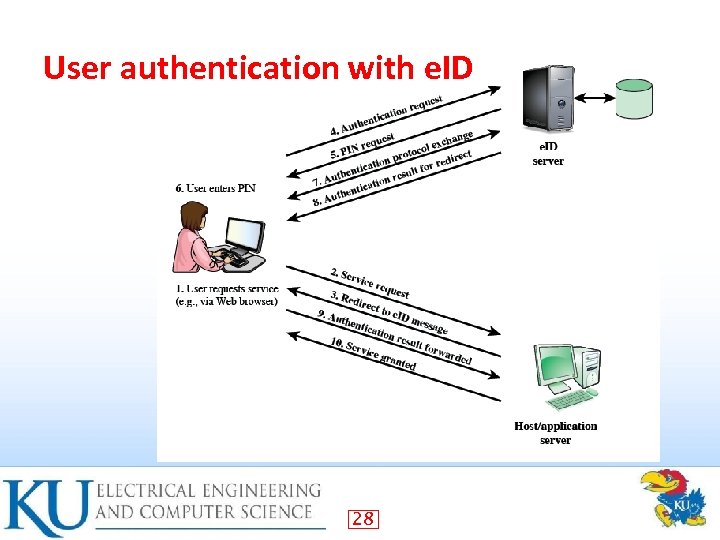 User authentication with e. ID 28
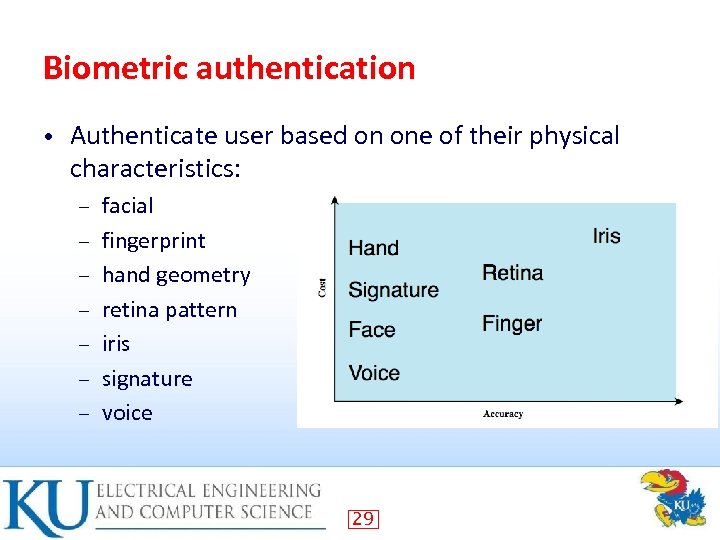 Biometric authentication • Authenticate user based on one of their physical characteristics: – – – – facial fingerprint hand geometry retina pattern iris signature voice 29
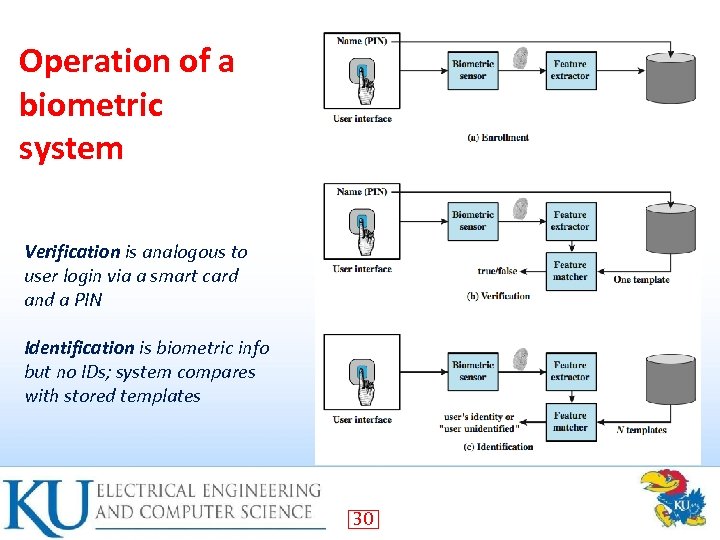 Operation of a biometric system Verification is analogous to user login via a smart card and a PIN Identification is biometric info but no IDs; system compares with stored templates 30
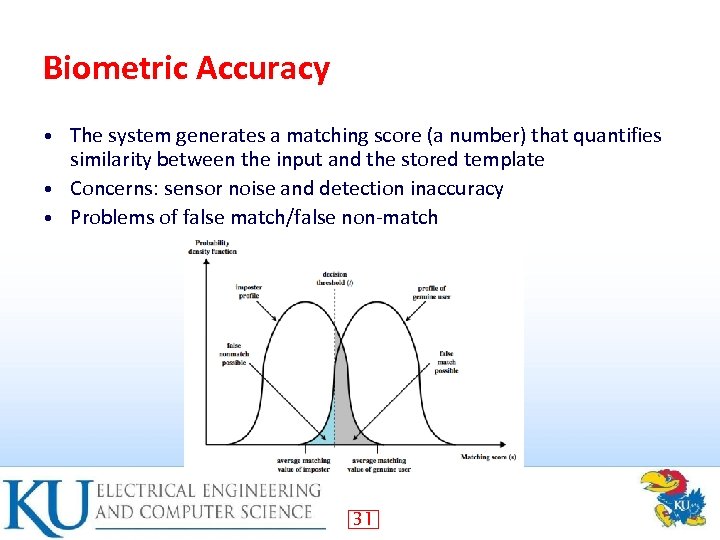 Biometric Accuracy The system generates a matching score (a number) that quantifies similarity between the input and the stored template • Concerns: sensor noise and detection inaccuracy • Problems of false match/false non-match • 31
 Remote User Authentication • Authentication over network more complex – • Problems of eavesdropping, replay Generally use challenge-response user sends identity – host responds with random number r – user computes f(r, h(P)) and sends back – host compares value from user with own computed value, if match user authenticated – • Protects against a number of attacks 33
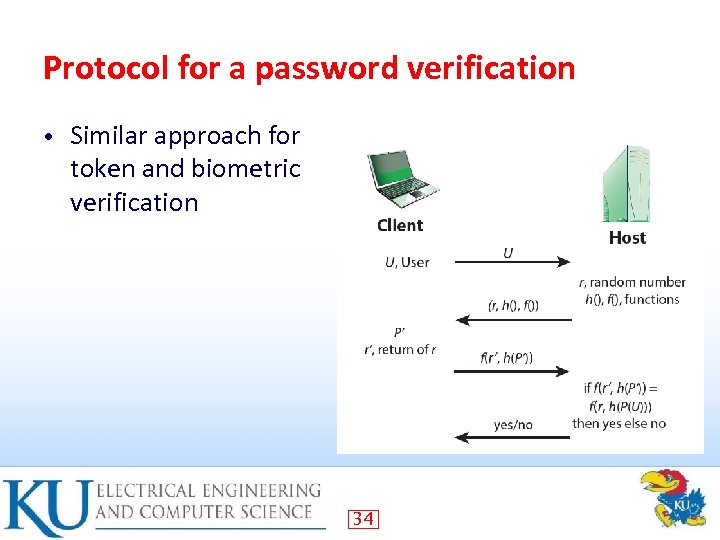 Protocol for a password verification • Similar approach for token and biometric verification 34
 Authentication Security Issues • Client attacks: attacker attempts to achieve user authentication without access to the remote host Masquerade as a legitimate user (e. g. , guess the password or try all passwords) – Countermeasure: strong passwords; limit number of attempts – 35
 Authentication Security Issues • Host attacks: attacker attacks the host where passwords/passcodes are stored – Countermeasure: hashing, protect password databases 36
 Authentication Security Issues • Eavesdropping: attacker attempts to learn passwords by observing the user, finding written passwords, keylogging – Countermeasures diligence to keep passwords • multifactor authentication • admin revoke compromised passwords • 37
 Authentication Security Issues • Replay: attacker repeats a previously captured user response – Countermeasure Challenge-response • 1 -time passcodes • 38
 Authentication Security Issues eavesdropping • replay • trojan horse • 39
 Authentication Security Issues • Trojan horse: an application or physical device masquerades as an authentic application or device – • Countermeasure: authentication of the client within a trusted security environment Denial of service: attacker attempts to disable a user authentication service (via flooding) – Countermeasure: a multifactor authentication with a token 40
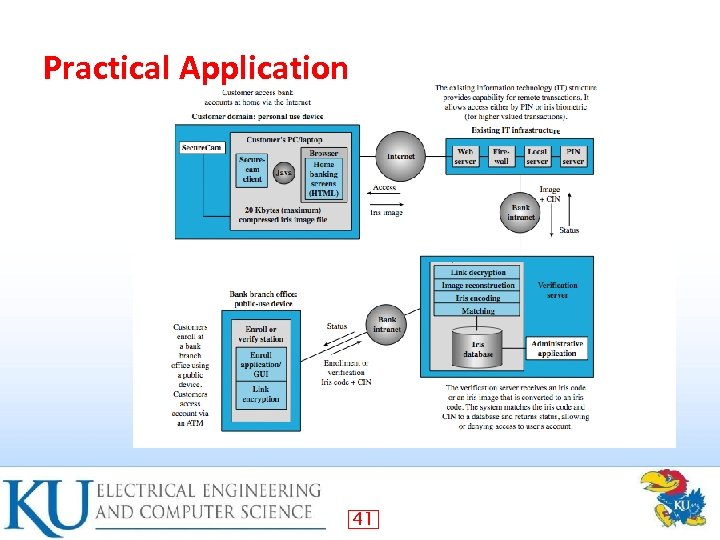 Practical Application 41
 Summary • Introduced user authentication using passwords – using tokens – using biometrics – Remote user authentication issues • Example application and case study • 43