 Скачать презентацию Computer Organization Design 计算机组成与设计 Weidong Wang 王维东
f1f22157b9dc0b43e4d899d684326b3f.ppt
- Количество слайдов: 176




Computer Organization & Design 计算机组成与设计 Weidong Wang (王维东) wdwang@zju. edu. cn College of Information Science & Electronic Engineering 信息与通信 程研究所 Zhejiang University

Course Information • Instructor: Weidong WANG – Email: wdwang@zju. edu. cn – Tel(O): 0571 -87953170; – Office Hours: TBD, Yuquan Campus, Xindian (High-Tech) Building 306, /email whenever • TA: – mobile,Email: » Lu Huang黄露, 13516719473/6719473; eliver 8801@zju. edu. cn » Hanqi Shen沈翰祺, 15067115046; 542886864@qq. com » Office Hours: Wednesday & Saturday 14: 00 -16: 30 PM. » Xindian (High-Tech) Building 308. (也可以短信邮件联系)
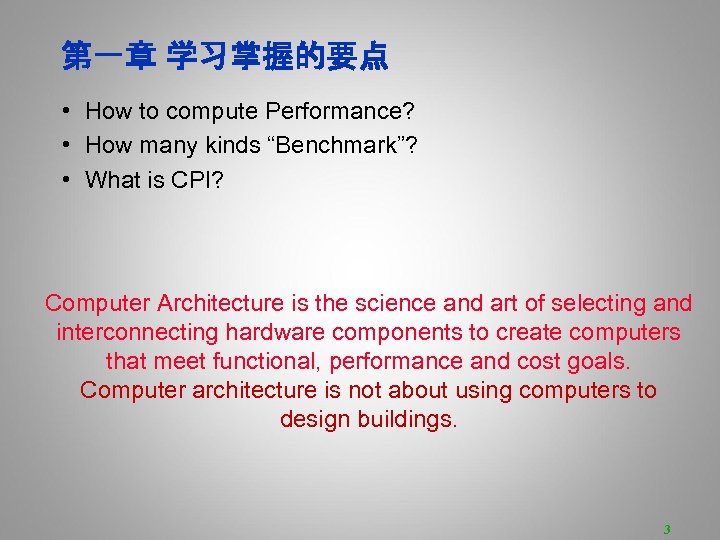
第一章 学习掌握的要点 • How to compute Performance? • How many kinds “Benchmark”? • What is CPI? Computer Architecture is the science and art of selecting and interconnecting hardware components to create computers that meet functional, performance and cost goals. Computer architecture is not about using computers to design buildings. 3
Lecture 2 & 3 Instruction Set Architecture Of MIPS
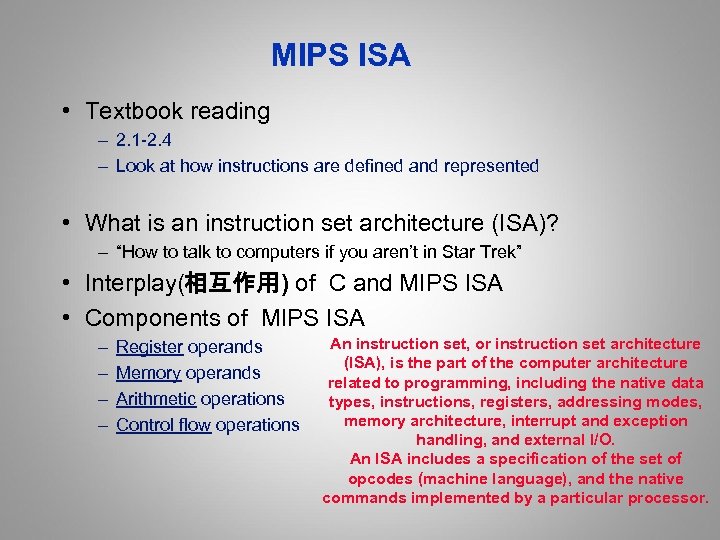
MIPS ISA • Textbook reading – 2. 1 -2. 4 – Look at how instructions are defined and represented • What is an instruction set architecture (ISA)? – “How to talk to computers if you aren’t in Star Trek” • Interplay(相互作用) of C and MIPS ISA • Components of MIPS ISA – – Register operands Memory operands Arithmetic operations Control flow operations An instruction set, or instruction set architecture (ISA), is the part of the computer architecture related to programming, including the native data types, instructions, registers, addressing modes, memory architecture, interrupt and exception handling, and external I/O. An ISA includes a specification of the set of opcodes (machine language), and the native commands implemented by a particular processor.
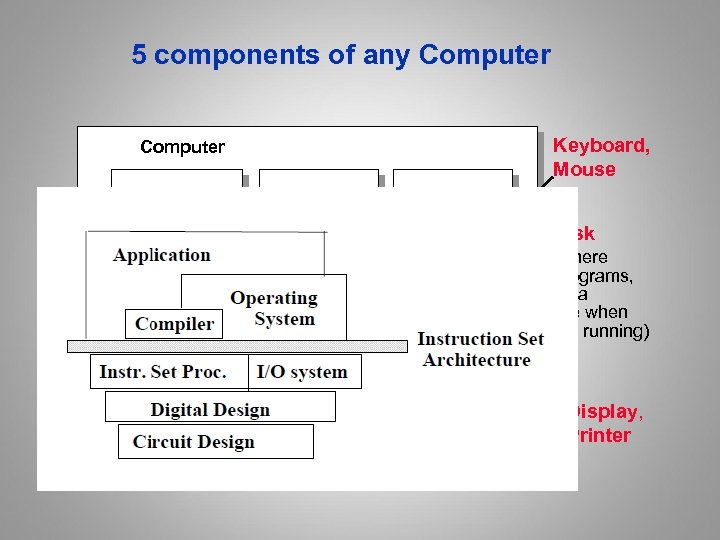
5 components of any Computer Keyboard, Mouse Computer Processor Control (“brain”) Datapath (“brawn”) Memory (where programs, data live when running) Devices Input Disk (where programs, data live when not running) Output Display, Printer
Computer (All Digital Systems) Are At Their Core Pretty Simple • Computers only work with binary signals – Signal on a wire is either 0, or 1 • Usually called a “bit” – More complex stuff材料(numbers, characters, strings, pictures) • Must be built from multiple bits • Built out of simple logic gates that perform Boolean logic – AND, OR, NOT, … • And memory cells that preserve bits over time – Flip-flops, registers, SRAM cells, DRAM cells, … • To get hardware to do anything, need to break it down to bits – Strings of bits that tell hardware what to do are called instructions Strings of bits – A sequence of instructions called machine language program sequence of instructions (machine code)
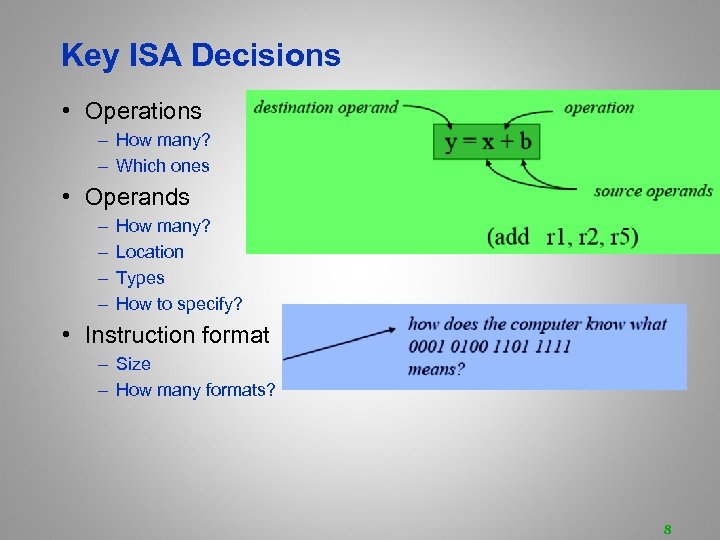
Key ISA Decisions • Operations – How many? – Which ones • Operands – – How many? Location Types How to specify? • Instruction format – Size – How many formats? 8
Hardware/Software Interface • The Instruction Set Architecture (ISA) defines what Instruction Set Architecture instructions do • MIPS, Intel IA 32 (x 86), Sun SPARC, Power. PC, IBM 390, Intel IA 64, ARM – These are all ISAs • Many different implementations can implement same ISA (family) – 8086, 386, 486, Pentium II, Pentium 4 implement IA 32 – Of course they continue to extend it, while maintaining binary compatibility • ISA last a long time – X 86 has been in use since the 70 s – IBM 390 started as IBM 360 in 60 s

Running An Application machine

Crafting精心制作 an ISA • We’ll look at some of the decisions facing an instruction set architect, and • how those decisions were made in the design of the MIPS instruction set. • MIPS, like SPARC, Power. PC, and Alpha AXP, is a RISC (Reduced Instruction Set Computer) ISA. – fixed instruction length – few instruction formats – load/store architecture • RISC architectures worked because they enabled pipelining. They continue to thrive兴盛 because they enable parallelism. 11

MIPS ISA • MIPS – semiconductor company that built one of the first MIPS commercial RISC architectures – Founded by J. Hennessy – Microprocessor without interlocked piped stages architecture – Million Instructions Per Second • We will study the MIPS architecture in some detail in this class • Why MIPS instead of Intel 80 x 86? – – MIPS is simple, elegant and easy to understand X 86 is ugly and complicated to explain X 86 is dominant on desktop MIPS is prevalent in embedded applications as processor core of system on chip (SOC)

C vs MIPS Programmers Interface C Registers Memory MIPS I ISA 32 32 b integer, R 0=0 32 32 b single FP 16 64 b double FP PC and special registers local variables global variables 232 linear array of bytes Data types int, short, char, unsigned, word (32 b), byte (8 b), float, double, half-word (16 b) aggregate data types, pointers single FP (32 b), double FP (64 b) Arithmetic operators Memory access +, -, *, %, ++, <, etc. add, sub, mult, slt, etc. a, *a, a[i][j] lw, sw, lh, sh, lb, sb Control If-else, while, do-while, for, switch, procedure call, return branches, jump and link

MIPS Processor History

Why Have Registers? • Memory-memory ISA – ALL variables declared声明in memory – Why not operate directly on memory operands? – E. g. Digital Equipment Corp (DEC) VAX ISA • Benefits of registers – Smaller is faster – Multiple concurrent accesses – Shorter names • Load-Store ISA – Arithmetic operations only use register operands – Data is loaded into registers, operated on, and stored back to memory – All RISC instruction sets
Using Registers • Registers are a finite resource that needs to be managed – Programmer – Compilers: register allocation • Goals – Keep data in registers as much as possible – Always use data still in registers if possible • Issues – Finite number of registers available • Spill register to memory when all register in use – Arrays • Data is too large to store in registers – What’s the impact of fewer or more registers?

Register Naming • Registers are identified by a $<num> – $3 • By convention约定, we also give them names – – – $zero contains the hardwired value 0 $v 0, $v 1 are for results and expression evaluation结果 $a 0 -$a 3 are for arguments参数 $s 0, $s 1, … $s 7 are for save values值 $to, $t 1, …$t 9 are for temporary values临时 The others will be introduced as appropriate • See Figs in 2. 16 p. 161 for ARM register conventions • Compilers use these conventions to simplify linking

Assembly Instructions • The basic type of instruction has four components: 1. 2. 3. 4. Operation name Destination operand 1 st source operand 2 nd source operand add dst, src 1, src 2 # dst = src 1 + src 2 dst, src 1, and src 2 are register names ($) What do these instructions do? - add $1, $1

C Example Simple C procedure: sum_pow 2 = 2 b+c 1: int sum_pow 2 (int b, int c) 2: { 3: int pow 2[8] = {1, 2, 4, 8, 16, 32, 64, 128}; 4: int a , ret; 5: a = b + c; 6: if (a < 8) 7: ret = pow 2[a]; 8: else 9: ret = 0; 10: return (ret); 11: }

Arithmetic Operators • Consider line 5, C operation for addition a = b + c; • Assume the variables are in register $1 -$3 respectively. • The add operator using registers add $1, $2, $3 # a = b +c • Use the sub operator for a = b - c in MIPS sub $1, $2, $3 # a = b - c • But we know that variables a, b, and c really start in some memory location – Will add load & store instruction soon

Complex Operations • What about more complex statements? a = b + c + d – e; • Break into multiple instructions add $t 0, $s 1, $s 2 # $t 0 = b + c add $t 1, $t 0, $s 3 # $t 1 = $t 0 + d sub $s 0, $t 1, $s 4 # a = $t 1 - e
![Signed & Unsigned Number • If given b[n-1: 0] in a register or in](https://present5.com/presentation/f1f22157b9dc0b43e4d899d684326b3f/image-22.jpg "Signed & Unsigned Number • If given b[n-1: 0] in a register or in")
Signed & Unsigned Number • If given b[n-1: 0] in a register or in memory • Unsigned value • Signed value (2’s complement)

Unsigned & Signed Numbers/2. 4 • Example values – 4 bits – Unsigned: [0, 24 -1] – Signed : [ -23, 23 -1] • Equivalence等价 – Same encoding for non-negative values • Uniqueness单值性 – Every bit pattern represents unique integer value – Not true with sign magnitude

Arithmetic Overflow

Constants • Often want to be able to specify operand in the instruction: immediate or literal • Use the addi instruction addi dst, src 1, immediate • The immediate is a 16 bit signed value between -215 and 215 -1 • Sign-extended to 32 bits • Consider the following C code a++; • The addi operator addi $s 0, 1 # a = a + 1

Memory Data Transfer • Data transfer instructions are used to move data to and from memory. • A load operation moves data from a memory location to a register and a store operation moves data from a register to a memory location.

Data Transfer Instructions: Loads • Data transfer instructions have three parts – Operator name (transfer size) – Destination register – Base register address and constant offset Lw dst, offset (base) – Offset value is a singed constant – Reading P. 94 section 2. 5
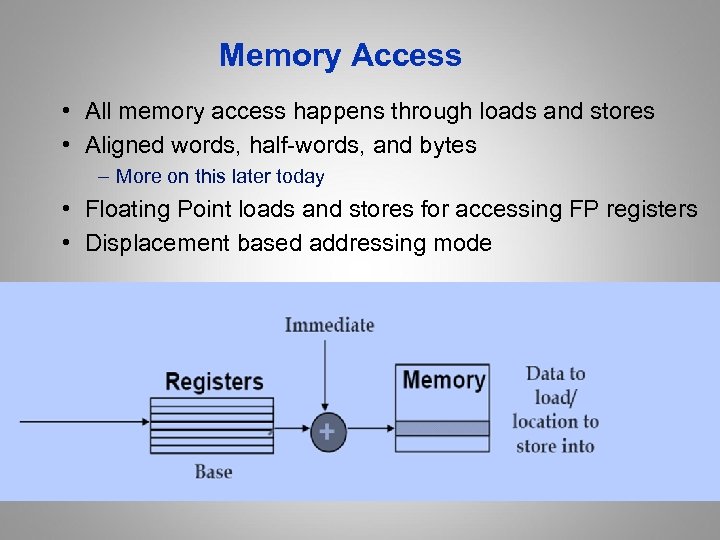
Memory Access • All memory access happens through loads and stores • Aligned words, half-words, and bytes – More on this later today • Floating Point loads and stores for accessing FP registers • Displacement based addressing mode
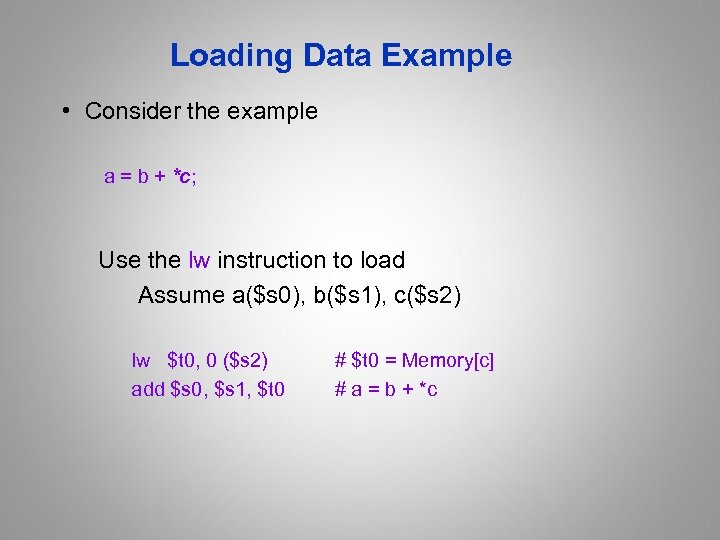
Loading Data Example • Consider the example a = b + *c; Use the lw instruction to load Assume a($s 0), b($s 1), c($s 2) lw $t 0, 0 ($s 2) # $t 0 = Memory[c] add $s 0, $s 1, $t 0 # a = b + *c
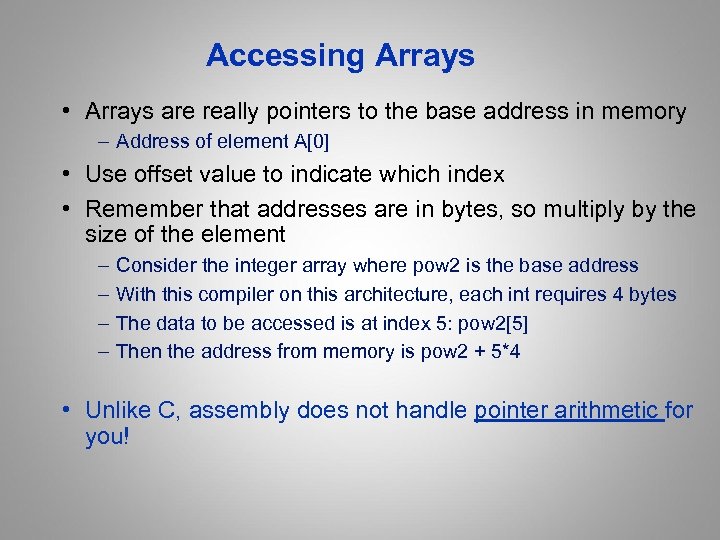
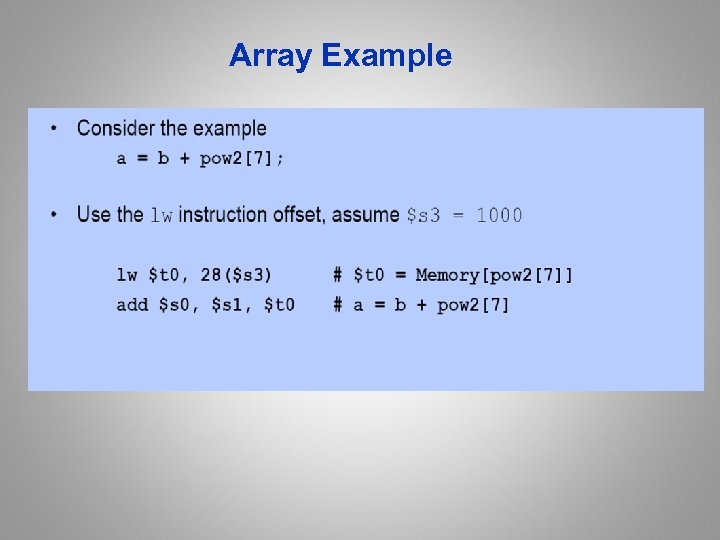
Accessing Arrays • Arrays are really pointers to the base address in memory – Address of element A[0] • Use offset value to indicate which index • Remember that addresses are in bytes, so multiply by the size of the element – – Consider the integer array where pow 2 is the base address With this compiler on this architecture, each int requires 4 bytes The data to be accessed is at index 5: pow 2[5] Then the address from memory is pow 2 + 5*4 • Unlike C, assembly does not handle pointer arithmetic for you!

Array Memory Diagram
Array Example
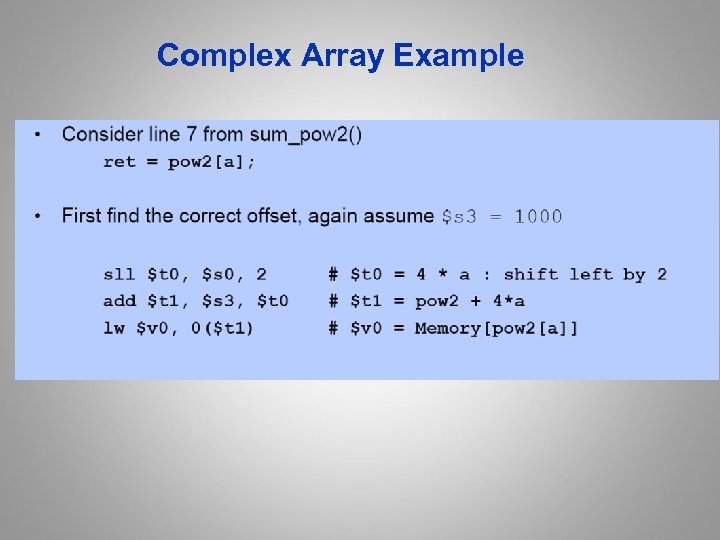
Complex Array Example
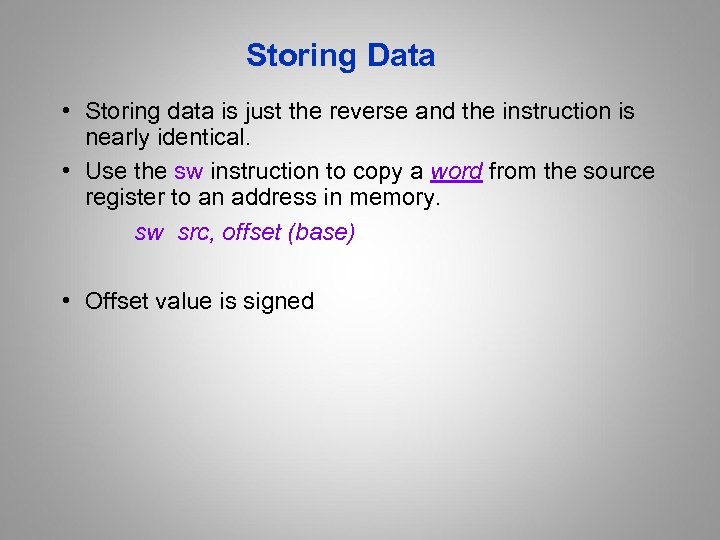
Storing Data • Storing data is just the reverse and the instruction is nearly identical. • Use the sw instruction to copy a word from the source register to an address in memory. sw src, offset (base) • Offset value is signed
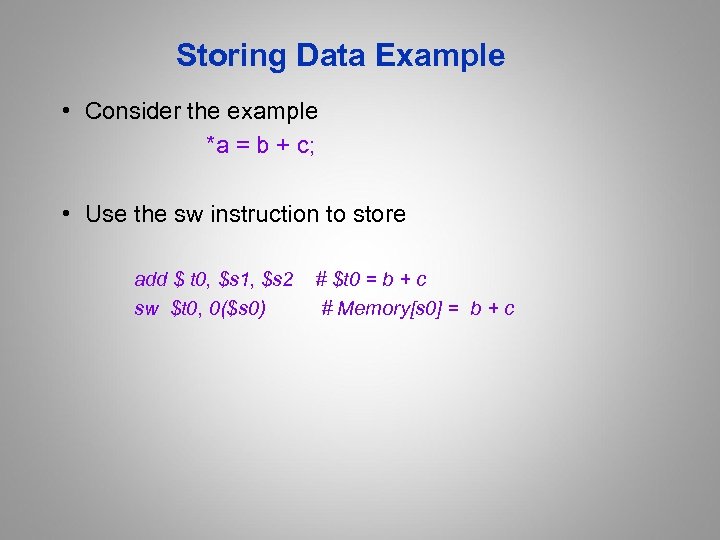
Storing Data Example • Consider the example *a = b + c; • Use the sw instruction to store add $ t 0, $s 1, $s 2 sw $t 0, 0($s 0) # $t 0 = b + c # Memory[s 0] = b + c
![Storing to an Array • Consider the example a[3] = b + c; •](https://present5.com/presentation/f1f22157b9dc0b43e4d899d684326b3f/image-36.jpg "Storing to an Array • Consider the example a[3] = b + c; •")
Storing to an Array • Consider the example a[3] = b + c; • Use the sw instruction offset add $t 0, $s 1, $s 2 sw $t 0, 12($s 0) # $t 0 = b + c # Memory[a[3]] = b + c
![Complex Array Storage • Consider the example a [i] = b + c; •](https://present5.com/presentation/f1f22157b9dc0b43e4d899d684326b3f/image-37.jpg "Complex Array Storage • Consider the example a [i] = b + c; •")
Complex Array Storage • Consider the example a [i] = b + c; • Use the sw instruction offset add $t 0, $s 1, $s 2 # $t 0 = b + c sll $t 1, $s 3, 2 # $t 1 = 4 * I add $t 2, $s 0, $t 1 #t 2 = a + 4*I sw $t 0, 0($t 2) # Memory[a[i]]= b + c

A “short” Array Example • ANSI C requires a short to be at least 16 bits and no longer than an int, but does not define the exact size • For our purposes, treat a short as 2 bytes • So, with a short array c[7] is at c + 7*2, shift left by 1

MIPS Integer Load/Store
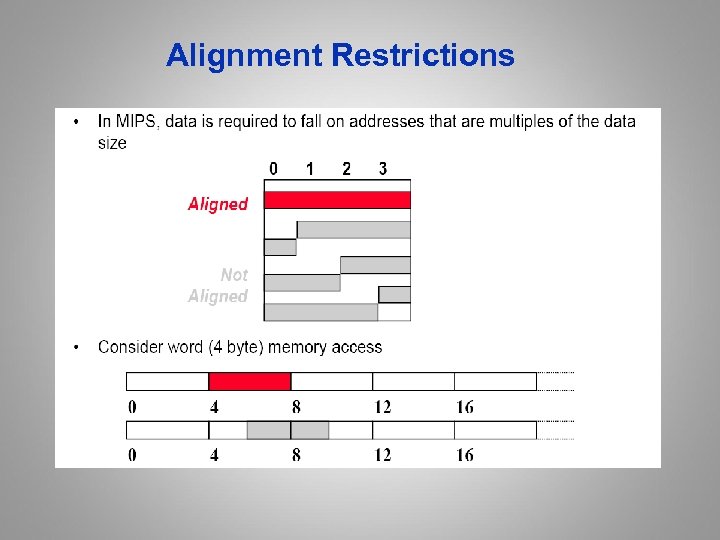
Alignment Restrictions
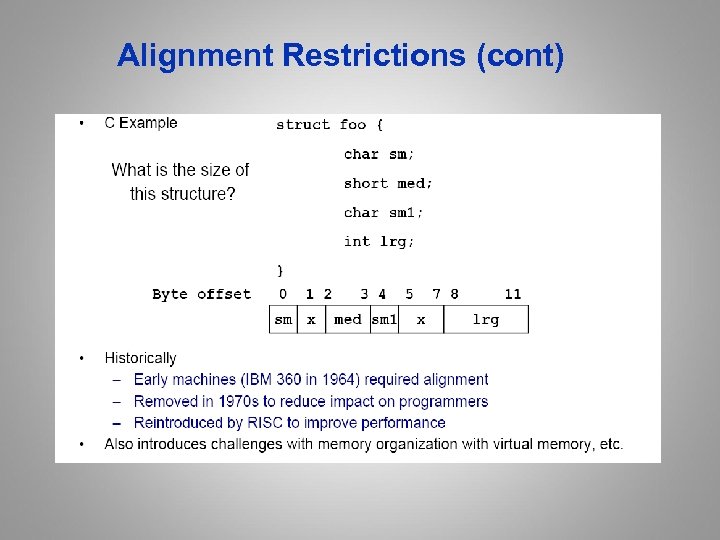
Alignment Restrictions (cont)

Memory Mapped I/O • Data transfer instructions can be used to move data to and from I/O device registers • A load operation moves data from a an I/O device to load a CPU register and a store operation moves data store from a CPU register to a I/O device register.

Endianess字节存储顺序: Big or Little • Question: what is the order of bytes within a word? • 从小到大 • Big endian: – Address of most significant byte == address of word – IBM 360, Motorola 68 K, MIPS, SPARC • 从大到小 • Little endian: – Address of least significant byte == address of word – Intel x 86, ARM, DEC Vax & Alpha, … • Important notes – Endianess matters if you store words and load byte or communicate between different systems – Most modern processors are bi-endian (configuration register) – For entertaining details, read “On holy wars and a plea for peace”

Changing Control Flow/2. 7 • One of the distinguishing characteristics of computers is the ability to evaluate conditions and change control flow – If-then-else – Loops – Case statements • Control flow instructions: two types – Conditional branch instructions are known as branches – Unconditional changes in the control flow are called jumps • The target of the branch/jump is a label
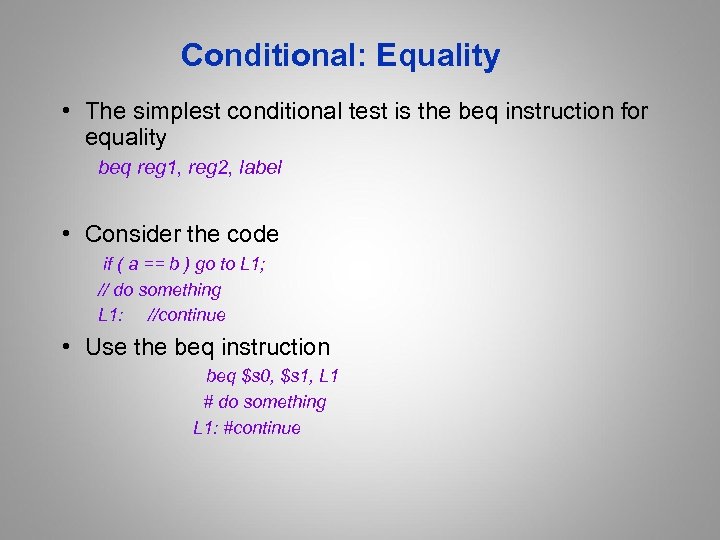
Conditional: Equality • The simplest conditional test is the beq instruction for equality beq reg 1, reg 2, label • Consider the code if ( a == b ) go to L 1; // do something L 1: //continue • Use the beq instruction beq $s 0, $s 1, L 1 # do something L 1: #continue
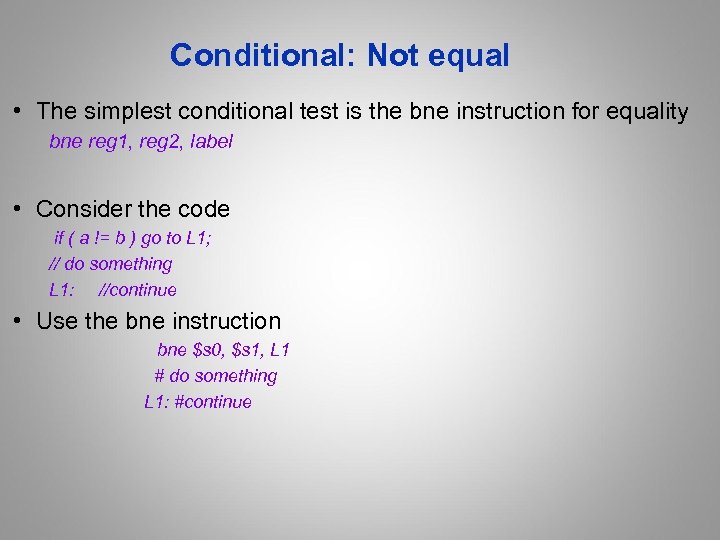
Conditional: Not equal • The simplest conditional test is the bne instruction for equality bne reg 1, reg 2, label • Consider the code if ( a != b ) go to L 1; // do something L 1: //continue • Use the bne instruction bne $s 0, $s 1, L 1 # do something L 1: #continue
Unconditional: Jumps • The j instruction jumps to a label j label
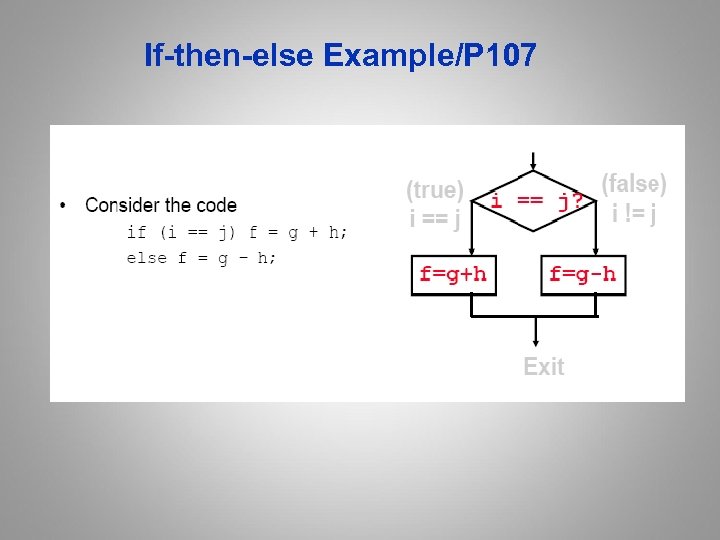
If-then-else Example/P 107
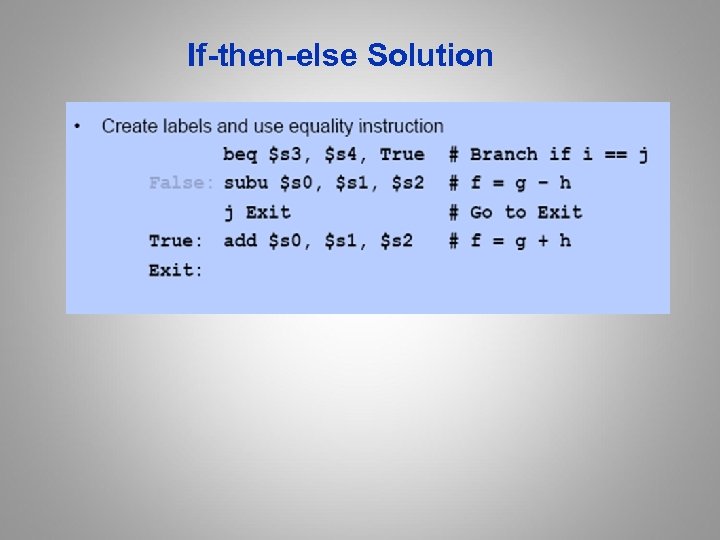
If-then-else Solution

Other Comparisons • Other conditional arithmetic operators are useful in evaluating conditional < > <= expressions using <, >, <=, >= • Use compare instruction to “set” register to 1 when condition met • Consider the following C code if (f < g) goto Less; • Solution slt $t 0, $s 1 # $t 0 = 1 if $s 0 < $s 1 //(slt==set less than) bne $t 0, $zero, Less # Goto Less if $t 0 != 0

MIPS Comparisons
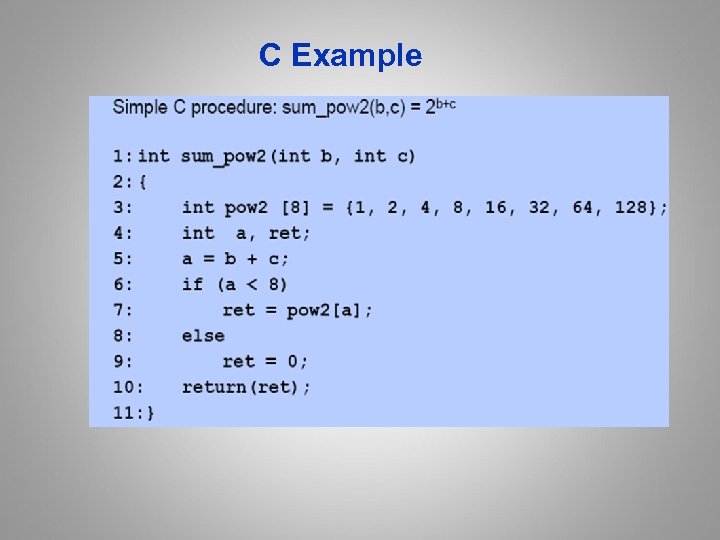
C Example
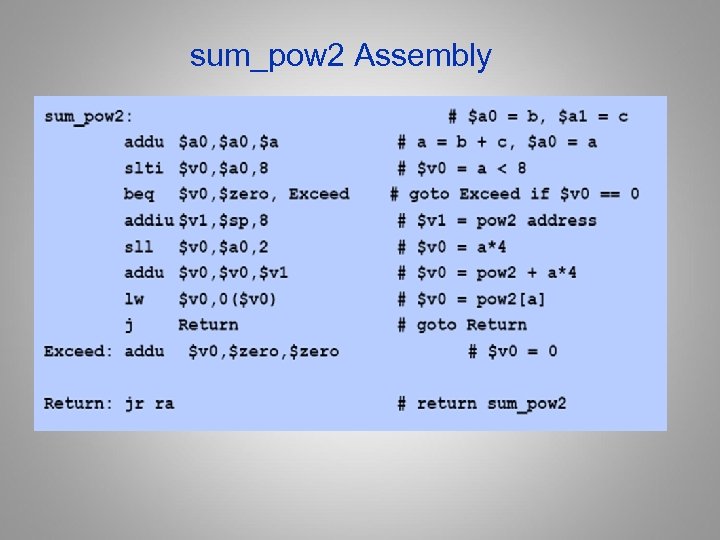
sum_pow 2 Assembly

MIPS Jumps & Branches
Support for Simple Branches Only • Notice that there is no branch less than instruction for comparing two registers? – The reason is that such an instruction would be too complicated and might require a longer clock cycle time – Therefore, conditionals that do not compare against zero take at least two instructions where the first is a set and the second is a conditional branch • As we’ll see later, this is a design trade-off – Less time per instruction vs. fewer instructions • How do you decide what to do? – Other RISC ISAs made a different choice.
![While loop in C • Consider a while loop While (A[i] == k) i](https://present5.com/presentation/f1f22157b9dc0b43e4d899d684326b3f/image-56.jpg "While loop in C • Consider a while loop While (A[i] == k) i")
While loop in C • Consider a while loop While (A[i] == k) i = i + j; Assembly loop Assume i = $s 0, j = $s 1, k = $s 2 Loop: sll $t 0, $s 0, 2 #$t 0 = 4 *i addu $t 1, $t 0, $s 3 # $t 1 = &(A[i]) lw $t 2, 0($t 1) # $t 2 = A[i] bne $t 2, $s 2, Exit # goto Exit if != addu $s 0, $s 1 # i = i + j j Loop # goto Loop Exit Basic Block Maximal sequence of instructions with out branches or branch targets

Improve Loop Efficiency
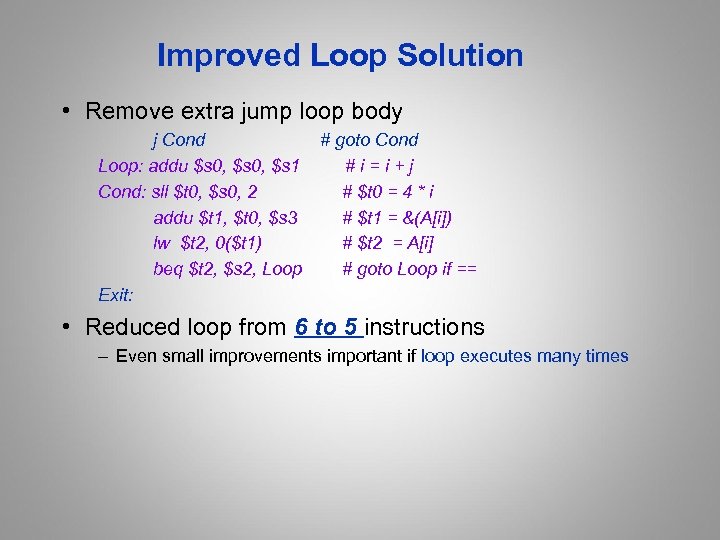
Improved Loop Solution • Remove extra jump loop body j Cond # goto Cond Loop: addu $s 0, $s 1 #i=i+j Cond: sll $t 0, $s 0, 2 # $t 0 = 4 * i addu $t 1, $t 0, $s 3 # $t 1 = &(A[i]) lw $t 2, 0($t 1) # $t 2 = A[i] beq $t 2, $s 2, Loop # goto Loop if == Exit: • Reduced loop from 6 to 5 instructions – Even small improvements important if loop executes many times
Machine Language Representation • Instructions are represented as binary data in memory – Stored program – Von Neumann • Simplicity • One memory system • Same addresses used for branches, procedures, data, etc. • The only difference is how bits are interpreted • What are the risks of this decision? • Binary compatibility (backwards) – Commercial software relies on ability to work on next generation hardware – This leads to very long life for an ISA

Home. Work 1 • Readings: – Read Chapter 2 all, then Appendix C and D.

Coffee break 61

Machine Language Representation/2. 5 • Instructions are represented as binary data in memory – Stored program – Von Neumann • Simplicity • One memory system • Same addresses used for branches, procedures, data, etc. • The only difference is how bits are interpreted • What are the risks of this decision? • Binary compatibility (backwards) – Commercial software relies on ability to work on next generation hardware – This leads to very long life for an ISA
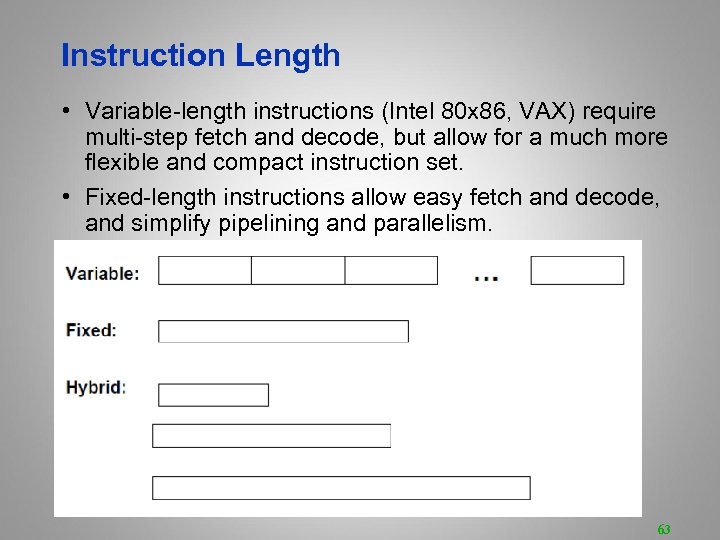
Instruction Length • Variable-length instructions (Intel 80 x 86, VAX) require multi-step fetch and decode, but allow for a much more flexible and compact instruction set. • Fixed-length instructions allow easy fetch and decode, and simplify pipelining and parallelism. 63
How Many Operands? • Most instructions have three operands (e. g. , z = x + y). • Well-known ISAs specify 0 -3 (explicit) operands per instruction. • Operands can be specified implicitly or explicitly明确的. 64
How Many Operands? Basic ISA Classes 65

Comparing the Number of Instructions • Code sequence for C = A + B for four classes of instruction sets: 66
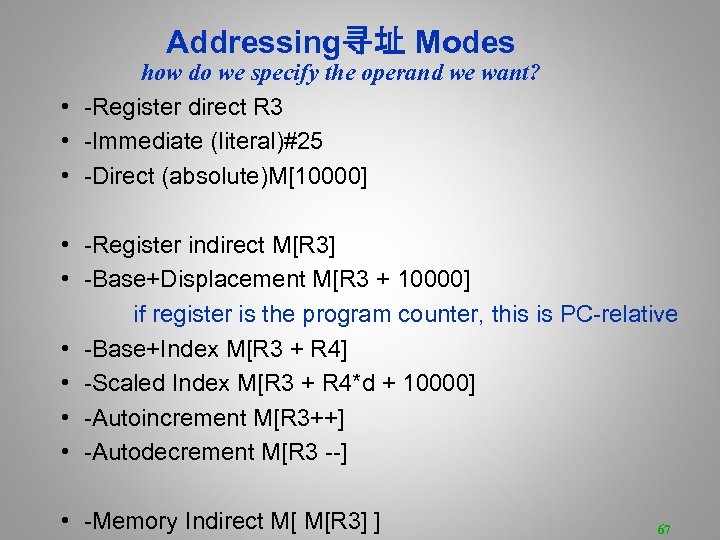
Addressing寻址 Modes how do we specify the operand we want? • -Register direct R 3 • -Immediate (literal)#25 • -Direct (absolute)M[10000] • -Register indirect M[R 3] • -Base+Displacement M[R 3 + 10000] if register is the program counter, this is PC-relative • -Base+Index M[R 3 + R 4] • -Scaled Index M[R 3 + R 4*d + 10000] • -Autoincrement M[R 3++] • -Autodecrement M[R 3 --] • -Memory Indirect M[ M[R 3] ] 67
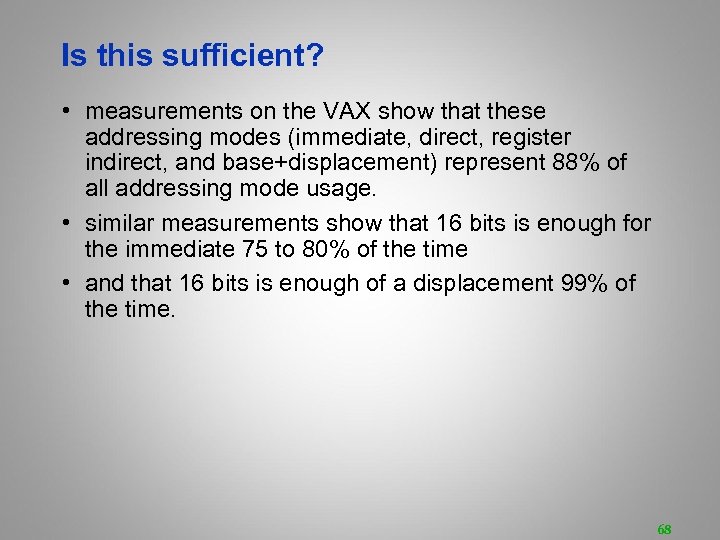
Is this sufficient? • measurements on the VAX show that these addressing modes (immediate, direct, register indirect, and base+displacement) represent 88% of all addressing mode usage. • similar measurements show that 16 bits is enough for the immediate 75 to 80% of the time • and that 16 bits is enough of a displacement 99% of the time. 68
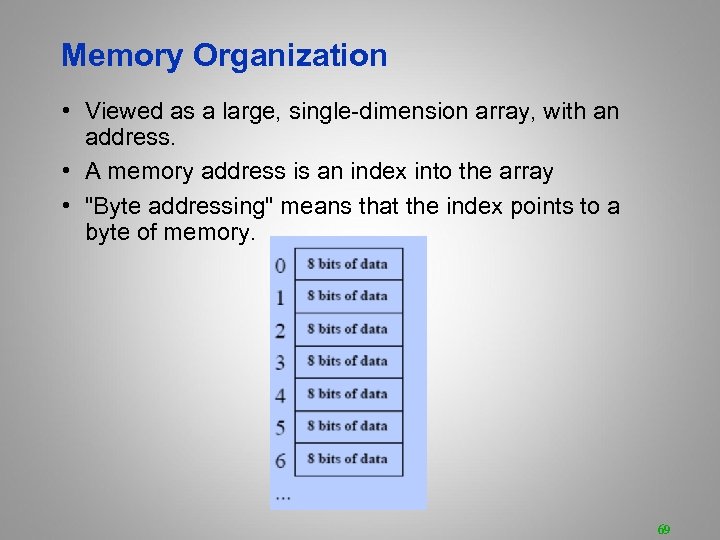
Memory Organization • Viewed as a large, single-dimension array, with an address. • A memory address is an index into the array • "Byte addressing" means that the index points to a byte of memory. 69
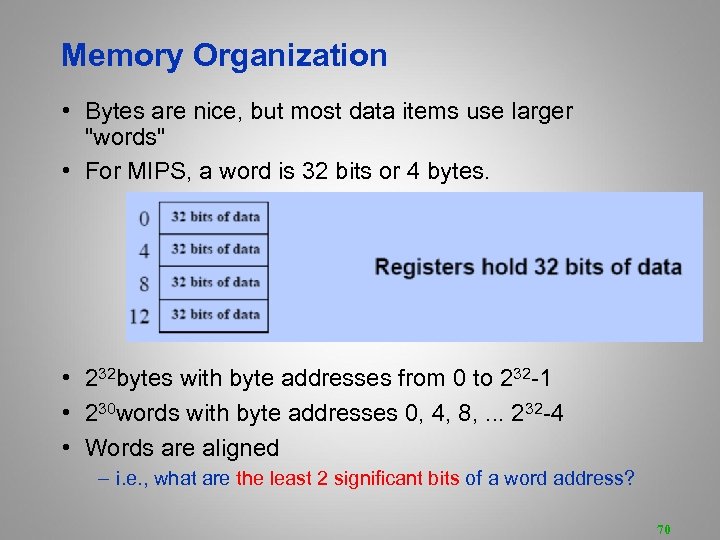
Memory Organization • Bytes are nice, but most data items use larger "words" • For MIPS, a word is 32 bits or 4 bytes. • 232 bytes with byte addresses from 0 to 232 -1 • 230 words with byte addresses 0, 4, 8, . . . 232 -4 • Words are aligned – i. e. , what are the least 2 significant bits of a word address? 70
The MIPS ISA, so far • • fixed 32 -bit instructions 3 instruction formats 3 -operand, load-store architecture 32 general-purpose registers (integer, floating point) – R 0 always equals 0. • 2 special-purpose integer registers, HI and LO, because multiply and divide produce more than 32 bits. • registers are 32 -bits wide (word) • register, immediate, and base+displacement addressing modes 71
Which instructions? • • • arithmetic logical data transfer conditional branch unconditional jump 72

Which instructions (integer) • arithmetic – add, subtract, multiply, divide • logical – and, or, shift left, shift right • data transfer – load word, store word 73
Conditional branch • How do you specify the destination of a branch/jump? • studies show that almost all conditional branches go short distances from the current program counter (loops, if-then-else). – we can specify a relative address in much fewer bits than an absolute address – e. g. , beq$1, $2, 100 => if ($1 == $2) PC = PC + 100 * 4 • How do we specify the condition of the branch? 74
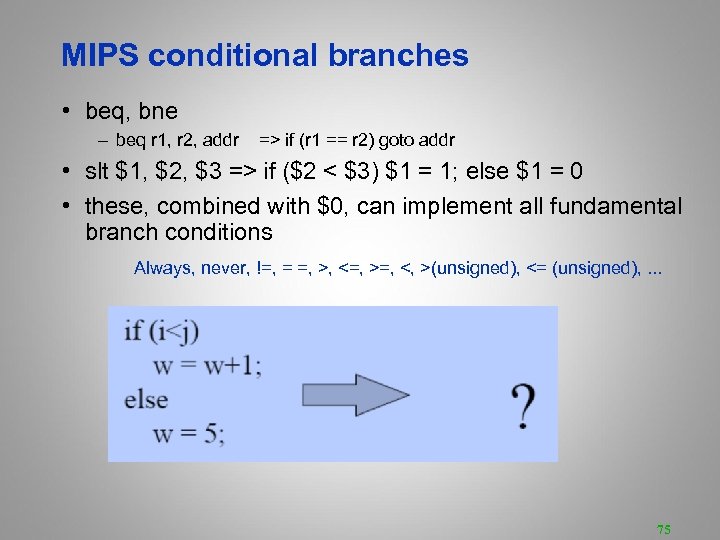
MIPS conditional branches • beq, bne – beq r 1, r 2, addr => if (r 1 == r 2) goto addr • slt $1, $2, $3 => if ($2 < $3) $1 = 1; else $1 = 0 • these, combined with $0, can implement all fundamental branch conditions Always, never, !=, = =, >, <=, >=, <, >(unsigned), <= (unsigned), . . . 75
MIPS Instruction Encoding what does each bit mean? • MIPS instructions are encoded in different forms, depending upon the arguments – R-format, I-format, J-format • MIPS architecture has three instruction formats, all 32 bits in length – Regularity is simpler for hardware – and improves performance • A 6 bit opcode/操作码 appears at the beginning of each instruction – Control logic based on decode instruction type
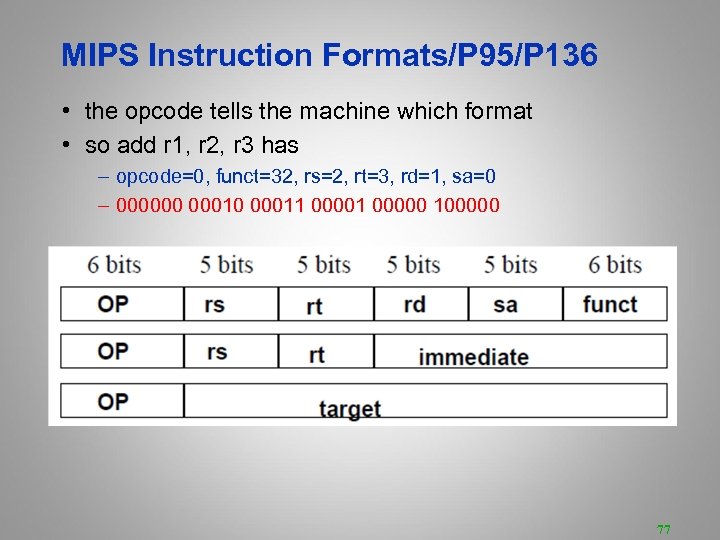
MIPS Instruction Formats/P 95/P 136 • the opcode tells the machine which format • so add r 1, r 2, r 3 has – opcode=0, funct=32, rs=2, rt=3, rd=1, sa=0 – 000000 00011 00000 100000 77

Accessing the Operands • operands are generally in one of two places: – registers (32 int, 32 fp) – memory (232 locations) • registers are – easy to specify – close to the processor (fast access) • the idea that we want to access registers whenever possible led to load-store architectures. – normal arithmetic instructions only access registers – only access memory with explicit loads and stores 78
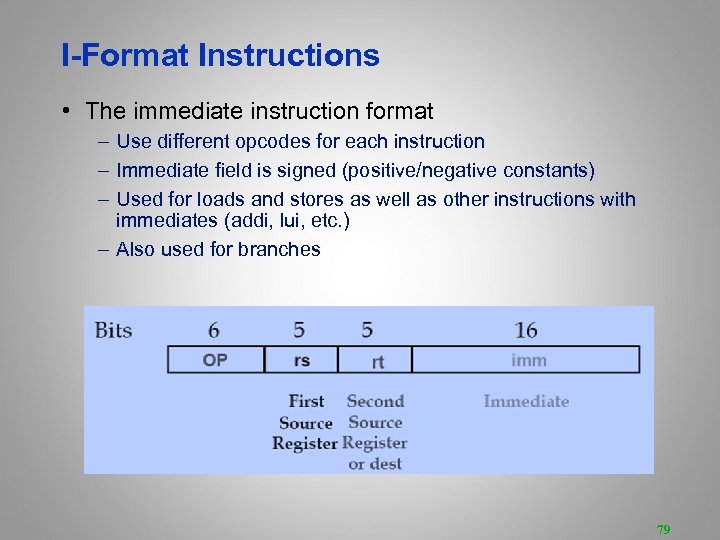
I-Format Instructions • The immediate instruction format – Use different opcodes for each instruction – Immediate field is signed (positive/negative constants) – Used for loads and stores as well as other instructions with immediates (addi, lui, etc. ) – Also used for branches 79
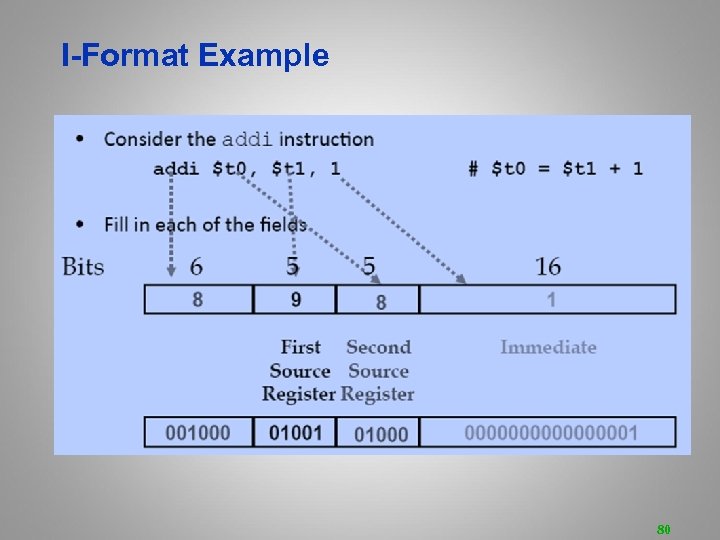
I-Format Example 80

I-Format Example: Load/Store 81
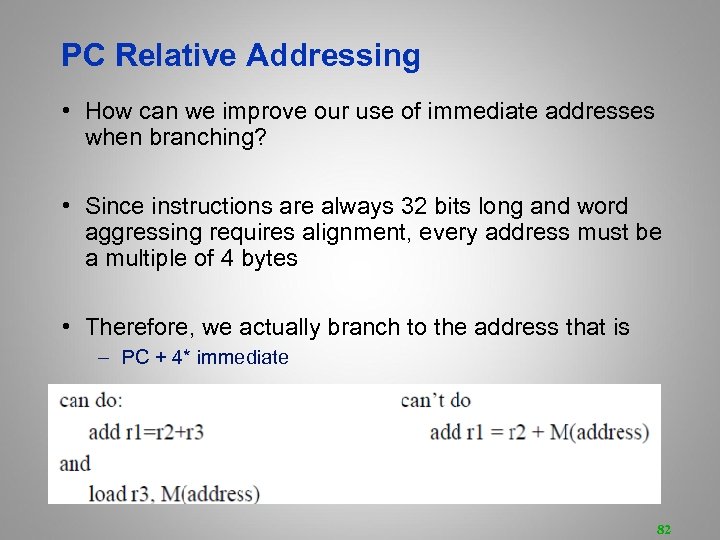
PC Relative Addressing • How can we improve our use of immediate addresses when branching? • Since instructions are always 32 bits long and word aggressing requires alignment, every address must be a multiple of 4 bytes • Therefore, we actually branch to the address that is – PC + 4* immediate 82
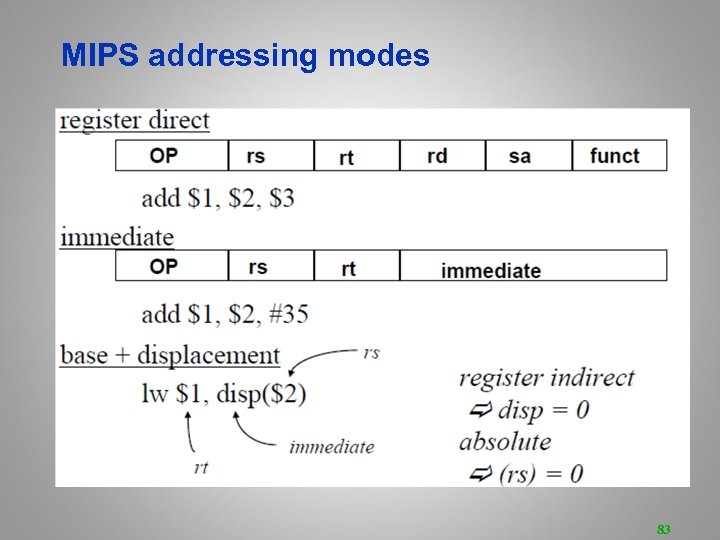
MIPS addressing modes 83
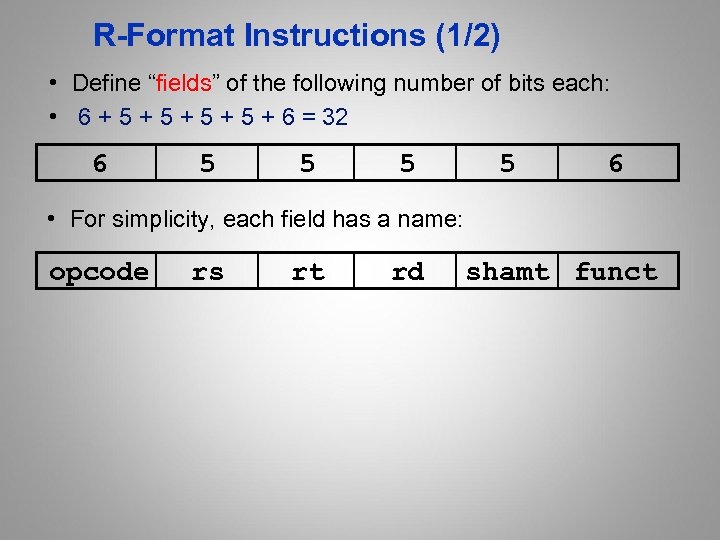
R-Format Instructions (1/2) • Define “fields” of the following number of bits each: • 6 + 5 + 5 + 6 = 32 6 5 5 6 • For simplicity, each field has a name: opcode rs rt rd shamt funct
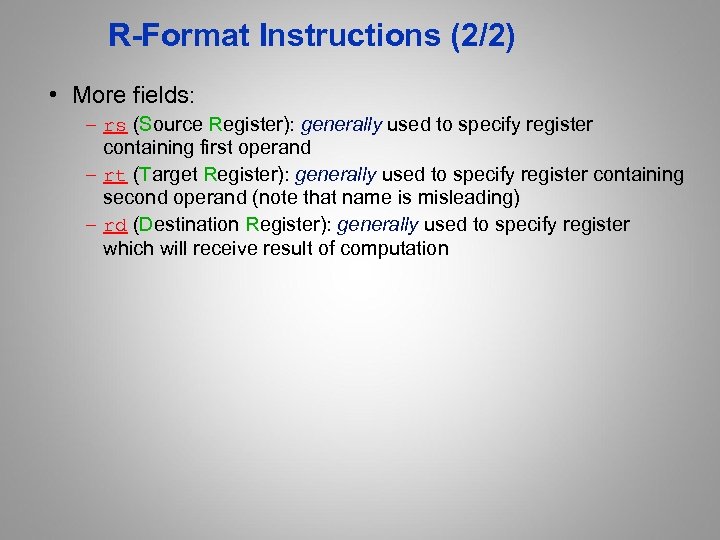
R-Format Instructions (2/2) • More fields: – rs (Source Register): generally used to specify register containing first operand – rt (Target Register): generally used to specify register containing second operand (note that name is misleading) – rd (Destination Register): generally used to specify register which will receive result of computation
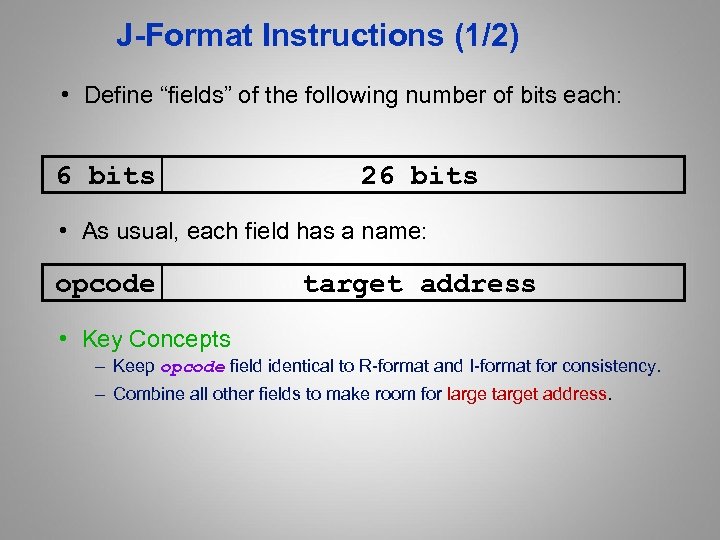
J-Format Instructions (1/2) • Define “fields” of the following number of bits each: 6 bits 26 bits • As usual, each field has a name: opcode target address • Key Concepts – Keep opcode field identical to R-format and I-format for consistency. – Combine all other fields to make room for large target address.
![J-Format Instructions (2/2) • Summary: – New PC = { PC[31. . 28], target](https://present5.com/presentation/f1f22157b9dc0b43e4d899d684326b3f/image-87.jpg "J-Format Instructions (2/2) • Summary: – New PC = { PC[31. . 28], target")
J-Format Instructions (2/2) • Summary: – New PC = { PC[31. . 28], target address, 00 } • Understand where each part came from! • Note: In Verilog, { , , } means concatenation { 4 bits , 26 bits , 2 bits } = 32 bit address – { 1010, 1111111111111, 00 } = 1010111111111111100 – We use Verilog in this class

Instruction Formats • I-format: used for instructions with immediates, lw and sw (since the offset counts as an immediate), and the branches (beq and bne), – (but not the shift instructions; later) • J-format: used for j and jal • R-format: used for all other instructions • It will soon become clear why the instructions have been partitioned in this way.
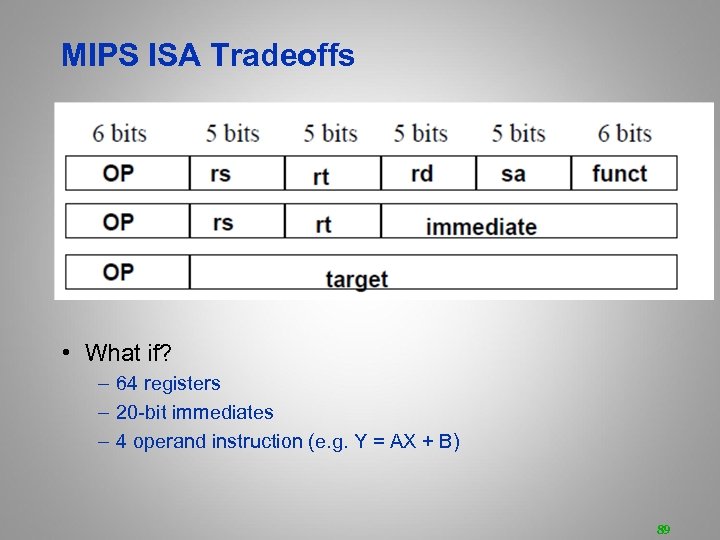
MIPS ISA Tradeoffs • What if? – 64 registers – 20 -bit immediates – 4 operand instruction (e. g. Y = AX + B) 89
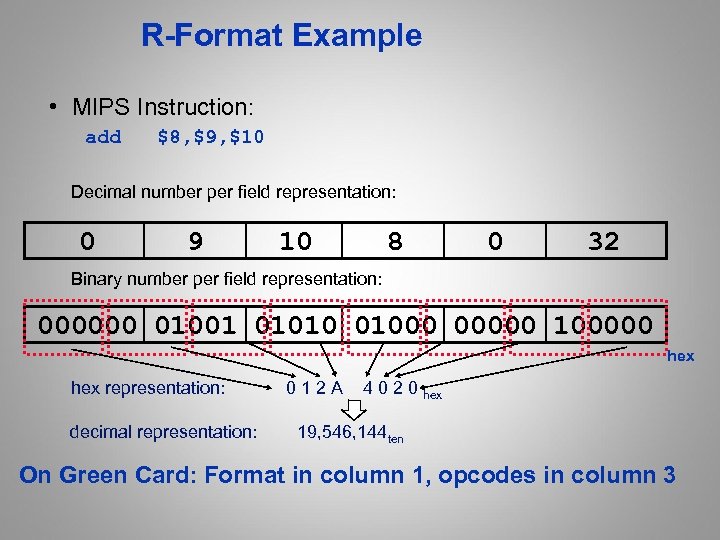
R-Format Example • MIPS Instruction: add $8, $9, $10 Decimal number per field representation: 0 9 10 8 0 32 Binary number per field representation: 000000 01001 01010 01000 00000 100000 hex representation: 0 1 2 A 4 0 2 0 hex decimal representation: 19, 546, 144 ten On Green Card: Format in column 1, opcodes in column 3
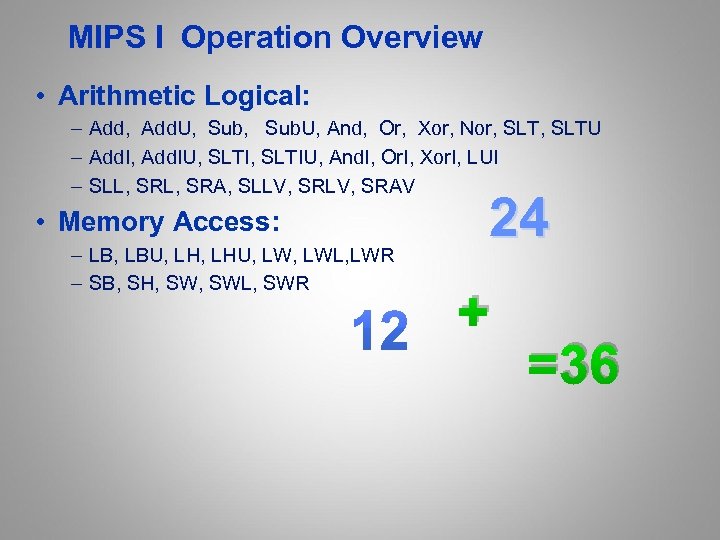
MIPS I Operation Overview • Arithmetic Logical: – Add, Add. U, Sub. U, And, Or, Xor, Nor, SLTU – Add. I, Add. IU, SLTIU, And. I, Or. I, Xor. I, LUI – SLL, SRA, SLLV, SRAV • Memory Access: – LB, LBU, LHU, LWL, LWR – SB, SH, SWL, SWR 24 + =36
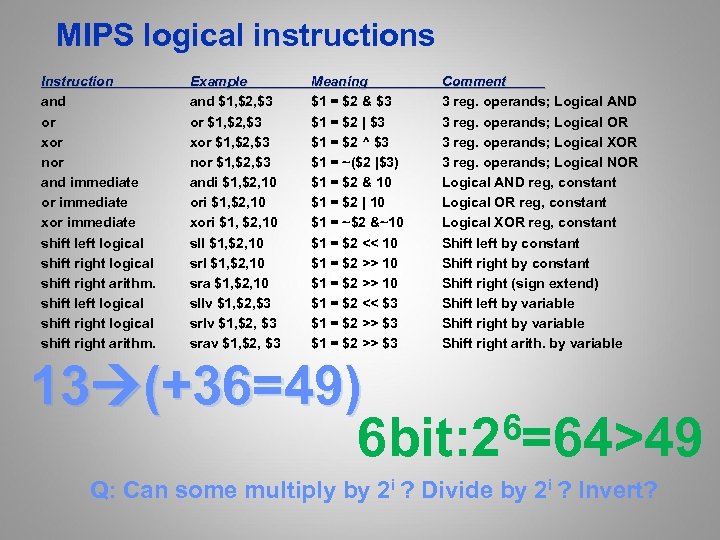
MIPS logical instructions Instruction and or xor nor and immediate or immediate xor immediate shift left logical shift right arithm. Example and $1, $2, $3 or $1, $2, $3 xor $1, $2, $3 nor $1, $2, $3 andi $1, $2, 10 ori $1, $2, 10 xori $1, $2, 10 sll $1, $2, 10 sra $1, $2, 10 sllv $1, $2, $3 srav $1, $2, $3 Meaning $1 = $2 & $3 $1 = $2 | $3 $1 = $2 ^ $3 $1 = ~($2 |$3) $1 = $2 & 10 $1 = $2 | 10 $1 = ~$2 &~10 $1 = $2 << 10 $1 = $2 >> 10 $1 = $2 << $3 $1 = $2 >> $3 Comment 3 reg. operands; Logical AND 3 reg. operands; Logical OR 3 reg. operands; Logical XOR 3 reg. operands; Logical NOR Logical AND reg, constant Logical OR reg, constant Logical XOR reg, constant Shift left by constant Shift right (sign extend) Shift left by variable Shift right arith. by variable 13 (+36=49) 6=64>49 6 bit: 2 Q: Can some multiply by 2 i ? Divide by 2 i ? Invert?
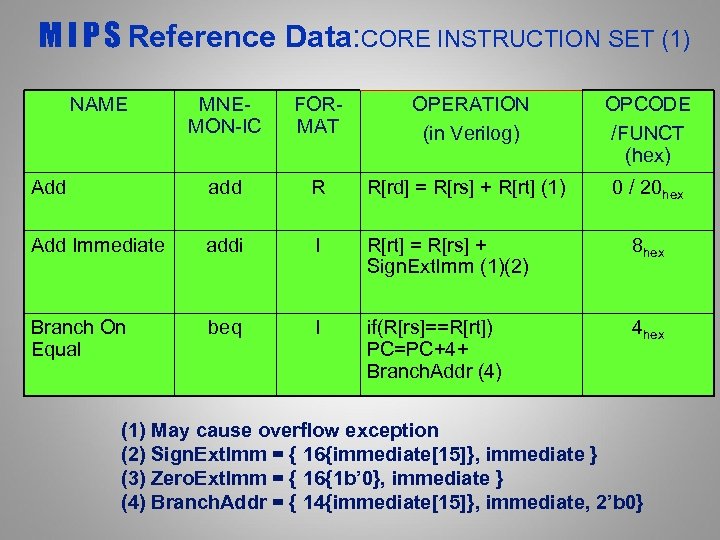
M I P S Reference Data: CORE INSTRUCTION SET (1) NAME MNEMON-IC FORMAT OPERATION (in Verilog) OPCODE /FUNCT (hex) Add add R R[rd] = R[rs] + R[rt] (1) 0 / 20 hex Add Immediate addi I R[rt] = R[rs] + Sign. Ext. Imm (1)(2) 8 hex Branch On Equal beq I if(R[rs]==R[rt]) PC=PC+4+ Branch. Addr (4) 4 hex (1) May cause overflow exception (2) Sign. Ext. Imm = { 16{immediate[15]}, immediate } (3) Zero. Ext. Imm = { 16{1 b’ 0}, immediate } (4) Branch. Addr = { 14{immediate[15]}, immediate, 2’b 0}

MIPS data transfer instructions Instruction sw 500($4), $3 sh 502($2), $3 sb 41($3), $2 Comment Store word Store half Store byte lw $1, 30($2) lh $1, 40($3) lhu $1, 40($3) lbu $1, 40($3) Load word Load halfword unsigned Load byte unsigned lui $1, 40 Load Upper Immediate (16 bits shifted left by 16) Q: Why need lui? LUI R 5 0000 … 0000
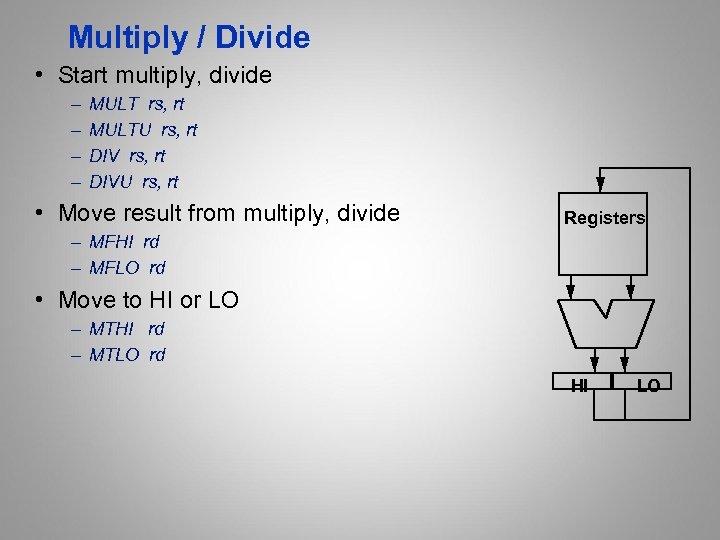
Multiply / Divide • Start multiply, divide – – MULT rs, rt MULTU rs, rt DIVU rs, rt • Move result from multiply, divide Registers – MFHI rd – MFLO rd • Move to HI or LO – MTHI rd – MTLO rd HI LO
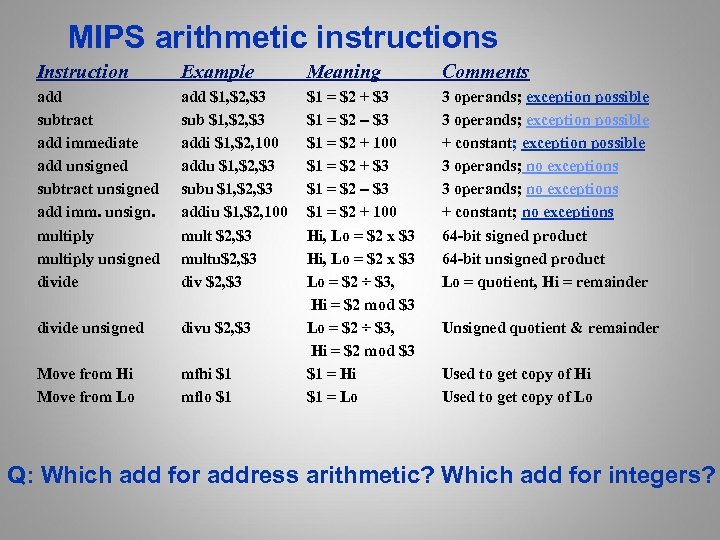
MIPS arithmetic instructions Instruction Example Meaning Comments add subtract add immediate add unsigned subtract unsigned add imm. unsign. multiply unsigned divide add $1, $2, $3 sub $1, $2, $3 addi $1, $2, 100 addu $1, $2, $3 subu $1, $2, $3 addiu $1, $2, 100 mult $2, $3 multu$2, $3 div $2, $3 3 operands; exception possible + constant; exception possible 3 operands; no exceptions + constant; no exceptions 64 -bit signed product 64 -bit unsigned product Lo = quotient, Hi = remainder divide unsigned divu $2, $3 Move from Hi Move from Lo mfhi $1 mflo $1 $1 = $2 + $3 $1 = $2 – $3 $1 = $2 + 100 Hi, Lo = $2 x $3 Lo = $2 ÷ $3, Hi = $2 mod $3 $1 = Hi $1 = Lo Unsigned quotient & remainder Used to get copy of Hi Used to get copy of Lo Q: Which add for address arithmetic? Which add for integers?
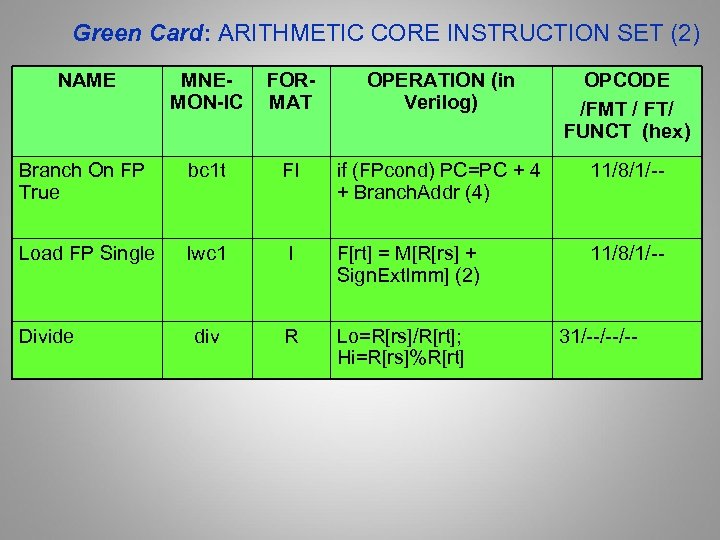
Green Card: ARITHMETIC CORE INSTRUCTION SET (2) NAME MNEMON-IC FORMAT OPERATION (in Verilog) OPCODE /FMT / FT/ FUNCT (hex) Branch On FP True bc 1 t FI if (FPcond) PC=PC + 4 + Branch. Addr (4) 11/8/1/-- Load FP Single lwc 1 I F[rt] = M[R[rs] + Sign. Ext. Imm] (2) 11/8/1/-- div R Lo=R[rs]/R[rt]; Hi=R[rs]%R[rt] Divide 31/--/--/--
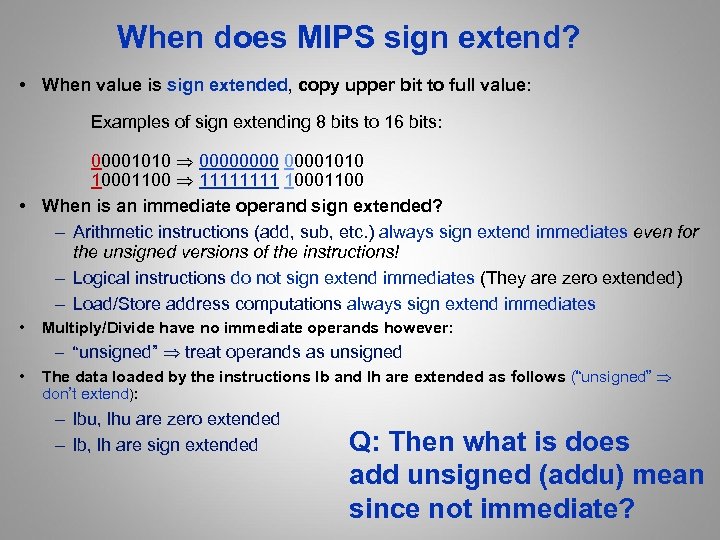
When does MIPS sign extend? • When value is sign extended, copy upper bit to full value: Examples of sign extending 8 bits to 16 bits: 00001010 00001010 10001100 1111 10001100 • When is an immediate operand sign extended? – Arithmetic instructions (add, sub, etc. ) always sign extend immediates even for the unsigned versions of the instructions! – Logical instructions do not sign extend immediates (They are zero extended) – Load/Store address computations always sign extend immediates • Multiply/Divide have no immediate operands however: • – “unsigned” treat operands as unsigned The data loaded by the instructions lb and lh are extended as follows (“unsigned” don’t extend): – lbu, lhu are zero extended – lb, lh are sign extended Q: Then what is does add unsigned (addu) mean since not immediate?
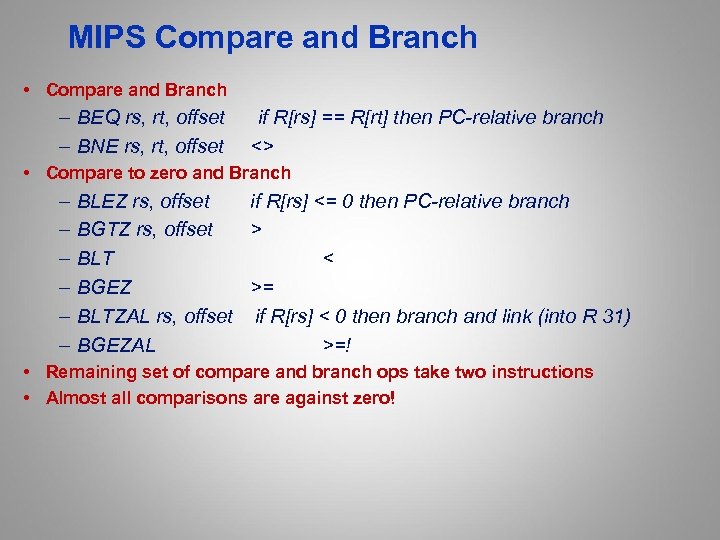
MIPS Compare and Branch • Compare and Branch – BEQ rs, rt, offset – BNE rs, rt, offset if R[rs] == R[rt] then PC-relative branch <> • Compare to zero and Branch – – – BLEZ rs, offset if R[rs] <= 0 then PC-relative branch BGTZ rs, offset > BLT < BGEZ >= BLTZAL rs, offset if R[rs] < 0 then branch and link (into R 31) BGEZAL >=! • Remaining set of compare and branch ops take two instructions • Almost all comparisons are against zero!

MIPS jump, branch, compare instructions Instruction Example Meaning branch on equal beq $1, $2, 100 branch on not eq. bne $1, $2, 100 set on less than slt $1, $2, $3 set less than imm. slti $1, $2, 100 set less than uns. sltu $1, $2, $3 set l. t. imm. uns. sltiu $1, $2, 100 jump j 10000 jump register jr $31 jump and link jal 10000 if ($1 == $2) go to PC+4+100 Equal test; PC relative branch if ($1!= $2) go to PC+4+100 Not equal test; PC relative if ($2 < $3) $1=1; else $1=0 Compare less than; 2’s comp. if ($2 < 100) $1=1; else $1=0 Compare < constant; 2’s comp. if ($2 < $3) $1=1; else $1=0 Compare less than; natural numbers if ($2 < 100) $1=1; else $1=0 Compare < constant; natural numbers go to 10000 Jump to target address go to $31 For switch, procedure return $31 = PC + 4; go to 10000 For procedure call Reading P. 112 section 2. 8
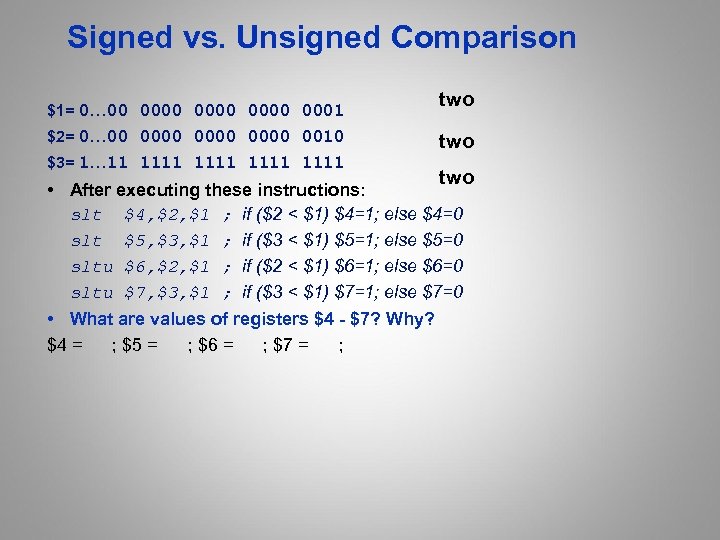
Signed vs. Unsigned Comparison $1= 0… 00 0000 0001 $2= 0… 00 0000 0010 $3= 1… 11 1111 two two • After executing these instructions: slt $4, $2, $1 ; if ($2 < $1) $4=1; else $4=0 slt $5, $3, $1 ; if ($3 < $1) $5=1; else $5=0 sltu $6, $2, $1 ; if ($2 < $1) $6=1; else $6=0 sltu $7, $3, $1 ; if ($3 < $1) $7=1; else $7=0 • What are values of registers $4 - $7? Why? $4 = ; $5 = ; $6 = ; $7 = ;

MIPS assembler register convention • “caller saved” P. 112 section 2. 8 • “callee saved” • On Green Card in Column #2 at bottom

Peer Instruction: $s 3=i, $s 4=j, $s 5=@A Loop: addiu sll addu lw addiu slti beq slti bne $s 4, 1 $t 1, $s 3, 2 $t 1, $s 5 $t 0, 0($t 1) $s 3, 1 $t 1, $t 0, 10 $t 1, $0, Loop $t 1, $t 0, 0 $t 1, $0, Loop # # # # # j = j + 1 $t 1 = 4 * i $t 1 = @ A[i] do j = $t 0 = A[i] while i = i + 1 $t 1 = $t 0 < 10 goto Loop $t 1 = $t 0 < 0 goto Loop What C code properly fills in the blank in loop on right? 1: A[i++] >= 10 2: A[i++] >= 10 | A[i] < 3: A[i] >= 10 || A[i++] < 4: A[i++] >= 10 || A[i] < 5: A[i] >= 10 && A[i++] < 6 None of the above 0 0 j + 1 (______);

Peer Instruction: $s 3=i, $s 4=j, $s 5=@A Loop: addiu sll addu lw addiu slti beq slti bne $s 4, 1 $t 1, $s 3, 2 $t 1, $s 5 $t 0, 0($t 1) $s 3, 1 $t 1, $t 0, 10 $t 1, $0, Loop $t 1, $t 0, 0 $t 1, $0, Loop # # # # # j = j + 1 $t 1 = 4 * i $t 1 = @ A[i] do j = j + 1 $t 0 = A[i] while (______); i = i + 1 $t 1 = $t 0 < 10 goto Loop if $t 1 == 0 ($t 0 >= 10) $t 1 = $t 0 < 0 goto Loop if $t 1 != 0 ($t 0 < 0) What C code properly fills in the blank in loop on right? 1: A[i++] >= 10 2: A[i++] >= 10 | A[i] < 0 3: A[i] >= 10 || A[i++] < 0 4: A[i++] >= 10 || A[i] < 0 5: A[i] >= 10 && A[i++] < 0 6: None of the above

Green Card: OPCODES, BASE CONVERSION, ASCII Card (3)/2. 9 MIPS opcode (31: 26) (1) MIPS funct (5: 0) (2) MIPS funct (5: 0) Binary Decimal Hexadeci-mal ASCII (1) sll add. f 00 0000 0 0 NUL j srl mul. f 00 0010 2 2 STX lui sync floor. w. f 00 1111 15 f SI lbu and cvt. w. f 10 0100 36 24 $ (1) opcode(31: 26) == 0 (2) opcode(31: 26) == 17 ten (11 hex ); if fmt(25: 21)==16 ten (10 hex ) f = s (single); if fmt(25: 21)==17 ten (11 hex ) f = d (double) Note: 3 -in-1 - Opcodes, base conversion, ASCII!
![Green Card • green card /n. / [after the "IBM System/360 Reference Data" card]](https://present5.com/presentation/f1f22157b9dc0b43e4d899d684326b3f/image-106.jpg "Green Card • green card /n. / [after the \"IBM System/360 Reference Data\" card]")
Green Card • green card /n. / [after the "IBM System/360 Reference Data" card] A summary of an assembly language, even if the color is not green. For example, "I'll go get my green card so I can check the addressing mode for that instruction. " www. jargon. net Image from Dave's Green Card Collection: http: //www. planetmvs. com/greencard/

Green Card 107

Peer Instruction Which instruction has same representation as 35 ten? opcode rs rt A. add $0, $0 B. subu $s 0, $s 0 opcode rs rt C. lw $0, 0($0) opcode rs rt D. addi $0, 35 opcode rs rt E. subu $0, $0 opcode rs rt F. Trick question! Instructions are not numbers rd shamt funct offset immediate rd Registers numbers and names: 0: $0, 8: $t 0, 9: $t 1, . . 15: $t 7, 16: $s 0, 17: $s 1, . . 23: $s 7 Opcodes and function fields (if necessary) add: opcode = 0, funct = 32 subu: opcode = 0, funct = 35 addi: opcode = 8 lw: opcode = 35 shamt funct

Peer Instruction Which instruction bit pattern = number 35? 0 0 0 32 0 16 16 16 0 35 35 0 0 0 D. addi $0, 35 8 0 0 35 E. subu $0, $0 0 A. add $0, $0 B. subu $s 0, $s 0 C. lw $0, 0($0) F. Trick question! Instructions != numbers Registers numbers and names: 0: $0, 8: $t 0, 9: $t 1, …, 16: $s 0, 17: $s 1, …, Opcodes and function fields add: opcode = 0, function field = 32 subu: opcode = 0, function field = 35 addi: opcode = 8 lw: opcode = 35 0 0 35

Branch & Pipelines/2. 11 Time li $3, #7 execute sub $4, 1 bz $4, LL ifetch execute ifetch addi $5, $3, 1 LL: slt $1, $3, $5 execute ifetch Branch Target Branch execute ifetch Delay Slot execute By the end of Branch instruction, the CPU knows whether or not the branch will take place. However, it will have fetched the next instruction by then, regardless of whether or not a branch will be taken. Why not execute it?

Delayed Branches li $3, #7 sub $4, 1 bz $4, LL addi $5, $3, 1 Delay Slot Instruction subi $6, 2 LL: slt $1, $3, $5 • In the “Raw” MIPS, the instruction after the branch is executed even when the branch is taken – This is hidden by the assembler for the MIPS “virtual machine” – allows the compiler to better utilize the instruction pipeline (? ? ? ) • Jump and link (jal inst): – Put the return addr. Into link register ($31): • PC+4 (logical architecture) • PC+8 physical (“Raw”) architecture delay slot executed – Then jump to destination address

Filling Delayed Branches Branch: Inst Fetch Dcd & Op Fetch Execute execute successor Inst Fetch even if branch taken! Then branch target or continue Dcd & Op Fetch Execute Inst Fetch Single delay slot impacts the critical path • Compiler can fill a single delay slot with a useful instruction 50% of the time. • try to move down from above jump • move up from target, if safe add $3, $1, $2 sub $4, 1 bz $4, LL NOP. . . LL: add rd, . . . Is this violating the ISA abstraction?

Summary: Salient features of MIPS I • 32 -bit fixed format inst (3 formats) • 32 32 -bit GPR (R 0 contains zero) and 32 FP registers (and HI LO) – partitioned by software convention • 3 -address, reg-reg arithmetic instr. • Single address mode for load/store: base+displacement – no indirection, scaled • 16 -bit immediate plus LUI • Simple branch conditions – compare against zero or two registers for =, – no integer condition codes • Delayed branch – execute instruction after a branch (or jump) even if the branch is taken (Compiler can fill a delayed branch with useful work about 50% of the time)

And in conclusion. . . • Continued rapid improvement in Computing – 2 X every 1. 5 years in processor speed; – every 2. 0 years in memory size; – every 1. 0 year in disk capacity; – Moore’s Law enables processor, memory (2 X transistors/chip/ ~1. 5 ro 2. 0 yrs) • 5 classic components of all computers Control Datapath Memory Input Output } Processor

MIPS Machine Instruction Review: Instruction Format Summary

Addressing Modes Summary • Register addressing – Operand is a register (e. g. ALU) • Base/displacement addressing (ex. load/store) – Operand is at the memory location that is the sum of – a base register + a constant • Immediate addressing (e. g. constants) – Operand is a constant within the instruction itself • PC-relative addressing (e. g. branch) – Address is the sum of PC and constant in instruction (e. g. branch) • Pseudo-direct addressing (e. g. jump) – Target address is concatenation of field in instruction and the PC

Addressing Modes Summary

Logic Operators • Bitwise operators often useful for bit manipulation • Always operate unsigned except for arithmetic shifts 118

MIPS Logic Instructions 119

Loading a 32 bit Constant • MIPS only has 16 bits of immediate value • Could load from memory but still have to generate memory address 120

Complete Assembly Example • Consider the while loop from lecture 2 Loop: addu $t 0, $s 0 addu $t 0, $t 0 add $t 1, $t 0, $s 3 lw $t 2, 0($t 1) bne $t 2, $s 2, Exit addu $s 0, $s 1 j Loop # $t 0 = 2 * I # $t 0 = 4 * i # $t 1 = &(A[i]) # $t 2 = A[i] # goto Exit if != # i = i + j # goto Loop Exit: • Pretend the first instruction is located at address 80000 121

Complete Machine Code Example • Now we can write the complete example for our while loop 122

Addressing Modes Summary • Register addressing – Operand is a register (e. g. ALU) • Base/displacement addressing (ex. load/store) – Operand is at the memory location that is the sum of – a base register + a constant • Immediate addressing (e. g. constants) – Operand is a constant within the instruction itself • PC-relative addressing (e. g. branch) – Address is the sum of PC and constant in instruction (e. g. branch) • Pseudo-direct addressing (e. g. jump) – Target address is concatenation of field in instruction and the PC 123
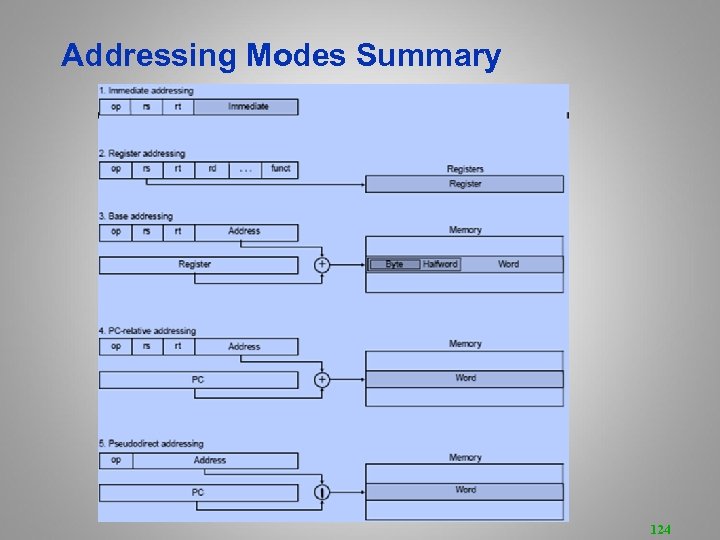
Addressing Modes Summary 124

Pseudo instructions 125

For Loop Example/2. 13 126

While Loop Transformation • While loop review 127

For Loop Transformation • Similar to while loop 128

Switch Statements 129

Jump Table Structure 130
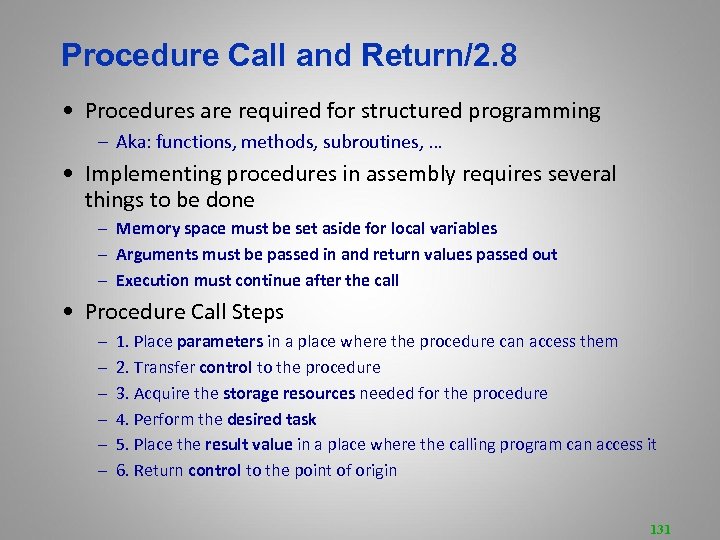
Procedure Call and Return/2. 8 • Procedures are required for structured programming – Aka: functions, methods, subroutines, … • Implementing procedures in assembly requires several things to be done – Memory space must be set aside for local variables – Arguments must be passed in and return values passed out – Execution must continue after the call • Procedure Call Steps – – – 1. Place parameters in a place where the procedure can access them 2. Transfer control to the procedure 3. Acquire the storage resources needed for the procedure 4. Perform the desired task 5. Place the result value in a place where the calling program can access it 6. Return control to the point of origin 131

Call and Return • To jump to a procedure, use the jal or jalr instructions jal target jalr $dest # Jump and link to label # Jump and link to $dest • Jump and link – The program counter (PC) stores the address of the currently executing instruction – The “jump and link” instructions stores the next instruction address in $ra before transferring control to the target/destination – Therefore, the address stored in $ra is PC + 4 • To return, use the jr instruction jr $ra 132

Stack-Based Languages • Languages that Support Recursion • e. g. , C, Java, Pascal, … – Code must be “Reentrant” • Multiple simultaneous instantiations of single procedure – Need some place to store state of each instantiation • Arguments, local variables, return pointer • Stack Discipline – State for given procedure needed for limited time • From when called to when return – Callee returns before caller does – LIFO • Stack Allocated in Frames – State for single procedure instantiation 133

Nested Stacks • The stack grows downward and shrinks upward 134

Stacks • Data is pushed onto the stack to store it and popped from the stack when not longer needed – MIPS does not support in hardware (use loads/stores) – Procedure calling convention requires one • Calling convention – Common rules across procedures required – Recent machines are set by software convention and earlier machines by hardware instructions • Using Stacks – Stacks can grow up or down – Stack grows down in MIPS – Entire stack frame is pushed and popped, rather than single elements 135

MIPS Storage Layout 136

Register Assignments Calling Convention 137

Call and Return • Caller – Save caller-saved registers $a 0 -$a 3, $t 0 -$t 9 – Load arguments in $a 0 -$a 3, rest passed on stack – Execute jal instruction • Callee Setup 1. Allocate memory for new frame ($sp = $sp - frame) 2. Save callee-saved registers $s 0 -$s 7, $fp, $ra 3. Set frame pointer ($fp = $sp + frame size - 4) • Callee Return – – Place return value in $v 0 and $v 1 Restore any callee-saved registers Pop stack ($sp = $sp + frame size) Return by jr $ra 138

Simple Example 139

Review --Instruction Execution in a CPU 140

Microarchitecture: Implementation of an ISA status lines Controller control points Data path Structure: How components are connected. Static Behavior: How data moves between components Dynamic 141

Microcoded Microarchitecture busy? zero? opcode holds fixed microcode instructions controller (ROM) Datapath Data holds user program written in macrocode instructions (e. g. , MIPS, x 86, etc. ) Addr Memory (RAM) en. Mem. Wrt 142

The MIPS 32 ISA • Processor State 32 32 -bit GPRs, R 0 always contains a 0 16 double-precision/32 single-precision FPRs FP status register, used for FP compares & exceptions PC, the program counter See H&P some other special registers Appendix B for full description • Data types 8 -bit byte, 16 -bit half word 32 -bit word for integers 32 -bit word for single precision floating point 64 -bit word for double precision floating point • Load/Store style instruction set data addressing modes- immediate & indexed branch addressing modes- PC relative & register indirect Byte addressable memory- big-endian mode All instructions are 32 bits 143

MIPS Instruction Formats 6 0 5 rs 5 rt 5 rd 5 0 6 func ALUi opcode rs rt immediate rt (rs) op immediate Mem 6 opcode 5 rs 5 rt 16 displacement M[(rs) + displacement] 6 opcode 5 rs 5 16 offset 6 opcode 5 rs 5 16 6 opcode 26 offset rd (rs) func (rt) BEQZ, BNEZ JR, JALR J, JAL 144

Data Formats and Memory Addresses Data formats: Bytes, Half words, words and double words Some issues • Byte addressing Big Endian Most Significant Byte 0 3 vs. Little Endian Least Significant Byte 1 2 2 1 3 0 Byte Addresses • Word alignment Suppose the memory is organized in 32 -bit words. Can a word address begin only at 0, 4, 8, . . ? 0 1 2 3 4 5 6 7 145

A Bus-based Datapath for MIPS zero? Opcode ld. IR Op. Sel ld. A busy 32(PC) 31(Link) rd rt rs ld. B 2 rd rt rs IR Ext. Sel Imm Ext 2 en. Imm 3 A ALU control 32 GPRs + PC. . . 32 -bit Reg en. ALU Reg. Wrt Memory Mem. Wrt en. Reg data Bus MA addr B ALU Reg. Sel ld. MA data en. Mem 32 Microinstruction: register to register transfer (17 control signals) MA B PC means Reg[rt] means Reg. Sel = PC; en. Reg=yes; Reg. Sel = rt; en. Reg=yes; ld. MA= yes ld. B = yes 146
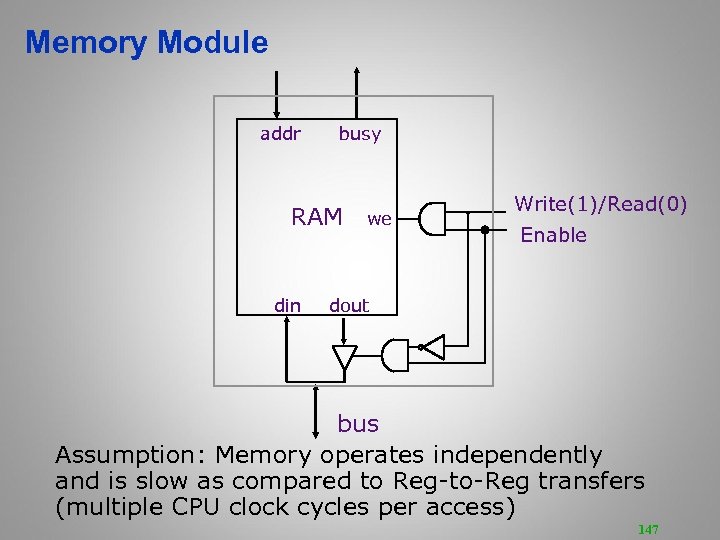
Memory Module addr busy RAM din we Write(1)/Read(0) Enable dout bus Assumption: Memory operates independently and is slow as compared to Reg-to-Reg transfers (multiple CPU clock cycles per access) 147

Instruction Execution of a MIPS instruction involves 1. 2. 3. 4. 5. instruction fetch decode and register fetch ALU operation memory operation (optional) write back to register file (optional) + the computation of the next instruction address 148
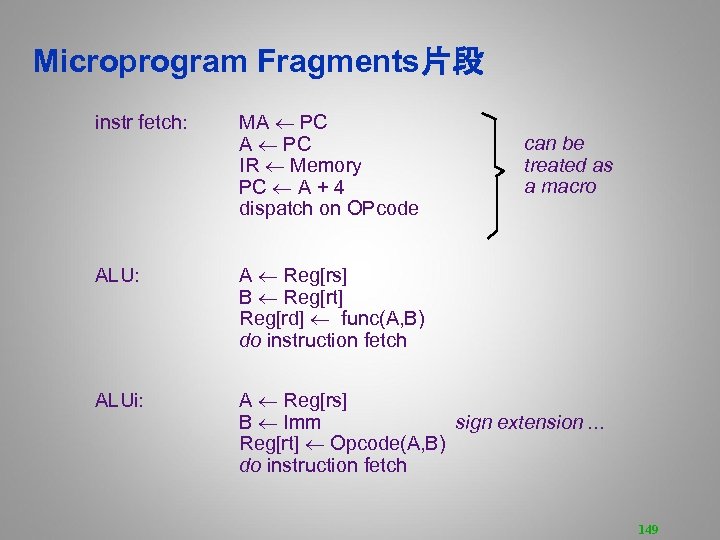
Microprogram Fragments片段 instr fetch: MA PC IR Memory PC A + 4 dispatch on OPcode can be treated as a macro ALU: A Reg[rs] B Reg[rt] Reg[rd] func(A, B) do instruction fetch ALUi: A Reg[rs] B Imm sign extension. . . Reg[rt] Opcode(A, B) do instruction fetch 149
![Microprogram Fragments (cont. ) LW: A Reg[rs] B Imm MA A + B Reg[rt]](https://present5.com/presentation/f1f22157b9dc0b43e4d899d684326b3f/image-150.jpg "Microprogram Fragments (cont. ) LW: A Reg[rs] B Imm MA A + B Reg[rt]")
Microprogram Fragments (cont. ) LW: A Reg[rs] B Imm MA A + B Reg[rt] Memory do instruction fetch J: A PC {A[31: 28], B[25: 0], 00} B IR PC Jump. Targ(A, B) do instruction fetch beqz: A Reg[rs] If zero? (A) then go to bz-taken do instruction fetch bz-taken: A PC B Imm << 2 PC A + B do instruction fetch Jump. Targ(A, B) = 150
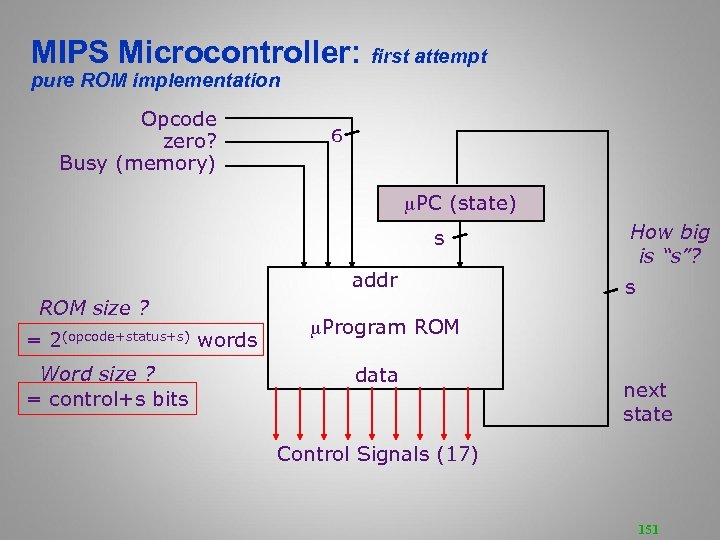
MIPS Microcontroller: first attempt pure ROM implementation Opcode zero? Busy (memory) 6 PC (state) s addr ROM size ? = 2(opcode+status+s) words Word size ? = control+s bits How big is “s”? s Program ROM data next state Control Signals (17) 151
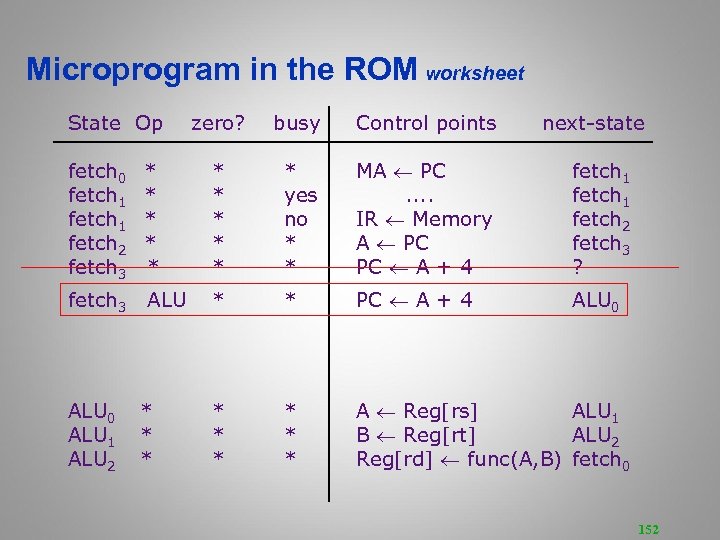
Microprogram in the ROM worksheet State Op zero? busy Control points next-state fetch 0 fetch 1 fetch 2 fetch 3 * * * yes no * * MA PC. . IR Memory A PC PC A + 4 fetch 1 fetch 2 fetch 3 ? fetch 3 ALU * * PC A + 4 ALU 0 * * * A Reg[rs] ALU 1 B Reg[rt] ALU 2 Reg[rd] func(A, B) fetch 0 ALU 1 ALU 2 * * * 152

Microprogram in the ROM State Op fetch 0 fetch 1 fetch 2 fetch 3 fetch 3 fetch 3. . . ALU 0 ALU 1 ALU 2 zero? busy Control points next-state * * ALUi LW SW J JAL JR JALR beqz * * * * yes no * * * * * MA PC. . IR Memory A PC PC A + 4 PC A + 4 PC A + 4 * * * * * A Reg[rs] ALU 1 B Reg[rt] ALU 2 Reg[rd] func(A, B) fetch 0 fetch 1 fetch 2 fetch 3 ALU 0 ALUi 0 LW 0 SW 0 JAL 0 JR 0 JALR 0 beqz 0 153

Microprogram in the ROM Cont. State Op ALUi 0 ALUi 1 ALUi 2. . . J 0 J 1 J 2. . . beqz 0 beqz 1 beqz 2 beqz 3. . . zero? busy Control points next-state * s. Ext u. Ext * * * * * A Reg[rs] B s. Ext 16(Imm) B u. Ext 16(Imm) Reg[rd] Op(A, B) ALUi 1 ALUi 2 fetch 0 * * * * * A PC J 1 B IR J 2 PC Jump. Targ(A, B) fetch 0 * * * yes no * * * * A Reg[rs] A PC. . B s. Ext 16(Imm) PC A+B beqz 1 beqz 2 fetch 0 beqz 3 fetch 0 Jump. Targ(A, B) = {A[31: 28], B[25: 0], 00} 154
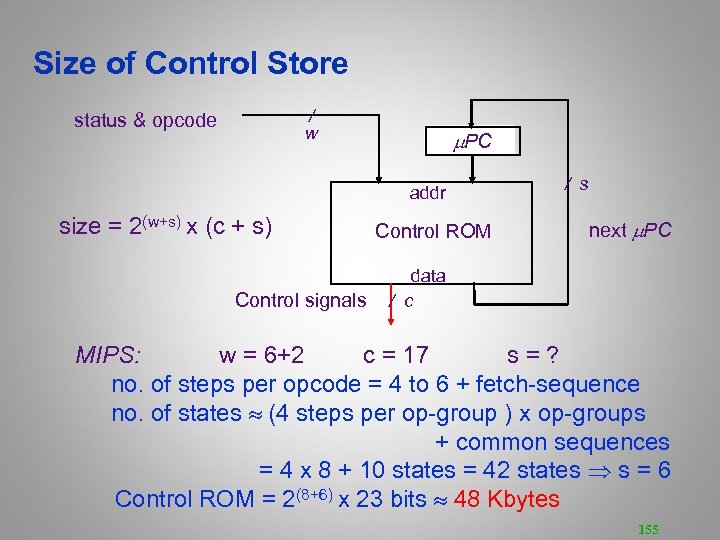
Size of Control Store / w status & opcode PC addr size = 2(w+s) x (c + s) Control signals Control ROM / s next PC data / c MIPS: w = 6+2 c = 17 s = ? no. of steps per opcode = 4 to 6 + fetch-sequence no. of states (4 steps per op-group ) x op-groups + common sequences = 4 x 8 + 10 states = 42 states s = 6 Control ROM = 2(8+6) x 23 bits 48 Kbytes 155

Reducing Control Store Size Control store has to be fast expensive • Reduce the ROM height (= address bits) – reduce inputs by extra external logic each input bit doubles the size of the control store – reduce states by grouping opcodes find common sequences of actions – condense input status bits combine all exceptions into one, i. e. , exception/no-exception • Reduce the ROM width – restrict the next-state encoding Next, Dispatch on opcode, Wait for memory, . . . – encode control signals (vertical microcode) 156

MIPS Controller V 2 Opcode absolute ext op-group input encoding reduces ROM height PC (state) address Jump. Type = next | spin | fetch | dispatch | feqz | fnez PC+1 +1 PCSrc jump logic zero busy Control ROM data Control Signals (17) next-state encoding reduces ROM width 157
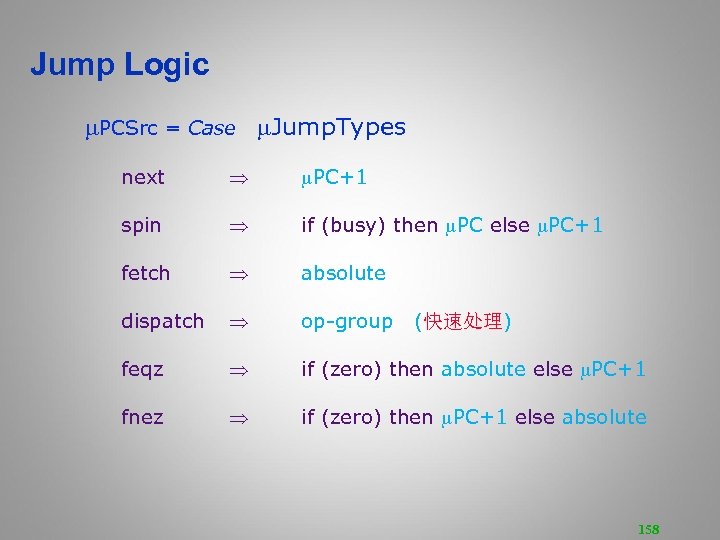
Jump Logic PCSrc = Case Jump. Types next PC+1 spin if (busy) then PC else PC+1 fetch absolute dispatch op-group feqz if (zero) then absolute else PC+1 fnez if (zero) then PC+1 else absolute (快速处理) 158

Instruction Fetch & ALU: MIPS-Controller-2 State Control points next-state fetch 0 fetch 1 fetch 2 fetch 3. . . ALU 0 ALU 1 ALU 2 MA PC IR Memory A PC PC A + 4 next spin使延长 next dispatch A Reg[rs] B Reg[rt] Reg[rd] func(A, B) next fetch ALUi 0 ALUi 1 ALUi 2 A Reg[rs] B s. Ext 16(Imm) Reg[rd] Op(A, B) next fetch 159

Load & Store: MIPS-Controller-2 State Control points next-state LW 0 LW 1 LW 2 LW 3 LW 4 A Reg[rs] B s. Ext 16(Imm) MA A+B Reg[rt] Memory next spin fetch SW 0 SW 1 SW 2 SW 3 SW 4 A Reg[rs] B s. Ext 16(Imm) MA A+B Memory Reg[rt] next spin fetch 160

Branches: MIPS-Controller-2 State Control points BEQZ 0 BEQZ 1 BEQZ 2 BEQZ 3 BEQZ 4 A Reg[rs] BNEZ 0 BNEZ 1 BNEZ 2 BNEZ 3 BNEZ 4 next-state A Reg[rs] next fnez A PC next B s. Ext 16(Imm<<2) next PC A+B fetch next feqz A PC next B s. Ext 16(Imm<<2) next PC A+B fetch 161

Jumps: MIPS-Controller-2 State Control points next-state J 0 J 1 J 2 A PC next B IR next PC Jump. Targ(A, B) fetch JR 0 JR 1 A Reg[rs] PC A JAL 0 JAL 1 JAL 2 JAL 3 A PC next Reg[31] A next B IR next PC Jump. Targ(A, B) fetch JALR 0 JALR 1 JALR 2 JALR 3 A PC B Reg[rs] Reg[31] A PC B next fetch next 162

Implementing Complex Instructions Opcode ld. IR zero? Op. Sel ld. A busy 32(PC) 31(Link) rd rt rs ld. B 2 IR Ext. Sel 2 en. Imm Ext rd rt rs 3 A ALU control 32 GPRs + PC. . . Reg. Wrt 32 -bit Reg en. ALU data Bus MA addr B ALU Reg. Sel ld. MA Memory Mem. Wrt en. Reg data en. Mem 32 rd M[(rs)] op (rt) M[(rd)] (rs) op (rt) M[(rd)] M[(rs)] op M[(rt)] Reg-Memory-src ALU op Reg-Memory-dst ALU op Mem-Mem ALU op 163

Mem-Mem ALU Instructions: MIPS-Controller-2 Mem-Mem ALU op ALUMM 0 ALUMM 1 ALUMM 2 ALUMM 3 ALUMM 4 ALUMM 5 ALUMM 6 M[(rd)] M[(rs)] op M[(rt)] MA Reg[rs] A Memory MA Reg[rt] B Memory MA Reg[rd] Memory func(A, B) next spin fetch Complex instructions usually do not require datapath modifications in a microprogrammed implementation -- only extra space for the control program Implementing these instructions using a hardwired controller is difficult without datapath modifications 164

Performance Issues/2. 18 Microprogrammed control multiple cycles per instruction Cycle time ? t. C > max(treg-reg, t. ALU, t ROM) Suppose 10 * t ROM < t. RAM Good performance, relative to a single-cycle hardwired implementation, can be achieved even with a CPI of 10 165
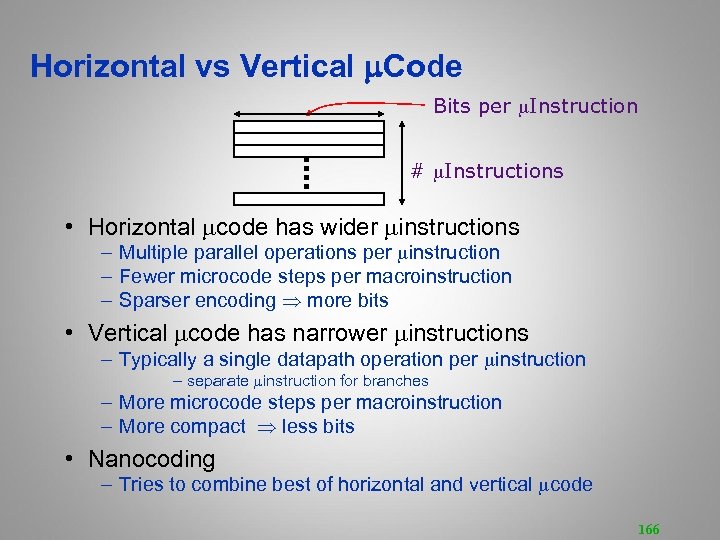
Horizontal vs Vertical m. Code Bits per Instruction # Instructions • Horizontal code has wider instructions – Multiple parallel operations per instruction – Fewer microcode steps per macroinstruction – Sparser encoding more bits • Vertical code has narrower instructions – Typically a single datapath operation per instruction – separate instruction for branches – More microcode steps per macroinstruction – More compact less bits • Nanocoding – Tries to combine best of horizontal and vertical code 166
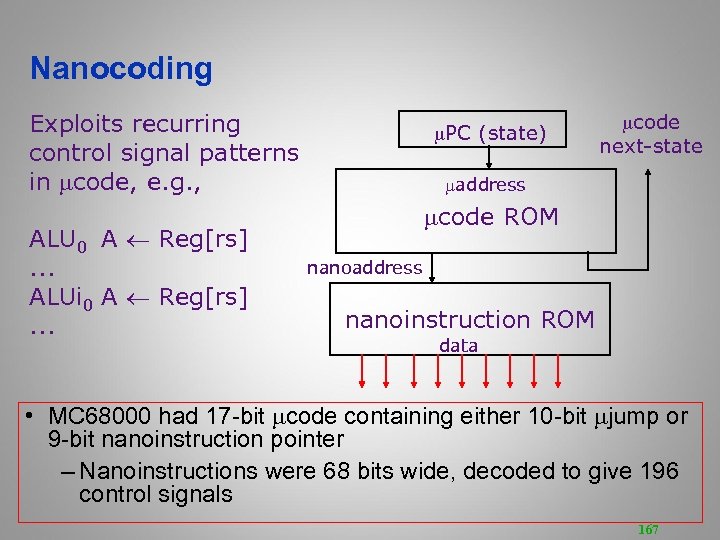
Nanocoding Exploits recurring control signal patterns in code, e. g. , ALU 0 A Reg[rs]. . . ALUi 0 A Reg[rs]. . . PC (state) code next-state address code ROM nanoaddress nanoinstruction ROM data • MC 68000 had 17 -bit code containing either 10 -bit jump or 9 -bit nanoinstruction pointer – Nanoinstructions were 68 bits wide, decoded to give 196 control signals 167

Modern Usage • Microprogramming is far from extinct消逝的 • Played a crucial关键性role in micros of the Eighties DEC u. VAX, Motorola 68 K series, Intel 286/386 • Microcode pays an assisting role in most modern micros (AMD Bulldozer, Intel Sandy Bridge, Intel Atom, IBM Power. PC) • Most instructions are executed directly, i. e. , with hard-wired control • Infrequently-used and/or complicated instructions invoke the microcode engine • Patchable microcode common for post-fabrication bug fixes, e. g. Intel processors load µcode patches at bootup 168

Alternative Architectures • Design alternative: – provide more powerful operations – goal is to reduce number of instructions executed – danger is a slower cycle time and/or a higher CPI • Sometimes referred to as “RISC vs. CISC” – virtually all new instruction sets since 1982 have been RISC – VAX: minimize code size, make assembly language easy • instructions from 1 to 54 bytes long! • We’ll look at Power. PC and 80 x 86/2. 16 -2. 17 169

Power. PC • Indexed addressing变址寻址 – example: lw$t 1, $a 0+$s 3 #$t 1=Memory[$a 0+$s 3] – What do we have to do in MIPS? • Update addressing更新地址 – update a register as part of load (for marching through arrays) – example: lwu$t 0, 4($s 3) #$t 0=Memory[$s 3+4]; $s 3=$s 3+4 – What do we have to do in MIPS? • Others: – load multiple/store multiple – a special counter register “bc. Loop” decrement counter, if not 0 goto loop 170

80 x 86 • 1978: The Intel 8086 is announced (16 bit architecture) • 1980: The 8087 floating point coprocessor is added • 1982: The 80286 increases address space to 24 bits, +instructions • 1985: The 80386 extends to 32 bits, new addressing modes • 1989 -1995: The 80486, Pentium Pro add a few instructions (mostly designed for higher performance) • 1997: MMX is added 171

80 x 86 • See your textbook for a more detailed description • Complexity: – – Instructions from 1 to 17 bytes long one operand must act as both a source and destination one operand can come from memory complex addressing modes e. g. , “base or scaled index with 8 or 32 bit displacement” • Saving grace: 可取之处 – the most frequently used instructions are not too difficult to build – compilers avoid the portions of the architecture that are slow 172

Key Points • MIPS is a general-purpose register, load-store, fixedinstruction-length architecture. • MIPS is optimized for fast pipelined performance, not for low instruction count • Four principles of IS architecture – – simplicity favors regularity简单有规律 smaller is faster小的更快 good design demands compromise好的设计需要妥协 make the common case fast使常见的快速 173

Home. Work 1 • Readings: – Read Chapter 2 all, then Appendix C and D.

Home. Work 2 • Readings: – Read Chapter 3. • Home Work: – HW 1 – http: //mypage. zju. edu. cn/wdwd/565896. html • 查资料, 熟悉具体芯片 • ST Microelectronics – STM 32 F 050 ----- ARM cortex M 0 ISA • Intel – Z 2420 ----------Intel Atom 80 x 86 • MICROCHIP – PIC 32 MX 110 -----MIPS M 4 K ISA

Acknowledgements • These slides contain material from courses: – UCB CS 152. – Stanford EE 108 B 176
Скачать презентацию Computer Organization Design 计算机组成与设计 Weidong Wang 王维东
f1f22157b9dc0b43e4d899d684326b3f.ppt