


 Скачать презентацию COMPUTER OPERATION-TYPES OF DATA Подготовил студент 2 -го
po_pk_os.ppt
- Количество слайдов: 10
 COMPUTER OPERATION-TYPES OF DATA Подготовил студент 2 -го курса группы ТВ-102 Кожевников Михаил 2/11/2018 1
 Without what of the devices listed below operation of the computer is impossible: Printer; Processor; Keyboard; Flash memory; Monitor; Random access memory; CD ROM device. 2/11/2018 2
 Define possible volume of the following data carriers, using specified versions of answers (1, 44 Mb, 700 Mb, 120 Gb, 512 Mb, 4, 7 Gb): CD-R; DVD-R; Flash memory; Diskette; Hard magnetic disk. 2/11/2018 3
 Computer software The operating system – provides joint functioning of all devices of the computer and provides to the user access to its resources with OS graphic interface use. Drivers of devices – the special programs providing management of operation of devices of the computer and coordination of information exchange with other devices (to each device there corresponds the driver). 2/11/2018 4
 Functions of an operating system Testing of separate knots of equipment, memory and other components of the equipment Interface of the applied program to hardware (special programs – drivers are for this purpose used) Computer use in a multiprogram mode (i. e. at the same time some programs can be carried out at once), thus OS watches distribution of internal resources and sequence of performance of teams For convenience of work of the user with the computer the interface – set of means and rules for computer and person interaction is used 2/11/2018 5
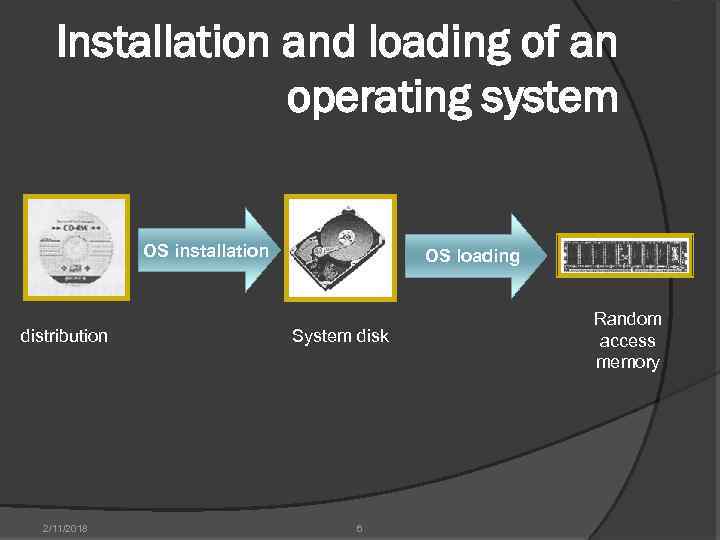 Installation and loading of an operating system OS installation distribution 2/11/2018 OS loading System disk 6 Random access memory
 Installation of an operating system OS installation – files of an operating system are copied from a distribution kit disk on a hard disk of the computer. Files of an operating system are stored in longterm memory on a hard disk which is called as system. The operating system, as well as other programs, can be carried out, if it is in random access memory of the computer. Therefore loading of OS files from a system disk in random access memory is necessary. 2/11/2018 7
 Loading of an operating system begins in one of three cases – after: inclusions of a food of the computer; Reset button pressing on the system block of the computer; simultaneous pressing of a combination of keys on the keyboard: { Ctrl } + { Alt } + { Del } In the course of OS loading: testing of operability of the processor, memory, etc. devices is made; on the screen of the monitor short diagnostic messages on testing process are deduced after the completion of loading of OS the user has an opportunity to operate the computer about OS graphic interface use. 2/11/2018 8
 Windows OS standard programs Paint – the graphic editor, allows to create, look through and edit drawings or the scanned photos Imaging – is used for viewing and editing of graphic files, for example, digital drawings or the scanned photos The calculator – the electronic calculator is analog of the ordinary manual calculator The notebook – a text editor, is used for creation and editing of text files of a simple format Word. Pad – a text editor, is used for creation and formatting of text files with difficult formatting 2/11/2018 9
 Applied software The appendix is the program, giving the chance to process text, graphic, numerical, audio-and a video information to work in computer networks, without owning programming. The appendix functions under control of a certain operating system. Types of appendices: 1. General applications (calculators, spreadsheets, text, sound and graphic editors, multimedia players, databases, programs of development of presentations, communication programs etc. ). 2. Appendices of a special purpose (accounting programs, the encyclopedias training programs, systems of machine translation, the programming system, computer games etc. ) 2/11/2018 10