


 Скачать презентацию Computer Concepts 7 th Edition Chapter 5 Internet
8a59e028ea0413251662263c99ffb4f7.ppt
- Количество слайдов: 67
 Computer Concepts 7 th Edition Chapter 5: Internet and LAN Technology 1
 Chapter 5 Internet and LAN Technology Section A: Network Building Blocks Computer Concepts 7 th Edition Parsons/Oja
 Chapter Preview After this chapter, you should be able to: – Diagram Shannon’s model of a communications network – Explain digital vs. analog communications – List types of cables – List network devices – Explain packet switching and circuit switching – Describe role of protocols – Describe various networks – Recount basics of Internet and Internet access Chapter 5: Internet and LAN Technology 3
 Why is networking computers advantageous? • Sharing networked hardware and software can reduce costs • Sharing networked hardware can provide access to a wide range of services and specialized peripheral devices • Sharing data on a network is easy • Networks enable people to work together regardless of time and place Chapter 5: Internet and LAN Technology 4
 Why is geographic scope important? • • Personal Area Network Local Area Network Metropolitan Area Network Wide Area Network Chapter 5: Internet and LAN Technology 5
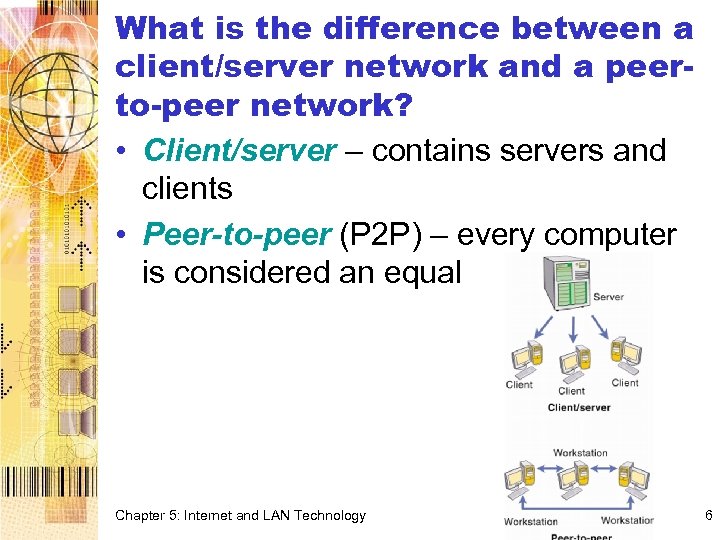 What is the difference between a client/server network and a peerto-peer network? • Client/server – contains servers and clients • Peer-to-peer (P 2 P) – every computer is considered an equal Chapter 5: Internet and LAN Technology 6
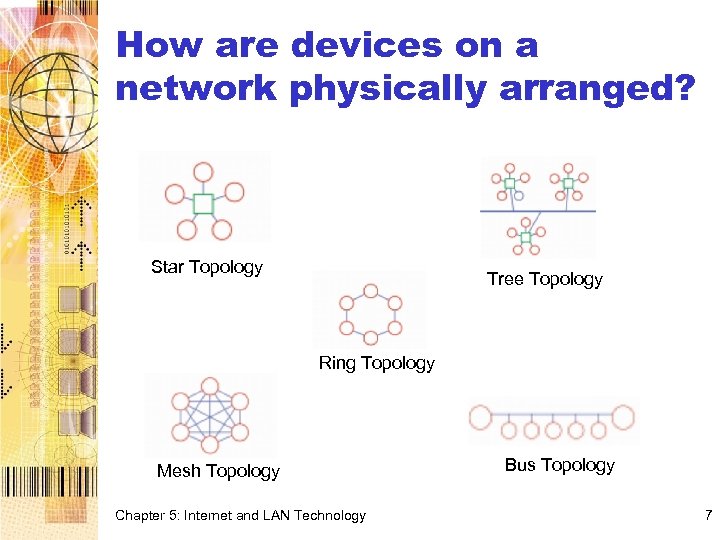 How are devices on a network physically arranged? Star Topology Tree Topology Ring Topology Mesh Topology Chapter 5: Internet and LAN Technology Bus Topology 7
 Network Links: What connects the nodes of a network? • Data can travel from one network device to another over a cable or through the air • A communications channel is a physical path or a frequency for a signal transmission • Wired network – Networks use different types of cables • Wireless network Chapter 5: Internet and LAN Technology 8
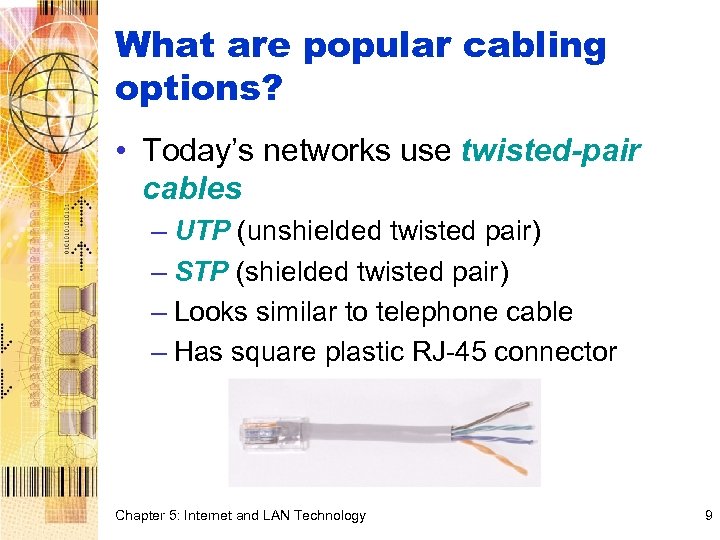 What are popular cabling options? • Today’s networks use twisted-pair cables – UTP (unshielded twisted pair) – STP (shielded twisted pair) – Looks similar to telephone cable – Has square plastic RJ-45 connector Chapter 5: Internet and LAN Technology 9
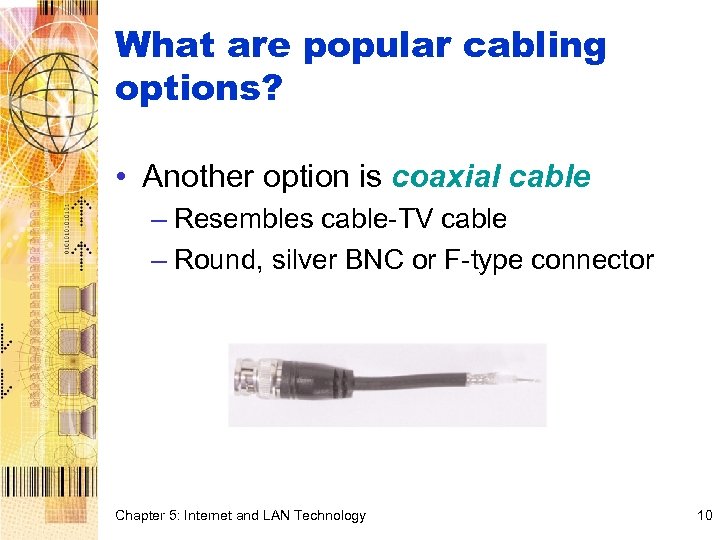 What are popular cabling options? • Another option is coaxial cable – Resembles cable-TV cable – Round, silver BNC or F-type connector Chapter 5: Internet and LAN Technology 10
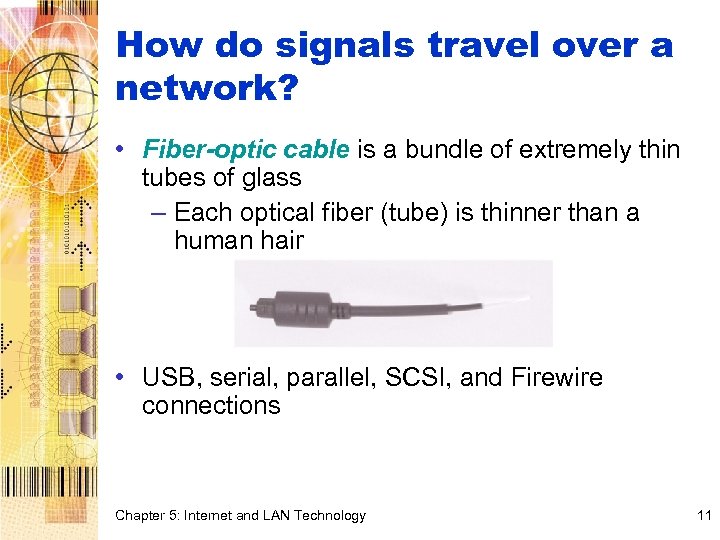 How do signals travel over a network? • Fiber-optic cable is a bundle of extremely thin tubes of glass – Each optical fiber (tube) is thinner than a human hair • USB, serial, parallel, SCSI, and Firewire connections Chapter 5: Internet and LAN Technology 11
 What are the options for wireless networks? • Data can also travel airways in form of RF signals sent and received by a transceiver • Microwaves provide another option for transporting data • Radio and microwave transmissions cannot be bent around the surface of the earth to reach far-flung towers • Communications satellites play an important part in long-distance communications • A transponder on the satellite receives the signal, amplifies it, and retransmits the signal back to a ground station on earth Chapter 5: Internet and LAN Technology 12
 How do signals travel over a network? • Infrared light can also carry data signals, but for short distances with a clear line of sight – Best for transmitting between notebook computers and a printer, or between a PDA and a desktop computer Chapter 5: Internet and LAN Technology 13
 What’s bandwidth? • Bandwidth is the transmission capacity of a communications channel • High-bandwidth communications systems, such as cable TV, are sometimes referred to as broadband • Systems with less capacity, such as the telephone system, are referred to as narrowband • The bandwidth of a digital channel is usually measured in bits per second (bps) Chapter 5: Internet and LAN Technology 14
 How does data travel over a network? • In 1948, Claude Shannon published an article that described a communication model Chapter 5: Internet and LAN Technology 15
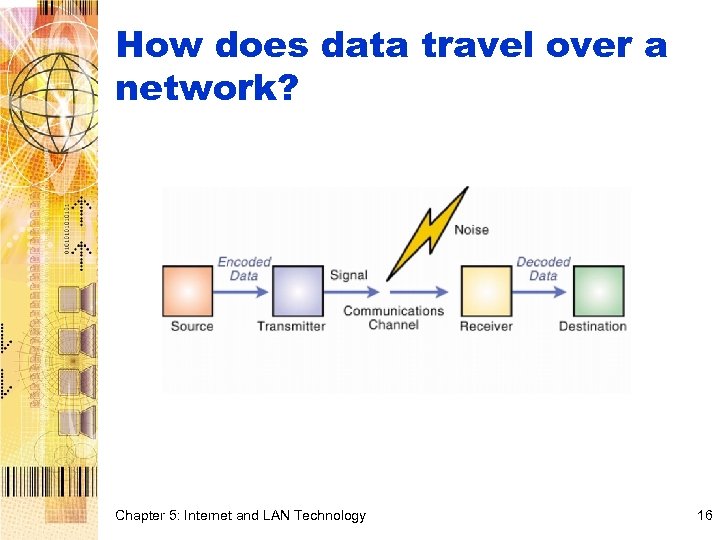 How does data travel over a network? Chapter 5: Internet and LAN Technology 16
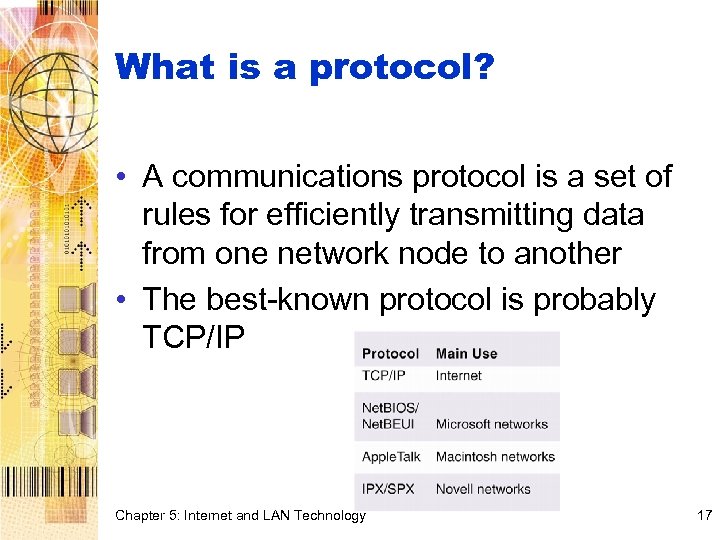 What is a protocol? • A communications protocol is a set of rules for efficiently transmitting data from one network node to another • The best-known protocol is probably TCP/IP Chapter 5: Internet and LAN Technology 17
 What’s a packet? • When you transmit data, it is broken up into small pieces called packets • A packet is a parcel of data that is sent across a network – Has the address of its sender – Has the address of the destination – Has some data • When they reach the destination, they are put back together into original form Chapter 5: Internet and LAN Technology 18
 How does a protocol initiate a transmission? • A synchronous protocol coordinates sending and receiving by using a clock signal • Asynchronous protocols require the transmitting computer to send a start bit that indicates the beginning of a packet – Handshaking Chapter 5: Internet and LAN Technology 19
 How do protocols regulate the flow of data? • Simplex – signal travels in only one direction • Half duplex – signal travels in both directions, but only one direction at a time • Full duplex – signal travels in both directions at the same time Chapter 5: Internet and LAN Technology 20
 Chapter 5 Internet and LAN Technology Section B: Local Area Networks Computer Concepts 7 th Edition Parsons/Oja
 LAN Standards: What are LAN standards? • LAN technologies are standardized by the Institute of Electrical and Electronics Engineers • IEEE designation numbers help identify compatible network technologies – IEEE 802. 3 Chapter 5: Internet and LAN Technology 22
 What is ARCnet? • ARCnet (Attached Resource Computer network) is one of the oldest, simplest, and least expensive LAN technologies • Original ARCnet standard supported transmission rates of 2. 5 Mbps • Later versions supported 20 and 100 Mbps transmission rates • Permits mixed transmission media Chapter 5: Internet and LAN Technology 23
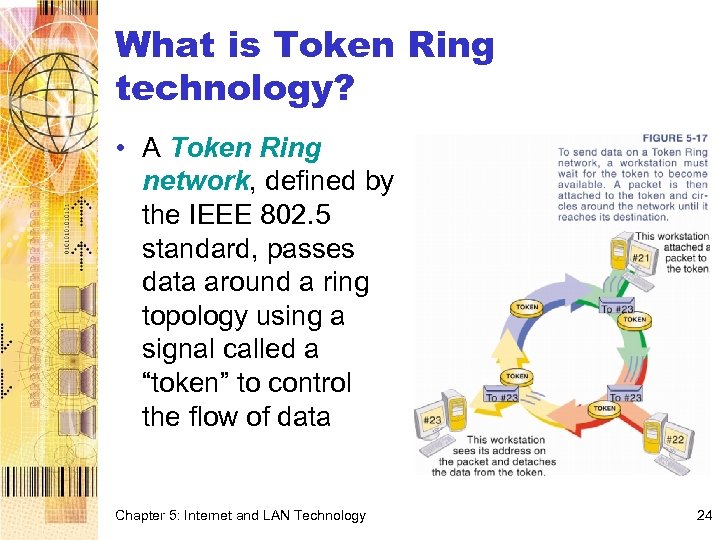 What is Token Ring technology? • A Token Ring network, defined by the IEEE 802. 5 standard, passes data around a ring topology using a signal called a “token” to control the flow of data Chapter 5: Internet and LAN Technology 24
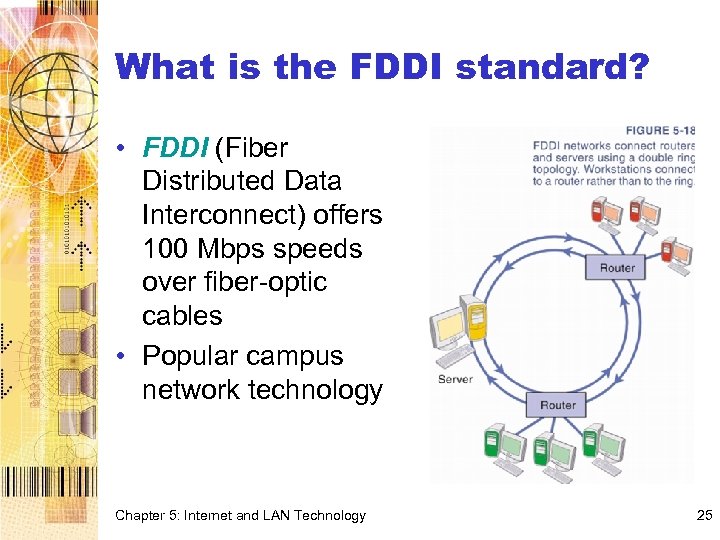 What is the FDDI standard? • FDDI (Fiber Distributed Data Interconnect) offers 100 Mbps speeds over fiber-optic cables • Popular campus network technology Chapter 5: Internet and LAN Technology 25
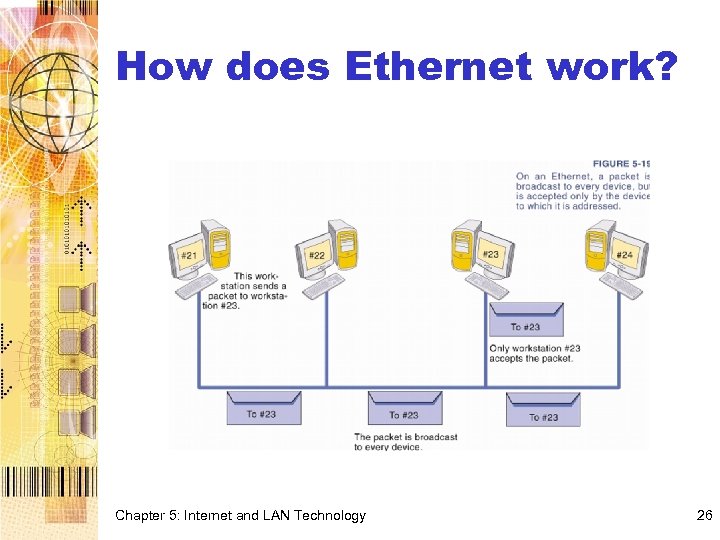 How does Ethernet work? Chapter 5: Internet and LAN Technology 26
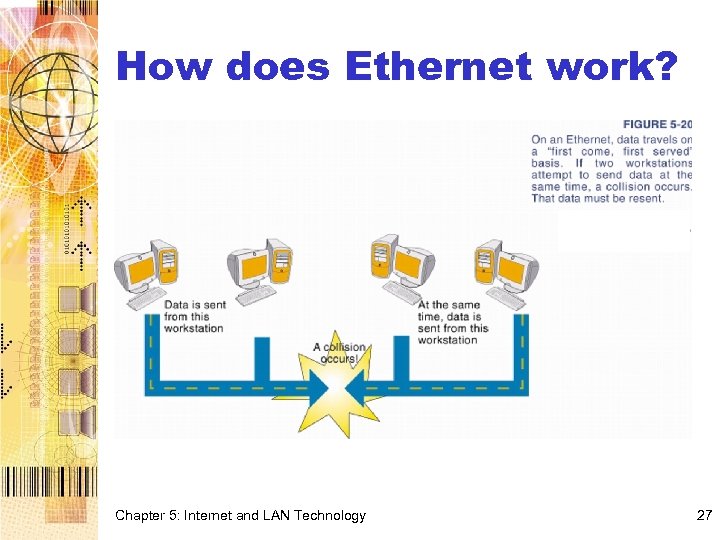 How does Ethernet work? Chapter 5: Internet and LAN Technology 27
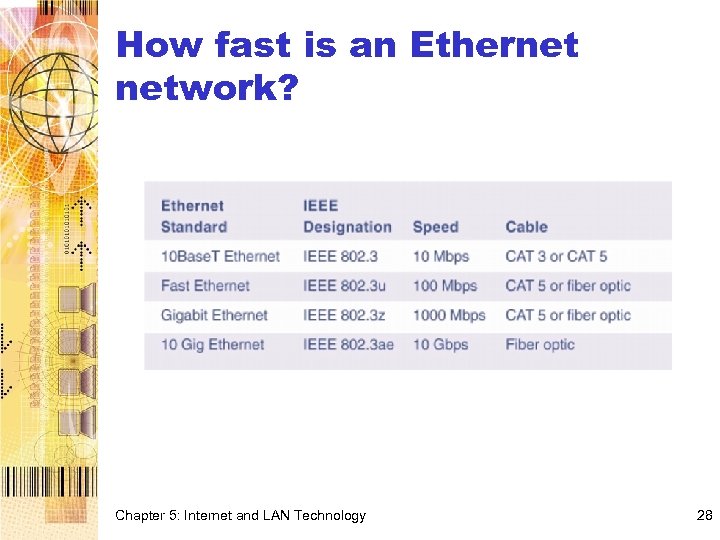 How fast is an Ethernet network? Chapter 5: Internet and LAN Technology 28
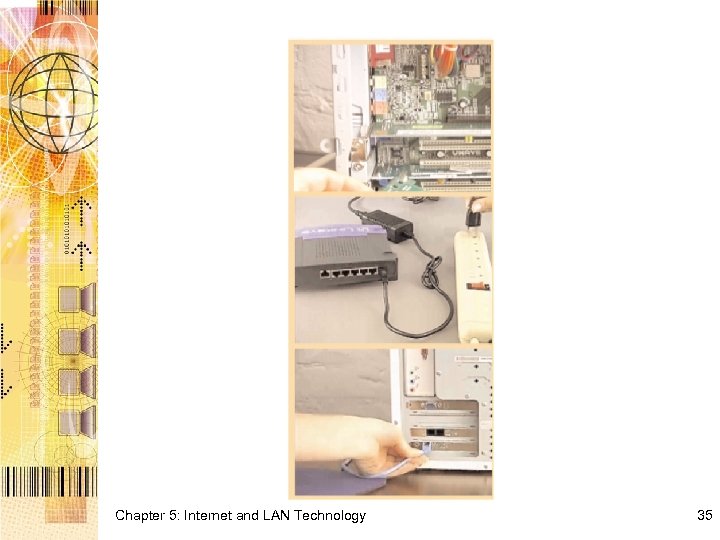
 What equipment is required for Ethernet installations? • An Ethernet card is a type of network interface card designed to support Ethernet protocols • A hub is used to connect more than two computers – Each network device requires one of the hub ports – You can add hubs using an uplink port Chapter 5: Internet and LAN Technology 29
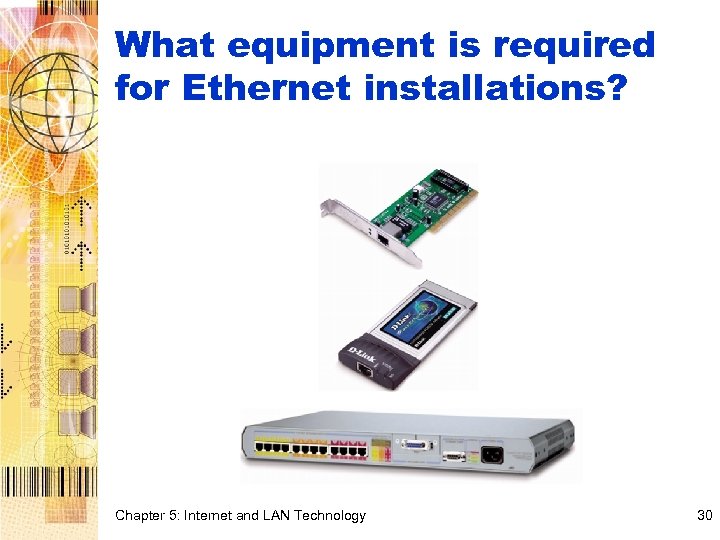 What equipment is required for Ethernet installations? Chapter 5: Internet and LAN Technology 30
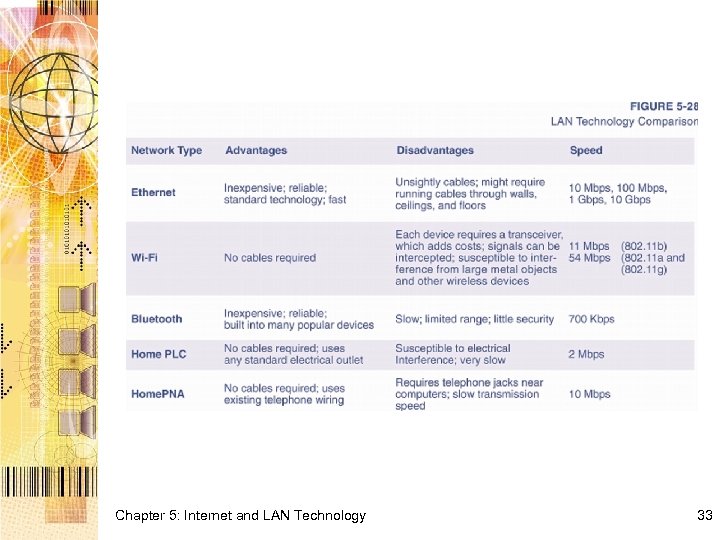
 What is Wi-Fi? • Wireless LANs are slower but eliminate unsightly wires • Signals can be disrupted by large metal objects, cell phones, pagers, and other wireless devices • Most popular is 802. 11 sometimes called Wi. Fi for “wireless fidelity” – Range of up to 150 feet • Bluetooth – 1 Mbps, range of 30 feet Chapter 5: Internet and LAN Technology 31
 Home. PNA and Home. PNC Networks • Home. PNA uses a special NIC and cable to connect each computer to a standard telephone wall jack • Network frequency is usually different from voice, so can use network at same time you place a call • You cannot make a call when dial-up Internet connection is active however • Home. PLC uses special NIC to connect to standard electrical outlet, but power fluctuations can adversely affect signal Chapter 5: Internet and LAN Technology 32
 Chapter 5: Internet and LAN Technology 33
 LAN Installation: How do I set up a simple LAN? • First make sure every PC contains an Ethernet port • Next, attach each workstation to a hub • With all workstations connected, turn them on • Windows should automatically detect the Ethernet cards and establish a connection to the network Chapter 5: Internet and LAN Technology 34
 Chapter 5: Internet and LAN Technology 35
 How do I specify which resources can be shared by other workstations? • Each workstation can specify whether its files will be accessible to other workstations on the network • Drive mapping is Windows terminology for assigning a drive letter to a storage device that’s located on a different workstation Chapter 5: Internet and LAN Technology 36
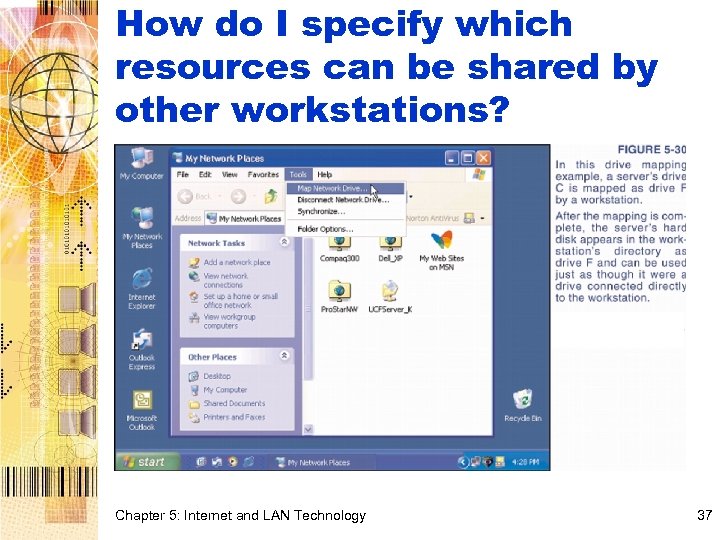 How do I specify which resources can be shared by other workstations? Chapter 5: Internet and LAN Technology 37
 Chapter 5 Internet and LAN Technology Section C: Internet Technology Computer Concepts 7 th Edition Parsons/Oja
 Background: How did the Internet get started? • The United States created ARPA (Advanced Research Projects Agency). – To help scientists communicate and share valuable computer resources – In response to the Soviet Union’s launch of Sputnik in 1957, the first artificial satellite • The ARPANET, created in 1969, connected computers at four universities Chapter 5: Internet and LAN Technology 39
 How fast does data travel over the Internet? • Using Ping or Traceroute, you can discover how long data is in transit • On average, data within the US usually arrives at its destination 110 -120 ms (milliseconds) after it is sent • Overseas transmissions require a little more time Chapter 5: Internet and LAN Technology 40
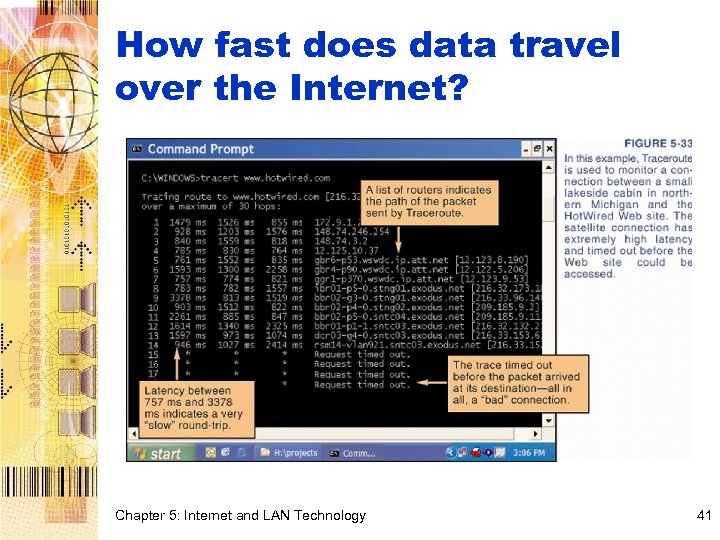 How fast does data travel over the Internet? Chapter 5: Internet and LAN Technology 41
 What kinds of network devices are part of an ISP? • An ISP operates network devices that handle the physical aspects of transmitting and receiving data from your computer • Many ISPs operate e-mail servers to handle incoming and outgoing mail for their subscribers and Web servers for subscriber Web sites Chapter 5: Internet and LAN Technology 42
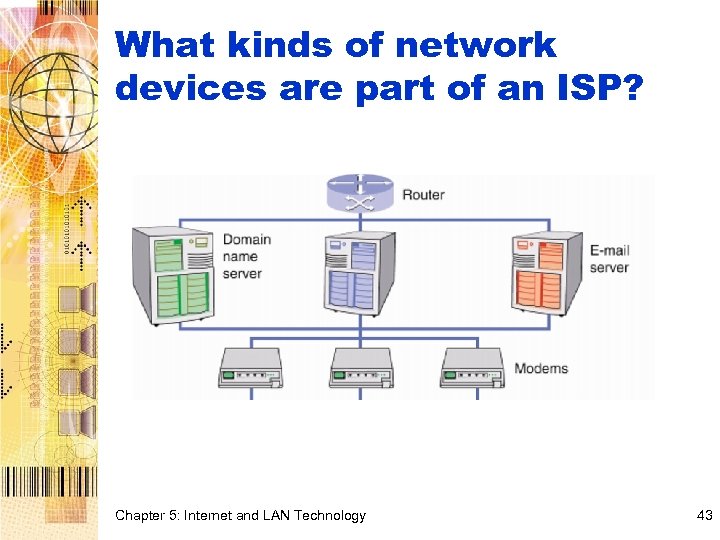 What kinds of network devices are part of an ISP? Chapter 5: Internet and LAN Technology 43
 Internet Protocols: Why odes the Internet use TCP/IP? • TCP/IP provides a standard that is fairly easy to implement, public, free, and extensible • The Internet is not owned, operated, or controlled by any single entity • TCP/IP is glue that holds the Internet together Chapter 5: Internet and LAN Technology 44
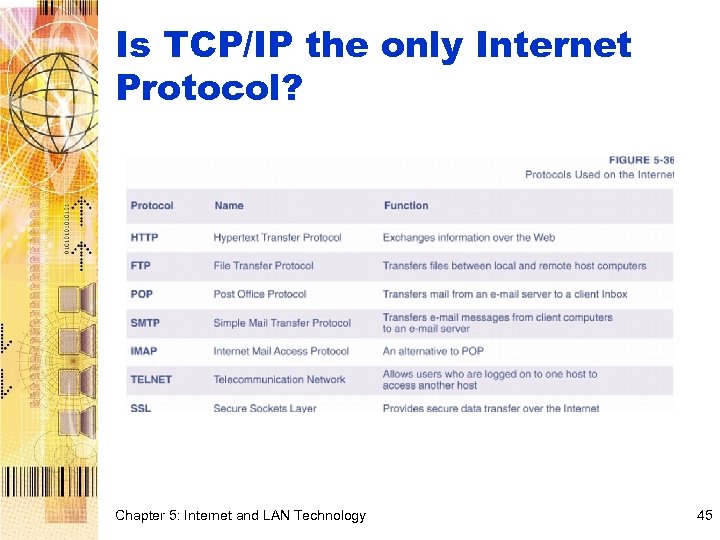 Is TCP/IP the only Internet Protocol? Chapter 5: Internet and LAN Technology 45
 IP Addresses: Does the Internet use a special addressing scheme? • The IP part of TCP/IP defines the format for the addresses that identify computers on the Internet • These addresses are called IP addresses • An IP address is a series of numbers, such as 204. 127. 129. 001 – It is separated into four sections by periods – Each section’s number cannot exceed 255 – Each address requires 32 bits (8 bits per section) Chapter 5: Internet and LAN Technology 46
 Do I need a permanent IP address? • Static IP address – permanently assigned IP address • Dynamic IP address – temporarily assigned • ISPs need static IP addresses • Clients typically use dynamic IP addresses as the IP addressing scheme provides approximately only 4. 3 billion unique addresses Chapter 5: Internet and LAN Technology 47
 Domain Names: What’s a domain name? • People find it difficult to remember long strings of numbers, so host computers also have names called domain names • Domain name – “fully qualified domain name” (FQDN), usually typed in all lowercase – Key component of URLs and e-mail addresses – www. msu. edu/biologycatalog. htm www. msu. edu is the domain name Chapter 5: Internet and LAN Technology 48
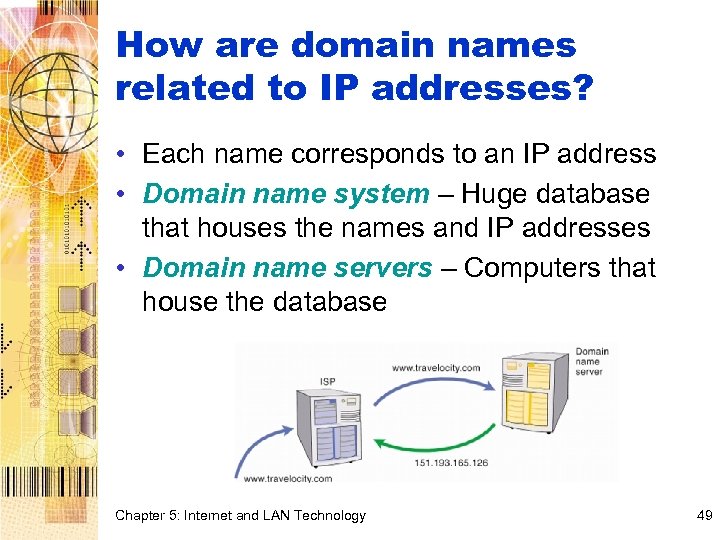 How are domain names related to IP addresses? • Each name corresponds to an IP address • Domain name system – Huge database that houses the names and IP addresses • Domain name servers – Computers that house the database Chapter 5: Internet and LAN Technology 49
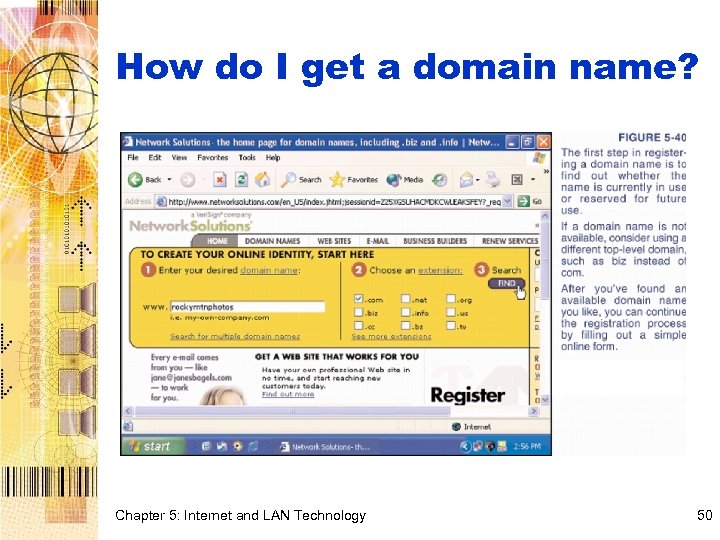 How do I get a domain name? Chapter 5: Internet and LAN Technology 50
 Is a fee required to obtain a domain name? • You can register a domain name for a minimal annual fee ($10 - $50) • Some Internet entrepreneurs have registered high-profile domain names and resell them – stockmarket. com - $900, 000 – answers. com - $150, 000 Chapter 5: Internet and LAN Technology 51
 Chapter 5 Internet and LAN Technology Section D: Internet Access Computer Concepts 7 th Edition Parsons/Oja
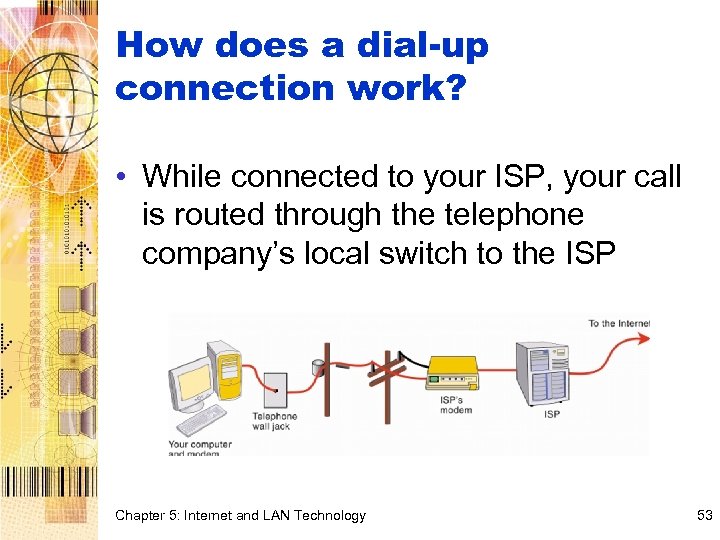 How does a dial-up connection work? • While connected to your ISP, your call is routed through the telephone company’s local switch to the ISP Local Switch Chapter 5: Internet and LAN Technology 53
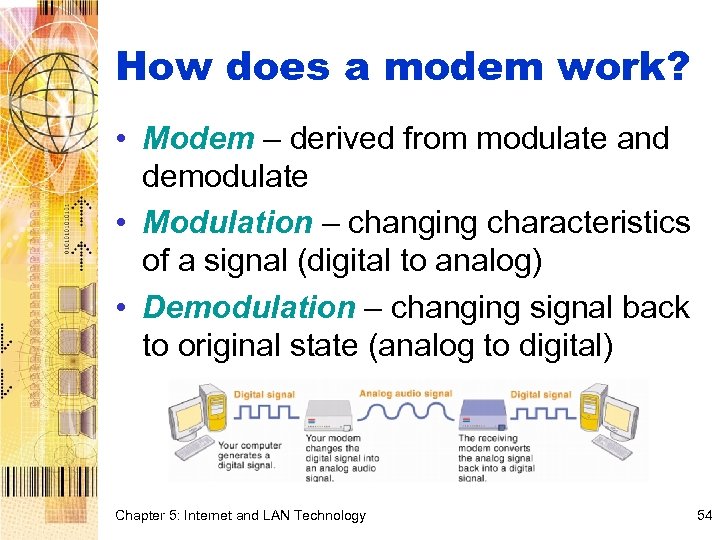 How does a modem work? • Modem – derived from modulate and demodulate • Modulation – changing characteristics of a signal (digital to analog) • Demodulation – changing signal back to original state (analog to digital) Chapter 5: Internet and LAN Technology 54
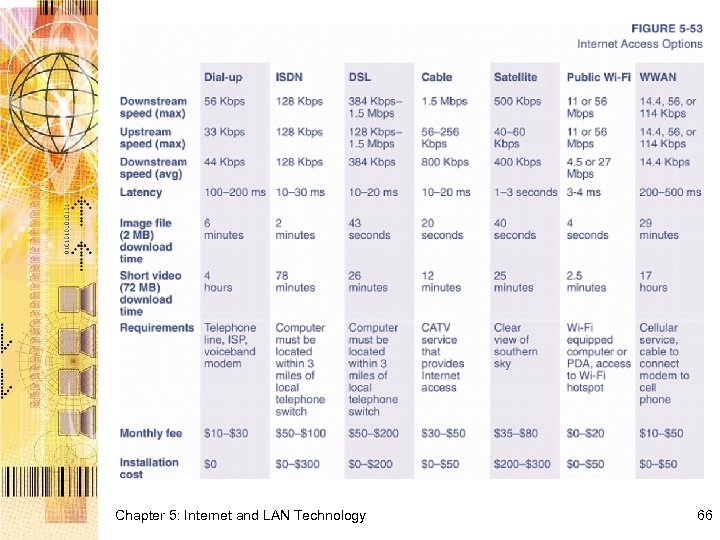
 How fast is a modem? • Speed was measured as baud rate, number of times per second that a signal in a communications channel varies speeds • Today, measure in terms of bits per second • V. 90 – theoretical maximum speed of 56 Kbps • Even with perfect connection, a 56 Kbps modem tops out at about 44 Kbps • Slightly faster speeds may be available with the new V. 92 and V. 44 modem standards • Downstream vs. upstream Chapter 5: Internet and LAN Technology 55
 Cable Television Connections: How does a cable modem work? • Community antenna television – CATV • The satellite dish farm at which television broadcasts are received and retransmitted is referred to as the head-end • From the head-end, cabling system branches out and eventually reaches consumers’ homes • Topology is similar to computer network, and that is what is formed when you use cable TV as your ISP Chapter 5: Internet and LAN Technology 56
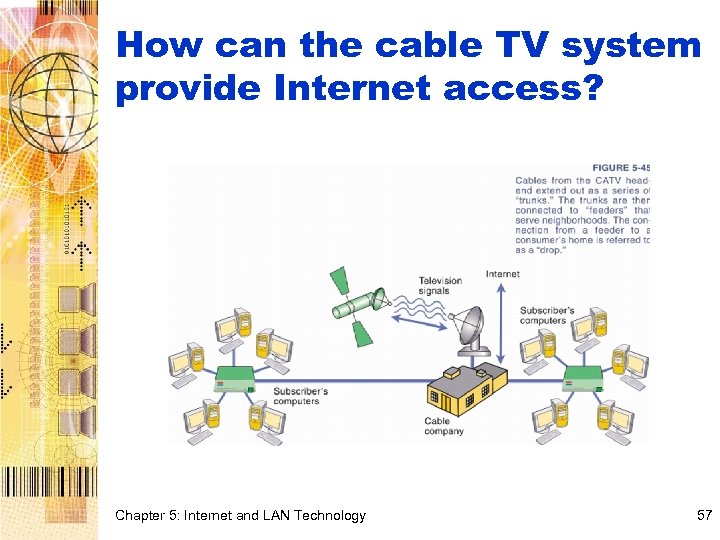 How can the cable TV system provide Internet access? Chapter 5: Internet and LAN Technology 57
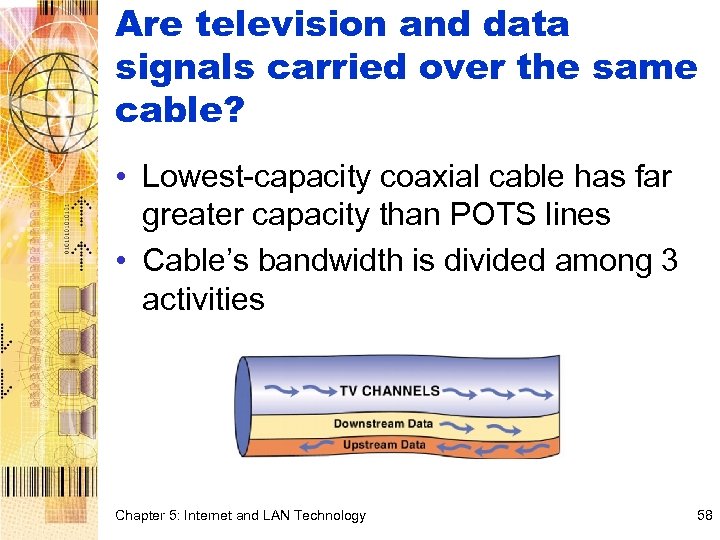 Are television and data signals carried over the same cable? • Lowest-capacity coaxial cable has far greater capacity than POTS lines • Cable’s bandwidth is divided among 3 activities Chapter 5: Internet and LAN Technology 58
 What’s the significance of becoming part of a “neighborhood network”? • An always-on connection is always connected • A hacker who discovers that your computer has a security weakness can easily find it again, and its high-speed access makes it a very desirable target Chapter 5: Internet and LAN Technology 59
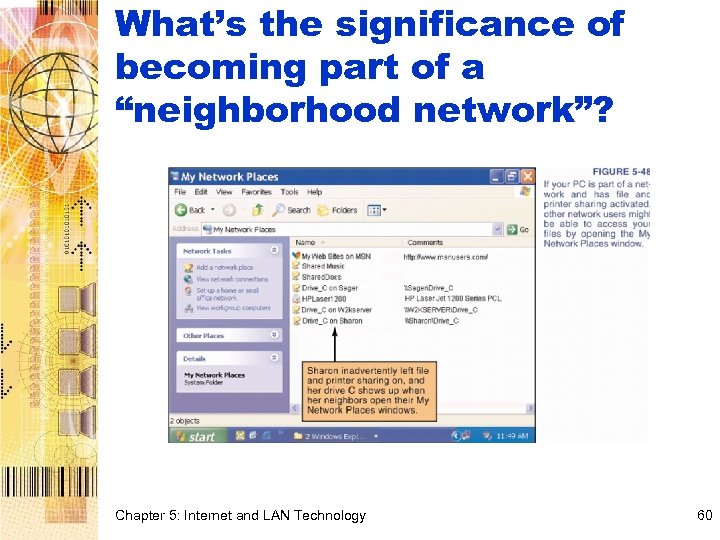 What’s the significance of becoming part of a “neighborhood network”? Chapter 5: Internet and LAN Technology 60
 DSL, ISDN, T 1, and T 3: What other options are available for high-speed Internet access? • Several services such as DSL, ISDN, T 1, and T 3 take advantage of full capacity of the telephone connections (normal dial-up services do not) • Offers high-speed digital communications links for voice and data Chapter 5: Internet and LAN Technology 61
 What is DSL? • DSL (Digital Subscriber Line) is a highspeed, always-on, Internet access technology that runs over standard phone lines • Several versions exist – ADSL, SDSL, HDSL • x. DSL – refers to entire group of DSL technologies • DSLAM (DSL Access Multiplexor) – interpret data signals Chapter 5: Internet and LAN Technology 62
 Who uses T 1 or T 3 service? • T 1 – high-speed 1. 544 Mbps digital network – Consists of 24 individual channels (64 Kbps for each) – Popular for businesses and ISPs • T 3 – 672 channels – Supports data rates of about 43 Mbps – Sometimes referred to as DS 3 (Digital Service-3) lines – Provide many of the links on the Internet backbone Chapter 5: Internet and LAN Technology 63
 How does satellite access work? • Direct satellite service (DSS) uses a geosynchronous or low-earth satellite to send television, voice, or computer data directly to a satellite dish • Two-way satellite service ships both upstream and downstream data through the satellite – Offers 500 Kbps downstream – 40 -60 Kbps upstream Chapter 5: Internet and LAN Technology 64
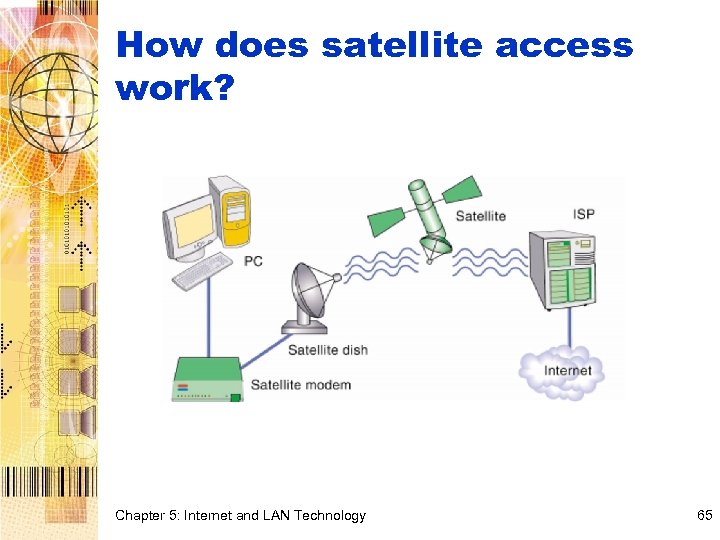 How does satellite access work? Chapter 5: Internet and LAN Technology 65
 Chapter 5: Internet and LAN Technology 66
 Conclusion You should now be able to: – Diagram Shannon’s model of a communications network – Explain digital vs. analog communications – List types of cables – List network devices – Explain packet switching and circuit switching – Describe role of protocols – Describe various networks – Recount basics of Internet and Internet access Chapter 5: Internet and LAN Technology 67