


 Скачать презентацию Complements on Unified Modeling Language Software Engineering 2007 2008
15f6d6011074f5974332c590006a42c4.ppt
- Количество слайдов: 91
 Complements on Unified Modeling Language Software Engineering 2007/2008 Ernesto Damiani (Ernesto. Damiani@unibz. it) Software Engineering
 Outline • Use case diagrams • Class diagrams • Sequence diagrams • State diagrams • Activity diagrams Software Engineering 2
 UML Ø It is an international industry standard graphical notation for describing software analysis and designs Ø It has been accepted as a standard by the Object Management Group (OMG). The OMG is a non-profit organization with about 700 members that sets standards for distributed object-oriented computing Software Engineering 3
 Diagrams Ø Five fundamental UML notations that are introduced here are: • • • Use case diagrams Class diagrams Sequence diagrams State diagrams Activity diagrams Software Engineering 4
 Use Case Diagrams Ø Used during requirements elicitation and analysis as graphical means of representing the functional requirements of the system • developed during requirements elicitation and • further refined and corrected as they are reviewed (by stakeholders) during analysis Ø Very helpful for writing acceptance test cases Note: The use case diagram is accompanied by a textual use case flow of events. Software Engineering 5
 Use Case Ø It is a sequence of transactions performed by a system that yields an outwardly visible, measurable result of value for a particular actor Ø They typically represents a major piece of functionality that is complete from beginning to end Ø Example: for a Word processor • Make some text bold • Create an index • Delete a word Software Engineering 6
 Actor Ø An entity that interacts with the system (person, machine, or other) Ø It is not part of the system itself Ø Anyone or anything that must interact with the system to: • Input information to the system; • Receive information from the system; or • Both input information to and receive information from the system Ø The name should identify the role or set of roles the actor plays relative to one or more use cases Software Engineering 7
 Use Case Diagram Ø A use case diagram is a visual representation of the relationships between actors and use cases together that documents the system’s intended behavior Software Engineering 8
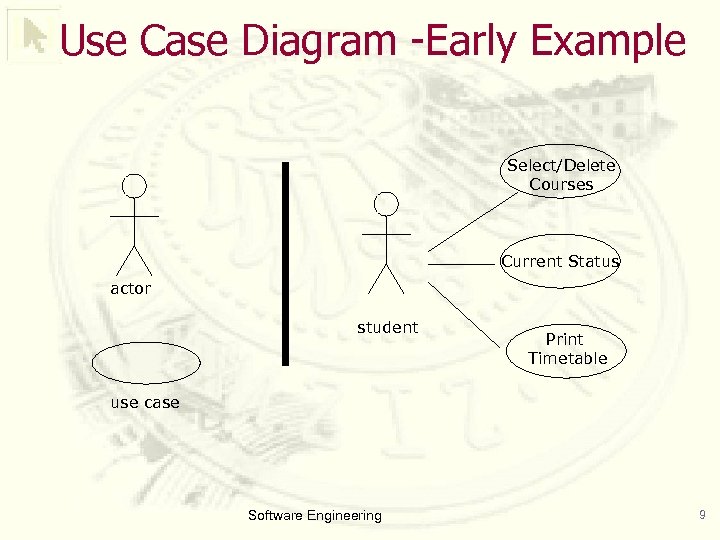 Use Case Diagram -Early Example Select/Delete Courses Current Status actor student Print Timetable use case Software Engineering 9
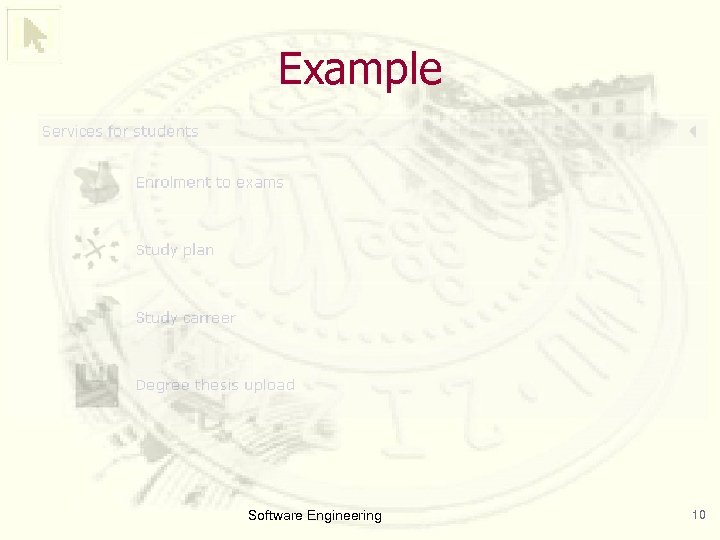 Example Software Engineering 10
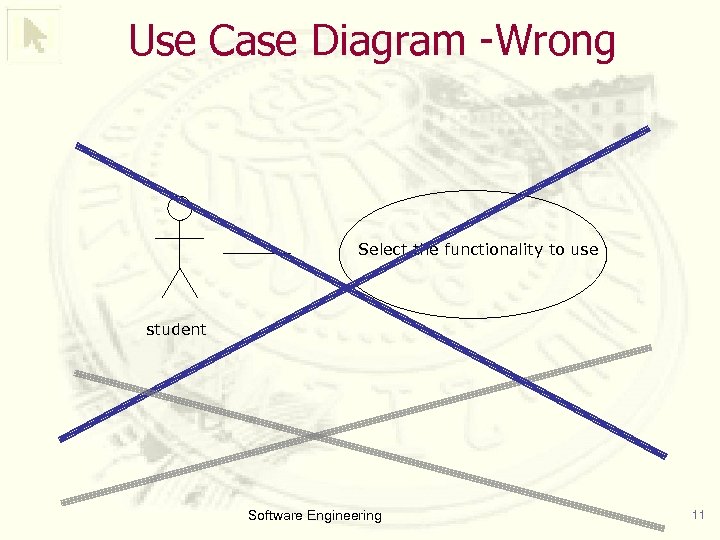 Use Case Diagram -Wrong Select the functionality to use student Software Engineering 11
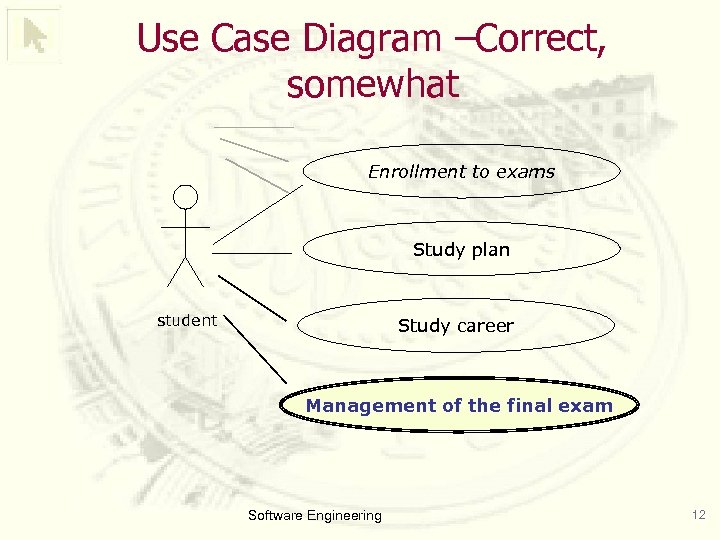 Use Case Diagram –Correct, somewhat Enrollment to exams Study plan student Study career Management of the final exam Software Engineering 12
 Types of relationship Between actors and use cases: • «communicates» relationship indicates that one of these entities initiated invoked a request of the other § An actor communicates with use cases because actors want measurable results. § Two use cases communicate if a case w needs information from another use case or w needs to initiate action of another use case. • There are two other kinds of relationships between use cases (not between actors and use cases) that you might find useful. § «include» and § «extend» Software Engineering 13
 <
<
 «extend» Ø Used to describe a variation on normal behavior or behavior that is only executed under stated conditions Ø Used when the alternative flow is fairly complex and/or multi-stepped, possibly with its own sub-flows and alternative flows Software Engineering 15
 Example The train waits at the station until the signal turns green. After the signal turns green, the train ensures that no doors are blocked. If any door is blocked, the train sounds an announcement for passengers to clear the doorways, waits for 10 seconds, and then tries to close the doors again. If the doors are not closed after three such cycles, a train operator is dispatched to find the problem. After the doors are closed, the train leaves the station at an acceleration rate of 10 km/min 2. After six seconds, the train reaches a cruising speed of 60 km/h. The train maintains that speed until it reaches the next station. The train stops at the next station. Software Engineering 16
 «include» vs. «extend» Ø Use Case X includes Use Case Y: • X has a multi-step subtask Y. In the course of doing X or a subtask of X, Y will always be completed. Ø Use Case X extends Use Case Y: • Y performs a sub-task and X is a similar but more specialized way of accomplishing that subtask (e. g. closing the door is a sub-task of Y; X provides a means for closing a blocked door with a few extra steps). X only happens in an exception situation. Y can complete without X ever happening Software Engineering 17
 Developing a Use Case ØWhat are the main tasks or functions that are performed by the actor? ØWhat system information will the actor acquire, produce or change? ØWill the actor have to inform the system about changes in the external environment? ØWhat information does the actor desire from the system? ØDoes the actor wish to be informed about unexpected changes? Software Engineering 18
 Example Ø Suppose we want to model the New York Stock Exchange … • There are traders. . . • … and Sales systems Software Engineering 19
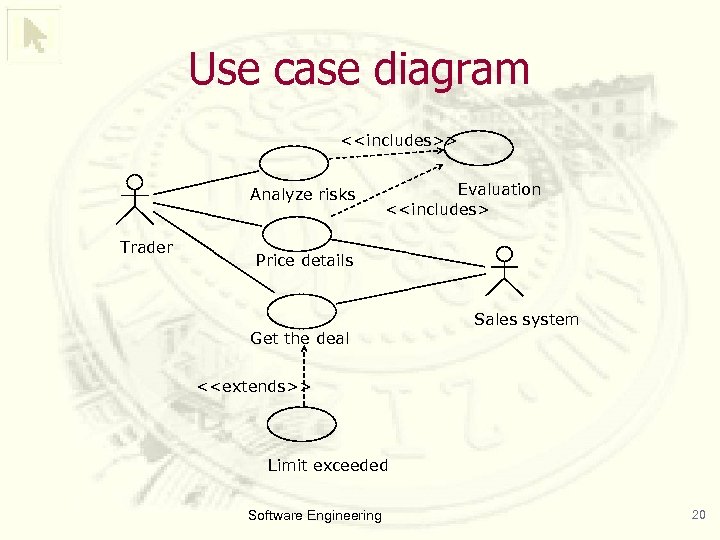 Use case diagram <
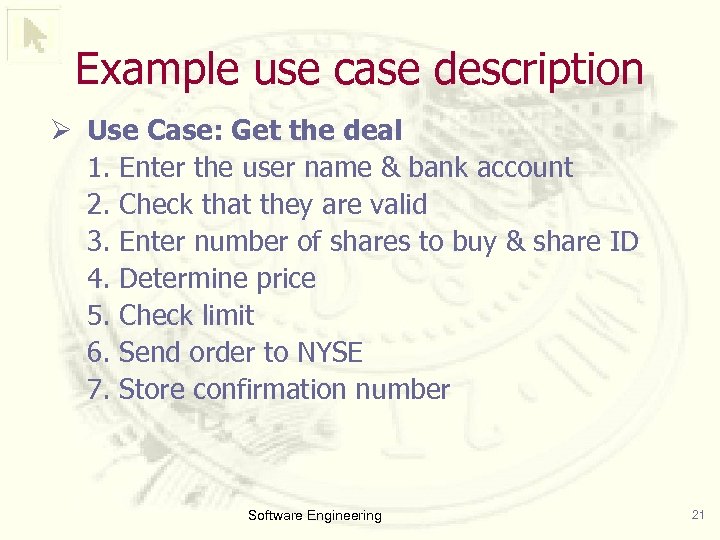 Example use case description Ø Use Case: Get the deal 1. Enter the user name & bank account 2. Check that they are valid 3. Enter number of shares to buy & share ID 4. Determine price 5. Check limit 6. Send order to NYSE 7. Store confirmation number Software Engineering 21
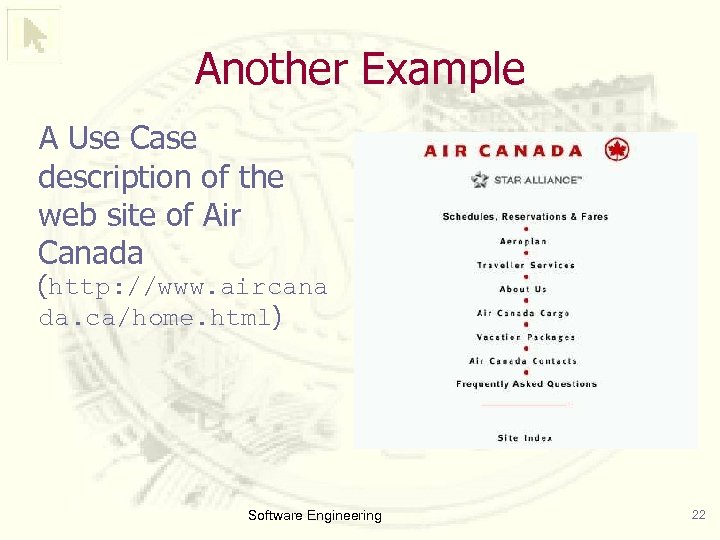 Another Example A Use Case description of the web site of Air Canada (http: //www. aircana da. ca/home. html) Software Engineering 22
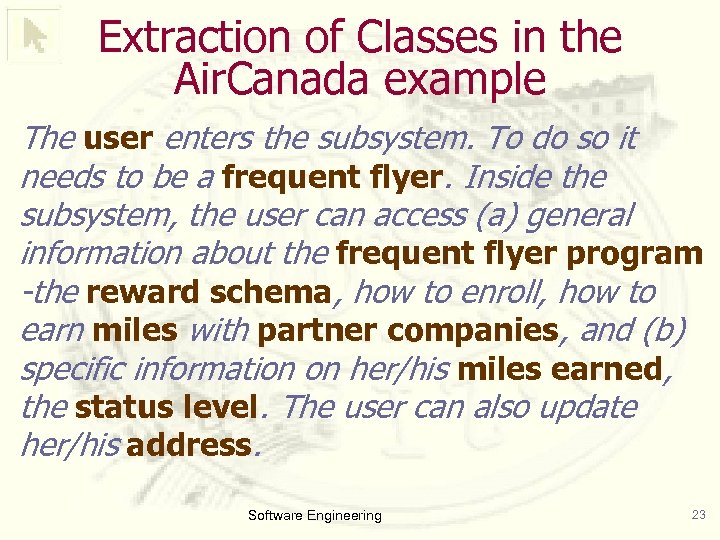 Extraction of Classes in the Air. Canada example The user enters the subsystem. To do so it needs to be a frequent flyer. Inside the subsystem, the user can access (a) general information about the frequent flyer program -the reward schema, how to enroll, how to earn miles with partner companies, and (b) specific information on her/his miles earned, the status level. The user can also update her/his address. Software Engineering 23
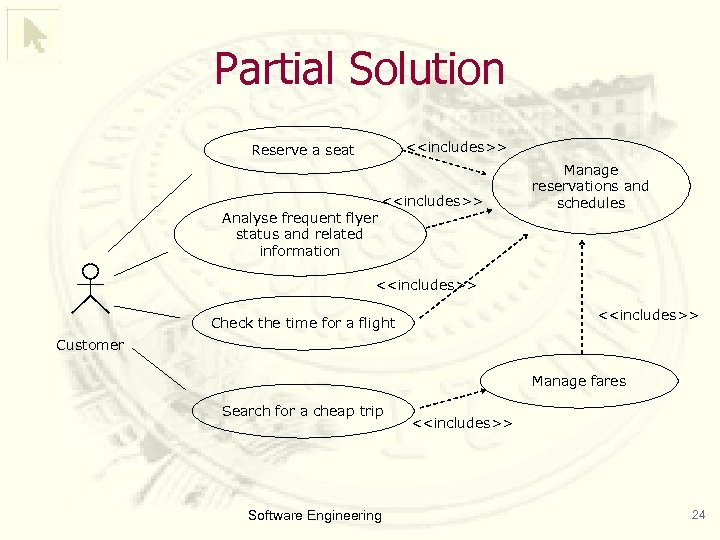 Partial Solution <
 Textual Description (only for the frequent flyer use case) (2/2) Ø The user enters the subsystem to gain more information about its frequent flyer status. Inside the subsystem, the user can access: Ø (a) general information about the frequent filer program – the reward schema, how to enroll, how to get miles with partner companies, and Software Engineering 25
 Textual Description (only for the frequent flyer use case) (2/2) Ø(b) specific information on her/his status, such as the miles earned, the status level. The user can also update her/his address. ØNOTICE: This is a very different format!!! Software Engineering 26
 Outline • Use case diagrams • Class diagrams • Sequence diagrams • State diagrams • Activity diagrams Software Engineering 27
 Class Diagrams Used in both the analysis and the design phases. • analysis phase: describes the classes and relationships in the problem domain, but it does not suggest how the system is implemented. • design phase: class diagram describes how the system to be implemented should be developed. • after the design phase: class diagram has detailed implementation information, including the class names, the methods and attributes of the classes, and the relationships among classes UML notation for a class Software Engineering 28
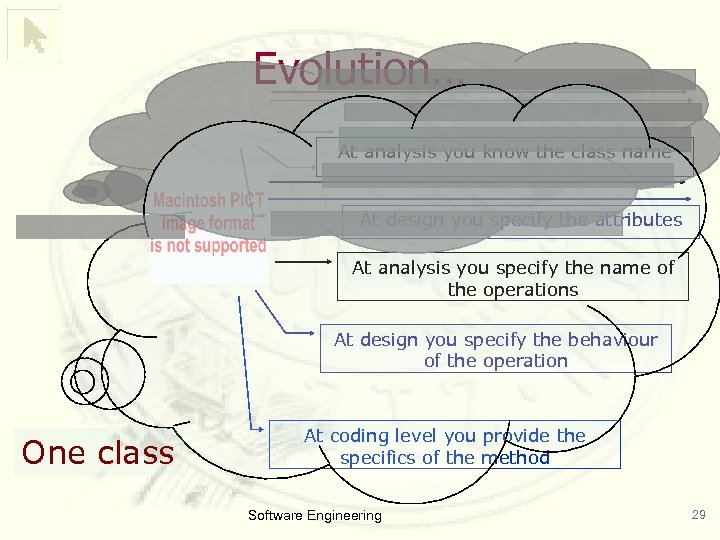 Evolution… At analysis you know the class name At design you specify the attributes At analysis you specify the name of the operations At design you specify the behaviour of the operation One class At coding level you provide the specifics of the method Software Engineering 29
 Extraction of Classes Ø Normal sequence: Get the deal 1. Enter the user name & bank account 2. Check that they are valid 3. Enter number of shares to buy & share ID 4. Determine price 5. Check limit 6. Send order to NYSE 7. Store confirmation number Software Engineering 30
 How to define classes? Ø Look for nouns in the Use Cases Ø Define a class for every noun (+ add others) Ø Document the set of rules that determine the set of objects belonging to the class Ø Add associations to model the relations Ø Think about the subset relationship to build generalizations. . . Software Engineering 31
 Static Relationships Ø Inheritance (“generalization”) can be thought of as an “is-a” relationship Ø Association represents a relationship between two instances of classes Association indicates that one class utilizes an attribute or methods of another class § aggregation, and § composition Software Engineering 32
 Generalization: extension & restriction Ø Attributes & operations of an ancestor class are inherited to the subclass Ø Extension: adding of new attributes or operations Ø Restriction: Additional restrictions on ancestor attributes • circle = Ellipse with equally long axes • Caution: arbitrary change of size of an axis of the circle can violate restriction Software Engineering 33
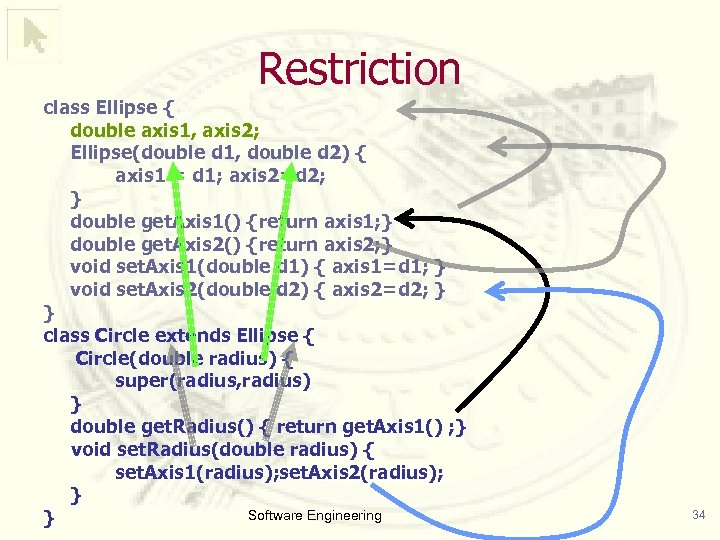 Restriction class Ellipse { double axis 1, axis 2; Ellipse(double d 1, double d 2) { axis 1 = d 1; axis 2=d 2; } double get. Axis 1() {return axis 1; } double get. Axis 2() {return axis 2; } void set. Axis 1(double d 1) { axis 1=d 1; } void set. Axis 2(double d 2) { axis 2=d 2; } } class Circle extends Ellipse { Circle(double radius) { super(radius, radius) } double get. Radius() { return get. Axis 1() ; } void set. Radius(double radius) { set. Axis 1(radius); set. Axis 2(radius); } Software Engineering } 34
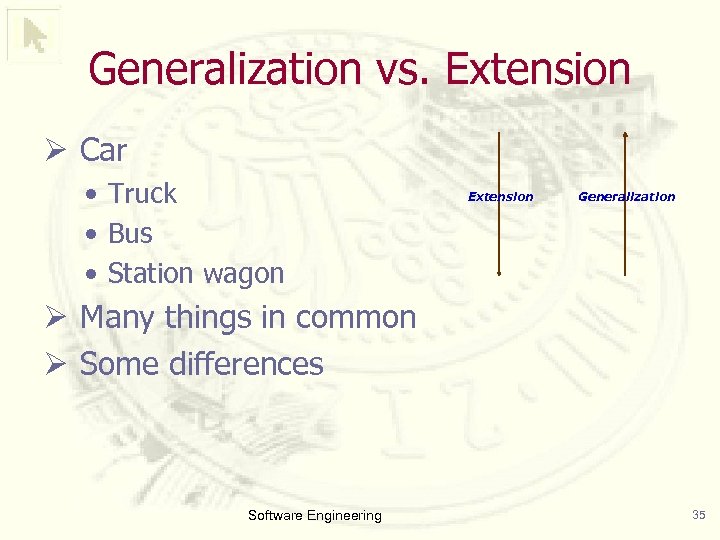 Generalization vs. Extension Ø Car • Truck • Bus • Station wagon Extension Generalization Ø Many things in common Ø Some differences Software Engineering 35
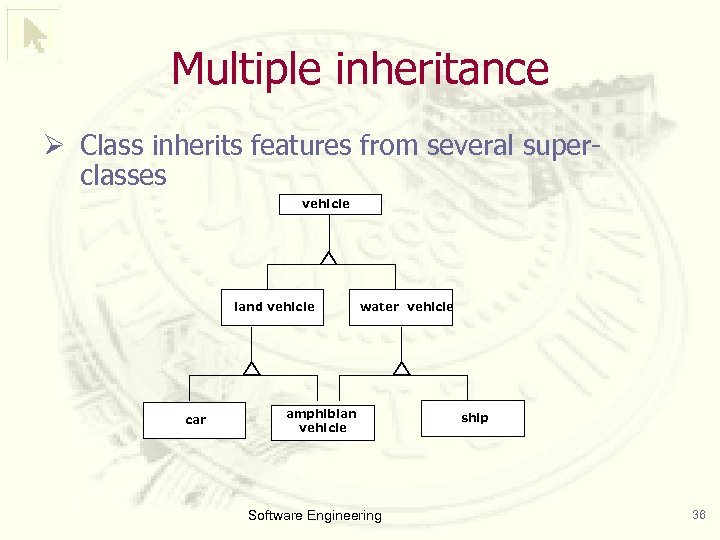 Multiple inheritance Ø Class inherits features from several superclasses vehicle land vehicle car water vehicle amphibian vehicle Software Engineering ship 36
 Proposed Exercise Ø Define the class of “textbooks” as derived from the concept of “educational tool” and of “book” Ø Redefine the class avoiding multiple inheritance Software Engineering 37
 Discussing multiple inheritance Ø Advantages: • closer to human thinking • higher flexibility for specifying classes • higher chances for reuse Ø Disadvantages: • loss of clarity which method is executed • implementation more complicated • conflict resolution is necessary for multiple inherited features Software Engineering 38
 Avoiding multiple inheritance Ø Basically: question of implementation Ø Often the simplest way: restructure model Ø Techniques for restructuring: • Delegation & aggregation • Inheritance based on the most important feature and delegation of the rest • Generalization based on different dimensions Software Engineering 39
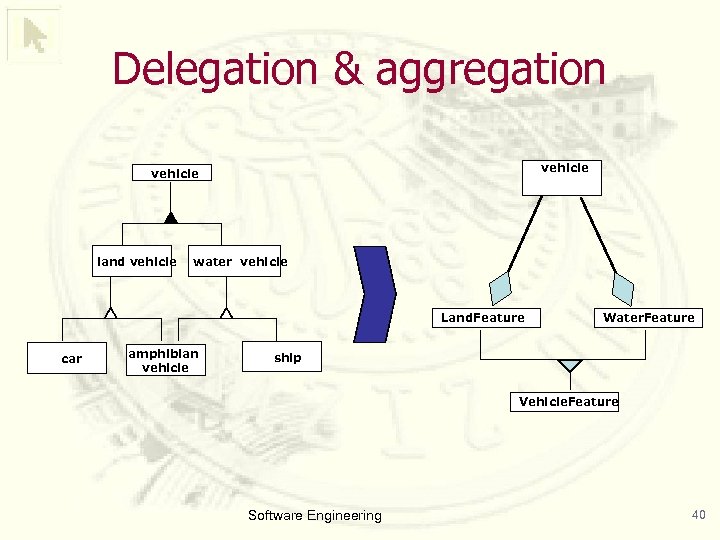 Delegation & aggregation vehicle land vehicle water vehicle Land. Feature car amphibian vehicle Water. Feature ship Vehicle. Feature Software Engineering 40
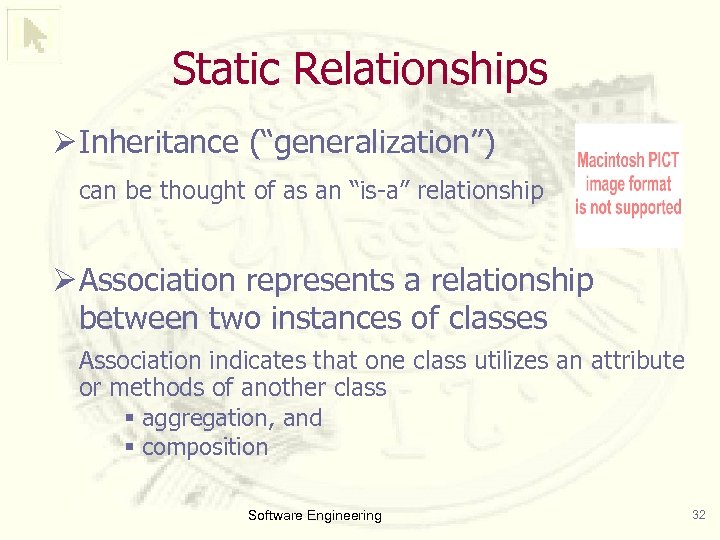
 Aggregation Ø It conveys the information that one object is part of another object, but their lifetimes are independent (they could exist independently) • Aggregation is stronger than association • is often thought of as a “has-a” relationship • is unidirectional: there is a container and one or more contained objects • “a Department contains a set of Employees” • “a Faculty contains a set of Teachers” Software Engineering 41
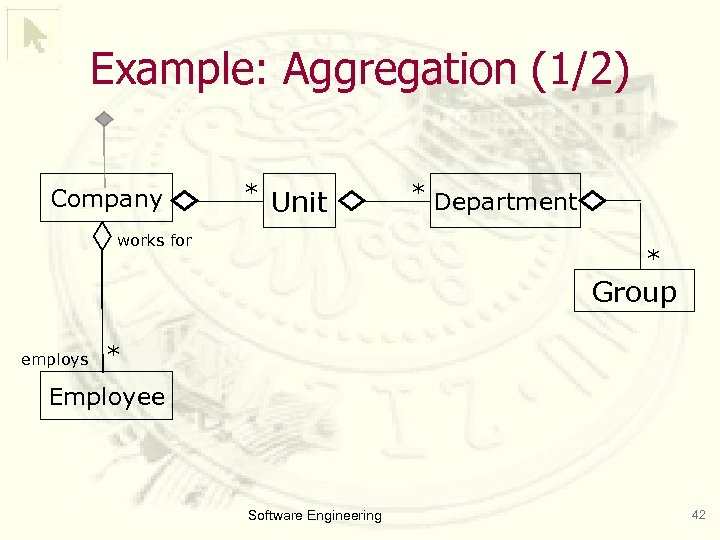 Example: Aggregation (1/2) Company * Unit works for * Department * Group employs * Employee Software Engineering 42
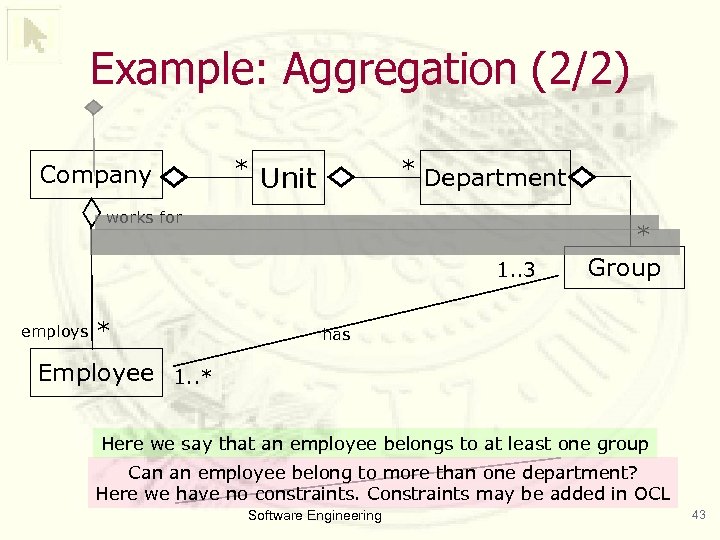 Example: Aggregation (2/2) Company * Unit * Department works for 1. . 3 employs * * Group has Employee 1. . * Here we say that an employee belongs to at least one group Can an employee belong to more than one department? Here we have no constraints. Constraints may be added in OCL Software Engineering 43
 Composition (1/2) An object is contained in another object, and it can exist only as long as the container exists and it only exists for the benefit of the container • Any deletion of the whole is considered to cascade to all the parts • Stronger than aggregation Software Engineering 44
 Composition (2/2) Ø Example Software Engineering 45
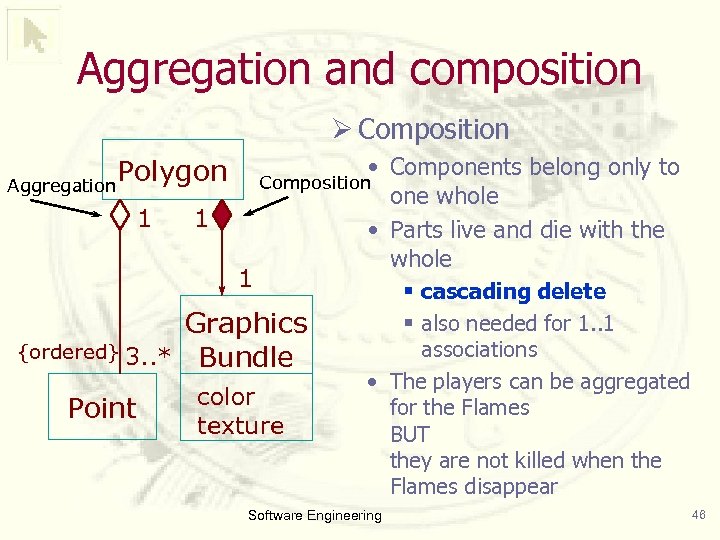 Aggregation and composition Ø Composition Polygon Aggregation 1 1 1 • Components belong only to Composition one whole • Parts live and die with the whole Graphics {ordered} 3. . * Bundle Point color texture § cascading delete § also needed for 1. . 1 associations • The players can be aggregated for the Flames BUT they are not killed when the Flames disappear Software Engineering 46
![Attributes and Operations visibility name : type [= default. Value] The operations are the](https://present5.com/presentation/15f6d6011074f5974332c590006a42c4/image-47.jpg "Attributes and Operations visibility name : type [= default. Value] The operations are the") Attributes and Operations visibility name : type [= default. Value] The operations are the services that a class is responsible for carrying out. visibility name(parameter-list) : return-type{property string} Software Engineering 47
Attributes and Operations visibility name : type [= default. Value] The operations are the services that a class is responsible for carrying out. visibility name(parameter-list) : return-type{property string} Software Engineering 47
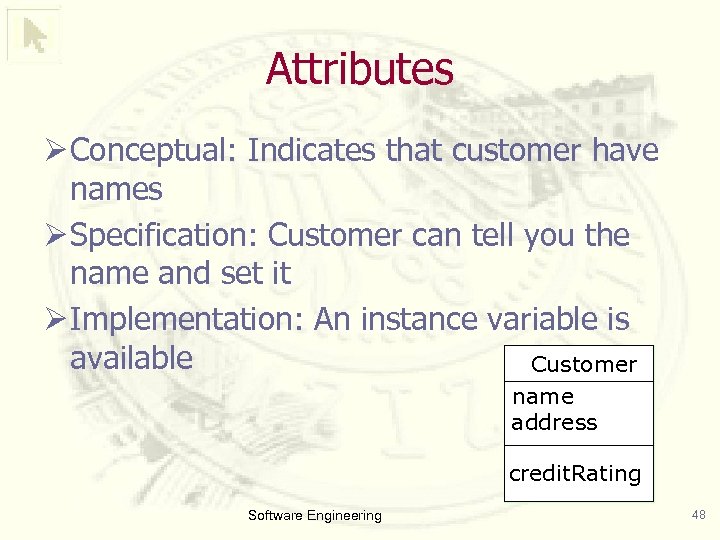 Attributes Ø Conceptual: Indicates that customer have names Ø Specification: Customer can tell you the name and set it Ø Implementation: An instance variable is available Customer name address credit. Rating Software Engineering 48
 Difference between attributes and associations Ø Conceptual perspective • not much of a difference! • Attributes are simple/single valued (0. . 1) Ø Specification/implementation perspective • Navigability from type to attribute • Attribute stores values NOT references § no sharing of attribute values between instances! Ø Often: Stores simple objects • Numbers, Strings, Dates, Money objects Software Engineering 49
 Operations Ø Processes that a class knows to carry out Ø Correspond to messages of the class Ø Conceptual level • principal responsibilities Ø Specification level • public messages = interface of the class Ø Normally: Don’t show operations that manipulate attributes –the setter and getter methods Software Engineering 50
 Types of operations Ø Query = returns some value without modifying the class’ internal state Ø Modifier = changes the internal state Ø Queries can be executed in any order Ø Getting & setting messages • getting: query • setting: modifier Software Engineering 51
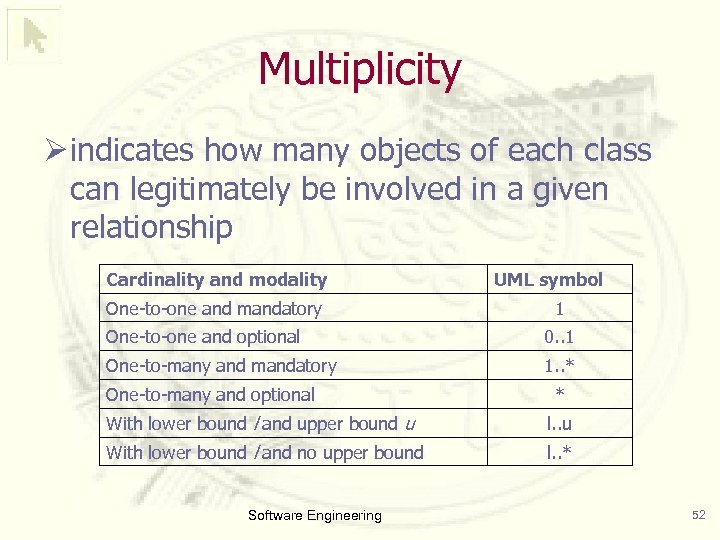 Multiplicity Ø indicates how many objects of each class can legitimately be involved in a given relationship Cardinality and modality One-to-one and mandatory UML symbol 1 One-to-one and optional 0. . 1 One-to-many and mandatory 1. . * One-to-many and optional * With lower bound l and upper bound u l. . u With lower bound l and no upper bound l. . * Software Engineering 52
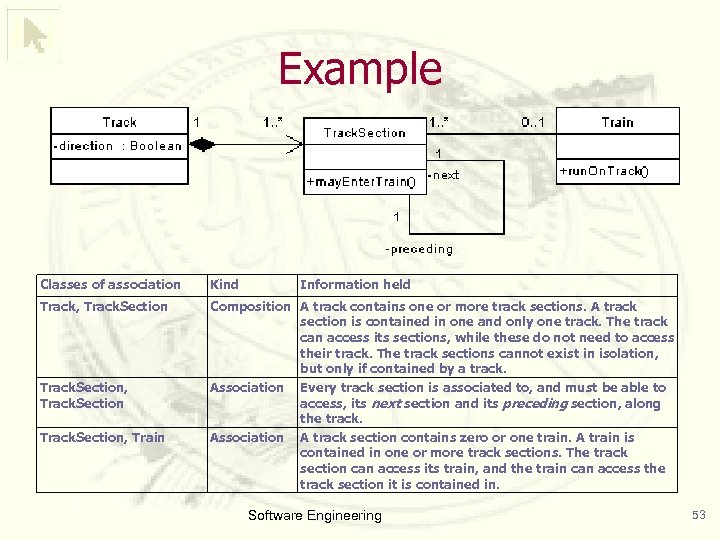 Example Classes of association Kind Track, Track. Section Composition A track contains one or more track sections. A track section is contained in one and only one track. The track can access its sections, while these do not need to access their track. The track sections cannot exist in isolation, but only if contained by a track. Association Every track section is associated to, and must be able to access, its next section and its preceding section, along the track. Association A track section contains zero or one train. A train is contained in one or more track sections. The track section can access its train, and the train can access the track section it is contained in. Track. Section, Train Information held Software Engineering 53
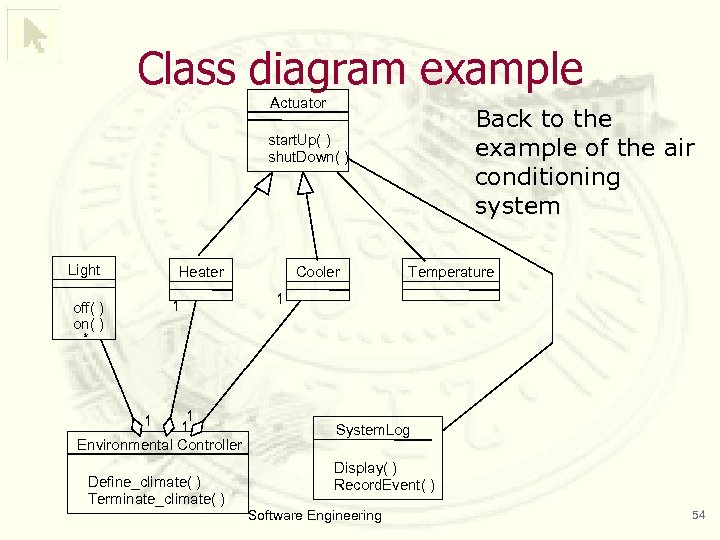 Class diagram example Actuator Back to the example of the air conditioning system start. Up( ) shut. Down( ) Light Heater 1 off( ) on( ) * 1 1 Environmental Controller 1 Define_climate( ) Terminate_climate( ) Cooler Temperature 1 System. Log Display( ) Record. Event( ) Software Engineering 54
 More Advanced Class Diagram Concepts Ø Abstract Classes Ø Packages Ø Stereotypes Ø Notes Software Engineering 55
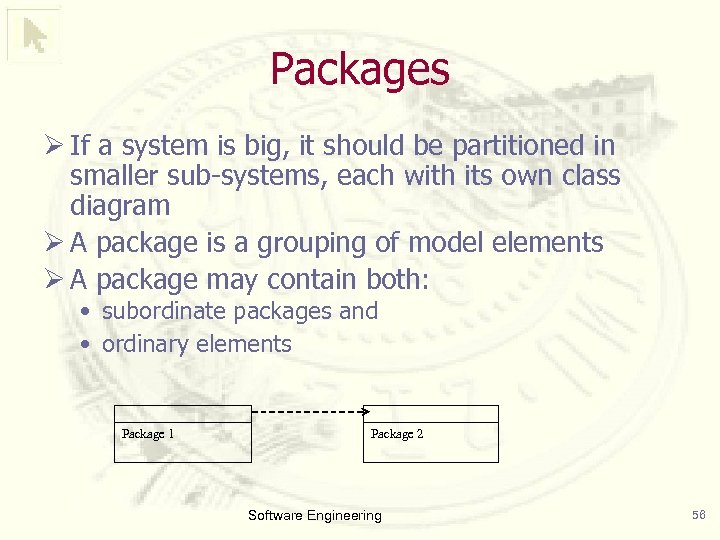 Packages Ø If a system is big, it should be partitioned in smaller sub-systems, each with its own class diagram Ø A package is a grouping of model elements Ø A package may contain both: • subordinate packages and • ordinary elements Package 1 Package 2 Software Engineering 56
 Stereotypes Ø Stereotypes are high-level classifications of an object that gives some indication of the kind of object it is Ø Common class stereotypes are: • «control» , a class, an object of which denotes an entity that controls interactions between a collection of objects; • «entity» , a class that represents a domain-specific situation or a real-world object and that does not initiate interactions; and • «boundary» , a class that lies on the periphery of a system but within it Software Engineering 57
 Object Diagram Ø A snapshot of the detailed state of a system at a point in time. It can contain: • many different instances of the same class, and • no instance of other classes. Ø While there is only class diagram of the system, there may be hundreds of different object diagrams Ø the associations among objects are shown as links Software Engineering 58
 Example: object diagram Software Engineering 59
 Outline • Use case diagrams • Class diagrams • Sequence diagrams • State diagrams • Activity diagrams Software Engineering 60
 Sequence diagrams Ø Often used to depict the chronologicallystructured event flow through a use case Ø Sequence diagrams represent a system behavior based upon the needed interactions among a set of objects in terms of the messages that exchange among them to produce the desired result Ø They have two dimensions: • the vertical dimension represents time • the horizontal dimension represents different objects Software Engineering 61
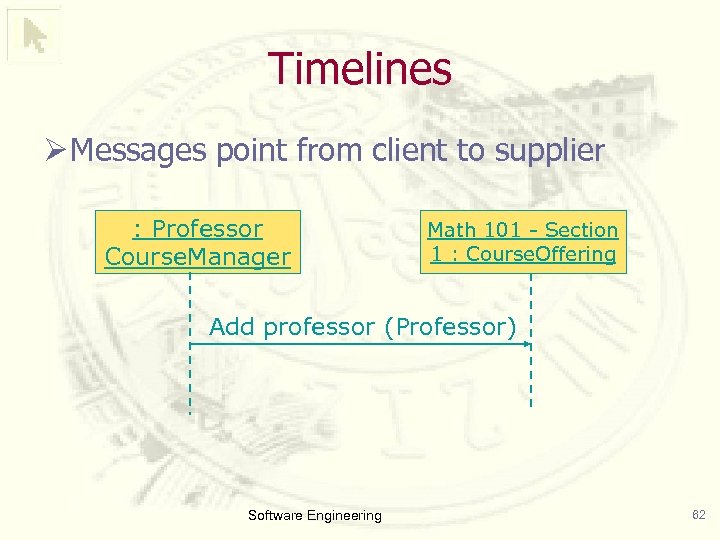 Timelines Ø Messages point from client to supplier : Professor Course. Manager Math 101 - Section 1 : Course. Offering Add professor (Professor) Software Engineering 62
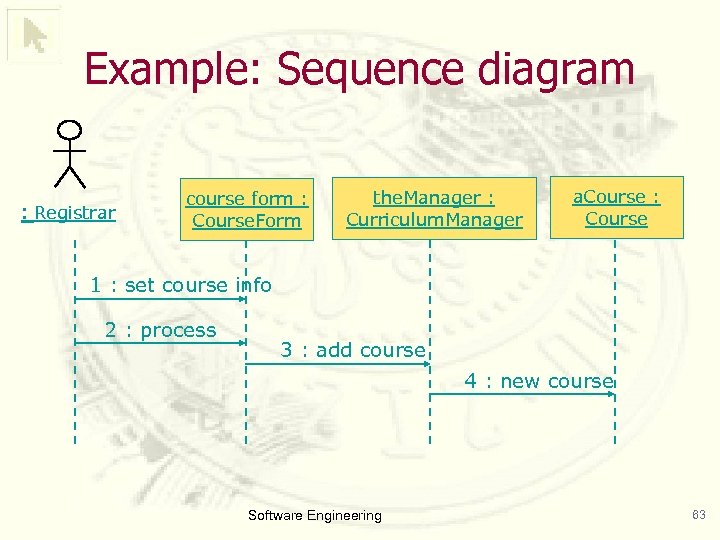 Example: Sequence diagram : Registrar course form : Course. Form the. Manager : Curriculum. Manager a. Course : Course 1 : set course info 2 : process 3 : add course 4 : new course Software Engineering 63
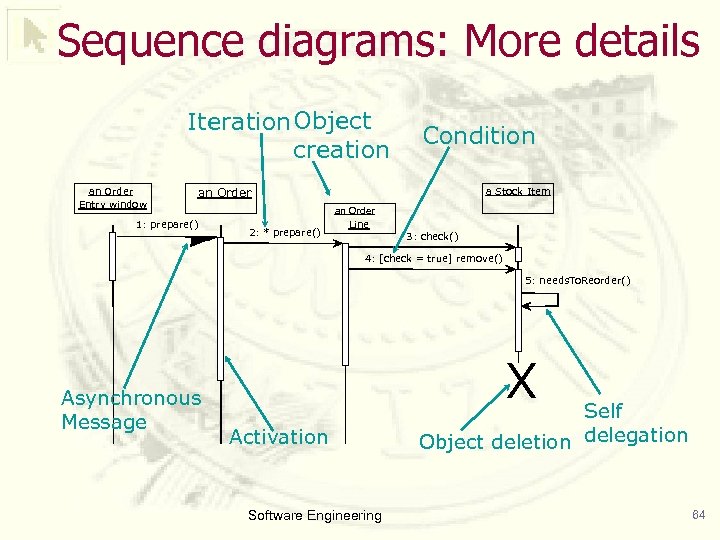 Sequence diagrams: More details Iteration Object creation an Order Entry window Condition an Order 1: prepare() a Stock Item an Order 2: * prepare() Line 3: check() 4: [check = true] remove() 5: needs. To. Reorder() Asynchronous Message X Activation Software Engineering Self Object deletion delegation 64
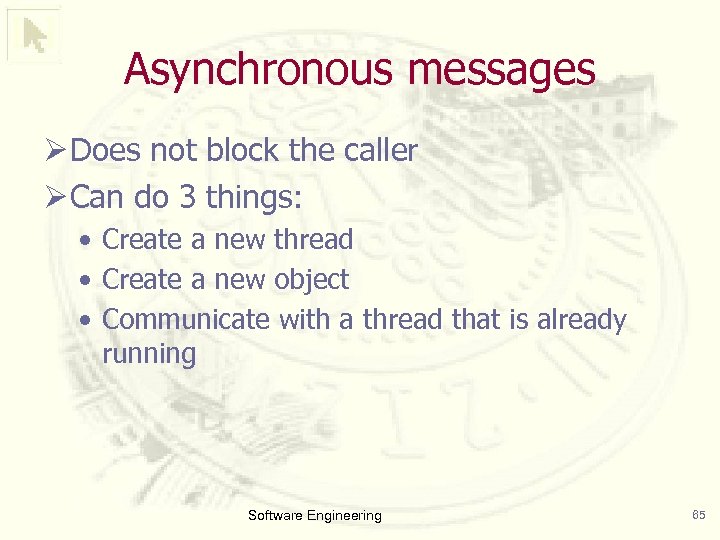 Asynchronous messages Ø Does not block the caller Ø Can do 3 things: • Create a new thread • Create a new object • Communicate with a thread that is already running Software Engineering 65
 Example Software Engineering 66
 Outline • Use case diagrams • Class diagrams • Sequence diagrams • State diagrams • Activity diagrams Software Engineering 67
 State Diagram Ø A state is a condition in which an object can be at some point during its lifetime, for some finite period of time Ø A state diagram describes the behavior of one object across several use cases • all the possible states a particular object can get into • how the objects state changes as a result of external events that reach the object Ø It is used to identify object attributes and to refine the behavior description of an object Software Engineering 68
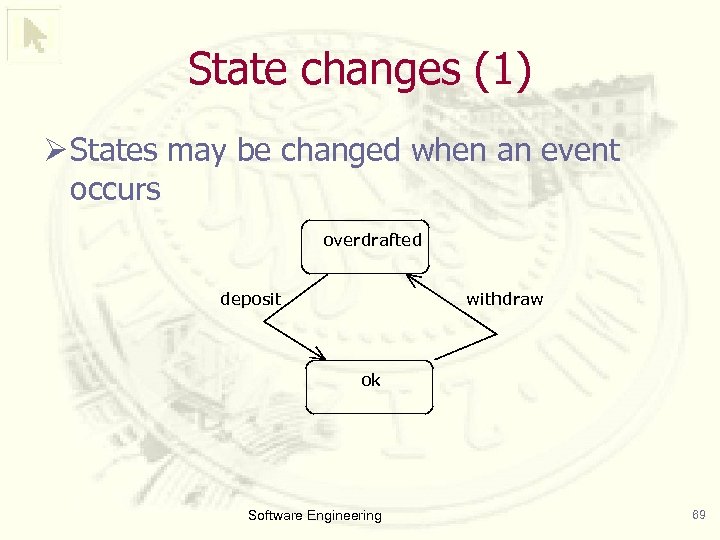 State changes (1) Ø States may be changed when an event occurs overdrafted deposit withdraw ok Software Engineering 69
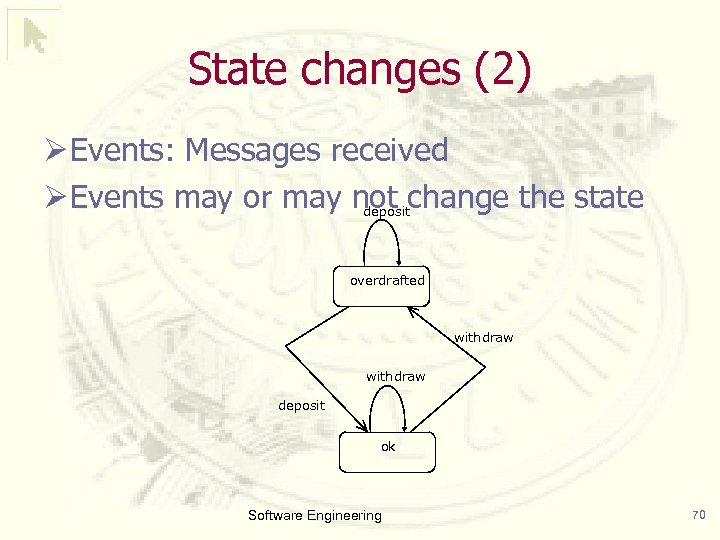 State changes (2) Ø Events: Messages received Ø Events may or may not change the state deposit overdrafted withdraw deposit ok Software Engineering 70
 Example 1 (on-line auction) Software Engineering 71
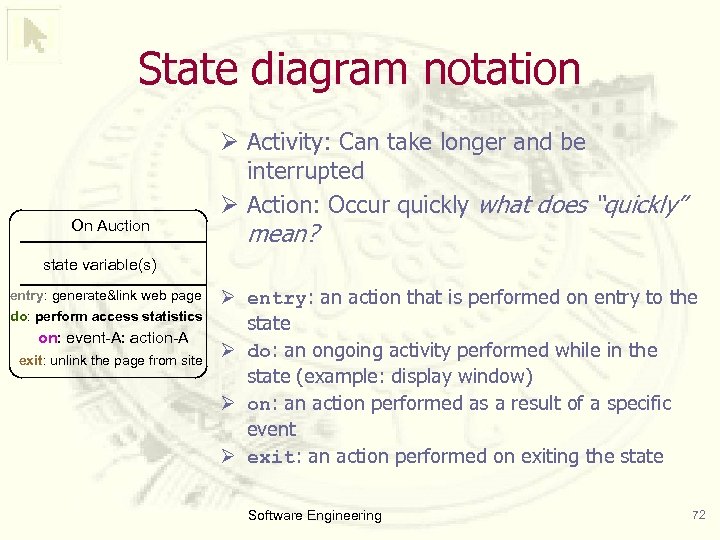 State diagram notation On Auction Ø Activity: Can take longer and be interrupted Ø Action: Occur quickly what does “quickly” mean? state variable(s) entry: generate&link web page do: perform access statistics on: event-A: action-A exit: unlink the page from site Ø entry: an action that is performed on entry to the state Ø do: an ongoing activity performed while in the state (example: display window) Ø on: an action performed as a result of a specific event Ø exit: an action performed on exiting the state Software Engineering 72
![State diagram notation (2) State-A Event(arguments)[condition]/action State-B Ø Event: message send Ø Guard condition:](https://present5.com/presentation/15f6d6011074f5974332c590006a42c4/image-73.jpg "State diagram notation (2) State-A Event(arguments)[condition]/action State-B Ø Event: message send Ø Guard condition:") State diagram notation (2) State-A Event(arguments)[condition]/action State-B Ø Event: message send Ø Guard condition: § Transition only occurs when guard evaluates to true § Guards of transition exiting one state are mutually exclusive Ø Action: Processes considered to occur quickly and are not interruptible Each part can be omitted! Software Engineering 73
State diagram notation (2) State-A Event(arguments)[condition]/action State-B Ø Event: message send Ø Guard condition: § Transition only occurs when guard evaluates to true § Guards of transition exiting one state are mutually exclusive Ø Action: Processes considered to occur quickly and are not interruptible Each part can be omitted! Software Engineering 73
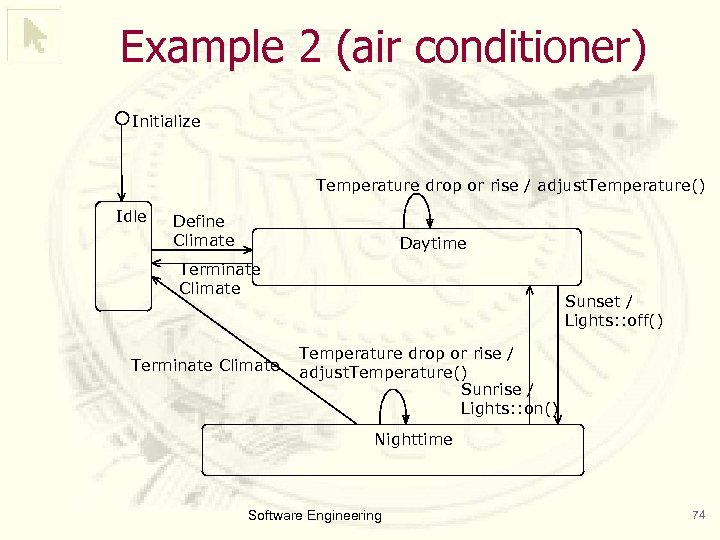 Example 2 (air conditioner) Initialize Temperature drop or rise / adjust. Temperature() Idle Define Climate Daytime Terminate Climate Sunset / Lights: : off() Temperature drop or rise / adjust. Temperature() Sunrise / Lights: : on() Nighttime Software Engineering 74
![Example 3 (States of a hockey game) shootout tie[ time is up ] playing](https://present5.com/presentation/15f6d6011074f5974332c590006a42c4/image-75.jpg "Example 3 (States of a hockey game) shootout tie[ time is up ] playing") Example 3 (States of a hockey game) shootout tie[ time is up ] playing Boxing penalty face off win[ time is up ] break end of game Software Engineering 75
Example 3 (States of a hockey game) shootout tie[ time is up ] playing Boxing penalty face off win[ time is up ] break end of game Software Engineering 75
![State transitions for an order Event get next item[ not all items checked ]](https://present5.com/presentation/15f6d6011074f5974332c590006a42c4/image-76.jpg "State transitions for an order Event get next item[ not all items checked ]") State transitions for an order Event get next item[ not all items checked ] Action / get first item Checking Item received[ some items not in stock ] [ All items checked && some items not in stock ] do: check item Guard [ All items checked && all items available ] Dispatching do: initiate delivery Software Engineering Waiting Item received[ all items available ] Delivered 76
State transitions for an order Event get next item[ not all items checked ] Action / get first item Checking Item received[ some items not in stock ] [ All items checked && some items not in stock ] do: check item Guard [ All items checked && all items available ] Dispatching do: initiate delivery Software Engineering Waiting Item received[ all items available ] Delivered 76
 Problem: Cancel the order Ø Want to be able to cancel an order at any time Ø Solutions • Transitions from every state to state “cancelled” • Superstate and single transition Software Engineering 77
![Transitions to “cancelled” get next item[ not all items checked ] / get first](https://present5.com/presentation/15f6d6011074f5974332c590006a42c4/image-78.jpg "Transitions to “cancelled” get next item[ not all items checked ] / get first") Transitions to “cancelled” get next item[ not all items checked ] / get first item Checking do: check item Item received[ some items not in stock ] [ All items checked && some items not in stock ] Waiting Item received[ all items available ] [ All items checked && all items available ] cancelled Dispatching do: initiate delivery cancelled Cancelled Delivered Software Engineering 78
Transitions to “cancelled” get next item[ not all items checked ] / get first item Checking do: check item Item received[ some items not in stock ] [ All items checked && some items not in stock ] Waiting Item received[ all items available ] [ All items checked && all items available ] cancelled Dispatching do: initiate delivery cancelled Cancelled Delivered Software Engineering 78
![Superstate / Substates Active get next item[ not all items checked ] / get](https://present5.com/presentation/15f6d6011074f5974332c590006a42c4/image-79.jpg "Superstate / Substates Active get next item[ not all items checked ] / get") Superstate / Substates Active get next item[ not all items checked ] / get first item Item received[ some items not in stock ] [ All items checked && some items not in stock ] Checking do: check item Waiting cancelled Cancelled Item received[ all items available ] [ All items checked && all items available ] Dispatching do: initiate delivery Software Engineering Delivered 79
Superstate / Substates Active get next item[ not all items checked ] / get first item Item received[ some items not in stock ] [ All items checked && some items not in stock ] Checking do: check item Waiting cancelled Cancelled Item received[ all items available ] [ All items checked && all items available ] Dispatching do: initiate delivery Software Engineering Delivered 79
 Outline • Use case diagrams • Class diagrams • Sequence diagrams • State diagrams • Activity diagrams Software Engineering 80
 Activity diagrams Ø Used to describe • workflow • parallel processing Ø Activities • conceptual: task to be done • specification/implementation: method on a class Ø Similar to Petri nets Software Engineering 81
 Activity diagrams They consist of: Ø Activities: activity is a single step that needs to be done, whether by a human or a computer Ø Incoming transitions trigger the activity • If there are several incoming transitions, any of these can trigger the activity independent of the others Software Engineering 82
 Activity diagrams Ø They are used during: • Analysis, to break down the complex flow of a use case • Design of complex methods Ø They are updated and enhanced form of flowcharts Ø They are variation of a state chart, in which • the states are activities representing the performance of operations and • the transitions are triggered by the unconditional completion of the operations Ø They are enhancement over flowcharts is the ability to handle parallelism when the order of the ensuing activities is irrelevant; they can run • consecutively, • simultaneously, or • alternately Software Engineering 83
 Activity diagrams (coffee machine) Software Engineering 84
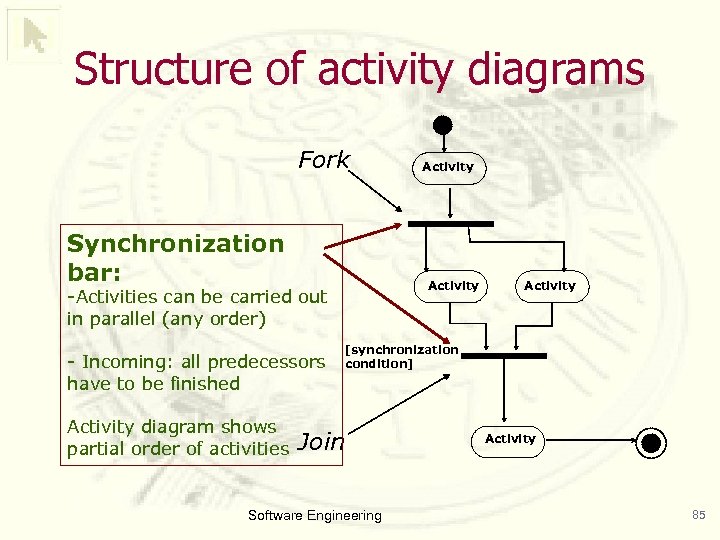 Structure of activity diagrams Fork Synchronization bar: Activity -Activities can be carried out in parallel (any order) - Incoming: all predecessors have to be finished Activity diagram shows partial order of activities Activity [synchronization condition] Join Software Engineering Activity 85
 Examples Software Engineering 86
 A Comprehensive Example: The Elevator Software Engineering 87
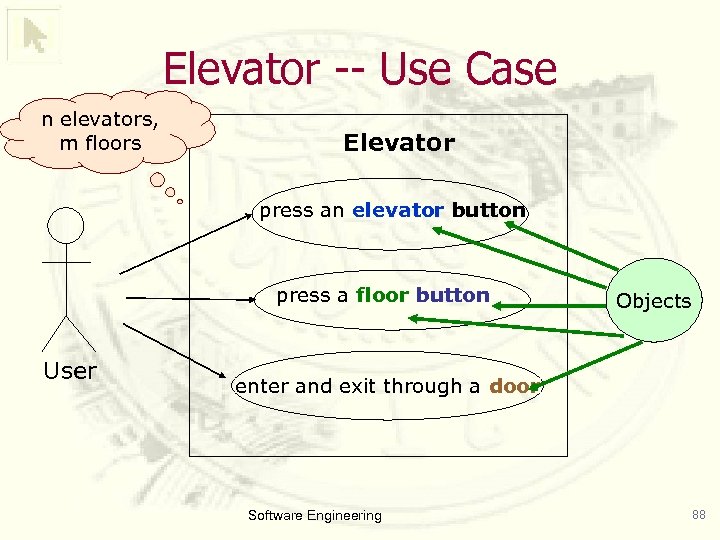 Elevator -- Use Case n elevators, m floors Elevator press an elevator button press a floor button User Objects enter and exit through a door Software Engineering 88
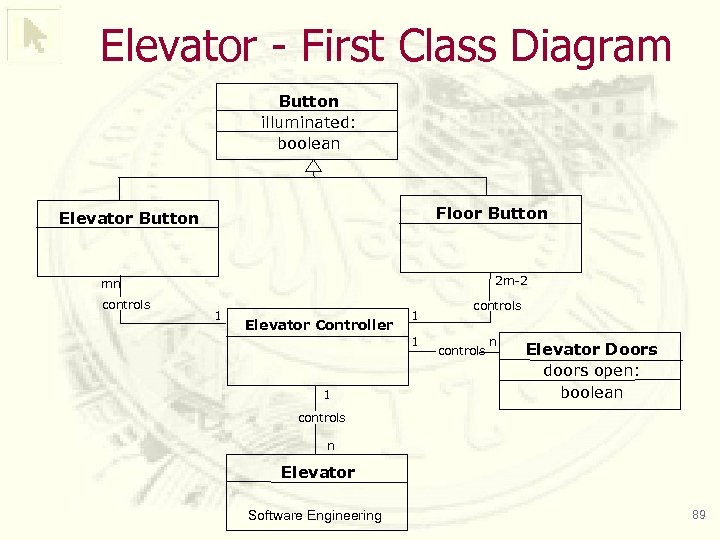 Elevator - First Class Diagram Button illuminated: boolean Floor Button Elevator Button 2 m-2 mn controls 1 Elevator Controller 1 1 1 controls n Elevator Doors doors open: boolean controls n Elevator Software Engineering 89
![[button pushed, button lit] [no requests pending, doors closed] Elevator Controller Loop [button pushed,](https://present5.com/presentation/15f6d6011074f5974332c590006a42c4/image-90.jpg "[button pushed, button lit] [no requests pending, doors closed] Elevator Controller Loop [button pushed,") [button pushed, button lit] [no requests pending, doors closed] Elevator Controller Loop [button pushed, button unlit] Process Request do/update request do/turn on button Elevator State Diagram [elevator moving in direction d, floor f is next] Continue Moving do/move elevator one floor in direction d [elevator stopped, no requests pending] Go into Wait State do/close elevator doors after timeout Determine if Stop Requested do/ check requests [no request to stop at floor f] [elevator stopped, request(s) pending] [user requested stop at floor f] Stop at Floor do/stop elevator do/open doors do/update requests Close Elevator Doors do/close elevator doors after timeout [floor button lit] [floor button unlit] Floor Button Off do/turn off floor button [elevator button lit] button unlit] Elevator Button Off do/ turn off elevator button Software Engineering Process Next Request do/move elevator one floor in direction of next request 90
[button pushed, button lit] [no requests pending, doors closed] Elevator Controller Loop [button pushed, button unlit] Process Request do/update request do/turn on button Elevator State Diagram [elevator moving in direction d, floor f is next] Continue Moving do/move elevator one floor in direction d [elevator stopped, no requests pending] Go into Wait State do/close elevator doors after timeout Determine if Stop Requested do/ check requests [no request to stop at floor f] [elevator stopped, request(s) pending] [user requested stop at floor f] Stop at Floor do/stop elevator do/open doors do/update requests Close Elevator Doors do/close elevator doors after timeout [floor button lit] [floor button unlit] Floor Button Off do/turn off floor button [elevator button lit] button unlit] Elevator Button Off do/ turn off elevator button Software Engineering Process Next Request do/move elevator one floor in direction of next request 90
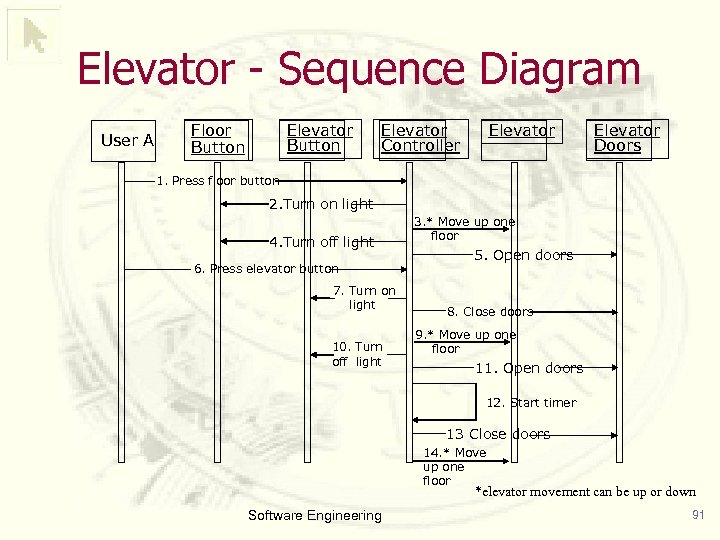 Elevator - Sequence Diagram User A Floor Button Elevator Controller Elevator Doors 1. Press floor button 2. Turn on light 4. Turn off light 6. Press elevator button 7. Turn on light 10. Turn off light 3. * Move up one floor 5. Open doors 8. Close doors 9. * Move up one floor 11. Open doors 12. Start timer 13 Close doors 14. * Move up one floor *elevator movement can be up or down Software Engineering 91