


![Adding your custom function (custom. xsl) cont. . makedrag : function() { dragchan[this. id]=new](https://present5.com/presentation/5cb50573702feae478baf3d96c79b3e0/image-13.jpg "Adding your custom function (custom. xsl) cont. . makedrag : function() { dragchan[this. id]=new")
![Adding your custom function (custom. xsl) cont. . dragchan[this. id]. on. Drag. Enter =](https://present5.com/presentation/5cb50573702feae478baf3d96c79b3e0/image-14.jpg "Adding your custom function (custom. xsl) cont. . dragchan[this. id]. on. Drag. Enter =")
 Скачать презентацию Competing with My Yahoo and i Google Presented
5cb50573702feae478baf3d96c79b3e0.ppt
- Количество слайдов: 28
 Competing with My. Yahoo and i. Google Presented by: Greg Skinner Lehigh University April 14, 2008 Course ID 0694 INDIVIDUAL ACHIEVEMENT. EDUCATIONAL EXCELLENCE. ADMINISTRATIVE INNOVATION. INSTITUTIONAL PERFORMANCE. 1
 Session Rules of Etiquette • Please turn off your cell phone/pager • If you must leave the session early, please do so as discreetly as possible • Please avoid side conversation during the session Thank you for your cooperation! Course ID xxx 2
 Introduction • Purpose of presentation • Present methods to extend the standard Luminis user interface to make it more modern and user friendly • Drag and Drop Channels • Drag and Drop Tabs • Add Channels and Add/Delete/Modify Columns without leaving your layout • Benefits of attending this class • Better understanding of the luminis layout template • Leave with real usable code! • Create a more robust product for your institution • Helpful Prerequisites • Familiar with using Luminis IV’s capability to deploy a theme Course ID xxx 3
 Agenda • Drag and Drop Theme • Built off of the classic theme • Uses YUI code • “Channel Add” Channel • Based off of the UVic Channel List Channel (http: //www. lumdev. net/node/568) • Uses the Drag and Drop Theme and YUI code • My. Notes Application • PHP/My. SQL/AJAX homegrown app • CASified using the php. CAS client and Luminis CAS server (http: //www. ja-sig. org/wiki/display/CASC/php. CAS) • Easy to drop in and go! Course ID xxx 4
 Drag and Drop Theme INDIVIDUAL ACHIEVEMENT. EDUCATIONAL EXCELLENCE. ADMINISTRATIVE INNOVATION. INSTITUTIONAL PERFORMANCE. 5
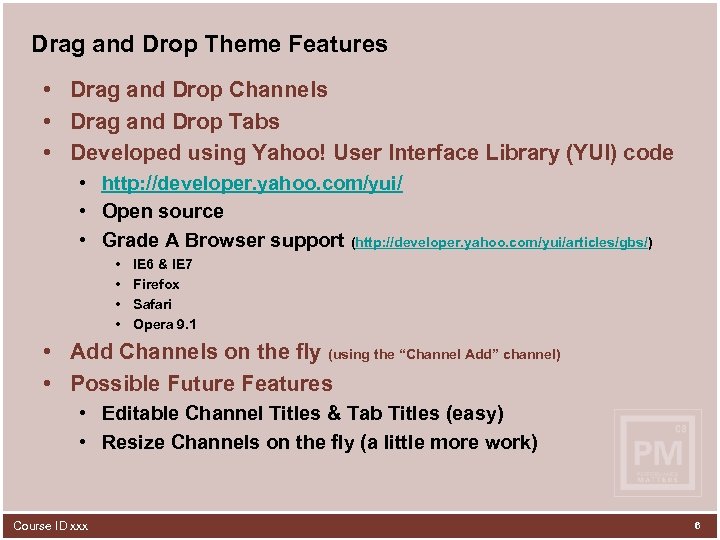 Drag and Drop Theme Features • Drag and Drop Channels • Drag and Drop Tabs • Developed using Yahoo! User Interface Library (YUI) code • http: //developer. yahoo. com/yui/ • Open source • Grade A Browser support (http: //developer. yahoo. com/yui/articles/gbs/) • • IE 6 & IE 7 Firefox Safari Opera 9. 1 • Add Channels on the fly (using the “Channel Add” channel) • Possible Future Features • Editable Channel Titles & Tab Titles (easy) • Resize Channels on the fly (a little more work) Course ID xxx 6
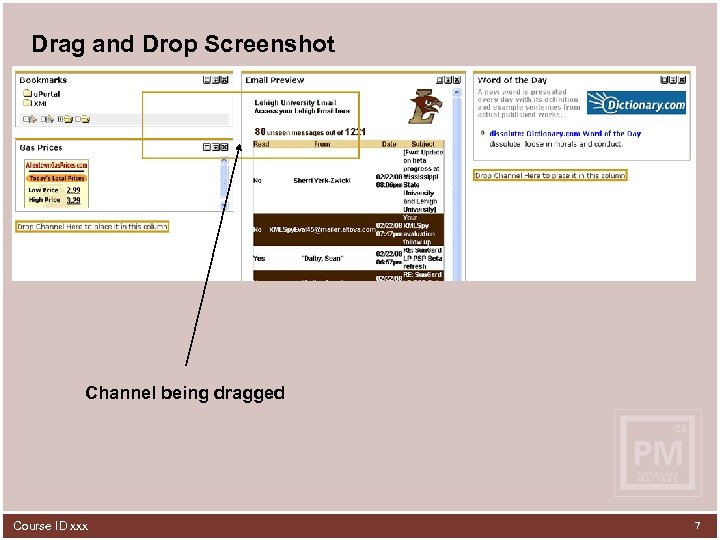 Drag and Drop Screenshot Channel being dragged Course ID xxx 7
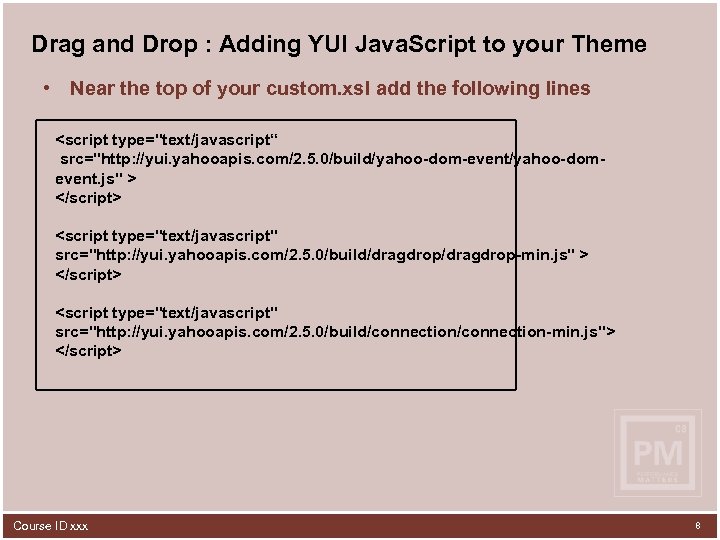 Drag and Drop : Adding YUI Java. Script to your Theme • Near the top of your custom. xsl add the following lines Course ID xxx 8
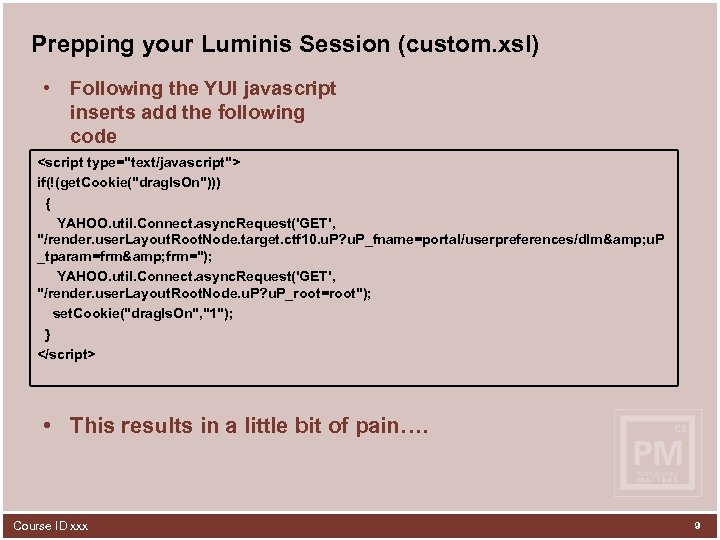 Prepping your Luminis Session (custom. xsl) • Following the YUI javascript inserts add the following code • This results in a little bit of pain…. Course ID xxx 9
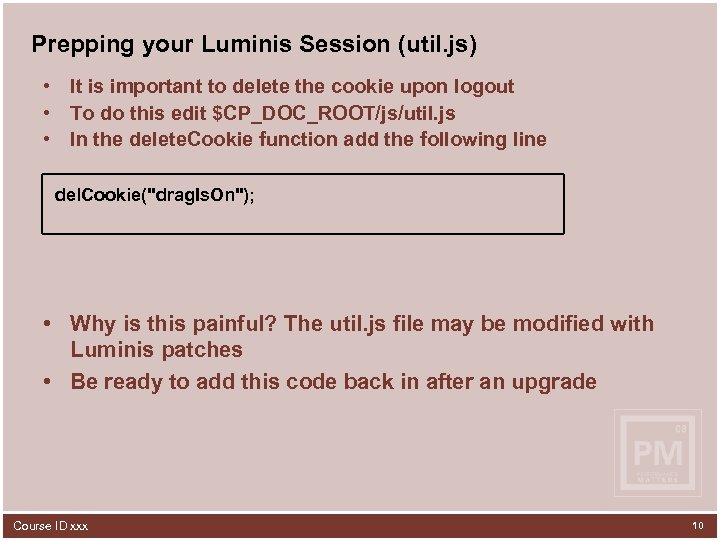 Prepping your Luminis Session (util. js) • It is important to delete the cookie upon logout • To do this edit $CP_DOC_ROOT/js/util. js • In the delete. Cookie function add the following line del. Cookie("drag. Is. On"); • Why is this painful? The util. js file may be modified with Luminis patches • Be ready to add this code back in after an upgrade Course ID xxx 10
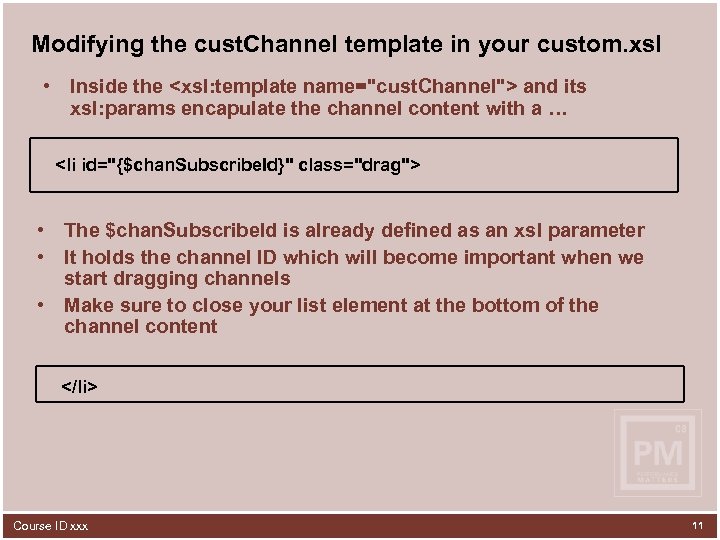 Modifying the cust. Channel template in your custom. xsl • Inside the
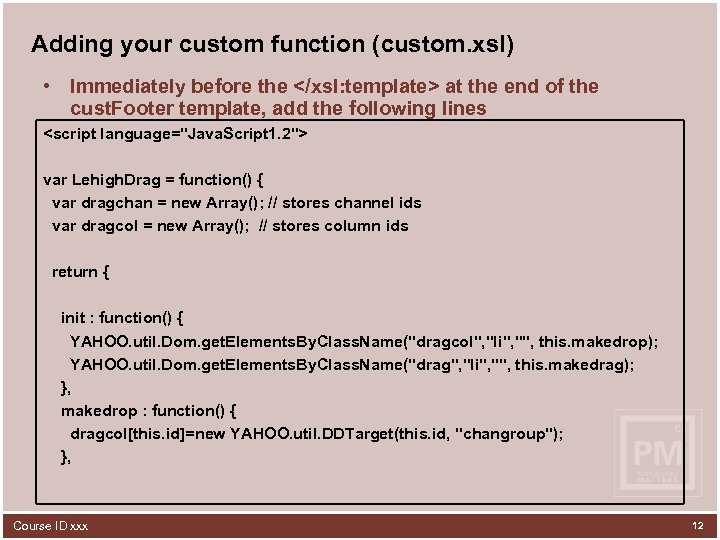 Adding your custom function (custom. xsl) • Immediately before the at the end of the cust. Footer template, add the following lines Course ID xxx 14
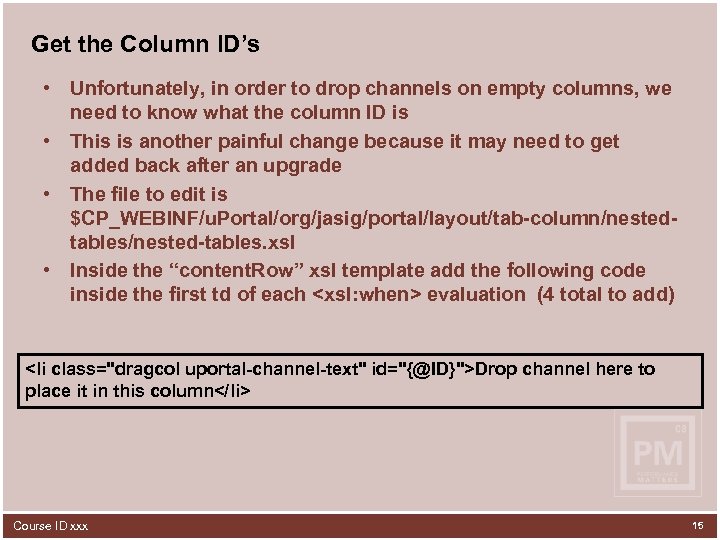 Get the Column ID’s • Unfortunately, in order to drop channels on empty columns, we need to know what the column ID is • This is another painful change because it may need to get added back after an upgrade • The file to edit is $CP_WEBINF/u. Portal/org/jasig/portal/layout/tab-column/nestedtables/nested-tables. xsl • Inside the “content. Row” xsl template add the following code inside the first td of each
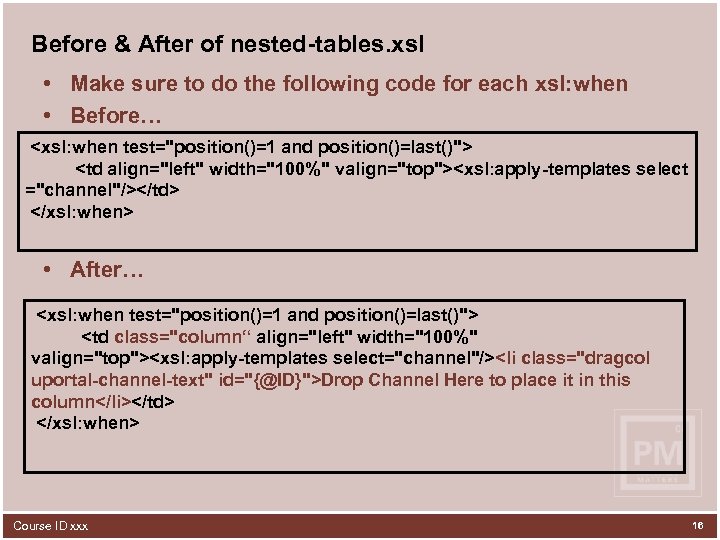 Before & After of nested-tables. xsl • Make sure to do the following code for each xsl: when • Before…
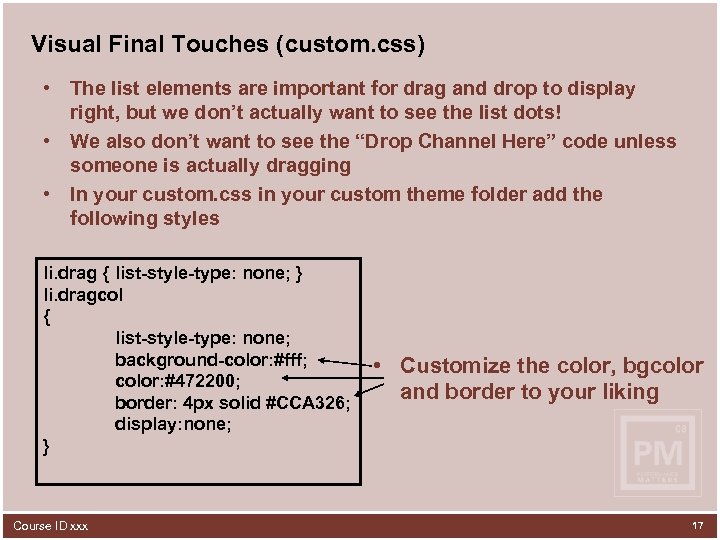 Visual Final Touches (custom. css) • The list elements are important for drag and drop to display right, but we don’t actually want to see the list dots! • We also don’t want to see the “Drop Channel Here” code unless someone is actually dragging • In your custom. css in your custom theme folder add the following styles li. drag { list-style-type: none; } li. dragcol { list-style-type: none; background-color: #fff; color: #472200; border: 4 px solid #CCA 326; display: none; } Course ID xxx • Customize the color, bgcolor and border to your liking 17
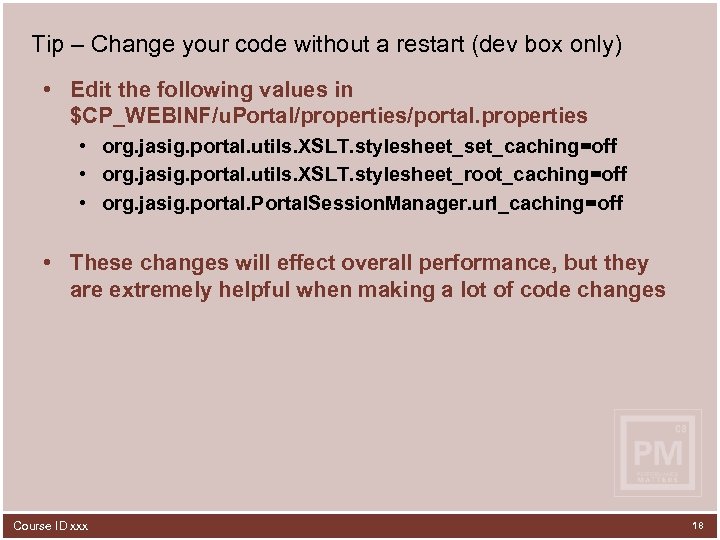 Tip – Change your code without a restart (dev box only) • Edit the following values in $CP_WEBINF/u. Portal/properties/portal. properties • org. jasig. portal. utils. XSLT. stylesheet_set_caching=off • org. jasig. portal. utils. XSLT. stylesheet_root_caching=off • org. jasig. portal. Portal. Session. Manager. url_caching=off • These changes will effect overall performance, but they are extremely helpful when making a lot of code changes Course ID xxx 18
 “Channel Add” Channel INDIVIDUAL ACHIEVEMENT. EDUCATIONAL EXCELLENCE. ADMINISTRATIVE INNOVATION. INSTITUTIONAL PERFORMANCE. 19
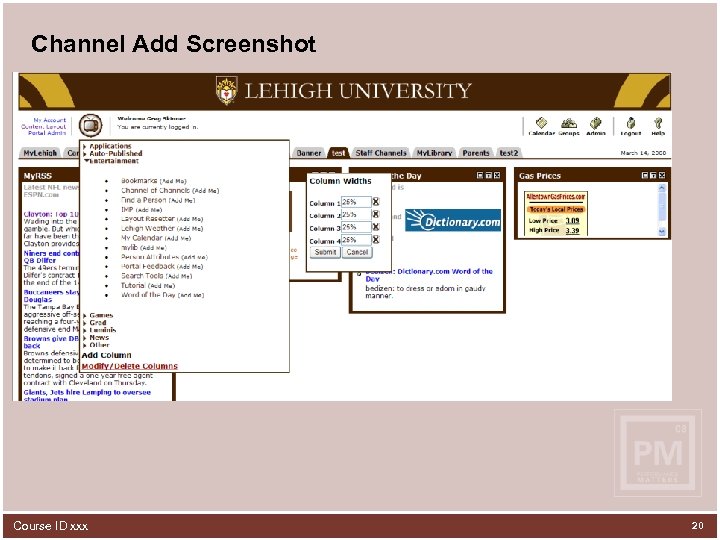 Channel Add Screenshot Course ID xxx 20
 How does it work? • Uses YUI code to make 2 ( or 3) asynchronous calls to Luminis to add a channel • 1 st Pass (tells Luminis to add a channel to the top left) • 2 nd Pass (tells Luminis what channel to add) • 3 rd Pass (if the channel parameters allow the user to choose channel height, YUI instead passes the channel’s default height, any other channel parameters and it brings up a form for the user) • I added a lightbox effect so that the user knows the system is busy • Refreshes the screen once completed Course ID xxx 21
 Concerns • Attempts to place the channel in the top left column • If a channel already exists that is locked, it will add the new channel below it • Make sure you have an appropriate default height set Where is the code? • Too much code to put on slides… • Don’t worry! I will give you the URL shortly to download all the code Course ID xxx 22
 My. Notes Application INDIVIDUAL ACHIEVEMENT. EDUCATIONAL EXCELLENCE. ADMINISTRATIVE INNOVATION. INSTITUTIONAL PERFORMANCE. 23
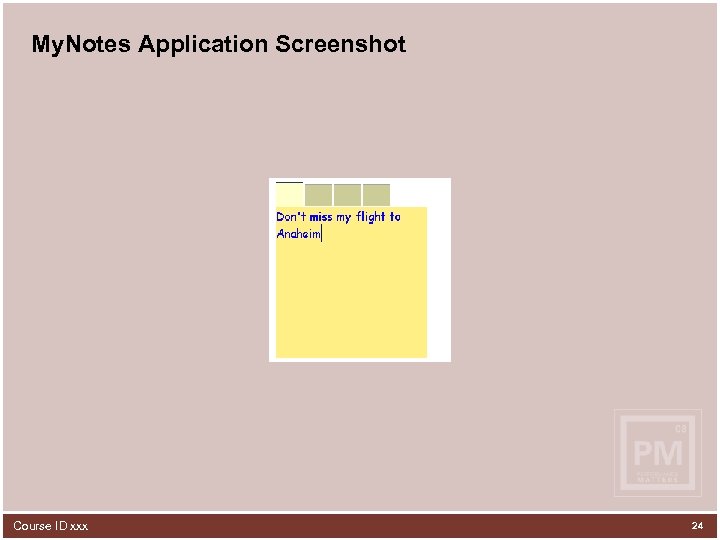 My. Notes Application Screenshot Course ID xxx 24
 Features • CAS application • Creates the necessary db rows (behind the scenes) the first time the user accesses the application • No Save button (uses Ajax to post to the database automatically) Course ID xxx 25
 Summary • All code is downloadable at http: //www. lehigh. edu/~gas 207/luminis. zip password: summit 2008 • Luminis IV makes it much easier to develop an advanced theme thanks to the new theme capability • Drag and Drop is awesome! Course ID xxx 26
 Questions & Answers Course ID xxx 27
 Thank You! Greg Skinner gas 207@lehigh. edu Please complete the online class evaluation form Course ID 0694 Sun. Gard, the Sun. Gard logo, Banner, Campus Pipeline, Luminis, Power. CAMPUS, Matrix, and Plus are trademarks or registered trademarks of Sun. Gard Data Systems Inc. or its subsidiaries in the U. S. and other countries. Third-party names and marks referenced herein are trademarks or registered trademarks of their respective owners. © 2008 Sun. Gard. All rights reserved. Course ID xxx 28