


 Скачать презентацию Comparison of Enterprise Data Platforms 1 WILLIAM MCKNIGHT
2e4ef0c6b26dfcb87a1fbf363c5510ad.ppt
- Количество слайдов: 58
 Comparison of Enterprise Data Platforms 1 WILLIAM MCKNIGHT PRESIDENT MCKNIGHT CONSULTING GROUP, LLC
 William Mc. Knight • • • • Advisor, Architect, Strategist, Project Manager 20 years of information management experience Ran a Best Practices Business Intelligence Program as VP/IT Many clients have gone public with their success case study where William was advisor or architect of the solution International keynote speaker, 100+ talks Monthly columnist in Information Management Magazine, 9 years, 80+ articles www. b-eye-network. com – blog, video blogs, channel, radio shows 12+ White papers Searchdatamanagement. com ‘ask the expert’ Worked on over 50 client Information Management programs Author: “ 90 Days to Success in Consulting” Best Practices Judge, Expert Witness DB 2 Version 1 Developer MBA © Mc. Knight Consulting Group, 2010
 Outline 3 DBMS Market The Data Warehouse Appliance Columnar Data Storage Open Source BI On-Demand BI Platforms Virtualization Next Steps © Mc. Knight Consulting Group, 2010
 What I See In Large Enterprise Customers Common Objectives Get leaner; Be more agile Become more real-time Significantly reduce costs Similar Situations Extreme data complexity and volumes BI is becoming a commodity New economics commoditization, consolidation, cloud… New opportunities analytic appliances, virtualization, … Tipping Points Enterprise data warehouse necessary, not sufficient Pragmatic buyers asking practical questions Enterprise software model becoming increasingly untenable Maintenance 45% of revenues
 DBMS Market 5 © Mc. Knight Consulting Group, 2010
 Platform Many components linked together Determines Processing power I/O bandwidth High number of users High complexity of data access How much data can be stored Must be adaptable to growing requirements over time The data warehouse platform must be high performance, so much each component. © Mc. Knight Consulting Group, 2010
 Data Volume Explosion Historical All customer touch-point data Granular data Clickstream data Operationally-needed data Data democratization RFID, call center data Increased usage as success has beget success © Mc. Knight Consulting Group, 2010
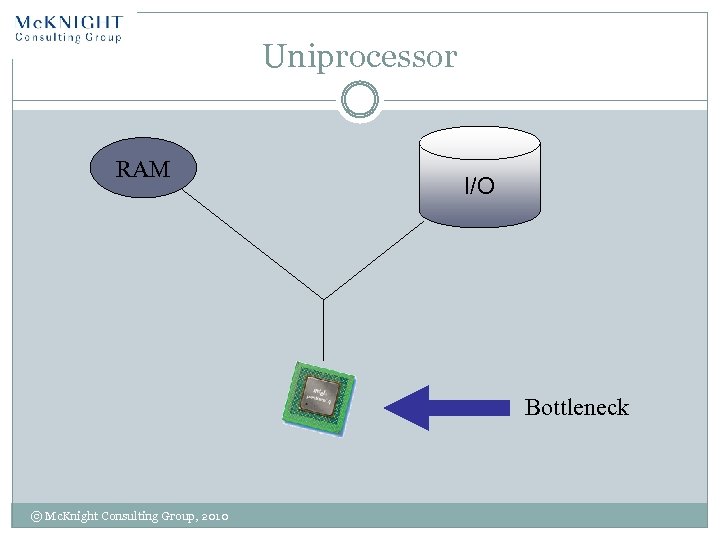 Uniprocessor RAM I/O Bottleneck © Mc. Knight Consulting Group, 2010
 Parallel Processing Single-CPU Limitations Signal speed limited by speed of light Circuit size limited Higher performing processors cost exponentially more than their performance take-up Three types Functional specialization Data Workflow © Mc. Knight Consulting Group, 2010
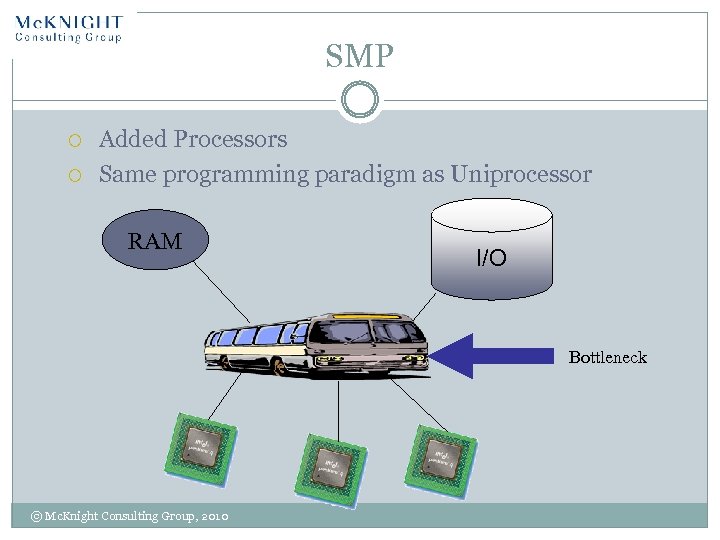 SMP Added Processors Same programming paradigm as Uniprocessor RAM I/O Bottleneck © Mc. Knight Consulting Group, 2010
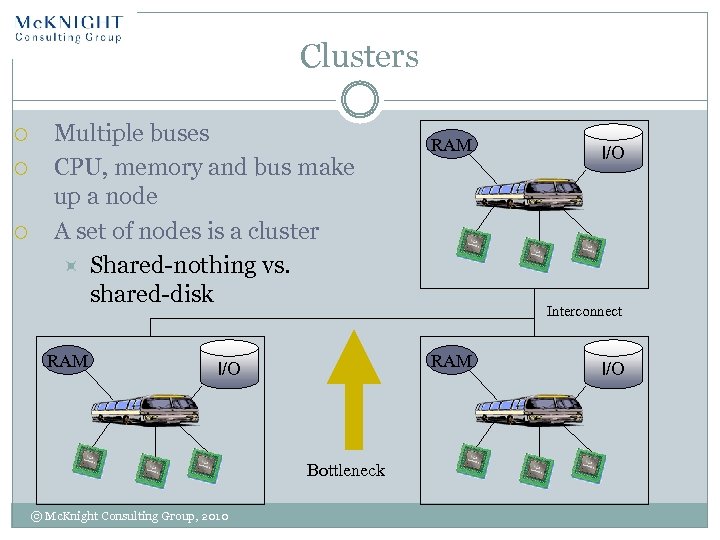 Clusters Multiple buses CPU, memory and bus make up a node A set of nodes is a cluster Shared-nothing vs. shared-disk RAM Bottleneck I/O Interconnect RAM I/O © Mc. Knight Consulting Group, 2010 RAM I/O
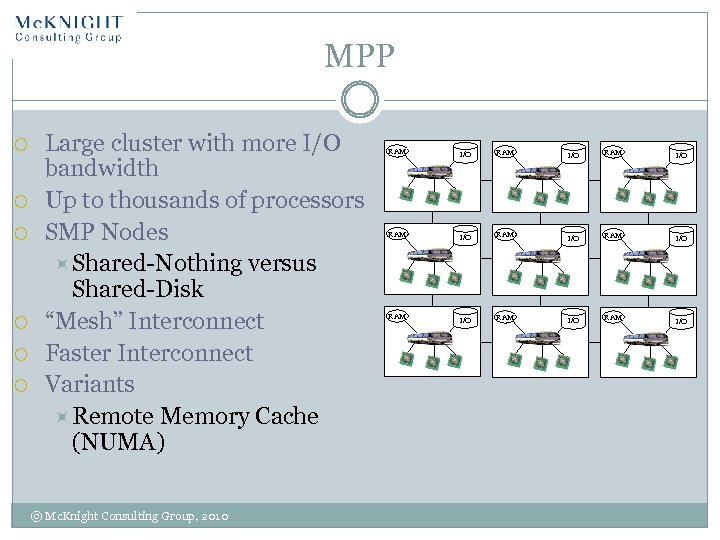 MPP Large cluster with more I/O bandwidth Up to thousands of processors SMP Nodes Shared-Nothing versus Shared-Disk “Mesh” Interconnect Faster Interconnect Variants Remote Memory Cache (NUMA) © Mc. Knight Consulting Group, 2010 RAM I/O RAM I/O RAM I/O
 Row-based MPP examples Teradata DB 2 Open Systems Netezza Oracle Exadata DATAllegro/Microsoft Madison Greenplum Aster Data Kognitio HP Neoview © Mc. Knight Consulting Group, 2010
 Typical design choices in row-based MPP “Random” (hashed or round-robin) data distribution among nodes Large block sizes Suitable for scans rather than random accesses Balanced hardware High-end interconnect © Mc. Knight Consulting Group, 2010
 Multidimensional Data Storage Separate physical file structure Data navigation path predefined Access is mainly through desktop tools © Mc. Knight Consulting Group, 2010
 Database Specialization is upon us 16 General purpose DBMS Multidimensional OLAP Data Warehouse Appliance Memory Resident DBMS Columnar DBMS The field is changing © Mc. Knight Consulting Group, 2010
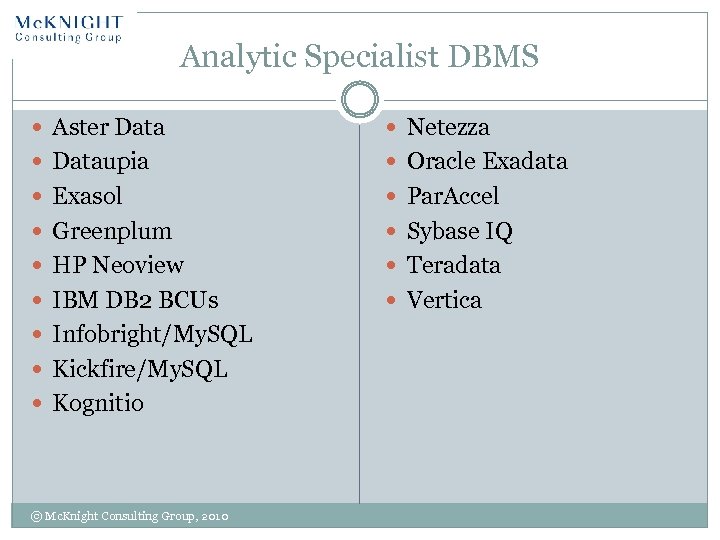 Analytic Specialist DBMS Aster Data Netezza Dataupia Oracle Exadata Exasol Par. Accel Greenplum Sybase IQ HP Neoview Teradata IBM DB 2 BCUs Vertica Infobright/My. SQL Kickfire/My. SQL Kognitio © Mc. Knight Consulting Group, 2010
 The Data Warehouse Appliance © Mc. Knight Consulting Group, 2010
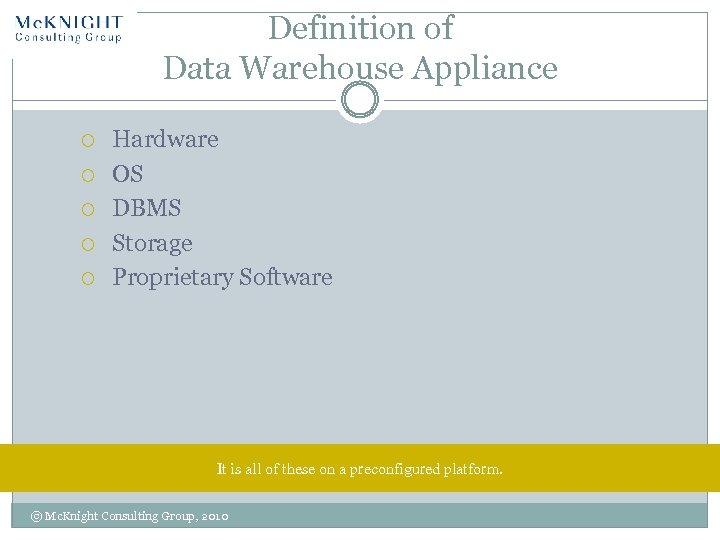 Definition of Data Warehouse Appliance Hardware OS DBMS Storage Proprietary Software It is all of these on a preconfigured platform. © Mc. Knight Consulting Group, 2010
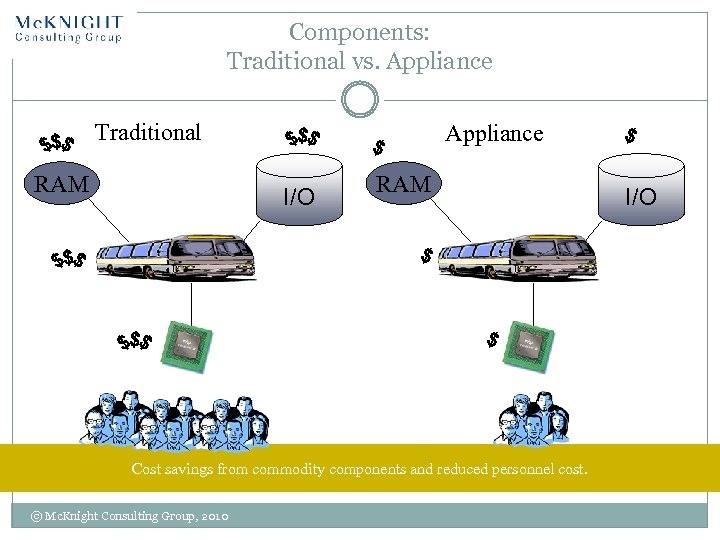 Components: Traditional vs. Appliance Traditional RAM Appliance I/O RAM Cost savings from commodity components and reduced personnel cost. © Mc. Knight Consulting Group, 2010 I/O
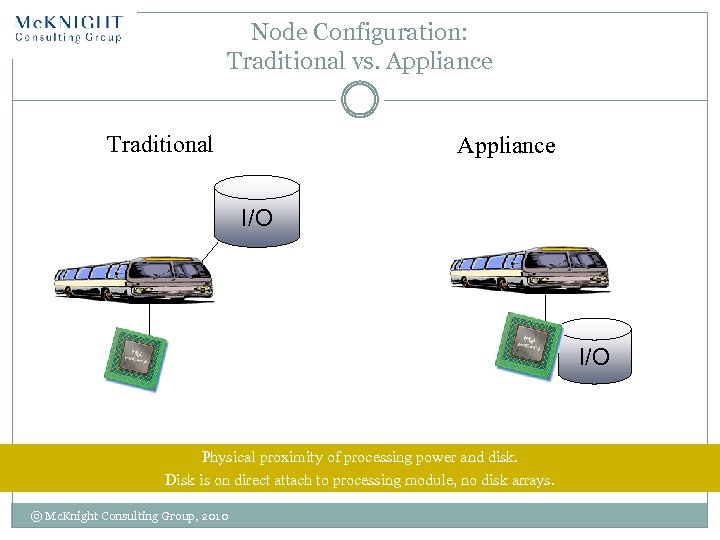 Node Configuration: Traditional vs. Appliance Traditional Appliance I/O Physical proximity of processing power and disk. Disk is on direct attach to processing module, no disk arrays. © Mc. Knight Consulting Group, 2010
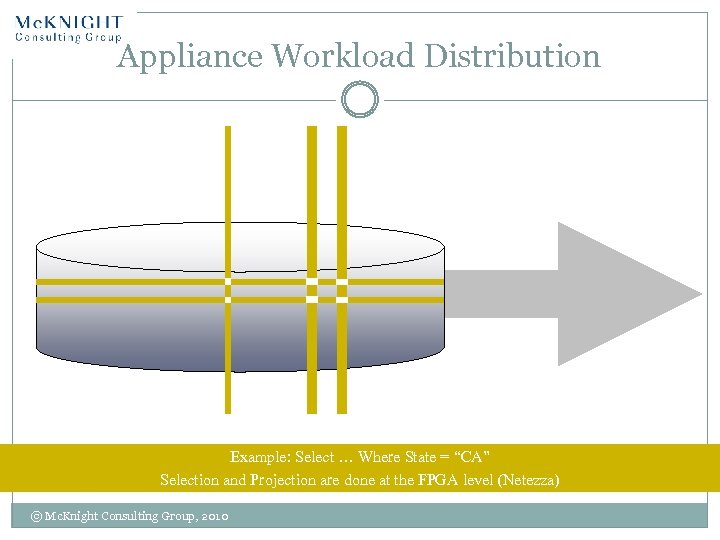 Appliance Workload Distribution Example: Select … Where State = “CA” Selection and Projection are done at the FPGA level (Netezza) © Mc. Knight Consulting Group, 2010
 Appliance Challenges Low cost, low power components All table scans (Netezza), no indexes FPGA limitations on query context management may limit concurrent processing No disk options Mean time to repair nodes ODBC tool integration Pre-fetch memory limitations © Mc. Knight Consulting Group, 2010
 Columnar Data Storage 24 © Mc. Knight Consulting Group, 2010
 Moore’s Law at Work 25 In last 30 years Transistors per chip > 100, 000 Disk density > 100, 000 Disk Speed > 12. 5 © Mc. Knight Consulting Group, 2010
 DBMS Design over the years 26 RDBMS design is virtually unchanged, except for parallelism Hardware, however: Disk capacity has increased tremendously (and got far cheaper) CPU performance has improved too, but… Transfer rates and seek times have increased modestly © Mc. Knight Consulting Group, 2010
 Making OLTP Analytic Specialized indexes Star indexes Materialized views Other indexes OLAP cubing Summary tables Partitioning Packaged analytics © Mc. Knight Consulting Group, 2010
 Transaction Processing 28 SQL Server on modern spec Intel box can do 20, 000 TPS That’s 100, 000 disk I/Os per second it COULD do If not that I/Os per second can only do far less You’d need hundreds of drives per CPU today Disk drives are slower Makes random disk I/O relatively slow © Mc. Knight Consulting Group, 2010
 Cache/Memory 29 Multiple levels of cache (L 1, L 2) CPU in wait mode… a lot L 2 Cache misses © Mc. Knight Consulting Group, 2010
 Columnar DBMS examples Sybase IQ SAND Vertica Par. Accel Info. Bright Kickfire Exasol Monet. DB Microsoft SQL Server 2008 R 2 Gemini/Vertipaq Oracle – hybrid columnar (future) Mix of storage, compression and materialization
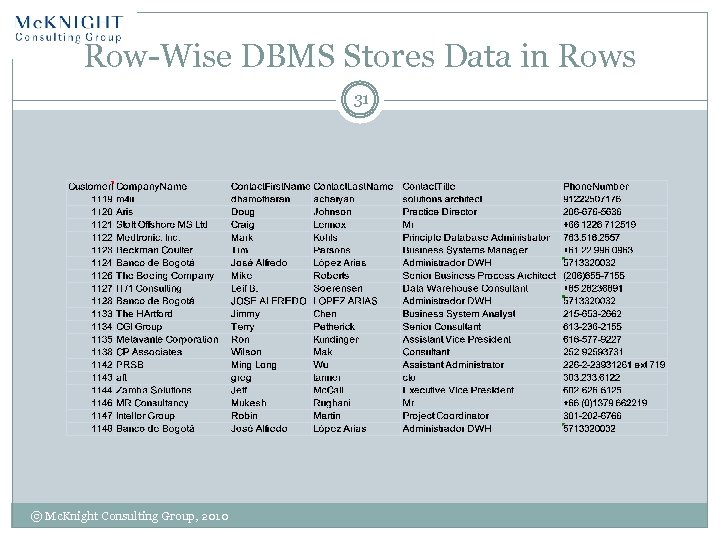 Row-Wise DBMS Stores Data in Rows 31 © Mc. Knight Consulting Group, 2010
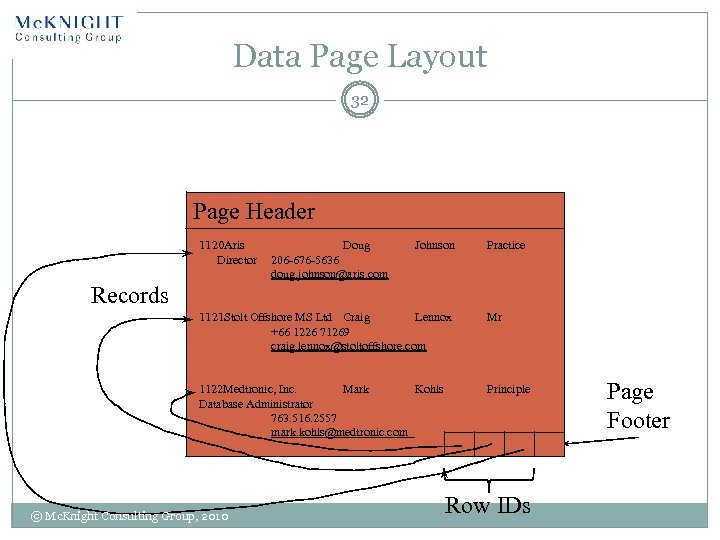 Data Page Layout 32 Page Header 1120 Aris Director Doug 206 -676 -5636 doug. johnson@aris. com Johnson Practice Records 1121 Stolt Offshore MS Ltd Craig Lennox +66 1226 71269 craig. lennox@stoltoffshore. com Mr 1122 Medtronic, Inc. Mark Kohls Database Administrator 763. 516. 2557 mark. kohls@medtronic. com Principle © Mc. Knight Consulting Group, 2010 Row IDs Page Footer
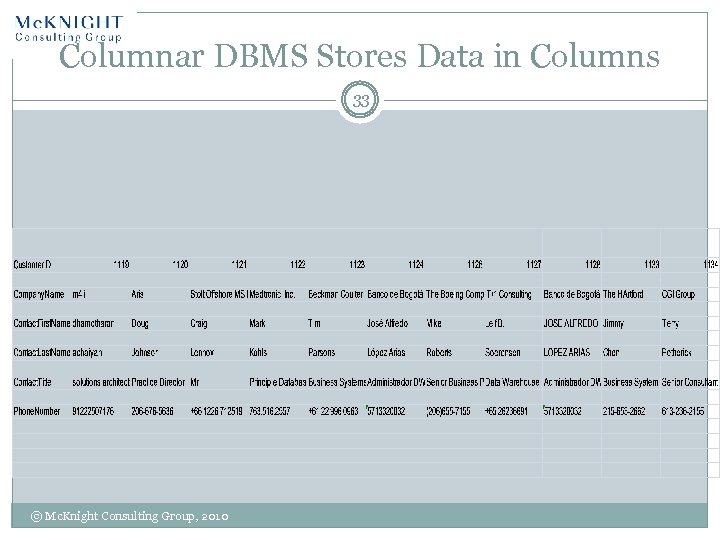 Columnar DBMS Stores Data in Columns 33 © Mc. Knight Consulting Group, 2010
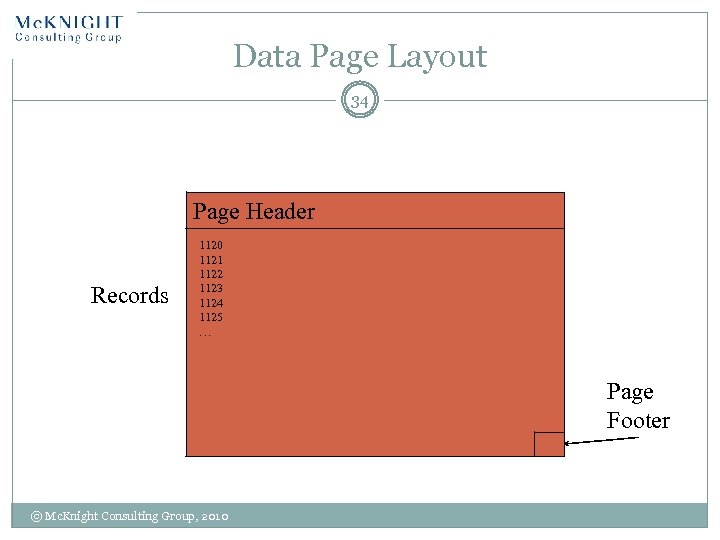 Data Page Layout 34 Page Header Records 1120 1121 1122 1123 1124 1125 … Page Footer © Mc. Knight Consulting Group, 2010
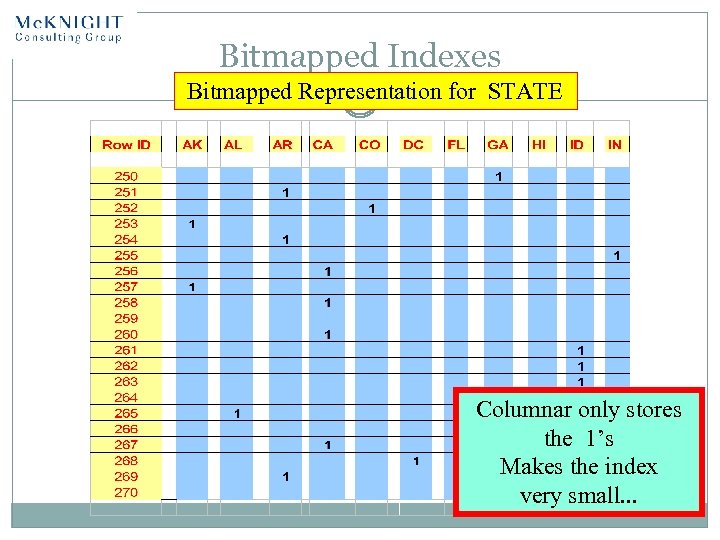 Bitmapped Indexes Bitmapped Representation for STATE Columnar only stores the 1’s Makes the index very small. . .
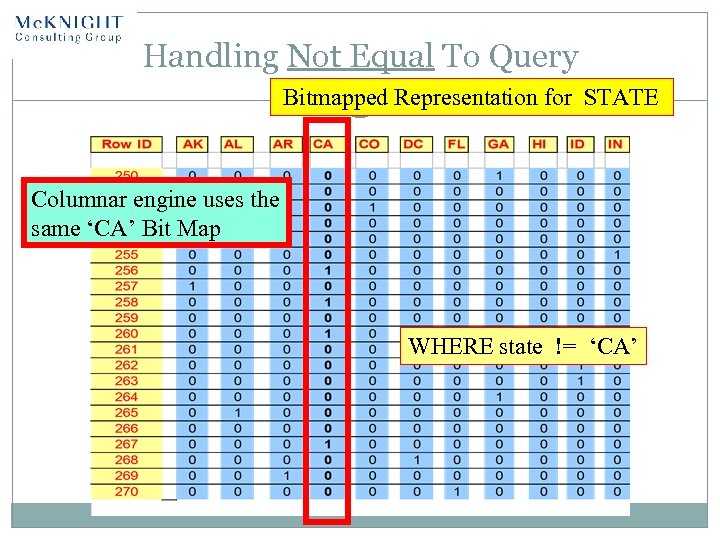 Handling Not Equal To Query Bitmapped Representation for STATE Columnar engine uses the same ‘CA’ Bit Map WHERE state != ‘CA’
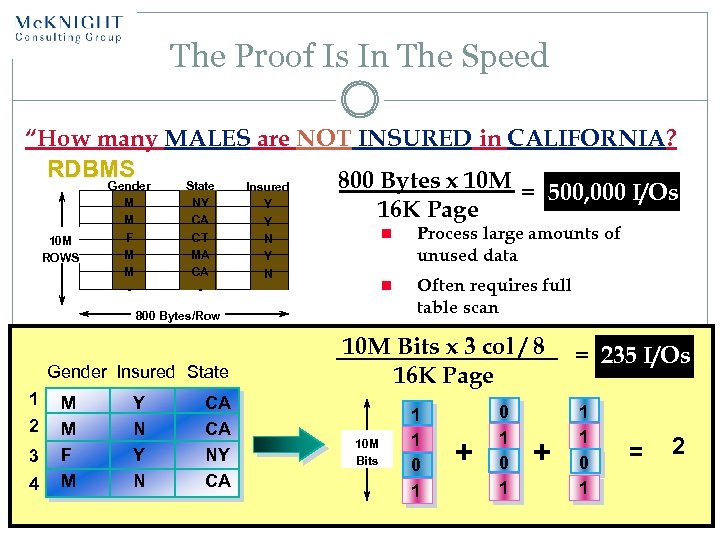 The Proof Is In The Speed “How many MALES are NOT INSURED in CALIFORNIA? RDBMS 800 Bytes x 10 M Gender State Insured = 500, 000 I/Os M NY Y 16 K Page M CA Y 10 M ROWS F M M - CT MA CA - n 800 Bytes/Row Gender Insured State 1 2 3 4 M M F M Y N CA CA NY CA Process large amounts of unused data n N Y N Often requires full table scan 10 M Bits x 3 col / 8 16 K Page 10 M Bits 1 1 0 1 + = 235 I/Os 1 1 0 1 = 2
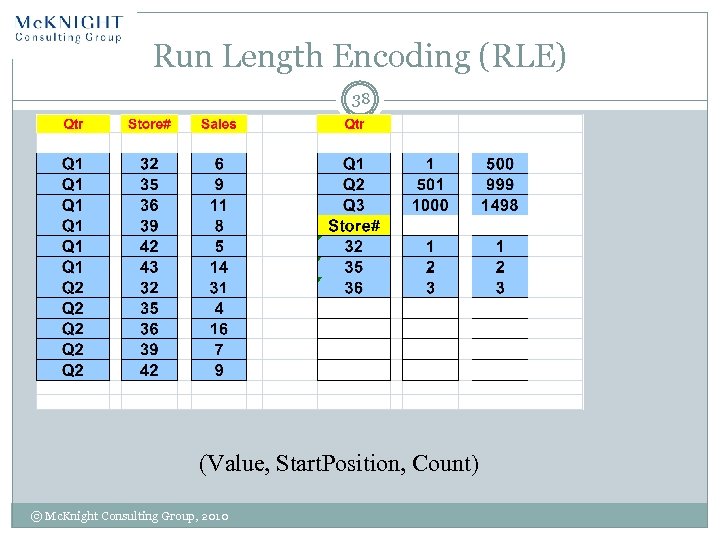 Run Length Encoding (RLE) 38 (Value, Start. Position, Count) © Mc. Knight Consulting Group, 2010
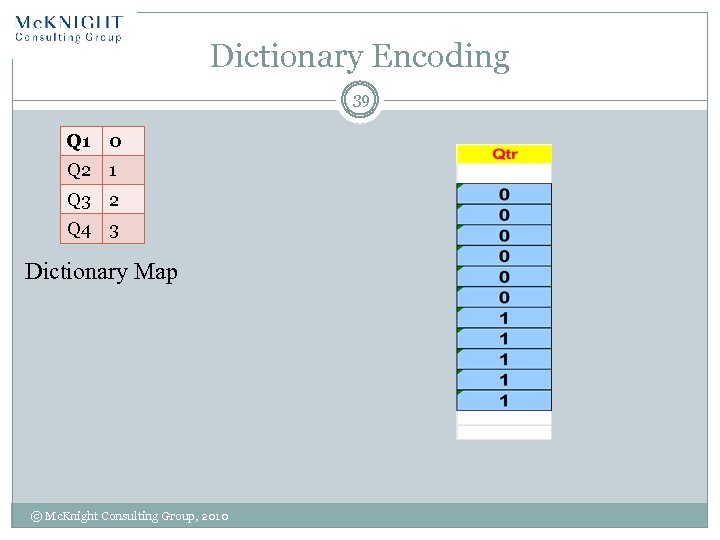 Dictionary Encoding 39 Q 1 0 Q 2 1 Q 3 2 Q 4 3 Dictionary Map © Mc. Knight Consulting Group, 2010
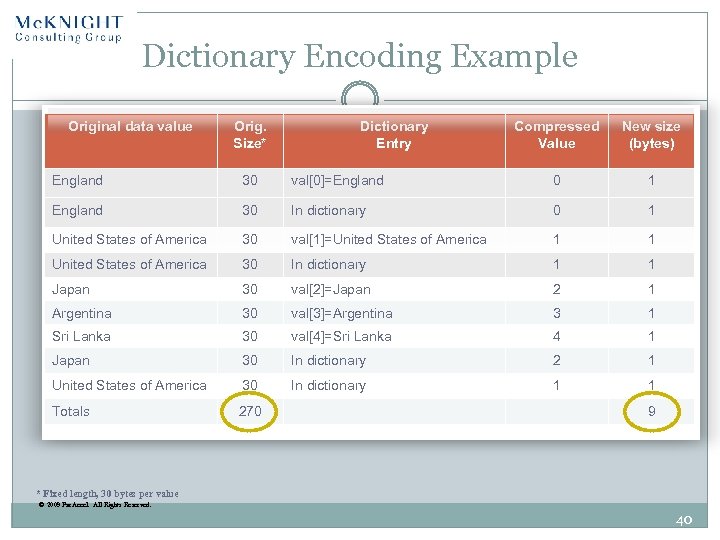 Dictionary Encoding Example Original data value Orig. Size* Dictionary Entry Compressed Value New size (bytes) England 30 val[0]=England 0 1 England 30 In dictionary 0 1 United States of America 30 val[1]=United States of America 1 1 United States of America 30 In dictionary 1 1 Japan 30 val[2]=Japan 2 1 Argentina 30 val[3]=Argentina 3 1 Sri Lanka 30 val[4]=Sri Lanka 4 1 Japan 30 In dictionary 2 1 United States of America 30 In dictionary 1 1 Totals 270 9 * Fixed length, 30 bytes per value © 2009 Par. Accel. All Rights Reserved. 40
 Open Source BI 41 © Mc. Knight Consulting Group, 2010
 What is Open Source BI? 42 Access to source code, ability to share/modify code Free and open source vs. Commercial open source All categories of BI covered: Reporting OLAP Data mining Data visualization GIS ETL Data Quality © Mc. Knight Consulting Group, 2010
 Who’s Adopting Open Source BI 43 Packaged applications/ISV market And Data Warehouse Appliances Proof of Concepts Edge uses (non EDW) New needs When “good enough” is Price conscious Academic < 50 GB applications © Mc. Knight Consulting Group, 2010
 Challenges to Open Source BI 44 Software maturity Commercial version needed for needed functionality Service and support © Mc. Knight Consulting Group, 2010
 On-Demand BI Platforms 45 © Mc. Knight Consulting Group, 2010
 BI Software as a Service/Cloud 46 Delivery model with hosted software, paid for on a subscription basis Multi-tenant vs. single-tenant Data security concerns Stovepipe architecture concerns Regulations may prevent storage arrangement Customization is a must Fault tolerance, high availability and on-demand capacity Vendor viability © Mc. Knight Consulting Group, 2010
 Saa. S/Cloud BIBenefits 47 Lowered initial cost MTM by per-user/enterprise/concurrent users/volumes of data Fees: enhancements, customization, cancellation Speed to some development Business focused Installation, maintenance taken care of © Mc. Knight Consulting Group, 2010
 Saa. S/Cloud BI Challenges 48 Some vendors small Long-term cost Understanding limitations Integration with in-house and other hosted systems © Mc. Knight Consulting Group, 2010
 Saa. S/Cloud BI Fit 49 Limited knowledge of BI Web-based environment Customization capabilities Speed is essential SMB EDW, Large co. mart © Mc. Knight Consulting Group, 2010
 Virtualization 50 © Mc. Knight Consulting Group, 2010
 When Should I Use Data Virtualization? Industry Business Driver or Key Initiative… Cost reduction, customer care, competitive response, compliance, consolidation (M&A) Business Function…. Marketing, Sales, Research, etc. Consuming Applications… BI, Portal, Dashboards, Composite Applications, etc. Technology Trend… SOA, Cloud, Mashups, etc. Adjacent Technology… BI, MDM, Data Warehouse, ETL, Data Quality, etc. Specific IT Project… Project X, Project Y, Project Z in the upcoming portfolio
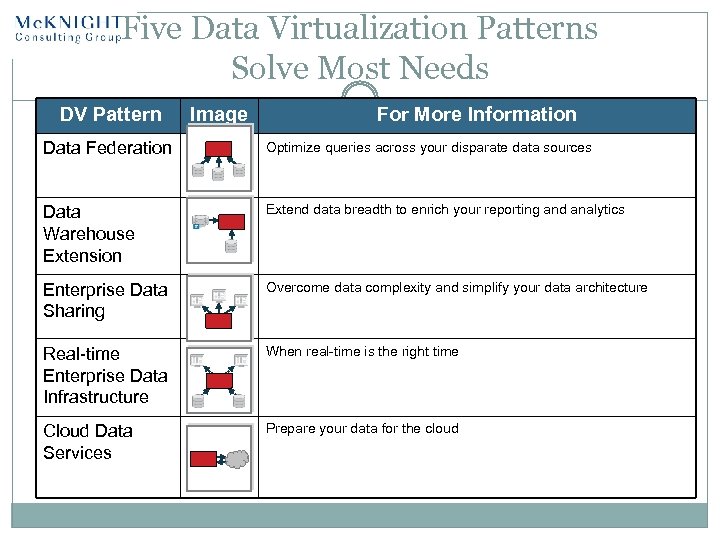 Five Data Virtualization Patterns Solve Most Needs DV Pattern Image For More Information Data Federation Optimize queries across your disparate data sources Data Warehouse Extension Extend data breadth to enrich your reporting and analytics Enterprise Data Sharing Overcome data complexity and simplify your data architecture Real-time Enterprise Data Infrastructure When real-time is the right time Cloud Data Services Prepare your data for the cloud
 Next Steps 53 © Mc. Knight Consulting Group, 2010
 Future Trends in Data Management 54 Confusion, opportunities Master data management and other movement to operational BI Appliance acceptance, even for EDW Selective columnar Virtualization Selective on-demand BI Data clouds Terminology battles! Open source, Map. Reduce – wild cards © Mc. Knight Consulting Group, 2010
 Next Steps Stay informed Develop information use cases (function, performance) Current Anticipated Future Probable Future/Vision Short-List gap based on Database storage format (row, column, MOLAP) Storage model (appliance, cloud, Saa. S) Pricing model (open source) and budget Run Proofs-of-concept © Mc. Knight Consulting Group, 2010
 Summary 56 Adopt columnar, Data Warehouse Appliances (or both) for edge applications Consider Data Warehouse Appliances for EDW POC Open Source Selectively add on-demand BI (or be prepared for it) Add Operational BI capabilities © Mc. Knight Consulting Group, 2010
 Remember! This is never a total plug-and-play Data modeling is important You have to staff DW expertise The business does have to be involved Data quality is important What is today will not always be TCO includes hardware, software, people, reality All BI does not happen in one place Architecture is important No excuse for not understanding your business well Get a readiness assessment before making big moves © Mc. Knight Consulting Group, 2010
 Comparison of Enterprise Data Platforms 58 Presented by: William Mc. Knight President Mc. Knight Consulting Group LLC (214) 514 -1444 william@williammcknight. com www. williammcknight. com