 Скачать презентацию Commercial Building Re-tuning Overview and Key Operational Faults
3c650cbd521bbd5d96a02fda778a0521.ppt
- Количество слайдов: 92



Commercial Building Re-tuning: Overview and Key Operational Faults and Corrections Srinivas Katipamula, Ph. D. Staff Scientist, Pacific Northwest National Laboratory Better Building by Design – 2011 February 10 th, Sheraton Conference Center Burlington, Vermont 1
Presentation Outline Learning Objectives Definition of Retro-Commissioning and Re-tuning Why Retro-Commission a Building? Washington State Project Approach to Re-tuning U. S. Department of Energy Project on Re-tuning Overview of Re-tuning Training Identifying Low-cost/No-cost Operational Faults Using the Retuning Approach Common Operation Faults Example Operational Faults Results from Re-Tuning Buildings Conclusions 2

Efficiency Vermont is a Registered Provider with The American Institute of Architects Continuing Education Systems (AIA/CES). Credit(s) earned on completion of this program will be reported to AIA/CES for AIA members. Certificates of Completion for both AIA members and non-AIA members are available upon request. This program is registered with AIA/CES for continuing professional education. As such, it does not include content that may be deemed or construed to be an approval or endorsement by the AIA of any material of construction or any method or manner of handling, using, distributing, or dealing in any material or product. Questions related to specific materials, methods, and services will be addressed at the conclusion of this presentation.
Learning Objectives At the end of this program, participants will be able to: Understand an overview of Commercial Building Re-Tuning Understand Key Building Operation Faults and Their Corrections (These presentations will provide an overview of the re-tuning process including the difference between re-tuning and other similar approaches) Describe the various steps in the re-tuning process Identify targets that commonly yield significant improvements in operation and decreases in energy use and discuss how re-tuning can yield a “gold mine” in savings

Course Evaluations In order to maintain high-quality learning experiences, please access the evaluation for this course by logging into CES Discovery and clicking on the Course Evaluation link on the left side of the page.
Definitions HVAC Retro-commissioning HVAC Re-tuning HVAC Re-commissioning HVAC Continuous Commissioning. SM Monitoring-Based Commissioning All processes above in part relate to setting up control systems to some known design configurations, verifying set points and adding control algorithms 6
Why Retro-Commission a Buildings? 7
Retro-Commissioning Literature A number of studies have shown that retrocommissioning buildings can lead to significant energy savings – 5 to 30% Cost of retro-commissioning varies between 0. 1$/sf to 0. 6$/sf Cost savings can range between 0. 1$/sf to 0. 75$/sf Simple payback ranging from 3 months to 3 years A number of the measures addressed by retrocommissioning relate to our inability to control the building operations 8
Why is Retro-Commissioning not Widely Used? There is a perception that retro-commissioning can be expensive It can be expensive, but typically has less than 3 year paybacks There is a perception that measures addressed during retro-commissioning do not persist for a long time (>6 months) 9
Re-tuning can Fill the Gap Re-tuning can address both the cost and the persistence question Because re-tuning is implemented by leveraging information from building automation system and primarily targets operational problems, cost of implementation is significantly lower than retro-commissioning Because re-tuning costs a fraction of retrocommissioning, it can be periodically done to ensure persistence 10
Origins for Re-Tuning In 1990 s several researcher organizations were developing automated fault detection and diagnostics (FDD) tools – the researchers found that the FDD tools can indeed be used for commissioning building systems Also, at the same time Texas A&M University was using a process called continuous commissioning to retro-commission existing buildings In 2000 s monitoring-based commissioning was being applied at many California campuses 11
What is Re-Tuning? A systematic process to identify and correct building operational problems that lead to energy waste Implemented primarily through the building control system at no cost other than the labor required to perform the retuning process Includes small, low-cost repairs, such as replacing faulty sensors Includes identifying other opportunities for improving energy efficiency that require investment Might be thought of as a scaled-down retro-commissioning focused on identifying and correcting operational problems 12
Major Focus Areas in Re-Tuning Occupancy scheduling Discharge-air temperature control Discharge-air static pressure control Air-handling unit (AHU) heating & cooling AHU outside/fresh air makeup AHU economizer operation Zone conditioning Meter profiles Central plant 13
Purpose of Re-Tuning Improve the building’s energy efficiency through low-cost and no-cost operational improvements (mostly control changes) Identify opportunities to further increase the building’s energy efficiency Identify problems requiring physical repair Catch the big energy saving opportunities 14
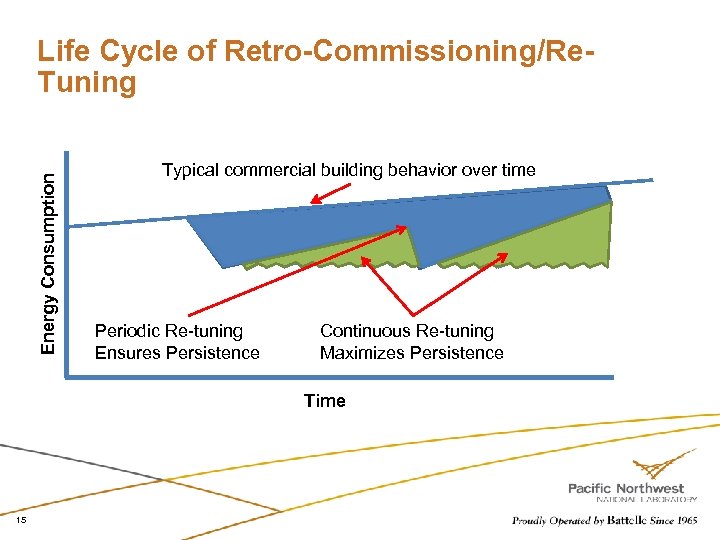
Energy Consumption Life Cycle of Retro-Commissioning/Re. Tuning Typical commercial building behavior over time Periodic Re-tuning Ensures Persistence Continuous Re-tuning Maximizes Persistence Time 15

Washington State Re-Tuning Pilot Project 16
Large Commercial Buildings Project Goal Educate companies that large buildings can be re-tuned economically to save electricity Teach the proper techniques and skills to perform re-tuning, and Show that service providers can provide retuning as a service for a fee Approach Recruit 5 to 10 companies that provide HVAC services to commercial buildings to deliver retuning services and to help recruit customers Each of the selected service providers are required to recruit at least 6 buildings for retuning Use 10 to 20 of the buildings as training grounds for hands-on training of the HVAC service providers on how to perform re-tuning 17

U. S. Department of Energy Re. Tuning Project 18
U. S. Department of Energy Re-Tuning Training Outreach Re-tuning Training was Originally Developed as part of a Project Funded by Washington State (www. retuning. org) Extending Training Outreach Beyond WA State (www. pnl. gov/buildingretuning) Organization with large building stock interested in getting trained in the re-tuning process Train-the-trainer – secondary goal Working with a number of organizations to recruit for both the above approaches 19
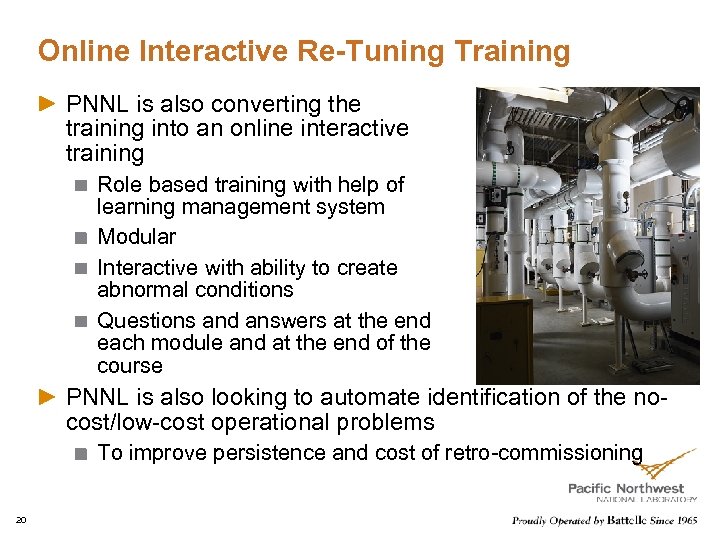
Online Interactive Re-Tuning Training PNNL is also converting the training into an online interactive training Role based training with help of learning management system Modular Interactive with ability to create abnormal conditions Questions and answers at the end each module and at the end of the course PNNL is also looking to automate identification of the nocost/low-cost operational problems To improve persistence and cost of retro-commissioning 20
Project Objective Improve operational efficiency of the commercial building sector by transferring the skills to “re-tune” large commercial buildings Training building operators and service providers in the general principles and practices of good energy management Publicizing the results of the project to other building operators and HVAC service providers, who are not part of the training, and to customers to encourage widespread adoption of these energysaving methods Preparing case studies to quantify comfort impact and energy savings resulting from re-tuning 21
Overview of Re-tuning Training 22
Re-tuning Training consists of two parts Classroom training 6 to 8 hours, limited to 20 to 25 people Field training 1 day to 3 days, depending on the size of the building Limited to 4 to 8 people 23
Intent of Re-tuning Training Provide an in-depth training of the re-tuning approach Prepare the participating technicians for hands-on field training Provide an opportunity to ask questions and get clarification on any aspect of the re-tuning process “Tell me and I'll forget; show me and I may remember; involve me and I'll understand” Chinese Proverb 24
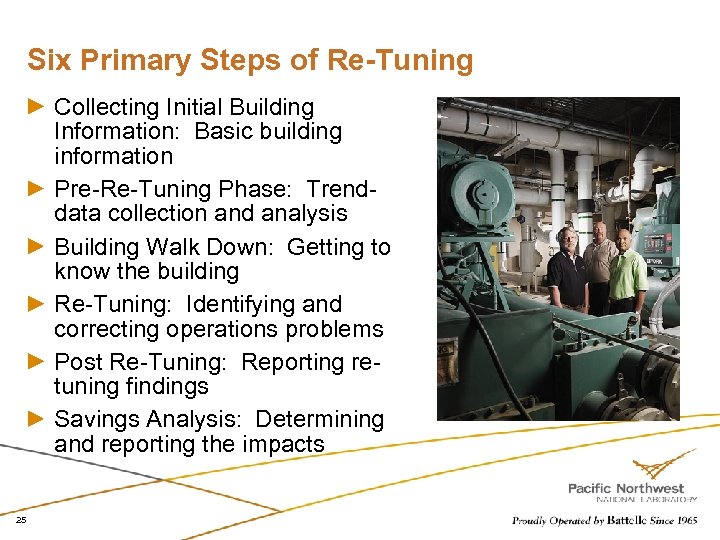
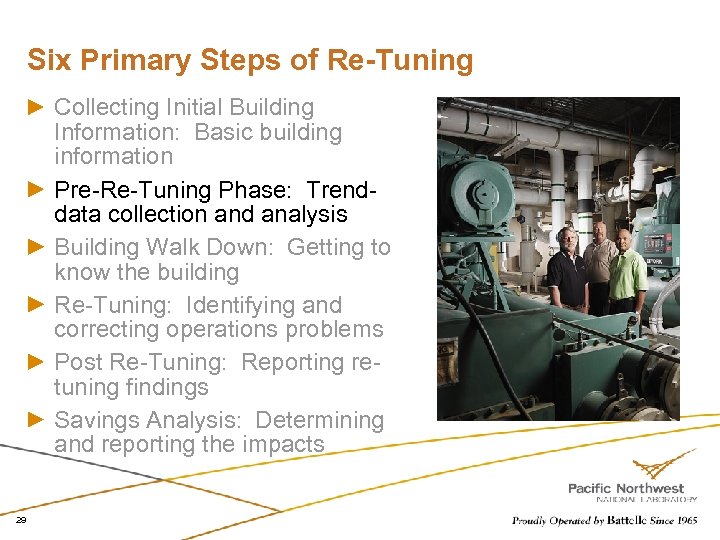
Six Primary Steps of Re-Tuning Collecting Initial Building Information: Basic building information Pre-Re-Tuning Phase: Trenddata collection and analysis Building Walk Down: Getting to know the building Re-Tuning: Identifying and correcting operations problems Post Re-Tuning: Reporting retuning findings Savings Analysis: Determining and reporting the impacts 25
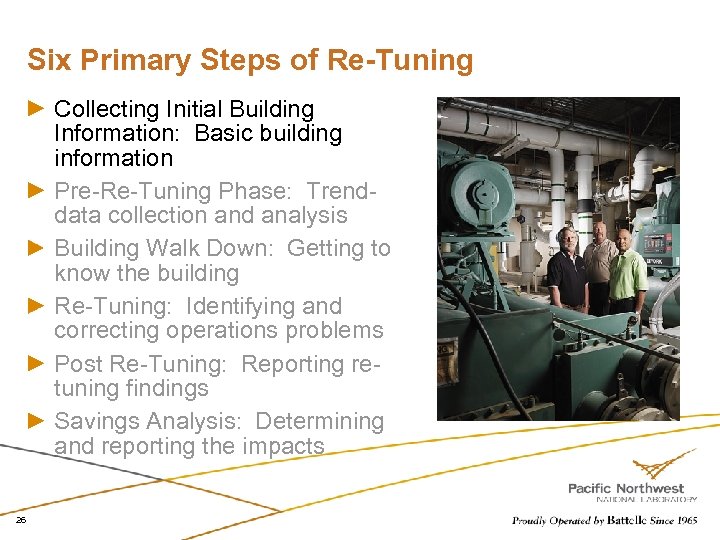
Six Primary Steps of Re-Tuning Collecting Initial Building Information: Basic building information Pre-Re-Tuning Phase: Trenddata collection and analysis Building Walk Down: Getting to know the building Re-Tuning: Identifying and correcting operations problems Post Re-Tuning: Reporting retuning findings Savings Analysis: Determining and reporting the impacts 26
Information to Collect Overall building geometry Approximate gross square feet Number of floors General building shape Type of HVAC system(s) Approximate number of zones Approximate number of each major type of equipment Boilers Chillers Air handlers Type of building automation system (manufacturer, model, version) 27
Collecting basic building information If you manage the building, you probably have all or most of this information at your fingertips Gather information to guide selection of trend logs to set up in the next phase Determine the overall design of the building and its mechanical systems 28
Six Primary Steps of Re-Tuning Collecting Initial Building Information: Basic building information Pre-Re-Tuning Phase: Trenddata collection and analysis Building Walk Down: Getting to know the building Re-Tuning: Identifying and correcting operations problems Post Re-Tuning: Reporting retuning findings Savings Analysis: Determining and reporting the impacts 29
Trend-Data Collection & Analysis: Purpose Detect potential operational problems even before visiting the building Identify problems that require time histories to detect – incorrect schedules, no use of setback during unoccupied modes, poor economizer operation 30
Steps for Trend Data Collection • Develop a monitoring plan – develop forms to guide service providers through this. Plan includes the points to trend and for each point: – Planned trend start time – Planned trend time – Length of measurement period (2 weeks recommended) – Time interval between logged measurements (30 minutes or less recommended) – Measurement units (e. g. , F for temperature) • Implement trend logs in control system 31
Analyze Trend Log Data – Major Steps Download trend log data files from BAS Format data files for compatibility with the spreadsheet analysis tool Open data files in spreadsheet analysis tool and automatically generate graphs Review graphs to identify operational issues Record operational issues for reference during re-tuning 32
Review Graphs & Identify Operation Issues to investigate with trend log data PNNL spreadsheets automatically generate graphs needed We’ll look at some examples of what to look for Online reference document provides additional information and examples, which you can refer to any time you need to (see www. retuning. org) 33
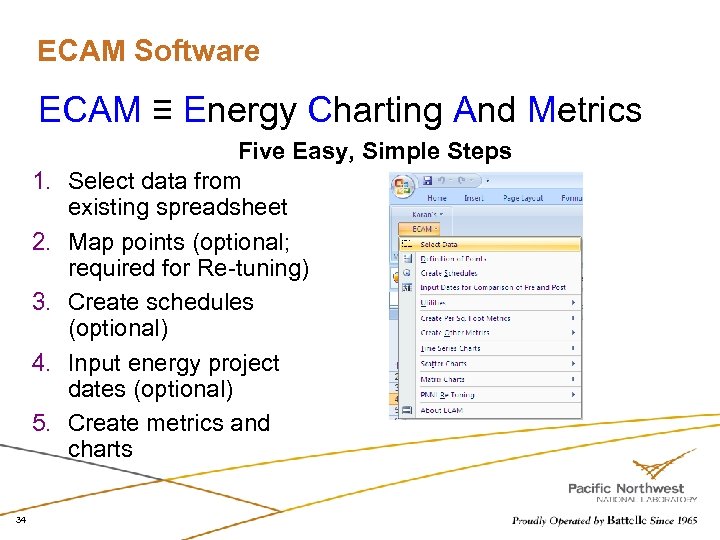
ECAM Software ECAM ≡ Energy Charting And Metrics 1. 2. 3. 4. 5. 34 Five Easy, Simple Steps Select data from existing spreadsheet Map points (optional; required for Re-tuning) Create schedules (optional) Input energy project dates (optional) Create metrics and charts
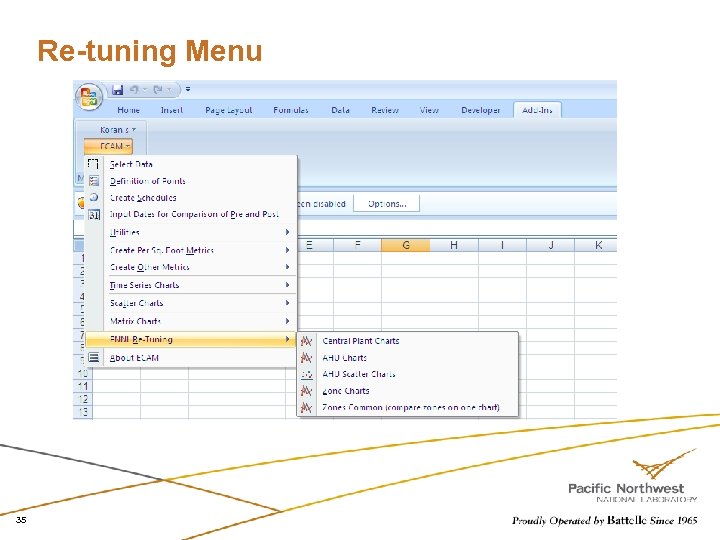
Re-tuning Menu 35
ECAM: Example AHU Time Series Charts Outdoor, return, mixed, and discharge air temperatures vs. time Discharge air temperature and discharge air temperature set point vs. time Outdoor air fraction and damper position signal vs. time Outdoor and return air temperatures, damper position signal vs. time Damper, chilled water valve, and hot water valve position signals vs. time Damper position signal vs. time Discharge static pressure vs. time Supply fan speed, status, and static pressure vs. time Return fan speed and status vs. time 36
ECAM: Example AHU Scatter Charts Discharge air temperature vs. discharge air temperature set point Chilled water signal vs. hot water signal Damper signal vs. outdoor air temperature Mixed air temperature vs. outside air temperature 37
ECAM: Example Zone Charts Zone damper position signal, reheat valve position signal, occupancy mode, and Zone temperature vs. time. 38
ECAM: Example Central Plant Charts CHW supply, return, ΔT, and outdoor air temperature vs. time CHW flow and outdoor air temperature vs. time 39
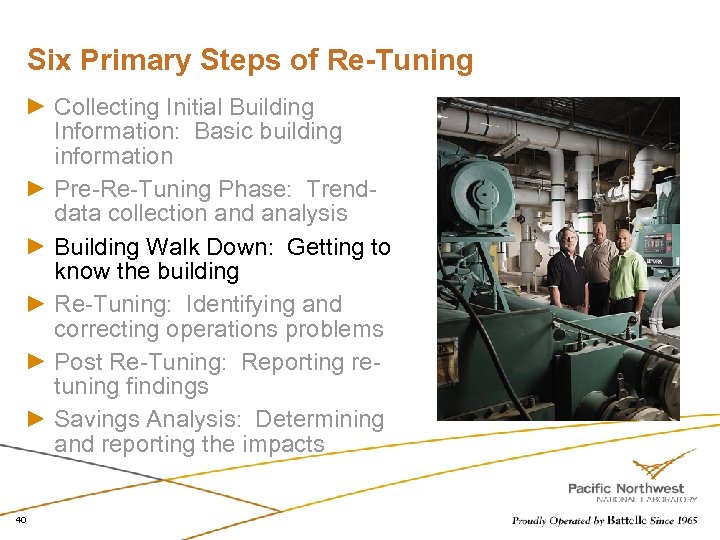
Six Primary Steps of Re-Tuning Collecting Initial Building Information: Basic building information Pre-Re-Tuning Phase: Trenddata collection and analysis Building Walk Down: Getting to know the building Re-Tuning: Identifying and correcting operations problems Post Re-Tuning: Reporting retuning findings Savings Analysis: Determining and reporting the impacts 40
Building Walk Down: Purpose Get to know the building better Develop a general impression of: Overall building condition Overall building design HVAC system design Collect some basic data on the building systems at a level of detail greater than the initial data collection 41
Building Walk Down: Major Steps Review electrical and mechanical prints Walk the outside of the building Walk the inside of the building Walk down the roof Walk down the air handlers Walk down the plant area Review the DDC system (BAS) front end 42
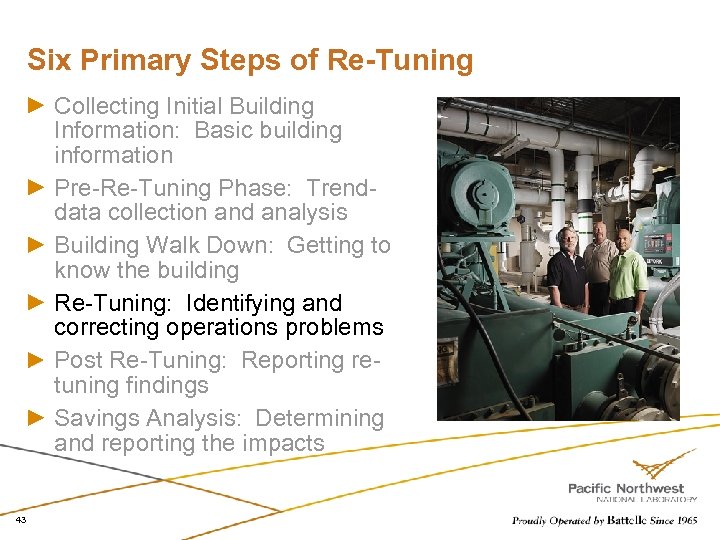
Six Primary Steps of Re-Tuning Collecting Initial Building Information: Basic building information Pre-Re-Tuning Phase: Trenddata collection and analysis Building Walk Down: Getting to know the building Re-Tuning: Identifying and correcting operations problems Post Re-Tuning: Reporting retuning findings Savings Analysis: Determining and reporting the impacts 43
Occupancy Scheduling Shut off systems whenever possible Night unoccupied schedules Weekend unoccupied schedules Daytime no or low use unoccupied schedules Auditorium, class rooms, conference rooms Includes lighting Includes specialized exhaust Do not restart too early Use a startup schedule based on building needs Do not use fresh air during warm-up except last 30 minutes for flushing building 44
Occupancy Scheduling (continued) Shut off systems whenever possible Refrain from starting up system for the occasional nighttime user or weekend user Use bypass buttons Unoccupied mode is a major cost saver Simple to implement Simple to track Simple to administer Sometimes the least paid employee is the most costly Janitors working at night with all HVAC running, all fresh air open & lights on Is this required? 45
Occupancy Scheduling (continued) When running at night for warm up, cool down, or maintaining temperatures, do not ventilate (no outside air) Run static pressure at ½ of normal set points, if it does not affect reheat controls Check to make sure heated areas get full air in unoccupied modes Push unoccupied mode air to where it is needed Set VAV boxes in interior zones to unoccupied with 0 air flow Set VAV boxes with reheat to a high air flow in unoccupied mode, so box will be 100% open during night cycling Air gets to zones needing heat 46
Occupancy Scheduling (continued) Building electric consumption should show significant energy drop for nights/weekends Signifying setbacks are active on all HVAC systems Base load versus peak loads should be at least 30% difference and as much as 50% with aggressive setbacks Trended data for zone temps should show 5 -10 o. F deviations from set points when setbacks are active during non-shoulder months Winter zone temps should drop down to 60 -65 o. F and summer zone temps should rise to 80 -85 o. F 47
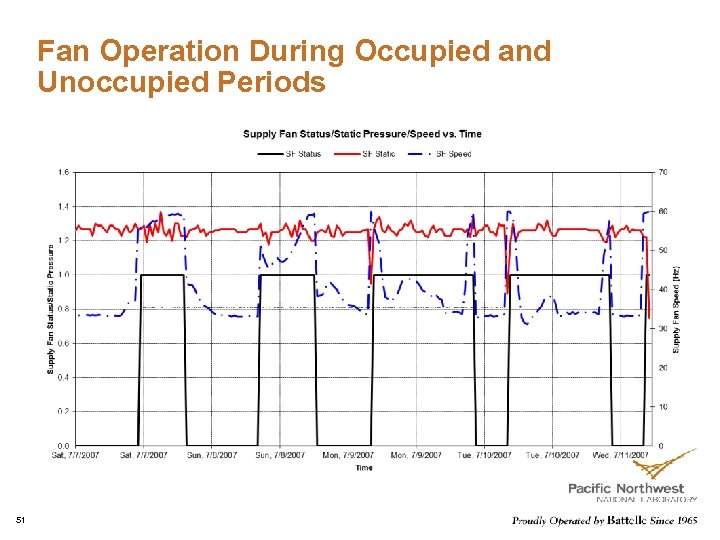
Occupancy Schedule (continued) Trended data for discharge static pressures should show readings of 0” or at least 50% (half) of normal (occupied) static pressure readings Trended data for main supply/return fan status should indicate “OFF” during unoccupied periods Trended data for VAV boxes occupied status should indicate “Unoccupied” during unoccupied periods Trended data for support systems (reheat pumps, reheat converters, reheat hot water boilers, chillers, towers, pumps, etc) should indicate they are turning off at night, if all areas of the building are also shut down 48
Occupancy Schedule (continued) Unoccupied periods should include weekends, holidays and night hours during work week periods If facility has sporadic use periods, this may require additional efforts to succeed at implementing setbacks Make sure the “tail” is not “wagging the dog” – janitors, special events, extreme weather events, overrides, etc How does your organization respond to trouble calls (occupant complaints)? How do you respond? Is the response a “band-aid” or a long-term solution? Overrides on schedules are not long-term solutions 49
Air Handler Data Analysis Key conditions to look for while analyzing the charts: Unoccupied or 24/7 operation Unoccupied hour setback Lower/higher than expected supply air temperature Excessive outdoor air intake During occupied periods During pre-/pre-cooling periods Significant reheat during summer/cooling season Is the supply fan modulating (if VAV) Higher than normal static pressure Set point and static pressure resets Economizer is not utilized or not working properly 50
Fan Operation During Occupied and Unoccupied Periods 51
Air Handler Data Analysis: Static Pressure Purpose: Determine whether the static pressure set point is too high or too low Approach: For each air handler, review a plot of the damper positions of all VAV units vs. time Look for situations where: Most dampers are nearly closed during cooling – static pressure too high Several VAV boxes on an air handler have dampers fully open – static pressure is too low and VAV boxes are not able to meet zone loads – starved boxes Dampers are not modulating as conditions change – VAV boxes that are not being controlled or not responding to control signals 52
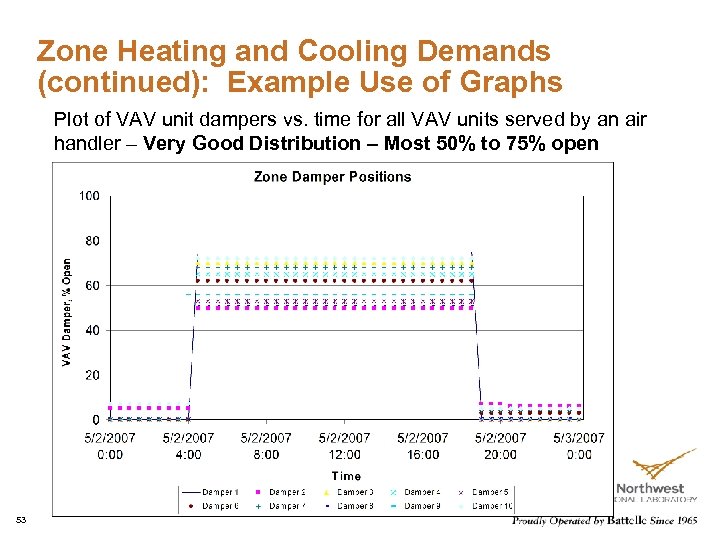
Zone Heating and Cooling Demands (continued): Example Use of Graphs Plot of VAV unit dampers vs. time for all VAV units served by an air handler – Very Good Distribution – Most 50% to 75% open 53
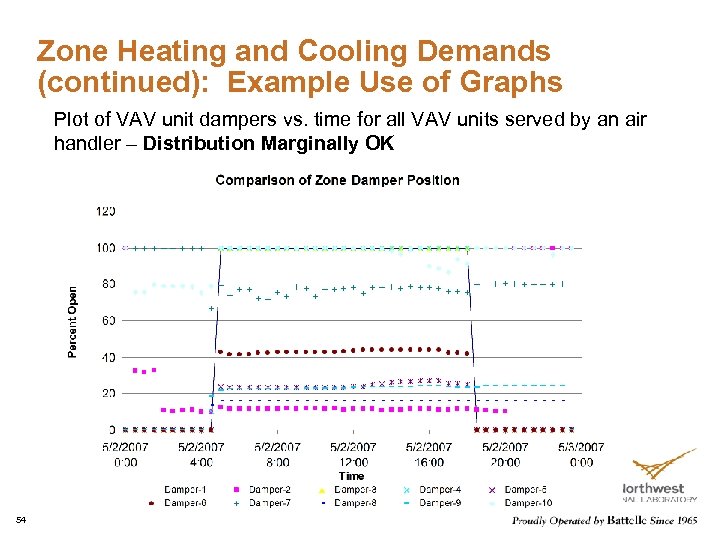
Zone Heating and Cooling Demands (continued): Example Use of Graphs Plot of VAV unit dampers vs. time for all VAV units served by an air handler – Distribution Marginally OK 54
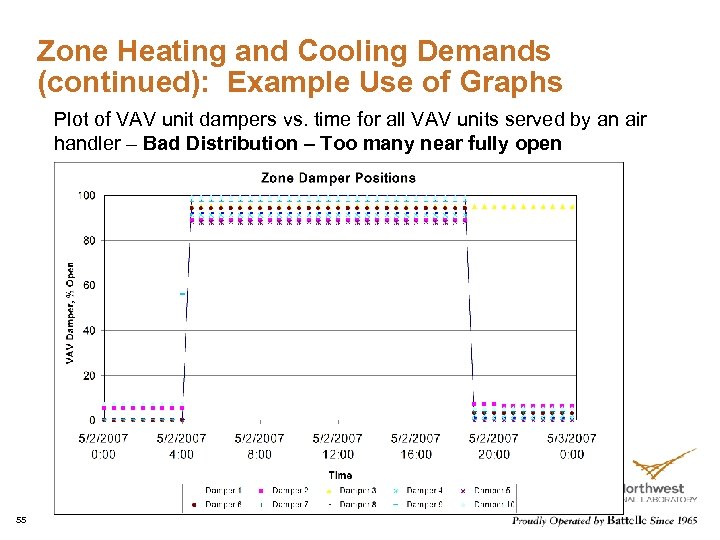
Zone Heating and Cooling Demands (continued): Example Use of Graphs Plot of VAV unit dampers vs. time for all VAV units served by an air handler – Bad Distribution – Too many near fully open 55
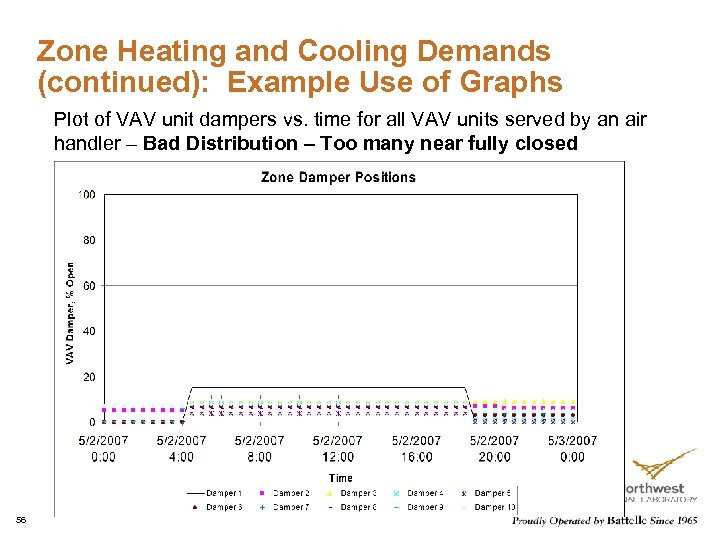
Zone Heating and Cooling Demands (continued): Example Use of Graphs Plot of VAV unit dampers vs. time for all VAV units served by an air handler – Bad Distribution – Too many near fully closed 56
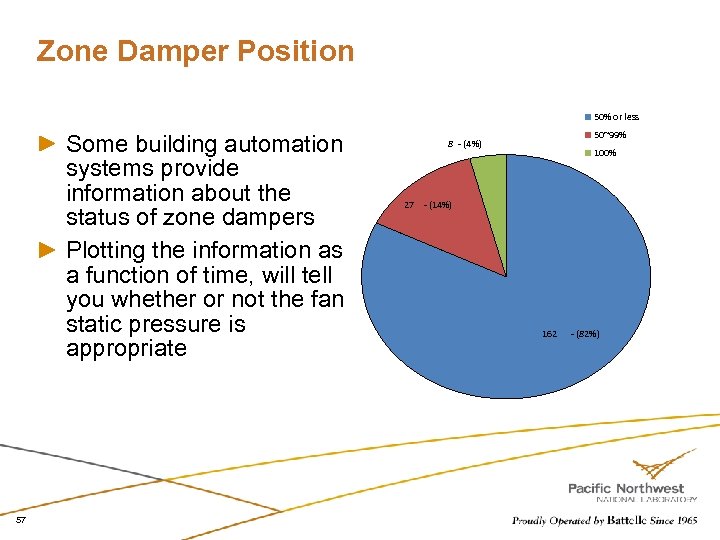
Zone Damper Position 50% or less Some building automation systems provide information about the status of zone dampers Plotting the information as a function of time, will tell you whether or not the fan static pressure is appropriate 57 50~99% 8 - (4%) 100% 27 - (14%) 162 - (82%)
Air Handler Data Analysis: Discharge Set point Purpose Review discharge air temperatures for the air handlers Determine whether discharge air temperatures are maintained relatively stable Determine whether the discharge-air temperatures are too cool or too warm Approach For each air handler monitored, review plots of discharge-air temperature and discharge-air set point vs. time and supply-air temperature vs. supply-air set point Look for deviations between discharge-air temperatures and set points Look for unusually high (> 70 F) or low (< 55 F) discharge-air temperatures 58
Air Handling Unit: Minimum Outdoor-Air Operations Purpose Review minimum outdoor-air operations Determine whether sufficient outdoor air is being supplied for ventilation Determine whether more outdoor air than needed is being brought in at times (e. g. , when the outdoor-air temperature < 40 F or > 60 F or when the zones served are unoccupied) Determine whether outdoor-air dampers close during night and weekend setback and during startup mode in the morning. 59
Air Handling Unit: Minimum Outdoor-Air Operations (continued) Approach For each air-side economizer, review plots of: Outdoor-air fraction (OAF) vs. time Outdoor-air damper and occupancy mode vs. time Outdoor-air fraction vs. fan speed (if available) Determine if OAF > minimum OAF for ventilation when the system is not economizing Determine whether outdoor-air ventilation is being provided when the building is unoccupied and ventilation is not required for some other reason If OAF and fan speed are tracking each other, it is an indication of return-air problems 20% damper position is never 20% outdoor air 60
Air Handling Unit: Minimum Outdoor-Air Operations (continued) Potential issues to identify Insufficient outdoor-air ventilation provided – minimum outdoor-air fraction (OAF) is too low Too much outdoor-air ventilation provided when the air handler is not economizing Too much outdoor-air ventilation provided during unoccupied times (nights and weekends), during setback Use air fraction to find % of outside air Works if air is mixed relatively evenly OAF = ((Return-Mixed)/(Return-Outside))*100 Add into code for all air handlers and track history Especially schools and other public spaces 61
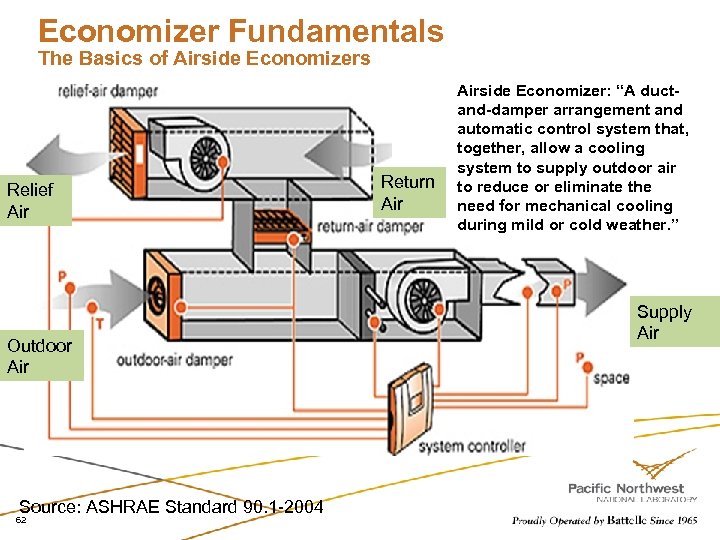
Economizer Fundamentals The Basics of Airside Economizers Relief Air Outdoor Air Source: ASHRAE Standard 90. 1 -2004 62 Return Airside Economizer: “A ductand-damper arrangement and automatic control system that, together, allow a cooling system to supply outdoor air to reduce or eliminate the need for mechanical cooling during mild or cold weather. ” Supply Air
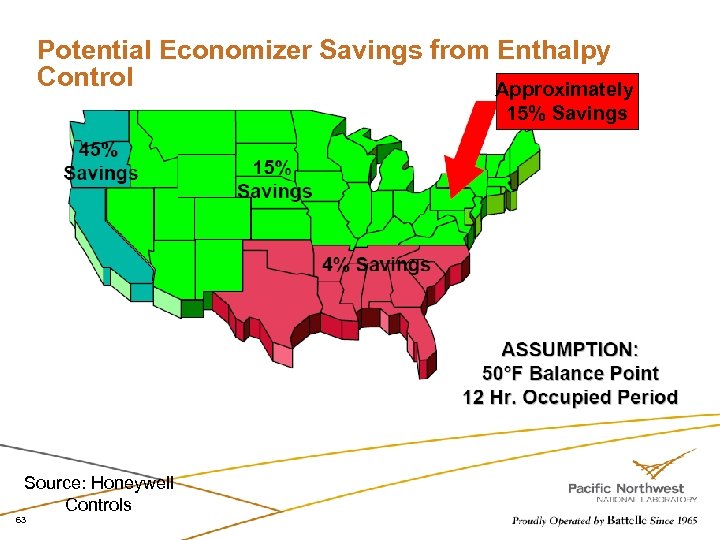
Potential Economizer Savings from Enthalpy Control Approximately 15% Savings Source: Honeywell Controls 63
Economizer Operation Purpose To determine whether air-side economizers are operating properly Do economizers open, close, and/or modulate under appropriate conditions? At what temperature compared to the discharge temperature? At what apparent control signal values do the economizers open? Does the cooling coil operate (chilled water flow) during economizing? 64
Economizer Operation (continued) Approach For each air-side economizer, review plots of: Outdoor-air temperature, mixed-air temperature, return-air temperature and discharge-air temperature vs. time Outdoor-air damper position (% open), outdoor-air temperature, and return-air temperature vs. time Outdoor-air damper position and chilled-water valve position (% open) vs. time Look for outdoor-air dampers (economizer) open at unusual times of day or under unusual outdoor temperature conditions Look for outdoor-air dampers not open to economizer under favorable conditions (outdoor-air temperature between 40 F and 60 F) Look for outdoor-air damper not closing to minimum position for freeze prevention when outdoor temperature is less than about 40 F 65
Economizer Operation (continued) Potential issues to identify Incorrect economizer operation – numerous causes (identified later during on-site work) Incorrect control strategy Stuck dampers Disconnected or damaged linkages Failed actuator Disconnected wires Failed, uncalibrated or miscalibrated sensors 2 X 4 in damper Others? 66
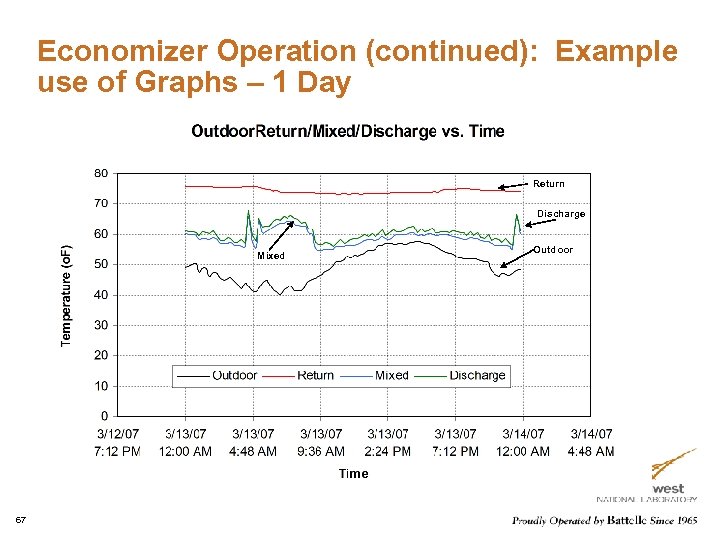
Economizer Operation (continued): Example use of Graphs – 1 Day Return Discharge Mixed 67 Outdoor
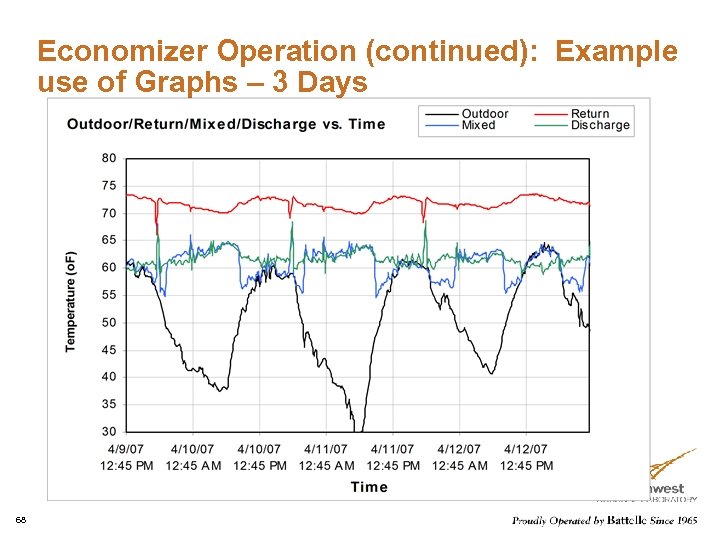
Economizer Operation (continued): Example use of Graphs – 3 Days 68
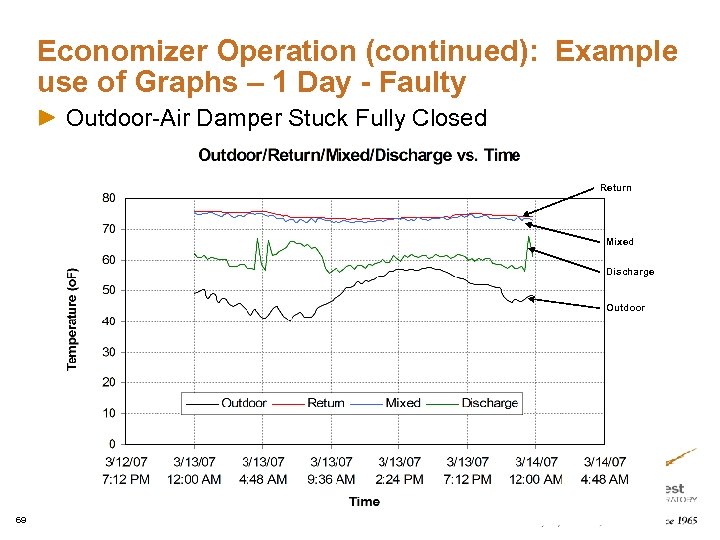
Economizer Operation (continued): Example use of Graphs – 1 Day - Faulty Outdoor-Air Damper Stuck Fully Closed Return Mixed Discharge Outdoor 69
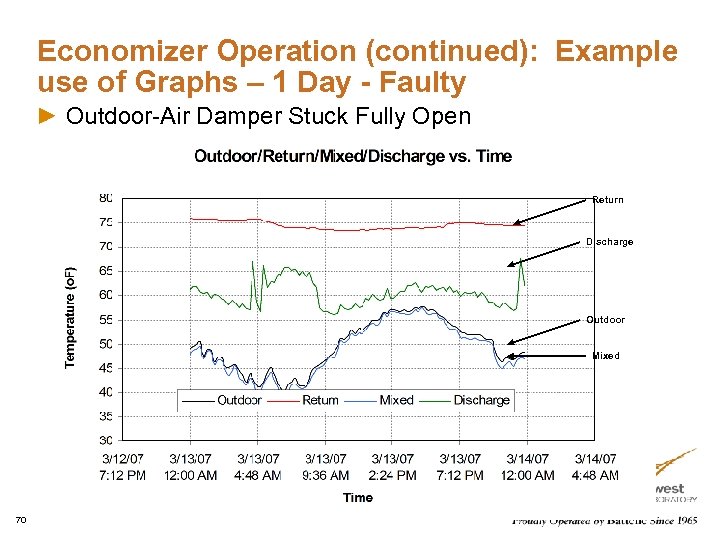
Economizer Operation (continued): Example use of Graphs – 1 Day - Faulty Outdoor-Air Damper Stuck Fully Open Return Discharge Outdoor Mixed 70
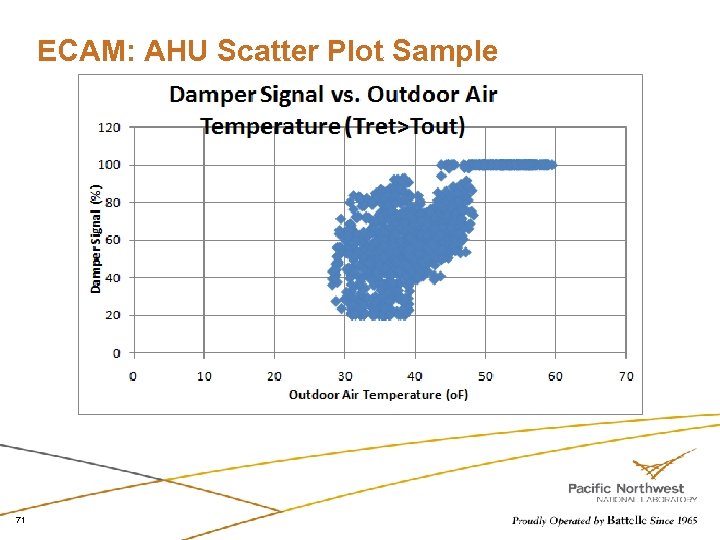
ECAM: AHU Scatter Plot Sample 71
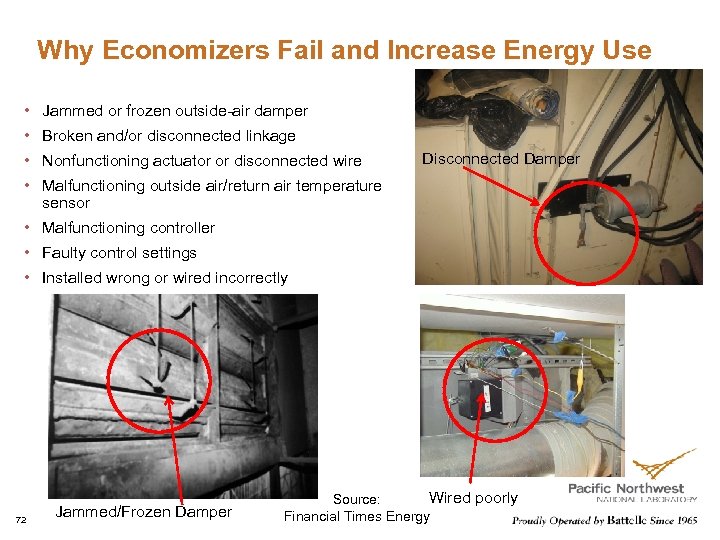
Why Economizers Fail and Increase Energy Use • Jammed or frozen outside-air damper • Broken and/or disconnected linkage • Nonfunctioning actuator or disconnected wire Disconnected Damper • Malfunctioning outside air/return air temperature sensor • Malfunctioning controller • Faulty control settings • Installed wrong or wired incorrectly 72 Jammed/Frozen Damper Wired poorly Source: Financial Times Energy
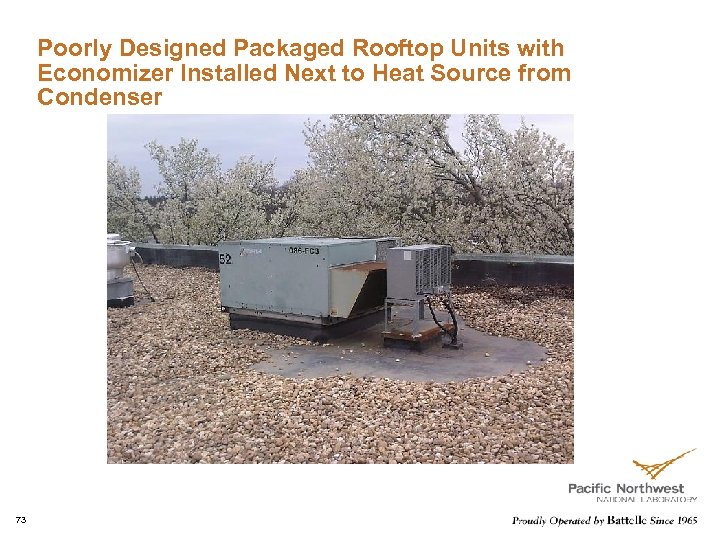
Poorly Designed Packaged Rooftop Units with Economizer Installed Next to Heat Source from Condenser 73
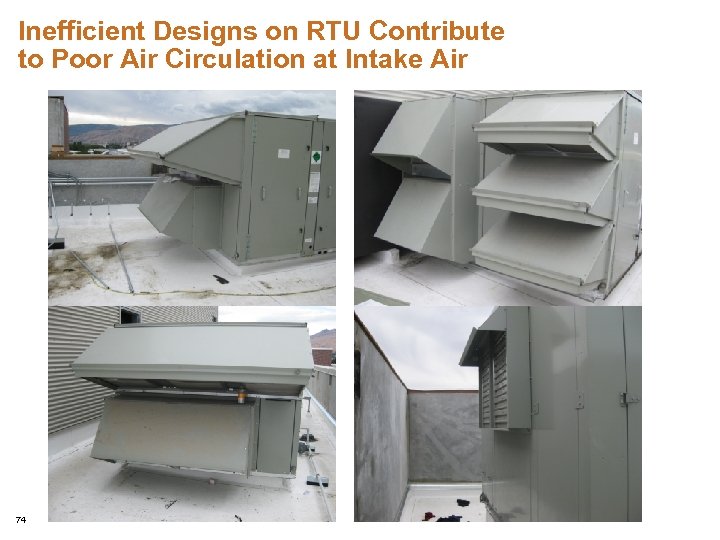
Inefficient Designs on RTU Contribute to Poor Air Circulation at Intake Air 74
Air Handling Unit: Outdoor-Air Lockouts for Heating & Cooling (continued) Potential issues to identify Air-handler heating and cooling coils operating simultaneously Heating and cooling lockouts possibly overlapping (need to be confirmed in control-code settings during on-site re-tuning) Unreasonable values are set for the heating and cooling lockouts 75
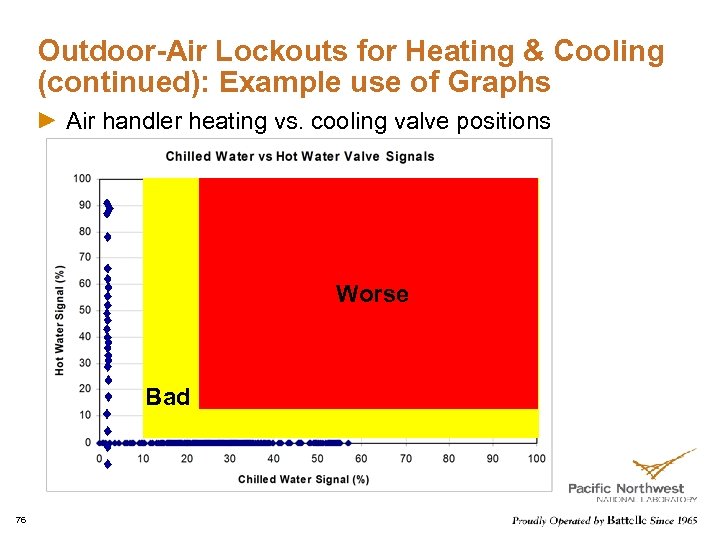
Outdoor-Air Lockouts for Heating & Cooling (continued): Example use of Graphs Air handler heating vs. cooling valve positions Worse Bad 76
Zone Heating and Cooling Demands Purpose Get a feel for how many zones on each monitored air handler are heating and how many are cooling at the same time Get a sense of which areas are heating and which are cooling at any given time Determine if any individual zones are heating and cooling at the same time Others? 77
Zone Heating and Cooling Demands (continued) Approach For each air handler, count the number of zones served that are in heating mode and those in cooling mode under various conditions (e. g. , time of day and approximate outdoor air temperature). Use a plot of number of zones in each mode and the outdoor temperature vs. time Note which areas of the building (e. g. , interior core vs. perimeter zones or zones facing certain directions) are in heating and cooling Look for any monitored zones that are using both heating and cooling over relatively short time periods or cycling between heating and cooling 78
Zone Heating and Cooling Demands (continued) Potential issues to identify Supply-air temperature too cool or too warm No use of supply-air reset Certain zones (e. g. , corner offices) driving air handler operation Some zones out of control, oscillating between heating and cooling Others 79
Importance of Terminal Units Re-tuning Terminal boxes are major building HVAC components and directly impact comfort and energy costs Terminal boxes control may cause occupant discomfort and waste energy, if they have inappropriate operation and control Improper minimum air flow setting and control may result in significant simultaneous heating and cooling, extra fan power consumption and higher energy consumption in the summer 80
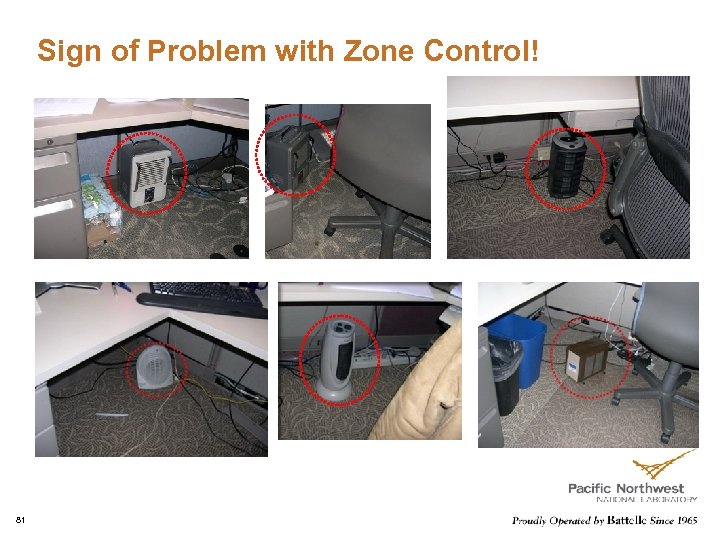
Sign of Problem with Zone Control! 81
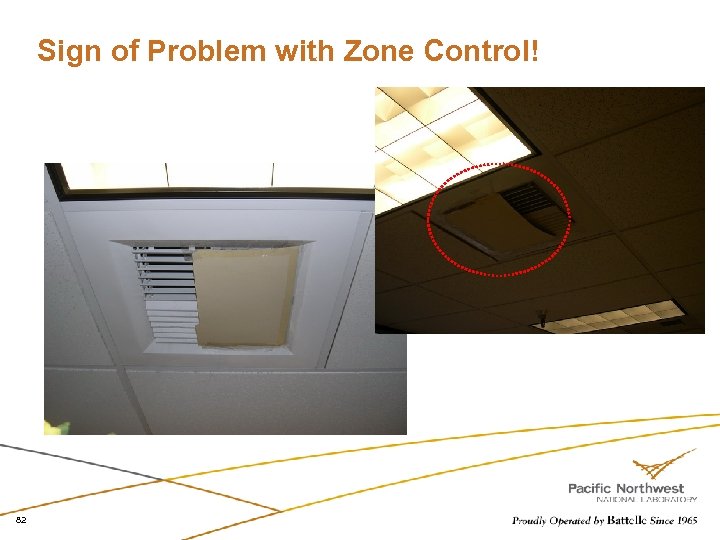
Sign of Problem with Zone Control! 82
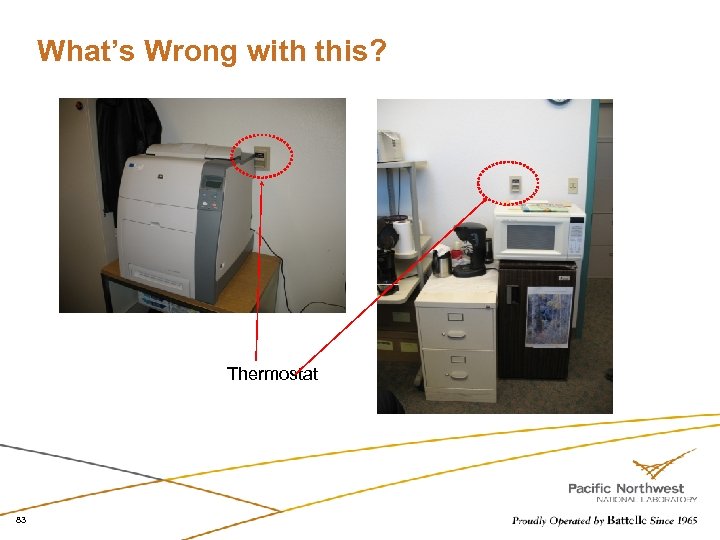
What’s Wrong with this? Thermostat 83
Central Plant and Whole Building Meter Profiles Training also covers Chiller and boiler plants Meter profiles 84
Re-tuning Examples 85
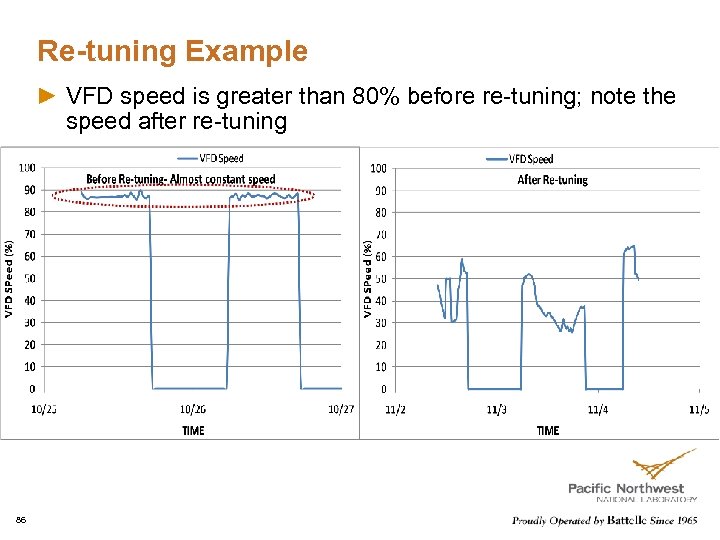
Re-tuning Example VFD speed is greater than 80% before re-tuning; note the speed after re-tuning 86
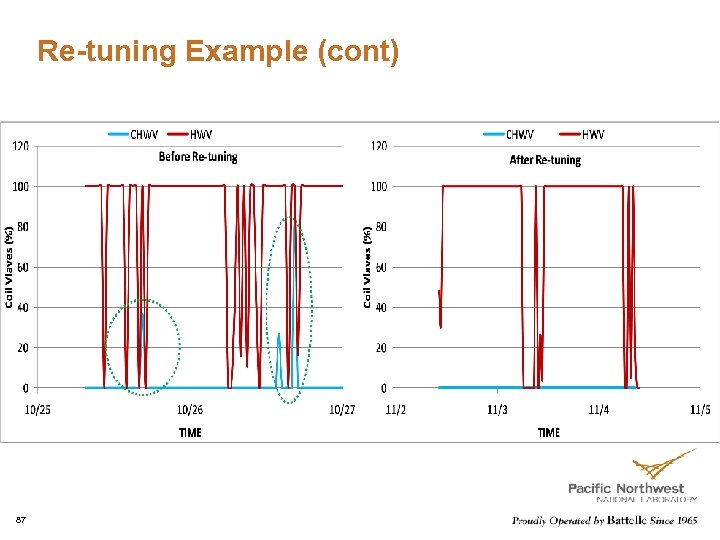
Re-tuning Example (cont) Lockout chilled water consumption in winter 87
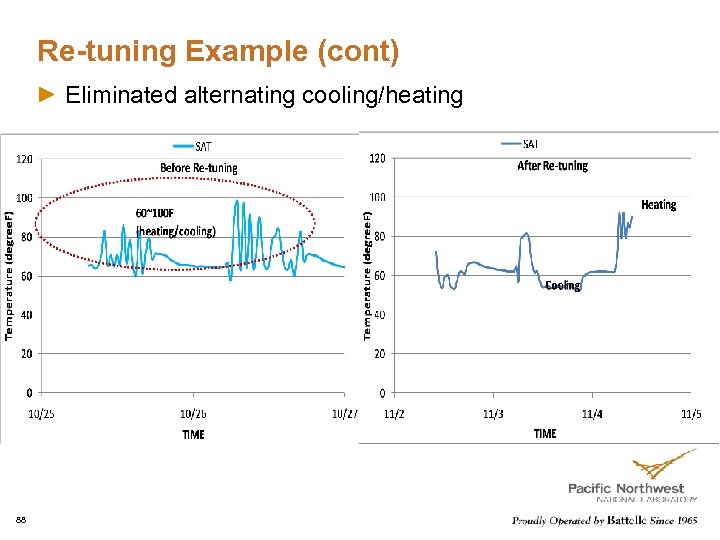
Re-tuning Example (cont) Eliminated alternating cooling/heating 88
Six Primary Steps of Re-Tuning Collecting initial building information: Basic building information Pre-Re-Tuning Phase: Trend-data collection and analysis Building Walk Down: Getting to know the building Re-Tuning: Identifying and correcting operations problems Post-Re-Tuning: Reporting re-tuning findings Savings Analysis: Determining and reporting the impacts 89
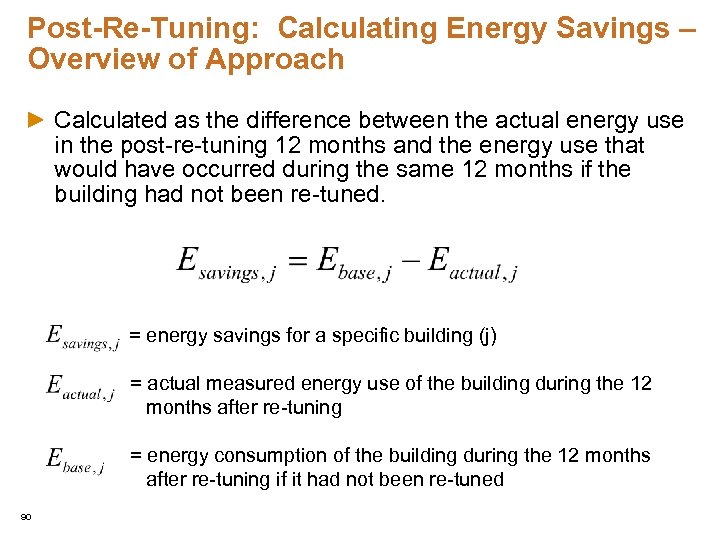
Post-Re-Tuning: Calculating Energy Savings – Overview of Approach Calculated as the difference between the actual energy use in the post-re-tuning 12 months and the energy use that would have occurred during the same 12 months if the building had not been re-tuned. = energy savings for a specific building (j) = actual measured energy use of the building during the 12 months after re-tuning = energy consumption of the building during the 12 months after re-tuning if it had not been re-tuned 90
Highlights of Re-Tuning Every set point adjustment made will have an impact of some sort on the utility meter Can save energy and keep occupants comfortable It takes time to tune a building There are no magic set points that work all the time Always monitor the utility meters (gas & electric) to see what affect you have had Look at the big picture when making adjustments Watch the meter profiles weekly Learn and know the building’s personality 91

Questions? 92
Скачать презентацию Commercial Building Re-tuning Overview and Key Operational Faults
3c650cbd521bbd5d96a02fda778a0521.ppt