


 Скачать презентацию CMSC 601 Time Management Success Strategies Adapted
1a37fabe55b110e93e275a37e8ac3c8a.ppt
- Количество слайдов: 22
 CMSC 601: Time Management & Success Strategies Adapted from slides by Prof. Marie des. Jardins March 2011
 Sources • Robert L. Peters, Getting What You Came For: The Smart Student’s Guide to Earning a Master’s or Ph. D. (Revised Edition). NY: Farrar, Straus, and Giroux, 1997 • Richard M. Reis, Tomorrow’s Professor: Preparing for Academic Careers in Science and Engineering, IEEE Press • J. Cuny, Time management and family issues, CRA-W Workshops • H. T. Kung, Useful things to know about Ph. D. thesis research, CMU Immigration Course, 87
 Outline • Early in your graduate student career • Late in your graduate student career • General
 How long is a graduate career? • Lots of variables: MS vs. Ph. D, part-time vs. full-time, discipline, school, student characteristics, advisor characteristics, age, etc. • Typical mean-time-to-finish in Computer Science, full-time, starting with a BS – MS: two years – Ph. D: five years
 The First Two Years (or So)
 What Matters? • Taking core classes is important. . . –. . . but not as important as finding an advisor. . . • . . . and a topic. . . –. . . which means that classes in your area matter most • Grades are important. . . –. . . but not as important as research
 Peters: Things to Do Right Away • Buy a good computer • Set up a calendar system • Set up a filing system • Keep a log of daily progress • Apply for fellowships • Set up regular meetings with your advisor • Create or join a grad student support group • Start looking for a thesis topic
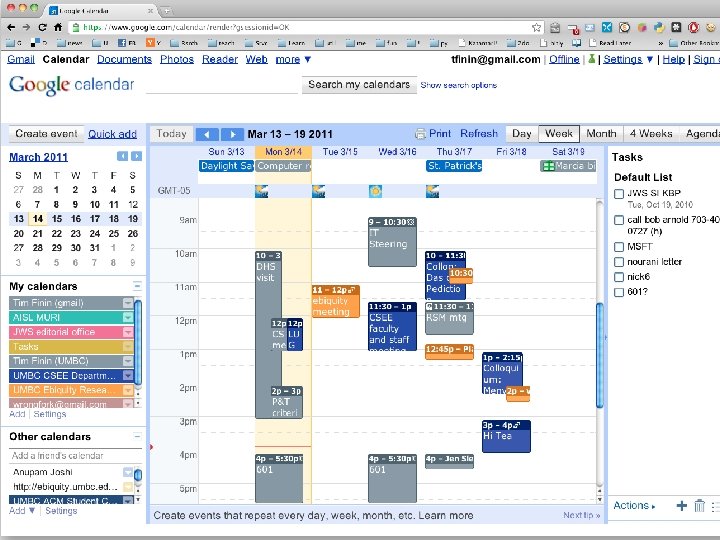
 Electronic or Paper Calendar? • Use whatever works for you • Many technically savvy people still prefer a traditional date book • Electronic calendars have their advantages • Google calendar seems to be achieving a dominant position – UMBC will switch to using Google calendar as its official calendar for staff – Its well supported on many devices (e. g. , phones)
 Balancing Classes and Research • This is the biggest challenge of the first one to two years • Our old Ph. D comprehensive exam system emphasized classes – Must pass three core exams and two elective exams. Two tries. • Our new Ph. D portfolio system privileges research accomplishments – Get good grades in core classes. Show progress on research: papers, proposal, etc.
 Last chance to take classes • You probably won’t take any semester-long classes again – You’ll take tutorials and maybe a short course or two – You may teach a course you never had, which is a good way to learn • If you think you should really understand a topic in depth for your future career, take the course now
 The Third (or So) Year and Beyond
 The three most important things • Finishing your dissertation
 Graduate School Characteristics • Unstructured environment • Few landmarks or milestones • Have to balance many things • Reading • Thinking • Sketching out ideas • Talking to colleagues, advisor • Designing and implementing systems • Learning your craft • Empirical evaluation • Theoretical analysis • Writing
 Time Management • Divide and conquer – Make a list of tasks and refine them until they’re doable • Do something every day – Have easy tasks and hard tasks on your To-Do list • Set weekly goals – Review these with your advisor and/or “research buddy” • Set deadlines – Even if artificial, they help to create structure • Make time for other important activities – Prof. service, extracurricular activities, exercise, socializing • Keep a journal and/or notebook – Jot down stray thoughts; review to assess your progress
 Making Steady Progress This is the biggest challenge of the third year and beyond
 General Tips
 Prioritize • What is most important? • What is most urgent? • Long-term vs. short-term priorities –Use your long-term goals to prioritize shortterm tasks –Plan for the year/month/week, not for the day • Avoid extreme reactivity • Avoid queue starvation
 Organization Systems • Timeline for graduate school – Classes, comps/portolio, prelims/proposal, deadlines • Monthly calendar • Weekly schedule • Daily log • Prioritized and organized task list – Bring this up to date periodically • Peters suggests monthly progress reports – Weekly progress reports, emailed to your advisor, can be very helpful for both of you
 Things to Track • Deadlines for filing paperwork, forms, etc. • Conference deadlines – Know what the important conferences are, when they are held, and when the paper deadlines are • Course assignments and exams • Meetings • Use an electronic calendar effectively • Put items with deadlines on your electronic calendar with one or more email and/or popup alerts
 Keep a notebook • Many people use a notebook for meeting notes and research ideas – Save them as they fill up for later reference • Others always have a laptop or tablet and take notes on that – Searchable, but not good for sketches • Others use random scraps of paper to take notes and then lose them • Find out what works for you and try to be consistent
 Filing • You will probably have to do this both on paper and electronically! • Papers you read –organized by topic or author’s last name –cross-indexed in a Bib. Te. X-like database • Papers you write –organized by topic or venue • Research ideas • Back up your electronic records or keep them on a server or in the cloud