 Скачать презентацию Click to edit Master title style IBM Pure
f34767c1ef67ba5c722f992fbe63b897.ppt
- Количество слайдов: 39



Click to edit Master title style IBM Pure. Data System for Operational Analytics James Cho Chief Architect Pure. Data Transaction System And Operational Analytics Solutions Session Code:
Click to edit Master title style Agenda • Introduction Pure Systems • Pure. Data for Operational Analytics • Smart Analytics 5600 • Questions/Discussion
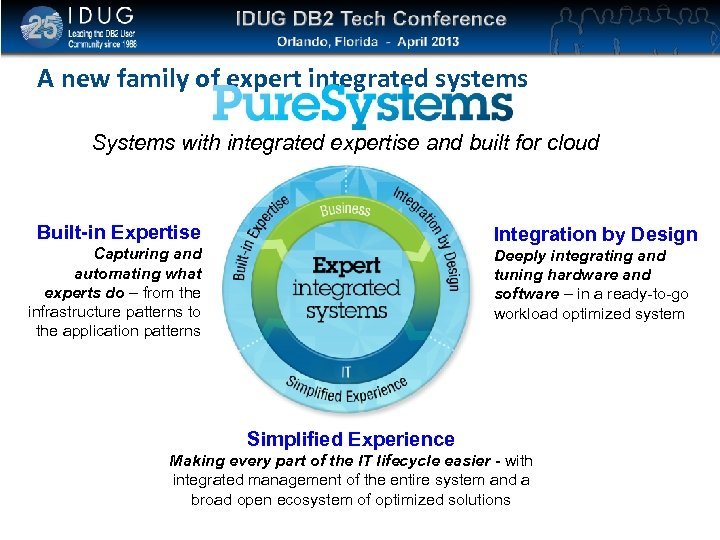
Click to edit Master title style A new family of expert integrated systems Systems with integrated expertise and built for cloud Built-in Expertise Integration by Design Capturing and automating what experts do – from the infrastructure patterns to the application patterns Deeply integrating and tuning hardware and software – in a ready-to-go workload optimized system Simplified Experience Making every part of the IT lifecycle easier - with integrated management of the entire system and a broad open ecosystem of optimized solutions
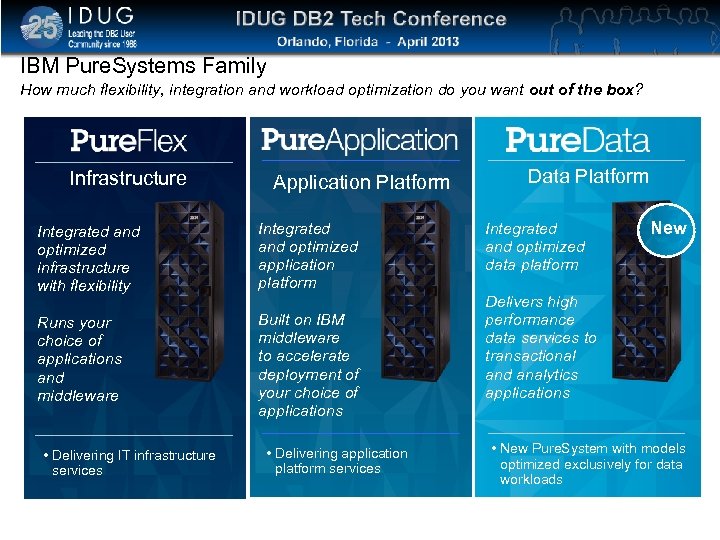
Click to edit Master title style IBM Pure. Systems Family How much flexibility, integration and workload optimization do you want out of the box? Infrastructure Application Platform Integrated and optimized infrastructure with flexibility Integrated and optimized application platform Runs your choice of applications and middleware Built on IBM middleware to accelerate deployment of your choice of applications • Delivering IT infrastructure services • Delivering application platform services Data Platform Integrated and optimized data platform New Delivers high performance data services to transactional and analytics applications • New Pure. System with models optimized exclusively for data workloads
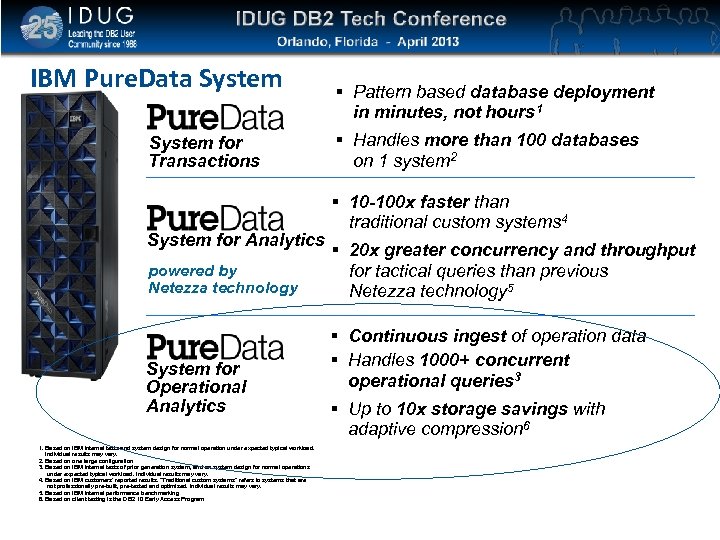
Click to edit Master title style IBM Pure. Data System for Transactions System for Analytics powered by Netezza technology System for Operational Analytics 1. Based on IBM internal tests and system design for normal operation under expected typical workload. Individual results may vary. 2. Based on one large configuration 3. Based on IBM internal tests of prior generation system, and on system design for normal operations under expected typical workload. Individual results may vary. 4. Based on IBM customers' reported results. "Traditional custom systems" refers to systems that are not professionally pre-built, pre-tested and optimized. Individual results may vary. 5. Based on IBM internal performance benchmarking 6. Based on client testing is the DB 2 10 Early Access Program Pattern based database deployment in minutes, not hours 1 Handles more than 100 databases on 1 system 2 10 -100 x faster than traditional custom systems 4 20 x greater concurrency and throughput for tactical queries than previous Netezza technology 5 Continuous ingest of operation data Handles 1000+ concurrent operational queries 3 Up to 10 x storage savings with adaptive compression 6
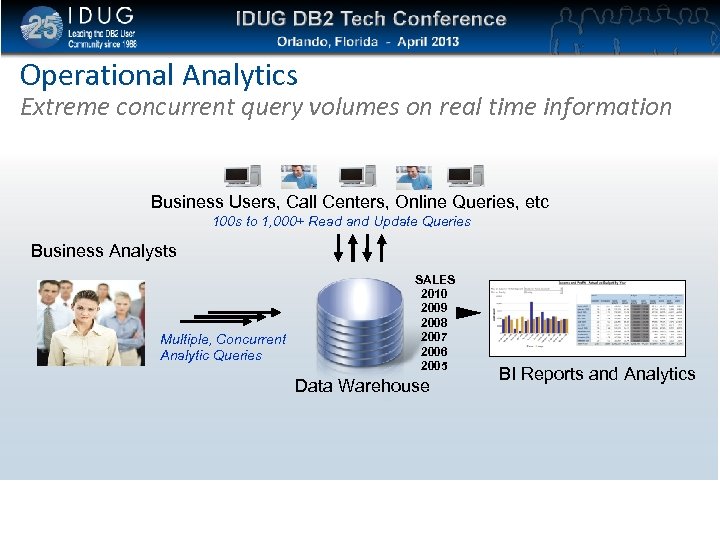
Click to edit Master title style Operational Analytics Extreme concurrent query volumes on real time information Business Users, Call Centers, Online Queries, etc 100 s to 1, 000+ Read and Update Queries Business Analysts Multiple, Concurrent Analytic Queries SALES 2010 2009 2008 2007 2006 2005 Data Warehouse BI Reports and Analytics
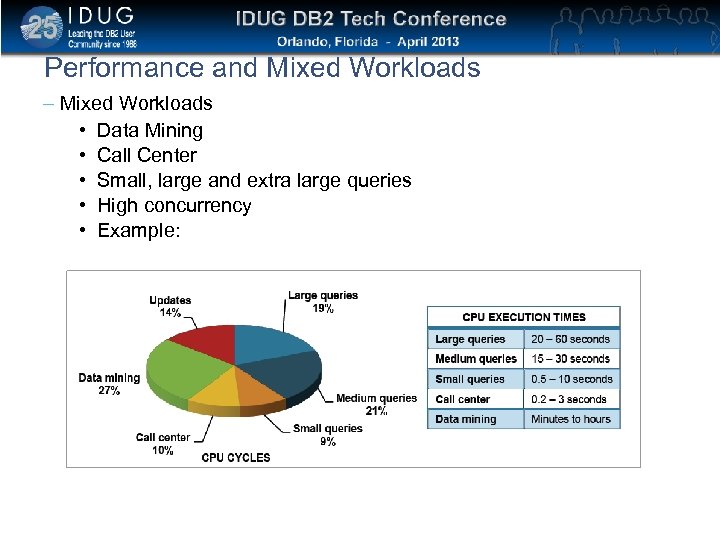
Click to edit Master title style Performance and Mixed Workloads – Mixed Workloads • Data Mining • Call Center • Small, large and extra large queries • High concurrency • Example:
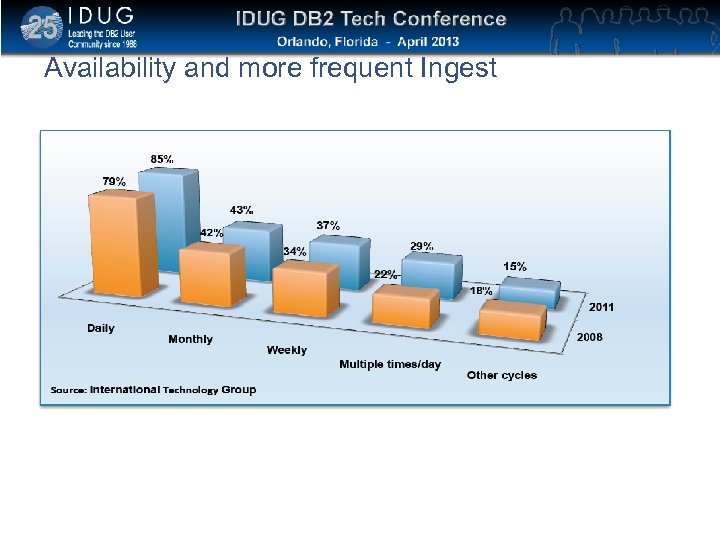
Click to edit Master title style Availability and more frequent Ingest
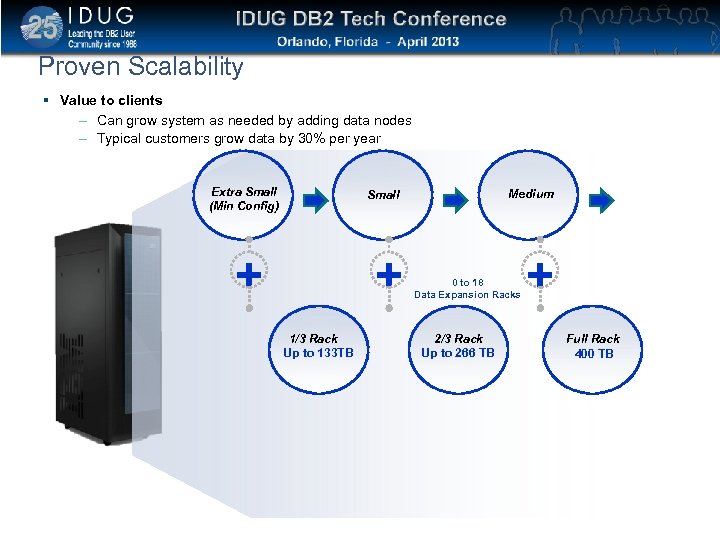
Click to edit Master title style Proven Scalability Value to clients – Can grow system as needed by adding data nodes – Typical customers grow data by 30% per year Extra Small (Min Config) Medium Small + + 1/3 Rack Up to 133 TB 0 to 18 Data Expansion Racks 2/3 Rack Up to 266 TB + Full Rack 400 TB
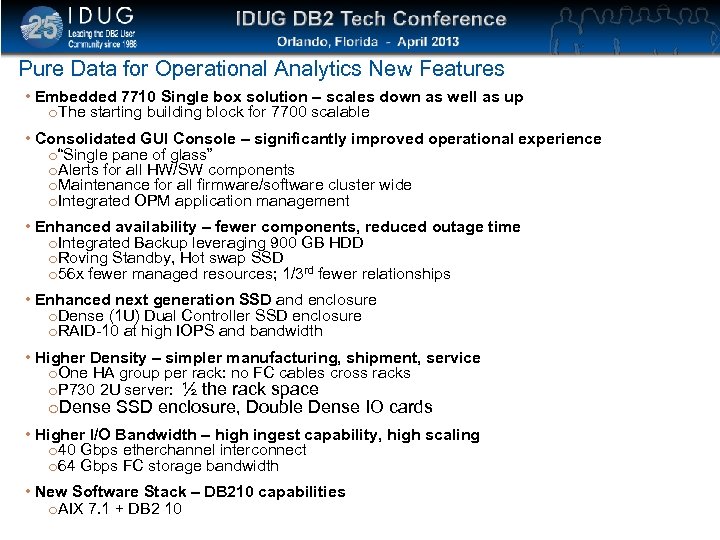
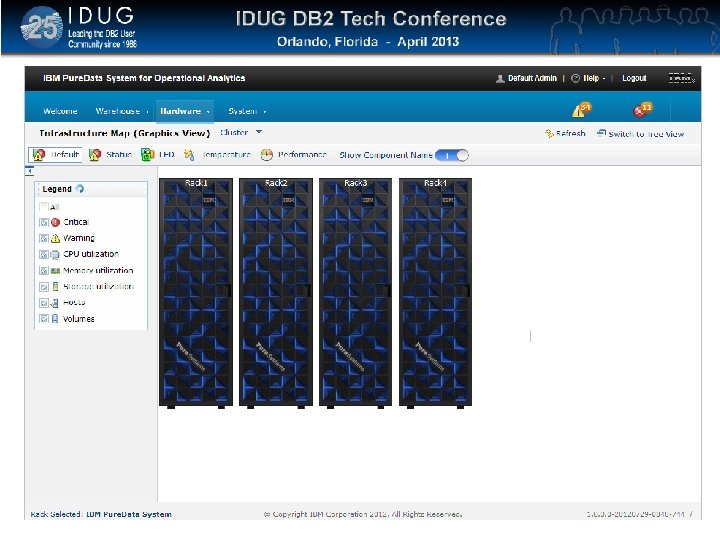
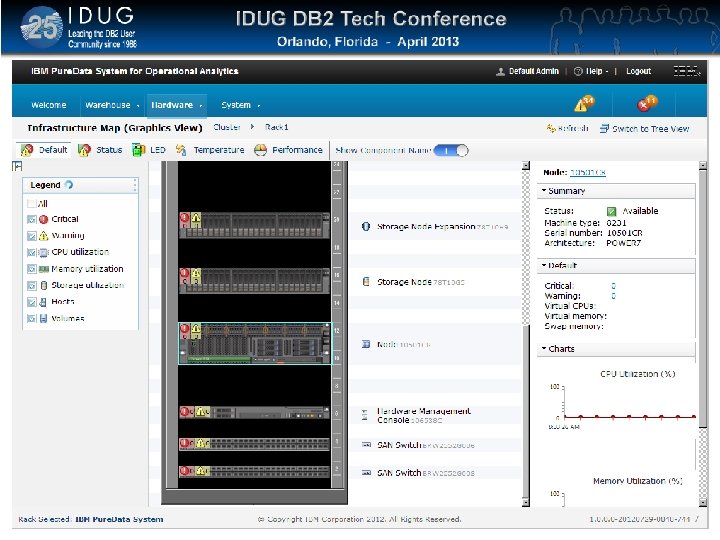
Click to edit Master title style Pure Data for Operational Analytics New Features • Embedded 7710 Single box solution – scales down as well as up o. The starting building block for 7700 scalable • Consolidated GUI Console – significantly improved operational experience o“Single pane of glass” o. Alerts for all HW/SW components o. Maintenance for all firmware/software cluster wide o. Integrated OPM application management • Enhanced availability – fewer components, reduced outage time o. Integrated Backup leveraging 900 GB HDD o. Roving Standby, Hot swap SSD o 56 x fewer managed resources; 1/3 rd fewer relationships • Enhanced next generation SSD and enclosure o. Dense (1 U) Dual Controller SSD enclosure o. RAID-10 at high IOPS and bandwidth • Higher Density – simpler manufacturing, shipment, service o. One HA group per rack: no FC cables cross racks o. P 730 2 U server: ½ the rack space o. Dense SSD enclosure, Double Dense IO cards • Higher I/O Bandwidth – high ingest capability, high scaling o 40 Gbps etherchannel interconnect o 64 Gbps FC storage bandwidth • New Software Stack – DB 210 capabilities o. AIX 7. 1 + DB 2 10
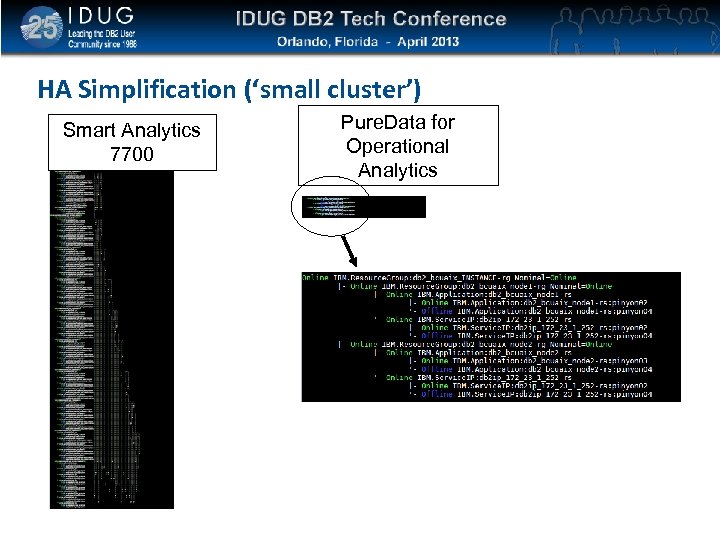
Click to edit Master title style HA Simplification (‘small cluster’) Smart Analytics 7700 Pure. Data for Operational Analytics
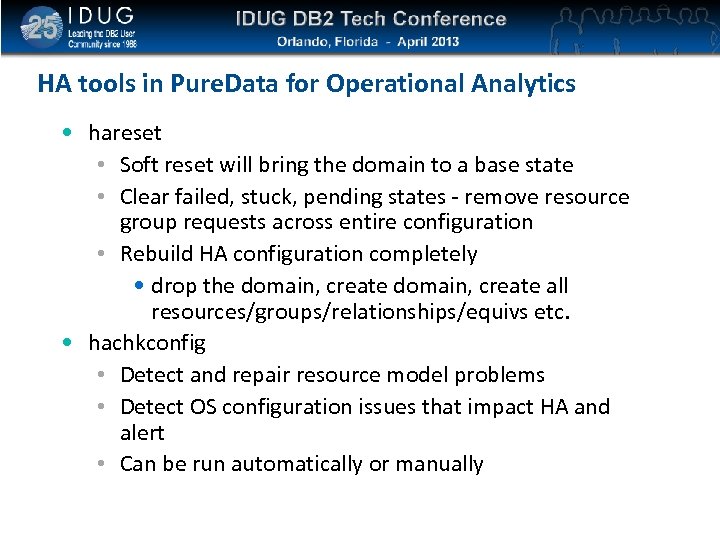
Click to edit Master title style HA tools in Pure. Data for Operational Analytics • hareset • Soft reset will bring the domain to a base state • Clear failed, stuck, pending states - remove resource group requests across entire configuration • Rebuild HA configuration completely • drop the domain, create all resources/groups/relationships/equivs etc. • hachkconfig • Detect and repair resource model problems • Detect OS configuration issues that impact HA and alert • Can be run automatically or manually
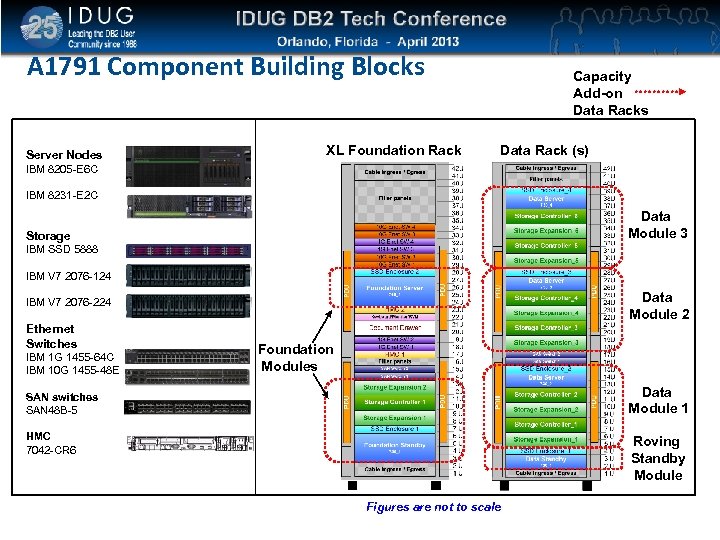
Click to edit Master title style A 1791 Component Building Blocks Server Nodes XL Foundation Rack Capacity Add-on Data Racks Data Rack (s) IBM 8205 -E 6 C IBM 8231 -E 2 C Data Module 3 Storage IBM SSD 5888 IBM V 7 2076 -124 Data Module 2 IBM V 7 2076 -224 Ethernet Switches IBM 1 G 1455 -64 C IBM 10 G 1455 -48 E Foundation Modules Data Module 1 SAN switches SAN 48 B-5 HMC 7042 -CR 6 Roving Standby Module Figures are not to scale
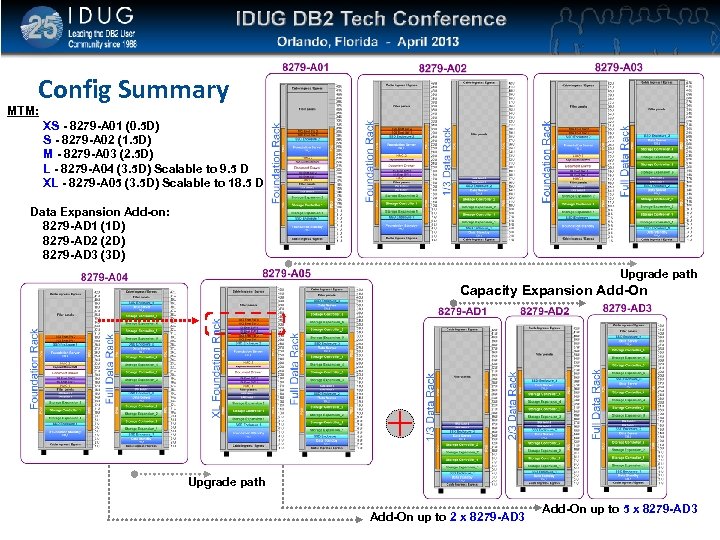
Click to edit Master title style Config Summary MTM: XS - 8279 -A 01 (0. 5 D) S - 8279 -A 02 (1. 5 D) M - 8279 -A 03 (2. 5 D) L - 8279 -A 04 (3. 5 D) Scalable to 9. 5 D XL - 8279 -A 05 (3. 5 D) Scalable to 18. 5 D Data Expansion Add-on: 8279 -AD 1 (1 D) 8279 -AD 2 (2 D) 8279 -AD 3 (3 D) Upgrade path Capacity Expansion Add-On Upgrade path Add-On up to 2 x 8279 -AD 3 Add-On up to 5 x 8279 -AD 3
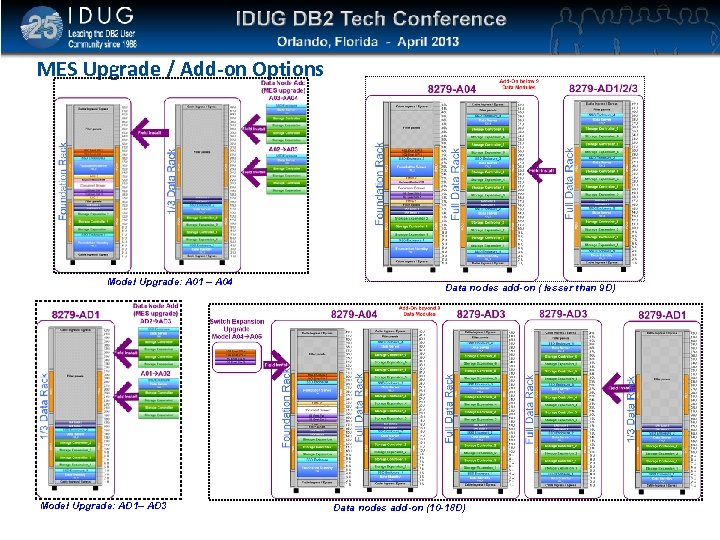
Click to edit Master title style MES Upgrade / Add-on Options Model Upgrade: A 01 – A 04 Model Upgrade: AD 1– AD 3 Data nodes add-on ( lesser than 9 D) Data nodes add-on (10 -18 D)
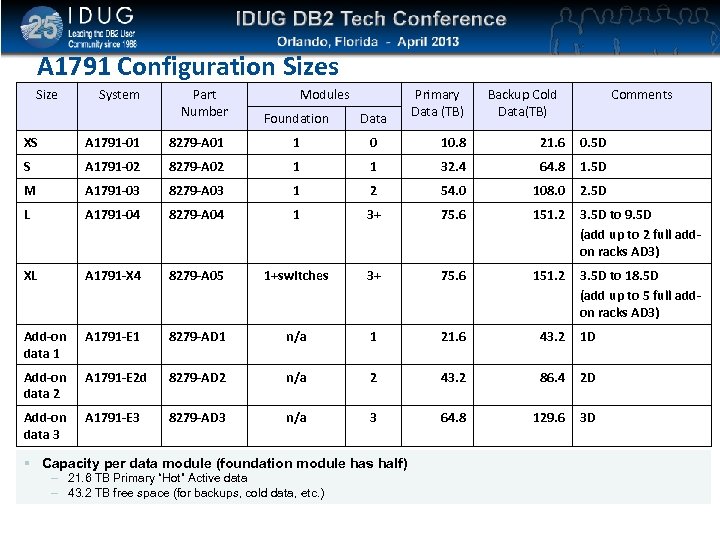
Click to edit Master title style A 1791 Configuration Sizes Size System Part Number Modules Foundation Data Primary Data (TB) Backup Cold Data(TB) Comments XS A 1791 -01 8279 -A 01 1 0 10. 8 21. 6 0. 5 D S A 1791 -02 8279 -A 02 1 1 32. 4 64. 8 1. 5 D M A 1791 -03 8279 -A 03 1 2 54. 0 108. 0 2. 5 D L A 1791 -04 8279 -A 04 1 3+ 75. 6 151. 2 3. 5 D to 9. 5 D (add up to 2 full addon racks AD 3) XL A 1791 -X 4 8279 -A 05 1+switches 3+ 75. 6 151. 2 3. 5 D to 18. 5 D (add up to 5 full addon racks AD 3) Add-on data 1 A 1791 -E 1 8279 -AD 1 n/a 1 21. 6 43. 2 1 D Add-on data 2 A 1791 -E 2 d 8279 -AD 2 n/a 2 43. 2 86. 4 2 D Add-on data 3 A 1791 -E 3 8279 -AD 3 n/a 3 64. 8 129. 6 3 D Capacity per data module (foundation module has half) – 21. 6 TB Primary “Hot” Active data – 43. 2 TB free space (for backups, cold data, etc. )
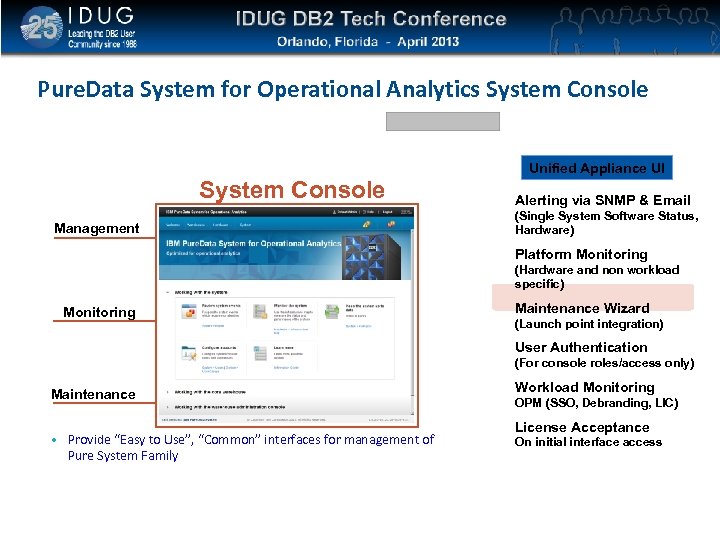
Click to edit Master title style Pure. Data System for Operational Analytics System Console Unified Appliance UI System Console Management Alerting via SNMP & Email (Single System Software Status, Hardware) Platform Monitoring (Hardware and non workload specific) Monitoring Maintenance Wizard (Launch point integration) User Authentication (For console roles/access only) Maintenance • Provide “Easy to Use”, “Common” interfaces for management of Pure System Family Workload Monitoring OPM (SSO, Debranding, LIC) License Acceptance On initial interface access
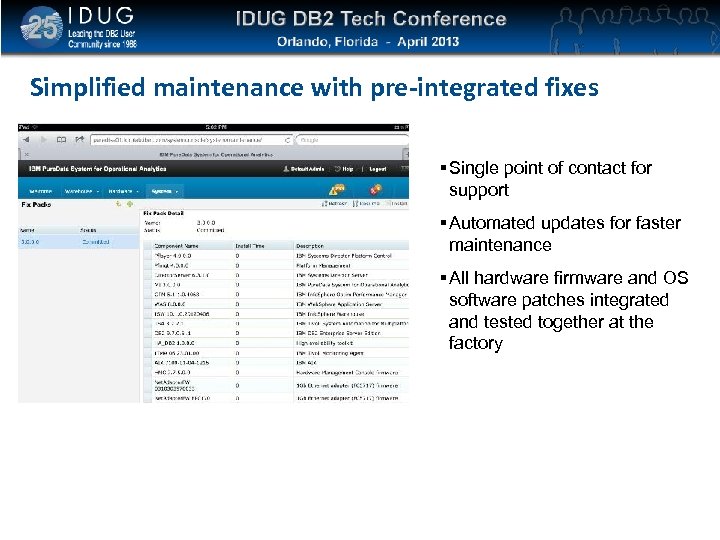
Click to edit Master title style Simplified maintenance with pre-integrated fixes Single point of contact for support Automated updates for faster maintenance All hardware firmware and OS software patches integrated and tested together at the factory
Click to edit Master title style
Click to edit Master title style
Click to edit Master title style
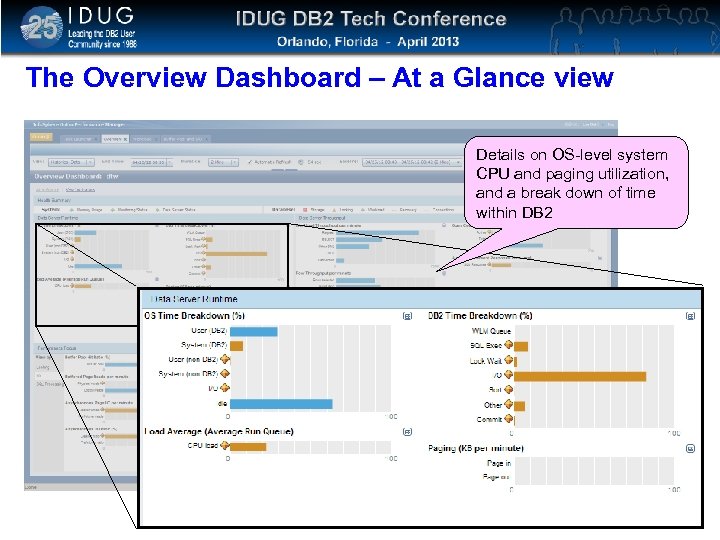
Click to edit Master title style The Overview Dashboard – At a Glance view Details on OS-level system CPU and paging utilization, and a break down of time within DB 2
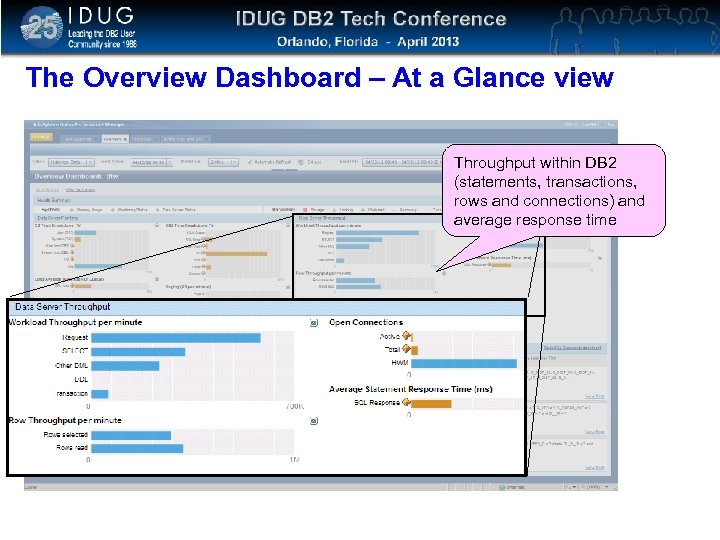
Click to edit Master title style The Overview Dashboard – At a Glance view Throughput within DB 2 (statements, transactions, rows and connections) and average response time
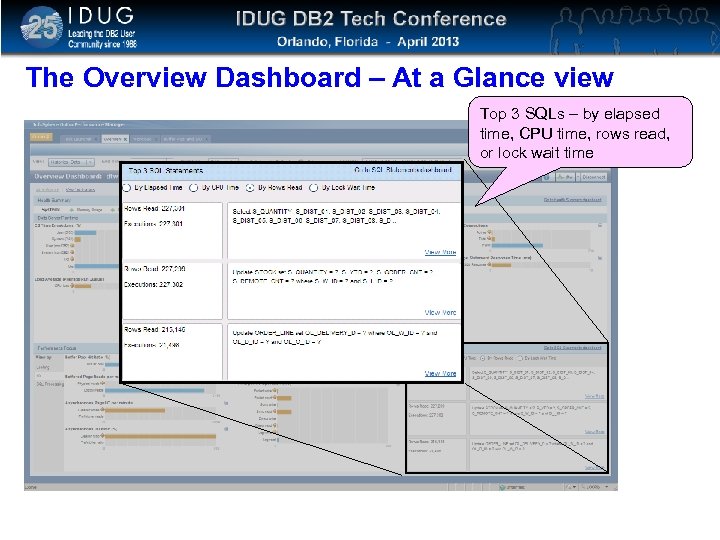
Click to edit Master title style The Overview Dashboard – At a Glance view Top 3 SQLs – by elapsed time, CPU time, rows read, or lock wait time
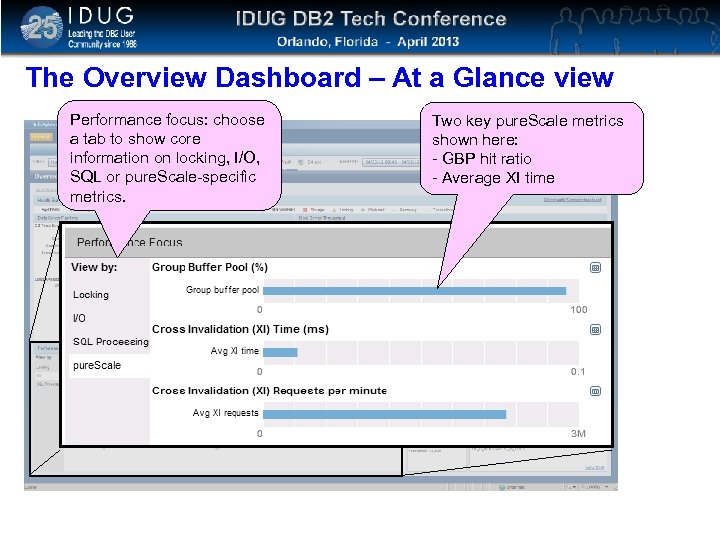
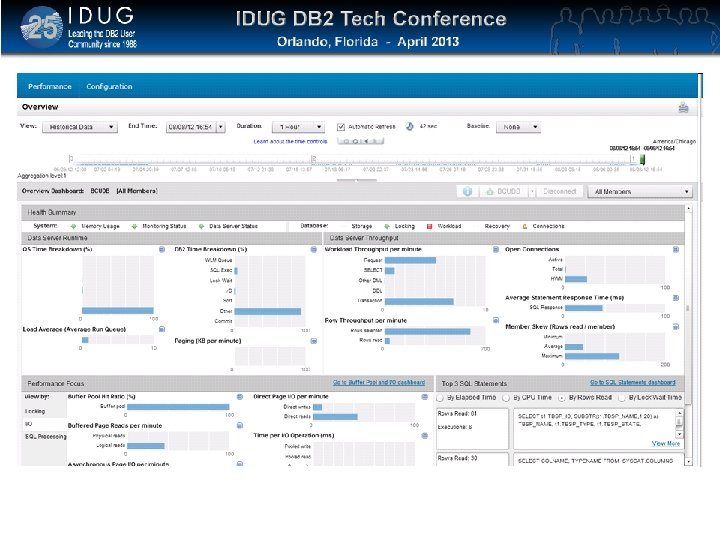
Click to edit Master title style The Overview Dashboard – At a Glance view Performance focus: choose a tab to show core information on locking, I/O, SQL or pure. Scale-specific metrics. Two key pure. Scale metrics shown here: - GBP hit ratio - Average XI time
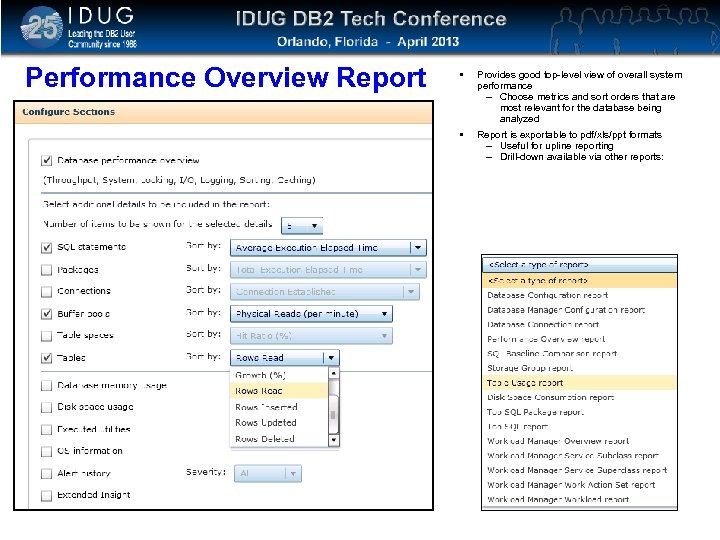
Click to edit Master title style Performance Overview Report Provides good top-level view of overall system performance – Choose metrics and sort orders that are most relevant for the database being analyzed Report is exportable to pdf/xls/ppt formats – Useful for upline reporting – Drill-down available via other reports:
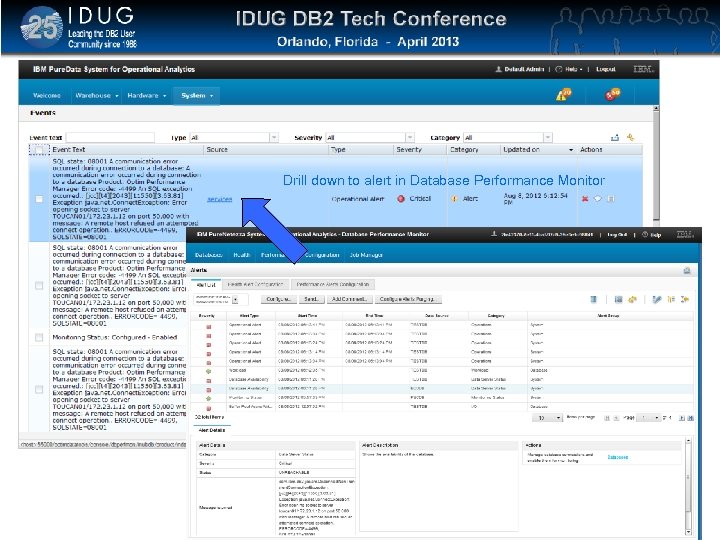
Click to edit Master title style Drill down to alert in Database Performance Monitor
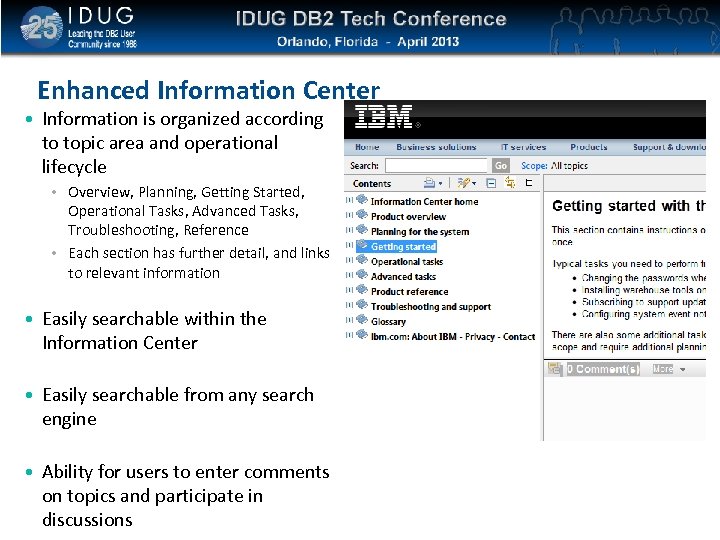
Click to edit Master title style Enhanced Information Center • Information is organized according to topic area and operational lifecycle • Overview, Planning, Getting Started, Operational Tasks, Advanced Tasks, Troubleshooting, Reference • Each section has further detail, and links to relevant information • Easily searchable within the Information Center • Easily searchable from any search engine • Ability for users to enter comments on topics and participate in discussions
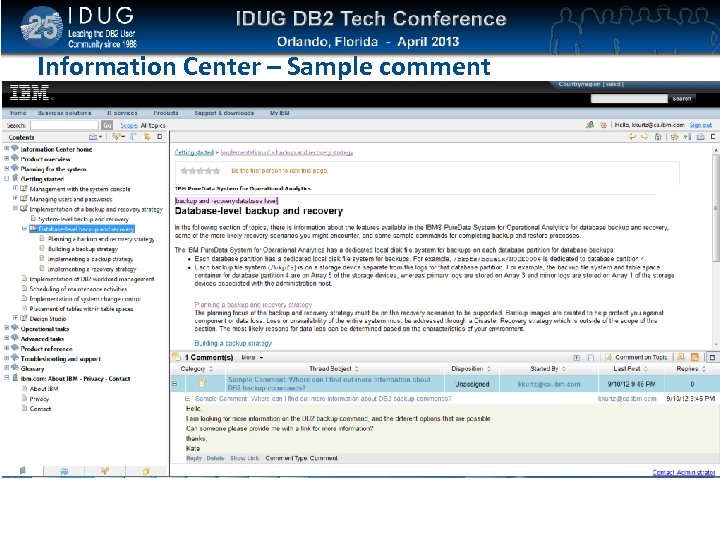
Click to edit Master title style Information Center – Sample comment
Click to edit Master title style ISAS 5600 R 3 Announced April 9 th GA June 2013
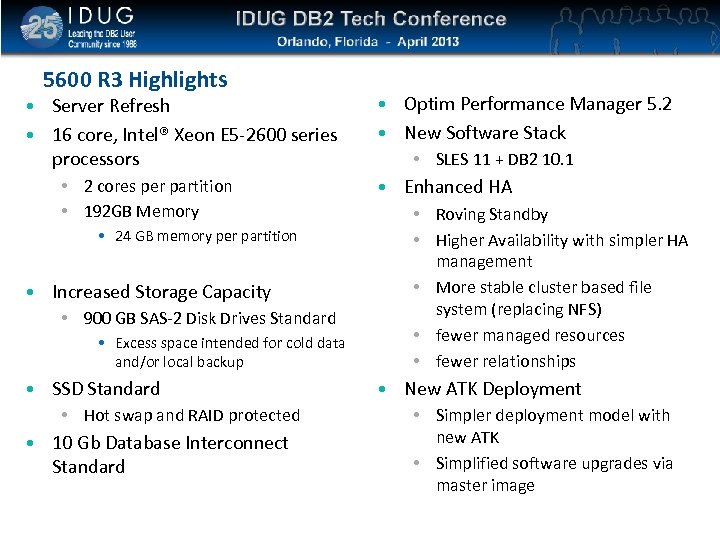
Click to edit Master title style 5600 R 3 Highlights • Server Refresh • 16 core, Intel® Xeon E 5 -2600 series processors • 2 cores per partition • 192 GB Memory • 24 GB memory per partition • Increased Storage Capacity • 900 GB SAS-2 Disk Drives Standard • Excess space intended for cold data and/or local backup • SSD Standard • Hot swap and RAID protected • 10 Gb Database Interconnect Standard • Optim Performance Manager 5. 2 • New Software Stack • SLES 11 + DB 2 10. 1 • Enhanced HA • Roving Standby • Higher Availability with simpler HA management • More stable cluster based file system (replacing NFS) • fewer managed resources • fewer relationships • New ATK Deployment • Simpler deployment model with new ATK • Simplified software upgrades via master image
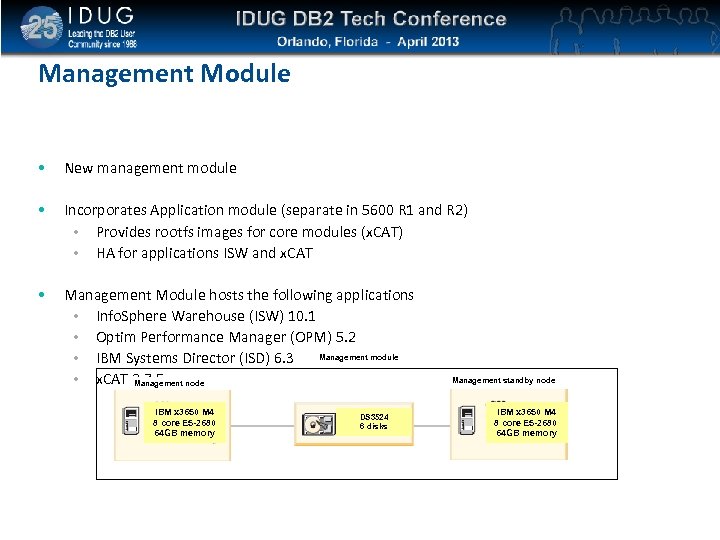
Click to edit Master title style Management Module • New management module • Incorporates Application module (separate in 5600 R 1 and R 2) • Provides rootfs images for core modules (x. CAT) • HA for applications ISW and x. CAT • Management Module hosts the following applications • Info. Sphere Warehouse (ISW) 10. 1 • Optim Performance Manager (OPM) 5. 2 Management module • IBM Systems Director (ISD) 6. 3 • x. CAT 2. 7. 5 node Management IBM x 3650 M 4 8 core E 5 -2680 64 GB memory DS 3524 6 disks Management standby node IBM x 3650 M 4 8 core E 5 -2680 64 GB memory
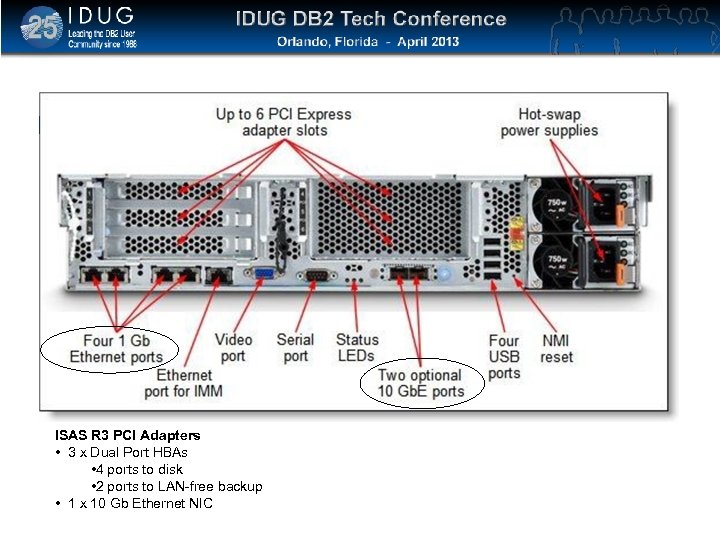
Click to edit Master title style IBM System x 3650 M 4 ISAS R 3 PCI Adapters • 3 x Dual Port HBAs • 4 ports to disk • 2 ports to LAN-free backup • 1 x 10 Gb Ethernet NIC
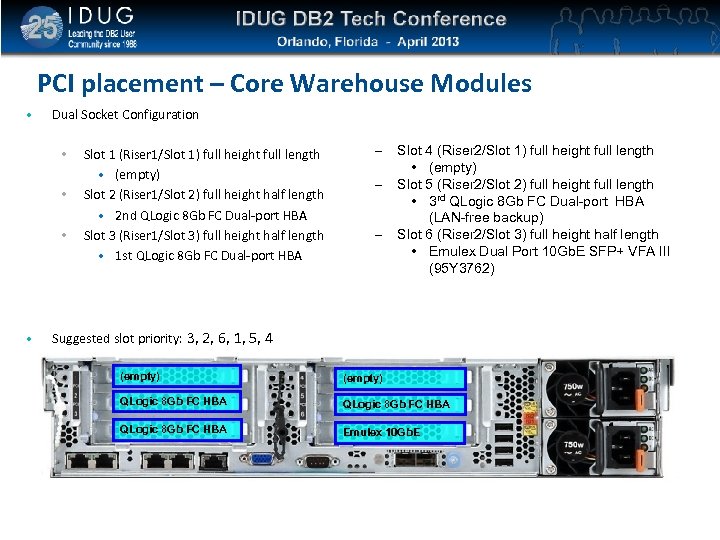
Click to edit Master title style PCI placement – Core Warehouse Modules • Dual Socket Configuration • • Slot 1 (Riser 1/Slot 1) full height full length • (empty) Slot 2 (Riser 1/Slot 2) full height half length • 2 nd QLogic 8 Gb FC Dual-port HBA Slot 3 (Riser 1/Slot 3) full height half length • 1 st QLogic 8 Gb FC Dual-port HBA – – – Slot 4 (Riser 2/Slot 1) full height full length • (empty) Slot 5 (Riser 2/Slot 2) full height full length • 3 rd QLogic 8 Gb FC Dual-port HBA (LAN-free backup) Slot 6 (Riser 2/Slot 3) full height half length • Emulex Dual Port 10 Gb. E SFP+ VFA III (95 Y 3762) Suggested slot priority: 3, 2, 6, 1, 5, 4 (empty) QLogic 8 Gb FC HBA Emulex 10 Gb. E
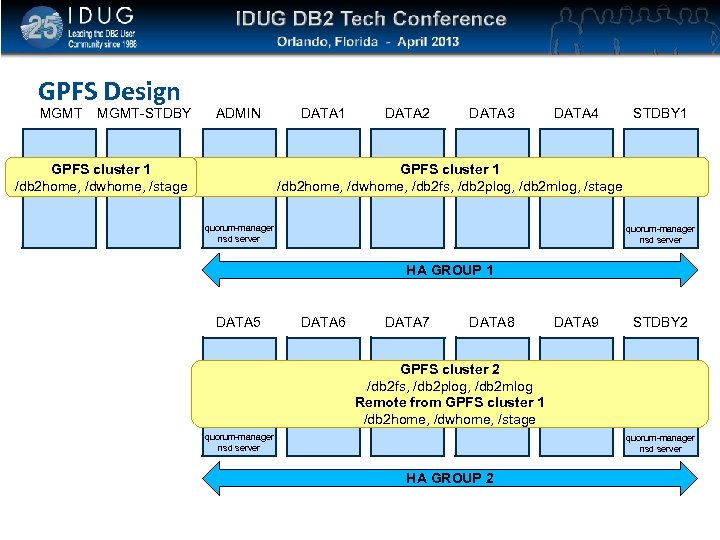
Click to edit Master title style GPFS Design MGMT-STDBY ADMIN GPFS cluster 1 /db 2 home, /dwhome, /stage DATA 1 DATA 2 DATA 3 DATA 4 STDBY 1 GPFS cluster 1 /db 2 home, /dwhome, /db 2 fs, /db 2 plog, /db 2 mlog, /stage quorum-manager nsd server HA GROUP 1 DATA 5 DATA 6 DATA 7 DATA 8 DATA 9 STDBY 2 GPFS cluster 2 /db 2 fs, /db 2 plog, /db 2 mlog Remote from GPFS cluster 1 /db 2 home, /dwhome, /stage quorum-manager nsd server HA GROUP 2
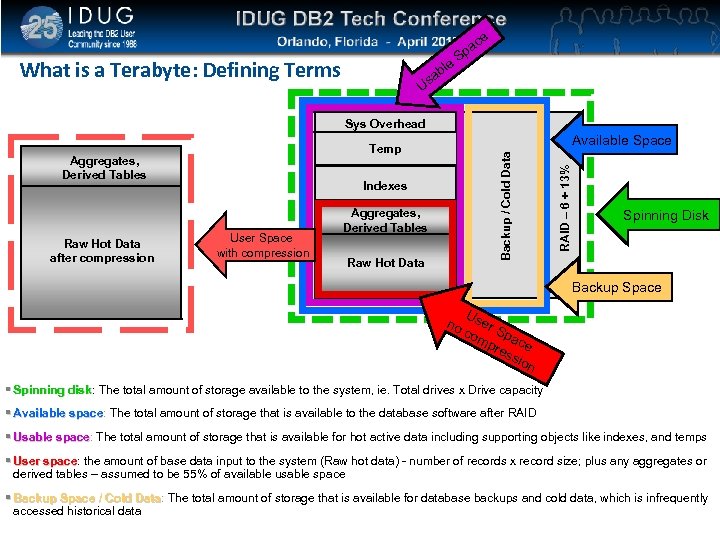
Click to edit Master title style What is a Terabyte: Defining Terms le ab e ac p S Us Sys Overhead Indexes User Space with compression Aggregates, Derived Tables Raw Hot Data RAID – 6 + 13% Backup / Cold Data Aggregates, Derived Tables Raw Hot Data after compression Available Space Temp Spinning Disk Backup Space no Us e com r Spa pre ce ssi on Spinning disk: The total amount of storage available to the system, ie. Total drives x Drive capacity disk Available space: The total amount of storage that is available to the database software after RAID space Usable space: The total amount of storage that is available for hot active data including supporting objects like indexes, and temps space User space: the amount of base data input to the system (Raw hot data) - number of records x record size; plus any aggregates or space derived tables – assumed to be 55% of available usable space Backup Space / Cold Data: The total amount of storage that is available for database backups and cold data, which is infrequently Data accessed historical data
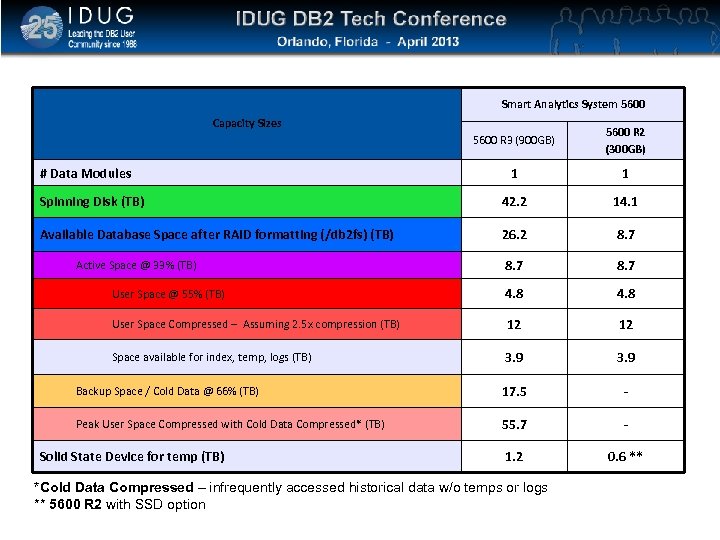
Click to edit Master title style Smart Analytics System 5600 R 3 data sizing System 5600 Capacity Sizes 5600 R 3 (900 GB) 5600 R 2 (300 GB) 1 1 Spinning Disk (TB) 42. 2 14. 1 Available Database Space after RAID formatting (/db 2 fs) (TB) 26. 2 8. 7 User Space @ 55% (TB) 4. 8 User Space Compressed – Assuming 2. 5 x compression (TB) 12 12 Space available for index, temp, logs (TB) 3. 9 Backup Space / Cold Data @ 66% (TB) 17. 5 - Peak User Space Compressed with Cold Data Compressed* (TB) 55. 7 - 1. 2 0. 6 ** # Data Modules Active Space @ 33% (TB) Solid State Device for temp (TB) *Cold Data Compressed – infrequently accessed historical data w/o temps or logs ** 5600 R 2 with SSD option
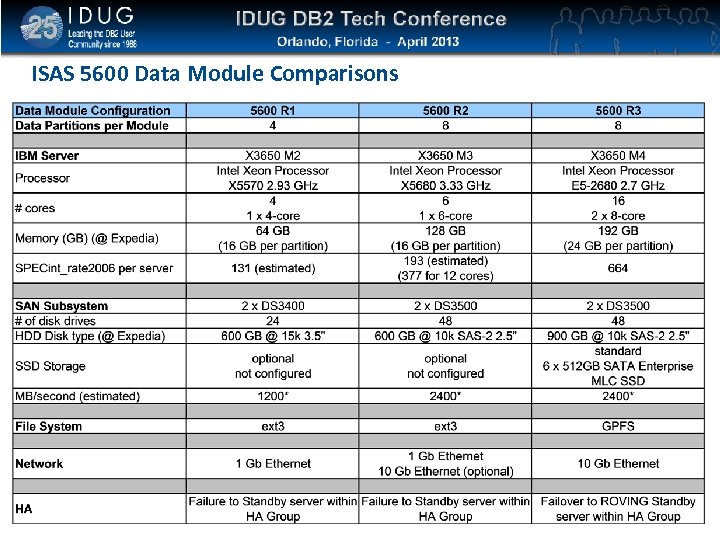
Click to edit Master title style ISAS 5600 Data Module Comparisons
Click to edit Master title style Evaluate my session online: www. idug. org/na 2013/eval James Cho IBM jamescho@us. ibm. com Session IBM Pure. Data System for Operational
Скачать презентацию Click to edit Master title style IBM Pure
f34767c1ef67ba5c722f992fbe63b897.ppt